We read every piece of feedback, and take your input very seriously.
To see all available qualifiers, see our documentation.
1 parent eabd3f0 commit dbddd3fCopy full SHA for dbddd3f
1 file changed
source/c12/c12_06.md
@@ -9,7 +9,12 @@
9
`venv` 后可以接一个目录(如果此目录不存在,会自动创建)用于创建你的虚拟环境,他可以是绝对路径,也可以是相对路径。
10
11
```shell
12
+# mac or linux
13
$ python3 -m venv [venv_dir]
14
+
15
+# windows: 一定要指定 --without-pip
16
+# 最后再手动执行命令安装 python -m ensurepip
17
+$ python3 -m venv --without-pip [venv_dir]
18
```
19
20
使用 venv 创建虚拟环境的速度非常快,大概只需要两三秒的样子。
@@ -46,10 +51,17 @@ $ /usr/local/bin/python3 -m venv [venv_dir]
46
51
如果你使用 Windows ,那么在 cmd 下进行 `Scripts` 目录,执行 `activate.bat`
47
52
48
53
49
-$ cd Scripts
50
-$ activate.bat
54
+# cmd.exe
55
+$ .\Scripts\activate.bat
56
57
+# PowserShell
58
+$ .\Scripts\Activate.ps1
59
60
61
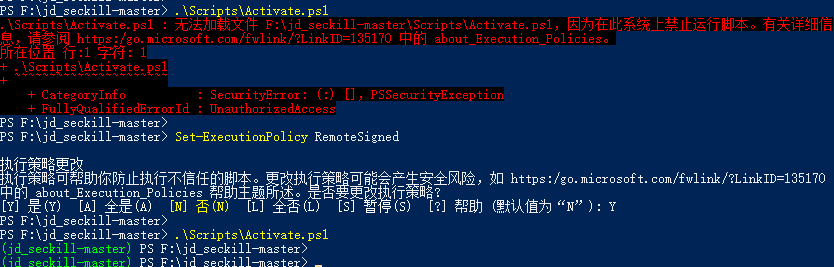
+如果你使用PowserShell激活虚拟环境出现如下错误,那要先执行这个命令:`Set-ExecutionPolicy RemoteSigned`,再按 `Y`
62
63
+
64
65
而如果你使用的 Mac 或者 Linux,那么直接执行下面命令就行
66
67

0 commit comments