|
| 1 | +--- |
| 2 | +title: Jdk14 都要出了,Jdk8 的时间处理姿势还不了解一下? |
| 3 | +# toc: false |
| 4 | +date: 2019-10-24 08:01:01 |
| 5 | +url: jdk/jdk8-time |
| 6 | +tags: |
| 7 | + - Java8 |
| 8 | + - LocalDateTime |
| 9 | + - LocalDate |
| 10 | +categories: |
| 11 | + - Java 新特性 |
| 12 | +--- |
| 13 | + |
| 14 | +当前时间:2019年10月24日。距离 JDK 14 发布时间(2020年3月17日)还有多少天? |
| 15 | + |
| 16 | +```java |
| 17 | +// 距离JDK 14 发布还有多少天? |
| 18 | +LocalDate jdk14 = LocalDate.of(2020, 3, 17); |
| 19 | +LocalDate nowDate = LocalDate.now(); |
| 20 | +System.out.println("距离JDK 14 发布还有:"+nowDate.until(jdk14,ChronoUnit.DAYS)+"天"); |
| 21 | +``` |
| 22 | +<!-- more --> |
| 23 | +JDK 8 已经在 2014年 3月 18日正式可用 ,距离现在已经 5年多时间过去了。5年时间里很多企业也都换上了 JDK 8,明年 3月份 Jdk14 也要来了,那么 Jdk 8 的新特性你真的用起来了吗?我准备写一个 Jdk 8开始的新特性介绍以及使用的系列文章,后续 Jdk 也会继续更新,你如果需要的话不妨关注下博客或者公众号。 |
| 24 | + |
| 25 | +## 1. 时间处理类 |
| 26 | + |
| 27 | +Jdk8 带来了全新的时间处理工具类,用于代替之前存在缺陷的时间处理。新的时间处理相比之前更加简单好用。 |
| 28 | + |
| 29 | + |
| 30 | + |
| 31 | +常用的类有以下几个类。 |
| 32 | + |
| 33 | +| 时间相关类 | 介绍 | |
| 34 | +| ----------------- | -------------------------- | |
| 35 | +| LocalDateTime | 时间处理类,最高精确到纳秒 | |
| 36 | +| LocalDate | 时间处理类,最高精确到天 | |
| 37 | +| DateTimeFormatter | 时间格式化 | |
| 38 | +| ZoneId | 时区设置类 | |
| 39 | + |
| 40 | +## 2. 时间获取 |
| 41 | + |
| 42 | +使用不同的类可以获取不同精度的时间。 |
| 43 | + |
| 44 | +```java |
| 45 | +/** |
| 46 | + * 时间获取 |
| 47 | +*/ |
| 48 | +@Test |
| 49 | +public void nowTimeTest() { |
| 50 | + // 当前精确时间 |
| 51 | + LocalDateTime now = LocalDateTime.now(); |
| 52 | + System.out.println("当前精确时间:" + now); |
| 53 | + System.out.println("当前精确时间:" + now.getYear() + "-" + now.getMonthValue() + "-" + now.getDayOfMonth() + " " + now.getHour() + "-" + now.getMinute() + "-" + now.getSecond()); |
| 54 | + |
| 55 | + // 获取当前日期 |
| 56 | + LocalDate localDate = LocalDate.now(); |
| 57 | + System.out.println("当前日期:" + localDate); |
| 58 | + System.out.println("当前日期:" + localDate.getYear() + "-" + localDate.getMonthValue() + "-" + localDate.getDayOfMonth()); |
| 59 | + |
| 60 | + // 获取当天时间 |
| 61 | + LocalTime localTime = LocalTime.now(); |
| 62 | + System.out.println("当天时间:" + localTime); |
| 63 | + System.out.println("当天时间:" + localTime.getHour() + ":" + localTime.getMinute() + ":" + localTime.getSecond()); |
| 64 | + |
| 65 | + // 有时区的当前精确时间 |
| 66 | + ZonedDateTime nowZone = LocalDateTime.now().atZone(ZoneId.systemDefault()); |
| 67 | + System.out.println("当前精确时间(有时区):" + nowZone); |
| 68 | + System.out.println("当前精确时间(有时区):" + nowZone.getYear() + "-" + nowZone.getMonthValue() + "-" + nowZone.getDayOfMonth() + " " + nowZone.getHour() + "-" + nowZone.getMinute() + "-" + nowZone.getSecond()); |
| 69 | +} |
| 70 | +``` |
| 71 | + |
| 72 | +获取到的时间: |
| 73 | + |
| 74 | +```shell |
| 75 | +当前精确时间:2019-10-24T00:26:41.724 |
| 76 | +当前精确时间:2019-10-24 0-26-41 |
| 77 | +当前日期:2019-10-24 |
| 78 | +当前日期:2019-10-24 |
| 79 | +当前精确时间(有时区):2019-10-24T00:26:41.725+08:00[GMT+08:00] |
| 80 | +当前精确时间(有时区):2019-10-24 0-26-41 |
| 81 | +当天时间:00:26:41.725 |
| 82 | +当天时间:0:26:41 |
| 83 | +``` |
| 84 | + |
| 85 | +## 3. 时间创建 |
| 86 | + |
| 87 | +可以指定年月日时分秒创建一个时间类,也可以使用字符串直接转换成时间。 |
| 88 | + |
| 89 | +```java |
| 90 | +/** |
| 91 | + * 时间创建 |
| 92 | + */ |
| 93 | +@Test |
| 94 | +public void createTime() { |
| 95 | + LocalDateTime ofTime = LocalDateTime.of(2019, 10, 1, 8, 8, 8); |
| 96 | + System.out.println("当前精确时间:" + ofTime); |
| 97 | + |
| 98 | + LocalDate localDate = LocalDate.of(2019, 10, 01); |
| 99 | + System.out.println("当前日期:" + localDate); |
| 100 | + |
| 101 | + LocalTime localTime = LocalTime.of(12, 01, 01); |
| 102 | + System.out.println("当天时间:" + localTime); |
| 103 | +} |
| 104 | +``` |
| 105 | + |
| 106 | +创建的时间: |
| 107 | + |
| 108 | +```shell |
| 109 | +当前精确时间:2019-10-01T08:08:08 |
| 110 | +当前日期:2019-10-01 |
| 111 | +当天时间:12:01:01 |
| 112 | +``` |
| 113 | + |
| 114 | +## 4. 时间转换 |
| 115 | + |
| 116 | +```java |
| 117 | +/** |
| 118 | +* 日期转换 |
| 119 | +*/ |
| 120 | +@Test |
| 121 | +public void convertTimeTest() { |
| 122 | + LocalDateTime parseTime = LocalDateTime.parse("2019-10-01T22:22:22.222"); |
| 123 | + System.out.println("字符串时间转换:" + parseTime); |
| 124 | + |
| 125 | + LocalDate formatted = LocalDate.parse("20190101", DateTimeFormatter.BASIC_ISO_DATE); |
| 126 | + System.out.println("字符串时间转换-指定格式:" + formatted); |
| 127 | + |
| 128 | + // Date 转换成 LocalDateTime |
| 129 | + Date date = new Date(); |
| 130 | + ZoneId zoneId = ZoneId.systemDefault(); |
| 131 | + System.out.println("Date 转换成 LocalDateTime:" + LocalDateTime.ofInstant(date.toInstant(), zoneId)); |
| 132 | + |
| 133 | + // LocalDateTime 转换成 Date |
| 134 | + LocalDateTime localDateTime = LocalDateTime.now(); |
| 135 | + Date toDate = Date.from(localDateTime.atZone(ZoneId.systemDefault()).toInstant()); |
| 136 | + System.out.println("LocalDateTime 转换成 Date:" + toDate);\ |
| 137 | + |
| 138 | + // 当前时间转时间戳 |
| 139 | + long epochMilli = LocalDateTime.now().toInstant(ZoneOffset.of("+8")).toEpochMilli(); |
| 140 | + System.out.println("当前时间转时间戳:" + epochMilli); |
| 141 | + // 时间戳转换成时间 |
| 142 | + LocalDateTime epochMilliTime = LocalDateTime.ofInstant(Instant.ofEpochMilli(epochMilli), ZoneId.systemDefault()); |
| 143 | + System.out.println("时间戳转换成时间:" + epochMilliTime); |
| 144 | +} |
| 145 | +``` |
| 146 | + |
| 147 | +转换结果: |
| 148 | + |
| 149 | +```shell |
| 150 | +字符串时间转换:2019-10-01T22:22:22.222 |
| 151 | +字符串时间转换-指定格式:2019-01-01 |
| 152 | +Date 转换成 LocalDateTime:2019-10-24T00:46:41.251 |
| 153 | +LocalDateTime 转换成 Date:Thu Oct 24 00:46:41 GMT+08:00 2019 |
| 154 | +当前时间转时间戳:1571849201258 |
| 155 | +时间戳转换成时间:2019-10-24T00:46:41.258 |
| 156 | +``` |
| 157 | + |
| 158 | +## 5. 时间格式化 |
| 159 | + |
| 160 | +```java |
| 161 | +/** |
| 162 | + * 日期格式化 |
| 163 | + */ |
| 164 | +@Test |
| 165 | +public void formatTest() { |
| 166 | + LocalDateTime now = LocalDateTime.now(); |
| 167 | + System.out.println("当前时间:" + now); |
| 168 | + System.out.println("格式化后:" + now.format(DateTimeFormatter.ISO_LOCAL_DATE_TIME)); |
| 169 | + System.out.println("格式化后:" + now.format(DateTimeFormatter.ISO_LOCAL_DATE)); |
| 170 | + System.out.println("格式化后:" + now.format(DateTimeFormatter.ISO_LOCAL_TIME)); |
| 171 | + System.out.println("格式化后:" + now.format(DateTimeFormatter.ofPattern("YYYY-MM-dd hh:mm:ss"))); |
| 172 | +} |
| 173 | +``` |
| 174 | + |
| 175 | +格式化后: |
| 176 | + |
| 177 | +```shell |
| 178 | +当前时间:2019-10-24T00:37:44.867 |
| 179 | +格式化后:2019-10-24T00:37:44.867 |
| 180 | +格式化后:2019-10-24 |
| 181 | +格式化后:00:37:44.867 |
| 182 | +格式化后:2019-10-24 12:37:44 |
| 183 | +``` |
| 184 | + |
| 185 | +## 6. 时间比较 |
| 186 | + |
| 187 | +```java |
| 188 | +/** |
| 189 | + * 时间比较 |
| 190 | + */ |
| 191 | +@Test |
| 192 | +public void diffTest() { |
| 193 | + LocalDateTime now = LocalDateTime.now(); |
| 194 | + LocalDateTime yestory = now.minusDays(1); |
| 195 | + System.out.println(now + "在" + yestory + "之后吗?" + now.isAfter(yestory)); |
| 196 | + System.out.println(now + "在" + yestory + "之前吗?" + now.isBefore(yestory)); |
| 197 | + |
| 198 | + // 时间差 |
| 199 | + long day = yestory.until(now, ChronoUnit.DAYS); |
| 200 | + long month = yestory.until(now, ChronoUnit.MONTHS); |
| 201 | + long hours = yestory.until(now, ChronoUnit.HOURS); |
| 202 | + long minutes = yestory.until(now, ChronoUnit.MINUTES); |
| 203 | + System.out.println("相差月份" + month); |
| 204 | + System.out.println("相差天数" + day); |
| 205 | + System.out.println("相差小时" + hours); |
| 206 | + System.out.println("相差分钟" + minutes); |
| 207 | + |
| 208 | + // 距离JDK 14 发布还有多少天? |
| 209 | + LocalDate jdk14 = LocalDate.of(2020, 3, 17); |
| 210 | + LocalDate nowDate = LocalDate.now(); |
| 211 | + System.out.println("距离JDK 14 发布还有:" + nowDate.until(jdk14, ChronoUnit.DAYS) + "天"); |
| 212 | +} |
| 213 | +``` |
| 214 | + |
| 215 | +比较结果: |
| 216 | + |
| 217 | +```shell |
| 218 | +2019-10-24T00:39:01.589在2019-10-23T00:39:01.589之后吗?true |
| 219 | +2019-10-24T00:39:01.589在2019-10-23T00:39:01.589之前吗?false |
| 220 | +相差月份0 |
| 221 | +相差天数1 |
| 222 | +相差小时24 |
| 223 | +相差分钟1440 |
| 224 | +距离JDK 14 发布还有:145天 |
| 225 | +``` |
| 226 | + |
| 227 | +## 7. 时间加减 |
| 228 | + |
| 229 | +```java |
| 230 | +/** |
| 231 | + * 日期加减 |
| 232 | + */ |
| 233 | +@Test |
| 234 | +public void calcTest() { |
| 235 | + LocalDateTime now = LocalDateTime.now(); |
| 236 | + System.out.println("当前时间:"+now); |
| 237 | + LocalDateTime plusTime = now.plusMonths(1).plusDays(1).plusHours(1).plusMinutes(1).plusSeconds(1); |
| 238 | + System.out.println("增加1月1天1小时1分钟1秒时间后:" + plusTime); |
| 239 | + LocalDateTime minusTime = now.minusMonths(2); |
| 240 | + System.out.println("减少2个月时间后:" + minusTime); |
| 241 | +} |
| 242 | +``` |
| 243 | + |
| 244 | +操作结果: |
| 245 | + |
| 246 | +```shell |
| 247 | +当前时间:2019-10-24T00:41:08.877 |
| 248 | +增加1月1天1小时1分钟1秒时间后:2019-11-25T01:42:09.877 |
| 249 | +减少2个月时间后:2019-08-24T00:41:08.877 |
| 250 | +``` |
| 251 | + |
| 252 | +## 8. 时间扩展方法 |
| 253 | + |
| 254 | +```java |
| 255 | +/** |
| 256 | + * 时间方法 |
| 257 | + */ |
| 258 | +@Test |
| 259 | +public void timeFunctionTest() { |
| 260 | + LocalDateTime now = LocalDateTime.now(); |
| 261 | + System.out.println("当前时间:" + now); |
| 262 | + // 第一天 |
| 263 | + LocalDateTime firstDay = now.withDayOfMonth(1); |
| 264 | + System.out.println("本月第一天:" + firstDay); |
| 265 | + // 当天最后一秒 |
| 266 | + LocalDateTime lastSecondOfDay = now.withHour(23).withMinute(59).withSecond(59); |
| 267 | + System.out.println("当天最后一秒:" + lastSecondOfDay); |
| 268 | + // 最后一天 |
| 269 | + LocalDateTime lastDay = now.with(TemporalAdjusters.lastDayOfMonth()); |
| 270 | + System.out.println("本月最后一天:" + lastDay); |
| 271 | + // 是否闰年 |
| 272 | + System.out.println("今年是否闰年:" + Year.isLeap(now.getYear())); |
| 273 | +} |
| 274 | +``` |
| 275 | + |
| 276 | +输出结果: |
| 277 | + |
| 278 | +```java |
| 279 | +当前时间:2019-10-24T00:43:28.296 |
| 280 | +本月第一天:2019-10-01T00:43:28.296 |
| 281 | +当天最后一秒:2019-10-24T23:59:59.296 |
| 282 | +本月最后一天:2019-10-31T00:43:28.296 |
| 283 | +今年是否闰年:false |
| 284 | +``` |
| 285 | + |
| 286 | +Jdk 8 新的时间类使用起来相比之前显得更加方便简单。 |
| 287 | + |
| 288 | +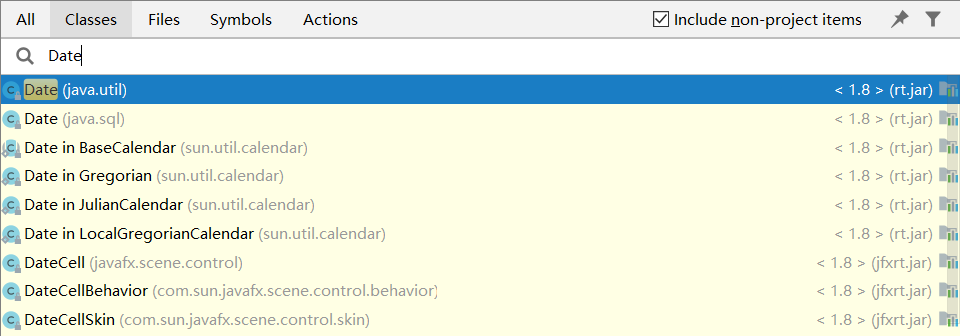 |
| 289 | + |
| 290 | +Jdk 8 也把时间处理成独立成一个包,并且使用不同的类名加以区分。而不是像之前相同的类名不同的包。这样的方式使用起来也更加清晰。 |
| 291 | + |
| 292 | +🚀 代码已经上传到 [Github(https://github.com/niumoo/jdk-feature)](https://github.com/niumoo/jdk-feature) 。 |
| 293 | + |
| 294 | + |
| 295 | + |
0 commit comments