|
1 | 1 | # Django Girls Tutorial |
2 | | -[](https://gitter.im/DjangoGirls/tutorial?utm_source=badge&utm_medium=badge&utm_campaign=pr-badge&utm_content=badge) |
3 | 2 |
|
4 | | -> This work is licensed under the Creative Commons Attribution-ShareAlike 4.0 |
5 | | -International License. To view a copy of this license, visit |
6 | | -http://creativecommons.org/licenses/by-sa/4.0/ |
| 3 | +This is the source code repository for the Django Girls Tutorial. Django Girls Tutorial is used on [tutorial.djangogirls.org](http://tutorial.djangogirls.org) so if you want to read it, please go there. If you want to contribute please do go further with this file. |
7 | 4 |
|
8 | 5 |
|
9 | | -## Introduction |
| 6 | +# How to contribute |
10 | 7 |
|
11 | | -Have you ever felt that the world is more and more about technology and you are somehow left behind? Have you ever wondered how to create a website but have never had enough motivation to start? Have you ever thought that the software world is too complicated for you to even try doing something on your own? |
| 8 | +The Django Girls Tutorial is licensed under a *Creative Commons Attribution-ShareAlike 4.0* license. Everyone is free to add, edit and correct the tutorial. |
12 | 9 |
|
13 | | -Well, we have good news for you! Programming is not as hard as it seems and we want to show you how fun it can be. |
| 10 | +# Editing basics |
14 | 11 |
|
15 | | -The tutorial will not magically turn you into a programmer. If you want to be good at it, you need months or even years of learning and practice. But we want to show you that programming or creating websites is not as complicated as it seems. We will try to explain different bits and pieces as well as we can, so you will not feel intimidated by technology. |
| 12 | +The source code of the tutorial is [hosted on Github](http://github.com/DjangoGirls/tutorial). The Github [Fork & Pull workflow](https://help.github.com/articles/using-pull-requests) is used to accept and review changes. |
16 | 13 |
|
17 | | -We hope that we'll be able to make you love technology as much as we do! |
| 14 | +The tutorial uses the [GitBook](https://www.gitbook.io/) service for publishing its documentation. [See more information about how Gitbook works](http://help.gitbook.io/). |
18 | 15 |
|
19 | | -## What will you learn during the tutorial? |
| 16 | +The tutorial is written in [Markdown mark up language](https://help.github.com/articles/markdown-basics). |
20 | 17 |
|
21 | | -Once you've finished the tutorial, you will have a simple, working web application: your own blog. We will show you how to put it online, so others will see your work! |
| 18 | +You can find any discussions about the contents of the tutorial on the [Github issue tracker](https://github.com/DjangoGirls/tutorial/issues). |
22 | 19 |
|
23 | | -It will (more or less) look like this: |
| 20 | +# Getting started and prerequisites |
24 | 21 |
|
25 | | -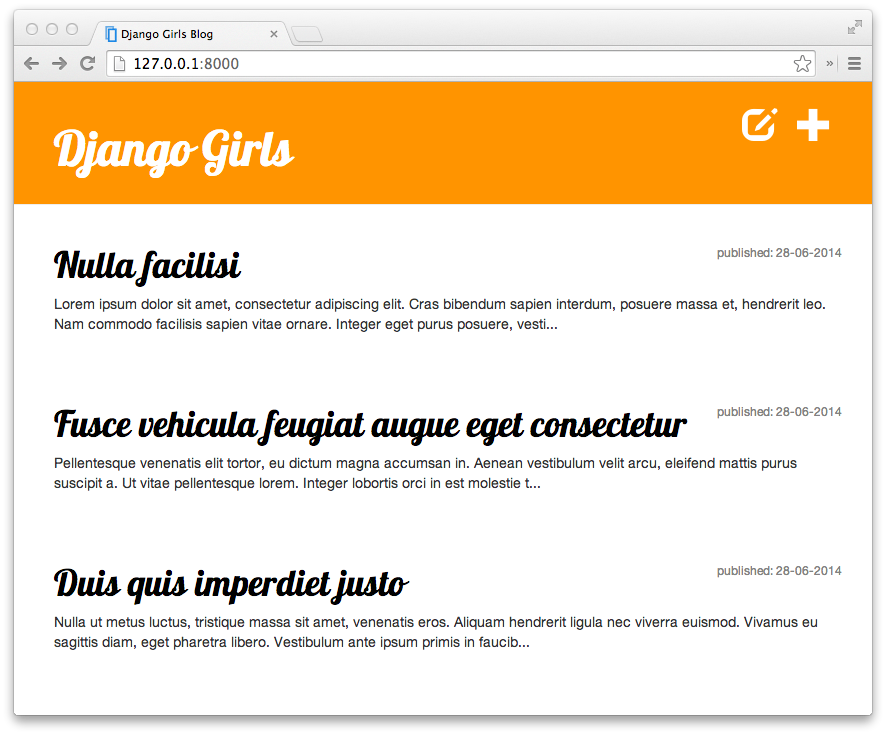 |
| 22 | +For contributing to the tutorial the following is needed to get started: |
26 | 23 |
|
27 | | -> If you work with the tutorial on your own and don't have a coach that will help you in case of any problem, we have a chat for you: [](https://gitter.im/DjangoGirls/tutorial?utm_source=badge&utm_medium=badge&utm_campaign=pr-badge&utm_content=badge). We asked our coaches and previous attendees to be there from time to time and help others with the tutorial! Don't be afraid to ask your question there! |
| 24 | +* a [Github account](https://github.com) |
| 25 | +* in the case of complex edits familiarity with [Git command line basics](https://help.github.com/articles/set-up-git) or familiarity with an app ([Windows](https://windows.github.com/), [Mac](https://mac.github.com/)) to push your edits made on your computer to Github. |
28 | 26 |
|
29 | | -OK, [let's start at the beginning...](./how_the_internet_works/README.md) |
| 27 | +## Fork the repository |
30 | 28 |
|
31 | | -## About and contributing |
| 29 | +First fork the [DjangoGirls/tutorial](https://github.com/DjangoGirls/tutorial) repository to your personal Github account: |
32 | 30 |
|
33 | | -This tutorial is maintained by [DjangoGirls](http://djangogirls.org/). If you find any mistakes or want to update the tutorial please [follow the contributing guidelines](https://github.com/DjangoGirls/tutorial/blob/master/CONTRIBUTING.md). |
| 31 | + |
34 | 32 |
|
35 | | -## Would you like to help us translate the tutorial to other languages? |
| 33 | +# Editing chapter content |
36 | 34 |
|
37 | | -Currently, translations are being kept on crowdin.com platform in: |
| 35 | +## Simple changes |
38 | 36 |
|
39 | | -https://crowdin.com/project/django-girls-tutorial |
| 37 | +For simple changes like typo corrections you can use the Github online editor: |
| 38 | + |
| 39 | +* Open your local fork page on Github, |
| 40 | +* go to *README.md* file in any chapter, |
| 41 | +* press the *Edit* icon (pen) |
| 42 | + |
| 43 | +and you can edit the chapter directly on github.com. |
| 44 | + |
| 45 | + |
| 46 | + |
| 47 | +Markdown syntax is used to edit the individual pages of the tutorial. |
| 48 | + |
| 49 | + |
| 50 | + |
| 51 | +Save your changes and create a pull request as explained below. |
| 52 | + |
| 53 | +## New content and complex changes |
| 54 | + |
| 55 | +For adding new chapters, writing longer snippets of text or adding images, you need to get a copy of the tutorial to your local computer. |
| 56 | + |
| 57 | +Either use the Github app for your operating system (mentioned above) or `git` command line to get the repository locally. You get the repository address from the front page of your own Github repository fork: |
| 58 | + |
| 59 | + git clone [email protected]:yourgithubusername/tutorial.git |
| 60 | + |
| 61 | +Download the [Gitbook Editor](https://github.com/GitbookIO/editor/releases) app to your computer. |
| 62 | + |
| 63 | +Then you can open the tutorial in Gitbook Editor (*File* > *Open book*). |
| 64 | + |
| 65 | +Make any changes in the tutorial using Gitbook and then save changes (*Book* > *Save all*). |
| 66 | + |
| 67 | +Then commit the changes using `git` and push the changes to your remote Github repository. |
| 68 | + |
| 69 | +Example: |
| 70 | + |
| 71 | + $ git status |
| 72 | + On branch contributing |
| 73 | + Untracked files: |
| 74 | + (use "git add <file>..." to include in what will be committed) |
| 75 | + |
| 76 | + contributing_and_editing_this_book/images/gitbook.png |
| 77 | + |
| 78 | + $ git add contributing_and_editing_this_book/images/gitbook.png |
| 79 | + |
| 80 | + $ git commit -m "Added gitbook editor screenshot" |
| 81 | + [contributing fe36152] Added gitbook screenshot |
| 82 | + 1 file changed, 0 insertions(+), 0 deletions(-) |
| 83 | + create mode 100644 contributing_and_editing_this_book/images/gitbook.png |
| 84 | + |
| 85 | + $ git push |
| 86 | + Counting objects: 11, done. |
| 87 | + Delta compression using up to 8 threads. |
| 88 | + Compressing objects: 100% (5/5), done. |
| 89 | + Writing objects: 100% (5/5), 266.37 KiB | 0 bytes/s, done. |
| 90 | + Total 5 (delta 1), reused 0 (delta 0) |
| 91 | + To [email protected]:miohtama/tutorial.git |
| 92 | + b37ca59..fe36152 contributing -> contributing |
| 93 | + |
| 94 | +If you don't want to download the Gitbook Editor app you can also go to the [Gitbook website](http://gitbook.com), sign up for free and work directly in your browser. |
| 95 | + |
| 96 | +# Making a pull request |
| 97 | + |
| 98 | +After you have finished your changes you need to create [a pull request](https://help.github.com/articles/using-pull-requests) on Github. DjangoGirls will get notified about the pull request, review your changes, suggest any corrections if needed and then *pull* your changes to the master version. |
| 99 | + |
| 100 | +In your own repository on Github press do *Compare & pull request* |
| 101 | + |
| 102 | + |
| 103 | + |
| 104 | +Fill in the information *why* this change is being made. The reviewer can see the details of the actual change, so you don't need repeat the content of the change. |
| 105 | + |
| 106 | +Then press *Create pull request*. |
| 107 | + |
| 108 | +Github emails will notify you for the follow up process. |
| 109 | + |
| 110 | +# Further information and help |
| 111 | + |
| 112 | +GitHub has an excellent [documentation](https://help.github.com/). Check it out if you need help! |
| 113 | + |
| 114 | +For further questions please [contact DjangoGirls](http://djangogirls.org/). |
40 | 115 |
|
41 | | -If your language is not listed on crowdin, please [open a new issue](https://github.com/DjangoGirls/tutorial/issues/new) informing the language so we can add it. |
|
0 commit comments