A complete, data-driven admin dashboard built with React and Codehooks.io. Define your data model once in JSON, and get a full admin interface with CRUD, authentication, and a visual editor — ready to deploy in minutes.
| Collection List View | Detail View |
|---|---|
 |
 |
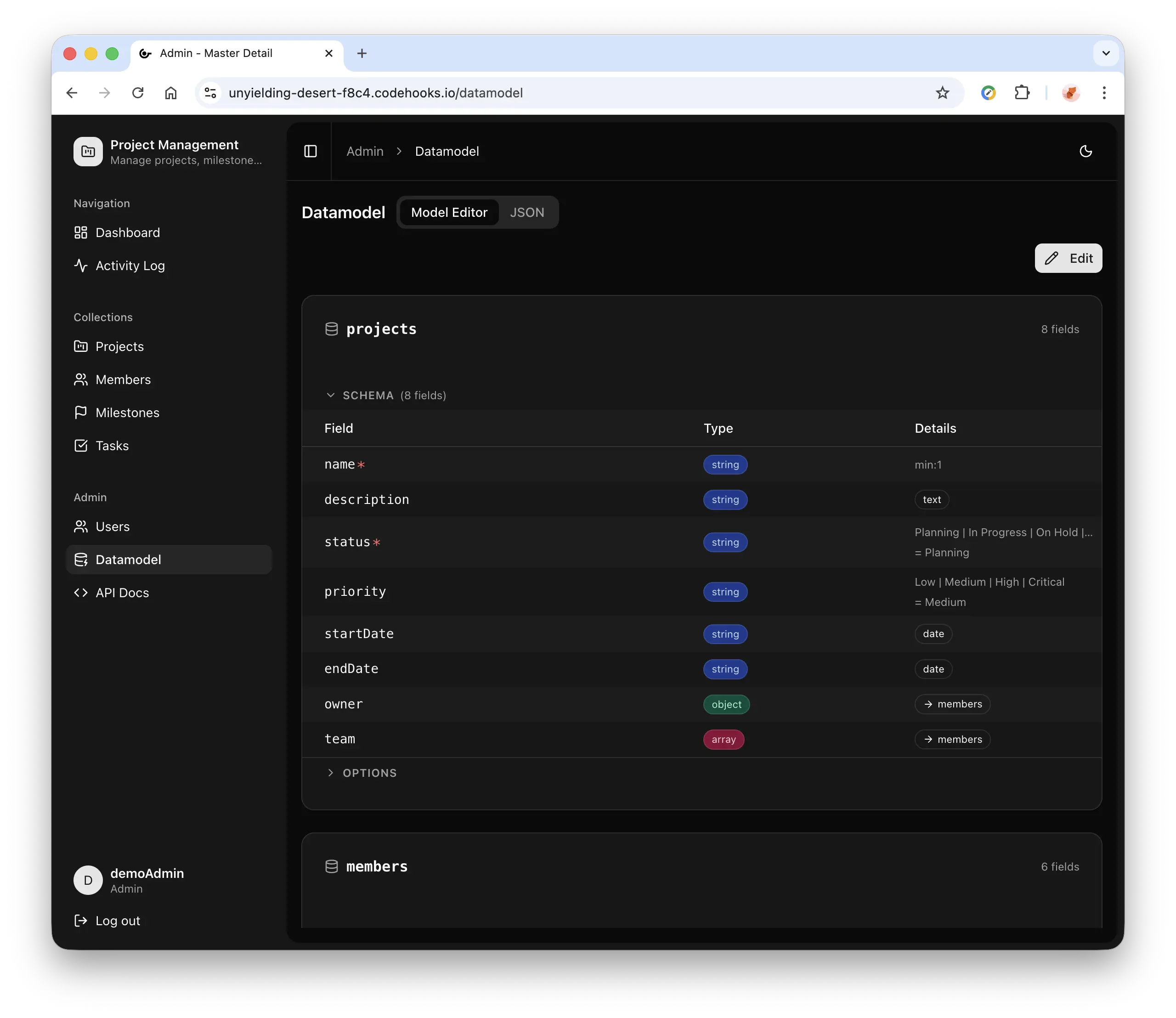
| Visual Datamodel Editor | Data Relations |
|---|---|
 |
 |
Building admin dashboards from scratch is repetitive. You end up writing the same CRUD forms, list views, auth flows, and user management over and over. This template eliminates that boilerplate — you describe your data model in a single JSON file, and the app generates everything dynamically: collections, forms, search, filters, and relationships.
It's designed as a starting point for real projects. The datamodel is editable at runtime through a visual editor or JSON, so you can iterate without redeploying. Want to build something completely new? Copy the built-in prompt to your favorite AI agent, describe your system, paste the result back — and your new application is live in seconds. Authentication and role-based access control are built in, with a clean separation that makes it easy to swap in Clerk.com or another auth provider later.
A monorepo with a React frontend and a Codehooks.io serverless backend that work together to deliver:
- Dynamic CRUD — Collections, list views, detail panels, and forms generated from
datamodel.json, with a full REST API and dynamic OpenAPI/Swagger documentation athttps://<YOUR_APP_URL>.codehooks.io/docsthat automatically reflects the current datamodel - Authentication — JWT-based login with cookie sessions, two roles (admin/user), user management UI
- Visual Datamodel Editor — Add/remove collections and fields, configure relationships, edit as JSON with syntax highlighting, version history with rollback
- AI-Powered Design — Copy the built-in prompt to ChatGPT, Claude, or any AI agent, describe what you need, paste the generated datamodel JSON back into the editor, hit Save — and your new app is live instantly
- Lookup Fields — Reference fields across collections with live search (single and multi-select)
- Calculated Fields — Server-computed formula fields (
price * quantity) with autocomplete editor, dependency ordering, and automatic recalculation - Tree View — Hierarchical data with expandable tree lists, nested sub-items in detail view, and inline child creation
- Related Collections — Show linked records with configurable filters and inline create
- Activity Log — Audit trail for all create, update, and delete operations
- File Uploads — Image and file upload with preview
- Dashboard — Collection stats and recent activity overview
- Dark Mode — Theme toggle with system preference support
- Responsive — Collapsible sidebar, mobile-friendly layout
| Layer | Technology |
|---|---|
| Frontend | React 18, Vite, Tailwind CSS v4, shadcn/ui |
| Backend | Codehooks.io (Node.js serverless) |
| Database | Codehooks NoSQL datastore |
| Auth | Custom JWT with httpOnly cookie sessions |
| UI Components | shadcn/ui (Radix primitives + Tailwind) |
┌─────────────────────────────────────────────┐
│              datamodel.json                 │
│  (collections, schemas, relationships)      │
└──────────┬──────────────────┬───────────────┘
           │                  │
           ▼                  ▼
┌──────────────────┐ ┌──────────────────────┐
│  Backend         │ │  Frontend            │
│  (Codehooks.io)  │ │  (React + Vite)      │
│                  │ │                      │
│  - JWT auth      │ │  - Dynamic CRUD UI   │
│  - REST API      │ │  - Datamodel editor  │
│  - User mgmt     │ │  - Role-based views  │
│  - Activity log  │ │  - Dashboard         │
│  - File storage  │ │  - Activity log      │
│  - Schema valid. │ │  - User management   │
└──────────────────┘ └──────────────────────┘
The datamodel.json file is only used for initial bootstrap — on first deploy, it seeds the datamodel into the database. From that point on, all schema changes are stored in the database with full version history and easy rollback. The frontend fetches the live datamodel at runtime via /api/datamodel and renders the UI dynamically. Changes made through the visual editor take effect immediately without redeploying.
npm i -g codehooks
coho logincoho create myadmin --template react-admin-dashboard
mv config.json backend
cd myadminOr install into an existing directory:
mkdir myadmin && cd myadmin
coho install react-admin-dashboardcoho set-env JWT_ACCESS_TOKEN_SECRET $(openssl rand -hex 32)
coho set-env JWT_REFRESH_TOKEN_SECRET $(openssl rand -hex 32)npm run install:allGet your project URL:
coho infoUpdate frontend/vite.config.js with your project URL:
const BACKEND_URL = 'https://YOUR_PROJECT.api.codehooks.io/dev';Note: The
BACKEND_URL(including the space path, e.g./dev) is only used by the Vite dev server to proxy API calls during local development. It is not used in production.
npm run deployNavigate to your project URL. Default credentials:
- Admin:
admin/admin([email protected]) - User:
user/user([email protected])
On first deploy, the app automatically seeds these two users if the
system_userscollection is empty.
Codehooks.io provides two distinct URLs for each project. It's important to understand the difference:
| Type | Example | Purpose |
|---|---|---|
| App URL | https://unyielding-desert-f8c4.codehooks.io |
Load the React frontend here |
| API URL | https://myproject.api.codehooks.io/dev |
Backend API calls (includes space path) |
The App URL has an auto-generated synthetic name (e.g. unyielding-desert-f8c4) and serves the static frontend files. This is where you open the app in your browser:
https://unyielding-desert-f8c4.codehooks.io
The API URL uses your logical project name (e.g. myproject) and includes the space sub-path (/dev, /prod, etc.). This is used for all API and auth requests:
https://myproject.api.codehooks.io/dev/api/customers
https://myproject.api.codehooks.io/dev/auth/login
The React app handles this routing internally — API calls use the space path automatically. You only need the API URL in frontend/vite.config.js for the local dev server proxy.
Custom domains are supported by Codehooks.io. Point your own domain (e.g. admin.yourcompany.com) to the App URL and an automatic Let's Encrypt TLS certificate will be provisioned. Users then access the app via your custom domain, while API routing continues to work transparently.
Run the frontend dev server with hot reload:
npm run devThe Vite dev server (port 5173) proxies /api and /auth requests to your Codehooks backend. Edit React components and see changes instantly.
To deploy after making changes:
npm run deployThis builds the frontend into backend/dist/ and deploys everything to Codehooks.io.
The datamodel.json file seeds the initial datamodel into the database on first deploy. After that, all changes are managed through the visual Datamodel Editor (admin only) or the JSON tab — stored in the database with full version history and rollback support. No redeployment needed.
All datamodel updates (via the editor or PUT /api/datamodel) are validated against the master schema defined in backend/datamodel-schema.js. The structure below documents every property at each level.
The top-level datamodel object:
| Property | Type | Required | Description |
|---|---|---|---|
app |
object | No | App-wide settings (title, subtitle, icon) |
collections |
object | Yes | Map of collection definitions (at least one) |
app object:
| Property | Type | Required | Description |
|---|---|---|---|
title |
string | No | App name shown in sidebar header |
subtitle |
string | No | Subtitle shown below the title |
icon |
string | No | Lucide icon key for the app |
Each collection (collections.<name>):
| Property | Type | Required | Description |
|---|---|---|---|
label |
string | Yes | Display name in the sidebar and UI |
icon |
string | Yes | Lucide icon key |
schema |
object | Yes | JSON Schema defining the collection's fields |
listFields |
string[] | Yes | Fields shown as columns in the list view (min 1) |
searchFields |
string[] | Yes | Fields included in text search |
defaultSort |
object | No | Default sort order, e.g. { "name": 1 } |
treeView |
object | No | Enable hierarchical tree view (see Tree View) |
relatedCollections |
array | No | Reverse-lookup related records |
schema object (per collection):
| Property | Type | Required | Description |
|---|---|---|---|
type |
string | Yes | Must be "object" |
properties |
object | Yes | Field definitions (at least one) |
required |
string[] | No | Fields that must be provided on create |
Each field (schema.properties.<name>):
| Property | Type | Required | Description |
|---|---|---|---|
type |
string | Yes | string, number, integer, boolean, object, or array |
title |
string | No | Display label in forms and list headers |
format |
string | No | email, date, textarea, image, file, uri |
enum |
string[] | No | Fixed list of allowed values (renders as dropdown) |
default |
any | No | Default value for new records |
minLength |
integer | No | Minimum string length |
maxLength |
integer | No | Maximum string length |
minimum |
number | No | Minimum numeric value |
maximum |
number | No | Maximum numeric value |
properties |
object | No | Sub-properties (required for object type lookups) |
items |
object | No | Item schema (required for array type) |
x-accept |
string | No | Accepted file extensions, e.g. ".jpg,.png,.webp" |
x-lookup |
object | No | Lookup configuration for reference fields |
x-calculate |
string | No | Formula expression for calculated fields (see Calculated Fields) |
x-lookup object (for reference fields):
| Property | Type | Required | Description |
|---|---|---|---|
collection |
string | Yes | Target collection to search |
displayField |
string or string[] | Yes | Field(s) to display from the referenced record |
searchFields |
string[] | Yes | Fields to search when typing in the lookup input |
relatedCollections[] items:
| Property | Type | Required | Description |
|---|---|---|---|
collection |
string | Yes | Collection that holds the related records |
foreignKey |
string | Yes | Dot-path to the reference field, e.g. "customer._id" |
title |
string | Yes | Section heading in the detail view |
displayFields |
string[] | Yes | Columns shown in the related records table |
sort |
object | No | Sort order, e.g. { "dueDate": 1 } |
allowCreate |
boolean | No | Show a "New" button to create related records |
filters |
array | No | Predefined filter buttons |
filters[] items (inside relatedCollections):
| Property | Type | Required | Description |
|---|---|---|---|
field |
string | Yes | Field to filter on |
value |
any | Yes | Value to match |
label |
string | Yes | Button label |
exclude |
boolean | No | If true, filter excludes matching records |
active |
boolean | No | Whether the filter is active by default |
treeView object (per collection):
| Property | Type | Required | Description |
|---|---|---|---|
parentField |
string | Yes | Field name containing the parent reference (must be an x-lookup to the same collection) |
{
  "app": {
    "title": "My App",
    "subtitle": "Admin Dashboard",
    "icon": "zap"
  }
}
The icon field accepts any key from the Lucide icon set that's included in the icon map (e.g., zap, shield, globe, star, home, briefcase, layers).
{
  "collections": {
    "customers": {
      "label": "Customers",
      "icon": "users",
      "schema": {
        "type": "object",
        "properties": {
          "name": { "type": "string", "title": "Full Name", "minLength": 1 },
          "email": { "type": "string", "format": "email", "title": "Email" },
          "status": { "type": "string", "enum": ["active", "inactive", "lead"], "title": "Status" }
        },
        "required": ["name"]
      },
      "listFields": ["name", "email", "status"],
      "searchFields": ["name", "email"],
      "defaultSort": { "name": 1 }
    }
  }
}| Type | Format/Modifier | Renders As |
|---|---|---|
string |
— | Text input |
string |
format: "email" |
Email input |
string |
format: "uri" |
URL input |
string |
format: "date-time" |
Date-time picker |
string |
enum: [...] |
Dropdown select |
string |
x-accept: "image/*" |
Image upload |
string |
x-accept: "*/*" |
File upload |
number / integer |
— | Number input |
boolean |
— | Checkbox |
object |
x-lookup: {...} |
Lookup field with search |
array |
items.x-lookup: {...} |
Multi-select lookup |
Reference records from other collections:
{
  "customer": {
    "type": "object",
    "title": "Customer",
    "properties": { "_id": { "type": "string" } },
    "x-lookup": {
      "collection": "customers",
      "displayField": "name",
      "searchFields": ["name", "email"]
    }
  }
}Show linked records in the detail view:
{
  "relatedCollections": [
    {
      "collection": "orders",
      "foreignKey": "customer._id",
      "title": "Orders",
      "displayFields": ["orderNumber", "total", "status"],
      "sort": { "orderDate": -1 },
      "allowCreate": true,
      "filters": [
        { "field": "status", "value": "active", "label": "Active only", "active": true }
      ]
    }
  ]
}Enable an expandable tree view for collections with hierarchical data — tasks with subtasks, categories with subcategories, page trees, org charts, etc. Add a self-referencing lookup field and a treeView config:
{
  "tasks": {
    "label": "Tasks",
    "icon": "check-square",
    "treeView": {
      "parentField": "parent"
    },
    "schema": {
      "type": "object",
      "properties": {
        "title": { "type": "string", "title": "Title", "minLength": 1 },
        "parent": {
          "type": "object",
          "title": "Parent Task",
          "properties": { "_id": { "type": "string" } },
          "x-lookup": {
            "collection": "tasks",
            "displayField": "title",
            "searchFields": ["title"]
          }
        },
        "status": { "type": "string", "title": "Status", "enum": ["To Do", "Done"] }
      },
      "required": ["title"]
    },
    "listFields": ["title", "status"],
    "searchFields": ["title"]
  }
}
The parent field is a standard x-lookup that points to the same collection. The treeView.parentField tells the UI to render hierarchically instead of as a flat list.
List view — Records render as an indented tree with expand/collapse chevrons. Root items (no parent) appear at the top level. Hover any row to see a "+" button for adding a child. Search filters to matching items while preserving ancestor nodes so the tree structure stays valid.
Detail view — When viewing a record that has children, a "Sub-items" section appears below the form fields showing the nested tree. Each node has a "+" button, and a top-level "+ New" creates a direct child of the current record.
Visual editor — In the Model Editor's Options section, a Tree view dropdown appears automatically when a collection has a self-referencing lookup field. Select the parent field to enable, or "None" to disable.
Add server-computed fields to number or integer fields using the x-calculate property. Formulas are evaluated on the backend when records are created or updated, and the result is stored in the database — making calculated fields searchable and sortable like any other field.
{
  "schema": {
    "type": "object",
    "properties": {
      "price": { "type": "number", "title": "Unit Price" },
      "quantity": { "type": "integer", "title": "Quantity" },
      "subtotal": {
        "type": "number",
        "title": "Subtotal",
        "x-calculate": "price * quantity"
      },
      "tax": {
        "type": "number",
        "title": "Tax (25%)",
        "x-calculate": "subtotal * 0.25"
      },
      "total": {
        "type": "number",
        "title": "Total",
        "x-calculate": "subtotal + tax"
      }
    }
  }
}
Supported formula syntax:
| Feature | Example | Description |
|---|---|---|
| Field references | price |
Any numeric field in the same collection |
| Lookup field references | product.price |
Numeric fields from referenced (lookup) documents |
| Numbers | 0.25, 100 |
Integer and decimal literals |
| Arithmetic operators | +, -, *, /, % |
Addition, subtraction, multiplication, division, modulo |
| Parentheses | (price + tax) * quantity |
Grouping for operator precedence |
| Unary minus | -discount |
Negation |
| Chained calculations | subtotal + tax |
A calculated field can reference other calculated fields |
Not supported:
- Functions (e.g.,
Math.round(),SUM(),IF()) - String operations or concatenation
- Comparison operators (
>,<,==) - Conditional logic (
if/else, ternary) - Variables or assignments
- Aggregation across multiple records
How it works:
- Computed on write — Formulas run server-side on every create and update. The result is stored in the database, so you can search, sort, and filter on calculated fields just like regular fields.
- Dependency ordering — When multiple calculated fields reference each other (e.g.,
taxdepends onsubtotal), they are automatically evaluated in the correct order using topological sorting. Circular dependencies are detected and logged. - Lookup resolution — Formulas can reference fields from lookup documents using dot notation (e.g.,
product.price). The full referenced document is fetched from the database before evaluation. - Recalculation on schema change — When a formula is added, modified, or removed in the datamodel editor, all existing records in that collection are automatically recalculated via a background worker.
- Read-only in forms — Calculated fields are displayed with an "fx" indicator and cannot be edited manually.
- Precision — Results are rounded to 10 significant decimal places to avoid floating-point artifacts.
- Null propagation — If any referenced field is missing or not a number, the formula returns
null(the field is not set).
Datamodel Editor — The visual editor provides a formula input with autocomplete for number and integer fields. Start typing to see suggestions for available field names and lookup subfields. Use Ctrl+Space to trigger suggestions manually.
The Datamodel Editor includes a Copy Prompt button that generates a context-rich prompt describing the current datamodel format, field types, and conventions. Use it with any AI agent to design new applications or modify existing ones:
- Open the Datamodel Editor and click Copy Prompt
- Paste it into ChatGPT, Claude, Cursor, or any AI tool
- Describe what you want: "Build me a project management app with tasks, projects, and team members"
- Copy the generated JSON datamodel from the AI response
- Paste it into the JSON tab in the editor and click Save
Your new collections, fields, relationships, and UI are live instantly — no code changes, no redeployment. Combined with version history, you can experiment freely and roll back anytime.
| Capability | Admin | User |
|---|---|---|
| View collections / CRUD | Yes | Yes |
| View activity log | Yes | Yes |
| Datamodel editor | Yes | No |
| User management | Yes | No |
| Clear activity log | Yes | No |
API: PUT /api/datamodel |
Yes | 403 |
API: /api/admin/* |
Yes | 403 |
The sidebar dynamically hides admin sections for non-admin users. Direct URL access to admin pages redirects to the dashboard.
The JWT token and auth responses (/auth/login, /auth/me) include username, email, and role. The user's email is available in the frontend via useAuth() as user.email, which is useful for custom features like filtering records by the logged-in user's email or auto-filling form fields.
The app includes a full CRUD REST API with interactive documentation. Open API Docs from the admin sidebar or navigate directly to https://<YOUR_APP_URL>.codehooks.io/docs to explore all endpoints via the built-in Swagger UI.
The OpenAPI specification is generated dynamically from the current datamodel stored in the database. When you add or modify collections through the Datamodel Editor (or PUT /api/datamodel), the API docs at /docs update automatically — no redeployment needed. Each collection gets its own set of CRUD endpoints with request/response schemas derived from the collection's field definitions.
| Method | Path | Description |
|---|---|---|
| POST | /auth/login |
Login with username/password |
| POST | /auth/logout |
Clear auth cookie |
| GET | /auth/me |
Get current user info |
| GET | /api/app |
Get app title/subtitle/icon |
| Method | Path | Description |
|---|---|---|
| GET | /api/datamodel |
Get full datamodel config |
| GET | /api/:collection |
List records (supports query, sort, pagination) |
| POST | /api/:collection |
Create a record |
| GET | /api/:collection/:id |
Get a record |
| PATCH | /api/:collection/:id |
Update a record |
| DELETE | /api/:collection/:id |
Delete a record |
| Method | Path | Description |
|---|---|---|
| PUT | /api/datamodel |
Update datamodel |
| GET | /api/datamodel/versions |
List datamodel versions |
| GET | /api/datamodel/versions/:id |
Get a specific version |
| GET | /api/datamodel/prompt |
Get AI prompt for datamodel |
| GET | /api/admin/users |
List users |
| POST | /api/admin/users |
Create user |
| PATCH | /api/admin/users/:id |
Update user |
| DELETE | /api/admin/users/:id |
Delete user |
| DELETE | /api/admin/activitylog |
Clear activity log |
List endpoints support:
q— JSON query filter (e.g.,q={"status":"active"})h— Hints object with$sort,$limit,$offset,$fields
Example: /api/customers?q={"status":"active"}&h={"$sort":{"name":1},"$limit":25}
├── datamodel.json              # Initial datamodel (seeds database on first deploy)
├── package.json                # Root scripts (dev, build, deploy, install:all)
│
├── backend/
│   ├── index.js                # Auth, CRUD API, user management, activity log
│   ├── calculate.js            # Safe expression evaluator for calculated fields
│   ├── schema-builder.js       # JSON Schema validation builder
│   ├── datamodel-schema.js     # Validation schema for datamodel updates
│   ├── hooks.js                # Placeholder for before/after CRUD hooks
│   └── package.json
│
└── frontend/
    ├── vite.config.js           # Vite config with backend proxy
    └── src/
        ├── App.jsx              # Routes with auth guards
        ├── api/
        │   └── collectionApi.js # API client (CRUD, auth, user mgmt)
        ├── contexts/
        │   └── AuthContext.jsx  # Auth state, login/logout, isAdmin
        ├── pages/
        │   ├── DashboardPage    # Stats and recent activity
        │   ├── CollectionPage   # Dynamic master-detail CRUD
        │   ├── DatamodelPage    # Visual + JSON datamodel editor
        │   ├── UsersPage        # User management (admin)
        │   ├── ActivityLogPage  # Audit trail with filters
        │   └── LoginPage        # Authentication
        ├── components/
        │   ├── AppSidebar       # Dynamic navigation from datamodel
        │   ├── Layout           # Shell with breadcrumbs
        │   ├── MasterList       # List view with search/pagination
        │   ├── DetailPanel      # Record detail with form
        │   ├── FormField        # Schema-driven input renderer
        │   ├── LookupField      # Single lookup with search
        │   ├── MultiLookupField # Multi-select lookup
        │   ├── FileField        # File/image upload
        │   ├── TreeList         # Hierarchical tree table view
        │   ├── ChildrenTree     # Sub-items tree in detail view
        │   ├── RelatedList      # Related collection records
        │   ├── FormulaEditor    # Formula input with autocomplete
        │   ├── OptionsEditor    # Datamodel options editor
        │   └── FieldEditorDrawer# Field type/validation editor
        └── lib/
            └── iconMap.js       # Lucide icon name mapping
Add entries to frontend/src/lib/iconMap.js:
import { Rocket } from 'lucide-react';

const iconMap = {
  // ... existing icons
  'rocket': Rocket,
};If you created your project with coho create --template react-admin-dashboard and haven't modified the template code (only changed the datamodel), you can pull in the latest bugfixes and features by re-installing:
cd your-project
coho install react-admin-dashboard
npm run deploy
This overwrites the template files (backend/index.js, frontend/src/*, etc.) with the latest version. Your data, datamodel, and users are safe — they live in the Codehooks datastore, not in files. The datamodel.json file is only used for the initial seed; after first deploy, the database is the source of truth.
When this works:
- You've only customized the datamodel (via the visual editor or JSON)
- You haven't modified
backend/index.js, frontend components, or other template files
When it doesn't work:
- You've added custom backend endpoints or changed auth logic
- You've modified frontend components or added new pages
- In those cases, review the commit history and apply specific changes manually
MIT
For issues and questions: