


Auto-generate timesheets. Approve in minutes. Export for billing.
CodeClocker automatically tracks active coding time in your JetBrains IDE and turns it into weekly timesheets — no manual timers needed. Use it locally for personal tracking, or connect to CodeClocker Hub for team submissions, approvals, and billing exports. Managers approve with one click, finance exports to CSV or PDF.

Website • CodeClocker Hub • JetBrains Marketplace • Report Issue
CodeClocker automatically tracks coding time and generates weekly timesheets from real IDE activity.
It gives developers a pre-filled draft they can review and adjust instead of reconstructing the whole week from scratch.
Use it locally for personal productivity, or connect to CodeClocker Hub to unlock team timesheets, approval workflows, team awareness updates, and billing exports.
- Auto-generated weekly timesheets — pre-filled from actual IDE activity with per-project and per-branch breakdowns.
- Evidence-linked worklogs — connect timesheet entries to branches and commits for easier review and client reporting.
- One-click approvals — managers review and approve team timesheets from a single dashboard.
- CSV & PDF exports — export approved timesheets for payroll, accounting, or client billing.
- Automated reminders — nudge developers to submit and managers to approve on time.
- Team activity dashboard — see weekly hours, submission status, and project activity across the team.
- Team awareness updates — daily pulse emails and Slack summaries help teammates stay aware of what the team is working on, what moved forward, and what may need coordination.
- Slack integrations — post team activity summaries to Slack channels on a schedule.
- Role-based access — owners, managers, and members with appropriate permissions.
- Anonymous mode — teams can enable anonymous activity tracking so managers see aggregated team stats without individual breakdowns. Non-anonymous mode shows per-member contributions for teams that prefer full transparency. To prevent spying, once a team is created with anonymous mode enabled, the setting cannot be changed.
Built for software teams that need weekly timesheets, manager approvals, team awareness, and invoice-ready exports without asking developers to run timers.
Start a free team trial at hub.codeclocker.com.
- Automatic time tracking — records active coding time per project automatically in the background.
- Daily & weekly goals — set targets globally or per project, and get notified when you hit them.
- Pomodoro Timer — built-in timer with configurable work/break intervals and status bar countdown.
- What I Was Doing — generate standup-ready summaries with time breakdowns, branch details, and commits.
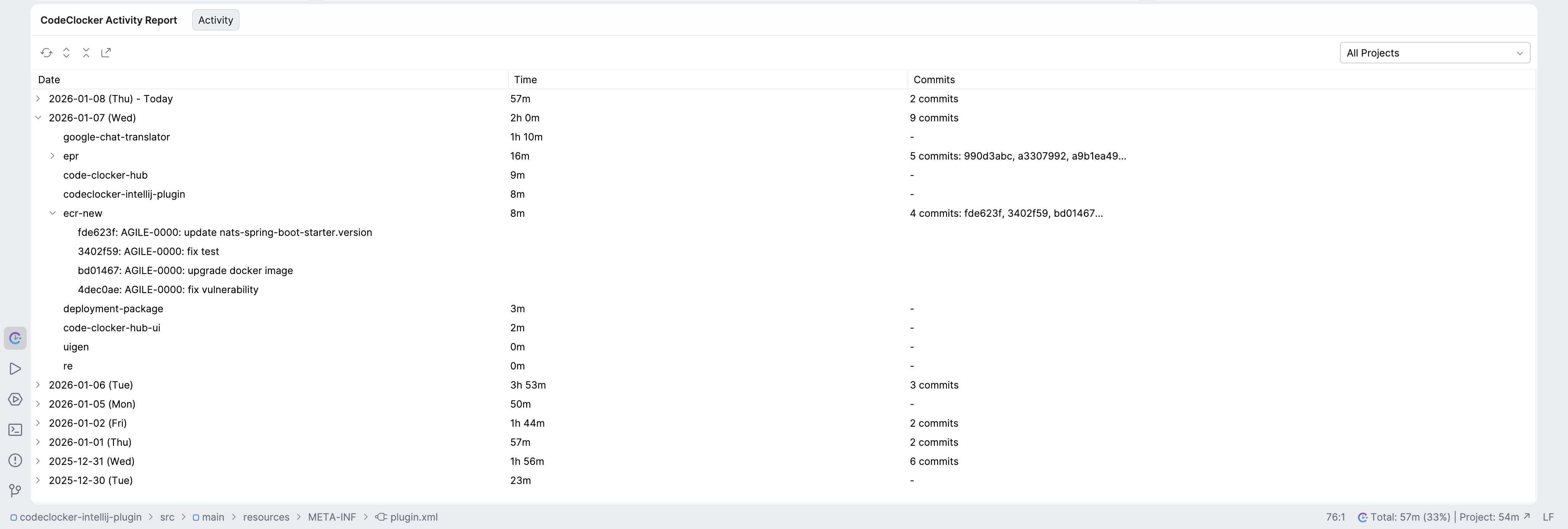
- Activity Report — tree-view of daily activity with project breakdown, commit history, and CSV export.
- Teammate awareness — daily pulse updates help you stay aware of what your teammates are working on and what moved forward across the team.
- VCS / Git insights — tracks added and removed lines from version control activity.
- Auto-pause — pauses tracking when the IDE loses focus or on inactivity timeout.
- Privacy first — all data stays on your machine in Local Mode. Hub sync is opt-in.
- Team privacy controls — your team can run in anonymous mode where managers only see team-level totals, not individual activity.
IntelliJ IDEA, PyCharm, Android Studio, WebStorm, PhpStorm, Rider, CLion, GoLand, DataGrip, RubyMine, AppCode, RustRover — and all other JetBrains IDEs.
Learn more at site.codeclocker.com.
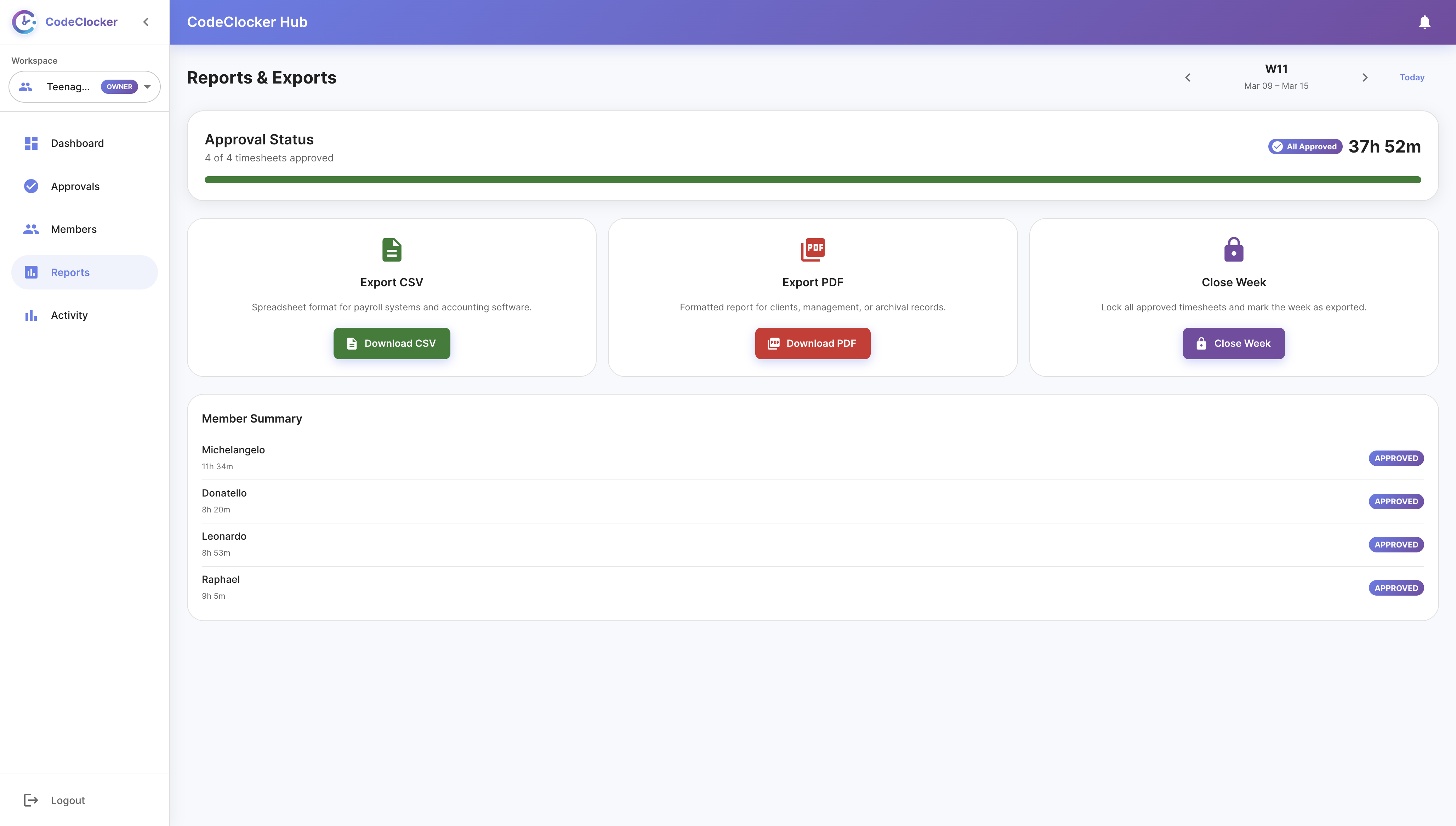
Review submission status, tracked hours, and flags for every team member. Approve timesheets and export the week — all from one screen.
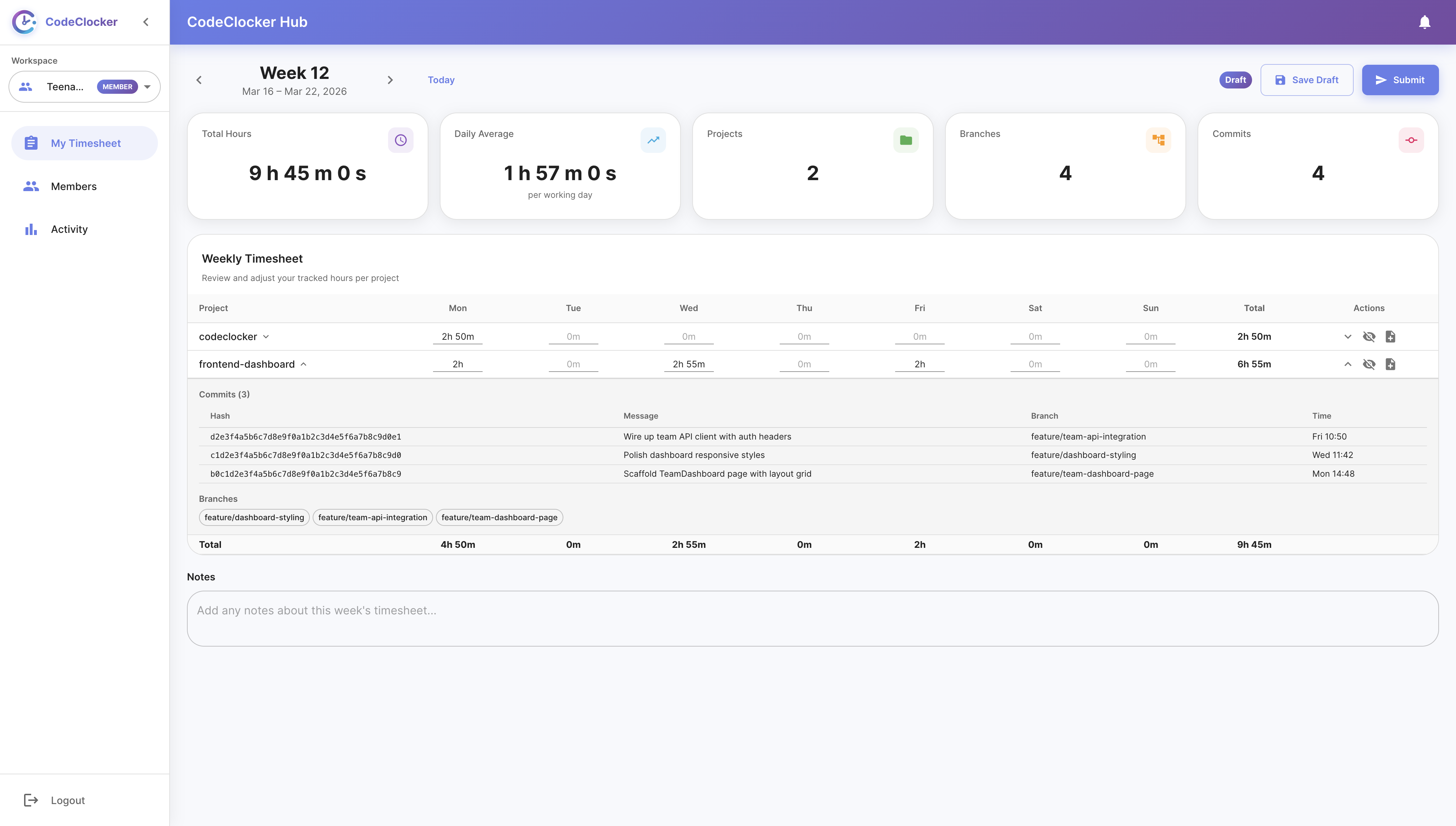
Weekly timesheets are filled automatically from IDE activity. Developers review, adjust if needed, and submit in seconds. Every row links to commits and branches.
See aggregated overall team activity. Filter by time range to spot trends.

Export approved timesheets as CSV for payroll or PDF for clients. Close the week once everything is approved.
The status bar widget shows today's tracked time, goal progress, coding trends, and per-project breakdown — without leaving your IDE.

Detailed tree-view of daily coding activity organized by project. Expand any day to see commits with hashes and messages. Filter by project and export to CSV.
-
From your IDE:
Settings/Preferences > Plugins > Marketplace > Search for "CodeClocker" > Install
-
From JetBrains Marketplace:
Go to JetBrains Marketplace and click Install to ....
Or download the latest release and install manually via Settings/Preferences > Plugins > ⚙️ > Install plugin from disk...
- Install the plugin — from JetBrains Marketplace or directly in your IDE.
- Sign up on CodeClocker Hub — create your account and get an API key.
- Connect the plugin — paste the API key via Tools > CodeClocker API Key.
- Create a team — invite developers via a shareable link.
- Approve & export — review auto-generated timesheets each week, export to CSV or PDF.
Developers only need the plugin installed and connected. CodeClocker builds draft timesheets automatically from IDE activity.
- CodeClocker Website — features, pricing, and how it works
- CodeClocker Hub — web dashboard for timesheets, approvals, and exports
- JetBrains Marketplace — plugin page with reviews and ratings
- GitHub Issues — report bugs or request features
- Changelog — release history and what's new