-
Notifications
You must be signed in to change notification settings - Fork 0
Expand file tree
/
Copy pathdbinit.py
More file actions
110 lines (95 loc) · 13.1 KB
/
dbinit.py
File metadata and controls
110 lines (95 loc) · 13.1 KB
1
2
3
4
5
6
7
8
9
10
11
12
13
14
15
16
17
18
19
20
21
22
23
24
25
26
27
28
29
30
31
32
33
34
35
36
37
38
39
40
41
42
43
44
45
46
47
48
49
50
51
52
53
54
55
56
57
58
59
60
61
62
63
64
65
66
67
68
69
70
71
72
73
74
75
76
77
78
79
80
81
82
83
84
85
86
87
88
89
90
91
92
93
94
95
96
97
98
99
100
101
102
103
104
105
106
107
108
109
110
import os
from apps import db
from run import app
from apps.authentication.models import Users, Groups
from apps.home.models import Labs, LabCategories
from sqlalchemy import event
import sys
import uuid
def dbinit():
try:
cats = LabCategories.query.all()
if len(cats) > 0:
return
except:
pass
db.create_all()
everybody = Groups(groupname="Everybody", organization="SYSTEM", description="System Group that includes everybody")
db.session.add(everybody)
default_pw = uuid.uuid4().hex[:16]
admin = Users(
username=os.environ.get("HACKINSDN_ADMIN_USERNAME", "admin"),
password=os.environ.get("HACKINSDN_ADMIN_PASSWORD", default_pw),
category="admin"
)
db.session.add(admin)
if "HACKINSDN_ADMIN_PASSWORD" not in os.environ:
print("#######################################")
print(f"## Default admin password: {default_pw}")
print("#######################################")
idx = 1
for cat, color in [('All', 'dark'), ('Introductory', 'light'), ('Intermediate', 'info'), ('Advanced', 'warning'), ('Offensive Security', 'danger'), ('Defensive Security', 'success'), ('Networking', 'primary')]:
lab_cat = LabCategories(id=idx, category=cat, color_cls=color)
db.session.add(lab_cat)
idx += 1
if app.config.get("ENABLE_CLABS"):
clab_cat = LabCategories(id=idx, category="ContainerLab", color_cls="secondary")
db.session.add(clab_cat)
idx += 1
lab1 = Labs(
title="Hello World",
description="Hello World testing lab",
manifest='apiVersion: apps/v1\r\nkind: Deployment\r\nmetadata:\r\n name: helloworld-hackinsdn-${pod_hash}\r\n labels:\r\n app: helloworld-hackinsdn-${pod_hash}\r\nspec:\r\n replicas: 1\r\n selector:\r\n matchLabels:\r\n app: helloworld-hackinsdn-${pod_hash}\r\n template:\r\n metadata:\r\n name: helloworld-hackinsdn-${pod_hash}\r\n labels:\r\n app: helloworld-hackinsdn-${pod_hash}\r\n spec:\r\n containers:\r\n - name: helloworld-hackinsdn\r\n image: hackinsdn/helloworld:latest\r\n ports:\r\n - containerPort: 80\r\n---\r\napiVersion: v1\r\nkind: Service\r\nmetadata:\r\n name: helloworld-hackinsdn-${pod_hash}\r\n labels:\r\n app: helloworld-hackinsdn-${pod_hash}\r\nspec:\r\n type: NodePort\r\n ports:\r\n - port: 80\r\n targetPort: 80\r\n name: http-helloworld-webserver\r\n selector:\r\n app: helloworld-hackinsdn-${pod_hash}',
extended_desc=b'<h1>Hello World</h1><p><br></p><p>This lab is a hello world just to make sure everything is working.</p>',
)
lab1.set_lab_guide_md(
'# Lab guide for Hello World\r\n\r\nThis is a lab guide for Hello World\r\n\r\n## 1. Make sure this lab is working\r\n\r\nTo make sure this lab is working, you should open the helloworld service as ilustrated below:\r\n\r\n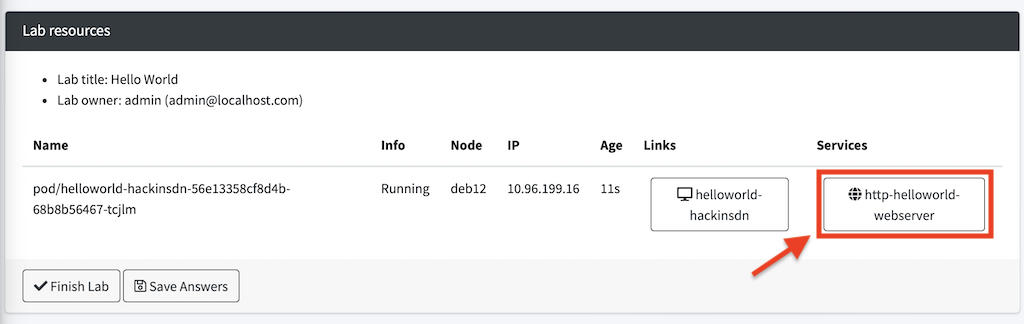\r\n\r\nYou should see something like this:\r\n\r\n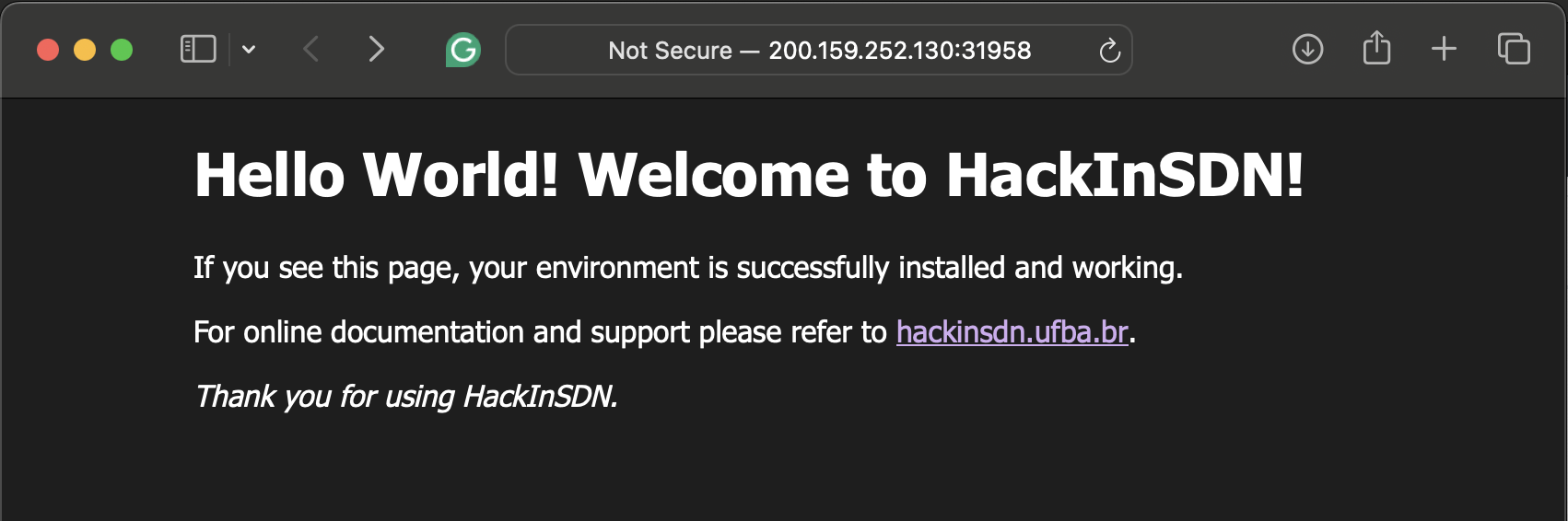\r\n\r\n> [!IMPORTANT] \r\n> The hello world service shows a message indicating the status of the system. Which option below best describe the status indicated by the hello world service?\r\n>\r\n> <input type="radio" name="answer_helloworld_q1" id="id1" value="system-degradated" /> <label for="id1">System is working in a degradated status.</label><br>\r\n> <input type="radio" name="answer_helloworld_q1" id="id2" value="system-not-working" /> <label for="id2">System is not working.</label><br>\r\n> <input type="radio" name="answer_helloworld_q1" id="id3" value="system-working" /> <label for="id3">System is working correctly.</label><br>\r\n> <input type="radio" name="answer_helloworld_q1" id="id4" value="system-unknow" /> <label for="id4">It is not possible to know the system status.</label><br>\r\n\r\n## 2. Accessing the lab console\r\n\r\nSometimes you will need to run commands on some components of the Lab. Follow the indication below to run commands on the Lab container:\r\n\r\n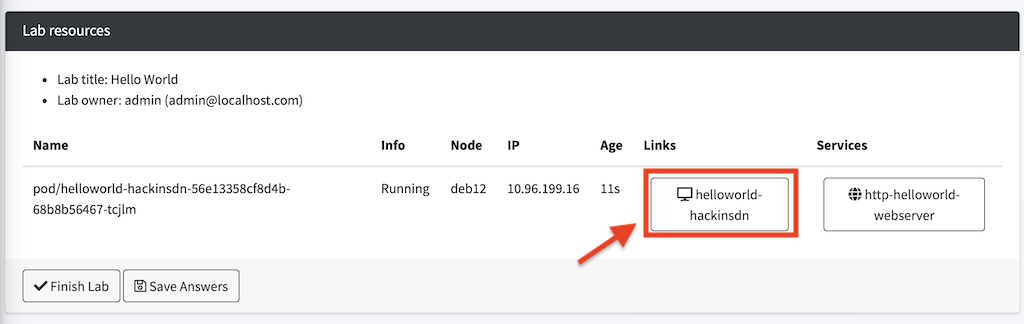\r\n\r\nYou should see something like this:\r\n\r\n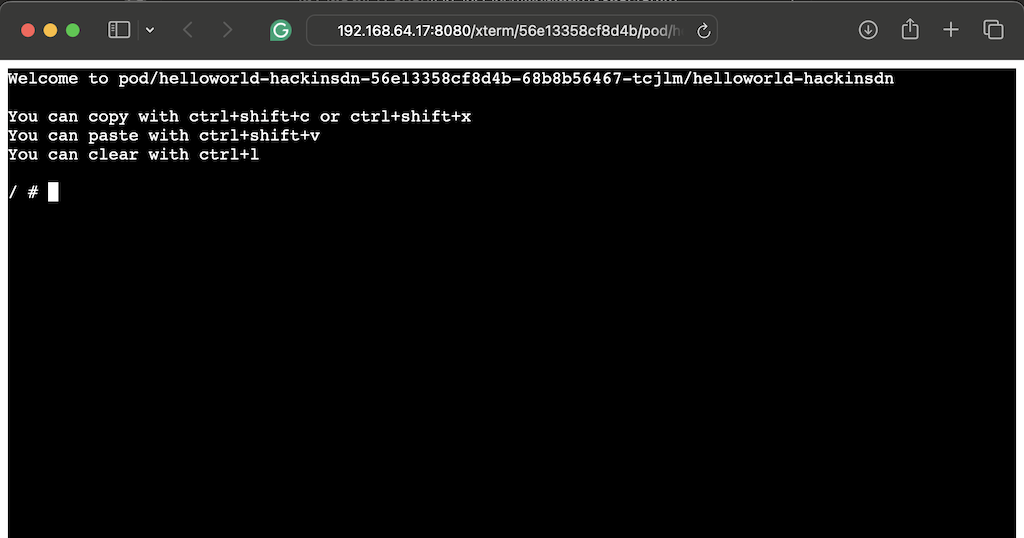\r\n\r\n> [!IMPORTANT] \r\n> When you clicked on the link indicated above, which component was loaded from the Lab:\r\n>\r\n> <select name="answer_helloworld_q2">\r\n> <option value="">--</option>\r\n> <option>The Kubernetes cluster</option>\r\n> <option>The terminal of the container</option>\r\n> <option>Nothing was opened</option>\r\n> <option>All options are correct</option>\r\n> </select>'
)
introductory_category = LabCategories.query.filter_by(category='Introductory').first()
if introductory_category:
lab1.categories.append(introductory_category)
lab1.allowed_groups.append(everybody)
db.session.add(lab1)
#u1 = Users(username="user1", email="user1@localhost")
#u2 = Users(username="student1", email="student1@localhost", category="student")
#u3 = Users(username="student2", email="student2@localhost", category="student")
#u4 = Users(username="student3", email="student3@localhost", category="student")
#u5 = Users(username="teacher1", email="teacher1@localhost", category="teacher")
#u6 = Users(username="user2", email="user2@localhost")
#db.session.add(u1)
#db.session.add(u2)
#db.session.add(u3)
#db.session.add(u4)
#db.session.add(u5)
#g1 = Groups(groupname="group1", description="this is group 1", organization="XPTO", accesstoken="123456")
#g1.owners.append(admin)
#g1.members.append(u6)
#db.session.add(g1)
#g2 = Groups(groupname="GROUP-02", members=[u2, u3], assistants=[u4], owners=[u5])
#db.session.add(g2)
#lab2 = Labs(
# title="New hello-world with extra new features",
# description="New Hello World testing lab with extra new features",
# manifest='apiVersion: apps/v1\r\nkind: Deployment\r\nmetadata:\r\n name: helloworld-hackinsdn-${pod_hash}\r\n labels:\r\n app: helloworld-hackinsdn-${pod_hash}\r\nspec:\r\n replicas: 1\r\n selector:\r\n matchLabels:\r\n app: helloworld-hackinsdn-${pod_hash}\r\n template:\r\n metadata:\r\n name: helloworld-hackinsdn-${pod_hash}\r\n labels:\r\n app: helloworld-hackinsdn-${pod_hash}\r\n spec:\r\n containers:\r\n - name: helloworld-hackinsdn\r\n image: hackinsdn/helloworld:latest\r\n ports:\r\n - containerPort: 80\r\n---\r\napiVersion: v1\r\nkind: Service\r\nmetadata:\r\n name: helloworld-hackinsdn-${pod_hash}\r\n labels:\r\n app: helloworld-hackinsdn-${pod_hash}\r\nspec:\r\n type: NodePort\r\n ports:\r\n - port: 80\r\n targetPort: 80\r\n name: http-helloworld-webserver\r\n selector:\r\n app: helloworld-hackinsdn-${pod_hash}',
# extended_desc=b'<h1>Hello World</h1><p><br></p><p>This lab is a hello world just to make sure everything is working.</p>',
#)
#lab2.set_lab_guide_md(
# '# Lab guide for Hello World\r\n\r\nThis is a lab guide for Hello World\r\n\r\n## 1. Make sure this lab is working\r\n\r\nTo make sure this lab is working, you should open the helloworld service as ilustrated below:\r\n\r\n\r\n\r\nYou should see something like this:\r\n\r\n\r\n\r\n> [!IMPORTANT] \r\n> The hello world service shows a message indicating the status of the system. Which option below best describe the status indicated by the hello world service?\r\n>\r\n> <input type="radio" name="answer_newhelloworld_q1" id="id1" value="system-degradated" /> <label for="id1">System is working in a degradated status.</label><br>\r\n> <input type="radio" name="answer_newhelloworld_q1" id="id2" value="system-not-working" /> <label for="id2">System is not working.</label><br>\r\n> <input type="radio" name="answer_newhelloworld_q1" id="id3" value="system-working" /> <label for="id3">System is working correctly.</label><br>\r\n> <input type="radio" name="answer_newhelloworld_q1" id="id4" value="system-unknow" /> <label for="id4">It is not possible to know the system status.</label><br>\r\n\r\n## 2. Accessing the lab console\r\n\r\nSometimes you will need to run commands on some components of the Lab. Follow the indication below to run commands on the Lab container:\r\n\r\n\r\n\r\nYou should see something like this:\r\n\r\n\r\n\r\n> [!IMPORTANT] \r\n> When you clicked on the link indicated above, which component was loaded from the Lab:\r\n>\r\n> <select name="answer_newhelloworld_q2">\r\n> <option value="">--</option>\r\n> <option>The Kubernetes cluster</option>\r\n> <option>The terminal of the container</option>\r\n> <option>Nothing was opened</option>\r\n> <option>All options are correct</option>\r\n> </select>'
#)
#lab2.allowed_groups.append(g1)
#db.session.add(lab2)
#lab3 = Labs(
# title="DDoS attacks, detection and mitigation",
# description="Testing Lab for DDoS Attacks including execution, detection and mitigation",
# manifest='apiVersion: apps/v1\r\nkind: Deployment\r\nmetadata:\r\n name: helloworld-hackinsdn-${pod_hash}\r\n labels:\r\n app: helloworld-hackinsdn-${pod_hash}\r\nspec:\r\n replicas: 1\r\n selector:\r\n matchLabels:\r\n app: helloworld-hackinsdn-${pod_hash}\r\n template:\r\n metadata:\r\n name: helloworld-hackinsdn-${pod_hash}\r\n labels:\r\n app: helloworld-hackinsdn-${pod_hash}\r\n spec:\r\n containers:\r\n - name: helloworld-hackinsdn\r\n image: hackinsdn/helloworld:latest\r\n ports:\r\n - containerPort: 80\r\n---\r\napiVersion: v1\r\nkind: Service\r\nmetadata:\r\n name: helloworld-hackinsdn-${pod_hash}\r\n labels:\r\n app: helloworld-hackinsdn-${pod_hash}\r\nspec:\r\n type: NodePort\r\n ports:\r\n - port: 80\r\n targetPort: 80\r\n name: http-helloworld-webserver\r\n selector:\r\n app: helloworld-hackinsdn-${pod_hash}',
# extended_desc=b'<h1>Hello World</h1><p><br></p><p>This lab is a hello world just to make sure everything is working.</p>',
#)
#lab3.set_lab_guide_md(
# '# Lab guide for Hello World\r\n\r\nThis is a lab guide for Hello World\r\n\r\n## 1. Make sure this lab is working\r\n\r\nTo make sure this lab is working, you should open the helloworld service as ilustrated below:\r\n\r\n\r\n\r\nYou should see something like this:\r\n\r\n\r\n\r\n> [!IMPORTANT] \r\n> The hello world service shows a message indicating the status of the system. Which option below best describe the status indicated by the hello world service?\r\n>\r\n> <input type="radio" name="answer_ddos_q1" id="id1" value="system-degradated" /> <label for="id1">System is working in a degradated status.</label><br>\r\n> <input type="radio" name="answer_ddos_q1" id="id2" value="system-not-working" /> <label for="id2">System is not working.</label><br>\r\n> <input type="radio" name="answer_ddos_q1" id="id3" value="system-working" /> <label for="id3">System is working correctly.</label><br>\r\n> <input type="radio" name="answer_ddos_q1" id="id4" value="system-unknow" /> <label for="id4">It is not possible to know the system status.</label><br>\r\n\r\n## 2. Accessing the lab console\r\n\r\nSometimes you will need to run commands on some components of the Lab. Follow the indication below to run commands on the Lab container:\r\n\r\n\r\n\r\nYou should see something like this:\r\n\r\n\r\n\r\n> [!IMPORTANT] \r\n> When you clicked on the link indicated above, which component was loaded from the Lab:\r\n>\r\n> <select name="answer_ddos_q2">\r\n> <option value="">--</option>\r\n> <option>The Kubernetes cluster</option>\r\n> <option>The terminal of the container</option>\r\n> <option>Nothing was opened</option>\r\n> <option>All options are correct</option>\r\n> </select>'
#)
#lab3.allowed_groups.append(g2)
#db.session.add(lab3)
db.session.commit()
with app.app_context():
dbinit()