March 2024 note: Work on this project has been temporarily stopped.
When thinking about how the missing edit functions can be created, I decided to put these in a separate library.
Mmultitool is intended to provide certain functions in a more general way so that they can be used in this as well as other projects.
I started this project to try some ideas about midi processing and to get some practice in WPF programming.
This early version is currently more useful for developers than musicans. There is still a lot to do, but I think the basic structure is there and I see some potential for further development into a useful and interesting tool.
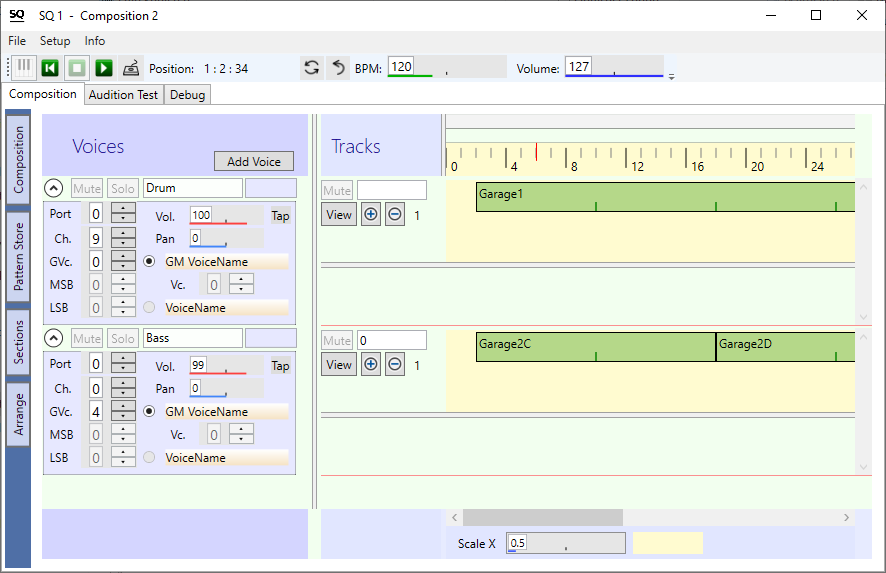
Screenshot (click to enlage)
Musically
In a final version, the user should be able to create little clips and soundscapes and play pattern in a intuitive way. It should work with the 'GS Wavetable Software Synth' as Output device, but prefered is a Midi Hardware sound generator like a keyboard or a soundmodule. On a first level in GM mode, but on a second level also in exclusive mode. I own a 'Yamaha Motif Rack ES' and '-XS' device myself, so there will be maybe some support for this devices, but of course there should also be the ability to use other Midi devices. Maybe in the way that the user can create custom voice- and parameter lists to be read by this application.
SQ1 is supposed to be a nice tool, a helper, an addition to existing Sequencers and DAW's, free or commercial.
Programmatically
I'm still learning WPF, want to get practice and want to find elegant solutions.
I like well-structured projects and clean, straight-forward code but the current version is far away from this.
One reason is that I started with some ideas but without an exact plan or diagram. It takes some time to find out how the necessary core functions and structures should look like.
I began with some basic ideas of how my Midi application should work:
- not using Midi-files directly, instead an internal format is used. The bridge to the Midi-world is 'import from' and 'export to' Midi-files.
- using absolute time instead of delta time
- using note durations instead of note-on / note-off events. Note-off events are generated by code according to note duration.
- using a uniform time format as far as possible (Sequencer-Time / Seqencer Ticks)
Soon after the start i had to make some decisions. Whether they were good or not so good, the future will tell.
- Choosing a value for the TPQ (Ticks per quarter note) constant. It is now a a quite high value of 960. Maybe it would also work with 480, but it doesn't really matter. If you consider that a typical sequence will rarely last longer than 10 minutes and the maximum duration that can be reached with a time field of type UInteger at BPM 120 is over 20 days, there should be enough reserve.
- After a few tests with saving and loading files, I decided to use the .xml format and not a binary format. Xml seems to be a bit more tolerant of small changes in the data structure, and it also offers better possibilities for checking and debugging. A small disadvantage is the file size, but this can be reduced by about 90 percent in later versions using compression.
- Then I tried to write a structure for the sequencer data, called Composition. That was good so far, but over time I realized that in addition to a fixed song structure, a temporary structure would also be useful.
So I created a new property Audition with the same structure as Composition.
After some more testing, it turned out that while composition and audition are good for planned sequences, there should be another option for direct user interaction.
For this purpose I started Directplay. It's a kind of queued play of pattern.
Therefore, an Audition time base is kept parallel to the Composition time base and the third time base runs independently for Directplay.
The solution is divided into the following parts:
- SequencerBase contains core timer, player, fundamental elements (classes) for the sequencer, definitions of the structures in the sequencer, functions for loading and saving
- SequencerUI contains code and UserControls needed for the Graphical User Interface.
- SequencerUITools is is the place for additional tools like Midi-File import
- SQ1 is the Main Application
Some important objects
- Voice determines the instrument, the volume and other parameters for the note output. Also contains the table of running notes for note-off processing.
- Track is the carrier for the patterns.
- Pattern contains the list of midi events. The length property describes the number of ticks from the beginning to the end of the pattern. The Duration property describes how long the pattern is played. If the duration is greater than the length, then the pattern will be played repeatedly.
An important resource for this application is a high frequency timer. At every tick it calculates together with a stopwatch and the current BPM value the Sequencer time. Then it calls the player procedure. If the sequencer is running, it checks if it is time to generate some Midi events.
To understand Note-off processing, it is important to know that the player proc also checks if it is time to generate some Note-off events. Also sequencer-stop and Loop-functions includes a call to 'TurnAllRunningNotes off'.
From previous projects i have learned that it's sometimes confusing to have Midi I/O inside the sequencer part.
Therefore in this project the sequencer part can be seen as a generator for accurate timed Midi-Events.
It's then up to the Main Application to handle this events and send them to the Midi-Out.
This is done in MainWindow with:
AddHandler SequencerBase.MidiOutShortMsg, AddressOf MidiOutShortMsg
In the specified sub, the msg can be passed to the output, as well as other user-defined tasks. However the origin of the event is the player of the sequencer and therefore no time-consuming tasks should be done in it. Under no circumstances a control on the screen can be accessed.
Some screen actions are located in the Mouse and Keyboard handlers of the controls. For other actions, there is the ScreenRefreshTimer in the MainWindow, currently set to an interval of 50 milliseconds.
AddHandler ScreenRefreshTimer.Elapsed, AddressOf ScreenRefreshTimer_Tick
...
Me.Dispatcher.Invoke(New ScreenRefresh_Delegate(AddressOf ScreenRefresh))
In the specified sub, some controls are updated for example the running SequencerTime text.
This is a friendly reminder that content in a Midifile can be protected by Copyright law. This software provides some functions for editing Midifiles with the intention of creating genuine music. Special care should be taken before edited material from unkown source is made public. In any case, the user of this software is responsible for compliance with musical copyrights.