Repository files navigation
Player - Local files
USB HDD
USB Audio CD
NAS
SD card
Renderers / Clients - with metadata and coverarts
AirPlay
Bluetooth audio receiver
SnapClient - Multiroom audio client
Spotify Connect
DLNA / UPnP
Streamers
Bluetooth audio sender
HTTP (no metadata)
SnapServer - Multiroom audio client
Web Radio
DAB Radio (not on RPi Zero and 1)
Digital Signal Processors
CamillaDSP (not on RPi Zero and 1)
Equalizer
Based on Arch Linux Arm
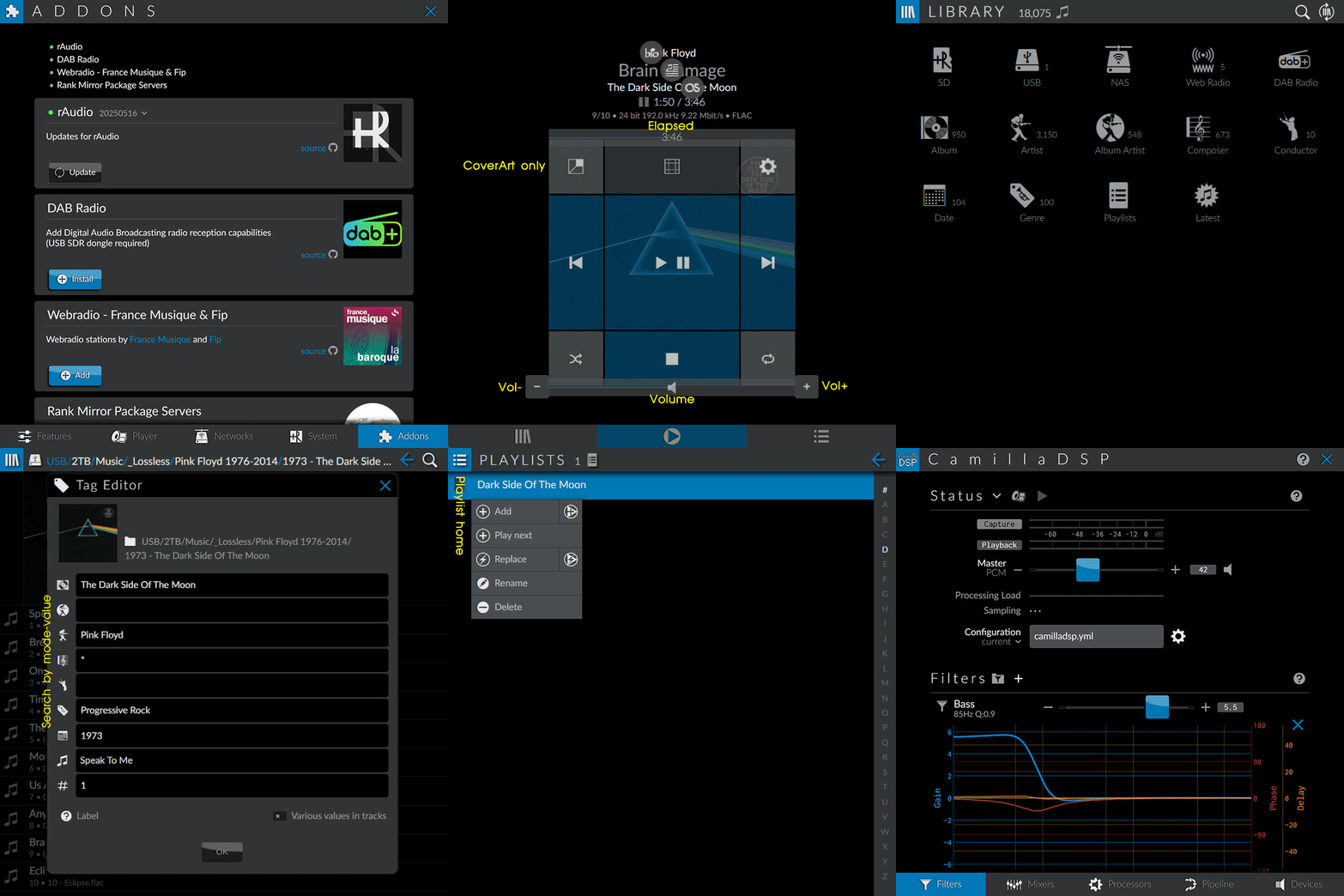
Control via GUI
Remote with any browsers
Android - rAudio app
Local display (not on RPi Zero and 1)
Share data and files between multiple rAudios
Server rAudio : clients (Easy setup with server IP address only)
File server : clients
Live data update - refresh across all rAudios
Live display update - refresh across multiple GUI clients
Metadata Tag Editor - kid3-cli
Album mode with coverarts
File mode with thumbnail icons
Coverarts and bookmarks - add, replace and remove
WebRadio coverarts - online fetched
*.jpg, *.png and animated *.gif applicable*.wav - album artists and sort tracks*.cue - virtually as individual tracks in all modes and user playlistsVU meter as coverart (for remote screen)
Wi-Fi connection can be pre-configured for headless mode.
Access point - iwd
File sharing - samba
Easy update and extra features with Addons
Support boot from USB drive without SD card (DIY )
Bluetooth:
Audio - Receiver / Sender
Keyboard and mouse
USB:
Bluetooth
DAC
Keyboard and mouse
SDR (for DAB Radio)
Storage
Wi-Fi
GPIO:
Write rAudio to SD card Existing users:
Keep current setup SD card.
Try with a spare one before moving forward.
Use only backup made from rAudio with the latest update
Before power on: (Wired LAN connection is recommended)
/BOOT/wifi Wi-Fi pre-configure: (any of)
BOOT - SD card drive (1st partition)Edit template file:
Rename wifi0 in BOOT to wifi
Edit ESSID and Key.
From rAudio backup
From existing
Copy an existing profile file from /etc/netctl
Rename it to wifi then copy it to BOOT before power on.
/BOOT/accesspoint Wi-Fi access point mode
Auto start: No IP address assigned from connected wired/wireless network
Force enable access point only: Place blank accesspoint file in BOOT before power on.
On client devices, select rAudio from Wi-Fi network list to connect with password raudioap.
On browser, open web user interface with URL raudio.local
Settings > Networks > Wi-Fi - search
Select access point to connect
Reboot
Browser refreshes when ready. (Manually refresh if it's too long.)
/BOOT/backup_file.gz System pre-configure: (Run once)
Restore database and settings (Wi-Fi connection included.)
Copy rAudio backup file to BOOT
Use only backup made from rAudio with the latest update
/BOOT/expand Expand root partition:
By default, root partition will be expanded on initial boot.
SD card backup with shrunken root partition:
Create a blank file expand in BOOT before backup
/BOOT/localbrowseroff No display / monitor or or disable Browser:
Create a blank file localbrowseroff in BOOT
Display / Monitor: (optional - Local browser enabled by default)
Connect before boot to ensure proper detection
HDMI display on RPi 4 and 5 - Use HDMI0 port
Raspberry Pi Touch Display 2: Settings
Boot duration
RPi4: 20+ seconds
RPi3: 50+ seconds
RPi1, Zero: 80+ seconds
After initial boot:
If there's a connected screen, IP address for connecting from remote devices will be displayed.
Before setup anything: Settings > Addons > rAudio > Update (if available)
Restore settings and database:
If not pre-configured, Settings > System > Backup/Restore Settings
Build Library database:
Automatically run on boot if database is empty with connected USB and NAS
Force build / update - Settings > update Library (icon next to Sources)
Tracks on existing database can be played during updating.
Before database is available, default WebRadio stations are available for playing.
Parse coverarts for Album and directory thumbnails :
Only if never run before or to force update
Library > Album > coverart icon (next to ALBUM heading)
User guide
Settings > last icon next to Addons
Power off and wait a few seconds then power on
If not connected, temporarily connect wired LAN then remove after Wi-Fi setup successfully.
Still no - Download the image file and start over again
Best sound quality:
Settings > Player > Bit-perfect - Enable
Use only amplifier volume (Unless quality of DAC hardware volume is better.)
Disable features if not use to lower CPU usage:
Full screen UI
Android - rAudio app
Add to Home Screen (Safari on iOS, Chrome on Android)
Coverart as large playback control buttons
Tap top of coverart to see controls guide.
Hide top and bottom bars
No needs for top and bottom bars
Use coverart controls instead of top bar buttons
Swipe to switch between pages
<- Library <-> Playback <-> Playlist ->
Drag to arrange order
Library home blocks
Playlist tracks
Saved playlist tracks
Some coverarts missing from album directories
Subdirectories listed after partial Library database update from context menu.
Subdirectories - context menu > Exclude directory
Some music files missing from library
Make sure embedded metadata in each file is in UTF-8 encoding.
Settings > MPD > question mark icon -scroll- FFmpeg Decoder
Enable if filetypes list contains ones of the missing files.
No albums found after update very large Library
Settings > MPD > Output Buffer - Increase by 8192 at a time
Update Library
CUE sheet
*.cue filenames must be identical to each coresponding music file.Can be directly edited by Tag Editor.
Minimum permission for music files (on Linux ext filesystem)
Directories: rwxr-xr-x (755)
Files: rw-r--r-- (644)
RPi to router connection:
With wired LAN if possible - Disable Wi-Fi
With WiFi if necessary
With RPi accesspoint only if there's no router
Connect to rAudio with IP address instead of raudio.local
Get IP address: Menu > Network > Network Interfaces list
Backup SD card which already setup
On Linux: bash <( curl -sL https://github.com/rern/rOS/raw/main/imagecreate.sh )
Shrink ROOT partition to minimum
Create and compress image file
Custom startup / shutdown script
Copy custom script named startup.sh / shutdown.sh to BOOT
About
Raspberry Pi audio player: AirPlay, Audio CD, Bluetooth, DAB radio, DSP, Internet rafio, Multi-room, Spotify Connect, UPnP/DLNA
Topics
Resources
Stars
Watchers
Forks
You can’t perform that action at this time.