Forked from https://www.losem.tk/948.
YouTube video tutorial https://www.youtube.com/watch?v=UXuXC3TOlyU.
You have a virtual private server (VPS), a domain name, and a DNS record pointing from fully qualified domain name of server to IP address of server.
Either disable your firewall completely, or open ports 22/tcp (SSH), 80/tcp (HTTP), and 443/tcp (HTTPS).
echo "net.core.default_qdisc=fq" >> /etc/sysctl.conf
echo "net.ipv4.tcp_congestion_control=bbr" >> /etc/sysctl.conf
sysctl -p
apt update && apt upgrade -y
apt install -y wget unzip socat
mkdir /etc/trojan-go
cd /etc/trojan-go
Determine latest release by visiting https://github.com/p4gefau1t/trojan-go/releases in a browser.
Download latest release to server, e.g.
wget https://github.com/p4gefau1t/trojan-go/releases/download/v0.10.6/trojan-go-linux-amd64.zip
unzip trojan-go-linux-amd64.zip
curl -Lo config.json https://raw.githubusercontent.com/seakfind/examples/main/Trojan-Go/config_server.json
Edit config.json.
Replace your-domain-name.com by your actual server fully qualified domain name.
Replace your_awesome_password by your choice for password.
Replace /ray123 by your choice for path.
cd
curl https://get.acme.sh | sh
ln -s /root/.acme.sh/acme.sh /usr/local/bin/acme.sh
acme.sh --set-default-ca --server letsencrypt
Replace your-domain-name.com by your actual server fully qualified domain name.
For server with IPv4:
acme.sh --issue -d your-domain-name.com --standalone --keylength ec-256
For IPv6-only server:
acme.sh --issue -d your-domain-name.com --listen-v6 --standalone --keylength ec-256
Replace your-domain-name.com by your actual server fully qualified domain name.
acme.sh --install-cert -d your-domain-name.com --ecc --key-file /etc/trojan-go/server.key --fullchain-file /etc/trojan-go/server.crt
apt install -y nginx
curl -Lo /etc/nginx/sites-available/default https://raw.githubusercontent.com/seakfind/examples/main/Trojan-Go/default
Edit /etc/nginx/sites-available/default.
Replace your-domain-name.com by your actual server fully qualified domain name.
Replace www.bing.com by your camouflage URL.
systemctl reload nginx
systemctl status nginx
curl -Lo /etc/systemd/system/trojan-go.service https://raw.githubusercontent.com/seakfind/examples/main/Trojan-Go/trojan-go.service
systemctl daemon-reload
systemctl enable trojan-go
systemctl start trojan-go
systemctl status trojan-go
Apply CDN proxying (orange cloud in Cloudflare) and SSL/TLS mode Full.
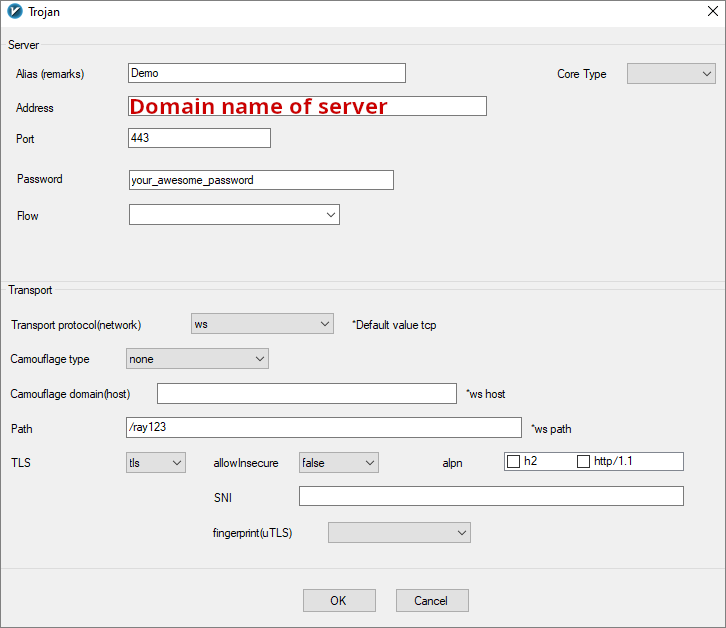
Screenshot below shows v2rayN client on Windows.