Forked from https://github.com/chika0801/Xray-examples/tree/main/VLESS-TCP-XTLS-Vision and translated by Google Translate.
XTLS Vision Installation guide
- Install Xray
bash -c "$(curl -L https://github.com/XTLS/Xray-install/raw/main/install-release.sh)" @ install --beta
- Download configuration
curl -Lo /usr/local/etc/xray/config.json https://raw.githubusercontent.com/seakfind/examples/main/VLESS-TCP-XTLS-Vision/config_server.json
Edit /usr/local/etc/xray/config.json.
Replace port number by your choice of port number.
Replace id by your choice of id from https://www.uuidgenerator.net.
Save the file.
- Obtain SSL certificate and private key
You first need to buy a domain name, then add a subdomain and point the subdomain to the IP of your VPS. Wait 5-10 minutes for DNS resolution to take effect. You can check if the returned IP is correct by pinging your subdomain. After confirming that the DNS resolution has taken effect, execute the following commands (execute each command in sequence).
Note: Replace chika.example.com with your subdomain.
apt install -y socat
curl https://get.acme.sh | sh
alias acme.sh=~/.acme.sh/acme.sh
acme.sh --upgrade --auto-upgrade
acme.sh --set-default-ca --server letsencrypt
acme.sh --issue -d chika.example.com --standalone --keylength ec-256
acme.sh --install-cert -d chika.example.com --ecc --fullchain-file /etc/ssl/private/fullchain.cer --key-file /etc/ssl/private/private.key
chown -R nobody:nogroup /etc/ssl/private/
SSL certificates are valid for 90 days and are automatically renewed every 60 days. If the rate limit is exceeded, an error will be reported.
To back up the applied SSL certificate: Use WinSCP to log in to your VPS, enter the /etc/ssl/private/ directory, and download the certificate file fullchain.cer and the private key file private.key. To restore, rename the certificate file to fullchain.cer and the private key file to private.key, log in to your VPS using WinSCP, upload them to the /etc/ssl/private/ directory and execute the following command: chown -R nobody:nogroup /etc/ssl/private/. See Insufficient privileges when using certificates.
- Start the Xray service
systemctl restart xray
systemctl status xray
- Configuration
/usr/local/etc/xray/config.json - Certificate
/etc/ssl/private/fullchain.cer - Private key
/etc/ssl/private/private.key - View logs
journalctl -u xray --output cat -e - Real-time log
journalctl -u xray --output cat -f
You will need releases of v2rayN (>= 5.38) and Xray-core (>= 1.6.2) that include the Vision feature.
Servers——>Add [VLESS] server

-
Download the client configuration example config_client.json
-
Find
"address": "", and enter the IP address of the VPS between the"". Find"serverName": "", and enter the domain name included in the certificate between the"". -
Server——>Add a custom configuration server——>Browse(B)——>Select client configuration——>Core type Xray——>Socks port 0
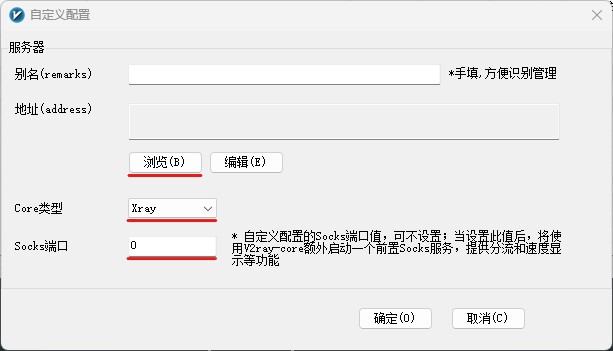
Tip: As long as the certificate is valid, the domain name contained in the certificate does not need to resolve to the VPS IP address. One certificate can be used on multiple VPS.
Use v2rayNG version >= 1.7.24.
地址(address) VPS IP address
端口(port) 16387
用户ID(id) chika
流控(flow) xtls-rprx-vision
传输协议(network) tcp
传输层安全(tls) tls
SNI Domain name included in the certificate