I have:
Bug description
Opening the camera Quick Capture (tapping the camera icon in the message field) breaks when you rotate the device. The image preview becomes blank and the Capture button does nothing. Switching cameras (front/rear camera), rotating back to the previous orientation, or closing and reopening Quick Capture makes it functional again. This bug occurs in when starting in both landscape and portrait orientations and with either camera (eg. open quick capture, switch to front camera, then rotate).
Steps to reproduce
- Tap camera icon in empty message field
- Rotate phone
Actual result: Camera preview is blank, shutter button is non-functional
Expected result: Camera preview should remain visible and you should be able to capture a picture.
Screenshots
Open Quick Capture in portrait:
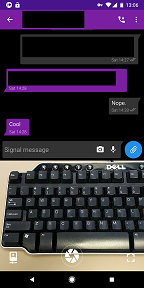
Rotate device:
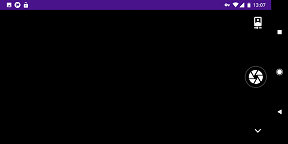
Rotate back:
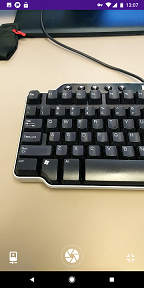
Open Quick capture in landscape:
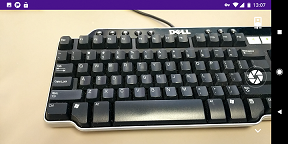
Rotate:
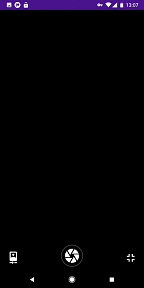
Reduce Quick Capture from full screen to small preview:
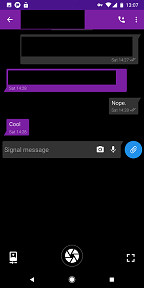
Device info
Device: Google Pixel 2 XL
Android version: 8.1.0
Signal version: 4.16.7
I have:
Bug description
Opening the camera Quick Capture (tapping the camera icon in the message field) breaks when you rotate the device. The image preview becomes blank and the Capture button does nothing. Switching cameras (front/rear camera), rotating back to the previous orientation, or closing and reopening Quick Capture makes it functional again. This bug occurs in when starting in both landscape and portrait orientations and with either camera (eg. open quick capture, switch to front camera, then rotate).
Steps to reproduce
Actual result: Camera preview is blank, shutter button is non-functional
Expected result: Camera preview should remain visible and you should be able to capture a picture.
Screenshots
Open Quick Capture in portrait:

Rotate device:

Rotate back:

Open Quick capture in landscape:

Rotate:

Reduce Quick Capture from full screen to small preview:

Device info
Device: Google Pixel 2 XL
Android version: 8.1.0
Signal version: 4.16.7