<?xml version="1.0" encoding="utf-8"?><feed xmlns="http://www.w3.org/2005/Atom" ><generator uri="https://jekyllrb.com/" version="3.10.0">Jekyll</generator><link href="https://guydavis.github.io/feed.xml" rel="self" type="application/atom+xml" /><link href="https://guydavis.github.io/" rel="alternate" type="text/html" /><updated>2026-03-06T04:33:29+00:00</updated><id>https://guydavis.github.io/feed.xml</id><title type="html">Code Recollection</title><subtitle>Notes from my explorations in Computer Science</subtitle><entry><title type="html">OpenClaw</title><link href="https://guydavis.github.io/2026/03/05/openclaw_installation/" rel="alternate" type="text/html" title="OpenClaw" /><published>2026-03-05T00:00:00+00:00</published><updated>2026-03-05T00:00:00+00:00</updated><id>https://guydavis.github.io/2026/03/05/openclaw_installation</id><content type="html" xml:base="https://guydavis.github.io/2026/03/05/openclaw_installation/"><![CDATA[<p>Recently, I set out to install and configure <a href="https://openclaw.ai/">OpenClaw,</a> a process that proved to be quite an adventure, involving various servers, AI models, and networking challenges.</p>

<h2 id="the-installation-challenge">The Installation Challenge</h2>

<p>The installation process proved more complicated than a straight out-of-the-box experience. One of the main hurdles was dealing with localhost binding and the need to port-forward traffic. I had to route connections from my Ubuntu server, <code class="language-plaintext highlighter-rouge">merry</code>, over to my Unraid server, <code class="language-plaintext highlighter-rouge">aragorn</code>. This required carefully configuring SSH and networking settings to ensure that the services could communicate properly across my home lab setup.</p>

<h2 id="primary-agent-gemini-flash">Primary Agent: Gemini Flash</h2>

<p>For the primary agent, I decided to go with Gemini Flash. I’m leveraging my Google Pro AI subscription for this. I bound my Google AI Studio project to the <a href="https://support.google.com/googleone/answer/14534406?hl=en">$10 USD per month credit provided by Google</a> to cut API costs. This setup gives OpenClaw access to a decent reasoning model.  Not as good as Anthropic’s newest Opus model, if reviews are to be believed,  but I’m not paying $$$ for that.</p>

<p><img src="/img/posts/openclaw_installation_gemini.png" class="img-fluid" /></p>

<h2 id="remote-access-via-telegram-and-discord">Remote Access via Telegram and Discord</h2>

<p>One of the real nice features of OpenClaw is the ability to access it remotely via Telegram and Discord. I set up a webhook for both services to allow me to interact with the agent from anywhere.</p>

<style>
.device-bezel {
  width: 30%; 
  border: 8px solid #222; /* Simulates the phone frame */
  border-radius: 36px;    /* High radius for that "handheld" feel */
  background: #222;       /* Fills gaps if image doesn't perfectly fit */
  box-shadow: 0 20px 40px rgba(0,0,0,0.2);
}
</style>

<p><img src="/img/posts/openclaw_installation_telegram.png" class="device-bezel" />  <img src="/img/posts/openclaw_installation_discord.png" class="device-bezel" /></p>

<h2 id="secondary-agent-ollama-and-amd-gpus">Secondary Agent: Ollama and AMD GPUs</h2>

<p>I also wanted a local, open-source fallback. I made repeated attempts to configure a secondary agent connecting to my local Ollama server. This server is busy running various models on some older hardware—specifically, an AMD RX590 GPU. Getting the tools and Ollama to play nicely with an older AMD card turned out to be a failure though.  I <em>think</em> the issue was the huge context being passed to the model on every prompt by OpenClaw. I may try again in the future with a more recent card.</p>

<h2 id="network-monitoring-with-unifi">Network Monitoring with Unifi</h2>

<p>Finally, to bring everything together, I configured a Unifi skill for the agent. This allows OpenClaw to integrate with my network controller and keep an active eye on my home network’s health, giving the agent the ability to check on my devices and network topology.</p>

<p><img src="/img/posts/openclaw_installation_chat_unifi.png" class="img-fluid" /></p>

<h2 id="conclusions">Conclusions</h2>

<p>Overall, the initial setup was complex and I was able to get a few things working.  I completely struck-out on working useful local agents however, so I am not interested in building a lot of workflows that will simply generate a lot of API calls and big Google AI bills.</p>

<p>I’ll keep an eye on the project and may try again in the future once they improve the efficiency of local agents, allowing older hardware to be used more effectively.</p>]]></content><author><name></name></author><summary type="html"><![CDATA[Recently, I set out to install and configure OpenClaw, a process that proved to be quite an adventure, involving various servers, AI models, and networking challenges. The Installation Challenge The installation process proved more complicated than a straight out-of-the-box experience. One of the main hurdles was dealing with localhost binding and the need to port-forward traffic. I had to route connections from my Ubuntu server, merry, over to my Unraid server, aragorn. This required carefully configuring SSH and networking settings to ensure that the services could communicate properly across my home lab setup. Primary Agent: Gemini Flash For the primary agent, I decided to go with Gemini Flash. I’m leveraging my Google Pro AI subscription for this. I bound my Google AI Studio project to the $10 USD per month credit provided by Google to cut API costs. This setup gives OpenClaw access to a decent reasoning model. Not as good as Anthropic’s newest Opus model, if reviews are to be believed, but I’m not paying $$$ for that. Remote Access via Telegram and Discord One of the real nice features of OpenClaw is the ability to access it remotely via Telegram and Discord. I set up a webhook for both services to allow me to interact with the agent from anywhere. Secondary Agent: Ollama and AMD GPUs I also wanted a local, open-source fallback. I made repeated attempts to configure a secondary agent connecting to my local Ollama server. This server is busy running various models on some older hardware—specifically, an AMD RX590 GPU. Getting the tools and Ollama to play nicely with an older AMD card turned out to be a failure though. I think the issue was the huge context being passed to the model on every prompt by OpenClaw. I may try again in the future with a more recent card. Network Monitoring with Unifi Finally, to bring everything together, I configured a Unifi skill for the agent. This allows OpenClaw to integrate with my network controller and keep an active eye on my home network’s health, giving the agent the ability to check on my devices and network topology. Conclusions Overall, the initial setup was complex and I was able to get a few things working. I completely struck-out on working useful local agents however, so I am not interested in building a lot of workflows that will simply generate a lot of API calls and big Google AI bills. I’ll keep an eye on the project and may try again in the future once they improve the efficiency of local agents, allowing older hardware to be used more effectively.]]></summary></entry><entry><title type="html">Image and Video Creation</title><link href="https://guydavis.github.io/2026/02/16/comfyui_amd_6750xt/" rel="alternate" type="text/html" title="Image and Video Creation" /><published>2026-02-16T00:00:00+00:00</published><updated>2026-02-16T00:00:00+00:00</updated><id>https://guydavis.github.io/2026/02/16/comfyui_amd_6750xt</id><content type="html" xml:base="https://guydavis.github.io/2026/02/16/comfyui_amd_6750xt/"><![CDATA[<h2 id="comfyui">ComfyUI</h2>

<p>While text-based local LLMs are interested, there are also good tools for image and video generation.  On Windows, ComfyUI recently added some support for AMD GPUs.</p>

<ol>
  <li>Install latest AMD Adrenalin Edition (drivers for AMD GPU)</li>
  <li>Install latest AMD <a href="https://www.amd.com/en/developer/resources/rocm-hub/hip-sdk.html">HIP SDK</a></li>
  <li>Install ComfyUI for Windows 11:</li>
</ol>

<p><img src="/img/posts/comfyui_amd_launch.png" class="img-fluid" /></p>

<ol>
  <li>Select AMD GPU:</li>
</ol>

<p><img src="/img/posts/comfyui_amd_install.png" class="img-fluid" /></p>

<ol>
  <li>Try a test prompt in ComfyUI:</li>
</ol>

<p><img src="/img/posts/comfyui_amd_prompt.png" class="img-fluid" /></p>

<ol>
  <li>Generate the resulting test image:</li>
</ol>

<p><img src="/img/posts/comfyui_amd_result.png" class="img-fluid" /></p>

<h2 id="notes">NOTES:</h2>

<p>I also tried this on my other machine, with an Nvidia 3070ti GPU, and discovered the install was simple and troubleshooting was not needed.  Yet another example, where AMD is far behind the tool support that is available for Nvidia hardware.</p>

<h3 id="more-in-this-series">More in this series…</h3>
<ul>
  <li><a href="/2025/10/20/ollama_amd_gpu">AMD GPUs</a> - Running Ollama with AMD cards.</li>
</ul>]]></content><author><name></name></author><summary type="html"><![CDATA[ComfyUI]]></summary></entry><entry><title type="html">LLMs on Android - Updated</title><link href="https://guydavis.github.io/2026/01/04/llms-on-android-updated/" rel="alternate" type="text/html" title="LLMs on Android - Updated" /><published>2026-01-04T00:00:00+00:00</published><updated>2026-01-04T00:00:00+00:00</updated><id>https://guydavis.github.io/2026/01/04/llms-on-android-updated</id><content type="html" xml:base="https://guydavis.github.io/2026/01/04/llms-on-android-updated/"><![CDATA[<p>Since my <a href="/2024/07/18/llms-on-android">earlier testing of Chatbots on Android</a> years ago, a lot of changes have happened.  I’m revisiting the options for an Android phone/tablet user to interact with LLMs now.  There are many more options now, ranging from cloud services down to on-device models.</p>

<style>
.device-bezel {
  width: 30%; 
  border: 8px solid #222; /* Simulates the phone frame */
  border-radius: 36px;    /* High radius for that "handheld" feel */
  background: #222;       /* Fills gaps if image doesn't perfectly fit */
  box-shadow: 0 20px 40px rgba(0,0,0,0.2);
}
</style>

<h1 id="cloud-services">Cloud Services</h1>

<p>All of the options in this section are thin apps that simply pass your query up into the cloud. As a positive, this is often the fastest and most featureful appproach.  On the negative side, you lose all privacy when conversing with a corporate cloud.</p>

<h2 id="openai-chatgpt">OpenAI ChatGPT</h2>

<p><img src="/img/posts/llms_android_chatgpt.png" class="device-bezel" />  <img src="/img/posts/llms_android_chatgpt_hello.png" class="device-bezel" /></p>

<h2 id="anthropic-claude">Anthropic Claude</h2>

<p><img src="/img/posts/llms_android_claude.png" class="device-bezel" />  <img src="/img/posts/llms_android_claude_hello.png" class="device-bezel" /></p>

<h2 id="google-gemini">Google Gemini</h2>

<p><img src="/img/posts/llms_android_gemini.png" class="device-bezel" />  <img src="/img/posts/llms_android_gemini_hello.png" class="device-bezel" /></p>

<h2 id="microsoft-copilot">Microsoft Copilot</h2>

<p><img src="/img/posts/llms_android_copilot.png" class="device-bezel" />  <img src="/img/posts/llms_android_copilot_hello.png" class="device-bezel" /></p>

<h2 id="mistral-ai">Mistral AI</h2>

<p><img src="/img/posts/llms_android_mistral.png" class="device-bezel" />  <img src="/img/posts/llms_android_mistral_hello.png" class="device-bezel" /></p>

<h2 id="alibaba-qwen">Alibaba Qwen</h2>

<p><img src="/img/posts/llms_android_qwen.png" class="device-bezel" />  <img src="/img/posts/llms_android_qwen_hello.png" class="device-bezel" /></p>

<h2 id="moonshotai-kimi">MoonshotAI Kimi</h2>

<p><img src="/img/posts/llms_android_kimi.png" class="device-bezel" />  <img src="/img/posts/llms_android_kimi_hello.png" class="device-bezel" /></p>

<h1 id="home-lan-llms">Home LAN LLMs</h1>

<p>After my <a href="/2025/01/03/ollama">deployment</a> of private Gemma, Mistral, and Qwen LLMs on my home LAN, running Ollama on each PC, with a <a href="/2025/10/20/ollama_amd_gpu">single instance of OpenWebUI</a> fronting them all, I went looking for a mobile phone app to access my home LLMs.  I found Conduit, which I connected to OpenWebUI via Tailscale on my Unraid server.</p>

<h2 id="conduit-openwebui">Conduit OpenWebUI</h2>

<p><img src="/img/posts/llms_android_conduit_login.png" class="device-bezel" /> <img src="/img/posts/llms_android_conduit_models.png" class="device-bezel" />  <img src="/img/posts/llms_android_conduit_hello.png" class="device-bezel" /></p>

<h1 id="on-device-models">On Device Models</h1>

<p>The real future of LLMs will likely be on edge devices themselves as phones/tablets get more powerful hardware.  At this point, with my mid-range Google Pixel 9a, local LLMs can be run quite effectively.</p>

<h2 id="google-edge">Google Edge</h2>

<p>The Edge app from Google is more of a playground demonstration than a real Chatbot app.  They are mainly trying to attract developers looking to include AI in their apps, without requiring a network connection or cloud service.</p>

<p><img src="/img/posts/llms_android_edge.png" class="device-bezel" />  <img src="/img/posts/llms_android_edge_hello.png" class="device-bezel" /></p>

<h2 id="apollo-leap">Apollo LEAP</h2>

<p>Similarly, the LEAP models in Apollo seem to be a developer demonstration, aiming for adoption and integration.</p>

<p><img src="/img/posts/llms_android_leap.png" class="device-bezel" />  <img src="/img/posts/llms_android_leap_hello.png" class="device-bezel" /></p>

<h2 id="pocketpal-ai">Pocketpal AI</h2>

<p>Pocketpal seems to the leader of true on-device Chatbots, offering a wide-selection of free models.</p>

<p><img src="/img/posts/llms_android_pocketpal.png" class="device-bezel" />  <img src="/img/posts/llms_android_pocketpal_hello.png" class="device-bezel" /></p>

<h2 id="chatbox-ai">Chatbox AI</h2>

<p>On the otherhand, ChatboxAI mentioned a “Free” version, but I couldn’t seem to get to it, instead only being shown license sales pages…</p>

<p><img src="/img/posts/llms_android_chatbox.png" class="device-bezel" />  <img src="/img/posts/llms_android_chatbox_free.png" class="device-bezel" /></p>

<h3 id="more-in-this-series">More in this series…</h3>
<ul>
  <li><a href="/2024/07/18/llms-on-android">LLMs on Android</a> Apps accessing Cloud Services</li>
</ul>]]></content><author><name></name></author><summary type="html"><![CDATA[Since my earlier testing of Chatbots on Android years ago, a lot of changes have happened. I’m revisiting the options for an Android phone/tablet user to interact with LLMs now. There are many more options now, ranging from cloud services down to on-device models.]]></summary></entry><entry><title type="html">AI in a Bubble?</title><link href="https://guydavis.github.io/2025/12/01/ai-bubble/" rel="alternate" type="text/html" title="AI in a Bubble?" /><published>2025-12-01T00:00:00+00:00</published><updated>2025-12-01T00:00:00+00:00</updated><id>https://guydavis.github.io/2025/12/01/ai-bubble</id><content type="html" xml:base="https://guydavis.github.io/2025/12/01/ai-bubble/"><![CDATA[<p>Since late 2022 when OpenAI’s <a href="/2022/12/21/chatgpt/">ChatGPT</a> sprang onto the scene, the progressive improvements in large-language models (LLMs) have been impressive.  This has led to an unprecedented runup in the value of the leading LLM providers, leading many to question if we are in an <a href="https://en.wikipedia.org/wiki/AI_bubble">AI bubble</a>.  While no one can refute that there is a gold rush on right now, the only question is whether these companies have struck real or fool’s gold.</p>

<h2 id="ai-investments">AI Investments</h2>

<p>A huge amount of capital has flowed into the AI market recently, with <a href="https://www.startupbooted.com/openai-valuation-history">OpenAI leading the charge</a>.  This has led to a large investment in AI data centres, in hopes of one day striking it rich on real profitability.  Even the spending plans of the so-called hyper-scalers are somewhat ludicrous:</p>

<p><img src="/img/posts/ai_bubble_spending.png" class="img-fluid" /></p>

<p>This is despite OpenAI’s <a href="https://www.wheresyoured.at/openai400bn/">expenses far outpacing its realistic revenues for the foreseeable future</a>. With OpenAI planning an IPO in 2026, a public airing of their finances will likely be the <a href="https://www.theglobeandmail.com/business/article-what-you-need-to-know-ai-artificial-intelligence-bubble-will-pop/">cause of their implosion</a>, in a tightening credit environment.</p>

<h2 id="google-catches-up">Google Catches Up</h2>

<p>I became a small investor in Google’s parent company, Alphabet, when the original appearance of OpenAI’s ChatGPT combined with their clumsy early LLM efforts (Bard) depressed the stock price (PE ~17-20).  Many thought that OpenAI was the first real threat to Google’s dominance in Web search and advertisting. However, I’ve been working with their rebranded LLM (Gemini) since <a href="/2024/02/16/google-gemini/">early 2024</a>, experiencing all the improvements they released so I stuck with them during recent stock runup (PE ~30).</p>

<p><img src="/img/posts/ai_bubble_goog_pe.png" class="img-fluid" /></p>

<p>Beyond the technological improvements, Google also started to expose these features in their main Search interface, raising their visiblity with the general public who seem mildly positive about them, but not clamoring to pay monthly fees for these features.</p>

<p>Google’s recovery after their initial stumbles doesn’t imply massive future success.  With little in the way of user subscriptions for AI driving their revenue, will their infrastrucure build pay off?  Will they be able to sneak more ads in, without further annoying their users?</p>

<h2 id="massive-infrastructure-build">Massive Infrastructure Build</h2>

<p>The American tech giants are planning to spend an extraordinary amount on building large data centres with depreciating hardware.  Each week brings new announcements from Microsoft, OpenAI, Google, AWS, Oracle, and others; all trying to outspend each other, often using promised funds from one deal to pay for the next deal, in a <a href="https://www.calcalistech.com/ctechnews/article/z4lxiqbtw">financial game of musical chairs</a>.  Their planned spend for 2026 is hundreds of billions of dollars, all of which is money not being spent on the rest of American economy, which is relatively moribund after considering inflation and the $US decline.</p>

<p><img src="/img/posts/ai_bubble_borrowing.png" class="img-fluid" /></p>

<p>As seen above, borrowing is increasing in effort to raise more funds for this unprecedented build-out.</p>

<h2 id="wheres-the-demand">Where’s the Demand?</h2>

<p>My own experience is that LLMs are novel and interesting, but they are not a magic bullet.  I have long used Gemini for various tasks including writing, mathematics, image generation, and of course coding.  The LLM has acted as a slightly faster search engine in my experience.  For example, when coding I would normally find snippets from sites like <a href="https://stackexchange.com/">Stack Exchange</a>, that I would piece together and then test myself.  While Gemini generates larger snippets, I still must test the program and fix the inevitable flaws it comes with. Yes models are improving over time, but I don’t forsee revolutionary improvements putting millions of people out of work, slaves to the billionaire class.  In my experience, management routinely overestimates the importance of technology, while underestimating the importance of staff.</p>

<p>In fact many <a href="https://www.theglobeandmail.com/business/article-return-on-generative-ai-investments-survey-2-canadian-businesses/">studies</a> are showing that few businesses are getting anywhere near the expected benefit from their trial AI &amp; LLMs to justify <a href="https://gradientflow.substack.com/p/deconstructing-openais-path-to-125">any significant per-employee subscription</a>. Even if an LLM saves a white-collar worker an hour a week, this time-saving rarely translates into a measurable ROI that justifies an expensive monthly subscription for every employee, especially in light of the continued need for human fact-checking and refinement. To be clear, free LLMs offer nearly the capability of the high subscription offerings, so why pay more?</p>

<p>For a counterpoint opinions to my bearish take, the Blackrock investment firm is <a href="https://www.blackrock.com/us/financial-professionals/insights/ai-tech-bubble">confident</a> that demand will materialize for the incredible spend on infrastruture however. As well, JP Morgan is <a href="https://am.jpmorgan.com/us/en/asset-management/adv/insights/market-insights/market-updates/on-the-minds-of-investors/does-circularity-in-ai-deals-warn-of-a-bubble/">heartened by rising GPU-usage in data centers</a>. I’m not surprised that investment peddlers are bullish on this market… time will tell I suppose.</p>

<h2 id="china-rising">China Rising</h2>

<p>The large American tech giants which have focused on closed-source and closed weight models, with small side projects such as Google’s Gemma model.  Chinese firms, on the other hand, have targetted open-weight models, freely available for enthusiasts to run at home, often on gaming PCs with a discrete GPU.  Yes, while this approach is lagging behind the current state-of-the-art closed frontier models, these Chinese models are not much <strong>farther than a year behind</strong>.  Most importantly, for many mundane day-to-day tasks, these free models are quite sufficient.  China is also leveraging their manufacturing base to build both humanoid and industrial robots with specialized AIs that don’t need to have all of Wikipedia at their fingertips to function.</p>

<p>As well, the short-sighted and scattershot approach to hardware controls that the US has attempted to impose on China, have been ineffective at best, simply leading the Chinese to re-double their efforts to engineer cutting-edge silicon themselves at firms such as <a href="https://en.wikipedia.org/wiki/Semiconductor_Manufacturing_International_Corporation">SMIC</a>.  While Nvidia and TSMC are making bank right now, selling shovels to prospectors during this gold rush, it’s not clear they will maintain that lead over Chinese fabs forever.  Nor is it clear, that all these crazed prospectors will actually find real AI gold (aka enough revenue).</p>

<h2 id="conclusions">Conclusions</h2>

<p>Overall, LLMs are an interesting tool that will no doubt improve over time and become part of daily life for workers around the world, just like the Internet did decades ago.  However, just like the “dot Com” bubble burst around the turn of the century, I think this “AI infrastructure” bubble will also result in a large drop in stock prices of North American tech companies as the lack of true revenue growth for new AI services becomes apparent.  I don’t see every white-collar worker worldwide paying hundreds of dollars monthly in new AI subscription charges to these tech behemoths, even accounting for potential layoffs.</p>

<p>Finally, the massive American AI infrastructure build implicitly assumes a “winner-take-all” outcome; a digital moat allowing a single champion to garner all possible revenue from huge user and API subscriptions. This isn’t even close to the case today with a lot of competitors having similar offerings. In the future, I expect more competition, not less, thus preventing one champion from charging the many hundreds of dollars in monthly subscription fees per seat they’ll need to recoup their planned infrastructure spend.</p>]]></content><author><name></name></author><summary type="html"><![CDATA[Since late 2022 when OpenAI’s ChatGPT sprang onto the scene, the progressive improvements in large-language models (LLMs) have been impressive. This has led to an unprecedented runup in the value of the leading LLM providers, leading many to question if we are in an AI bubble. While no one can refute that there is a gold rush on right now, the only question is whether these companies have struck real or fool’s gold.]]></summary></entry><entry><title type="html">Machinaris</title><link href="https://guydavis.github.io/2025/11/15/machinaris-eol/" rel="alternate" type="text/html" title="Machinaris" /><published>2025-11-15T00:00:00+00:00</published><updated>2025-11-15T00:00:00+00:00</updated><id>https://guydavis.github.io/2025/11/15/machinaris-eol</id><content type="html" xml:base="https://guydavis.github.io/2025/11/15/machinaris-eol/"><![CDATA[<h1 id="a-history-of-a-green-cryptocurrency">A History of a Green Cryptocurrency</h1>

<p>Almost four years ago, the <a href="https://en.wikipedia.org/wiki/Bram_Cohen">original devloper of BitTorrent</a> released a new cryptocurrency named <a href="https://en.wikipedia.org/wiki/Chia_Network">Chia</a>. Unlike the two large cryptocoins at the time (Bitcoin and Ethereum), Chia didn’t use the expensive <a href="https://en.wikipedia.org/wiki/Proof_of_work">proof-of-work</a> approach which needed both in GPU hardware and lots of electricity. Intead Chia used a <a href="https://en.wikipedia.org/wiki/Proof_of_space">proof-of-space</a> consensus using mostly hard-drive storage.</p>

<p>Eventually a talented developer in Germany released a <a href="/2023/02/20/gigahorse/">GPU-based enhancement in early 2023</a>, that was simply more competitive than the original design, providing a strong-incentive to start buying new GPU hardware for an improved plot format.  At the time, I was discouraged that the “Green” vision of Chia had been lost.  The CNI group responded by hinting at a new plot format that would return Chia to its original roots one day.</p>

<h1 id="my-machinaris-project">My Machinaris Project</h1>

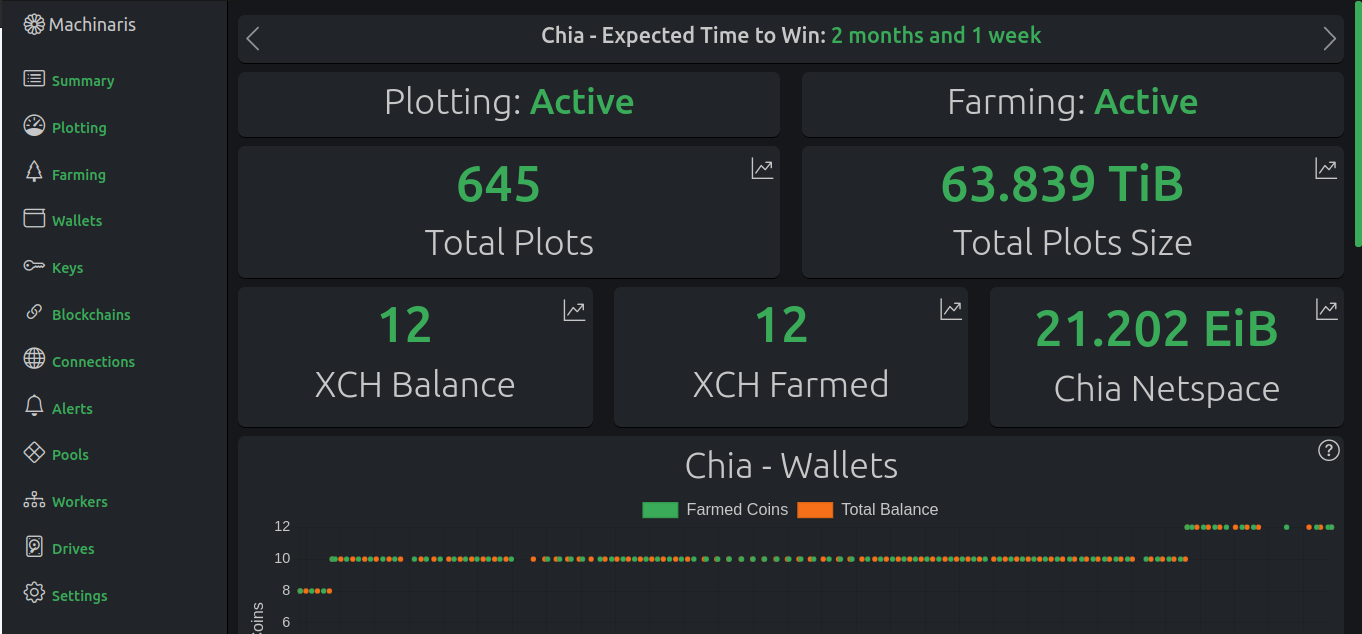
<p>As a user of Unraid, when trying to adopt Chia in early 2021, I found there was really no good option.  My <a href="https://github.com/guydavis/machinaris">Machinaris project</a> was essentially a bundling of various tools and forks that sprouted up around Chia when it first appeared years ago.</p>

<p><img src="https://raw.githubusercontent.com/guydavis/machinaris-unraid/master/docs/img/machinaris_home.png" class="img-fluid" /></p>

<p>However, with the loss of interest in Chia over the past few years, all those related tools have been dropped by their authors. As well, my own interest in the Chia ecosystem has waned considerably, so as of now, I simply don’t want to invest a lot of upcoming time in trying to patch all the various old tools (plotman, chiadog, madmax, gigahorse, bladebit, etc…) that will inevitably break/change when CNI’s new plot format finally drops.</p>

<h2 id="conclusion">Conclusion</h2>

<p>I think this means the end of my <a href="https://github.com/guydavis/machinaris">Machinaris</a> project. For those that want to continue running Machinaris against the current format plots, using Chia 2.5.X, that should be possible until CNI releases an urgent security fix or some other backwards-incompatible change. Thanks everyone for the support over the years, it’s been fun.</p>

<h3 id="more-in-this-series">More in this series…</h3>
<ul>
  <li><a href="/2021/04/30/unraid-chia-plotting-farming/">Chia on Unraid</a> - Chia CLI on Unraid with Docker</li>
  <li><a href="/2021/05/21/unraid-chia-machinaris/">Machinaris</a> - a new WebUI for Chia on Unraid</li>
  <li><a href="/2021/06/29/machinaris-distributed/">Distributed Farming</a> - Machinaris on many worker systems</li>
  <li><a href="/2021/09/04/chia-tools/">Chia Tools</a> - open-source Chia projects</li>
  <li><a href="/2021/10/13/chia-forks/">Chia Forks</a> - running forks of Chia with Machinaris</li>
  <li><a href="/2021/12/31/mmx-blockchain/">MMX Blockchain</a> - MMX blockchain on Machinaris</li>
  <li><a href="/2022/02/09/mmx-gpu/">MMX on GPUs</a> - Farming MMX with a GPU</li>
  <li><a href="/2023/02/20/gigahorse/">Gigahorse</a> - Farming Chia with a GPU</li>
  <li><a href="/2023/06/22/gigahorse-fees/">Gigahorse Fees</a> - Pay to play for Chia</li>
  <li><a href="/2023/10/02/chia_layoffs/">Chia Layoffs</a> - Chia Network Inc. lays off many developers</li>
</ul>]]></content><author><name></name></author><summary type="html"><![CDATA[A History of a Green Cryptocurrency]]></summary></entry><entry><title type="html">Ollama with AMD</title><link href="https://guydavis.github.io/2025/10/20/ollama_amd_gpu/" rel="alternate" type="text/html" title="Ollama with AMD" /><published>2025-10-20T00:00:00+00:00</published><updated>2025-10-20T00:00:00+00:00</updated><id>https://guydavis.github.io/2025/10/20/ollama_amd_gpu</id><content type="html" xml:base="https://guydavis.github.io/2025/10/20/ollama_amd_gpu/"><![CDATA[<p>Earlier this year, I experimented with various LLM models using <a href="/2025/01/03/ollama">Ollama</a> on <a href="/2019/07/16/zen2_pc_gaming/">our gaming PC</a> with a Nvidia RTX 3070ti GPU.  At the time, I had also tried with <a href="/2018/11/09/budget_pc_gaming/">our other gaming PC</a> running on an AMD Radeon 6750xt GPU.  Unfortunately, I wasn’t successful and the models on that PC had fallen back to the CPU, resulting in running times at least 10x slower than the Nvidia GPU system.</p>

<p>Since then, enthusiasts online have filled in the support that <a href="https://www.reddit.com/r/Amd/comments/1la9yz9/comment/mxjo1nt/">AMD themselves can’t seem to deliver</a>.  Thanks to this <a href="https://github.com/likelovewant/ollama-for-amd">Github project</a>, it is now possible to run recent models on the 6750xt (aka gfx1031).  Even more impressive, thanks to this <a href="https://github.com/robertrosenbusch/gfx803_rocm">Github project</a>, I was able to rehabilitate my old Radeon RX590 (aka gfx803).</p>

<h1 id="amd-radeon-6750xt">AMD Radeon 6750xt</h1>

<p>This is an interesting card as it lacks the Nvidia CUDA support, but has 12 GB of VRAM rather than the 8 GB of the Nvidia card.</p>

<h2 id="installing-ollama">Installing Ollama</h2>

<p>On this PC, I install apps and data on the larger D: drive, so first download <a href="https://github.com/likelovewant/ollama-for-amd/releases">OllamaSetup.exe</a> and install via Powershell:</p>

<p><code class="language-plaintext highlighter-rouge">.\OllamaSetup.exe /DIR="D:\Program Files\Ollama"</code></p>

<p>Then quit Ollama from system tray and download the <a href="https://github.com/likelovewant/ROCmLibs-for-gfx1103-AMD780M-APU/releases/tag/v0.6.4.2">correct ROCM libraries</a> for the 6750xt which is the gfx1031 generation.</p>

<ol>
  <li>Find the rocblas.dll file and the rocblas/library folder within your Ollama installation folder (located at D:\Program Files\Ollama\lib\ollama\rocm).</li>
  <li>Delete the existing <code class="language-plaintext highlighter-rouge">rocblas/library</code> folder.</li>
  <li>Replace it with the correct ROCm libraries.</li>
  <li>Set env var OLLAMA_MODELS=D:\Program Files\Ollama\models  (create the folder)</li>
  <li>Then run Ollama again from Start menu.</li>
</ol>

<p>Then launch OpenWebUI in Docker:</p>

<p><img src="/img/posts/ollama_amd_gpu_docker.png" class="img-fluid" /></p>

<div class="language-plaintext highlighter-rouge"><div class="highlight"><pre class="highlight"><code>docker run -d `
   -p 3000:8080 `
   -v open-webui:/app/backend/data `
   --name open-webui `
   --restart always `
   -e OLLAMA_BASE_URL=http://host.docker.internal:11434 `
   ghcr.io/open-webui/open-webui:main
</code></pre></div></div>

<p>Then browse to http://localhost:3000 to access OpenWebUI, where I tested the recent Qwen v3 model:</p>

<p><img src="/img/posts/ollama_amd_gpu_qwen_chat.png" class="img-fluid" /></p>

<p>Monitoring the speed of the response, I was pleasantly surprised.  Much faster than the CPU-fallback mode I experienced earlier.  Ollama reported GPU being used:</p>

<p><img src="/img/posts/ollama_amd_gpu_list_ps.png" class="img-fluid" /></p>

<p>Monitoring the GPU usage via Task Manager, I was able to run queries against both Qwen and Gemma, though that is a bit too tight:</p>

<p><img src="/img/posts/ollama_amd_gpu_usage.png" class="img-fluid" style="height: 50%; width: 50%" /></p>

<h1 id="amd-radeon-rx-590">AMD Radeon RX 590</h1>

<p>For an even bigger challenge, I decided to look at running Ollama using a AMD 590, nearly a decade old card now.</p>

<div class="language-plaintext highlighter-rouge"><div class="highlight"><pre class="highlight"><code>sudo docker run -it -d --restart unless-stopped --device=/dev/kfd --device=/dev/dri --group-add=video --ipc=host --cap-add=SYS_PTRACE --security-opt seccomp=unconfined -p 8080:8080 -p 11434:11434  --name rocm64_ollama_095 robertrosenbusch/rocm6_gfx803_ollama:6.4.1_0.9.5 bash

sudo docker exec -ti rocm64_ollama_095 bash

./ollama pull gemma3:4b
./ollama pull qwen3:8b
python3 /llm-benchmark/benchmark.py

</code></pre></div></div>

<p><img src="/img/posts/ollama_amd_gpu_590_model_pulls.png" class="img-fluid" /></p>

<p>Then in another shell, I monitored the GPU usage with <code class="language-plaintext highlighter-rouge">amdgpu_top</code>, ensuring the old card was working as hard as it could:</p>

<p><img src="/img/posts/ollama_amd_gpu_590_amdgpu_top.png" class="img-fluid" /></p>

<p>The results of the benchmark are not fast at all, but just impressive that these new models even run on hardware from a decade ago.  Kudos to <a href="https://github.com/robertrosenbusch/gfx803_rocm">Robert Rosenbusch</a> for his great work making this possible.</p>

<p><img src="/img/posts/ollama_amd_gpu_590_benchmark.png" class="img-fluid" /></p>

<p>Finally, I browsed to the Ollama webui and asked the Qwen model if it thought I could run it on such an old AMD GPU.  Quite rightly, Qwen advised me that it is highly unlikely it could run on such ancient hardware:</p>

<p><img src="/img/posts/ollama_amd_gpu_590_qwen3_8b.png" class="img-fluid" /></p>

<h1 id="network-hosting">Network Hosting</h1>

<p>With multiple systems on my home network hosting Ollama and different models now, I decided to put a single instance of OpenWebUI on the home server running 24/7 in the basement.  This lets family members use local LLMs from anywhere on our home network, useful for comparisons against the public models like Gemini and ChatGPT.</p>

<p><img src="/img/posts/ollama_amd_gpu_network.png" class="img-fluid" /></p>

<p>While the LLM frontend can expose different models on different computers, but it doesn’t do a good job of labelling them, dealing with certain workers being offline, nor selecting the fastest available worker.  I am hopeful that OpenWebUI will improve handling of multiple Ollama workers in the future.</p>

<h1 id="benchmarking">Benchmarking</h1>

<p>After forking and fixing <a href="https://github.com/guydavis/llm-benchmark">a simple LLM benchmarking script</a>, I deployed it to all 3 of my systems to see how well they ran the same prompts using the <code class="language-plaintext highlighter-rouge">gemma3:4b</code> as a common test.</p>

<h2 id="setup">Setup</h2>

<p>First in Gitbash:</p>
<div class="language-plaintext highlighter-rouge"><div class="highlight"><pre class="highlight"><code>cd "d:/Program Files/Ollama"
git clone https://github.com/guydavis/llm-benchmark.git
cd llm-benchmark
python -m venv venv
</code></pre></div></div>
<p>Then in Powershell:</p>
<div class="language-plaintext highlighter-rouge"><div class="highlight"><pre class="highlight"><code>cd "d:\Program Files\Ollama\llm-benchmark"
Set-ExecutionPolicy -ExecutionPolicy RemoteSigned -Scope CurrentUser
.\venv\Scripts\activate
pip install -r requirements.txt
ollama list
python benchmark.py -u gemma3:4b
</code></pre></div></div>

<h2 id="amd-radeon-rx-590-1">AMD Radeon RX 590</h2>

<p><img src="/img/posts/benchmark_gemma_amd_rx590.png" class="img-fluid" /></p>

<h2 id="amd-radeon-6750xt-1">AMD Radeon 6750xt</h2>

<p><img src="/img/posts/benchmark_gemma_amd_6750xt.png" class="img-fluid" /></p>

<h2 id="nvidia-rtx-3070ti">Nvidia RTX 3070ti</h2>

<p><img src="/img/posts/benchmark_gemma_nvidia_3070ti.png" class="img-fluid" /></p>

<h1 id="conclusions">Conclusions</h1>

<p>Clearly, the open-weight models are rapidly improving if they can run reasonably on such old hardware.  Soon these mid-weight LLMs will run on portable devices such as phones, improving upon the current embedded models.  There is still clearly a serious performance penalty to run on an AMD GPU, instead of industry-standard Nvidia GPUs. Though simply being able to use AMD hardware is honestly a pleasant surprise.</p>

<p>With such progress happening, I fail to see why the American tech giants will be able to charge premium subscription prices.  With the AI stock market boom in full swing right now, it will be interesting to see if they are still flying high in a year, in the face of open-weight model competition.</p>

<h3 id="more-in-this-series">More in this series…</h3>
<ul>
  <li><a href="/2024/04/19/llama-3">Llama 3</a> - Llama 3</li>
  <li><a href="/2025/01/03/ollama">Ollama</a> - Ollama via OpenWebUI</li>
  <li><a href="/2025/02/06/deepseek-distill">Deepseek</a> - Trying small distills locally.</li>
</ul>]]></content><author><name></name></author><summary type="html"><![CDATA[Earlier this year, I experimented with various LLM models using Ollama on our gaming PC with a Nvidia RTX 3070ti GPU. At the time, I had also tried with our other gaming PC running on an AMD Radeon 6750xt GPU. Unfortunately, I wasn’t successful and the models on that PC had fallen back to the CPU, resulting in running times at least 10x slower than the Nvidia GPU system.]]></summary></entry><entry><title type="html">Backrest</title><link href="https://guydavis.github.io/2025/09/30/backrest/" rel="alternate" type="text/html" title="Backrest" /><published>2025-09-30T00:00:00+00:00</published><updated>2025-09-30T00:00:00+00:00</updated><id>https://guydavis.github.io/2025/09/30/backrest</id><content type="html" xml:base="https://guydavis.github.io/2025/09/30/backrest/"><![CDATA[<p>After recently <a href="/2025/04/27/google-gemini-2_5/">upgrading</a> to a family plan for <a href="https://one.google.com/">Google One</a> that included the advanced/full access to Google Gemini, I’ve had more space (2 TB) available in Google Drive.  With this space, I went looking for ways to backup files from my Unraid server to the Google Drive space.  This led me to a combination of:</p>

<ol>
  <li>rclone - Used to transfer files from the Unraid server to GDrive</li>
  <li>restic - CLI for automated backups</li>
  <li>backrest - WebUI for restic</li>
</ol>

<h2 id="rclone">RClone</h2>

<p>You want this to be installed directly on the Unraid OS level, not within a separate Docker.  For this, install the rclone from Waseh, which will put the <code class="language-plaintext highlighter-rouge">rclone</code> binary directly on the Unraid OS CLI.</p>

<p><img src="/img/posts/backrest_rclone_app.png" class="img-fluid" /></p>

<p>Then you need to configure <code class="language-plaintext highlighter-rouge">rclone</code> for access to your GDrive, using <a href="https://restic.readthedocs.io/en/stable/030_preparing_a_new_repo.html#other-services-via-rclone">these directions</a>.  Basically, you need to create a new Google Cloud project (in Google Console), enable the GDrive API, then create a Service Account (named Unraid Backup or similar). The service account needs the Storage Object Admin privilege, then you create a Key for the Service Account, which will download a JSON private key.  With that info, you run <code class="language-plaintext highlighter-rouge">rclone config</code> and add a new rclone remote, which I called ‘gdrive’.  To verify that rclone can access Google Drive, run <code class="language-plaintext highlighter-rouge">rclone lsd gdrive</code> which should list the folders at the top of the remote Drive.  I then created a new folder in Drive called ‘Backups’ to hold these backups.</p>

<p><img src="/img/posts/backrest_rclone_config.png" class="img-fluid" /></p>

<h2 id="restic-and-backrest">Restic and Backrest</h2>

<p>The <code class="language-plaintext highlighter-rouge">restic</code> CLI binary is included within the BackRest docker container, installed via Unraid Apps:</p>

<p><img src="/img/posts/backrest_app_install.png" class="img-fluid" /></p>

<p>Be sure to add a new Path that will allow the Rclone config on Unraid OS to be shared into the Backrest container as well:</p>

<p><img src="/img/posts/backrest_install_rclone_conf.png" class="img-fluid" /></p>

<p>Once Backrest is running in the Docker container, we need to add a restic repository that is backed by the configured Google Drive (via rclone):</p>

<p><img src="/img/posts/backrest_restic_repo.png" class="img-fluid" /></p>

<p>Once the repo is created, then create a backup plan that uses it:</p>

<p><img src="/img/posts/backrest_restic_plan.png" class="img-fluid" /></p>

<p>I chose to backup once weekly.  To validate, I started the backup manually:</p>

<p><img src="/img/posts/backrest_restic_status.png" class="img-fluid" /></p>

<p>As this was my first backup, it took about half a day.  I immediately saw that Restic was creating files within the Backups folder I had created in Google Drive.</p>

<h2 id="conclusion">Conclusion</h2>

<p>This wasn’t the simplest setup with three different components, but it does seem to be working.  Next month, I’ll investigate the resulting backups and incrementals, to verify the recovery process.  So far, so good…</p>

<h3 id="more-in-this-series">More in this series…</h3>
<ul>
  <li><a href="/2021/03/15/unraid-urbackup/">Unraid Urbackup</a> - initial backup solution from a few years back</li>
</ul>]]></content><author><name></name></author><summary type="html"><![CDATA[After recently upgrading to a family plan for Google One that included the advanced/full access to Google Gemini, I’ve had more space (2 TB) available in Google Drive. With this space, I went looking for ways to backup files from my Unraid server to the Google Drive space. This led me to a combination of:]]></summary></entry><entry><title type="html">Audiobookshelf</title><link href="https://guydavis.github.io/2025/08/24/audiobookshelf/" rel="alternate" type="text/html" title="Audiobookshelf" /><published>2025-08-24T00:00:00+00:00</published><updated>2025-08-24T00:00:00+00:00</updated><id>https://guydavis.github.io/2025/08/24/audiobookshelf</id><content type="html" xml:base="https://guydavis.github.io/2025/08/24/audiobookshelf/"><![CDATA[<p>Way back during the Covid shutdown, I set up my home server to <a href="/2020/02/06/ebook_readers/">host ebooks and audiobooks</a> for my family to access from their phones and tablets. Subsequently, we found that Amazon’s Audible service and our local library’s Libby service were better options for reading and listening.  However, with the trade war launched by the USA this year, our family has been dumping any American products &amp; services and buying from Canada instead.  So bye-bye Audible subscription!</p>

<p>Instead, I wanted to host access to my own library of ebooks and audiobooks again, using <a href="https://readarr.com/">Readarr</a>, <a href="https://getlibation.com/">Libation</a>, and <a href="https://www.audiobookshelf.org/">Audiobookshelf</a>.</p>

<h2 id="readarr">Readarr</h2>

<p><a href="https://readarr.com/">Readarr</a> is part of the <a href="https://wiki.servarr.com/">Servarr group</a> of media management tools, including <a href="https://radarr.video/">Radarr</a> (movies), <a href="https://sonarr.tv/">Sonarr</a> (shows), and <a href="https://lidarr.audio/">Lidarr</a> (music).  Unfortunately, the Readarr project itself has been retired, but the community has picked it up, and are carrying forks forward.  The best, today anyways, seems to be <a href="https://github.com/pennydreadful/bookshelf">Bookshelf</a> by <a href="https://github.com/pennydreadful">pennydreadful</a>.</p>

<p>Deploying on Unraid is pretty easy, I simply used an existing Unraid app like “binhex-radarr” and change the Repository line to: <code class="language-plaintext highlighter-rouge">ghcr.io/pennydreadful/bookshelf:hardcover</code>:</p>

<p><img src="/img/posts/audiobookshelf_readarr_config.png" class="img-fluid" /></p>

<h2 id="libation">Libation</h2>

<p>Since, we had some audiobooks on Audible, I needed to use the <a href="https://getlibation.com/">Libation project</a> to extract them into a format that I could host myself.  Setup on Unraid was a bit tricky as I first needed to install the Libation desktop app on Windows, enter my Amazon Audible logic credentials to generate some encoded JSON files, then install the app on my Unraid server, placing the JSON settings files from Windows into the Unraid appdata area.</p>

<p><img src="/img/posts/audiobookshelf_unraid_libation.png" class="img-fluid" /></p>

<p>Then every half hour, Libation running in a Docker container on my Unraid server would look for any new audiobooks and extract them into place where Audiobookshelf automatically cataloged them, ready for listening by my whole family.</p>

<h2 id="audiobookshelf">Audiobookshelf</h2>

<p>For hosting, browsing, and reading the books, I chose <a href="https://www.audiobookshelf.org/">Audiobookshelf</a>.  ABS, as it’s known, is a Docker container deployed on my Unraid home server, combined with an Android app on our phones.</p>

<p>Deploying on Unraid is shown.  I also added a Path for my ebooks.</p>

<p><img src="/img/posts/audiobookshelf_unraid_abs.png" class="img-fluid" /></p>

<p>Then viewing the running instance of Audio Book Shelf, within a browser:</p>

<p><img src="/img/posts/audiobookshelf_home.png" class="img-fluid" /></p>

<p>While it is possible to use the web browser to play/read books, I found this interface better for just managing and listing the catalog.</p>

<p>Instead, listening is best done on a phone with the ABS app itself:</p>

<div>
    <img src="/img/posts/audiobookshelf_app_audiobooks.png" class="img-fluid" style="width: 30%; height: auto" /> 
    <img src="/img/posts/audiobookshelf_app_ebooks.png" class="img-fluid" style="width: 30%; height: auto" /> 
</div>

<p>Reading ebooks on the phone can be done with the ABS app directly (left screenshot) or another reader like Moon+ (right screenshot).</p>

<div>
    <img src="/img/posts/audiobookshelf_app_abs_reader.png" class="img-fluid" style="width: 30%; height: auto" /> 
    <img src="/img/posts/audiobookshelf_app_moon_reader.png" class="img-fluid" style="width: 30%; height: auto" /> 
</div>

<p><br /></p>

<h2 id="conclusion">Conclusion</h2>

<p>This whole setup was quite a bit easier than I expected.  I’m really impressed with the quality of the Audiobookshelf web app and phone app too.  I forsee no problem cancelling our Audible subscription on expiry.  Yet another American digital service that my family here in Canada will never pay for again.</p>

<h3 id="more-in-this-series">More in this series…</h3>
<ul>
  <li><a href="/2020/02/06/ebook_readers/">Ebook Readers</a> - hosting ebooks and audiobooks myself</li>
</ul>]]></content><author><name></name></author><summary type="html"><![CDATA[Way back during the Covid shutdown, I set up my home server to host ebooks and audiobooks for my family to access from their phones and tablets. Subsequently, we found that Amazon’s Audible service and our local library’s Libby service were better options for reading and listening. However, with the trade war launched by the USA this year, our family has been dumping any American products &amp; services and buying from Canada instead. So bye-bye Audible subscription!]]></summary></entry><entry><title type="html">Lidarr &amp;amp; Soulseek</title><link href="https://guydavis.github.io/2025/07/31/lidarr_broken/" rel="alternate" type="text/html" title="Lidarr &amp;amp; Soulseek" /><published>2025-07-31T00:00:00+00:00</published><updated>2025-07-31T00:00:00+00:00</updated><id>https://guydavis.github.io/2025/07/31/lidarr_broken</id><content type="html" xml:base="https://guydavis.github.io/2025/07/31/lidarr_broken/"><![CDATA[<p>After I scripted <a href="/2023/09/23/lidarr_importing">imports of album lists</a> into the Lidarr media tracking system back in 2023, I revisted it recently to import some more.  However, I found the Lidarr project itself in state of disarray, with multiple users complaining of a broken metadata API for weeks and weeks.  In fact, the devs acknowledged the issue and indicated they had no ETA for fix:</p>

<p><img src="/img/posts/lidarr_broken_devs.png" class="img-fluid" /></p>

<h2 id="lidarr-workarounds">Lidarr Workarounds</h2>

<p>Digging into the Lidarr Discord for support, I found a <a href="https://github.com/blampe/hearring-aid">fork from blampe</a> that seemed to help somewhat.  However, the issue with broken metadata lookups involved server side as well, so this wasn’t a final solution.</p>

<h2 id="spotify-playlist-import">Spotify Playlist Import</h2>

<p>A common way to share album lists these days seems to be Spotify.  I’ve never been a subscriber myself so I looked for tools to extract an album list from Spotify into a CSV file that I could then import into Lidarr.  This sounds easy, but the slight variation in naming of artists and albums makes this a challenging data cleanup problem.</p>

<p>To start with, I used Spotlistr generate the CSV file with appropriate fields from the Spotify playlist:</p>

<p><img src="/img/posts/lidarr_broken_spotlistr.png" class="img-fluid" /></p>

<p>Then I used my <a href="https://github.com/guydavis/lidarrtools">lidarrtools</a> scripts, to complete the import from CSV file into my Lidarr instance, working around missing meta-data.</p>

<h2 id="soulseek-alternatives">Soulseek Alternatives</h2>

<p>As I was looking at my music library, I stumbled across <a href="https://github.com/slskd/slskd/tree/master">Soulseek</a> as an alternative means of sourcing music, for import into Lidarr.  In my case, I am running Unraid so I found Docker templates for ‘slskd’ and ‘soularr’.  <a href="https://soularr.net/">Soularr</a> is a headless Python script that connects Soulseek and Lidarr.</p>

<p>Here’s the configuration for Soulseek:
<img src="/img/posts/slskd_unraid_template.png" class="img-fluid" /></p>

<p>Here’s the configuration for Soularr:
<img src="/img/posts/soularr_unraid_template.png" class="img-fluid" /></p>

<p>I needed to edit the <code class="language-plaintext highlighter-rouge">slskd.yml</code> file at <code class="language-plaintext highlighter-rouge">/mnt/user/appdata/slskd</code> to set an urlbase of <code class="language-plaintext highlighter-rouge">/slskd</code> (behind my SWAG proxy) and add an api_key for connection by Soularr.</p>

<p>Then I needed to create a <code class="language-plaintext highlighter-rouge">config.ini</code> file at <code class="language-plaintext highlighter-rouge">/mnt/user/appdata/soularr</code>, filling in the <code class="language-plaintext highlighter-rouge">lidarr</code> and <code class="language-plaintext highlighter-rouge">slskd</code> sections:</p>

<p><img src="/img/posts/soularr_lidarr_config.png" class="img-fluid" /></p>

<p><img src="/img/posts/soularr_slskd_config.png" class="img-fluid" /></p>

<p>Then port-forwarded 50300 and 50301 on my router to allow for Soulseek traffic.  After this, Soularr seemed to start querying Soulseek for missing albums, and then importing them into Lidarr.</p>

<h2 id="conclusion">Conclusion</h2>

<p>UPDATE: Eventually in August, the Lidarr devs deployed a new metadata service that began to correct the missing API hits for artist &amp; album searches.  Big thanks to them for improving Lidarr, a very useful bit of software.</p>

<h3 id="more-in-this-series">More in this series…</h3>
<ul>
  <li><a href="/2023/09/23/lidarr_importing">Lidarr Importing</a> - Scripting album imports</li>
</ul>]]></content><author><name></name></author><summary type="html"><![CDATA[After I scripted imports of album lists into the Lidarr media tracking system back in 2023, I revisted it recently to import some more. However, I found the Lidarr project itself in state of disarray, with multiple users complaining of a broken metadata API for weeks and weeks. In fact, the devs acknowledged the issue and indicated they had no ETA for fix:]]></summary></entry><entry><title type="html">Studying with Gemini</title><link href="https://guydavis.github.io/2025/06/20/google-gemini-studying/" rel="alternate" type="text/html" title="Studying with Gemini" /><published>2025-06-20T00:00:00+00:00</published><updated>2025-06-20T00:00:00+00:00</updated><id>https://guydavis.github.io/2025/06/20/google-gemini-studying</id><content type="html" xml:base="https://guydavis.github.io/2025/06/20/google-gemini-studying/"><![CDATA[<p>My sons have been studying for their final exams this past month as school is wrapping up for the summer.  While their teachers have sent home some practice questions, they felt they needed additional practice on a handful of specific topics.  Since, I haven’t been in school for many decades, my personal ability to help with some of their math problems was limited to say the least. :)</p>

<h2 id="summarizing-a-topic">Summarizing a Topic</h2>

<p>Instead, my younger son stumbled across a help feature of Google Gemini (and presumably others like ChatGPT), when asking for a summary on a challenging part of his upcoming Math exam:</p>

<p><img src="/img/posts/google-gemini-study-topic.png" class="img-fluid" /></p>

<p>As expected, this provided a good breakdown of the geometry subject he wanted clarification on, beyond the notes that his teacher had provided.</p>

<h2 id="generating-a-quiz">Generating a Quiz</h2>

<p>Next, he simply prompted for “practice questions” based on the earlier summary.</p>

<p><img src="/img/posts/google-gemini-study-quiz.png" class="img-fluid" /></p>

<p>Surprisingly, this generated an entire mini-quiz of ten questions that appeared in a separate dialog area:</p>

<p><img src="/img/posts/google-gemini-study-questions.png" class="img-fluid" /></p>

<p>He was then able to work through the questions and see the result.  In particular, he got one wrong and Gemini then offered to further discuss the theory behind the correct answer.</p>

<p><img src="/img/posts/google-gemini-study-results.png" class="img-fluid" /></p>

<h3 id="not-perfect">Not Perfect</h3>

<p>Since the topic was geometry, he asked for an image to illustrate Thale’s Theorem, covering the angles between 3 arbitrary points on the diameter of circle.  Here is the AI-generated summary and image of the theorem:</p>

<p><img src="/img/posts/google-gemini-study-thales.png" class="img-fluid" /></p>

<p>Do you notice that the generated image failed to place the corners of the triangle on the circle?  This actually confused him, so he issued a plain Google Search query and got images created by others which did show the correct point positions.</p>

<p><img src="/img/posts/google-gemini-study-aioverview.png" class="img-fluid" /></p>

<h2 id="conclusions">Conclusions</h2>

<p>Overall, Gemini was a really helpful tool for my son during his exam study session.  The mistake in generated image was also a good opportunity for him to realize that he needs to be able to judge the accuracy of all AI generated content.  I am trying to support my son’s in their responsible use of AI as a study aid, a tool in essence. However, they still need to understand the topics themselves and make good judgements on AI’s output, always with a sceptical eye.  Hopefully, this will help them avoid the current “<a href="https://archive.ph/qIXd0">cheater’s dilemma</a>” facing students at all levels these days.</p>]]></content><author><name></name></author><summary type="html"><![CDATA[My sons have been studying for their final exams this past month as school is wrapping up for the summer. While their teachers have sent home some practice questions, they felt they needed additional practice on a handful of specific topics. Since, I haven’t been in school for many decades, my personal ability to help with some of their math problems was limited to say the least. :)]]></summary></entry></feed>