<?xml version="1.0" encoding="utf-8"?>
<feed xmlns="http://www.w3.org/2005/Atom">
    <id>https://ohmyposh.dev/blog</id>
    <title>Oh My Posh Blog</title>
    <updated>2025-12-28T00:00:00.000Z</updated>
    <generator>https://github.com/jpmonette/feed</generator>
    <link rel="alternate" href="https://ohmyposh.dev/blog"/>
    <subtitle>Oh My Posh Blog</subtitle>
    <icon>https://ohmyposh.dev/img/favicons.svg</icon>
    <entry>
        <title type="html"><![CDATA[Oh My Posh Meets Claude Code: AI-Powered Terminal Prompts]]></title>
        <id>https://ohmyposh.dev/blog/oh-my-posh-claude-code-integration</id>
        <link href="https://ohmyposh.dev/blog/oh-my-posh-claude-code-integration"/>
        <updated>2025-12-28T00:00:00.000Z</updated>
        <summary type="html"><![CDATA[Oh My Posh now integrates with Claude Code's statusline feature to bring beautiful, customizable AI session information right into your terminal prompt.]]></summary>
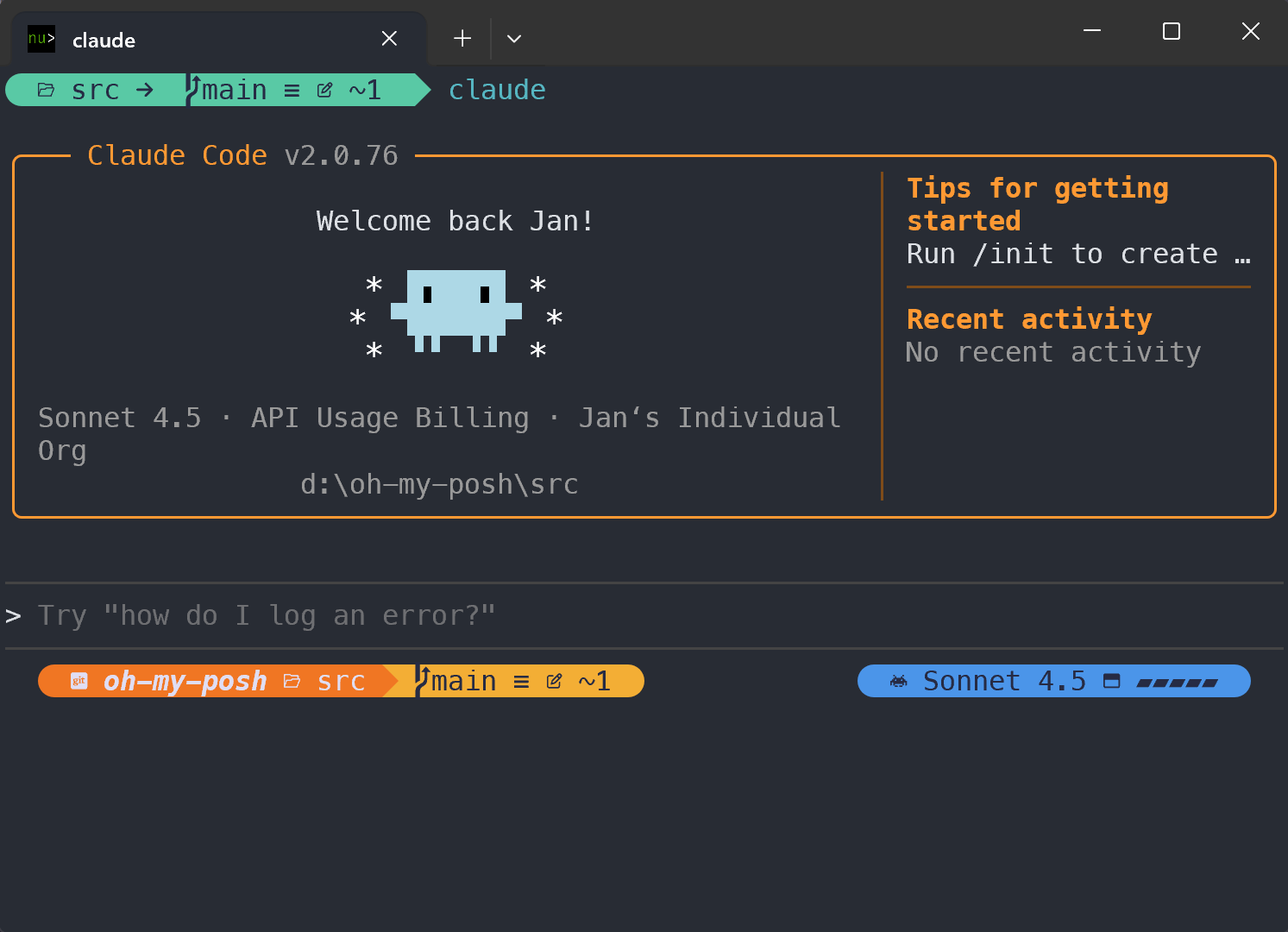
        <content type="html"><![CDATA[<p>Terminal customization just got a lot smarter. Oh My Posh now integrates with <a href="https://code.claude.com/" target="_blank" rel="noopener noreferrer" class="">Claude Code</a>
through its <a href="https://code.claude.com/docs/en/statusline" target="_blank" rel="noopener noreferrer" class=""><code>statusline</code> functionality</a>, bringing real-time AI session
information  and development context directly into your Claude Code prompt.
This isn't just another segment: it's a bridge between your
development workflow and AI-powered coding assistance.</p>
<p><img decoding="async" loading="lazy" alt="Claude Code" src="https://ohmyposh.dev/assets/images/claude-8f954368db7f46df551b3ca53db29a47.png" width="1493" height="1080" class="img_ev3q"></p>
<h2 class="anchor anchorTargetStickyNavbar_Vzrq" id="what-is-claude-codes-statusline">What is Claude Code's statusline?<a href="https://ohmyposh.dev/blog/oh-my-posh-claude-code-integration#what-is-claude-codes-statusline" class="hash-link" aria-label="Direct link to What is Claude Code's statusline?" title="Direct link to What is Claude Code's statusline?" translate="no">​</a></h2>
<p>Claude Code's <code>statusline</code> feature allows you to create custom status displays that appear at the bottom of
the Claude Code interface, similar to how terminal prompts work in shells. The <code>statusline</code> receives rich JSON
data about your current AI session via stdin, including:</p>
<ul>
<li class=""><strong>Model information</strong>: Which Claude model you're using (Claude Sonnet, Claude Opus, etc.)</li>
<li class=""><strong>Token usage</strong>: Input/output tokens, context window utilization, and usage percentages</li>
<li class=""><strong>Cost tracking</strong>: Real-time cost calculations and session duration</li>
<li class=""><strong>Workspace context</strong>: Current and project directories</li>
<li class=""><strong>Session metadata</strong>: Unique session IDs and version information</li>
</ul>
<p>The <code>statusline</code> updates automatically when conversation messages change (throttled to every 300ms max), and
your command's stdout becomes the status display with full ANSI color support.</p>
<h3 class="anchor anchorTargetStickyNavbar_Vzrq" id="setting-up-the-integration">Setting Up the Integration<a href="https://ohmyposh.dev/blog/oh-my-posh-claude-code-integration#setting-up-the-integration" class="hash-link" aria-label="Direct link to Setting Up the Integration" title="Direct link to Setting Up the Integration" translate="no">​</a></h3>
<p>Configuration is straightforward. Add this to your Claude Code settings:</p>
<div class="language-json codeBlockContainer_Ckt0 theme-code-block" style="--prism-color:#bfc7d5;--prism-background-color:#292d3e"><div class="codeBlockTitle_OeMC">~/.claude/settings.json</div><div class="codeBlockContent_QJqH"><pre tabindex="0" class="prism-code language-json codeBlock_bY9V thin-scrollbar" style="color:#bfc7d5;background-color:#292d3e"><code class="codeBlockLines_e6Vv"><div class="token-line" style="color:#bfc7d5"><span class="token punctuation" style="color:rgb(199, 146, 234)">{</span><span class="token plain"></span><br></div><div class="token-line" style="color:#bfc7d5"><span class="token plain">  </span><span class="token property">"statusLine"</span><span class="token operator" style="color:rgb(137, 221, 255)">:</span><span class="token plain"> </span><span class="token punctuation" style="color:rgb(199, 146, 234)">{</span><span class="token plain"></span><br></div><div class="token-line" style="color:#bfc7d5"><span class="token plain">    </span><span class="token property">"type"</span><span class="token operator" style="color:rgb(137, 221, 255)">:</span><span class="token plain"> </span><span class="token string" style="color:rgb(195, 232, 141)">"command"</span><span class="token punctuation" style="color:rgb(199, 146, 234)">,</span><span class="token plain"></span><br></div><div class="token-line" style="color:#bfc7d5"><span class="token plain">    </span><span class="token property">"command"</span><span class="token operator" style="color:rgb(137, 221, 255)">:</span><span class="token plain"> </span><span class="token string" style="color:rgb(195, 232, 141)">"oh-my-posh claude"</span><span class="token punctuation" style="color:rgb(199, 146, 234)">,</span><span class="token plain"></span><br></div><div class="token-line" style="color:#bfc7d5"><span class="token plain">    </span><span class="token property">"padding"</span><span class="token operator" style="color:rgb(137, 221, 255)">:</span><span class="token plain"> </span><span class="token number" style="color:rgb(247, 140, 108)">0</span><span class="token plain"></span><br></div><div class="token-line" style="color:#bfc7d5"><span class="token plain">  </span><span class="token punctuation" style="color:rgb(199, 146, 234)">}</span><span class="token plain"></span><br></div><div class="token-line" style="color:#bfc7d5"><span class="token plain"></span><span class="token punctuation" style="color:rgb(199, 146, 234)">}</span><br></div></code></pre></div></div>
<p>That's it! Oh My Posh will automatically detect when Claude Code provides session data and display the
relevant information in your prompt.</p>
<p>It's important to note that the <code>claude</code> CLI command operates differently from your regular prompt
configuration. When used as a <code>statusline</code> command, Oh My Posh runs in a special mode that's completely separate
from your standard terminal prompt. This means you'll likely want to create a dedicated, minimal configuration
specifically for Claude Code that focuses on displaying AI session information rather than your usual prompt
elements.</p>
<h3 class="anchor anchorTargetStickyNavbar_Vzrq" id="custom-configuration">Custom configuration<a href="https://ohmyposh.dev/blog/oh-my-posh-claude-code-integration#custom-configuration" class="hash-link" aria-label="Direct link to Custom configuration" title="Direct link to Custom configuration" translate="no">​</a></h3>
<p>By default, the <code>oh-my-posh claude</code> command provides a built-in <code>statusline</code> that shows your current working
directory, git context, active model name, and context window usage as a visual gauge. To customize this
display, use the <code>--config</code> flag to specify your own theme configuration file that includes a custom claude
segment tailored to your preferences.</p>
<div class="language-json codeBlockContainer_Ckt0 theme-code-block" style="--prism-color:#bfc7d5;--prism-background-color:#292d3e"><div class="codeBlockTitle_OeMC">~/.claude/settings.json</div><div class="codeBlockContent_QJqH"><pre tabindex="0" class="prism-code language-json codeBlock_bY9V thin-scrollbar" style="color:#bfc7d5;background-color:#292d3e"><code class="codeBlockLines_e6Vv"><div class="token-line" style="color:#bfc7d5"><span class="token punctuation" style="color:rgb(199, 146, 234)">{</span><span class="token plain"></span><br></div><div class="token-line" style="color:#bfc7d5"><span class="token plain">  </span><span class="token property">"statusLine"</span><span class="token operator" style="color:rgb(137, 221, 255)">:</span><span class="token plain"> </span><span class="token punctuation" style="color:rgb(199, 146, 234)">{</span><span class="token plain"></span><br></div><div class="token-line" style="color:#bfc7d5"><span class="token plain">    </span><span class="token property">"type"</span><span class="token operator" style="color:rgb(137, 221, 255)">:</span><span class="token plain"> </span><span class="token string" style="color:rgb(195, 232, 141)">"command"</span><span class="token punctuation" style="color:rgb(199, 146, 234)">,</span><span class="token plain"></span><br></div><div class="token-line" style="color:#bfc7d5"><span class="token plain">    </span><span class="token property">"command"</span><span class="token operator" style="color:rgb(137, 221, 255)">:</span><span class="token plain"> </span><span class="token string" style="color:rgb(195, 232, 141)">"oh-my-posh claude --config ~/.claude.omp.json"</span><span class="token punctuation" style="color:rgb(199, 146, 234)">,</span><span class="token plain"></span><br></div><div class="token-line" style="color:#bfc7d5"><span class="token plain">    </span><span class="token property">"padding"</span><span class="token operator" style="color:rgb(137, 221, 255)">:</span><span class="token plain"> </span><span class="token number" style="color:rgb(247, 140, 108)">0</span><span class="token plain"></span><br></div><div class="token-line" style="color:#bfc7d5"><span class="token plain">  </span><span class="token punctuation" style="color:rgb(199, 146, 234)">}</span><span class="token plain"></span><br></div><div class="token-line" style="color:#bfc7d5"><span class="token plain"></span><span class="token punctuation" style="color:rgb(199, 146, 234)">}</span><br></div></code></pre></div></div>
<p>Just make sure the configuration also leverages the data available in the <code>claude</code> segment to visualize the stats you
care about. As this isn't like a regular prompt integration, keep the <code>statusline</code> a single line and use left and right
aligned prompt blocks to play with.</p>
<div class="language-json codeBlockContainer_Ckt0 theme-code-block" style="--prism-color:#bfc7d5;--prism-background-color:#292d3e"><div class="codeBlockTitle_OeMC">~/.claude.omp.json</div><div class="codeBlockContent_QJqH"><pre tabindex="0" class="prism-code language-json codeBlock_bY9V thin-scrollbar" style="color:#bfc7d5;background-color:#292d3e"><code class="codeBlockLines_e6Vv"><div class="token-line" style="color:#bfc7d5"><span class="token punctuation" style="color:rgb(199, 146, 234)">{</span><span class="token plain"></span><br></div><div class="token-line" style="color:#bfc7d5"><span class="token plain">  </span><span class="token property">"$schema"</span><span class="token operator" style="color:rgb(137, 221, 255)">:</span><span class="token plain"> </span><span class="token string" style="color:rgb(195, 232, 141)">"https://raw.githubusercontent.com/JanDeDobbeleer/oh-my-posh/main/themes/schema.json"</span><span class="token punctuation" style="color:rgb(199, 146, 234)">,</span><span class="token plain"></span><br></div><div class="token-line" style="color:#bfc7d5"><span class="token plain">  </span><span class="token property">"palette"</span><span class="token operator" style="color:rgb(137, 221, 255)">:</span><span class="token plain"> </span><span class="token punctuation" style="color:rgb(199, 146, 234)">{</span><span class="token plain"></span><br></div><div class="token-line" style="color:#bfc7d5"><span class="token plain">    </span><span class="token property">"black"</span><span class="token operator" style="color:rgb(137, 221, 255)">:</span><span class="token plain"> </span><span class="token string" style="color:rgb(195, 232, 141)">"#262B44"</span><span class="token punctuation" style="color:rgb(199, 146, 234)">,</span><span class="token plain"></span><br></div><div class="token-line" style="color:#bfc7d5"><span class="token plain">    </span><span class="token property">"blue"</span><span class="token operator" style="color:rgb(137, 221, 255)">:</span><span class="token plain"> </span><span class="token string" style="color:rgb(195, 232, 141)">"#4B95E9"</span><span class="token punctuation" style="color:rgb(199, 146, 234)">,</span><span class="token plain"></span><br></div><div class="token-line" style="color:#bfc7d5"><span class="token plain">    </span><span class="token property">"green"</span><span class="token operator" style="color:rgb(137, 221, 255)">:</span><span class="token plain"> </span><span class="token string" style="color:rgb(195, 232, 141)">"#59C9A5"</span><span class="token punctuation" style="color:rgb(199, 146, 234)">,</span><span class="token plain"></span><br></div><div class="token-line" style="color:#bfc7d5"><span class="token plain">    </span><span class="token property">"orange"</span><span class="token operator" style="color:rgb(137, 221, 255)">:</span><span class="token plain"> </span><span class="token string" style="color:rgb(195, 232, 141)">"#F07623"</span><span class="token punctuation" style="color:rgb(199, 146, 234)">,</span><span class="token plain"></span><br></div><div class="token-line" style="color:#bfc7d5"><span class="token plain">    </span><span class="token property">"red"</span><span class="token operator" style="color:rgb(137, 221, 255)">:</span><span class="token plain"> </span><span class="token string" style="color:rgb(195, 232, 141)">"#D81E5B"</span><span class="token punctuation" style="color:rgb(199, 146, 234)">,</span><span class="token plain"></span><br></div><div class="token-line" style="color:#bfc7d5"><span class="token plain">    </span><span class="token property">"sapling"</span><span class="token operator" style="color:rgb(137, 221, 255)">:</span><span class="token plain"> </span><span class="token string" style="color:rgb(195, 232, 141)">"#a6d189"</span><span class="token punctuation" style="color:rgb(199, 146, 234)">,</span><span class="token plain"></span><br></div><div class="token-line" style="color:#bfc7d5"><span class="token plain">    </span><span class="token property">"white"</span><span class="token operator" style="color:rgb(137, 221, 255)">:</span><span class="token plain"> </span><span class="token string" style="color:rgb(195, 232, 141)">"#E0DEF4"</span><span class="token punctuation" style="color:rgb(199, 146, 234)">,</span><span class="token plain"></span><br></div><div class="token-line" style="color:#bfc7d5"><span class="token plain">    </span><span class="token property">"yellow"</span><span class="token operator" style="color:rgb(137, 221, 255)">:</span><span class="token plain"> </span><span class="token string" style="color:rgb(195, 232, 141)">"#F3AE35"</span><span class="token plain"></span><br></div><div class="token-line" style="color:#bfc7d5"><span class="token plain">  </span><span class="token punctuation" style="color:rgb(199, 146, 234)">}</span><span class="token punctuation" style="color:rgb(199, 146, 234)">,</span><span class="token plain"></span><br></div><div class="token-line" style="color:#bfc7d5"><span class="token plain">  </span><span class="token property">"accent_color"</span><span class="token operator" style="color:rgb(137, 221, 255)">:</span><span class="token plain"> </span><span class="token string" style="color:rgb(195, 232, 141)">"32"</span><span class="token punctuation" style="color:rgb(199, 146, 234)">,</span><span class="token plain"></span><br></div><div class="token-line" style="color:#bfc7d5"><span class="token plain">  </span><span class="token property">"blocks"</span><span class="token operator" style="color:rgb(137, 221, 255)">:</span><span class="token plain"> </span><span class="token punctuation" style="color:rgb(199, 146, 234)">[</span><span class="token plain"></span><br></div><div class="token-line" style="color:#bfc7d5"><span class="token plain">    </span><span class="token punctuation" style="color:rgb(199, 146, 234)">{</span><span class="token plain"></span><br></div><div class="token-line" style="color:#bfc7d5"><span class="token plain">      </span><span class="token property">"type"</span><span class="token operator" style="color:rgb(137, 221, 255)">:</span><span class="token plain"> </span><span class="token string" style="color:rgb(195, 232, 141)">"prompt"</span><span class="token punctuation" style="color:rgb(199, 146, 234)">,</span><span class="token plain"></span><br></div><div class="token-line" style="color:#bfc7d5"><span class="token plain">      </span><span class="token property">"alignment"</span><span class="token operator" style="color:rgb(137, 221, 255)">:</span><span class="token plain"> </span><span class="token string" style="color:rgb(195, 232, 141)">"left"</span><span class="token punctuation" style="color:rgb(199, 146, 234)">,</span><span class="token plain"></span><br></div><div class="token-line" style="color:#bfc7d5"><span class="token plain">      </span><span class="token property">"segments"</span><span class="token operator" style="color:rgb(137, 221, 255)">:</span><span class="token plain"> </span><span class="token punctuation" style="color:rgb(199, 146, 234)">[</span><span class="token plain"></span><br></div><div class="token-line" style="color:#bfc7d5"><span class="token plain">        </span><span class="token punctuation" style="color:rgb(199, 146, 234)">{</span><span class="token plain"></span><br></div><div class="token-line" style="color:#bfc7d5"><span class="token plain">          </span><span class="token property">"options"</span><span class="token operator" style="color:rgb(137, 221, 255)">:</span><span class="token plain"> </span><span class="token punctuation" style="color:rgb(199, 146, 234)">{</span><span class="token plain"></span><br></div><div class="token-line" style="color:#bfc7d5"><span class="token plain">            </span><span class="token property">"dir_length"</span><span class="token operator" style="color:rgb(137, 221, 255)">:</span><span class="token plain"> </span><span class="token number" style="color:rgb(247, 140, 108)">3</span><span class="token punctuation" style="color:rgb(199, 146, 234)">,</span><span class="token plain"></span><br></div><div class="token-line" style="color:#bfc7d5"><span class="token plain">            </span><span class="token property">"folder_separator_icon"</span><span class="token operator" style="color:rgb(137, 221, 255)">:</span><span class="token plain"> </span><span class="token string" style="color:rgb(195, 232, 141)">"\ue0bb"</span><span class="token punctuation" style="color:rgb(199, 146, 234)">,</span><span class="token plain"></span><br></div><div class="token-line" style="color:#bfc7d5"><span class="token plain">            </span><span class="token property">"style"</span><span class="token operator" style="color:rgb(137, 221, 255)">:</span><span class="token plain"> </span><span class="token string" style="color:rgb(195, 232, 141)">"fish"</span><span class="token plain"></span><br></div><div class="token-line" style="color:#bfc7d5"><span class="token plain">          </span><span class="token punctuation" style="color:rgb(199, 146, 234)">}</span><span class="token punctuation" style="color:rgb(199, 146, 234)">,</span><span class="token plain"></span><br></div><div class="token-line" style="color:#bfc7d5"><span class="token plain">          </span><span class="token property">"template"</span><span class="token operator" style="color:rgb(137, 221, 255)">:</span><span class="token plain"> </span><span class="token string" style="color:rgb(195, 232, 141)">"{{ if .Segments.Git.Dir }} \uf1d2 &lt;i&gt;&lt;b&gt;{{ .Segments.Git.RepoName }}{{ if .Segments.Git.IsWorkTree }} \ue21c{{ end }}&lt;/b&gt;&lt;/i&gt;{{ $rel :=  .Segments.Git.RelativeDir }}{{ if $rel }} \ueaf7 {{ .Format $rel }}{{ end }}{{ else }} \uea83 {{ path .Path .Location }}{{ end }} "</span><span class="token punctuation" style="color:rgb(199, 146, 234)">,</span><span class="token plain"></span><br></div><div class="token-line" style="color:#bfc7d5"><span class="token plain">          </span><span class="token property">"foreground"</span><span class="token operator" style="color:rgb(137, 221, 255)">:</span><span class="token plain"> </span><span class="token string" style="color:rgb(195, 232, 141)">"p:white"</span><span class="token punctuation" style="color:rgb(199, 146, 234)">,</span><span class="token plain"></span><br></div><div class="token-line" style="color:#bfc7d5"><span class="token plain">          </span><span class="token property">"leading_diamond"</span><span class="token operator" style="color:rgb(137, 221, 255)">:</span><span class="token plain"> </span><span class="token string" style="color:rgb(195, 232, 141)">"\ue0b6"</span><span class="token punctuation" style="color:rgb(199, 146, 234)">,</span><span class="token plain"></span><br></div><div class="token-line" style="color:#bfc7d5"><span class="token plain">          </span><span class="token property">"background"</span><span class="token operator" style="color:rgb(137, 221, 255)">:</span><span class="token plain"> </span><span class="token string" style="color:rgb(195, 232, 141)">"p:orange"</span><span class="token punctuation" style="color:rgb(199, 146, 234)">,</span><span class="token plain"></span><br></div><div class="token-line" style="color:#bfc7d5"><span class="token plain">          </span><span class="token property">"type"</span><span class="token operator" style="color:rgb(137, 221, 255)">:</span><span class="token plain"> </span><span class="token string" style="color:rgb(195, 232, 141)">"path"</span><span class="token punctuation" style="color:rgb(199, 146, 234)">,</span><span class="token plain"></span><br></div><div class="token-line" style="color:#bfc7d5"><span class="token plain">          </span><span class="token property">"style"</span><span class="token operator" style="color:rgb(137, 221, 255)">:</span><span class="token plain"> </span><span class="token string" style="color:rgb(195, 232, 141)">"diamond"</span><span class="token plain"></span><br></div><div class="token-line" style="color:#bfc7d5"><span class="token plain">        </span><span class="token punctuation" style="color:rgb(199, 146, 234)">}</span><span class="token punctuation" style="color:rgb(199, 146, 234)">,</span><span class="token plain"></span><br></div><div class="token-line" style="color:#bfc7d5"><span class="token plain">        </span><span class="token punctuation" style="color:rgb(199, 146, 234)">{</span><span class="token plain"></span><br></div><div class="token-line" style="color:#bfc7d5"><span class="token plain">          </span><span class="token property">"options"</span><span class="token operator" style="color:rgb(137, 221, 255)">:</span><span class="token plain"> </span><span class="token punctuation" style="color:rgb(199, 146, 234)">{</span><span class="token plain"></span><br></div><div class="token-line" style="color:#bfc7d5"><span class="token plain">            </span><span class="token property">"branch_icon"</span><span class="token operator" style="color:rgb(137, 221, 255)">:</span><span class="token plain"> </span><span class="token string" style="color:rgb(195, 232, 141)">"\ue0a0"</span><span class="token punctuation" style="color:rgb(199, 146, 234)">,</span><span class="token plain"></span><br></div><div class="token-line" style="color:#bfc7d5"><span class="token plain">            </span><span class="token property">"fetch_status"</span><span class="token operator" style="color:rgb(137, 221, 255)">:</span><span class="token plain"> </span><span class="token boolean" style="color:rgb(255, 88, 116)">true</span><span class="token plain"></span><br></div><div class="token-line" style="color:#bfc7d5"><span class="token plain">          </span><span class="token punctuation" style="color:rgb(199, 146, 234)">}</span><span class="token punctuation" style="color:rgb(199, 146, 234)">,</span><span class="token plain"></span><br></div><div class="token-line" style="color:#bfc7d5"><span class="token plain">          </span><span class="token property">"template"</span><span class="token operator" style="color:rgb(137, 221, 255)">:</span><span class="token plain"> </span><span class="token string" style="color:rgb(195, 232, 141)">" {{ if .UpstreamURL }}{{ url .UpstreamIcon .UpstreamURL }} {{ end }}{{ .HEAD }}{{if .BranchStatus }} {{ .BranchStatus }}{{ end }}{{ if .Working.Changed }} \uf044 {{ nospace .Working.String }}{{ end }}{{ if .Staging.Changed }} \uf046 {{ .Staging.String }}{{ end }} "</span><span class="token punctuation" style="color:rgb(199, 146, 234)">,</span><span class="token plain"></span><br></div><div class="token-line" style="color:#bfc7d5"><span class="token plain">          </span><span class="token property">"foreground"</span><span class="token operator" style="color:rgb(137, 221, 255)">:</span><span class="token plain"> </span><span class="token string" style="color:rgb(195, 232, 141)">"p:black"</span><span class="token punctuation" style="color:rgb(199, 146, 234)">,</span><span class="token plain"></span><br></div><div class="token-line" style="color:#bfc7d5"><span class="token plain">          </span><span class="token property">"leading_diamond"</span><span class="token operator" style="color:rgb(137, 221, 255)">:</span><span class="token plain"> </span><span class="token string" style="color:rgb(195, 232, 141)">"&lt;parentBackground,background&gt;\ue0b0&lt;/&gt;"</span><span class="token punctuation" style="color:rgb(199, 146, 234)">,</span><span class="token plain"></span><br></div><div class="token-line" style="color:#bfc7d5"><span class="token plain">          </span><span class="token property">"trailing_diamond"</span><span class="token operator" style="color:rgb(137, 221, 255)">:</span><span class="token plain"> </span><span class="token string" style="color:rgb(195, 232, 141)">"\ue0b4"</span><span class="token punctuation" style="color:rgb(199, 146, 234)">,</span><span class="token plain"></span><br></div><div class="token-line" style="color:#bfc7d5"><span class="token plain">          </span><span class="token property">"background"</span><span class="token operator" style="color:rgb(137, 221, 255)">:</span><span class="token plain"> </span><span class="token string" style="color:rgb(195, 232, 141)">"p:green"</span><span class="token punctuation" style="color:rgb(199, 146, 234)">,</span><span class="token plain"></span><br></div><div class="token-line" style="color:#bfc7d5"><span class="token plain">          </span><span class="token property">"type"</span><span class="token operator" style="color:rgb(137, 221, 255)">:</span><span class="token plain"> </span><span class="token string" style="color:rgb(195, 232, 141)">"git"</span><span class="token punctuation" style="color:rgb(199, 146, 234)">,</span><span class="token plain"></span><br></div><div class="token-line" style="color:#bfc7d5"><span class="token plain">          </span><span class="token property">"style"</span><span class="token operator" style="color:rgb(137, 221, 255)">:</span><span class="token plain"> </span><span class="token string" style="color:rgb(195, 232, 141)">"diamond"</span><span class="token punctuation" style="color:rgb(199, 146, 234)">,</span><span class="token plain"></span><br></div><div class="token-line" style="color:#bfc7d5"><span class="token plain">          </span><span class="token property">"foreground_templates"</span><span class="token operator" style="color:rgb(137, 221, 255)">:</span><span class="token plain"> </span><span class="token punctuation" style="color:rgb(199, 146, 234)">[</span><span class="token plain"></span><br></div><div class="token-line" style="color:#bfc7d5"><span class="token plain">            </span><span class="token string" style="color:rgb(195, 232, 141)">"{{ if or (.Working.Changed) (.Staging.Changed) }}p:black{{ end }}"</span><span class="token punctuation" style="color:rgb(199, 146, 234)">,</span><span class="token plain"></span><br></div><div class="token-line" style="color:#bfc7d5"><span class="token plain">            </span><span class="token string" style="color:rgb(195, 232, 141)">"{{ if or (gt .Ahead 0) (gt .Behind 0) }}p:white{{ end }}"</span><span class="token plain"></span><br></div><div class="token-line" style="color:#bfc7d5"><span class="token plain">          </span><span class="token punctuation" style="color:rgb(199, 146, 234)">]</span><span class="token punctuation" style="color:rgb(199, 146, 234)">,</span><span class="token plain"></span><br></div><div class="token-line" style="color:#bfc7d5"><span class="token plain">          </span><span class="token property">"background_templates"</span><span class="token operator" style="color:rgb(137, 221, 255)">:</span><span class="token plain"> </span><span class="token punctuation" style="color:rgb(199, 146, 234)">[</span><span class="token plain"></span><br></div><div class="token-line" style="color:#bfc7d5"><span class="token plain">            </span><span class="token string" style="color:rgb(195, 232, 141)">"{{ if or (.Working.Changed) (.Staging.Changed) }}p:yellow{{ end }}"</span><span class="token punctuation" style="color:rgb(199, 146, 234)">,</span><span class="token plain"></span><br></div><div class="token-line" style="color:#bfc7d5"><span class="token plain">            </span><span class="token string" style="color:rgb(195, 232, 141)">"{{ if and (gt .Ahead 0) (gt .Behind 0) }}p:red{{ end }}"</span><span class="token punctuation" style="color:rgb(199, 146, 234)">,</span><span class="token plain"></span><br></div><div class="token-line" style="color:#bfc7d5"><span class="token plain">            </span><span class="token string" style="color:rgb(195, 232, 141)">"{{ if gt .Ahead 0 }}#49416D{{ end }}"</span><span class="token punctuation" style="color:rgb(199, 146, 234)">,</span><span class="token plain"></span><br></div><div class="token-line" style="color:#bfc7d5"><span class="token plain">            </span><span class="token string" style="color:rgb(195, 232, 141)">"{{ if gt .Behind 0 }}#7A306C{{ end }}"</span><span class="token plain"></span><br></div><div class="token-line" style="color:#bfc7d5"><span class="token plain">          </span><span class="token punctuation" style="color:rgb(199, 146, 234)">]</span><span class="token plain"></span><br></div><div class="token-line" style="color:#bfc7d5"><span class="token plain">        </span><span class="token punctuation" style="color:rgb(199, 146, 234)">}</span><span class="token plain"></span><br></div><div class="token-line" style="color:#bfc7d5"><span class="token plain">      </span><span class="token punctuation" style="color:rgb(199, 146, 234)">]</span><span class="token plain"></span><br></div><div class="token-line" style="color:#bfc7d5"><span class="token plain">    </span><span class="token punctuation" style="color:rgb(199, 146, 234)">}</span><span class="token punctuation" style="color:rgb(199, 146, 234)">,</span><span class="token plain"></span><br></div><div class="token-line" style="color:#bfc7d5"><span class="token plain">    </span><span class="token punctuation" style="color:rgb(199, 146, 234)">{</span><span class="token plain"></span><br></div><div class="token-line" style="color:#bfc7d5"><span class="token plain">      </span><span class="token property">"type"</span><span class="token operator" style="color:rgb(137, 221, 255)">:</span><span class="token plain"> </span><span class="token string" style="color:rgb(195, 232, 141)">"prompt"</span><span class="token punctuation" style="color:rgb(199, 146, 234)">,</span><span class="token plain"></span><br></div><div class="token-line" style="color:#bfc7d5"><span class="token plain">      </span><span class="token property">"alignment"</span><span class="token operator" style="color:rgb(137, 221, 255)">:</span><span class="token plain"> </span><span class="token string" style="color:rgb(195, 232, 141)">"right"</span><span class="token punctuation" style="color:rgb(199, 146, 234)">,</span><span class="token plain"></span><br></div><div class="token-line" style="color:#bfc7d5"><span class="token plain">      </span><span class="token property">"segments"</span><span class="token operator" style="color:rgb(137, 221, 255)">:</span><span class="token plain"> </span><span class="token punctuation" style="color:rgb(199, 146, 234)">[</span><span class="token plain"></span><br></div><div class="token-line" style="color:#bfc7d5"><span class="token plain">        </span><span class="token punctuation" style="color:rgb(199, 146, 234)">{</span><span class="token plain"></span><br></div><div class="token-line" style="color:#bfc7d5"><span class="token plain">          </span><span class="token property">"leading_diamond"</span><span class="token operator" style="color:rgb(137, 221, 255)">:</span><span class="token plain"> </span><span class="token string" style="color:rgb(195, 232, 141)">"\ue0b6"</span><span class="token punctuation" style="color:rgb(199, 146, 234)">,</span><span class="token plain"></span><br></div><div class="token-line" style="color:#bfc7d5"><span class="token plain">          </span><span class="token property">"template"</span><span class="token operator" style="color:rgb(137, 221, 255)">:</span><span class="token plain"> </span><span class="token string" style="color:rgb(195, 232, 141)">" \udb82\udfc9 {{ .Model.DisplayName }} \uf2d0 {{ .TokenUsagePercent.GaugeUsed }} "</span><span class="token punctuation" style="color:rgb(199, 146, 234)">,</span><span class="token plain"></span><br></div><div class="token-line" style="color:#bfc7d5"><span class="token plain">          </span><span class="token property">"foreground"</span><span class="token operator" style="color:rgb(137, 221, 255)">:</span><span class="token plain"> </span><span class="token string" style="color:rgb(195, 232, 141)">"p:white"</span><span class="token punctuation" style="color:rgb(199, 146, 234)">,</span><span class="token plain"></span><br></div><div class="token-line" style="color:#bfc7d5"><span class="token plain">          </span><span class="token property">"background"</span><span class="token operator" style="color:rgb(137, 221, 255)">:</span><span class="token plain"> </span><span class="token string" style="color:rgb(195, 232, 141)">"accent"</span><span class="token punctuation" style="color:rgb(199, 146, 234)">,</span><span class="token plain"></span><br></div><div class="token-line" style="color:#bfc7d5"><span class="token plain">          </span><span class="token property">"type"</span><span class="token operator" style="color:rgb(137, 221, 255)">:</span><span class="token plain"> </span><span class="token string" style="color:rgb(195, 232, 141)">"claude"</span><span class="token punctuation" style="color:rgb(199, 146, 234)">,</span><span class="token plain"></span><br></div><div class="token-line" style="color:#bfc7d5"><span class="token plain">          </span><span class="token property">"style"</span><span class="token operator" style="color:rgb(137, 221, 255)">:</span><span class="token plain"> </span><span class="token string" style="color:rgb(195, 232, 141)">"diamond"</span><span class="token plain"></span><br></div><div class="token-line" style="color:#bfc7d5"><span class="token plain">        </span><span class="token punctuation" style="color:rgb(199, 146, 234)">}</span><span class="token punctuation" style="color:rgb(199, 146, 234)">,</span><span class="token plain"></span><br></div><div class="token-line" style="color:#bfc7d5"><span class="token plain">        </span><span class="token punctuation" style="color:rgb(199, 146, 234)">{</span><span class="token plain"></span><br></div><div class="token-line" style="color:#bfc7d5"><span class="token plain">          </span><span class="token property">"options"</span><span class="token operator" style="color:rgb(137, 221, 255)">:</span><span class="token plain"> </span><span class="token punctuation" style="color:rgb(199, 146, 234)">{</span><span class="token plain"></span><br></div><div class="token-line" style="color:#bfc7d5"><span class="token plain">            </span><span class="token property">"charged_icon"</span><span class="token operator" style="color:rgb(137, 221, 255)">:</span><span class="token plain"> </span><span class="token string" style="color:rgb(195, 232, 141)">"\ue22f "</span><span class="token punctuation" style="color:rgb(199, 146, 234)">,</span><span class="token plain"></span><br></div><div class="token-line" style="color:#bfc7d5"><span class="token plain">            </span><span class="token property">"charging_icon"</span><span class="token operator" style="color:rgb(137, 221, 255)">:</span><span class="token plain"> </span><span class="token string" style="color:rgb(195, 232, 141)">"\ue234 "</span><span class="token punctuation" style="color:rgb(199, 146, 234)">,</span><span class="token plain"></span><br></div><div class="token-line" style="color:#bfc7d5"><span class="token plain">            </span><span class="token property">"discharging_icon"</span><span class="token operator" style="color:rgb(137, 221, 255)">:</span><span class="token plain"> </span><span class="token string" style="color:rgb(195, 232, 141)">"\ue231 "</span><span class="token plain"></span><br></div><div class="token-line" style="color:#bfc7d5"><span class="token plain">          </span><span class="token punctuation" style="color:rgb(199, 146, 234)">}</span><span class="token punctuation" style="color:rgb(199, 146, 234)">,</span><span class="token plain"></span><br></div><div class="token-line" style="color:#bfc7d5"><span class="token plain">          </span><span class="token property">"cache"</span><span class="token operator" style="color:rgb(137, 221, 255)">:</span><span class="token plain"> </span><span class="token punctuation" style="color:rgb(199, 146, 234)">{</span><span class="token plain"></span><br></div><div class="token-line" style="color:#bfc7d5"><span class="token plain">            </span><span class="token property">"duration"</span><span class="token operator" style="color:rgb(137, 221, 255)">:</span><span class="token plain"> </span><span class="token string" style="color:rgb(195, 232, 141)">"10m"</span><span class="token punctuation" style="color:rgb(199, 146, 234)">,</span><span class="token plain"></span><br></div><div class="token-line" style="color:#bfc7d5"><span class="token plain">            </span><span class="token property">"strategy"</span><span class="token operator" style="color:rgb(137, 221, 255)">:</span><span class="token plain"> </span><span class="token string" style="color:rgb(195, 232, 141)">"session"</span><span class="token plain"></span><br></div><div class="token-line" style="color:#bfc7d5"><span class="token plain">          </span><span class="token punctuation" style="color:rgb(199, 146, 234)">}</span><span class="token punctuation" style="color:rgb(199, 146, 234)">,</span><span class="token plain"></span><br></div><div class="token-line" style="color:#bfc7d5"><span class="token plain">          </span><span class="token property">"leading_diamond"</span><span class="token operator" style="color:rgb(137, 221, 255)">:</span><span class="token plain"> </span><span class="token string" style="color:rgb(195, 232, 141)">"&lt;background,parentBackground&gt;\ue0b2&lt;/&gt;"</span><span class="token punctuation" style="color:rgb(199, 146, 234)">,</span><span class="token plain"></span><br></div><div class="token-line" style="color:#bfc7d5"><span class="token plain">          </span><span class="token property">"trailing_diamond"</span><span class="token operator" style="color:rgb(137, 221, 255)">:</span><span class="token plain"> </span><span class="token string" style="color:rgb(195, 232, 141)">"\ue0b4"</span><span class="token punctuation" style="color:rgb(199, 146, 234)">,</span><span class="token plain"></span><br></div><div class="token-line" style="color:#bfc7d5"><span class="token plain">          </span><span class="token property">"template"</span><span class="token operator" style="color:rgb(137, 221, 255)">:</span><span class="token plain"> </span><span class="token string" style="color:rgb(195, 232, 141)">"{{ if not .Error }} {{ .Icon }}{{ .Percentage }}%{{ end }}"</span><span class="token punctuation" style="color:rgb(199, 146, 234)">,</span><span class="token plain"></span><br></div><div class="token-line" style="color:#bfc7d5"><span class="token plain">          </span><span class="token property">"foreground"</span><span class="token operator" style="color:rgb(137, 221, 255)">:</span><span class="token plain"> </span><span class="token string" style="color:rgb(195, 232, 141)">"#111111"</span><span class="token punctuation" style="color:rgb(199, 146, 234)">,</span><span class="token plain"></span><br></div><div class="token-line" style="color:#bfc7d5"><span class="token plain">          </span><span class="token property">"background"</span><span class="token operator" style="color:rgb(137, 221, 255)">:</span><span class="token plain"> </span><span class="token string" style="color:rgb(195, 232, 141)">"accent"</span><span class="token punctuation" style="color:rgb(199, 146, 234)">,</span><span class="token plain"></span><br></div><div class="token-line" style="color:#bfc7d5"><span class="token plain">          </span><span class="token property">"type"</span><span class="token operator" style="color:rgb(137, 221, 255)">:</span><span class="token plain"> </span><span class="token string" style="color:rgb(195, 232, 141)">"battery"</span><span class="token punctuation" style="color:rgb(199, 146, 234)">,</span><span class="token plain"></span><br></div><div class="token-line" style="color:#bfc7d5"><span class="token plain">          </span><span class="token property">"style"</span><span class="token operator" style="color:rgb(137, 221, 255)">:</span><span class="token plain"> </span><span class="token string" style="color:rgb(195, 232, 141)">"diamond"</span><span class="token punctuation" style="color:rgb(199, 146, 234)">,</span><span class="token plain"></span><br></div><div class="token-line" style="color:#bfc7d5"><span class="token plain">          </span><span class="token property">"background_templates"</span><span class="token operator" style="color:rgb(137, 221, 255)">:</span><span class="token plain"> </span><span class="token punctuation" style="color:rgb(199, 146, 234)">[</span><span class="token plain"></span><br></div><div class="token-line" style="color:#bfc7d5"><span class="token plain">            </span><span class="token string" style="color:rgb(195, 232, 141)">"{{if eq \"Discharging\" .State.String}}p:orange{{end}}"</span><span class="token punctuation" style="color:rgb(199, 146, 234)">,</span><span class="token plain"></span><br></div><div class="token-line" style="color:#bfc7d5"><span class="token plain">            </span><span class="token string" style="color:rgb(195, 232, 141)">"{{if eq \"Full\" .State.String}}p:green{{end}}"</span><span class="token plain"></span><br></div><div class="token-line" style="color:#bfc7d5"><span class="token plain">          </span><span class="token punctuation" style="color:rgb(199, 146, 234)">]</span><span class="token plain"></span><br></div><div class="token-line" style="color:#bfc7d5"><span class="token plain">        </span><span class="token punctuation" style="color:rgb(199, 146, 234)">}</span><span class="token plain"></span><br></div><div class="token-line" style="color:#bfc7d5"><span class="token plain">      </span><span class="token punctuation" style="color:rgb(199, 146, 234)">]</span><span class="token plain"></span><br></div><div class="token-line" style="color:#bfc7d5"><span class="token plain">    </span><span class="token punctuation" style="color:rgb(199, 146, 234)">}</span><span class="token plain"></span><br></div><div class="token-line" style="color:#bfc7d5"><span class="token plain">  </span><span class="token punctuation" style="color:rgb(199, 146, 234)">]</span><span class="token punctuation" style="color:rgb(199, 146, 234)">,</span><span class="token plain"></span><br></div><div class="token-line" style="color:#bfc7d5"><span class="token plain">  </span><span class="token property">"version"</span><span class="token operator" style="color:rgb(137, 221, 255)">:</span><span class="token plain"> </span><span class="token number" style="color:rgb(247, 140, 108)">4</span><span class="token plain"></span><br></div><div class="token-line" style="color:#bfc7d5"><span class="token plain"></span><span class="token punctuation" style="color:rgb(199, 146, 234)">}</span><br></div></code></pre></div></div>
<h2 class="anchor anchorTargetStickyNavbar_Vzrq" id="the-claude-code-segment">The Claude Code segment<a href="https://ohmyposh.dev/blog/oh-my-posh-claude-code-integration#the-claude-code-segment" class="hash-link" aria-label="Direct link to The Claude Code segment" title="Direct link to The Claude Code segment" translate="no">​</a></h2>
<p>Oh My Posh's new <code>claude</code> segment taps into this <code>statusline</code> data to bring AI session awareness directly
into your terminal prompt. When you use the <code>oh-my-posh claude</code> command as your <code>statusline</code> command in Claude
Code, you get access to a wealth of session information that can be displayed in your prompt without needing
to know the technical details.</p>
<h3 class="anchor anchorTargetStickyNavbar_Vzrq" id="example-configuration">Example Configuration<a href="https://ohmyposh.dev/blog/oh-my-posh-claude-code-integration#example-configuration" class="hash-link" aria-label="Direct link to Example Configuration" title="Direct link to Example Configuration" translate="no">​</a></h3>
<p>Here's a sample configuration that shows the model name and context usage:</p>
<div class="language-json codeBlockContainer_Ckt0 theme-code-block" style="--prism-color:#bfc7d5;--prism-background-color:#292d3e"><div class="codeBlockContent_QJqH"><pre tabindex="0" class="prism-code language-json codeBlock_bY9V thin-scrollbar" style="color:#bfc7d5;background-color:#292d3e"><code class="codeBlockLines_e6Vv"><div class="token-line" style="color:#bfc7d5"><span class="token punctuation" style="color:rgb(199, 146, 234)">{</span><span class="token plain"></span><br></div><div class="token-line" style="color:#bfc7d5"><span class="token plain">  </span><span class="token property">"type"</span><span class="token operator" style="color:rgb(137, 221, 255)">:</span><span class="token plain"> </span><span class="token string" style="color:rgb(195, 232, 141)">"claude"</span><span class="token punctuation" style="color:rgb(199, 146, 234)">,</span><span class="token plain"></span><br></div><div class="token-line" style="color:#bfc7d5"><span class="token plain">  </span><span class="token property">"style"</span><span class="token operator" style="color:rgb(137, 221, 255)">:</span><span class="token plain"> </span><span class="token string" style="color:rgb(195, 232, 141)">"diamond"</span><span class="token punctuation" style="color:rgb(199, 146, 234)">,</span><span class="token plain"></span><br></div><div class="token-line" style="color:#bfc7d5"><span class="token plain">  </span><span class="token property">"leading_diamond"</span><span class="token operator" style="color:rgb(137, 221, 255)">:</span><span class="token plain"> </span><span class="token string" style="color:rgb(195, 232, 141)">"\ue0b6"</span><span class="token punctuation" style="color:rgb(199, 146, 234)">,</span><span class="token plain"></span><br></div><div class="token-line" style="color:#bfc7d5"><span class="token plain">  </span><span class="token property">"trailing_diamond"</span><span class="token operator" style="color:rgb(137, 221, 255)">:</span><span class="token plain"> </span><span class="token string" style="color:rgb(195, 232, 141)">"\ue0b4"</span><span class="token punctuation" style="color:rgb(199, 146, 234)">,</span><span class="token plain"></span><br></div><div class="token-line" style="color:#bfc7d5"><span class="token plain">  </span><span class="token property">"foreground"</span><span class="token operator" style="color:rgb(137, 221, 255)">:</span><span class="token plain"> </span><span class="token string" style="color:rgb(195, 232, 141)">"#FFFFFF"</span><span class="token punctuation" style="color:rgb(199, 146, 234)">,</span><span class="token plain"></span><br></div><div class="token-line" style="color:#bfc7d5"><span class="token plain">  </span><span class="token property">"background"</span><span class="token operator" style="color:rgb(137, 221, 255)">:</span><span class="token plain"> </span><span class="token string" style="color:rgb(195, 232, 141)">"#FF6B35"</span><span class="token punctuation" style="color:rgb(199, 146, 234)">,</span><span class="token plain"></span><br></div><div class="token-line" style="color:#bfc7d5"><span class="token plain">  </span><span class="token property">"template"</span><span class="token operator" style="color:rgb(137, 221, 255)">:</span><span class="token plain"> </span><span class="token string" style="color:rgb(195, 232, 141)">" \udb82\udfc9 {{ .Model.DisplayName }} \uf2d0 {{ .TokenUsagePercent.Gauge }} "</span><span class="token plain"></span><br></div><div class="token-line" style="color:#bfc7d5"><span class="token plain"></span><span class="token punctuation" style="color:rgb(199, 146, 234)">}</span><br></div></code></pre></div></div>
<p>This displays something like: <code>🤖 Claude 4.5 Sonnet  ▰▰▰▱▱</code></p>
<p>The gauge provides instant visual feedback on how much of your context window you've consumed, which is
crucial for managing long coding sessions.</p>
<h2 class="anchor anchorTargetStickyNavbar_Vzrq" id="the-technical-details">The Technical Details<a href="https://ohmyposh.dev/blog/oh-my-posh-claude-code-integration#the-technical-details" class="hash-link" aria-label="Direct link to The Technical Details" title="Direct link to The Technical Details" translate="no">​</a></h2>
<p>Under the hood, Oh My Posh reads the rich JSON session data that Claude Code provides via stdin when used
as a <code>statusline</code> command. The segment only activates when Claude Code session data is available, so there's no
performance impact when you're not using Claude Code.</p>
<h2 class="anchor anchorTargetStickyNavbar_Vzrq" id="getting-started">Getting Started<a href="https://ohmyposh.dev/blog/oh-my-posh-claude-code-integration#getting-started" class="hash-link" aria-label="Direct link to Getting Started" title="Direct link to Getting Started" translate="no">​</a></h2>
<p>If you're already using Oh My Posh, adding Claude Code integration is as simple as:</p>
<ol>
<li class="">Install Claude Code if you haven't already</li>
<li class="">Add the <code>statusline</code> configuration to your Claude Code settings</li>
<li class="">Optionally create your own configuration including the <code>claude</code> segment</li>
<li class="">Start a Claude Code session and watch your prompt come alive</li>
</ol>
<p>For detailed configuration options and all available properties, check out the <a href="https://ohmyposh.dev/docs/segments/cli/claude" target="_blank" rel="noopener noreferrer" class="">complete Claude segment documentation</a>.</p>
<h2 class="anchor anchorTargetStickyNavbar_Vzrq" id="whats-next">What's Next?<a href="https://ohmyposh.dev/blog/oh-my-posh-claude-code-integration#whats-next" class="hash-link" aria-label="Direct link to What's Next?" title="Direct link to What's Next?" translate="no">​</a></h2>
<p>This integration opens up exciting possibilities. Imagine prompts that:</p>
<ul>
<li class="">Change color based on token usage percentage</li>
<li class="">Show different icons for different AI models</li>
<li class="">Display cost warnings when sessions get expensive</li>
<li class="">Integrate with any other segment to show additional development context</li>
</ul>
<p>The foundation is there, and now it's up to the community to build amazing configurations that make
AI-powered development even more seamless.</p>]]></content>
        <author>
            <name>Jan De Dobbeleer</name>
            <uri>https://github.com/jandedobbeleer</uri>
        </author>
        <category label="claude" term="claude"/>
        <category label="ai" term="ai"/>
        <category label="terminal" term="terminal"/>
        <category label="prompt" term="prompt"/>
        <category label="statusline" term="statusline"/>
        <category label="integration" term="integration"/>
        <category label="customization" term="customization"/>
    </entry>
    <entry>
        <title type="html"><![CDATA[Deprecating the bash rprompt]]></title>
        <id>https://ohmyposh.dev/blog/deprecating-bash-rprompt</id>
        <link href="https://ohmyposh.dev/blog/deprecating-bash-rprompt"/>
        <updated>2024-07-22T00:00:00.000Z</updated>
        <summary type="html"><![CDATA[Deprecating the bash rprompt]]></summary>
        <content type="html"><![CDATA[<p>After careful consideration, it was decided to remove support for the <a class="" href="https://ohmyposh.dev/docs/configuration/block#type"><code>rprompt</code></a> in bash. If you are
interested in the reasons behind this decision, please read on.</p>
<h2 class="anchor anchorTargetStickyNavbar_Vzrq" id="context">Context<a href="https://ohmyposh.dev/blog/deprecating-bash-rprompt#context" class="hash-link" aria-label="Direct link to Context" title="Direct link to Context" translate="no">​</a></h2>
<p><a class="" href="https://ohmyposh.dev/docs/configuration/block#type"><code>rprompt</code></a> is a feature that allows you to display a prompt at the right side of the terminal, on
the same line as your cursor. This feature is available natively on a lot of shells, but not on bash.
To work around this limitation, Oh My Posh has a <strong>custom implementation</strong> we use for both bash and PowerShell.</p>
<h2 class="anchor anchorTargetStickyNavbar_Vzrq" id="history">History<a href="https://ohmyposh.dev/blog/deprecating-bash-rprompt#history" class="hash-link" aria-label="Direct link to History" title="Direct link to History" translate="no">​</a></h2>
<h3 class="anchor anchorTargetStickyNavbar_Vzrq" id="first-implementation">First implementation<a href="https://ohmyposh.dev/blog/deprecating-bash-rprompt#first-implementation" class="hash-link" aria-label="Direct link to First implementation" title="Direct link to First implementation" translate="no">​</a></h3>
<p>There were two evolutions of bash' custom <a class="" href="https://ohmyposh.dev/docs/configuration/block#type"><code>rprompt</code></a> in Oh My Posh. The first one printed the <a class="" href="https://ohmyposh.dev/docs/configuration/block#type"><code>rprompt</code></a>
together with the primany prompt in the <code>PS1</code> variable, so we only need one CLI call to visualize the prompt.</p>
<p>The challenge is that, as the <a class="" href="https://ohmyposh.dev/docs/configuration/block#type"><code>rprompt</code></a> is printed together with the primary prompt, we need to make sure
bash' readline can interpret the prompt correctly. In bash, every character that isn't a printable character,
like color codes, needs to be wrapped in <code>\[</code> and <code>\]</code>. This is necessary to make sure bash can <strong>calculate the length</strong>
of the prompt and ultimately <strong>position the cursor</strong> correctly.</p>
<p>It turned out that for <a class="" href="https://ohmyposh.dev/docs/configuration/block#type"><code>rprompt</code></a>, this <em>needed to be done differently</em>. The <a class="" href="https://ohmyposh.dev/docs/configuration/block#type"><code>rprompt</code></a> is printed
after what bash interprets as the end of the prompt. We found out that we need to wrap the entire <a class="" href="https://ohmyposh.dev/docs/configuration/block#type"><code>rprompt</code></a> in
<code>\[</code> and <code>\]</code>, and not escape individual non-printable characters.</p>
<p>We did that for a while, but apparently this approach was <strong>not very robust</strong>. It was easy to break readline's
cursor position calculation, and it was hard to debug. The behaviour of this was also different cross platform,
so we had to go back to the drawing board.</p>
<h3 class="anchor anchorTargetStickyNavbar_Vzrq" id="second-implementation">Second implementation<a href="https://ohmyposh.dev/blog/deprecating-bash-rprompt#second-implementation" class="hash-link" aria-label="Direct link to Second implementation" title="Direct link to Second implementation" translate="no">​</a></h3>
<p>The second implementation of the <a class="" href="https://ohmyposh.dev/docs/configuration/block#type"><code>rprompt</code></a> was a lot more robust. We decided to print the <a class="" href="https://ohmyposh.dev/docs/configuration/block#type"><code>rprompt</code></a>
in a separate CLI call, so we could control the output more easily. It leveraged the use of the <code>PROMPT_COMMAND</code>
variable in bash, which is a hook that is executed before the prompt is printed. We would first print the
<a class="" href="https://ohmyposh.dev/docs/configuration/block#type"><code>rprompt</code></a> in the <code>PROMPT_COMMAND</code>,
and then set the primary prompt in the <code>PS1</code> variable so bash would not bother about the <a class="" href="https://ohmyposh.dev/docs/configuration/block#type"><code>rprompt</code></a> being there.</p>
<p>This approach was a lot <strong>cleaner from an achitectural point of view</strong>, but it came with its own challenges.
The most obvious one is needing two CLI calls to print the prompt, which made rendering a bit slower than the first implementation.</p>
<p>Additionally, as we print before <code>PS1</code> is evaluated, we noticed the following issues along the way:</p>
<ol>
<li class="">when the output of the previous command didn't end with a newline, the <a class="" href="https://ohmyposh.dev/docs/configuration/block#type"><code>rprompt</code></a> would be printed on the
same line as the output of the previous command</li>
<li class="">when the prompt was at the bottom of the terminal buffer, the <a class="" href="https://ohmyposh.dev/docs/configuration/block#type"><code>rprompt</code></a> would be printed on the same line
as the prompt, which would break the prompt</li>
<li class="">depending on the platform, it would still break command history navigation</li>
<li class="">it required different logic for multiline prompts as we print before <code>PS1</code> and need to reposition the cursor correctly</li>
</ol>
<p>Of these issues, <strong>only bullet 4 could be fixed</strong>. Everything else was outside of our control.</p>
<h2 class="anchor anchorTargetStickyNavbar_Vzrq" id="conclusion">Conclusion<a href="https://ohmyposh.dev/blog/deprecating-bash-rprompt#conclusion" class="hash-link" aria-label="Direct link to Conclusion" title="Direct link to Conclusion" translate="no">​</a></h2>
<p>Oh My Posh is a tool that needs to be easy to use, maintain and be 100% reliable. One of the core principles of
Oh My Posh is that it should <strong>never break the shell</strong>. The <a class="" href="https://ohmyposh.dev/docs/configuration/block#type"><code>rprompt</code></a> feature in bash has never been reliable
enough, and it was <em>hard to debug</em> when it broke.
I spent countless hours debugging issues with the <a class="" href="https://ohmyposh.dev/docs/configuration/block#type"><code>rprompt</code></a> in bash, but it's <strong>time to move on</strong>. If you
want to use the <a class="" href="https://ohmyposh.dev/docs/configuration/block#type"><code>rprompt</code></a> feature, I would recommend using a shell that supports it natively, like
<a href="https://www.nushell.sh/" target="_blank" rel="noopener noreferrer" class="">nushell</a>, <a href="https://www.zsh.org/" target="_blank" rel="noopener noreferrer" class="">zsh</a> or <a href="https://fishshell.com/" target="_blank" rel="noopener noreferrer" class="">fish</a>.</p>
<h2 class="anchor anchorTargetStickyNavbar_Vzrq" id="what-about-powershell">What about Powershell?<a href="https://ohmyposh.dev/blog/deprecating-bash-rprompt#what-about-powershell" class="hash-link" aria-label="Direct link to What about Powershell?" title="Direct link to What about Powershell?" translate="no">​</a></h2>
<p>The <a class="" href="https://ohmyposh.dev/docs/configuration/block#type"><code>rprompt</code></a> feature in PowerShell is <strong>100% reliable</strong>, even if it's not natively supported. PowerShell doesn't
have the same challenges calculating the actual prompt width like bash, there's <em>no need to escape anything</em>.
We can use the first implementation mentioned above, and it works like a charm.</p>]]></content>
        <author>
            <name>Jan De Dobbeleer</name>
            <uri>https://github.com/jandedobbeleer</uri>
        </author>
        <category label="breaking" term="breaking"/>
        <category label="ohmyposh" term="ohmyposh"/>
    </entry>
    <entry>
        <title type="html"><![CDATA[What's new #3]]></title>
        <id>https://ohmyposh.dev/blog/whats-new-3</id>
        <link href="https://ohmyposh.dev/blog/whats-new-3"/>
        <updated>2022-05-19T00:00:00.000Z</updated>
        <summary type="html"><![CDATA[What's new #3]]></summary>
        <content type="html"><![CDATA[<p>So long, old friend!</p>
<h2 class="anchor anchorTargetStickyNavbar_Vzrq" id="powershell-module">PowerShell module<a href="https://ohmyposh.dev/blog/whats-new-3#powershell-module" class="hash-link" aria-label="Direct link to PowerShell module" title="Direct link to PowerShell module" translate="no">​</a></h2>
<p>In the beginning, all we had was the <a href="https://www.powershellgallery.com/packages/oh-my-posh/7.85.2" target="_blank" rel="noopener noreferrer" class="">PowerShell Module</a>. It's the <em>origin of Oh My Posh</em>
and has remained available ever since, even with the move to Go. With that evolution however,
its advantages have been greatly reduced. In fact, it even introduced <a class="" href="https://ohmyposh.dev/docs/migrating#problem-statement">additional hurdles</a> along
the way.</p>
<p>As of March, the module no longer offers new functionality and displays a warning message. Have a look
at the <a class="" href="https://ohmyposh.dev/docs/migrating">migration page</a> for a guide on how to migrate from the module to other means of
installation. It only takes a minute.</p>
<h2 class="anchor anchorTargetStickyNavbar_Vzrq" id="giveaway">Giveaway<a href="https://ohmyposh.dev/blog/whats-new-3#giveaway" class="hash-link" aria-label="Direct link to Giveaway" title="Direct link to Giveaway" translate="no">​</a></h2>
<p>A fews weeks ago I started a <a href="https://twitter.com/jandedobbeleer/status/1511031115569639428?s=20&amp;t=5aZbBZxGXbCBmc-R4WAdIQ" target="_blank" rel="noopener noreferrer" class="">giveaway</a> to celebrate the 6 year anniversary of Oh My Posh.
But then I went on holiday, and didn't follow up to announce the winner. So without further ado,
<strong>congratulations to <a href="https://twitter.com/samerde" target="_blank" rel="noopener noreferrer" class="">@samerde</a></strong> for getting picked by a random online random picker and
winning the giveaway!</p>
<h2 class="anchor anchorTargetStickyNavbar_Vzrq" id="features">Features<a href="https://ohmyposh.dev/blog/whats-new-3#features" class="hash-link" aria-label="Direct link to Features" title="Direct link to Features" translate="no">​</a></h2>
<p>It's been a while, so you might want to hang tight 😅</p>
<h3 class="anchor anchorTargetStickyNavbar_Vzrq" id="powershell-utf-8">PowerShell UTF-8<a href="https://ohmyposh.dev/blog/whats-new-3#powershell-utf-8" class="hash-link" aria-label="Direct link to PowerShell UTF-8" title="Direct link to PowerShell UTF-8" translate="no">​</a></h3>
<p>In the early days, Oh My Posh was forcibly setting PowerShell to UTF-8 due to issues with fonts and paths.
However, it turned out that wasn't really necessary. A new way of invocation was introduced, which removes
the need to set this shell wide and <strong>avoids unwanted side effects</strong>. This can however still break path when
for example your <code>--config</code> path contains a non-ascii character. Can't win them all I guess. In that case,
set the shell to UTF-8 in the scope of initializing Oh My Posh.</p>
<div class="language-powershell codeBlockContainer_Ckt0 theme-code-block" style="--prism-color:#bfc7d5;--prism-background-color:#292d3e"><div class="codeBlockContent_QJqH"><pre tabindex="0" class="prism-code language-powershell codeBlock_bY9V thin-scrollbar" style="color:#bfc7d5;background-color:#292d3e"><code class="codeBlockLines_e6Vv"><div class="token-line" style="color:#bfc7d5"><span class="token variable" style="color:rgb(191, 199, 213)">$previousOutputEncoding</span><span class="token plain"> = </span><span class="token namespace" style="color:rgb(178, 204, 214)">[Console]</span><span class="token plain">::OutputEncoding</span><br></div><div class="token-line" style="color:#bfc7d5"><span class="token plain"></span><span class="token namespace" style="color:rgb(178, 204, 214)">[Console]</span><span class="token plain">::OutputEncoding = </span><span class="token namespace" style="color:rgb(178, 204, 214)">[Text.Encoding]</span><span class="token plain">::UTF8</span><br></div><div class="token-line" style="color:#bfc7d5"><span class="token plain"></span><span class="token keyword" style="font-style:italic">try</span><span class="token plain"> </span><span class="token punctuation" style="color:rgb(199, 146, 234)">{</span><span class="token plain"></span><br></div><div class="token-line" style="color:#bfc7d5"><span class="token plain">    oh-my-posh init pwsh </span><span class="token operator" style="color:rgb(137, 221, 255)">--</span><span class="token plain">config ~</span><span class="token operator" style="color:rgb(137, 221, 255)">/</span><span class="token plain">custom</span><span class="token punctuation" style="color:rgb(199, 146, 234)">.</span><span class="token plain">omp</span><span class="token punctuation" style="color:rgb(199, 146, 234)">.</span><span class="token plain">json </span><span class="token punctuation" style="color:rgb(199, 146, 234)">|</span><span class="token plain"> </span><span class="token function" style="color:rgb(130, 170, 255)">Invoke-Expression</span><span class="token plain"></span><br></div><div class="token-line" style="color:#bfc7d5"><span class="token plain"></span><span class="token punctuation" style="color:rgb(199, 146, 234)">}</span><span class="token plain"> </span><span class="token keyword" style="font-style:italic">finally</span><span class="token plain"> </span><span class="token punctuation" style="color:rgb(199, 146, 234)">{</span><span class="token plain"></span><br></div><div class="token-line" style="color:#bfc7d5"><span class="token plain">    </span><span class="token namespace" style="color:rgb(178, 204, 214)">[Console]</span><span class="token plain">::OutputEncoding = </span><span class="token variable" style="color:rgb(191, 199, 213)">$previousOutputEncoding</span><span class="token plain"></span><br></div><div class="token-line" style="color:#bfc7d5"><span class="token plain"></span><span class="token punctuation" style="color:rgb(199, 146, 234)">}</span><br></div></code></pre></div></div>
<h3 class="anchor anchorTargetStickyNavbar_Vzrq" id="nu-shell">Nu shell<a href="https://ohmyposh.dev/blog/whats-new-3#nu-shell" class="hash-link" aria-label="Direct link to Nu shell" title="Direct link to Nu shell" translate="no">​</a></h3>
<p>If you haven't seen <a href="https://www.nushell.sh/" target="_blank" rel="noopener noreferrer" class="">Nu shell</a> yet, it's a new kid on the block. Oh My Posh now supports it just
like we support any other popular shell (bash, zsh, fish, etc). This means we can keep adding functionality
without the need for user interaction apart from updating Oh My Posh.</p>
<h3 class="anchor anchorTargetStickyNavbar_Vzrq" id="accordion">Accordion<a href="https://ohmyposh.dev/blog/whats-new-3#accordion" class="hash-link" aria-label="Direct link to Accordion" title="Direct link to Accordion" translate="no">​</a></h3>
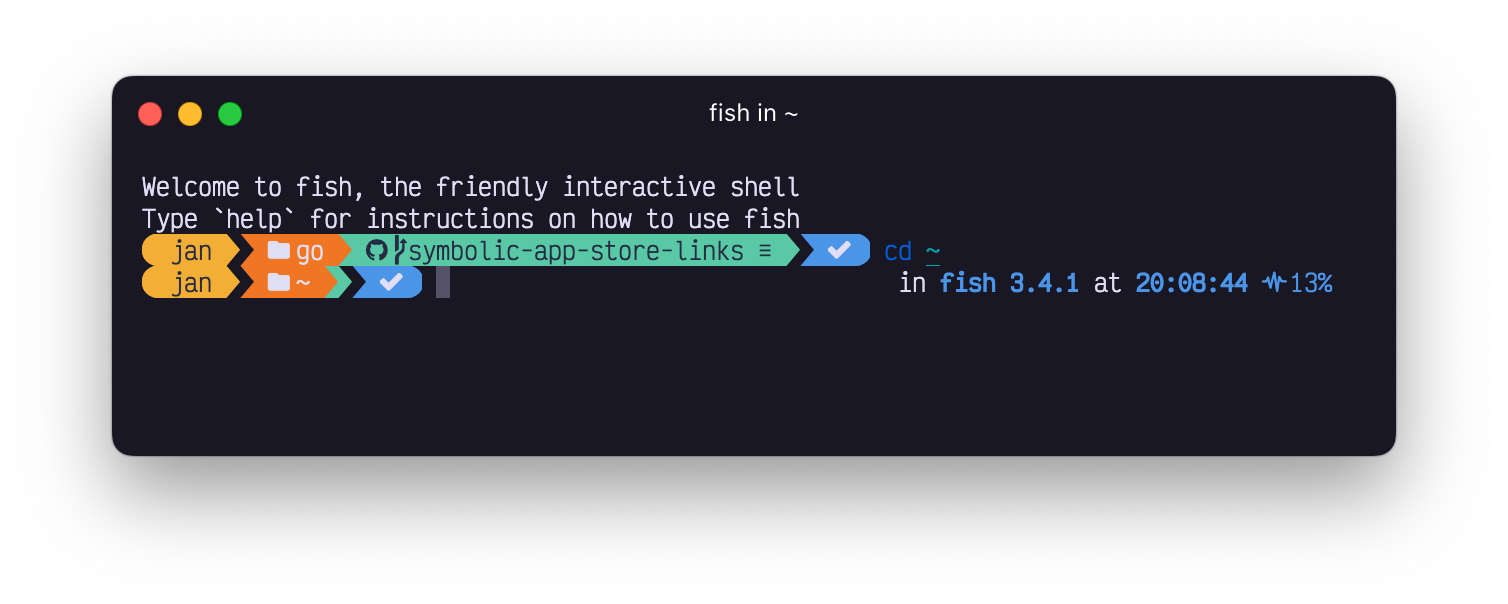
<p>Ever wanted to have a <code>powerline</code> segment to display collapsed when disabled? Now you can!
Use the <code>accordion</code> style to display a segment in a collapsible state.</p>
<p><img decoding="async" loading="lazy" alt="Accordion prompt" src="https://ohmyposh.dev/assets/images/accordeon-613562c6de9459049460842c858716fc.png" width="1508" height="604" class="img_ev3q"></p>
<h3 class="anchor anchorTargetStickyNavbar_Vzrq" id="project">Project<a href="https://ohmyposh.dev/blog/whats-new-3#project" class="hash-link" aria-label="Direct link to Project" title="Direct link to Project" translate="no">​</a></h3>
<p>Things just keep growing. The <a class="" href="https://ohmyposh.dev/docs/segments/system/project">project</a> segment now supports the following project definitions:</p>
<ul>
<li class=""><a href="https://crates.io/" target="_blank" rel="noopener noreferrer" class="">cargo</a></li>
<li class=""><a href="https://python-poetry.org/" target="_blank" rel="noopener noreferrer" class="">poetry</a></li>
<li class=""><a href="https://getcomposer.org/" target="_blank" rel="noopener noreferrer" class="">php</a></li>
<li class=""><a href="https://docs.microsoft.com/en-us/nuget/reference/nuspec" target="_blank" rel="noopener noreferrer" class="">nuspec</a></li>
</ul>
<h3 class="anchor anchorTargetStickyNavbar_Vzrq" id="shell">Shell<a href="https://ohmyposh.dev/blog/whats-new-3#shell" class="hash-link" aria-label="Direct link to Shell" title="Direct link to Shell" translate="no">​</a></h3>
<p>If you work with multiple shell versions, this one's for you. You can now use the <code>.Version</code> property
in the <a class="" href="https://ohmyposh.dev/docs/segments/system/shell">shell</a> segment to distinct between versions:</p>
<div class="language-json codeBlockContainer_Ckt0 theme-code-block" style="--prism-color:#bfc7d5;--prism-background-color:#292d3e"><div class="codeBlockContent_QJqH"><pre tabindex="0" class="prism-code language-json codeBlock_bY9V thin-scrollbar" style="color:#bfc7d5;background-color:#292d3e"><code class="codeBlockLines_e6Vv"><div class="token-line" style="color:#bfc7d5"><span class="token property">"template"</span><span class="token operator" style="color:rgb(137, 221, 255)">:</span><span class="token plain"> </span><span class="token string" style="color:rgb(195, 232, 141)">" in {{ .Name }} {{ .Version }} "</span><br></div></code></pre></div></div>
<h3 class="anchor anchorTargetStickyNavbar_Vzrq" id="git">Git<a href="https://ohmyposh.dev/blog/whats-new-3#git" class="hash-link" aria-label="Direct link to Git" title="Direct link to Git" translate="no">​</a></h3>
<p>The <a class="" href="https://ohmyposh.dev/docs/segments/scm/git">git</a> segment learned a new trick to make your life easier (or faster). Before we hardcoded the
untracked files mode to <code>normal</code>. However, on larger repo's this can get rather cumbersome, so we now allow
you to <strong>override this per repo</strong>.</p>
<div class="language-json codeBlockContainer_Ckt0 theme-code-block" style="--prism-color:#bfc7d5;--prism-background-color:#292d3e"><div class="codeBlockContent_QJqH"><pre tabindex="0" class="prism-code language-json codeBlock_bY9V thin-scrollbar" style="color:#bfc7d5;background-color:#292d3e"><code class="codeBlockLines_e6Vv"><div class="token-line" style="color:#bfc7d5"><span class="token property">"untracked_modes"</span><span class="token operator" style="color:rgb(137, 221, 255)">:</span><span class="token plain"> </span><span class="token punctuation" style="color:rgb(199, 146, 234)">{</span><span class="token plain"></span><br></div><div class="token-line" style="color:#bfc7d5"><span class="token plain">  </span><span class="token property">"/Users/user/Projects/oh-my-posh/"</span><span class="token operator" style="color:rgb(137, 221, 255)">:</span><span class="token plain"> </span><span class="token string" style="color:rgb(195, 232, 141)">"no"</span><span class="token plain"></span><br></div><div class="token-line" style="color:#bfc7d5"><span class="token plain"></span><span class="token punctuation" style="color:rgb(199, 146, 234)">}</span><br></div></code></pre></div></div>
<p>The available options are listed in the <a href="https://git-scm.com/docs/git-status#Documentation/git-status.txt--ultmodegt" target="_blank" rel="noopener noreferrer" class="">git documentation</a>, use them as you see fit!</p>
<h3 class="anchor anchorTargetStickyNavbar_Vzrq" id="cross-segment-template-properties">Cross segment template properties<a href="https://ohmyposh.dev/blog/whats-new-3#cross-segment-template-properties" class="hash-link" aria-label="Direct link to Cross segment template properties" title="Direct link to Cross segment template properties" translate="no">​</a></h3>
<p>Wait, what? Yes, you read that right. Oh My Posh now supports <strong>cross segment template properties</strong>.
This means you can use one segment's properties in another segment's template. How? Oh My Posh
exposes the <code>.Segments</code> property which contains all segment's properties in a map. To make use
of another segment's data, use <code>{{ .Segments.Segment }}</code> in your template where <code>.Segment</code>
is the name of the segment you want to use with the first letter uppercased.</p>
<p>If you want to for example use the <a class="" href="https://ohmyposh.dev/docs/segments/scm/git">git</a> segment's <code>.UpstreamGone</code> property in the <a class="" href="https://ohmyposh.dev/docs/segments/system/status">exit</a> segment, you can
do so like this:</p>
<div class="language-json codeBlockContainer_Ckt0 theme-code-block" style="--prism-color:#bfc7d5;--prism-background-color:#292d3e"><div class="codeBlockContent_QJqH"><pre tabindex="0" class="prism-code language-json codeBlock_bY9V thin-scrollbar" style="color:#bfc7d5;background-color:#292d3e"><code class="codeBlockLines_e6Vv"><div class="token-line" style="color:#bfc7d5"><span class="token property">"template"</span><span class="token operator" style="color:rgb(137, 221, 255)">:</span><span class="token plain"> </span><span class="token string" style="color:rgb(195, 232, 141)">" {{ if .Segments.Git.UpstreamGone }}\uf7d3{{ else if gt .Code 0 }}\uf00d{{ else }}\uf00c{{ end }} "</span><br></div></code></pre></div></div>
<div class="theme-admonition theme-admonition-caution admonition_xJq3 alert alert--warning"><div class="admonitionHeading_Gvgb"><span class="admonitionIcon_Rf37"><svg viewBox="0 0 16 16"><path fill-rule="evenodd" d="M8.893 1.5c-.183-.31-.52-.5-.887-.5s-.703.19-.886.5L.138 13.499a.98.98 0 0 0 0 1.001c.193.31.53.501.886.501h13.964c.367 0 .704-.19.877-.5a1.03 1.03 0 0 0 .01-1.002L8.893 1.5zm.133 11.497H6.987v-2.003h2.039v2.003zm0-3.004H6.987V5.987h2.039v4.006z"></path></svg></span>caution</div><div class="admonitionContent_BuS1"><p>For this to work, the segment you refer to needs to be in your config. The above example won't work if
your config does not contain a git segment as Oh My Posh only populates the properties when it needs to.</p></div></div>
<h3 class="anchor anchorTargetStickyNavbar_Vzrq" id="other">Other<a href="https://ohmyposh.dev/blog/whats-new-3#other" class="hash-link" aria-label="Direct link to Other" title="Direct link to Other" translate="no">​</a></h3>
<ul>
<li class=""><code>oh-my-posh debug</code> now measures the run time correctly and can log startup logic</li>
<li class="">The language segments can now distinct between files and folders</li>
<li class="">The <a class="" href="https://ohmyposh.dev/docs/segments/languages/python">python</a> segment now supports pyenv <code>.python-version</code> files</li>
<li class="">The <code>init</code> command has a new switch called <code>--strict</code> which no longer resolves the executable</li>
<li class="">The <a class="" href="https://ohmyposh.dev/docs/segments/system/battery">battery</a> segment can now display all relevant states on macOS</li>
<li class="">The <a class="" href="https://ohmyposh.dev/docs/segments/languages/dotnet">dotnet</a> segment now supports <code>.slnf</code> files</li>
<li class="">A <a class="" href="https://ohmyposh.dev/docs/configuration/general#settings">new</a> segment to display iTerm shell integration prompt marks</li>
<li class="">The <a class="" href="https://ohmyposh.dev/docs/segments/system/sysinfo#properties">memory</a> segment can now display available memory</li>
<li class="">The <a class="" href="https://ohmyposh.dev/docs/segments/system/path">path</a> segment now has a <code>.Writable</code> property, indicating if the current user
can write to the current folder</li>
</ul>
<h3 class="anchor anchorTargetStickyNavbar_Vzrq" id="fixes">Fixes<a href="https://ohmyposh.dev/blog/whats-new-3#fixes" class="hash-link" aria-label="Direct link to Fixes" title="Direct link to Fixes" translate="no">​</a></h3>
<ul>
<li class="">The <a class="" href="https://ohmyposh.dev/docs/segments/scm/git">git</a> segment can now handle repo's with <code>--separate-git-dir</code></li>
<li class="">Hyperlinks are correctly measured (which should display the right aligned prompt correctly)</li>
<li class="">Prompt escape sequences are correctly escaped, this avoids unwanted visual side effects</li>
<li class="">Spotify now works correctly on Windows for non-English systems</li>
<li class="">Parallel logic to make things fast no longer randomly crashes on Windows</li>
<li class="">Upstream gone logic for git was broken, and has been fixed</li>
<li class="">PSReadLine in PowerShell now receives the correct amount of prompt lines (<code>Set-PSReadlineOption -ExtraPromptLineCount</code>),
this fixes weird behaviour when using a transient prompt when your config results in a multiline prompt</li>
<li class="">The <a href="https://docs.microsoft.com/en-us/windows/package-manager/winget/" target="_blank" rel="noopener noreferrer" class="">winget</a> installer now adds <code>PATH</code> entries correctly, regardless of the installation mode</li>
</ul>
<p>That's it for this time, see you for the next one 🤞🏻</p>
<p><em>Keep that prompt posh everyone!</em></p>]]></content>
        <author>
            <name>Jan De Dobbeleer</name>
            <uri>https://github.com/jandedobbeleer</uri>
        </author>
        <category label="weekly" term="weekly"/>
        <category label="ohmyposh" term="ohmyposh"/>
    </entry>
    <entry>
        <title type="html"><![CDATA[What idiot wrote this code?]]></title>
        <id>https://ohmyposh.dev/blog/idiots-everywhere</id>
        <link href="https://ohmyposh.dev/blog/idiots-everywhere"/>
        <updated>2022-03-28T00:00:00.000Z</updated>
        <summary type="html"><![CDATA[It was me...]]></summary>
        <content type="html"><![CDATA[<p>It finally happened, <strong>I introduced a bug</strong> that only appears in 1 use case and it can't be resolved as it's the result
of using an old and new version of Oh My Posh at the same time. Who does that you might ask? Well, it can be because you're
using WSL on Windows, or VM’s on any system while sharing the same configuration cross installation.
Not the main use-case, but also not exotic either.</p>
<h2 class="anchor anchorTargetStickyNavbar_Vzrq" id="what-happened">What happened?<a href="https://ohmyposh.dev/blog/idiots-everywhere#what-happened" class="hash-link" aria-label="Direct link to What happened?" title="Direct link to What happened?" translate="no">​</a></h2>
<p>In the beginning of the year, after what has been quite the struggle, I was finally able to deliver <strong>the most important
architectural update</strong> since the introduction of the rewrite in Go. Because of this, a migration of old configs was needed
so that no end user would have to go through the ordeal of figuring out what to map where, it's a very logical process
and obviously computers are better at that.</p>
<p>To facilitate this, I added a config property called <code>version</code> which can be incremented when the configuration evolves
and triggers an automatic migration when necessary. The logic to identify the need for migration is as follows:</p>
<div class="language-go codeBlockContainer_Ckt0 theme-code-block" style="--prism-color:#bfc7d5;--prism-background-color:#292d3e"><div class="codeBlockContent_QJqH"><pre tabindex="0" class="prism-code language-go codeBlock_bY9V thin-scrollbar" style="color:#bfc7d5;background-color:#292d3e"><code class="codeBlockLines_e6Vv"><div class="token-line" style="color:#bfc7d5"><span class="token keyword" style="font-style:italic">if</span><span class="token plain"> </span><span class="token operator" style="color:rgb(137, 221, 255)">!</span><span class="token plain">env</span><span class="token punctuation" style="color:rgb(199, 146, 234)">.</span><span class="token function" style="color:rgb(130, 170, 255)">Flags</span><span class="token punctuation" style="color:rgb(199, 146, 234)">(</span><span class="token punctuation" style="color:rgb(199, 146, 234)">)</span><span class="token punctuation" style="color:rgb(199, 146, 234)">.</span><span class="token plain">Migrate </span><span class="token operator" style="color:rgb(137, 221, 255)">&amp;&amp;</span><span class="token plain"> cfg</span><span class="token punctuation" style="color:rgb(199, 146, 234)">.</span><span class="token plain">Version </span><span class="token operator" style="color:rgb(137, 221, 255)">!=</span><span class="token plain"> configVersion </span><span class="token punctuation" style="color:rgb(199, 146, 234)">{</span><span class="token plain"></span><br></div><div class="token-line" style="color:#bfc7d5"><span class="token plain">    cfg</span><span class="token punctuation" style="color:rgb(199, 146, 234)">.</span><span class="token function" style="color:rgb(130, 170, 255)">BackupAndMigrate</span><span class="token punctuation" style="color:rgb(199, 146, 234)">(</span><span class="token plain">env</span><span class="token punctuation" style="color:rgb(199, 146, 234)">)</span><span class="token plain"></span><br></div><div class="token-line" style="color:#bfc7d5"><span class="token plain"></span><span class="token punctuation" style="color:rgb(199, 146, 234)">}</span><br></div></code></pre></div></div>
<p>If you're observant, you might already spot the issue now that you know the use-case. For those of us who like to read
and not think, the result is rather straightforward as it will always run the migration, either when forced (because you
can use <code>oh-my-posh config migrate</code> manually), or when the current config version doesn't match the required config
version. <em>Simple, right?</em> And this works according to expectations when updating Oh My Posh. The problem starts when you
have a shared config, and use multiple versions of Oh My Posh on the same machine.</p>
<p>Imagine working using multiple shells, one is WSL Ubuntu with a version of Oh My Posh that's still on version 1
(<strong>S1</strong>). One day, you update PowerShell in Windows to use the latest greatest, using version 2 (<strong>S2</strong>). Starting S2,
<strong>it automatically migrates the config to version 2</strong>, moving the <code>template</code> property to the segment's model.</p>
<p>In practice, the following version 1 config:</p>
<div class="language-json codeBlockContainer_Ckt0 theme-code-block" style="--prism-color:#bfc7d5;--prism-background-color:#292d3e"><div class="codeBlockContent_QJqH"><pre tabindex="0" class="prism-code language-json codeBlock_bY9V thin-scrollbar" style="color:#bfc7d5;background-color:#292d3e"><code class="codeBlockLines_e6Vv"><div class="token-line" style="color:#bfc7d5"><span class="token punctuation" style="color:rgb(199, 146, 234)">{</span><span class="token plain"></span><br></div><div class="token-line" style="color:#bfc7d5"><span class="token plain">  </span><span class="token property">"$schema"</span><span class="token operator" style="color:rgb(137, 221, 255)">:</span><span class="token plain"> </span><span class="token string" style="color:rgb(195, 232, 141)">"https://raw.githubusercontent.com/JanDeDobbeleer/oh-my-posh/main/themes/schema.json"</span><span class="token punctuation" style="color:rgb(199, 146, 234)">,</span><span class="token plain"></span><br></div><div class="token-line" style="color:#bfc7d5"><span class="token plain">  </span><span class="token property">"version"</span><span class="token operator" style="color:rgb(137, 221, 255)">:</span><span class="token plain"> </span><span class="token number" style="color:rgb(247, 140, 108)">1</span><span class="token punctuation" style="color:rgb(199, 146, 234)">,</span><span class="token plain"></span><br></div><div class="token-line" style="color:#bfc7d5"><span class="token plain">  </span><span class="token property">"blocks"</span><span class="token operator" style="color:rgb(137, 221, 255)">:</span><span class="token plain"> </span><span class="token punctuation" style="color:rgb(199, 146, 234)">[</span><span class="token plain"></span><br></div><div class="token-line" style="color:#bfc7d5"><span class="token plain">    </span><span class="token punctuation" style="color:rgb(199, 146, 234)">{</span><span class="token plain"></span><br></div><div class="token-line" style="color:#bfc7d5"><span class="token plain">      </span><span class="token property">"type"</span><span class="token operator" style="color:rgb(137, 221, 255)">:</span><span class="token plain"> </span><span class="token string" style="color:rgb(195, 232, 141)">"prompt"</span><span class="token punctuation" style="color:rgb(199, 146, 234)">,</span><span class="token plain"></span><br></div><div class="token-line" style="color:#bfc7d5"><span class="token plain">      </span><span class="token property">"alignment"</span><span class="token operator" style="color:rgb(137, 221, 255)">:</span><span class="token plain"> </span><span class="token string" style="color:rgb(195, 232, 141)">"left"</span><span class="token punctuation" style="color:rgb(199, 146, 234)">,</span><span class="token plain"></span><br></div><div class="token-line" style="color:#bfc7d5"><span class="token plain">      </span><span class="token property">"segments"</span><span class="token operator" style="color:rgb(137, 221, 255)">:</span><span class="token plain"> </span><span class="token punctuation" style="color:rgb(199, 146, 234)">[</span><span class="token plain"></span><br></div><div class="token-line" style="color:#bfc7d5"><span class="token plain">        </span><span class="token punctuation" style="color:rgb(199, 146, 234)">{</span><span class="token plain"></span><br></div><div class="token-line" style="color:#bfc7d5"><span class="token plain">          </span><span class="token property">"background"</span><span class="token operator" style="color:rgb(137, 221, 255)">:</span><span class="token plain"> </span><span class="token string" style="color:rgb(195, 232, 141)">"#9A348E"</span><span class="token punctuation" style="color:rgb(199, 146, 234)">,</span><span class="token plain"></span><br></div><div class="token-line" style="color:#bfc7d5"><span class="token plain">          </span><span class="token property">"foreground"</span><span class="token operator" style="color:rgb(137, 221, 255)">:</span><span class="token plain"> </span><span class="token string" style="color:rgb(195, 232, 141)">"#ffffff"</span><span class="token punctuation" style="color:rgb(199, 146, 234)">,</span><span class="token plain"></span><br></div><div class="token-line" style="color:#bfc7d5"><span class="token plain">          </span><span class="token property">"leading_diamond"</span><span class="token operator" style="color:rgb(137, 221, 255)">:</span><span class="token plain"> </span><span class="token string" style="color:rgb(195, 232, 141)">"\ue0b6"</span><span class="token punctuation" style="color:rgb(199, 146, 234)">,</span><span class="token plain"></span><br></div><div class="token-line" style="color:#bfc7d5"><span class="token plain">          </span><span class="token property">"properties"</span><span class="token operator" style="color:rgb(137, 221, 255)">:</span><span class="token plain"> </span><span class="token punctuation" style="color:rgb(199, 146, 234)">{</span><span class="token plain"></span><br></div><div class="token-line theme-code-block-highlighted-line" style="color:#bfc7d5"><span class="token plain">            </span><span class="token property">"template"</span><span class="token operator" style="color:rgb(137, 221, 255)">:</span><span class="token plain"> </span><span class="token string" style="color:rgb(195, 232, 141)">"{{ .UserName }} "</span><span class="token plain"></span><br></div><div class="token-line" style="color:#bfc7d5"><span class="token plain">          </span><span class="token punctuation" style="color:rgb(199, 146, 234)">}</span><span class="token punctuation" style="color:rgb(199, 146, 234)">,</span><span class="token plain"></span><br></div><div class="token-line" style="color:#bfc7d5"><span class="token plain">          </span><span class="token property">"style"</span><span class="token operator" style="color:rgb(137, 221, 255)">:</span><span class="token plain"> </span><span class="token string" style="color:rgb(195, 232, 141)">"diamond"</span><span class="token punctuation" style="color:rgb(199, 146, 234)">,</span><span class="token plain"></span><br></div><div class="token-line" style="color:#bfc7d5"><span class="token plain">          </span><span class="token property">"type"</span><span class="token operator" style="color:rgb(137, 221, 255)">:</span><span class="token plain"> </span><span class="token string" style="color:rgb(195, 232, 141)">"session"</span><span class="token plain"></span><br></div><div class="token-line" style="color:#bfc7d5"><span class="token plain">        </span><span class="token punctuation" style="color:rgb(199, 146, 234)">}</span><span class="token plain"></span><br></div><div class="token-line" style="color:#bfc7d5"><span class="token plain">      </span><span class="token punctuation" style="color:rgb(199, 146, 234)">]</span><span class="token plain"></span><br></div><div class="token-line" style="color:#bfc7d5"><span class="token plain">    </span><span class="token punctuation" style="color:rgb(199, 146, 234)">}</span><span class="token plain"></span><br></div><div class="token-line" style="color:#bfc7d5"><span class="token plain">  </span><span class="token punctuation" style="color:rgb(199, 146, 234)">]</span><span class="token plain"></span><br></div><div class="token-line" style="color:#bfc7d5"><span class="token plain"></span><span class="token punctuation" style="color:rgb(199, 146, 234)">}</span><br></div></code></pre></div></div>
<p>Is migrated to:</p>
<div class="language-json codeBlockContainer_Ckt0 theme-code-block" style="--prism-color:#bfc7d5;--prism-background-color:#292d3e"><div class="codeBlockContent_QJqH"><pre tabindex="0" class="prism-code language-json codeBlock_bY9V thin-scrollbar" style="color:#bfc7d5;background-color:#292d3e"><code class="codeBlockLines_e6Vv"><div class="token-line" style="color:#bfc7d5"><span class="token punctuation" style="color:rgb(199, 146, 234)">{</span><span class="token plain"></span><br></div><div class="token-line" style="color:#bfc7d5"><span class="token plain">  </span><span class="token property">"$schema"</span><span class="token operator" style="color:rgb(137, 221, 255)">:</span><span class="token plain"> </span><span class="token string" style="color:rgb(195, 232, 141)">"https://raw.githubusercontent.com/JanDeDobbeleer/oh-my-posh/main/themes/schema.json"</span><span class="token punctuation" style="color:rgb(199, 146, 234)">,</span><span class="token plain"></span><br></div><div class="token-line" style="color:#bfc7d5"><span class="token plain">  </span><span class="token property">"version"</span><span class="token operator" style="color:rgb(137, 221, 255)">:</span><span class="token plain"> </span><span class="token number" style="color:rgb(247, 140, 108)">2</span><span class="token punctuation" style="color:rgb(199, 146, 234)">,</span><span class="token plain"></span><br></div><div class="token-line" style="color:#bfc7d5"><span class="token plain">  </span><span class="token property">"blocks"</span><span class="token operator" style="color:rgb(137, 221, 255)">:</span><span class="token plain"> </span><span class="token punctuation" style="color:rgb(199, 146, 234)">[</span><span class="token plain"></span><br></div><div class="token-line" style="color:#bfc7d5"><span class="token plain">    </span><span class="token punctuation" style="color:rgb(199, 146, 234)">{</span><span class="token plain"></span><br></div><div class="token-line" style="color:#bfc7d5"><span class="token plain">      </span><span class="token property">"type"</span><span class="token operator" style="color:rgb(137, 221, 255)">:</span><span class="token plain"> </span><span class="token string" style="color:rgb(195, 232, 141)">"prompt"</span><span class="token punctuation" style="color:rgb(199, 146, 234)">,</span><span class="token plain"></span><br></div><div class="token-line" style="color:#bfc7d5"><span class="token plain">      </span><span class="token property">"alignment"</span><span class="token operator" style="color:rgb(137, 221, 255)">:</span><span class="token plain"> </span><span class="token string" style="color:rgb(195, 232, 141)">"left"</span><span class="token punctuation" style="color:rgb(199, 146, 234)">,</span><span class="token plain"></span><br></div><div class="token-line" style="color:#bfc7d5"><span class="token plain">      </span><span class="token property">"segments"</span><span class="token operator" style="color:rgb(137, 221, 255)">:</span><span class="token plain"> </span><span class="token punctuation" style="color:rgb(199, 146, 234)">[</span><span class="token plain"></span><br></div><div class="token-line" style="color:#bfc7d5"><span class="token plain">        </span><span class="token punctuation" style="color:rgb(199, 146, 234)">{</span><span class="token plain"></span><br></div><div class="token-line" style="color:#bfc7d5"><span class="token plain">          </span><span class="token property">"background"</span><span class="token operator" style="color:rgb(137, 221, 255)">:</span><span class="token plain"> </span><span class="token string" style="color:rgb(195, 232, 141)">"#9A348E"</span><span class="token punctuation" style="color:rgb(199, 146, 234)">,</span><span class="token plain"></span><br></div><div class="token-line" style="color:#bfc7d5"><span class="token plain">          </span><span class="token property">"foreground"</span><span class="token operator" style="color:rgb(137, 221, 255)">:</span><span class="token plain"> </span><span class="token string" style="color:rgb(195, 232, 141)">"#ffffff"</span><span class="token punctuation" style="color:rgb(199, 146, 234)">,</span><span class="token plain"></span><br></div><div class="token-line" style="color:#bfc7d5"><span class="token plain">          </span><span class="token property">"leading_diamond"</span><span class="token operator" style="color:rgb(137, 221, 255)">:</span><span class="token plain"> </span><span class="token string" style="color:rgb(195, 232, 141)">"\ue0b6"</span><span class="token punctuation" style="color:rgb(199, 146, 234)">,</span><span class="token plain"></span><br></div><div class="token-line theme-code-block-highlighted-line" style="color:#bfc7d5"><span class="token plain">          </span><span class="token property">"template"</span><span class="token operator" style="color:rgb(137, 221, 255)">:</span><span class="token plain"> </span><span class="token string" style="color:rgb(195, 232, 141)">"{{ .UserName }} "</span><span class="token punctuation" style="color:rgb(199, 146, 234)">,</span><span class="token plain"></span><br></div><div class="token-line" style="color:#bfc7d5"><span class="token plain">          </span><span class="token property">"style"</span><span class="token operator" style="color:rgb(137, 221, 255)">:</span><span class="token plain"> </span><span class="token string" style="color:rgb(195, 232, 141)">"diamond"</span><span class="token punctuation" style="color:rgb(199, 146, 234)">,</span><span class="token plain"></span><br></div><div class="token-line" style="color:#bfc7d5"><span class="token plain">          </span><span class="token property">"type"</span><span class="token operator" style="color:rgb(137, 221, 255)">:</span><span class="token plain"> </span><span class="token string" style="color:rgb(195, 232, 141)">"session"</span><span class="token plain"></span><br></div><div class="token-line" style="color:#bfc7d5"><span class="token plain">        </span><span class="token punctuation" style="color:rgb(199, 146, 234)">}</span><span class="token plain"></span><br></div><div class="token-line" style="color:#bfc7d5"><span class="token plain">      </span><span class="token punctuation" style="color:rgb(199, 146, 234)">]</span><span class="token plain"></span><br></div><div class="token-line" style="color:#bfc7d5"><span class="token plain">    </span><span class="token punctuation" style="color:rgb(199, 146, 234)">}</span><span class="token plain"></span><br></div><div class="token-line" style="color:#bfc7d5"><span class="token plain">  </span><span class="token punctuation" style="color:rgb(199, 146, 234)">]</span><span class="token plain"></span><br></div><div class="token-line" style="color:#bfc7d5"><span class="token plain"></span><span class="token punctuation" style="color:rgb(199, 146, 234)">}</span><br></div></code></pre></div></div>
<p>Awesome, no user interaction at all and <em>everything works as designed</em>. However, you now want to do something using S1,
and due to the logic, Oh My Posh sees that <code>2 != 1</code> and <strong>the migration is triggered for version 1</strong>. The migration as such
is non-breaking, but Oh My Posh doesn't know the <code>template</code> property on <code>segment</code> in this case. The end result of our
config above is rather annoying as we're now left with this:</p>
<div class="language-json codeBlockContainer_Ckt0 theme-code-block" style="--prism-color:#bfc7d5;--prism-background-color:#292d3e"><div class="codeBlockContent_QJqH"><pre tabindex="0" class="prism-code language-json codeBlock_bY9V thin-scrollbar" style="color:#bfc7d5;background-color:#292d3e"><code class="codeBlockLines_e6Vv"><div class="token-line" style="color:#bfc7d5"><span class="token punctuation" style="color:rgb(199, 146, 234)">{</span><span class="token plain"></span><br></div><div class="token-line" style="color:#bfc7d5"><span class="token plain">  </span><span class="token property">"$schema"</span><span class="token operator" style="color:rgb(137, 221, 255)">:</span><span class="token plain"> </span><span class="token string" style="color:rgb(195, 232, 141)">"https://raw.githubusercontent.com/JanDeDobbeleer/oh-my-posh/main/themes/schema.json"</span><span class="token punctuation" style="color:rgb(199, 146, 234)">,</span><span class="token plain"></span><br></div><div class="token-line" style="color:#bfc7d5"><span class="token plain">  </span><span class="token property">"version"</span><span class="token operator" style="color:rgb(137, 221, 255)">:</span><span class="token plain"> </span><span class="token number" style="color:rgb(247, 140, 108)">1</span><span class="token punctuation" style="color:rgb(199, 146, 234)">,</span><span class="token plain"></span><br></div><div class="token-line" style="color:#bfc7d5"><span class="token plain">  </span><span class="token property">"blocks"</span><span class="token operator" style="color:rgb(137, 221, 255)">:</span><span class="token plain"> </span><span class="token punctuation" style="color:rgb(199, 146, 234)">[</span><span class="token plain"></span><br></div><div class="token-line" style="color:#bfc7d5"><span class="token plain">    </span><span class="token punctuation" style="color:rgb(199, 146, 234)">{</span><span class="token plain"></span><br></div><div class="token-line" style="color:#bfc7d5"><span class="token plain">      </span><span class="token property">"type"</span><span class="token operator" style="color:rgb(137, 221, 255)">:</span><span class="token plain"> </span><span class="token string" style="color:rgb(195, 232, 141)">"prompt"</span><span class="token punctuation" style="color:rgb(199, 146, 234)">,</span><span class="token plain"></span><br></div><div class="token-line" style="color:#bfc7d5"><span class="token plain">      </span><span class="token property">"alignment"</span><span class="token operator" style="color:rgb(137, 221, 255)">:</span><span class="token plain"> </span><span class="token string" style="color:rgb(195, 232, 141)">"left"</span><span class="token punctuation" style="color:rgb(199, 146, 234)">,</span><span class="token plain"></span><br></div><div class="token-line" style="color:#bfc7d5"><span class="token plain">      </span><span class="token property">"segments"</span><span class="token operator" style="color:rgb(137, 221, 255)">:</span><span class="token plain"> </span><span class="token punctuation" style="color:rgb(199, 146, 234)">[</span><span class="token plain"></span><br></div><div class="token-line" style="color:#bfc7d5"><span class="token plain">        </span><span class="token punctuation" style="color:rgb(199, 146, 234)">{</span><span class="token plain"></span><br></div><div class="token-line" style="color:#bfc7d5"><span class="token plain">          </span><span class="token property">"background"</span><span class="token operator" style="color:rgb(137, 221, 255)">:</span><span class="token plain"> </span><span class="token string" style="color:rgb(195, 232, 141)">"#9A348E"</span><span class="token punctuation" style="color:rgb(199, 146, 234)">,</span><span class="token plain"></span><br></div><div class="token-line" style="color:#bfc7d5"><span class="token plain">          </span><span class="token property">"foreground"</span><span class="token operator" style="color:rgb(137, 221, 255)">:</span><span class="token plain"> </span><span class="token string" style="color:rgb(195, 232, 141)">"#ffffff"</span><span class="token punctuation" style="color:rgb(199, 146, 234)">,</span><span class="token plain"></span><br></div><div class="token-line" style="color:#bfc7d5"><span class="token plain">          </span><span class="token property">"leading_diamond"</span><span class="token operator" style="color:rgb(137, 221, 255)">:</span><span class="token plain"> </span><span class="token string" style="color:rgb(195, 232, 141)">"\ue0b6"</span><span class="token punctuation" style="color:rgb(199, 146, 234)">,</span><span class="token plain"></span><br></div><div class="token-line" style="color:#bfc7d5"><span class="token plain">          </span><span class="token property">"style"</span><span class="token operator" style="color:rgb(137, 221, 255)">:</span><span class="token plain"> </span><span class="token string" style="color:rgb(195, 232, 141)">"diamond"</span><span class="token punctuation" style="color:rgb(199, 146, 234)">,</span><span class="token plain"></span><br></div><div class="token-line" style="color:#bfc7d5"><span class="token plain">          </span><span class="token property">"type"</span><span class="token operator" style="color:rgb(137, 221, 255)">:</span><span class="token plain"> </span><span class="token string" style="color:rgb(195, 232, 141)">"session"</span><span class="token plain"></span><br></div><div class="token-line" style="color:#bfc7d5"><span class="token plain">        </span><span class="token punctuation" style="color:rgb(199, 146, 234)">}</span><span class="token plain"></span><br></div><div class="token-line" style="color:#bfc7d5"><span class="token plain">      </span><span class="token punctuation" style="color:rgb(199, 146, 234)">]</span><span class="token plain"></span><br></div><div class="token-line" style="color:#bfc7d5"><span class="token plain">    </span><span class="token punctuation" style="color:rgb(199, 146, 234)">}</span><span class="token plain"></span><br></div><div class="token-line" style="color:#bfc7d5"><span class="token plain">  </span><span class="token punctuation" style="color:rgb(199, 146, 234)">]</span><span class="token plain"></span><br></div><div class="token-line" style="color:#bfc7d5"><span class="token plain"></span><span class="token punctuation" style="color:rgb(199, 146, 234)">}</span><br></div></code></pre></div></div>
<p>😱 the template is gone! Nothing to worry about just yet, Oh My Posh will use the default template so you will still see
a prompt, and the migration also <em>creates a backup</em> of your previously correct version 2 config. Up to this point you
can still revert, it's unfortunate, but your local tweaks are still available. If you happen to continue working in S2 at
this point however, it will once again trigger the migration to version 2 and <strong>overwrite your backup with the faulty
version 1 config</strong>.</p>
<p>While the fix for this issue in code is trivial, it's impossible to push that to older versions. People will upgrade
to the most recent version, and in this specific setup, this is potentially breaking. <strong>The advice is to upgrade all versions
at once</strong>, so you only migrate once and there's no "old" version of Oh My Posh left to trigger this unwanted side-effect.</p>
<p>The actual fix for the issue can be found in <a href="https://github.com/JanDeDobbeleer/oh-my-posh/releases/tag/v7.52.1" target="_blank" rel="noopener noreferrer" class="">7.52.1</a>, but due to obvious reasons, it will only work
going from version 2 to any new config version in the future.</p>
<div class="language-go codeBlockContainer_Ckt0 theme-code-block" style="--prism-color:#bfc7d5;--prism-background-color:#292d3e"><div class="codeBlockContent_QJqH"><pre tabindex="0" class="prism-code language-go codeBlock_bY9V thin-scrollbar" style="color:#bfc7d5;background-color:#292d3e"><code class="codeBlockLines_e6Vv"><div class="token-line" style="color:#bfc7d5"><span class="token keyword" style="font-style:italic">if</span><span class="token plain"> </span><span class="token operator" style="color:rgb(137, 221, 255)">!</span><span class="token plain">env</span><span class="token punctuation" style="color:rgb(199, 146, 234)">.</span><span class="token function" style="color:rgb(130, 170, 255)">Flags</span><span class="token punctuation" style="color:rgb(199, 146, 234)">(</span><span class="token punctuation" style="color:rgb(199, 146, 234)">)</span><span class="token punctuation" style="color:rgb(199, 146, 234)">.</span><span class="token plain">Migrate </span><span class="token operator" style="color:rgb(137, 221, 255)">&amp;&amp;</span><span class="token plain"> cfg</span><span class="token punctuation" style="color:rgb(199, 146, 234)">.</span><span class="token plain">Version </span><span class="token operator" style="color:rgb(137, 221, 255)">&lt;</span><span class="token plain"> configVersion </span><span class="token punctuation" style="color:rgb(199, 146, 234)">{</span><span class="token plain"></span><br></div><div class="token-line" style="color:#bfc7d5"><span class="token plain">    cfg</span><span class="token punctuation" style="color:rgb(199, 146, 234)">.</span><span class="token function" style="color:rgb(130, 170, 255)">BackupAndMigrate</span><span class="token punctuation" style="color:rgb(199, 146, 234)">(</span><span class="token plain">env</span><span class="token punctuation" style="color:rgb(199, 146, 234)">)</span><span class="token plain"></span><br></div><div class="token-line" style="color:#bfc7d5"><span class="token plain"></span><span class="token punctuation" style="color:rgb(199, 146, 234)">}</span><br></div></code></pre></div></div>
<p>While I try hard to come up with every possible edge case when validating this logic, sometimes things slip through.
Even when looking at this one <strong>I find it challenging not having considered that case</strong>, but it still happened. The
good news? It won't happen again 😅</p>]]></content>
        <author>
            <name>Jan De Dobbeleer</name>
            <uri>https://github.com/jandedobbeleer</uri>
        </author>
        <category label="weekly" term="weekly"/>
        <category label="ohmyposh" term="ohmyposh"/>
    </entry>
    <entry>
        <title type="html"><![CDATA[What's new #2]]></title>
        <id>https://ohmyposh.dev/blog/whats-new-2</id>
        <link href="https://ohmyposh.dev/blog/whats-new-2"/>
        <updated>2022-03-27T00:00:00.000Z</updated>
        <summary type="html"><![CDATA[What's new #2]]></summary>
        <content type="html"><![CDATA[<p>Wouldn't have imagined doing part two in a week's time, but here we are again!</p>
<h2 class="anchor anchorTargetStickyNavbar_Vzrq" id="features">Features<a href="https://ohmyposh.dev/blog/whats-new-2#features" class="hash-link" aria-label="Direct link to Features" title="Direct link to Features" translate="no">​</a></h2>
<h3 class="anchor anchorTargetStickyNavbar_Vzrq" id="cli-interface-also-2">CLI interface (also #2)<a href="https://ohmyposh.dev/blog/whats-new-2#cli-interface-also-2" class="hash-link" aria-label="Direct link to CLI interface (also #2)" title="Direct link to CLI interface (also #2)" translate="no">​</a></h3>
<p>In the <a class="" href="https://ohmyposh.dev/blog/whats-new-1">previous post</a> I highlighted some changes in the CLI interface. Turns out I could make it
even more straightforward. As Oh My Posh is a prompt generating utility, the <code>prompt</code> command
doesn't make sense as that's implied. It has been removed, although it <strong>will keep working</strong> to
not break existing functionality on upgrade.</p>
<h4 class="anchor anchorTargetStickyNavbar_Vzrq" id="init">Init<a href="https://ohmyposh.dev/blog/whats-new-2#init" class="hash-link" aria-label="Direct link to Init" title="Direct link to Init" translate="no">​</a></h4>
<p>The following initialization:</p>
<div class="language-powershell codeBlockContainer_Ckt0 theme-code-block" style="--prism-color:#bfc7d5;--prism-background-color:#292d3e"><div class="codeBlockContent_QJqH"><pre tabindex="0" class="prism-code language-powershell codeBlock_bY9V thin-scrollbar" style="color:#bfc7d5;background-color:#292d3e"><code class="codeBlockLines_e6Vv"><div class="token-line" style="color:#bfc7d5"><span class="token plain">oh-my-posh prompt init pwsh </span><span class="token punctuation" style="color:rgb(199, 146, 234)">|</span><span class="token plain"> </span><span class="token function" style="color:rgb(130, 170, 255)">Invoke-Expression</span><br></div></code></pre></div></div>
<p>now becomes:</p>
<div class="language-powershell codeBlockContainer_Ckt0 theme-code-block" style="--prism-color:#bfc7d5;--prism-background-color:#292d3e"><div class="codeBlockContent_QJqH"><pre tabindex="0" class="prism-code language-powershell codeBlock_bY9V thin-scrollbar" style="color:#bfc7d5;background-color:#292d3e"><code class="codeBlockLines_e6Vv"><div class="token-line" style="color:#bfc7d5"><span class="token plain">oh-my-posh init pwsh </span><span class="token punctuation" style="color:rgb(199, 146, 234)">|</span><span class="token plain"> </span><span class="token function" style="color:rgb(130, 170, 255)">Invoke-Expression</span><br></div></code></pre></div></div>
<h4 class="anchor anchorTargetStickyNavbar_Vzrq" id="debug">Debug<a href="https://ohmyposh.dev/blog/whats-new-2#debug" class="hash-link" aria-label="Direct link to Debug" title="Direct link to Debug" translate="no">​</a></h4>
<p>To debug Oh My Posh, you can simply use the <code>debug</code> command. It's smart enough to know your config
so you don't have to specify the <code>--config</code> option.</p>
<div class="language-powershell codeBlockContainer_Ckt0 theme-code-block" style="--prism-color:#bfc7d5;--prism-background-color:#292d3e"><div class="codeBlockContent_QJqH"><pre tabindex="0" class="prism-code language-powershell codeBlock_bY9V thin-scrollbar" style="color:#bfc7d5;background-color:#292d3e"><code class="codeBlockLines_e6Vv"><div class="token-line" style="color:#bfc7d5"><span class="token plain">oh-my-posh debug</span><br></div></code></pre></div></div>
<h3 class="anchor anchorTargetStickyNavbar_Vzrq" id="fish-shell">Fish shell<a href="https://ohmyposh.dev/blog/whats-new-2#fish-shell" class="hash-link" aria-label="Direct link to Fish shell" title="Direct link to Fish shell" translate="no">​</a></h3>
<p>We already supported <a href="https://fishshell.com/" target="_blank" rel="noopener noreferrer" class="">fish shell</a> for a while, but we stepped up the game. I started using fish
as my primary shell, so obviously it couldn't stay behind. I suggest you also have
a go at it, it's a very enjoyable experience.</p>
<p>But OK, what changed? We now support the following out-of-the-box:</p>
<ul>
<li class=""><a class="" href="https://ohmyposh.dev/docs/configuration/block#type">right prompt</a></li>
<li class=""><a class="" href="https://ohmyposh.dev/docs/configuration/transient">transient prompt</a></li>
<li class=""><a class="" href="https://ohmyposh.dev/docs/configuration/tooltips">tooltips</a></li>
</ul>
<p>It seems there's <strong><em>no support (yet) for a secondary prompt in fish</em></strong>, once that's available we can easily add that too.
To enjoy all of this, upgrade to the latest and initialize fish by adding the following line to <code>~/.config/fish/config.fish</code>:</p>
<div class="language-bash codeBlockContainer_Ckt0 theme-code-block" style="--prism-color:#bfc7d5;--prism-background-color:#292d3e"><div class="codeBlockContent_QJqH"><pre tabindex="0" class="prism-code language-bash codeBlock_bY9V thin-scrollbar" style="color:#bfc7d5;background-color:#292d3e"><code class="codeBlockLines_e6Vv"><div class="token-line" style="color:#bfc7d5"><span class="token plain">oh-my-posh init fish | source</span><br></div></code></pre></div></div>
<h3 class="anchor anchorTargetStickyNavbar_Vzrq" id="transient-prompt">Transient prompt<a href="https://ohmyposh.dev/blog/whats-new-2#transient-prompt" class="hash-link" aria-label="Direct link to Transient prompt" title="Direct link to Transient prompt" translate="no">​</a></h3>
<p>Speaking of <a class="" href="https://ohmyposh.dev/docs/configuration/transient">transient</a>, it learned some new tricks. First, you can now use the <code>.Code</code> property to work with
the last command's error code (if any) in the template. This can for example be used to color the transient prompt
differently when the last command failed. That did imply we also needed support for color <a class="" href="https://ohmyposh.dev/docs/configuration/colors#color-templates">templates</a>,
as that wasn't possible just yet. Say no more, we now have a <a class="" href="https://ohmyposh.dev/docs/configuration/transient">transient prompt</a> that supports color templates.</p>
<div class="language-json codeBlockContainer_Ckt0 theme-code-block" style="--prism-color:#bfc7d5;--prism-background-color:#292d3e"><div class="codeBlockContent_QJqH"><pre tabindex="0" class="prism-code language-json codeBlock_bY9V thin-scrollbar" style="color:#bfc7d5;background-color:#292d3e"><code class="codeBlockLines_e6Vv"><div class="token-line" style="color:#bfc7d5"><span class="token property">"transient_prompt"</span><span class="token operator" style="color:rgb(137, 221, 255)">:</span><span class="token plain"> </span><span class="token punctuation" style="color:rgb(199, 146, 234)">{</span><span class="token plain"></span><br></div><div class="token-line" style="color:#bfc7d5"><span class="token plain">    </span><span class="token property">"background"</span><span class="token operator" style="color:rgb(137, 221, 255)">:</span><span class="token plain"> </span><span class="token string" style="color:rgb(195, 232, 141)">"p:yellow"</span><span class="token punctuation" style="color:rgb(199, 146, 234)">,</span><span class="token plain"></span><br></div><div class="token-line" style="color:#bfc7d5"><span class="token plain">    </span><span class="token property">"background_templates"</span><span class="token operator" style="color:rgb(137, 221, 255)">:</span><span class="token plain"> </span><span class="token punctuation" style="color:rgb(199, 146, 234)">[</span><span class="token plain"></span><br></div><div class="token-line" style="color:#bfc7d5"><span class="token plain">      </span><span class="token string" style="color:rgb(195, 232, 141)">"{{ if gt .Code 0 }}p:red{{ end }}"</span><span class="token plain"></span><br></div><div class="token-line" style="color:#bfc7d5"><span class="token plain">    </span><span class="token punctuation" style="color:rgb(199, 146, 234)">]</span><span class="token punctuation" style="color:rgb(199, 146, 234)">,</span><span class="token plain"></span><br></div><div class="token-line" style="color:#bfc7d5"><span class="token plain">    </span><span class="token property">"foreground"</span><span class="token operator" style="color:rgb(137, 221, 255)">:</span><span class="token plain"> </span><span class="token string" style="color:rgb(195, 232, 141)">"p:black"</span><span class="token punctuation" style="color:rgb(199, 146, 234)">,</span><span class="token plain"></span><br></div><div class="token-line" style="color:#bfc7d5"><span class="token plain">    </span><span class="token property">"foreground_templates"</span><span class="token operator" style="color:rgb(137, 221, 255)">:</span><span class="token plain"> </span><span class="token punctuation" style="color:rgb(199, 146, 234)">[</span><span class="token plain"></span><br></div><div class="token-line" style="color:#bfc7d5"><span class="token plain">      </span><span class="token string" style="color:rgb(195, 232, 141)">"{{ if gt .Code 0 }}p:white{{ end }}"</span><span class="token plain"></span><br></div><div class="token-line" style="color:#bfc7d5"><span class="token plain">    </span><span class="token punctuation" style="color:rgb(199, 146, 234)">]</span><span class="token punctuation" style="color:rgb(199, 146, 234)">,</span><span class="token plain"></span><br></div><div class="token-line" style="color:#bfc7d5"><span class="token plain">    </span><span class="token property">"template"</span><span class="token operator" style="color:rgb(137, 221, 255)">:</span><span class="token plain"> </span><span class="token string" style="color:rgb(195, 232, 141)">"&lt;background,transparent&gt;\ue0b6&lt;/&gt; {{ .Folder }} &lt;background,transparent&gt;\ue0b0&lt;/&gt;&lt;,transparent&gt; &lt;/&gt;"</span><span class="token plain"></span><br></div><div class="token-line" style="color:#bfc7d5"><span class="token plain"></span><span class="token punctuation" style="color:rgb(199, 146, 234)">}</span><br></div></code></pre></div></div>
<p>Which produces the following result:</p>
<p><img decoding="async" loading="lazy" alt="Terminal" src="https://ohmyposh.dev/assets/images/transient-color-04f7496e0ec5f1d10c64c23cf66c2743.png" width="1516" height="860" class="img_ev3q"></p>
<h3 class="anchor anchorTargetStickyNavbar_Vzrq" id="config-version-2">Config version 2<a href="https://ohmyposh.dev/blog/whats-new-2#config-version-2" class="hash-link" aria-label="Direct link to Config version 2" title="Direct link to Config version 2" translate="no">​</a></h3>
<p>Remember we did a migration to config version 1 in the beginning of the year? Well, we did a migration to version 2.
Looking at Oh My Posh's architecture, the different prompts (transient, secondary, ...) were moving closer to the model
used by segments. The only difference was that <code>template</code> wasn't a property, but a field of those prompts. As <strong>all segments
now have template support</strong>, it was a no-brainer to align both models and do a migration to config version 2 so nobody
would have any manual work in the process.</p>
<p>The following segment definition:</p>
<div class="language-json codeBlockContainer_Ckt0 theme-code-block" style="--prism-color:#bfc7d5;--prism-background-color:#292d3e"><div class="codeBlockContent_QJqH"><pre tabindex="0" class="prism-code language-json codeBlock_bY9V thin-scrollbar" style="color:#bfc7d5;background-color:#292d3e"><code class="codeBlockLines_e6Vv"><div class="token-line" style="color:#bfc7d5"><span class="token punctuation" style="color:rgb(199, 146, 234)">{</span><span class="token plain"></span><br></div><div class="token-line" style="color:#bfc7d5"><span class="token plain">  </span><span class="token property">"background"</span><span class="token operator" style="color:rgb(137, 221, 255)">:</span><span class="token plain"> </span><span class="token string" style="color:rgb(195, 232, 141)">"#9A348E"</span><span class="token punctuation" style="color:rgb(199, 146, 234)">,</span><span class="token plain"></span><br></div><div class="token-line" style="color:#bfc7d5"><span class="token plain">  </span><span class="token property">"foreground"</span><span class="token operator" style="color:rgb(137, 221, 255)">:</span><span class="token plain"> </span><span class="token string" style="color:rgb(195, 232, 141)">"#ffffff"</span><span class="token punctuation" style="color:rgb(199, 146, 234)">,</span><span class="token plain"></span><br></div><div class="token-line" style="color:#bfc7d5"><span class="token plain">  </span><span class="token property">"leading_diamond"</span><span class="token operator" style="color:rgb(137, 221, 255)">:</span><span class="token plain"> </span><span class="token string" style="color:rgb(195, 232, 141)">"\ue0b6"</span><span class="token punctuation" style="color:rgb(199, 146, 234)">,</span><span class="token plain"></span><br></div><div class="token-line" style="color:#bfc7d5"><span class="token plain">  </span><span class="token property">"properties"</span><span class="token operator" style="color:rgb(137, 221, 255)">:</span><span class="token plain"> </span><span class="token punctuation" style="color:rgb(199, 146, 234)">{</span><span class="token plain"></span><br></div><div class="token-line" style="color:#bfc7d5"><span class="token plain">    </span><span class="token property">"template"</span><span class="token operator" style="color:rgb(137, 221, 255)">:</span><span class="token plain"> </span><span class="token string" style="color:rgb(195, 232, 141)">"{{ .UserName }} "</span><span class="token plain"></span><br></div><div class="token-line" style="color:#bfc7d5"><span class="token plain">  </span><span class="token punctuation" style="color:rgb(199, 146, 234)">}</span><span class="token punctuation" style="color:rgb(199, 146, 234)">,</span><span class="token plain"></span><br></div><div class="token-line" style="color:#bfc7d5"><span class="token plain">  </span><span class="token property">"style"</span><span class="token operator" style="color:rgb(137, 221, 255)">:</span><span class="token plain"> </span><span class="token string" style="color:rgb(195, 232, 141)">"diamond"</span><span class="token punctuation" style="color:rgb(199, 146, 234)">,</span><span class="token plain"></span><br></div><div class="token-line" style="color:#bfc7d5"><span class="token plain">  </span><span class="token property">"type"</span><span class="token operator" style="color:rgb(137, 221, 255)">:</span><span class="token plain"> </span><span class="token string" style="color:rgb(195, 232, 141)">"session"</span><span class="token plain"></span><br></div><div class="token-line" style="color:#bfc7d5"><span class="token plain"></span><span class="token punctuation" style="color:rgb(199, 146, 234)">}</span><br></div></code></pre></div></div>
<p>Will now be migrated to this for version 2:</p>
<div class="language-json codeBlockContainer_Ckt0 theme-code-block" style="--prism-color:#bfc7d5;--prism-background-color:#292d3e"><div class="codeBlockContent_QJqH"><pre tabindex="0" class="prism-code language-json codeBlock_bY9V thin-scrollbar" style="color:#bfc7d5;background-color:#292d3e"><code class="codeBlockLines_e6Vv"><div class="token-line" style="color:#bfc7d5"><span class="token punctuation" style="color:rgb(199, 146, 234)">{</span><span class="token plain"></span><br></div><div class="token-line" style="color:#bfc7d5"><span class="token plain">  </span><span class="token property">"background"</span><span class="token operator" style="color:rgb(137, 221, 255)">:</span><span class="token plain"> </span><span class="token string" style="color:rgb(195, 232, 141)">"#9A348E"</span><span class="token punctuation" style="color:rgb(199, 146, 234)">,</span><span class="token plain"></span><br></div><div class="token-line" style="color:#bfc7d5"><span class="token plain">  </span><span class="token property">"foreground"</span><span class="token operator" style="color:rgb(137, 221, 255)">:</span><span class="token plain"> </span><span class="token string" style="color:rgb(195, 232, 141)">"#ffffff"</span><span class="token punctuation" style="color:rgb(199, 146, 234)">,</span><span class="token plain"></span><br></div><div class="token-line" style="color:#bfc7d5"><span class="token plain">  </span><span class="token property">"leading_diamond"</span><span class="token operator" style="color:rgb(137, 221, 255)">:</span><span class="token plain"> </span><span class="token string" style="color:rgb(195, 232, 141)">"\ue0b6"</span><span class="token punctuation" style="color:rgb(199, 146, 234)">,</span><span class="token plain"></span><br></div><div class="token-line" style="color:#bfc7d5"><span class="token plain">  </span><span class="token property">"style"</span><span class="token operator" style="color:rgb(137, 221, 255)">:</span><span class="token plain"> </span><span class="token string" style="color:rgb(195, 232, 141)">"diamond"</span><span class="token punctuation" style="color:rgb(199, 146, 234)">,</span><span class="token plain"></span><br></div><div class="token-line" style="color:#bfc7d5"><span class="token plain">  </span><span class="token property">"template"</span><span class="token operator" style="color:rgb(137, 221, 255)">:</span><span class="token plain"> </span><span class="token string" style="color:rgb(195, 232, 141)">"{{ .UserName }} "</span><span class="token punctuation" style="color:rgb(199, 146, 234)">,</span><span class="token plain"></span><br></div><div class="token-line" style="color:#bfc7d5"><span class="token plain">  </span><span class="token property">"type"</span><span class="token operator" style="color:rgb(137, 221, 255)">:</span><span class="token plain"> </span><span class="token string" style="color:rgb(195, 232, 141)">"session"</span><span class="token plain"></span><br></div><div class="token-line" style="color:#bfc7d5"><span class="token plain"></span><span class="token punctuation" style="color:rgb(199, 146, 234)">}</span><br></div></code></pre></div></div>
<h2 class="anchor anchorTargetStickyNavbar_Vzrq" id="go-118">Go 1.18<a href="https://ohmyposh.dev/blog/whats-new-2#go-118" class="hash-link" aria-label="Direct link to Go 1.18" title="Direct link to Go 1.18" translate="no">​</a></h2>
<p>Not something that impacts the end user directly, but maybe interesting to know is that Oh My Posh is now
using <a href="https://tip.golang.org/doc/go1.18" target="_blank" rel="noopener noreferrer" class="">go 1.18</a> by default. This brings obvious language improvements and a few new features we can play with.
The most notable is generics, but it doesn't seem like we can benefit just yet as it's not yet supported
for methods, and that's the main use-case for us.</p>
<p>Nonetheless, it's good to stay up-to-date, if you notice any quirks though, be sure to let us know!</p>
<p>That's it for this week, see you for the next one 🤞🏻</p>
<p><em>Keep that prompt posh everyone!</em></p>]]></content>
        <author>
            <name>Jan De Dobbeleer</name>
            <uri>https://github.com/jandedobbeleer</uri>
        </author>
        <category label="weekly" term="weekly"/>
        <category label="ohmyposh" term="ohmyposh"/>
    </entry>
    <entry>
        <title type="html"><![CDATA[What's new #1]]></title>
        <id>https://ohmyposh.dev/blog/whats-new-1</id>
        <link href="https://ohmyposh.dev/blog/whats-new-1"/>
        <updated>2022-03-20T00:00:00.000Z</updated>
        <summary type="html"><![CDATA[What's new #1]]></summary>
        <content type="html"><![CDATA[<p>What a week it’s been! Oh My Posh turned 6 years old and we dropped a ton of stuff!</p>
<!-- -->
<h2 class="anchor anchorTargetStickyNavbar_Vzrq" id="swag">Swag<a href="https://ohmyposh.dev/blog/whats-new-1#swag" class="hash-link" aria-label="Direct link to Swag" title="Direct link to Swag" translate="no">​</a></h2>
<p>After seeing Scott Hanselman wear his oh my zsh shirt while we got to talk about
Oh My Posh on <a href="https://devblogs.microsoft.com/commandline/windows-wednesday/" target="_blank" rel="noopener noreferrer" class="">Windows Wednesdays</a>, I got the sudden urge to expand his wardrobe.</p>
<iframe class="youtube" src="https://www.youtube.com/embed/uO_F5W2LbSk" title="Windows Wednesdays: Oh My Posh" referrerpolicy="strict-origin-when-cross-origin" loading="lazy" allowfullscreen=""></iframe>
<p>And so, we did. Got in touch with <a href="https://twitter.com/marcduiker" target="_blank" rel="noopener noreferrer" class="">Marc Duiker</a> and we got to work. The result? A ton of new goodies.
Consider this to be <strong>the first artist series</strong> for Oh My Posh, a way to also highlight some talented
people in the community. All profits go to the development of the project and artists also get a 20% royalty
per item sold. If you know any interesting artists to work with for the next batch, be sure to let me know!</p>
<p>So, what are you waiting for? Get some!</p>
<ul>
<li class=""><a href="https://swag.ohmyposh.dev/" target="_blank" rel="noopener noreferrer" class="">Shirts</a></li>
<li class=""><a href="https://pimpyourowndevice.com/community/" target="_blank" rel="noopener noreferrer" class="">Stickers</a></li>
</ul>
<h2 class="anchor anchorTargetStickyNavbar_Vzrq" id="features">Features<a href="https://ohmyposh.dev/blog/whats-new-1#features" class="hash-link" aria-label="Direct link to Features" title="Direct link to Features" translate="no">​</a></h2>
<h3 class="anchor anchorTargetStickyNavbar_Vzrq" id="cli-interface">CLI interface<a href="https://ohmyposh.dev/blog/whats-new-1#cli-interface" class="hash-link" aria-label="Direct link to CLI interface" title="Direct link to CLI interface" translate="no">​</a></h3>
<p>Something I've been sleeping on for a long time, Oh My Posh finally has a new CLI interface.
Starting out I had no experience in Go, nor any idea on how to create a proper CLI interface.
Over the years the interface grew, but <strong><em>not in a very sustainable way</em></strong>, it was a chain of if statements
which was a bit of a pain to support.</p>
<p>You can now interact with Oh My Posh via an interface powered by <a href="https://github.com/spf13/cobra" target="_blank" rel="noopener noreferrer" class="">Cobra</a>. Not only does this
bring maintainability and extensibility, it at once introduces a few added features.</p>
<h4 class="anchor anchorTargetStickyNavbar_Vzrq" id="init">Init<a href="https://ohmyposh.dev/blog/whats-new-1#init" class="hash-link" aria-label="Direct link to Init" title="Direct link to Init" translate="no">​</a></h4>
<p>If you paid attention to the evolution of the <code>init</code> functionality which automatically supercharges
your prompt, you might have noticed I was always trying to make it easier for anyone to get started. When working on the
<a href="https://swag.ohmyposh.dev/" target="_blank" rel="noopener noreferrer" class="">shirts</a> with Marc, it hit me we didn't really have an identifiable prompt as a first time
experience. So, as of <a href="https://github.com/JanDeDobbeleer/oh-my-posh/releases/tag/v7.42.0" target="_blank" rel="noopener noreferrer" class="">7.42.0</a> Oh My Posh can initialize your prompt without specifying the
<code>--config</code> flag. Because we have no way to know how you installed Oh My Posh, and if you have themes
installed locally, we download the default theme, cache and use it to get you up and running right there.</p>
<p>When using PowerShell for example, this is all it takes from now on:</p>
<div class="language-powershell codeBlockContainer_Ckt0 theme-code-block" style="--prism-color:#bfc7d5;--prism-background-color:#292d3e"><div class="codeBlockContent_QJqH"><pre tabindex="0" class="prism-code language-powershell codeBlock_bY9V thin-scrollbar" style="color:#bfc7d5;background-color:#292d3e"><code class="codeBlockLines_e6Vv"><div class="token-line" style="color:#bfc7d5"><span class="token plain">oh-my-posh init pwsh </span><span class="token punctuation" style="color:rgb(199, 146, 234)">|</span><span class="token plain"> </span><span class="token function" style="color:rgb(130, 170, 255)">Invoke-Expression</span><br></div></code></pre></div></div>
<div class="theme-admonition theme-admonition-info admonition_xJq3 alert alert--info"><div class="admonitionHeading_Gvgb"><span class="admonitionIcon_Rf37"><svg viewBox="0 0 14 16"><path fill-rule="evenodd" d="M7 2.3c3.14 0 5.7 2.56 5.7 5.7s-2.56 5.7-5.7 5.7A5.71 5.71 0 0 1 1.3 8c0-3.14 2.56-5.7 5.7-5.7zM7 1C3.14 1 0 4.14 0 8s3.14 7 7 7 7-3.14 7-7-3.14-7-7-7zm1 3H6v5h2V4zm0 6H6v2h2v-2z"></path></svg></span>remote config</div><div class="admonitionContent_BuS1"><p>In case you missed it, as I haven't really done these updates before, you can also use
a remote config file nowadays. Also <strong>triggered by Scott Hanselman</strong> who uses multiple devices
but still wants the same, seamless experience everywhere. I'm sure he's not alone 😄.</p></div></div>
<h4 class="anchor anchorTargetStickyNavbar_Vzrq" id="export-config">Export config<a href="https://ohmyposh.dev/blog/whats-new-1#export-config" class="hash-link" aria-label="Direct link to Export config" title="Direct link to Export config" translate="no">​</a></h4>
<p>While this functionality was already present, you can now also save the current config to a new
file in the format of your choice. Combining that with the new initialization above, new users can
right away save the default config elsewhere and tweak it to make it their own.</p>
<div class="language-powershell codeBlockContainer_Ckt0 theme-code-block" style="--prism-color:#bfc7d5;--prism-background-color:#292d3e"><div class="codeBlockContent_QJqH"><pre tabindex="0" class="prism-code language-powershell codeBlock_bY9V thin-scrollbar" style="color:#bfc7d5;background-color:#292d3e"><code class="codeBlockLines_e6Vv"><div class="token-line" style="color:#bfc7d5"><span class="token plain" style="display:inline-block"></span><br></div><div class="token-line" style="color:#bfc7d5"><span class="token plain">oh-my-posh config export </span><span class="token operator" style="color:rgb(137, 221, 255)">--</span><span class="token plain">output=~</span><span class="token operator" style="color:rgb(137, 221, 255)">/</span><span class="token punctuation" style="color:rgb(199, 146, 234)">.</span><span class="token plain">mytheme</span><span class="token punctuation" style="color:rgb(199, 146, 234)">.</span><span class="token plain">omp</span><span class="token punctuation" style="color:rgb(199, 146, 234)">.</span><span class="token plain">json</span><br></div><div class="token-line" style="color:#bfc7d5"><span class="token plain" style="display:inline-block"></span><br></div></code></pre></div></div>
<h4 class="anchor anchorTargetStickyNavbar_Vzrq" id="edit">Edit<a href="https://ohmyposh.dev/blog/whats-new-1#edit" class="hash-link" aria-label="Direct link to Edit" title="Direct link to Edit" translate="no">​</a></h4>
<p>Putting things together, all we needed additionally was a way to edit the config.</p>
<div class="language-powershell codeBlockContainer_Ckt0 theme-code-block" style="--prism-color:#bfc7d5;--prism-background-color:#292d3e"><div class="codeBlockContent_QJqH"><pre tabindex="0" class="prism-code language-powershell codeBlock_bY9V thin-scrollbar" style="color:#bfc7d5;background-color:#292d3e"><code class="codeBlockLines_e6Vv"><div class="token-line" style="color:#bfc7d5"><span class="token plain" style="display:inline-block"></span><br></div><div class="token-line" style="color:#bfc7d5"><span class="token plain">oh-my-posh config edit</span><br></div><div class="token-line" style="color:#bfc7d5"><span class="token plain" style="display:inline-block"></span><br></div></code></pre></div></div>
<p>Almost feels natural right?</p>
<h3 class="anchor anchorTargetStickyNavbar_Vzrq" id="rrrrrrr-matey">RRRRRRR Matey!<a href="https://ohmyposh.dev/blog/whats-new-1#rrrrrrr-matey" class="hash-link" aria-label="Direct link to RRRRRRR Matey!" title="Direct link to RRRRRRR Matey!" translate="no">​</a></h3>
<p>Thanks to <a href="https://github.com/jedwillick" target="_blank" rel="noopener noreferrer" class="">Jed Willick</a>, who's already been on a roll for a while adding segments to Oh My Posh,
we now have a <a href="https://ohmyposh.dev/docs/r" target="_blank" rel="noopener noreferrer" class="">segment</a> for <a href="https://www.r-project.org/about.html" target="_blank" rel="noopener noreferrer" class="">R</a> 🏴‍☠️. Read all about it <a href="https://ohmyposh.dev/docs/r" target="_blank" rel="noopener noreferrer" class="">here</a>.</p>
<h2 class="anchor anchorTargetStickyNavbar_Vzrq" id="bug-fixes">Bug fixes<a href="https://ohmyposh.dev/blog/whats-new-1#bug-fixes" class="hash-link" aria-label="Direct link to Bug fixes" title="Direct link to Bug fixes" translate="no">​</a></h2>
<p>Obviously, nothing is perfect. But we aim to be! The following issues have been found and fixed:</p>
<ul>
<li class="">We now display the right distro name in WSL</li>
<li class="">The poshgit prompt is now disabled when using Oh My Posh</li>
<li class="">Terminal titles are stripped from ANSI escape sequences, otherwise they are not displayed correctly</li>
<li class="">The config file now also works with the <code>.yml</code> extension and not only <code>.yaml</code></li>
</ul>
<p>That's it for this week, I'll try to keep this up 🤞🏻.</p>
<p><em>Keep that prompt posh everyone!</em></p>]]></content>
        <author>
            <name>Jan De Dobbeleer</name>
            <uri>https://github.com/jandedobbeleer</uri>
        </author>
        <category label="weekly" term="weekly"/>
        <category label="ohmyposh" term="ohmyposh"/>
    </entry>
</feed>