The Patch Bay - Connecting Preservation and Technology2024-11-14T15:09:05-05:00Ethanhttps://patchbay.techThe Cloud Is Just Someone Else's 10,000 ComputersEthanhttps://patchbay.tech/the-cloud-is-just-someone-elses-10000-computers/2022-04-21T20:00:39-04:00
I don't need to be the umpteenth person to tell you, in dramatically vague terms, that cloud computing and software-as-a-service have (*Paul LaFontaine voice*) changed the very society we live in. But every now and then I am reminded that the Big Tech consolidation and…
]]>
I don't need to be the umpteenth person to tell you, in dramatically vague terms, that cloud computing and software-as-a-service have (*Paul LaFontaine voice*) changed the very society we live in. But every now and then I am reminded that the Big Tech consolidation and movement of everything online in the last ~15 years has fundamentally obstructed and obscured how computers work and most people's understanding of what's happening in/on the device right in front of them.1
And as individuals and institutions across the board, from enterprise-level research universities to local collectives, have quickly come to rely on cloud-based file hosting, I think it has become absolutely critical for archivists - whether it's in the context of picking one's own storage options for a digital preservation and access plan, or sifting through acquisition, management, and organization of other's folks' collections - to understand what these services actually are and what they are providing. I've overheard requests for an "open source alternative" to Google Drive or Dropbox a couple of times recently, and it both encourages and troubles me a bit: encouraging because folks are questioning the ubiquity and motivation of these companies and services, but troubling because it means cloud-based companies have rather successfully obscured not only where people's files and data live, but the mélange of software we use to interact with them. In essence, an "open-source alternative" to Google Drive does not exist; or at least, it doesn't exist in the same way that we commonly talk about open-source alternatives to proprietary and expensive desktop software products (Adobe Premiere vs. Kdenlive, GarageBand vs. Audacity, Microsoft Office vs. LibreOffice, etc.)
Don't SaaS Me
I will repeatedly use the word "service" in this post, and that's not accidental. As part of a productivity suite (including the other "Google Workspace" products, like Google Docs, Google Sheets, Google Photos, etc), Google Drive and its equivalents are not just software, the way Finder or Windows File Manager are pieces of software, running on your computer, that allow you to browse and manipulate your files. It is an example of what's called Software as a Service (SaaS), an access and delivery model where, instead of downloading and installing a particular program to your computer,2 you log in and use a software platform that runs on another computer (often, though as we'll see not exclusively, in return for some kind of subscription fee or license). The software platform itself, and often the data you're manipulating (word files, spreadsheets, presentations, for example) is not actually stored and running on the computer you're using to access the service - it's on someone else's, a server. To be even more specific to the current technological moment and not 20-year-old definitions of computing, it's running in "the cloud", which is not precisely "someone else's computer" as the joke goes, but more as my title suggests, "someone else's data center(s) with potentially thousands of servers working in concert" (scale is going to be a running theme here, and it's important).
So when we talk about using these kinds of monolithic file hosting and productivity platforms - I'll stick with Google Drive for this post as a very representative and relevant example, but this also encompasses, for instance, iCloud, Microsoft OneDrive and Office 365, Adobe Creative Cloud, Dropbox, Box, etc. - using them actually encompasses four3 different things:
1. Storage space (GBs and TBs of drive space on which to put data; likely when you get down to it these are hard disk drives, but we could also be talking about solid state drives or even tape depending on precisely the service/price/purpose)
2. Computing power (processors and RAM on which to run software)
3. Server software (the software that runs on the cloud computing power and that actually manages/interacts with your files; with proprietary services, you will basically never as a user actually directly see or interact with this platform, in Google Drive's case only Google's internal developers and sysadmins know what this looks like or how to install, run, debug it, etc.)
4. Client software (the software that users actually see and use to control/direct the server application; in Google Drive's case, the most commonly-used client is the web interface you see when you log in via a browser to drive.google.com, meaning this web client also runs on Google's servers)
Because the last piece there is basically the only one that is visible to folks in any meaningful way, there can be a conflation of the client with the totality of the service. But putting all these four factors together is why, to put it bluntly, there is no "open source alternative" to Google Drive: in particular there is no such thing as open-source storage space or computing power. Those are material/physical resources that you either have or you don't - and Google has them in spades, while the typical computer/SaaS user doesn't.
Compounding this is the capitalist trap paradox that the more you use these platforms (again, either as an individual or an organization) the more difficult it will be to extricate yourself and your stuff, because you have been invisibly relying more and more on the time, money, and knowledge it takes to manage storage space and computing power - especially communally-used storage and computing power, as is the case with a file sharing service accessed by potentially many staff, patrons, and/or community members within one organization alone. Software, no matter how openly or ethically made, cannot replace those considerations on its own.
But! This is not to despair, nor disparage the instinct that I know is leading folks to ask such questions and seek alternatives. For many, many (good!) reasons, archivists are looking to divorce themselves and their work as much as possible from Big Tech companies. I do not mean to say "this is impossible" and leave it at that, but rather elaborate on exactly what currently available options are, and a glimmer of the effort and tradeoffs involved with them.
The Disclaimer
I will, for the purposes of this post, be assuming a thing or two, namely that by "Big Tech" I mean folks are looking to avoid proprietary SaaS, file hosting, and cloud computing options from a certain cadre of outsized companies including: Google, Microsoft, Amazon, Apple, Oracle, Dropbox. In the course of doing so I will mention other options, potentially including paid services offered by smaller companies ("smaller", in some of these cases, being an extremely relative term).
This should not be read as a full-throated endorsement, paid advertisement for, or suggestion that these companies/services are not still part of the problem. You know - *gestures wildly* - the problem. Sometimes we just need the footing to investigate options, start a conversation, and move the needle a bit, particularly in work or communal settings. That's all I'm aiming for here. For more well-rounded critique, the larger social implications of all cloud computing, and envisioning and embodying true alternatives, may I humbly encourage you go read something else, like Logic Magazine.4
Switching Clients
The good news - maybe there's no open-source Google Drive, but there are open-source Google Drive clients that you can switch to, right now, today, with absolutely no disruption, changes, or migration of your files necessary. Just as you are not actually limited to interacting with files hosted on Drive with Google's browser-based web app - you can also install and use their official desktop client, which, as the name implies, runs on *your* desktop/laptop's computing power rather than Google's servers; or use their mobile app client, which does the same but on your phone - you are not limited here by Google-made clients at all.
Open-source clients take advantage of Google Drive's public API, which means that as long you have a Drive account and can provide the credentials to that account, any piece of client software can control/pass commands to Drive's *server* application to perform certain tasks with your files. You are still taking advantage of Google's resources (storage space, computing power, server-based file management platform), but you can also take advantage of features that SaaS companies like Google don't always directly offer or intend with their own client software.
This may be particularly useful for archival or preservation-minded organizations, who often have use cases that Google doesn't seek to serve (because our usage/business is at a scale that pales compared to general office productivity, personal file backup, education, etc). That might include more stable transfers than the upload/download options offered by a web browser, or automatically checking file fixity.
Open-source clients also tend to be designed more generically or comprehensively to hook into multiple cloud storage platforms. So you can use them to manage files on multiple services, e.g. Google Drive and Dropbox, or even transfer between them, without getting locked into using every vendor/SaaS' client separately. That in turn helps for cleaner and more protected workflows - over time, as platforms change their clients and service offerings (i.e. pricing, limitations on storage space/computing power, privacy or ToS) you and your org/community can step back from these vagaries a bit and make smaller tweaks to settings or configurations (or even just move over to another hosting platform, if need be) rather than completely re-learning and re-training.
(Not that open-source software certainly *also* changes design, features, or workflows, and that such cycles still need to be taken into account; but, these changes are likely not made from a place of planned/forced obsolescence or pushing you into more profitable behaviors, which in my experience leads to more gradual changes and longer tails of backwards-compatibility)
rclone A personal favorite - rclone builds on basic Unix command-line tools (especially rsync) for an experience tailor-made for using cloud services in all manner of situations. You can manually control transfer speeds (for uploading/downloading over low bandwidth without losing or cancelling transfers), easily preserve timestamps and other file system data, encrypt sensitive files, and more. And their docs are great, there are example configurations on their site for a large number of the most popular file hosting services. Rclone itself has an experimental GUI built-in now but I personally prefer Rclone Browser for day-to-day use.
CyberDuck This is a pretty old-school client that goes back to the early aughts and was originally meant for uploading/downloading data to personal or web servers over FTP/SFTP, but seems to have successfully made the transition over to working with cloud services.
Duplicati Duplicati is specifically designed for encryption and creating backups of local files on external storage/remote servers (such as cloud services), so it doesn't seem to be a full-fledged file manager per se. But, for archivists, orgs, or individuals looking for a way to primarily just use Google Drive or similar services as a remote storage option and not do a lot of sharing or manipulation of files at rest (that is, you just want a secure backup for your second or third copy of certain files/materials), it seems like a pretty good option for managing that.
Hack the Platform
Let's say though that an open source client isn't enough - you want to divorce from the Google Drive platform altogether and not still be invisibly relying on the Drive server software. Yes, open source file hosting platforms (server + client) exist!
The issue here is that, unlike clients which can be run on any old laptop/desktop/mobile device, server software requires - well, a server. So if you want to make the leap and use such platforms, you may need to learn something about server administration, network configuration, etc. Plus again, you need the computing power and storage space to run the software and store the data, whether that's server hardware that you actually control/own like a desktop NAS unit, or going back to a cloud service (something like Google Cloud rather than Drive, a service that provides computing infrastructure but no particular application or software running on it). I'll elaborate on options for the latter in a moment.
But overall I want to highlight that this is the step where we're potentially starting to talk about time and effort to learn *new* technological skills in order to take advantage of this software, rather than just open source tools that build on or unlock skills, expertise, and workflows that you already have as a digital archivist.
Nextcloud Again I'm starting here with the platform I myself use and am most familiar with. Nextcloud's probably the biggest name in "Google Drive" alternatives in FOSS-world (at least in the U.S.), and it definitely aims to go pound-for-pound against Drive by offering not just file storage/backup but tons of sharing options, integrations, and (as of fall 2021) an out-of-the-box office productivity suite that lets you collaboratively create and edit documents, spreadsheets and presentations in the built-in web client, just like Google Docs/Sheets/Slides. Personally I've used mine to sync my most important and frequently-used documents across desktops; share digitized videos with family; draft blog posts with contributors for this very site; automatically back up photos from my phone; and set up a personal music streaming service. It's pretty great, and that's all just for me, ignoring much of the multi-account/user options.
ownCloud Nextcloud is actually a fork of ownCloud, so they are extremely similar and many plugins/integrations, configuration settings, and other aspects of Nextcloud/ownCloud management seem completely cross-compatible. The history of the two projects is kind of murky to me as an outsider/onlooker - the split seems to have occurred over disagreements in business modeling and licensing5, resulting in two platforms that look and behave in much the same ways but serve slightly different communities, with ownCloud skewing toward enterprise-level business and support. Anecdotally it seems like ownCloud is a bit more popular/adopted in Europe as well. I'll link a breakdown between the two here if you are interested and really want to get into the nitty-gritty of the differences between the two.
Seafile Like ownCloud, Seafile offers both a completely free and open source "community edition" as well as a paid tier business/enterprise option. Seafile was originally created in China and seems to have been primarily adopted in Asian and European markets; in fact its current lack of presence in the U.S. may at least be partly due to its Chinese and German partner organizations squabbling over the rights to Seafile's U.S. trademark/intellectual property. I know little about Seafile but it seemed worth mentioning.
Mo Hosting Mo Problems
All right, now as I've repeatedly mentioned, if you're interested in a Google Drive platform alternative like Nextcloud/ownCloud/Seafile, you're going to need to invest in some hardware to go with your shiny new open source software. But let's say you don't have the physical space, time, or uninterrupted power supply to run and configure your own actual server/rack. That's what cloud computing is supposed to offer: access to someone else's hardware resources.
Of course, in our efforts to get away from prominent SaaS file hosting solutions like Google Drive, this leads us right back to the same suspects: there's a bit of paradox, ethically-speaking, in setting up your personal or organizational Nextcloud platform on Google Cloud, or Microsoft Azure, or Amazon Web Services. This is also where the whole scale and model of cloud computing runs into problems in a capitalist society in general: if you're big enough to offer cloud services at a useful/reasonable price point, there's a not-insignificant chance you are: 1) still contributing to climate collapse and/or 2) about to get swallowed/bought up by one of those three or four giants anyway.
So, take all of this with a grain of salt, but if I were at a minimum just looking into alternatives to getting away from Google, I would look at:
DigitalOcean Disclosure: the web site you're reading right now is hosted on DigtalOcean (as is my personal Nextcloud server I mentioned earlier). I like the clear pricing models and above all the community around DO - their documentation and tutorials, written by both staff and community members, are a terrific place to start if you're interested in learning about system/server administration or just need some clear instructions for setting up particular, popular platforms (like say, Nextcloud).
Linode Linode also comes up a lot as an AWS/Azure/Google Cloud alternative - I tried them once and I admit pricing and usage was all extremely similar to DO, so I have no real comparison to make here except, as I've mentioned, that I've preferred DO's documentation (though there's absolutely nothing preventing you from using DO's tutorials to set up open source software on Linode's infrastructure!)
Backblaze Both Backblaze and the next service here specialize more in cloud storage than computing; which is to say, to my knowledge they don't offer virtual servers and computing power (processors/RAM) the way DigitalOcean and Linode do; just remote storage management and client software to allow syncing/backing up your files. That means you're not going to, e.g. install Nextcloud on Backblaze and get a lot of productivity/sharing options, a complete "Google Drive" equivalent - but if you're the type of person or organization that's simply using Google Drive or Dropbox for remote storage and backup in the first place, and largely ignoring the other features of the Google Workspace SaaS, then maybe this (which can be used in combination with one of the open source clients I mentioned earlier) is the kind of "alternative" service you're looking for.
Wasabi Again, like Backblaze, Wasabi specializes in cloud storage, and the company's very quick rise in this space (since only 2018) has a lot to do with their dirt-cheap pricing model. Take that as you will.
Reclaim Hosting Though they are technically piggy-backing on DigitalOcean's cloud computing infrastructure, I did want to shout out Reclaim Hosting as an option that the sort of folks likely to be reading this - educators, non-profit/cultural heritage practitioners, students - should probably be aware of. In essence Reclaim packages support/service plans on top of DigitalOcean's cloud computing infrastructure, taking a lot of the nitty-gritty of self-hosting SaaS platforms (domain management, setting up firewalls and network security, installing the actual server software like Wordpress, Drupal, Omeka) either out of your hands entirely or at least simplifying it.
And if you don't specifically have ties to the educator/academia community that Reclaim is targeting, know that there are similar kinds of services out there: essentially, SaaS companies running open source platforms for you but managing the cloud computing infrastructure. A good place to start is looking at the websites for one of the open source platforms I mentioned above and looking for their "partners" or "hosting providers" - third-party companies that run these open source options on their servers and offer you access, basically the same way Google does with Drive. Pricing and terms of service may vary wildly depending where the company is located and other vagaries, so you're always going to want to pay attention to the fine print, particularly if you're working with any sensitive digital collection or community data.
The Part Where I Ask *You* Questions
None of the sections above are meant to be comprehensive. I've listed some tools and services that I have at least a passing familiarity with so that if anyone's interested, I could maybe answer particular questions or chat more about my experience with them. But above all I'm offering these as examples, and trying to ground some of the vocabulary and features of these services, so that folks have a better idea of how to look for and evaluate the right combination of software and computing services that works for your stuff and situation.
With all of these tools and SaaS options, whether you pursue alternatives or stick with a monolith like Google Drive, remember to keep one eye peeled behind the curtain. Some useful things to ask yourself in any file hosting project or evaluation:
Where are my files actually stored?
Where is the software I'm using running (and who's running/managing/maintaining it)?
Who else needs to access these files, when, and for what purpose? Do I need to be able to collaboratively manage and edit files, or do I just need a backup?
How much storage space do I actually need?
Do I prefer working with files on my desktop or in a browser? Both?
Do I have time and capacity (including $) to learn more about computing and self-hosting software - or do I just need a quick, trusted service solution (also $, there's really no way to get around the $)?
Google Drive’s native file “formats” being another fabulous example, but that is a post for another day
There is a fifth factor that I could discuss here - bandwidth - which encompasses the amount and speed at which you can move data to, from, and within these platforms. But that's really getting into the weeds, potentially brings in complications like your Internet Service Provider, and frankly IMHO isn't going to be a high-impact decision point for individuals or small-scale orgs. If you're looking to get your mid- to large-scale institution away from Amazon Web Services, it's going to come into play; but I'll leave it out of "what do we do about Google Drive".
I shit you not, I had no idea that their latest issue (16) is literally called "Clouds" when I first wrote this.
The unfortunate and basically unanswerable kind of fight that annoyingly erupts from time to time in open source communities over who is really behaving according to "the spirit" of free or open software
]]>
Your Promotion to Package Manager ManagerEthanhttps://patchbay.tech/your-promotion-to-package-manager-manager/2020-07-30T13:05:24-04:00
Let's talk about Homebrew. No, not the beer-making technique that left you befuddled by the appearance of approximately two thousand quirky-named, identically-tasting IPAs at the liquor store. I mean the popular package manager for macOS. Homebrew is a beloved tool of digital preservation educators and…
]]>
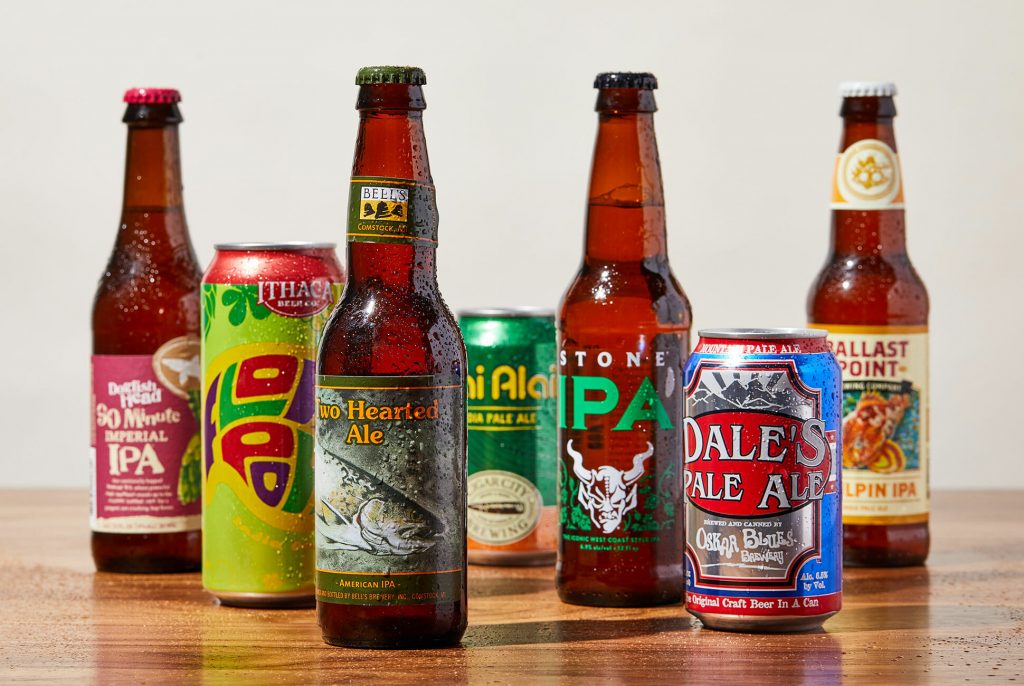
Let's talk about Homebrew. No, not the beer-making technique that left you befuddled by the appearance of approximately two thousand quirky-named, identically-tasting IPAs at the liquor store. I mean the popular package manager for macOS.
I literally had to search for "quintuple pale ale" before I stopped getting actual results.
Homebrew is a beloved tool of digital preservation educators and practitioners alike, and it's little wonder why. While I will continue to bang the drum for Linux operating systems and the Windows Subsystem for Linux, macOS remains a popular choice for digipres workstations given the general familiarity of Macs and the ability to easily and natively run much handy Bash/command line software. And Homebrew provides macOS with a major piece that it's "missing" out-of-the-box: a command line-based package manager.
A "package manager" or package management system allows a user to install, uninstall, upgrade and configure the software on their computer in a consistent and centralized manner. The official Mac App Store is a package manager, for instance - rather than needing to trawl the internet to find, download, and run individual installers for every single application you'd like to try, the App Store (in theory) puts everything in one place. Homebrew is frequently described as an "App Store" for CLI programs, and the comparison is pretty apt.1 Setting up Homebrew is pretty much step one for any Mac-based digipres machine: once it's in place, it's only a matter of minutes to ffmpeg, mediainfo and mediaconch, vrecord, exiftool, imagemagick, rsync, youtube-dl, hashdeep, ddrescue, and much more.
Homebrew is far from the only command line package manager out there - part of why it's called the "missing" package manager for macOS is because CLI package managers are included in Linux operating systems by default. Debian-based systems like Ubuntu have the Advanced Packaging Tool (APT);2 Red Hat-based systems have YUM or DNF; Arch systems have Pacman, SUSE systems have zypper, etc etc etc (and Homebrew can be used on Linux as well, incidentally). Since 2017, native Windows users can even get in on the action with Chocolatey.
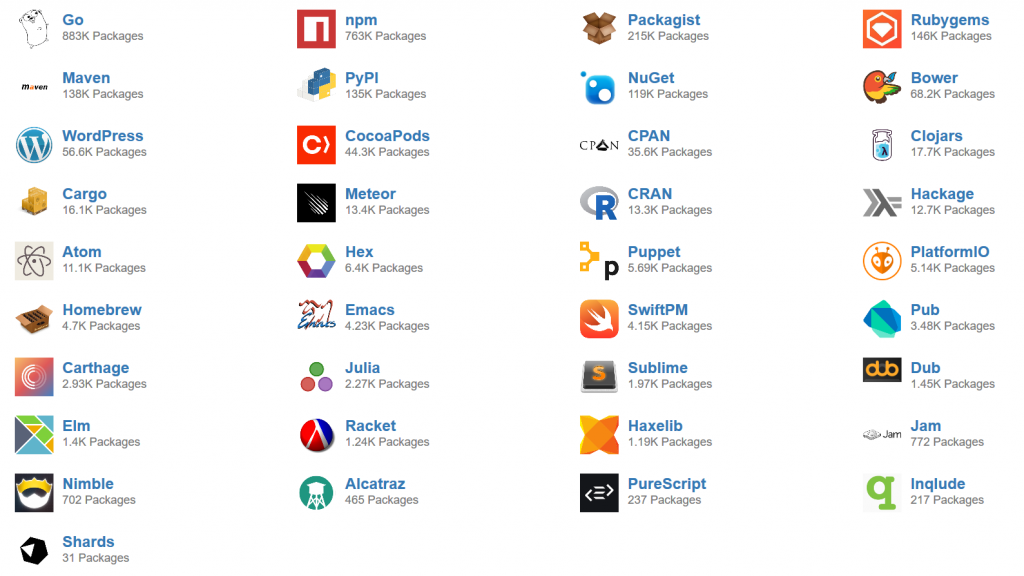
Homebrew isn't even the first attempt to bring command-line package management to MacOS, following in the footsteps of Fink and MacPorts (both of which are still around, though I would say with less robust or user-friendly communities around them). And that's not even getting into the crazy number of package or "dependency managers" that do basically the same work for developers looking to add modules in particular programming language environments: pip (Python), RubyGems (Ruby), npm and yarn (NodeJS/JavaScript), Maven (Java)...
It's a software preservation nightmare! Hooray!
All of these projects have more or less the same goal and advantages: automatically do all the work it takes to install a piece of software and make it available to the user. In many cases that means, for example, typing $ brew install mediainfo so that the mediainfo command-line application is then available by calling $ mediainfo example.mov , where it wasn't available before.
However, as with so many lovely, user-friendly innovations, there is an element here of ceding control for convenience. And while most of the time it is hopefully unnecessary to peek under the Homebrew hood, a couple of times in the past year I've seen situations come up where it helps to have some clarity about what all, exactly, Homebrew is doing when one hits enter on a "brew install".
So today I'm going to dive a bit deeper on the ins and outs of package management. I'll use Homebrew for several concrete examples because of its popularity and ubiquity in digipres training, so keep in mind that some of Homebrew's (beer-obsessed) vocabulary may be unique; but the concepts described here are basically applicable across the board, no matter what package manager you're using.
Return to the Source
First off, I would like to clarify a few basic computing concepts: namely, the different types of code and executable programs that can be installed with a package manager.
There is a key difference in programming between source code and machine code. Source code is "human-readable" - open up a source code file and you will be greeted with plain text, written and formatted according to the conventions of a particular programming language (Python, Bash, JavaScript, Ruby, HTML, etc). These sorts of files make up the majority of what you see on popular source code hosting and version control platforms like GitHub, GitLab, Bitbucket, SourceForge. They facilitate the work of programmers and developers: broadly speaking, people read and write source code.
Machine code, as the name implies...is for machines. It is a set of instructions that can be directly executed by a computer's processor. Machine code is numerical - there are no words to read, but the CPU interprets and understands a given string of numbers, or even just ones and zeroes, as a series of actions for it to perform. Open up a machine code file in a text editor, and you will just get a string of absolute wingding gobbledygook as the editor tries (and fails) to interpret and display this numerical series as text. (Open it up in a hex editor instead, and you might get a different result, but that's another day's topic)
Literal machine code
In order to get from source code (human-readable) to machine code (machine-readable) you usually have to compile the source code. The purpose of a compiler is to take your source code text and translate it down into ones and zeroes for your computer to actually do something with. Very broadly speaking, every operating system has its own compiler to make executable machine code for the particular OS and CPU that you are using right now. The same source code file (written, let's say, in Python) is going to create different machine code whether the machine code is intended and compiled to run on MacOS or Windows.
I'm probably making this sound more complicated than it is: we see the results when you, for instance, try to open and run a ".exe" file intended for Windows on macOS3 Windows .exes are machine code: again, try opening one up in a plain text editor like Notepad or Atom or Sublime Text and see the results.
Because executable machine code is numerical, and at its very core just a very long string of ones and zeroes, executable machine code files, like Windows .exe files, are sometimes just called "binaries".
This can get *really* confusing because technically a "binary" is just "any file not written and meant to be displayed as plain text" - .mp3s, .movs, .pdfs, .jpgs, all of them and many more are also "binary" files. But in the particular context of package management and installing applications, the term "binary" is very frequently used interchangeably and synonymously with "version", e.g. "a macOS binary", "a Windows binary", etc. I sort of wish I could've avoided this altogether but it will absolutely come up when troubleshooting or searching support forums with package management questions, so here we are.
So if you want to create software that works on different operating systems and processors, someone usually has to compile it from source code first into executable binaries that match the desired operating systems and processors. Again, you've seen this out in the digital world: you're trying to download a piece of software from a website and there are two different links, one "For Windows" that downloads a .exe, and one "for MacOS" that gives you a .app or .pkg or such. And because compilation is essentially an act of translation, there are correspondingly things that can get lost in that process. We'll see a direct example of this later in a case study.
*Extremely undergrad film student voice* It's really more of a character study
A last aside: you may have encountered scripts and be thinking, "hey, but I can run (execute) a .py Python script or a .sh Bash script, which are source code files, without compiling!" Well, you got me! Just as I mentioned above that not all binaries are executable, not all executables are binaries. Scripting uses a process called interpreting *instead* of compiling. This usually allows scripts to be a little more portable than binaries across operating systems, but the basic idea - that there is a layer of translation necessary between the source code file and the computer - is the same.
Define Your "Install"
So what all exactly does source code and machine code and binaries have to do with package management and installing software?
Let's say you are a web archivist running macOS and you installed two different pieces of software at the same time: youtube-dl, which is a handy command line tool for downloading media from YouTube and other hosting sources, and Webrecorder Player, a wonderful desktop tool for viewing and inspecting web archives (WARCs), no internet connection required.
You "installed" both programs. But youtube-dl is not in your "Applications" folder next to Webrecorder Player. And no matter how many variations on $ webrecorder you type into your Terminal, Webrecorder Player does not launch on your desktop.
If that's the case... what does "install" mean?
"Installing" an application is actually a highly contextual process. The end-goal is always the same: you want to take a program and make it usable. But how you're supposed to use a program....depends on the program! And thus the steps actually necessary to complete an installation also depend on the program, user, and goals involved. When broken down into smaller, discrete actions - downloading source code, compiling the code, creating a binary, moving that binary to a particular folder, changing some operating system settings so that you can execute that binary - the installation process can get quite variable and customizable.
So finally, we return to package managers. As I said up top, package managers take care of many of the nitty-gritty details of installing programs so that as far as you, the user, are concerned, "install" just means "click this button" or "type one brief command." They are meant to cover a large majority of use cases with minimal effort - but potentially to the detriment of edge cases or tinkering an installation to exactly how a user needs it.
To return specifically to Homebrew, every package or program that you can install with Homebrew has a corresponding formula. You can browse all of them here. Homebrew's formulae are all hosted on GitHub, and every single one of them is just a brief script (written in Ruby) which defines instructions to answer the question:"what does 'install' mean for this particular program?" When you type $ brew install mediainfo, Homebrew searches in the Homebrew/homebrew-core repository in GitHub, finds the mediainfo.rb formula, and then follows whatever steps that formula tells it to do.
To get a better idea of what these instructions actually look like and how Homebrew interprets and performs them, let's look at a concrete example.
Case Study: vrecord's Homebrew Formula
This is the whole Homebrew formula for vrecord, the open source video digitization program, developed and maintained by the Association of Moving Image Archivists' Open Source Committee - let's take a look and break it down by section:
class Vrecord < Formula desc "Capturing a video signal and turning it into a digital file" homepage "https://github.com/amiaopensource/vrecord" url "https://github.com/amiaopensource/vrecord/archive/v2020-07-01.tar.gz" version "2020-07-01" sha256 "983264ca6a69b78b4487a7479ab5a4db04cbc425f865ec2cb15844e72af4f4ac" head "https://github.com/amiaopensource/vrecord.git" depends_on "amiaopensource/amiaos/deckcontrol" depends_on "amiaopensource/amiaos/ffmpegdecklink" depends_on "amiaopensource/amiaos/gtkdialog" depends_on "cowsay" on_macos do depends_on "bash" depends_on "gnuplot" depends_on "mediaconch" depends_on "mkvtoolnix" depends_on "mpv" depends_on "qcli" depends_on "xmlstarlet" end on_linux do def caveats <<~EOS ** IMPORTANT FOR LINUX INSTALL ** Additional install steps are necessary for a fully functioning Vrecord install on Linux. This includes using the standard package manager to install gnuplot, xmlstarlet, mkvtoolnix and mediaconch. Additionally, it often is necessary to remove the Homebrew installed version of SDL2 to prevent conflicts. For more information please see: https://github.com/amiaopensource/vrecord/blob/master/Resources/Documentation/linux_installation.md EOS end end def install bin.install "vrecord" bin.install "vtest" prefix.install "Resources/audio_mode.gif" prefix.install "Resources/qcview.lua" prefix.install "Resources/vrecord_policy_ffv1.xml" prefix.install "Resources/vrecord_policy_uncompressed.xml" prefix.install "Resources/vrecord_logo.png" prefix.install "Resources/vrecord_logo_playback.png" prefix.install "Resources/vrecord_logo_audio.png" prefix.install "Resources/vrecord_logo_edit.png" prefix.install "Resources/vrecord_logo_help.png" prefix.install "Resources/vrecord_logo_documentation.png" man1.install "vrecord.1" man1.install "vtest.1" end test do system "#{bin}/vrecord", "-h" endend
Metadata
class Vrecord < Formula desc "Capturing a video signal and turning it into a digital file" homepage "https://github.com/amiaopensource/vrecord" url "https://github.com/amiaopensource/vrecord/archive/v2020-07-01.tar.gz" version "2020-07-01" sha256 "983264ca6a69b78b4487a7479ab5a4db04cbc425f865ec2cb15844e72af4f4ac" head "https://github.com/amiaopensource/vrecord.git"
class Vrecord < Formula - This line is required to start every formula - Homebrew needs to know that the script you've pointed it to is indeed a formula! (The first letter of the program/formula name has to be capitalized to conform with Ruby syntax, regardless of how you normally write the name)
desc - A brief description of the application and its purpose. Not strictly required, but helpful - this will often match the "About" project description on the application's GitHub/GitLab page, if the code is hosted there.
homepage - A project site where users can go for more information about the program. It's mandatory to include a homepage if you want to include your formula in Homebrew's core list of packages.
url - This is required - it directs Homebrew to where it should download the program's code (in this case, and in the case of many Homebrew formulae, the source code is contained in a tarball, a format that takes all the source code files and packages them together into one, like a .zip file). If a program has multiple versions or releases, this is the field that specifies *which* version Homebrew will try to install.
version - This is metadata that helps Homebrew keep track of which version of a program you have installed (particularly helpful if you have multiple versions of a program/formula installed on the same computer). It's not required to have this field, and if the source code URL above comes from GitHub, Homebrew can usually pull this version info from the file name automatically - but it doesn't hurt to specify manually.
sha256 - This is the checksum for the source code tarball from the URL above. Once the tarball has downloaded to your computer, Homebrew will automatically check that it matches this checksum here - basically a security feature to make sure that what Homebrew downloads is indeed the code/program that you wanted. This is required.
head - "Head" specifies a cutting-edge version of the program - if it's specified, it means early adopters can try out the absolute newest changes and revisions to the program by its developers by running $ brew install --HEAD <formula> instead of just $ brew install <formula>. It's basically a way to signal to users that some new options or features may be available for them to try out but they are not yet considered stable. It's not required if the formula/program author only wants Homebrew users to install "guaranteed", stable releases of their software.
Dependencies
depends_on "amiaopensource/amiaos/deckcontrol" depends_on "amiaopensource/amiaos/ffmpegdecklink" depends_on "amiaopensource/amiaos/gtkdialog" depends_on "cowsay" on_macos do depends_on "bash" depends_on "gnuplot" depends_on "mediaconch" depends_on "mkvtoolnix" depends_on "mpv" depends_on "qcli" depends_on "xmlstarlet" end on_linux do def caveats <<~EOS ** IMPORTANT FOR LINUX INSTALL ** Additional install steps are necessary for a fully functioning Vrecord install on Linux. This includes using the standard package manager to install gnuplot, xmlstarlet, mkvtoolnix and mediaconch. Additionally, it often is necessary to remove the Homebrew installed version of SDL2 to prevent conflicts. For more information please see: https://github.com/amiaopensource/vrecord/blob/master/Resources/Documentation/linux_installation.md EOS end end
In this section of a formula, the program developer needs to specify any and all external dependencies - that is, if there is other code, or other programs, that have to be present and installed on the user's computer before vrecord can be installed and used correctly.
Every depends_on line specifies a dependency, and every dependency listed is...another Homebrew formula. So before Homebrew proceeds to the next section of the vrecord formula (the actual "install" section), it will go to each and everyone of these formula *first* and complete the instructions found there...(including, if those formula specify dependencies, going to their dependent formula - and on and on, down the line, if necessary).
(This means that the amount of time it takes vrecord to install can vary wildly, depending on how many of those depends_on formula are already present on your computer when you start - if you already have installed cowsay or mediaconch before, Homebrew will just skip over this part for those dependencies.)
In this case, the vrecord formula also specifies slightly different behavior depending on whether the Homebrew user is running macOS or Linux. Homebrew works on Linux systems, but, as I mentioned earlier, Linux systems usually have their own baked-in package managers (e.g. apt), and sometimes Homebrew and native Linux package managers don't play nice with each other - so in this case, rather than having Homebrew run the install process for all those dependencies on_linux, the vrecord formula instead defines a caveat, which is just a warning to display to the user. This caveat, obviously, recommends using the native package manager to install certain dependencies instead of Homebrew, to avoid conflicts and errors.
Finally, the meat of the matter - in this section of the formula, we actually get to what "install" even means in the context of vrecord.
vrecord is a relatively straightforward case because, the source code doesn't need to becompiled. The source code is itself a Bash script, which can be interpreted and run by a macOS or Linux system as-is (or, as-long-as-the-dependencies-have-been-installed). There is no translation down to the ones and zeroes of machine code required. So the installation process here isn't a matter of compiling, it's just a matter of moving the files to where they can be used.
prefix here is a variable - it's a setting that's part of your overall Homebrew configuration, so that any time any Homebrew formula mentions "prefix", the package manager will just sub in the value it has stored there. Specifically, prefix defines a file path, an over-arching directory/folder for all of Homebrew's files to live in.
Usually, prefix is set by default when you first install Homebrew and you never have to mess with it again (the whole point of a package manager being to mess with things as little as possible). You can see yours by running $ brew config and looking for the HOMEBREW_PREFIX line - on MacOS, it's usually something like /usr/local. So, all of the programs that Homebrew downloads, installs, compiles, whatever - they'll go into that /usr/local directory (unless otherwise specified by a formula) - all neatly nested and organized according to the package/formula name and version.
(The nested directory for keeping code, in Homebrew-speak, is called the Cellar. So if you want to find all your Homebrew-installed programs, poke around your /usr/local/Cellar directory.)
So all those lines that start with prefix.install are saying: take this file (from inside the tarball you downloaded) and put them inside the nested folder specified by the prefix variable. In vrecord's case, we're just taking some image and configuration templates (the .XML files) for vrecord's GUI mode and putting them in appropriate locations in the Cellar.
The bin.install options are doing the same thing, but flagging an extra step. These two entries (vrecord and vtest) are the actual scripts that we want to run, so they need to be made executable for you, the user, to run them. The bin.install directive 1) links the specified files to a particular directory - in this case, /usr/local/bin - where your operating system expects to find executable command-line programs, and 2) adjusts their permissions so that you can run these scripts (without needing "sudo" permission.
("bin" in these file paths stands for "binaries" - remember that there is a general but imprecise equation between binaries and executables, so that is why we are putting the vrecord script there - because it is executable, even though it is a source code file, not actually a binary/machine code)
The man1.install directives are again very similar to bin.install - these are manual pages that explain how to run the program (by typing $ man vrecord or $ man vtest). macOS expects to find these files in a certain place, just like how it expects executable binaries to be in /usr/bin or /usr/local/bin. So man1.install copies these files to that location.
Test
test do system "#{bin}/vrecord", "-h" endend
Homebrew formula writers can optionally put in a "test" block at the end of the script to see if the installation process proceeded correctly. It's generally out-of-scope of the Homebrew project to make sure that every single feature of every single program works as expected - but it can be a handy check just to make sure at least at the end of all this you got an executable something out of it.
In the case of vrecord, this test block simply directs the user's computer to try running the command $ vrecord -h - if the computer encounters no errors trying to run this command (which just displays vrecord's "help" page), then Homebrew will consider this a successful installation and finish running.
Phew. Let's review - in the end, what did that vrecord Homebrew formula do? It told the computer to:
Go to a certain URL and download the file (tarball) it found there.
Check for any other external software that vrecord needs to work.
Extract vrecord's files out of the tarball and move them to a different folder.
Test that the computer can find and execute the program now that it's been moved.
Case Study: Troubleshooting ewfmount
..now what about a slightly more complicated example? One that involves source code compilation? Let's start with a Tweet.
is anyone successfully running libewf with fuse osx on a mac os? If so what build did you use? I can't get libewf (from sleuthkit homebrew) to "see" osx fuse (tried binary from osx fuse website and brewed osxfuse)
A bit of context: libewf is a collection of software that allows users to work with EWF-formatted disk images, which is a pretty popular option for preserving hard drives. One of the tools included in libewf is ewfmount, a program that allows you to, well, mount EWF disk images and explore the files on them, just as if they were a physical, external hard drive attached over USB or what have you.
Complicating things, ewfmount won't work with MacOS out-of-the-box. First you have to install "FUSE for MacOS", a piece of software that allows MacOS to work with file systems beyond the ones that Apple cares about (basically just APFS at this point). Otherwise, trying to mount your EWF disk image is going to have the same affect as plugging in an unformatted hard drive.
Eddy had installed these two pieces - libewf/ewfmount and FUSE for MacOS, using Homebrew, but the two pieces of software still weren't "seeing" each other. To find out why, it helped to take a look at the Homebrew formulae - if the installation wasn't working (Eddy didn't have a usable version of the desired program at the end of the process), then one of the steps Homebrew was taking by default had to be incorrect for his context.
Here is the current Homebrew formula for libewf - see if you can spot the problematic line:
class Libewf < Formula desc "Library for support of the Expert Witness Compression Format" homepage "https://github.com/libyal/libewf" # The main libewf repository is currently "experimental". url "https://github.com/libyal/libewf-legacy/releases/download/20140808/libewf-20140808.tar.gz" sha256 "dfe29b5f2f1841ff1fe11979780d710a660dbc4727af82ec391f398e6b49e5fd" license "LGPL-3.0" bottle do cellar :any sha256 "43d8ba6c2441f65080f257a7239fe468be70cb2578ec2106230edd1164e967b6" => :catalina sha256 "4c5482f8f1c97f9c3f3687bccd9c3628b314699bc26743e641f2ae573bf95eeb" => :mojave sha256 "cae6fd2f38855fd15f8a50b644d0817181fed055aef85b7793759d7703a833d4" => :high_sierra end head do url "https://github.com/libyal/libewf.git" depends_on "autoconf" => :build depends_on "automake" => :build depends_on "gettext" => :build depends_on "libtool" => :build end depends_on "pkg-config" => :build depends_on "openssl@1.1" uses_from_macos "bzip2" uses_from_macos "zlib" def install if build.head? system "./synclibs.sh" system "./autogen.sh" end args = %W[ --disable-dependency-tracking --disable-silent-rules --prefix=#{prefix} --with-libfuse=no ] system "./configure", *args system "make", "install" end test do assert_match version.to_s, shell_output("#{bin}/ewfinfo -V") endend
...give up? On Line 40, in the "install" section of the formula, there are several "args" listed, including --with-libfuse=no. This our clue and our culprit!
These "args" are arguments (options) for source code compilation. So by default, the Homebrew formula defines "installation" of libewf/ewfmount to not include a software library called libfuse - which, as the name implies, is a critical component that libewf/ewfmount requires for communicating with FUSE for MacOS. Without it, ewfmount can not mount EWF disk images on MacOS.
Now, you can edit *any* Homebrew formula and how it works, just for you, by running $ brew edit <package>. This will open up a local copy of the formula in a text editor and let you change and edit options, without affecting how this formula behaves for all other Homebrew users.
But, unfortunately, in this case it is still not enough to just run $ brew edit libewf and change line 40 to --with-libfuse=yes. That's because, towards the top of this formula, you'll notice a section that starts with "bottle".
"Bottles" are Homebrew's clever name for binaries. These are pre-compiled versions of the source code for libewf, ready to go for MacOS (with flavors for High Sierra, Mojave, or Catalina, as indicated). If a bottle is specified in a Homebrew formula, that's it - any instructions for how to compile the source code, later on in the formula, will be ignored, because as far as Homebrew is concerned, you already have a working binary, and it will proceed from there. So editing line 40 will make no difference, because either way Homebrew will by default use a bottle/binary that was (we can assume/infer) already created with --with-libfuse=no.
The solution, in this case, is to both edit line 40 to --with-libfuse=yes AND run $ brew install --build-from-source libewf instead of just $ brew install libewf. This extra flag/option tells Homebrew to ignore the "bottle" section, skip over those pre-compiled binaries, and start from scratch with the source code specified at url. THEN, proceeding down the formula to the "install" section, Homebrew will compile the source according to the options you set, creating a new version/binary with libfuse enabled.
(There is a longer, more rambling and circular version of this solution that I wrote in that Twitter thread - but, it is a little out-of-date, as the Homebrew formula has been edited to adjust the default source code URL since that writing. The basic point - that getting a version of ewfmount that works with FUSE for MacOS using Homebrew requires the two-step process of changing a flag for use during compilation AND telling Homebrew to start from source - still stands)
Wrapping Up
I hope that these examples and explanations help digipres users understand that, while an AMAZING tool and community, Homebrew is not magic! It plays by certain rules and relies on assumptions of what will work best for the most number of users. The vast majority of the time - those assumptions will probably work fine for you!
But if they don't, it's just like any other piece of technology, analog or digital - you'll need to know a bit more about what it's doing in order to effectively troubleshoot, fix, or change it. So I'll leave off with a note that Homebrew's documentation IS ALSO AMAZING! The (open-source and volunteer!!!) contributors have pulled together tons and tons of information about how Homebrew works, guidelines for different ways of using it, templates and automated tools for creating and testing formulae, etc. I really recommend exploring those pages to learn more about the various tricks up Homebrew's sleeve (there's a lot of built-in neatness you might not even know about!!) and as a diving-off point to learn more about code compilation, operating systems, interpreters, and just how software works, in general.
Am I just saying that because this is the longest blog post I've ever written, and there were about twenty different tangents and other topics that I didn't even explore, and that I probably don't have the time to write about? Maybe! But it's time to put a cork in it.
Please return to this line in a minute so you can appreciate just how clever I am.
See, told you! Why aren’t you laughing?
macOS does some trickery that usually hides its executable machine code and files from your view, which again is a topic for another post; but broadly speaking the flip side is true as well when you try to open a macOS .app or .pkg on Windows
]]>
A Brief Introduction to Signal-to-Noise Ratio for Analog Video PreservationEthanhttps://patchbay.tech/a-brief-introduction-to-signal-to-noise-ratio-for-analog-video-preservation/2020-02-07T19:36:42-05:00
This is a guest post written by Jeff Lauber, based on his paper originally written for a course on “Video Preservation” in NYU’s M.A. program in Moving Image Archiving and Preservation. Jeff is a media archivist based in New York City. He currently works as…
]]>
This is a guest post written by Jeff Lauber, based on his paper originally written for a course on “Video Preservation” in NYU’s M.A. program in Moving Image Archiving and Preservation.
Jeff is a media archivist based in New York City. He currently works as an archivist for Jenny Holzer Studio in Brooklyn and carries out freelance archival projects for a number of NYC institutions.
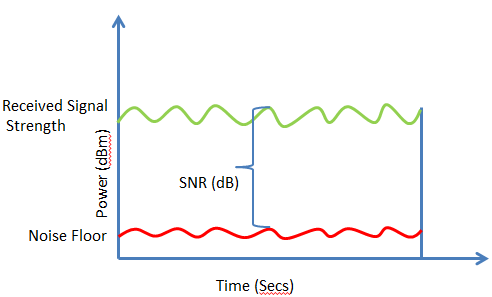
In its most basic sense, signal-to-noise ratio (SNR) explains itself: the proportion of noise present in transmission of a given signal compared to the pure signal itself. In more technical terms: “the dimensionless ratio of the signal power to the noise power contained in a recording [...] the signal-to-noise ratio parameterizes the performance of optimal signal processing systems when the noise is Gaussian [i.e. normally distributed and/or predictable].”1 Applicable in numerous fields in which imaging and/or transmission of electronic signals are used, SNR allows for a more precise understanding of how accurately a signal is being received. In the preservation of videotape, SNR can act as an important indication of whether or not audiovisual signals from the tape are being captured properly and with minimal unwanted background noise in the analog-to-digital conversion process.
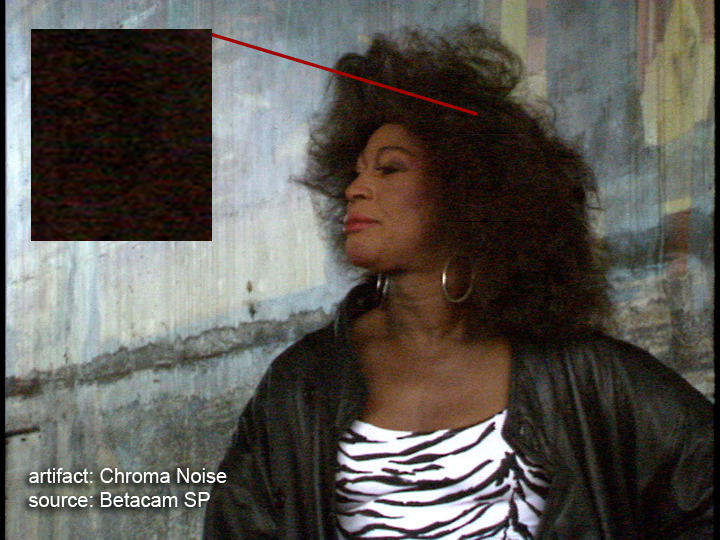
Noise in magnetic/electronic audiovisual signal transmission can be the result of a number of factors. In its most common instance, noise is perceived in the video signal as “snow” and is the result of random electrical disturbances in the signal transmission process. Most of this random noise is white (i.e. distributed evenly across the frequency spectrum) and is introduced to the signal via components that contain low signal levels such as camera imagers, videotape recorders, cable circuits, and broadcast receivers.2 In fact, noise can be introduced into the signal at any stage in the recording and transmission process; as Jim Lindner importantly notes, “the impact [of introducing noise into the signal] is cumulative over the entire signal chain and is not necessarily just an issue of the magnetic media itself or of a problem with magnetic fields in storage.”3
Noise in the chroma (color) signal from a Betacam transfer; image courtesy the AV Artifact Atlas
In general, the SNR of analog recording media and electronics has improved in tandem with advancements in technology. Though natural to both analog and digital recordings, noise has often been considered impure and undesirable in audiovisual signals, and efforts to improve recording technology over the years were intent on achieving the highest possible SNR, i.e. the lowest level of noise proportionate to the audiovisual signals.3 Video SNR is most often expressed in decibels and, in more precise terms, is the “power ratio […] of the peak-to-peak signal voltage or current, from black level to reference white but not including the sync pulses, to the rms [sic] value of the noise.”2 The noise power in a video signal can be expressed as either a weighted or unweighted value. Unweighted noise is an expression of the noise power in a given signal and can be determined mathematically/logarithmically or using an instrument with a uniform frequency response which quantitatively measures the output spectrum of a signal transmission. Weighted noise takes into account the noise that the average human can visibly perceive in a video signal: by considering factors such as natural eye response, screen brightness, and scan-line width, among others, the weighted factor simulates the aperture response of the human eye to adjust the noise power measurement to what can be visually perceived.2 In general, weighted noise measurements result in a SNR that is about 8dB higher than unweighted, the greater proportion a result of adjusting the factor for noise that is present in the signal but cannot be visually perceived.4. A final important consideration when measuring the SNR of a given video signal is to factor in time : in terms of human perception, still frames of a film or video image appear noisier than moving images, eye-brain coordination generally integrating around six frames of a video image to improve the SNR. It is noted that incorporating a 0.2 second factor into the mathematical equation to calculate SNR is good practice in that respect.5 In broadcast television, weighted SNR of between 43 and 53dB is considered reasonable, though newer analog and digital technologies have become capable of ratios far greater.2
SNR is an important factor to consider in the analog-to-digital conversion of videotape signals and in video- and audiotape preservation generally. In the simplest sense, awareness of noise and its proportion to the pure, desired audiovisual signal is essential. Lindner notes that many people—notably younger generations whose lives have been predominantly digital—have come to expect pure, seemingly noiseless image and sound quality from audiovisual content. However, both visual and audible noise are natural qualities of analog recordings.3 Thus, attempting to reduce noise in analog-to-digital transfer of video- and audiotapes has the potential to inaccurately capture intrinsic noise qualities if done too severely.
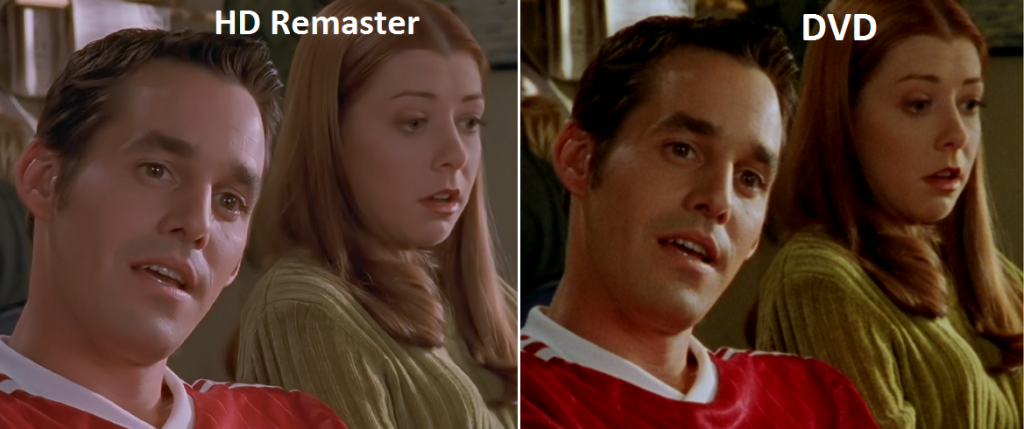
The HD remaster of Buffy the Vampire Slayer is infamous for its over-emphatic Digital Noise Reduction of material originally shot on film.
In a technical sense, digitization of analog videotape must take into consideration the SNR of a given audiovisual signal since, as with signal amplification and transmission, the digitization process involves sending a signal through multiple components or pieces of equipment, each of which has the potential to introduce noise. This consideration is especially pertinent given that noise is additive in analog systems, i.e. noise accumulates at every stage of the recording, transmission, and/or digitization process.2 Converting the waveform of analog audiovisual content into quantized, digital values in general introduces error, and the quality of the recording or presence of noise is also determined by the number of bits per sample. The signal to quantization noise ratio (SQNR), in that respect, measures the difference between the signal and the noise introduced in quantization; it has been noted that every bit adds around 6dB of resolution to the digitized signal so that a 16-bit sample, for instance, would allow for a maximum SQNR of 96dB.6 An awareness of target SNRs and methods for maximizing the ratio of digitized content can help ensure cleaner, more accurate digital transfer.
However, when dealing with analog videotape and transmitting its signal, noise is an inevitability; even when sample size is significant and even when other measures are taken to reduce noise in the signal path during digitization (e.g. minimizing the length of the path and the number of components used – literally, shorter cables and less equipment, if possible), there is an “irreducible amount of noise superimposed on the signal each time the camera image is read out, amplified, and digitized.”
Embrace the noise
Johnson D. Signal-to-Noise Ratio. Scholarpedia. http://www.scholarpedia.org/article/Signal-to-noise_ratio. Accessed October 14, 2018.
Inglis A. Video Engineering. New York, NY: McGraw-Hill; 1993.
Lindner J. Magnetic Fields, Erasing Magnetic Media by Mistake, and Analog Video Noise. AMIA Listserv. https://lsv.uky.edu/archives/amia-l.html. Published February 11, 2015. Accessed October 12, 2018.
Constant M. Signal to Noise Ratio. CCTV Information. https://www.cctv-information.co.uk/i/Signal_to_Noise_Ratio. Published 2009. Accessed October 14, 2018.
Rose A. Comparative Noise Properties of Vision, Television, and Photographic Film. In: Vision: Human and Electronic. New York, NY: Plenum Press; 1973:95-110.
Chan CF. Chapter 2: Digitization of Sound. City University of Hong Kong. http://www.ee.cityu.edu/hk/~cfchan/EE5809/chap2.pdf. Accessed October 14, 2018.
]]>
Coming Soon: A Revived Patch BayEthanhttps://patchbay.tech/coming-soon-a-revived-patch-bay/2019-08-24T16:22:40-04:00
As we quickly approach the one-year anniversary of the last time I updated this blog, a couple things have become clear to me: I'm extremely proud of The Patch Bay back catalog, particularly the evergreen posts on time, color, and audio in analog video that…
]]>
As we quickly approach the one-year anniversary of the last time I updated this blog, a couple things have become clear to me:
the best burger in West Hartford can be found at Park & Oak, don't listen to any bullshit about Plan B
I do not currently have the mental/emotional/sleep capacity to continue researching and writing technical posts here while working extensively during the day on emulation and EaaSI-related documentation
I'm extremely proud of The Patch Bay back catalog, particularly the evergreen posts on time, color, and audio in analog video that I cranked out last year during the Summer O' Unemployment. And I'm thrilled that the day job I stumbled into still gives me the space to tinker, explore, create new resources for archivists and share - to the point that, for now, there have just been better platforms to disseminate the things I've been working on than the Patch Bay.
(Check out the EaaSI blog on the Software Preservation Network's site, or tune in to our ongoing webinar series, to get what I mean!)
But! It's made me sad to watch The Patch Bay drift into dormancy (he says, letting Netflix roll over to the next episode of "GLOW"). So it is time to fulfill my destiny as a millennial and become a content aggregator.
In all seriousness, thanks to Kelly Haydon for originally suggesting some time ago that The Patch Bay start taking guest posts, and for kicking things off by pointing me in the direction of some amazing student work that will start this new phase. In essence, I hope to turn this site into more of an editorial project, soliciting guest posts and working with the submitter to create something in the Patch Bay spirit of connecting preservation and technology.
So, in addition to a "stay tuned", consider this post also a call for submissions! Have you written (or do you want to write) about a topic related to audiovisual and/or digital preservation? Have no blog of your own on which to post it? Send it over! Based on past material covered by The Patch Bay, topics might include, but are in no way limited to:
tutorials for using a particular piece of software or toolchain (i.e. several applications together in a workflow)
the history of analog and/or digital audiovisual technology
personal narrative pieces on the experience of using or learning about technical concepts in preservation
tips for equipment maintenance or repair
and so on!
A few guidelines to keep in mind:
I'm willing to look at/edit/post anything between ~1,000-5,000 words (my posts have averaged around 2,500, but, whatever, it's a blog and I'm flexible!)
Whether starting from something you already have written or from scratch, we'll work together in an OnlyOffice doc to get your post ready for prime time (copy editing, adding images, fleshing out or cutting things down)
I run this site in my free time, so please be patient in awaiting responses, edits, posts!
Unless otherwise noted, all content on The Patch Bay is posted under a Creative Commons Attribution 4.0 International license (CC-BY 4.0). If you have any objections or would like your content posted under a different license, I am open to discussion, but strongly encourage the use of Creative Commons or compatible copyleft licensing.
Benefits of submitting or posting on The Patch Bay!
Free web archiving services for your writing: when your post goes up, I'll both submit a snapshot of the page to the Wayback Machine, and if desired, create and send you a WARC file of your post (backup/storage is on you from there)
Social media promotion: will boost each post to my ~70 Mastodon and ~500 Twitter followers, it's not that many but only cool people allowed
Sometimes other people link and even assign your posts to read in classes or workshops and it feels good to know you've contributed to the shared knowledge of the the community?
If any of this interests you, or if you have more questions, feel free to get in touch by emailing ethan.t.gates (at) gmail.com, or DM'ing me on Mastodon or Twitter.
And if you're just a loyal reader - watch this space!!!! Seriously, we've got some cool stuff coming soon.
]]>
See What You Hear: Audio Calibration for Video DigitizationEthanhttps://patchbay.tech/see-what-you-hear-audio-calibration-for-video-digitization/2018-09-29T15:33:43-04:00
I've always been amused by the way a certain professional field frequently goes out of its way to shout "we don't understand audio" to the world. (Association of Moving Image Archivists, Moving Image Archiving and Preservation, Moving Image Archive Studies, Museum of the Moving Image,…
]]>
I've always been amused by the way a certain professional field frequently goes out of its way to shout "we don't understand audio" to the world. (Association of Moving Image Archivists, Moving Image Archiving and Preservation, Moving Image Archive Studies, Museum of the Moving Image, etc. etc.)
"But there's no good word to quickly cover the range of media we potentially work with," you cry! To which I say, "audiovisual" is a perfectly good format-agnostic term that's been in the public consciousness for decades and doesn't confuse my second cousins when I try to explain what I do. "But silent film!" you counter, trying to use clever technicalities. To which I say, silent film was almost never really silent, home movies were meant to be narrated over, and stop being a semantic straw man when I'm trying to have a hot take over here!
The point is: when working in video preservation and digitization, our training and resources have a tendency to lean toward "visual" fidelity rather than the "audio" half of things (and it IS half). I'm as guilty of it as anyone. As I've described before, I'm a visual learner and it bleeds into my understanding and documentation of technical concepts. So I'm going to take a leap and try and address another personal Achilles' heel: audio calibration, monitoring, and transfer for videotape digitization.
I hope this to be the first in an eventual two-part post (though both halves can stand alone as well). Today I'll be talking about principles of audio monitoring: scales, scopes and characteristics to watch out for. Tune in later for a breakdown of format-by-format tips and tricks that vary depending on which video format you're working with: track arrangements, encoding, common errors, and more. My focus, for now, is on audio in regards to videotape - audio-only formats like 1/4" open reel, audio cassette, vinyl/lacquer disc and more bring their own concerns that I won't get into right now, if only for the sake of scope crawl (I've been writing enough 3000+ word posts of late). But much if not all of the content in this post particularly should be applicable to audio-only preservation as well!
Big thanks to Andrew Weaver for letting me pick his brain and help spitball these posts!
The Spinal Tap Problem
Anyone who has ever attended one of my workshops knows that I love to take a classic bit of comedy and turn it into a buzz-killing object lesson. So:
Besides an exceptional sense of improvisational timing, what we have here is an excellent illustration of a fundamental disconnect in audio calibration and monitoring: the difference between how audio signal is measured (e.g. on a scale of 1 to 10) and how it is perceived ("loudness").
There are two places where we can measure or monitor audio: on the signal level (as the audio passes through electrical equipment and wires, as voltage) or on the output level (as it travels through the air and hits our ears as a series of vibrations). We tend to be obsessed with the latter - judging audio based on whether it's "too quiet" or "too loud", which strictly speaking is as much a matter of presentation as preservation. Cranking the volume knob to 11 on a set of speakers may cause unpleasant aural side effects (crackling, popping, bleeding eardrums) but the audio signal as recorded on the videotape you're watching stays the same.
To be clear, this isn't actually any different than video signal: as I've alluded to in past posts, a poorly calibrated computer monitor can affect the brightness and color of how a video is displayed regardless of what the signal's underlying math is trying to show you. So just as we use waveform monitors and vectorscopes to look at video signals, we need "objective" scales and monitors to tell us what is happening on the signal level of audio to make sure that we are accurately and completely transferring analog audio into the digital realm.
Just like different color spaces have come up with different scales and algorithms for communicating color, different scales and systems can be applied to audio depending on the source and/or characteristic in question. Contextualizing and knowing how to "read" exactly what these scales are telling us is something that tends to get lost by the wayside in video preservation, and what I'm aiming to demystify a bit here.
Measuring Audio Signal
So if we're concerned with monitoring audio on the signal level - how do we do that?
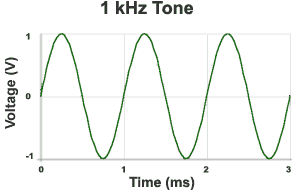
All audiovisual signal/information is ultimately just electricity passed along on wires, whether that signal is interpreted as analog (a continuous wave) or digital (a string of binary on/off data points). So at some level measuring a signal quantitatively (rather than how it looks or sounds) always means getting down and interpreting the voltage: the fluctuations in electric charge passed along a cable or wire.
In straight scientific terms, voltage is usually measured in volts (V). But engineers tend to come up with other scales to interpret voltage that adjust unit values and are thus more meaningful to their own needs. Take analog video signal, for instance: rather than volts, we use the IRE scale to talk about, interpret and adjust some of the most important characteristics of video (brightness and sync).
We never really talk about it in these terms, but +100 IRE (the upper limit of NTSC's "broadcast range", essentially "white") is equivalent to 700 millivolts (0.7 V). We *could* just use volts/millivolts to talk about video signal, but the IRE scale was designed to be more directly illustrative about data points important to analog video. Think of it this way: what number is easier to remember, 100 or 700?
Only one of those numbers has an emoji, is all I'm saying.
Audio engineers had the same conundrum when it came to analog audio signal. Where it gets super confusing from here is that many scales emerged to translate voltage into something useful for measuring audio. I think the best way to proceed from here is just to break down the various scales you might see and the context for/behind them.
dBu/dBv
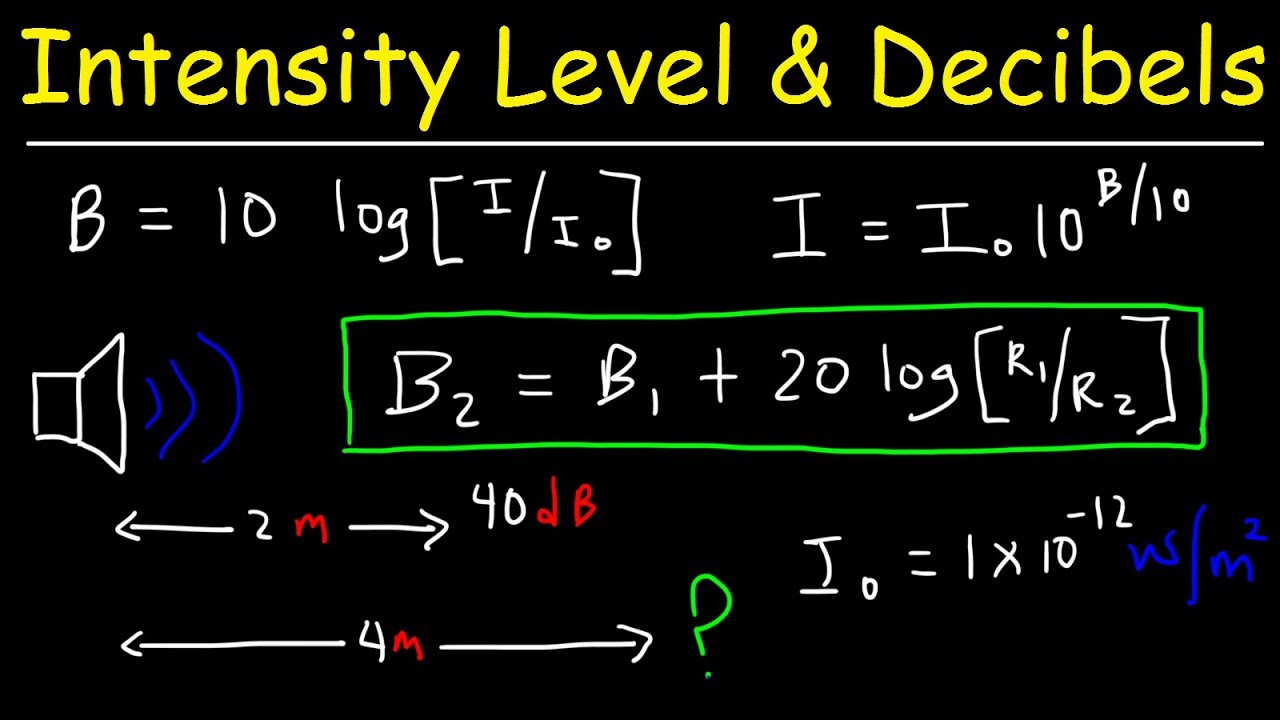
Decibel-based scales are logarithmic rather than linear, which makes them ideal for measuring audio signals and vibrations - the human ear is more sensitive to certain changes in frequency and/or amplitude than others, and a logarithmic scale can better account for that (quite similar to gamma correction when it comes to color/luminance and the human eye).
sighhhhhhhhh
The problem is that decibels are also a relative unit of measurement: something can not just be "1 dB" or "1000 dB" loud; it can only be 1 dB or 1000 dB louder than something else. So you can see quite a lot of scales related to audio that start with "dB" but then have some sort of letter serving as a suffix; this suffix specifies what "sound" or voltage or other value is serving as the reference point for that particular scale.
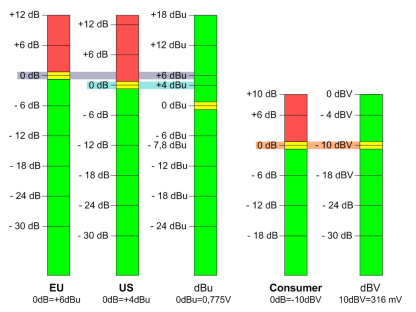
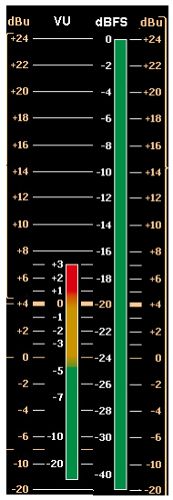
An extremely common decibel-based scale for measuring analog audio signals is dBu. The "u" value in there stands for an "unterminated" voltage of 0.775 volts (in other words, the value "+1 dBu" stands for an audio wave that is 1 decibel louder than the audio wave generated by a sustained voltage of 0.775 V).
In the analog world, dBu is considered a very precise unit of measurement, since it was based on electrical voltage values rather than any "sound", which can get subjective. So you'll see it in a lot of professional analog audio applications, including professional-grade video equipment.
Confusingly: "dBu" was originally called "dBv", but was re-named to avoid confusion with the next unit of measurement on this list. So yes, it is very important to distinguish whether you are dealing with a lower-case "v" or upper-case "V". If you see "dBv", it should be completely interchangeable with "dBu" (...unless someone just wrote it incorrectly).
dBV
dBV functions much the same as dBu, except the reference value used is equivalent to exactly 1 volt (1 V). It is also used as a measurement of analog audio signal. (+1 dBV indicates an audio wave one decibel louder than the wave generated by a sustained voltage of 1 V)
...sure!
Now...why do these two scales exist, referenced to slightly different voltages? Honestly, I'm still a bit mystified myself. Explanations of these reference values delve quite a bit into characteristics of electrical impedance and resistance that I don't feel adequately prepped/informed enough to get into at the moment.
What you DO need to know is that a fair amount of consumer-grade analog audiovisual equipment was calibrated according to and uses the dBV scale instead of dBu. This will be a concern if you're figuring out how to properly mix and match and set up equipment, but let's table that for a minute.
PPM and VU
dBu and dBV, while intended for accurately measuring audio signal/waves, still had a substantial foot in the world of electrical signal/voltage, as I've shown here. Audio engineers still wanted their version of "IRE": a reference scale and accompanying monitor/meter that was most useful and illustrative for the practical range of sound and audio signal that they tended to work with. At the time (~1930s), that meant radio broadcasting, so just keep that in mind whenever you're flipping over your desk in frustration trying to figure out why audio calibration is the way it is.
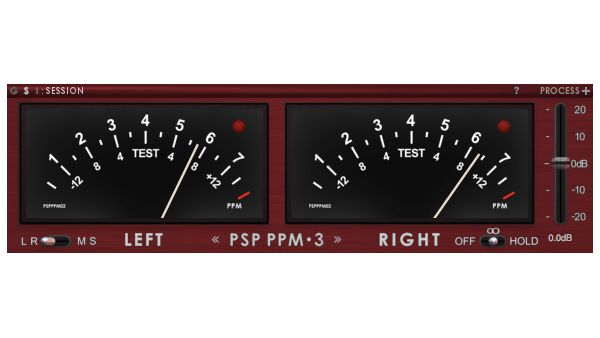
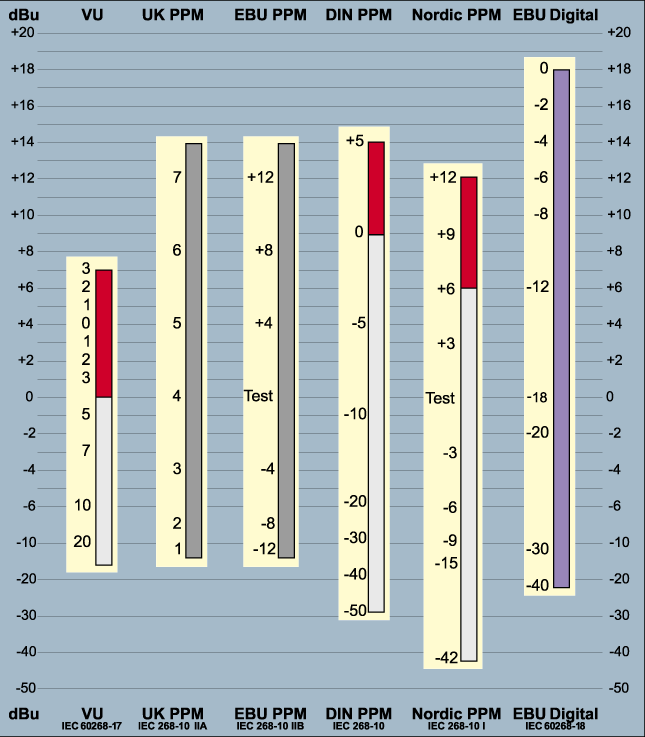
The BBC struck in this arena first, with PPM (peak program meter), a highly accurate meter and scale intended to show "instant peaks": the highest point on each crest of an audio wave. These meters became very popular in European broadcasting environments, but different countries and engineers couldn't agree on what reference value, and therefore measurement scale, to use. So if you come across a PPM audio meter, you might see all kind of scales/number values depending on the context and who made it: the original BBC PPM scale went from 1 to 7, for instance (with 6 being the "intended maximum level" for radio broadcasts) while EBU PPM, ABC (American) PPM, Nordic PPM, DIN PPM, CBC PPM, etc. etc., might all show different decibel levels.
Why
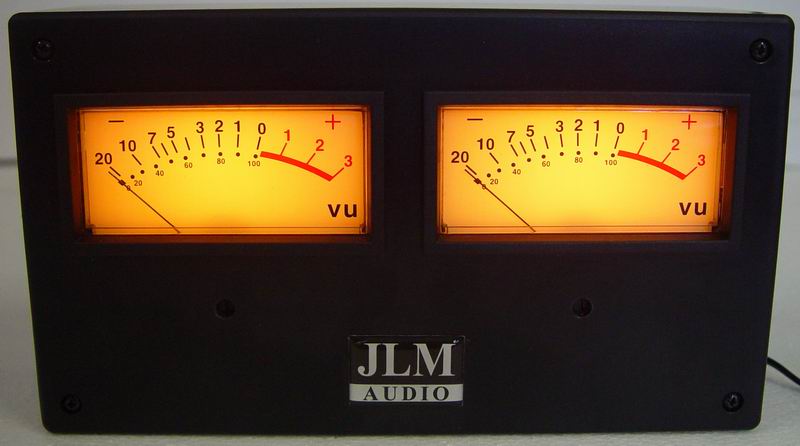
In the United States, however, audio/radio engineers decided that PPM would be too expensive to implement, and instead came up with VU meters. VU stands for VolumeUnits (not, as I thought myself for a long time, "voltage units"!!! VU and V are totally different units of scale/measurement).
VU meters are averaged, which means they don't so much give a precise reading of the peaks of audio waves so much as a generalized sense of the strength of the signal. Even though this meant they might miss certain fluctuations (a very quick decibel spike on an audio wave might not fully register on a VU meter if it is brief and unsustained), this translated close enough to perceived loudness that American engineers went with this lower-cost option. VU meters (and the Volume Unit scale that accompany it) are and always have been intended to get analog audio "in the ballpark" rather than give highly accurate readings - you can see this in the incredibly bad low-level sensitivity on most VU meters (going from, say, -26 VU to -20 VU, for instance, is barely going to register a blip on your needle).
So I've lumped these two scales/types of meter together because you're going to see them in similar situations (equipment for in-studio production monitoring for analog A/V), just generally varying by your geography. From here on out I will focus on VU because it is the scale I am used to dealing with as an archivist in the United States.
dBFS
All of these scales I've described so far have related to analog audio. If the whole point of this post is to talk about digitizing analog video formats...what about digital audio?
Thankfully, digital audio is a little more straightforward, at least in that there's pretty much only one scale to concern yourself with: dBFS ("decibels below [or in relation to] Full Scale").
Whereas analog scales tend to use relatively "central" reference values - where ensuing audio measurements can be either higher OR lower than the "zero" point - the "Full Scale" reference refers to the point at which digital audio equipment simply will not accept any higher value. In other words, 0 dBFS is technically the highest possible point on the scale, and all other audio values can only be lower (-1 dBFS, -100 dBFS, etc. etc.), because anything higher would simply be clipped: literally, the audio wave is just cut off at that point.
Tipping the Scales
All right. dBu, dBV, dBFS, VU....I've thrown around a lot of acronyms and explanations here, but what does this all actually add up to?
If you take away anything from this post, remember this:
0 VU = +4 dBu = -20 dBFS
The only way to sift through all these different scales and systems - the only way to take an analog audio signal and make sure it is being translated accurately into a digital audio signal - is to calibrate them all against a trusted, known reference. In other words - we need a reference point for the reference points.
In the audio world, that is accomplished using a 1 kHz sine wave test tone. Like SMPTE color bars, the 1 kHz test tone is used to calibrate all audio equipment, whether analog or digital, to ensure that they're all understanding an audio signal the same way, even if they're using different numbers/scales to express it.
We worship you, o Lord our savior
In the analog world, this test tone is literally the reference point for the VU scale - so if you play a 1 kHz test tone on equipment with VU meters, it should read 0 VU. From there, the logarithms and standards demand that 0 VU is the same as +4 dBu. That is where the test tone should read if you have equipment that uses those scales.
dBFS is a *little* more tricky. It's SMPTE-recommended practice to set 1 kHz test tone to read at -20 dBFS on digital audio meters - but this is not a hard-and-fast standard. Depending on the context, some equipment (and therefore the audio signals recorded using them) are calibrated so that a 1 kHz test tone is meant to hit -18 or even -14 dBFS, which can throw the relationship between your scales all out of whack.
(In my experience, however, 99 times out of 100 you will be fine assuming 0 VU = -20 dBFS)
Once you're confident (relatively) that everyone's starting in the same place, that makes it possible to proceed from there: audio signals hitting between 0 and +3 VU on VU meters, for example, should be hitting roughly between -20 dBFS and -6 dBFS on a digital scale.
Note that these are all logarithmic scales based on different logarithms - so they are never going to line up one-to-one except at the agreed-upon reference point. That is, +4 dBu may be equal to 0 VU, but +5 dBu is not equal to 1 VU. When it comes to translating audio signal from one system and scale to another, we can follow certain guidelines and ranges, but there is always going to be a certain amount of imprecision and subjectivity in working with these scales on a practical level during the digitization process.
Danger, Will Robinson
Remember when I said that we were talking about signal level, not necessarily output level, in this post? And then I said something about how professional equipment calibrated to the dBu scale versus how consumer equipment calibrated to dBV scale? Sorry. Let's circle back to that for a minute.
Audio equipment engineers and manufacturers didn't stop trying to cut corners when they adopted the VU meters over PPM. As a cost-saving measure for wider consumer releases, they wanted to make audio devices with ever-cheaper physical components. Cheaper components literally can't handle as much voltage passing through them as higher-quality, "professional-grade" components and equipment.
The height of professionalism
So many consumer-grade devices were calibrated to output a 1 kHz test tone audio signal at -10 dBV, which is equivalent to a significantly lower voltage than the professional, +4 dBu standard.
(The math makes my head hurt, but you can walk through it in this post; also, I get the necessary difference in voltage but no, I still don't really understand why this necessitated a difference in the decibel scale used)
What this means is: if you're not careful, and you're mixing devices that weren't meant to work together, you can output a signal that is too strong for the input equipment to handle (professional -> consumer), or way weaker than it should be (consumer -> professional). I'll quote here the most important conclusion from that post I just linked above:
If you plug a +4dBu output into a -10dBV input the signal is coming in 11.79dB hotter than the gear was designed for... turn something down.
If you plug a -10dBV output into a +4dBu input the signal is coming in 11.79dB quieter than the gear was designed for... turn something up.
Unbalanced audio signal/cables are a big indicator of equipment calibrated to -10 dBV: so watch out for any audio cables and connections you're making with RCA connectors.
Consumer-grade blogging
The reality is also that after a while many professional-grade manufacturers were aware of the -10 dBV/+4 dBu divide, and factored that into their equipment: somewhere, somehow (usually on the back of your device, perhaps on an unmarked switch) is the ability to actually swap back and forth between expecting a -10 dBV input and a +4 dBu one (thereby making any voltage gain adjustments to give you your *expected* VU/dBFS readings accordingly). Otherwise, you'll have to figure out a way to make your voltage gain adjustments yourself.
The lessons are two-fold:
Find a manual and get to know your equipment!!
You can plug in consumer to professional equipment, but BE CAREFUL going professional into consumer!! It is possible to literally fry circuits by overloading them with the extra voltage and cause serious damage.
Set Phase-rs to Stun
There's another thing to watch out for while we're on the general topic of balanced and unbalanced audio, which are the concepts of polarity and phase.
Polarity is what makes balanced audio work; it refers to the relation of an audio signal's position to the median line of voltage (0 V). Audio sine waves swing from positive voltage to negative voltage and vice versa -precisely inverting the polarity of a wave (i.e. taking a voltage of +0.5 V and flipping it to -0.5 V) and summing those two signals together (playing them at the same time) results in complete cancellation.
Professional audio connections (those using XLR cables/connections) take advantage of this quality of polarity to help eliminate noise from audio signals (again, you can read my post from a couple years back to learn more about that process). But this relies on audio cables and equipment being correctly wired: it's *possible* for technicians, especially those making or working with custom setups, to accidentally solder a wire such that the "negative" wire on an XLR connector leads to a "positive" input on a deck or vice versa.
This would result in all kinds of insanely incorrectly-recorded signals, and probably caught very quickly. But it's a thing to possibly watch out for - and if you're handed an analog video tape where the audio was somehow recorded with inverse polarity, there are often options (both on analog equipment or in digital audio software, depending on what you have on hand) that are as easy as flipping a switch or button, rather than having to custom solder wires to match the original misalignment of the recording equipment.
This is where phase might come into play, though. Phase is, essentially, a delay of audio signal. It's expressed in terms of relation to the starting point of the original audio sine wave: e.g. a 90 degree phase shift would result in a quarter-rotation, or a delay of a quarter of a wavelength.
In my experience, phase doesn't come too much into play when digitizing audio - except that a 180 degree phase shift can, inconveniently, look precisely the same as a polarity inversion when looking at an audio waveform. This has led to some sloppy labeling and nomenclature in audio equipment, meaning that you may see settings on either analog or digital equipment that refer to "reversing the phase" when what they actually do is reverse the polarity.
You can read a bit more here about the distinction between the two, including what "phase shifts" really mean in audio terms, but the lesson here is to watch your waveforms and be careful of what your audio settings are actually doing to the signal, regardless of how they're labelled.
Reading Your Audio
I've referred to a few tools for watching and "reading" the characteristics of audio we've been discussing. For clarity's sake, in this section I'll review exactly, for practical purposes, what tools and monitors you can look at to keep track of your audio.
Level Meters
Level meters are crucial to measuring signal level and will be where you see scales such as dBu, dBFS, VU, etc. In both analog and digital form, they're often handily color-coded; so if after all of this, you still don't really get the difference between dBu and dBFS, to some degree it doesn't matter: level meters will warn you when levels are getting too hot by changing from green to yellow and eventually to red when you're in danger of getting too "hot" and clipping (whatever that equivalent point is in the scale in question).
Waveform
Waveforms will actually chart the shape of an audio wave; they're basically a graph with time on the x-axis and amplitude (usually measured in voltage) on the y-axis. These are usually great for post-digitization quality control work, since they give an idea of audio levels not just in any one given moment but over the whole length of the recording. That can alert you to issues like noise in the signal (if, say, the waveform stays high where you would expect more fluctuation in a recording that alternates loud and quiet sections) or unwanted shifts in polarity.
Waveform monitors can sometimes come in the form of oscilloscopes: these are essentially the same device, in terms of showing the user the "shape" of the audio signal (the amplitude of the wave based on voltage). Oscilloscopes tend to be more of a "live" form of monitoring, like level meters - that is, they function moment-to-moment and require the audio to be actively playing to show you anything. Digital waveform monitors tend to actually save/track themselves over time to give the full shape of the recording/signal, rather than just the wave at any one given moment.
Spectrogram
Spectrograms help with a quality of audio that we haven't really gotten to yet: frequency. Like waveforms, they are a graph with time on the x-axis, but instead of amplitude they chart audio wave frequency.
If amplitude is perceived by human ears as loudness, frequency is perceived as pitch. They end up looking something like a "heat map" of an audio signal - stronger frequencies in the recording show up "brighter" on a spectrogram.
Spectrograms are crucial to audio engineers for crafting and recording new signals, "cleaning up" audio signals by removing unwanted frequencies. As archivists, you're probably not actually looking to mess or change with the frequencies in your recorded signal, but they can be helpful for checking and controlling your equipment; that is, making sure that you're not introducing any new noise into the audio signal in the process of digitization. Certain frequencies can be dead giveaways for electrical hum, for example.
The More You Know
This is all a lot to sift through. I hope this post clarifies a few things - at the very least, why so much of the language around digitizing audio, and especially digitizing audio for video, is so muddled.
I'll leave off with a few general tips and resources:
Get to know your equipment. Test audio reference signals as they pass through different combinations of devices to get an idea what (if anything) each is doing to your signal. The better you know your "default" position, the more confidently you can move forward with analyzing and reading individual recordings.
Get to know your meters. Which one of the scales I mentioned are they using? What does that tell you? If you have both analog and digital meters (which would be ideal), how do they relate as you move from one to the other?
Leave "headroom". This is the general concept in audio engineering of adjusting voltage/gain/amplitude so that you can be confident there is space between the top of your audio waveform and "clipping" level (wherever that is). For digitization purposes, if you're ever in doubt about where your levels should be, push it down and leave more headroom. If the choice is between capturing the accurate shape of an audio signal, albeit too "low", there will be opportunity to readjust that signal again later as long as you got all the information. If you clip when digitizing, that's it - you're not getting that signal information back and you're not going to be able to adjust it.
]]>
Everyday LinuxEthanhttps://patchbay.tech/everyday-linux/2018-08-01T14:20:22-04:00
A couple weeks ago, there was a Forbes article that caught my eye. (No, librarians, it wasn't that twaddle, please don't hurt me) No, it was this one, relating one writer/podcaster's decision to switch to Linux as his everyday operating system after a few too…
]]>
A couple weeks ago, there was a Forbes article that caught my eye. (No, librarians, it wasn't that twaddle, please don't hurt me)
No, it was this one, relating one writer/podcaster's decision to switch to Linux as his everyday operating system after a few too many of the new "Blue Screen of Death": Windows 10's staggeringly inconvenient and endless Update screens.
Actually, turn it on, turn it off, who cares! You're not working on that spreadsheet today anyway.
The article stood out because I had already been planning to write something extremely similar myself. A couple years ago, I needed a new laptop and decided I wanted out of the Apple ecosystem, partly because Apple's desktop/laptop hardware and macOS design seemed increasingly shunted to the side in favor of iOS/mobile/tablets, but mostly because of $$$. I considered jumping ship to a Windows 10 machine, which, as I've said on several occasions, is actually a pretty nifty OS at its core - but, like Mr. Evangelho, I had encountered one too many productivity-destroying updates to my liking on my Windows station at work. Never mind the intrusive privacy defaults and the insane inability to permanently uninstall Candy Crush, Minecraft and other bloatware forced upon me by Microsoft.
why
I had used Linux operating systems, particularly Ubuntu (via BitCurator) before, and thought it might be time to take the leap to everyday use. After a little bit of research to make sure I would still be able to find versions of my most common/critical applications, I jumped ship and haven't looked back. So, whereas I have written before about Linux in a professional context for digital preservation on severaloccasions, I want to finally make my evangelizing case of Linux as an everyday, personal operating system - for anyone.
Linux has a reputation as a "geeky" system for programmers and hardcore computer tinkerers, but it's become incredibly accessible to anyone - or at least, certainly to anyone who's used to having macOS or Windows in their daily lives. In fact, you're almost certainly already using Linux even if you don't realize it - if you have an Android smartphone, if you have a Chromebook laptop, if you have any of a thousand different smart/networked home devices (which, please throw them in the trash, but whatever), you're using and relying on Linux.
Breaking away from the Mac/Windows dichotomy is as easy as your original choice of one or the other - the hurdle is largely just realizing there's another option to debate.
Why Linux?
A Linux operating system is an example of free and open source software, often abbreviated FOSS. The "free" in there is meant to refer to "freedom", not price (although FOSS tends to be free in that sense as well) - a legacy of the Free Software Foundation's four maxims that computer users should be able to:
run a program
study a program's source code (in essence, to understand exactly how it works)
redistribute exact copies of that program
create and distribute modified versions of that program
This is all in opposition to closed and proprietary software, which use copyright and patent licenses to run contrary to at least one or more of these ideas. (Note that some open source software may still carry licenses that restrict the latter two points in certain ways - always check!)
Look, I could go on my anti-capitalist screed here, but you should probably just go see a more clever and entertaining one. But what it comes down to is that, unlike the proprietary model of one company hiring employees to build and distribute/sell its own, closed software, open source software is built by collaborative networks of programmers and users, under the general philosophy that humanity tends to make better, more broadly applicable advancements when everyone stands to (at least potentially) benefit.
Laika believed in this, don't you?
That doesn't mean that all open source developers are noble self-sacrificing volunteers. There are entire companies - like Canonical, Mozilla, Red Hat - dedicated to creating and supporting it, and any number of name-brand tech giants - Google, Oracle, yes Microsoft and Apple even - that at least participate in certain open source projects. When I say everyone can benefit, that often includes Big Tech. So don't get me wrong, there's plenty of ways to participate in and advocate for FOSS in ways that don't involve a total shift in your operating system and computing environment, if you're perfectly content where you are now.
But for me, switching over completely to a FOSS operating system in Linux felt like a way to take back some control from increasingly intrusive devices. For many years, Apple products' big selling point was "it just works", and I solidly felt that way with my first couple MacBooks - buy a laptop and the operating system got out of the way, letting you browse the internet, make movies, write up Sticky Note reminders, listen to music, and install other favorite programs and games, in a matter of minutes. I could do whatever it was I wanted to do.
I don't feel like macOS (or Windows) "just works" quite in that same way anymore - they're designed to work the way Apple and Microsoft want me to work. Constant, barraging notifications to log in to iCloud or OneDrive accounts, to enable Siri or Cortana AI assistance. Obscured telemetry settings sending data back to the hivemind and downloading "helpful" background programs, clogging up the computer's resources without user knowledge. Stepping way beyond security concerns to slowly but surely cordon off anything downloaded by the user, to pigeonhole them into corporately-vetted App Stores. A six-month long hooplah over "Dark Mode."
...go away forever?
(Look, I'm no fool - Apple's choices were always business choices, made to ultimately improve their company's market share, no matter which way you slice it - but I don't think I'm alone in feeling that for some time that meant ceding at least the illusion of control to the user, or at least not nagging them every damn day into the feeling they were somehow using their own computer the "wrong" way)
Linux operating systems, because they are open and modifiable, are also extremely flexible and controllable - if that means you want to get into the nitty-gritty and install every single piece of software that makes a computer work yourself, go for it. But if that means you just want something that gets out of the way and lets you play Oregon Trail on the Internet Archive, Linux can also be that. It can be your everyday, bread-and-butter, "just works" computer, without voices constantly shouting at you about what that should look like.
What's different?
Well, despite the whole stirring case I may have just made...there is no "Linux operating system." Or at least, there is no one thing called "Linux" that you just go out and download and start streaming Netflix on.
Linux is a kernel. It's the very center, core, most important piece of an operating system, but it's not entirely functional in and of itself. You have to pile a bunch of other things on top of it: a desktop environment, a way to install and update applications, icons and windows and buttons - all the sexy, front-facing stuff that most of us actually consider when picking which operating system we want to use. So many, many, many people and companies have created their own version of that stuff, piled it on top of Linux, and released it as their own operating system. And each one of those can have a completely different look or feel to them.
All these different flavors or versions of Linux are referred to as distributions. (If you want to really fit in, call them "distros")
So....what distribution do you choose???
This is absolutely the most overwhelming thing about switching to Linux. There are a lot of distributions, and they all have their own advantages and disadvantages - sometimes not very obvious, because there aren't necessarily whole marketing teams behind them to give you the quick, summarized pitch on what makes their distribution different from others.
I've tried out several myself and will give out some recommendations, in what I hope are user-friendly terms, in the next/last section. This huge amount of choice at this very first stage can be staggering, but consider the benefit compared to closed systems: do you ever wish macOS had a "home" button and a super-key like Windows, so you could just pull up applications and more without having to remember the keyboard shortcut for Spotlight? Do you wish the Windows dock was more responsive, or its drop-down menus were located all the way at the top of the screen so you had more space for your word document? You're probably never going to be able to make those tweaks unless Apple or Microsoft make them for you. With Linux, you can find the distribution that either already mixes and matches things the right way for you - or lets you tweak them yourself!
Like literally entire applications dedicated to easily tweaking the system
In terms of hardware, if you're coming from Windows/PC-land, there's not going to be much difference at all. Like Windows, you install a Linux operating system on a third-party hardware manufacturer's device: HP, IBM, Lenovo, etc. You can competitively price features to your liking - more or less storage, higher resolution screen, higher quality keyboard or trackpad, whatever it is that's important to you and your everyday comfort.
A small handful of companies will even directly sell you laptops with Linux distributions pre-installed (System76, Dell). But for the most competitive (read: cheapest) options, you'll have to install Linux on a PC of your choice yourself.
Maybe not the most efficient choice
Like with Windows, this does also mean you *may* occasionally have to install or reinstall drivers to make certain peripheral devices (Wi-Fi cards, external mice) play nice with your operating system. This used to be a much more common issue than it is now, and a legitimate knock against Linux systems - but these days, if you're using a major, well-supported distribution, it's really no worse than Windows. And if you're sitting there, a dedicated Windows user, thinking "huh, I've never had to deal with that", neither have I in two years on my Linux laptop. This is more a warning to the Mac crowd that, hey, it's possible for problems to arise when the company making the software isn't also making the hardware (and if you've ever used a cheap non-Apple Thunderbolt adapter or power charger - you probably knew that anyway!)
Finally, applications! Again, the major Linux distributions have all at this point pretty much borrowed the visual conception of the "App Store" - a program you can use to easily browse, install and launch a vast range of open source software. The vetting may not be as thorough - so bring the same healthy dose of skepticism and awareness that you do to the Google Play Store and you'll be fine.
Sure, "contains ads", seems legit
If you're worried about losing out on your favorite Mac/Windows programs, you absolutely may want to do some research to make sure there are either Linux versions or at least satisfactory Linux equivalents to the software you need. But while you might not be able to get Adobe programs, for instance, on to your new operating system, there's plenty of big-name proprietary apps that have made the leap in recent years: Spotify, Slack, even Skype. And Linux programs are usually available to at least open and convert the files you originally made with their Mac/Windows equivalents (LibreOffice can open and work with the various Microsoft Office formats, for instance, and GIMP can at least partially convert PhotoShop .PSDs)
Installing these applications is as easy as clicking "Install" in an App Store. No Apple ID hoops to go through. And the really wonderful thing is that unlike Mac or Windows, most Linux systems will track and perform application updates at the same time and in the same place as operating system updates - no more menu-searching and notifications from individual applications to make sure you're on the latest, greatest, and most secure version of any given program. You'll just get a general pop-up from the "Software Center" or equivalent and perform updates in one quick, fell swoop, or as nit-picky as desired. (And my Linux laptop has never unexpectedly forced a restart to update while I was doing something else)
And finally, Linux drives are formatted differently than macOS or Windows, using the "ext4" file system. This means you can encounter some of the same quirks in moving your old files to a Linux system that you've ever had in shuttling between Mac and Windows - but Linux pretty much always comes with at least read support for HFS+ (Mac) and NTFS (Windows) drives, so likewise I've never had issues with at least just transferring old files over to a new drive.
How can I try it out?
The great news is, unlike Mac or Windows, you don't have to go to a physical store or buy a completely new laptop just to try a Linux distribution and see if it's something you would like to use!
Just like when you install (or reinstall) the operating system on a Mac or Windows computer, to install Linux you'll need a USB drive that is at least 8GB large to house the installation disk image - an ISO file. Unlike Mac or Windows, Linux installation images, in addition to the installation program itself, pretty much always have a "Live" mode - this lets you run a Linux session on your computer, to see how well it works on your hardware and if you like the distribution's design and features. It's a fantastic try-before-you-buy feature, and can even work with MacBooks, if that's all you have (just don't be surprised/blame Linux if there's some hardware wonkiness, like your keyboard not responding 100% correctly).
Once you have an 8GB USB flash drive and the ISO file for the OS you want to try downloaded, you'll need an application to "burn" the ISO to the flash drive and make it bootable. I recommend Etcher, which is multi-platform so it'll work whether you're starting out on Mac or Windows (and also, just for the record, if you're trying to make bootable installers from macOS .DMGs or Windows ISOs - Etcher is a rad tool!). From there you'll need to boot into the installer USB according to instructions that will depend on your laptop manufacturer (it usually means holding down one of the function keys at the top of your keyboard during startup, but the key combination varies depending on the hardware/maker).
So what about all those distributions? Which ones should you try? Here are some of the most popular flavors that I think would also be accessible to converts making their way over from macOS or Windows. These distributions all have wide user bases, meaning they all have either good documentation or even active support accounts that you can contact in the event of questions or problems.
Thanks to its popularity as an operating system for servers and the Internet of Things, Ubuntu is probably the biggest name in Linux, and if you just want a super stable, incredibly well-supported desktop with thoughtful features, it is still my go-to recommendation for most casual users seeking alternative to macOS and Windows (and as I said earlier, if you've ever encountered BitCurator, you already know what it looks/feels like). It's what I use myself for day-to-day web browsing, streaming services, word processing, some Steam gaming, light digipres/coding and a bit of server maintenance for this very site.
When it comes to Ubuntu, you're going to want to look to try out a version labeled "LTS" - that's "Long-Term Support", meaning OS updates are guaranteed for five years (any of the other versions are primarily for developers and other anxious early adopters who don't mind a few more bugs). The latest LTS release, 18.04, just came out a couple months ago with a pretty major desktop redesign, but it's as attractive, sleek and functional as ever, and I came back to it after flirting with some of the other distributions on this list.
Linux Mint is itself a derivative of Ubuntu, so everything I just said about stability and support goes for Mint as well - the Mint developers just wait for Ubuntu to release updates and then add their own spin. The differences are thus largely visual - Linux Mint's desktop is made to look more like Windows, so users who are migrating from that direction are more likely to be at home here. It's been around for a while so the support community is likewise large and varied.
Zorin is also an Ubuntu derivative that's even more explicitly targeted at converting Windows users/Linux newbies. It's newer than Mint but I have to say personally I think that's led to a fresher, more attractive design. (More Windows 10 to Linux Mint's Windows 7). In fact it's pretty much built around flexible, easily changed desktop design. Going with a distribution based on super pretty icons and easily swapping around menus might seem silly, but honestly, there's so many distributions with such similar core features that these *are* the kinds of decisions that make Linux users go with one over the other.
Whereas Linux Mint and Zorin are more or less "Ubuntu for Windows converts", elementary OS has a visual design more targeted to bring over macOS users, with a dock, top menu bar, etc. It's a very light, sleek OS that really only ships with the most basic apps and the design encourages you to keep things simple (their media apps are literally just called things like "Music" and "Videos", and their custom web browser Epiphany has a bare minimum of features to keep from becoming a memory hog like Firefox and Chrome). But since it's Ubuntu based you can still easily install more familiar open source apps like VLC, etc. Also a very intriguing Linux OS to try if you're used to something like a Chromebook or a tablet as your primary device.
System76 is known more for their attractive hardware and great customer support (I've had my Lemur for two years and am still in love), but they recently tried putting out their own Ubuntu Linux distribution targeted at developers and creative professionals. It pretty much seems like Ubuntu but with some more minimalist icon design and some nifty expanded features for multiple workspaces, but mostly I'm plugging them here because if you wind up looking for higher-end hardware and some really helpful, responsive support, System76 is tops.
Whereas all these previous distributions I've mentioned have built off the stability of Ubuntu, Solus is different, as it is its own completely independent OS. It's an example of a "rolling release" operating system: while with macOS, Windows, and many Linux distributions like Ubuntu, you have to worry about your particular, fixed-point version eventually becoming obsolete and no longer receiving updates (e.g. once macOS 10.14 comes out, those users still using 10.11 will no longer receive security and software updates from Apple), Solus will just continually roll out updates, forever. Or, well, "forever," but you get what I mean.
That means users actually get the latest software and features much faster, as you don't have to wait for those things to get bundled into the next "release". It's an interesting model if you're really ready to unmoor and explore away from the usual systems.
Aside from that, Solus' custom "Budgie" desktop design is extremely pretty and modern, with a quick-launch menu and a custom applets bar. It feels a lot like Windows 10 in that sense.
]]>
Color is MathEthanhttps://patchbay.tech/color-is-math/2018-07-16T13:53:22-04:00
I know, I hate to break it to you. I'm not thrilled about it either - one of my favorite memories from high school is walking straight up to my Statistics teacher on the last day of senior year and proudly announcing that it was…
]]>
I know, I hate to break it to you. I'm not thrilled about it either - one of my favorite memories from high school is walking straight up to my Statistics teacher on the last day of senior year and proudly announcing that it was the last time I was ever going to be in a math class. (Yes, I do feel a bit guilty about the look of befuddled disappointment on his face, but by god I was right)
But it's true: at least when it comes to video preservation, color is math. Everything else you thought you knew about color - that it's light, that you get colors by mixing together other colors, that it's pretty - is irrelevant.
LIES
Just now, you thought you were looking at color bars? Wrong. Numbers.
nooooooooooooooooooooooooooooooooooooooo
When I first started learning to digitize analog video, the concept of luminance and brightness made sense. Waveform monitors made sense. A bright spot in a frame of video shows up as a spike on the waveform in way that appeases visual logic. When digitizing, you wanted to keep images from becoming too bright or too dark, lest visual details at these extremes be lost in the digital realm. All told, pretty straightforward.
Vectorscopes and chrominance/color information made less sense. There were too many layers of abstraction, and not just in "reading" the vectorscope and translating it to what I was seeing on the screen - there was something about the vocabulary around color and color spaces, full of ill-explained and overlapping acronyms (as I have learned, the only people who love their acronyms more than moving image archivists and metadata specialists are video engineers).
I'd like to sift through some of the concepts, redundancies, and labeling/terminology that threw me off personally for a long time when it came to color.
CIE XYZ OMG
Who in the rainbow can draw the line where the violet tint ends and the orange tint begins? Distinctly we see the difference of the colors, but where exactly does the one first blendingly enter into the other? So with sanity and insanity.
—Herman Melville, Billy Budd
I think it might help if we start very very broad in thinking about color before narrowing in on interpreting color information in the specific context of video.
In the early 20th century, color scientists attempted to define quantitative links between the visible spectrum of electromagnetic wavelengths and the physiological perception of the human eye. In other words - in the name of science, they wanted to standardize the color "red" (and all the other ones too I guess)
Though we all know it's the best one, right
Given the insanely subjective process of assigning names to colors, how do you make sure that what you and I (or more importantly, two electronics manufacturers) call "red" is the same? By assigning an objective system of numbers/values to define what is "red" - and orange, yellow, green, etc. etc. - based on how light hits and is interpreted by the human eye.
After a number of experiments in the 1920s, the International Commission on Illumination (abbreviated CIE from the French - like FIAF) developed in 1931 what is called the CIE XYZ color space: a mathematical definition of, in theory, all color visible to the human eye. The "X", "Y" and "Z" stand for specific things that are not "colors" exactly, so I don't even want to get into that here.
The important thing about the CIE XYZ color space - you can't really "see" it. The limitations of image reproduction technology mean there will always be tangible limits standing between you and the full CIE XYZ gamut (outside of, maybe, a color scientist's lab, but I'm not even convinced of that). Consider that graph above: even though it's colored in for illustrative purposes, that's not actually every color you can possibly see in there. The actual wavelengths of light produced, and therefore colors represented, by your computer's LED screen encompasses a much much more limited range of values.
tl;dr your computer screen, compared to the mathematical limits of the natural world - sucks.
That's to be expected though! Practical implementations of any standard will always be more limited than an abstract model.
*cough*
So even if it basically only exists in theory (and in the unbounded natural world around us), the CIE XYZ color space and its definition of color values served as the foundation for most color spaces that followed it. A color space is the system for creating/reproducing color employed by any particular piece of technology. Modern color printers, for example, use the CMYK color space: a combination of four color primaries (cyan, magenta, yellow, and "key"/black) that when mixed together by certain, defined amounts, create other colors, until you have hard copies of your beautiful PowerPoint presentation ready to distribute.
Again, just like CIE XYZ, any color space you encounter is math - it's just a method of saying this number means orange and this number means blue and this number means taupe. But, just like with all other kinds of math, color math rarely stays that straightforward. The way each color space works, the way its values are calculated, and the gamut it can cover largely depend on the vagaries and specific limitations of the piece of technology it's being employed with/on. In the case of CIE XYZ, it's the human eye - in the case of CMYK, it's those shitty ink cartridges on your desktop laser printer that are somehow empty again even though you JUST replaced them.
More lying liars who lie
So what about analog video? What are the specific limitations there?
Peak TV: Color in Analog Video
Video signals and engineering are linked pretty inextricably with the history of television broadcasting, the first "mass-market" application of video recording.
So tune in to what you know of television history. Much like with film, it started with black-and-white images only, right? That's because it's not just budding moving image archivists who find brightness easier to understand and manipulate in their practical work - it was the same for the engineers figuring out how to create, record, and broadcast a composite video signal. It's much easier for a video signal to tell the electron gun in a CRT television monitor what to do if frame-by-frame it's only working with one variable: "OK, be kinda bright here, now REALLY BRIGHT here, now sorta bright, now not bright at all", etc.
Compare that to: "OK, now display this calculated sum of three nonlinear tristumulus primary component values, now calculate it again, and again, and oh please do this just as fast when we just gave you the brightness information you needed".
So in first rolling out their phenomenal, game-changing new technology, television engineers and companies were fine with "just" creating and sending out black-and-white signals. (Color film was only just starting to get commonplace anyway, so it's not like moving image producers and consumers were clamoring for more - yet!)
Who needs color video when you have these two, said America
But as we moved into the early 1950s, video engineers and manufacturing companies needed to push their tech forward (capitalism, competition, spirit of progress, yadda yadda), with color signal. But consider this - now, not only did they need to figure out how to create a color video signal, they needed to do it while staying compatible with the entire system and market of black-and-white broadcasting. The broadcast companies and the showmakers and the government regulation bodies and the consumers who bought TVs and everyone else who JUST got this massive network of antennas and cables and frequencies and television sets in place were not going to be psyched to re-do the entire thing only a few years later to get color images. Color video signal needed to work on televisions that had been designed for black-and-white.
From the CIE research of the '20s and '30s, video engineers knew that both the most efficient and wide-ranging (in terms of gamut of colors covered) practical color spaces were composed by mixing values based on primaries of red, green, and blue (RGB).
No no no no notorious
But in a pure RGB color space, brightness values are not contained on just one component, like in composite black-and-white video - each of the three primary values is a combination of both chrominance and luminance (e.g. the R value is a sum of two other values that mean "how red is this" and "how bright is this", respectively). If you used such a system for composite analog video, what would happen if you piped that signal into a black-and-white television monitor, designed to only see and interpret one component, luminance? You probably would've gotten a weirdly dim and distorted image, if you got anything at all, as the monitor tried to interpret numbers containing both brightness and color as just brightness.
This is where differentialcolor systems came into play. What engineers found is that you could still create a color composite video signal from three component primaries - but instead of those being chrominance/luminance-mixed RGB values, you could keep the brightness value for each video frame isolated in its own Y′ component (which Charles Poynton would insist I now call luma, for reasons of.....math), while all the new chroma/color information could be contained in two channels instead of three: a blue-difference (B′-Y′) and a red-difference (R′-Y′) component. By knowing these three primaries, you can actually recreate four values: brightness (luma) plus three chroma values (R, G, and B). Even though there's strictly speaking no "green" value specified in the signal, a color television monitor can figure out what this fourth value should be based on those differential calculations.
For television broadcasting, keeping the luma component isolated meant that you could still pipe a color composite video signal into a black-and-white TV, and it would still just display a correct black-and-white image: it just used the values from the luma component and discarded the two color difference components. Meanwhile, new monitors designed to interpret all three components correctly would display a proper color image.
This basic model of using two color difference components for video was so wildly efficient and successful that we still use color spaces based on this model today! Even as we passed from analog video signals into digital.
Making it possible with adapters and converters, to, say, play Fallout 4 on a B&W TV
Lookup Table: "YUV"
...but you may have noticed that I just said "basic model" and "color spaces", as in plural. Uh oh.
As if this wasn't all complicated enough, video engineers still couldn't all just agree on one way to implement the Y′, B′-Y′,R′-Y′ model. Engineers working within the NTSC video standard needed something different than those working with PAL, who needed something different than SECAM. The invention of component video signal, where these three primaries were each carried on their own signal/cable, rather than mixed together in a single, composite signal, also required new adjustments. And digital video introduced even more opportunities for sophisticated color display.
I mean just look at this gamut
So you got a whole ton of related color spaces, each using the same color difference model, but employing different math to get there. In each case, the "scale factors" of the two color difference signals are adjusted to optimize the color space for the particular recording technology or signal in question. Even though they *always* basically represent blue-difference and red-difference components, the letters change because the math behind them is slightly different.
So here is a quick guide to some common blue/red difference color spaces, and the specific video signal/context they have been employed with:
Y′UV = Composite analog PAL video
Y′IQ = Composite analog NTSC video
Y′DBDR = Composite analog SECAM video
Y′PBPR = Component analog video
Y′CBCR = Component digital video - intended as digital equivalent/conversion of YPBPR, and also sometimes called "YCC"
PhotoYCC (Y′C1C2) = Kodak-developed digital color space intended to replicate the gamut of film on CD; mostly for still images, but could be encountered with film scans (whereas most still image color spaces are fully RGB rather than color-difference!)
xvYCC = component digital video, intended to take advantage of post-CRT screens (still relatively rare compared to Y′CBCR, though), sometimes called "x.v. Color" or "Extended-gamut YCC"
And now a PSA for all those out there who use ffmpeg or anyone who's heard/seen the phrase "uncompressed YUV" or similar when looking at recommendations for digitizing analog video. You might be confused at this point: according to the table above, why are we making a "YUV" file in a context where PAL video might not be involved at all???
As Charles Poynton again helpfully lays out in this really must-read piece - it literally comes down to sloppy naming conventions. For whatever reason, the phrase "YUV" has now loosely been applied, particularly in the realm of digital video and images, to pretty much any color space that uses the general B′-Y′ and R′-Y′ color difference model.
I don't know the reasons for this. Is it because Y′UV came first? Is it because, as Poynton lays out, certain pieces of early digital video software used ".yuv" as a file extension? Is it a peculiar Euro-centric bias in the history of computing? The comments below are open for your best conspiracy theories.
I don't know the answer, but I know that in the vast vast majority of cases where you see "YUV" in a digital context - ffmpeg, Blackmagic, any other kind of video capture software - that video/file almost certainly actually uses the Y′CBCR color space.
Gamma Correction, Or How I Learned To Stop Worrying and Make a Keyboard Shortcut for "Prime"
Another thing that I must clarify at this point. As evidenced by this "YUV" debacle, some people are really picky about color space terminology and others are not. For the purposes of this piece, I have been really picky, because for backtracking through this history it's easier to understand precise definitions and then enumerate the ways people have gotten sloppy. You have to learn to write longhand before shorthand.
So you may have noticed that I've been picky about using proper, capitalized subscripts in naming color spaces like Y′CBCR. In their rush to write hasty, mean-spirited posts on the Adobe forums, you may see people write things like "YCbCr" or "Y Cb Cr" or "YCC" or any other combination of things. They're all trying to say the same thing, but they basically can't be bothered to find or set the subscript shortcuts on their keyboard.
which, I mean, I don't entirely blame 'em
In the same vein, you may have noticed these tiny tick marks (′) next to the various color space components I've described. That is not a mistake nor an error in your browser's character rendering nor a spot on your screen (I hope). Nor is it any of the following things: an apostrophe, a single quotation mark, or an accent mark.
This little ′ is a prime. In this context it indicates that the luma or chroma value in question has been gamma-corrected. The issue is - you guessed it - math.
Curse you, Mathemagician
The human eye perceives brightness in a nonlinear fashion. Let's say the number "0" is the darkest thing you can possibly see and "10" is the brightest. If you started stepping up from zero in precisely regular increments, e.g. 1, 2, 3, 4, etc., all the way up to ten, your eyes would weirdly not perceive these changes in brightness in a straight linear fashion - that is, you would *think* that some of the increases were more or less drastic than the others, even though mathemetically speaking they were all exactly the same. Your eyes are just more sensitive to certain parts of the spectrum.
Gamma correction adjusts for this discrepancy between nonlinear human perception and the kind of linear mathematical scale that technology like analog video cameras or computers tend to work best with. Don't ask me how it does that - I took Statistics, not Calculus.
The point is, these color spaces adjust their luma values to account for this, and that's what the symbol indicates. It's pretty important - but then again, prime symbols are usually not a readily-accessible shortcut that people have figured out on their keyboards. So they just skip them and write things like... "YUV". And I'm not just talking hasty forum posts at this point - I double-dare you to try and reconstruct everything I've just told you about color spaces from Wikipedia.
Which, come to think of it, the reason why "YUV" won out as a shorthand term for Y′CBCR may very well be just that it doesn't involve any subscripts or primes. Never underestimate ways programmers will look to solve inefficiencies!
Reading a Vectorscope - Quick Tips
This is all phenomenal background information, but when it gets down to it, a lot of people digitizing video just want to know how to read a vectorscope so they can tell if the color in their video signal is "off".
Here we have a standard SMPTE NTSC color bars test pattern as it reads on a properly calibrated vectorscope. Each of the six color bars (our familiar red, green, and blue, as well as cyan, yellow, and magenta) are exactly as they should, as evidenced by the dots/points falling right into the little square boxes indicated for them (the white/gray bar should actually be the point smack in the center of the vectorscope, since it contains no chroma at all).
The saturation of the signal will be determined by how far away from the center of the vectorscope the dots for any given frame or pixel of video fall. For example, here is an oversaturated frame - the chroma values for this signal are too high, which you can tell because the dots are extending out way beyond the little labeled boxes.
Meanwhile, an undersaturated image will just appear as a clump towards the center of the vectorscope, never spiking out very far (and a black-and-white image should in fact only do that!)
Besides saturation, a vectorscope can also help you see if there is an error in phase or hue (both words refer to the same concept). As hopefully demonstrated by our discussion of color spaces and primaries, colors generally relate to each other in set ways - and the circular, wheel-like design of the vectorscope reflects that. If the dots on a vectorscope appear rotated - that is, dots that should be spiking out towards the "R"/red box, are instead headed for the "Mg"/magenta box - that indicates a phaseerror. In such a case, any elephants you have on screen are probably going to start all looking like pink elephants.
The problem is, even with these "objective" measurements, color remains a stubbornly subjective thing. Video errors in saturation and phase may not be so wildly obvious as the examples above, making them a tricky thing to judge, especially against artistic intent or the possibility of an original recording being made with mis-calibrated equipment. Again, you can find plenty of tutorials and opinions on the subject of color correction online from angry men, but I always just tell everyone to use your best judgement. It's as good as anyone else's!
XKCD #1492
(If you do want or need to adjust the color in a video signal, you'll need a processing amplifier.)
Pixel Perfect: Further Reading on Color
I've touched on digital video and color here but mostly focused on pre-digital color spaces and systems for audiovisual archivists and others who work with analog video signals. Really, that's because all of this grew out of a desire to figure out what was going on with "uncompressed YUV" codecs and "-pix_fmt yuv420p" ffmpeg flags, and I worked backwards from there until I found my answers in analog engineering.
There's so much more to get into with color in video, but for today I think I'm going to leave you with some links to explore further.
On the subject of other color spaces beyond Y′CBCR
openYCoCg An experimental video codec from AV Preservation by Reto Kromer, based on the Y′COCG color space, which can convert to/from RGB values but isn't based on human vision models (using orange-difference and green-difference instead of the usual blue/red)
]]>
Doing DigiPres with WindowsEthanhttps://patchbay.tech/doing-digipres-with-windows/2018-06-22T15:39:19-04:00
A couple of times at NYU, a new student would ask me what kind of laptop I would recommend for courses and professional use in video and digital preservation. Maybe their personal one had just died and they were shopping for something new. Often they'd…
]]>
A couple of times at NYU, a new student would ask me what kind of laptop I would recommend for courses and professional use in video and digital preservation. Maybe their personal one had just died and they were shopping for something new. Often they'd used both Mac and Windows in the past so were generally comfortable with either.
I was and still am conflicted by this question. There are essentially three options here: 1) some flavor of MacBook, 2) a PC running Windows, or 3) a PC running some flavor of Linux. (There are Chromebooks as well, but given their focus on cloud applications and lack of a robust desktop environment, I wouldn't particularly recommend them for archivists or students looking for flexibility in professional and personal use)
Each of these options have their drawbacks. MacBooks are and always have been prohibitively expensive for many people, and I'm generally on board with calling those "butterfly switch" keyboards on recent models a crime. Though a Linux distribution like Ubuntu or Linux Mint is my actual recommendation and personally preferred option, it remains unfamiliar to the vast majority of casual users (though Android and ChromeOS are maybe opening the window), and difficult to recommend without going full FOSS evangelist on someone who is largely just looking to make small talk (I'll write this post another day).
So I never want to steer people away from the very real affordability benefits of PC/Windows - yet feel guilty knowing that's angling them full tilt against the grain of Unix-like environments (Mac/Linux) that seem to dominate digital preservation tutorials and education. It makes them that student or that person in a workshop desperately trying in vain to follow along with Bash commands or muck around in /usr/local while the instructor guiltily confronts the trolley problem of spending their time saving the one or the many.
I also recognize that *nix education, while the generally preferred option for the #digipres crowd, leaves a gaping hole in many archivists' understanding of computing environments. PC/Windows remains the norm in a large number of enterprise/institutional workplaces. Teaching ffmpeg is great, but do we leave students stranded when they step into a workplace and can't install command line programs without Homebrew (or don't have admin privileges to install new programs at all)?
This post is intended as a mea culpa for some of these oversights by providing an overview of some fundamental concepts of working with Windows beyond the desktop environment - with an eye towards echoing the Windows equivalents to usual digital preservation introductions (the command line, scripting, file system, etc.).
To start, let's take a moment to consider how we got here - why are Mac/Linux systems so different from Windows, and why do they tend to dominate digital preservation conversations?
Every operating system (whether macOS, Windows, a Linux distribution, etc.) is actually a combination of various applications and a kernel. The kernel is the core part of the OS - it handles the critical task of translating all the requests you as a user make in software/applications to the hardware (CPU, RAM, drives, monitor, peripherals, etc.) that actually perform/execute the request.
"Applications" and "Kernel" together make up a complete operating system.
UNIX was a complete operating system created by Bell Labs in 1969 - but it was originally distributed with full source code, meaning others could see exactly how UNIX worked and develop their own modifications. There is a whole complex web of UNIX offshoots that emerged in the '80s and early '90s, but the upshot is that a lot of people took UNIX's kernel and used it as the base for a number of other kernels and operating systems, including modern-day macOS and Linux distributions. (The modifications to the kernel mean that these operating systems, while originally derived in some way from UNIX, are not technically UNIX itself - hence you will see these systems referred to as "Unix-like" or "*nix")
The result of this shared lineage is that Mac and Linux operating systems are similar to each other in many fundamental ways, which in turn makes cross-compatible software relatively easy to create. They share a basic file system structure and usually a default terminal and programming language (Bash) for doing command line work, for instance.
Meanwhile there was Microsoft, which, though it originally created its own (phenomenally popular!) variant of UNIX in the '80s, switched over in the late '80s/early '90s into developing its own, proprietary kernel, entirely separate from UNIX. This was the NT kernel, which is at the heart of basically every Windows operating system ever made. These fundamental differences in architecture (affecting not just clearly visible characteristics like file systems/naming and command line work, but extremely low-level methods of how software communicates with hardware) make it more difficult to make software cross-compatible between both *nix and Windows operating systems without a bunch of time and effort from programmers.
So, given the choice between these two major branches in computing, why this appearance that Mac hardware and operating systems have won out for digital preservation tasks, despite being the more expensive option for constantly cash-strapped cultural institutions and employees?
It seems to me it has very little to do with an actual affinity for Macs/Apple and everything to do with Linux and GNU and open source software. Unlike either macOS or Windows, Linux systems are completely open source - meaning any software developer can look at the source code for Linux operating systems and thus both design and make available software that works really well for them without jumping through any proprietary hoops (like the App Store or Windows Store). It just so happens that Macs, because at their core they are also Unix-like, can run a lot of the same, extremely useful software, with minimal to no effort. So a lot of the software that makes digital preservation easier was created for Unix-like environments, and we wind up recommending/teaching on Macs because given the choice between the macOS/Windows monoliths, Macs give us Bash and GNU tools and other critical pieces that make our jobs less frustrating.
Microsoft, at least in the '90s and early aughts, didn't make as much of an effort to appeal directly to developers (who, very very broadly speaking, value independence and the ability to do their own, unique thing to make themselves or their company stand out) - they made their rampant success on enterprise-level business, selling Windows as an operating system that could be managed en masse as the desktop environment for entire offices and institutions with less troubleshooting of individual machines/setups.
(Also key is that Microsoft kept their systems cheaper by never getting into the game of hardware manufacturing - unlike Mac operating systems, Windows is meant to run on third-party hardware made by companies like HP, Dell, IBM, etc. The competition between these manufacturers keeps prices down, unlike Apple's all-in-one hardware + OS systems, making them the cheaper option for businesses opening up a new office to buy a lot of computers all at once. Capitalism!)
As I'll get into soon, there have been some very intriguing reversals to this dynamic in recent years. But, in summary: the reason Macs have seemed to dominate digital preservation workshops and education is that there was software that made our jobs easier. It was never that you can't do these things with Windows.
Windows File System
Beyond the superficial desktop design differences (dock vs. panel, icons), the first thing any user moving between macOS and Windows probably notices are the differences between Finder (Mac) and File Explorer (Windows) in navigating between files and folders.
In *nix systems, all data storage devices - hard disk drives, flash drives, external discs or floppies, or partitions on those devices - are mounted into the same, "root" file system as the operating system itself, in Windows every single storage device or partition is separated into its own "drive" (I use quotes because two partitions might exist on the same physical hard disk drive, but are identified by Windows as separate drives for the purpose of saving/working with files), identified by a letter - C:, D:, G:, etc. Usually, the Windows operating system itself, and probably most of a casual user's files, are saved on to the default C: drive. (Why start at C? It harkens back to the days of floppy drives and disk operating systems, but that's a story for another post). From that point, any additional drives, disks or partitions are assigned another letter (if for some reason you need more than 26 drives or partitions mounted, you'll have to resort to some trickery!)
Also, file paths in Windows use backslashes (e.g. C:\Users\Ethan\Desktop) instead of forward slashes (/Users/Ethan/Desktop)
and if you're doing command-line work, Bash (the default macOS CLI) is case-sensitive (meaning /Users/Ethan/Desktop/sample.txt and /Users/Ethan/Desktop/SAMPLE.txt are different files) while Windows' DOS/PowerShell command line interfaces (more on these in a minute) are not (so SAMPLE.txt would overwrite sample.txt)
¯\_(ツ)_/¯
Fundamentally, I don't think these minor differences affect the difficulty either way of performing common tasks like navigating directories in the command line or scripting from Macs - it's just different, and an important thing to keep in mind to remember where your files live.
What DOES make things more difficult is when you start trying to move files between macOS and Windows file systems. You've probably encountered issues when trying to connect external hard drives formatted for one file system to a computer formatted for another. Though there's a lot of programming differences between file systems that cause these issues (logic, security, file sizes, etc.), you can see the issue just with the minor, user-visible differences just mentioned: if a file lives at E:\DRIVE\file.txt on a Windows-formatted external drive, how would a computer running macOS even understand where to find that file?
Modern Windows systems/drives are formatted with a file system called NTFS (for many years Microsoft used FAT and its variants such as FAT16 and FAT32, so NTFS is backwards-compatible with these legacy file systems). Apple, meanwhile, is in a moment transitioning from its very longtime system HFS+ (which you may have also seen referred to in software as "Mac OS Extended") to a new file system, APFS.
File system transitions tend to be a headache for users. NTFS and HFS+ have at least been around for long enough that quite a lot of software has been made to allow moving back and forth/between the two file systems (if you are on Windows, HFS Explorer is a great free program for exploring and extracting files on Mac-formatted drives; while on macOS, the NTFS-3G driver allows for similarly reading and writing from Windows-formatted storage). Since it is still pretty new, I am less aware of options for reading APFS volumes on Windows, but will happily correct that if anyone has recommendations!
** I've got a lot of questions in the past about the exFAT file system, which is theoretically cross-compatible with both Mac and Windows systems. I personally have had great success with formatting external hard drives with exFAT, but have also heard a number of horror stories from those who have tried to use it and been unable to mount the drive into one or another OS. Anecdotally it seems that drives originally formatted exFAT on a Windows computer have better success than drives formatted exFAT on a Mac, but I don't know enough to say why that might be the case. So: proceed, but with caution!
Executable Files
No matter what operating system you're using, executable files are pieces of code that directly instruct the computer to perform a task (as opposed to any other kind of data file, whose information usually needs to be parsed/interpreted by executable software in some way to become in any way meaningful - like a word processing application opening a text file, where the application is the executable and the text file is the data file). As a common user, anytime you double-clicked on a file to open an application or run a script, whether a GUI or a command line program, you ran an executable.
Where executable files live and how they're identified to you, the user, varies a bit from one operating system to the next. A MacOS user is accustomed to launching installed programs from the Applications folder, which are all actually .app files (.apps in turn are actually secret "bundles" that contain executables and other data files inside the .app, which you can view like a folder if you right-click and select "Open Package Contents" on an application).
Executable files (with or without a file extension) might also be automatically identified by macOS anywhere and labeled with this icon:
And finally, because executable files are also called binaries, you might find executables in a folder labeled "bin" (for instance, Homebrew puts the executable files for programs it installs into /usr/local/bin)
Windows-compatible executables are almost always identified with .exe file extensions. Applications that come with an installer (or, say, from the Windows Store) tend to put these in directories identified by the application name in the "Program Files" folder(s) by default. But some applications you just download off of GitHub or SourceForge or anywhere else on the internet might just put them in a "bin" folder or somewhere else.
(Note: script files, which are often identified by an extension according to the programming language they were written in - .py files for Python, .rb for Ruby, .sh for Bash, etc. - can usually be made automatically executable like an .exe but are not necessarily by default. If you download a script, whether working on Mac or Windows, you may need to check whether it's automatically come to you as an executable or more steps need to be taken. They often don't, because downloading executables is a big no-no from the perspective of malware protection.)
Command Prompt vs. PowerShell
On macOS, we usually do command line work (which offers powerful tools for automation, cool/flexible software, etc.) using the Terminal application and Bash shell/programming language.
Modern Windows operating systems are a little more confusing because they actually offer two command line interfaces by default: Command Prompt and PowerShell.
The Command Prompt application uses DOS commands and has essentially not changed since the days of MS-DOS, Microsoft's pre-Windows operating system that was entirely accessed/used via command line (in fact, early Windows operating systems like Windows 3.1 and Windows 95 were to a large degree just graphic user interfaces built on top of MS-DOS).
The stagnation of Command Prompt/DOS was another reason developers started migrating over to Linux and Bash - to take advantage of more advanced/convenient features for CLI work and scripting. In 2006, Microsoft introduced PowerShell as a more contemporary, powerful command line interface and programming language aimed at developers in an attempt to win some of them back.
While I recognize that PowerShell can do a lot more and make automation/scripting way easier, I still tend to stick with Command Prompt/DOS when doing or teaching command line work in Windows. Why? Because I'm lazy.
The Command Prompt/DOS interface and commands were written around the same time as the original Bash - so even though development continued on Bash while Command Prompt stayed the same, a lot of the most basic commands and syntax remained analogous. For instance, the command for making a directory is the same in both Terminal and Command Prompt ("mkdir"), even if the specific file paths are written out differently.
So for me, while learning Command Prompt is a matter of tweaking some commands and knowledge that I already know because of Bash, learning PowerShell is like learning a whole new language - making a directory in PowerShell, e.g., is done with the command shortcut "md".* It's sort of like saying I already know Castillian Spanish, so I can tweak that to figure out a regional dialect or accent - but learning Portuguese would be a whole other course.
Relevant? Maybe not.
But your mileage on which of those things is easier may vary! Perhaps it's more clear to keep your *nix and Windows knowledge totally separate and take advantage of PowerShell scripting. But this is just to explain the Command Prompt examples I may use for the remaining of this post.
* ok, yes, "mkdir" will also work in PowerShell because it's the cmdlet name - this comparison doesn't work so well with the basic stuff, but it gets true for more advanced functions/commands and you know it, Mx. Know-It-All
The PATH Variable
The PATH system variable is a fun bit of computing knowledge that hopefully ties together all the three previous topics we've just covered!
Every modern operating system has a default PATH variable set when you start it up (system variables are basically configuration settings that, as their name implies, you can update or change). PATH determines where your command line interface looks for executable files/binaries to use as commands.
Here's an example back on macOS. Many of the binaries you know and execute as commands (cd, mkdir, echo, rm) live in /bin or /usr/bin in the file system. By default, the PATH variable is set as a list that contains both "/bin" and "/usr/bin" - so that when you type
$ cd /my/home/directory
into Terminal, the computer knows to look in /bin and /usr/bin to find the executable file that contains instructions for running the "cd" command.
Package managers, like Homebrew, usually put all the executables for the programs you install into one folder (in Homebrew's case, /usr/local/bin) and ALSO automatically update the PATH variable so that /usr/local/bin is added to the PATH list. If Homebrew put, let's say, ffmpeg's executable file into the /usr/local/bin folder, but never updated the PATH variable, your Terminal wouldn't know where to find ffmpeg (and would just return a "command not found" error if you ran any command starting with $ ffmpeg, even though it *is* somewhere on your computer.
So let's move over to Windows: because Command Prompt, by default, does not have a package manager, if you download a command line program like ffmpeg, Command Prompt will not automatically know where to find that command - unless a) you move the ffmpeg directory, executable file included, into somewhere already in your PATH list (maybe somewhere like "C:\Program Files\"), or b) update the PATH list to include where you've put the ffmpeg directory.
I personally work with Windows rarely enough that I tend to just add a command line program's directory to the PATH variable when needed - which usually requires rebooting the computer. So I can see how if you were adding/installing command line programs for Windows more frequently, it would probably be convenient to just create/determine "here's my folder of command line executables", update the PATH variable once, and then just put new downloaded executables in that folder from then on.
*** I do NOT recommend putting your Downloads or Documents folder, or any user directory that you can access/change files in without admin privileges, into your PATH!!! It's an easy trick for accidentally-downloaded malware to get into a commonly-accessed folder (and/or one that doesn't require raised/administrative privileges) and then be able to run its executable files from there without you ever knowing because it's in your PATH.
Updating the PATH variable was a pain in the ass in Windows 7 and 8 but is much less so now on Windows 10.
If you are in the command line and want to quickly troubleshoot what file paths/directories are and aren't in your PATH, you can use the "echo" command, which is available on both *nix and Windows systems. In *nix/Bash, variables can be invoked in scripts or changed with $PATH, so
$ echo $PATH
would return something like so, with the different file paths in the PATH list separated by colons:
While on Windows, variables are identified like %THIS%, so you would run
> echo %PATH%
Package Management
Now, as I said above, package managers like Homebrew on macOS can usually handle updating/maintaining the PATH variable so you don't have to do it by hand. For some time, there wasn't any equivalent command line package manager (at least that I was aware of) for Windows, so there wasn't any choice in the matter.
That's no longer true! Now there's Chocolatey, a package manager that will work with either Command Prompt or PowerShell. (Note: Chocolatey *uses* PowerShell in the background to do its business, so even though you can install and use Chocolatey with Command Prompt, PowerShell still needs to be on your computer. As long as your computer/OS is newer than 2006, this shouldn't be an issue).
Users of Homebrew will generally be right at home with Chocolatey: instead of $ brew install [package-name]you can just type > choco install [package-name] and Chocolatey will do the work of downloading the program and putting the executable in your PATH, so you can get right back to command line work with your new program. It works whether you're on Windows 7 or 10.
The drawback, at least if you're coming over from using macOS and Homebrew, is that Chocolatey is much more limited in the number/type of packages it offers. That is, Chocolatey still needs Windows-compatible software to offer, and as we went over before, some *nix software has just never been ported over to supported Windows versions (or at least, into Chocolatey packages). But many of the apps/commands you probably know and love as a media archivist: ffmpeg, youtube-dl, mediainfo, exiftool, etc. - are there!
Scripting
If you've been doing introductory digipres stuff, you've probably dipped your toes into Bash scripting - which is just the idea of writing some code written in Bash into a plain text file, containing instructions for the Terminal. Your computer can then run the instructions in the script without you needing to type out all the commands into Terminal by hand. This is obviously most useful for automating repetitive tasks, where you might want to run the same set of commands over and over again on different directories or sets of files, without constant supervising and re-typing/remembering commands. Scripts written in Bash and intended for Mac/Linux Terminals tend to be identified with ".sh" file extensions (though not exclusively).
Scripting is absolutely still possible with Windows, but we have to adjust for the fact that the Windows command line interface doesn't speak Bash. Command Prompt scripts are written in DOS style, and their benefit for Windows systems (over, say, PowerShell scripts) is that they are extremely portable - it doesn't much matter what version of Windows or PowerShell you're using.
Command Prompt scripts are often called "batch files" and can usually be identified by two different file extensions: .bat or .cmd
(The difference between the two extensions/file formats is negligible on a modern operating system like Windows 7 or 10. Basically, BAT files were used with MS-DOS, and CMD files were introduced with Windows NT operating systems to account for the slight improvements from the MS-DOS command line to NT's Command Prompt. But, NT/Command Prompt remained backwards-compatible with MS-DOS/BAT files, so you would only ever encounter issues if you tried to run a CMD file on MS-DOS, which, why are you doing that?)
Actually writing Windows batch scripts for Command Prompt is its own whole tutorial. Which - thankfully - I don't have to write, because you can follow this terrific one instead!
Because Command Prompt batch scripts are still so heavily rooted in decades-old strategies (DOS) for talking to computers, they are pretty awkward to look at and understand.
I mean what
A lot of software developers skip right to a more advanced/human-readable programming language like Python or Ruby. Scripts in these languages do also have the benefit of being cross-platform, since Python, for example, can be installed on either Mac or Windows. But Windows OS will not understand them by default, so you have to go install them and set up a development environment rather than start scripting from scratch as you can with BAT/CMD files.
Windows Registry
The Windows Registry is fascinating (to me!). Whereas in a *nix operating system, critical system-wide configuration settings are contained as text in files (usually high up under the "root" level of your computer's file system, where you need special elevated permissions to access and change them), in Windows these settings (beyond the usual, low-level user settings you can change in the Settings app or Control Panel) are stored in what's called the Windows Registry.
The Windows Registry is a database where configuration settings are stored, not as text in files, but as "registry values" - pieces or strings of data that store instructions. These values are stored in "keys" (folders), which are themselves stored in "hives" (larger folders that categorize the keys within related subfolders).
Registry values can be a number of different things - text, a string of characters representing hex code, a boolean value, and more. Which kind of data they are, and what you can acceptably change them to, depends entirely on the specific setting they are meant to control. However, values and keys are also often super abstracted from the settings they change - meaning it can be very very hard to tell what exactly a registry value can change or control just by looking at it.
.....no, not at all!
For that reason, casual users are generally advised to stay out of the Windows Registry altogether, and those who are going to change something are advised to make a backup of their Registry before making edits, so they can restore it if anything goes wrong.
Just as you may never mess around in your "/etc" folder on a Mac, even as a digitally-minded archivist, you may or may not ever need to mess in the Windows Registry! I've only poked around in it to do things like removing that damn OneDrive tab from the side of my File Explorer windows so I stop accidentally clicking on it. But I thought I'd mention it since it's a pretty big difference in how the Windows operating and file systems work.
Or disable Microsoft's over-extensive telemetry! Which, along with the fact that you can't fucking uninstall Candy Crush no matter how hard you try, is one of the big things holding back an actually pretty nifty OS.
How to Cheat: *nix on Windows
OK. So ALL OF THIS has been based on getting more familiar with Windows and working with it as-is, in its quirky not-Unix-like glory. I wanted to write these things out, because to me, understanding the differences between the major operating systems helped me get a better handle on how computers work in general.
But guess what? You could skip all that. Because there are totally ways to just follow along with *nix-based, Bash-centric digital preservation education on Windows, and get everyone on the same page.
On Windows 7, there were several programs that would port a Bash-like command line environment and a number of Linux/GNU utilities to work in Windows - Cygwin probaby being the most popular. Crucially, this was not a way to run Linux/Unix-like applications on Windows - it was just a way of doing the most basic tasks of navigating and manipulating files on your Windows computer in a *nix-like way, with Bash commands (the software essentially translated them into DOS/Windows commands behind-the-scenes).
But a way way more robust boon for cross-compatibility was the introduction of the Windows Subsystem for Linux in Windows 10. Microsoft, for many years the fiercest commercial opponent of open source software/systems, has in the last ten years or so increasingly been embracing the open source community (probably seeing how Linux took over the web and making a long-term bet to win back the business of software/web developers).
Hmm
The WSL is a complete compatibility layer for, in essence, installing Linux operating systems like Ubuntu or or Kali or openSUSE *inside* a Windows operating system. Though it still has its own limitations, this basically means that you can run a Bash terminal, install Linux software, and navigate around your computer just as you would on a *nix-only system - from inside Windows.
The major drawback from a teaching perspective: it is still a Linux operating system Windows users will be working with (I'd personally recommend Ubuntu for digipres newbies) - meaning there may still be nagging differences from Mac users (command line package management using "apt" instead of Homebrew for instance, although this too can be smoothed over with the addition of Linuxbrew). This little tutorial covers some of those, like mounting external drives into the WSL file system and how to get to your Windows files in the WSL.
You can follow Microsoft's instructions for installing Ubuntu on the WSL here (it may vary a bit depending on which update/version exactly of Windows 10 you're running).
That's it! To be absolutely clear at the end of things here, I've generally not worked with Windows for most digital/audiovisual preservation tasks, so I'm hardly an expert. But I hope this post can be used to get Windows users up to speed and on the same page as the Mac club when it comes to the basics of using their computers for digipres fun!
]]>
About Time: Sifting Through Analog Video TerminologyEthanhttps://patchbay.tech/about-time-sifting-through-analog-video-terminology/2018-06-11T16:08:38-04:00
In case it's ever unclear, writing these blog posts is as much for me as it is for you, dear reader. Technical audiovisual and digital concepts are hard to wrap your head around, and for a myriad of reasons technical writing is frequently no help.
]]>
In case it's ever unclear, writing these blog posts is as much for me as it is for you, dear reader. Technical audiovisual and digital concepts are hard to wrap your head around, and for a myriad of reasons technical writing is frequently no help. Writing things out, as clearly and simply as I can, is as much a way of self-checking that I actually understand what's going on as it is a primer for others.
And it case this intro is unclear, this is a warning to cover my ass as I dive into a topic that still trips me up every time I try to walk through it out loud. I'll provide references as I can at the end of the piece, but listen to me at your own risk.
When I first started learning about preserving analog video, *most* of what I was reading/talking about made a certain amount of sense, which is to say it at least translated into some direct sensory/observable phenomenon - luminance values made images brighter or darker, mapping audio channels clearly changed how and what I was hearing, using component video rather than composite meant mucking around with a bunch more cables. But when we talked about analog signal workflows, there always seemed to be three big components to keep track of: video (what I was seeing), audio (what I was hearing) and then this nebulous goddamn thing called "sync" that I didn't understand at all but seemed very very important.
The same way I feel when anyone tells me "umami" is a thing WHAT ARE YOU
I do not know who to blame for the morass of analog video signal terms and concepts that all have to do in some form with "time" and/or "synchronization". Most likely, it's just an issue at the very heart of the technology, which is such a marvel of mechanical and mathematical precision that even as OLED screens become the consumer norm I'm going to be right here crowing about how incredible it is that CRTs ever are/were a thing. What I do know is that between the glut of almost-but-not-quite-the-same words and devices that do almost-but-not-quite-the-same-thing-except-when-they're-combined-and-then-they-DO-do-the-same-thing, there's a real hindrance to understanding how to put together or troubleshoot an analog video digitization setup. Much of both the equipment and the vocabulary that we're working with came from the needs of production, and that has led to some redundancies that don't always make sense coming from the angle of either preservation or casual use.
I once digitized an audio cassette from the '70s on which an audio tech was testing levels (...I hope?) by just repeating "time time time time" about 100 times in a row and ever since that day I've feared that his unleashed soul now possesses me. Anyway.
So I'm going to offer a guide here to some concepts and equipment that I've frequently seen either come up together or understandably get confused for each other. That includes in particular:
sync and sync generators
time base correction
genlock
timecode
...though other terms will inevitably rise as we go along. I'm going to assume a certain base level of knowledge with the characteristics and function of analog video signal - that is, I will write assuming the reader has been introduced to electron guns, lines, fields, frames, interlacing, and the basics of reading a classic/default analog video waveform. But I will try not to ever go right into the deep end.
Sync/Sync Generators
I know I just said I would assume some analog video knowledge, but let's take a moment to contemplate the basics, because it helps me wrap my head around sync generators and why they can be necessary.
Consider the NTSC analog video standard (developed in the United States and employed in North, Central and parts of South America). According to NTSC, every frame of video has two fields, each consisting of 262.5 scan lines - so that's 525 scan lines per frame. There are also 29.97 frames of video per second.
That means the electron gun in a television monitor has to fire off 15734.25 lines of video PER SECOND - and that includes not just actually tracing the lines themselves, but the time it takes to reset both horizontally (to start the next line) and vertically (to start the next field).
Now throw a recording device into the mix. At the same time that a camera is creating that signal and a monitor is playing it back, a VTR/VCR has to receive that signal and translate it into a magnetic field stored on a constantly-moving stretch of videotape via an insanely quick-spinning metal drum.
Even in the most basic of analog video signal flows, there are multiple devices (monitor, playback/recording device, camera, etc.) here that need to have an extremely precise sense of timing. The recording device, for instance, needs to have a very consistent internal sense of how long a second is, in order for all its tiny little metal and plastic pieces to spin and roll and pulse in sync (for a century, electronic devices, either analog OR digital, have used tiny pieces of vibrating crystal quartz to keep track of time - which is just a whole other insane tangent). But, in order to achieve the highest quality signal flow, it also needs to have the exactsamesense of how long a second is as the camera and the monitor that it's also hooked up to.
When you're dealing with physical pieces of equipment, possibly manufactured by completely different companies at completely different times from completely different materials, that's difficult to achieve. Enter in sync signal and sync generators.
Stay with me here
Sync generators essentially serve as a drumbeat for an analog video system, pumping out a trusted reference signal that all other devices in the signal chain can use to drive their work instead of their own internal sense of timing. There are two kinds of sync signals/pulses that sync generators have historically output:
Drive pulses were almost exclusively used to trigger certain circuits in tube cameras, and were never part of any broadcast/recorded video signal. So you're almost certainly never going to need to use one in archival digitization work, but just in case you ever come across a sync generator with V. Drive and H. Drive outputs (vertical drive and horizontal drive pulses), that's what those are for.
Blanking pulses cause the electron gun on a camera or monitor to go into its "blanking" period - which is the point at which the electron gun briefly shuts off and retraces back to the beginning of a new line (horizontal blanking) or of a new field (vertical blanking). These pulses are a part of every broadcast/recorded video signal, and they must be extremely consistent to maintain the whole 525-scan-lines-29.97-times-per-second deal.
Since blanking pulses are the vast majority of modern sync signals, you may also just see these referred to as "sync pulses".
So the goal of sync generators is to output a constant video signal with precise blanking pulses that are trusted to be exactly where (or to be more accurate, when) they should be. Blanking pulses are contained in the "inactive" part of a video signal, meaning they are never meant to actually be visualized as image on a video camera or monitor (unless for troubleshooting purposes) - so it literally does not matter what the "active" part of a sync generator's video signal is. It could just be field after field, frame after frame of black (often labeled "black burst"). It could be some kind of test pattern - so you will often see test pattern generators that double as or are used as sync generators, even though these are separate functions/purposes, and thus could also be entirely separate devices in your setup.
Color bars - not *just* for geeky yet completely hard-to-use desktop wallpapers
(To belabor the point, test patterns, contained in the "active" part of the video signal, can be used to check the system, but they do not drive the system in the same way that the blanking pulses in the "inactive" part of a signal do. IMHO, this is an extremely misleading definition of "active" and "inactive", since both parts are clearly serving crucial roles to the signal, and what is meant is just "seen" or "unseen".)
Here's the kicker - strictly speaking, sync generators aren't absolutely necessary to a digitization station. It's entirely possible that you'll hook up all your components and all the individual pieces of equipment will work together acceptably - their sense of where and when blanking pulses should fall might already be the same, or close enough to be negligible.
But maybe you're seeing some kind of a wobbling or inconsistent image. That *could* be a sync issue, with one of your devices (the monitor, e.g.) losing its sense of proper timing, and resolvable by making sure all devices are working off the same, trusted sync generator.
You'll see inputs for sync signal labeled in all sorts of inconsistent ways on analog video devices: "Sync In", "Ext Sync", "Ext Ref", "Ref In", etc. As far as I'm aware, these all mean the same thing, and references in manuals or labels to "sync signal" or "reference signal" should be treated interchangeably.
Time Base Correction
Sync generators can help line up devices with inconsistent timing in a system as a video signal is passed from one to another. Time Base Correctors (TBCs) perform an extremely similar but ever-so-confusingly-different task. TBCs can take an input video signal, strip out inconsistent sync/blanking pulses, and replace them entirely with new, steady ones.
This is largely necessary when dealing with pre-recorded signals. Consider a perfectly set up, synced recording system: using a CRT for the operator to monitor the image, a video camera passed a video signal along to a VTR, which recorded that signal on to magnetic tape. At the time, a sync generator made sure all these devices worked together seamlessly. But now, playing back that tape for digitization, we've introduced the vagaries of magnetic tape's physical/chemical makeup into the mix. Perhaps it's been years and the tape has stretched or bent, the metallic particles have expanded or compressed - not enough to prevent playback, but enough to muck with the sync pulses that rely on precision down to millionths of a second. As described with sync loss above, this usually manifests in the image looking wobbly, improperly framed or distorted on a monitor, etc.
TBCs can either use their own internal sense of time to replace/correct the timing of the sync pulses on the recorded video signal - or they can use the drumbeat of a sync generator as a reference, to ensure consistency within a whole system of devices.
(Addendum): A point I'm still not totally clear on is the separation (or lack thereof) between time base correction and frame synchronization. According to the following video I found, a stand-alone frame synchronizer could stabilize the vertical blanking pulses in a signal only, resulting in a solid image at the moment of transition from one frame to another (that is, the active video image remains properly centered vertically within a monitor), but did nothing for horizontal sync pulses, potentially resulting in line-by-line inconsistencies:
So time base correction would appear to incorporate frame synchronization, while adding the extra stabilization of consistent horizontal sync/blanking pulses.
While, as I said above, you can very often get away with digitizing video without a sync generator, TBCs are generally much more critical. It depends on what analog video format you're working with exactly, but whereas the nature of analog devices meant there was ever so slight leeway to deal with those millionth-of-a-second inconsistencies (say, to display a signal on a CRT), the precise on-or-off, one-or-zero nature of digital signals means analog-to-digital converters usually need a very very steady signal input to do their job properly.
You may however not need an external TBC unit. Many video playback decks had them built in, though of varying quality and performance. If you can, check the manual for your model(s) to see if it has an internal TBC, and if so, if it's possible to adjust or even turn it off if you have a more trustworthy external unit.
Professional-quality S-VHS deck with built-in TBC controls
Technically there are actually three kinds of TBCs: line, full frame and full field. Line TBCs can only sample, store and correct errors/blanking pulses for a few lines of video at a time. Full field TBCs can handle, as the name implies, a full 262.5 (NTSC) lines of video at a time, and full frame TBCs can take care a whole frame's worth (525, NTSC) of lines at a time. "Modern", late-period analog TBCs are pretty much always going to be full frame, or even capable of multiple frames' worth of correction at a time (this is good for avoiding delay and sync issues in the system if working without a sync generator). This will likely only come into play with older TBC units.
And here's one last thing that I found confusing about TBCs given the particular equipment I was trained on: this process of time base correction, and TBCs themselves, has nothing to do with adjusting the qualities of the active image itself. Brightness, saturation, hue - these visible characteristics of video image are adjusted using a device called a processing amplifier or proc amp.
Because the process of replacing or adjusting sync pulses is a natural moment in a signal flow to ALSO adjust active video signal levels (may as well do all your mucking at once, to limit troubleshooting if something's going wrong), many external TBC units also contain proc amps, thus time base correction and video adjustments are made on the same device, such as the DPS TBC unit above. But there are two different parts/circuit boards of the unit that are doing these two tasks, and they can be housed in completely separate devices as well (i.e. you may have a proc amp that does no time base correction, or a TBC that offers no signal level adjustments).
Genlock
"Genlock" is a phrase and label that you may see on various devices like TBCs, proc amps, special effects generators and more - often instead of or in the same general place you would see "Sync" or "Ref" inputs. What's the deal here?
This term really grew out of the production world and was necessary for cases where editors or broadcasters were trying to mix two or more input video signals into one output. When mixing various signals, it was again good/recommended practice to choose one as the timing reference - all the other input signals, output, and special effects created (fades, added titles, wipes, etc. etc.) would be "locked" on to the timing of the chosen genlock input (which might be either a reference signal from a sync generator, or one of the actually-used video inputs). This prevented awkward "jumps" or other visual errors when switching between or mixing the multiple signals.
In the context of a more straightforward digitization workflow, where the goal is not to mix multiple signals together but just pass one steadily all the way through playback and time base correction to monitoring and digitization, "genlock" can be treated as essentially interchangeable with the sync signal we discussed in the "Sync/Sync Generators" section above. If the device you're using has a genlock input, and you're employing a sync generator to provide an external timing reference for your system, this is where you would connect the two.
Timecode
The signals and devices that I've been describing have been all about driving machinery - time base is all about coordinating mechanical and electrical components that function down at the level of milliseconds.
Timecode, on the other hand, is for people. It's about identifying frames of video for the purpose of editing, recording or otherwise manipulating content. Unlike film, where if absolutely need be a human could just look at and individually count frames to find and edit images on a reel, magnetic tape provides no external, human-readable sense of what image or content is located where. Timecode provides that. SMPTE timecode, probably the most commonly used standard, identified frames according to a clock-based system formatted "00:00:00:00", which translated to "Hours:Minutes:Seconds:Frames".
Timecode could be read, generated, and recorded by most playback/recording/editing devices (cameras or VTRs), but there were also stand-alone timecode reader/generator boxes created (such as in the photo above) for consistency and stability's sake across multiple recording devices in a system.
There have been multiple systems of recording and deploying timecode throughout the history of video, depending on the format in question and other concerns. Timecode was sometimes recorded as its own signal/track on a videotape, entirely separate from the video signal, in the same location as one might record an audio track. This system was called Linear Timecode (LTC). The problem with LTC was, like with audio tracks, the tape had to be in constant motion to read the timecode track (like how you can not keep hearing an audio signal when you pause it, even though you *can* potentially keep seeing one frame of image when a video signal is paused on one line).
Vertical Interval Timecode (VITC) fixed this (and had the added benefit of freeing up more physical space on the tape itself) by incorporating timecode into video signal itself, in a portion of the inactive, blanking part of the signal. This allowed systems to read/identify frame numbers even when the tape was paused.
Other systems like CTL timecode (control track) and BITC (timecode burnt-in to the video image) were also developed, but we don't need to go too far into that here.
As long as we're at it, however, I'd also like to quickly clarify two more terms: drop-frame and non-drop-frame timecode. These came about from a particular problem with the NTSC video standard (as far as I'm aware, PAL and SECAM do not suffer the same, but please someone feel free to correct me). Since NTSC video plays back at the frustratingly non-round number of 29.97 frames per second (a number arrived at for mathematical reasons beyond my personal comprehension that have something to do with how the signal carries color information), the timecode identifying frame numbers will eventually drift away from "actual" clock time as perceived/used by humans. An "hour of timecode" which by necessity must count upwards at a 30 fps rate such as:
00:00:00:28 00:00:00:29 00:00:01:00 00:00:01:01
played back at 29.97 fps, will actually be 3.6 seconds longer than "wall-clock" time.
That's already an issue at an hour, and proceeds to get worse the longer the content being recorded. So SMPTE developed "drop-frame" timecode, which confusingly does not drop actual frames of video!! Instead, it drops some of the timecode frame markers. Using drop-frame timecode, our sequence would actually proceed thus:
00:00:00;28 00:00:00;29 00:00:01;02 00:00:01;03
With the ":00" and ":01" frame markers removed entirely from the timecode; except for every tenth minute, when they are re-inserted to make the math check out:
00:00:09;28 00:00:09;29 00:00:10;00 00:00:10;01
Non-drop-frame timecode simply proceeds as normal, with the potential drift from clock time. Drop-frame timecode is often (but not necessarily - watch out) identified in video systems using semi-colons or single periods instead of colons between the second and frame counts, as I have done above. Semi-colons are common on digital devices, while periods are common on VTRs that didn't have the ability to display semi-colons.
I hope this journey through the fourth dimension of analog video clarifies a few things. While each of these concepts is reasonable enough on their own, the way they relate to each other is not always clear, and the similarity in terms can send your brain down the wrong alley quickly. Happy digitizing!
Weise, Marcus and Diana Weynand. How Video Works: From Analog to High Definition. 2nd Edition. Burlington, MA: Focal Press, 2013.
]]>
A Guide to Legacy Mac EmulatorsEthanhttps://patchbay.tech/a-guide-to-legacy-mac-emulators/2018-05-21T15:29:01-04:00
Last fall I wrote about the collaborative technical/scholarly process of making some '90s multimedia CD-ROMs available for a Cinema Studies course on Interactive Cinema. I elided much of the technical process of setting up a legacy operating system environment in an emulator, since my focus…
]]>
Last fall I wrote about the collaborative technical/scholarly process of making some '90s multimedia CD-ROMs available for a Cinema Studies course on Interactive Cinema. I elided much of the technical process of setting up a legacy operating system environment in an emulator, since my focus for that post was on general strategy and assessment - but there are aspects of the technical setup process that aren't super clear from the Emaculation guides that I first started with.
That's not too surprising. The tinkering enthusiast communities that come up with emulators for Mac systems, in particular, are not always the clearest about self-documentation (the free-level versions of PC-emulating enterprise software like VirtualBox or VMWare are, unsurprisingly, more self-describing). That's also not something that to hold against them in the least, mind you - when you are a relatively tiny, all-volunteer group of programmers keeping the software going to maintain decades' worth of content from a major computing company that's notoriously litigious about intellectual property....some of the details are going to fall through the cracks, especially when you're trying to cram them into a forum post, not specifically addressing the archival/information science community, etc. etc.
In particular, while each Mac emulator has some pretty good information available to troubleshoot it (if you've got the time to find it), I've never found a really satisfying overview, that is, an explanation of why you might choose X program over Y. That's partly because, as open source software, each of these programs is *potentially* capable of a hell of a lot - but might require a lot of futzing in configuration files and compiling of source code to actually unlock all those potentials (which, those of us just trying to load up Nanosaur for the first time in 15 years aren't necessarily looking to mess with). Most of the "default" or recommended pre-compiled Mac/Windows versions of emulators offered up to casual or first-time users don't necessarily do every single feature that the emulator's front page brags about.
So what really is the boundary between Basilisk II and SheepShaver? Why is there such a difference between MacOS 9.0.4 and 9.1? And what the hell is a ROM file anyway? That's what I want to get into today. I'll start with the essential components to get any Mac emulation program running, give some recommendations for picking an emulator, then round it out with some installation instructions and tips for each one. (You can jump right to an app with this Table of Contents:
There are several free and open-source software options for emulating legacy Mac systems on contemporary computers. We'll go over these in more detail in a minute.
An Operating System Installer
You'll need the program that installs the desired operating system that you're trying to recreate/emulate: let's say, for example, Mac OS 8.5. These used to come on bootable CD-ROMs, or depending on the age of the OS, floppy disks. If you still have the original installer CD lying around, great! You can still use that. For the rest of us, there's WinWorld , providing disk image files for all your abandonware OS needs.
A ROM File
This is the first thing that can start to throw people off. So you know your computer has a hard drive, where your operating system and all your files and programs live. It also has a CPU, central processing unit, which is commonly analogized to the "brain" of the computer: it coordinates all the different pieces of your computer, hardware and software alike: operating system, keyboard, mouse, monitor, hard drive (or solid state drive), CD-ROM drive, USB hub, etc. etc. This ensures your computer has at least some basic functionality even if your operating system were to get corrupted or some piece of hardware were to truly go haywire (see this other post). But the CPU itself needs a little bit of programmed code in order to work - it has to be able to both understand and give instructions. Rather than stored on a hard drive like the operating system, which is easily writable/modifiable by the user, this crucial, small central piece of code is stored on the CPU on a chip of Read-Only Memory (the read-only part is why this sort of code is often called firmware rather than software). That's your ROM file. If the whole goal of an emulator is to trick legacy software into thinking it's on an older machine by creating a fake computer-inside-your-computer (a "virtual machine"), you need a ROM file to serve as the fake brain.
This is trickier with Mac emulation than it is with Windows/PC emulation. The major selling point of Windows systems is that they are not locked into specific hardware: there are/have been any number of third-party manufacturers (Dell, Lenovo, HP, IBM, etc etc) and they all have to make sure their hardware, including the CPU/ROM that come with their desktops, are very broadly compatible, because they can never predict what other manufacturer's hardware/software you may be trying to use in combination. This makes emulation easier, because the emulating application can likewise go for broad compatibility and probably be fine, without worrying too specifically about *exactly* what model of CPU/ROM it's trying to imitate (see, for example, DOSBox).
Not so with Mac, since Apple makes closed-box systems: the hardware, OS, software, etc., are all very carefully designed to only work with their own stuff (or, at least, stuff that Apple has pretty specifically approved/licensed). So setting up a Mac emulator, you have to get very specific about which ROM file you are using as your fake brain - because certain Apple models would have certain CPUs, which could only work with certain operating system versions, which would only work with certain versions of QuickTime, which would only play certain files, which would.........
That sounds exhausting.
It is.
Wait, if this relies on proprietary code from closed-box systems... is this legal?
Well if you got this far in an article about making fake Macs before asking that, I'm not so sure you actually care about the answer. But, at least so far as my knowledge of American intellectual property law goes, and I am by no means whatsoever an expert, we are in gray legal territory. You're definitely safest to extract and use the ROM file of a Mac computer you bought. Otherwise we're basically making an intellectual property fair use case here - that we're not taking any business/profit from Apple from using this firmware/software for personal or educational purpose, and that providing emulation for archival purposes (and yes, I would consider recovering personal data an "archival" process) serves a public good by providing access to otherwise-lost files. The (non-legal) term "abandonware" does also exist for a reason - these forums/communities are pretty prominent, and Apple's shown no particular signs recently of looking to shut them down or stem the proliferation of legacy ROMs floating around.
Of course, be careful about who and where you download from. Besides malware, it's easy to come across ROM files that are just corrupted and non-functional. I'll link with impunity to options that have worked for me.
[Also be advised! Files made from video game cartridges - SNES, Game Boy, Atari, Sega Genesis, the like - are *also* called ROM files, since game cartridges are also really just pieces of Read-Only Memory. Just searching "ROMs" is going to offer up a lot of sites offering those, which is very fun and all but definitely not going to work in your Mac emulator]
So how do I pick what ROM file and emulator to use?
That's largely going to depend on what OS you're aiming for. There are four emulators that I've used successfully (read: that have builds and guides available on Emaculation) that together cover the gamut of basically all legacy Mac machines: Mini vMac, Basilisk II, SheepShaver, and QEMU.
As I mentioned at the top, a confusing aspect is that many of these programs have various "builds" - different versions of the same basic application that offer tweaks and improvements focused on one particular feature or another. The most stable, generic version that they recommend for download might not actually be compatible with *every* ROM or operating system that the emulator can theoretically handle (with a different build).
In hunting down ROM files, you'll probably also come across ROMs listed, rather than from a particular Mac model, as "Old World" or "New World". These essentially refer to the two broad "families" of CPUs that Apple used for Macs before moving to the Intel chips still found in Macs today: generally speaking, "Old World" refers to the Motorola 68000 series of processors, while "New World" refers to the PowerPC line spearheaded by "AIM" (an Apple-IBM-Motorola alliance).
New World and Old World ROMs can be a good place to start, since they are often taken from sources (e.g. recovery discs) more broadly aimed at emulating Motorola 68000 or PowerPC architecture and therefore could potentially imitate a number of specific Mac models - but don't be too surprised if you come across a software/OS combination that's just not working and you have to hunt down a more specific ROM for a particular Mac brand/model. We'll see an example of this in a moment with our first emulator.
If you are currently using macOS or iOS, you can find some wonderfully detailed tech specs on every single piece of Mac hardware ever made using the freeware Mactracker app. Picking an exact model to emulate based on your OS/processor needs can help narrow down your search.
So with that in mind, let's cut to the chase - moving chronologically through Mac history, here are my recommendation and install tips:
Mini vMac is an easy-to-setup (but thereby probably not the most robust) emulator for black-and-white Motorola 68000-based Macs. While it's eminently customizable if you dig into the source code (or pay the guy who makes it at least $10 for a year's worth of by-request custom setups - not a bad deal!!), the "standard variation" of this app that the Mini vMac page encourages you to download for a quick start quite specifically emulates a Macintosh Plus. The Macintosh Plus could run Mac System 1.0 through 7.6.1 - but the System 7.x versions frequently required some extra hardware finagling, so I'd recommend sticking with Mini vMac for Systems 1.0 through 6.x.
Also, while a generic Old World ROM *should* work since Mac Pluses had 68000-series CPUs, I haven't had much success with those on the standard variation of Mini vMac. Look for a ROM file specifically from a Mac Plus instead (such as the one in the link above, to a very useful GitHub repository with several ROMs from specific Mac models).
Installation:
Download the standard variation build for your host operating system (OSX, Windows, etc.)
Download a bootable disk image for your desired guest OS - System 1.x through 6.x (note these will probably be floppy disk image files, either with a .dsk or .img file extension).
Download the Mac Plus ROM, rename it to "vMac.ROM" and place it in the same folder as the Mini vMac application.
Double-click on the Mini vMac application to launch. You should hear a (very loud) startup beep and see a picture of a 3.5" floppy with a blinking question mark on it - this indicates that the emulator has correctly loaded the ROM file but can't find a bootable operating system.
Drag the disk image for your operating system on to the Mini vMac window. If it's a complete, bootable disk image, your desired operating system environment should appear!
From there, it'll depend what you're doing - if you're just trying to run/look at a piece of software from a floppy image, you can just drag and drop the .img or .dsk into the Mini vMac window and it should appear in your booted System 1.x-6.x environment.If you want to create a virtual "drive" to save your emulated environment on, you can create an empty disk image with one of the next two emulators on this list or the dd command-line utility if you're on a Mac/Linux system (note: creating a Blank Image through a contemporary version of macOS' Disk Utility won't work): $ dd if=/dev/zero of=/path/to/image.img bs=512 count=1000
will make a 512 KB blank image (512 bytes was the traditional size for floppy disk "blocks").You can increase the count argument to however large you want, but be warned that early file systems had size limitations and at some point operating systems and software like the classic Mac systems might not recognize/work with a disk that's too large. Once you have a blank disk image, you can just drop it into a Mini vMac window running a legacy OS to format ("initialize") it to Apple's old HFS file system and start installing software/saving files to it.Generally speaking though, a lot of apps and files from this era ran straight off of floppies, so if you're just looking to run old programs without necessarily saving/creating new files, dragging and dropping in a system disk and then your .img or .dsk files should just do the trick!
Basilisk II is another well-maintained Motorola 68000 series emulator. But whereas Mini vMac is primarily aimed at emulating the Mac Plus, Basilisk can either emulate a Mac Classic or a Mac II series model (hence "Basilisk II" - there never was a "Basilisk I"), depending on the configuration/build and ROM file used. As with Mini vMac, this might not be clear, but the precompiled configurations of Basilisk for Mac and Windows offered up on the Emaculation forums - which is where the Basilisk II homepage sends you - specifically offers the latter. So while you may see info that Basilisk II can emulate all the way from System 0.x through 8.1, the version you're most likely going to be using out-of-the-box can probably only handle the more limited range of System 7.x through 8.1 (the targeted range for the Mac II series).
Note though: this was a kind of bananas era for Apple hardware when it came to model branding. So in terms of looking for ROMs, you can try to find something specifically labelled as being from a Mac II series machine - but you may also find success with a ROM file from a Quadra (largely the same as Mac II machines, but with some CPU/RAM upgrades) or a Performa (literally re-branded Quadras with a different software configuration, intended for consumer rather than professional use). In fact, the Performa ROM and Quadra ROMs on Redundant Robot's site works quite well, so I've linked/recommended that above (the Performa one definitely supports color display, so that's a good one). These have the benefit of emulating a slightly more powerful machine than the older Mac IIs - but just keep in mind what you're doing. Your desired OS may install fine, but you may still encounter a piece of legacy software that is relying on the configuration and limitations of the Mac II.
Installation:
Download the precompiled app for your host operating system from Emaculation (I'll assume OSX/macOS here).
Download a bootable disk image for your desired guest OS, from 7.x through 8.1 - I'll use Mac OS 7.6.1 here as an example. Note this is right in the transition period from floppies to CD-ROM - so your images may likely be ISOs instead of .img.
Download the Performa ROM from Redundant Robot and unzip it. It's a good idea to put it in the same folder as the Basilisk app just to keep track of it, but this time you can put it anywhere - you'll have the option to select it in the Basilisk preferences no matter where it lives on your computer (and you don't need to rename it either).
In the Basilisk folder, double-click on the "BasiliskGUI" app. This is where you can edit the preferences/configuration for your virtual machine:
In the "Volumes" tab, click on "Create...". We need to make a totally blank disk image to serve as the virtual hard drive for our emulated computer. Choose your save location using the file navigation menu, then pick a size and name for this file (something descriptive like MacOS7 or OS7_System can help you keep track of what it is). For System 7, somewhere around 500 or 1000 MB is going to be plenty. Hit "OK" and in a moment your new blank disk image will appear under the "Volumes" tab in preferences.
Next select "Add" and navigate to the bootable disk image for your operating system. So, here we select and add the System 7.6.1 ISO file.
The "Unix Root" is an option for Basilisk to create a "shared" folder between your host, contemporary desktop and your emulated environment. This could be useful later for shuttling individual files into your emulator later (as opposed to packaging and mounting disk images), but is not strictly necessary to set up right now. If you do choose to create and set up a shared folder right now, you have to type out the full file path for the directory you want you use, e.g.:
Keep the "Boot From" drop-down on "Any" and the "Disable CD-ROM Driver" box unchecked.
The only other tab you should have to make any changes on at this point are "Graphics" and "Memory/Misc". For "Graphics", make sure you have Video Type: "Window" selected. The Refresh Rate can be "Dynamic" so long as you're on a computer that's come out within...like, the last 10 years. The width and height resolution settings are up to you, but you might want to keep them accurate to a legacy resolution like 640x480 for accurate rendering of software later.
In the "Memory/Misc" tab, choose the amount of RAM you want your virtual machine to have. 64 MB is, again, plenty powerful for the era. Again, you can always tweak this later if it helps with rendering software. Keep Mac Model ID on "Mac IIci (MacOS7.x)" (note: I've successfully installed System 7 in Basilisk using this setting and Quadra 900 ROM, so I think the desired operating system, rather than the Mac Model, might be the most important thing to keep in mind here). Also leave CPU Type on "68040". Finally, use the Browse button to select the Performa ROM file you downloaded:
At this point, you can hit "Save" and then "Start" at the bottom of the Basilisk Settings window...and you should successfully boot into the System 7.6.1 ISO! The desktop background even comes up with little optical discs to make sure you know you're operating from a CD-ROM:
The "disk is unreadable by this Macintosh" error is to be expected: this is the blank virtual drive that you created, but haven't formatted yet. Choose "Initialize" and then "Continue" (you're not wiping any data, because the blank disk image doesn't have any data in it yet!!). You should get an option to name your new drive in System 7 - I generally like to name this the same thing that I named the disk image file, just to avoid confusion and make it clear (to myself) that this is just the same file/disk being represented in two different environments.
Once that's done, you should just be on the System 7 desktop, with two "drives" mounted in the top right: the Mac OS 7.6.1 ISO installer, and then your blank virtual drive. Double-click on the Mac OS 7.6.1 ISO drive and then the "Install Mac OS" program to start running the installer software.
The System 7.6.1 installer in particular forces you to go through a README file and then to "update your hard disk driver" (you can just select "Skip" for the latter).
For the "Choose a disk for installation" step, make sure you have selected the empty (but now formatted) virtual drive you named.
From there you should be able to just run the installer. This copies over and installs the Mac OS 7 system from the ISO to your virtual hard disk!
When the program has successfully run, you now quit out of Basilisk by shutting down the emulated System 7 machine. (Hint: this used to be in the "Special" menu!)
You can now remove the System 7.6.1 ISO file from the Volumes list in Basilisk's setting, so that every time you launch the software, it goes right into the System 7 environment now installed on your virtual drive. You can now also mount/add any other software for which you have an ISO or IMG file (CD or floppy, basically) by adding that file to Basilisk's Volumes list and relaunching Basilisk!
SheepShaver is a PowerPC Macintosch emulator, maintained by the same team/people who run Basilisk II - so you'll find that the interface and installation process of using SheepShaver are extremely similar. Since we're dealing with PowerPC architecture now, you're going to need a New World ROM, or similar specific ROM (I've had general success pretending I'm using one of the blue-and-white Power Macintosh G3s).
You might notice that SheepShaver's maximum installable-OS point is Mac OS 9.0.4 - even though yes, versions of Mac OS 9 existed above 9.0.4. This is because SheepShaver cannot emulate modern Memory Management Units (MMUs) - a particular advancement in CPU technology that we don't need to get into too much right now (particularly since I don't totally understand at the moment what it does). But the point is, Mac OS 9.0.4 was the last Mac operating system that could function entirely without a modern-style MMU. If you need Mac OS 9.1 or above, it's time to start looking at QEMU - but, just speaking personally, I have yet to encounter a piece of software that was so specific to Mac OS 9.1-9.2.2 that it didn't work in 9.0.4 in SheepShaver.
Installation:
Download the precompiled app for your host operating system from Emaculation (I'll assume OSX/macOS here).If you are using macOS Sierra (10.12) or above as your host OS: Starting with Sierra, Apple introduced a new silent "quarantine" feature to its Gatekeeper software, which manages and verifies applications you've downloaded through the App Store or elsewhere. I can bet that at one point or another you've gone to the Security & Privacy section of your System Preferences to allow apps downloaded from "identified developers" or even to just let through one troublesome app that Gatekeeper didn't trust for whatever reason. Perhaps you even remember the old ability to allow apps downloaded from "Anywhere", which Apple has now removed as an option from the System Preferences GUI.As a result, some applications that you just download in a .zip file from a third-party (like the Emaculation forums) may not open correctly because it has been quietly "quarantined" by Gatekeeper, removing the permissions and file associations the application needs to run correctly. Obviously this is a strong security feature to have on by default to protect against malware, but in this case we want to be sure SheepShaver at least can pass through. Though you can't do this in System Preferences anymore, you can pass apps individually through the quarantine using the following command in Terminal:[cc lang="Bash"] $ sudo xattr -rd com.apple.quarantine /path/to/SheepShaver.app [/cc]
Download a bootable disk image for your desired guest OS, from 8.2 through 9.0.4 - I'll use Mac OS 9.0.4 here as an example. This is firmly in the CD-ROM era now so it should be an ISO file.Once you have downloaded and extracted the ISO file, you must "lock" the ISO in Finder. This is needed to trick the Mac OS 9 installer software into thinking it is really on a physical CD-ROM. You can do this by right-clicking on the ISO, selecting "Get Info", then checking the "Locked" box:
Download the New World ROM from Redundant Robot and unzip it. Put this in the same folder as the SheepShaver app itself and rename the ROM file so it is just named "Mac OS ROM" (spaces included, no file extension):
Double-click on the SheepShaver app icon to launch the app. If the app has successfully found a compatible ROM in the same folder, you should see a gray screen with a floppy disk icon and a blinking question mark on it: (If no compatible ROM is found, the app will just automatically quit on launch, so you can troubleshoot from there).
In the SheepShaver app menu at the top of your screen, select "Preferences" to open the settings menu, which happens to look pretty much just like the Basilisk II settings window.
In the "Setup" tab, click on "Create...". We need to make a totally blank disk image to serve as the virtual hard drive for our emulated computer. Choose your save location using the file navigation menu, then pick a size and name for this file (something descriptive like MacOS9 or OS9_System can help you keep track of what it is). For installing OS 9, again, somewhere around 500 or 1000 MB is going to be plenty. Hit "OK" and in a moment your new blank disk image will appear under the "Volumes" tab in preferences.
Next select "Add" and navigate to the bootable disk image for your operating system. So, here we select and add the (locked) Mac OS 9.0.4 ISO file.
For the "ROM File" field, click Browse and select your "Mac OS ROM" file. As long as the ROM file is in the same directory as the application and named "Mac OS ROM", SheepShaver *will* read it by default, but it doesn't hurt to specify again here (or if desired, you could select other ROMs here at this point for testing/troubleshooting).
The "Unix Root" is an option for SheepShaver to create a "shared" folder between your host desktop and your emulated environment. This could be useful later for shuttling individual files into your emulator later (as opposed to packaging and mounting disk images), but is not strictly necessary to set up right now. If you do choose to create and set up a shared folder right now, you should type out the full file path for the directory you want you use, e.g.:
Keep the options on "Boot From: Any" and leave "Disable CD-ROM" unchecked. Choose an amount of RAM you want your virtual machine to have. 512 MB was plenty powerful for the time, but you can futz with this potentially based on the requirements for the software you're trying to run.
For the "Audio/Video" tab, make sure you have Video Type: "Window" selected. The Refresh Rate can be "Dynamic" so long as you're on a computer that's come out within...like, the last 10 years. The width and height resolution settings are up to you, but you might want to keep them accurate to a legacy resolution like 640x480 for accurate rendering of software later. Make sure "Enable QuickDraw Acceleration" is selected and leave audio settings alone.
Under the "Miscelleaneous" tab, select "Enable JIT Compiler", "Allow Emulated CPU to Idle" and "Ignore Illegal Memory Accesses". You can select the Mouse Wheel Function to taste. If you're interested in getting networking working inside your virtual machine, in the "Ethernet Interface" enter the word "slirp" - otherwise, you can ignore this section.
Hit "Save" to save these preferences and leave the settings window. You should be back at your blinking gray floppy. At this point, the only way to shut down the virtual machine and apply your new settings is to force-quit SheepShaver by pressing Control + Esc.
Immediately double-click on the SheepShaver app again to relaunch. This time, you should boot into the Mac OS 9 installer CD! The desktop background should make it very clear you are booted into a CD installer:
The "disk is unreadable by this Macintosh" error is to be expected: this is the blank virtual drive that you created, but haven't formatted yet. Choose "Initialize" and then "Continue" (you're not wiping any data, because the blank disk image doesn't have any data in it yet!!). You should get an option to name your new drive in OS 9 - I generally like to name this the same thing that I named the disk image file on my host system, just to avoid confusion and make it clear (to myself) that this is just the same file/disk being represented in two different environments.
If it hasn't already opened automatically, double-click on the Mac OS 9 ISO drive and then the "Install Mac OS 9" program to start running the installer software.
For the "Choose a disk for installation" step, make sure you have selected the empty (but now formatted) virtual drive you named.
From there you should be able to just run the installer. This copies over and installs the Mac OS 9 system from the ISO to your virtual hard disk!
When the program has successfully run, you can remove the ISO file from the mounted "Volumes" in SheepShaver's preferences. Hit "Save" and then shut down the emulated machine to quiet SheepShaver (hint: the "Shut Down" command used to be in the "Special" menu on Mac OS desktop!!)
Now, when you relaunch SheepShaver again, you should boot directly into your installed Mac OS 9 environment! As with Basilisk, you can mount floppy or CD-ROM images into your emulated desktop by opening SheepShaver's Preferences and selecting the image files to Add them to your Volumes list (you'll have to quit SheepShaver and relaunch any time you want to change/apply new settings, including loading new images!!)
QEMU is a generic, extremely flexible emulator/virtualization application. It can be theoretically configured to run all kinds of guest operating systems on all kinds of hosts, not just Macs; but the forum users at Emaculation have put a lot of work into assembling QEMU builds specifically capable of PowerPC MacOSX emulation, a processor/OS combination that has generally hounded and confounded the emulation community for some time.
As such, I'll say up front this is definitely the roughest emulator to use, both in terms of the emulated system not running as smoothly as you'll see with the other listed programs (audio, for instance, isn't working unless you use an experimental build) and in that troubleshooting is going to be near impossible without a basic understanding of Bash scripting. (You *can* just follow exactly this guide or the Emaculation tips with a basic text editor like TextEdit, but especially given the fact that the forums are pumping out new builds on the regular, there's no guarantee these will work/last very long).
The good news is - you don't need a separate ROM file for this one! I assume the necessary code is just packaged into the provided QEMU builds rather than kept in a separate file. The Emaculation forums provide a few approved builds depending on what exactly you're trying to do, but unless you're trying to do some emulated networking (if you're just a beginner here - not recommended), the first download link on that page is the one you should use. This will let you install any PowerPC OS from 9.1 up that you choose - for the purposes of this guide, I'm going to pretend I'm putting Mac OSX 10.1 "Puma" on a classic Bondi Blue iMac G3!
Installation:
Download the precompiled build for your host system. For Mac systems, we'll be using the first download in this forum post, although again, remember that you will not have audio with this build!! Feel free to explore some of the experimental versions once you have the process down.
Unzip the QEMU folder and put your MacOSX install disc ISO into that same folder.
Open the Disk Utility program. Hit Command+N (or go to File -> New Image -> Blank Image) to create a blank disk image for your virtual hard drive (we have now moved up far enough in time that Disk Utility can actually do all the proper formatting/partitioning here!)With the file browser navigate into the QEMU download folder and name your file something descriptive, like MacOSPuma. You will need at least 1.2 GB to install OSX 10.1, so I'd recommend making the blank image at least 2GB - note that Disk Utility makes you enter this number in MB! (so, 2000 MB)For "Format", select "Mac OS Extended (Journaled)". For "Encryption" select "none", for "Partitions", select "Single partition - Apple Partition Map" and for "Image Format" select "read/write disk image".It will take a minute to create the blank disk image, but you should wind up with a file called "MacOSPuma.dmg" in your QEMU folder.
In the downloaded folder there should be a file called "qemu.command". Open this file with a plain text editor, TextEdit will do.
Much of the text here is good, but we need to make a few substitutions. Namely, we need to attach a virtual CD-ROM drive, make sure it reads our Mac OSX installer ISO, make sure the code reads our blank disk image, and set it so that the QEMU application attempts to boot from the ISO, not the blank hard disk image. First, change the flag for boot -c to boot -d. Change the -drive file=~/Mac-disks/9.2.img,format=raw,media=disk so that the path matches the file path of the blank .dmg disk image that you made. Make sure to change the file extension and not to put any extra spaces into the code.Now, add another drive path flag to the code BEFORE the disk image drive flag. It should read something like: -drive file=~/QEMU/Mac_OS_Puma.iso,format=raw,media=cdrom, only substituting in the correct file path and name for your ISO.All told, the file should now look like this - note how all the code following "./qemu-system-ppc" is all on one line, even though the text wrapping in TextEdit will probably make it look otherwise for you: #!/bin/bash cd "$(dirname "$0")"./qemu-system-ppc -L pc-bios -boot d -M mac99 -m 256 -prom-env 'auto-boot?=true' -prom-env 'boot-args=-v' -prom-env 'vga-ndrv?=true' -drive file=~/QEMU/Mac_OS_Puma.iso,format=raw,media=cdrom -drive file=~/QEMU/MacOSPuma.dmg,format=raw,media=disk -netdev user,id=network0 -device sungem,netdev=network0 Save the "qemu.command" file.
Now we need to make this .command file (which is basically just a tiny Bash script) executable so that your host operating system knows to run it like an application just by double-clicking. Open the Terminal app and run $ chmod +x /path/to/qemu.command either typing out the full file path yourself, or just drag-and-dropping the qemu.command file into Terminal to get the full path automatically.
Double-click on the "qemu.command" file. If all has been set up correctly, after a minute you should boot into the Mac OSX Puma installer.
Your blank .dmg file should show up as an available destination disk on which to install OSX! Once the full installer has run (takes a few minutes), the software will eventually try to reboot the machine, which at this point will just take you back into the ISO installer. Mash Command+Q to quit out of QEMU.
Go back to your "qemu.command" file in TextEdit. Swap the boot -d flag BACK to boot -c, and delete the -drive flag for the ISO installer entirely, just leaving the .dmg file attached. Save the file. At this point, you should now be able to just double-click the "qemu.command" file and launch into OSX Puma, installed on your virtual hard drive!(it may take a minute! remember this is not going to be nearly as quick/smooth as loading on original hardware - and that you'll have to go through a bunch of Apple's "registration" nonsense)
You can always attach more disk images to the emulated environment by re-creating "-drive" entries with "media=cdrom" and the file path to your ISO/CDR in the "qemu.command" file and saving/relaunching QEMU.