|
| 1 | +--- |
| 2 | +title: Springboot 系列(八)动态Banner与图片转字符图案的手动实现 |
| 3 | +toc_number: false |
| 4 | +date: 2019-02-25 23:40:01 |
| 5 | +url: springboot/springboot-08-banner |
| 6 | +tags: |
| 7 | + - Springboot |
| 8 | + - Springboot Banner |
| 9 | +categories: |
| 10 | + - Springboot |
| 11 | +--- |
| 12 | +> 注意:本 Spring Boot 系列文章基于 Spring Boot 版本 **v2.1.1.RELEASE** 进行学习分析,版本不同可能会有细微差别。 |
| 13 | +
|
| 14 | +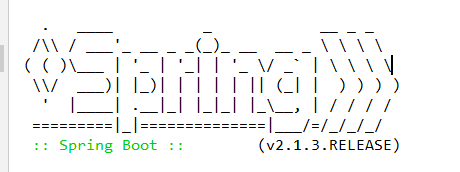 |
| 15 | + |
| 16 | +使用过 Springboot 的对上面这个图案肯定不会陌生,Springboot 启动的同时会打印上面的图案,并带有版本号。查看官方文档可以找到关于 banner 的描述 |
| 17 | +>The banner that is printed on start up can be changed by adding a banner.txt file to your classpath or by setting the spring.banner.location property to the location of such a file. If the file has an encoding other than UTF-8, you can set spring.banner.charset. In addition to a text file, you can also add a banner.gif, banner.jpg, or banner.png image file to your classpath or set the spring.banner.image.location property. Images are converted into an ASCII art representation and printed above any text banner. |
| 18 | +
|
| 19 | +<!--more--> |
| 20 | +就不翻译了,直接有道翻译贴过来看个大概意思。 |
| 21 | +>可以通过向类路径中添加一个banner.txt文件或设置spring.banner来更改在start up上打印的banner。属性指向此类文件的位置。如果文件的编码不是UTF-8,那么可以设置spring.banner.charset。除了文本文件,还可以添加横幅。将gif、banner.jpg或banner.png图像文件保存到类路径或设置spring.banner.image。位置属性。图像被转换成ASCII艺术形式,并打印在任何文本横幅上面。 |
| 22 | +
|
| 23 | +# 1. 自定义 banner |
| 24 | +根据官方的描述,可以在类路径中自定义 banner 图案,我们进行尝试在放 resouce 目录下新建文件 banner.txt 并写入内容([在线字符生成](http://patorjk.com/software/taag/#p=testall&f=Graffiti&t=niumoo))。 |
| 25 | +``` |
| 26 | + (_) |
| 27 | + _ __ _ _ _ _ __ ___ ___ ___ |
| 28 | + | '_ \| | | | | '_ ` _ \ / _ \ / _ \ |
| 29 | + | | | | | |_| | | | | | | (_) | (_) | |
| 30 | + |_| |_|_|\__,_|_| |_| |_|\___/ \___/ 版本:${spring-boot.formatted-version} |
| 31 | +``` |
| 32 | +启动 Springboot 在控制台看到下面的输出。 |
| 33 | +```log |
| 34 | + (_) |
| 35 | + _ __ _ _ _ _ __ ___ ___ ___ |
| 36 | + | '_ \| | | | | '_ ` _ \ / _ \ / _ \ |
| 37 | + | | | | | |_| | | | | | | (_) | (_) | |
| 38 | + |_| |_|_|\__,_|_| |_| |_|\___/ \___/ 版本:(v2.1.3.RELEASE) |
| 39 | +2019-02-25 14:00:31.289 INFO 12312 --- [ main] net.codingme.banner.BannerApplication : Starting BannerApplication on LAPTOP-L1S5MKTA with PID 12312 (D:\IdeaProjectMy\springboot-git\springboot-banner\target\classes started by Niu in D:\IdeaProjectMy\springboot-git\springboot-banner) |
| 40 | +2019-02-25 14:00:31.291 INFO 12312 --- [ main] net.codingme.banner.BannerApplication : No active profile set, falling back to default profiles: default |
| 41 | +2019-02-25 14:00:32.087 INFO 12312 --- [ main] o.s.b.w.embedded.tomcat.TomcatWebServer : Tomcat initialized with port(s): 8080 (http) |
| 42 | +``` |
| 43 | +发现自定义 banner 已经生效了,官方文档的介绍里说还可以放置图片,下面放置图片 banner.jpg 测试。 |
| 44 | +网上随便找了一个图片。 |
| 45 | +再次启动观察输出。 |
| 46 | +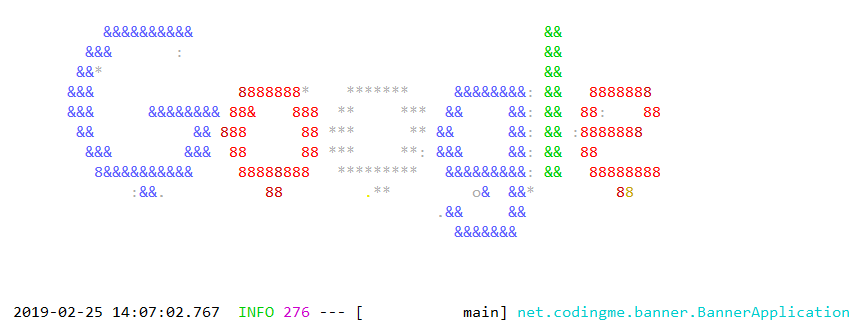Springboot 把图案转成了 ASCII 图案。 |
| 47 | +# 2. ASCII 图案生成原理 |
| 48 | +看了上面的例子,发现 Springboot 可以把图片转换成 ASCII 图案,那么它是怎么做的呢?我们或许可以想象出一个大概流程。 |
| 49 | +1. 获取图片。 |
| 50 | +2. 遍历图片像素点。 |
| 51 | +3. 分析像素点,每个像素点根据颜色深度得出一个值,根据明暗度匹配不同的字符。 |
| 52 | +4. 输出图案。 |
| 53 | + |
| 54 | +Springboot 对图片 banner 的处理到底是不是我们上面想想的那样呢?直接去源码中寻找答案。 |
| 55 | +```java |
| 56 | +/** 位置:org.springframework.boot.SpringApplicationBannerPrinter */ |
| 57 | +//方法1: |
| 58 | +public Banner print(Environment environment, Class<?> sourceClass, Log logger) { |
| 59 | + // 获取 banner 调用方法记为2 |
| 60 | + Banner banner = getBanner(environment); |
| 61 | + try { |
| 62 | + logger.info(createStringFromBanner(banner, environment, sourceClass)); |
| 63 | + } |
| 64 | + catch (UnsupportedEncodingException ex) { |
| 65 | + logger.warn("Failed to create String for banner", ex); |
| 66 | + } |
| 67 | + // 打印 banner |
| 68 | + return new PrintedBanner(banner, sourceClass); |
| 69 | +} |
| 70 | +// 方法2 |
| 71 | +private Banner getBanner(Environment environment) { |
| 72 | + Banners banners = new Banners(); |
| 73 | + // 获取图片banner,我们只关注这个,调用方法记为3 |
| 74 | + banners.addIfNotNull(getImageBanner(environment)); |
| 75 | + banners.addIfNotNull(getTextBanner(environment)); |
| 76 | + if (banners.hasAtLeastOneBanner()) { |
| 77 | + return banners; |
| 78 | + } |
| 79 | + if (this.fallbackBanner != null) { |
| 80 | + return this.fallbackBanner; |
| 81 | + } |
| 82 | + return DEFAULT_BANNER; |
| 83 | + } |
| 84 | +// 方法3 |
| 85 | +/** 获取自定义banner文件信息 */ |
| 86 | +private Banner getImageBanner(Environment environment) { |
| 87 | + // BANNER_IMAGE_LOCATION_PROPERTY = "spring.banner.image.location"; |
| 88 | + String location = environment.getProperty(BANNER_IMAGE_LOCATION_PROPERTY); |
| 89 | + if (StringUtils.hasLength(location)) { |
| 90 | + Resource resource = this.resourceLoader.getResource(location); |
| 91 | + return resource.exists() ? new ImageBanner(resource) : null; |
| 92 | + } |
| 93 | + // IMAGE_EXTENSION = { "gif", "jpg", "png" }; |
| 94 | + for (String ext : IMAGE_EXTENSION) { |
| 95 | + Resource resource = this.resourceLoader.getResource("banner." + ext); |
| 96 | + if (resource.exists()) { |
| 97 | + return new ImageBanner(resource); |
| 98 | + } |
| 99 | + } |
| 100 | + return null; |
| 101 | +} |
| 102 | +``` |
| 103 | +上面是寻找自定义图片 banner 文件源码,如果把图片转换成 ASCII 图案继续跟进,追踪方法1中的`PrintedBanner(banner, sourceClass)`方法。最终查找输出图案的主要方法。 |
| 104 | +```java |
| 105 | +// 位置:org.springframework.boot.ImageBanner#printBanner |
| 106 | +private void printBanner(BufferedImage image, int margin, boolean invert, |
| 107 | + PrintStream out) { |
| 108 | + AnsiElement background = invert ? AnsiBackground.BLACK : AnsiBackground.DEFAULT; |
| 109 | + out.print(AnsiOutput.encode(AnsiColor.DEFAULT)); |
| 110 | + out.print(AnsiOutput.encode(background)); |
| 111 | + out.println(); |
| 112 | + out.println(); |
| 113 | + AnsiColor lastColor = AnsiColor.DEFAULT; |
| 114 | + // 图片高度遍历 |
| 115 | + for (int y = 0; y < image.getHeight(); y++) { |
| 116 | + for (int i = 0; i < margin; i++) { |
| 117 | + out.print(" "); |
| 118 | + } |
| 119 | + // 图片宽度遍历 |
| 120 | + for (int x = 0; x < image.getWidth(); x++) { |
| 121 | + // 获取每一个像素点 |
| 122 | + Color color = new Color(image.getRGB(x, y), false); |
| 123 | + AnsiColor ansiColor = AnsiColors.getClosest(color); |
| 124 | + if (ansiColor != lastColor) { |
| 125 | + out.print(AnsiOutput.encode(ansiColor)); |
| 126 | + lastColor = ansiColor; |
| 127 | + } |
| 128 | + // 像素点转换成字符输出,调用方法记为2 |
| 129 | + out.print(getAsciiPixel(color, invert)); |
| 130 | + } |
| 131 | + out.println(); |
| 132 | + } |
| 133 | + out.print(AnsiOutput.encode(AnsiColor.DEFAULT)); |
| 134 | + out.print(AnsiOutput.encode(AnsiBackground.DEFAULT)); |
| 135 | + out.println(); |
| 136 | + } |
| 137 | +// 方法2,像素点转换成字符 |
| 138 | + private char getAsciiPixel(Color color, boolean dark) { |
| 139 | + // 根据 color 算出一个亮度值 |
| 140 | + double luminance = getLuminance(color, dark); |
| 141 | + for (int i = 0; i < PIXEL.length; i++) { |
| 142 | + // 寻找亮度值匹配的字符 |
| 143 | + if (luminance >= (LUMINANCE_START - (i * LUMINANCE_INCREMENT))) { |
| 144 | + // PIXEL = { ' ', '.', '*', ':', 'o', '&', '8', '#', '@' }; |
| 145 | + return PIXEL[i]; |
| 146 | + } |
| 147 | + } |
| 148 | + return PIXEL[PIXEL.length - 1]; |
| 149 | + } |
| 150 | +``` |
| 151 | +通过查看源码,发现 Springboot 的图片 banner 的转换和我们预想的大致一致,这么有趣的功能我们能不能自己写一个呢? |
| 152 | + |
| 153 | +# 3.自己实现图片转 ASCII字符 |
| 154 | +根据上面的分析,总结一下思路,我们也可以手动写一个图片转 ASCII 字符图案。 |
| 155 | +思路如下: |
| 156 | +1. 图片大小缩放,调整到合适大小。 |
| 157 | +2. 遍历图片像素。 |
| 158 | +3. 获取图片像素点亮度(RGB颜色通过公式可以得到亮度数值)。 |
| 159 | +4. 匹配字符。 |
| 160 | +5. 输出图案。 |
| 161 | + |
| 162 | +上面的5个步骤直接使用 Java 代码就可以完整实现,下面是编写的源码。 |
| 163 | +```java |
| 164 | +import java.awt.*; |
| 165 | +import java.awt.image.BufferedImage; |
| 166 | +import java.io.File; |
| 167 | +import java.io.FileOutputStream; |
| 168 | +import java.io.IOException; |
| 169 | + |
| 170 | +import javax.imageio.ImageIO; |
| 171 | + |
| 172 | +/** |
| 173 | + * <p> |
| 174 | + * 根据图片生成字符图案 |
| 175 | + * 1.图片大小缩放 |
| 176 | + * 2.遍历图片像素点 |
| 177 | + * 3.获取图片像素点亮度 |
| 178 | + * 4.匹配字符 |
| 179 | + * 5.输出图案 |
| 180 | + * |
| 181 | + * @author niujinpeng |
| 182 | + * @website www.wdbyte.com |
| 183 | + * @date 2019-02-25 23:03:01 |
| 184 | + */ |
| 185 | +public class GeneratorTextImage { |
| 186 | + private static final char[] PIXEL = {'@', '#', '8', '&', 'o', ':', '*', '.', ' '}; |
| 187 | + public static void main(String[] args) throws Exception { |
| 188 | + // 图片缩放 |
| 189 | + BufferedImage bufferedImage = makeSmallImage("src/main/resources/banner.jpg"); |
| 190 | + // 输出 |
| 191 | + printImage(bufferedImage); |
| 192 | + } |
| 193 | + |
| 194 | + public static void printImage(BufferedImage image) throws IOException { |
| 195 | + int width = image.getWidth(); |
| 196 | + int height = image.getHeight(); |
| 197 | + for (int i = 0; i < height; i++) { |
| 198 | + for (int j = 0; j < width; j++) { |
| 199 | + int rgb = image.getRGB(j, i); |
| 200 | + Color color = new Color(rgb); |
| 201 | + int red = color.getRed(); |
| 202 | + int green = color.getGreen(); |
| 203 | + int blue = color.getBlue(); |
| 204 | + // 一个用于计算RGB像素点亮度的公式 |
| 205 | + Double luminace = 0.2126 * red + 0.7152 * green + 0.0722 * blue; |
| 206 | + double index = luminace / (Math.ceil(255 / PIXEL.length) + 0.5); |
| 207 | + System.out.print(PIXEL[(int)(Math.floor(index))]); |
| 208 | + } |
| 209 | + System.out.println(); |
| 210 | + } |
| 211 | + } |
| 212 | + |
| 213 | + public static BufferedImage makeSmallImage(String srcImageName) throws Exception { |
| 214 | + File srcImageFile = new File(srcImageName); |
| 215 | + if (srcImageFile == null) { |
| 216 | + System.out.println("文件不存在"); |
| 217 | + return null; |
| 218 | + } |
| 219 | + FileOutputStream fileOutputStream = null; |
| 220 | + BufferedImage tagImage = null; |
| 221 | + Image srcImage = null; |
| 222 | + try { |
| 223 | + srcImage = ImageIO.read(srcImageFile); |
| 224 | + int srcWidth = srcImage.getWidth(null);// 原图片宽度 |
| 225 | + int srcHeight = srcImage.getHeight(null);// 原图片高度 |
| 226 | + int dstMaxSize = 90;// 目标缩略图的最大宽度/高度,宽度与高度将按比例缩写 |
| 227 | + int dstWidth = srcWidth;// 缩略图宽度 |
| 228 | + int dstHeight = srcHeight;// 缩略图高度 |
| 229 | + float scale = 0; |
| 230 | + // 计算缩略图的宽和高 |
| 231 | + if (srcWidth > dstMaxSize) { |
| 232 | + dstWidth = dstMaxSize; |
| 233 | + scale = (float)srcWidth / (float)dstMaxSize; |
| 234 | + dstHeight = Math.round((float)srcHeight / scale); |
| 235 | + } |
| 236 | + srcHeight = dstHeight; |
| 237 | + if (srcHeight > dstMaxSize) { |
| 238 | + dstHeight = dstMaxSize; |
| 239 | + scale = (float)srcHeight / (float)dstMaxSize; |
| 240 | + dstWidth = Math.round((float)dstWidth / scale); |
| 241 | + } |
| 242 | + // 生成缩略图 |
| 243 | + tagImage = new BufferedImage(dstWidth, dstHeight, BufferedImage.TYPE_INT_RGB); |
| 244 | + tagImage.getGraphics().drawImage(srcImage, 0, 0, dstWidth, dstHeight, null); |
| 245 | + return tagImage; |
| 246 | + } finally { |
| 247 | + if (fileOutputStream != null) { |
| 248 | + try { |
| 249 | + fileOutputStream.close(); |
| 250 | + } catch (Exception e) { |
| 251 | + } |
| 252 | + fileOutputStream = null; |
| 253 | + } |
| 254 | + tagImage = null; |
| 255 | + srcImage = null; |
| 256 | + System.gc(); |
| 257 | + } |
| 258 | + } |
| 259 | +} |
| 260 | +``` |
| 261 | +还是拿上面的 Google log 图片作为实验对象,运行得到字符图案输出。 |
| 262 | +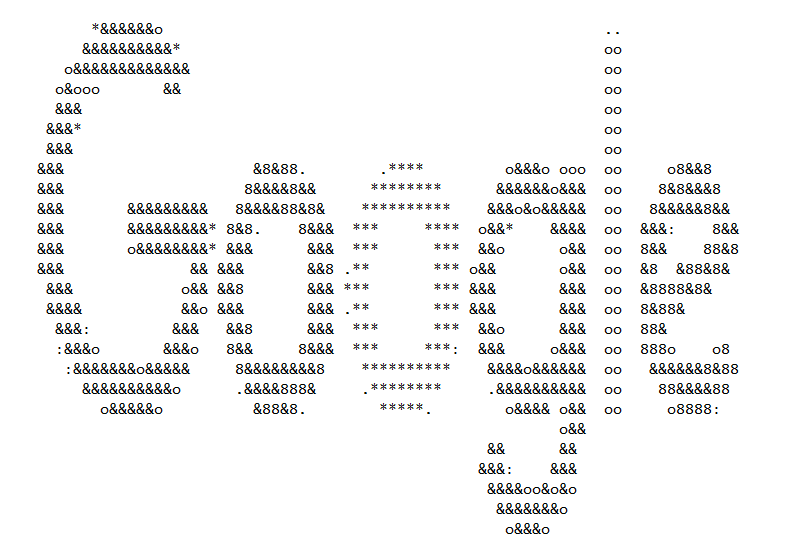 |
| 263 | + |
| 264 | +文章代码已经上传到 GitHub [Spring Boot](https://github.com/niumoo/springboot/tree/master/)。 |
0 commit comments