<?xml version="1.0" encoding="utf-8"?>

<feed xmlns="http://www.w3.org/2005/Atom">
    <id>https://ivorySQL.org/blog</id>
    <title>IvorySQL Blog</title>
    <updated>2026-02-10T00:00:00.000Z</updated>
    <generator>https://github.com/jpmonette/feed</generator>
    <link rel="alternate" href="https://ivorySQL.org/blog"/>
    <subtitle>IvorySQL Blog</subtitle>
    <icon>https://ivorySQL.org/img/favicon.ico</icon>
    <entry>
        <title type="html"><![CDATA[IvorySQL 5.0+ - a game changer for Oracle to PostgreSQL transitions]]></title>
        <id>https://ivorySQL.org/blog/ivorysql-5.0-oracle-to-postgresql-migration</id>
        <link href="https://ivorySQL.org/blog/ivorysql-5.0-oracle-to-postgresql-migration"/>
        <updated>2026-02-10T00:00:00.000Z</updated>
        <summary type="html"><![CDATA[Introduction]]></summary>
        <content type="html"><![CDATA[<h2 class="anchor anchorTargetStickyNavbar_Vzrq" id="introduction">Introduction<a href="https://ivorysql.org/blog/ivorysql-5.0-oracle-to-postgresql-migration#introduction" class="hash-link" aria-label="Direct link to Introduction" title="Direct link to Introduction" translate="no">​</a></h2>
<p>IvorySQL: “advanced, fully featured, open source Oracle compatible PostgreSQL with a firm commitment to always remain 100% compatible and a Drop-in replacement of the latest PostgreSQL.”（<a href="https://github.com/IvorySQL/IvorySQL" target="_blank" rel="noopener noreferrer" class="">GitHub</a>）</p>
<p>Also, it’s our team’s favorite engine to translate both foreign SQL and foreign applications for PostgreSQL! We believe in transitions, not migrations - a gradual shift from the old database engine to the new, specifically to reduce risk and optimize results. Using a project like this makes a huge difference in achieving both these goals.</p>
<p>It’s been a little bit since the latest major version was released, but we’re still excited about what’s new and wanted to share.</p>
<h2 class="anchor anchorTargetStickyNavbar_Vzrq" id="whats-new">What’s new<a href="https://ivorysql.org/blog/ivorysql-5.0-oracle-to-postgresql-migration#whats-new" class="hash-link" aria-label="Direct link to What’s new" title="Direct link to What’s new" translate="no">​</a></h2>
<p>Version 5.0 (<a href="https://github.com/IvorySQL/IvorySQL/releases/tag/IvorySQL_5.0" target="_blank" rel="noopener noreferrer" class="">release notes</a>) came out on November 25, 2025 and there’s already been a minor version released since then (<a href="https://github.com/IvorySQL/IvorySQL/releases/tag/IvorySQL_5.1" target="_blank" rel="noopener noreferrer" class="">5.1 release notes</a>) on December 18, 2025. These editions of the project were the direct result of massive efforts from the IvorySQL team to provide a lot of quality feature improvements as well as implement PostgreSQL 18 compatibility.</p>
<p>IvorySQL 5 brought a lot of necessary changes with it, including:</p>
<ul>
<li class=""><strong>PLiSQL</strong> - a compatible subset of Oracle PL/SQL</li>
<li class=""><strong>Oracle-Compatible Package Support</strong></li>
<li class=""><strong>Oracle-Style Sequence Support</strong></li>
<li class="">v5.0 enhancements such as <strong>ROWID</strong>, <strong>%TYPE</strong>, <strong>%ROWTYPE</strong>, and <strong>nested subfunctions</strong></li>
</ul>
<p>In particular, we really enjoy a lot of the functionality upgrades.</p>
<p>For example, IvorySQL now has <strong>better NULL handling</strong>, where NULL is now treated like an empty string in compatible mode (matching Oracle behavior) to avoid bugs during migration. So, when you have situations such as <code>SELECT CONCAT ('a' || NULL)</code>, IvorySQL will now return <code>'a'</code> instead of following PostgreSQL’s behavior of returning <code>NULL</code>.</p>
<p>One enhancement we really enjoy is that you can now <strong>nest functions and procedures</strong>. Functions are able to be embedded inside other functions (like Oracle packages, but simpler, using only private methods). This lets you organize complex logic in one place.</p>
<p>Along the same lines, support was also added for <code>DO [ LANGUAGE lang_name ] code [USING IN | OUT | IN OUT, ...]</code>.</p>
<h2 class="anchor anchorTargetStickyNavbar_Vzrq" id="trying-it-out">Trying it out<a href="https://ivorysql.org/blog/ivorysql-5.0-oracle-to-postgresql-migration#trying-it-out" class="hash-link" aria-label="Direct link to Trying it out" title="Direct link to Trying it out" translate="no">​</a></h2>
<p>Currently, we’re ingesting applications that range from only a few packages, procedures, and functions (around 10-50 objects) to massive data loads that include around 50,000 objects (10,000+ procedures and hundreds of packages).</p>
<p>While there are still many features that will need to be added over time, it considerably reduces the effort taken to complete the transition from Oracle to PostgreSQL successfully.</p>
<p>If you’re thinking about testing it for yourself, there are a plethora of options to get started (including building it from source, using containers, etc.)… and even a WASM build! This in particular allows IvorySQL to be run directly in the browser without having to fully install it locally; it’s very convenient to look at syntax support and take the first step into the world of PostgreSQL.</p>
<p>You can deploy the IvorySQL-WASM project locally in just a few steps, following the <a href="https://www.ivorysql.org/blog/ivorysql-wasm/" target="_blank" rel="noopener noreferrer" class="">blog post IvorySQL published</a> on the subject.</p>
<p>Or, you can <a href="https://trial.ivorysql.org/" target="_blank" rel="noopener noreferrer" class="">try out the hosted WASM</a> on the IvorySQL website.</p>
<h2 class="anchor anchorTargetStickyNavbar_Vzrq" id="whats-next">What’s next<a href="https://ivorysql.org/blog/ivorysql-5.0-oracle-to-postgresql-migration#whats-next" class="hash-link" aria-label="Direct link to What’s next" title="Direct link to What’s next" translate="no">​</a></h2>
<p>Hoping to learn more about how to use IvorySQL yourself? Keep an eye on the events page on their website (<a href="https://www.ivorysql.org/events" target="_blank" rel="noopener noreferrer" class="">latest updates</a>), or <a href="https://www.youtube.com/@ivorysql" target="_blank" rel="noopener noreferrer" class="">check out recordings</a> from the HOW2025 conference in Jinan, China in the meantime.</p>
<p><a href="https://ivorysql.io/" target="_blank" rel="noopener noreferrer" class="">The next conference in Jinan</a> is already scheduled, from April 26th to the 28th! (By the way, the <a href="https://sessionize.com/how2026" target="_blank" rel="noopener noreferrer" class="">Call for Proposals is open</a> until February 27th, 2026.)</p>
<p>Our team is happy to employ contributors to the IvorySQL project. Some of our team members (Cédric Villemain, Yasir Hussain Shah) have been recognized in the release notes for 5.0 and 5.1 - and we have more additions planned. For the next release, we have planned some exciting developments, including:</p>
<ul>
<li class=""><code>ENABLE/DISABLE</code> constraint syntax</li>
<li class=""><code>UTL_FILE</code> package addition</li>
<li class="">Oracle-style <code>CREATE TRIGGER</code> body (without needing to create a function beforehand)</li>
<li class="">Support for Oracle’s legacy join operator <code>(+)</code></li>
</ul>
<p>We’re looking forward to seeing the result of ongoing community work for the next release as well. Many great features are actively being added; for example, recently a new contributor to the project, Rophy Tsai, added the <code>DBMS_OUTPUT</code> and <code>DBMS_UTILITY</code> packages: something widely used across Oracle-based SQL codebases. It was recently merged to IvorySQL’s main branch, and will likely be included in the next minor or major release.</p>
<p>For those looking to transition to or explore PostgreSQL without extensive modifications to their existing database logic and applications, IvorySQL (specially v5.x) offers a practical solution. A direct migration to PostgreSQL could, in some cases, require significant changes to both database objects and application code. IvorySQL helps bridge this gap, allowing a smoother adoption of PostgreSQL with greater compatibility.</p>
<h2 class="anchor anchorTargetStickyNavbar_Vzrq" id="additional-resources">Additional resources<a href="https://ivorysql.org/blog/ivorysql-5.0-oracle-to-postgresql-migration#additional-resources" class="hash-link" aria-label="Direct link to Additional resources" title="Direct link to Additional resources" translate="no">​</a></h2>
<ul>
<li class=""><a href="https://www.postgresql.org/about/news/ivorysql-50-released-major-oracle-compatibility-expansion-on-postgresql-180-foundation-3180/" target="_blank" rel="noopener noreferrer" class="">PostgreSQL.org announcement for IvorySQL 5</a></li>
<li class=""><a href="https://github.com/orgs/IvorySQL/projects/19" target="_blank" rel="noopener noreferrer" class="">IvorySQL 5.0 roadmap on GitHub</a></li>
</ul>]]></content>
        <author>
            <name>Yasir Hussain Shah</name>
            <uri>https://www.data-bene.io/en/team/yasir-hussain-shah/</uri>
        </author>
        <category label="IvorySQL" term="IvorySQL"/>
        <category label="Database" term="Database"/>
        <category label="Oracle Compatible" term="Oracle Compatible"/>
        <category label="PostgreSQL" term="PostgreSQL"/>
        <category label="migration" term="migration"/>
    </entry>
    <entry>
        <title type="html"><![CDATA[In-Depth Analysis of PostgreSQL 18 Key New Features]]></title>
        <id>https://ivorySQL.org/blog/analysis-of-pg-18-key-new-features</id>
        <link href="https://ivorySQL.org/blog/analysis-of-pg-18-key-new-features"/>
        <updated>2025-09-26T00:00:00.000Z</updated>
        <summary type="html"><![CDATA[The Global Development Group of PostgreSQL released the first Beta version of PostgreSQL 18 on May 8, 2025, with the official version officially launched on September 25. The IvorySQL community will break down the six highlight features of PostgreSQL 18 for you in this article.]]></summary>
        <content type="html"><![CDATA[<p>The Global Development Group of PostgreSQL released the first Beta version of PostgreSQL 18 on May 8, 2025, with the official version officially launched on September 25. The IvorySQL community will break down the six highlight features of PostgreSQL 18 for you in this article.</p>
<h2 class="anchor anchorTargetStickyNavbar_Vzrq" id="1-pg-asynchronous-io-aio-framework-the-first-step-to-breaking-the-synchronous-blocking-bottleneck">1. PG Asynchronous I/O (AIO) Framework: The First Step to Breaking the Synchronous Blocking Bottleneck<a href="https://ivorysql.org/blog/analysis-of-pg-18-key-new-features#1-pg-asynchronous-io-aio-framework-the-first-step-to-breaking-the-synchronous-blocking-bottleneck" class="hash-link" aria-label="Direct link to 1. PG Asynchronous I/O (AIO) Framework: The First Step to Breaking the Synchronous Blocking Bottleneck" title="Direct link to 1. PG Asynchronous I/O (AIO) Framework: The First Step to Breaking the Synchronous Blocking Bottleneck" translate="no">​</a></h2>
<p>PostgreSQL 18 has newly introduced an asynchronous I/O subsystem. The new mechanism allows the parallel execution of multiple asynchronous prefetch operations <strong>in specific scenarios</strong>. The CPU can continue to advance queries without waiting for data to be returned, reducing waiting overhead to a certain extent. This framework lays the foundation for more in-depth and thorough performance optimization of asynchronous I/O in PostgreSQL's future development, marking the first crucial step forward.</p>
<h3 class="anchor anchorTargetStickyNavbar_Vzrq" id="core-scenarios-for-improvement">Core Scenarios for Improvement<a href="https://ivorysql.org/blog/analysis-of-pg-18-key-new-features#core-scenarios-for-improvement" class="hash-link" aria-label="Direct link to Core Scenarios for Improvement" title="Direct link to Core Scenarios for Improvement" translate="no">​</a></h3>
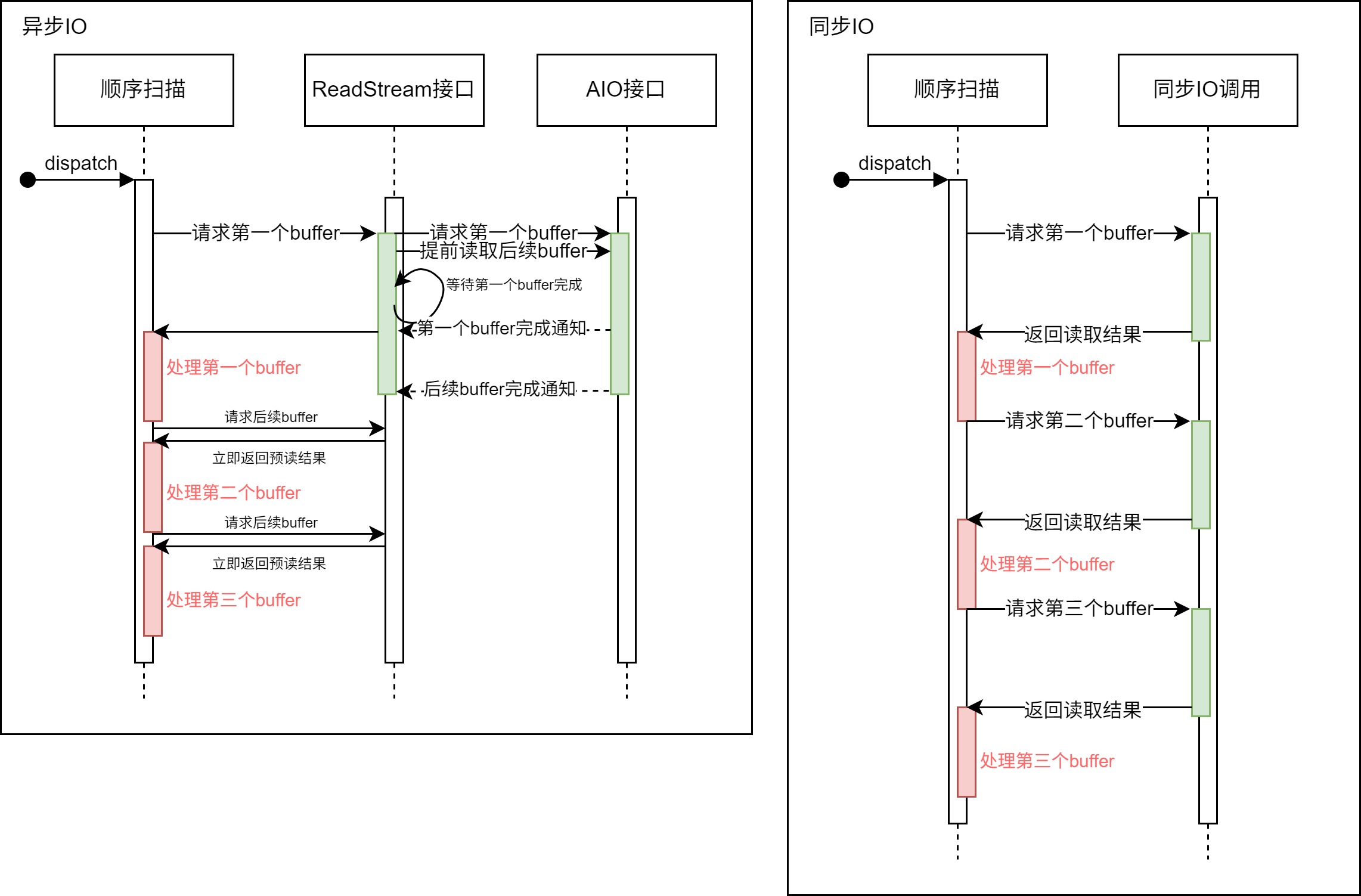
<p><strong>【Only asynchronous read is implemented at present, with asynchronous write not yet supported】</strong> In all Seq Scan scenarios, parallel sequential prefetch can be achieved through the ReadStream facility adapted for asynchronous I/O, which improves the performance of Seq Scan with better results than the original advisory prefetch of <code>posix_fadvice</code>. Especially in cloud storage scenarios, a single blocking read I/O takes much longer than local I/O, making the advantages of parallel prefetch powered by asynchronous I/O more prominent. At present, asynchronous I/O supports asynchronous reading for sequential scans, bitmap heap scans and VACUUM operations. Early tests show that the performance of read-intensive queries can be improved by 2 to 3 times.</p>
<p><img decoding="async" loading="lazy" alt="img" src="https://ivorysql.org/assets/images/20250926-aio-drawio-99a351b1a3a0b55a3452defb40d3eff1.png" width="2283" height="1503" class="img_ev3q"></p>
<p>The ReadStream mechanism with asynchronous I/O can asynchronously prefetch subsequent buffers that may be used after receiving a read request. In contrast, with the synchronous I/O method, the system has to wait for the completion of the I/O operation every time a buffer read request is made, which reduces the system throughput.</p>
<h3 class="anchor anchorTargetStickyNavbar_Vzrq" id="usage-method">Usage Method<a href="https://ivorysql.org/blog/analysis-of-pg-18-key-new-features#usage-method" class="hash-link" aria-label="Direct link to Usage Method" title="Direct link to Usage Method" translate="no">​</a></h3>
<div class="language-text codeBlockContainer_Ckt0 theme-code-block" style="--prism-color:#393A34;--prism-background-color:#f6f8fa"><div class="codeBlockContent_QJqH"><pre tabindex="0" class="prism-code language-text codeBlock_bY9V thin-scrollbar" style="color:#393A34;background-color:#f6f8fa"><code class="codeBlockLines_e6Vv"><span class="token-line" style="color:#393A34"><span class="token plain"># - I/O -</span><br></span><span class="token-line" style="color:#393A34"><span class="token plain" style="display:inline-block"></span><br></span><span class="token-line" style="color:#393A34"><span class="token plain">#backend_flush_after = 0		# measured in pages, 0 disables</span><br></span><span class="token-line" style="color:#393A34"><span class="token plain">effective_io_concurrency = 300		# 1-1000; 0 disables issuing multiple simultaneous IO requests</span><br></span><span class="token-line" style="color:#393A34"><span class="token plain">maintenance_io_concurrency = 300	# 1-1000; same as effective_io_concurrency</span><br></span><span class="token-line" style="color:#393A34"><span class="token plain">io_max_combine_limit = 256kB		# usually 1-128 blocks (depends on OS)</span><br></span><span class="token-line" style="color:#393A34"><span class="token plain">                    # (change requires restart)</span><br></span><span class="token-line" style="color:#393A34"><span class="token plain">io_combine_limit = 256kB		# usually 1-128 blocks (depends on OS)</span><br></span><span class="token-line" style="color:#393A34"><span class="token plain" style="display:inline-block"></span><br></span><span class="token-line" style="color:#393A34"><span class="token plain">io_method = io_uring # worker, io_uring, sync</span><br></span><span class="token-line" style="color:#393A34"><span class="token plain">                    # (change requires restart)</span><br></span><span class="token-line" style="color:#393A34"><span class="token plain">io_max_concurrency = 128		# Max number of IOs that one process</span><br></span><span class="token-line" style="color:#393A34"><span class="token plain">                    # can execute simultaneously</span><br></span><span class="token-line" style="color:#393A34"><span class="token plain">                    # -1 sets based on shared_buffers</span><br></span><span class="token-line" style="color:#393A34"><span class="token plain">                    # (change requires restart)</span><br></span><span class="token-line" style="color:#393A34"><span class="token plain">#io_workers = 3				# 1-32;</span><br></span></code></pre></div></div>
<p>Users can enable asynchronous I/O by selecting three different <code>io_method</code> options:</p>
<ul>
<li class=""><code>worker</code>: Several background I/O workers receive and process I/O requests from backend processes.</li>
<li class=""><code>io_uring</code>: The io_uring subsystem in the Linux system processes PG's I/O requests through operating system kernel threads.</li>
<li class=""><code>sync</code>: Synchronous I/O that meets the interface requirements of the asynchronous I/O framework.</li>
</ul>
<p>To enable asynchronous I/O, users need to set the above GUC parameters according to their own situations. Among them, the maximum number of asynchronous I/O handles that each process can have is <code>io_max_concurrency</code>, which users can set to <code>-1</code> to allow the database to select an appropriate value automatically. If the self-set value is too large, the database may fail to start due to the excessive memory occupied by asynchronous I/O; if the value is too small, the performance of asynchronous I/O cannot be fully utilized.</p>
<p>After starting the database, users can obtain the real-time execution status of asynchronous I/O in the current system through the <code>pg_aios</code> view:</p>
<div class="language-text codeBlockContainer_Ckt0 theme-code-block" style="--prism-color:#393A34;--prism-background-color:#f6f8fa"><div class="codeBlockContent_QJqH"><pre tabindex="0" class="prism-code language-text codeBlock_bY9V thin-scrollbar" style="color:#393A34;background-color:#f6f8fa"><code class="codeBlockLines_e6Vv"><span class="token-line" style="color:#393A34"><span class="token plain">postgres=# select * from pg_aios;</span><br></span><span class="token-line" style="color:#393A34"><span class="token plain">-[ RECORD 1 ]---+-------------------------------------------</span><br></span><span class="token-line" style="color:#393A34"><span class="token plain">pid             | 85834</span><br></span><span class="token-line" style="color:#393A34"><span class="token plain">io_id           | 14208</span><br></span><span class="token-line" style="color:#393A34"><span class="token plain">io_generation   | 204</span><br></span><span class="token-line" style="color:#393A34"><span class="token plain">state           | SUBMITTED</span><br></span><span class="token-line" style="color:#393A34"><span class="token plain">operation       | readv</span><br></span><span class="token-line" style="color:#393A34"><span class="token plain">off             | 116252672</span><br></span><span class="token-line" style="color:#393A34"><span class="token plain">length          | 8192</span><br></span><span class="token-line" style="color:#393A34"><span class="token plain">target          | smgr</span><br></span><span class="token-line" style="color:#393A34"><span class="token plain">handle_data_len | 1</span><br></span><span class="token-line" style="color:#393A34"><span class="token plain">raw_result      |</span><br></span><span class="token-line" style="color:#393A34"><span class="token plain">result          | UNKNOWN</span><br></span><span class="token-line" style="color:#393A34"><span class="token plain">target_desc     | block 14191 in file "base/5/16427"</span><br></span><span class="token-line" style="color:#393A34"><span class="token plain">f_sync          | f</span><br></span><span class="token-line" style="color:#393A34"><span class="token plain">f_localmem      | f</span><br></span><span class="token-line" style="color:#393A34"><span class="token plain">f_buffered      | t</span><br></span><span class="token-line" style="color:#393A34"><span class="token plain">...</span><br></span></code></pre></div></div>
<p>For the meaning of each column, please refer to the <a href="https://www.postgresql.org/docs/18/view-pg-aios.html" target="_blank" rel="noopener noreferrer" class="">official documentation</a>.</p>
<h3 class="anchor anchorTargetStickyNavbar_Vzrq" id="framework-design">Framework Design<a href="https://ivorysql.org/blog/analysis-of-pg-18-key-new-features#framework-design" class="hash-link" aria-label="Direct link to Framework Design" title="Direct link to Framework Design" translate="no">​</a></h3>
<p>PostgreSQL 18 introduces an asynchronous I/O framework that supports flexible configuration of asynchronous I/O through GUC parameters, including the implementation method (<code>io_method</code>, optional worker, io_uring or sync), concurrency scale (such as <code>*_io_concurrency</code>, <code>io_max_concurrency</code>) and implementation-related parameters (such as <code>io_workers</code>).</p>
<p>The framework abstracts the I/O targets (currently supporting smgr, with WAL support planned for the future) and the behaviors of different stages and data sources (shared buffer/local buffer) through the <code>PgAioHandleCallbacks</code> structure to support subsequent expansion. The relevant memory is allocated in the shared memory at startup and will not be scaled subsequently. Processes access their affiliated asynchronous I/O resources by number, and handles are marked for reuse with generation numbers.</p>
<p>At present, the asynchronous I/O of this version mainly provides asynchronous read support for smgr, and does not yet support asynchronous read and write for WAL. The asynchronous write function of smgr is still under development.</p>
<h3 class="anchor anchorTargetStickyNavbar_Vzrq" id="modifications-to-the-original-facilities">Modifications to the Original Facilities<a href="https://ivorysql.org/blog/analysis-of-pg-18-key-new-features#modifications-to-the-original-facilities" class="hash-link" aria-label="Direct link to Modifications to the Original Facilities" title="Direct link to Modifications to the Original Facilities" translate="no">​</a></h3>
<ol>
<li class=""><strong>Extend the smgr interface</strong>: Add the <code>smgr_startreadv</code> method to support asynchronous reading.</li>
<li class=""><strong>Implement callback structures</strong>: smgr needs to implement the callback structures of <code>PgAioTargetInfo</code> and <code>PgAioHandleCallBacks</code>.</li>
<li class=""><strong>Adapt existing modules</strong>: Modules such as smgr and buffer manager need to fill the asynchronous I/O abstract structure to be compatible with the framework.</li>
<li class=""><strong>PG critical section processing</strong>: Synchronous I/O can be initiated in the PG critical section; due to the segmented execution and callback of asynchronous I/O, operations that may fail in the callback need to be removed (all operations in the critical section cannot fail, such as using <code>RelPathStr</code> instead of the <code>char*</code> string of palloc) to ensure security.</li>
<li class=""><strong>Optimize the upper-layer interface</strong>: Transform interfaces such as ReadStream by using asynchronous I/O to achieve true prefetch, which greatly improves the I/O performance of operations such as sequential scan, pg_prewarm and ANALYZE, with better results than the original posix_fadvise solution.</li>
</ol>
<h3 class="anchor anchorTargetStickyNavbar_Vzrq" id="usage-notes-and-future-outlook">Usage Notes and Future Outlook<a href="https://ivorysql.org/blog/analysis-of-pg-18-key-new-features#usage-notes-and-future-outlook" class="hash-link" aria-label="Direct link to Usage Notes and Future Outlook" title="Direct link to Usage Notes and Future Outlook" translate="no">​</a></h3>
<ol>
<li class=""><strong>io_uring requires a relatively new kernel</strong>: The old version of the Linux Kernel does not support io_uring. Although some early version kernels support io_uring, their functions and performance are quite different from those of the new kernel.</li>
<li class=""><strong>Architecture limits concurrency granularity</strong>: Restricted by the multi-process architecture, there are few computing tasks that can run in parallel during PG asynchronous I/O, making it difficult to achieve finer-grained task-level asynchrony. The current main performance gains are concentrated on parallel I/O operations such as <strong>ReadStream sequential prefetch</strong>.</li>
<li class=""><strong>Possible performance improvements in the future</strong>: Linux io_uring supports the Direct I/O (DIO) feature, laying the foundation for enabling DIO in PG. Enabling Direct I/O in the future can eliminate double buffering (the OS layer buffers I/O data, and the PG layer also buffers I/O data) to reduce unnecessary data copying. On high-speed NVMe, the <strong>IORING_SETUP_IOPOLL</strong> option can also be enabled with DIO to use the polling method to check the completion of I/O, which can further improve performance.</li>
<li class=""><strong>More asynchronous I/O backends in the future</strong>: In addition to the <code>sync</code> mode, the official version of PostgreSQL 18 only supports two asynchronous I/O backends: <code>worker</code> and <code>io_uring</code>. At present, the design of the asynchronous I/O framework is basically complete, and future versions are expected to support I/O backends such as Windows IORing, IOCP and Posix asynchronous I/O, providing users with more choices.</li>
</ol>
<h3 class="anchor anchorTargetStickyNavbar_Vzrq" id="summary">Summary<a href="https://ivorysql.org/blog/analysis-of-pg-18-key-new-features#summary" class="hash-link" aria-label="Direct link to Summary" title="Direct link to Summary" translate="no">​</a></h3>
<p>The PostgreSQL 18 asynchronous I/O framework improves the I/O capability of the database system and also enhances the scalability of the PostgreSQL architecture. Users only need to modify the GUC parameters according to their own situations to obtain the benefits brought by asynchronous I/O. At present, the design of the asynchronous I/O framework is basically complete, and it will be very convenient to support other asynchronous I/O backends in the later stage. Postgres users on any platform can try <code>io_method = worker</code> or <code>sync</code>. If you want to use the io_uring backend on an old Linux kernel distribution that is not officially adapted to io_uring, you need to conduct sufficient tests before use.</p>
<h2 class="anchor anchorTargetStickyNavbar_Vzrq" id="2-skip-scan-speed-up-b-tree-indexes">2. Skip Scan: Speed Up B-Tree Indexes<a href="https://ivorysql.org/blog/analysis-of-pg-18-key-new-features#2-skip-scan-speed-up-b-tree-indexes" class="hash-link" aria-label="Direct link to 2. Skip Scan: Speed Up B-Tree Indexes" title="Direct link to 2. Skip Scan: Speed Up B-Tree Indexes" translate="no">​</a></h2>
<p>In versions of PostgreSQL prior to 18, a multi-column B-tree index can be used for query conditions that include any subset of columns in the index, and it is most efficient when constraints are applied to the leading (leftmost) column. An equality constraint on the leading column, plus any inequality constraint on the first column without an equality constraint, is used to limit the portion of the index to be scanned.</p>
<p>For example, given an ascending index based on the non-null fields (a, b, c) and the query condition WHERE a = 5 AND b &gt;= 42 AND c &lt; 77, the index will start scanning from the first entry with a = 5 and b = 42 and continue until the last entry with a = 5. Index entries with c &gt;= 77 will be skipped, but they still need to be scanned.</p>
<p>In principle, this index can be used for queries with constraints on b and/or c but no constraints on a — however, the entire index must be scanned, so the optimizer prefers a sequential table scan over an index scan in most cases.</p>
<h3 class="anchor anchorTargetStickyNavbar_Vzrq" id="core-scenarios-for-improvement-1">Core Scenarios for Improvement<a href="https://ivorysql.org/blog/analysis-of-pg-18-key-new-features#core-scenarios-for-improvement-1" class="hash-link" aria-label="Direct link to Core Scenarios for Improvement" title="Direct link to Core Scenarios for Improvement" translate="no">​</a></h3>
<p>Starting from PostgreSQL 18:
If a B-tree index scan can apply Skip Scan, constraints for each column are applied while traversing the index, which can reduce index reads. The working principle of Skip Scan is to internally generate a dynamic equality constraint that matches each possible value in the index column.</p>
<h3 class="anchor anchorTargetStickyNavbar_Vzrq" id="effect-test">Effect Test<a href="https://ivorysql.org/blog/analysis-of-pg-18-key-new-features#effect-test" class="hash-link" aria-label="Direct link to Effect Test" title="Direct link to Effect Test" translate="no">​</a></h3>
<p>Comparison Versions:
<strong>PostgreSQL 17 vs PostgreSQL 18</strong></p>
<h4 class="anchor anchorTargetStickyNavbar_Vzrq" id="table-structure-and-index">Table Structure and Index<a href="https://ivorysql.org/blog/analysis-of-pg-18-key-new-features#table-structure-and-index" class="hash-link" aria-label="Direct link to Table Structure and Index" title="Direct link to Table Structure and Index" translate="no">​</a></h4>
<div class="language-sql codeBlockContainer_Ckt0 theme-code-block" style="--prism-color:#393A34;--prism-background-color:#f6f8fa"><div class="codeBlockContent_QJqH"><pre tabindex="0" class="prism-code language-sql codeBlock_bY9V thin-scrollbar" style="color:#393A34;background-color:#f6f8fa"><code class="codeBlockLines_e6Vv"><span class="token-line" style="color:#393A34"><span class="token keyword" style="color:#00009f">CREATE</span><span class="token plain"> </span><span class="token keyword" style="color:#00009f">TABLE</span><span class="token plain"> t1</span><br></span><span class="token-line" style="color:#393A34"><span class="token plain"></span><span class="token punctuation" style="color:#393A34">(</span><span class="token plain"></span><br></span><span class="token-line" style="color:#393A34"><span class="token plain">c1 </span><span class="token keyword" style="color:#00009f">int</span><span class="token punctuation" style="color:#393A34">,</span><span class="token plain"></span><br></span><span class="token-line" style="color:#393A34"><span class="token plain">c2 </span><span class="token keyword" style="color:#00009f">int</span><span class="token punctuation" style="color:#393A34">,</span><span class="token plain"></span><br></span><span class="token-line" style="color:#393A34"><span class="token plain">c3 </span><span class="token keyword" style="color:#00009f">float</span><span class="token plain"></span><br></span><span class="token-line" style="color:#393A34"><span class="token plain"></span><span class="token punctuation" style="color:#393A34">)</span><span class="token plain"></span><br></span><span class="token-line" style="color:#393A34"><span class="token plain"></span><span class="token keyword" style="color:#00009f">WITH</span><span class="token plain"> </span><span class="token punctuation" style="color:#393A34">(</span><span class="token keyword" style="color:#00009f">fillfactor</span><span class="token operator" style="color:#393A34">=</span><span class="token number" style="color:#36acaa">80</span><span class="token punctuation" style="color:#393A34">)</span><span class="token punctuation" style="color:#393A34">;</span><span class="token plain"></span><br></span><span class="token-line" style="color:#393A34"><span class="token plain" style="display:inline-block"></span><br></span><span class="token-line" style="color:#393A34"><span class="token plain" style="display:inline-block"></span><br></span><span class="token-line" style="color:#393A34"><span class="token plain"></span><span class="token keyword" style="color:#00009f">CREATE</span><span class="token plain"> </span><span class="token keyword" style="color:#00009f">INDEX</span><span class="token plain"> idx_t1_c1c2 </span><span class="token keyword" style="color:#00009f">ON</span><span class="token plain"> t1</span><span class="token punctuation" style="color:#393A34">(</span><span class="token plain">c1</span><span class="token punctuation" style="color:#393A34">,</span><span class="token plain"> c2</span><span class="token punctuation" style="color:#393A34">)</span><span class="token punctuation" style="color:#393A34">;</span><br></span></code></pre></div></div>
<h4 class="anchor anchorTargetStickyNavbar_Vzrq" id="data-generation">Data Generation<a href="https://ivorysql.org/blog/analysis-of-pg-18-key-new-features#data-generation" class="hash-link" aria-label="Direct link to Data Generation" title="Direct link to Data Generation" translate="no">​</a></h4>
<div class="language-sql codeBlockContainer_Ckt0 theme-code-block" style="--prism-color:#393A34;--prism-background-color:#f6f8fa"><div class="codeBlockContent_QJqH"><pre tabindex="0" class="prism-code language-sql codeBlock_bY9V thin-scrollbar" style="color:#393A34;background-color:#f6f8fa"><code class="codeBlockLines_e6Vv"><span class="token-line" style="color:#393A34"><span class="token keyword" style="color:#00009f">INSERT</span><span class="token plain"> </span><span class="token keyword" style="color:#00009f">INTO</span><span class="token plain"> t1</span><br></span><span class="token-line" style="color:#393A34"><span class="token plain"></span><span class="token keyword" style="color:#00009f">SELECT</span><span class="token plain"> </span><span class="token punctuation" style="color:#393A34">(</span><span class="token plain">random</span><span class="token punctuation" style="color:#393A34">(</span><span class="token punctuation" style="color:#393A34">)</span><span class="token operator" style="color:#393A34">*</span><span class="token number" style="color:#36acaa">1000</span><span class="token punctuation" style="color:#393A34">)</span><span class="token plain">::</span><span class="token keyword" style="color:#00009f">int</span><span class="token punctuation" style="color:#393A34">,</span><span class="token plain"> </span><span class="token punctuation" style="color:#393A34">(</span><span class="token plain">random</span><span class="token punctuation" style="color:#393A34">(</span><span class="token punctuation" style="color:#393A34">)</span><span class="token operator" style="color:#393A34">*</span><span class="token number" style="color:#36acaa">10000</span><span class="token punctuation" style="color:#393A34">)</span><span class="token plain">::</span><span class="token keyword" style="color:#00009f">int</span><span class="token punctuation" style="color:#393A34">,</span><span class="token plain"> random</span><span class="token punctuation" style="color:#393A34">(</span><span class="token punctuation" style="color:#393A34">)</span><span class="token plain"></span><br></span><span class="token-line" style="color:#393A34"><span class="token plain"></span><span class="token keyword" style="color:#00009f">FROM</span><span class="token plain"> generate_series</span><span class="token punctuation" style="color:#393A34">(</span><span class="token number" style="color:#36acaa">1</span><span class="token punctuation" style="color:#393A34">,</span><span class="token number" style="color:#36acaa">1000000</span><span class="token punctuation" style="color:#393A34">)</span><span class="token plain"> g</span><span class="token punctuation" style="color:#393A34">;</span><br></span></code></pre></div></div>
<h4 class="anchor anchorTargetStickyNavbar_Vzrq" id="import-data-via-copy">Import Data via COPY<a href="https://ivorysql.org/blog/analysis-of-pg-18-key-new-features#import-data-via-copy" class="hash-link" aria-label="Direct link to Import Data via COPY" title="Direct link to Import Data via COPY" translate="no">​</a></h4>
<div class="language-sql codeBlockContainer_Ckt0 theme-code-block" style="--prism-color:#393A34;--prism-background-color:#f6f8fa"><div class="codeBlockContent_QJqH"><pre tabindex="0" class="prism-code language-sql codeBlock_bY9V thin-scrollbar" style="color:#393A34;background-color:#f6f8fa"><code class="codeBlockLines_e6Vv"><span class="token-line" style="color:#393A34"><span class="token plain">COPY t1 </span><span class="token keyword" style="color:#00009f">FROM</span><span class="token plain"> </span><span class="token string" style="color:#e3116c">'/.../t1.csv'</span><span class="token plain"> </span><span class="token keyword" style="color:#00009f">WITH</span><span class="token plain"> </span><span class="token punctuation" style="color:#393A34">(</span><span class="token plain">FORMAT csv</span><span class="token punctuation" style="color:#393A34">)</span><span class="token punctuation" style="color:#393A34">;</span><br></span></code></pre></div></div>
<h4 class="anchor anchorTargetStickyNavbar_Vzrq" id="query-statement-using-the-second-column-of-the-composite-index">Query Statement: Using the Second Column of the Composite Index<a href="https://ivorysql.org/blog/analysis-of-pg-18-key-new-features#query-statement-using-the-second-column-of-the-composite-index" class="hash-link" aria-label="Direct link to Query Statement: Using the Second Column of the Composite Index" title="Direct link to Query Statement: Using the Second Column of the Composite Index" translate="no">​</a></h4>
<div class="language-sql codeBlockContainer_Ckt0 theme-code-block" style="--prism-color:#393A34;--prism-background-color:#f6f8fa"><div class="codeBlockContent_QJqH"><pre tabindex="0" class="prism-code language-sql codeBlock_bY9V thin-scrollbar" style="color:#393A34;background-color:#f6f8fa"><code class="codeBlockLines_e6Vv"><span class="token-line" style="color:#393A34"><span class="token keyword" style="color:#00009f">EXPLAIN</span><span class="token plain"> </span><span class="token keyword" style="color:#00009f">ANALYZE</span><span class="token plain"> </span><span class="token keyword" style="color:#00009f">SELECT</span><span class="token plain"> </span><span class="token operator" style="color:#393A34">*</span><span class="token plain"> </span><span class="token keyword" style="color:#00009f">FROM</span><span class="token plain"> t1 </span><span class="token keyword" style="color:#00009f">WHERE</span><span class="token plain"> c2</span><span class="token operator" style="color:#393A34">=</span><span class="token number" style="color:#36acaa">100</span><span class="token punctuation" style="color:#393A34">;</span><br></span></code></pre></div></div>
<h4 class="anchor anchorTargetStickyNavbar_Vzrq" id="postgresql-17-execution-plan-selecting-parallel-sequential-scan">PostgreSQL 17 Execution Plan: Selecting Parallel Sequential Scan<a href="https://ivorysql.org/blog/analysis-of-pg-18-key-new-features#postgresql-17-execution-plan-selecting-parallel-sequential-scan" class="hash-link" aria-label="Direct link to PostgreSQL 17 Execution Plan: Selecting Parallel Sequential Scan" title="Direct link to PostgreSQL 17 Execution Plan: Selecting Parallel Sequential Scan" translate="no">​</a></h4>
<div class="language-text codeBlockContainer_Ckt0 theme-code-block" style="--prism-color:#393A34;--prism-background-color:#f6f8fa"><div class="codeBlockContent_QJqH"><pre tabindex="0" class="prism-code language-text codeBlock_bY9V thin-scrollbar" style="color:#393A34;background-color:#f6f8fa"><code class="codeBlockLines_e6Vv"><span class="token-line" style="color:#393A34"><span class="token plain">                                                    QUERY PLAN</span><br></span><span class="token-line" style="color:#393A34"><span class="token plain">-------------------------------------------------------------------------------------------------------------------</span><br></span><span class="token-line" style="color:#393A34"><span class="token plain"> Gather  (cost=1000.00..12986.33 rows=100 width=16) (actual time=1.125..76.076 rows=90 loops=1)</span><br></span><span class="token-line" style="color:#393A34"><span class="token plain">   Workers Planned: 2</span><br></span><span class="token-line" style="color:#393A34"><span class="token plain">   Workers Launched: 2</span><br></span><span class="token-line" style="color:#393A34"><span class="token plain">   -&gt;  Parallel Seq Scan on t1  (cost=0.00..11976.33 rows=42 width=16) (actual time=1.414..68.624 rows=30 loops=3)</span><br></span><span class="token-line" style="color:#393A34"><span class="token plain">         Filter: (c2 = 100)</span><br></span><span class="token-line" style="color:#393A34"><span class="token plain">         Rows Removed by Filter: 333303</span><br></span><span class="token-line" style="color:#393A34"><span class="token plain"> Planning Time: 0.792 ms</span><br></span><span class="token-line" style="color:#393A34"><span class="token plain"> Execution Time: 76.165 ms</span><br></span><span class="token-line" style="color:#393A34"><span class="token plain">(8 rows)</span><br></span></code></pre></div></div>
<p>Disabling sequential scan to force index scan is not an optimal plan and results in slower execution.</p>
<div class="language-text codeBlockContainer_Ckt0 theme-code-block" style="--prism-color:#393A34;--prism-background-color:#f6f8fa"><div class="codeBlockContent_QJqH"><pre tabindex="0" class="prism-code language-text codeBlock_bY9V thin-scrollbar" style="color:#393A34;background-color:#f6f8fa"><code class="codeBlockLines_e6Vv"><span class="token-line" style="color:#393A34"><span class="token plain">                                                        QUERY PLAN</span><br></span><span class="token-line" style="color:#393A34"><span class="token plain">--------------------------------------------------------------------------------------------------------------------------</span><br></span><span class="token-line" style="color:#393A34"><span class="token plain"> Index Scan using idx_t1_c1c2 on t1  (cost=0.42..18773.42 rows=100 width=16) (actual time=1.846..100.758 rows=90 loops=1)</span><br></span><span class="token-line" style="color:#393A34"><span class="token plain">   Index Cond: (c2 = 100)</span><br></span><span class="token-line" style="color:#393A34"><span class="token plain"> Planning Time: 0.147 ms</span><br></span><span class="token-line" style="color:#393A34"><span class="token plain"> Execution Time: 100.806 ms</span><br></span><span class="token-line" style="color:#393A34"><span class="token plain">(4 rows)</span><br></span></code></pre></div></div>
<h4 class="anchor anchorTargetStickyNavbar_Vzrq" id="postgresql-18-execution-plan-selecting-index-scan-showing-a-significant-improvement-in-the-efficiency-of-skip-scan">PostgreSQL 18 Execution Plan: Selecting Index Scan, showing a significant improvement in the efficiency of Skip Scan<a href="https://ivorysql.org/blog/analysis-of-pg-18-key-new-features#postgresql-18-execution-plan-selecting-index-scan-showing-a-significant-improvement-in-the-efficiency-of-skip-scan" class="hash-link" aria-label="Direct link to PostgreSQL 18 Execution Plan: Selecting Index Scan, showing a significant improvement in the efficiency of Skip Scan" title="Direct link to PostgreSQL 18 Execution Plan: Selecting Index Scan, showing a significant improvement in the efficiency of Skip Scan" translate="no">​</a></h4>
<div class="language-text codeBlockContainer_Ckt0 theme-code-block" style="--prism-color:#393A34;--prism-background-color:#f6f8fa"><div class="codeBlockContent_QJqH"><pre tabindex="0" class="prism-code language-text codeBlock_bY9V thin-scrollbar" style="color:#393A34;background-color:#f6f8fa"><code class="codeBlockLines_e6Vv"><span class="token-line" style="color:#393A34"><span class="token plain">                                                        QUERY PLAN</span><br></span><span class="token-line" style="color:#393A34"><span class="token plain">---------------------------------------------------------------------------------------------------------------------------</span><br></span><span class="token-line" style="color:#393A34"><span class="token plain"> Index Scan using idx_t1_c1c2 on t1  (cost=0.42..3900.84 rows=100 width=16) (actual time=0.225..11.464 rows=90.00 loops=1)</span><br></span><span class="token-line" style="color:#393A34"><span class="token plain">   Index Cond: (c2 = 100)</span><br></span><span class="token-line" style="color:#393A34"><span class="token plain">   Index Searches: 1002</span><br></span><span class="token-line" style="color:#393A34"><span class="token plain">   Buffers: shared hit=3096</span><br></span><span class="token-line" style="color:#393A34"><span class="token plain"> Planning Time: 0.141 ms</span><br></span><span class="token-line" style="color:#393A34"><span class="token plain"> Execution Time: 11.522 ms</span><br></span><span class="token-line" style="color:#393A34"><span class="token plain">(6 rows)</span><br></span></code></pre></div></div>
<p>Disabling index scan and bitmap scan to force sequential scan.</p>
<div class="language-text codeBlockContainer_Ckt0 theme-code-block" style="--prism-color:#393A34;--prism-background-color:#f6f8fa"><div class="codeBlockContent_QJqH"><pre tabindex="0" class="prism-code language-text codeBlock_bY9V thin-scrollbar" style="color:#393A34;background-color:#f6f8fa"><code class="codeBlockLines_e6Vv"><span class="token-line" style="color:#393A34"><span class="token plain">postgres=# EXPLAIN ANALYZE SELECT * FROM t1 WHERE c2=100;</span><br></span><span class="token-line" style="color:#393A34"><span class="token plain">                                                      QUERY PLAN</span><br></span><span class="token-line" style="color:#393A34"><span class="token plain">----------------------------------------------------------------------------------------------------------------------</span><br></span><span class="token-line" style="color:#393A34"><span class="token plain"> Gather  (cost=1000.00..12986.33 rows=100 width=16) (actual time=1.486..86.881 rows=90.00 loops=1)</span><br></span><span class="token-line" style="color:#393A34"><span class="token plain">   Workers Planned: 2</span><br></span><span class="token-line" style="color:#393A34"><span class="token plain">   Workers Launched: 2</span><br></span><span class="token-line" style="color:#393A34"><span class="token plain">   Buffers: shared hit=6768</span><br></span><span class="token-line" style="color:#393A34"><span class="token plain">   -&gt;  Parallel Seq Scan on t1  (cost=0.00..11976.33 rows=42 width=16) (actual time=2.758..78.712 rows=30.00 loops=3)</span><br></span><span class="token-line" style="color:#393A34"><span class="token plain">         Filter: (c2 = 100)</span><br></span><span class="token-line" style="color:#393A34"><span class="token plain">         Rows Removed by Filter: 333303</span><br></span><span class="token-line" style="color:#393A34"><span class="token plain">         Buffers: shared hit=6768</span><br></span><span class="token-line" style="color:#393A34"><span class="token plain"> Planning Time: 0.141 ms</span><br></span><span class="token-line" style="color:#393A34"><span class="token plain"> Execution Time: 86.926 ms</span><br></span><span class="token-line" style="color:#393A34"><span class="token plain">(10 rows)</span><br></span></code></pre></div></div>
<h3 class="anchor anchorTargetStickyNavbar_Vzrq" id="usage-notes">Usage Notes<a href="https://ivorysql.org/blog/analysis-of-pg-18-key-new-features#usage-notes" class="hash-link" aria-label="Direct link to Usage Notes" title="Direct link to Usage Notes" translate="no">​</a></h3>
<p>Skip Scan currently only supports equality comparison conditions.</p>
<h3 class="anchor anchorTargetStickyNavbar_Vzrq" id="summary-1">Summary<a href="https://ivorysql.org/blog/analysis-of-pg-18-key-new-features#summary-1" class="hash-link" aria-label="Direct link to Summary" title="Direct link to Summary" translate="no">​</a></h3>
<p>The Index Skip Scan of PostgreSQL 18 enables multi-column BTREE indexes to be used for queries that only reference the second or subsequent index columns with equality, greatly reducing the number of entries that need to be accessed for index scanning and significantly improving its efficiency.</p>
<h2 class="anchor anchorTargetStickyNavbar_Vzrq" id="3-virtual-generated-columns-a-flexible-balance-between-storage-and-computation">3. Virtual Generated Columns: A Flexible Balance Between Storage and Computation<a href="https://ivorysql.org/blog/analysis-of-pg-18-key-new-features#3-virtual-generated-columns-a-flexible-balance-between-storage-and-computation" class="hash-link" aria-label="Direct link to 3. Virtual Generated Columns: A Flexible Balance Between Storage and Computation" title="Direct link to 3. Virtual Generated Columns: A Flexible Balance Between Storage and Computation" translate="no">​</a></h2>
<p>The features related to development experience in PostgreSQL 18 focus on simplifying the development process, improving code flexibility, and enabling developers to utilize the capabilities of PostgreSQL more efficiently.</p>
<p>IvorySQL has long been committed to Oracle feature compatibility, including syntax compatibility for virtual columns:
<code>column [datatype][generated always] AS (column_expression)[VIRTUAL]</code></p>
<p>PostgreSQL 18 has finally brought the virtual column feature this time. A virtual column is a table column that does not store data, and its value is dynamically calculated when queried. Compared with stored columns, virtual columns save column storage space, and the value of a virtual column is obtained by calculating the value of the virtual column expression when querying.</p>
<h3 class="anchor anchorTargetStickyNavbar_Vzrq" id="basic-syntax">Basic Syntax<a href="https://ivorysql.org/blog/analysis-of-pg-18-key-new-features#basic-syntax" class="hash-link" aria-label="Direct link to Basic Syntax" title="Direct link to Basic Syntax" translate="no">​</a></h3>
<p>The syntax of virtual columns in PostgreSQL 18 is similar to that of stored columns, with the new keyword <strong>VIRTUAL</strong> added. When the STORED and VIRTUAL keywords are omitted, the column is a virtual column by default. Its syntax is as follows:
<code>GENERATED ALWAYS AS ( generation_expr ) [ STORED | VIRTUAL ]</code></p>
<h3 class="anchor anchorTargetStickyNavbar_Vzrq" id="virtual-column-use-cases">Virtual Column Use Cases<a href="https://ivorysql.org/blog/analysis-of-pg-18-key-new-features#virtual-column-use-cases" class="hash-link" aria-label="Direct link to Virtual Column Use Cases" title="Direct link to Virtual Column Use Cases" translate="no">​</a></h3>
<p>The identification of a virtual column is indicated in the column constraints. A column is identified as a virtual column through the virtual column constraint syntax. The following are the creation, query and addition of virtual columns for a table with virtual columns:</p>
<div class="language-sql codeBlockContainer_Ckt0 theme-code-block" style="--prism-color:#393A34;--prism-background-color:#f6f8fa"><div class="codeBlockContent_QJqH"><pre tabindex="0" class="prism-code language-sql codeBlock_bY9V thin-scrollbar" style="color:#393A34;background-color:#f6f8fa"><code class="codeBlockLines_e6Vv"><span class="token-line" style="color:#393A34"><span class="token comment" style="color:#999988;font-style:italic">-- Create a table containing a virtual column, where price_with_tax is a virtual column</span><span class="token plain"></span><br></span><span class="token-line" style="color:#393A34"><span class="token plain"></span><span class="token keyword" style="color:#00009f">CREATE</span><span class="token plain"> </span><span class="token keyword" style="color:#00009f">TABLE</span><span class="token plain"> products </span><span class="token punctuation" style="color:#393A34">(</span><span class="token plain"></span><br></span><span class="token-line" style="color:#393A34"><span class="token plain">    id </span><span class="token keyword" style="color:#00009f">SERIAL</span><span class="token plain"> </span><span class="token keyword" style="color:#00009f">PRIMARY</span><span class="token plain"> </span><span class="token keyword" style="color:#00009f">KEY</span><span class="token punctuation" style="color:#393A34">,</span><span class="token plain"></span><br></span><span class="token-line" style="color:#393A34"><span class="token plain">    name </span><span class="token keyword" style="color:#00009f">TEXT</span><span class="token plain"> </span><span class="token operator" style="color:#393A34">NOT</span><span class="token plain"> </span><span class="token boolean" style="color:#36acaa">NULL</span><span class="token punctuation" style="color:#393A34">,</span><span class="token plain"></span><br></span><span class="token-line" style="color:#393A34"><span class="token plain">    price </span><span class="token keyword" style="color:#00009f">NUMERIC</span><span class="token punctuation" style="color:#393A34">(</span><span class="token number" style="color:#36acaa">10</span><span class="token punctuation" style="color:#393A34">,</span><span class="token number" style="color:#36acaa">2</span><span class="token punctuation" style="color:#393A34">)</span><span class="token plain"> </span><span class="token operator" style="color:#393A34">NOT</span><span class="token plain"> </span><span class="token boolean" style="color:#36acaa">NULL</span><span class="token punctuation" style="color:#393A34">,</span><span class="token plain"></span><br></span><span class="token-line" style="color:#393A34"><span class="token plain">    tax_rate </span><span class="token keyword" style="color:#00009f">NUMERIC</span><span class="token punctuation" style="color:#393A34">(</span><span class="token number" style="color:#36acaa">5</span><span class="token punctuation" style="color:#393A34">,</span><span class="token number" style="color:#36acaa">2</span><span class="token punctuation" style="color:#393A34">)</span><span class="token plain"> </span><span class="token keyword" style="color:#00009f">DEFAULT</span><span class="token plain"> </span><span class="token number" style="color:#36acaa">0.20</span><span class="token punctuation" style="color:#393A34">,</span><span class="token plain"></span><br></span><span class="token-line" style="color:#393A34"><span class="token plain">    price_with_tax </span><span class="token keyword" style="color:#00009f">NUMERIC</span><span class="token punctuation" style="color:#393A34">(</span><span class="token number" style="color:#36acaa">10</span><span class="token punctuation" style="color:#393A34">,</span><span class="token number" style="color:#36acaa">2</span><span class="token punctuation" style="color:#393A34">)</span><span class="token plain"> GENERATED ALWAYS </span><span class="token keyword" style="color:#00009f">AS</span><span class="token plain"> </span><span class="token punctuation" style="color:#393A34">(</span><span class="token plain">price </span><span class="token operator" style="color:#393A34">*</span><span class="token plain"> </span><span class="token punctuation" style="color:#393A34">(</span><span class="token number" style="color:#36acaa">1</span><span class="token plain"> </span><span class="token operator" style="color:#393A34">+</span><span class="token plain"> tax_rate</span><span class="token punctuation" style="color:#393A34">)</span><span class="token punctuation" style="color:#393A34">)</span><span class="token plain"> VIRTUAL</span><br></span><span class="token-line" style="color:#393A34"><span class="token plain"></span><span class="token punctuation" style="color:#393A34">)</span><span class="token punctuation" style="color:#393A34">;</span><span class="token plain"></span><br></span><span class="token-line" style="color:#393A34"><span class="token plain" style="display:inline-block"></span><br></span><span class="token-line" style="color:#393A34"><span class="token plain"></span><span class="token comment" style="color:#999988;font-style:italic">-- Insert data</span><span class="token plain"></span><br></span><span class="token-line" style="color:#393A34"><span class="token plain"></span><span class="token keyword" style="color:#00009f">INSERT</span><span class="token plain"> </span><span class="token keyword" style="color:#00009f">INTO</span><span class="token plain"> products </span><span class="token punctuation" style="color:#393A34">(</span><span class="token plain">name</span><span class="token punctuation" style="color:#393A34">,</span><span class="token plain"> price</span><span class="token punctuation" style="color:#393A34">,</span><span class="token plain"> tax_rate</span><span class="token punctuation" style="color:#393A34">)</span><span class="token plain"></span><br></span><span class="token-line" style="color:#393A34"><span class="token plain"></span><span class="token keyword" style="color:#00009f">VALUES</span><span class="token plain"> </span><span class="token punctuation" style="color:#393A34">(</span><span class="token string" style="color:#e3116c">'Laptop'</span><span class="token punctuation" style="color:#393A34">,</span><span class="token plain"> </span><span class="token number" style="color:#36acaa">1000.00</span><span class="token punctuation" style="color:#393A34">,</span><span class="token plain"> </span><span class="token number" style="color:#36acaa">0.20</span><span class="token punctuation" style="color:#393A34">)</span><span class="token punctuation" style="color:#393A34">;</span><span class="token plain"></span><br></span><span class="token-line" style="color:#393A34"><span class="token plain" style="display:inline-block"></span><br></span><span class="token-line" style="color:#393A34"><span class="token plain"></span><span class="token comment" style="color:#999988;font-style:italic">-- Query data (the virtual column is calculated automatically)</span><span class="token plain"></span><br></span><span class="token-line" style="color:#393A34"><span class="token plain"></span><span class="token keyword" style="color:#00009f">SELECT</span><span class="token plain"> name</span><span class="token punctuation" style="color:#393A34">,</span><span class="token plain"> price</span><span class="token punctuation" style="color:#393A34">,</span><span class="token plain"> tax_rate</span><span class="token punctuation" style="color:#393A34">,</span><span class="token plain"> price_with_tax </span><span class="token keyword" style="color:#00009f">FROM</span><span class="token plain"> products</span><span class="token punctuation" style="color:#393A34">;</span><span class="token plain"></span><br></span><span class="token-line" style="color:#393A34"><span class="token plain">  name  </span><span class="token operator" style="color:#393A34">|</span><span class="token plain">  price  </span><span class="token operator" style="color:#393A34">|</span><span class="token plain"> tax_rate </span><span class="token operator" style="color:#393A34">|</span><span class="token plain"> price_with_tax</span><br></span><span class="token-line" style="color:#393A34"><span class="token plain"></span><span class="token comment" style="color:#999988;font-style:italic">--------+---------+----------+----------------</span><span class="token plain"></span><br></span><span class="token-line" style="color:#393A34"><span class="token plain"> Laptop </span><span class="token operator" style="color:#393A34">|</span><span class="token plain"> </span><span class="token number" style="color:#36acaa">1000.00</span><span class="token plain"> </span><span class="token operator" style="color:#393A34">|</span><span class="token plain">     </span><span class="token number" style="color:#36acaa">0.20</span><span class="token plain"> </span><span class="token operator" style="color:#393A34">|</span><span class="token plain">        </span><span class="token number" style="color:#36acaa">1200.00</span><span class="token plain"></span><br></span><span class="token-line" style="color:#393A34"><span class="token plain"></span><span class="token punctuation" style="color:#393A34">(</span><span class="token number" style="color:#36acaa">1</span><span class="token plain"> </span><span class="token keyword" style="color:#00009f">row</span><span class="token punctuation" style="color:#393A34">)</span><span class="token plain"></span><br></span><span class="token-line" style="color:#393A34"><span class="token plain" style="display:inline-block"></span><br></span><span class="token-line" style="color:#393A34"><span class="token plain"></span><span class="token comment" style="color:#999988;font-style:italic">-- Add a virtual column to the table</span><span class="token plain"></span><br></span><span class="token-line" style="color:#393A34"><span class="token plain"></span><span class="token keyword" style="color:#00009f">ALTER</span><span class="token plain"> </span><span class="token keyword" style="color:#00009f">TABLE</span><span class="token plain"> products </span><span class="token keyword" style="color:#00009f">ADD</span><span class="token plain"> </span><span class="token keyword" style="color:#00009f">COLUMN</span><span class="token plain"> selling_price </span><span class="token keyword" style="color:#00009f">NUMERIC</span><span class="token punctuation" style="color:#393A34">(</span><span class="token number" style="color:#36acaa">10</span><span class="token punctuation" style="color:#393A34">,</span><span class="token number" style="color:#36acaa">2</span><span class="token punctuation" style="color:#393A34">)</span><span class="token plain"></span><br></span><span class="token-line" style="color:#393A34"><span class="token plain">GENERATED ALWAYS </span><span class="token keyword" style="color:#00009f">AS</span><span class="token plain"> </span><span class="token punctuation" style="color:#393A34">(</span><span class="token plain"></span><br></span><span class="token-line" style="color:#393A34"><span class="token plain">    price </span><span class="token operator" style="color:#393A34">*</span><span class="token plain"> </span><span class="token punctuation" style="color:#393A34">(</span><span class="token number" style="color:#36acaa">1</span><span class="token plain"> </span><span class="token operator" style="color:#393A34">-</span><span class="token plain"> </span><span class="token number" style="color:#36acaa">0.2</span><span class="token punctuation" style="color:#393A34">)</span><span class="token plain"> </span><span class="token operator" style="color:#393A34">*</span><span class="token plain"> </span><span class="token punctuation" style="color:#393A34">(</span><span class="token number" style="color:#36acaa">1</span><span class="token plain"> </span><span class="token operator" style="color:#393A34">+</span><span class="token plain"> tax_rate</span><span class="token punctuation" style="color:#393A34">)</span><span class="token plain"></span><br></span><span class="token-line" style="color:#393A34"><span class="token plain"></span><span class="token punctuation" style="color:#393A34">)</span><span class="token plain"> virtual</span><span class="token punctuation" style="color:#393A34">;</span><br></span></code></pre></div></div>
<h3 class="anchor anchorTargetStickyNavbar_Vzrq" id="brief-analysis-of-implementation-principles">Brief Analysis of Implementation Principles<a href="https://ivorysql.org/blog/analysis-of-pg-18-key-new-features#brief-analysis-of-implementation-principles" class="hash-link" aria-label="Direct link to Brief Analysis of Implementation Principles" title="Direct link to Brief Analysis of Implementation Principles" translate="no">​</a></h3>
<h4 class="anchor anchorTargetStickyNavbar_Vzrq" id="creation-of-virtual-columns">Creation of Virtual Columns<a href="https://ivorysql.org/blog/analysis-of-pg-18-key-new-features#creation-of-virtual-columns" class="hash-link" aria-label="Direct link to Creation of Virtual Columns" title="Direct link to Creation of Virtual Columns" translate="no">​</a></h4>
<p>The storage method of virtual columns in a created table is similar to that of ordinary columns, and the column information of both is stored in the pg_attribute system table. The attgenerated column stores the generated column information: if the value of this column is 's', it means the column is a stored column. The identifier of the newly added virtual column in PostgreSQL 18 in this field is 'v', and the expression of the virtual column is stored in the pg_attrdef system table.</p>
<div class="language-sql codeBlockContainer_Ckt0 theme-code-block" style="--prism-color:#393A34;--prism-background-color:#f6f8fa"><div class="codeBlockContent_QJqH"><pre tabindex="0" class="prism-code language-sql codeBlock_bY9V thin-scrollbar" style="color:#393A34;background-color:#f6f8fa"><code class="codeBlockLines_e6Vv"><span class="token-line" style="color:#393A34"><span class="token comment" style="color:#999988;font-style:italic">-- View virtual column information, where attgenerated is v indicating that the column is a virtual column</span><span class="token plain"></span><br></span><span class="token-line" style="color:#393A34"><span class="token plain">postgres</span><span class="token operator" style="color:#393A34">=</span><span class="token comment" style="color:#999988;font-style:italic"># select * from pg_attribute where attname='price_with_tax';</span><span class="token plain"></span><br></span><span class="token-line" style="color:#393A34"><span class="token plain"></span><span class="token operator" style="color:#393A34">-</span><span class="token punctuation" style="color:#393A34">[</span><span class="token plain"> RECORD </span><span class="token number" style="color:#36acaa">1</span><span class="token plain"> </span><span class="token punctuation" style="color:#393A34">]</span><span class="token comment" style="color:#999988;font-style:italic">--+---------------</span><span class="token plain"></span><br></span><span class="token-line" style="color:#393A34"><span class="token plain">attrelid       </span><span class="token operator" style="color:#393A34">|</span><span class="token plain"> </span><span class="token number" style="color:#36acaa">16388</span><span class="token plain"></span><br></span><span class="token-line" style="color:#393A34"><span class="token plain">attname        </span><span class="token operator" style="color:#393A34">|</span><span class="token plain"> price_with_tax</span><br></span><span class="token-line" style="color:#393A34"><span class="token plain">atttypid       </span><span class="token operator" style="color:#393A34">|</span><span class="token plain"> </span><span class="token number" style="color:#36acaa">1700</span><span class="token plain"></span><br></span><span class="token-line" style="color:#393A34"><span class="token plain">attlen         </span><span class="token operator" style="color:#393A34">|</span><span class="token plain"> </span><span class="token operator" style="color:#393A34">-</span><span class="token number" style="color:#36acaa">1</span><span class="token plain"></span><br></span><span class="token-line" style="color:#393A34"><span class="token plain">attnum         </span><span class="token operator" style="color:#393A34">|</span><span class="token plain"> </span><span class="token number" style="color:#36acaa">5</span><span class="token plain"></span><br></span><span class="token-line" style="color:#393A34"><span class="token plain">atttypmod      </span><span class="token operator" style="color:#393A34">|</span><span class="token plain"> </span><span class="token number" style="color:#36acaa">655366</span><span class="token plain"></span><br></span><span class="token-line" style="color:#393A34"><span class="token plain">attndims       </span><span class="token operator" style="color:#393A34">|</span><span class="token plain"> </span><span class="token number" style="color:#36acaa">0</span><span class="token plain"></span><br></span><span class="token-line" style="color:#393A34"><span class="token plain">attbyval       </span><span class="token operator" style="color:#393A34">|</span><span class="token plain"> f</span><br></span><span class="token-line" style="color:#393A34"><span class="token plain">attalign       </span><span class="token operator" style="color:#393A34">|</span><span class="token plain"> i</span><br></span><span class="token-line" style="color:#393A34"><span class="token plain">attstorage     </span><span class="token operator" style="color:#393A34">|</span><span class="token plain"> m</span><br></span><span class="token-line" style="color:#393A34"><span class="token plain">attcompression </span><span class="token operator" style="color:#393A34">|</span><span class="token plain"></span><br></span><span class="token-line" style="color:#393A34"><span class="token plain">attnotnull     </span><span class="token operator" style="color:#393A34">|</span><span class="token plain"> f</span><br></span><span class="token-line" style="color:#393A34"><span class="token plain">atthasdef      </span><span class="token operator" style="color:#393A34">|</span><span class="token plain"> t</span><br></span><span class="token-line" style="color:#393A34"><span class="token plain">atthasmissing  </span><span class="token operator" style="color:#393A34">|</span><span class="token plain"> f</span><br></span><span class="token-line" style="color:#393A34"><span class="token plain">attidentity    </span><span class="token operator" style="color:#393A34">|</span><span class="token plain"></span><br></span><span class="token-line" style="color:#393A34"><span class="token plain">attgenerated   </span><span class="token operator" style="color:#393A34">|</span><span class="token plain"> v</span><br></span><span class="token-line" style="color:#393A34"><span class="token plain">attisdropped   </span><span class="token operator" style="color:#393A34">|</span><span class="token plain"> f</span><br></span><span class="token-line" style="color:#393A34"><span class="token plain">attislocal     </span><span class="token operator" style="color:#393A34">|</span><span class="token plain"> t</span><br></span><span class="token-line" style="color:#393A34"><span class="token plain">attinhcount    </span><span class="token operator" style="color:#393A34">|</span><span class="token plain"> </span><span class="token number" style="color:#36acaa">0</span><span class="token plain"></span><br></span><span class="token-line" style="color:#393A34"><span class="token plain">attcollation   </span><span class="token operator" style="color:#393A34">|</span><span class="token plain"> </span><span class="token number" style="color:#36acaa">0</span><span class="token plain"></span><br></span><span class="token-line" style="color:#393A34"><span class="token plain">attstattarget  </span><span class="token operator" style="color:#393A34">|</span><span class="token plain"></span><br></span><span class="token-line" style="color:#393A34"><span class="token plain">attacl         </span><span class="token operator" style="color:#393A34">|</span><span class="token plain"></span><br></span><span class="token-line" style="color:#393A34"><span class="token plain">attoptions     </span><span class="token operator" style="color:#393A34">|</span><span class="token plain"></span><br></span><span class="token-line" style="color:#393A34"><span class="token plain">attfdwoptions  </span><span class="token operator" style="color:#393A34">|</span><span class="token plain"></span><br></span><span class="token-line" style="color:#393A34"><span class="token plain">attmissingval  </span><span class="token operator" style="color:#393A34">|</span><span class="token plain"></span><br></span><span class="token-line" style="color:#393A34"><span class="token plain" style="display:inline-block"></span><br></span><span class="token-line" style="color:#393A34"><span class="token plain"></span><span class="token comment" style="color:#999988;font-style:italic">-- View the storage of virtual column expressions, the following expression is the virtual column expression</span><span class="token plain"></span><br></span><span class="token-line" style="color:#393A34"><span class="token plain">postgres</span><span class="token operator" style="color:#393A34">=</span><span class="token comment" style="color:#999988;font-style:italic"># select pg_get_expr(adbin, adrelid) from pg_attrdef where adnum = 5;</span><span class="token plain"></span><br></span><span class="token-line" style="color:#393A34"><span class="token plain">             pg_get_expr</span><br></span><span class="token-line" style="color:#393A34"><span class="token plain"></span><span class="token comment" style="color:#999988;font-style:italic">-------------------------------------</span><span class="token plain"></span><br></span><span class="token-line" style="color:#393A34"><span class="token plain"> </span><span class="token punctuation" style="color:#393A34">(</span><span class="token plain">price </span><span class="token operator" style="color:#393A34">*</span><span class="token plain"> </span><span class="token punctuation" style="color:#393A34">(</span><span class="token punctuation" style="color:#393A34">(</span><span class="token number" style="color:#36acaa">1</span><span class="token punctuation" style="color:#393A34">)</span><span class="token plain">::</span><span class="token keyword" style="color:#00009f">numeric</span><span class="token plain"> </span><span class="token operator" style="color:#393A34">+</span><span class="token plain"> tax_rate</span><span class="token punctuation" style="color:#393A34">)</span><span class="token punctuation" style="color:#393A34">)</span><span class="token plain"></span><br></span><span class="token-line" style="color:#393A34"><span class="token plain"></span><span class="token punctuation" style="color:#393A34">(</span><span class="token number" style="color:#36acaa">1</span><span class="token plain"> </span><span class="token keyword" style="color:#00009f">row</span><span class="token punctuation" style="color:#393A34">)</span><br></span></code></pre></div></div>
<h4 class="anchor anchorTargetStickyNavbar_Vzrq" id="insert-or-update-of-virtual-columns">Insert or Update of Virtual Columns<a href="https://ivorysql.org/blog/analysis-of-pg-18-key-new-features#insert-or-update-of-virtual-columns" class="hash-link" aria-label="Direct link to Insert or Update of Virtual Columns" title="Direct link to Insert or Update of Virtual Columns" translate="no">​</a></h4>
<p>Since the data of virtual columns does not occupy storage space, any operation that specifies to update or insert virtual columns will be restricted.</p>
<div class="language-sql codeBlockContainer_Ckt0 theme-code-block" style="--prism-color:#393A34;--prism-background-color:#f6f8fa"><div class="codeBlockContent_QJqH"><pre tabindex="0" class="prism-code language-sql codeBlock_bY9V thin-scrollbar" style="color:#393A34;background-color:#f6f8fa"><code class="codeBlockLines_e6Vv"><span class="token-line" style="color:#393A34"><span class="token comment" style="color:#999988;font-style:italic">-- Specify to insert a virtual column</span><span class="token plain"></span><br></span><span class="token-line" style="color:#393A34"><span class="token plain"></span><span class="token keyword" style="color:#00009f">INSERT</span><span class="token plain"> </span><span class="token keyword" style="color:#00009f">INTO</span><span class="token plain"> products </span><span class="token punctuation" style="color:#393A34">(</span><span class="token plain">name</span><span class="token punctuation" style="color:#393A34">,</span><span class="token plain"> price</span><span class="token punctuation" style="color:#393A34">,</span><span class="token plain"> tax_rate</span><span class="token punctuation" style="color:#393A34">,</span><span class="token plain"> price_with_tax</span><span class="token punctuation" style="color:#393A34">)</span><span class="token plain"> </span><span class="token keyword" style="color:#00009f">VALUES</span><span class="token plain"> </span><span class="token punctuation" style="color:#393A34">(</span><span class="token string" style="color:#e3116c">'Laptop'</span><span class="token punctuation" style="color:#393A34">,</span><span class="token plain"> </span><span class="token number" style="color:#36acaa">1000.00</span><span class="token punctuation" style="color:#393A34">,</span><span class="token plain"> </span><span class="token number" style="color:#36acaa">0.20</span><span class="token punctuation" style="color:#393A34">,</span><span class="token plain"> </span><span class="token number" style="color:#36acaa">1</span><span class="token punctuation" style="color:#393A34">)</span><span class="token punctuation" style="color:#393A34">;</span><span class="token plain"></span><br></span><span class="token-line" style="color:#393A34"><span class="token plain">ERROR:  cannot </span><span class="token keyword" style="color:#00009f">insert</span><span class="token plain"> a non</span><span class="token operator" style="color:#393A34">-</span><span class="token keyword" style="color:#00009f">DEFAULT</span><span class="token plain"> </span><span class="token keyword" style="color:#00009f">value</span><span class="token plain"> </span><span class="token keyword" style="color:#00009f">into</span><span class="token plain"> </span><span class="token keyword" style="color:#00009f">column</span><span class="token plain"> </span><span class="token string" style="color:#e3116c">"price_with_tax"</span><span class="token plain"></span><br></span><span class="token-line" style="color:#393A34"><span class="token plain">DETAIL:  </span><span class="token keyword" style="color:#00009f">Column</span><span class="token plain"> </span><span class="token string" style="color:#e3116c">"price_with_tax"</span><span class="token plain"> </span><span class="token operator" style="color:#393A34">is</span><span class="token plain"> a generated </span><span class="token keyword" style="color:#00009f">column</span><span class="token punctuation" style="color:#393A34">.</span><span class="token plain"></span><br></span><span class="token-line" style="color:#393A34"><span class="token plain" style="display:inline-block"></span><br></span><span class="token-line" style="color:#393A34"><span class="token plain"></span><span class="token comment" style="color:#999988;font-style:italic">-- Specify to update a virtual column</span><span class="token plain"></span><br></span><span class="token-line" style="color:#393A34"><span class="token plain"></span><span class="token keyword" style="color:#00009f">update</span><span class="token plain"> products </span><span class="token keyword" style="color:#00009f">set</span><span class="token plain"> price_with_tax </span><span class="token operator" style="color:#393A34">=</span><span class="token plain"> </span><span class="token number" style="color:#36acaa">1</span><span class="token plain"> </span><span class="token keyword" style="color:#00009f">where</span><span class="token plain"> name </span><span class="token operator" style="color:#393A34">=</span><span class="token plain"> </span><span class="token string" style="color:#e3116c">'Laptop'</span><span class="token punctuation" style="color:#393A34">;</span><span class="token plain"></span><br></span><span class="token-line" style="color:#393A34"><span class="token plain">ERROR:  </span><span class="token keyword" style="color:#00009f">column</span><span class="token plain"> </span><span class="token string" style="color:#e3116c">"price_with_tax"</span><span class="token plain"> can only be updated </span><span class="token keyword" style="color:#00009f">to</span><span class="token plain"> </span><span class="token keyword" style="color:#00009f">DEFAULT</span><span class="token plain"></span><br></span><span class="token-line" style="color:#393A34"><span class="token plain">DETAIL:  </span><span class="token keyword" style="color:#00009f">Column</span><span class="token plain"> </span><span class="token string" style="color:#e3116c">"price_with_tax"</span><span class="token plain"> </span><span class="token operator" style="color:#393A34">is</span><span class="token plain"> a generated </span><span class="token keyword" style="color:#00009f">column</span><span class="token punctuation" style="color:#393A34">.</span><br></span></code></pre></div></div>
<h4 class="anchor anchorTargetStickyNavbar_Vzrq" id="query-of-virtual-columns">Query of Virtual Columns<a href="https://ivorysql.org/blog/analysis-of-pg-18-key-new-features#query-of-virtual-columns" class="hash-link" aria-label="Direct link to Query of Virtual Columns" title="Direct link to Query of Virtual Columns" translate="no">​</a></h4>
<p>The implementation of querying virtual columns in PostgreSQL 18 is completed at the stage of generating the execution plan. In the logical rewrite and optimization stage, it is judged whether the range table of the query contains virtual columns. If it does, the expression of the virtual column is obtained from pg_attrdef and replaces the original virtual column name. In this way, querying the value of a virtual column is equivalent to calculating the value of its expression, that is, <code>select price_with_tax</code> is equivalent to <code>select (price * ('1'::numeric + tax_rate)) as price_with_tax</code>. It can be seen that the following virtual column is replaced with its expression:</p>
<div class="language-sql codeBlockContainer_Ckt0 theme-code-block" style="--prism-color:#393A34;--prism-background-color:#f6f8fa"><div class="codeBlockContent_QJqH"><pre tabindex="0" class="prism-code language-sql codeBlock_bY9V thin-scrollbar" style="color:#393A34;background-color:#f6f8fa"><code class="codeBlockLines_e6Vv"><span class="token-line" style="color:#393A34"><span class="token plain">postgres</span><span class="token operator" style="color:#393A34">=</span><span class="token comment" style="color:#999988;font-style:italic"># explain verbose SELECT name, price, tax_rate, price_with_tax</span><span class="token plain"></span><br></span><span class="token-line" style="color:#393A34"><span class="token plain"></span><span class="token keyword" style="color:#00009f">FROM</span><span class="token plain"> products</span><span class="token punctuation" style="color:#393A34">;</span><span class="token plain"></span><br></span><span class="token-line" style="color:#393A34"><span class="token plain">                              QUERY </span><span class="token keyword" style="color:#00009f">PLAN</span><span class="token plain"></span><br></span><span class="token-line" style="color:#393A34"><span class="token plain"></span><span class="token comment" style="color:#999988;font-style:italic">----------------------------------------------------------------------</span><span class="token plain"></span><br></span><span class="token-line" style="color:#393A34"><span class="token plain"> Seq Scan </span><span class="token keyword" style="color:#00009f">on</span><span class="token plain"> </span><span class="token keyword" style="color:#00009f">public</span><span class="token punctuation" style="color:#393A34">.</span><span class="token plain">products  </span><span class="token punctuation" style="color:#393A34">(</span><span class="token plain">cost</span><span class="token operator" style="color:#393A34">=</span><span class="token number" style="color:#36acaa">0.00</span><span class="token punctuation" style="color:#393A34">.</span><span class="token number" style="color:#36acaa">.23</span><span class="token number" style="color:#36acaa">.12</span><span class="token plain"> </span><span class="token keyword" style="color:#00009f">rows</span><span class="token operator" style="color:#393A34">=</span><span class="token number" style="color:#36acaa">750</span><span class="token plain"> width</span><span class="token operator" style="color:#393A34">=</span><span class="token number" style="color:#36acaa">76</span><span class="token punctuation" style="color:#393A34">)</span><span class="token plain"></span><br></span><span class="token-line" style="color:#393A34"><span class="token plain">   Output: name</span><span class="token punctuation" style="color:#393A34">,</span><span class="token plain"> price</span><span class="token punctuation" style="color:#393A34">,</span><span class="token plain"> tax_rate</span><span class="token punctuation" style="color:#393A34">,</span><span class="token plain"> </span><span class="token punctuation" style="color:#393A34">(</span><span class="token plain">price </span><span class="token operator" style="color:#393A34">*</span><span class="token plain"> </span><span class="token punctuation" style="color:#393A34">(</span><span class="token string" style="color:#e3116c">'1'</span><span class="token plain">::</span><span class="token keyword" style="color:#00009f">numeric</span><span class="token plain"> </span><span class="token operator" style="color:#393A34">+</span><span class="token plain"> tax_rate</span><span class="token punctuation" style="color:#393A34">)</span><span class="token punctuation" style="color:#393A34">)</span><span class="token plain"></span><br></span><span class="token-line" style="color:#393A34"><span class="token plain"></span><span class="token punctuation" style="color:#393A34">(</span><span class="token number" style="color:#36acaa">2</span><span class="token plain"> </span><span class="token keyword" style="color:#00009f">rows</span><span class="token punctuation" style="color:#393A34">)</span><br></span></code></pre></div></div>
<h3 class="anchor anchorTargetStickyNavbar_Vzrq" id="applicable-scenarios">Applicable Scenarios<a href="https://ivorysql.org/blog/analysis-of-pg-18-key-new-features#applicable-scenarios" class="hash-link" aria-label="Direct link to Applicable Scenarios" title="Direct link to Applicable Scenarios" translate="no">​</a></h3>
<ul>
<li class="">Virtual columns can be used when storage space is a concern, because virtual columns do not occupy disk space.</li>
<li class="">Virtual columns need to be used when the value of a column needs to change with the change of dependent columns, because the value of a virtual column is obtained dynamically.</li>
<li class="">Virtual columns can be used when the virtual column expression is simple, because querying virtual columns consumes CPU resources, and complex expressions will consume too many CPU resources.</li>
<li class="">Since Oracle has the virtual column feature, it is more convenient to migrate Oracle's virtual columns to PostgreSQL.</li>
</ul>
<h3 class="anchor anchorTargetStickyNavbar_Vzrq" id="unfinished-parts">Unfinished Parts<a href="https://ivorysql.org/blog/analysis-of-pg-18-key-new-features#unfinished-parts" class="hash-link" aria-label="Direct link to Unfinished Parts" title="Direct link to Unfinished Parts" translate="no">​</a></h3>
<p>Some functions are not yet supported but may be added as incremental functions in subsequent versions:</p>
<ul>
<li class="">Creating indexes on virtual columns or using virtual columns for indexing.</li>
<li class="">No unique constraints on virtual columns.</li>
<li class="">Extended statistical information on virtual columns.</li>
<li class="">Foreign key constraints on virtual columns.</li>
<li class="">Non-null constraints on virtual columns (check constraints are supported).</li>
<li class="">ALTER TABLE / DROP EXPRESSION.</li>
<li class="">Virtual columns cannot have domain types.</li>
<li class="">Logical replication does not support virtual columns.</li>
</ul>
<h3 class="anchor anchorTargetStickyNavbar_Vzrq" id="summary-2">Summary<a href="https://ivorysql.org/blog/analysis-of-pg-18-key-new-features#summary-2" class="hash-link" aria-label="Direct link to Summary" title="Direct link to Summary" translate="no">​</a></h3>
<p>Virtual columns are essentially different from ordinary columns and stored columns. Because the values of virtual columns do not occupy disk space, the way to obtain their values is also different from that of ordinary columns and stored columns: ordinary columns or stored columns need to obtain data from the disk, while virtual columns obtain their values through dynamic calculation.</p>
<h2 class="anchor anchorTargetStickyNavbar_Vzrq" id="4-enhanced-uuid-functions-improved-orderliness-and-usability">4. Enhanced UUID Functions: Improved Orderliness and Usability<a href="https://ivorysql.org/blog/analysis-of-pg-18-key-new-features#4-enhanced-uuid-functions-improved-orderliness-and-usability" class="hash-link" aria-label="Direct link to 4. Enhanced UUID Functions: Improved Orderliness and Usability" title="Direct link to 4. Enhanced UUID Functions: Improved Orderliness and Usability" translate="no">​</a></h2>
<h3 class="anchor anchorTargetStickyNavbar_Vzrq" id="the-disorder-of-traditional-uuids-the-main-pain-point-of-using-it-as-a-primary-key">The Disorder of Traditional UUIDs: The Main Pain Point of Using It as a Primary Key<a href="https://ivorysql.org/blog/analysis-of-pg-18-key-new-features#the-disorder-of-traditional-uuids-the-main-pain-point-of-using-it-as-a-primary-key" class="hash-link" aria-label="Direct link to The Disorder of Traditional UUIDs: The Main Pain Point of Using It as a Primary Key" title="Direct link to The Disorder of Traditional UUIDs: The Main Pain Point of Using It as a Primary Key" translate="no">​</a></h3>
<p>The complete randomness of traditional UUIDs (especially v4) is the pain point of using them as database primary keys:</p>
<ul>
<li class="">UUIDs are generated randomly with uncertain insertion positions, leading to frequent splitting and reorganization of the index tree and a significant reduction in write performance.</li>
<li class="">It destroys the physical storage order of clustered indexes (such as InnoDB) and increases disk I/O.</li>
<li class="">The efficiency of range queries and sorting is low with poor performance.</li>
</ul>
<h3 class="anchor anchorTargetStickyNavbar_Vzrq" id="key-breakthrough-of-uuidv7-time-ordered-architecture-design">Key Breakthrough of UUIDv7: Time-Ordered Architecture Design<a href="https://ivorysql.org/blog/analysis-of-pg-18-key-new-features#key-breakthrough-of-uuidv7-time-ordered-architecture-design" class="hash-link" aria-label="Direct link to Key Breakthrough of UUIDv7: Time-Ordered Architecture Design" title="Direct link to Key Breakthrough of UUIDv7: Time-Ordered Architecture Design" translate="no">​</a></h3>
<p>UUIDv7 solves the problem of completely random UUID generation by introducing a timestamp in the high-order part of the UUID, enabling newly generated UUIDs to be naturally sorted by creation time. In this way, B-tree indexes can perform sequential insertion like auto-incrementing integers, while still maintaining the advantages of global uniqueness and distributed generation of UUIDs.</p>
<p>This feature makes UUIDv7 as a primary key have the following prominent advantages:</p>
<ul>
<li class="">Strictly increment according to the order of creation time.</li>
<li class="">Reduce index fragmentation.</li>
<li class="">Improve cache hit rate.</li>
<li class="">Suitable for scenarios with high-concurrency insertion and efficient query.</li>
</ul>
<h3 class="anchor anchorTargetStickyNavbar_Vzrq" id="structural-design-of-uuidv7">Structural Design of UUIDv7<a href="https://ivorysql.org/blog/analysis-of-pg-18-key-new-features#structural-design-of-uuidv7" class="hash-link" aria-label="Direct link to Structural Design of UUIDv7" title="Direct link to Structural Design of UUIDv7" translate="no">​</a></h3>
<p><img decoding="async" loading="lazy" alt="img" src="https://ivorysql.org/assets/images/20250926-uuidv7-5ddf263b41da1fb9be96b0f53d963b16.png" width="1093" height="245" class="img_ev3q"></p>
<table><thead><tr><th>Field</th><th>Bit Count</th><th>Description</th></tr></thead><tbody><tr><td>Millisecond-level Unix timestamp</td><td>48 bits</td><td>Unix timestamp (in milliseconds)</td></tr><tr><td>Sub-millisecond timestamp fraction (for additional sorting)</td><td>12 bits</td><td>Microsecond precision extension of the timestamp</td></tr><tr><td>Random number</td><td>62 bits</td><td>Random number or counter</td></tr><tr><td>Version number</td><td>4 bits</td><td>Fixed as 0111 (v7)</td></tr><tr><td>Variant</td><td>2 bits</td><td>Fixed as 10 (RFC 4122)</td></tr></tbody></table>
<p><strong>Analysis of Key Design Points:</strong></p>
<ul>
<li class=""><strong>High-precision time prefix (48 bits)</strong>: Unix timestamp accurate to milliseconds to ensure that IDs are strictly incremented by time (NTP clock synchronization is required).</li>
<li class=""><strong>Trailing random bits (62 bits)</strong>: Ensure distributed uniqueness and avoid the risk of MAC address leakage in version v1.</li>
</ul>
<p><strong>How Orderliness Solves Performance Problems?</strong></p>
<ul>
<li class=""><strong>B-Tree index optimization</strong>: Newly generated UUIDv7 is always larger than the previous value, so it is appended to the end of the index to avoid splitting of intermediate nodes.</li>
<li class=""><strong>Buffer pool friendly</strong>: Sequential writing makes new records concentrate on a small number of data pages. When a page is full, the database only needs to allocate new pages for appending, reducing the elimination of old pages and disk I/O.</li>
<li class=""><strong>Range query acceleration</strong>: Time orderliness enables WHERE id &gt; '2025-06-01' to be converted into timestamp range filtering, greatly reducing the scanning range.</li>
</ul>
<h3 class="anchor anchorTargetStickyNavbar_Vzrq" id="how-to-apply-uuidv7-in-postgresql-18">How to Apply UUIDv7 in PostgreSQL 18<a href="https://ivorysql.org/blog/analysis-of-pg-18-key-new-features#how-to-apply-uuidv7-in-postgresql-18" class="hash-link" aria-label="Direct link to How to Apply UUIDv7 in PostgreSQL 18" title="Direct link to How to Apply UUIDv7 in PostgreSQL 18" translate="no">​</a></h3>
<p>PostgreSQL 18 has introduced a number of new functions to support UUIDv7, facilitating the generation, operation and extraction of UUID information.</p>
<ol>
<li class=""><code>uuidv7()</code> function: Used to generate a new UUIDv7 value</li>
</ol>
<div class="language-sql codeBlockContainer_Ckt0 theme-code-block" style="--prism-color:#393A34;--prism-background-color:#f6f8fa"><div class="codeBlockContent_QJqH"><pre tabindex="0" class="prism-code language-sql codeBlock_bY9V thin-scrollbar" style="color:#393A34;background-color:#f6f8fa"><code class="codeBlockLines_e6Vv"><span class="token-line" style="color:#393A34"><span class="token comment" style="color:#999988;font-style:italic">-- Generate UUIDv7 using the current timestamp</span><span class="token plain"></span><br></span><span class="token-line" style="color:#393A34"><span class="token plain"></span><span class="token keyword" style="color:#00009f">SELECT</span><span class="token plain"> uuidv7</span><span class="token punctuation" style="color:#393A34">(</span><span class="token punctuation" style="color:#393A34">)</span><span class="token punctuation" style="color:#393A34">;</span><span class="token plain"></span><br></span><span class="token-line" style="color:#393A34"><span class="token plain"></span><span class="token comment" style="color:#999988;font-style:italic">-- Output example: 0197f96c-b278-7f64-a32f-dae3cabe1ff0</span><span class="token plain"></span><br></span><span class="token-line" style="color:#393A34"><span class="token plain" style="display:inline-block"></span><br></span><span class="token-line" style="color:#393A34"><span class="token plain"></span><span class="token comment" style="color:#999988;font-style:italic">-- Generate UUIDv7 for 1 hour ago</span><span class="token plain"></span><br></span><span class="token-line" style="color:#393A34"><span class="token plain"></span><span class="token keyword" style="color:#00009f">SELECT</span><span class="token plain"> uuidv7</span><span class="token punctuation" style="color:#393A34">(</span><span class="token keyword" style="color:#00009f">INTERVAL</span><span class="token plain"> </span><span class="token string" style="color:#e3116c">'-1 hour'</span><span class="token punctuation" style="color:#393A34">)</span><span class="token punctuation" style="color:#393A34">;</span><span class="token plain"></span><br></span><span class="token-line" style="color:#393A34"><span class="token plain"></span><span class="token comment" style="color:#999988;font-style:italic">-- Generate UUIDv7 for 30 minutes later</span><span class="token plain"></span><br></span><span class="token-line" style="color:#393A34"><span class="token plain"></span><span class="token keyword" style="color:#00009f">SELECT</span><span class="token plain"> uuidv7</span><span class="token punctuation" style="color:#393A34">(</span><span class="token keyword" style="color:#00009f">INTERVAL</span><span class="token plain"> </span><span class="token string" style="color:#e3116c">'30 minutes'</span><span class="token punctuation" style="color:#393A34">)</span><span class="token punctuation" style="color:#393A34">;</span><br></span></code></pre></div></div>
<ol start="2">
<li class=""><code>uuidv4()</code> function: As an alias for the existing function <code>gen_random_uuid()</code>, easy to use with uuidv7</li>
</ol>
<div class="language-sql codeBlockContainer_Ckt0 theme-code-block" style="--prism-color:#393A34;--prism-background-color:#f6f8fa"><div class="codeBlockContent_QJqH"><pre tabindex="0" class="prism-code language-sql codeBlock_bY9V thin-scrollbar" style="color:#393A34;background-color:#f6f8fa"><code class="codeBlockLines_e6Vv"><span class="token-line" style="color:#393A34"><span class="token comment" style="color:#999988;font-style:italic">-- The two are equivalent</span><span class="token plain"></span><br></span><span class="token-line" style="color:#393A34"><span class="token plain"></span><span class="token keyword" style="color:#00009f">SELECT</span><span class="token plain"> gen_random_uuid</span><span class="token punctuation" style="color:#393A34">(</span><span class="token punctuation" style="color:#393A34">)</span><span class="token punctuation" style="color:#393A34">;</span><span class="token plain"></span><br></span><span class="token-line" style="color:#393A34"><span class="token plain"></span><span class="token keyword" style="color:#00009f">SELECT</span><span class="token plain"> uuidv4</span><span class="token punctuation" style="color:#393A34">(</span><span class="token punctuation" style="color:#393A34">)</span><span class="token punctuation" style="color:#393A34">;</span><br></span></code></pre></div></div>
<ol start="3">
<li class=""><code>uuid_extract_timestamp()</code> function: This function now supports UUIDv7 (originally only supported UUIDv1)</li>
</ol>
<div class="language-sql codeBlockContainer_Ckt0 theme-code-block" style="--prism-color:#393A34;--prism-background-color:#f6f8fa"><div class="codeBlockContent_QJqH"><pre tabindex="0" class="prism-code language-sql codeBlock_bY9V thin-scrollbar" style="color:#393A34;background-color:#f6f8fa"><code class="codeBlockLines_e6Vv"><span class="token-line" style="color:#393A34"><span class="token comment" style="color:#999988;font-style:italic">-- Extract timestamp from UUIDv7</span><span class="token plain"></span><br></span><span class="token-line" style="color:#393A34"><span class="token plain"></span><span class="token keyword" style="color:#00009f">SELECT</span><span class="token plain"> uuid_extract_timestamp</span><span class="token punctuation" style="color:#393A34">(</span><span class="token plain">uuidv7</span><span class="token punctuation" style="color:#393A34">(</span><span class="token punctuation" style="color:#393A34">)</span><span class="token punctuation" style="color:#393A34">)</span><span class="token punctuation" style="color:#393A34">;</span><span class="token plain"></span><br></span><span class="token-line" style="color:#393A34"><span class="token plain"></span><span class="token comment" style="color:#999988;font-style:italic">-- Example output: 2025-09-18 12:20:49.409+00</span><br></span></code></pre></div></div>
<ol start="4">
<li class=""><code>uuid_extract_version()</code> function: Used to detect the version of UUID:</li>
</ol>
<div class="language-sql codeBlockContainer_Ckt0 theme-code-block" style="--prism-color:#393A34;--prism-background-color:#f6f8fa"><div class="codeBlockContent_QJqH"><pre tabindex="0" class="prism-code language-sql codeBlock_bY9V thin-scrollbar" style="color:#393A34;background-color:#f6f8fa"><code class="codeBlockLines_e6Vv"><span class="token-line" style="color:#393A34"><span class="token comment" style="color:#999988;font-style:italic">-- Check UUID version</span><span class="token plain"></span><br></span><span class="token-line" style="color:#393A34"><span class="token plain"></span><span class="token keyword" style="color:#00009f">SELECT</span><span class="token plain"> uuid_extract_version</span><span class="token punctuation" style="color:#393A34">(</span><span class="token plain">uuidv7</span><span class="token punctuation" style="color:#393A34">(</span><span class="token punctuation" style="color:#393A34">)</span><span class="token punctuation" style="color:#393A34">)</span><span class="token punctuation" style="color:#393A34">;</span><span class="token plain">  </span><span class="token comment" style="color:#999988;font-style:italic">-- Returns 7</span><span class="token plain"></span><br></span><span class="token-line" style="color:#393A34"><span class="token plain"></span><span class="token keyword" style="color:#00009f">SELECT</span><span class="token plain"> uuid_extract_version</span><span class="token punctuation" style="color:#393A34">(</span><span class="token plain">uuidv4</span><span class="token punctuation" style="color:#393A34">(</span><span class="token punctuation" style="color:#393A34">)</span><span class="token punctuation" style="color:#393A34">)</span><span class="token punctuation" style="color:#393A34">;</span><span class="token plain">  </span><span class="token comment" style="color:#999988;font-style:italic">-- Returns 4</span><br></span></code></pre></div></div>
<p>Using UUIDv7 as the primary key in the PostgreSQL database:</p>
<div class="language-sql codeBlockContainer_Ckt0 theme-code-block" style="--prism-color:#393A34;--prism-background-color:#f6f8fa"><div class="codeBlockContent_QJqH"><pre tabindex="0" class="prism-code language-sql codeBlock_bY9V thin-scrollbar" style="color:#393A34;background-color:#f6f8fa"><code class="codeBlockLines_e6Vv"><span class="token-line" style="color:#393A34"><span class="token comment" style="color:#999988;font-style:italic">-- Create a table with a UUIDv7 primary key</span><span class="token plain"></span><br></span><span class="token-line" style="color:#393A34"><span class="token plain"></span><span class="token keyword" style="color:#00009f">CREATE</span><span class="token plain"> </span><span class="token keyword" style="color:#00009f">TABLE</span><span class="token plain"> users </span><span class="token punctuation" style="color:#393A34">(</span><span class="token plain"></span><br></span><span class="token-line" style="color:#393A34"><span class="token plain">    id UUID </span><span class="token keyword" style="color:#00009f">PRIMARY</span><span class="token plain"> </span><span class="token keyword" style="color:#00009f">KEY</span><span class="token plain"> </span><span class="token keyword" style="color:#00009f">DEFAULT</span><span class="token plain"> uuidv7</span><span class="token punctuation" style="color:#393A34">(</span><span class="token punctuation" style="color:#393A34">)</span><span class="token punctuation" style="color:#393A34">,</span><span class="token plain"></span><br></span><span class="token-line" style="color:#393A34"><span class="token plain">    username </span><span class="token keyword" style="color:#00009f">VARCHAR</span><span class="token punctuation" style="color:#393A34">(</span><span class="token number" style="color:#36acaa">50</span><span class="token punctuation" style="color:#393A34">)</span><span class="token plain"> </span><span class="token keyword" style="color:#00009f">UNIQUE</span><span class="token plain"> </span><span class="token operator" style="color:#393A34">NOT</span><span class="token plain"> </span><span class="token boolean" style="color:#36acaa">NULL</span><span class="token punctuation" style="color:#393A34">,</span><span class="token plain"></span><br></span><span class="token-line" style="color:#393A34"><span class="token plain">    email </span><span class="token keyword" style="color:#00009f">VARCHAR</span><span class="token punctuation" style="color:#393A34">(</span><span class="token number" style="color:#36acaa">100</span><span class="token punctuation" style="color:#393A34">)</span><span class="token plain"> </span><span class="token operator" style="color:#393A34">NOT</span><span class="token plain"> </span><span class="token boolean" style="color:#36acaa">NULL</span><span class="token punctuation" style="color:#393A34">,</span><span class="token plain"></span><br></span><span class="token-line" style="color:#393A34"><span class="token plain">    created_at </span><span class="token keyword" style="color:#00009f">TIMESTAMP</span><span class="token plain"> </span><span class="token keyword" style="color:#00009f">WITH</span><span class="token plain"> </span><span class="token keyword" style="color:#00009f">TIME</span><span class="token plain"> ZONE </span><span class="token keyword" style="color:#00009f">DEFAULT</span><span class="token plain"> </span><span class="token keyword" style="color:#00009f">CURRENT_TIMESTAMP</span><span class="token plain"></span><br></span><span class="token-line" style="color:#393A34"><span class="token plain"></span><span class="token punctuation" style="color:#393A34">)</span><span class="token punctuation" style="color:#393A34">;</span><br></span></code></pre></div></div>
<p>In this way, the <code>id</code> of each new record will be automatically assigned a UUID sorted by timestamp.</p>
<div class="language-sql codeBlockContainer_Ckt0 theme-code-block" style="--prism-color:#393A34;--prism-background-color:#f6f8fa"><div class="codeBlockContent_QJqH"><pre tabindex="0" class="prism-code language-sql codeBlock_bY9V thin-scrollbar" style="color:#393A34;background-color:#f6f8fa"><code class="codeBlockLines_e6Vv"><span class="token-line" style="color:#393A34"><span class="token comment" style="color:#999988;font-style:italic">-- Insert data</span><span class="token plain"></span><br></span><span class="token-line" style="color:#393A34"><span class="token plain"></span><span class="token keyword" style="color:#00009f">INSERT</span><span class="token plain"> </span><span class="token keyword" style="color:#00009f">INTO</span><span class="token plain"> users </span><span class="token punctuation" style="color:#393A34">(</span><span class="token plain">username</span><span class="token punctuation" style="color:#393A34">,</span><span class="token plain"> email</span><span class="token punctuation" style="color:#393A34">)</span><span class="token plain"></span><br></span><span class="token-line" style="color:#393A34"><span class="token plain"></span><span class="token keyword" style="color:#00009f">VALUES</span><span class="token plain"> </span><span class="token punctuation" style="color:#393A34">(</span><span class="token string" style="color:#e3116c">'alice'</span><span class="token punctuation" style="color:#393A34">,</span><span class="token plain"> </span><span class="token string" style="color:#e3116c">'alice@example.com'</span><span class="token punctuation" style="color:#393A34">)</span><span class="token punctuation" style="color:#393A34">;</span><span class="token plain"></span><br></span><span class="token-line" style="color:#393A34"><span class="token plain"></span><span class="token keyword" style="color:#00009f">INSERT</span><span class="token plain"> </span><span class="token keyword" style="color:#00009f">INTO</span><span class="token plain"> users </span><span class="token punctuation" style="color:#393A34">(</span><span class="token plain">username</span><span class="token punctuation" style="color:#393A34">,</span><span class="token plain"> email</span><span class="token punctuation" style="color:#393A34">)</span><span class="token plain"></span><br></span><span class="token-line" style="color:#393A34"><span class="token plain"></span><span class="token keyword" style="color:#00009f">VALUES</span><span class="token plain"> </span><span class="token punctuation" style="color:#393A34">(</span><span class="token string" style="color:#e3116c">'bob'</span><span class="token punctuation" style="color:#393A34">,</span><span class="token plain"> </span><span class="token string" style="color:#e3116c">'bob@example.com'</span><span class="token punctuation" style="color:#393A34">)</span><span class="token punctuation" style="color:#393A34">;</span><span class="token plain"></span><br></span><span class="token-line" style="color:#393A34"><span class="token plain" style="display:inline-block"></span><br></span><span class="token-line" style="color:#393A34"><span class="token plain"></span><span class="token comment" style="color:#999988;font-style:italic">-- View by UUID time order</span><span class="token plain"></span><br></span><span class="token-line" style="color:#393A34"><span class="token plain"></span><span class="token keyword" style="color:#00009f">SELECT</span><span class="token plain"> id</span><span class="token punctuation" style="color:#393A34">,</span><span class="token plain"> username</span><span class="token punctuation" style="color:#393A34">,</span><span class="token plain"> uuid_extract_timestamp</span><span class="token punctuation" style="color:#393A34">(</span><span class="token plain">id</span><span class="token punctuation" style="color:#393A34">)</span><span class="token plain"> </span><span class="token keyword" style="color:#00009f">as</span><span class="token plain"> uuid_timestamp</span><br></span><span class="token-line" style="color:#393A34"><span class="token plain"></span><span class="token keyword" style="color:#00009f">FROM</span><span class="token plain"> users</span><br></span><span class="token-line" style="color:#393A34"><span class="token plain"></span><span class="token keyword" style="color:#00009f">ORDER</span><span class="token plain"> </span><span class="token keyword" style="color:#00009f">BY</span><span class="token plain"> id</span><span class="token punctuation" style="color:#393A34">;</span><br></span></code></pre></div></div>
<h3 class="anchor anchorTargetStickyNavbar_Vzrq" id="performance-advantages">Performance Advantages<a href="https://ivorysql.org/blog/analysis-of-pg-18-key-new-features#performance-advantages" class="hash-link" aria-label="Direct link to Performance Advantages" title="Direct link to Performance Advantages" translate="no">​</a></h3>
<ol>
<li class="">The timestamp order of UUIDv7 can significantly reduce page splitting and cache invalidation, effectively improving the efficiency of B-tree indexes.</li>
</ol>
<div class="language-sql codeBlockContainer_Ckt0 theme-code-block" style="--prism-color:#393A34;--prism-background-color:#f6f8fa"><div class="codeBlockContent_QJqH"><pre tabindex="0" class="prism-code language-sql codeBlock_bY9V thin-scrollbar" style="color:#393A34;background-color:#f6f8fa"><code class="codeBlockLines_e6Vv"><span class="token-line" style="color:#393A34"><span class="token comment" style="color:#999988;font-style:italic">-- Create a performance test table</span><span class="token plain"></span><br></span><span class="token-line" style="color:#393A34"><span class="token plain"></span><span class="token keyword" style="color:#00009f">CREATE</span><span class="token plain"> </span><span class="token keyword" style="color:#00009f">TABLE</span><span class="token plain"> performance_test </span><span class="token punctuation" style="color:#393A34">(</span><span class="token plain"></span><br></span><span class="token-line" style="color:#393A34"><span class="token plain">    id_v4 UUID </span><span class="token keyword" style="color:#00009f">DEFAULT</span><span class="token plain"> uuidv4</span><span class="token punctuation" style="color:#393A34">(</span><span class="token punctuation" style="color:#393A34">)</span><span class="token punctuation" style="color:#393A34">,</span><span class="token plain"></span><br></span><span class="token-line" style="color:#393A34"><span class="token plain">    id_v7 UUID </span><span class="token keyword" style="color:#00009f">DEFAULT</span><span class="token plain"> uuidv7</span><span class="token punctuation" style="color:#393A34">(</span><span class="token punctuation" style="color:#393A34">)</span><span class="token punctuation" style="color:#393A34">,</span><span class="token plain"></span><br></span><span class="token-line" style="color:#393A34"><span class="token plain">    </span><span class="token keyword" style="color:#00009f">data</span><span class="token plain"> </span><span class="token keyword" style="color:#00009f">TEXT</span><span class="token plain"> </span><span class="token keyword" style="color:#00009f">DEFAULT</span><span class="token plain"> </span><span class="token string" style="color:#e3116c">'sample data'</span><span class="token plain"></span><br></span><span class="token-line" style="color:#393A34"><span class="token plain"></span><span class="token punctuation" style="color:#393A34">)</span><span class="token punctuation" style="color:#393A34">;</span><span class="token plain"></span><br></span><span class="token-line" style="color:#393A34"><span class="token plain"></span><span class="token comment" style="color:#999988;font-style:italic">-- Use UUIDv7 for indexing</span><span class="token plain"></span><br></span><span class="token-line" style="color:#393A34"><span class="token plain"></span><span class="token keyword" style="color:#00009f">CREATE</span><span class="token plain"> </span><span class="token keyword" style="color:#00009f">INDEX</span><span class="token plain"> idx_v4 </span><span class="token keyword" style="color:#00009f">ON</span><span class="token plain"> performance_test </span><span class="token punctuation" style="color:#393A34">(</span><span class="token plain">id_v4</span><span class="token punctuation" style="color:#393A34">)</span><span class="token punctuation" style="color:#393A34">;</span><span class="token plain"></span><br></span><span class="token-line" style="color:#393A34"><span class="token plain"></span><span class="token keyword" style="color:#00009f">CREATE</span><span class="token plain"> </span><span class="token keyword" style="color:#00009f">INDEX</span><span class="token plain"> idx_v7 </span><span class="token keyword" style="color:#00009f">ON</span><span class="token plain"> performance_test </span><span class="token punctuation" style="color:#393A34">(</span><span class="token plain">id_v7</span><span class="token punctuation" style="color:#393A34">)</span><span class="token punctuation" style="color:#393A34">;</span><br></span></code></pre></div></div>
<p>After batch insertion, you can use <code>pg_statio_user_indexes</code> to view the index hit status, and UUIDv7 usually performs better.</p>
<ol start="2">
<li class="">UUIDv7 has built-in time sorting, which significantly improves sorting performance in most scenarios.</li>
</ol>
<div class="language-sql codeBlockContainer_Ckt0 theme-code-block" style="--prism-color:#393A34;--prism-background-color:#f6f8fa"><div class="codeBlockContent_QJqH"><pre tabindex="0" class="prism-code language-sql codeBlock_bY9V thin-scrollbar" style="color:#393A34;background-color:#f6f8fa"><code class="codeBlockLines_e6Vv"><span class="token-line" style="color:#393A34"><span class="token comment" style="color:#999988;font-style:italic">-- Utilize the natural sorting of UUIDv7</span><span class="token plain"></span><br></span><span class="token-line" style="color:#393A34"><span class="token plain"></span><span class="token keyword" style="color:#00009f">SELECT</span><span class="token plain"> id_v7</span><span class="token punctuation" style="color:#393A34">,</span><span class="token plain"> </span><span class="token keyword" style="color:#00009f">data</span><span class="token plain"></span><br></span><span class="token-line" style="color:#393A34"><span class="token plain"></span><span class="token keyword" style="color:#00009f">FROM</span><span class="token plain"> performance_test</span><br></span><span class="token-line" style="color:#393A34"><span class="token plain"></span><span class="token keyword" style="color:#00009f">ORDER</span><span class="token plain"> </span><span class="token keyword" style="color:#00009f">BY</span><span class="token plain"> id_v7</span><br></span><span class="token-line" style="color:#393A34"><span class="token plain"></span><span class="token keyword" style="color:#00009f">LIMIT</span><span class="token plain"> </span><span class="token number" style="color:#36acaa">10</span><span class="token punctuation" style="color:#393A34">;</span><br></span></code></pre></div></div>
<p>Compared with the random order of UUIDv4, the query results of UUIDv7 are returned in the order of creation, which is more intuitive.</p>
<h3 class="anchor anchorTargetStickyNavbar_Vzrq" id="uuidv7-best-practices">UUIDv7 Best Practices<a href="https://ivorysql.org/blog/analysis-of-pg-18-key-new-features#uuidv7-best-practices" class="hash-link" aria-label="Direct link to UUIDv7 Best Practices" title="Direct link to UUIDv7 Best Practices" translate="no">​</a></h3>
<p><img decoding="async" loading="lazy" alt="img" src="https://ivorysql.org/assets/images/20250926-uuidv7-2-5dc7700627ddfee6c6ae0d2e1c26eabe.png" width="1062" height="389" class="img_ev3q"></p>
<p>Scenarios suitable for using UUIDv7:</p>
<ul>
<li class=""><strong>Multi-tenant applications</strong>: UUIDv7 can be used as the primary key, and a composite index for <code>(tenant_id, id)</code> can be created to maintain both uniqueness and time sorting.</li>
<li class=""><strong>Distributed systems</strong>: Multiple services can independently generate UUIDv7 and still maintain time order on a global scale.</li>
</ul>
<h3 class="anchor anchorTargetStickyNavbar_Vzrq" id="limitations-and-notes">Limitations and Notes<a href="https://ivorysql.org/blog/analysis-of-pg-18-key-new-features#limitations-and-notes" class="hash-link" aria-label="Direct link to Limitations and Notes" title="Direct link to Limitations and Notes" translate="no">​</a></h3>
<ul>
<li class=""><strong>Dependence on system clock</strong>: Time synchronization mechanisms such as NTP need to be enabled to avoid clock drift.</li>
<li class=""><strong>Timestamp precision</strong>: UUIDv7 is in milliseconds. When multiple UUIDs are generated in the same millisecond, the order may not fully reflect the actual creation order, but uniqueness is still maintained.</li>
<li class=""><strong>Migration planning</strong>: When migrating from UUIDv4 to UUIDv7, it is necessary to check the application logic, indexes and external dependencies.</li>
</ul>
<h3 class="anchor anchorTargetStickyNavbar_Vzrq" id="summary-3">Summary<a href="https://ivorysql.org/blog/analysis-of-pg-18-key-new-features#summary-3" class="hash-link" aria-label="Direct link to Summary" title="Direct link to Summary" translate="no">​</a></h3>
<p>PostgreSQL 18's support for UUIDv7 solves the performance bottleneck of using UUID as a primary key. While maintaining global uniqueness, UUIDv7 has the orderliness similar to auto-incrementing integers, making B-tree insertion more efficient and queries faster.</p>
<p>For modern applications that require distribution, high concurrency and high performance, UUIDv7 provides a practical solution that balances uniqueness and performance.</p>
<h2 class="anchor anchorTargetStickyNavbar_Vzrq" id="5-enhanced-explain-intuitive-presentation-of-execution-details">5. Enhanced EXPLAIN: Intuitive Presentation of Execution Details<a href="https://ivorysql.org/blog/analysis-of-pg-18-key-new-features#5-enhanced-explain-intuitive-presentation-of-execution-details" class="hash-link" aria-label="Direct link to 5. Enhanced EXPLAIN: Intuitive Presentation of Execution Details" title="Direct link to 5. Enhanced EXPLAIN: Intuitive Presentation of Execution Details" translate="no">​</a></h2>
<p>PostgreSQL 18 has made a major upgrade to the EXPLAIN command. By providing richer and more intuitive execution plan information, it enables database developers and DBAs to perform query performance analysis and optimization more easily.</p>
<h3 class="anchor anchorTargetStickyNavbar_Vzrq" id="automatic-buffer-analysis">Automatic Buffer Analysis<a href="https://ivorysql.org/blog/analysis-of-pg-18-key-new-features#automatic-buffer-analysis" class="hash-link" aria-label="Direct link to Automatic Buffer Analysis" title="Direct link to Automatic Buffer Analysis" translate="no">​</a></h3>
<p>EXPLAIN ANALYZE now includes BUFFER statistics by default without the need to manually add the BUFFERS option:</p>
<ul>
<li class=""><strong>Shared Hits</strong>: Displays the number of data blocks read from the cache, reflecting the memory usage efficiency.</li>
<li class=""><strong>Shared Reads</strong>: Identifies the data blocks that must be read from the disk, helping to identify I/O bottlenecks.</li>
<li class=""><strong>Shared Dirtied</strong>: For data modification operations, displays the number of blocks that have been changed.</li>
</ul>
<h3 class="anchor anchorTargetStickyNavbar_Vzrq" id="refined-index-monitoring">Refined Index Monitoring<a href="https://ivorysql.org/blog/analysis-of-pg-18-key-new-features#refined-index-monitoring" class="hash-link" aria-label="Direct link to Refined Index Monitoring" title="Direct link to Refined Index Monitoring" translate="no">​</a></h3>
<p>New index scan count statistics are added to allow developers to accurately understand the efficiency of index usage:</p>
<div class="language-sql codeBlockContainer_Ckt0 theme-code-block" style="--prism-color:#393A34;--prism-background-color:#f6f8fa"><div class="codeBlockContent_QJqH"><pre tabindex="0" class="prism-code language-sql codeBlock_bY9V thin-scrollbar" style="color:#393A34;background-color:#f6f8fa"><code class="codeBlockLines_e6Vv"><span class="token-line" style="color:#393A34"><span class="token comment" style="color:#999988;font-style:italic">-- Example output showing index usage</span><span class="token plain"></span><br></span><span class="token-line" style="color:#393A34"><span class="token plain"></span><span class="token keyword" style="color:#00009f">Index</span><span class="token plain"> Scan </span><span class="token keyword" style="color:#00009f">using</span><span class="token plain"> orders_pkey </span><span class="token keyword" style="color:#00009f">on</span><span class="token plain"> orders</span><br></span><span class="token-line" style="color:#393A34"><span class="token plain"></span><span class="token keyword" style="color:#00009f">Index</span><span class="token plain"> Searches: </span><span class="token number" style="color:#36acaa">1</span><span class="token plain">  </span><span class="token comment" style="color:#999988;font-style:italic">-- Clearly displays the number of index lookups</span><span class="token plain"></span><br></span><span class="token-line" style="color:#393A34"><span class="token plain">Buffers: shared hit</span><span class="token operator" style="color:#393A34">=</span><span class="token number" style="color:#36acaa">2</span><span class="token plain"> </span><span class="token keyword" style="color:#00009f">read</span><span class="token operator" style="color:#393A34">=</span><span class="token number" style="color:#36acaa">2</span><br></span></code></pre></div></div>
<h3 class="anchor anchorTargetStickyNavbar_Vzrq" id="enhanced-statistical-information">Enhanced Statistical Information<a href="https://ivorysql.org/blog/analysis-of-pg-18-key-new-features#enhanced-statistical-information" class="hash-link" aria-label="Direct link to Enhanced Statistical Information" title="Direct link to Enhanced Statistical Information" translate="no">​</a></h3>
<ul>
<li class="">Support for fractional row counts to provide more accurate row count estimates.</li>
<li class="">Output memory and disk usage details for Material, Window Aggregate and CTE nodes.</li>
<li class="">Display detailed parameter information in window functions.</li>
<li class="">Show worker cache statistics for Parallel Bitmap Heap Scan.</li>
<li class="">Output disabled nodes.</li>
<li class="">Output WAL buffer information.</li>
</ul>
<h3 class="anchor anchorTargetStickyNavbar_Vzrq" id="basic-query-analysis">Basic Query Analysis<a href="https://ivorysql.org/blog/analysis-of-pg-18-key-new-features#basic-query-analysis" class="hash-link" aria-label="Direct link to Basic Query Analysis" title="Direct link to Basic Query Analysis" translate="no">​</a></h3>
<div class="language-sql codeBlockContainer_Ckt0 theme-code-block" style="--prism-color:#393A34;--prism-background-color:#f6f8fa"><div class="codeBlockContent_QJqH"><pre tabindex="0" class="prism-code language-sql codeBlock_bY9V thin-scrollbar" style="color:#393A34;background-color:#f6f8fa"><code class="codeBlockLines_e6Vv"><span class="token-line" style="color:#393A34"><span class="token comment" style="color:#999988;font-style:italic">-- Create a test table</span><span class="token plain"></span><br></span><span class="token-line" style="color:#393A34"><span class="token plain"></span><span class="token keyword" style="color:#00009f">CREATE</span><span class="token plain"> </span><span class="token keyword" style="color:#00009f">TABLE</span><span class="token plain"> orders </span><span class="token punctuation" style="color:#393A34">(</span><span class="token plain"></span><br></span><span class="token-line" style="color:#393A34"><span class="token plain">    order_id </span><span class="token keyword" style="color:#00009f">SERIAL</span><span class="token plain"> </span><span class="token keyword" style="color:#00009f">PRIMARY</span><span class="token plain"> </span><span class="token keyword" style="color:#00009f">KEY</span><span class="token punctuation" style="color:#393A34">,</span><span class="token plain"></span><br></span><span class="token-line" style="color:#393A34"><span class="token plain">    customer_id </span><span class="token keyword" style="color:#00009f">INTEGER</span><span class="token plain"> </span><span class="token operator" style="color:#393A34">NOT</span><span class="token plain"> </span><span class="token boolean" style="color:#36acaa">NULL</span><span class="token punctuation" style="color:#393A34">,</span><span class="token plain"></span><br></span><span class="token-line" style="color:#393A34"><span class="token plain">    order_date </span><span class="token keyword" style="color:#00009f">DATE</span><span class="token plain"> </span><span class="token operator" style="color:#393A34">NOT</span><span class="token plain"> </span><span class="token boolean" style="color:#36acaa">NULL</span><span class="token punctuation" style="color:#393A34">,</span><span class="token plain"></span><br></span><span class="token-line" style="color:#393A34"><span class="token plain">    total_amount </span><span class="token keyword" style="color:#00009f">DECIMAL</span><span class="token punctuation" style="color:#393A34">(</span><span class="token number" style="color:#36acaa">10</span><span class="token punctuation" style="color:#393A34">,</span><span class="token plain"> </span><span class="token number" style="color:#36acaa">2</span><span class="token punctuation" style="color:#393A34">)</span><span class="token plain"> </span><span class="token operator" style="color:#393A34">NOT</span><span class="token plain"> </span><span class="token boolean" style="color:#36acaa">NULL</span><span class="token plain"></span><br></span><span class="token-line" style="color:#393A34"><span class="token plain"></span><span class="token punctuation" style="color:#393A34">)</span><span class="token punctuation" style="color:#393A34">;</span><span class="token plain"></span><br></span><span class="token-line" style="color:#393A34"><span class="token plain"></span><span class="token keyword" style="color:#00009f">CREATE</span><span class="token plain"> </span><span class="token keyword" style="color:#00009f">INDEX</span><span class="token plain"> idx_orders_customer_id </span><span class="token keyword" style="color:#00009f">ON</span><span class="token plain"> orders</span><span class="token punctuation" style="color:#393A34">(</span><span class="token plain">customer_id</span><span class="token punctuation" style="color:#393A34">)</span><span class="token punctuation" style="color:#393A34">;</span><span class="token plain"></span><br></span><span class="token-line" style="color:#393A34"><span class="token plain" style="display:inline-block"></span><br></span><span class="token-line" style="color:#393A34"><span class="token plain"></span><span class="token comment" style="color:#999988;font-style:italic">-- Insert test data</span><span class="token plain"></span><br></span><span class="token-line" style="color:#393A34"><span class="token plain"></span><span class="token keyword" style="color:#00009f">INSERT</span><span class="token plain"> </span><span class="token keyword" style="color:#00009f">INTO</span><span class="token plain"> orders </span><span class="token punctuation" style="color:#393A34">(</span><span class="token plain">customer_id</span><span class="token punctuation" style="color:#393A34">,</span><span class="token plain"> order_date</span><span class="token punctuation" style="color:#393A34">,</span><span class="token plain"> total_amount</span><span class="token punctuation" style="color:#393A34">)</span><span class="token plain"></span><br></span><span class="token-line" style="color:#393A34"><span class="token plain"></span><span class="token keyword" style="color:#00009f">SELECT</span><span class="token plain"></span><br></span><span class="token-line" style="color:#393A34"><span class="token plain">    </span><span class="token punctuation" style="color:#393A34">(</span><span class="token plain">n </span><span class="token operator" style="color:#393A34">%</span><span class="token plain"> </span><span class="token number" style="color:#36acaa">10</span><span class="token punctuation" style="color:#393A34">)</span><span class="token plain"> </span><span class="token operator" style="color:#393A34">+</span><span class="token plain"> </span><span class="token number" style="color:#36acaa">1</span><span class="token punctuation" style="color:#393A34">,</span><span class="token plain"></span><br></span><span class="token-line" style="color:#393A34"><span class="token plain">    </span><span class="token keyword" style="color:#00009f">CURRENT_DATE</span><span class="token plain"> </span><span class="token operator" style="color:#393A34">-</span><span class="token plain"> </span><span class="token punctuation" style="color:#393A34">(</span><span class="token plain">n </span><span class="token operator" style="color:#393A34">%</span><span class="token plain"> </span><span class="token number" style="color:#36acaa">365</span><span class="token punctuation" style="color:#393A34">)</span><span class="token punctuation" style="color:#393A34">,</span><span class="token plain"></span><br></span><span class="token-line" style="color:#393A34"><span class="token plain">    </span><span class="token punctuation" style="color:#393A34">(</span><span class="token number" style="color:#36acaa">50</span><span class="token plain"> </span><span class="token operator" style="color:#393A34">+</span><span class="token plain"> </span><span class="token punctuation" style="color:#393A34">(</span><span class="token plain">random</span><span class="token punctuation" style="color:#393A34">(</span><span class="token punctuation" style="color:#393A34">)</span><span class="token plain"> </span><span class="token operator" style="color:#393A34">*</span><span class="token plain"> </span><span class="token number" style="color:#36acaa">950</span><span class="token punctuation" style="color:#393A34">)</span><span class="token punctuation" style="color:#393A34">)</span><span class="token plain">::</span><span class="token keyword" style="color:#00009f">decimal</span><span class="token punctuation" style="color:#393A34">(</span><span class="token number" style="color:#36acaa">10</span><span class="token punctuation" style="color:#393A34">,</span><span class="token number" style="color:#36acaa">2</span><span class="token punctuation" style="color:#393A34">)</span><span class="token plain"></span><br></span><span class="token-line" style="color:#393A34"><span class="token plain"></span><span class="token keyword" style="color:#00009f">FROM</span><span class="token plain"> generate_series</span><span class="token punctuation" style="color:#393A34">(</span><span class="token number" style="color:#36acaa">1</span><span class="token punctuation" style="color:#393A34">,</span><span class="token plain"> </span><span class="token number" style="color:#36acaa">50000</span><span class="token punctuation" style="color:#393A34">)</span><span class="token plain"> n</span><span class="token punctuation" style="color:#393A34">;</span><span class="token plain"></span><br></span><span class="token-line" style="color:#393A34"><span class="token plain" style="display:inline-block"></span><br></span><span class="token-line" style="color:#393A34"><span class="token plain"></span><span class="token comment" style="color:#999988;font-style:italic">-- View the enhanced execution plan</span><span class="token plain"></span><br></span><span class="token-line" style="color:#393A34"><span class="token plain"></span><span class="token keyword" style="color:#00009f">EXPLAIN</span><span class="token plain"> </span><span class="token keyword" style="color:#00009f">ANALYZE</span><span class="token plain"></span><br></span><span class="token-line" style="color:#393A34"><span class="token plain"></span><span class="token keyword" style="color:#00009f">SELECT</span><span class="token plain"> </span><span class="token operator" style="color:#393A34">*</span><span class="token punctuation" style="color:#393A34">,</span><span class="token function" style="color:#d73a49">sum</span><span class="token punctuation" style="color:#393A34">(</span><span class="token plain">total_amount</span><span class="token punctuation" style="color:#393A34">)</span><span class="token plain"> </span><span class="token keyword" style="color:#00009f">OVER</span><span class="token plain"> </span><span class="token punctuation" style="color:#393A34">(</span><span class="token keyword" style="color:#00009f">PARTITION</span><span class="token plain"> </span><span class="token keyword" style="color:#00009f">BY</span><span class="token plain"> customer_id</span><span class="token punctuation" style="color:#393A34">)</span><span class="token plain"></span><br></span><span class="token-line" style="color:#393A34"><span class="token plain"></span><span class="token keyword" style="color:#00009f">FROM</span><span class="token plain"> orders </span><span class="token keyword" style="color:#00009f">WHERE</span><span class="token plain"> order_id</span><span class="token operator" style="color:#393A34">&gt;</span><span class="token number" style="color:#36acaa">49900</span><span class="token punctuation" style="color:#393A34">;</span><br></span></code></pre></div></div>
<p>Execution Plan:</p>
<div class="language-sql codeBlockContainer_Ckt0 theme-code-block" style="--prism-color:#393A34;--prism-background-color:#f6f8fa"><div class="codeBlockContent_QJqH"><pre tabindex="0" class="prism-code language-sql codeBlock_bY9V thin-scrollbar" style="color:#393A34;background-color:#f6f8fa"><code class="codeBlockLines_e6Vv"><span class="token-line" style="color:#393A34"><span class="token plain">QUERY </span><span class="token keyword" style="color:#00009f">PLAN</span><span class="token plain"></span><br></span><span class="token-line" style="color:#393A34"><span class="token plain"></span><span class="token comment" style="color:#999988;font-style:italic">----------------------------------------------------------------------------------------------------------------------------------------</span><span class="token plain"></span><br></span><span class="token-line" style="color:#393A34"><span class="token plain"> WindowAgg  </span><span class="token punctuation" style="color:#393A34">(</span><span class="token plain">cost</span><span class="token operator" style="color:#393A34">=</span><span class="token number" style="color:#36acaa">13.46</span><span class="token punctuation" style="color:#393A34">.</span><span class="token number" style="color:#36acaa">.15</span><span class="token number" style="color:#36acaa">.04</span><span class="token plain"> </span><span class="token keyword" style="color:#00009f">rows</span><span class="token operator" style="color:#393A34">=</span><span class="token number" style="color:#36acaa">99</span><span class="token plain"> width</span><span class="token operator" style="color:#393A34">=</span><span class="token number" style="color:#36acaa">50</span><span class="token punctuation" style="color:#393A34">)</span><span class="token plain"> </span><span class="token punctuation" style="color:#393A34">(</span><span class="token plain">actual </span><span class="token keyword" style="color:#00009f">time</span><span class="token operator" style="color:#393A34">=</span><span class="token number" style="color:#36acaa">0.630</span><span class="token punctuation" style="color:#393A34">.</span><span class="token number" style="color:#36acaa">.0</span><span class="token number" style="color:#36acaa">.745</span><span class="token plain"> </span><span class="token keyword" style="color:#00009f">rows</span><span class="token operator" style="color:#393A34">=</span><span class="token number" style="color:#36acaa">100.00</span><span class="token plain"> loops</span><span class="token operator" style="color:#393A34">=</span><span class="token number" style="color:#36acaa">1</span><span class="token punctuation" style="color:#393A34">)</span><span class="token plain"></span><br></span><span class="token-line" style="color:#393A34"><span class="token plain">   Window: w1 </span><span class="token keyword" style="color:#00009f">AS</span><span class="token plain"> </span><span class="token punctuation" style="color:#393A34">(</span><span class="token keyword" style="color:#00009f">PARTITION</span><span class="token plain"> </span><span class="token keyword" style="color:#00009f">BY</span><span class="token plain"> customer_id</span><span class="token punctuation" style="color:#393A34">)</span><span class="token plain"></span><br></span><span class="token-line" style="color:#393A34"><span class="token plain">   Storage: Memory  Maximum Storage: </span><span class="token number" style="color:#36acaa">17</span><span class="token plain">kB</span><br></span><span class="token-line" style="color:#393A34"><span class="token plain">   Buffers: shared hit</span><span class="token operator" style="color:#393A34">=</span><span class="token number" style="color:#36acaa">5</span><span class="token plain"> </span><span class="token keyword" style="color:#00009f">read</span><span class="token operator" style="color:#393A34">=</span><span class="token number" style="color:#36acaa">2</span><span class="token plain"></span><br></span><span class="token-line" style="color:#393A34"><span class="token plain">   </span><span class="token operator" style="color:#393A34">-</span><span class="token operator" style="color:#393A34">&gt;</span><span class="token plain">  Sort  </span><span class="token punctuation" style="color:#393A34">(</span><span class="token plain">cost</span><span class="token operator" style="color:#393A34">=</span><span class="token number" style="color:#36acaa">13.30</span><span class="token punctuation" style="color:#393A34">.</span><span class="token number" style="color:#36acaa">.13</span><span class="token number" style="color:#36acaa">.55</span><span class="token plain"> </span><span class="token keyword" style="color:#00009f">rows</span><span class="token operator" style="color:#393A34">=</span><span class="token number" style="color:#36acaa">99</span><span class="token plain"> width</span><span class="token operator" style="color:#393A34">=</span><span class="token number" style="color:#36acaa">18</span><span class="token punctuation" style="color:#393A34">)</span><span class="token plain"> </span><span class="token punctuation" style="color:#393A34">(</span><span class="token plain">actual </span><span class="token keyword" style="color:#00009f">time</span><span class="token operator" style="color:#393A34">=</span><span class="token number" style="color:#36acaa">0.307</span><span class="token punctuation" style="color:#393A34">.</span><span class="token number" style="color:#36acaa">.0</span><span class="token number" style="color:#36acaa">.333</span><span class="token plain"> </span><span class="token keyword" style="color:#00009f">rows</span><span class="token operator" style="color:#393A34">=</span><span class="token number" style="color:#36acaa">100.00</span><span class="token plain"> loops</span><span class="token operator" style="color:#393A34">=</span><span class="token number" style="color:#36acaa">1</span><span class="token punctuation" style="color:#393A34">)</span><span class="token plain"></span><br></span><span class="token-line" style="color:#393A34"><span class="token plain">         Sort </span><span class="token keyword" style="color:#00009f">Key</span><span class="token plain">: customer_id</span><br></span><span class="token-line" style="color:#393A34"><span class="token plain">         Sort Method: quicksort  Memory: </span><span class="token number" style="color:#36acaa">28</span><span class="token plain">kB</span><br></span><span class="token-line" style="color:#393A34"><span class="token plain">         Buffers: shared hit</span><span class="token operator" style="color:#393A34">=</span><span class="token number" style="color:#36acaa">5</span><span class="token plain"> </span><span class="token keyword" style="color:#00009f">read</span><span class="token operator" style="color:#393A34">=</span><span class="token number" style="color:#36acaa">2</span><span class="token plain"></span><br></span><span class="token-line" style="color:#393A34"><span class="token plain">         </span><span class="token operator" style="color:#393A34">-</span><span class="token operator" style="color:#393A34">&gt;</span><span class="token plain">  </span><span class="token keyword" style="color:#00009f">Index</span><span class="token plain"> Scan </span><span class="token keyword" style="color:#00009f">using</span><span class="token plain"> orders_pkey </span><span class="token keyword" style="color:#00009f">on</span><span class="token plain"> orders  </span><span class="token punctuation" style="color:#393A34">(</span><span class="token plain">cost</span><span class="token operator" style="color:#393A34">=</span><span class="token number" style="color:#36acaa">0.29</span><span class="token punctuation" style="color:#393A34">.</span><span class="token number" style="color:#36acaa">.10</span><span class="token number" style="color:#36acaa">.02</span><span class="token plain"> </span><span class="token keyword" style="color:#00009f">rows</span><span class="token operator" style="color:#393A34">=</span><span class="token number" style="color:#36acaa">99</span><span class="token plain"> width</span><span class="token operator" style="color:#393A34">=</span><span class="token number" style="color:#36acaa">18</span><span class="token punctuation" style="color:#393A34">)</span><span class="token plain"> </span><span class="token punctuation" style="color:#393A34">(</span><span class="token plain">actual </span><span class="token keyword" style="color:#00009f">time</span><span class="token operator" style="color:#393A34">=</span><span class="token number" style="color:#36acaa">0.089</span><span class="token punctuation" style="color:#393A34">.</span><span class="token number" style="color:#36acaa">.0</span><span class="token number" style="color:#36acaa">.174</span><span class="token plain"> </span><span class="token keyword" style="color:#00009f">rows</span><span class="token operator" style="color:#393A34">=</span><span class="token number" style="color:#36acaa">100.00</span><span class="token plain"> loops</span><span class="token operator" style="color:#393A34">=</span><span class="token number" style="color:#36acaa">1</span><span class="token punctuation" style="color:#393A34">)</span><span class="token plain"></span><br></span><span class="token-line" style="color:#393A34"><span class="token plain">               </span><span class="token keyword" style="color:#00009f">Index</span><span class="token plain"> Cond: </span><span class="token punctuation" style="color:#393A34">(</span><span class="token plain">order_id </span><span class="token operator" style="color:#393A34">&gt;</span><span class="token plain"> </span><span class="token number" style="color:#36acaa">49900</span><span class="token punctuation" style="color:#393A34">)</span><span class="token plain"></span><br></span><span class="token-line" style="color:#393A34"><span class="token plain">               </span><span class="token keyword" style="color:#00009f">Index</span><span class="token plain"> Searches: </span><span class="token number" style="color:#36acaa">1</span><span class="token plain"></span><br></span><span class="token-line" style="color:#393A34"><span class="token plain">               Buffers: shared hit</span><span class="token operator" style="color:#393A34">=</span><span class="token number" style="color:#36acaa">2</span><span class="token plain"> </span><span class="token keyword" style="color:#00009f">read</span><span class="token operator" style="color:#393A34">=</span><span class="token number" style="color:#36acaa">2</span><span class="token plain"></span><br></span><span class="token-line" style="color:#393A34"><span class="token plain"> Planning:</span><br></span><span class="token-line" style="color:#393A34"><span class="token plain">   Buffers: shared hit</span><span class="token operator" style="color:#393A34">=</span><span class="token number" style="color:#36acaa">64</span><span class="token plain"> </span><span class="token keyword" style="color:#00009f">read</span><span class="token operator" style="color:#393A34">=</span><span class="token number" style="color:#36acaa">22</span><span class="token plain"></span><br></span><span class="token-line" style="color:#393A34"><span class="token plain"> Planning </span><span class="token keyword" style="color:#00009f">Time</span><span class="token plain">: </span><span class="token number" style="color:#36acaa">2.080</span><span class="token plain"> ms</span><br></span><span class="token-line" style="color:#393A34"><span class="token plain"> Execution </span><span class="token keyword" style="color:#00009f">Time</span><span class="token plain">: </span><span class="token number" style="color:#36acaa">1.343</span><span class="token plain"> ms</span><br></span></code></pre></div></div>
<p>Insights from Execution Plan Output:</p>
<ul>
<li class="">Buffer usage (cache hits vs disk reads): 64 shared buffers were accessed from the cache and 22 were read from the disk when generating the execution plan; 5 shared buffers were accessed from the cache and 2 were read from the disk during execution.</li>
<li class="">Index efficiency statistics: 1 orders_pkey index scan was executed, and 2 shared buffers were accessed from the cache, clearly showing the efficiency of index usage.</li>
<li class="">Memory usage details of window functions: 17kB of disk space was used.</li>
<li class="">Accurate row statistics.</li>
<li class="">Detailed parameters of window functions.</li>
</ul>
<h3 class="anchor anchorTargetStickyNavbar_Vzrq" id="wal-log-analysis">WAL Log Analysis<a href="https://ivorysql.org/blog/analysis-of-pg-18-key-new-features#wal-log-analysis" class="hash-link" aria-label="Direct link to WAL Log Analysis" title="Direct link to WAL Log Analysis" translate="no">​</a></h3>
<div class="language-sql codeBlockContainer_Ckt0 theme-code-block" style="--prism-color:#393A34;--prism-background-color:#f6f8fa"><div class="codeBlockContent_QJqH"><pre tabindex="0" class="prism-code language-sql codeBlock_bY9V thin-scrollbar" style="color:#393A34;background-color:#f6f8fa"><code class="codeBlockLines_e6Vv"><span class="token-line" style="color:#393A34"><span class="token keyword" style="color:#00009f">EXPLAIN</span><span class="token plain"> </span><span class="token punctuation" style="color:#393A34">(</span><span class="token keyword" style="color:#00009f">ANALYZE</span><span class="token punctuation" style="color:#393A34">,</span><span class="token plain"> WAL</span><span class="token punctuation" style="color:#393A34">)</span><span class="token plain"></span><br></span><span class="token-line" style="color:#393A34"><span class="token plain"></span><span class="token keyword" style="color:#00009f">INSERT</span><span class="token plain"> </span><span class="token keyword" style="color:#00009f">INTO</span><span class="token plain"> orders </span><span class="token punctuation" style="color:#393A34">(</span><span class="token plain">customer_id</span><span class="token punctuation" style="color:#393A34">,</span><span class="token plain"> order_date</span><span class="token punctuation" style="color:#393A34">,</span><span class="token plain"> total_amount</span><span class="token punctuation" style="color:#393A34">)</span><span class="token plain"></span><br></span><span class="token-line" style="color:#393A34"><span class="token plain"></span><span class="token keyword" style="color:#00009f">SELECT</span><span class="token plain"></span><br></span><span class="token-line" style="color:#393A34"><span class="token plain">    </span><span class="token punctuation" style="color:#393A34">(</span><span class="token plain">n </span><span class="token operator" style="color:#393A34">%</span><span class="token plain"> </span><span class="token number" style="color:#36acaa">10</span><span class="token punctuation" style="color:#393A34">)</span><span class="token plain"> </span><span class="token operator" style="color:#393A34">+</span><span class="token plain"> </span><span class="token number" style="color:#36acaa">1</span><span class="token punctuation" style="color:#393A34">,</span><span class="token plain"></span><br></span><span class="token-line" style="color:#393A34"><span class="token plain">    </span><span class="token keyword" style="color:#00009f">CURRENT_DATE</span><span class="token plain"> </span><span class="token operator" style="color:#393A34">-</span><span class="token plain"> </span><span class="token punctuation" style="color:#393A34">(</span><span class="token plain">n </span><span class="token operator" style="color:#393A34">%</span><span class="token plain"> </span><span class="token number" style="color:#36acaa">365</span><span class="token punctuation" style="color:#393A34">)</span><span class="token punctuation" style="color:#393A34">,</span><span class="token plain"></span><br></span><span class="token-line" style="color:#393A34"><span class="token plain">    </span><span class="token punctuation" style="color:#393A34">(</span><span class="token number" style="color:#36acaa">50</span><span class="token plain"> </span><span class="token operator" style="color:#393A34">+</span><span class="token plain"> </span><span class="token punctuation" style="color:#393A34">(</span><span class="token plain">random</span><span class="token punctuation" style="color:#393A34">(</span><span class="token punctuation" style="color:#393A34">)</span><span class="token plain"> </span><span class="token operator" style="color:#393A34">*</span><span class="token plain"> </span><span class="token number" style="color:#36acaa">950</span><span class="token punctuation" style="color:#393A34">)</span><span class="token punctuation" style="color:#393A34">)</span><span class="token plain">::</span><span class="token keyword" style="color:#00009f">decimal</span><span class="token punctuation" style="color:#393A34">(</span><span class="token number" style="color:#36acaa">10</span><span class="token punctuation" style="color:#393A34">,</span><span class="token number" style="color:#36acaa">2</span><span class="token punctuation" style="color:#393A34">)</span><span class="token plain"></span><br></span><span class="token-line" style="color:#393A34"><span class="token plain"></span><span class="token keyword" style="color:#00009f">FROM</span><span class="token plain"> generate_series</span><span class="token punctuation" style="color:#393A34">(</span><span class="token number" style="color:#36acaa">1</span><span class="token punctuation" style="color:#393A34">,</span><span class="token plain"> </span><span class="token number" style="color:#36acaa">50000</span><span class="token punctuation" style="color:#393A34">)</span><span class="token plain"> n</span><span class="token punctuation" style="color:#393A34">;</span><br></span></code></pre></div></div>
<p>Execution Plan:</p>
<div class="language-sql codeBlockContainer_Ckt0 theme-code-block" style="--prism-color:#393A34;--prism-background-color:#f6f8fa"><div class="codeBlockContent_QJqH"><pre tabindex="0" class="prism-code language-sql codeBlock_bY9V thin-scrollbar" style="color:#393A34;background-color:#f6f8fa"><code class="codeBlockLines_e6Vv"><span class="token-line" style="color:#393A34"><span class="token plain">QUERY </span><span class="token keyword" style="color:#00009f">PLAN</span><span class="token plain"></span><br></span><span class="token-line" style="color:#393A34"><span class="token plain"></span><span class="token comment" style="color:#999988;font-style:italic">---------------------------------------------------------------------------------------------------------------------------------------------</span><span class="token plain"></span><br></span><span class="token-line" style="color:#393A34"><span class="token plain"> </span><span class="token keyword" style="color:#00009f">Insert</span><span class="token plain"> </span><span class="token keyword" style="color:#00009f">on</span><span class="token plain"> orders  </span><span class="token punctuation" style="color:#393A34">(</span><span class="token plain">cost</span><span class="token operator" style="color:#393A34">=</span><span class="token number" style="color:#36acaa">0.00</span><span class="token punctuation" style="color:#393A34">.</span><span class="token number" style="color:#36acaa">.2000</span><span class="token number" style="color:#36acaa">.00</span><span class="token plain"> </span><span class="token keyword" style="color:#00009f">rows</span><span class="token operator" style="color:#393A34">=</span><span class="token number" style="color:#36acaa">0</span><span class="token plain"> width</span><span class="token operator" style="color:#393A34">=</span><span class="token number" style="color:#36acaa">0</span><span class="token punctuation" style="color:#393A34">)</span><span class="token plain"> </span><span class="token punctuation" style="color:#393A34">(</span><span class="token plain">actual </span><span class="token keyword" style="color:#00009f">time</span><span class="token operator" style="color:#393A34">=</span><span class="token number" style="color:#36acaa">767.116</span><span class="token punctuation" style="color:#393A34">.</span><span class="token number" style="color:#36acaa">.767</span><span class="token number" style="color:#36acaa">.118</span><span class="token plain"> </span><span class="token keyword" style="color:#00009f">rows</span><span class="token operator" style="color:#393A34">=</span><span class="token number" style="color:#36acaa">0.00</span><span class="token plain"> loops</span><span class="token operator" style="color:#393A34">=</span><span class="token number" style="color:#36acaa">1</span><span class="token punctuation" style="color:#393A34">)</span><span class="token plain"></span><br></span><span class="token-line" style="color:#393A34"><span class="token plain">   Buffers: shared hit</span><span class="token operator" style="color:#393A34">=</span><span class="token number" style="color:#36acaa">299156</span><span class="token plain"> </span><span class="token keyword" style="color:#00009f">read</span><span class="token operator" style="color:#393A34">=</span><span class="token number" style="color:#36acaa">2</span><span class="token plain"> dirtied</span><span class="token operator" style="color:#393A34">=</span><span class="token number" style="color:#36acaa">500</span><span class="token plain"> written</span><span class="token operator" style="color:#393A34">=</span><span class="token number" style="color:#36acaa">501</span><span class="token plain"></span><br></span><span class="token-line" style="color:#393A34"><span class="token plain">   WAL: records</span><span class="token operator" style="color:#393A34">=</span><span class="token number" style="color:#36acaa">152158</span><span class="token plain"> bytes</span><span class="token operator" style="color:#393A34">=</span><span class="token number" style="color:#36acaa">10427828</span><span class="token plain"> buffers </span><span class="token keyword" style="color:#00009f">full</span><span class="token operator" style="color:#393A34">=</span><span class="token number" style="color:#36acaa">139</span><span class="token plain"></span><br></span><span class="token-line" style="color:#393A34"><span class="token plain">   </span><span class="token operator" style="color:#393A34">-</span><span class="token operator" style="color:#393A34">&gt;</span><span class="token plain">  Subquery Scan </span><span class="token keyword" style="color:#00009f">on</span><span class="token plain"> </span><span class="token string" style="color:#e3116c">"*SELECT*"</span><span class="token plain">  </span><span class="token punctuation" style="color:#393A34">(</span><span class="token plain">cost</span><span class="token operator" style="color:#393A34">=</span><span class="token number" style="color:#36acaa">0.00</span><span class="token punctuation" style="color:#393A34">.</span><span class="token number" style="color:#36acaa">.2000</span><span class="token number" style="color:#36acaa">.00</span><span class="token plain"> </span><span class="token keyword" style="color:#00009f">rows</span><span class="token operator" style="color:#393A34">=</span><span class="token number" style="color:#36acaa">50000</span><span class="token plain"> width</span><span class="token operator" style="color:#393A34">=</span><span class="token number" style="color:#36acaa">28</span><span class="token punctuation" style="color:#393A34">)</span><span class="token plain"> </span><span class="token punctuation" style="color:#393A34">(</span><span class="token plain">actual </span><span class="token keyword" style="color:#00009f">time</span><span class="token operator" style="color:#393A34">=</span><span class="token number" style="color:#36acaa">5.742</span><span class="token punctuation" style="color:#393A34">.</span><span class="token number" style="color:#36acaa">.336</span><span class="token number" style="color:#36acaa">.699</span><span class="token plain"> </span><span class="token keyword" style="color:#00009f">rows</span><span class="token operator" style="color:#393A34">=</span><span class="token number" style="color:#36acaa">50000.00</span><span class="token plain"> loops</span><span class="token operator" style="color:#393A34">=</span><span class="token number" style="color:#36acaa">1</span><span class="token punctuation" style="color:#393A34">)</span><span class="token plain"></span><br></span><span class="token-line" style="color:#393A34"><span class="token plain">         Buffers: shared hit</span><span class="token operator" style="color:#393A34">=</span><span class="token number" style="color:#36acaa">50013</span><span class="token plain"></span><br></span><span class="token-line" style="color:#393A34"><span class="token plain">         WAL: records</span><span class="token operator" style="color:#393A34">=</span><span class="token number" style="color:#36acaa">1516</span><span class="token plain"> bytes</span><span class="token operator" style="color:#393A34">=</span><span class="token number" style="color:#36acaa">150084</span><span class="token plain"> buffers </span><span class="token keyword" style="color:#00009f">full</span><span class="token operator" style="color:#393A34">=</span><span class="token number" style="color:#36acaa">2</span><span class="token plain"></span><br></span><span class="token-line" style="color:#393A34"><span class="token plain">         </span><span class="token operator" style="color:#393A34">-</span><span class="token operator" style="color:#393A34">&gt;</span><span class="token plain">  </span><span class="token keyword" style="color:#00009f">Function</span><span class="token plain"> Scan </span><span class="token keyword" style="color:#00009f">on</span><span class="token plain"> generate_series n  </span><span class="token punctuation" style="color:#393A34">(</span><span class="token plain">cost</span><span class="token operator" style="color:#393A34">=</span><span class="token number" style="color:#36acaa">0.00</span><span class="token punctuation" style="color:#393A34">.</span><span class="token number" style="color:#36acaa">.1750</span><span class="token number" style="color:#36acaa">.00</span><span class="token plain"> </span><span class="token keyword" style="color:#00009f">rows</span><span class="token operator" style="color:#393A34">=</span><span class="token number" style="color:#36acaa">50000</span><span class="token plain"> width</span><span class="token operator" style="color:#393A34">=</span><span class="token number" style="color:#36acaa">24</span><span class="token punctuation" style="color:#393A34">)</span><span class="token plain"> </span><span class="token punctuation" style="color:#393A34">(</span><span class="token plain">actual </span><span class="token keyword" style="color:#00009f">time</span><span class="token operator" style="color:#393A34">=</span><span class="token number" style="color:#36acaa">5.460</span><span class="token punctuation" style="color:#393A34">.</span><span class="token number" style="color:#36acaa">.227</span><span class="token number" style="color:#36acaa">.650</span><span class="token plain"> </span><span class="token keyword" style="color:#00009f">rows</span><span class="token operator" style="color:#393A34">=</span><span class="token number" style="color:#36acaa">50000.00</span><span class="token plain"> loops</span><span class="token operator" style="color:#393A34">=</span><span class="token number" style="color:#36acaa">1</span><span class="token punctuation" style="color:#393A34">)</span><span class="token plain"></span><br></span><span class="token-line" style="color:#393A34"><span class="token plain"> Planning </span><span class="token keyword" style="color:#00009f">Time</span><span class="token plain">: </span><span class="token number" style="color:#36acaa">0.114</span><span class="token plain"> ms</span><br></span><span class="token-line" style="color:#393A34"><span class="token plain"> Execution </span><span class="token keyword" style="color:#00009f">Time</span><span class="token plain">: </span><span class="token number" style="color:#36acaa">767.179</span><span class="token plain"> ms</span><br></span></code></pre></div></div>
<p>WAL Statistics:</p>
<ul>
<li class="">Monitor the log generation volume of write load: 1516 logs were generated in the WAL buffer with a total of 150084 bytes of data.</li>
<li class="">Diagnose write performance bottlenecks: The buffer was full 2 times.</li>
</ul>
<h3 class="anchor anchorTargetStickyNavbar_Vzrq" id="parallel-query-optimization">Parallel Query Optimization<a href="https://ivorysql.org/blog/analysis-of-pg-18-key-new-features#parallel-query-optimization" class="hash-link" aria-label="Direct link to Parallel Query Optimization" title="Direct link to Parallel Query Optimization" translate="no">​</a></h3>
<div class="language-sql codeBlockContainer_Ckt0 theme-code-block" style="--prism-color:#393A34;--prism-background-color:#f6f8fa"><div class="codeBlockContent_QJqH"><pre tabindex="0" class="prism-code language-sql codeBlock_bY9V thin-scrollbar" style="color:#393A34;background-color:#f6f8fa"><code class="codeBlockLines_e6Vv"><span class="token-line" style="color:#393A34"><span class="token keyword" style="color:#00009f">EXPLAIN</span><span class="token plain"> </span><span class="token punctuation" style="color:#393A34">(</span><span class="token keyword" style="color:#00009f">ANALYZE</span><span class="token punctuation" style="color:#393A34">)</span><span class="token plain"></span><br></span><span class="token-line" style="color:#393A34"><span class="token plain"></span><span class="token keyword" style="color:#00009f">SELECT</span><span class="token plain"> </span><span class="token operator" style="color:#393A34">*</span><span class="token plain"> </span><span class="token keyword" style="color:#00009f">FROM</span><span class="token plain"> orders </span><span class="token keyword" style="color:#00009f">WHERE</span><span class="token plain"> customer_id </span><span class="token operator" style="color:#393A34">IN</span><span class="token plain"> </span><span class="token punctuation" style="color:#393A34">(</span><span class="token number" style="color:#36acaa">1</span><span class="token punctuation" style="color:#393A34">,</span><span class="token plain"> </span><span class="token number" style="color:#36acaa">2</span><span class="token punctuation" style="color:#393A34">,</span><span class="token plain"> </span><span class="token number" style="color:#36acaa">3</span><span class="token punctuation" style="color:#393A34">,</span><span class="token plain"> </span><span class="token number" style="color:#36acaa">4</span><span class="token punctuation" style="color:#393A34">,</span><span class="token plain"> </span><span class="token number" style="color:#36acaa">5</span><span class="token punctuation" style="color:#393A34">,</span><span class="token plain"> </span><span class="token number" style="color:#36acaa">6</span><span class="token punctuation" style="color:#393A34">)</span><span class="token punctuation" style="color:#393A34">;</span><br></span></code></pre></div></div>
<p>Execution Plan:</p>
<div class="language-sql codeBlockContainer_Ckt0 theme-code-block" style="--prism-color:#393A34;--prism-background-color:#f6f8fa"><div class="codeBlockContent_QJqH"><pre tabindex="0" class="prism-code language-sql codeBlock_bY9V thin-scrollbar" style="color:#393A34;background-color:#f6f8fa"><code class="codeBlockLines_e6Vv"><span class="token-line" style="color:#393A34"><span class="token plain">QUERY </span><span class="token keyword" style="color:#00009f">PLAN</span><span class="token plain"></span><br></span><span class="token-line" style="color:#393A34"><span class="token plain"></span><span class="token comment" style="color:#999988;font-style:italic">-------------------------------------------------------------------------------------------------------------------------------------------------------</span><span class="token plain"></span><br></span><span class="token-line" style="color:#393A34"><span class="token plain"> Gather  </span><span class="token punctuation" style="color:#393A34">(</span><span class="token plain">cost</span><span class="token operator" style="color:#393A34">=</span><span class="token number" style="color:#36acaa">2752.40</span><span class="token punctuation" style="color:#393A34">.</span><span class="token number" style="color:#36acaa">.10357</span><span class="token number" style="color:#36acaa">.99</span><span class="token plain"> </span><span class="token keyword" style="color:#00009f">rows</span><span class="token operator" style="color:#393A34">=</span><span class="token number" style="color:#36acaa">327855</span><span class="token plain"> width</span><span class="token operator" style="color:#393A34">=</span><span class="token number" style="color:#36acaa">18</span><span class="token punctuation" style="color:#393A34">)</span><span class="token plain"> </span><span class="token punctuation" style="color:#393A34">(</span><span class="token plain">actual </span><span class="token keyword" style="color:#00009f">time</span><span class="token operator" style="color:#393A34">=</span><span class="token number" style="color:#36acaa">22.375</span><span class="token punctuation" style="color:#393A34">.</span><span class="token number" style="color:#36acaa">.121</span><span class="token number" style="color:#36acaa">.296</span><span class="token plain"> </span><span class="token keyword" style="color:#00009f">rows</span><span class="token operator" style="color:#393A34">=</span><span class="token number" style="color:#36acaa">330000.00</span><span class="token plain"> loops</span><span class="token operator" style="color:#393A34">=</span><span class="token number" style="color:#36acaa">1</span><span class="token punctuation" style="color:#393A34">)</span><span class="token plain"></span><br></span><span class="token-line" style="color:#393A34"><span class="token plain">   Workers Planned: </span><span class="token number" style="color:#36acaa">2</span><span class="token plain"></span><br></span><span class="token-line" style="color:#393A34"><span class="token plain">   Workers Launched: </span><span class="token number" style="color:#36acaa">2</span><span class="token plain"></span><br></span><span class="token-line" style="color:#393A34"><span class="token plain">   Buffers: shared hit</span><span class="token operator" style="color:#393A34">=</span><span class="token number" style="color:#36acaa">3810</span><span class="token plain"></span><br></span><span class="token-line" style="color:#393A34"><span class="token plain">   </span><span class="token operator" style="color:#393A34">-</span><span class="token operator" style="color:#393A34">&gt;</span><span class="token plain">  Parallel Bitmap Heap Scan </span><span class="token keyword" style="color:#00009f">on</span><span class="token plain"> orders  </span><span class="token punctuation" style="color:#393A34">(</span><span class="token plain">cost</span><span class="token operator" style="color:#393A34">=</span><span class="token number" style="color:#36acaa">2751.40</span><span class="token punctuation" style="color:#393A34">.</span><span class="token number" style="color:#36acaa">.10029</span><span class="token number" style="color:#36acaa">.13</span><span class="token plain"> </span><span class="token keyword" style="color:#00009f">rows</span><span class="token operator" style="color:#393A34">=</span><span class="token number" style="color:#36acaa">136606</span><span class="token plain"> width</span><span class="token operator" style="color:#393A34">=</span><span class="token number" style="color:#36acaa">18</span><span class="token punctuation" style="color:#393A34">)</span><span class="token plain"> </span><span class="token punctuation" style="color:#393A34">(</span><span class="token plain">actual </span><span class="token keyword" style="color:#00009f">time</span><span class="token operator" style="color:#393A34">=</span><span class="token number" style="color:#36acaa">12.868</span><span class="token punctuation" style="color:#393A34">.</span><span class="token number" style="color:#36acaa">.88</span><span class="token number" style="color:#36acaa">.329</span><span class="token plain"> </span><span class="token keyword" style="color:#00009f">rows</span><span class="token operator" style="color:#393A34">=</span><span class="token number" style="color:#36acaa">110000.00</span><span class="token plain"> loops</span><span class="token operator" style="color:#393A34">=</span><span class="token number" style="color:#36acaa">3</span><span class="token punctuation" style="color:#393A34">)</span><span class="token plain"></span><br></span><span class="token-line" style="color:#393A34"><span class="token plain">         Recheck Cond: </span><span class="token punctuation" style="color:#393A34">(</span><span class="token plain">customer_id </span><span class="token operator" style="color:#393A34">=</span><span class="token plain"> </span><span class="token keyword" style="color:#00009f">ANY</span><span class="token plain"> </span><span class="token punctuation" style="color:#393A34">(</span><span class="token string" style="color:#e3116c">'{1,2,3,4,5,6}'</span><span class="token plain">::</span><span class="token keyword" style="color:#00009f">integer</span><span class="token punctuation" style="color:#393A34">[</span><span class="token punctuation" style="color:#393A34">]</span><span class="token punctuation" style="color:#393A34">)</span><span class="token punctuation" style="color:#393A34">)</span><span class="token plain"></span><br></span><span class="token-line" style="color:#393A34"><span class="token plain">         </span><span class="token keyword" style="color:#00009f">Rows</span><span class="token plain"> Removed </span><span class="token keyword" style="color:#00009f">by</span><span class="token plain"> </span><span class="token keyword" style="color:#00009f">Index</span><span class="token plain"> Recheck: </span><span class="token number" style="color:#36acaa">53967</span><span class="token plain"></span><br></span><span class="token-line" style="color:#393A34"><span class="token plain">         Heap Blocks: exact</span><span class="token operator" style="color:#393A34">=</span><span class="token number" style="color:#36acaa">170</span><span class="token plain"> lossy</span><span class="token operator" style="color:#393A34">=</span><span class="token number" style="color:#36acaa">566</span><span class="token plain"></span><br></span><span class="token-line" style="color:#393A34"><span class="token plain">         Buffers: shared hit</span><span class="token operator" style="color:#393A34">=</span><span class="token number" style="color:#36acaa">3810</span><span class="token plain"></span><br></span><span class="token-line" style="color:#393A34"><span class="token plain">         Worker </span><span class="token number" style="color:#36acaa">0</span><span class="token plain">:  Heap Blocks: exact</span><span class="token operator" style="color:#393A34">=</span><span class="token number" style="color:#36acaa">387</span><span class="token plain"> lossy</span><span class="token operator" style="color:#393A34">=</span><span class="token number" style="color:#36acaa">957</span><span class="token plain"></span><br></span><span class="token-line" style="color:#393A34"><span class="token plain">         Worker </span><span class="token number" style="color:#36acaa">1</span><span class="token plain">:  Heap Blocks: exact</span><span class="token operator" style="color:#393A34">=</span><span class="token number" style="color:#36acaa">369</span><span class="token plain"> lossy</span><span class="token operator" style="color:#393A34">=</span><span class="token number" style="color:#36acaa">1055</span><span class="token plain"></span><br></span><span class="token-line" style="color:#393A34"><span class="token plain">         </span><span class="token operator" style="color:#393A34">-</span><span class="token operator" style="color:#393A34">&gt;</span><span class="token plain">  Bitmap </span><span class="token keyword" style="color:#00009f">Index</span><span class="token plain"> Scan </span><span class="token keyword" style="color:#00009f">on</span><span class="token plain"> idx_orders_customer_id  </span><span class="token punctuation" style="color:#393A34">(</span><span class="token plain">cost</span><span class="token operator" style="color:#393A34">=</span><span class="token number" style="color:#36acaa">0.00</span><span class="token punctuation" style="color:#393A34">.</span><span class="token number" style="color:#36acaa">.2669</span><span class="token number" style="color:#36acaa">.44</span><span class="token plain"> </span><span class="token keyword" style="color:#00009f">rows</span><span class="token operator" style="color:#393A34">=</span><span class="token number" style="color:#36acaa">327855</span><span class="token plain"> width</span><span class="token operator" style="color:#393A34">=</span><span class="token number" style="color:#36acaa">0</span><span class="token punctuation" style="color:#393A34">)</span><span class="token plain"> </span><span class="token punctuation" style="color:#393A34">(</span><span class="token plain">actual </span><span class="token keyword" style="color:#00009f">time</span><span class="token operator" style="color:#393A34">=</span><span class="token number" style="color:#36acaa">21.219</span><span class="token punctuation" style="color:#393A34">.</span><span class="token number" style="color:#36acaa">.21</span><span class="token number" style="color:#36acaa">.220</span><span class="token plain"> </span><span class="token keyword" style="color:#00009f">rows</span><span class="token operator" style="color:#393A34">=</span><span class="token number" style="color:#36acaa">330000.00</span><span class="token plain"> loops</span><span class="token operator" style="color:#393A34">=</span><span class="token number" style="color:#36acaa">1</span><span class="token punctuation" style="color:#393A34">)</span><span class="token plain"></span><br></span><span class="token-line" style="color:#393A34"><span class="token plain">               </span><span class="token keyword" style="color:#00009f">Index</span><span class="token plain"> Cond: </span><span class="token punctuation" style="color:#393A34">(</span><span class="token plain">customer_id </span><span class="token operator" style="color:#393A34">=</span><span class="token plain"> </span><span class="token keyword" style="color:#00009f">ANY</span><span class="token plain"> </span><span class="token punctuation" style="color:#393A34">(</span><span class="token string" style="color:#e3116c">'{1,2,3,4,5,6}'</span><span class="token plain">::</span><span class="token keyword" style="color:#00009f">integer</span><span class="token punctuation" style="color:#393A34">[</span><span class="token punctuation" style="color:#393A34">]</span><span class="token punctuation" style="color:#393A34">)</span><span class="token punctuation" style="color:#393A34">)</span><span class="token plain"></span><br></span><span class="token-line" style="color:#393A34"><span class="token plain">               </span><span class="token keyword" style="color:#00009f">Index</span><span class="token plain"> Searches: </span><span class="token number" style="color:#36acaa">1</span><span class="token plain"></span><br></span><span class="token-line" style="color:#393A34"><span class="token plain">               Buffers: shared hit</span><span class="token operator" style="color:#393A34">=</span><span class="token number" style="color:#36acaa">266</span><span class="token plain"></span><br></span><span class="token-line" style="color:#393A34"><span class="token plain"> Planning:</span><br></span><span class="token-line" style="color:#393A34"><span class="token plain">   Buffers: shared hit</span><span class="token operator" style="color:#393A34">=</span><span class="token number" style="color:#36acaa">30</span><span class="token plain"></span><br></span><span class="token-line" style="color:#393A34"><span class="token plain"> Planning </span><span class="token keyword" style="color:#00009f">Time</span><span class="token plain">: </span><span class="token number" style="color:#36acaa">0.510</span><span class="token plain"> ms</span><br></span><span class="token-line" style="color:#393A34"><span class="token plain"> Execution </span><span class="token keyword" style="color:#00009f">Time</span><span class="token plain">: </span><span class="token number" style="color:#36acaa">158.523</span><span class="token plain"> ms</span><br></span></code></pre></div></div>
<p>Insights into Parallel Execution Efficiency:</p>
<ul>
<li class="">Detailed cache statistics for each worker process: Worker 0 hit 387 exact blocks and 957 lossy blocks, and Worker 1 hit 369 exact blocks and 1055 lossy blocks.</li>
<li class="">Exact block and lossy block analysis: The appearance of lossy blocks indicates that work_mem may be too small to allow the bitmap to accurately locate tuples.</li>
</ul>
<h3 class="anchor anchorTargetStickyNavbar_Vzrq" id="technical-advantages-and-value">Technical Advantages and Value<a href="https://ivorysql.org/blog/analysis-of-pg-18-key-new-features#technical-advantages-and-value" class="hash-link" aria-label="Direct link to Technical Advantages and Value" title="Direct link to Technical Advantages and Value" translate="no">​</a></h3>
<h4 class="anchor anchorTargetStickyNavbar_Vzrq" id="real-time-performance-diagnosis">Real-Time Performance Diagnosis<a href="https://ivorysql.org/blog/analysis-of-pg-18-key-new-features#real-time-performance-diagnosis" class="hash-link" aria-label="Direct link to Real-Time Performance Diagnosis" title="Direct link to Real-Time Performance Diagnosis" translate="no">​</a></h4>
<ul>
<li class=""><strong>Lower the threshold</strong>: Automated buffer statistics allow beginners to quickly identify I/O problems.</li>
<li class=""><strong>In-depth insights</strong>: Provide more fine-grained performance data for expert users.</li>
<li class=""><strong>Comprehensive coverage</strong>: Obtain multi-dimensional information such as execution plans, cache usage and index efficiency with a single command.</li>
</ul>
<h4 class="anchor anchorTargetStickyNavbar_Vzrq" id="optimization-guidance">Optimization Guidance<a href="https://ivorysql.org/blog/analysis-of-pg-18-key-new-features#optimization-guidance" class="hash-link" aria-label="Direct link to Optimization Guidance" title="Direct link to Optimization Guidance" translate="no">​</a></h4>
<ul>
<li class=""><strong>Index optimization</strong>: Avoid over-indexing or under-indexing through accurate index usage statistics.</li>
<li class=""><strong>Memory tuning</strong>: Guide the adjustment of work_mem parameters according to the frequency of lossy blocks.</li>
<li class=""><strong>Query rewriting</strong>: Optimize the SQL statement structure based on detailed execution cost data.</li>
</ul>
<h3 class="anchor anchorTargetStickyNavbar_Vzrq" id="future-outlook-of-the-function">Future Outlook of the Function<a href="https://ivorysql.org/blog/analysis-of-pg-18-key-new-features#future-outlook-of-the-function" class="hash-link" aria-label="Direct link to Future Outlook of the Function" title="Direct link to Future Outlook of the Function" translate="no">​</a></h3>
<p>Although the enhanced EXPLAIN in PostgreSQL 18 has brought significant improvements, there are still some aspects that can be further improved:</p>
<ol>
<li class=""><strong>Output readability</strong>: With the increase in information volume, the output becomes more complex and may require better formatting or visualization tool support.</li>
<li class=""><strong>Historical comparison</strong>: The lack of a built-in mechanism for direct comparison with historical execution plans makes performance regression analysis still rely on external tools.</li>
<li class=""><strong>Threshold alert</strong>: There is no built-in mechanism to issue warnings for abnormal values (such as an abnormally high number of buffer reads), which requires manual analysis.</li>
<li class=""><strong>Execution plan visualization</strong>: Text-based output is still difficult to understand intuitively in complex queries and needs to be supplemented by third-party tools.</li>
</ol>
<h3 class="anchor anchorTargetStickyNavbar_Vzrq" id="summary-4">Summary<a href="https://ivorysql.org/blog/analysis-of-pg-18-key-new-features#summary-4" class="hash-link" aria-label="Direct link to Summary" title="Direct link to Summary" translate="no">​</a></h3>
<p>The enhanced EXPLAIN in PostgreSQL 18 represents a major advance in database observability. By automatically collecting key performance indicators and providing more in-depth execution insights, it significantly lowers the threshold for query optimization and provides more powerful analysis capabilities for experienced DBAs at the same time.</p>
<h2 class="anchor anchorTargetStickyNavbar_Vzrq" id="6-oauth-20-authentication-support-strengthen-the-data-protection-barrier">6. OAuth 2.0 Authentication Support: Strengthen the Data Protection Barrier<a href="https://ivorysql.org/blog/analysis-of-pg-18-key-new-features#6-oauth-20-authentication-support-strengthen-the-data-protection-barrier" class="hash-link" aria-label="Direct link to 6. OAuth 2.0 Authentication Support: Strengthen the Data Protection Barrier" title="Direct link to 6. OAuth 2.0 Authentication Support: Strengthen the Data Protection Barrier" translate="no">​</a></h2>
<p>In terms of security, IvorySQL is committed to adding a variety of national cryptographic authentication functions to ensure data security. PostgreSQL 18 has further strengthened identity authentication by introducing support for OAuth 2.0, an open standard authorization protocol used to authorize an application or service to access a user's resources in another application without providing a username and password.</p>
<p>This feature mainly includes the following core elements:</p>
<ul>
<li class=""><strong>OAuth2 validator framework</strong>: Provides an extensible framework that enables PostgreSQL to integrate with OAuth 2.0 providers. PostgreSQL itself does not implement specific token verification algorithms (such as JWT verification), but delegates this work to an external shared library (<code>*.so</code> file).</li>
<li class=""><strong>Client authentication support</strong>: libpq (PostgreSQL's C client library) now supports the OAuth 2.0 authentication process.</li>
<li class=""><strong>Custom verification logic</strong>: Allows the implementation of custom token verification and user mapping logic through a callback mechanism.</li>
</ul>
<h3 class="anchor anchorTargetStickyNavbar_Vzrq" id="configure-oauth-authentication-method">Configure OAuth Authentication Method<a href="https://ivorysql.org/blog/analysis-of-pg-18-key-new-features#configure-oauth-authentication-method" class="hash-link" aria-label="Direct link to Configure OAuth Authentication Method" title="Direct link to Configure OAuth Authentication Method" translate="no">​</a></h3>
<h4 class="anchor anchorTargetStickyNavbar_Vzrq" id="server-side-configuration">Server-Side Configuration<a href="https://ivorysql.org/blog/analysis-of-pg-18-key-new-features#server-side-configuration" class="hash-link" aria-label="Direct link to Server-Side Configuration" title="Direct link to Server-Side Configuration" translate="no">​</a></h4>
<ol>
<li class="">
<p>Selecting the OAuth authentication method is similar to selecting the national cryptographic authentication method in the Highgo Database. You need to specify the METHOD as oauth in the pg_hba.conf file to enable OAuth authentication.</p>
<p>At the same time, the OPTIONS must specify the issuer and scope parameters, in addition to several optional parameters: validator, map, delegate_ident_mapping. The following is a minimal configuration example:</p>
<div class="language-text codeBlockContainer_Ckt0 theme-code-block" style="--prism-color:#393A34;--prism-background-color:#f6f8fa"><div class="codeBlockContent_QJqH"><pre tabindex="0" class="prism-code language-text codeBlock_bY9V thin-scrollbar" style="color:#393A34;background-color:#f6f8fa"><code class="codeBlockLines_e6Vv"><span class="token-line" style="color:#393A34"><span class="token plain">local all test oauth issuer="http://127.0.0.1:9000" scope="openid postgre"</span><br></span></code></pre></div></div>
</li>
<li class="">
<p>Specify the external OAuth validator, configure the newly provided oauth_validator_libraries parameter in the postgresql.conf file, and the configuration content is the library file provided by the OAuth validator.</p>
</li>
</ol>
<h4 class="anchor anchorTargetStickyNavbar_Vzrq" id="client-side-configuration">Client-Side Configuration<a href="https://ivorysql.org/blog/analysis-of-pg-18-key-new-features#client-side-configuration" class="hash-link" aria-label="Direct link to Client-Side Configuration" title="Direct link to Client-Side Configuration" translate="no">​</a></h4>
<p>The client needs to specify the following connection parameters to achieve connection:</p>
<ul>
<li class="">oauth_issuer: Required parameter, an HTTPS URL that is the issuer identifier of the authorization server.</li>
<li class="">oauth_client_id: Required parameter, the OAuth 2.0 client identifier issued by the authorization server.</li>
<li class="">oauth_client_secret: Optional parameter, the client password to be used when accessing the OAuth authorization server.</li>
<li class="">oauth_scope: Optional parameter, the scope of the access request sent to the authorization server, specified as a space-separated list of OAuth scope identifiers.</li>
</ul>
<h3 class="anchor anchorTargetStickyNavbar_Vzrq" id="authentication-implementation-principle">Authentication Implementation Principle<a href="https://ivorysql.org/blog/analysis-of-pg-18-key-new-features#authentication-implementation-principle" class="hash-link" aria-label="Direct link to Authentication Implementation Principle" title="Direct link to Authentication Implementation Principle" translate="no">​</a></h3>
<p>The overall OAuth authentication process is roughly as shown in the figure below:</p>
<p><img decoding="async" loading="lazy" alt="img" src="https://ivorysql.org/assets/images/20250926-oauth-97f62144108afc05d4145c50d8b8cec1.png" width="766" height="931" class="img_ev3q"></p>
<h4 class="anchor anchorTargetStickyNavbar_Vzrq" id="client-libpq">Client (libpq)<a href="https://ivorysql.org/blog/analysis-of-pg-18-key-new-features#client-libpq" class="hash-link" aria-label="Direct link to Client (libpq)" title="Direct link to Client (libpq)" translate="no">​</a></h4>
<p>PostgreSQL implements a <strong>non-blocking, state machine-based asynchronous network client</strong>. The state machine includes the following states: <code>OAUTH_STEP_INIT</code>, <code>OAUTH_STEP_DISCOVERY</code>, <code>OAUTH_STEP_DEVICE_AUTHORIZATION</code>, <code>OAUTH_STEP_TOKEN_REQUEST</code>, <code>OAUTH_STEP_WAIT_INTERVAL</code>. Its core principles include the following parts:</p>
<ul>
<li class=""><strong>DISCOVERY</strong>: The client obtains the authorization server metadata from the user request.</li>
<li class=""><strong>DEVICE_AUTHORIZATION</strong>: The client sends a request to the authorization server, which returns a device_code and a verification_uri. The client outputs the message "Visit xxxxxx and enter the code: xxxxxx" to prompt the user to perform operations.</li>
<li class=""><strong>TOKEN_REQUEST and WAIT_INTERVAL</strong>: Poll the authorization server until the user completes the authorization, and the authorization server returns an access_token to the client.</li>
<li class="">Set the obtained <code>access_token</code> in the connection object. <code>libpq</code> will send it to the PostgreSQL server as a password, and the OAuth validator on the server side will be responsible for verifying this token.</li>
</ul>
<h4 class="anchor anchorTargetStickyNavbar_Vzrq" id="server-side">Server-Side<a href="https://ivorysql.org/blog/analysis-of-pg-18-key-new-features#server-side" class="hash-link" aria-label="Direct link to Server-Side" title="Direct link to Server-Side" translate="no">​</a></h4>
<p>The PostgreSQL server processes the OAuth authentication process, also implemented through a state machine, but it is much simpler than the client, with a total of three states: <code>OAUTH_STATE_INIT</code>, <code>OAUTH_STATE_ERROR</code>, <code>OAUTH_STATE_FINISHED</code>. The following are the core steps:</p>
<ul>
<li class="">First, parse the message sent by the client, whose format complies with Section 3.1 of RFC 7628.</li>
<li class="">Extract the pure Bearer Token from the client message and verify its format (whether it is a valid Base64 string).</li>
<li class="">Pass the extracted token to the validator module for substantive verification.<!-- -->
<ul>
<li class="">Verification successful: The state is converted to <code>OAUTH_STATE_FINISHED</code>, and <code>PG_SASL_EXCHANGE_SUCCESS</code> is returned. Proceed with the subsequent operations of establishing a connection.</li>
<li class="">Verification failed: Generate a JSON error response compliant with Section 3.2.2 of RFC 7628, informing the client of the required <code>scope</code> and where to obtain the token. The state is converted to <code>OAUTH_STATE_ERROR</code>, and <code>PG_SASL_EXCHANGE_CONTINUE</code> is returned, waiting for the client to send the final <code>KVSEP</code> to end the failed handshake.</li>
</ul>
</li>
</ul>
<h4 class="anchor anchorTargetStickyNavbar_Vzrq" id="external-validator">External Validator<a href="https://ivorysql.org/blog/analysis-of-pg-18-key-new-features#external-validator" class="hash-link" aria-label="Direct link to External Validator" title="Direct link to External Validator" translate="no">​</a></h4>
<p>An external validator usually needs to handle the following matters:</p>
<ul>
<li class=""><strong>Token verification</strong>: It can be done through online verification and local verification, determined by the validator itself. In online verification, the validator usually sends the token to the dedicated <code>Introspection Endpoint</code> of the authorization server, and the authorization server returns a JSON response to inform whether the token is valid. Local verification requires the validator to implement a set of verification processes internally to verify the signature and validity period of the token locally. The advantage of local verification is fast response, but the disadvantage is that token revocation cannot be detected in real time.</li>
<li class=""><strong>Identity mapping</strong>: After successful verification, the validator needs to extract the unique user identifier from the token and convert it into an identity identifier understandable by the database, that is, a database user.</li>
<li class=""><strong>Connection decision</strong>: If the token is within the validity period and there is a corresponding database user mapping relationship, a session connection is created with the identity of the user.</li>
</ul>
<h3 class="anchor anchorTargetStickyNavbar_Vzrq" id="advantages-and-disadvantages-analysis">Advantages and Disadvantages Analysis<a href="https://ivorysql.org/blog/analysis-of-pg-18-key-new-features#advantages-and-disadvantages-analysis" class="hash-link" aria-label="Direct link to Advantages and Disadvantages Analysis" title="Direct link to Advantages and Disadvantages Analysis" translate="no">​</a></h3>
<p><strong>Advantages</strong>:</p>
<ol>
<li class="">OAuth2 provides a modern and standardized authentication mechanism to improve security. Through OAuth2 authentication, the security risk of password exposure during data transmission in traditional password authentication is avoided.</li>
<li class="">It simplifies database user management, supports unified identity policies and access control, and improves management efficiency.</li>
</ol>
<p><strong>Disadvantages</strong>:</p>
<ol>
<li class="">Compared with traditional password authentication, the implementation is more complex and requires additional configuration and maintenance work, including the setting and management of the OAuth2 provider, which increases the complexity of operation and maintenance. For example, the national cryptographic authentication function of Highgo Database also only requires very simple configuration to use while ensuring password security.</li>
<li class="">It depends on the availability and reliability of the external OAuth provider. If the OAuth provider has problems, it may affect database access.</li>
<li class="">Each connection may require additional network requests to verify the token, which may increase the time to establish a connection, especially in high-concurrency scenarios.</li>
</ol>
<h3 class="anchor anchorTargetStickyNavbar_Vzrq" id="summary-5">Summary<a href="https://ivorysql.org/blog/analysis-of-pg-18-key-new-features#summary-5" class="hash-link" aria-label="Direct link to Summary" title="Direct link to Summary" translate="no">​</a></h3>
<p>The OAuth2 support introduced by PostgreSQL 18 is an important security enhancement feature that allows organizations to use modern authentication mechanisms to protect database access. By providing a flexible validator framework and callback mechanism, PostgreSQL 18 can adapt to various OAuth2 deployment scenarios and business requirements.</p>
<p>Although OAuth2 authentication increases the complexity of the system, it provides significant security advantages, especially in centralized identity management and single sign-on. It is a worthwhile new feature for organizations that want to adopt modern security best practices. OAuth authentication does not conflict with existing authentication methods, and you can still choose methods such as the national cryptographic authentication provided by Highgo Database when you do not want to perform tedious configuration.</p>
<p>When implementing OAuth2 authentication, organizations should carefully evaluate their needs, existing infrastructure and technical capabilities to ensure successful deployment and operation and maintenance. At the same time, factors such as performance, availability and compatibility should be considered to provide the best user experience and system reliability.</p>
<h2 class="anchor anchorTargetStickyNavbar_Vzrq" id="summary-6">Summary<a href="https://ivorysql.org/blog/analysis-of-pg-18-key-new-features#summary-6" class="hash-link" aria-label="Direct link to Summary" title="Direct link to Summary" translate="no">​</a></h2>
<p>PostgreSQL 18 has achieved an all-round upgrade in performance, functions and security with six core features:</p>
<ul>
<li class="">Asynchronous I/O breaks the synchronous blocking bottleneck and improves the throughput of read-intensive scenarios.</li>
<li class="">Skip Scan makes multi-column B-tree indexes play an efficient role in non-leading column queries.</li>
<li class="">Virtual generated columns find a flexible balance between storage and computation and optimize the development experience.</li>
<li class="">UUIDv7 solves the performance pain point caused by the disorder of traditional UUIDs and balances uniqueness and orderliness.</li>
<li class="">Enhanced EXPLAIN provides more intuitive and detailed execution insights for query optimization.</li>
<li class="">OAuth 2.0 authentication builds a modern protection barrier for data security.</li>
</ul>
<p>These features not only meet the current database requirements for high performance, high concurrency, easy development and strong security, but also lay a solid foundation for future development in cross-platform adaptation and function expansion. They further consolidate PostgreSQL's leading position in the open source database field and provide more powerful and flexible technical support for various application scenarios.</p>]]></content>
        <author>
            <name>IvorySQL Team</name>
            <uri>https://github.com/ivorysql</uri>
        </author>
        <category label="IvorySQL" term="IvorySQL"/>
        <category label="Database" term="Database"/>
        <category label="UUIDv7" term="UUIDv7"/>
        <category label="PostgreSQL" term="PostgreSQL"/>
        <category label="I/O" term="I/O"/>
        <category label="OAuth" term="OAuth"/>
    </entry>
    <entry>
        <title type="html"><![CDATA[IvorySQL-WASM, An Exploration Journey of Installation-Free Databases]]></title>
        <id>https://ivorySQL.org/blog/ivorysql-wasm</id>
        <link href="https://ivorySQL.org/blog/ivorysql-wasm"/>
        <updated>2025-05-27T00:00:00.000Z</updated>
        <summary type="html"><![CDATA[Introduction]]></summary>
        <content type="html"><![CDATA[<h2 class="anchor anchorTargetStickyNavbar_Vzrq" id="introduction">Introduction<a href="https://ivorysql.org/blog/ivorysql-wasm#introduction" class="hash-link" aria-label="Direct link to Introduction" title="Direct link to Introduction" translate="no">​</a></h2>
<p>To lower the usage barrier for community users and enhance their experience, the IvorySQL community has launched the IvorySQL-WASM project, enabling users to quickly access online demos.</p>
<p>IvorySQL-WASM is developed based on the open-source Postgres-WASM framework. It allows users to experience IvorySQL directly in web browsers without local installations or complex deployments. By combining WebAssembly and virtualization technologies, IvorySQL-WASM provides a simple, lightweight, and accessible way for developers, testers, and database enthusiasts to effortlessly explore the powerful features of IvorySQL.</p>
<h2 class="anchor anchorTargetStickyNavbar_Vzrq" id="technical-analysis">Technical Analysis<a href="https://ivorysql.org/blog/ivorysql-wasm#technical-analysis" class="hash-link" aria-label="Direct link to Technical Analysis" title="Direct link to Technical Analysis" translate="no">​</a></h2>
<p>Core technologies of IvorySQL-WASM:</p>
<ul>
<li class="">
<p><strong>V86</strong>: An x86 emulator that simulates the hardware environment required for virtual operating systems, including CPU, memory, VGA, BIOS, and serial ports.</p>
</li>
<li class="">
<p><strong>BuildRoot</strong>: Used to build a minimal Linux system image running on V86, integrated with IvorySQL 4.4 services and a stable runtime environment.</p>
</li>
<li class="">
<p><strong>WebAssembly (WASM)</strong>: A low-level, assembly-like binary instruction format. Tools like <a href="https://emscripten.org/" target="_blank" rel="noopener noreferrer" class="">Emscripten</a> compile C/C++ code into WASM modules, enabling the migration of existing C library ecosystems to the web platform. With its compact binary format and near-native performance, WASM serves as the core technology for running database services in the IvorySQL-WASM project.</p>
</li>
</ul>
<h2 class="anchor anchorTargetStickyNavbar_Vzrq" id="quick-deployment">Quick Deployment<a href="https://ivorysql.org/blog/ivorysql-wasm#quick-deployment" class="hash-link" aria-label="Direct link to Quick Deployment" title="Direct link to Quick Deployment" translate="no">​</a></h2>
<p>Developers can follow these steps to deploy the IvorySQL-WASM project locally:</p>
<h3 class="anchor anchorTargetStickyNavbar_Vzrq" id="linux-environment">Linux Environment<a href="https://ivorysql.org/blog/ivorysql-wasm#linux-environment" class="hash-link" aria-label="Direct link to Linux Environment" title="Direct link to Linux Environment" translate="no">​</a></h3>
<ol>
<li class="">Install dependencies: Node.js and npm.</li>
<li class="">Clone the project: <code>git clone git@github.com:IvorySQL/ivorysql-wasm.git</code></li>
<li class="">Navigate to the <code>package/runtime</code> directory and start the HTTP server: <code>npx serve</code></li>
<li class="">Access via browser: <code>http://server_ip:3000</code></li>
</ol>
<h3 class="anchor anchorTargetStickyNavbar_Vzrq" id="windows-environment">Windows Environment<a href="https://ivorysql.org/blog/ivorysql-wasm#windows-environment" class="hash-link" aria-label="Direct link to Windows Environment" title="Direct link to Windows Environment" translate="no">​</a></h3>
<ol>
<li class="">Download and install <a href="https://nodejs.org/dist/v22.15.0/node-v22.15.0-x64.msi" target="_blank" rel="noopener noreferrer" class="">Node.js</a>.</li>
<li class="">Execute <code>npx.cmd serve</code> in the corresponding PowerShell directory to start the HTTP server.</li>
</ol>
<p><img decoding="async" loading="lazy" alt="img" src="https://ivorysql.org/assets/images/w-1-5a8c60395b5b08e5d9435b0cd67c747b.png" width="692" height="303" class="img_ev3q"></p>
<h2 class="anchor anchorTargetStickyNavbar_Vzrq" id="experience">Experience<a href="https://ivorysql.org/blog/ivorysql-wasm#experience" class="hash-link" aria-label="Direct link to Experience" title="Direct link to Experience" translate="no">​</a></h2>
<p>By accessing <code>http://192.168.31.186:3000/</code>, users can perform online IvorySQL operations, such as creating a <code>t1</code> table and listing tables.</p>
<p><img decoding="async" loading="lazy" alt="img" src="https://ivorysql.org/assets/images/w-2-73fbcfe398872626e3e16b39767cf183.png" width="1874" height="772" class="img_ev3q"></p>
<p>When running the minimal Linux virtual machine, the browser first downloads the system image files (~35MB) and state snapshot (15MB). Thus, the initial page load may take several seconds to over 20 seconds, depending on whether the HTTP server is hosted internally or externally. The state snapshot enables rapid loading of preconfigured databases.</p>
<p>Task Manager observations show that IvorySQL’s browser-based operation consumes CPU and memory resources efficiently.</p>
<p><img decoding="async" loading="lazy" alt="img" src="data:image/png;base64,iVBORw0KGgoAAAANSUhEUgAAA74AAABBCAYAAAD2UnhQAAAAAXNSR0IArs4c6QAAAARnQU1BAACxjwv8YQUAAAAJcEhZcwAADsMAAA7DAcdvqGQAAB06SURBVHhe7d19bBzVuQbwJ1cXqiKiVlBCaluI1An4GruywJEd2kCxKkOixIkjo5YoQsWyQWCnLallBdTUhFQ0stJQGlso3dS9Qhb8UeN82OTDQqEB2tiyCRaGXF+CCaK2cUJLS5GiAlf4nvfMmd2Z2Zn9wt7dbJ6ftIn3a3Y9nt2dZ973nF0wq4CIiIguKefPn8eiRYvMOaK5we0qfbiu04frOn3mc13/h/mfiIiIiIiIKCcx+BIREREREVFOY/AlIiIiIiKinMbgS0RERERERDmNwZeIiIiIiIhyGoMvERERERER5TQGXyIiIiIiIsppKQbfGRze3ojGfaPmfGJmDm9HY6O6X+N2HJ7RF2C7/TMRERFlJf35HfWZP4p9jfvUv7JPkOhnudyHn/tElAr7PScZfM9JjZX13G/71mXbY67MRG6TOQtmFfNzguQX2ob9k+ZsgIqmEBrKrA/LbfaNC2qxo201FlvnrOum1yEkNyQiIqK0OX/+PBYtWmTOxeb/eS07lCMoD60B9u1F59Bk+LM/kBzw3jaNdaEG8JM/NyWzXV28ZNvvxJA5J5zbvmvf1+bZBx7d14hONPnsA5v97Hy/69wujXXtZL/nJPH+MboP6k+Fpi/5npOr69p3W0WFWV9mO6+QbXGx3i6n1/m9xyeWDdWLJKHMN5/rOsnga60AtTYCPthivFhlwzuY53jRR79pOMX98CQiIqKUxdu50DtEw8v157b6cI8Ovp4Q6wrHemcz6BM+GD/7L365HsbsoODdVkf3bcf0mjasVju5zteOtc9r9o8RCb8MvrH5B7JgBbU70KZWfrL3C4sTynJ9u3bmtBnZNuO9fbsO5Mg2uxd4QLZ/a/sdXm79PWyuz4c45nVdS/BNyOuh2YaGx2Zf+MCcj/L6bKihYfaxoBvI/R97Yda+9vVQwG0/eGH2sZiPQ0RERF/WuXPnzE9BrM/10Ovy0fzYbIP84KQ/r0PqVon6YPaFx9TyQqHgfQW66MXfri5icfeFLfr14tjn1fTrxXo9CdkPjnpNadbrxP86t1xe18m856QjU+T0dq3I+vaublmvkcvk8yDo/V62Wfd69v5NfP+eAeZzXSc0xldSuj4KELKTvIzTdfTYy1ECUwl2pnvrCIDcVp3k0MHkfmzTY3wb0TlViwfMbeWol9ULrm6/dz9Q+4A+YkZERESZUoY1tQUYOnhYfTqL6chnupy27cckhtBpnzenoOk/RvdZVayGhgasm94WeDui7KT2UQ8OoSDVfdTFecg3P1KKZqYxWZAXbhePZ7SfmSIxo+gfXo41zmLszGEcVFktfNnoCIYqyt3t4nquJnnflzbnSezfFvkcsGLftvB5XYUf6rTOZ/DNP4UxvhbdomGXwT3jFvxEt31EyLIO5rlL4kRERDR/Emon0+3Mw8ivUPss8LSp6XbmKdTusNo7g1mtb7LfY7cjiuBWT7qY5WxLqH4t7Ed+Au34vvu85rW03Lxe2Oocm19rrL5sf37UeF3fHKHfn6yxvXBmFj8J5JicbnV2DU0p0O/pef2NGCkPYc20/B2Wo3ZqWLcy33wq+u+iFqBW8UHkybYN63WiFpKVrc4pzuo8ihG9fmTlhBCKs7HIi/jUsPrEk4rvdvvIsVUNdoZ+2XAzeRSAiIiIHBavRluoDWvyzHmHmekp9e8khk8Fzd5pfc43NsrYL7WvEGpC/v5t4dk+yxrUZeUjugKQrTOAErkVIC/2Dm8AFQykQ6JiHauPKRtF//5JFBRMoTPeLM1ykEGCnKlQ6veakOe0o1b9NUUFmuLmmFxmdTLo8K/eoyv0RYdxEE1oKJN1rjJsOTCcL9uulecqyp3hVd7nOzFlV9b1Z0ZId/VsPzxqPgOsim9Bai+eOZVU8JW0bpWs7Ump3GXtyMmzQY72WzN9qZXatHwYe+VKfVkFnOuubI3aCIc62f5ERESUJawqS/RkMTPTakemQu0mDZ8yB7Qj9IHscOC1K8JlaNDhd29kH6GsQe+EPoC9ev+BAZhyhmN4n+w3T9XuSKjaRX6scCWzC7e1tSHUlK/yR1D4tQ4yqIRszkfT7096Yj55f/pysz1f9OyM5jA9MoxJ3ZYs63wdbp62z0vnjjO7yd8leiIrIQcb2laXYXVb5GBDNnT2JtTqrNsx9MGAJiwf7gyYytrmKHfr389aKdP5FRiaktnCbsapff2YnhrClFlRzhYF/VhT8VsOiIiIKHXx28msz29pudyRd9DdphZu23wA2Bv0FRd0KcrdllDr20gkwMbbgdcHiwKG99mC93cjr7t4QfnSaHWWTmX7K3Uc68Mx1ELacp05Qn6Wg2ly/yZ0xp+hWBTU6g7WILm6rvVs5Hn52D8sGS0P/eEMJ9uhPVOzdVv5m+xVa9a9/ZvtNfrYqA/7a5Jiy3irs90iEO+F7mfm8F49ffuacnOBenmvVj8PTVZgnc/yyhqaUDG5H/2s+hIREWWMTEYlR/L9dr5l0hirbVN9pq+rcEyA5aAnvnRMhKnITmnUkCa5XXgYFFG2KkN5hRRy+13bdKoW5xWohU37bPczmFYhwt1OeokyVUeZPDfqfUi6RaTyu/cwps1Fwqo0RvKFX5tzk/o7ynwDrstjhN5cVtaggq3PUBZdCdbtzea82i5PDQPLb/bPgvL1XrIed9QWRNattaKxQ34Ot5ZnVopjfBM3o7bG2gecR7NmzKx4awISv5lFcoTJl4iIKFO8O5BhKqh2DlWgyd4RVTugTfn7sc0VaJ2f9VIps9oS9U6ojOs1QVcH4ZFy7Fg+jG2ekEyUbcoadqC2QGYy97bZStUrzrhTj8Wr16FCZkV3HfSR5XRiSIUF1wy7lyqp8qrQFFj4lvCrAqtfbqMvQ96/p1CrNkJ5j9Zv7TOnrHG+Mxf3gcqUgu9Qpz1mwe9kj/+16CMJrs/NxbrfO1b1ePHqtrjtHURERJRm4fZCd7ua7taS6owJv3a3l/21hS5mZ3WxirkyUaZUtuRzf0ftFDo5yQdlNWsfdkctPHPcuFtCEyNj3lWQVq+UyFhg0+Ic1f5MNM/0mHST4U71Y3i5NVlVWbnV0XO4fxjL5WhMWflF3Zmb5NcZyZGoeGN5vGN8DfmwlO8CDr+YrWVZPeHW1NnJvWEQERFRqpIZRxWZ4CrW57X1ue430Ykez+g3zk7a4LiTn1Nyedxptrk0xvj6BQ5nhhDRY0ej7q8P2tlvQsnnjpzerl0ZzbtuA6j37tr8/djv974eTwbHU6f8Pb5ERER08WJAofnA7Sp9uK7Th+s6feZzXc/7GF8iIiIiIiKiTGLwJSIiIiIiopzG4EtEREREREQ5jcGXiIiIiIiIchqDLxEREREREeU0Bl8iIiIiIiLKaQy+RERERERElNMWnDt3jt/jS0RERERERDlrwYULFxh8iYiILiEffvghrrnmGnOOaG7IdtX1cb45R/Mp/7MZTF2+2Jyj+STr+sY8vl+mw2WfnMfnCxeZc3OPrc5ERERERESU0xh8iYiIiIiIKKcx+BIREREREVFOY/AlIiIiIiKinMbJrYiIiC4xnNyK5oNsV+9dxgmX0kEmATr26TfNOZpPnNwqfTi5FREREREREdGXwOBLREREREREOY3Bl4iIiIiIiHIagy8RERERERHlNAZfIiIiIiIiymkMvkRERERERJTTGHx9jIyM4OGHH8bixYuxcOFCXHnllVGnu+++G0ePHjX3ICIiIiIiomzF4Ovj5MmT+OKLL9Dd3Y0//elPOHHiRPjU29uLq6++Gv/+97/1dc8995y5FxEREREREWUjBl8fH3zwAT7//HPceuutuOWWW1yn0tJSXHbZZfq66667Dm+88Qaef/55/Otf/zL3JiIiIiIiomzC4OtDqrkSfK+44gpzSbSSkhKsXLlSt0O/9NJLukr8t7/9zVxLRERERERE2YLBN0Wzs7M6/K5duxZXXXUVDh06hFOnTiVd+Z3oqMIVzQP2OXRUXaEDt/+pGfYthb5vVYe6l5e1nKoOn2vkPr7Ljn3yWxYlZqBZrUPfv1Pi5mIZRERERERzaSp0O27P+wpub3XPfaQv91yWaQy+KZKq8GeffYbrr78eLS0tetxvX18fBgac0TRZhWg+fgEXLgSdOlBtbqkSLBpbB4HBVpS6QmozOjoaYV1V6rhcnVTALmw+7rNcdTpQD1S2Y8zvOnU63lxoHji2rAxoA83u9RD0/Ly3U6fggwfugxDBJvD2afMjERERXRyON1k78+bUFEpgz8Zzn6idfuf1NXswZS62TKCnJsHHmRfvYPDe/8T2bz+IM+YSl1cfVNfJ9eb0+BFzhfL+b/F753Xm1P+qud7jo+6VUbd1nuLe797f4iNzmZ8zj0cvx77Mefp99zvm2iyT5LYXDp5R25TbUKu1vF3HzQWKfZnzFOvxrMdqQo/9mOq08cwjODH9KU6032Vulb0YfJMkYWjDhg16Uqva2lrU1NTghz/8IXp6enDkyBG89dZb5pax6YCollUqCbVrvRW0wpXfeAbQXNoKtI9B8mr9AUdIHStCb2sxDqifx9orVZYdi1zXEY7NHhPo2NmFyg2rVPTOLTqkrodeH+H1sHUcja5Aayrt60+rVeq43YUDKJaDB18qyJuDGcebc27dEhER5SQJHpvexOY/q5152aH/8y6grTh2ANH32Ye13ZH7lHSvi4Tfs3vQ5Fhme1ELnnAsbypUjz1FB9HZmJm9hY+678OxUXPGQ4fGh4CNb/wf2uzTL1aZa20rcGe/43p1WvNdc5XHVZtecd3OPm2sU1fW9QXeTytbgYLRP+Lt9815LxXCX+5Rtykz553KdmOz/Xj9u9V+dFH2hd9Utj1RXomSkR6cPGvOe6nt75ludZtyc96pfBeelceK+3gTONmncsumtahrPKFv/+z2SnOd7Sh2qTDsDNd628+7HT1Bzy2NGHyT9NWvfhU/+MEPdOCtqqrC9773Pf1/fX09rr32Wnz88cfmlrFVd1jhSoKrSq5W0AoMpm4DzetxWgVaqcJWd4yhaKepPkrFUgfih3VlWKq7ITQiOk97W6pL/SvE+pRoZTMbDeBJ9YtVmvURVt3hqmBP6Ap5vQrHx+EubFej48IB1EtVPeGDEkRERHTxmkDPb/apnftHULfEXLRkMx5VO/hv9h0OrKgNHVX3UQHinipzgbkPuvswJOfPjuPN8jqsMMusuKshsjwVDJ5oK0F7pipmKizubwduqVthLnB49UE829OoQu/TWGYuivL+/2ASJbj6OnM+FSaw3vkjb6D2GC3BtXUncey/HRVnh49e/iMm69RtAkJ82HU/xm0qaE++61vfzpDUtj1tpARLNg1iz9P+rcVTL/bgzU3qNiPmgiDq8e7dBLx5xme9nD2Ml0YqsfnBGNvp2TM4iwastF8HQv8OCHxu6cTgm6TLL79cz+5833336RZn5+mmm24yt0rUAA51mR+VhMbfqgAmoTkS3KSi2AFIBdlUNreOqwBrgpqE36A87aoU+53G2uE+jmMCc4IV0KC256jLJzpQ5fk9vTnTvs+AvY7Uzx0JLn9wPNazDQjHYdV4uF2tha5DKR8AcD8fsw7VL+j+eyd4gMG7rjwrym89Jbqeo/4uSuBl4TsOqE3Pf3ma9zEDlu98vkRERBmjd+6BtXe5d+7zC0tUuAiuqBUs81a+jPIiFJgfUbQM+ebHCBV2ftICbN+CCnNJer2DwZ9vAVr/gFu/ZS5yOHM8hILWnwWH3jkReQ6VCYTnG3+0GwU9T2Awqup7BH9RAf7OH9WY87G8g79nW6dzituebeWD0mXwK5/K6lE81wYVWNea87FM4K/j5kePoadbwgdv7BbpjW2DgHQ2SNtzzR4M6YC9Nmpbzm98BGvV7VyV4Axg8M2giY6d0LlXtzpX4cgq9/hbaVUOV4PtkyfF2uHpUI1cb40B1tXkmkN6mYnPSSUBJpnbx1ddU69SZy+OOJepgtBO9UvXbzWtv6ZKXexq127H6fU+42sHW7F+fKt1m+PNaPZbvvo95GCCtfxqyE30+o1KZMbE2zit4v2GVcGtRYWrNqhbnMbbc7hu5Dk1ImR+5wOoV1vC+qDnaJPKcyMQcqynSrWceOsp0fUc/fcyB2Zcl1ljlutrZEuTbcbqPrCXWfO2I9jqx+zFhnD7+BjaoX4HT/j1Pl8iIqLMqsT1dsXNtqQIKn4Eym/swma04Dl7x/6sVHFV2HhqsxV25f6OUCIV4pK1q9WHej32YBcezVCL85nHi3AMu1G7aam5xOkI/rcHuPZ69VGtx/+ak2eM7Ufvvan+DeFZx/jZoHG6vl79NY6NNuI23+fgQ1drT+Ktl93J9aPuJ/Ba3aMJhWf7MTdGtWxnWvLbXpiu1g7ipRdde1mYCv0Kfc4qcizHd2PPSINP98FRvNINvc3K9lzRLq3Rp7FZWqc3HbTapA+txl/7BqOCu+UutHQ3oO9oZqu+DL4ZM4EjvcVqw7LCrcogaH1SBR89wZKn+udzmR14S8c3QBckVYAJV9XktF4llspijDfK+bkKtEmOV61+WD23QfQ6kunEkV4Mqpinc5MEJ/U8ZRyyK88XNiOkfqnB1ifd60Hd74Dzhj7Lx8AhFSHt5VsHAfQBhKBx1BPj6vkkYhAxC8fJqmxHKFy1T7SqrH5/57pPdD0lup6ra9Q9Hb+nXpeVqHSu44kj6B2sRJE8CX3QACi+IbI1VDfbz88aN15/wNk+rrafkArrUQcrvM+XiIgoQ6Ql2fwYbRDvBVbdzuC9EaiAYSYJ+k6LezkqlHR2l2DPd6zrW3EQnd8/HA7Hk45JhuKO55wjMlmUbmN+5se4ylzm57WH7gN+aY/FHced2II9jvDrHbO7uXWFuk+i4fcdDP4u+arysqpGTLb/2jERl1R7T+KWqhhBdlQ9bzucP5SOSnaSUt72InQLfdtuq71ek2pvUBg1Rlqw0Wx7Mk69xK/74Hgf+tCAe50HaEyFGuO/QpOMZdfnPW3OYUexaxMy185vMPhmiB5XWlwD++WpZ1tWO/8DulxZ42671YGkC4dMupH20NLeDdYMzB3NwTNBH+9Ah75uK8ZLfUJflGI4MswcKMSqDSpY9R4xFT4J+462Yp/gZCu8oVj966myVhZ5Anf08vUkXZ62ZXsmaz2e2lTXwwcCCotUtEuECXtzpfgGz++SgKjfP8H1lPB6tirkXWZDm9Cl3a0IOdaxPnBRuQG6QF64Cuoq66CLt4qrA7K5znlAprRVvXV7DiL4/F5ERETZx6cap8mMzOt0MGiXypc+STVsUAXdpkgIqeo016lT+zLT4tyFFS/ejtZxe4Khg1jSVj//EwG9+iD2SFtwf6yxu2dwTv1X4GpBXorKX+5GgQqRfwkIthKEZaKq134Xe/ZlLdlqr+27P8OdZSG8bE9O9eohvFa2G7fGnBjLMbmVCvA3DRTFnSE6ewRtex5VW9R2tw/P2AdPJLA6x577cU5upbbbO/qKPTNE22OP3S3MMm5YJtUC6nAH1qHpxdXonO70bdkfalWvD58W6HRj8M2QifFinyqXtJZWov1h7+VWRbBrpxUudCvz8WZMNHsquVIZ9gQQqQxXdRSiQ4JwrKqaVPfmIYDoNuHBVkgx264WxmorTpa1fFNBjLN8a0KxMV0lbi01FfTCG1Tc91SNPawq9VwfFMhOhUXqDez022obsg5SSEuztY7H9XY1MT7omP3bdABIy7W0YUuw9Wx/QePIWeAlIqKspNtKfaprsapx9tjMbudOfyHqntqllrUPr/iMa9SzOJsW58kzg1j7U9MSjbuw0qdddW5ZVVbgJI6tibQn72k/qS4zLcvydUXXLcO16pJrr08ylCpXf8tnoqwo5nnU1aRQeV2KG6pXYHLgsAqupmpcvTpm5dpNBfj7G4FYM0SnWyrbXpRCrFhrT4ZlBVa7PTkxarv9aYN7TLHv2OOjeK6vDvfKsOGiZahrP4glngm48mXm5/a79Fcg6QM7WfB1Rwy+GVLd4fhOXkOP+bWraR6ugGdU1xRb7dE2qQzbIVOTiZuKsdU9VbEPq1IqYy1L53icr7TTbjVVRB0g67dGWl916JScFf2AutqYSNjUVUcruLqqkYFUWJMnFGZVOaPbhW3xJr9KIxM+nXSHQLzfOYn1HN7OBuQggmkZ1+tYOg6sAzNRBxbU3/i4BFopqdvbX4zHJCIiylpLVuOOcrWvP+H+/JqaUNHDMSvzl2MmG7LH/6adCn3PRFqTnS3KgMzgrM7rsa/L8I0y4Nx7frNArcA3Yoyl/fu7KkQvXRY7iL5/GG+NInZ7cgxXbXoUt0jl+fEUq8bZZo62PT2R1EgLnmu1xuu62pNToGeE9lSNZdzwWRWowxO3yRjeQ9Hbs4TejTJjuc91mcDgmzWsgBWe9MlLB0hPZVLGuJ7e6Qiq7lZV62uP/AKbVamzqm4yy3ApWtFutU4fUGFa2qIlAEMCjTOgmxmJvW2tcehJk7p2otFUECOsSrZ8jZKrC3ugWX+/cf2B6IMD0awgO9j7JJ6U5bvWn9+EXSbkO9rJ5Suh2lWwWx81s7I1eVOXazxuJnkmwFLrSYZyB24zYUmsZ3MgYfzQOAbD68hqKe/auROnnSF7Qm0hUUdJ7JbwgMeUWZ7jttwTERFlilXxetPZbqwnqnJWZa3vKg1/R6/5Cpi+33jaQ38is+BGt5lK2+fZ7V3hyYZkRujwfdVjyfet3vH9bNjvsKqik+1FjvG6R9C/ZgsmHZNInXl8pWuGZWvssPOridR97Cqyg/7qIRW0b4zVnhzTKtwq44l7Uhmva6rNZXfjhkQmw0qLRLa9RNyFe7arbao7YLxuTKatORy0rTHC3qrx5JmSOIFa2v+/go19dXg2oP05Exh8s4RV7W1HVJezgwTIyHhWIYEErvGSup1XEq2EotOxApsJsVeUonfDWGTCquoOqx11bAN67QCcTMr1YyZNGlTh2vv76fG3B+rdY0HXn0b7WBLtsLrS3YUuu0IZJt/Da8Y328u2f1/Xwq0DAWPtp1X4dd5WhV51baS110mCsvO26jTfgU5tHweKdkYeT6VeaSVOZD0lvp5NyO1Sy3asTKsSPAg410VhM2rkq7Ncy4tMZiWPKROLuR5TZqVO+A9LRESUAVWdeFa+d9RMRCUTVS3p/hQt4QC7DNfLbLYOMsvts2t7IpME5RVjT9FBnPBUuuy2T+csztIS2l5kJhjSj3UisRl40+G7T6OtfzfOPWS3RK/Fa3V9piJsWfaLPwA/t6+XlukSbHzjFce4YKty7KWrwmX/havN+VRcddvdKMAK3HRbAtVe5+RW3y7CsaXq94gzsVfaxd32EpP//TqUIMEDKM7JrbzbrZ7UKno5Fe1BYdYKvLKc9376adT2n2kLVMiZNT+TsWXLFnzyyScIhWT8Q+Luv/9+XHnlldi9e7e5JD4Zg1sqX+USDgOmymjO+QYbqZrpSYKSI8uqOXSFrhJKZc4ZUgKZx5KvwcnevGKq1sUHYo9jToH+++hW5zHHdycTEV3cPvzwQ1xzzTXmHNHckO3qvcsWm3M0ny775DyOffpNc47mU/5nM7gx79J8v5Tv65UZyGWsrh/dynzmEZx48Aya9Ezmldj859QP3Mh2/fnCRebc3GPw9dHa2op//OMfeOqpp3SVKhFSJW1pacHXv/51PPHEE+ZSSgsdzuX7YhMI8imQWbStgwX1OOBq/SYiujgx+NJ8YPBNHwbf9Llkg+/ZPTrMplJxThWDbwbs2rUL7777Lurq6vC1r33NXBpsdnYW//znP9HX14elS5di8+bN5hpKBx1MMffVXiKiXMXgS/OBwTd9GHzT51Ku+KYbg28GDA8Po6enB88//zxmZmbwxRdfmGv8LViwAAsXLsQ999yDjRs3Yvny5eYamk92G7KMfR2zxygTEVFcDL40Hxh804fBN30YfNOHwZeIiIjmFIMvzQcG3/Rh8E0fBt/0me/gy1mdiYiIiIiIKKcx+BIREREREVEOA/4fA46WLKlXlpkAAAAASUVORK5CYII=" width="958" height="65" class="img_ev3q"></p>
<h3 class="anchor anchorTargetStickyNavbar_Vzrq" id="notes">Notes<a href="https://ivorysql.org/blog/ivorysql-wasm#notes" class="hash-link" aria-label="Direct link to Notes" title="Direct link to Notes" translate="no">​</a></h3>
<ol>
<li class="">
<p>Databases are stored in memory. Refreshing the page clears the database and restores the system to its initial state.</p>
</li>
<li class="">
<p>IvorySQL uses dual ports. The default connection port is 1521. To log in via port 5432, exit psql in the shell terminal and execute:</p>
<div class="language-bash codeBlockContainer_Ckt0 theme-code-block" style="--prism-color:#393A34;--prism-background-color:#f6f8fa"><div class="codeBlockContent_QJqH"><pre tabindex="0" class="prism-code language-bash codeBlock_bY9V thin-scrollbar" style="color:#393A34;background-color:#f6f8fa"><code class="codeBlockLines_e6Vv"><span class="token-line" style="color:#393A34"><span class="token plain">psql -U postgres -p 5432 -d postgres</span><br></span></code></pre></div></div>
<p><img decoding="async" loading="lazy" alt="img" src="https://ivorysql.org/assets/images/w-4-05b8390bab87d0d912f731e29bf50a31.png" width="803" height="263" class="img_ev3q"></p>
</li>
<li class="">
<p>To save the current database: Click "Save state to file". The browser will automatically generate and download a <code>v86state.bin</code> file. To reuse the saved database: Click "Restore from file" on the page and upload the <code>v86state.bin</code> file.</p>
</li>
<li class="">
<p>The V86 system has a minimum memory configuration of 128 MB (current setting).</p>
</li>
</ol>
<h3 class="anchor anchorTargetStickyNavbar_Vzrq" id="developers-can-modify-the-source-code-to-meet-specific-needs">Developers can modify the source code to meet specific needs.<a href="https://ivorysql.org/blog/ivorysql-wasm#developers-can-modify-the-source-code-to-meet-specific-needs" class="hash-link" aria-label="Direct link to Developers can modify the source code to meet specific needs." title="Direct link to Developers can modify the source code to meet specific needs." translate="no">​</a></h3>
<ol>
<li class="">For BuildRoot, refer to <code>package/buildroot/README.md</code>.</li>
<li class="">For V86, refer to <a href="https://github.com/copy/v86/releases/tag/latest" target="_blank" rel="noopener noreferrer" class="">https://github.com/copy/v86/releases/tag/latest</a>.</li>
<li class="">For the web interface, refer to <code>package/runtime/README.md</code>.</li>
</ol>
<h2 class="anchor anchorTargetStickyNavbar_Vzrq" id="community-edition-coming-soon">Community Edition Coming Soon<a href="https://ivorysql.org/blog/ivorysql-wasm#community-edition-coming-soon" class="hash-link" aria-label="Direct link to Community Edition Coming Soon" title="Direct link to Community Edition Coming Soon" translate="no">​</a></h2>
<p>The IvorySQL-WASM Community Edition will be released alongside IvorySQL 4.5. For details, follow the <a href="https://www.ivorysql.org/zh-cn/" target="_blank" rel="noopener noreferrer" class="">IvorySQL Official Website</a>.</p>]]></content>
        <author>
            <name>IvorySQL Team</name>
            <uri>https://github.com/ivorysql</uri>
        </author>
        <category label="IvorySQL" term="IvorySQL"/>
        <category label="Database" term="Database"/>
        <category label="Oracle Compatible" term="Oracle Compatible"/>
        <category label="PostgreSQL" term="PostgreSQL"/>
        <category label="WasmEdge" term="WasmEdge"/>
    </entry>
    <entry>
        <title type="html"><![CDATA[IvorySQL Incremental Backup and Merge Features]]></title>
        <id>https://ivorySQL.org/blog/ivorysql-incremental-backup-and-merge-features</id>
        <link href="https://ivorySQL.org/blog/ivorysql-incremental-backup-and-merge-features"/>
        <updated>2025-03-20T00:00:00.000Z</updated>
        <summary type="html"><![CDATA[1. Overview]]></summary>
        <content type="html"><![CDATA[<h2 class="anchor anchorTargetStickyNavbar_Vzrq" id="1-overview">1. Overview<a href="https://ivorysql.org/blog/ivorysql-incremental-backup-and-merge-features#1-overview" class="hash-link" aria-label="Direct link to 1. Overview" title="Direct link to 1. Overview" translate="no">​</a></h2>
<p>IvorySQL v4 introduces block-level incremental backup and incremental backup merge features aimed at optimizing the database backup and recovery process. By supporting incremental backups through the <code>pg_basebackup</code> tool, storage requirements and backup times are significantly reduced. Additionally, the <code>pg_combinebackup</code> tool can merge multiple incremental backups into a single full backup, enhancing the flexibility and efficiency of data recovery.</p>
<h2 class="anchor anchorTargetStickyNavbar_Vzrq" id="2-feature-introduction">2. Feature Introduction<a href="https://ivorysql.org/blog/ivorysql-incremental-backup-and-merge-features#2-feature-introduction" class="hash-link" aria-label="Direct link to 2. Feature Introduction" title="Direct link to 2. Feature Introduction" translate="no">​</a></h2>
<p>IvorySQL’s incremental backup works by recording data changes during each checkpoint cycle, ensuring that only the data blocks changed since the last backup are included. This mechanism not only reduces the required storage space but also shortens I/O operation times during the backup process. Furthermore, the <code>pg_combinebackup</code> tool supports merging multiple incremental backups into one full backup, eliminating the need to apply incremental backups one by one during data recovery, thus simplifying the recovery process.</p>
<p><img decoding="async" loading="lazy" alt="img" src="https://ivorysql.org/assets/images/20250320-1-8f4120529e6e3b72a1eb39447241ed2e.png" width="1267" height="558" class="img_ev3q"></p>
<h3 class="anchor anchorTargetStickyNavbar_Vzrq" id="21-enabling-incremental-backup-feature">2.1 Enabling Incremental Backup Feature<a href="https://ivorysql.org/blog/ivorysql-incremental-backup-and-merge-features#21-enabling-incremental-backup-feature" class="hash-link" aria-label="Direct link to 2.1 Enabling Incremental Backup Feature" title="Direct link to 2.1 Enabling Incremental Backup Feature" translate="no">​</a></h3>
<p>To enable the incremental backup functionality, the relevant parameters must first be configured in the database, and the configuration file must be reloaded:</p>
<div class="language-sql codeBlockContainer_Ckt0 theme-code-block" style="--prism-color:#393A34;--prism-background-color:#f6f8fa"><div class="codeBlockContent_QJqH"><pre tabindex="0" class="prism-code language-sql codeBlock_bY9V thin-scrollbar" style="color:#393A34;background-color:#f6f8fa"><code class="codeBlockLines_e6Vv"><span class="token-line" style="color:#393A34"><span class="token keyword" style="color:#00009f">ALTER</span><span class="token plain"> SYSTEM </span><span class="token keyword" style="color:#00009f">SET</span><span class="token plain"> summarize_wal </span><span class="token operator" style="color:#393A34">=</span><span class="token plain"> </span><span class="token keyword" style="color:#00009f">ON</span><span class="token punctuation" style="color:#393A34">;</span><span class="token plain"></span><br></span><span class="token-line" style="color:#393A34"><span class="token plain"></span><span class="token keyword" style="color:#00009f">SELECT</span><span class="token plain"> pg_reload_conf</span><span class="token punctuation" style="color:#393A34">(</span><span class="token punctuation" style="color:#393A34">)</span><span class="token punctuation" style="color:#393A34">;</span><br></span></code></pre></div></div>
<p>Then, create a test table and insert initial data for subsequent backup operations:</p>
<div class="language-sql codeBlockContainer_Ckt0 theme-code-block" style="--prism-color:#393A34;--prism-background-color:#f6f8fa"><div class="codeBlockContent_QJqH"><pre tabindex="0" class="prism-code language-sql codeBlock_bY9V thin-scrollbar" style="color:#393A34;background-color:#f6f8fa"><code class="codeBlockLines_e6Vv"><span class="token-line" style="color:#393A34"><span class="token keyword" style="color:#00009f">CREATE</span><span class="token plain"> </span><span class="token keyword" style="color:#00009f">TABLE</span><span class="token plain"> sample_table</span><span class="token punctuation" style="color:#393A34">(</span><span class="token plain">t </span><span class="token keyword" style="color:#00009f">INT</span><span class="token punctuation" style="color:#393A34">)</span><span class="token punctuation" style="color:#393A34">;</span><span class="token plain"></span><br></span><span class="token-line" style="color:#393A34"><span class="token plain"></span><span class="token keyword" style="color:#00009f">INSERT</span><span class="token plain"> </span><span class="token keyword" style="color:#00009f">INTO</span><span class="token plain"> sample_table </span><span class="token keyword" style="color:#00009f">VALUES</span><span class="token plain"> </span><span class="token punctuation" style="color:#393A34">(</span><span class="token number" style="color:#36acaa">1</span><span class="token punctuation" style="color:#393A34">)</span><span class="token punctuation" style="color:#393A34">;</span><span class="token plain"></span><br></span><span class="token-line" style="color:#393A34"><span class="token plain"></span><span class="token keyword" style="color:#00009f">SELECT</span><span class="token plain"> </span><span class="token operator" style="color:#393A34">*</span><span class="token plain"> </span><span class="token keyword" style="color:#00009f">FROM</span><span class="token plain"> sample_table</span><span class="token punctuation" style="color:#393A34">;</span><br></span></code></pre></div></div>
<p><img decoding="async" loading="lazy" alt="img" src="https://ivorysql.org/assets/images/20250320-2-ebb15bf5ff6e1a025f31ab176d56a71f.png" width="297" height="103" class="img_ev3q"></p>
<h3 class="anchor anchorTargetStickyNavbar_Vzrq" id="22-performing-full-backup">2.2 Performing Full Backup<a href="https://ivorysql.org/blog/ivorysql-incremental-backup-and-merge-features#22-performing-full-backup" class="hash-link" aria-label="Direct link to 2.2 Performing Full Backup" title="Direct link to 2.2 Performing Full Backup" translate="no">​</a></h3>
<p>Use the <code>pg_basebackup</code> tool to perform a full backup and generate a backup file containing the <code>backup_manifest</code> for use as the base for future incremental backups:</p>
<div class="language-bash codeBlockContainer_Ckt0 theme-code-block" style="--prism-color:#393A34;--prism-background-color:#f6f8fa"><div class="codeBlockContent_QJqH"><pre tabindex="0" class="prism-code language-bash codeBlock_bY9V thin-scrollbar" style="color:#393A34;background-color:#f6f8fa"><code class="codeBlockLines_e6Vv"><span class="token-line" style="color:#393A34"><span class="token plain">pg_basebackup -Fp -D /backup/\$(date +%Y-%m-%d*%H%M%S-FULL)</span><br></span></code></pre></div></div>
<p>This command saves the full backup data to the specified directory and records the current backup state.</p>
<h3 class="anchor anchorTargetStickyNavbar_Vzrq" id="23-performing-incremental-backup">2.3 Performing Incremental Backup<a href="https://ivorysql.org/blog/ivorysql-incremental-backup-and-merge-features#23-performing-incremental-backup" class="hash-link" aria-label="Direct link to 2.3 Performing Incremental Backup" title="Direct link to 2.3 Performing Incremental Backup" translate="no">​</a></h3>
<p>(1) After modifying the data, perform an incremental backup to record changes since the last full or incremental backup.</p>
<p>Modify the table data and perform the first incremental backup:</p>
<div class="language-sql codeBlockContainer_Ckt0 theme-code-block" style="--prism-color:#393A34;--prism-background-color:#f6f8fa"><div class="codeBlockContent_QJqH"><pre tabindex="0" class="prism-code language-sql codeBlock_bY9V thin-scrollbar" style="color:#393A34;background-color:#f6f8fa"><code class="codeBlockLines_e6Vv"><span class="token-line" style="color:#393A34"><span class="token keyword" style="color:#00009f">UPDATE</span><span class="token plain"> sample_table </span><span class="token keyword" style="color:#00009f">SET</span><span class="token plain"> t </span><span class="token operator" style="color:#393A34">=</span><span class="token plain"> </span><span class="token number" style="color:#36acaa">2</span><span class="token punctuation" style="color:#393A34">;</span><span class="token plain"></span><br></span><span class="token-line" style="color:#393A34"><span class="token plain"></span><span class="token keyword" style="color:#00009f">SELECT</span><span class="token plain"> </span><span class="token operator" style="color:#393A34">*</span><span class="token plain"> </span><span class="token keyword" style="color:#00009f">FROM</span><span class="token plain"> sample_table</span><span class="token punctuation" style="color:#393A34">;</span><br></span></code></pre></div></div>
<p><img decoding="async" loading="lazy" alt="img" src="https://ivorysql.org/assets/images/20250320-3-f6122485af0a5a07e2e015eccf77e216.png" width="291" height="138" class="img_ev3q"></p>
<p>Execute the incremental backup:</p>
<div class="language-bash codeBlockContainer_Ckt0 theme-code-block" style="--prism-color:#393A34;--prism-background-color:#f6f8fa"><div class="codeBlockContent_QJqH"><pre tabindex="0" class="prism-code language-bash codeBlock_bY9V thin-scrollbar" style="color:#393A34;background-color:#f6f8fa"><code class="codeBlockLines_e6Vv"><span class="token-line" style="color:#393A34"><span class="token plain">pg_basebackup -Fp -D /backup/\$(date +%Y-%m-%d*%H%M%S-INCREMENTAL) -i /backup/2025-02-20_161530-FULL/backup_manifest</span><br></span></code></pre></div></div>
<p>(2) Modify the table data again and perform the second incremental backup.</p>
<div class="language-sql codeBlockContainer_Ckt0 theme-code-block" style="--prism-color:#393A34;--prism-background-color:#f6f8fa"><div class="codeBlockContent_QJqH"><pre tabindex="0" class="prism-code language-sql codeBlock_bY9V thin-scrollbar" style="color:#393A34;background-color:#f6f8fa"><code class="codeBlockLines_e6Vv"><span class="token-line" style="color:#393A34"><span class="token keyword" style="color:#00009f">UPDATE</span><span class="token plain"> sample_table </span><span class="token keyword" style="color:#00009f">SET</span><span class="token plain"> t </span><span class="token operator" style="color:#393A34">=</span><span class="token plain"> </span><span class="token number" style="color:#36acaa">3</span><span class="token punctuation" style="color:#393A34">;</span><span class="token plain"></span><br></span><span class="token-line" style="color:#393A34"><span class="token plain"></span><span class="token keyword" style="color:#00009f">SELECT</span><span class="token plain"> </span><span class="token operator" style="color:#393A34">*</span><span class="token plain"> </span><span class="token keyword" style="color:#00009f">FROM</span><span class="token plain"> sample_table</span><span class="token punctuation" style="color:#393A34">;</span><br></span></code></pre></div></div>
<p><img decoding="async" loading="lazy" alt="img" src="https://ivorysql.org/assets/images/20250320-4-3a56abb51193113ec5438b524ed93a9e.png" width="314" height="142" class="img_ev3q"></p>
<p>Then perform the second incremental backup:</p>
<div class="language-bash codeBlockContainer_Ckt0 theme-code-block" style="--prism-color:#393A34;--prism-background-color:#f6f8fa"><div class="codeBlockContent_QJqH"><pre tabindex="0" class="prism-code language-bash codeBlock_bY9V thin-scrollbar" style="color:#393A34;background-color:#f6f8fa"><code class="codeBlockLines_e6Vv"><span class="token-line" style="color:#393A34"><span class="token plain">pg_basebackup -Fp -D /backup/\$(date +%Y-%m-%d*%H%M%S-INCREMENTAL) -i /backup/2025-02-20_161808-INCREMENTAL/backup_manifest</span><br></span></code></pre></div></div>
<p><img decoding="async" loading="lazy" alt="img" src="https://ivorysql.org/assets/images/20250320-5-7427bc75793302a6177d8145139b9c8b.png" width="599" height="105" class="img_ev3q"></p>
<h3 class="anchor anchorTargetStickyNavbar_Vzrq" id="24-merging-incremental-backups">2.4 Merging Incremental Backups<a href="https://ivorysql.org/blog/ivorysql-incremental-backup-and-merge-features#24-merging-incremental-backups" class="hash-link" aria-label="Direct link to 2.4 Merging Incremental Backups" title="Direct link to 2.4 Merging Incremental Backups" translate="no">​</a></h3>
<p>Merge the full backup and multiple incremental backups to create a new full backup for subsequent recovery operations:</p>
<div class="language-bash codeBlockContainer_Ckt0 theme-code-block" style="--prism-color:#393A34;--prism-background-color:#f6f8fa"><div class="codeBlockContent_QJqH"><pre tabindex="0" class="prism-code language-bash codeBlock_bY9V thin-scrollbar" style="color:#393A34;background-color:#f6f8fa"><code class="codeBlockLines_e6Vv"><span class="token-line" style="color:#393A34"><span class="token plain">cd /backup</span><br></span><span class="token-line" style="color:#393A34"><span class="token plain">pg_combinebackup 2025-02-20_161530-FULL 2025-02-20_161808-INCREMENTAL 2025-02-20_162115-INCREMENTAL -o 2025-02-20_66666-FULL</span><br></span></code></pre></div></div>
<p><img decoding="async" loading="lazy" alt="img" src="https://ivorysql.org/assets/images/20250320-6-5c830f7a20815ce3c1e0e6c1abd1d5a5.png" width="605" height="128" class="img_ev3q"></p>
<blockquote>
<p>Note: The full backup must be listed first in the parameter list, and the incremental backups should be ordered chronologically to ensure data recovery integrity and consistency.</p>
</blockquote>
<h3 class="anchor anchorTargetStickyNavbar_Vzrq" id="25-restoring-merged-backup">2.5 Restoring Merged Backup<a href="https://ivorysql.org/blog/ivorysql-incremental-backup-and-merge-features#25-restoring-merged-backup" class="hash-link" aria-label="Direct link to 2.5 Restoring Merged Backup" title="Direct link to 2.5 Restoring Merged Backup" translate="no">​</a></h3>
<p>Start the database and verify the integrity of the data:</p>
<div class="language-sql codeBlockContainer_Ckt0 theme-code-block" style="--prism-color:#393A34;--prism-background-color:#f6f8fa"><div class="codeBlockContent_QJqH"><pre tabindex="0" class="prism-code language-sql codeBlock_bY9V thin-scrollbar" style="color:#393A34;background-color:#f6f8fa"><code class="codeBlockLines_e6Vv"><span class="token-line" style="color:#393A34"><span class="token plain">pg_ctl </span><span class="token keyword" style="color:#00009f">start</span><span class="token plain"> </span><span class="token operator" style="color:#393A34">-</span><span class="token plain">D </span><span class="token operator" style="color:#393A34">/</span><span class="token keyword" style="color:#00009f">backup</span><span class="token operator" style="color:#393A34">/</span><span class="token number" style="color:#36acaa">2025</span><span class="token operator" style="color:#393A34">-</span><span class="token number" style="color:#36acaa">02</span><span class="token operator" style="color:#393A34">-</span><span class="token number" style="color:#36acaa">20</span><span class="token plain">_66666</span><span class="token operator" style="color:#393A34">-</span><span class="token keyword" style="color:#00009f">FULL</span><span class="token plain"> </span><span class="token operator" style="color:#393A34">-</span><span class="token plain">o </span><span class="token string" style="color:#e3116c">'-p 5435'</span><span class="token plain"></span><br></span><span class="token-line" style="color:#393A34"><span class="token plain"></span><span class="token keyword" style="color:#00009f">SELECT</span><span class="token plain"> </span><span class="token operator" style="color:#393A34">*</span><span class="token plain"> </span><span class="token keyword" style="color:#00009f">FROM</span><span class="token plain"> sample_table</span><span class="token punctuation" style="color:#393A34">;</span><br></span></code></pre></div></div>
<p><img decoding="async" loading="lazy" alt="img" src="https://ivorysql.org/assets/images/20250320-7-fa0cc137940024161bb3c75547a3636d.png" width="1059" height="532" class="img_ev3q"></p>
<h3 class="anchor anchorTargetStickyNavbar_Vzrq" id="26-merging-specific-incremental-backup">2.6 Merging Specific Incremental Backup<a href="https://ivorysql.org/blog/ivorysql-incremental-backup-and-merge-features#26-merging-specific-incremental-backup" class="hash-link" aria-label="Direct link to 2.6 Merging Specific Incremental Backup" title="Direct link to 2.6 Merging Specific Incremental Backup" translate="no">​</a></h3>
<p>If you need to restore to a specific incremental backup state, you can merge up to a specific intermediate incremental backup:</p>
<div class="language-sql codeBlockContainer_Ckt0 theme-code-block" style="--prism-color:#393A34;--prism-background-color:#f6f8fa"><div class="codeBlockContent_QJqH"><pre tabindex="0" class="prism-code language-sql codeBlock_bY9V thin-scrollbar" style="color:#393A34;background-color:#f6f8fa"><code class="codeBlockLines_e6Vv"><span class="token-line" style="color:#393A34"><span class="token plain">pg_combinebackup </span><span class="token number" style="color:#36acaa">2025</span><span class="token operator" style="color:#393A34">-</span><span class="token number" style="color:#36acaa">02</span><span class="token operator" style="color:#393A34">-</span><span class="token number" style="color:#36acaa">20</span><span class="token plain">_161530</span><span class="token operator" style="color:#393A34">-</span><span class="token keyword" style="color:#00009f">FULL</span><span class="token plain"> </span><span class="token number" style="color:#36acaa">2025</span><span class="token operator" style="color:#393A34">-</span><span class="token number" style="color:#36acaa">02</span><span class="token operator" style="color:#393A34">-</span><span class="token number" style="color:#36acaa">20</span><span class="token plain">_161808</span><span class="token operator" style="color:#393A34">-</span><span class="token plain">INCREMENTAL </span><span class="token operator" style="color:#393A34">-</span><span class="token plain">o </span><span class="token number" style="color:#36acaa">2025</span><span class="token operator" style="color:#393A34">-</span><span class="token number" style="color:#36acaa">02</span><span class="token operator" style="color:#393A34">-</span><span class="token number" style="color:#36acaa">20</span><span class="token plain">_77777</span><span class="token operator" style="color:#393A34">-</span><span class="token keyword" style="color:#00009f">FULL</span><br></span></code></pre></div></div>
<p><img decoding="async" loading="lazy" alt="img" src="https://ivorysql.org/assets/images/20250320-8-09c567f682acc20fe5cba35c19538d6e.png" width="594" height="140" class="img_ev3q"></p>
<p>Then start the database and verify the data:</p>
<div class="language-sql codeBlockContainer_Ckt0 theme-code-block" style="--prism-color:#393A34;--prism-background-color:#f6f8fa"><div class="codeBlockContent_QJqH"><pre tabindex="0" class="prism-code language-sql codeBlock_bY9V thin-scrollbar" style="color:#393A34;background-color:#f6f8fa"><code class="codeBlockLines_e6Vv"><span class="token-line" style="color:#393A34"><span class="token plain">pg_ctl </span><span class="token keyword" style="color:#00009f">start</span><span class="token plain"> </span><span class="token operator" style="color:#393A34">-</span><span class="token plain">D </span><span class="token operator" style="color:#393A34">/</span><span class="token keyword" style="color:#00009f">backup</span><span class="token operator" style="color:#393A34">/</span><span class="token number" style="color:#36acaa">2025</span><span class="token operator" style="color:#393A34">-</span><span class="token number" style="color:#36acaa">02</span><span class="token operator" style="color:#393A34">-</span><span class="token number" style="color:#36acaa">20</span><span class="token plain">_77777</span><span class="token operator" style="color:#393A34">-</span><span class="token keyword" style="color:#00009f">FULL</span><span class="token plain"> </span><span class="token operator" style="color:#393A34">-</span><span class="token plain">o </span><span class="token string" style="color:#e3116c">'-p 5436'</span><span class="token plain"></span><br></span><span class="token-line" style="color:#393A34"><span class="token plain"></span><span class="token keyword" style="color:#00009f">SELECT</span><span class="token plain"> </span><span class="token operator" style="color:#393A34">*</span><span class="token plain"> </span><span class="token keyword" style="color:#00009f">FROM</span><span class="token plain"> sample_table</span><span class="token punctuation" style="color:#393A34">;</span><br></span></code></pre></div></div>
<p><img decoding="async" loading="lazy" alt="img" src="https://ivorysql.org/assets/images/20250320-9-3b1553fe5925fcf96099b34bda2e6cb5.png" width="1049" height="536" class="img_ev3q"></p>
<h2 class="anchor anchorTargetStickyNavbar_Vzrq" id="3-considerations">3. Considerations<a href="https://ivorysql.org/blog/ivorysql-incremental-backup-and-merge-features#3-considerations" class="hash-link" aria-label="Direct link to 3. Considerations" title="Direct link to 3. Considerations" translate="no">​</a></h2>
<h3 class="anchor anchorTargetStickyNavbar_Vzrq" id="backup-sequence">Backup Sequence<a href="https://ivorysql.org/blog/ivorysql-incremental-backup-and-merge-features#backup-sequence" class="hash-link" aria-label="Direct link to Backup Sequence" title="Direct link to Backup Sequence" translate="no">​</a></h3>
<p>Ensure that the full backup is listed first in the merge command, with incremental backups ordered chronologically to avoid data inconsistency during the merge process.</p>
<h3 class="anchor anchorTargetStickyNavbar_Vzrq" id="incremental-backup-storage-management">Incremental Backup Storage Management<a href="https://ivorysql.org/blog/ivorysql-incremental-backup-and-merge-features#incremental-backup-storage-management" class="hash-link" aria-label="Direct link to Incremental Backup Storage Management" title="Direct link to Incremental Backup Storage Management" translate="no">​</a></h3>
<p>While incremental backups reduce storage space requirements, recovery operations depend on the complete incremental backup chain. Any loss of an incremental backup will result in recovery failure. Therefore, it is recommended to regularly check and merge incremental backups to ensure the integrity and reliability of the backup chain.</p>
<h3 class="anchor anchorTargetStickyNavbar_Vzrq" id="performance-monitoring">Performance Monitoring<a href="https://ivorysql.org/blog/ivorysql-incremental-backup-and-merge-features#performance-monitoring" class="hash-link" aria-label="Direct link to Performance Monitoring" title="Direct link to Performance Monitoring" translate="no">​</a></h3>
<p>Monitor the database performance when performing incremental backup and merge operations to ensure that the impact on system performance remains within acceptable limits, avoiding backup operations during peak load periods.</p>
<h2 class="anchor anchorTargetStickyNavbar_Vzrq" id="4-summary">4. Summary<a href="https://ivorysql.org/blog/ivorysql-incremental-backup-and-merge-features#4-summary" class="hash-link" aria-label="Direct link to 4. Summary" title="Direct link to 4. Summary" translate="no">​</a></h2>
<p>The block-level incremental backup and <code>pg_combinebackup</code> tool provided by IvorySQL significantly enhance the efficiency of database backup and recovery. By backing up only changed data blocks, incremental backups show excellent performance in reducing storage usage and shortening backup times. The incremental backup merge feature further simplifies the recovery process, making operations more convenient.</p>
<p>These advanced features make IvorySQL an ideal choice for large-scale databases and environments with strict data recovery requirements, offering flexible and efficient backup and recovery solutions to ensure data security and availability.</p>]]></content>
        <author>
            <name>IvorySQL Team</name>
            <uri>https://github.com/ivorysql</uri>
        </author>
        <category label="IvorySQL" term="IvorySQL"/>
        <category label="Database" term="Database"/>
        <category label="Oracle Compatible" term="Oracle Compatible"/>
        <category label="PostgreSQL" term="PostgreSQL"/>
        <category label="Incremental Backup" term="Incremental Backup"/>
    </entry>
    <entry>
        <title type="html"><![CDATA[Analysis of the Logical Replication Slot Synchronization Feature in IvorySQL v4]]></title>
        <id>https://ivorySQL.org/blog/ivorysql-logical-replication-slot</id>
        <link href="https://ivorySQL.org/blog/ivorysql-logical-replication-slot"/>
        <updated>2025-03-05T00:00:00.000Z</updated>
        <summary type="html"><![CDATA[IvorySQL v4 is based on PostgreSQL 17 and introduces the capability of synchronizing logical replication slots to hot standby databases. This improvement effectively addresses the issue of logical replication interruption after switching from the primary database to the backup database in older versions. For databases that prioritize high data availability and business continuity, this is undoubtedly a significant advantage. It not only enhances the overall stability of the system but also ensures that the data replication process can continue seamlessly in the event of a failure, thereby minimizing the likelihood of business interruption.]]></summary>
        <content type="html"><![CDATA[<p>IvorySQL v4 is based on PostgreSQL 17 and introduces the capability of synchronizing logical replication slots to hot standby databases. This improvement effectively addresses the issue of logical replication interruption after switching from the primary database to the backup database in older versions. For databases that prioritize high data availability and business continuity, this is undoubtedly a significant advantage. It not only enhances the overall stability of the system but also ensures that the data replication process can continue seamlessly in the event of a failure, thereby minimizing the likelihood of business interruption.</p>
<p><img decoding="async" loading="lazy" alt="img" src="https://ivorysql.org/assets/images/20250305-1-b477c3d95d833e1ecff18533f5055692.png" width="1186" height="960" class="img_ev3q"></p>
<h2 class="anchor anchorTargetStickyNavbar_Vzrq" id="replication-slot-synchronization-mechanism">Replication Slot Synchronization Mechanism<a href="https://ivorysql.org/blog/ivorysql-logical-replication-slot#replication-slot-synchronization-mechanism" class="hash-link" aria-label="Direct link to Replication Slot Synchronization Mechanism" title="Direct link to Replication Slot Synchronization Mechanism" translate="no">​</a></h2>
<h3 class="anchor anchorTargetStickyNavbar_Vzrq" id="prerequisites">Prerequisites<a href="https://ivorysql.org/blog/ivorysql-logical-replication-slot#prerequisites" class="hash-link" aria-label="Direct link to Prerequisites" title="Direct link to Prerequisites" translate="no">​</a></h3>
<ol>
<li class="">
<p><strong>Physical Replication Slot</strong>: There must be a physical replication slot between the primary database and the backup database, serving as the foundation for synchronizing logical replication slots and ensuring effective data transfer between them.</p>
</li>
<li class="">
<p><strong>Configuration Parameters</strong>:</p>
<ul>
<li class="">Configure the <code>primary_slot_name</code> parameter on the backup database and specify the replication slot when using the <code>pg_basebackup</code> tool. This configuration step ensures that the backup database can correctly receive data from the primary database.</li>
<li class="">Enable the <code>hot_standby_feedback</code> feature on the backup database to ensure it can receive and send back WAL logs. This feature guarantees the activity of the backup database during data reception and maintains the integrity of its feedback mechanism.</li>
<li class="">Specify a valid database name (<code>dbname</code>) in the <code>primary_conninfo</code> parameter. This configuration ensures that the target database for the replication process is clear and correct.</li>
</ul>
</li>
<li class="">
<p><strong>Recommended Configuration</strong>: Configure the <code>standby_slot_names</code> parameter on the primary database to maintain consistency in replication slot synchronization. This configuration helps maintain a consistent state of replication slots between the primary and backup databases, thereby enhancing the reliability of the replication process.</p>
</li>
</ol>
<h3 class="anchor anchorTargetStickyNavbar_Vzrq" id="implementation-method">Implementation Method<a href="https://ivorysql.org/blog/ivorysql-logical-replication-slot#implementation-method" class="hash-link" aria-label="Direct link to Implementation Method" title="Direct link to Implementation Method" translate="no">​</a></h3>
<ol>
<li class="">
<p><strong>Creating Logical Replication Slots</strong>:
When calling the <code>pg_create_logical_replication_slot</code> function, set <code>failover=true</code> to specify the synchronization of the replication slot to the backup database. This setting is crucial as it determines the behavior of the replication slot during primary and standby switches.</p>
</li>
<li class="">
<p><strong>Subscription Configuration</strong>:
When using the <code>CREATE SUBSCRIPTION</code> statement, specify <code>failover=true</code> to ensure the replication slot is synchronized to the backup database. This provides database administrators with flexible configuration options, allowing them to tailor replication strategies based on actual business needs and environmental characteristics.</p>
</li>
<li class="">
<p><strong>Manual Synchronization</strong>:
Execute the <code>pg_sync_replication_slots</code> function on the backup database to manually synchronize the replication slots. This method offers an immediate synchronization mechanism, particularly suitable for scenarios requiring rapid reflection of changes from the primary database.</p>
</li>
<li class="">
<p><strong>Automatic Synchronization</strong>:
Set the <code>sync_replication_slots = on</code> parameter on the backup database to achieve regular automatic synchronization without the need to restart the database. This automation simplifies database maintenance, allowing administrators to focus more on other critical tasks.</p>
</li>
</ol>
<p>The following diagram illustrates the process of configuring and creating synchronized logical replication slots, detailing the steps to configure the basic parameters for synchronized logical replication slots and how to create one.</p>
<p><img decoding="async" loading="lazy" alt="img" src="https://ivorysql.org/assets/images/20250305-2-e00b5bc5efe4913922963cdba55c9b26.png" width="1269" height="1126" class="img_ev3q"></p>
<h2 class="anchor anchorTargetStickyNavbar_Vzrq" id="functions-and-parameters">Functions and Parameters<a href="https://ivorysql.org/blog/ivorysql-logical-replication-slot#functions-and-parameters" class="hash-link" aria-label="Direct link to Functions and Parameters" title="Direct link to Functions and Parameters" translate="no">​</a></h2>
<ol>
<li class="">
<p><code>pg_create_logical_replication_slot</code></p>
<ul>
<li class="">A new <code>failover</code> parameter has been added, with a default value of false. If set to true, it indicates that the replication slot needs to be synchronized to the backup database.</li>
<li class="">Example syntax:<!-- -->
<div class="language-sql codeBlockContainer_Ckt0 theme-code-block" style="--prism-color:#393A34;--prism-background-color:#f6f8fa"><div class="codeBlockContent_QJqH"><pre tabindex="0" class="prism-code language-sql codeBlock_bY9V thin-scrollbar" style="color:#393A34;background-color:#f6f8fa"><code class="codeBlockLines_e6Vv"><span class="token-line" style="color:#393A34"><span class="token keyword" style="color:#00009f">SELECT</span><span class="token plain"> pg_create_logical_replication_slot</span><span class="token punctuation" style="color:#393A34">(</span><span class="token string" style="color:#e3116c">'test_slot'</span><span class="token punctuation" style="color:#393A34">,</span><span class="token plain"> </span><span class="token string" style="color:#e3116c">'test_decoding'</span><span class="token punctuation" style="color:#393A34">,</span><span class="token plain"> </span><span class="token boolean" style="color:#36acaa">false</span><span class="token punctuation" style="color:#393A34">,</span><span class="token plain"> </span><span class="token boolean" style="color:#36acaa">false</span><span class="token punctuation" style="color:#393A34">,</span><span class="token plain"> </span><span class="token boolean" style="color:#36acaa">true</span><span class="token punctuation" style="color:#393A34">)</span><br></span></code></pre></div></div>
</li>
<li class="">This function provides database administrators with finer control, making the management of logical replication slots more flexible and efficient.</li>
</ul>
</li>
<li class="">
<p><code>pg_sync_replication_slots</code></p>
<ul>
<li class="">This function is used to manually synchronize replication slots to the backup database.</li>
<li class="">Example syntax:<!-- -->
<div class="language-sql codeBlockContainer_Ckt0 theme-code-block" style="--prism-color:#393A34;--prism-background-color:#f6f8fa"><div class="codeBlockContent_QJqH"><pre tabindex="0" class="prism-code language-sql codeBlock_bY9V thin-scrollbar" style="color:#393A34;background-color:#f6f8fa"><code class="codeBlockLines_e6Vv"><span class="token-line" style="color:#393A34"><span class="token keyword" style="color:#00009f">SELECT</span><span class="token plain"> pg_sync_replication_slots</span><span class="token punctuation" style="color:#393A34">(</span><span class="token punctuation" style="color:#393A34">)</span><br></span></code></pre></div></div>
</li>
<li class="">Using this function allows for the instant synchronization of changes from the primary database to the backup database, ensuring data consistency and integrity.</li>
</ul>
</li>
<li class="">
<p><code>sync_replication_slots</code></p>
<ul>
<li class="">Setting this parameter to on on the backup database enables regular automatic synchronization of replication slot changes without restarting the database.</li>
<li class="">This automation significantly reduces the burden on database administrators, making the maintenance of replication slots easier and more efficient.</li>
</ul>
</li>
</ol>
<p><img decoding="async" loading="lazy" alt="img" src="https://ivorysql.org/assets/images/20250305-3-e368dd57bce7eec33a1d91b5aba72fbf.png" width="402" height="735" class="img_ev3q"></p>
<p><img decoding="async" loading="lazy" alt="img" src="https://ivorysql.org/assets/images/20250305-4-438cb045e492559d95e6371d26f3efe3.png" width="387" height="391" class="img_ev3q"></p>
<p>As shown in the figure above, the status of the replication slots for the primary and backup databases is displayed. The primary database has created the logical replication slot <code>test_slots2</code> with the attribute <code>failover</code> set to true, enabling the failover functionality of this slot. Whether manually or automatically, the status and information of the logical replication slot <code>test_slots2</code> can be synchronized to the backup database. When a switch occurs or a failover happens, and the backup is promoted to the new primary, the information of the logical replication slot <code>test_slots2</code> will be retained, ensuring that the subscription side does not lose any data during the transition.</p>
<h2 class="anchor anchorTargetStickyNavbar_Vzrq" id="operational-steps-and-verification">Operational Steps and Verification<a href="https://ivorysql.org/blog/ivorysql-logical-replication-slot#operational-steps-and-verification" class="hash-link" aria-label="Direct link to Operational Steps and Verification" title="Direct link to Operational Steps and Verification" translate="no">​</a></h2>
<h3 class="anchor anchorTargetStickyNavbar_Vzrq" id="manual-synchronization-of-replication-slots">Manual Synchronization of Replication Slots<a href="https://ivorysql.org/blog/ivorysql-logical-replication-slot#manual-synchronization-of-replication-slots" class="hash-link" aria-label="Direct link to Manual Synchronization of Replication Slots" title="Direct link to Manual Synchronization of Replication Slots" translate="no">​</a></h3>
<p>Set up the primary and backup database environments, ensuring correct configurations for both physical replication slots and streaming replication users. This process requires careful planning and execution to ensure the stability and reliability of the replication environment.</p>
<ol>
<li class="">
<p><strong>Create the Replication Slot</strong>:</p>
<ul>
<li class="">Execute:<!-- -->
<div class="language-sql codeBlockContainer_Ckt0 theme-code-block" style="--prism-color:#393A34;--prism-background-color:#f6f8fa"><div class="codeBlockContent_QJqH"><pre tabindex="0" class="prism-code language-sql codeBlock_bY9V thin-scrollbar" style="color:#393A34;background-color:#f6f8fa"><code class="codeBlockLines_e6Vv"><span class="token-line" style="color:#393A34"><span class="token keyword" style="color:#00009f">SELECT</span><span class="token plain"> pg_create_logical_replication_slot</span><span class="token punctuation" style="color:#393A34">(</span><span class="token string" style="color:#e3116c">'test_slot2'</span><span class="token punctuation" style="color:#393A34">,</span><span class="token plain"> </span><span class="token string" style="color:#e3116c">'test_decoding'</span><span class="token punctuation" style="color:#393A34">,</span><span class="token plain"> </span><span class="token boolean" style="color:#36acaa">false</span><span class="token punctuation" style="color:#393A34">,</span><span class="token plain"> </span><span class="token boolean" style="color:#36acaa">false</span><span class="token punctuation" style="color:#393A34">,</span><span class="token plain"> </span><span class="token boolean" style="color:#36acaa">true</span><span class="token punctuation" style="color:#393A34">)</span><br></span></code></pre></div></div>
</li>
<li class="">This operation is the starting point for synchronizing the logical replication slot, laying the foundation for subsequent data replication.</li>
</ul>
</li>
<li class="">
<p><strong>Manually Synchronize the Replication Slot on the Backup Database</strong>:</p>
<ul>
<li class="">Execute:<!-- -->
<div class="language-sql codeBlockContainer_Ckt0 theme-code-block" style="--prism-color:#393A34;--prism-background-color:#f6f8fa"><div class="codeBlockContent_QJqH"><pre tabindex="0" class="prism-code language-sql codeBlock_bY9V thin-scrollbar" style="color:#393A34;background-color:#f6f8fa"><code class="codeBlockLines_e6Vv"><span class="token-line" style="color:#393A34"><span class="token keyword" style="color:#00009f">SELECT</span><span class="token plain"> pg_sync_replication_slots</span><span class="token punctuation" style="color:#393A34">(</span><span class="token punctuation" style="color:#393A34">)</span><br></span></code></pre></div></div>
</li>
<li class="">This operation ensures that changes to the replication slot are promptly reflected on the backup database, guaranteeing data synchronization and consistency.</li>
</ul>
</li>
<li class="">
<p><strong>Verify Replication Slot Synchronization</strong>:</p>
<ul>
<li class="">Execute a query on the backup database to ensure the replication slot has been synchronized.</li>
<li class="">Execute:<!-- -->
<div class="language-sql codeBlockContainer_Ckt0 theme-code-block" style="--prism-color:#393A34;--prism-background-color:#f6f8fa"><div class="codeBlockContent_QJqH"><pre tabindex="0" class="prism-code language-sql codeBlock_bY9V thin-scrollbar" style="color:#393A34;background-color:#f6f8fa"><code class="codeBlockLines_e6Vv"><span class="token-line" style="color:#393A34"><span class="token keyword" style="color:#00009f">SELECT</span><span class="token plain"> </span><span class="token operator" style="color:#393A34">*</span><span class="token plain"> </span><span class="token keyword" style="color:#00009f">FROM</span><span class="token plain"> pg_replication_slots</span><br></span></code></pre></div></div>
</li>
<li class="">This verification step is crucial for confirming the successful synchronization of the replication slots, ensuring the correctness and completeness of the replication process.</li>
</ul>
</li>
</ol>
<h3 class="anchor anchorTargetStickyNavbar_Vzrq" id="automatic-synchronization-of-replication-slots">Automatic Synchronization of Replication Slots<a href="https://ivorysql.org/blog/ivorysql-logical-replication-slot#automatic-synchronization-of-replication-slots" class="hash-link" aria-label="Direct link to Automatic Synchronization of Replication Slots" title="Direct link to Automatic Synchronization of Replication Slots" translate="no">​</a></h3>
<ol>
<li class="">
<p><strong>Set <code>sync_replication_slots = on</code> on the Backup Database</strong>:</p>
<ul>
<li class="">Execute:<!-- -->
<div class="language-sql codeBlockContainer_Ckt0 theme-code-block" style="--prism-color:#393A34;--prism-background-color:#f6f8fa"><div class="codeBlockContent_QJqH"><pre tabindex="0" class="prism-code language-sql codeBlock_bY9V thin-scrollbar" style="color:#393A34;background-color:#f6f8fa"><code class="codeBlockLines_e6Vv"><span class="token-line" style="color:#393A34"><span class="token keyword" style="color:#00009f">ALTER</span><span class="token plain"> SYSTEM </span><span class="token keyword" style="color:#00009f">SET</span><span class="token plain"> sync_replication_slots </span><span class="token operator" style="color:#393A34">=</span><span class="token plain"> </span><span class="token keyword" style="color:#00009f">on</span><br></span></code></pre></div></div>
</li>
<li class="">Then execute:<!-- -->
<div class="language-sql codeBlockContainer_Ckt0 theme-code-block" style="--prism-color:#393A34;--prism-background-color:#f6f8fa"><div class="codeBlockContent_QJqH"><pre tabindex="0" class="prism-code language-sql codeBlock_bY9V thin-scrollbar" style="color:#393A34;background-color:#f6f8fa"><code class="codeBlockLines_e6Vv"><span class="token-line" style="color:#393A34"><span class="token keyword" style="color:#00009f">SELECT</span><span class="token plain"> pg_reload_conf</span><span class="token punctuation" style="color:#393A34">(</span><span class="token punctuation" style="color:#393A34">)</span><br></span></code></pre></div></div>
</li>
<li class="">This automation simplifies the synchronization tasks for replication slots, allowing administrators to complete synchronization without manual intervention.</li>
</ul>
</li>
<li class="">
<p><strong>Verify Automatic Synchronization</strong>:</p>
<ul>
<li class="">Insert data into the primary database and observe changes in the backup database's replication slots to ensure that changes in the primary database are automatically synchronized to the backup database. This verification step is critical for confirming the proper functioning of the automatic synchronization feature, ensuring the automation and reliability of the replication process.</li>
</ul>
</li>
</ol>
<p><img decoding="async" loading="lazy" alt="img" src="https://ivorysql.org/assets/images/20250305-5-6970523f5ffe31f36e0dbe1002dbc6a4.png" width="1029" height="298" class="img_ev3q"></p>
<h3 class="anchor anchorTargetStickyNavbar_Vzrq" id="simulating-the-switch-between-the-primary-and-backup-databases">Simulating the Switch Between the Primary and Backup Databases<a href="https://ivorysql.org/blog/ivorysql-logical-replication-slot#simulating-the-switch-between-the-primary-and-backup-databases" class="hash-link" aria-label="Direct link to Simulating the Switch Between the Primary and Backup Databases" title="Direct link to Simulating the Switch Between the Primary and Backup Databases" translate="no">​</a></h3>
<ol>
<li class="">
<p><strong>Perform the Primary Database Promotion on the Backup Database</strong>:</p>
<ul>
<li class="">Simulate a primary database failure by shutting down the primary database.</li>
<li class="">Execute on the backup database:<!-- -->
<div class="language-sql codeBlockContainer_Ckt0 theme-code-block" style="--prism-color:#393A34;--prism-background-color:#f6f8fa"><div class="codeBlockContent_QJqH"><pre tabindex="0" class="prism-code language-sql codeBlock_bY9V thin-scrollbar" style="color:#393A34;background-color:#f6f8fa"><code class="codeBlockLines_e6Vv"><span class="token-line" style="color:#393A34"><span class="token plain">pg_ctl </span><span class="token operator" style="color:#393A34">-</span><span class="token plain">D </span><span class="token keyword" style="color:#00009f">data</span><span class="token plain"> promote</span><br></span></code></pre></div></div>
</li>
<li class="">This operation simulates an emergency switch in the event of a primary database failure, serving as an important step in testing the functionality of replication slot synchronization in real failure scenarios.</li>
</ul>
</li>
<li class="">
<p><strong>Continue Logical Replication on the New Primary Database</strong>:</p>
<ul>
<li class="">Bind the VIP to the new primary database to ensure logical replication can continue. This operation ensures that logical replication can proceed seamlessly after the switch of the primary database, maintaining business continuity and data consistency.</li>
</ul>
</li>
</ol>
<p><img decoding="async" loading="lazy" alt="img" src="https://ivorysql.org/assets/images/20250305-6-93a10935e1cfcbe01bd4281cefb0191d.png" width="1064" height="335" class="img_ev3q"></p>
<p><img decoding="async" loading="lazy" alt="img" src="https://ivorysql.org/assets/images/20250305-7-ff9ef06a8cf25189bfd6b3344337dc0a.png" width="1074" height="190" class="img_ev3q"></p>
<p>The above diagram shows the new primary after the switch, retaining the existing logical replication slot <code>my_subscription</code> and publication information <code>my_publication</code>. After configuring other necessary parameters, the logical replication slot synchronization capability of the new backup is restored.</p>
<p>The subscriber routes to the new primary database using the VIP, continuing to utilize the synchronized logical replication slot to ensure normal data replication.</p>
<p><img decoding="async" loading="lazy" alt="img" src="https://ivorysql.org/assets/images/20250305-8-5a8ce2312c35d3a112e51651baf81824.png" width="1070" height="153" class="img_ev3q"></p>
<h2 class="anchor anchorTargetStickyNavbar_Vzrq" id="conclusion">Conclusion<a href="https://ivorysql.org/blog/ivorysql-logical-replication-slot#conclusion" class="hash-link" aria-label="Direct link to Conclusion" title="Direct link to Conclusion" translate="no">​</a></h2>
<p>The logical replication slot synchronization feature enhances the reliability of IvorySQL in high-availability environments, resolving the issue of logical replication slot loss after switching between the primary and backup databases. This feature ensures that information regarding logical replication slots is not lost during primary and standby switches, guaranteeing the continuity and consistency of the data replication process.</p>
<p>The synchronization process must meet the following conditions:</p>
<ul>
<li class="">Replication slots with <code>failover=true</code> set;</li>
<li class="">Configuration of physical replication slots between the primary and backup databases;</li>
<li class="">Enabling <code>hot_standby_feedback</code> on the backup database;</li>
<li class="">Correct configuration of the database name in the <code>primary_conninfo</code> parameter on the backup database;</li>
<li class="">Recommended configuration of the <code>standby_slot_names</code> parameter to ensure consistency;</li>
<li class="">The backup database can manually or automatically synchronize replication slots through <code>pg_sync_replication_slots</code> or the <code>sync_replication_slots</code> parameter, ensuring seamless logical replication switching.</li>
</ul>
<p>This series of measures and features collectively constitutes the power and flexibility of the logical replication slot synchronization functionality in IvorySQL, providing database administrators with robust tools to address various complex and challenging data replication scenarios.</p>]]></content>
        <author>
            <name>IvorySQL Team</name>
            <uri>https://github.com/ivorysql</uri>
        </author>
        <category label="IvorySQL" term="IvorySQL"/>
        <category label="Database" term="Database"/>
        <category label="Oracle Compatible" term="Oracle Compatible"/>
        <category label="PostgreSQL" term="PostgreSQL"/>
        <category label="Logical Replication Slot" term="Logical Replication Slot"/>
    </entry>
    <entry>
        <title type="html"><![CDATA[Analysis of the Invisible Column Feature in IvorySQL 4.0]]></title>
        <id>https://ivorySQL.org/blog/ivorysql-invisible-column</id>
        <link href="https://ivorySQL.org/blog/ivorysql-invisible-column"/>
        <updated>2025-01-13T00:00:00.000Z</updated>
        <summary type="html"><![CDATA[Preface]]></summary>
        <content type="html"><![CDATA[<h2 class="anchor anchorTargetStickyNavbar_Vzrq" id="preface">Preface<a href="https://ivorysql.org/blog/ivorysql-invisible-column#preface" class="hash-link" aria-label="Direct link to Preface" title="Direct link to Preface" translate="no">​</a></h2>
<p>With the diversification of database application scenarios, users have raised higher demands for data management flexibility and privacy. IvorySQL, an open-source database based on PostgreSQL and compatible with Oracle, has always been committed to staying ahead and innovating in terms of functionality. In the recently released version 4.0, IvorySQL introduced a new Oracle-compatible feature, <a href="https://github.com/IvorySQL/IvorySQL/pull/679" target="_blank" rel="noopener noreferrer" class="">Invisible Column</a>, contributed by community member <a href="https://github.com/imranzaheer612" target="_blank" rel="noopener noreferrer" class="">Imran Zaheer</a>, demonstrating the power of open-source collaboration.</p>
<p>The introduction of Invisible Column provides developers with a new option to dynamically adjust the database structure without affecting existing applications. This further enhances IvorySQL's ability in data flexibility management, offering users greater convenience in areas such as database upgrades and compatibility optimization.</p>
<p>This article will provide a detailed introduction to the functionality, use cases, and usage of this feature.</p>
<h2 class="anchor anchorTargetStickyNavbar_Vzrq" id="what-is-invisible-column">What is Invisible Column?<a href="https://ivorysql.org/blog/ivorysql-invisible-column#what-is-invisible-column" class="hash-link" aria-label="Direct link to What is Invisible Column?" title="Direct link to What is Invisible Column?" translate="no">​</a></h2>
<p>In modern database development, column visibility management plays a significant role in affecting the flexibility and migration efficiency of applications. Oracle 12c introduced a powerful feature: Invisible Column. This feature allows columns to be hidden, enhancing data security and implementing business logic. It provides developers with flexibility and control, especially in scenarios such as application migration or version upgrades.</p>
<p>In Oracle, an Invisible Column refers to columns that are invisible to most SQL queries and tools. By setting a column as an invisible column:</p>
<ul>
<li class="">It will not appear in the results of a regular <code>SELECT * FROM</code> query.</li>
<li class="">It will not be displayed in description operations in <code>SQL*Plus</code> or <code>OCI</code>.</li>
<li class="">It will not be included in record definitions based on the <code>%ROWTYPE</code> attribute.</li>
</ul>
<p>However, invisible columns still exist in the table and can be accessed or referenced by explicitly specifying the column name. Additionally, there are restrictions when using invisible columns, as they cannot be used in external tables, cluster tables, or temporary tables.</p>
<h2 class="anchor anchorTargetStickyNavbar_Vzrq" id="applications-of-invisible-column">Applications of Invisible Column<a href="https://ivorysql.org/blog/ivorysql-invisible-column#applications-of-invisible-column" class="hash-link" aria-label="Direct link to Applications of Invisible Column" title="Direct link to Applications of Invisible Column" translate="no">​</a></h2>
<h3 class="anchor anchorTargetStickyNavbar_Vzrq" id="1-application-migration">1. Application Migration<a href="https://ivorysql.org/blog/ivorysql-invisible-column#1-application-migration" class="hash-link" aria-label="Direct link to 1. Application Migration" title="Direct link to 1. Application Migration" translate="no">​</a></h3>
<p>Invisible columns are very useful in application migration processes. When adding new columns to an existing table, invisible columns can prevent the new columns from affecting the functionality of old applications. The old applications will not be aware of the new columns, while the new applications can explicitly reference them. This makes the online migration of applications smoother and simpler.</p>
<h3 class="anchor anchorTargetStickyNavbar_Vzrq" id="2-sensitive-data-protection">2. Sensitive Data Protection<a href="https://ivorysql.org/blog/ivorysql-invisible-column#2-sensitive-data-protection" class="hash-link" aria-label="Direct link to 2. Sensitive Data Protection" title="Direct link to 2. Sensitive Data Protection" translate="no">​</a></h3>
<p>Certain sensitive data can be stored in invisible columns to prevent it from being accessed by most default query tools, thereby reducing the risk of accidental exposure.</p>
<h3 class="anchor anchorTargetStickyNavbar_Vzrq" id="3-data-model-optimization">3. Data Model Optimization<a href="https://ivorysql.org/blog/ivorysql-invisible-column#3-data-model-optimization" class="hash-link" aria-label="Direct link to 3. Data Model Optimization" title="Direct link to 3. Data Model Optimization" translate="no">​</a></h3>
<p>During data model adjustments or debugging, some columns can be temporarily set as invisible to ensure they do not impact regular queries, thus avoiding confusion in query results.</p>
<h2 class="anchor anchorTargetStickyNavbar_Vzrq" id="using-invisible-columns-in-ivorysql">Using Invisible Columns in IvorySQL<a href="https://ivorysql.org/blog/ivorysql-invisible-column#using-invisible-columns-in-ivorysql" class="hash-link" aria-label="Direct link to Using Invisible Columns in IvorySQL" title="Direct link to Using Invisible Columns in IvorySQL" translate="no">​</a></h2>
<p>Invisible Column is a newly added compatibility feature in IvorySQL 4.0. Please make sure your version is 4.0 before using it.</p>
<h3 class="anchor anchorTargetStickyNavbar_Vzrq" id="1-creating-invisible-columns">1. Creating Invisible Columns<a href="https://ivorysql.org/blog/ivorysql-invisible-column#1-creating-invisible-columns" class="hash-link" aria-label="Direct link to 1. Creating Invisible Columns" title="Direct link to 1. Creating Invisible Columns" translate="no">​</a></h3>
<p>You can define a column as an invisible column directly when creating the table:</p>
<div class="language-text codeBlockContainer_Ckt0 theme-code-block" style="--prism-color:#393A34;--prism-background-color:#f6f8fa"><div class="codeBlockContent_QJqH"><pre tabindex="0" class="prism-code language-text codeBlock_bY9V thin-scrollbar" style="color:#393A34;background-color:#f6f8fa"><code class="codeBlockLines_e6Vv"><span class="token-line" style="color:#393A34"><span class="token plain">CREATE TABLE employees (</span><br></span><span class="token-line" style="color:#393A34"><span class="token plain">emp_id NUMBER,</span><br></span><span class="token-line" style="color:#393A34"><span class="token plain">emp_name VARCHAR2(50),</span><br></span><span class="token-line" style="color:#393A34"><span class="token plain">emp_salary NUMBER INVISIBLE</span><br></span><span class="token-line" style="color:#393A34"><span class="token plain">);</span><br></span></code></pre></div></div>
<p>In this example, <code>emp_salary</code> is an invisible column, which is not visible in the default query:</p>
<div class="language-text codeBlockContainer_Ckt0 theme-code-block" style="--prism-color:#393A34;--prism-background-color:#f6f8fa"><div class="codeBlockContent_QJqH"><pre tabindex="0" class="prism-code language-text codeBlock_bY9V thin-scrollbar" style="color:#393A34;background-color:#f6f8fa"><code class="codeBlockLines_e6Vv"><span class="token-line" style="color:#393A34"><span class="token plain">SELECT * FROM employees;</span><br></span><span class="token-line" style="color:#393A34"><span class="token plain">emp_id | emp_name</span><br></span><span class="token-line" style="color:#393A34"><span class="token plain">--------+----------</span><br></span><span class="token-line" style="color:#393A34"><span class="token plain">(0 rows)</span><br></span></code></pre></div></div>
<h3 class="anchor anchorTargetStickyNavbar_Vzrq" id="2-inserting-data-into-invisible-columns">2. Inserting Data into Invisible Columns<a href="https://ivorysql.org/blog/ivorysql-invisible-column#2-inserting-data-into-invisible-columns" class="hash-link" aria-label="Direct link to 2. Inserting Data into Invisible Columns" title="Direct link to 2. Inserting Data into Invisible Columns" translate="no">​</a></h3>
<p>When inserting data into the table, you can explicitly specify the column name to insert data into an invisible column:</p>
<div class="language-text codeBlockContainer_Ckt0 theme-code-block" style="--prism-color:#393A34;--prism-background-color:#f6f8fa"><div class="codeBlockContent_QJqH"><pre tabindex="0" class="prism-code language-text codeBlock_bY9V thin-scrollbar" style="color:#393A34;background-color:#f6f8fa"><code class="codeBlockLines_e6Vv"><span class="token-line" style="color:#393A34"><span class="token plain">INSERT INTO employees(emp_id, emp_name, emp_salary) VALUES(1, 'Jack', 20000);</span><br></span><span class="token-line" style="color:#393A34"><span class="token plain">INSERT 0 1</span><br></span><span class="token-line" style="color:#393A34"><span class="token plain">INSERT INTO employees(emp_id, emp_name, emp_salary) VALUES(2, 'Lucy', 30000);</span><br></span><span class="token-line" style="color:#393A34"><span class="token plain">INSERT 0 1;</span><br></span></code></pre></div></div>
<p>Inserts without specifying column names cannot include invisible columns:</p>
<div class="language-text codeBlockContainer_Ckt0 theme-code-block" style="--prism-color:#393A34;--prism-background-color:#f6f8fa"><div class="codeBlockContent_QJqH"><pre tabindex="0" class="prism-code language-text codeBlock_bY9V thin-scrollbar" style="color:#393A34;background-color:#f6f8fa"><code class="codeBlockLines_e6Vv"><span class="token-line" style="color:#393A34"><span class="token plain">INSERT INTO employees VALUES(3, 'Peter');</span><br></span><span class="token-line" style="color:#393A34"><span class="token plain">INSERT 0 1</span><br></span></code></pre></div></div>
<h3 class="anchor anchorTargetStickyNavbar_Vzrq" id="3-displayingmodifying-existing-columns-as-invisible">3. Displaying/Modifying Existing Columns as Invisible<a href="https://ivorysql.org/blog/ivorysql-invisible-column#3-displayingmodifying-existing-columns-as-invisible" class="hash-link" aria-label="Direct link to 3. Displaying/Modifying Existing Columns as Invisible" title="Direct link to 3. Displaying/Modifying Existing Columns as Invisible" translate="no">​</a></h3>
<p>You can use the <code>VISIBLE</code> keyword to change an invisible column back to a regular column:</p>
<div class="language-text codeBlockContainer_Ckt0 theme-code-block" style="--prism-color:#393A34;--prism-background-color:#f6f8fa"><div class="codeBlockContent_QJqH"><pre tabindex="0" class="prism-code language-text codeBlock_bY9V thin-scrollbar" style="color:#393A34;background-color:#f6f8fa"><code class="codeBlockLines_e6Vv"><span class="token-line" style="color:#393A34"><span class="token plain">ALTER TABLE employees MODIFY emp_salary VISIBLE;</span><br></span><span class="token-line" style="color:#393A34"><span class="token plain">ALTER TABLE</span><br></span></code></pre></div></div>
<p>To set an existing column as an invisible column, you can use <code>INVISIBLE</code>:</p>
<div class="language-text codeBlockContainer_Ckt0 theme-code-block" style="--prism-color:#393A34;--prism-background-color:#f6f8fa"><div class="codeBlockContent_QJqH"><pre tabindex="0" class="prism-code language-text codeBlock_bY9V thin-scrollbar" style="color:#393A34;background-color:#f6f8fa"><code class="codeBlockLines_e6Vv"><span class="token-line" style="color:#393A34"><span class="token plain">ALTER TABLE employees MODIFY emp_salary INVISIBLE;</span><br></span><span class="token-line" style="color:#393A34"><span class="token plain">ALTER TABLE</span><br></span></code></pre></div></div>
<p>Note that not all columns can be set as invisible.</p>
<h3 class="anchor anchorTargetStickyNavbar_Vzrq" id="4-psql-d-meta-command">4. psql \d Meta-Command<a href="https://ivorysql.org/blog/ivorysql-invisible-column#4-psql-d-meta-command" class="hash-link" aria-label="Direct link to 4. psql \d Meta-Command" title="Direct link to 4. psql \d Meta-Command" translate="no">​</a></h3>
<p>When using the <code>\d</code> meta-command in psql, the invisible column information will not be displayed:</p>
<div class="language-text codeBlockContainer_Ckt0 theme-code-block" style="--prism-color:#393A34;--prism-background-color:#f6f8fa"><div class="codeBlockContent_QJqH"><pre tabindex="0" class="prism-code language-text codeBlock_bY9V thin-scrollbar" style="color:#393A34;background-color:#f6f8fa"><code class="codeBlockLines_e6Vv"><span class="token-line" style="color:#393A34"><span class="token plain">\d employees</span><br></span><span class="token-line" style="color:#393A34"><span class="token plain">                  Table "public.employees"</span><br></span><span class="token-line" style="color:#393A34"><span class="token plain">   Column   |     Type     | Collation | Nullable | Default </span><br></span><span class="token-line" style="color:#393A34"><span class="token plain">------------+--------------+-----------+----------+---------</span><br></span><span class="token-line" style="color:#393A34"><span class="token plain"> emp_id     | number       |           |          | </span><br></span><span class="token-line" style="color:#393A34"><span class="token plain"> emp_name   | varchar2(50) |           |          | </span><br></span><span class="token-line" style="color:#393A34"><span class="token plain"> emp_salary | number       |           |          | </span><br></span></code></pre></div></div>
<p>To view more detailed table information, including the invisible columns, you can use the <code>\d+</code> meta-command:</p>
<div class="language-text codeBlockContainer_Ckt0 theme-code-block" style="--prism-color:#393A34;--prism-background-color:#f6f8fa"><div class="codeBlockContent_QJqH"><pre tabindex="0" class="prism-code language-text codeBlock_bY9V thin-scrollbar" style="color:#393A34;background-color:#f6f8fa"><code class="codeBlockLines_e6Vv"><span class="token-line" style="color:#393A34"><span class="token plain">\d+ employees</span><br></span><span class="token-line" style="color:#393A34"><span class="token plain">                                                   Table "public.employees"</span><br></span><span class="token-line" style="color:#393A34"><span class="token plain">   Column   |     Type     | Collation | Nullable | Default | Invisible | Storage  | Compression | Stats target | Description </span><br></span><span class="token-line" style="color:#393A34"><span class="token plain">------------+--------------+-----------+----------+---------+-----------+----------+-------------+--------------+-------------</span><br></span><span class="token-line" style="color:#393A34"><span class="token plain"> emp_id     | number       |           |          |         |           | main     |             |              | </span><br></span><span class="token-line" style="color:#393A34"><span class="token plain"> emp_name   | varchar2(50) |           |          |         |           | extended |             |              | </span><br></span><span class="token-line" style="color:#393A34"><span class="token plain"> emp_salary | number       |           |          |         | invisible | main     |             |              | </span><br></span><span class="token-line" style="color:#393A34"><span class="token plain">Access method: heap</span><br></span></code></pre></div></div>
<h3 class="anchor anchorTargetStickyNavbar_Vzrq" id="5-accessing-invisible-columns">5. Accessing Invisible Columns<a href="https://ivorysql.org/blog/ivorysql-invisible-column#5-accessing-invisible-columns" class="hash-link" aria-label="Direct link to 5. Accessing Invisible Columns" title="Direct link to 5. Accessing Invisible Columns" translate="no">​</a></h3>
<p>When using a <code>SELECT *</code> query to retrieve table data, invisible column data will not be displayed:</p>
<div class="language-text codeBlockContainer_Ckt0 theme-code-block" style="--prism-color:#393A34;--prism-background-color:#f6f8fa"><div class="codeBlockContent_QJqH"><pre tabindex="0" class="prism-code language-text codeBlock_bY9V thin-scrollbar" style="color:#393A34;background-color:#f6f8fa"><code class="codeBlockLines_e6Vv"><span class="token-line" style="color:#393A34"><span class="token plain">SELECT * FROM employees;</span><br></span><span class="token-line" style="color:#393A34"><span class="token plain"> emp_id | emp_name </span><br></span><span class="token-line" style="color:#393A34"><span class="token plain">--------+----------</span><br></span><span class="token-line" style="color:#393A34"><span class="token plain"> 1      | Jack</span><br></span><span class="token-line" style="color:#393A34"><span class="token plain"> 2      | Lucy</span><br></span><span class="token-line" style="color:#393A34"><span class="token plain"> 3      | Peter</span><br></span><span class="token-line" style="color:#393A34"><span class="token plain">(3 rows)</span><br></span></code></pre></div></div>
<p>Although invisible columns are not visible in the default query, developers can still access them by explicitly specifying the column names:</p>
<div class="language-text codeBlockContainer_Ckt0 theme-code-block" style="--prism-color:#393A34;--prism-background-color:#f6f8fa"><div class="codeBlockContent_QJqH"><pre tabindex="0" class="prism-code language-text codeBlock_bY9V thin-scrollbar" style="color:#393A34;background-color:#f6f8fa"><code class="codeBlockLines_e6Vv"><span class="token-line" style="color:#393A34"><span class="token plain">SELECT emp_name, emp_salary FROM employees;</span><br></span><span class="token-line" style="color:#393A34"><span class="token plain"> emp_name | emp_salary </span><br></span><span class="token-line" style="color:#393A34"><span class="token plain">----------+------------</span><br></span><span class="token-line" style="color:#393A34"><span class="token plain"> Jack     | 20000</span><br></span><span class="token-line" style="color:#393A34"><span class="token plain"> Lucy     | 30000</span><br></span><span class="token-line" style="color:#393A34"><span class="token plain"> Peter    | </span><br></span><span class="token-line" style="color:#393A34"><span class="token plain">(3 rows)</span><br></span></code></pre></div></div>
<h2 class="anchor anchorTargetStickyNavbar_Vzrq" id="conclusion">Conclusion<a href="https://ivorysql.org/blog/ivorysql-invisible-column#conclusion" class="hash-link" aria-label="Direct link to Conclusion" title="Direct link to Conclusion" translate="no">​</a></h2>
<p>The invisible column feature is a cleverly designed functionality that provides greater flexibility and security for database development and management. By effectively utilizing invisible columns, developers can easily handle complex application migration scenarios while maintaining system stability and scalability.</p>
<p>If you have a project that uses IvorySQL database, consider integrating this feature into your solution to enhance overall efficiency and reliability.</p>]]></content>
        <author>
            <name>IvorySQL Team</name>
            <uri>https://github.com/ivorysql</uri>
        </author>
        <category label="IvorySQL" term="IvorySQL"/>
        <category label="Database" term="Database"/>
        <category label="Oracle Compatible" term="Oracle Compatible"/>
        <category label="PostgreSQL" term="PostgreSQL"/>
        <category label="Invisible Column" term="Invisible Column"/>
    </entry>
    <entry>
        <title type="html"><![CDATA[IvorySQL 4.0-Design Insights into Oracle Package Compatibility Feature]]></title>
        <id>https://ivorySQL.org/blog/ivorysql-oracle-package-compatibility</id>
        <link href="https://ivorySQL.org/blog/ivorysql-oracle-package-compatibility"/>
        <updated>2025-01-09T00:00:00.000Z</updated>
        <summary type="html"><![CDATA[Recently, IvorySQL 4.0 was released, and this version introduces a new feature that adds compatibility with Oracle packages.]]></summary>
        <content type="html"><![CDATA[<p>Recently, IvorySQL 4.0 was released, and this version introduces a new feature that adds compatibility with Oracle packages.</p>
<p>To help users better understand and utilize IvorySQL 4.0, this article provides a concise overview of the design philosophy behind this feature.</p>
<h2 class="anchor anchorTargetStickyNavbar_Vzrq" id="what-is-an-oracle-package">What is an Oracle Package?<a href="https://ivorysql.org/blog/ivorysql-oracle-package-compatibility#what-is-an-oracle-package" class="hash-link" aria-label="Direct link to What is an Oracle Package?" title="Direct link to What is an Oracle Package?" translate="no">​</a></h2>
<p>A package is a schema object that contains logically related PL/SQL types, variables, constants, subprograms, cursors, and exceptions. Packages are compiled and stored in the database, and multiple applications can share the contents of a package.</p>
<p>Every package has a package specification that declares public objects accessible outside the package.</p>
<p>If the public objects include cursors or subprograms, the package must also have a package body. The package body must define the code for the public cursors and subprograms. The body can also declare and define private objects, which cannot be referenced outside the package but can be used within the package. Lastly, the package body can include an initialization section, used for initializing variables, performing one-time setup steps, and handling exceptions. Modifying the package body does not require changes to the package specification or to database objects that reference the public objects of the package, so the package body can be considered a black box.</p>
<h2 class="anchor anchorTargetStickyNavbar_Vzrq" id="implementation-of-packages-in-ivorysql">Implementation of Packages in IvorySQL<a href="https://ivorysql.org/blog/ivorysql-oracle-package-compatibility#implementation-of-packages-in-ivorysql" class="hash-link" aria-label="Direct link to Implementation of Packages in IvorySQL" title="Direct link to Implementation of Packages in IvorySQL" translate="no">​</a></h2>
<p>In terms of content, the package body is similar to a nested subprogram, and the package specification merely defines the external interface of the package body. Therefore, from an implementation perspective, the process of implementing a package can be similar to that of nested subprograms.</p>
<p>The main tasks we handle include the following: creating, updating, instantiating, deleting packages, and referencing package objects in external processes.</p>
<ul>
<li class=""><strong>Creating a package:</strong> Modify the psql syntax so that psql can send the entire package creation statement to the server. The server will then add the package creation syntax. The syntax structure is similar to that of ordinary functions, so it is processed similarly, without requiring expansion at the SQL side. After syntax parsing, it follows the DDL process and calls the package creation function to store the package contents in the system tables.</li>
<li class=""><strong>Updating a package:</strong> Support update syntax on the SQL side. After syntax parsing, the package update function is called to update the system table contents. The <code>plisql_package_Handler</code> is invoked to parse the syntax and invalidate the package specification or body tuples, preventing package and body compilation at runtime.</li>
<li class=""><strong>Deleting a package:</strong> Support the delete syntax on the SQL side. After syntax parsing, the package delete function is called to delete the package content from the system tables.</li>
<li class=""><strong>Instantiating a package:</strong> The first time the package is referenced, if its contents are not in memory (specifically in a hash table, similar to the portal hash table storage), the instantiation function is called to reinstantiate the package. This process involves calling the PL/iSQL compile function to recompile both the package specification and body, storing the compiled result in the current process's memory. The instantiation of a package should load the entire package and body into memory.</li>
<li class=""><strong>Referencing package objects:</strong> During parsing, an interface is provided to search for variables, types, and subprograms in the package specification. It first looks for the package type within the current schema, then searches the system tables. When looking for subprograms, it prioritizes searching nested functions, packages, and system tables.</li>
<li class=""><strong>Package invalidation and state:</strong> If a package only contains constants and types, it is stateless. Otherwise, it is stateful. The state of the package is set when accessing its variables and functions. When the package is rebuilt, its local instance is invalidated and recompiled. For other processes' instances, if the package is stateful, accessing variables or types will result in a "state lost" error on the first access, after which normal access resumes.</li>
</ul>
<h2 class="anchor anchorTargetStickyNavbar_Vzrq" id="package-design-in-ivorysql">Package Design in IvorySQL<a href="https://ivorysql.org/blog/ivorysql-oracle-package-compatibility#package-design-in-ivorysql" class="hash-link" aria-label="Direct link to Package Design in IvorySQL" title="Direct link to Package Design in IvorySQL" translate="no">​</a></h2>
<h3 class="anchor anchorTargetStickyNavbar_Vzrq" id="new-system-tables-and-caches">New System Tables and Caches<a href="https://ivorysql.org/blog/ivorysql-oracle-package-compatibility#new-system-tables-and-caches" class="hash-link" aria-label="Direct link to New System Tables and Caches" title="Direct link to New System Tables and Caches" translate="no">​</a></h3>
<p>To store the contents of the package body and specification, two new system tables have been added:</p>
<table><thead><tr><th>System Table Name</th><th>Purpose</th></tr></thead><tbody><tr><td><code>pg_package.h</code></td><td>Stores package specification content</td></tr><tr><td><code>pg_package_body.h</code></td><td>Stores package body content</td></tr></tbody></table>
<p>The corresponding system caches are as follows:</p>
<table><thead><tr><th>System Cache Name</th><th>Purpose</th></tr></thead><tbody><tr><td><code>PKGBODYOID</code></td><td>Find package body tuple by its OID</td></tr><tr><td><code>PKGBODYPKGID</code></td><td>Find package body tuple by package specification OID</td></tr><tr><td><code>PKGNAMEARGSNSP</code></td><td>Find package tuple by package name and schema OID</td></tr><tr><td><code>PKGOID</code></td><td>Find package tuple by package specification OID</td></tr></tbody></table>
<h3 class="anchor anchorTargetStickyNavbar_Vzrq" id="package-instantiation">Package Instantiation<a href="https://ivorysql.org/blog/ivorysql-oracle-package-compatibility#package-instantiation" class="hash-link" aria-label="Direct link to Package Instantiation" title="Direct link to Package Instantiation" translate="no">​</a></h3>
<p>Package instantiation, similar to function compilation, converts data defined as strings into structured data. A package consists of both a specification and a body, and its compilation requires some special handling. New functions are introduced to compile both the specification and the body and store the results in a hash table.</p>
<p>Additionally, to handle local cache invalidation during package and body deletion, an invalidation function is registered during cache creation, to clear the package's cache state when it is invalidated.</p>
<div class="language-c codeBlockContainer_Ckt0 theme-code-block" style="--prism-color:#393A34;--prism-background-color:#f6f8fa"><div class="codeBlockContent_QJqH"><pre tabindex="0" class="prism-code language-c codeBlock_bY9V thin-scrollbar" style="color:#393A34;background-color:#f6f8fa"><code class="codeBlockLines_e6Vv"><span class="token-line" style="color:#393A34"><span class="token comment" style="color:#999988;font-style:italic">/* register invalid cache */</span><span class="token plain"></span><br></span><span class="token-line" style="color:#393A34"><span class="token plain"></span><span class="token function" style="color:#d73a49">CacheRegisterSyscacheCallback</span><span class="token punctuation" style="color:#393A34">(</span><span class="token plain">PKGBODYOID</span><span class="token punctuation" style="color:#393A34">,</span><span class="token plain"> InvalidatePackageCacheCallback</span><span class="token punctuation" style="color:#393A34">,</span><span class="token plain"> </span><span class="token punctuation" style="color:#393A34">(</span><span class="token plain">Datum</span><span class="token punctuation" style="color:#393A34">)</span><span class="token plain"> </span><span class="token number" style="color:#36acaa">0</span><span class="token punctuation" style="color:#393A34">)</span><span class="token punctuation" style="color:#393A34">;</span><span class="token plain"></span><br></span><span class="token-line" style="color:#393A34"><span class="token plain"></span><span class="token function" style="color:#d73a49">CacheRegisterSyscacheCallback</span><span class="token punctuation" style="color:#393A34">(</span><span class="token plain">PKGOID</span><span class="token punctuation" style="color:#393A34">,</span><span class="token plain"> InvalidatePackageCacheCallback</span><span class="token punctuation" style="color:#393A34">,</span><span class="token plain"> </span><span class="token punctuation" style="color:#393A34">(</span><span class="token plain">Datum</span><span class="token punctuation" style="color:#393A34">)</span><span class="token plain"> </span><span class="token number" style="color:#36acaa">0</span><span class="token punctuation" style="color:#393A34">)</span><span class="token punctuation" style="color:#393A34">;</span><br></span></code></pre></div></div>
<p><code>InvalidatePackageCacheCallback</code> traverses the hash table using the hash value to update the corresponding package's cache state.</p>
<p>The package cache state is represented by a char, with three bits currently in use. <code>0x01</code> indicates that the package specification has been updated, <code>0x02</code> indicates whether the package has a body, and <code>0x04</code> indicates that the package body has been updated.</p>
<h3 class="anchor anchorTargetStickyNavbar_Vzrq" id="referencing-objects-in-a-package">Referencing Objects in a Package<a href="https://ivorysql.org/blog/ivorysql-oracle-package-compatibility#referencing-objects-in-a-package" class="hash-link" aria-label="Direct link to Referencing Objects in a Package" title="Direct link to Referencing Objects in a Package" translate="no">​</a></h3>
<p>Interfaces are provided to search for functions, types, and variables within a package during the parsing phase. Below are some of the functions available:</p>
<table><thead><tr><th>Function Name</th><th>Parameters</th><th>Return Value</th><th>Description</th></tr></thead><tbody><tr><td><code>LookupPkgTypeByTypename</code></td><td><code>Const List* names</code>, <code>Bool missing_ok</code></td><td><code>PkgType*</code></td><td>Searches for types within the package based on a list of names.</td></tr><tr><td><code>LookupPkgVarByvarnames</code></td><td><code>Const List _names</code>, <code>Bool missing_ok</code></td><td><code>PkgVar*</code></td><td>Searches for variables within the package based on names.</td></tr><tr><td><code>LookupPkgEntryByTypename</code></td><td><code>const List *names</code>, <code>bool missing_ok</code></td><td><code>PkgEntry </code></td><td>Returns attributes (types or variables) of a package based on name.</td></tr><tr><td><code>LookupPkgFunc</code></td><td><code>ParseState *pstate</code>, <code>List *fargs, FuncCall *fn</code></td><td><code>FuncExpr</code></td><td>Searches for functions within the package based on name.</td></tr></tbody></table>
<p>When non-package functions in PL/iSQL use a package's type, they simply reference the type's address. When using variables, a local mapping is required, with special handling during assignments. Typically, this involves switching to the package's memory context and then calling the package's assignment function.</p>
<h3 class="anchor anchorTargetStickyNavbar_Vzrq" id="function-parameters-or-return-values-referencing-package-types">Function Parameters or Return Values Referencing Package Types<a href="https://ivorysql.org/blog/ivorysql-oracle-package-compatibility#function-parameters-or-return-values-referencing-package-types" class="hash-link" aria-label="Direct link to Function Parameters or Return Values Referencing Package Types" title="Direct link to Function Parameters or Return Values Referencing Package Types" translate="no">​</a></h3>
<p>This part requires modifications to the <code>pg_proc</code> system table structure to add fields that record the names of parameter and return value types. Two new columns are added to the system table to solve this issue.</p>
<p>Similar to <code>proargnames</code>, a new <code>protypenames</code> field records the type names of parameter types, and <code>rettypename</code> records the return value type name. These fields are only populated when the corresponding type references a package; otherwise, they remain empty.</p>
<p>Since <code>protypenames</code> is a text array, it is populated when a function's parameter is of a package type. The type name for package items is serialized into a <code>TypeName</code> structure, and other non-package parameter types are represented as empty strings.</p>
<h3 class="anchor anchorTargetStickyNavbar_Vzrq" id="standard-package">Standard Package<a href="https://ivorysql.org/blog/ivorysql-oracle-package-compatibility#standard-package" class="hash-link" aria-label="Direct link to Standard Package" title="Direct link to Standard Package" translate="no">​</a></h3>
<p>Support for the standard package under the sys schema is available, allowing users to access objects in the package specification without specifying the package name. Users can create their own standard packages.</p>
<h3 class="anchor anchorTargetStickyNavbar_Vzrq" id="discard-package-syntax">DISCARD PACKAGE Syntax<a href="https://ivorysql.org/blog/ivorysql-oracle-package-compatibility#discard-package-syntax" class="hash-link" aria-label="Direct link to DISCARD PACKAGE Syntax" title="Direct link to DISCARD PACKAGE Syntax" translate="no">​</a></h3>
<p>This feature was introduced for compatibility with PostgreSQL's <code>DISCARD</code> functionality. Currently, PostgreSQL supports <code>DISCARD SEQUENCE</code>, <code>DISCARD TEMP</code>, <code>DISCARD PLAN</code>, and other commands to discard session-level objects such as sequences, temporary tables, and plans. The <code>DISCARD ALL</code> command also deletes temporary storage like portals, temporary tables, plans, and sequences.</p>
<p>IvorySQL supports the <code>DISCARD PACKAGE</code> syntax, which, when called within <code>DISCARD ALL</code>, deletes the session's package cache.</p>
<h3 class="anchor anchorTargetStickyNavbar_Vzrq" id="logical-backup-and-restore-support-for-packages">Logical Backup and Restore Support for Packages<a href="https://ivorysql.org/blog/ivorysql-oracle-package-compatibility#logical-backup-and-restore-support-for-packages" class="hash-link" aria-label="Direct link to Logical Backup and Restore Support for Packages" title="Direct link to Logical Backup and Restore Support for Packages" translate="no">​</a></h3>
<p>The <code>pg_dump</code> tool now supports backing up and restoring data that includes package functionality.</p>
<h2 class="anchor anchorTargetStickyNavbar_Vzrq" id="conclusion">Conclusion<a href="https://ivorysql.org/blog/ivorysql-oracle-package-compatibility#conclusion" class="hash-link" aria-label="Direct link to Conclusion" title="Direct link to Conclusion" translate="no">​</a></h2>
<p>The design insights shared above outline the implementation of Oracle package compatibility.</p>
<p>By modularizing related functionality through packages, the database organizes procedures, functions, variables, and other programming elements into self-contained units, facilitating management and maintenance. Since implementation details are hidden in the package body, code security and maintainability are improved. Code in the package body is loaded into memory upon first invocation, allowing subsequent calls to access it directly, reducing parsing and loading time.</p>]]></content>
        <author>
            <name>IvorySQL Team</name>
            <uri>https://github.com/ivorysql</uri>
        </author>
        <category label="IvorySQL" term="IvorySQL"/>
        <category label="Database" term="Database"/>
        <category label="Oracle Compatible" term="Oracle Compatible"/>
        <category label="PostgreSQL" term="PostgreSQL"/>
        <category label="Oracle Package" term="Oracle Package"/>
        <category label="Package" term="Package"/>
    </entry>
    <entry>
        <title type="html"><![CDATA[IvorySQL Upgrade Guide-A Smooth Transition from 3.x to 4.0]]></title>
        <id>https://ivorySQL.org/blog/ivorysql-upgrade-3.x-to-4.0</id>
        <link href="https://ivorySQL.org/blog/ivorysql-upgrade-3.x-to-4.0"/>
        <updated>2025-01-02T00:00:00.000Z</updated>
        <summary type="html"><![CDATA[Recently, IvorySQL 4.0 was released, offering full support for PostgreSQL 17 and enhanced compatibility with Oracle.]]></summary>
        <content type="html"><![CDATA[<p>Recently, IvorySQL 4.0 was released, offering full support for PostgreSQL 17 and enhanced compatibility with Oracle.</p>
<p>This article will detail the process of upgrading from IvorySQL 3.x to IvorySQL 4.0.</p>
<h2 class="anchor anchorTargetStickyNavbar_Vzrq" id="introduction-to-the-pg_upgrade-tool">Introduction to the <code>pg_upgrade</code> Tool<a href="https://ivorysql.org/blog/ivorysql-upgrade-3.x-to-4.0#introduction-to-the-pg_upgrade-tool" class="hash-link" aria-label="Direct link to introduction-to-the-pg_upgrade-tool" title="Direct link to introduction-to-the-pg_upgrade-tool" translate="no">​</a></h2>
<p>Recently, IvorySQL 4.0 was released, offering full support for PostgreSQL 17 and enhanced compatibility with Oracle.</p>
<p>This article will detail the process of upgrading from IvorySQL 3.x to IvorySQL 4.0.</p>
<h2 class="anchor anchorTargetStickyNavbar_Vzrq" id="introduction-to-the-pg_upgrade-tool-1">Introduction to the <code>pg_upgrade</code> Tool<a href="https://ivorysql.org/blog/ivorysql-upgrade-3.x-to-4.0#introduction-to-the-pg_upgrade-tool-1" class="hash-link" aria-label="Direct link to introduction-to-the-pg_upgrade-tool-1" title="Direct link to introduction-to-the-pg_upgrade-tool-1" translate="no">​</a></h2>
<p>The <code>pg_upgrade</code> tool is a built-in PostgreSQL utility for cross-version upgrades, allowing for in-place upgrades of the database without the need for export and import operations. Since IvorySQL is derived from PostgreSQL, it can also use the <code>pg_upgrade</code> tool for major version upgrades.</p>
<p><code>pg_upgrade</code> provides a compatibility check before the upgrade (<code>-c</code> or <code>--check</code> option) to identify issues such as plugin and data type incompatibilities. If the <code>--link</code> option is specified, the new version can directly use the original database files without copying, allowing the upgrade to be completed in just a few minutes.</p>
<p>Common parameters include:</p>
<ul>
<li class=""><code>-b bindir, --old-bindir=bindir</code>: Path to the old IvorySQL executable directory</li>
<li class=""><code>-B bindir, --new-bindir=bindir</code>: Path to the new IvorySQL executable directory</li>
<li class=""><code>-d configdir, --old-datadir=configdir</code>: Path to the old data directory</li>
<li class=""><code>-D configdir, --new-datadir=configdir</code>: Path to the new data directory</li>
<li class=""><code>-c, --check</code>: Perform only a compatibility check without making any changes to data</li>
<li class=""><code>-k, --link</code>: Upgrade using hard links</li>
</ul>
<p>Next, we will explain how to use <code>pg_upgrade</code> to upgrade IvorySQL to the latest 4.0 version on the CentOS 8 platform.</p>
<h2 class="anchor anchorTargetStickyNavbar_Vzrq" id="upgrade-preparation">Upgrade Preparation<a href="https://ivorysql.org/blog/ivorysql-upgrade-3.x-to-4.0#upgrade-preparation" class="hash-link" aria-label="Direct link to Upgrade Preparation" title="Direct link to Upgrade Preparation" translate="no">​</a></h2>
<p>First, stop the old version of the IvorySQL 3.4 database:</p>
<p><img decoding="async" loading="lazy" alt="img" src="data:image/png;base64,iVBORw0KGgoAAAANSUhEUgAAA0IAAABACAIAAAC4HFC1AAAACXBIWXMAAA7EAAAOxAGVKw4bAAAbw0lEQVR4nO2dX0wb2bnAv9xwNxKVI626PCxKguWZWQpSeWj9sC1O1khonAkrIucBpUSq/GRp4NoSqXcL6otfVqHb2UUal1jiyaoUGuUhaGmTiedaincDvX1w7wMrBbEzgwyRvA9sFSm+jcTe5O59mBkzhvnnwRgI30+82GfOd77vmzNzPs53zvGpc+fOgYH29nZAEARBEARBjjz/dtgKIAiCIAiCIF7AMA5BEARBEORYgmEc0jJ8LHz42WErgSAIgiBvDFZhXIBdKK2slFZWpumW6oMcawa5ldLKSmllIU4ctioIgiAI8sZjNxsnpoJ9fZOi4RuaK61wg7YCB7mV0gIbcNm8C4GNQwxyWgxaWuAGa/EEwd5Tv1xpREOPKli3dSAmeyHAcrqSC9N0w2HXIGcSrhVSfcG+VGHv1TR88DV8MAZAw4dfw88b/9/AF7s9nA41XM0TdW35RweKD4bVv9yo70Abdt2WqTc60wevYdNBk13X88Wm9Iq3g+Eu68sMjgpPDRenOm3F7seHrXwq3dLsB/aH8V9vr05of38Zen35x01Q0oCdD13cvlZDvv/9jjfe/8FlrQMbfAN0bRRbucfWjUYmoUgrY4BW0vSkaiHVF4xm15st1jVEfGEhrmRH+vqCfX0jWYhzesy086Vy4Fq0si0AUGdPG+mXAXbhHgtz0b5gX99ISgxwC41Nu9JcQ9e/x4JPhC9/Cn/9KfxDhHc/g3cbaQ0g1B3rqhSXGqvkkfq2yvOPw0OL4aHHuY0Db9ltW+beqKSHFmPz1YNT7yBAk93hi90eiMFabGgxPPQ4veRL3w6GTS9s+EnZhw9b+VSa4IvdNgnUDuKBlf/rrZ6ZMz0zb83C65lffz/exEiuaT4090bTkf+uueKP/2yg1gENiAQ7zdHr2WjQTLhJKHLkx2WPvGlr42h2UEmNZEX15q2LqUmRiLOY4dsFMUgT69lsQQEAWBfFggIBwr2X6GmOLoii84U6PhK+zYM6VHybhSqAj2xE3/DFzvKdtWIjVTzTyra8cfQ1bDon0OQ6ujrDXdXcfKUMAFAtLlfK4PObTcjhk3KQnHr04K2Jb374j6HXDb2+bDh5PmwmBBEAsdCqmOzo0tZ4lQDN3ePoAAAo4lwqNaf6kGDv1aJOJTuyKwom2GmOHSQAQClklQALc4bUm7lA+1oEPc1pCdN1MTWZUuM2Is4ShZQIQE8vcIMErGejI6IILAHgdKfNBWpFcY6NEwQArIvZydSOaQGajbOsXquuyIsPndSoFYEiTqZSahA2yNXWL7L3VlgAM//vRpmL9s25U3Uvgxw3KKaCIl1yPSFXleHdWpQow5c/bazFznCoWjRMGISnhtNQCt+qmH70h4LpqU4/AACUl0rpW+rgV7tyLb3hi93o9APAxlpsbK1WatqWPYa2qsVbpfRS1VDUnR7t9ncBQLV4p5TekekLj3ZrCuwucsNuDf2jA7kb2n/h5TuPDTMrnekHQbi1mK79rx8KFqcgPVQqOilv7qhQsDjly40Z5jm6unO3O4v6Nzae948G05qoSu6ZLwZrtfuFJjuzsRYbWnNxnWnv7UxrSdi6zmbtQwhPDcc2Srmu7nTIBwDlpbX0rV2PiUlb4anhGKyVz3fvbQu8esPiIepMP9AnI7sGijdMTDg4Hv29bfzXryM/Pi03Mh1lgcn9Mjqq+MxYYvXesPfGPt82rcBu1DOPAQLsQi2FOr2yAgAA4qQaHtiHIrZ6xDkuTpsM9C6Vb2BctjKZ5koszClEY2o0PhtHDxLiZF9fsC86qdBxzuAvy+lKenqBDYipkb6+YF9qnaYDbgTa1CLYewtcQIwG+/qC0VSB4PTbRgRALCgwyHGQjQajWSAIUJR1gnCY1bQUCFpEqFkXnQNDFyHYaY4FbUY3WiDYe5zLuMbCZCc1tKK+6KRCTy9oyeJCSne7fgsaTWoHaDZOKAXR3f80NDdNi5OpBqbiAOCbj+B/aPhwAd6joeFpf/9od3ijUnSZIgkFc1O+4thieGgxPFYqh4K5XYtLQt0xqKSH1At2D04NteUfHai1FbtV8U8N7CQ1QsHcVKeW3xlbgxs7Rf7RYPoG5DQNK/4bAw2tLtqroXUWqVJcgvDFHfPDFzthqVJ0VF4zYY+jltZyG77YqEHgaLe/poyN50PB3A1f8dbj8NBi+PfVcKixPnACTbbFV6eDAfPeG/Lp/bDiN/RD++Sj/0Z3+ElJt6s7vSdbZ9qWP+Qr/l53r7Fje/OG5UOk3qPHuQ0o31GtaGFu/Z+nZPiBbEZe1cSH9Y7yh4wXW7037Lyxz7dNC3AY9cxjAC2RmhIB1JHUsCbbY+aUnl5ZMB/o7Wt5GJftTAYg6ICY0ovcBRWNh3HinJayVArZ7DpBDzrl4gIsO2ioNZfdFQGYC7SpFaDpgJKdVG+SIs6l9FoEEVCUdaAHabEgKmoM58YkS4E1NVI1DVMFIPTQOzsZ7ZvUoh9lLisCTbvbu2BhsrUaQBABgHXNHKWQitb9y+IRIr6wUlpZuccRBeOMoB30NEcXUmabGOyR4R9R+DILPhY+aHCLgy8c8hXn904GmOO/4AOoltU340YlPVZKP6l/v2+sped3pkz20ZYvHPKV75TUUbC8tJa+U/WH1P96fbHRTlha0yZ7Niq5WxXo0uds5kuxoZL27t5Yy9WHHW4ade+N4pMKhDrD2qfOcKiam684Ka9j4qhqbn6XQKgpY+15zRs5zRtrucZWAp1Aky3o6s49GC4+GEifr6R/v9chFo4yqGFishXG3mtSy6otLSgpL63lliA82u0H8OoNu4fojWCvD+0c5e29sb+3TQtwHnwtI4emqsGyg0p2sjYup1IFF7GNt3HZbqAHABC1KRVFnMuKQLPOxz54SKo2SoAgQMw2OvBb1yIGaQIUZcdZirIORKCWONWCudrl9R8bFBggCFAMN0YRJ6OGzkRw9zg6YLgBru1rTA1QsnNZeppbKSlKQRQLYtbt5JkdWmo1QLPT3MJ0qn5Xshl6OtVje1UR/iEC0PDhZ/BeFL6R3VTq6gx3VdyPguX5tVwomH4wXN6oFJcqxXnX03iNttXVGe6CsmEOoLxZhS6fH0Bdt1Q2JOzKS6WYQax/aiAd8vlrn92P8Q16A5bWchsDsVFfcb6q/usf23BU3l5gpQhBg8C12M5eECvP+/xdUJz3mk88USaHgvU7E6t1+VwtteoLjwbTt4O1TLGGC0e5NdkRF20Vn1RgaudxaNwbDg9Rk3nvf1eH/s/w+dQf//TWbBPSptaY+NDBUd7eG15qtcwbToNv45GDNwIEAYSe/dQpOK7G8jIuOwUwRkSxAJx5kZEWhHGtoy5/SgzS9LqYUuOwA2mO5u5xdCEVHVHvHM2VuANpR6WQjQZFYpCmB2l6mmUbzPrbsS5m50R2mmUDoq1Ago3TAMCVVna+iy+sxMVU0DbH6mPhAxq+jGpbHECEbwF8AQA3YVx4tNu/VD9cOVDJjS0WuzrD/Z3hUDB2o4FFM4235YXw1EA6VEmPPVaH/PDUcNp93YY1rBaXqrFQp3++Eg75yktW05DuqeTuVHPmAr173oaTZfJSKTzkeFG1OL9WvKFFlrVvW9N7W99Wi/jm33u+cXflj38g4dSjfcc0jfrQ23vD49vGvTfeIJwGMlMOblxugBbsVF1XFNfZRje1FDVhasglEwFQ1hUAUNaBHgSxAOy9FS4gZgPcyj1WmXTIkdsIhHWlvgjouLbiUp2oy841YVbMWQ0giEGaCChKIZudjEaDUVfpbGvo+MKeE0Yc5ix31hxofylRnc9z7PrV/4QqCT/T/895l4V3AarueroxKeYKf1dnuMtX3qjk5kuxscWY+yxSo21tVIobalpNb/qCDzaqZQA10ebvMiwACnWnR7V8q/88lO+sNTBH6FlDAAAoz68VuzrDoc5wVyVXG/XtlHcjsDs2Wi/QzvPV8obnVM4JNNmMUHduzwkj5U1jvOjKUe5NtsVVW+GLncbHoXFv2DxEh8nl91+R/zyd328YZ+pDG0d5e2/s523TEpwG38YjB294bMvLuGw70O+Cpgetioy0IozLZgtAx1l1fSIRZ10tjLKptS6K6wQ7rW1UIeIcG1DEggIAylxWiS+w66m+YF90TsxORl2t97cWuFuNQY6LE2CI8Gpr1+hpt/sbvKgBQMe5Bb0IAvTuG1+njDPiukIM1vbXEGychj0HiBDxhZXSQjNOKpbhGxF8Y/Dh1/Dh1/DzMaiKLjOqoU7TDQfq+qdYFwCAP9QdMy7a7e9O3w7GtLMYfOEuHzxzN25ZtGVNtbhU9d/Q2+rqTt+oTdWoC6q6Y+pS7q7O9FS3H/Qh7RnUIkt/KNjAiuOGNVSpFJd8saluv77S30l5NwIhfGOXQBvP7/JG/f2y5wSabMpStdzVWdsS6x/tDkP9YWM2jjKo0YjJ1ti11Rk2PJX6wi9v3rB5iLQLjI9SS/jh8tD3M++d+uOD065eX6AtZ9y9ywqsfGjjKMf3hqk39vG2aRHuB1+XkYNHNbLZgrqjAgC0U4U5F+Opl3HZdqAHAHpQPY2foOMsDWLWedl605Kqxl2++g7b9Wx0JKsAiJPR7DTH3WNBD0XdSLSupWRHoso0t1BiAQDWxdRIbV2hmBpJsXFuZVrdyptNjdTWRdpoaCMQxMloKs6x91gOANZFw5SpmBrJctMLK3HQVyOyeobbzhvW2KihZEeiUCsCRZyL1u8zEFOT4kJNmcmowy6EQio6yXHxhZVpAG1t5u45tWYetvftb+CvJLzHwrsA//0bcJl18sVGO8tLj8t7S5ZK6aWB9O3hmLqY+k41rZ+hVZ5/HIOgWgQA5aW1mKtTHizbMp7LoO/n11YslecfxzZrbVWLtx7vHGCxVIrd6k6PDsSmAKBaNOTairce56aCuQfdoK8Ej53XlivZtOVNQ63F+bVyqHPXmhs75Z2wFGjl+aVS7E4wPTUQA31WzJXyJ9BkKyrpsVL6t925B0EAbTtFcafU+kkBKC9V/KMDRb0fmh444loNh7ZgCcK/HU536W3VAk1rb9hh/RCpFG+Virdrj1JJdb5Xu+wgf/H96i8AAORv2ib+dLqBjOp502/t3mxGR+WWqjG9xOa9oV9g4g3HWo1Cvv/9X36h/3iD5hbnlXPeB9/GIwebthyilFScrR0OIs5FUwXH+MnbuGxnMgCIQHMlTjtwZMRNnvfUuXPnjJ/b29sBQD2Xhch6SBU7Q3MlDiZNf7Kp6bWQQ4CeXmHXo9G9/0P4WPgZwJdZt4J8TVrbdNTa8sYR0tA/OpDr8n4K2q5z/qw5gSZ740g8Ke5tNFzpi90eiO06x9jkNMc3jCPUsY8RJyEG8Gaj3WwczZVWoOBiA6MT9PQCu56KzikABD3N0iC60dJbLeQw0c88VEzPFq5m4ctGpFWLridL9k0r2/LGkdGwqzt9A3JjBxSRGDmBJnvjyD8poWButJoeWysD+EPBWAiKWrRXzY0t5pqr4DHgyHTsIw7GAO6wCuPWs9Gg61kTJ0R1U25cP7PY1Tyhx1rIYVJI9QUPWwfk4FDnTqrFW6UW/MLs0eAEmnwALK3lLgbTD9Rj5NR09iFrhBwDMAZwh1VSFUEQBEEQBDnS7J6Ne/ny5aHogSAIgiAIgjRECw4cQRAEQRAEQZoPhnEIgiAIgiDHEgzjEARBEARBjiUYxiEIgiAIghxLmh7GRTLyUyFJtqSWN0gmsyjLT2X5qSwvJqmWtIlYwGSeypnISWv6sDiBJiMIgrzZND2MyyfIXobf+4tzZFKwCdSsajUfKvl5hlF4ppcke0lymJda0OZxxP5+HQWOvoYIgiAIcrCcuKQqSZEgPMLoDUEQBEGQ487uMI5KLuppl0hGzzkaviSZ5IygZyQzhrkQKlnLVO6aI4lk9PRl7ZraBda1gMk8FZKRWgJUyIwb859UTQ1hJplZdJEqIpPCU1l+mmEAmBmtUUMtijHYxezWRM6M7xgujLvJxBoEPhUykboq1HhGMPGhdVuRjKr5znUzsjzDeBdog939sneUR28Y0tzGu7wrA2j46KChnRqGbnPFUsMdu+wfB/suekRo1GRwtMu6syEIgiAtZncYJ0kKkCQFAMxlBkiKBAAgKVJ4mAc1I5kELSPJ5MnkYi22kPhhizRlPqF/r1+zkz+1rgUAQCXHrzy8SZK9JDMhM+N8bcxgZoQkISSGSbKXTMqMq2BCVtVOCADChKoGmcjrDS0KGUJgekmyl0nkyczi7rCAGU/Co6Rai5l1nstjZmoCSWZCZmaEWkTCzMhCRDOcmYWkm7byDwVgrhhimisREB4J3gXaYHe/nB3VqDcAgIlQpnfZk4YOahi6DWkIi63ssn8cwKaLHhEaN1kvtXz0HDobgiAI0kL2JFVlWaJIEoCiCEmSmSsRAJIiZUkGAJD4mww5IaiBgDTL18cWzUeYTQhqw3melylGncUhk8kICLO8VjTLC/tshmQYUuJvqqGkJMwmd9rSkWaTfN59JpaiCABF0hyVTzATiYcK6MpL/E1d+XwikXfTlvAwD8xlfRSOXGFkns/vR6AnXDjKDGtvqLbVbqXxLjcdm25jbZft46Aqb9ZFjwieTFaxfvQcOhuCIAjSQnb/GBdIeUGKUBRJMSDweUiSFEUylFKbLSMzizxDGl73rdJ0B4KiQNCCmGZARRgKZMN0jiQpkCRJAM+hj8TP8sxMRn4qSXlBeCTweS32BYKigKIW5WTd9c5tCbO8tJhMkgIvU8lxRsrz+xToAa+OsvZGK7HuNjZ2OT0ORxtPJjsJbFFnQxAEQVywJ4wDWZLJKyQBlPJQyEPyc4ZUKElW3/dMZjHD5BPMsDoMM5mnmdaqe3zI80yvQEUY5jLDzCSTIPHDtcSfkOhNNBz+yoIgJ5kIxQPDkJJw0zhwehLYSuy8cbSxexxOJke+syEIgpwgTHaqypJMXrlMCo8EkCWZZJKEJKgpOZIiQeJnD2MqxYgiSU1N5kp5QdLXPQGAmgTc31BNURGGIiUpz/MTDNPL7KSlvCsv8bMCFWGYCEPl+Z0YqNnesNPAo6OsvdFKrB1la5f143D08WiyF4EIgiDIYWASxkmSQjERkBQAEB7mqZ2lQLIkQ20AppiZur2TDtTV3R8yz+eBGU+qOxuo8WQDapgLFASZSn6uHQVMjfNJcr9DNTOeEXSBQDIUCbIsAejKz+gLw0kmsyjv3rlpRf6hQCYz41Rtc8N+Bdpger+8OsrSG3aoywG1zaHM3rvcaI+y6TZ2dlk/Di6gxgX5qWC6jbrpRSZ4NNlJYNM7G4IgCOIRs3PjhEcCyIK6ilmWJdgZtoTEMC9H1EMK+CsyL4C2j2/n6BDjMRB1v5EgJCYEGBf0IyfAXS1zhAmGV7QDEXjSOSJwQuKHmYTCqMcoCBE5sd+Un8QPM7wuUF5kYJbRd8WCMMEkZmVGNxbyTMJtyCjwsxLUNjfUvvUu0K4ts/vlzVF23rDTYCIhEOoxMfwV4Pc0ZKqhvUBjt9F6uKNd1o+DMzabOJteZIo3k+0FHkBnQxAEQbxx6ty5c4etw35hMk8zMEG6iQwQBEEQBEHeFI7nrzgwM4J+jC3FzCQZqJ3jhSAIgiAIckI4prNxJJP5PKmdeyILiZsJ4STvHUQQBEEQ5CRyTMM4BEEQBEGQk87xTKoiCIIgCIKceDCMQxAEQRAEOZZgGIcgCIIgCHIswTAOQRAEQRDkWIJhHIIgCIIgyLEEw7hDpv9axxfXzhy2FgiCIAiCHD9OWhjXdj3ekbnYdthqIAiCIAiC7JeTFsYhCIIgCIK8IZjPS1HMDJ+JqL92JQkTSeOvX1PjGX6coQBAFvibCcPPaTOZpxmYTUhkMhmhAECaZZhZCSIZeQYSvQmhdt2MnIEEOSF4FOjAhZ6zH107cwEAADZXX/zh/vYmAMCZj393tl+9ouPtLy4BAGx+9Tzx5NWeWq+W71c/XdW+77/WcR3+9eydH/V3AMCr5a+qnz5xLgIA6Gj/OGpedOHi2Y8unbkAAFvby9852YMgCIIgCGKG2WwcMyNkCIHpJclekpmQmRkhE6kVyUJE4odJspdkZiG5KCTJ+rrjSXiUJNW6asiVfygAcyWyc8mVCAiPBO8Cbek5m7l2enlu6+onW1fnXjzrOZvRVp5tf/rJ1tVPnv95Cza/en71k62rn2ztxHAX367VStzfPn/tbWPi9UJP2/KCXnTp7Y97wLmo5+wX8TObT55f/WTr6txLuGQQ2HM2c+n08v3nVz/Zurrw6rxBGoIgCIIgiHtMwjiKIgAUSY2YpHyCmUg8VAAAgEwmIxJ/k1d/wFTKJxJ5itEm7TSk2SSf3xVsCQ/zwFxmtE+RK4zM8/n9CLThwjunAV4/2wIAgK3tT+defLr62qlS2y972ja/qt7dAgDYXH35h69eXeh560KtfHV7WS+6uwr9F9uditquXzyz+VX1rjqlt7X96f1tXWDb9YtnYPWlXvTy7qpr2xAEQRAEQQyYJFUlfpZnZjLyU0nKC8Ijgc8LWhhFUBRQ1KKcrLueBHAIs4RZXlpMJkmBl6nkOCPl+X0KtGbzycs/95z9+Hcdm1vby6vbf3uihVl2dLzV3wHPDEnPze9eQ0fbeYDNPdcur27DNcei0xc64IKeuq1RK1p+su3FNgRBEARBEAOma+PyPNMrUBGGucwwM8kkSPwwoy9ZE4yr3NwiC4KcZCIUDwxDSsJNY5TmSaAN23fntv7WceaXPznT33P2V5fqFsC1kuX7W5/iTBuCIAiCIAeGaVI1wlCkJOV5foJhehle1hOdiiTVrXJzj8TPClSEYSIMled3NjF4F2jFhY4z/R1tm1vbd5+8SMxtJXalR03Z+n55C86/Y1gM985p2Hr1zOza/p4zLopeb25Bf4/paXA2RQiCIAiCIA1gusVhPCN8ntRWqJEMRYIsSwAAMs/ngZnRdyGQTGZRztQvZbMk/1Agk5lxqra5Yb8CLfhJ+8dx3/UO9UPbLzva4LvXhgToq2ffwZ7A7tXfVl9duKTX6mj/6FLb5ur3O7V6zvR3AABc6Gm/3gPLT146Fb26+2Qbes7q2xra+q+9/YW+Dfbuk23oab/e06a2dR23OCAIgiAI4gnTtXHDDMzwwlN1xZokzDKJvFYmTDCJ8WRSW82mFrlcxybwsxITEfh8/bfeBZqy+eR5As5+FO/4lfpx9V+J+3UL0Zbvv1iOn8387kcAsLn6Qi3dfPI88V2t1qvl+89rB44AAKxCf7TjY+3okOd1qVKrotUXifvt1y/qJ5us/iuhnXsCsPoi8dXZj669/SsA2Nr+8+orh8lCBEEQBEEQM06dO3fusHU40vRf6/gYXly9b7IpwaYIQRAEQRDkoMFfcUAQBEEQBDmWYBiHIAiCIAhyLMGkKoIgCIIgyLFk9xaH9vb2Q9EDQRAEQRAEaQhMqiIIgiAIghxLMIxDEARBEAQ5lmAYh7QMHwsffnbYSiAIgiDIG8P/A1EvAubqaVn0AAAAAElFTkSuQmCC" width="834" height="64" class="img_ev3q"></p>
<p>Then, install the new version of the IvorySQL 4.0 database:</p>
<p><img decoding="async" loading="lazy" alt="img" src="https://ivorysql.org/assets/images/up-to-4.0-2-4563181ec2bad457c0a3d4128446a4ed.png" width="1160" height="466" class="img_ev3q"></p>
<p>Initialize the new IvorySQL 4.0 data directory:</p>
<p><img decoding="async" loading="lazy" alt="img" src="https://ivorysql.org/assets/images/up-to-4.0-3-4ff2c0afcb6fb47d079ab171e261f9e5.png" width="687" height="183" class="img_ev3q"></p>
<p>Check version compatibility:</p>
<p><img decoding="async" loading="lazy" alt="img" src="https://ivorysql.org/assets/images/up-to-4.0-4-00c330bd4aead0fffb85712501b2a4b7.png" width="1171" height="322" class="img_ev3q"></p>
<p>Finally, if <code>Clusters are compatible</code> appears, it indicates that there are no compatibility issues between the two versions, and the upgrade can proceed.</p>
<h2 class="anchor anchorTargetStickyNavbar_Vzrq" id="official-upgrade">Official Upgrade<a href="https://ivorysql.org/blog/ivorysql-upgrade-3.x-to-4.0#official-upgrade" class="hash-link" aria-label="Direct link to Official Upgrade" title="Direct link to Official Upgrade" translate="no">​</a></h2>
<p><img decoding="async" loading="lazy" alt="img" src="https://ivorysql.org/assets/images/up-to-4.0-5-999ed695e72bae1ac12ce5ac9535d8dc.png" width="1159" height="410" class="img_ev3q"></p>
<p><img decoding="async" loading="lazy" alt="img" src="https://ivorysql.org/assets/images/up-to-4.0-6-5682919a2e7af771ba72f93045ce233a.png" width="1140" height="665" class="img_ev3q"></p>
<p>When you see <code>Upgrade Complete</code>, it indicates that the upgrade has been successfully completed.</p>
<h2 class="anchor anchorTargetStickyNavbar_Vzrq" id="update-statistics">Update Statistics<a href="https://ivorysql.org/blog/ivorysql-upgrade-3.x-to-4.0#update-statistics" class="hash-link" aria-label="Direct link to Update Statistics" title="Direct link to Update Statistics" translate="no">​</a></h2>
<p><code>pg_upgrade</code> will create new system tables and reuse old data for the upgrade, but the statistics are not migrated during the upgrade process. Therefore, before enabling the new version, you should first re-gather statistics to avoid incorrect query plans due to missing statistics.</p>
<p>First, start the new version of the database:</p>
<p><img decoding="async" loading="lazy" alt="img" src="data:image/png;base64,iVBORw0KGgoAAAANSUhEUgAAA1EAAAA9CAIAAADDOXRBAAAACXBIWXMAAA7EAAAOxAGVKw4bAAAZK0lEQVR4nO2dT2jjWJ7Hf7Xd2wvF+DSw0KZ6YiypzQQmhxkfehg37UCQ61U1AV9ySMHgk0HJWpAaL5uc1nuqDGjaII/LkJMZqBzqEvBMlcpaQ7lpw87Bs4c0ZEhJMs40uGGhTx4Gtnd7ew/6Y9mRZEn+k1Ty+1CHsqX3fr/385PeN+/3nnTn3r17YHL37l1AEARBEARBbhx/d9UOIAiCIAiCIAsHNR+yHCIcfPqbq3YCQRAEQW4tjpovzp10T0+7p6eH7LL9Qd5eNoTT7ulp9/QkT121KwiCIAiCTOA6zycXk2tr+7LtG1bongobnrVtCKfdEy7u07aPCoNDbQiGYO2eCBuW+KC45/qXp0E8DOmCu62FNHkmNoQgKo1iD0+Mpj0X2IkwtoprybVi63IpFj75Ej7ZAWDh0y/hZ8H/kIjknm6WUoGLhWLMVmx7vf1iU/9X344s1LBvW47RiJYW7+HcwSYHryBaerHZfpqIOR8dC1T6YLN9EJ1aW9gYLvOq9Mu8L9jvd3/533/eM/79/uF39384BydteMXQx8+3bOiPvh1F46PvfZZa2OAbZwWr5ufc2BjmIEWWqQGuM/PN7baKa8lsrTfXOoNA5U9O8lpta20tuba2VYO8YAqs0Zfawr1Ypi0A0Odlw3ViVggylcsenghxOZtcW0uuZVuU8FzwVfhDDiIyfP4T+MNP4E8yvP8beD+Yl6lEbmXQ7gQrFJJxW/3j1+mHjfTD1/WLhVv2a8s5GoPSw0bueLg49xYBNjko6YNk2uNw4Ctlhhgu86p0IJJ76qDqFnHBqv/x3o/L//Dj8ntV+K78y2935yj75hZD52jMHfWPRih++02AUgsaECnuUGB7NX08mqzcQYq8RePyQiu8Uev5WG5DK27VZP2X7snFfZnKc5hodIM9FNiWLE8/0Tid3QD5yLhgtKNircdyfiYIIzR83QR9XPm6BkOACB3EzfTH0f6z83aQIqFZpq1wXH8P584tbLIzqWQp5SUR8EpZJHdevXhv7833//Twu0C3Lw9uXwznCUXFQW4tS8DdHN4NeH6cFYykniYfFYtHesAp7rklP7Xa1oS+prhDgdugAEBr1bQ4B0e2DKBzhd6lKPZQMPK2Pbm4X9RFHpXnqFZR1qejNijo1bJbsgwcBTCtWzhXaBzKC1yeogCgJ9f2i6OmxVkuz3FmqbFDYWI4zQ3rEGjyfrHY0gAANgRrzSX3/JQDcIq/CxuCsCEXkzLb9TfVF6co0EYuxSkqDlTcR3SHKrxvSUMVPv+JL3MW0XRq2LZNRaQPNkvQTT8ZOH6MpZKlg2gMAAD6nW7pyaA/VvC8dBHJPYrGAODiPLdzbh11tOWNzdaw/aRb6gxthxKl7URsBQCG7Wfd0qjOSHo7YTgwecgPkx7Gttfrj4y/7/vPXtvmbKKlF0l40ihZEiGVbB9A6WG3Pc1550Clku2DSH3HNoOykqg/jbbNbzwiH9tOloyqBvWvIjk4t34vbLL/OJQOou0njfbHm2mXE5x6b7T0NJm+1A/dYwjpg83cRbe+kiilIgDQ75yXnkxcJg620gebOTjvf5C4bAvCRsPlIoqWXpiTnSvr7UcOTVgcr/747u4vv8v88B01yESXCw6/lz1Q7a/sR9zuG97RmPFuswy8Rj1nDRDnTqxM7uHpKQAAyPu6PPCWIp5+5AUhzzoM9D6d9z8ueykHVugKcFTU4sYJ2lE2e6TNNNBPEnCej92g5P21teRadl9j84ItuK6zpuzhCReXi1tra8m1Yo+dWATmUqFHKYp7bmUYs8UWJZi/MRUHuaXBhiBALZvM1oCiQNN6FDVlLtS1QjDko9G67BHY+hPFHQoc1KxEJ+cz0ena5GluWEnVfY09PDFy1q2iGXbzJ/CbW2eFQ1beL/qe5NM1nwG1IZw89z2B+uaf4a8sfHoCH7IQOPsQ206kLwZtn5maVLJ+EGnvNNIPG+mdbj+VrE8siEklcjAoPdRPmBzJAtmKba9btnJPBrGD9VFuJZWsH0SNNNPOOTwaHYptJ0uPoG54OIg9Wg+0Iuqyh+7JrEG7A+mPR81PfxyFzqA91XmjCZcC1TmvX0Ry27YKtxMxyxmPyKeS9UeR9pPX6YeN9K+H6VSwPnALm+xI+iCZ7nRL7pN8zr03FTH74SBm64feOdDYo0T6i67ZrkTpUtLQ0VYsFWn/2gyvvWOHi4brRaT/Rq/rF9B/prdiiSn+b+6o8D09j/SuQwzHAxVL2U92u294RWPGu80SmDLqOWsAI59blAH0kdS2jjxkApc9PD1xHui9S4UYl6crBzbPGTUk17L6lFD4gf4yATWffGRkTrVWrdaj2I1p436c4zZspY5qEyLDuUKPUnGWjWu1ff0X1eSjolmKouKa1gN2g5VbsqYLPj9Ncq3QcqNoeVhsAWWK+tp+dm1fNhOdNRlY1t/mDJcmu7sBFBUH6BnN0VrF7NgfQ2FgDwW2VXTabzEVij08OTmk5K1szW9xFf6Uhc9rEOHgk4B7OCLpVKR9fHmawZnYjyIAw75+G70YlHa6pS/GB4OL89LxaDJmBluRdCrSf9bVh8x+57z0bBhL6X9PR3LbUeicG9NIF4P6kwGsmLNBx93cw65xo784r49rFD9G/Uej/cUAUtG08SmaTg3rx4Npzps4BGpYP56oECxn3CNvRKNuROO8Hmz10i1sshOpZCk1KHnNjbkEyuaGQ5PdsPdeh1JutgwF0++c1zuQ3tY3moSLhtdFdCO4HEOvQIW7b8x2t1kC0wdfV+UwVzc4bkOr7VvjcrHY8qFtQo7L05WDdlSstRaXsg6a2w1KnKJA9i0OppeiNlgKNG0UWU3r2TOMhvKzTh//GLDCiWwmaPJ+1tbzKOG5wMZHPWOWTunZLq12VGMPhdOuprVkuSXXWvJMPcLM6oZwkz08oaCWTdY0gGD7b4cy/EkGYOHT38CHWXij+im0Ek2vDPwPmf3j83oqWXqx2b8YtDuD9rHvCcKgtlai6RXo22YX+n8ZwkokBtCHSGwF+ra8Yb/TzdmqjR2sl1KRmPXZvyAIGA3onNcv1nPbkfbxUJ9UyF1Mdd67wkEbkrYKz3OjzS5ukY/EVqB9HDateauanEqO79McmmllM6vrUdZHoPw2eSo+bLW/GMDB6HIIHo0pF9Gc+fB//vzw/2yf7/z2d+9V55C9dcchhlMCFe6+EabU0qIxbfANrhzCEacooMycqUlr6rKl0OPyPJVDcBat+ZbHWBqX2mDZnlzURdtCzLHCc4FtFbNb+s/MCl1hIXZ0WrVsUqY2WHaDZQ85LnwuHwAoLs8CgNA9HX2XPznNy8WkZ6pX/4OmVcweBVGcEQ4+YeHzrLGHA2T4GiASB/Cj+dLbiVjHWIzlj0F9p9FeiaZ/EU2nkrlHARb6BLcVhvTBeik1KO281vVB+mCz5L9sYA+H7c4wl4rGjgfpVKTfcZvg9M+g/mxYd64wfOQ9uF1N7nTTDx2+jm0n0gBwsNkefZeov0i0bSsXl9N7l29rSbz5+x+/8XfmD7+n4c6rmQVQ0BiGu2+EvNv4j8YNYtrw50iYcXm5ysGBRe/b7Wma76Snn1Kanre1Le+j4qD1NADQesBugNwC7vmpEJdrceH0OaftT8nre1QIPW38ELB5Y0mpPgVYC6R+QrsBFLXBUnFNa9Vq+9lsMusrq+5uylwQoP8rygDaUXZtao/vaRqA1rOabPfQneG/w5CGn5p/Qb3PwfsAQ39y1Z6b80VsJZpeifQvBvXjbm6nkfOfzApq62LQvtCze6bpH0XgYtgH0PN9sRXboqVUorRtpH1jH0D/2XmA2cfQHgIAQP/4vL0STaei6ZVB3ZIjXs77qTCR2x6v0Cvyw/5F6IzSLWyyowPGOi39X6kDcHGee2jbquIvUP6b7IkvW+mPo/bLIXg0PC6iq+T+R/9Lf/NOc1bN5xhDj0CFu2/McrdZCtMG3+DKIRwhbYUal+etHIKzcM1Xq7WAzXP6Akwqz/lKCHqU6slyj+IOjQ0EVF7g4prc0gBAO6pp+ROuV1xLrmWP5Np+1tc6R/cKJ93YEIQ8BTY5aK23Yw/9buAI4wYAmxdOzEMQZyfF1pgz84HKn5x2T8YfHy3LLWDzdg/l2tHUrqvCGxkiO/Dpl/Dpl/CzHRjKPhO7qajjjgp9zVZuBQAglkrk7KuSf5EoPU3qhwAi6ZUIfOVvkHOx5c6w3RnGHpm2VhKlR9YkkL4ILJHT16qvREsHiRiY499XYMnQWCoZYEl1YA91Bu1OJHeQiJlbGaY576dCSD+aqNAj8hPRGP+9vLmFTQ6HR6BsbgRpcjhb0bTtqjQXq4WLhsdFZJxgv5SWwvf3H35b/vDOb1+84+v2BQArifqLzcltZOAWQ49ATb1vOEZjhrvNkvA/+PpUDiHdqNVa+pYRADAe9Sz4GE/DjMuzKIf5DPTzye3aN0ibe4l7texWTQOQ97O1Q0F4zoGp6/3U6F5Kq21ltUPhpMsBAPTk4pa1cFIubhW5vHB6qO+CrhW3rIWfHh56VAjyfraYF7jnnAAAPdk2cysXt2rC4clpHgA0+agmA2cuv/OKhjsebmi1rSxYh0CTj7Lj2y/k4r58Yjmznw21OWMMxx9J3s8WJzz0U9fXv4I/0PAhB+8D/OevwGfyK5LbjvY7r/uXj3S6pc566elmTl8t/mxYMsZd6B+/zkFSPwQA/c55ztcDMlxt2R9pYT4KwVhl1T9+nfuLZWvYfvJ69OyPTjf3JFHaXs8dAMCwbUv5tZ+8rh8k6y8SYC51z31gLLHysBXOQ8Pi8Xk/FZ1YJ+Tl/DRcK3SLfKebe5YsHaznwJxv8+X8LWxyONyvFIB+ZxDbXm+b/dDxWS1B3PCyBR1I/8tmacW0ZU1DukfDC/eLSKf9pNt+al1KXT34Cwgv0D//9s8/BwBQ37y797t3AiR2P3D81uvOZg9UvTPMmUc87hvmCQ7RmFoqKPRH3/7+5+brN4ywTF/tF37wDa4cPGxNUSnFPGc9BkU+yhan76IINy57KIepzGWgv3Pv3j3rw927dwFAf/4NVQuR3p4OK3QF2Hd8Q9fcSyFXAHt4yvWy2cvzfxEOfgrwec1vRZE5rce6brbCcY08jG2v11fCP21u4nmK7tzCJofjWlwp/ttoOzOSe7puTpSaODw184ZxjTr2WwRqgHnhOs/HCt1TaBXHX7kbBvbwhOsVs0caAMUecizIfn62cKWQq8R8bqR25HR0WIPPg9Q2bPuehpmZZdoKx7XxcCVRegT1nQXJFzu3sMnhuPZXSipZ3x6Wds77ALFUMpeCtiENh/WdRn2+Dr4FXJuOfc1BDbAYHDVfr5ZN+p6PmYas72fOmw/a9pcQDFcKuUpaxbXkVfuALA59VmbYftJdwtuHrwe3sMkLoHNe/zhZeqE/rk/Pql+xR8hbAGqAxeCY20UQBEEQBEFuFGPzfH/729+uyg8EQRAEQRBkcSz6WS0IgiAIgiDI1YOaD0EQBEEQ5OaDmg9BEARBEOTmg5oPQRAEQRDk5jNfzZepqGcSTy+lVDhoUmmo6pmqnqlqg2eWYhNBXCCVM7WSuWovEARBkFvBfDVfs0CvEvHy2whpXvJQdW6l5g/Df1YhmkhWaXqVpjdFZQk230a8f69rbmuZziMIgiDIW8Ptyu3SDA3SK5R6CIIgCILcNsY0H8M3zExTpmKmPm1f0oQvS2ZitGKbSmF4K2E6McWSqZhZVOsc6wT3UkAqZxKfsfKwUmXXnoZlLDekMl9p+MiO0bx0pqpnFQJAyoZRWymG2NpFJj1RK7ujhku7fhLCtgrPpEpmrAizW5EcYuhuK1PRPR+dV1bVMglfoQdev5d3oIJHw9uWa2fzDpSH89cEe+99MHHIJbzel4NHB0AQBEEQizHNpyga0DQDAOQ+AZqhAQBohpZeNkFPjPJgJEZJk+YblhBRxE2XbGmzYH5vnjNK47qXAgBg+N0HLx/T9CpN9lSyK1qDGSlLPCUVNml6leZV4kt5qLrbBQlA2tPdoAtN01BDqlASWaXpVVJo0pXGpFAguzy84vVSpDp9lpCUrQppsqeSsmTpS1JWpYzRcFIF3o+t5ksJyIORQiUPMiC9ksJX6IHX7zU9UMGi4W3LtbN5BMqjwuvCeO+lbY3yDq/H5TClAyAIgiAIAEzmdlVVYWgagGEoRVHJgwwAzdCqogIAKOJjQu9JumpQquK4EJk/UrUg6YaboqgyRJ8fonk+A1JVNA5VRWlGMzQhtCI+1nWnIlX5kS0TpcqLTf8JYYahADTFCFSzQPYKLzUwnVfEx6bzzUKh6ceW9LIJ5L4pDzIPiCqKzVkqDIWPQDnhHg0vpne2ubVrmXj03mnhdb8cpnQABEEQBAGAiXevgdKUlAzD0AwBSWwCTzMMTRjNmoejKw2R0LZxaImeGlAMA5KheOYBkyEMqLbZIEXRgKdpgNB6QhGrIilX1DNFaUrSK0lsGtoFKIYBhmmo/Nj5021JVVFp8DwtiSrD7xKlKc5YYQjCBso9GlO4Bp1t7rj33pDhXWIHQBAEQd5yxjUfqIpKP6ApYLSXUhP4zwitMYqqD0Sk0qiQZoFs6mM2qZxVlu7uW0JTJKsSkyHkPiFlngdF3LSSjFJhtRBYvqiSpPIkw4hACK1Ij+0jeqgKl4lXNNzAzuafa98BEARBkGvB5L5dVVHpB/dp6ZUEqqLShKcUSc+g0QwNilj1OUmzMDRFmWtOWWlKirl0EQD0XKQpc8PBMBnC0IrSFMU9QlbJKBMX3nlFrEpMhpAMYZriSDDNOxpeHoQMlHs0PLgmnW3uuP9eIcO7xA6AIAiCvOVMaj5F0RiSAUUDAOllk7FW84GqqGCN1gwpT66p92Ks7GyootgEssvrWzeYXT6AG84VSpLK8J8Zz2dmdkWeNmVuWMhuRTIrBJowNKiqAmA6XzZX2dOk0lArPsPSfCnRfGWXsXZvzFqhB46/V9hAuUbDy9aiOhuzK6lnkuNG77kfcvLNvfeGC++COgCCIAhyA7n0fD7plQSqpC8JV1UFTMkHIBU2RTWjP0tCfKCKEhibfEdPXbE/JmPsLRdSYU+CXcl8Wgf4K+WMtEdEzXhuhUirM08FKeImKWhEf9qFlFEL0zOP0ysUzQrVBoEqMfcIg7RHClWVmI2FJin41ZeSWFXA2r1hfRu+Qi9bTr9XuEB5RcPdlkdnC+e8gceW1rkfcnZurPcaFxoAhO6Hi+kACIIgyM3jzr17967ah5kglbMK7NGF+e3qQBAEQRAEuXG8he/hIGXJfLYwQ8o8Af3xgQiCIAiCIIgbb+M8H00qn/HGUzxUqfC4IF2z5+4iCIIgCIJcM95GzYcgCIIgCIIE4y3M7SIIgiAIgiABQc2HIAiCIAhy80HNhyAIgiAIcvNBzYcgCIIgCHLzQc2HIAiCIAhy80HNd5WQypnq97VdCIIgCIIg4blVmo/mpTPzzaTXs0IEQRAEQZCFcKs0H4IgCIIgyC3FQfMxpKy/n15/Rf3Yi+2Z3Yr+Dni1URmf3yKVM7WyS3izrPF6tExFPasQ+3llVS2T8BVOwcX5TEV/Az0DDN8wjo7M0SMrQdrlXqFXu5hRVeUHPlqEIAiCIAgyO5c0HylLFUoiqzS9SpM9lZQla8EZKatSRhE3aXqVJlXgG5NpTbLLwyue1stWFQCA5ksJyIPRkjXyIAPSKyl8hZ64Ot8s0Ks0vSkqYJijV4lovLGN4T+r8CAapZo03xgTqS7t8qjQq12kLPGUVNik6VWaV+kJQwiCIAiCIIthUvMxDAWgKbq8UpoFsld4qQEAAM3zGUV8LOovt1WahUKTIeOzgEqVF5sTykx62QRy39Q2mQdEFcXmLBV64O68F4r4mNB7klGqKo6L1OBueLSL5vkMSFXzUFWU/FaKIAiCIAgyC+9OfFbEqkjKFfVMUZqS9EoSm4YYAophgGEaKj92Pg0wRQxJVVFp8DwtiSrD7xKlKc5YoTvuzk+BrjREQo/k5kxSzKNdFMOAZEheBEEQBEGQ5TGp+QCaIlmVmAwh9wkp8zwo4qaVtZQKq4XAekiVJJUnGUYEQmhFemyXYaEq9MDLeTdIpVEhzQLZ1AUiqZxVZvZj3u1CEARBEASZicu53QxhaEVpiuIeIatEVM28pKYol5Ke/lDEqsRkCMkQpimOFFj4Ct1wd94DmqFBEas+ZwR94NGu+TcZQRAEQRDED5f3cOxWpM94QyjRhKFBVRUAAFUUm0DK5nYEmlQaamWqotJpvpRovrLLWLs3Zq3QBVfnDYuKCpdU4NiXDClPbuDwwrlC93bph3Z5QgMAMLs87uFAEARBEGQpTGo+RdwkokbM54wQqJKCuf5M2iOFqkr0R5M0eGiSgt+dDZJYVcDavWF9G75CR7yc1w0W9iTYlcwnuZhfbopqRv9SfKCKEgBN+5SejhV6tUvaI6JGKg1VPVNFWpKm5J0RBEEQBEHmwp179+5dtQ8IgiAIgiDIYsH3cCAIgiAIgtx8UPMhCIIgCILcfFDzIQiCIAiC3Hze/cEP/lH/31//+l937969Wm8QBADO//WN26HEv324TE8QBEEQ5MaA83wIgiAIgiA3n/8HAARKTPIoHUsAAAAASUVORK5CYII=" width="849" height="61" class="img_ev3q"></p>
<p>Manually run the <code>vacuum</code> command:</p>
<p><img decoding="async" loading="lazy" alt="img" src="https://ivorysql.org/assets/images/up-to-4.0-8-be2c7b52deda5bab3fd79616a2f8986a.png" width="880" height="206" class="img_ev3q"></p>
<h2 class="anchor anchorTargetStickyNavbar_Vzrq" id="post-upgrade-cleanup">Post-Upgrade Cleanup<a href="https://ivorysql.org/blog/ivorysql-upgrade-3.x-to-4.0#post-upgrade-cleanup" class="hash-link" aria-label="Direct link to Post-Upgrade Cleanup" title="Direct link to Post-Upgrade Cleanup" translate="no">​</a></h2>
<p>After confirming there are no issues, delete the old database:</p>
<p><img decoding="async" loading="lazy" alt="img" src="data:image/png;base64,iVBORw0KGgoAAAANSUhEUgAAAiMAAABnCAIAAABdHtW1AAAACXBIWXMAAA7EAAAOxAGVKw4bAAAgAElEQVR4nO2df1BTd9ron7p1u9BFbmW6q0hIPAk628vitUstKeE2JNz4pjp22FGHS7pXLD+G4JSRa94tgesLrhPC7o2jo6NhUFacbbiMOi9TpzavuSTEITSuZbcjy3RHQ44JQex9O9il7ML6dmvvH+ckJJCcc/ILEJ/P8Ec43/N8n+f7JXyf832e55zzXFZWFkQmNTWVoRVBEARBWHmeoe2HP/xRSkrKkpmCIAiyiklPT2M9Z3p6ZgksWXqYPA2CIAiSELZuJbictmHDy3fvksk2ZulBT4MgCJJctm4l5ub+zv3k1eds1iy3AcgzS0rV3Ou6fyy3FQiSZLgEzeIXWeFw9DT8SpPZ6TQ7nU2y5NqDrCaKdE6z02l2mlScAgcIgqxSotjT2JqVYnGbLeiITGd26ooYhYp0TrOpks9RBYcOo4co0tFu0mzSFQWWPKKygzrojMbCGE2IrCspQ46LIl00voGQNZnooXXoZAumcbBZrBQ3Dy6Wkj/Ou/W3vKonIH/8+q25HHn8Vq84UstPiLXi8G2SBvH1hgzWLvj7tl2/LKZ+zu1biVWg3C3kOOSE6Hq6ePUXfOMvVs9wIpHs6Nlgs1ip6vImWUtkCJXJpCK7asVipVhc2wWq4/5lPXDwQvIjokupCwCoPWhs7lOmi2bbKmsy6bJtKqVYrBSrBgW6Dh0X4SebKv+RYv3+SMGLvy9IcVmfrNc9Xh+DqSsacZaKNzXojKsP75U7u/Y7d+2/Y/JFK5pafmIpluM4LFwhupZoopBVnqeRVRZ5mmu7bJSr89qa9TaBqhJDOZGQNelkgzYb+4n06fIisJm6KPdJmo5e8MoqOWyGnqQS8Mi2dg4AYM2jru/PwZOUVfY3kRRkeK9MOJbbDARZIcRfe5Yt09FhE9L2wdFmE7XsEJUdpir6mpq8ULtgW0NUNh2vKiIAgBy84MmuAlNQjCV8h8xShKzpOB0Z89qa9c2UayFUlYLBozbq0ruIAO8FVe2ADSoFAGx7i/Ad0k2q45XvEAQAeG0X9M3zQ+PLKlWVVX6pkKZY5pDNjEATkLa2o82DJABAkS6QSyM6nFUA4eY/AkU6XZGtWWmVm7lta/ibBUDaxgO/Cgg+EOMC1tldM0tCxuYn9HUOuXakYC2bqoLG1w5nP5rIXp8FMOF4NJG9viAbJnpGNT1zAACQUtAoPCxJAQAYf3Sq3X0rYBWsP/yREHrcE9mZeyUpAMFSkFUuPFy+PgsAxh9dbXdfHV+oN0YyisSzjiOzwYf4+7a8vy+DDwC+KcdE6Om8LO1hnoQHALOOKy79lVngQnipDO3lLRL6hG3X9wEAeK/cqQv0GZMuvnjL+w0ZfACAWcdJl97JTYphyEy6st7fy+NHY6GkQayFe7tOToX9Nch48Drv/frklBcgnomSNIi14NNPpJbTo/PVHZlg/QfbuO3l6l+kbgQAgId3vjz/u9mH841rX/1FZvW2tQDw8M5ffnf18ResY37aiHtPIyvabNWLxUqxqs0je+e4P2LDFC+SNZmqsm3NtWKxUnzUK1sQ3I/QIYMUUdkRiOGomgcFug46cCTgg81BQpFOB10qpeoCEAIg748LNrOElSJ2CLTT8lCjU5mgar6JqNTqqqArEEqq4hZKijxkNjMCYas2j6zJREcFB5v9005eoP4EXKOXMl2TzNbWzHlDA5BNzGe9inSmjkoBN7k1D/7X9+dkc6/3PN4kf8L91uDxuVO7P9X0zGVlw626T8vaH2WVZxYAAKTsPZd7OPuRZvenZbtHTzlSDp/L3ZsdIlpQngkOd9nuT8t2fxpwMwWNrxkkc1frqIOwd5FUrPD3ZUl8U0PBQR7xlnP7Uhwn7+za79x1apYnDmm6fiLDe/XOrv3OXUcmYN82TsGciFJTen+IyR9ucs6vnjHp4u/bdq4hxXHEuWu/s+7kFK+Bq4URh8ws1ZDhi3Y2WDqkjd915J5PvOUcnS6Kb6LEvHKY+vV+qlt2NwO56f/yi7V/MHjVGq/a8OXDbS//S3BuZtuLG0e+9Df9p/9RvApvPonb09hMdGyKHOy64CVkErYwCL+ysihIytS1YGkL3yGDFL9Yxicv6KkYDmkzHfVLEZuzPfe9ICuS2QZtJAgIID1chhSxw4AZzQELmweBoIdMdulV4jabP5TUZQOZnFuqP8KQI5sBxOZsgPH7tK7BZlVbszW+63FZk0422Bwue88KIWsymZoEtlpVF1dxcq2r/MWRrjWplY/zbs3lyJ9wkvq7/7p4LuQCOfulguy5q+2TEwAAc7d63FfHUwokIR5sosd91TEX0ll25l7J3NX2SWr3M+Fwn3IslIqR1MKCVMfV4NUntXxvBjgneqitgG+ixxnS5L3i8jdN6U9O8QvWs2XYllSqsCDVe8XV4wMA8Donfn1llqOuCENml9L7Lew5OQVZrLqY4GelAMyNU17fN6U/ck9/a45FhstE+Xy/vjLFPf+84eXnAb55SG1Vvpg9b/jy/Mg38813/nL9zjdU00eWbzbkvsD0iLCnk6V3ntkEATbOSxK7FCGREeAJumwn748DwRcAeKj2zdkkOb8K0+6HgcgdkpBNEMHxIiBtbaogTynQdRyX8ed9bRT7g6jMALLLdEHWpHOaSXLQZhsc6Bq0xVVrQMfNYrCXkGlNBFxQKbtIgOhK4Oesa13WtSB//Lru8ab7KQ9iHEGWZH0WzE3M/1HmJsYhKzsFgHFFyU7JgpS9517bG3zQwSbFAd56CW8qdGFN4fPAcXUq3NkpfB7w/dGb+T4AGL+jSyjFWy/hge/qfOzIOzEHvFQuuiIMmUXKG+QJvM57dfFWVUyYCrZoL4u9vinHramhK1MO9oKC2KaXiS8G/vbRK+nVBv7DL2b/MPK3P1pm/7j6AmSMrMJtWoCQQBlRJJeNW5v5gkogB5KiTqbr0MkGm1W11KIv05l1SdFDMdilUg4QRcXFRTJZU1UV92RMGIhKlQwAdOagf+p3TM53bM1KxmDaOEmCDAabVaZo/FxK1Vye7PmR8rX0gmL93iPdP1I3s+fOEs+jU7vdtxLcp2Qvj++8F1UtgOOkUx/9erqUUk8zUz1HnEO8jMKCDEnBFtW+0GRMZBI9UX+/bvjLHzekvpr34s/yXt6tgIeWyV9ZvmGXWy0sfe3ZOElyDitxkSIdNhKCUy/E5mwgvR4A8HhBJoGBQajqcB7Ptl7I1jk7Kkk6HhURhg5hnCSBIIKi+TKVrpJKy/M3C4C8ENWaG7MZQBBFMoJPkoNdXW0qlVLFKW4ZWRWdVKN/mm0A5AcqMbObAQDvfQ+AZzww5GALIzNne36O+I+cKipi9mR91TfrYc3s/ViNhwnHowlIyZr/o6RkZcPEONvWZHxuAtYXSGJWG4GMIvGsaeG1/JzXB5KCsHeTMDQxsIRSvkcOH/Cy5pMK/KwU8M2ybQxit5CfFRTCFGdp92XEFT3jZUh4qV7fVM+Ve3VHnHWcQn+xGc/Ehh/94NUNax9+MXvd8uWvDN5fWb7ZmEdXBzwjLL2n8XZ1DYJMVUml9AlVJaeQC4OUd8DmJaq0dO0yoTpexSdtDhIASFOX5x1T5fhRsVKsMtm69CpO6fHIHS40o0ine0cA41TTfQ/M51FkTVzLAWIxA6BYpTP5m4BfTPDBMx7k40KMSQyEyuQ0m0JvMrVZB0GmCrbQ1mVidbXk2gnrmpSquddv/e31W3M5VU/mrGtjDZ0BAIx/dWs8ZW9jJhXbzioX7s2eu+Vg9TSTVx1Q0OivAshef/jca4c552l4Wecui88tvhVRnLGwFgAAYLbn6hSIs8rFqZRsuXhB0xZ/wjlV0rDtegPr2soqNTs+AYuW1Bh1Dd2a5e/LKefRA39/X6r31iO2/yKGIXOXytA28Hgwx/of67g1BeIMykK+OFRXQZb2hN94SC3MSoWJ4A4TOFF+wn43/vOL1ZqXd22gfln76o/Xwv/75mEY4VVLsqJnwVXO/nJb7wVVbRcJYGtTXWg6ruuoAgBy0EYCpwUxshTZVau633TcZK4CAPDammsD1cC25trmStVxZxNVKHyhuZb0X6czWMjQIdjaVM2q45UdVToA8NqCYla25toLOq3J+Q4AkLYPLtiKqgTZBADJPBuRYTCD7KpVQaAJSNsHqtBkvq25zWZq8hvTpoop1R+CINxBW5uqeYGFXPp61Jzy+64nmyofZ8BaV/Pz8WZG5q7WjU40Cg0fbQIAGH90qi64yjkit9pHT5Vn+lM1c7d6Rk+x+ic/4TO2qeV7M7y3wlUiOe/VZW15v2GbqgHAN2VyzvKDmyCrfK+/0Nbpq6PLcIEfXPJEpw1mTUfu9PiYpCgcJ+85Tmw5d5kHVLaDKvllkwqL98qduokt758QqwAAZh0n7wSqnFksjDRkBpz36iDr/b3bVA0AMOsIinQx69IXbNOeEKsAvE5fz5VZrf8P5L1ypw4CxtNDDlaYwImiCffd+GJg6lf/SKvW8HcDAMDDO3/51e+41bKvFp5jeBNa0Ptp+JWmDqKLNZwSCzKdWQdtYZ9ZknApZBmQNTkrvSrV4r1OStVcDrwwcmH13D2cKhGn+JxRlCStGFLLT2xT8UKPcbtNZGXrWhGkp6dt2PAy92c5p6T84IsvvlxlL6qJYk8j05mdMNgc+uizWJA1mSq9R1UmEoCQNVXKwMbFYcQmhSwn/ttIybBryNyFlJElNijJzDq43dK48pjtOeLsWYW6VgTT0zMbNrwcrUiSjFkuOO5pEgtfptNW0tXAC299T7QUgiDI8sPxTWgAsPpeTgPL5GkQBEGeOZ7ltzszeZpVQ0YGe8Hi1FS0d5khCIIgnFj9nmb79u0cz/zss8+SagmCIMizySr3NNu3b//rX//K8eQf/vCH6GwQBEESzuqpMF0Ml6BZ/CIIgiAIM6vZ0yAIgiArAc6eRnly7MxOAMipv0Z9CGkaO6lkEhbVmz8/4z9DeebzhT0sZOeZsc/N9SKutkXWxUBR04fmpsKYVCAIgiBRwPXOTeVbO12uswAgyhG5XO7olCgP1efceM/MXeDGe6JXolMRuy4EQRAkuXDc04hyRGNm81jQhyhQvrXTdfrs0iz+S6kLQRAE4QKrp9l5ZuzzsbFr9TmienPQB5bwV0gPbykXO6d/OmP+fGzs87Gxa2eComQ59dfGxqjjC6NnyjOfm+t3Ks/QJ5jPHMrhpotf9MsO84dm84dm84cdTYWhj/njFTWd8TeVLXgUE4IgCJIQWD3NjfdEr4iUZ12us8rgD+/d4Kggp/6Q0nXD7Ao9qhS6Tu8RiV4RKW+I6q8FnAp9ULTntGtxT5BTf+itj/+nSPSKSNkwpjx0elEiJ4wucX1HE2+w9m2l8m1l7W/Gi37ZEZybKSrMHvzf/qb/3rBvNRd8IwiCLBfcomciUc7YmCv4A1dESqXIfPrsQhHz2dPUzsN1tv70WI5yZ7gNyiLMZ9+jpW6cDiMVRhcvaxOAb5x6QJp3qK32N22DQS8PGew1DY5TTaYPxnniHYl8oQuCIAgCABw9TU6OkKoCCHzgSs5OZc6NjxnTJi6XG3JEsdWZseryXfnXD7yFTeYPOzp+qVIV8r1Dg4Mc3lyCIAiCJA6W2rOc+dDWtbF68H+48Z6oYX5JNzdEchTK+kM55oYlqgUIr+v3ptq3HfxCiaSwqOiX77wD3g/eqzWhs0EQBFk6WPY0rtN7RKI9p11jp5WviEQNZgh84MLOt5Rjp0+zZHRycoTgGouumo2zLh7v9SJ+ttc7ZDL9prb27doPxvlFb8TzWnIEQRAkWjhEz3J2KnPcLhdAjkgEbhf3LI3yn8LUAtBNh+qVIgCAnEOn60Uu841ocj/R6Cr4eVPHP6to35It4WfDuA9fa4MgCLKUcLhzUyTKofYcIlGO+d/C7GaUJ8fOCE8rFxSMierrd7rMi2oBAADAZb6RU39t7AwAjJlP73nvNL2lCQrWAeRQ8bqxRT2HMTGSLt+V92v/o07b8eE7AADgHfw/tW1DzH0hCIIgiSV5z3IWKZXCsfg3K3HoysjIyM7OjupZzuPj4/iiGgRBkMSCbw2YB98agCAIkgxWuacBfBMagiDIcrP6PQ3g250RBEGWFa7Pcn6qQS+CIAiyjOCb0BAEQZDkgp4GQRAESS7oaRAEQZDkgp4GQRAESS7oaRAEQZDkgp4GQRAESS7oaRAEQZDkgp4GQRAESS7oaRAEQZDkgp4GQRAESS7oaRAEQZDkgp4GQRAESS7oaRAEQZDkgp4GQRAESS7oaRAEQZDkgp4GQRAESS7oaRAEQZDkgp4GQRAESS7oaRAEQZDkgp4GQRAESS7oaRAEQZDkgp4GQRAESS7oaRAEQZDkgp4GQRAESS5Pnad5btfP13ibv+dt/p63ec3hl7kJSQtvX8wlmM5Ir75YppfSv8hbym638OKzMzaiNYOnHyjrPZDOsfckjyvE+OVjgRnp1S3K2wNltwfKbl8slAui7Y2nHyiL/OVhGvJSfIvYv9gIsiJ4yjzNlqLnzv0ETnZ+y9d9y9c9OfUlZ0nPNMnQKs2tFvj67XHbFydRm+HTFveWXZpOmkHREMb49OqLUThCDnDoMMSM9OqLymoYLSvu3VFs1trX6S8WyqPRJ29hPD9hX5s4Jor5i40gK4OnzNPkvPwc/Pm7KBwMN+Rv8sjuUWuCe31azYiNFWJ8iBkCnlwwff6SjwQAmLbe9JGwjhBw7ktaqJf6rHZuuhAEiczzXE5Snvn8DJx9zyWqr9+ZAwCus0rlWZfy5NgZodklUuYAuG6Yx4RKpYhuisOgXT//3jl4Uvflc4f/63NbAODLJ/+t87t78NzhmjUNdKxsjbcZAAD+/IT/r99x6tQ+tMPO0MwrkU5bDy7YGaTLW3L10nQAIO2jTcdGA1eOhLSwrYVHAABMW499orVPAwBIC2+3rLN60uUCAI/P6lknl6aDZ7TsoF9QkKtvyZULAGDa2v2JNsxGJAoziAPK3gr6EpjsNi/Y1hAHCtsqeAQAeHznPeuqYXTHMR/7uCJLhR8yk/E8/YB/N1ChvF2xyM7IsxGkC0j7UNMxyk+wdRjWDM9oWfHoIlM5wtO38KzHevvfLIuwrQnz9wqeQ6snuCVdfiC3usI/h/NDZh5XJCk/LF9sBFkpcN7TKA/Vw7/Vi14RiV4RzfsSt6v+FZHyrCtHCB/vEYkazDmH6pVxG/WTNYfhu0O6b/m6b/md390DAPjuVOe3fN23dX8G+PMTPtXE0c2wQRzIlS9cFwCkPOLmJzuKe3ccHLovzW3zRzaIA8relnXWg707invLjvk2tyiDgh5fk8d6dxwcJQXr4KZ5R/GQVZBbLaV6K7x9kUdeMu8o7t1xcBQqlItDJVGZQXdVbD6/4HwAkBb2VqyzHjPvKO7dcWxaLk3n0iGDFOOQIxnv0/rNI7spU4OifAyzIS0M6NpxcOi+tLCXTnUwdsg8hzTp8gO5RMTWhchbCuX2Ia094glhdIXO4WZp8Mlv6CvgPD0u3+YKpT+7wzSuyFII8pTB2dO4ztafvrF4s+LyH3KNJcokgC+fHBqkHMwSkC6XplsvjS4MdttHz1NX7h7f+e5pQkpdV6bLpelk9yfU+k7aR5vmmwAASM/CD5SK6gM8svuTQIfaY75gqejNYBpO9QFekNToeTuncUWWYhkyk/GRLYw0GwR/HcDX9Ox5fNqDQ9qbX3PqlcEMQW7vQNntAaVe4NMe42aktFAv9WnnN4JcdDHNPHnpk7LiIdoteUbP20H+JnuxQGxSCLIC4RQ9SzA/WeP9+XNBv393sjOa3H5iEfDkAt/C5ZjpZLjvnb+UJr1fgyB9MwDj+rWOEADhj40ECJGKygw2XdZLDEtklFJchhyd8UyzQV4aPS8t1A+UkR6f1T5uvcR1C8JkBh1DS5cfeEN/sVBbPMSWWaHjZkynhdHFMvObW5Rt0vR5D73YzsRJIchKYzk8zZ+f8HXLoDYs8gO5hJ116UkA1mO9DKGYJTMjGcRgfOTZ8J0/2GsV8ORvZsulhdUVYZMxsZkxbb00aq0orD6QbmXskDiQKweAlrLbLYFjub0DucE2RztkeYtSL/VpD5opxylvKdMnTQpBViBPWe1ZouGVSKfPc98BeHxWD2zmB+Uw+OvAM32fRexr0sMc94jSjLh0RSnFPuRojWeykBDw5IJ00uM7f2mo7GBvGaeAYWQzpLm9i8qag/dnYfHnwOgfrZ3aFQW7xrBDZhhXOiEAsns0iv1Z7FIIshJ5tj2NNDtyAjks01b7NFHxRrUAAAAEuW0V6aTdxxb6nz5/yQfSQn/eO13eorzdErSARm0Gq67caiqlHyhJiF2KbchMxk+THljkKhhn481c/UW/LkiXC9JD7xcJ22FkM+zT9wU8vb9z4kCuHBbd/iLI7R0o643qFsvwQ2aaw2CzCWnhosR++Ilik0KQp4bliJ6tFNKrD/BIO8c8Ng15yVzmLWy7WFYNADBtPWYOV/K7CPtQGeRWH/CXsdpHy44FFutYzAiucvZXx06fP2g+7wGwD5XxC9talNUt9I6E054gshTjkFmMtx4bsl4s7B3IBQDSPlRG5dgjzwZ5yVwGAV10E3uHEc3waQ8O6VtyewcKAegSg4UhLwGX2Qkm8pBD5/C8fTowh9Zj5vMtb/jNHj1v51UL0gmYd9hhx8UqhSBPC89lZWUttw3LRbpcuu4++47k6TZD3lKmh6EdTGVU8Ug9E3O4fLoQZJXwLEfPpq0rYr1ItBnSwl7/s7AIaWG1FKw3ObiZ2KRW6xyuFF0Iskp4lvc0q5V0ecsb1XRpbKRb+hMlhSAIwg56GgRBECS5sFQEpKamLo0dCIIgSeKll15iPeerr75aAkueWZ7l2jMEQVY/ubm5XE7btGnT6GjMz2NFWEBPgyDIqiU3N3d2dpb7yehsksSzXHuGLC9path9YrmNQFYxXIJm8YsgXODoaQh13/DIyPDISLsiufYgq4kSw8jwyMjwSF+NcLlNQRBkGYliT2PR5OflNVqCjigMwyOGEkahEsPIcJ+a65vOOXQYPcISA+0mh/sMJYElT6i+TB0cicbCGE2IrCspQ46LEkM0vkGoaO+jh3bZoFgwjf2avPw8Tf9iKQW8+Sd4sw5AAbv/BD9L6OVLWsW5Pa2S8G1S7R67NpO1C0F5sf36HuqnuzwtkdYlCO4WchxyQnQ9Xbz2bu5v303gq8cRJpIdPevX5OWXGpfvRjdhTV9fjdu4Py8vPy9vvxFqDP5lff6gO+lWLKUuAKD2oLG5T4Uhmm2ror3PQFhK8/Py8vNK+4WGywZOwlvUkGaBmz+Fj34Kf7DAxhOwMQZTwyPZWsGftDvi6sPTMyDddU26a6DbG61oWsW5pViO47BwhehaoolCVgirPE+jUJe4NfuNFvqpWhZNo0VYo8ZQTiQU7QZFv8XCfiJ9uqIELJ20+3R3aoykQs1lM5Qmgoc3YAYAAB4aYQYgTRSbwYuQFmV6THftCeoNQZCEEH/tGaEw0GETt6VTo+mklh2h+nLgmtpt3L9gWyNUtxvUJUIAcPcb3YQaOoNiLOE7ZJYSKtoNdGSMtGgaNZRrEdaohf0aC3XpXSIE0li632IBtRCAbW8RvkO6qcagrhEKAYC0GBs180MjFOoatdovFdIUyxyymRFoArelUaPpdwMAlBgCuTT15RE1QLj5j0CJwVBi0eRbFMPctjWEUAjueZMIoZAAIcFhdmfGYGPAIY3BzZ9yUseFTKlkxt4zE3xIUJ7fqsoUAIB30r7gCTv8ra3vb5XyAWDGbhpuDRWMSHipzNbr+VL6hGK7CgDAYxqoCPQZky6BJL9VmykAAJix64dbHdykGIbMpGtra/lWQTQWSrV7WmFYqp8M+2uQ8eBxDLfqJz0A8UyUVLunFe62etMq6NHdrai762EzctN2Xu276ZsAAODBZ76O304/mG984bV3c9TbXwCAB5/9e3fvXx+E7wOJl7j3NIoSoaUxLy8/r7TRragxBHmXiPEiRXufmrBo9ufl5edpSMWC4H6EDhmkhOrLgRhOqaZfaPA7OSEBln43lBgMYCzNLzWCUAhuNykUsoSVInYItNOiR1faCUEOVahuN6jBGAglqTmGkiIOmc2MQNiq0a1o76Ojgv0a/7T7/wRco5cKQ7vC0qjhvKGhPA2NsMTQd5nzZvHeP8NfFbC7D7YoIJHxE0H5Vql30h4c5JHkd6vS7PoB6a5r0l/PCCQhTfZzmXRoqO4uqIo5BXMiSk22+kNMHhMVbro2v3rGpEtQXtytTbPXXZPuulahnxRouVoYccjMUtroZ4OlQ9p4ad2wR5LfTaeL4psoydYKuodrUg5uBvJ+fPzdHwy3jb773ui7bb7J7bzjwbmZ7emZn437m370bsn34xoyEpm4PY2lk45NufuNRlKoKGFbbQi1uiRIqtO4YGkL3yGDFKFQEG5jI+XS3JZOjV9KKCTcbhIUJQpLv8VNuRkuQ4rYYcAMTcBCTT8I/RsLY2NpXqPFH0oyWkCh4JbqjzDkyGaAUEgAkPRw3P2a0pDtTiwo2g2Kfk247D0rQkV7X1+70LK/1MhVfAz+UAo3jZCmhjcTVxGQJpWk2XuCV5+0ivJMcNztprYC3rvdjpAmj2nY3zTZqp8USOgLcAYVSykllaR5TMNUdsTjuNtqmuGoK8KQ2aVa/RZ26yeBz6qLCUF2GsCMh/L63snWuuHWQdZNEoeJ8t5t7aH2RpzY+KO1AH+ffAgAAA+njW0+42d/n2/+7N8//Owx1XTt48cb817M5twzEhVLf+cmIRSChfOSxC4lLFEIwe2eX2fdbjI4hkP7m8Dpob9G2eGCeBG4LY2lQZ5SaLhsUBDzvjaK/UFUZoDb2GlUtBtGht3ufoul32Lst8RVa+CPm8VgpqK9TwjG0nyjGyA6jzFjgT9YABSw+wRsKYV7Y9FrD4GfKeVPhi6saT45sqYAAAVcSURBVAI+2Hsmw52dJuCDwB+98TMpAPAw6VhCKX6mlA+eoNiRZ3wG+GlcdEUYMouUJyg053EMV8RbVXG3W5Lfen2Pxztpd0zae0L3mpHNiH56mXjY/9WHuT9Wn0nf83B6+LOvh83Tnz6MtS8kDlbzMwJCAmXCEoWCtGgoV5EUdQrDZYOiX1O6n1r0FYZhQ1L0UPQbS/MtwhKFokShaFeruSdjwiBU1ygAwDA8Mn+spm+kxqLJZwymUZuqfk1pZzR+Lk0NbyrgZildEQAWeAiQRgDE6Wmk5VsFjmF7NCJ2/bXW6NfTpZR6mpnsrrtm52dKCzOlkvwKVWgyJjKJnqi/fdg2OrwxPf+/rMvfznv7Ld6Dj11HzY8TqADhwtLXnpFuN+ewEhcpNxUZC0rbCAlwk24AcJOgKAFLP6gvjxgIi5EwjFxWuxtZSo0ZOgTSHdoEihq6SIHa7hijWnNjNgOEwhKFkHC7+43GxtLS/FJOccvIqvwZHepHYwFwd5bmMbsZoD2NmwwMOdjCyMz8X5gRwatq+teNatgIMBN3IXymVDLTvfBafsbjBWlR2LtJGJoYWEIp76TdS8WgaATZaeCd8STNQgE/KCMi2dpaHl/0jJ8p5ad5vJPdPcMVddcqOIX+YjOeiY0/fvG1jS88eDj9odl3tG306MePN22nqwOQpWQZPI3R2A+KGjWV0hfWqDmFXBikSIuFFKrb6XS0sMagJtyWfjcAuDuN7po+NanJy88r7bQYG0s5pccjd7jQjBKDoUYIQU4okEdRtHMtB4jFDABFjaHP3wSEYuESH2JMYhDW9I0M94XeZGqx9IOiJthCi7GT1dWOwT0LpNXB7j/B7j/Bz+pgxsI9dMbf2n19T/fiWxElmQtrAQAAZrp7JkGytUKSRslWSBY05fsTzmlSbbFdy74UsknNeHywaEmNUZfdMSNQ5VfwgTK+VZXmcbCmKBiGzF0qs1W7VQCsXg3sg5MgyaQsFEhCdRVubT3nNx7SpPw08AV3mMCJ8hP2u/HTl9RN2W/T92u9kL/xBfjiMRaYLT3Jip4FVzn7y21JY+l+oxvA0lhqbDcYLqvBf+XOpcfIUm7j/lJ3u6FvWA0AQFo0+wPpcYtmv0ZdYxhppwqFjZr9gVICBgsZOgRLY6mmxqC+rDYAAGkJillZNPuNhva+kRoAcFs6jRZQ+9MqTLMRGQYz3Mb9pRBoArelszQ0mW/RNFr6AsY0lsaU6g8h7B/J0liqWWAhl74eHoGPRLBFDRsB/ngEuNUWU/DCHk2rKM/0OAY8i1scwxWm/FZtcQUAeCe7HTMVwU36rRXl/kJbx90KugwXBOXF3Sr/BT6dNpjprhvo9jJJUdj1w/Zz+d3XtwKV7aBKftmkwuLpGagYz289t6cCAGDGrh8IVDmzWBhpyAw4hiv0W1vLiyu0ADBjD4p0MetqdRRTFnocd7tNM638IOMhYDw95GCFCZwomnDfjYf9E0e/yahtyn0bAAAefPbvR3+Lr/hbBljehOZ/Pw2h7rssNLKGU2JBYRg2QGPYZ5YkXApZBhTtI2qytHTxXidNDa8C3DQmQEeaVMLlen8FklZxrth/4e+H220iK1vXiuCll17atGkT92c5p6amPnjwAF9Ukwyi2NMoDMMj0K8JffRZLCja+9SkprTTDSBUtKsVYOHiMGKTQpYT/22k7s5wrTNGuJkgRTN2brc0rjxmuuuuda9CXSuCr776atOm6JIy6GaSBMc9TWIhFIZ2NV0NvPDW90RLIQjyTMPxTWgAgC+nSR7L4mkQBEGWDny787Kzmu+nQRAEAfQiK4BV/ixnBEEQZNn5/+z+rXL/OTzcAAAAAElFTkSuQmCC" width="547" height="103" class="img_ev3q"></p>
<p>With this, we have completed the entire upgrade process.</p>
<p>If you encounter any issues during the upgrade process, feel free to submit an <a href="https://github.com/IvorySQL/IvorySQL/issues" target="_blank" rel="noopener noreferrer" class="">issue</a> on GitHub, and we will assist you promptly. Additionally, if you have any ideas or expectations for future IvorySQL features, you can also submit an issue to provide feedback.</p>]]></content>
        <author>
            <name>IvorySQL Team</name>
            <uri>https://github.com/ivorysql</uri>
        </author>
        <category label="IvorySQL" term="IvorySQL"/>
        <category label="Database" term="Database"/>
        <category label="Oracle Compatible" term="Oracle Compatible"/>
        <category label="PostgreSQL" term="PostgreSQL"/>
    </entry>
    <entry>
        <title type="html"><![CDATA[External Storage Manager in IvorySQL Database]]></title>
        <id>https://ivorySQL.org/blog/ivorysql-external-storage-manager</id>
        <link href="https://ivorySQL.org/blog/ivorysql-external-storage-manager"/>
        <updated>2024-12-05T00:00:00.000Z</updated>
        <summary type="html"><![CDATA[In general, a database storage system is divided into two parts: memory and external storage. Except for in-memory databases, data is eventually persisted, which means that it needs to be written from the memory buffer to the external storage. This article will discuss the external storage manager in IvorySQL.]]></summary>
        <content type="html"><![CDATA[<p>In general, a database storage system is divided into two parts: memory and external storage. Except for in-memory databases, data is eventually persisted, which means that it needs to be written from the memory buffer to the external storage. This article will discuss the external storage manager in IvorySQL.</p>
<h2 class="anchor anchorTargetStickyNavbar_Vzrq" id="classification-of-storage-files">Classification of Storage Files<a href="https://ivorysql.org/blog/ivorysql-external-storage-manager#classification-of-storage-files" class="hash-link" aria-label="Direct link to Classification of Storage Files" title="Direct link to Classification of Storage Files" translate="no">​</a></h2>
<p>The storage manager used by IvorySQL is essentially the same as PostgreSQL. Its directory and file structure are shown in the following diagram:</p>
<p><img decoding="async" loading="lazy" alt="image" src="https://ivorysql.org/assets/images/20241205-1-afe4d9917b40c2a6c8bc4f38e3dd89c5.png" width="782" height="318" class="img_ev3q"></p>
<p>From a storage perspective, file management is divided into three main parts:</p>
<ul>
<li class="">Configuration-related files, such as <code>pg_control</code>, <code>postgresql.conf</code>, <code>pg_hba.conf</code>, <code>PG_VERSION</code>, etc.;</li>
<li class="">WAL log files, such as <code>000000010000000000000001</code>, <code>000000010000000000000002</code>, etc.;</li>
<li class="">Data record files for tables and indexes, and corresponding remaining space and visibility mapping files.</li>
</ul>
<p>Configuration-related files in PostgreSQL are handled with standard file read/write functions, for example, the <code>pg_control</code> file, which records the database state and operations. The background module reads and writes using <code>ReadControlFile()</code>, <code>WriteControlFile()</code>, and <code>UpdateControlFile()</code>. Front-end tools use <code>get_controlfile()</code> and <code>update_controlfile()</code> for reading and writing. Whether front-end or back-end, these read/write operations ultimately use standard file functions like <code>open()</code>, <code>read()</code>, and <code>write()</code>. These direct operations on configuration files are not within the scope of SMGR management.</p>
<p>WAL log files are read and written similarly to configuration files using standard file functions such as <code>read()</code>, <code>write()</code>, etc. However, file names need to be dynamically calculated based on the LSN.</p>
<p>Table and index data records are stored in the subdirectories of the corresponding database under the base directory. Changes to cluster-level catalog (system table) data records are reflected in the global directory. The management of system tables is similar to user tables, using the OID naming convention.</p>
<h2 class="anchor anchorTargetStickyNavbar_Vzrq" id="process-of-sql-statements-accessing-storage-media">Process of SQL Statements Accessing Storage Media<a href="https://ivorysql.org/blog/ivorysql-external-storage-manager#process-of-sql-statements-accessing-storage-media" class="hash-link" aria-label="Direct link to Process of SQL Statements Accessing Storage Media" title="Direct link to Process of SQL Statements Accessing Storage Media" translate="no">​</a></h2>
<p>An SQL statement typically accesses data records on disk through the following steps:</p>
<ul>
<li class="">First, the statement goes through 5 stages of query processing: parse, rewrite, analyze, plan, and execute.</li>
<li class="">Then, it enters the Table/Index Access Method layer.</li>
<li class="">The Access Method layer typically uses the Buffer Manager service to operate on data entries, deciding whether to mark data blocks as "dirty" based on the operation.</li>
<li class="">The Buffer Manager layer calls the Storage Manager service, using the buffer tag to invoke <code>smgr_read()</code> or <code>smgr_write()</code> to read or write data to the storage media.</li>
</ul>
<p><img decoding="async" loading="lazy" alt="image" src="https://ivorysql.org/assets/images/20241205-2-45a8c4c03cd3924a611d28e5f9ef8e88.png" width="883" height="332" class="img_ev3q"></p>
<h2 class="anchor anchorTargetStickyNavbar_Vzrq" id="smgr-api-interface">SMGR API Interface<a href="https://ivorysql.org/blog/ivorysql-external-storage-manager#smgr-api-interface" class="hash-link" aria-label="Direct link to SMGR API Interface" title="Direct link to SMGR API Interface" translate="no">​</a></h2>
<p>PostgreSQL originally had many implementations of the SMGR API interfaces, but currently, only the implementation for Magnetic Disk (md.c) remains. In fact, the disk manager can support any type of device as long as the operating system provides a standard file system interface for the device. However, the storage manager (smgr.c) layer is kept as an intermediate layer in case other types of storage managers are introduced. Removing this intermediate layer would not save significant overhead, as operations on storage media are much more expensive than a single C function call. <code>f_smgr</code> is a structure of function pointers that contains the functions required by PostgreSQL for storage. <code>smgr.c</code> defines wrapper functions for all function interfaces, and these wrappers eventually call the actual registered implementation functions, i.e., <code>mdXXXX</code> functions.</p>
<div class="language-c codeBlockContainer_Ckt0 theme-code-block" style="--prism-color:#393A34;--prism-background-color:#f6f8fa"><div class="codeBlockContent_QJqH"><pre tabindex="0" class="prism-code language-c codeBlock_bY9V thin-scrollbar" style="color:#393A34;background-color:#f6f8fa"><code class="codeBlockLines_e6Vv"><span class="token-line" style="color:#393A34"><span class="token keyword" style="color:#00009f">static</span><span class="token plain"> </span><span class="token keyword" style="color:#00009f">const</span><span class="token plain"> f_smgr smgrsw</span><span class="token punctuation" style="color:#393A34">[</span><span class="token punctuation" style="color:#393A34">]</span><span class="token plain"> </span><span class="token operator" style="color:#393A34">=</span><span class="token plain"> </span><span class="token punctuation" style="color:#393A34">{</span><span class="token plain"></span><br></span><span class="token-line" style="color:#393A34"><span class="token plain"></span><span class="token comment" style="color:#999988;font-style:italic">/* magnetic disk */</span><span class="token plain"></span><br></span><span class="token-line" style="color:#393A34"><span class="token plain"></span><span class="token punctuation" style="color:#393A34">{</span><span class="token plain"></span><br></span><span class="token-line" style="color:#393A34"><span class="token plain"></span><span class="token punctuation" style="color:#393A34">.</span><span class="token plain">smgr_init </span><span class="token operator" style="color:#393A34">=</span><span class="token plain"> mdinit</span><span class="token punctuation" style="color:#393A34">,</span><span class="token plain"></span><br></span><span class="token-line" style="color:#393A34"><span class="token plain"></span><span class="token punctuation" style="color:#393A34">.</span><span class="token plain">smgr_shutdown </span><span class="token operator" style="color:#393A34">=</span><span class="token plain"> </span><span class="token constant" style="color:#36acaa">NULL</span><span class="token punctuation" style="color:#393A34">,</span><span class="token plain"></span><br></span><span class="token-line" style="color:#393A34"><span class="token plain"></span><span class="token punctuation" style="color:#393A34">.</span><span class="token plain">smgr_open </span><span class="token operator" style="color:#393A34">=</span><span class="token plain"> mdopen</span><span class="token punctuation" style="color:#393A34">,</span><span class="token plain"></span><br></span><span class="token-line" style="color:#393A34"><span class="token plain"></span><span class="token punctuation" style="color:#393A34">.</span><span class="token plain">smgr_close </span><span class="token operator" style="color:#393A34">=</span><span class="token plain"> mdclose</span><span class="token punctuation" style="color:#393A34">,</span><span class="token plain"></span><br></span><span class="token-line" style="color:#393A34"><span class="token plain"></span><span class="token punctuation" style="color:#393A34">.</span><span class="token plain">smgr_create </span><span class="token operator" style="color:#393A34">=</span><span class="token plain"> mdcreate</span><span class="token punctuation" style="color:#393A34">,</span><span class="token plain"></span><br></span><span class="token-line" style="color:#393A34"><span class="token plain"></span><span class="token punctuation" style="color:#393A34">.</span><span class="token plain">smgr_exists </span><span class="token operator" style="color:#393A34">=</span><span class="token plain"> mdexists</span><span class="token punctuation" style="color:#393A34">,</span><span class="token plain"></span><br></span><span class="token-line" style="color:#393A34"><span class="token plain"></span><span class="token punctuation" style="color:#393A34">.</span><span class="token plain">smgr_unlink </span><span class="token operator" style="color:#393A34">=</span><span class="token plain"> mdunlink</span><span class="token punctuation" style="color:#393A34">,</span><span class="token plain"></span><br></span><span class="token-line" style="color:#393A34"><span class="token plain"></span><span class="token punctuation" style="color:#393A34">.</span><span class="token plain">smgr_extend </span><span class="token operator" style="color:#393A34">=</span><span class="token plain"> mdextend</span><span class="token punctuation" style="color:#393A34">,</span><span class="token plain"></span><br></span><span class="token-line" style="color:#393A34"><span class="token plain"></span><span class="token punctuation" style="color:#393A34">.</span><span class="token plain">smgr_prefetch </span><span class="token operator" style="color:#393A34">=</span><span class="token plain"> mdprefetch</span><span class="token punctuation" style="color:#393A34">,</span><span class="token plain"></span><br></span><span class="token-line" style="color:#393A34"><span class="token plain"></span><span class="token punctuation" style="color:#393A34">.</span><span class="token plain">smgr_read </span><span class="token operator" style="color:#393A34">=</span><span class="token plain"> mdread</span><span class="token punctuation" style="color:#393A34">,</span><span class="token plain"></span><br></span><span class="token-line" style="color:#393A34"><span class="token plain"></span><span class="token punctuation" style="color:#393A34">.</span><span class="token plain">smgr_write </span><span class="token operator" style="color:#393A34">=</span><span class="token plain"> mdwrite</span><span class="token punctuation" style="color:#393A34">,</span><span class="token plain"></span><br></span><span class="token-line" style="color:#393A34"><span class="token plain"></span><span class="token punctuation" style="color:#393A34">.</span><span class="token plain">smgr_writeback </span><span class="token operator" style="color:#393A34">=</span><span class="token plain"> mdwriteback</span><span class="token punctuation" style="color:#393A34">,</span><span class="token plain"></span><br></span><span class="token-line" style="color:#393A34"><span class="token plain"></span><span class="token punctuation" style="color:#393A34">.</span><span class="token plain">smgr_nblocks </span><span class="token operator" style="color:#393A34">=</span><span class="token plain"> mdnblocks</span><span class="token punctuation" style="color:#393A34">,</span><span class="token plain"></span><br></span><span class="token-line" style="color:#393A34"><span class="token plain"></span><span class="token punctuation" style="color:#393A34">.</span><span class="token plain">smgr_truncate </span><span class="token operator" style="color:#393A34">=</span><span class="token plain"> mdtruncate</span><span class="token punctuation" style="color:#393A34">,</span><span class="token plain"></span><br></span><span class="token-line" style="color:#393A34"><span class="token plain"></span><span class="token punctuation" style="color:#393A34">.</span><span class="token plain">smgr_immedsync </span><span class="token operator" style="color:#393A34">=</span><span class="token plain"> mdimmedsync</span><span class="token punctuation" style="color:#393A34">,</span><span class="token plain"></span><br></span><span class="token-line" style="color:#393A34"><span class="token plain"></span><span class="token punctuation" style="color:#393A34">}</span><span class="token plain"></span><br></span><span class="token-line" style="color:#393A34"><span class="token plain"></span><span class="token punctuation" style="color:#393A34">}</span><span class="token punctuation" style="color:#393A34">;</span><br></span></code></pre></div></div>
<p><code>SMgrRelation</code> is an important structure, and almost all SMGR-related functions require this structure.</p>
<p><img decoding="async" loading="lazy" alt="image" src="https://ivorysql.org/assets/images/20241205-3-012427f91d5df1be6418f7ffea118711.png" width="898" height="646" class="img_ev3q"></p>
<h2 class="anchor anchorTargetStickyNavbar_Vzrq" id="key-smgr-interface-functions">Key SMGR Interface Functions<a href="https://ivorysql.org/blog/ivorysql-external-storage-manager#key-smgr-interface-functions" class="hash-link" aria-label="Direct link to Key SMGR Interface Functions" title="Direct link to Key SMGR Interface Functions" translate="no">​</a></h2>
<ul>
<li class="">
<p><code>Smgrread()</code>: Locates an 8K data block based on 5 parameters: tablespace, database, relation, forknum, and blocknum, and reads it into the specified memory.</p>
<p><code>smgrread(SMgrRelation reln, ForkNumber forknum, BlockNumber blocknum, char * buffer)</code></p>
</li>
<li class="">
<p><code>Smgrwrite()</code>: Locates an 8K data block based on 5 parameters and then overwrites it with the values from the specified memory. The <code>skipFsync</code> parameter determines whether to ensure data is successfully flushed to disk before returning.</p>
<p><code>smgrwrite(SMgrRelation reln, ForkNumber forknum, BlockNumber blocknum, char * buffer, bool skipFsync)</code></p>
</li>
<li class="">
<p><code>smgrextend</code>: Extends the current file with a new 8K block and writes the data from the specified memory, similar to <code>smgrwrite</code>.</p>
<p><code>smgrextend(SMgrRelation reln, ForkNumber forknum, BlockNumber blocknum, char * buffer, bool skipFsync)</code></p>
</li>
<li class="">
<p><code>smgrnblocks</code>: Returns the total number of 8K data blocks for the specified table, which is important for the planner stage of query processing.</p>
<p><code>smgrnblocks(SMgrRelation reln, ForkNumber forknum)</code></p>
</li>
<li class="">
<p>Shared object existence.</p>
<p><code>smgropen(RelFileNode rnode, BackendId backend)</code></p>
</li>
<li class="">
<p><code>smgrclose</code>: Responsible for deleting the specified <code>SMgrRelation</code> object from the hash table.</p>
<p><code>smgrclose(SMgrRelation reln)</code></p>
</li>
<li class="">
<p><code>smgrtruncate</code>: Deletes a specified number of 8K data blocks from the file (data, remaining space, visibility) from the end of the file, potentially removing multiple data blocks from the three fork files to reduce the file size.</p>
<p><code>smgrtruncate(SMgrRelation reln, ForkNumber *forknum, int nforks, BlockNumber *nblocks)</code></p>
</li>
<li class="">
<p><code>smgrprefetch</code>: Uses POSIX_FADV_WILLNEED to request the operating system to pre-fetch disk data blocks into the cache, helping to avoid disk I/O bottlenecks.</p>
<p><code>smgrprefetch(SMgrRelation reln, ForkNumber forknum, BlockNumber blocknum)</code></p>
</li>
</ul>
<p><code>smgrwrite</code> and <code>smgrextend</code> are crucial functions for writing to disk and key to system I/O performance. They are called in the following scenarios:</p>
<ul>
<li class="">
<p><code>smgrwrite</code>:</p>
<ul>
<li class="">When a Buffer is modified, <code>smgrwrite</code> is called to write the data to the corresponding file on disk.</li>
<li class="">When a transaction commits, it is necessary to ensure that all dirty data is written back to disk, requiring <code>smgrwrite</code>.</li>
<li class="">During the VACUUM operation, when the visibility information of a table is updated, the corresponding buffer may become dirty, requiring <code>smgrwrite</code> to write it to disk.</li>
</ul>
</li>
<li class="">
<p><code>smgrextend</code>:</p>
<ul>
<li class="">When a file (table or index) needs to be extended, <code>smgrextend</code> is called to expand the file to the required size.</li>
<li class="">When creating a new table or index, its initial size is determined, and <code>smgrextend</code> is called.</li>
<li class="">When performing the CLUSTER operation, which reorganizes a table, <code>smgrextend</code> may also be called.</li>
</ul>
</li>
</ul>
<p><code>smgrwrite</code> and <code>smgrextend</code> ensure data persistence, with <code>smgrwrite</code> being used to write modified data to disk, while <code>smgrextend</code> is used to expand the file size.</p>]]></content>
        <author>
            <name>IvorySQL Team</name>
            <uri>https://github.com/ivorysql</uri>
        </author>
        <category label="IvorySQL" term="IvorySQL"/>
        <category label="Database" term="Database"/>
        <category label="Oracle Compatible" term="Oracle Compatible"/>
        <category label="PostgreSQL" term="PostgreSQL"/>
    </entry>
    <entry>
        <title type="html"><![CDATA[IvorySQL High Availability—Zero Loss Logical Replication Slots]]></title>
        <id>https://ivorySQL.org/blog/ivorysql-ha-zero-loss-logical-replication-slots</id>
        <link href="https://ivorySQL.org/blog/ivorysql-ha-zero-loss-logical-replication-slots"/>
        <updated>2024-11-27T00:00:00.000Z</updated>
        <summary type="html"><![CDATA[Introduction]]></summary>
        <content type="html"><![CDATA[<h2 class="anchor anchorTargetStickyNavbar_Vzrq" id="introduction">Introduction<a href="https://ivorysql.org/blog/ivorysql-ha-zero-loss-logical-replication-slots#introduction" class="hash-link" aria-label="Direct link to Introduction" title="Direct link to Introduction" translate="no">​</a></h2>
<p>In a database high-availability architecture, logical replication is one of the key mechanisms for data synchronization and scaling. With logical replication, database administrators can selectively replicate data from specific tables, rather than replicating the entire database instance as in physical replication. However, the limitation of logical replication slots is that they only exist on the primary node, meaning after a failover, the new primary node cannot continue sending data changes to downstream systems until the logical replication slot is recreated or manually restored. This situation may cause data loss or require manual intervention from the administrator, impacting business continuity.</p>
<p>PostgreSQL, as an excellent open-source relational database, provides various high availability tools, among which the <code>pg_failover_slot</code> plugin specifically addresses the issue of logical replication slots not syncing during failover. IvorySQL, a PostgreSQL-based database that is Oracle-compatible, also supports this plugin.</p>
<p>This article will explain how to install and configure the <code>pg_failover_slot</code> plugin and how it helps IvorySQL achieve seamless logical replication slot synchronization.</p>
<h2 class="anchor anchorTargetStickyNavbar_Vzrq" id="the-principles-and-limitations-of-logical-replication-slots">The Principles and Limitations of Logical Replication Slots<a href="https://ivorysql.org/blog/ivorysql-ha-zero-loss-logical-replication-slots#the-principles-and-limitations-of-logical-replication-slots" class="hash-link" aria-label="Direct link to The Principles and Limitations of Logical Replication Slots" title="Direct link to The Principles and Limitations of Logical Replication Slots" translate="no">​</a></h2>
<p>In PostgreSQL, logical replication is different from physical replication. It allows for row-level fine-grained control over data changes in specific tables and can synchronize data across different database versions and architectures. The key to logical replication is the logical replication slot, which records and maintains data changes on the primary node, and these changes can be captured and applied by downstream subscribers.</p>
<h3 class="anchor anchorTargetStickyNavbar_Vzrq" id="working-principle-of-logical-replication-slots">Working Principle of Logical Replication Slots<a href="https://ivorysql.org/blog/ivorysql-ha-zero-loss-logical-replication-slots#working-principle-of-logical-replication-slots" class="hash-link" aria-label="Direct link to Working Principle of Logical Replication Slots" title="Direct link to Working Principle of Logical Replication Slots" translate="no">​</a></h3>
<p>Logical replication slots are a buffering mechanism that PostgreSQL uses to track data changes. They store incremental data changes since the last transmission until the downstream subscriber successfully receives this data. The replication slot also records the last change received by the downstream subscriber, allowing incomplete data to be resent in the event of system failures or network issues.</p>
<h3 class="anchor anchorTargetStickyNavbar_Vzrq" id="limitations-of-logical-replication-slots">Limitations of Logical Replication Slots<a href="https://ivorysql.org/blog/ivorysql-ha-zero-loss-logical-replication-slots#limitations-of-logical-replication-slots" class="hash-link" aria-label="Direct link to Limitations of Logical Replication Slots" title="Direct link to Limitations of Logical Replication Slots" translate="no">​</a></h3>
<p>Since logical replication slots are maintained only on the primary node, the following issues can occur:</p>
<ul>
<li class="">Data loss after failover: When the primary node fails and the standby node is promoted to primary, the new primary node does not have the replication slot's records. At this point, subscribers cannot receive data changes from the new primary until the administrator manually creates a new replication slot on the new primary node.</li>
<li class="">Manual creation and reinitialization of logical replication slots: Manually creating replication slots is tedious and can cause data synchronization interruptions, possibly requiring the reinitialization of logical replication tables, adding extra load and complexity.</li>
</ul>
<p>To address these challenges, the <code>pg_failover_slot</code> plugin can automatically synchronize logical replication slots between the primary and standby nodes, ensuring continuity of data during failover.</p>
<h2 class="anchor anchorTargetStickyNavbar_Vzrq" id="overview-of-the-pg_failover_slot-plugin">Overview of the <code>pg_failover_slot</code> Plugin<a href="https://ivorysql.org/blog/ivorysql-ha-zero-loss-logical-replication-slots#overview-of-the-pg_failover_slot-plugin" class="hash-link" aria-label="Direct link to overview-of-the-pg_failover_slot-plugin" title="Direct link to overview-of-the-pg_failover_slot-plugin" translate="no">​</a></h2>
<p><code>pg_failover_slot</code> is a plugin developed specifically for PostgreSQL to solve the issue of logical replication slots not syncing between the primary and standby nodes. The plugin synchronizes logical replication slots between the primary and standby nodes, ensuring that when the standby node is promoted to primary, it can continue sending data changes to downstream subscribers without requiring the creation of a new slot or manual intervention.</p>
<p>Key features of the plugin include:</p>
<ul>
<li class="">Automatic replication slot synchronization: <code>pg_failover_slot</code> synchronizes logical replication slots between the primary and standby nodes, ensuring the standby node has the corresponding slot records.</li>
<li class="">Simplified failover process: After a primary-standby switch, there's no need to manually create new logical replication slots, ensuring subscribers can immediately receive data changes from the new primary node.</li>
<li class="">High availability support: By synchronizing the slots, <code>pg_failover_slot</code> enhances the system's fault tolerance and availability, reducing the management burden during outages.</li>
</ul>
<p><img decoding="async" loading="lazy" alt="img" src="https://ivorysql.org/assets/images/20241127-1-53ecfb69e6a7f50bce8b282decc7e21b.png" width="864" height="488" class="img_ev3q"></p>
<h2 class="anchor anchorTargetStickyNavbar_Vzrq" id="installing-and-configuring-the-pg_failover_slot-plugin">Installing and Configuring the <code>pg_failover_slot</code> Plugin<a href="https://ivorysql.org/blog/ivorysql-ha-zero-loss-logical-replication-slots#installing-and-configuring-the-pg_failover_slot-plugin" class="hash-link" aria-label="Direct link to installing-and-configuring-the-pg_failover_slot-plugin" title="Direct link to installing-and-configuring-the-pg_failover_slot-plugin" translate="no">​</a></h2>
<p>To use the <code>pg_failover_slot</code> plugin on IvorySQL, follow these steps.</p>
<h3 class="anchor anchorTargetStickyNavbar_Vzrq" id="system-environment-setup">System Environment Setup<a href="https://ivorysql.org/blog/ivorysql-ha-zero-loss-logical-replication-slots#system-environment-setup" class="hash-link" aria-label="Direct link to System Environment Setup" title="Direct link to System Environment Setup" translate="no">​</a></h3>
<p>Assuming you have already deployed IvorySQL in a production environment and configured the primary and standby node setup:</p>
<ul>
<li class="">Primary node: primary_node</li>
<li class="">Standby node: standby_node</li>
</ul>
<p>Ensure the IvorySQL primary-standby architecture is running correctly, and logical replication slots have been created. Use high availability tools to manage the failover process and VIP management for drift.</p>
<h3 class="anchor anchorTargetStickyNavbar_Vzrq" id="download-and-compile-the-plugin">Download and Compile the Plugin<a href="https://ivorysql.org/blog/ivorysql-ha-zero-loss-logical-replication-slots#download-and-compile-the-plugin" class="hash-link" aria-label="Direct link to Download and Compile the Plugin" title="Direct link to Download and Compile the Plugin" translate="no">​</a></h3>
<p>First, download and compile the <code>pg_failover_slot</code> plugin from GitHub:</p>
<div class="language-text codeBlockContainer_Ckt0 theme-code-block" style="--prism-color:#393A34;--prism-background-color:#f6f8fa"><div class="codeBlockContent_QJqH"><pre tabindex="0" class="prism-code language-text codeBlock_bY9V thin-scrollbar" style="color:#393A34;background-color:#f6f8fa"><code class="codeBlockLines_e6Vv"><span class="token-line" style="color:#393A34"><span class="token plain">git clone https://github.com/EnterpriseDB/pg_failover_slots.git</span><br></span><span class="token-line" style="color:#393A34"><span class="token plain">cd pg_failover_slots</span><br></span><span class="token-line" style="color:#393A34"><span class="token plain">make</span><br></span><span class="token-line" style="color:#393A34"><span class="token plain">make install</span><br></span></code></pre></div></div>
<h3 class="anchor anchorTargetStickyNavbar_Vzrq" id="configuring-ivorysql">Configuring IvorySQL<a href="https://ivorysql.org/blog/ivorysql-ha-zero-loss-logical-replication-slots#configuring-ivorysql" class="hash-link" aria-label="Direct link to Configuring IvorySQL" title="Direct link to Configuring IvorySQL" translate="no">​</a></h3>
<p>Next, add the <code>pg_failover_slot</code> plugin to <code>shared_preload_libraries</code> in the <code>postgresql.conf</code> file on both the primary and standby nodes. Also, set the <code>wal_level</code> to <code>logical</code> or higher:</p>
<div class="language-text codeBlockContainer_Ckt0 theme-code-block" style="--prism-color:#393A34;--prism-background-color:#f6f8fa"><div class="codeBlockContent_QJqH"><pre tabindex="0" class="prism-code language-text codeBlock_bY9V thin-scrollbar" style="color:#393A34;background-color:#f6f8fa"><code class="codeBlockLines_e6Vv"><span class="token-line" style="color:#393A34"><span class="token plain">wal_level = logical</span><br></span><span class="token-line" style="color:#393A34"><span class="token plain">shared_preload_libraries = 'pg_failover_slots'</span><br></span></code></pre></div></div>
<p>Ensure the primary database has already created logical replication slots, as this is a prerequisite.</p>
<p>On the standby node, configure:</p>
<div class="language-text codeBlockContainer_Ckt0 theme-code-block" style="--prism-color:#393A34;--prism-background-color:#f6f8fa"><div class="codeBlockContent_QJqH"><pre tabindex="0" class="prism-code language-text codeBlock_bY9V thin-scrollbar" style="color:#393A34;background-color:#f6f8fa"><code class="codeBlockLines_e6Vv"><span class="token-line" style="color:#393A34"><span class="token plain">hot_standby_feedback = on</span><br></span><span class="token-line" style="color:#393A34"><span class="token plain">primary_slot_name = ‘slot_name’</span><br></span></code></pre></div></div>
<p>This configuration ensures that the plugin is loaded when the database starts. After completing the configuration, restart the IvorySQL instances on both the primary and standby nodes:</p>
<p><code>pg_ctl restart -D $PGDATA</code></p>
<p><img decoding="async" loading="lazy" alt="img" src="https://ivorysql.org/assets/images/20241127-2-83d5d38eedd6114d5719ff38e071c2af.png" width="945" height="155" class="img_ev3q"></p>
<p>After a successful restart, you can see the <code>pg_failover_slot worker</code> child process in the process list, and running <code>show shared_preload_libraries</code> will show <code>pg_failover_slots</code>, indicating the plugin is active.</p>
<h3 class="anchor anchorTargetStickyNavbar_Vzrq" id="creating-logical-replication-slots">Creating Logical Replication Slots<a href="https://ivorysql.org/blog/ivorysql-ha-zero-loss-logical-replication-slots#creating-logical-replication-slots" class="hash-link" aria-label="Direct link to Creating Logical Replication Slots" title="Direct link to Creating Logical Replication Slots" translate="no">​</a></h3>
<p>Connect to Oracle mode using port 1521, and create tables <code>t_ora_like</code> and <code>test3</code> on the primary node with Oracle-compatible fields. The following shows the Oracle mode with Oracle attribute <code>varchar2</code> fields in the <code>t_ora_like</code> table as a base test table, aiming to test the compatibility between the plugin and Oracle attributes.</p>
<p><img decoding="async" loading="lazy" alt="img" src="https://ivorysql.org/assets/images/20241127-3-aa4674fda19d7d800886c5acc52a2859.png" width="1011" height="360" class="img_ev3q"></p>
<p>Then create publications on the primary node:</p>
<div class="language-text codeBlockContainer_Ckt0 theme-code-block" style="--prism-color:#393A34;--prism-background-color:#f6f8fa"><div class="codeBlockContent_QJqH"><pre tabindex="0" class="prism-code language-text codeBlock_bY9V thin-scrollbar" style="color:#393A34;background-color:#f6f8fa"><code class="codeBlockLines_e6Vv"><span class="token-line" style="color:#393A34"><span class="token plain">CREATE PUBLICATION my_publication FOR TABLE test3;</span><br></span><span class="token-line" style="color:#393A34"><span class="token plain">CREATE PUBLICATION my_publication2 FOR TABLE t_ora_like;</span><br></span></code></pre></div></div>
<p>At this point, when a subscriber subscribes to this publication via VIP, corresponding logical replication slots will be created. The <code>pg_failover_slot</code> plugin will automatically synchronize the replication slots to the standby node, and you do not need to manually create replication slots on the standby node.</p>
<p><img decoding="async" loading="lazy" alt="img" src="https://ivorysql.org/assets/images/20241127-4-e45d81ecda1d95adfae725f93f212d7f.png" width="1010" height="185" class="img_ev3q"></p>
<p><img decoding="async" loading="lazy" alt="img" src="https://ivorysql.org/assets/images/20241127-5-46fea2efa86671d55a34d3b43e6a3714.png" width="1010" height="223" class="img_ev3q"></p>
<h3 class="anchor anchorTargetStickyNavbar_Vzrq" id="synchronizing-logical-replication-slots">Synchronizing Logical Replication Slots<a href="https://ivorysql.org/blog/ivorysql-ha-zero-loss-logical-replication-slots#synchronizing-logical-replication-slots" class="hash-link" aria-label="Direct link to Synchronizing Logical Replication Slots" title="Direct link to Synchronizing Logical Replication Slots" translate="no">​</a></h3>
<p>The standby node will synchronize the corresponding logical replication slots.</p>
<p><img decoding="async" loading="lazy" alt="img" src="https://ivorysql.org/assets/images/20241127-6-3769ad677d18e8caf96c8afab26bf583.png" width="1017" height="192" class="img_ev3q"></p>
<h2 class="anchor anchorTargetStickyNavbar_Vzrq" id="failover-and-replication-slot-recovery">Failover and Replication Slot Recovery<a href="https://ivorysql.org/blog/ivorysql-ha-zero-loss-logical-replication-slots#failover-and-replication-slot-recovery" class="hash-link" aria-label="Direct link to Failover and Replication Slot Recovery" title="Direct link to Failover and Replication Slot Recovery" translate="no">​</a></h2>
<p>Once the <code>pg_failover_slot</code> plugin is configured on both the primary and standby nodes, it will automatically manage the synchronization and failover of logical replication slots.</p>
<h3 class="anchor anchorTargetStickyNavbar_Vzrq" id="failover-process">Failover Process<a href="https://ivorysql.org/blog/ivorysql-ha-zero-loss-logical-replication-slots#failover-process" class="hash-link" aria-label="Direct link to Failover Process" title="Direct link to Failover Process" translate="no">​</a></h3>
<p>When a failure occurs on the primary node, use high availability tools to perform a failover. The standby node will be promoted to the new primary, and the VIP will drift to the new node. The <code>pg_failover_slot</code> plugin will ensure the new primary node takes over and recovers the logical replication slot.</p>
<h3 class="anchor anchorTargetStickyNavbar_Vzrq" id="verifying-replication-slot-status">Verifying Replication Slot Status<a href="https://ivorysql.org/blog/ivorysql-ha-zero-loss-logical-replication-slots#verifying-replication-slot-status" class="hash-link" aria-label="Direct link to Verifying Replication Slot Status" title="Direct link to Verifying Replication Slot Status" translate="no">​</a></h3>
<p>Check if the replication slot has been recovered on the new primary node:</p>
<p><code>SELECT * FROM pg_replication_slots;</code></p>
<p>The new primary node will already contain the logical replication slot that was previously created on the old primary. This means that downstream subscribers can continue receiving data changes from the new primary node, ensuring seamless logical replication.</p>
<p><img decoding="async" loading="lazy" alt="img" src="https://ivorysql.org/assets/images/20241127-7-4c2c734b3eed4b940627e2c4a8cf5219.png" width="1017" height="191" class="img_ev3q"></p>
<h3 class="anchor anchorTargetStickyNavbar_Vzrq" id="subscriber-synchronization">Subscriber Synchronization<a href="https://ivorysql.org/blog/ivorysql-ha-zero-loss-logical-replication-slots#subscriber-synchronization" class="hash-link" aria-label="Direct link to Subscriber Synchronization" title="Direct link to Subscriber Synchronization" translate="no">​</a></h3>
<p>Downstream subscribers do not need any additional action. They will automatically receive updates from the new primary node via VIP, without reconfiguring subscriptions.</p>
<p><img decoding="async" loading="lazy" alt="img" src="https://ivorysql.org/assets/images/20241127-8-9fb7e911ff37cf9ab2e1beef2f6a1ddc.png" width="1021" height="563" class="img_ev3q"></p>
<p><img decoding="async" loading="lazy" alt="img" src="https://ivorysql.org/assets/images/20241127-9-05f93243c234577ce9e843196aa3d2c1.png" width="520" height="342" class="img_ev3q"></p>
<h2 class="anchor anchorTargetStickyNavbar_Vzrq" id="best-practices-and-considerations">Best Practices and Considerations<a href="https://ivorysql.org/blog/ivorysql-ha-zero-loss-logical-replication-slots#best-practices-and-considerations" class="hash-link" aria-label="Direct link to Best Practices and Considerations" title="Direct link to Best Practices and Considerations" translate="no">​</a></h2>
<p>When using the <code>pg_failover_slot</code> plugin, the following best practices can help you better manage and maintain the high availability of logical replication slots:</p>
<ul>
<li class="">Configure replication slot limits properly: In high-concurrency or large-scale replication scenarios, ensure that the <code>max_replication_slots</code> parameter is configured appropriately. This parameter in IvorySQL's <code>postgresql.conf</code> file should be adjusted based on workload complexity to prevent replication slot overload.</li>
<li class="">Regularly monitor replication slot status: Use the <code>pg_stat_replication_slots</code> view to periodically check the status of replication slots, ensuring no delays or losses during synchronization between the primary and standby nodes. When used with high availability tools, automated failover can ensure seamless switching between primary and standby nodes and management of VIP drift. When <code>pg_failover_slot</code> is used alongside high availability tools, it ensures seamless takeover of replication slots during failover.</li>
<li class="">Performance optimization and monitoring: Logical replication can put pressure on system performance during high concurrency, so it is recommended to regularly monitor system I/O performance and CPU utilization. If necessary, optimize system configurations.</li>
</ul>
<h2 class="anchor anchorTargetStickyNavbar_Vzrq" id="conclusion">Conclusion<a href="https://ivorysql.org/blog/ivorysql-ha-zero-loss-logical-replication-slots#conclusion" class="hash-link" aria-label="Direct link to Conclusion" title="Direct link to Conclusion" translate="no">​</a></h2>
<p>IvorySQL, together with the <code>pg_failover_slot</code> plugin, provides robust support for logical replication in high-availability environments. By automatically synchronizing logical replication slots between the primary and standby nodes, <code>pg_failover_slot</code> solves the problem of having to reinitialize replication slots after failover, significantly improving the stability and availability of logical replication.</p>
<p>For users who need seamless failover and wish to avoid data loss for downstream subscribers due to replication slot issues, <code>pg_failover_slot</code> is an essential tool. It simplifies the management of logical replication slots, reduces the complexity of database maintenance, and ensures data consistency in high-availability environments.</p>
<p>By following the steps outlined in this article, you can configure and use the <code>pg_failover_slot</code> plugin in IvorySQL to ensure your logical replication environment operates efficiently during primary-standby switches.</p>]]></content>
        <author>
            <name>IvorySQL Team</name>
            <uri>https://github.com/ivorysql</uri>
        </author>
        <category label="IvorySQL" term="IvorySQL"/>
        <category label="Database" term="Database"/>
        <category label="Oracle Compatible" term="Oracle Compatible"/>
        <category label="PostgreSQL" term="PostgreSQL"/>
        <category label="High Availability" term="High Availability"/>
    </entry>
    <entry>
        <title type="html"><![CDATA[PGCon2022 meeting review | Technical explanation of IvorySQL project]]></title>
        <id>https://ivorySQL.org/blog/ivorysql-pgcon2022</id>
        <link href="https://ivorySQL.org/blog/ivorysql-pgcon2022"/>
        <updated>2022-06-02T00:00:00.000Z</updated>
        <summary type="html"><![CDATA[Grant Zhou, head of Highgo North America Research Institute, delivered the technical explanation of IvorySQL project at the meeting on May 26, 2022 Ottawa time.]]></summary>
        <content type="html"><![CDATA[<p>Grant Zhou, head of Highgo North America Research Institute, delivered the technical explanation of IvorySQL project at the meeting on May 26, 2022 Ottawa time.</p>
<p>This conference mainly introduces who we are, what IvorySQL is, IvorySQL key function points, community contribution guide, developer guide, etc. Based on PostgreSQL 14, IvorySQL adds some exciting features on top of PostgreSQL!</p>
<p>IvorySQL provides the following features based on PostgreSQL:</p>
<ul>
<li class="">
<p>Oracle compatible Packages</p>
</li>
<li class="">
<p>Oracle compatible PL/iSQL procedural language</p>
</li>
<li class="">
<p>GUC to switch between Oracle and PostgreSQL modes</p>
</li>
<li class="">
<p>Oracle compatible syntax for various DDL operations</p>
</li>
<li class="">
<p>Oracle compatible date/time functions</p>
</li>
<li class="">
<p>Built-in Orafce (<a href="https://github.com/orafce/orafce" target="_blank" rel="noopener noreferrer" class="">https://github.com/orafce/orafce</a>)</p>
</li>
</ul>
<p>Many more …,  please read the release notes from <a href="https://www.ivorysql.org/zh-CN/releases-page" target="_blank" rel="noopener noreferrer" class="">https://www.ivorysql.org/zh-CN/releases-page</a></p>
<ul>
<li class="">
<p>Please check the Issues tab in GitHub regularly to get the latest feature lists</p>
</li>
<li class="">
<p>Welcome everyone to submit the features you want here</p>
</li>
</ul>
<p><a href="https://github.com/IvorySQL/IvorySQL/issues" target="_blank" rel="noopener noreferrer" class="">https://github.com/IvorySQL/IvorySQL/issues</a></p>
<p>bilibili  Video explanation link:</p>
<p><a href="https://www.bilibili.com/video/BV17U4y1y7nZ?spm_id_from=333.999.list.card_archive.click" target="_blank" rel="noopener noreferrer" class="">https://www.bilibili.com/video/BV17U4y1y7nZ?spm_id_from=333.999.list.card_archive.click</a></p>
<hr>
<blockquote>
<p>Join the IvorySQL community by subscribing to mailing lists:</p>
<ul>
<li class=""><strong><a href="https://lists.ivorysql.org/postorius/lists/hackers.ivorysql.org/" target="_blank" rel="noopener noreferrer" class="">Hackers List</a></strong></li>
<li class=""><strong><a href="https://lists.ivorysql.org/postorius/lists/general.ivorysql.org/" target="_blank" rel="noopener noreferrer" class="">Users List</a></strong></li>
</ul>
<p><em><strong>Also, don't forget to give us a <!-- -->⭐<!-- --> on <a href="https://github.com/IvorySQL/IvorySQL" target="_blank" rel="noopener noreferrer" class="">Github</a></strong></em></p>
</blockquote>]]></content>
        <author>
            <name>IvorySQL Team</name>
            <uri>https://github.com/ivorysql</uri>
        </author>
        <category label="IvorySQL" term="IvorySQL"/>
        <category label="PGCon2022， PostgreSQL" term="PGCon2022， PostgreSQL"/>
        <category label="Join Us" term="Join Us"/>
    </entry>
    <entry>
        <title type="html"><![CDATA[Introduction to IvorySQL Packages]]></title>
        <id>https://ivorySQL.org/blog/ivorysql-packages</id>
        <link href="https://ivorySQL.org/blog/ivorysql-packages"/>
        <updated>2022-05-27T00:00:00.000Z</updated>
        <summary type="html"><![CDATA[IvorySQL is an open source project. One of the core goals of this project is to deliver oracle]]></summary>
        <content type="html"><![CDATA[<p>IvorySQL is an open source project. One of the core goals of this project is to deliver oracle
compatibility, So that one can use the oracle code on IvorySQL database server.</p>
<p>Providing Oracle compatibility on top of PostgreSQL is a multi-dimensional task. Ranging from providing the Oracle compatible SQL syntax to adding support for data types that are either missing or behaves differently in PostgreSQL. One of the main core of Oracle compatibility is to provide the compatible PL (procedural language) in PostgreSQL that is functionally and syntactical compatible with Oracle's PL/SQL. For that purpose IvorySQL has added a new PL language PL/iSQL that that accepts, understands and executes the PL/SQL syntax.
And as you know one of the core feature of Oracle's PL/SQL is the PACKAGES.
Package is a schema object in Oracle that contains definitions for a group of related functionalities and is one of the most widely used feature of Oracle.</p>
<p>So In this blog I will give a introduction of Packages followed by an example on how you can create, use, and destroy Oracle style packages with IvorySQL.</p>
<h2 class="anchor anchorTargetStickyNavbar_Vzrq" id="packages">Packages<a href="https://ivorysql.org/blog/ivorysql-packages#packages" class="hash-link" aria-label="Direct link to Packages" title="Direct link to Packages" translate="no">​</a></h2>
<p>So what are packages? The Packages are grouping of PL/iSQL code, divided in logical program units. In other words
a package can be considered a collection of related functions, procedures, variables or cursors. This collection is
collectively be accessed via the common name.</p>
<p>IvorySQL has PL/iSQL language that accepts, understands and executes the PL/SQL code. The packages use this same language. The packages have two main components.</p>
<ul>
<li class="">
<p>Package Specification
The package specification lists all the items that can be accessed from outside the package. such as functions, procedures, variables and cursors. This is also know as public specification.</p>
</li>
<li class="">
<p>Package Body
The Package Body contains the implementation of all functions and procedures that are listed in the package specification. In addition these, it can also implement more function and procedure or other elements.</p>
</li>
</ul>
<p>These elements that are not in the package specification, will be treated private members of the package and these can only be referenced from within the package. The outside access is not permitted.</p>
<p>The package body can also have a special code block called initializer block. This is a special because this block is
executed only once per session, at the very beginning when the package is first accessed.</p>
<p>Let's see some example of the code and see how a package operates.</p>
<h2 class="anchor anchorTargetStickyNavbar_Vzrq" id="example">Example<a href="https://ivorysql.org/blog/ivorysql-packages#example" class="hash-link" aria-label="Direct link to Example" title="Direct link to Example" translate="no">​</a></h2>
<h3 class="anchor anchorTargetStickyNavbar_Vzrq" id="generic-example">Generic Example<a href="https://ivorysql.org/blog/ivorysql-packages#generic-example" class="hash-link" aria-label="Direct link to Generic Example" title="Direct link to Generic Example" translate="no">​</a></h3>
<p>First let's set the compatibility mode, so we can access oracle compatible features available in the ivorysql database.</p>
<p><code>SET compatible_mode TO oracle;</code></p>
<div class="language-text codeBlockContainer_Ckt0 theme-code-block" style="--prism-color:#393A34;--prism-background-color:#f6f8fa"><div class="codeBlockContent_QJqH"><pre tabindex="0" class="prism-code language-text codeBlock_bY9V thin-scrollbar" style="color:#393A34;background-color:#f6f8fa"><code class="codeBlockLines_e6Vv"><span class="token-line" style="color:#393A34"><span class="token plain">CREATE TABLE books (</span><br></span><span class="token-line" style="color:#393A34"><span class="token plain">    id     INT, </span><br></span><span class="token-line" style="color:#393A34"><span class="token plain">    title  VARCHAR2(100), </span><br></span><span class="token-line" style="color:#393A34"><span class="token plain">    author VARCHAR2(100),</span><br></span><span class="token-line" style="color:#393A34"><span class="token plain">    price  NUMBER);</span><br></span></code></pre></div></div>
<div class="language-text codeBlockContainer_Ckt0 theme-code-block" style="--prism-color:#393A34;--prism-background-color:#f6f8fa"><div class="codeBlockContent_QJqH"><pre tabindex="0" class="prism-code language-text codeBlock_bY9V thin-scrollbar" style="color:#393A34;background-color:#f6f8fa"><code class="codeBlockLines_e6Vv"><span class="token-line" style="color:#393A34"><span class="token plain">INSERT INTO books VALUES (10, 'The Hobbit', 'J. R. R. Tolkien', 10.0);</span><br></span><span class="token-line" style="color:#393A34"><span class="token plain">INSERT INTO books VALUES (11, 'Winnie-the-Pooh', 'A. A. Milne', 5.0);</span><br></span><span class="token-line" style="color:#393A34"><span class="token plain">INSERT INTO books VALUES (12, 'Peter Pan', 'James Matthew Barrie', 4.0);</span><br></span><span class="token-line" style="color:#393A34"><span class="token plain">INSERT INTO books VALUES (13, 'Charlie and the Chocolate Factory', 'Roald Dahl', 5.0);</span><br></span><span class="token-line" style="color:#393A34"><span class="token plain">INSERT INTO books VALUES (14, 'SThe Jungle Book', 'Rudyard Kipling', 9.0);</span><br></span><span class="token-line" style="color:#393A34"><span class="token plain">INSERT INTO books VALUES (15, 'The Little White Bird', 'James Matthew Barrie', 3.0);</span><br></span></code></pre></div></div>
<p>Let's create a simple package. This package declares a cursor to list all available books. Have some subprograms to list, add and remove books. It also declares a some private variables to keep count and book information.</p>
<div class="language-text codeBlockContainer_Ckt0 theme-code-block" style="--prism-color:#393A34;--prism-background-color:#f6f8fa"><div class="codeBlockContent_QJqH"><pre tabindex="0" class="prism-code language-text codeBlock_bY9V thin-scrollbar" style="color:#393A34;background-color:#f6f8fa"><code class="codeBlockLines_e6Vv"><span class="token-line" style="color:#393A34"><span class="token plain">CREATE OR REPLACE PACKAGE mybooks AS</span><br></span><span class="token-line" style="color:#393A34"><span class="token plain">    CURSOR      booksinfo IS SELECT * from BOOKS;</span><br></span><span class="token-line" style="color:#393A34"><span class="token plain" style="display:inline-block"></span><br></span><span class="token-line" style="color:#393A34"><span class="token plain">    PROCEDURE list_books;</span><br></span><span class="token-line" style="color:#393A34"><span class="token plain">    FUNCTION add_book(title VARCHAR2(100), author VARCHAR2(100), </span><br></span><span class="token-line" style="color:#393A34"><span class="token plain">         price NUMBER) RETURN bool;</span><br></span><span class="token-line" style="color:#393A34"><span class="token plain">    PROCEDURE remove_book(book_title VARCHAR2(100));</span><br></span><span class="token-line" style="color:#393A34"><span class="token plain">END;</span><br></span><span class="token-line" style="color:#393A34"><span class="token plain">ivorysql$# /</span><br></span><span class="token-line" style="color:#393A34"><span class="token plain">CREATE PACKAGE</span><br></span></code></pre></div></div>
<div class="language-text codeBlockContainer_Ckt0 theme-code-block" style="--prism-color:#393A34;--prism-background-color:#f6f8fa"><div class="codeBlockContent_QJqH"><pre tabindex="0" class="prism-code language-text codeBlock_bY9V thin-scrollbar" style="color:#393A34;background-color:#f6f8fa"><code class="codeBlockLines_e6Vv"><span class="token-line" style="color:#393A34"><span class="token plain">CREATE OR REPLACE PACKAGE BODY mybooks AS</span><br></span><span class="token-line" style="color:#393A34"><span class="token plain" style="display:inline-block"></span><br></span><span class="token-line" style="color:#393A34"><span class="token plain">    -- declare private variables</span><br></span><span class="token-line" style="color:#393A34"><span class="token plain">    bookinfo    booksinfo%rowtype; </span><br></span><span class="token-line" style="color:#393A34"><span class="token plain">    books_count INT;</span><br></span><span class="token-line" style="color:#393A34"><span class="token plain" style="display:inline-block"></span><br></span><span class="token-line" style="color:#393A34"><span class="token plain">    PROCEDURE list_books AS</span><br></span><span class="token-line" style="color:#393A34"><span class="token plain">    BEGIN</span><br></span><span class="token-line" style="color:#393A34"><span class="token plain">        OPEN booksinfo;</span><br></span><span class="token-line" style="color:#393A34"><span class="token plain">        RAISE INFO 'Book Info:';</span><br></span><span class="token-line" style="color:#393A34"><span class="token plain">        RAISE INFO '';</span><br></span><span class="token-line" style="color:#393A34"><span class="token plain">        LOOP</span><br></span><span class="token-line" style="color:#393A34"><span class="token plain">			FETCH booksinfo into bookinfo;</span><br></span><span class="token-line" style="color:#393A34"><span class="token plain">			EXIT WHEN NOT FOUND;</span><br></span><span class="token-line" style="color:#393A34"><span class="token plain" style="display:inline-block"></span><br></span><span class="token-line" style="color:#393A34"><span class="token plain">			RAISE INFO '  Name    = %', bookinfo.title;</span><br></span><span class="token-line" style="color:#393A34"><span class="token plain">            RAISE INFO '  Author  = %', bookinfo.author;</span><br></span><span class="token-line" style="color:#393A34"><span class="token plain">            RAISE INFO '  Price   = %', bookinfo.price;</span><br></span><span class="token-line" style="color:#393A34"><span class="token plain">            RAISE INFO '------------------------------';</span><br></span><span class="token-line" style="color:#393A34"><span class="token plain">		END LOOP;</span><br></span><span class="token-line" style="color:#393A34"><span class="token plain">        RAISE INFO 'Total Books   = %', books_count;</span><br></span><span class="token-line" style="color:#393A34"><span class="token plain">		CLOSE booksinfo;</span><br></span><span class="token-line" style="color:#393A34"><span class="token plain">    END;</span><br></span><span class="token-line" style="color:#393A34"><span class="token plain" style="display:inline-block"></span><br></span><span class="token-line" style="color:#393A34"><span class="token plain">    FUNCTION add_book(title VARCHAR2(100), author VARCHAR2(100),</span><br></span><span class="token-line" style="color:#393A34"><span class="token plain">        price NUMBER) RETURN bool AS</span><br></span><span class="token-line" style="color:#393A34"><span class="token plain">    BEGIN</span><br></span><span class="token-line" style="color:#393A34"><span class="token plain">        INSERT INTO BOOKS VALUES (</span><br></span><span class="token-line" style="color:#393A34"><span class="token plain">            books_count + 1,</span><br></span><span class="token-line" style="color:#393A34"><span class="token plain">            title,</span><br></span><span class="token-line" style="color:#393A34"><span class="token plain">            author,</span><br></span><span class="token-line" style="color:#393A34"><span class="token plain">            price);</span><br></span><span class="token-line" style="color:#393A34"><span class="token plain">        </span><br></span><span class="token-line" style="color:#393A34"><span class="token plain">        books_count := books_count + 1;</span><br></span><span class="token-line" style="color:#393A34"><span class="token plain">        RETURN true;</span><br></span><span class="token-line" style="color:#393A34"><span class="token plain" style="display:inline-block"></span><br></span><span class="token-line" style="color:#393A34"><span class="token plain">        EXCEPTION WHEN OTHERS THEN</span><br></span><span class="token-line" style="color:#393A34"><span class="token plain">            RETURN false;</span><br></span><span class="token-line" style="color:#393A34"><span class="token plain">    END;</span><br></span><span class="token-line" style="color:#393A34"><span class="token plain" style="display:inline-block"></span><br></span><span class="token-line" style="color:#393A34"><span class="token plain">    PROCEDURE remove_book(book_title VARCHAR2(100)) AS</span><br></span><span class="token-line" style="color:#393A34"><span class="token plain">    BEGIN</span><br></span><span class="token-line" style="color:#393A34"><span class="token plain">        DELETE FROM BOOKS WHERE title = book_title;</span><br></span><span class="token-line" style="color:#393A34"><span class="token plain" style="display:inline-block"></span><br></span><span class="token-line" style="color:#393A34"><span class="token plain">        EXCEPTION WHEN OTHERS THEN</span><br></span><span class="token-line" style="color:#393A34"><span class="token plain">            RAISE INFO 'Book % not found', book_title;</span><br></span><span class="token-line" style="color:#393A34"><span class="token plain">    END;</span><br></span><span class="token-line" style="color:#393A34"><span class="token plain" style="display:inline-block"></span><br></span><span class="token-line" style="color:#393A34"><span class="token plain">-- initializer block</span><br></span><span class="token-line" style="color:#393A34"><span class="token plain">BEGIN           </span><br></span><span class="token-line" style="color:#393A34"><span class="token plain">    books_count := 0;</span><br></span><span class="token-line" style="color:#393A34"><span class="token plain">    SELECT count(*) INTO books_count</span><br></span><span class="token-line" style="color:#393A34"><span class="token plain">        FROM BOOKS;</span><br></span><span class="token-line" style="color:#393A34"><span class="token plain">END;</span><br></span><span class="token-line" style="color:#393A34"><span class="token plain">ivorysql$# /</span><br></span><span class="token-line" style="color:#393A34"><span class="token plain">CREATE PACKAGE BODY</span><br></span></code></pre></div></div>
<p>Let checkout the count. This anonymous block tries to access the private members of the package, which should result in error.</p>
<div class="language-text codeBlockContainer_Ckt0 theme-code-block" style="--prism-color:#393A34;--prism-background-color:#f6f8fa"><div class="codeBlockContent_QJqH"><pre tabindex="0" class="prism-code language-text codeBlock_bY9V thin-scrollbar" style="color:#393A34;background-color:#f6f8fa"><code class="codeBlockLines_e6Vv"><span class="token-line" style="color:#393A34"><span class="token plain">ivorysql=# DECLARE</span><br></span><span class="token-line" style="color:#393A34"><span class="token plain">ivorysql$#   nbooks int := 0;</span><br></span><span class="token-line" style="color:#393A34"><span class="token plain">ivorysql$# BEGIN</span><br></span><span class="token-line" style="color:#393A34"><span class="token plain">ivorysql$#     nbooks := mybooks.books_count;</span><br></span><span class="token-line" style="color:#393A34"><span class="token plain">ivorysql$#     RAISE INFO 'Total Books   = %', nbooks;</span><br></span><span class="token-line" style="color:#393A34"><span class="token plain">ivorysql$# END;</span><br></span><span class="token-line" style="color:#393A34"><span class="token plain">ivorysql$# /</span><br></span><span class="token-line" style="color:#393A34"><span class="token plain">2022-05-26 16:35:32.328 PKT [63554] ERROR:  package private variable ("mybooks.books_count") is not accessible</span><br></span></code></pre></div></div>
<p>Let's list all available books using the subprogram <code>list_books</code> of the package <code>mybooks</code>.</p>
<div class="language-text codeBlockContainer_Ckt0 theme-code-block" style="--prism-color:#393A34;--prism-background-color:#f6f8fa"><div class="codeBlockContent_QJqH"><pre tabindex="0" class="prism-code language-text codeBlock_bY9V thin-scrollbar" style="color:#393A34;background-color:#f6f8fa"><code class="codeBlockLines_e6Vv"><span class="token-line" style="color:#393A34"><span class="token plain">ivorysql=# BEGIN</span><br></span><span class="token-line" style="color:#393A34"><span class="token plain">ivorysql$#     mybooks.list_books;</span><br></span><span class="token-line" style="color:#393A34"><span class="token plain">ivorysql$# END;</span><br></span><span class="token-line" style="color:#393A34"><span class="token plain">ivorysql$# /</span><br></span><span class="token-line" style="color:#393A34"><span class="token plain">INFO:  Book Info:</span><br></span><span class="token-line" style="color:#393A34"><span class="token plain">INFO:  </span><br></span><span class="token-line" style="color:#393A34"><span class="token plain">INFO:    Name    = The Hobbit</span><br></span><span class="token-line" style="color:#393A34"><span class="token plain">INFO:    Author  = J. R. R. Tolkien</span><br></span><span class="token-line" style="color:#393A34"><span class="token plain">INFO:    Price   = 10</span><br></span><span class="token-line" style="color:#393A34"><span class="token plain">INFO:  ------------------------------</span><br></span><span class="token-line" style="color:#393A34"><span class="token plain">INFO:    Name    = Winnie-the-Pooh</span><br></span><span class="token-line" style="color:#393A34"><span class="token plain">INFO:    Author  = A. A. Milne</span><br></span><span class="token-line" style="color:#393A34"><span class="token plain">INFO:    Price   = 3</span><br></span><span class="token-line" style="color:#393A34"><span class="token plain">....</span><br></span><span class="token-line" style="color:#393A34"><span class="token plain">....</span><br></span><span class="token-line" style="color:#393A34"><span class="token plain">INFO:  Total Books   = 6</span><br></span><span class="token-line" style="color:#393A34"><span class="token plain">DO</span><br></span><span class="token-line" style="color:#393A34"><span class="token plain">ivorysql=#</span><br></span></code></pre></div></div>
<p>Let's add a new book using the subprogram <code>add_book</code> of the package <code>mybooks</code>.</p>
<div class="language-text codeBlockContainer_Ckt0 theme-code-block" style="--prism-color:#393A34;--prism-background-color:#f6f8fa"><div class="codeBlockContent_QJqH"><pre tabindex="0" class="prism-code language-text codeBlock_bY9V thin-scrollbar" style="color:#393A34;background-color:#f6f8fa"><code class="codeBlockLines_e6Vv"><span class="token-line" style="color:#393A34"><span class="token plain">DECLARE</span><br></span><span class="token-line" style="color:#393A34"><span class="token plain">  added bool;</span><br></span><span class="token-line" style="color:#393A34"><span class="token plain">BEGIN</span><br></span><span class="token-line" style="color:#393A34"><span class="token plain">    added := mybooks.add_book('The Cat in the Hat', 'Dr. Seuss', 10);</span><br></span><span class="token-line" style="color:#393A34"><span class="token plain">    IF added = TRUE THEN</span><br></span><span class="token-line" style="color:#393A34"><span class="token plain">        RAISE INFO 'new book added';</span><br></span><span class="token-line" style="color:#393A34"><span class="token plain">    END IF;</span><br></span><span class="token-line" style="color:#393A34"><span class="token plain">END;</span><br></span><span class="token-line" style="color:#393A34"><span class="token plain">/</span><br></span></code></pre></div></div>
<h3 class="anchor anchorTargetStickyNavbar_Vzrq" id="dropping-a-package">Dropping a Package<a href="https://ivorysql.org/blog/ivorysql-packages#dropping-a-package" class="hash-link" aria-label="Direct link to Dropping a Package" title="Direct link to Dropping a Package" translate="no">​</a></h3>
<p>One can either drop the package body or complete package using:</p>
<ul>
<li class="">DROP PACKAGE BODY [package name]</li>
</ul>
<div class="language-text codeBlockContainer_Ckt0 theme-code-block" style="--prism-color:#393A34;--prism-background-color:#f6f8fa"><div class="codeBlockContent_QJqH"><pre tabindex="0" class="prism-code language-text codeBlock_bY9V thin-scrollbar" style="color:#393A34;background-color:#f6f8fa"><code class="codeBlockLines_e6Vv"><span class="token-line" style="color:#393A34"><span class="token plain">ivorysql=# DROP PACKAGE BODY mybooks;</span><br></span><span class="token-line" style="color:#393A34"><span class="token plain">DROP PACKAGE BODY</span><br></span></code></pre></div></div>
<ul>
<li class="">DROP PACKAGE [package name</li>
</ul>
<div class="language-text codeBlockContainer_Ckt0 theme-code-block" style="--prism-color:#393A34;--prism-background-color:#f6f8fa"><div class="codeBlockContent_QJqH"><pre tabindex="0" class="prism-code language-text codeBlock_bY9V thin-scrollbar" style="color:#393A34;background-color:#f6f8fa"><code class="codeBlockLines_e6Vv"><span class="token-line" style="color:#393A34"><span class="token plain">ivorysql=# DROP PACKAGE mybooks;</span><br></span><span class="token-line" style="color:#393A34"><span class="token plain">DROP PACKAGE</span><br></span></code></pre></div></div>
<h3 class="anchor anchorTargetStickyNavbar_Vzrq" id="package-invocation-with-different-rights">Package Invocation with different rights<a href="https://ivorysql.org/blog/ivorysql-packages#package-invocation-with-different-rights" class="hash-link" aria-label="Direct link to Package Invocation with different rights" title="Direct link to Package Invocation with different rights" translate="no">​</a></h3>
<p>We are going to create two packages with invoker and definer rights and watch the results to see how they differentiate.</p>
<div class="language-text codeBlockContainer_Ckt0 theme-code-block" style="--prism-color:#393A34;--prism-background-color:#f6f8fa"><div class="codeBlockContent_QJqH"><pre tabindex="0" class="prism-code language-text codeBlock_bY9V thin-scrollbar" style="color:#393A34;background-color:#f6f8fa"><code class="codeBlockLines_e6Vv"><span class="token-line" style="color:#393A34"><span class="token plain">ivorysql=&gt; SELECT current_user;</span><br></span><span class="token-line" style="color:#393A34"><span class="token plain"> current_user </span><br></span><span class="token-line" style="color:#393A34"><span class="token plain">--------------</span><br></span><span class="token-line" style="color:#393A34"><span class="token plain"> ivorysql</span><br></span><span class="token-line" style="color:#393A34"><span class="token plain">(1 row)</span><br></span></code></pre></div></div>
<p>-- Create a Package with INVOKER rights</p>
<div class="language-text codeBlockContainer_Ckt0 theme-code-block" style="--prism-color:#393A34;--prism-background-color:#f6f8fa"><div class="codeBlockContent_QJqH"><pre tabindex="0" class="prism-code language-text codeBlock_bY9V thin-scrollbar" style="color:#393A34;background-color:#f6f8fa"><code class="codeBlockLines_e6Vv"><span class="token-line" style="color:#393A34"><span class="token plain">CREATE OR REPLACE PACKAGE pkg_invrights AUTHID CURRENT_USER AS</span><br></span><span class="token-line" style="color:#393A34"><span class="token plain">    PROCEDURE curr_user;</span><br></span><span class="token-line" style="color:#393A34"><span class="token plain">END;</span><br></span><span class="token-line" style="color:#393A34"><span class="token plain">/</span><br></span><span class="token-line" style="color:#393A34"><span class="token plain" style="display:inline-block"></span><br></span><span class="token-line" style="color:#393A34"><span class="token plain">CREATE OR REPLACE PACKAGE BODY pkg_invrights AS</span><br></span><span class="token-line" style="color:#393A34"><span class="token plain">    PROCEDURE curr_user AS</span><br></span><span class="token-line" style="color:#393A34"><span class="token plain">    BEGIN</span><br></span><span class="token-line" style="color:#393A34"><span class="token plain">        RAISE INFO 'Current User: %', current_user;</span><br></span><span class="token-line" style="color:#393A34"><span class="token plain">    END;</span><br></span><span class="token-line" style="color:#393A34"><span class="token plain">END;</span><br></span><span class="token-line" style="color:#393A34"><span class="token plain">/</span><br></span></code></pre></div></div>
<p>-- Create a Package with DEFINER rights</p>
<div class="language-text codeBlockContainer_Ckt0 theme-code-block" style="--prism-color:#393A34;--prism-background-color:#f6f8fa"><div class="codeBlockContent_QJqH"><pre tabindex="0" class="prism-code language-text codeBlock_bY9V thin-scrollbar" style="color:#393A34;background-color:#f6f8fa"><code class="codeBlockLines_e6Vv"><span class="token-line" style="color:#393A34"><span class="token plain">CREATE OR REPLACE PACKAGE pkg_defrights AUTHID DEFINER AS</span><br></span><span class="token-line" style="color:#393A34"><span class="token plain">    PROCEDURE curr_user;</span><br></span><span class="token-line" style="color:#393A34"><span class="token plain">END;</span><br></span><span class="token-line" style="color:#393A34"><span class="token plain">/</span><br></span><span class="token-line" style="color:#393A34"><span class="token plain" style="display:inline-block"></span><br></span><span class="token-line" style="color:#393A34"><span class="token plain">CREATE OR REPLACE PACKAGE BODY pkg_defrights AS</span><br></span><span class="token-line" style="color:#393A34"><span class="token plain">    PROCEDURE curr_user AS</span><br></span><span class="token-line" style="color:#393A34"><span class="token plain">    BEGIN</span><br></span><span class="token-line" style="color:#393A34"><span class="token plain">        RAISE INFO 'Current User: %', current_user;</span><br></span><span class="token-line" style="color:#393A34"><span class="token plain">    END;</span><br></span><span class="token-line" style="color:#393A34"><span class="token plain">END;</span><br></span><span class="token-line" style="color:#393A34"><span class="token plain">/</span><br></span></code></pre></div></div>
<p>Let's see the package with invoker rights first.</p>
<div class="language-text codeBlockContainer_Ckt0 theme-code-block" style="--prism-color:#393A34;--prism-background-color:#f6f8fa"><div class="codeBlockContent_QJqH"><pre tabindex="0" class="prism-code language-text codeBlock_bY9V thin-scrollbar" style="color:#393A34;background-color:#f6f8fa"><code class="codeBlockLines_e6Vv"><span class="token-line" style="color:#393A34"><span class="token plain">ivorysql=&gt; CALL pkg_invrights.curr_user;</span><br></span><span class="token-line" style="color:#393A34"><span class="token plain">INFO:  Current User: ivorysql</span><br></span><span class="token-line" style="color:#393A34"><span class="token plain">CALL</span><br></span></code></pre></div></div>
<p>Let's see the package with definer rights.</p>
<div class="language-text codeBlockContainer_Ckt0 theme-code-block" style="--prism-color:#393A34;--prism-background-color:#f6f8fa"><div class="codeBlockContent_QJqH"><pre tabindex="0" class="prism-code language-text codeBlock_bY9V thin-scrollbar" style="color:#393A34;background-color:#f6f8fa"><code class="codeBlockLines_e6Vv"><span class="token-line" style="color:#393A34"><span class="token plain">ivorysql=&gt; CALL pkg_defrights.curr_user;</span><br></span><span class="token-line" style="color:#393A34"><span class="token plain">INFO:  Current User: ivorysql</span><br></span><span class="token-line" style="color:#393A34"><span class="token plain">CALL</span><br></span></code></pre></div></div>
<p>Let's switch to another user named <code>ivuser</code></p>
<div class="language-text codeBlockContainer_Ckt0 theme-code-block" style="--prism-color:#393A34;--prism-background-color:#f6f8fa"><div class="codeBlockContent_QJqH"><pre tabindex="0" class="prism-code language-text codeBlock_bY9V thin-scrollbar" style="color:#393A34;background-color:#f6f8fa"><code class="codeBlockLines_e6Vv"><span class="token-line" style="color:#393A34"><span class="token plain">ivorysql=&gt; \c ivorysql ivuser;</span><br></span><span class="token-line" style="color:#393A34"><span class="token plain">You are now connected to database "ivorysql" as user "ivuser".</span><br></span></code></pre></div></div>
<p>Let's see the package with invoker rights first.</p>
<div class="language-text codeBlockContainer_Ckt0 theme-code-block" style="--prism-color:#393A34;--prism-background-color:#f6f8fa"><div class="codeBlockContent_QJqH"><pre tabindex="0" class="prism-code language-text codeBlock_bY9V thin-scrollbar" style="color:#393A34;background-color:#f6f8fa"><code class="codeBlockLines_e6Vv"><span class="token-line" style="color:#393A34"><span class="token plain">ivorysql=&gt; CALL pkg_invrights.curr_user;</span><br></span><span class="token-line" style="color:#393A34"><span class="token plain">INFO:  Current User: ivuser</span><br></span><span class="token-line" style="color:#393A34"><span class="token plain">CALL</span><br></span></code></pre></div></div>
<p>Let's see the package with definer rights.</p>
<div class="language-text codeBlockContainer_Ckt0 theme-code-block" style="--prism-color:#393A34;--prism-background-color:#f6f8fa"><div class="codeBlockContent_QJqH"><pre tabindex="0" class="prism-code language-text codeBlock_bY9V thin-scrollbar" style="color:#393A34;background-color:#f6f8fa"><code class="codeBlockLines_e6Vv"><span class="token-line" style="color:#393A34"><span class="token plain">ivorysql=&gt; CALL pkg_defrights.curr_user;</span><br></span><span class="token-line" style="color:#393A34"><span class="token plain">INFO:  Current User: ivorysql</span><br></span><span class="token-line" style="color:#393A34"><span class="token plain">CALL</span><br></span></code></pre></div></div>
<p>As shown above when the package with invoker rights (<code>pkg_invrights</code>) is called, it's using the privileges of the user that invoked the package. However, when a definer package (<code>pkg_defrights</code>) is called, it still uses the privileges of the package owner.</p>]]></content>
        <author>
            <name>Asif Rehman</name>
            <uri>https://github.com/rasifr</uri>
        </author>
        <category label="IvorySQL" term="IvorySQL"/>
        <category label="Oracle" term="Oracle"/>
        <category label="Packages" term="Packages"/>
        <category label="PostgreSQL" term="PostgreSQL"/>
        <category label="Join Us" term="Join Us"/>
    </entry>
    <entry>
        <title type="html"><![CDATA[Compiling and Installing IvorySQL on Linux]]></title>
        <id>https://ivorySQL.org/blog/ivorysql-linux</id>
        <link href="https://ivorySQL.org/blog/ivorysql-linux"/>
        <updated>2022-05-17T00:00:00.000Z</updated>
        <summary type="html"><![CDATA[IvorySQL can be built on Linux, OSX, Unix, and Windows platforms, and is basically the same as PostgreSQL compiled and installed. This article describes the steps for compiling source code on a Linux-based system.]]></summary>
        <content type="html"><![CDATA[<p>IvorySQL can be built on Linux, OSX, Unix, and Windows platforms, and is basically the same as PostgreSQL compiled and installed. This article describes the steps for compiling source code on a Linux-based system.</p>
<h2 class="anchor anchorTargetStickyNavbar_Vzrq" id="preparation">Preparation<a href="https://ivorysql.org/blog/ivorysql-linux#preparation" class="hash-link" aria-label="Direct link to Preparation" title="Direct link to Preparation" translate="no">​</a></h2>
<h3 class="anchor anchorTargetStickyNavbar_Vzrq" id="11-obtaining-the-ivorysql-source-code">1.1 Obtaining the IvorySQL source code<a href="https://ivorysql.org/blog/ivorysql-linux#11-obtaining-the-ivorysql-source-code" class="hash-link" aria-label="Direct link to 1.1 Obtaining the IvorySQL source code" title="Direct link to 1.1 Obtaining the IvorySQL source code" translate="no">​</a></h3>
<p>For Windows or Linux, if you have Git installed, you can use git to download:</p>
<p>git clone <a href="https://github.com/IvorySQL/IvorySQL.git" target="_blank" rel="noopener noreferrer" class="">https://github.com/IvorySQL/IvorySQL.git</a></p>
<p>git clone <a href="https://gitee.com/IvorySQL/IvorySQL.git" target="_blank" rel="noopener noreferrer" class="">https://gitee.com/IvorySQL/IvorySQL.git</a></p>
<p>Or go directly to Github or Gitee to download:</p>
<p><a href="https://github.com/IvorySQL/IvorySQL" target="_blank" rel="noopener noreferrer" class="">https://github.com/IvorySQL/IvorySQL</a></p>
<p><a href="https://gitee.com/IvorySQL/IvorySQL" target="_blank" rel="noopener noreferrer" class="">https://gitee.com/IvorySQL/IvorySQL</a></p>
<p>Github can be a bit slow, use it if it works, and switch to Gitee if it doesn't.</p>
<p>As of this writing, the latest release of IvorySQL is 1.2, released on February 28, 2022.</p>
<p><img decoding="async" loading="lazy" alt="L" src="https://ivorysql.org/assets/images/L-a-a866b566063dee5b4d47772d8ad6e1d9.png" width="756" height="214" class="img_ev3q"></p>
<p>The source version used in this article is also IvorySQL 1.2.</p>
<h3 class="anchor anchorTargetStickyNavbar_Vzrq" id="12-installing-the-dependency-packages">1.2 Installing the dependency packages<a href="https://ivorysql.org/blog/ivorysql-linux#12-installing-the-dependency-packages" class="hash-link" aria-label="Direct link to 1.2 Installing the dependency packages" title="Direct link to 1.2 Installing the dependency packages" translate="no">​</a></h3>
<p>To compile IvorySQL from source, you must ensure that a prerequisite packages are available on your system.</p>
<p>Run the following command to install related packages:</p>
<div class="language-text codeBlockContainer_Ckt0 theme-code-block" style="--prism-color:#393A34;--prism-background-color:#f6f8fa"><div class="codeBlockContent_QJqH"><pre tabindex="0" class="prism-code language-text codeBlock_bY9V thin-scrollbar" style="color:#393A34;background-color:#f6f8fa"><code class="codeBlockLines_e6Vv"><span class="token-line" style="color:#393A34"><span class="token plain">sudo yum install -y bison-devel readline-devel zlib-devel openssl-devel wget</span><br></span><span class="token-line" style="color:#393A34"><span class="token plain">sudo yum groupinstall -y 'Development Tools'</span><br></span></code></pre></div></div>
<p><strong>Note: "Development Tools" includes GCC, make, Flex, bison.</strong></p>
<h2 class="anchor anchorTargetStickyNavbar_Vzrq" id="compilation-and-installation">Compilation and installation<a href="https://ivorysql.org/blog/ivorysql-linux#compilation-and-installation" class="hash-link" aria-label="Direct link to Compilation and installation" title="Direct link to Compilation and installation" translate="no">​</a></h2>
<p>The source code obtained in front of the folder IvorySQL, next we will enter this folder for operation.</p>
<h3 class="anchor anchorTargetStickyNavbar_Vzrq" id="21-configuration">2.1 configuration<a href="https://ivorysql.org/blog/ivorysql-linux#21-configuration" class="hash-link" aria-label="Direct link to 2.1 configuration" title="Direct link to 2.1 configuration" translate="no">​</a></h3>
<p>Run the following command as the Root user:</p>
<div class="language-text codeBlockContainer_Ckt0 theme-code-block" style="--prism-color:#393A34;--prism-background-color:#f6f8fa"><div class="codeBlockContent_QJqH"><pre tabindex="0" class="prism-code language-text codeBlock_bY9V thin-scrollbar" style="color:#393A34;background-color:#f6f8fa"><code class="codeBlockLines_e6Vv"><span class="token-line" style="color:#393A34"><span class="token plain">./configure</span><br></span></code></pre></div></div>
<p><strong>Note: Since --prefix is not provided, /usr/local/pgSQL will be used as default installation path.</strong></p>
<p>To use a different installation path, such as "/ usr/local/ivorysql/ivorysql - 1.2" :</p>
<div class="language-text codeBlockContainer_Ckt0 theme-code-block" style="--prism-color:#393A34;--prism-background-color:#f6f8fa"><div class="codeBlockContent_QJqH"><pre tabindex="0" class="prism-code language-text codeBlock_bY9V thin-scrollbar" style="color:#393A34;background-color:#f6f8fa"><code class="codeBlockLines_e6Vv"><span class="token-line" style="color:#393A34"><span class="token plain">./configure --prefix=/usr/local/ivorysql/ivorysql-1.2</span><br></span></code></pre></div></div>
<p>For more configure parameters, try ./configure --help. Also check out the PostgreSQL manual.</p>
<h3 class="anchor anchorTargetStickyNavbar_Vzrq" id="22-compilation-and-installation">2.2 Compilation and Installation<a href="https://ivorysql.org/blog/ivorysql-linux#22-compilation-and-installation" class="hash-link" aria-label="Direct link to 2.2 Compilation and Installation" title="Direct link to 2.2 Compilation and Installation" translate="no">​</a></h3>
<p>After the configuration is complete, run make to compile:</p>
<div class="language-text codeBlockContainer_Ckt0 theme-code-block" style="--prism-color:#393A34;--prism-background-color:#f6f8fa"><div class="codeBlockContent_QJqH"><pre tabindex="0" class="prism-code language-text codeBlock_bY9V thin-scrollbar" style="color:#393A34;background-color:#f6f8fa"><code class="codeBlockLines_e6Vv"><span class="token-line" style="color:#393A34"><span class="token plain">make</span><br></span></code></pre></div></div>
<p>To test the newly compiled service using regression tests before installing it, use either of the following commands:</p>
<div class="language-text codeBlockContainer_Ckt0 theme-code-block" style="--prism-color:#393A34;--prism-background-color:#f6f8fa"><div class="codeBlockContent_QJqH"><pre tabindex="0" class="prism-code language-text codeBlock_bY9V thin-scrollbar" style="color:#393A34;background-color:#f6f8fa"><code class="codeBlockLines_e6Vv"><span class="token-line" style="color:#393A34"><span class="token plain">make check</span><br></span><span class="token-line" style="color:#393A34"><span class="token plain">make check-world</span><br></span></code></pre></div></div>
<p>Then install:</p>
<div class="language-text codeBlockContainer_Ckt0 theme-code-block" style="--prism-color:#393A34;--prism-background-color:#f6f8fa"><div class="codeBlockContent_QJqH"><pre tabindex="0" class="prism-code language-text codeBlock_bY9V thin-scrollbar" style="color:#393A34;background-color:#f6f8fa"><code class="codeBlockLines_e6Vv"><span class="token-line" style="color:#393A34"><span class="token plain">make install</span><br></span></code></pre></div></div>
<h2 class="anchor anchorTargetStickyNavbar_Vzrq" id="initialize-the-database-service">Initialize the database service<a href="https://ivorysql.org/blog/ivorysql-linux#initialize-the-database-service" class="hash-link" aria-label="Direct link to Initialize the database service" title="Direct link to Initialize the database service" translate="no">​</a></h2>
<p>We only have a simple configuration here, can be local and remote connection is ok.</p>
<h3 class="anchor anchorTargetStickyNavbar_Vzrq" id="31-creating-an-os-user">3.1 Creating an OS User<a href="https://ivorysql.org/blog/ivorysql-linux#31-creating-an-os-user" class="hash-link" aria-label="Direct link to 3.1 Creating an OS User" title="Direct link to 3.1 Creating an OS User" translate="no">​</a></h3>
<p>In the root session, create user ivorysql:</p>
<div class="language-text codeBlockContainer_Ckt0 theme-code-block" style="--prism-color:#393A34;--prism-background-color:#f6f8fa"><div class="codeBlockContent_QJqH"><pre tabindex="0" class="prism-code language-text codeBlock_bY9V thin-scrollbar" style="color:#393A34;background-color:#f6f8fa"><code class="codeBlockLines_e6Vv"><span class="token-line" style="color:#393A34"><span class="token plain">/usr/sbin/groupadd ivorysql</span><br></span><span class="token-line" style="color:#393A34"><span class="token plain">/usr/sbin/useradd -g ivorysql ivorysql -c "IvorySQL1.2 Server"</span><br></span><span class="token-line" style="color:#393A34"><span class="token plain">passwd ivorysql</span><br></span></code></pre></div></div>
<h3 class="anchor anchorTargetStickyNavbar_Vzrq" id="32-creating-a-data-directory">3.2 Creating a Data Directory<a href="https://ivorysql.org/blog/ivorysql-linux#32-creating-a-data-directory" class="hash-link" aria-label="Direct link to 3.2 Creating a Data Directory" title="Direct link to 3.2 Creating a Data Directory" translate="no">​</a></h3>
<p>Next you need to create the data directory and change the permissions. Run the following command in the root session.</p>
<div class="language-text codeBlockContainer_Ckt0 theme-code-block" style="--prism-color:#393A34;--prism-background-color:#f6f8fa"><div class="codeBlockContent_QJqH"><pre tabindex="0" class="prism-code language-text codeBlock_bY9V thin-scrollbar" style="color:#393A34;background-color:#f6f8fa"><code class="codeBlockLines_e6Vv"><span class="token-line" style="color:#393A34"><span class="token plain">mkdir -p /ivorysql/1.2/data</span><br></span><span class="token-line" style="color:#393A34"><span class="token plain">chown -R ivorysql.ivorysql /ivorysql/1.2/</span><br></span></code></pre></div></div>
<p>**Note: The data directory is not placed in "/var/lib/ivorysql/ivorysql-1/data" when you do installation using the RPMs.</p>
<h3 class="anchor anchorTargetStickyNavbar_Vzrq" id="33-environment-variables">3.3 Environment Variables<a href="https://ivorysql.org/blog/ivorysql-linux#33-environment-variables" class="hash-link" aria-label="Direct link to 3.3 Environment Variables" title="Direct link to 3.3 Environment Variables" translate="no">​</a></h3>
<p>Switch to ivorysql user, modify the /home/ivorysqL/. bash_profile file, and configure environment variables:</p>
<div class="language-text codeBlockContainer_Ckt0 theme-code-block" style="--prism-color:#393A34;--prism-background-color:#f6f8fa"><div class="codeBlockContent_QJqH"><pre tabindex="0" class="prism-code language-text codeBlock_bY9V thin-scrollbar" style="color:#393A34;background-color:#f6f8fa"><code class="codeBlockLines_e6Vv"><span class="token-line" style="color:#393A34"><span class="token plain">umask 022</span><br></span><span class="token-line" style="color:#393A34"><span class="token plain">export LD_LIBRARY_PATH=/usr/local/pgsql/lib:$LD_LIBRARY_PATH</span><br></span><span class="token-line" style="color:#393A34"><span class="token plain">export PATH=/usr/local/pgsql/bin:$PATH</span><br></span><span class="token-line" style="color:#393A34"><span class="token plain">export PGDATA=/ivorysql/1.2/data</span><br></span></code></pre></div></div>
<p>Make environment variables take effect in the current IVorysQL user session:</p>
<div class="language-text codeBlockContainer_Ckt0 theme-code-block" style="--prism-color:#393A34;--prism-background-color:#f6f8fa"><div class="codeBlockContent_QJqH"><pre tabindex="0" class="prism-code language-text codeBlock_bY9V thin-scrollbar" style="color:#393A34;background-color:#f6f8fa"><code class="codeBlockLines_e6Vv"><span class="token-line" style="color:#393A34"><span class="token plain">source .bash_profile</span><br></span></code></pre></div></div>
<p>You can also log in again or start a session with a new user ivorysQL.</p>
<h3 class="anchor anchorTargetStickyNavbar_Vzrq" id="34-configuring-the-firewall">3.4 Configuring the Firewall<a href="https://ivorysql.org/blog/ivorysql-linux#34-configuring-the-firewall" class="hash-link" aria-label="Direct link to 3.4 Configuring the Firewall" title="Direct link to 3.4 Configuring the Firewall" translate="no">​</a></h3>
<p>If the firewall is enabled, port 5333 needs to be opened:</p>
<div class="language-text codeBlockContainer_Ckt0 theme-code-block" style="--prism-color:#393A34;--prism-background-color:#f6f8fa"><div class="codeBlockContent_QJqH"><pre tabindex="0" class="prism-code language-text codeBlock_bY9V thin-scrollbar" style="color:#393A34;background-color:#f6f8fa"><code class="codeBlockLines_e6Vv"><span class="token-line" style="color:#393A34"><span class="token plain">firewall-cmd --zone=public --add-port=5333/tcp --permanent</span><br></span><span class="token-line" style="color:#393A34"><span class="token plain">firewall-cmd --reload</span><br></span></code></pre></div></div>
<p><strong>Note: The default port is 5333. If this port is disabled, external clients will not be able to connect to the IP address.</strong></p>
<h3 class="anchor anchorTargetStickyNavbar_Vzrq" id="35-the-initialization">3.5 the initialization<a href="https://ivorysql.org/blog/ivorysql-linux#35-the-initialization" class="hash-link" aria-label="Direct link to 3.5 the initialization" title="Direct link to 3.5 the initialization" translate="no">​</a></h3>
<p>In user ivorysql, simply execute initdb to complete the initialization:</p>
<div class="language-text codeBlockContainer_Ckt0 theme-code-block" style="--prism-color:#393A34;--prism-background-color:#f6f8fa"><div class="codeBlockContent_QJqH"><pre tabindex="0" class="prism-code language-text codeBlock_bY9V thin-scrollbar" style="color:#393A34;background-color:#f6f8fa"><code class="codeBlockLines_e6Vv"><span class="token-line" style="color:#393A34"><span class="token plain">initdb</span><br></span></code></pre></div></div>
<p><strong>Note: InitDB operates in the same way as PostgreSQL, and can be initialized in the same way as PG.</strong></p>
<h3 class="anchor anchorTargetStickyNavbar_Vzrq" id="36-starting-the-database">3.6 Starting the Database<a href="https://ivorysql.org/blog/ivorysql-linux#36-starting-the-database" class="hash-link" aria-label="Direct link to 3.6 Starting the Database" title="Direct link to 3.6 Starting the Database" translate="no">​</a></h3>
<p>Use pg_ctl to start the database service:</p>
<div class="language-text codeBlockContainer_Ckt0 theme-code-block" style="--prism-color:#393A34;--prism-background-color:#f6f8fa"><div class="codeBlockContent_QJqH"><pre tabindex="0" class="prism-code language-text codeBlock_bY9V thin-scrollbar" style="color:#393A34;background-color:#f6f8fa"><code class="codeBlockLines_e6Vv"><span class="token-line" style="color:#393A34"><span class="token plain">pg_ctl start</span><br></span></code></pre></div></div>
<p>Check the status, the startup is successful:</p>
<div class="language-text codeBlockContainer_Ckt0 theme-code-block" style="--prism-color:#393A34;--prism-background-color:#f6f8fa"><div class="codeBlockContent_QJqH"><pre tabindex="0" class="prism-code language-text codeBlock_bY9V thin-scrollbar" style="color:#393A34;background-color:#f6f8fa"><code class="codeBlockLines_e6Vv"><span class="token-line" style="color:#393A34"><span class="token plain">pg_ctl status</span><br></span></code></pre></div></div>
<p>pg_ctl: server is running (PID: 29549)</p>
<p>/usr/local/pgsql/bin/postgres</p>
<h2 class="anchor anchorTargetStickyNavbar_Vzrq" id="configure-services">Configure services<a href="https://ivorysql.org/blog/ivorysql-linux#configure-services" class="hash-link" aria-label="Direct link to Configure services" title="Direct link to Configure services" translate="no">​</a></h2>
<p>Here is a simple configuration, can be local and remote connection is ok</p>
<h3 class="anchor anchorTargetStickyNavbar_Vzrq" id="41-client-authentication">4.1 Client Authentication<a href="https://ivorysql.org/blog/ivorysql-linux#41-client-authentication" class="hash-link" aria-label="Direct link to 4.1 Client Authentication" title="Direct link to 4.1 Client Authentication" translate="no">​</a></h3>
<p>Add the following information to /ivorysql/1.2/data/pg_hba.conf:</p>
<div class="language-text codeBlockContainer_Ckt0 theme-code-block" style="--prism-color:#393A34;--prism-background-color:#f6f8fa"><div class="codeBlockContent_QJqH"><pre tabindex="0" class="prism-code language-text codeBlock_bY9V thin-scrollbar" style="color:#393A34;background-color:#f6f8fa"><code class="codeBlockLines_e6Vv"><span class="token-line" style="color:#393A34"><span class="token plain">host    all             all             0.0.0.0/0               trust</span><br></span></code></pre></div></div>
<p><strong>Note: this is trust, which means you can log in without secret.</strong></p>
<p>Run the following command to load the configuration:</p>
<div class="language-text codeBlockContainer_Ckt0 theme-code-block" style="--prism-color:#393A34;--prism-background-color:#f6f8fa"><div class="codeBlockContent_QJqH"><pre tabindex="0" class="prism-code language-text codeBlock_bY9V thin-scrollbar" style="color:#393A34;background-color:#f6f8fa"><code class="codeBlockLines_e6Vv"><span class="token-line" style="color:#393A34"><span class="token plain">pg_ctl reload</span><br></span></code></pre></div></div>
<h3 class="anchor anchorTargetStickyNavbar_Vzrq" id="42-basic-parameters">4.2 Basic Parameters<a href="https://ivorysql.org/blog/ivorysql-linux#42-basic-parameters" class="hash-link" aria-label="Direct link to 4.2 Basic Parameters" title="Direct link to 4.2 Basic Parameters" translate="no">​</a></h3>
<p>Connect to database through PSQL:</p>
<div class="language-text codeBlockContainer_Ckt0 theme-code-block" style="--prism-color:#393A34;--prism-background-color:#f6f8fa"><div class="codeBlockContent_QJqH"><pre tabindex="0" class="prism-code language-text codeBlock_bY9V thin-scrollbar" style="color:#393A34;background-color:#f6f8fa"><code class="codeBlockLines_e6Vv"><span class="token-line" style="color:#393A34"><span class="token plain">psql</span><br></span></code></pre></div></div>
<p>Modify listening address:</p>
<div class="language-text codeBlockContainer_Ckt0 theme-code-block" style="--prism-color:#393A34;--prism-background-color:#f6f8fa"><div class="codeBlockContent_QJqH"><pre tabindex="0" class="prism-code language-text codeBlock_bY9V thin-scrollbar" style="color:#393A34;background-color:#f6f8fa"><code class="codeBlockLines_e6Vv"><span class="token-line" style="color:#393A34"><span class="token plain">alter system set listen_addresses = '*';</span><br></span></code></pre></div></div>
<p><strong>Note: By default the server does not allow connections from external hosts.</strong></p>
<p>Restart the service for the Settings to take effect:</p>
<div class="language-text codeBlockContainer_Ckt0 theme-code-block" style="--prism-color:#393A34;--prism-background-color:#f6f8fa"><div class="codeBlockContent_QJqH"><pre tabindex="0" class="prism-code language-text codeBlock_bY9V thin-scrollbar" style="color:#393A34;background-color:#f6f8fa"><code class="codeBlockLines_e6Vv"><span class="token-line" style="color:#393A34"><span class="token plain">pg_ctl restart</span><br></span></code></pre></div></div>
<h3 class="anchor anchorTargetStickyNavbar_Vzrq" id="43-daemon-service">4.3 Daemon Service<a href="https://ivorysql.org/blog/ivorysql-linux#43-daemon-service" class="hash-link" aria-label="Direct link to 4.3 Daemon Service" title="Direct link to 4.3 Daemon Service" translate="no">​</a></h3>
<p>Create service file:</p>
<div class="language-text codeBlockContainer_Ckt0 theme-code-block" style="--prism-color:#393A34;--prism-background-color:#f6f8fa"><div class="codeBlockContent_QJqH"><pre tabindex="0" class="prism-code language-text codeBlock_bY9V thin-scrollbar" style="color:#393A34;background-color:#f6f8fa"><code class="codeBlockLines_e6Vv"><span class="token-line" style="color:#393A34"><span class="token plain">touch /usr/lib/systemd/system/ivorysql.service</span><br></span></code></pre></div></div>
<p>The edited content is as follows:</p>
<div class="language-text codeBlockContainer_Ckt0 theme-code-block" style="--prism-color:#393A34;--prism-background-color:#f6f8fa"><div class="codeBlockContent_QJqH"><pre tabindex="0" class="prism-code language-text codeBlock_bY9V thin-scrollbar" style="color:#393A34;background-color:#f6f8fa"><code class="codeBlockLines_e6Vv"><span class="token-line" style="color:#393A34"><span class="token plain">[Unit]</span><br></span><span class="token-line" style="color:#393A34"><span class="token plain">Description=IvorySQL 1.2 database server</span><br></span><span class="token-line" style="color:#393A34"><span class="token plain">Documentation=https://www.ivorysql.org</span><br></span><span class="token-line" style="color:#393A34"><span class="token plain">Requires=network.target local-fs.target</span><br></span><span class="token-line" style="color:#393A34"><span class="token plain">After=network.target local-fs.target</span><br></span><span class="token-line" style="color:#393A34"><span class="token plain" style="display:inline-block"></span><br></span><span class="token-line" style="color:#393A34"><span class="token plain">[Service]</span><br></span><span class="token-line" style="color:#393A34"><span class="token plain">Type=forking</span><br></span><span class="token-line" style="color:#393A34"><span class="token plain" style="display:inline-block"></span><br></span><span class="token-line" style="color:#393A34"><span class="token plain">User=ivorysql</span><br></span><span class="token-line" style="color:#393A34"><span class="token plain">Group=ivorysql</span><br></span><span class="token-line" style="color:#393A34"><span class="token plain" style="display:inline-block"></span><br></span><span class="token-line" style="color:#393A34"><span class="token plain">Environment=PGDATA=/ivorysql/1.2/data/</span><br></span><span class="token-line" style="color:#393A34"><span class="token plain" style="display:inline-block"></span><br></span><span class="token-line" style="color:#393A34"><span class="token plain">OOMScoreAdjust=-1000</span><br></span><span class="token-line" style="color:#393A34"><span class="token plain" style="display:inline-block"></span><br></span><span class="token-line" style="color:#393A34"><span class="token plain">ExecStart=/usr/local/pgsql/bin/pg_ctl start -D ${PGDATA}</span><br></span><span class="token-line" style="color:#393A34"><span class="token plain">ExecStop=/usr/local/pgsql/bin/pg_ctl stop -D ${PGDATA}</span><br></span><span class="token-line" style="color:#393A34"><span class="token plain">ExecReload=/usr/local/pgsql/bin/pg_ctl reload -D ${PGDATA}</span><br></span><span class="token-line" style="color:#393A34"><span class="token plain" style="display:inline-block"></span><br></span><span class="token-line" style="color:#393A34"><span class="token plain">TimeoutSec=0</span><br></span><span class="token-line" style="color:#393A34"><span class="token plain" style="display:inline-block"></span><br></span><span class="token-line" style="color:#393A34"><span class="token plain">[Install]</span><br></span><span class="token-line" style="color:#393A34"><span class="token plain">WantedBy=multi-user.target</span><br></span></code></pre></div></div>
<p><strong>Note: There are many ways to write service. Be careful when using it in the production environment. Repeat the test several times.</strong></p>
<p>Stop the database service started by pg_ctl, enable the systemd service, and start:</p>
<div class="language-text codeBlockContainer_Ckt0 theme-code-block" style="--prism-color:#393A34;--prism-background-color:#f6f8fa"><div class="codeBlockContent_QJqH"><pre tabindex="0" class="prism-code language-text codeBlock_bY9V thin-scrollbar" style="color:#393A34;background-color:#f6f8fa"><code class="codeBlockLines_e6Vv"><span class="token-line" style="color:#393A34"><span class="token plain">systemctl enable --now ivorysql.service</span><br></span></code></pre></div></div>
<p>IvorSQL Database service operation commands:</p>
<div class="language-text codeBlockContainer_Ckt0 theme-code-block" style="--prism-color:#393A34;--prism-background-color:#f6f8fa"><div class="codeBlockContent_QJqH"><pre tabindex="0" class="prism-code language-text codeBlock_bY9V thin-scrollbar" style="color:#393A34;background-color:#f6f8fa"><code class="codeBlockLines_e6Vv"><span class="token-line" style="color:#393A34"><span class="token plain">systemctl start ivorysql.service			--启动数据库服务</span><br></span><span class="token-line" style="color:#393A34"><span class="token plain">systemctl stop ivorysql.service				--停止数据库服务</span><br></span><span class="token-line" style="color:#393A34"><span class="token plain">systemctl restart ivorysql.service			--重启数据库</span><br></span><span class="token-line" style="color:#393A34"><span class="token plain">systemctl status ivorysql.service			--查看数据库状态</span><br></span><span class="token-line" style="color:#393A34"><span class="token plain">systemctl reload ivorysql.service			--可以满足部分数据库配置修改完后生效</span><br></span></code></pre></div></div>
<h2 class="anchor anchorTargetStickyNavbar_Vzrq" id="database-client">Database Client<a href="https://ivorysql.org/blog/ivorysql-linux#database-client" class="hash-link" aria-label="Direct link to Database Client" title="Direct link to Database Client" translate="no">​</a></h2>
<p>The IvorySQL client is the same as the PostgreSQL client.</p>
<h3 class="anchor anchorTargetStickyNavbar_Vzrq" id="51-psql-connection">5.1 PSQL connection<a href="https://ivorysql.org/blog/ivorysql-linux#51-psql-connection" class="hash-link" aria-label="Direct link to 5.1 PSQL connection" title="Direct link to 5.1 PSQL connection" translate="no">​</a></h3>
<p>Connecting from ivorysql OS user:</p>
<div class="language-text codeBlockContainer_Ckt0 theme-code-block" style="--prism-color:#393A34;--prism-background-color:#f6f8fa"><div class="codeBlockContent_QJqH"><pre tabindex="0" class="prism-code language-text codeBlock_bY9V thin-scrollbar" style="color:#393A34;background-color:#f6f8fa"><code class="codeBlockLines_e6Vv"><span class="token-line" style="color:#393A34"><span class="token plain">[ivorysql@Node02 ~]$ psql</span><br></span><span class="token-line" style="color:#393A34"><span class="token plain">psql (15devel)</span><br></span><span class="token-line" style="color:#393A34"><span class="token plain">Type "help" for help.</span><br></span><span class="token-line" style="color:#393A34"><span class="token plain" style="display:inline-block"></span><br></span><span class="token-line" style="color:#393A34"><span class="token plain">ivorysql=#</span><br></span></code></pre></div></div>
<h3 class="anchor anchorTargetStickyNavbar_Vzrq" id="52-dbeaver-connection">5.2 DBeaver connection<a href="https://ivorysql.org/blog/ivorysql-linux#52-dbeaver-connection" class="hash-link" aria-label="Direct link to 5.2 DBeaver connection" title="Direct link to 5.2 DBeaver connection" translate="no">​</a></h3>
<p>DBeaver is a powerful open source tool with the following connectivity configurations:</p>
<p><img decoding="async" loading="lazy" alt="L" src="https://ivorysql.org/assets/images/L-b-b44bbdc5453c56e00b193be3eb80e806.png" width="520" height="364" class="img_ev3q"></p>
<h3 class="anchor anchorTargetStickyNavbar_Vzrq" id="53-connect-using-highgo-developer">5.3 Connect using HighGo Developer<a href="https://ivorysql.org/blog/ivorysql-linux#53-connect-using-highgo-developer" class="hash-link" aria-label="Direct link to 5.3 Connect using HighGo Developer" title="Direct link to 5.3 Connect using HighGo Developer" translate="no">​</a></h3>
<p>HighGo Developer is a tool independently developed by Highgo, which supports not only Highgo database, but also PostgreSQL and IvorySQL database. The connection configuration is as follows:</p>
<p><img decoding="async" loading="lazy" alt="L" src="https://ivorysql.org/assets/images/L-c-afd5419a1cafecaa55fb8d90f5efa2be.png" width="536" height="519" class="img_ev3q"></p>
<h2 class="anchor anchorTargetStickyNavbar_Vzrq" id="uninstall">Uninstall<a href="https://ivorysql.org/blog/ivorysql-linux#uninstall" class="hash-link" aria-label="Direct link to Uninstall" title="Direct link to Uninstall" translate="no">​</a></h2>
<p>If required IvorySQL can be uninstalled by compiling and uninstalling.</p>
<h3 class="anchor anchorTargetStickyNavbar_Vzrq" id="61-backing-up-data">6.1 Backing Up Data<a href="https://ivorysql.org/blog/ivorysql-linux#61-backing-up-data" class="hash-link" aria-label="Direct link to 6.1 Backing Up Data" title="Direct link to 6.1 Backing Up Data" translate="no">​</a></h3>
<p>The data directory is under "/ ivorysQL /1.2/data", so we can protect the directory, It is recomended to stop the database service and make a backup.</p>
<h3 class="anchor anchorTargetStickyNavbar_Vzrq" id="62-compilation-and-uninstallation">6.2 Compilation and Uninstallation<a href="https://ivorysql.org/blog/ivorysql-linux#62-compilation-and-uninstallation" class="hash-link" aria-label="Direct link to 6.2 Compilation and Uninstallation" title="Direct link to 6.2 Compilation and Uninstallation" translate="no">​</a></h3>
<p>Switch to the source directory and run the following commands:</p>
<div class="language-text codeBlockContainer_Ckt0 theme-code-block" style="--prism-color:#393A34;--prism-background-color:#f6f8fa"><div class="codeBlockContent_QJqH"><pre tabindex="0" class="prism-code language-text codeBlock_bY9V thin-scrollbar" style="color:#393A34;background-color:#f6f8fa"><code class="codeBlockLines_e6Vv"><span class="token-line" style="color:#393A34"><span class="token plain">make uninstall</span><br></span><span class="token-line" style="color:#393A34"><span class="token plain">make clean</span><br></span></code></pre></div></div>
<p>Delete residual directories and files:</p>
<div class="language-text codeBlockContainer_Ckt0 theme-code-block" style="--prism-color:#393A34;--prism-background-color:#f6f8fa"><div class="codeBlockContent_QJqH"><pre tabindex="0" class="prism-code language-text codeBlock_bY9V thin-scrollbar" style="color:#393A34;background-color:#f6f8fa"><code class="codeBlockLines_e6Vv"><span class="token-line" style="color:#393A34"><span class="token plain">systemctl disable ivorysql.servicemake					--Disable the service</span><br></span><span class="token-line" style="color:#393A34"><span class="token plain">mv /usr/lib/systemd/system/ivorysql.service /tmp/		--delete or move the service file to /tmp</span><br></span><span class="token-line" style="color:#393A34"><span class="token plain">rm -fr /usr/local/pgsql									--Remove the installed files</span><br></span></code></pre></div></div>
<p>The ivorysql user and the corresponding environment variables can be cleared according to the situation.</p>
<p>The rest is the data directory "/ ivorysQL /1.2/data", please be sure to take a backup before processing.</p>
<p>There are installed dependency packages, you can decide whether to uninstall according to the situation.</p>
<h2 class="anchor anchorTargetStickyNavbar_Vzrq" id="postscript">Postscript<a href="https://ivorysql.org/blog/ivorysql-linux#postscript" class="hash-link" aria-label="Direct link to Postscript" title="Direct link to Postscript" translate="no">​</a></h2>
<ul>
<li class="">
<p>For more detailed operations, see PostgreSQL.</p>
</li>
<li class="">
<p>You can also refer to the IvorySQL source code under the documentation: /root/ivorysql/readme.md.</p>
</li>
<li class="">
<p>You can also open a link to the website:</p>
<p><a href="https://gitee.com/IvorySQL/IvorySQL/blob/master/README.md%E3%80%82" target="_blank" rel="noopener noreferrer" class="">https://gitee.com/IvorySQL/IvorySQL/blob/master/README.md。</a></p>
</li>
<li class="">
<p>If you have any question, welcome to the official community IvorySQL warehouse: <strong>github.com/IvorySQL/IvorySQL</strong>  submit issue.</p>
</li>
</ul>
<hr>
<blockquote>
<p>Join the IvorySQL community by subscribing to mailing lists:</p>
<ul>
<li class=""><strong><a href="https://lists.ivorysql.org/postorius/lists/hackers.ivorysql.org/" target="_blank" rel="noopener noreferrer" class="">Hackers List</a></strong></li>
<li class=""><strong><a href="https://lists.ivorysql.org/postorius/lists/general.ivorysql.org/" target="_blank" rel="noopener noreferrer" class="">Users List</a></strong></li>
</ul>
<p><em><strong>Also, don't forget to give us a <!-- -->⭐<!-- --> on <a href="https://github.com/IvorySQL/IvorySQL" target="_blank" rel="noopener noreferrer" class="">Github</a></strong></em></p>
</blockquote>]]></content>
        <author>
            <name>IvorySQL Team</name>
            <uri>https://github.com/ivorysql</uri>
        </author>
        <category label="IvorySQL" term="IvorySQL"/>
        <category label="Welcome" term="Welcome"/>
        <category label="Linux" term="Linux"/>
        <category label="PostgreSQL" term="PostgreSQL"/>
        <category label="Join Us" term="Join Us"/>
    </entry>
    <entry>
        <title type="html"><![CDATA[Install software through the YUM source]]></title>
        <id>https://ivorySQL.org/blog/ivorysql-yum</id>
        <link href="https://ivorySQL.org/blog/ivorysql-yum"/>
        <updated>2022-05-06T00:00:00.000Z</updated>
        <summary type="html"><![CDATA[Install software through the YUM source]]></summary>
        <content type="html"><![CDATA[<h2 class="anchor anchorTargetStickyNavbar_Vzrq" id="install-software-through-the-yum-source">Install software through the YUM source<a href="https://ivorysql.org/blog/ivorysql-yum#install-software-through-the-yum-source" class="hash-link" aria-label="Direct link to Install software through the YUM source" title="Direct link to Install software through the YUM source" translate="no">​</a></h2>
<p>This section uses Centos7.9 as an example to show how to install the IvorySQL database. Here is the simplest YUM source installation.</p>
<h3 class="anchor anchorTargetStickyNavbar_Vzrq" id="11-installing-the-yum-source">1.1 Installing the YUM Source<a href="https://ivorysql.org/blog/ivorysql-yum#11-installing-the-yum-source" class="hash-link" aria-label="Direct link to 1.1 Installing the YUM Source" title="Direct link to 1.1 Installing the YUM Source" translate="no">​</a></h3>
<p>Download address: <a href="https://yum.highgo.ca/ivorysql.html" target="_blank" rel="noopener noreferrer" class="">https://yum.highgo.ca/ivorysql.html</a></p>
<p>Click "DOWNLOAD REPO RPM" to DOWNLOAD ivorysqL-release-1.0-1.noarch. RPM and upload it to Centos7.9:</p>
<p><img decoding="async" loading="lazy" alt="Y" src="https://ivorysql.org/assets/images/Y-a-04c6327693f128106183af7771070b9b.png" width="361" height="242" class="img_ev3q"></p>
<p>Or use wget on Centos7 to download:</p>
<div class="language-text codeBlockContainer_Ckt0 theme-code-block" style="--prism-color:#393A34;--prism-background-color:#f6f8fa"><div class="codeBlockContent_QJqH"><pre tabindex="0" class="prism-code language-text codeBlock_bY9V thin-scrollbar" style="color:#393A34;background-color:#f6f8fa"><code class="codeBlockLines_e6Vv"><span class="token-line" style="color:#393A34"><span class="token plain">wget https://yum.highgo.ca/dists/ivorysql-rpms/repo/ivorysql-release-1.0-1.noarch.rpm</span><br></span></code></pre></div></div>
<p>Install ivorysql - release - 1.0-1. Noarch. RPM:</p>
<div class="language-text codeBlockContainer_Ckt0 theme-code-block" style="--prism-color:#393A34;--prism-background-color:#f6f8fa"><div class="codeBlockContent_QJqH"><pre tabindex="0" class="prism-code language-text codeBlock_bY9V thin-scrollbar" style="color:#393A34;background-color:#f6f8fa"><code class="codeBlockLines_e6Vv"><span class="token-line" style="color:#393A34"><span class="token plain">rpm -ivh ivorysql-release-1.0-1.noarch.rpm</span><br></span></code></pre></div></div>
<p>After installation, will create the YUM source configuration file: / etc/yum.repos. d/ivorysql.repo.</p>
<p>Search to view related installation packages:</p>
<div class="language-text codeBlockContainer_Ckt0 theme-code-block" style="--prism-color:#393A34;--prism-background-color:#f6f8fa"><div class="codeBlockContent_QJqH"><pre tabindex="0" class="prism-code language-text codeBlock_bY9V thin-scrollbar" style="color:#393A34;background-color:#f6f8fa"><code class="codeBlockLines_e6Vv"><span class="token-line" style="color:#393A34"><span class="token plain">yum search ivorysql</span><br></span></code></pre></div></div>
<p>The search results are described in Table 1:</p>
<p>Table 1 Description of YUM sources</p>
<table><thead><tr><th><strong>No.</strong></th><th><strong>Package Name</strong></th><th><strong>Description</strong></th></tr></thead><tbody><tr><td>1</td><td><a href="https://yum.highgo.ca/dists/ivorysql-rpms/1/redhat/rhel-7-x86_64/ivorysql1-1.2-1.rhel7.x86_64.rpm" target="_blank" rel="noopener noreferrer" class="">ivorysql1.x86_64</a></td><td>IvorySQL client program and library files</td></tr><tr><td>2</td><td><a href="https://yum.highgo.ca/dists/ivorysql-rpms/1/redhat/rhel-7-x86_64/ivorysql1-contrib-1.2-1.rhel7.x86_64.rpm" target="_blank" rel="noopener noreferrer" class="">ivorysql1-contrib.x86_64</a></td><td>Contributed source code and binaries shipped with IvorySQL</td></tr><tr><td>3</td><td>ivorysql1-devel.x86_64</td><td>IvorySQL development header files and libraries</td></tr><tr><td>4</td><td>ivorysql1-docs.x86_64</td><td>Additional documentation for IvorySQL</td></tr><tr><td>5</td><td><a href="https://yum.highgo.ca/dists/ivorysql-rpms/1/redhat/rhel-7-x86_64/ivorysql1-libs-1.2-1.rhel7.x86_64.rpm" target="_blank" rel="noopener noreferrer" class="">ivorysql1-libs.x86_64</a></td><td>Shared libraries required by all IvorySQL clients</td></tr><tr><td>6</td><td>ivorysql1-llvmjit.x86_64</td><td>Instant compilation support for IvorySQL</td></tr><tr><td>7</td><td>ivorysql1-plperl.x86_64</td><td>Procedure language Perl for IvorySQL</td></tr><tr><td>8</td><td>ivorysql1-plpython3.x86_64</td><td>The procedure language Python3 for IvorySQL</td></tr><tr><td>9</td><td>ivorysql1-pltcl.x86_64</td><td>The procedure language Tcl for IvorySQL</td></tr><tr><td>10</td><td><a href="https://yum.highgo.ca/dists/ivorysql-rpms/1/redhat/rhel-7-x86_64/ivorysql1-server-1.2-1.rhel7.x86_64.rpm" target="_blank" rel="noopener noreferrer" class="">ivorysql1-server.x86_64</a></td><td>Create and run programs required by the IvorySQL server</td></tr><tr><td>11</td><td>ivorysql1-test.x86_64</td><td>Test suite shipped with IvorySQL</td></tr><tr><td>12</td><td>ivorysql-release.noarch</td><td>Highgo Basic Software Co., LTD. Yum source configuration RPM package</td></tr></tbody></table>
<p><strong>Note: 1, 2, 5, 10 are required for RPM package installation, hyperlinks can be downloaded separately.</strong></p>
<h3 class="anchor anchorTargetStickyNavbar_Vzrq" id="12-installation-ivorysql">1.2 installation IVORYSQL<a href="https://ivorysql.org/blog/ivorysql-yum#12-installation-ivorysql" class="hash-link" aria-label="Direct link to 1.2 installation IVORYSQL" title="Direct link to 1.2 installation IVORYSQL" translate="no">​</a></h3>
<p>To install the database service, install ivorysQL1-Server.</p>
<p>Run the following command in the user root session:</p>
<div class="language-text codeBlockContainer_Ckt0 theme-code-block" style="--prism-color:#393A34;--prism-background-color:#f6f8fa"><div class="codeBlockContent_QJqH"><pre tabindex="0" class="prism-code language-text codeBlock_bY9V thin-scrollbar" style="color:#393A34;background-color:#f6f8fa"><code class="codeBlockLines_e6Vv"><span class="token-line" style="color:#393A34"><span class="token plain">yum install -y ivorysql1-server</span><br></span></code></pre></div></div>
<p><strong>Installation List:</strong></p>
<p>ivorysql1-server.x86_64 0:1.2-1.rhel7</p>
<p><strong>Dependent installation:</strong></p>
<ul>
<li class="">
<p>ivorysql1.x86_64 0:1.2-1.rhel7			ivorysql1-contrib.x86_64 0:1.2-1.rhel7</p>
</li>
<li class="">
<p>ivorysql1-libs.x86_64 0:1.2-1.rhel7		libicu.x86_64 0:50.2-4.el7_7</p>
</li>
<li class="">
<p>libtirpc.x86_64 0:0.2.4-0.16.el7			libxslt.x86_64 0:1.1.28-6.el7</p>
</li>
<li class="">
<p>python3.x86_64 0:3.6.8-18.el7			python3-libs.x86_64 0:3.6.8-18.el7</p>
</li>
<li class="">
<p>python3-pip.noarch 0:9.0.3-8.el7		python3-setuptools.noarch 0:39.2.0-10.el7</p>
</li>
</ul>
<h3 class="anchor anchorTargetStickyNavbar_Vzrq" id="13-installed-directory">1.3 Installed Directory<a href="https://ivorysql.org/blog/ivorysql-yum#13-installed-directory" class="hash-link" aria-label="Direct link to 1.3 Installed Directory" title="Direct link to 1.3 Installed Directory" translate="no">​</a></h3>
<p>Table 2 describes the file directories generated during the YUM installation process.</p>
<p>Table 2 Installation directory file description</p>
<table><thead><tr><th><strong>No.</strong></th><th><strong>File path</strong></th><th><strong>Description</strong></th></tr></thead><tbody><tr><td>1</td><td>/usr/local/ivorysql/ivorysql-1</td><td>Software Installation Directory</td></tr><tr><td>2</td><td>/var/lib/ivorysql/ivorysql-1/data</td><td>Data directory (default)</td></tr><tr><td>3</td><td>/usr/bin/ivorysql-1-setup</td><td>Helps system administrators with basic database cluster management</td></tr><tr><td>4</td><td>/usr/lib/systemd/system/ivorysql-1.service</td><td>Guarding services</td></tr></tbody></table>
<h3 class="anchor anchorTargetStickyNavbar_Vzrq" id="14-rpm-installation">1.4 RPM installation<a href="https://ivorysql.org/blog/ivorysql-yum#14-rpm-installation" class="hash-link" aria-label="Direct link to 1.4 RPM installation" title="Direct link to 1.4 RPM installation" translate="no">​</a></h3>
<p>RPM installations, by the way, need to be installed in this order:</p>
<div class="language-text codeBlockContainer_Ckt0 theme-code-block" style="--prism-color:#393A34;--prism-background-color:#f6f8fa"><div class="codeBlockContent_QJqH"><pre tabindex="0" class="prism-code language-text codeBlock_bY9V thin-scrollbar" style="color:#393A34;background-color:#f6f8fa"><code class="codeBlockLines_e6Vv"><span class="token-line" style="color:#393A34"><span class="token plain">yum install -y libicu libxslt python3					--先安装依赖</span><br></span><span class="token-line" style="color:#393A34"><span class="token plain">rpm -ivh ivorysql1-libs-1.2-1.rhel7.x86_64.rpm</span><br></span><span class="token-line" style="color:#393A34"><span class="token plain">rpm -ivh ivorysql1-1.2-1.rhel7.x86_64.rpm</span><br></span><span class="token-line" style="color:#393A34"><span class="token plain">rpm -ivh ivorysql1-contrib-1.2-1.rhel7.x86_64.rpm --nodeps</span><br></span><span class="token-line" style="color:#393A34"><span class="token plain">rpm -ivh ivorysql1-server-1.2-1.rhel7.x86_64.rpm</span><br></span></code></pre></div></div>
<p>So, it's quite convenient to install using YUM. If not, download it separately and install it in this order.</p>
<p>Download address: <a href="https://yum.highgo.ca/ivorysql.html" target="_blank" rel="noopener noreferrer" class="">https://yum.highgo.ca/ivorysql.html</a></p>
<p><img decoding="async" loading="lazy" alt="Y" src="https://ivorysql.org/assets/images/Y-b-e7662c15d043ef4c0d252a5394927bb5.png" width="378" height="474" class="img_ev3q"></p>
<p>Click BROWSE Repository-1 to find the corresponding package to download (note: dependency packages are not available on the website).</p>
<h2 class="anchor anchorTargetStickyNavbar_Vzrq" id="initialize-the-database">Initialize the database<a href="https://ivorysql.org/blog/ivorysql-yum#initialize-the-database" class="hash-link" aria-label="Direct link to Initialize the database" title="Direct link to Initialize the database" translate="no">​</a></h2>
<p>The IvorySQL database is easy to initialize and start or stop by default.</p>
<h3 class="anchor anchorTargetStickyNavbar_Vzrq" id="21-default-initialization">2.1 Default Initialization<a href="https://ivorysql.org/blog/ivorysql-yum#21-default-initialization" class="hash-link" aria-label="Direct link to 2.1 Default Initialization" title="Direct link to 2.1 Default Initialization" translate="no">​</a></h3>
<p>To initialize the system, run the following command as user root:</p>
<div class="language-text codeBlockContainer_Ckt0 theme-code-block" style="--prism-color:#393A34;--prism-background-color:#f6f8fa"><div class="codeBlockContent_QJqH"><pre tabindex="0" class="prism-code language-text codeBlock_bY9V thin-scrollbar" style="color:#393A34;background-color:#f6f8fa"><code class="codeBlockLines_e6Vv"><span class="token-line" style="color:#393A34"><span class="token plain">/usr/local/ivorysql/ivorysql-1/bin/ivorysql-1-setup initdb</span><br></span></code></pre></div></div>
<p><strong>Note: IvorysQL-1 is read by default because SERVICE_NAME is not provided.</strong></p>
<p>Enable and start the service:</p>
<div class="language-text codeBlockContainer_Ckt0 theme-code-block" style="--prism-color:#393A34;--prism-background-color:#f6f8fa"><div class="codeBlockContent_QJqH"><pre tabindex="0" class="prism-code language-text codeBlock_bY9V thin-scrollbar" style="color:#393A34;background-color:#f6f8fa"><code class="codeBlockLines_e6Vv"><span class="token-line" style="color:#393A34"><span class="token plain">systemctl enable --now ivorysql-1.service</span><br></span></code></pre></div></div>
<p>IvorysqL-1-setup</p>
<div class="language-text codeBlockContainer_Ckt0 theme-code-block" style="--prism-color:#393A34;--prism-background-color:#f6f8fa"><div class="codeBlockContent_QJqH"><pre tabindex="0" class="prism-code language-text codeBlock_bY9V thin-scrollbar" style="color:#393A34;background-color:#f6f8fa"><code class="codeBlockLines_e6Vv"><span class="token-line" style="color:#393A34"><span class="token plain">ivorysql-1-setup {initdb|check_upgrade|upgrade} [SERVICE_NAME]</span><br></span></code></pre></div></div>
<p><strong>Note: For details about how to use this command, run ivorysqL-1-setup --help.</strong></p>
<h3 class="anchor anchorTargetStickyNavbar_Vzrq" id="22-custom-initialization">2.2 Custom Initialization<a href="https://ivorysql.org/blog/ivorysql-yum#22-custom-initialization" class="hash-link" aria-label="Direct link to 2.2 Custom Initialization" title="Direct link to 2.2 Custom Initialization" translate="no">​</a></h3>
<p>If we have a requirement to specify the data file path (/ ivorysQL /1.2/data/) and port number (5866), then we can customize the initialization.</p>
<p>According to the default service file "/ usr/lib/systemd/system/ivorysql - 1. The service" in the same directory replication of a new "ivorysql - 5866. The service" :</p>
<div class="language-text codeBlockContainer_Ckt0 theme-code-block" style="--prism-color:#393A34;--prism-background-color:#f6f8fa"><div class="codeBlockContent_QJqH"><pre tabindex="0" class="prism-code language-text codeBlock_bY9V thin-scrollbar" style="color:#393A34;background-color:#f6f8fa"><code class="codeBlockLines_e6Vv"><span class="token-line" style="color:#393A34"><span class="token plain">cp /usr/lib/systemd/system/ivorysql-1.service /usr/lib/systemd/system/ivorysql-5866.service</span><br></span></code></pre></div></div>
<p>Modify Add the following information:</p>
<div class="language-text codeBlockContainer_Ckt0 theme-code-block" style="--prism-color:#393A34;--prism-background-color:#f6f8fa"><div class="codeBlockContent_QJqH"><pre tabindex="0" class="prism-code language-text codeBlock_bY9V thin-scrollbar" style="color:#393A34;background-color:#f6f8fa"><code class="codeBlockLines_e6Vv"><span class="token-line" style="color:#393A34"><span class="token plain">Environment=PGDATA=/ivorysql/1.2/data/</span><br></span><span class="token-line" style="color:#393A34"><span class="token plain">Environment=PGPORT=5866</span><br></span></code></pre></div></div>
<p>Specify SERVICE_NAME as ivorysQL-5866 to initialize:</p>
<div class="language-text codeBlockContainer_Ckt0 theme-code-block" style="--prism-color:#393A34;--prism-background-color:#f6f8fa"><div class="codeBlockContent_QJqH"><pre tabindex="0" class="prism-code language-text codeBlock_bY9V thin-scrollbar" style="color:#393A34;background-color:#f6f8fa"><code class="codeBlockLines_e6Vv"><span class="token-line" style="color:#393A34"><span class="token plain">/usr/local/ivorysql/ivorysql-1/bin/ivorysql-1-setup initdb ivorysql-5866</span><br></span></code></pre></div></div>
<p>Enable and start the service:</p>
<div class="language-text codeBlockContainer_Ckt0 theme-code-block" style="--prism-color:#393A34;--prism-background-color:#f6f8fa"><div class="codeBlockContent_QJqH"><pre tabindex="0" class="prism-code language-text codeBlock_bY9V thin-scrollbar" style="color:#393A34;background-color:#f6f8fa"><code class="codeBlockLines_e6Vv"><span class="token-line" style="color:#393A34"><span class="token plain">systemctl enable --now ivorysql-5866.service</span><br></span></code></pre></div></div>
<h3 class="anchor anchorTargetStickyNavbar_Vzrq" id="23-common-service-operations">2.3 Common Service Operations<a href="https://ivorysql.org/blog/ivorysql-yum#23-common-service-operations" class="hash-link" aria-label="Direct link to 2.3 Common Service Operations" title="Direct link to 2.3 Common Service Operations" translate="no">​</a></h3>
<p>IvorSQL Database service operation commands:</p>
<div class="language-text codeBlockContainer_Ckt0 theme-code-block" style="--prism-color:#393A34;--prism-background-color:#f6f8fa"><div class="codeBlockContent_QJqH"><pre tabindex="0" class="prism-code language-text codeBlock_bY9V thin-scrollbar" style="color:#393A34;background-color:#f6f8fa"><code class="codeBlockLines_e6Vv"><span class="token-line" style="color:#393A34"><span class="token plain">systemctl start ivorysql-1.service				--启动数据库服务</span><br></span><span class="token-line" style="color:#393A34"><span class="token plain">systemctl stop ivorysql-1.service				--停止数据库服务</span><br></span><span class="token-line" style="color:#393A34"><span class="token plain">systemctl restart ivorysql-1.service			--重启数据库</span><br></span><span class="token-line" style="color:#393A34"><span class="token plain">systemctl status ivorysql-1.service			--查看数据库状态</span><br></span><span class="token-line" style="color:#393A34"><span class="token plain">systemctl reload ivorysql-1.service			--可以满足部分数据库配置修改完后生效</span><br></span></code></pre></div></div>
<h2 class="anchor anchorTargetStickyNavbar_Vzrq" id="configure-database-services">Configure database services<a href="https://ivorysql.org/blog/ivorysql-yum#configure-database-services" class="hash-link" aria-label="Direct link to Configure database services" title="Direct link to Configure database services" translate="no">​</a></h2>
<p>We only have a simple configuration here, can be local and remote connection is ok</p>
<h3 class="anchor anchorTargetStickyNavbar_Vzrq" id="31-client-authentication">3.1 Client Authentication<a href="https://ivorysql.org/blog/ivorysql-yum#31-client-authentication" class="hash-link" aria-label="Direct link to 3.1 Client Authentication" title="Direct link to 3.1 Client Authentication" translate="no">​</a></h3>
<p>Modify the/var/lib/ivorysql/ivorysql - 1 / data/pg_hba. Conf, add the following content:</p>
<div class="language-text codeBlockContainer_Ckt0 theme-code-block" style="--prism-color:#393A34;--prism-background-color:#f6f8fa"><div class="codeBlockContent_QJqH"><pre tabindex="0" class="prism-code language-text codeBlock_bY9V thin-scrollbar" style="color:#393A34;background-color:#f6f8fa"><code class="codeBlockLines_e6Vv"><span class="token-line" style="color:#393A34"><span class="token plain">host    all             all             0.0.0.0/0               scram-sha-256</span><br></span></code></pre></div></div>
<p>Run the following command to load the configuration:</p>
<div class="language-text codeBlockContainer_Ckt0 theme-code-block" style="--prism-color:#393A34;--prism-background-color:#f6f8fa"><div class="codeBlockContent_QJqH"><pre tabindex="0" class="prism-code language-text codeBlock_bY9V thin-scrollbar" style="color:#393A34;background-color:#f6f8fa"><code class="codeBlockLines_e6Vv"><span class="token-line" style="color:#393A34"><span class="token plain">systemctl reload ivorysql-1.service</span><br></span></code></pre></div></div>
<h3 class="anchor anchorTargetStickyNavbar_Vzrq" id="32-basic-parameters">3.2 Basic Parameters<a href="https://ivorysql.org/blog/ivorysql-yum#32-basic-parameters" class="hash-link" aria-label="Direct link to 3.2 Basic Parameters" title="Direct link to 3.2 Basic Parameters" translate="no">​</a></h3>
<p>Switch to user ivorysQL:</p>
<div class="language-text codeBlockContainer_Ckt0 theme-code-block" style="--prism-color:#393A34;--prism-background-color:#f6f8fa"><div class="codeBlockContent_QJqH"><pre tabindex="0" class="prism-code language-text codeBlock_bY9V thin-scrollbar" style="color:#393A34;background-color:#f6f8fa"><code class="codeBlockLines_e6Vv"><span class="token-line" style="color:#393A34"><span class="token plain">su - ivorysql</span><br></span></code></pre></div></div>
<p>Connect to database through PSQL:</p>
<div class="language-text codeBlockContainer_Ckt0 theme-code-block" style="--prism-color:#393A34;--prism-background-color:#f6f8fa"><div class="codeBlockContent_QJqH"><pre tabindex="0" class="prism-code language-text codeBlock_bY9V thin-scrollbar" style="color:#393A34;background-color:#f6f8fa"><code class="codeBlockLines_e6Vv"><span class="token-line" style="color:#393A34"><span class="token plain">psql</span><br></span></code></pre></div></div>
<p>Change ivorysQL password for remote connection:</p>
<div class="language-text codeBlockContainer_Ckt0 theme-code-block" style="--prism-color:#393A34;--prism-background-color:#f6f8fa"><div class="codeBlockContent_QJqH"><pre tabindex="0" class="prism-code language-text codeBlock_bY9V thin-scrollbar" style="color:#393A34;background-color:#f6f8fa"><code class="codeBlockLines_e6Vv"><span class="token-line" style="color:#393A34"><span class="token plain">alter system set listen_addresses = '*';</span><br></span><span class="token-line" style="color:#393A34"><span class="token plain">alter user ivorysql password '666666';</span><br></span></code></pre></div></div>
<p><strong>Note: User ivorysQL does not have a password. If you do not change the password, you can change the client authentication mode to Trust to avoid secret login.</strong></p>
<p>Return to user root and restart the service for the Settings to take effect:</p>
<div class="language-text codeBlockContainer_Ckt0 theme-code-block" style="--prism-color:#393A34;--prism-background-color:#f6f8fa"><div class="codeBlockContent_QJqH"><pre tabindex="0" class="prism-code language-text codeBlock_bY9V thin-scrollbar" style="color:#393A34;background-color:#f6f8fa"><code class="codeBlockLines_e6Vv"><span class="token-line" style="color:#393A34"><span class="token plain">systemctl restart ivorysql-1.service</span><br></span></code></pre></div></div>
<h2 class="anchor anchorTargetStickyNavbar_Vzrq" id="the-firewall">The firewall<a href="https://ivorysql.org/blog/ivorysql-yum#the-firewall" class="hash-link" aria-label="Direct link to The firewall" title="Direct link to The firewall" translate="no">​</a></h2>
<p>If the firewall is enabled, port 5333 needs to be opened:</p>
<div class="language-text codeBlockContainer_Ckt0 theme-code-block" style="--prism-color:#393A34;--prism-background-color:#f6f8fa"><div class="codeBlockContent_QJqH"><pre tabindex="0" class="prism-code language-text codeBlock_bY9V thin-scrollbar" style="color:#393A34;background-color:#f6f8fa"><code class="codeBlockLines_e6Vv"><span class="token-line" style="color:#393A34"><span class="token plain">firewall-cmd --zone=public --add-port=5333/tcp --permanent</span><br></span><span class="token-line" style="color:#393A34"><span class="token plain">firewall-cmd --reload</span><br></span></code></pre></div></div>
<p><strong>Note: The default ivorysQL service port is 5333. If this port is disabled, external clients fail to connect to the IVorysQL service through an IP address.</strong></p>
<h2 class="anchor anchorTargetStickyNavbar_Vzrq" id="the-client-connects-to-the-database">The client connects to the database<a href="https://ivorysql.org/blog/ivorysql-yum#the-client-connects-to-the-database" class="hash-link" aria-label="Direct link to The client connects to the database" title="Direct link to The client connects to the database" translate="no">​</a></h2>
<p>The IvorySQL client is the same as the PostgreSQL client.</p>
<h3 class="anchor anchorTargetStickyNavbar_Vzrq" id="41-psql-connection">4.1 PSQL connection<a href="https://ivorysql.org/blog/ivorysql-yum#41-psql-connection" class="hash-link" aria-label="Direct link to 4.1 PSQL connection" title="Direct link to 4.1 PSQL connection" translate="no">​</a></h3>
<p>Operating system user IvorysQL session connection:</p>
<div class="language-text codeBlockContainer_Ckt0 theme-code-block" style="--prism-color:#393A34;--prism-background-color:#f6f8fa"><div class="codeBlockContent_QJqH"><pre tabindex="0" class="prism-code language-text codeBlock_bY9V thin-scrollbar" style="color:#393A34;background-color:#f6f8fa"><code class="codeBlockLines_e6Vv"><span class="token-line" style="color:#393A34"><span class="token plain">[root@Node02 ~]# su - ivorysql </span><br></span><span class="token-line" style="color:#393A34"><span class="token plain">Last login: Wed Apr 27 23:58:57 CST 2022 on pts/0</span><br></span><span class="token-line" style="color:#393A34"><span class="token plain">-bash-4.2$ psql</span><br></span><span class="token-line" style="color:#393A34"><span class="token plain">psql (14.2)</span><br></span><span class="token-line" style="color:#393A34"><span class="token plain">Type "help" for help.</span><br></span><span class="token-line" style="color:#393A34"><span class="token plain" style="display:inline-block"></span><br></span><span class="token-line" style="color:#393A34"><span class="token plain">ivorysql=#</span><br></span></code></pre></div></div>
<h3 class="anchor anchorTargetStickyNavbar_Vzrq" id="42-dbeaver-connection">4.2 DBeaver connection<a href="https://ivorysql.org/blog/ivorysql-yum#42-dbeaver-connection" class="hash-link" aria-label="Direct link to 4.2 DBeaver connection" title="Direct link to 4.2 DBeaver connection" translate="no">​</a></h3>
<p>DBeaver is a powerful open source tool with the following connectivity configurations:</p>
<p><img decoding="async" loading="lazy" alt="Y" src="https://ivorysql.org/assets/images/Y-c-b44bbdc5453c56e00b193be3eb80e806.png" width="520" height="364" class="img_ev3q"></p>
<h3 class="anchor anchorTargetStickyNavbar_Vzrq" id="43-highgo-developer-connection">4.3 Highgo Developer connection<a href="https://ivorysql.org/blog/ivorysql-yum#43-highgo-developer-connection" class="hash-link" aria-label="Direct link to 4.3 Highgo Developer connection" title="Direct link to 4.3 Highgo Developer connection" translate="no">​</a></h3>
<p>Highgo Developer is a tool independently developed by Highgo, which supports not only Highgo database, but also PostgreSQL and IvorySQL database. The connection configuration is as follows:</p>
<p><img decoding="async" loading="lazy" alt="Y" src="https://ivorysql.org/assets/images/Y-d-afd5419a1cafecaa55fb8d90f5efa2be.png" width="536" height="519" class="img_ev3q"></p>
<h2 class="anchor anchorTargetStickyNavbar_Vzrq" id="uninstall">Uninstall<a href="https://ivorysql.org/blog/ivorysql-yum#uninstall" class="hash-link" aria-label="Direct link to Uninstall" title="Direct link to Uninstall" translate="no">​</a></h2>
<p>Since we installed through yum, it is recommended to use yum to uninstall. Try not to use RPM, which may cause incomplete uninstall. Of course, you can also uninstall it according to the Yum installation list.</p>
<h3 class="anchor anchorTargetStickyNavbar_Vzrq" id="51-backing-up-data">5.1 Backing Up Data<a href="https://ivorysql.org/blog/ivorysql-yum#51-backing-up-data" class="hash-link" aria-label="Direct link to 5.1 Backing Up Data" title="Direct link to 5.1 Backing Up Data" translate="no">​</a></h3>
<p>Data directory in/var/lib/ivorysql under/data/ivorysql - 1, so we can this directory will be protected, and best to stop the service, do a backup.</p>
<h3 class="anchor anchorTargetStickyNavbar_Vzrq" id="52-yum-uninstall">5.2 YUM uninstall<a href="https://ivorysql.org/blog/ivorysql-yum#52-yum-uninstall" class="hash-link" aria-label="Direct link to 5.2 YUM uninstall" title="Direct link to 5.2 YUM uninstall" translate="no">​</a></h3>
<p>Stop the database service first:</p>
<div class="language-text codeBlockContainer_Ckt0 theme-code-block" style="--prism-color:#393A34;--prism-background-color:#f6f8fa"><div class="codeBlockContent_QJqH"><pre tabindex="0" class="prism-code language-text codeBlock_bY9V thin-scrollbar" style="color:#393A34;background-color:#f6f8fa"><code class="codeBlockLines_e6Vv"><span class="token-line" style="color:#393A34"><span class="token plain">systemctl stop ivorysql-1.service</span><br></span></code></pre></div></div>
<p>Use the "yum history list" to determine the transaction ID of the yum installation:</p>
<div class="language-text codeBlockContainer_Ckt0 theme-code-block" style="--prism-color:#393A34;--prism-background-color:#f6f8fa"><div class="codeBlockContent_QJqH"><pre tabindex="0" class="prism-code language-text codeBlock_bY9V thin-scrollbar" style="color:#393A34;background-color:#f6f8fa"><code class="codeBlockLines_e6Vv"><span class="token-line" style="color:#393A34"><span class="token plain">[root@Node02 ~]# yum history list</span><br></span><span class="token-line" style="color:#393A34"><span class="token plain">Loaded plugins: fastestmirror</span><br></span><span class="token-line" style="color:#393A34"><span class="token plain">ID     | Login user               | Date and time    | Action(s)      | Altered</span><br></span><span class="token-line" style="color:#393A34"><span class="token plain">-------------------------------------------------------------------------------</span><br></span><span class="token-line" style="color:#393A34"><span class="token plain">     5 | root &lt;root&gt;              | 2022-04-27 12:38 | Install        |   11  &lt;</span><br></span><span class="token-line" style="color:#393A34"><span class="token plain">     4 | root &lt;root&gt;              | 2022-03-26 16:08 | Install        |   35 &gt; </span><br></span><span class="token-line" style="color:#393A34"><span class="token plain">     3 | root &lt;root&gt;              | 2022-03-26 16:07 | I, U           |   19   </span><br></span><span class="token-line" style="color:#393A34"><span class="token plain">     2 | root &lt;root&gt;              | 2022-03-26 16:07 | I, U           |   73   </span><br></span><span class="token-line" style="color:#393A34"><span class="token plain">     1 | System &lt;unset&gt;           | 2022-03-26 15:59 | Install        |  299   </span><br></span><span class="token-line" style="color:#393A34"><span class="token plain">history list</span><br></span></code></pre></div></div>
<p>You can see that ID 5 is the transaction that performs the installation. Run the following command to uninstall (replace XX with 5) :</p>
<div class="language-text codeBlockContainer_Ckt0 theme-code-block" style="--prism-color:#393A34;--prism-background-color:#f6f8fa"><div class="codeBlockContent_QJqH"><pre tabindex="0" class="prism-code language-text codeBlock_bY9V thin-scrollbar" style="color:#393A34;background-color:#f6f8fa"><code class="codeBlockLines_e6Vv"><span class="token-line" style="color:#393A34"><span class="token plain">yum history undo XX</span><br></span></code></pre></div></div>
<p>You can also use the following command to uninstall:</p>
<div class="language-text codeBlockContainer_Ckt0 theme-code-block" style="--prism-color:#393A34;--prism-background-color:#f6f8fa"><div class="codeBlockContent_QJqH"><pre tabindex="0" class="prism-code language-text codeBlock_bY9V thin-scrollbar" style="color:#393A34;background-color:#f6f8fa"><code class="codeBlockLines_e6Vv"><span class="token-line" style="color:#393A34"><span class="token plain">yum remove ivorysql-server</span><br></span></code></pre></div></div>
<p>However, the command is not completely uninstalled, only removing two dependencies and failing to remove eight dependencies. You can decide whether to uninstall this way depending on whether to keep these dependencies.</p>
<h2 class="anchor anchorTargetStickyNavbar_Vzrq" id="postscript">Postscript<a href="https://ivorysql.org/blog/ivorysql-yum#postscript" class="hash-link" aria-label="Direct link to Postscript" title="Direct link to Postscript" translate="no">​</a></h2>
<ul>
<li class="">
<p>For more detailed operations, see postgresQL operations. For example, direct initialization with initDB.</p>
</li>
<li class="">
<p>You can also refer to the IvorySQL documentation:</p>
</li>
</ul>
<p>/usr/share/doc/ivorysqL1-1.2/readme.rpm -dist</p>
<ul>
<li class="">If you have any question, welcome to the official community IvorySQL warehouse: <strong>github.com/IvorySQL/IvorySQL</strong>  submit issue.</li>
</ul>
<hr>
<blockquote>
<p>Join the IvorySQL community by subscribing to mailing lists:</p>
<ul>
<li class=""><strong><a href="https://lists.ivorysql.org/postorius/lists/hackers.ivorysql.org/" target="_blank" rel="noopener noreferrer" class="">Hackers List</a></strong></li>
<li class=""><strong><a href="https://lists.ivorysql.org/postorius/lists/general.ivorysql.org/" target="_blank" rel="noopener noreferrer" class="">Users List</a></strong></li>
</ul>
<p><em><strong>Also, don't forget to give us a <!-- -->⭐<!-- --> on <a href="https://github.com/IvorySQL/IvorySQL" target="_blank" rel="noopener noreferrer" class="">Github</a></strong></em></p>
</blockquote>]]></content>
        <author>
            <name>IvorySQL Team</name>
            <uri>https://github.com/ivorysql</uri>
        </author>
        <category label="IvorySQL" term="IvorySQL"/>
        <category label="Welcome" term="Welcome"/>
        <category label="YUM" term="YUM"/>
        <category label="PostgreSQL" term="PostgreSQL"/>
        <category label="Join Us" term="Join Us"/>
    </entry>
    <entry>
        <title type="html"><![CDATA[IvorySQL at PostgresConf SV 2022]]></title>
        <id>https://ivorySQL.org/blog/ivorysql-pgconf-sv-2022</id>
        <link href="https://ivorySQL.org/blog/ivorysql-pgconf-sv-2022"/>
        <updated>2022-04-18T00:00:00.000Z</updated>
        <summary type="html"><![CDATA[The Postgres Conference in Silicon Valley is the largest PG conference on the West Coast and one of the most important Postgres conferences of the year in the US and globally. It will be held on April 7-8, 2022 (PDT) at the Hilton Hotel SAN Jose, California, USA. As an annual technology event for PostgreSQL technologists, practitioners, and enthusiasts around the world, the Silicon Valley Conference is dedicated to bringing together and discussing the relationship between people, Postgres, and data! The conference is as inclusive and fair as silicon Valley, bringing together the best speakers, audiences and sponsors, all working to create growth opportunities for the global Postgres ecosystem.]]></summary>
        <content type="html"><![CDATA[<p>The Postgres Conference in Silicon Valley is the largest PG conference on the West Coast and one of the most important Postgres conferences of the year in the US and globally. It will be held on April 7-8, 2022 (PDT) at the Hilton Hotel SAN Jose, California, USA. As an annual technology event for PostgreSQL technologists, practitioners, and enthusiasts around the world, the Silicon Valley Conference is dedicated to bringing together and discussing the relationship between people, Postgres, and data! The conference is as inclusive and fair as silicon Valley, bringing together the best speakers, audiences and sponsors, all working to create growth opportunities for the global Postgres ecosystem.</p>
<p>About 200 people attended the meeting, the largest offline meeting since the outbreak.</p>
<p><strong>Bruce Momjian, a key member of the community</strong>, attended the conference, which was organized by PostgresConf,Joshua D.Drake, Jim Mlodgenski, and others. People from the United States,China, Canada, Brazil, Spain, Germany, India, Pakistan and other countries participated.</p>
<p><strong>Grant Zhou, head of Highgo North America Research Institute and Secretary general of PostgreSQL China International Advisory Committee, was invited to participate in PostgreSQL internal development discussions and community project contributions.</strong></p>
<p>The following is a two-day Postgres conference briefing in Silicon Valley brought to you by the IvorySQL open source database community.</p>
<h2 class="anchor anchorTargetStickyNavbar_Vzrq" id="some-of-the-speech">Some of the speech<a href="https://ivorysql.org/blog/ivorysql-pgconf-sv-2022#some-of-the-speech" class="hash-link" aria-label="Direct link to Some of the speech" title="Direct link to Some of the speech" translate="no">​</a></h2>
<p><strong>Digital Rights and Privacy: Concerns for the 21st century--by Andres Arrieta</strong></p>
<p>The Electronic Frontier Foundation has been protecting and fighting for our civil liberties for over 30 years. In those 30 years a lot has happened: Our relationship to the internet has fundamentally changed, and yet, in many ways, our understanding of how it works has remained stagnant. 30 years ago, the Internet was a mystical place of wizardry with many unknowns, and a realm which was difficult to access. Today it’s a core part of our life that we have become reliant on, and while it has become far easier than ever to access the many gifts that the Internet provides, understanding of how it works - from policy makers to enforcement agencies - continues to lag. During that time, EFF and its mission have grown to cover many of the aspects that technology has brought for better or worse and to help protect those impacted by it, while ensuring a bright future with innovation that improves our lives. So what is happening today and where are our efforts going? Why have some issues like privacy and competition become so strongly intertwined, and what new opportunities and threats lay ahead? I’ll walk you through some of our work, some of the areas of concern, and some of the things I believe will help us work towards a better future.</p>
<p><strong>Past, Present, and Future of Logical Replication--by Amit Kapila</strong>
In this talk, I will tell how the Logical Replication has been evolved over years in PostgreSQL. This will explain some of the major recent enhancements like facilitating logical replication of two-phase and large in-progress transactions. I will share my views on how this technology can be leveraged to build a highly scalable and available database solution for large Enterprises. After that, I will also talk about some of the important enhancements being discussed in this technology area for future releases of PostgreSQL. I'll also cover how this technology can be enhanced for data migration from PostgreSQL to other databases.</p>
<p><strong>IvorySQL--An Open Source Oracle-compatible Database Based on PostgreSQL--by GRANT ZHOU</strong>
There are many users who need to migrate their applications from Oracle to the open source Postgres, but in order to support the new database, users often need to re-develop the application, which is inconvenient. If there is a database based on Postgres and compatible with most Oracle syntax and functions, it will be too convenient for customers. However, the official Postgres project will not accept this kind of code submission. After all, Postgres is Postgres, and Oracle is Oracle. So, let's make an Oracle compatible database. This talk will introduce how to make a database compatible with Oracle syntax based on PG, and introduce the IvorySQL project. This project is an open source project (Apache 2.0) led by Highgo Software, and currently has released version 1.2 based on PostgreSQL 14.2. Welcome everyone to contribute on this open source Oracle compatible database - IvorySQL, powered by PostgreSQL.</p>
<p><strong>Non-Relational Postgres--by Bruce Momjian</strong>
Postgres has always had strong support for relational storage. However, there are many cases where relational storage is either inefficient or overly restrictive. This talk shows the many ways that Postgres has expanded to support non-relational storage, specifically the ability to store and index multiple values, even unrelated ones, in a single database field. Such storage allows for greater efficiency and access simplicity, and can also avoid the negatives of entity-attribute-value (eav) storage. The talk will cover many examples of multiple-value-per-field storage, including arrays, range types, geometry, full text search, xml, json, and records.</p>
<p><strong>Using Global database in Amazon Aurora PostgreSQL--by Shayon Sanyal and Sukhpreet Bedi</strong>
An Amazon Aurora Global database is designed for globally distributed applications, allowing a single Amazon Aurora database to span multiple AWS Regions. It replicates your data with no impact on database performance, enables fast local reads with low latency in each Region, and provides disaster recovery (DR) from Region-wide outages. In this session, learn how to plan for cross-Region DR and easily scale Aurora reads across the world to place your applications close to your users. You also learn how to meet your recovery point objective (RPO) and recovery time objective (RTO) with Amazon Aurora global databases.</p>
<p><strong>Amazon Babelfish for Aurora--by chandra pathivada</strong>
Now the Babelfish for Aurora is available. This presentation is about how Babelfish helps customers to migrate SQL Server workloads to Postgres. In this presentation, we are going to give a demo of what is Babelfish , the internals of Aurora ,Aurora for SQL Server DBAs using Babelfish, and Labs on Application Migration.</p>
<p><strong>The Biography of a Modern Cloud Native Application--by Alexandra Elchinoff and Karthik Ranganathan</strong>
Modern cloud native applications lead exciting lives - from their birth in the cloud and dealing with massive unplanned success to surviving cloud outages and handling customers worldwide. In this talk, Yugabyte CTO Karthik Ranganathan walks through the eventful life of a successful cloud native app, as seen from the perspective of the data layer.</p>
<h2 class="anchor anchorTargetStickyNavbar_Vzrq" id="some-of-the-pictures">Some of the pictures<a href="https://ivorysql.org/blog/ivorysql-pgconf-sv-2022#some-of-the-pictures" class="hash-link" aria-label="Direct link to Some of the pictures" title="Direct link to Some of the pictures" translate="no">​</a></h2>
<p><img decoding="async" loading="lazy" alt="po" src="https://ivorysql.org/assets/images/po-one-8381d4902bab3d647c986ea97959d3d6.png" width="1702" height="1276" class="img_ev3q"></p>
<p><img decoding="async" loading="lazy" alt="po" src="https://ivorysql.org/assets/images/po-two-746f70e28fa4ac9ec6ba39735237c125.png" width="686" height="513" class="img_ev3q"></p>
<p><img decoding="async" loading="lazy" alt="po" src="https://ivorysql.org/assets/images/po-three-b379f047807b2c626e7dfd21f0e7ac03.png" width="566" height="411" class="img_ev3q"></p>
<p><img decoding="async" loading="lazy" alt="po" src="https://ivorysql.org/assets/images/po-four-4d1f6770fc82a4887ce6a361073aaf2e.png" width="628" height="510" class="img_ev3q"></p>
<p><img decoding="async" loading="lazy" alt="po" src="https://ivorysql.org/assets/images/po-five-3a3dfe8a09cbbba27e4dea6738fbd23f.png" width="1702" height="1276" class="img_ev3q"></p>
<h2 class="anchor anchorTargetStickyNavbar_Vzrq" id="postgres-conference-in-silicon-valley-2022">Postgres Conference in Silicon Valley 2022<a href="https://ivorysql.org/blog/ivorysql-pgconf-sv-2022#postgres-conference-in-silicon-valley-2022" class="hash-link" aria-label="Direct link to Postgres Conference in Silicon Valley 2022" title="Direct link to Postgres Conference in Silicon Valley 2022" translate="no">​</a></h2>
<p><a href="https://postgresconf.org/conferences/SV2022" target="_blank" rel="noopener noreferrer" class="">https://postgresconf.org/conferences/SV2022</a></p>
<hr>
<blockquote>
<p>Join the IvorySQL community by subscribing to mailing lists:</p>
<ul>
<li class=""><strong><a href="https://lists.ivorysql.org/postorius/lists/hackers.ivorysql.org/" target="_blank" rel="noopener noreferrer" class="">Hackers List</a></strong></li>
<li class=""><strong><a href="https://lists.ivorysql.org/postorius/lists/general.ivorysql.org/" target="_blank" rel="noopener noreferrer" class="">Users List</a></strong></li>
</ul>
<p><em><strong>Also, don't forget to give us a <!-- -->⭐<!-- --> on <a href="https://github.com/IvorySQL/IvorySQL" target="_blank" rel="noopener noreferrer" class="">Github</a></strong></em></p>
</blockquote>]]></content>
        <author>
            <name>IvorySQL Team</name>
            <uri>https://github.com/ivorysql</uri>
        </author>
        <category label="IvorySQL" term="IvorySQL"/>
        <category label="PostgresConf SV" term="PostgresConf SV"/>
        <category label="Database" term="Database"/>
        <category label="Oracle Compatible" term="Oracle Compatible"/>
        <category label="PostgreSQL" term="PostgreSQL"/>
        <category label="Join Us" term="Join Us"/>
    </entry>
    <entry>
        <title type="html"><![CDATA[PostgresWorld Webinar | A Deep Dive Into IvorySQL]]></title>
        <id>https://ivorySQL.org/blog/ivorysql-pg-webinar</id>
        <link href="https://ivorySQL.org/blog/ivorysql-pg-webinar"/>
        <updated>2022-03-25T00:00:00.000Z</updated>
        <summary type="html"><![CDATA[Hi guys, PostgresWorld Webinars is back!]]></summary>
        <content type="html"><![CDATA[<p>Hi guys, PostgresWorld Webinars is back!</p>
<p>PostgreSQL plays an important role in the development of databases in China. Many database products around the world choose PostgreSQL as their technology development path. <strong>However, the problem of migrating applications from Oracle to Open source Postgres became the biggest obstacle,</strong> so we created the IvorySQL open source project, which is based on the latest PostgreSQL 14 database with strong Oracle compatibility.
But why do we have to do IvorySQL open source project? How is it technically different from Postgres and Oracle? This webinar invites you to join us.</p>
<p>This webinar is hosted by Grant Zhou on IvorySQL - An Open Source Oracle-compatible Database Based on PostgreSQL.</p>
<h2 class="anchor anchorTargetStickyNavbar_Vzrq" id="guest-introduction">Guest introduction<a href="https://ivorysql.org/blog/ivorysql-pg-webinar#guest-introduction" class="hash-link" aria-label="Direct link to Guest introduction" title="Direct link to Guest introduction" translate="no">​</a></h2>
<p><strong>Grant Zhou</strong> currently lived in Canada, he is the founder of Highgo Software North America, and he is leading the company PostgreSQL development team with members from Canada, China and Pakistan. He is working as the secretary of the International Consultant Committee of the PostgreSQL China Association at the same time, and also proud to be the Organizer &amp; Asia Liaison at PostgresConf. He worked in Alcatel-Lucent (Nokia) company for more than ten years and had rich experiences on high availability, real-time telecommunication systems, database technologies and Unix/Linux programming.</p>
<p>In December 2021, the team announced the first available version of IvorySQL database, <strong>which is the only open source database with Oracle compatibility features based on PostgreSQL</strong>. On Feburay 28, 2022, based on PostgreSQL 14.2, IvorySQL 1.2 was released.</p>
<h2 class="anchor anchorTargetStickyNavbar_Vzrq" id="conference-highlights">Conference Highlights<a href="https://ivorysql.org/blog/ivorysql-pg-webinar#conference-highlights" class="hash-link" aria-label="Direct link to Conference Highlights" title="Direct link to Conference Highlights" translate="no">​</a></h2>
<p>There are many users who need to migrate their applications from Oracle to the open source Postgres, but in order to support the new database, users often need to re-develop the application, which is inconvenient. If there is a database based on Postgres and compatible with most Oracle syntax and functions, it will be too convenient for customers. However, the official Postgres project will not accept this kind of code submission. After all, Postgres is Postgres, and Oracle is Oracle.
So, let's make an Oracle compatible database.
This talk will introduce how to make a database compatible with Oracle syntax based on PG, and introduce the IvorySQL project. This project is an open source project (Apache 2.0) led by Highgo Software and currently has released version 1.2 based on PostgreSQL 14.2.
<strong>Welcome everyone to contribute to this open source Oracle compatible database - IvorySQL, powered by PostgreSQL.</strong></p>
<h2 class="anchor anchorTargetStickyNavbar_Vzrq" id="time-and-link">Time and Link<a href="https://ivorysql.org/blog/ivorysql-pg-webinar#time-and-link" class="hash-link" aria-label="Direct link to Time and Link" title="Direct link to Time and Link" translate="no">​</a></h2>
<ul>
<li class=""><strong>Time:</strong> Stay tuned for the IvorySQL Project Webinar on March 31, 2022 at 1:00pm PDT.</li>
<li class="">**Participating website：**<a href="https://postgresconf.org/accounts/sign_up" target="_blank" rel="noopener noreferrer" class="">https://postgresconf.org/accounts/sign_up</a></li>
<li class="">**Watch the link：**<a href="https://postgresconf.org/conferences/PostgresWorld-Webinars-2022/program/proposals/ivorysql-an-open-source-oracle-compatible-database-based-on-postgresql" target="_blank" rel="noopener noreferrer" class="">https://postgresconf.org/conferences/PostgresWorld-Webinars-2022/program/proposals/ivorysql-an-open-source-oracle-compatible-database-based-on-postgresql</a></li>
</ul>
<hr>
<blockquote>
<p>Join the IvorySQL community by subscribing to mailing lists:</p>
<ul>
<li class=""><strong><a href="https://lists.ivorysql.org/postorius/lists/hackers.ivorysql.org/" target="_blank" rel="noopener noreferrer" class="">Hackers List</a></strong></li>
<li class=""><strong><a href="https://lists.ivorysql.org/postorius/lists/general.ivorysql.org/" target="_blank" rel="noopener noreferrer" class="">Users List</a></strong></li>
</ul>
<p><em><strong>Also, don't forget to give us a <!-- -->⭐<!-- --> on <a href="https://github.com/IvorySQL/IvorySQL" target="_blank" rel="noopener noreferrer" class="">Github</a></strong></em></p>
</blockquote>]]></content>
        <author>
            <name>IvorySQL Team</name>
            <uri>https://github.com/ivorysql</uri>
        </author>
        <category label="IvorySQL" term="IvorySQL"/>
        <category label="PostgresWorld" term="PostgresWorld"/>
        <category label="Database" term="Database"/>
        <category label="Oracle Compatible" term="Oracle Compatible"/>
        <category label="PostgreSQL" term="PostgreSQL"/>
        <category label="Join Us" term="Join Us"/>
    </entry>
    <entry>
        <title type="html"><![CDATA[IvorySQL Has Arrived]]></title>
        <id>https://ivorySQL.org/blog/IvorySQL</id>
        <link href="https://ivorySQL.org/blog/IvorySQL"/>
        <updated>2022-01-28T00:00:00.000Z</updated>
        <summary type="html"><![CDATA[Hello]]></summary>
        <content type="html"><![CDATA[<p><img decoding="async" loading="lazy" alt="Hello" src="https://ivorysql.org/assets/images/Hello-banner-46adc27e2ab99f4a46ba52a46482515c.png" width="1400" height="425" class="img_ev3q"></p>
<p>Just when the world was packing the bags for the holiday season and getting ready to welcome the New year we were hard at work and were giving the final touches to the project that our team was working on since the start of 2021. And it was the 15th of December just before the day end we got all green lights and silently released the very first version of IvorySQL before cleaning up the desk for that day.</p>
<h2 class="anchor anchorTargetStickyNavbar_Vzrq" id="ivorysql-at-glance">IvorySQL at Glance<a href="https://ivorysql.org/blog/IvorySQL#ivorysql-at-glance" class="hash-link" aria-label="Direct link to IvorySQL at Glance" title="Direct link to IvorySQL at Glance" translate="no">​</a></h2>
<p>IvorySQL is <strong>Apache 2.0</strong> licensed Open Source Oracle compatible PostgreSQL. The very first release of IvorySQL is derived from PostgreSQL 14 with a firm commitment to always remain 100% compatible and a Drop-in replacement of the latest PostgreSQL.</p>
<p>IvorySQL adds a compatible_db GUC on top of existing standard PostgreSQL configuration parameters. The <code>compatible_db</code> is a toggle switch to switch between Oracle and PostgreSQL compatibility modes. The second major highlight of IvorySQL is <code>PL/iSQL</code> procedural language that supports oracle’s PL/SQL syntax. These two additions sit at the core of Oracle compatibility of IvorySQL without breaking the standard PostgreSQL compatibility. The <code>compatible_db</code> switches the behavior of functions and objects that exist in both Oracle and PostgreSQL and acts differently, while <code>PL/iSQL</code> builds the foundation for running the oracle code on IvorySQL with minimal changes.</p>
<p>IvorySQL comes with numerous Oracle compatibility features including Oracle style  <strong>PACKAGES</strong>, <strong>DATA Types</strong>, and <strong>Conversion Functions</strong>. For details of Oracle compatibility features in IvorySQL refer to <em><a href="https://www.ivorysql.org/docs/intro" target="_blank" rel="noopener noreferrer" class="">IvorySQL documentation</a></em></p>
<h2 class="anchor anchorTargetStickyNavbar_Vzrq" id="we-are-committed-to-following-the-principles-of-open-source-way">We are committed to following the principles of open source way<a href="https://ivorysql.org/blog/IvorySQL#we-are-committed-to-following-the-principles-of-open-source-way" class="hash-link" aria-label="Direct link to We are committed to following the principles of open source way" title="Direct link to We are committed to following the principles of open source way" translate="no">​</a></h2>
<p>IvorySQL is committed to abiding by the principles of <em><strong><a href="https://opensource.com/open-source-way" target="_blank" rel="noopener noreferrer" class="">open-source ways</a></strong></em> and we strongly believe in building a healthy and inclusive community. We maintain that good ideas can come from anywhere, and the best ideas should win. Only by including diverse perspectives, we can reach to the best decision. While the first version of IvorySQL is mainly focused on Oracle Compatibility features, going forward the future road map and feature set will be determined by the community in an open-source way.</p>
<h2 class="anchor anchorTargetStickyNavbar_Vzrq" id="contributing-to-the-ivorysql">Contributing to the IvorySQL<a href="https://ivorysql.org/blog/IvorySQL#contributing-to-the-ivorysql" class="hash-link" aria-label="Direct link to Contributing to the IvorySQL" title="Direct link to Contributing to the IvorySQL" translate="no">​</a></h2>
<p>There are plenty of ways to contribute to IvorySQL. You can contribute by providing the documentation updates, by providing the translations for the documentation. If you have design skills you can contribute to the IvorySQL website project.<br>
<!-- -->Testing the IvorySQL and reporting issues, by issuing pull requests for bug fixes or new features or answering the questions on mailing lists are some ways to contribute to the IvorySQL project and all types of contributions are welcomed and appreciated by the IvorySQL community.</p>
<h2 class="anchor anchorTargetStickyNavbar_Vzrq" id="getting-started">Getting Started<a href="https://ivorysql.org/blog/IvorySQL#getting-started" class="hash-link" aria-label="Direct link to Getting Started" title="Direct link to Getting Started" translate="no">​</a></h2>
<p>All IvorySQL related projects including database server, website, and documentation are hosted and managed through Github. You can download the source code or released packages and track the current issues, pull requests, and discussions through the IvorySQL <a href="https://github.com/IvorySQL/" target="_blank" rel="noopener noreferrer" class="">Github page</a>.</p>
<p>Visit <a href="http://www.ivorysql.org/" target="_blank" rel="noopener noreferrer" class="">http://www.ivorysql.org</a> and read the project documentation and contribution guidelines.</p>
<hr>
<blockquote>
<p>Join the IvorySQL community by subscribing to mailing lists:</p>
<ul>
<li class=""><strong><a href="https://lists.ivorysql.org/postorius/lists/hackers.ivorysql.org/" target="_blank" rel="noopener noreferrer" class="">Hackers List</a></strong></li>
<li class=""><strong><a href="https://lists.ivorysql.org/postorius/lists/general.ivorysql.org/" target="_blank" rel="noopener noreferrer" class="">Users List</a></strong></li>
</ul>
<p><em><strong>Also, don't forget to give us a <!-- -->⭐<!-- --> on <a href="https://github.com/IvorySQL/IvorySQL" target="_blank" rel="noopener noreferrer" class="">Github</a></strong></em></p>
</blockquote>]]></content>
        <author>
            <name>IvorySQL Team</name>
            <uri>https://github.com/ivorysql</uri>
        </author>
        <category label="IvorySQL" term="IvorySQL"/>
        <category label="Welcome" term="Welcome"/>
        <category label="Database" term="Database"/>
        <category label="Oracle Compatible" term="Oracle Compatible"/>
        <category label="PostgreSQL" term="PostgreSQL"/>
        <category label="Join Us" term="Join Us"/>
    </entry>
</feed>