<?xml version="1.0" encoding="utf-8"?>
<feed xmlns="http://www.w3.org/2005/Atom">
  <title>TangTalk - Tech Blog</title>
  
  <subtitle>future architect&#39;s daily life</subtitle>
  <link href="/atom.xml" rel="self"/>
  
  <link href="https://xinyeah.github.io/"/>
  <updated>2020-09-23T00:46:23.740Z</updated>
  <id>https://xinyeah.github.io/</id>
  
  <author>
    <name>Xinye</name>
    
  </author>
  
  <generator uri="https://hexo.io/">Hexo</generator>
  
  <entry>
    <title>Azure Defender for Key Vault just released!</title>
    <link href="https://xinyeah.github.io/Azure-Defender-for-Key-Vault-just-released/"/>
    <id>https://xinyeah.github.io/Azure-Defender-for-Key-Vault-just-released/</id>
    <published>2020-09-22T17:30:26.000Z</published>
    <updated>2020-09-23T00:46:23.740Z</updated>
    
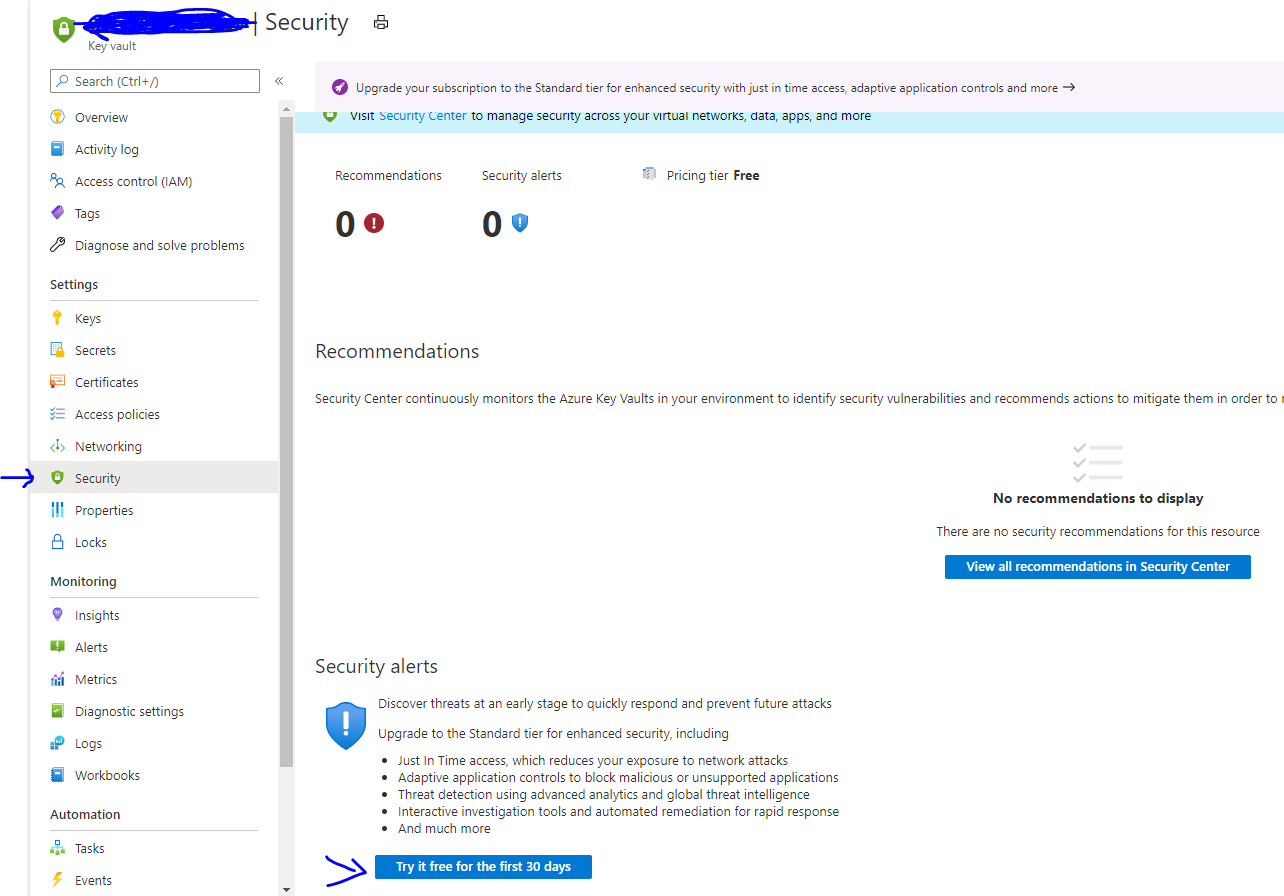
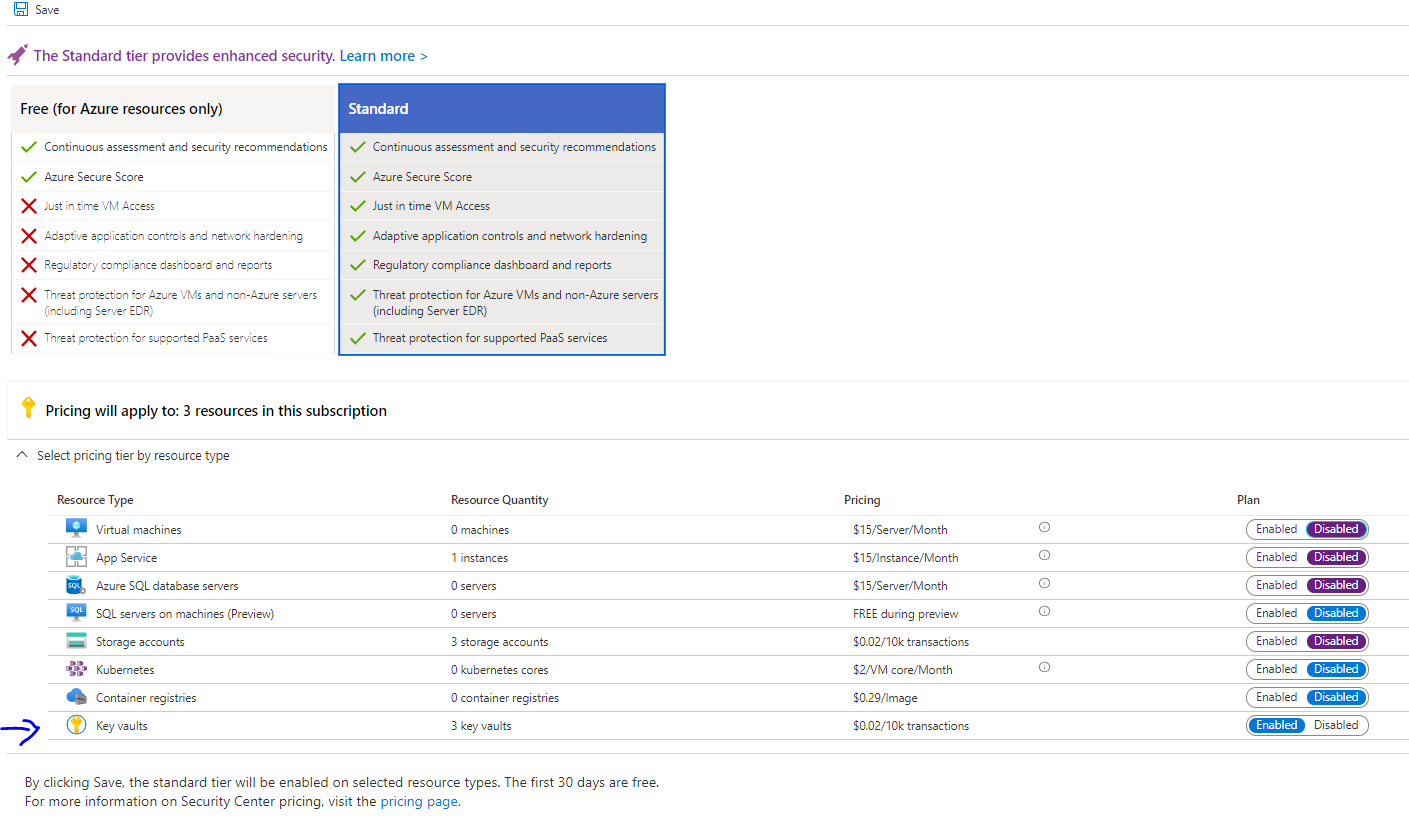
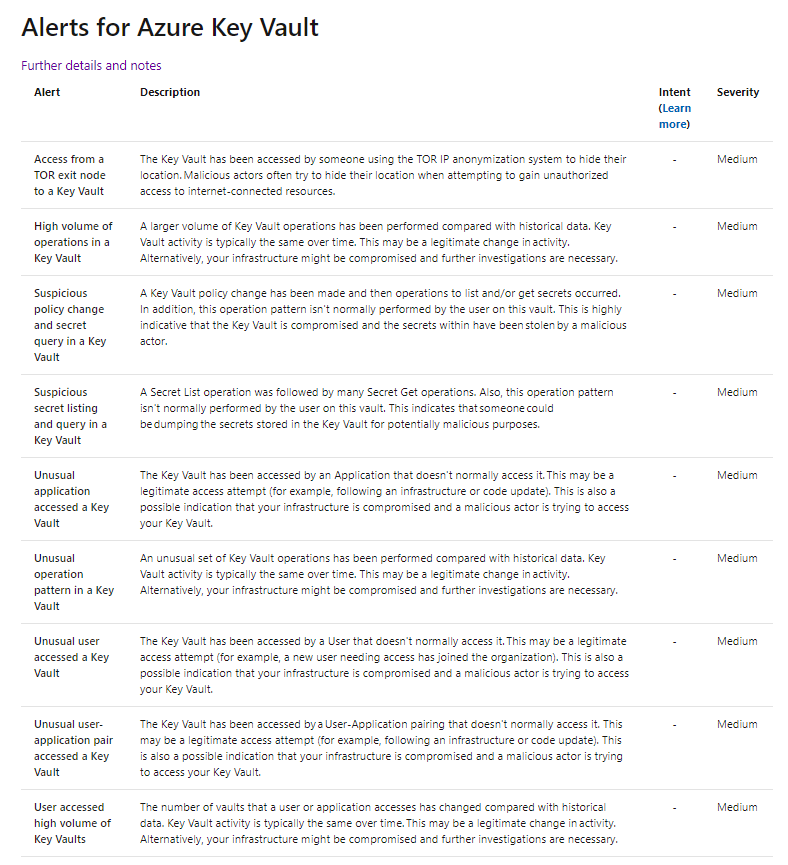
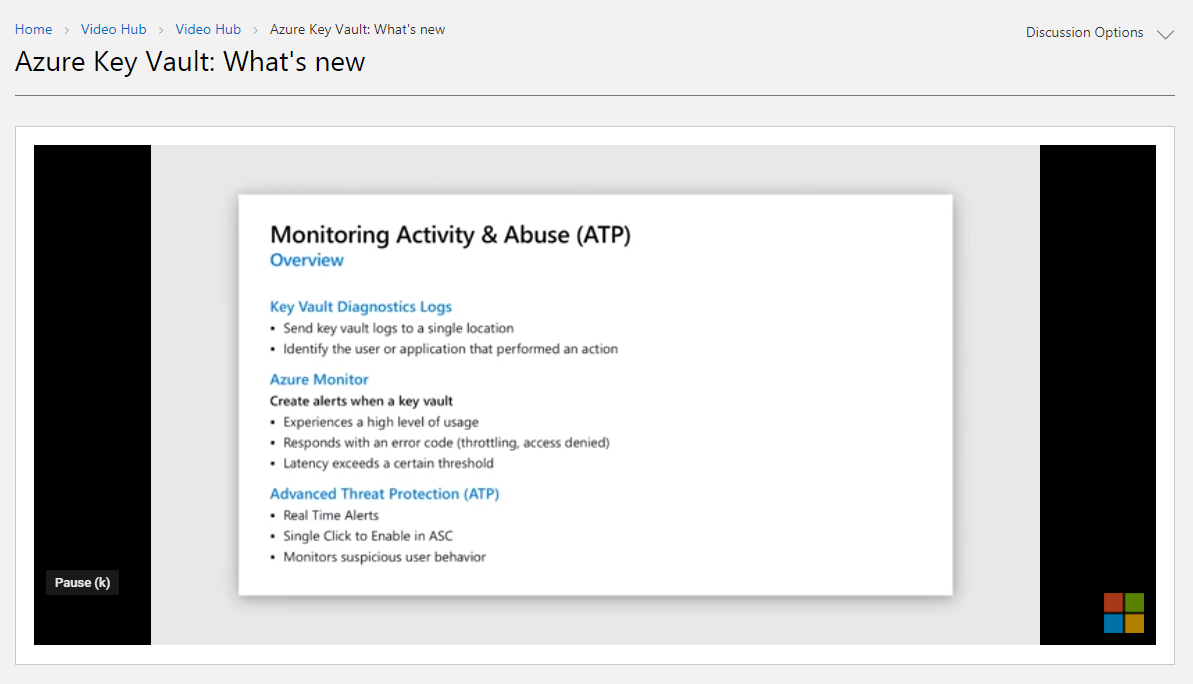
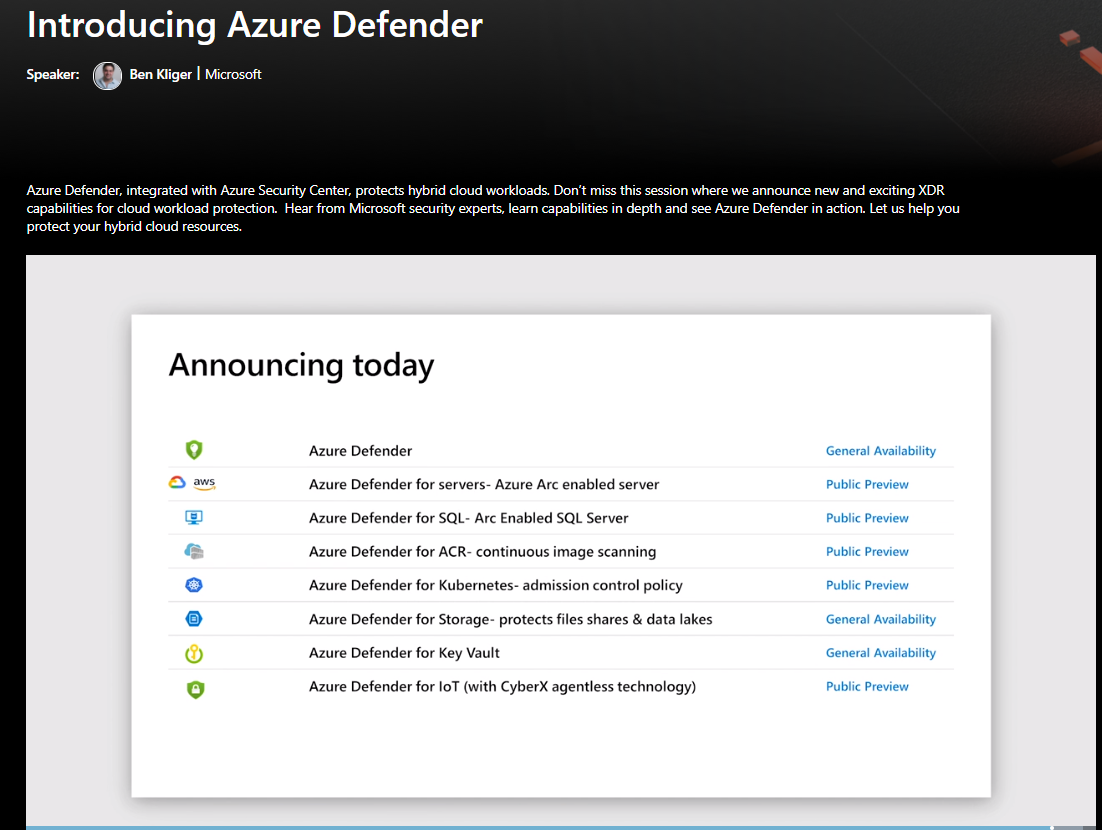
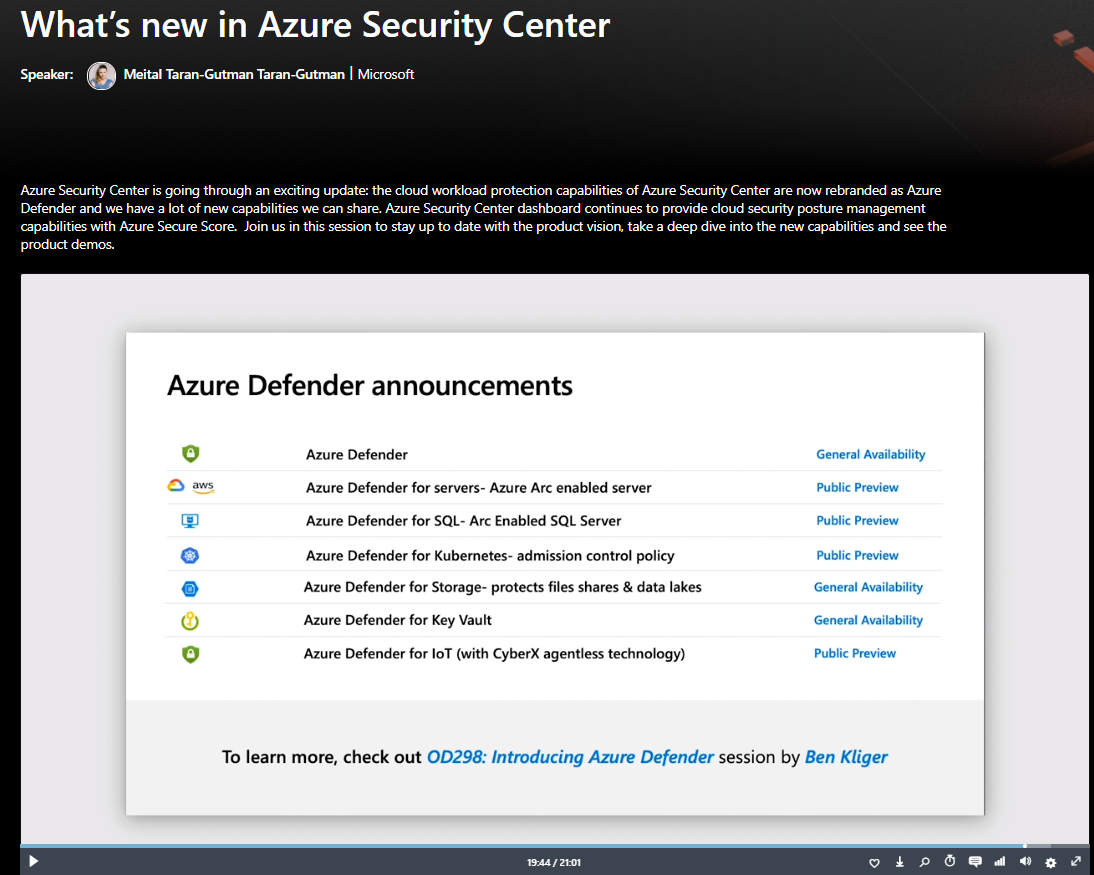
    <content type="html"><![CDATA[<p>As the service owner, I am super excited to share that Azure Defender for Key Vault is now generally available! </p><p>It is really One Microsoft experience to work closely with Azure Security Center and Azure Key Vault team to launch this service. Also personally, I grew up a lot after going through the Machine Learning algorithm improvement, infrastructure refactoring, BCDR and privacy policy compliance, cost reduce, monthly business review(MBR), customer feedback investigation. </p><p>It is indeed a challenging and inspiring work to wake me up every day.</p><h2 id="What-is-Azure-Defender-for-Key-Vault"><a href="#What-is-Azure-Defender-for-Key-Vault" class="headerlink" title="What is Azure Defender for Key Vault"></a>What is Azure Defender for Key Vault</h2><p><a href="https://docs.microsoft.com/en-us/azure/security-center/defender-for-key-vault-introduction" target="_blank" rel="noopener">https://docs.microsoft.com/en-us/azure/security-center/defender-for-key-vault-introduction</a></p><p>Customers are using Azure Key Vault to store the most sensitive information in their Azure environment: keys, passwords, secrets and certificates for all of their Azure resources. By achieving this data, attackers may be able to perform lateral movement and breach other resources in the customers Azure environment.</p><p>Azure Defender for Key Vault is a cloud-native, breadth threat protection suite – gives customers additional layer of protection for the precious secretes stored in the Key Vault by helping the SOC team to detect suspicious activities in their Key Vaults and protect the entire Azure environment.</p><h2 id="How-to-Enable-Azure-Defender-for-Key-Vault"><a href="#How-to-Enable-Azure-Defender-for-Key-Vault" class="headerlink" title="How to Enable Azure Defender for Key Vault"></a>How to Enable Azure Defender for Key Vault</h2><ol><li><p>Enable it from Azure Key Vault</p><p>In Key Vault’s <strong>Security</strong> page, click “try it for the first 30 days”</p><img src="https://raw.githubusercontent.com/xinyeah/xinyeah.github.io/master/images/image-20200922165536008.png" alt="image-20200922165536008" style="zoom:50%;" /></li><li><p>Enable it from Azure Security Center</p><p><a href="https://docs.microsoft.com/en-us/azure/security-center/security-center-pricing#enable-azure-defender" target="_blank" rel="noopener">https://docs.microsoft.com/en-us/azure/security-center/security-center-pricing#enable-azure-defender</a></p><ol><li>From Security Center’s main menu, select <strong>Pricing &amp; settings</strong>.</li><li>Select the subscription that you want to upgrade.</li><li>Select <strong>Azure Defender on</strong> to upgrade.</li><li>Select <strong>Save</strong>.</li></ol><p>Below is the pricing page for an example subscription. You’ll notice that each plan in Azure Defender is priced separately and can be individually set to on or off. Make sure it is on for Azure Key Vault.</p><p><img src="https://raw.githubusercontent.com/xinyeah/xinyeah.github.io/master/images/image-20200922165912513.png" alt="image-20200922165912513"></p></li></ol><h2 id="Azure-Defender-for-Key-Vault-Alerts"><a href="#Azure-Defender-for-Key-Vault-Alerts" class="headerlink" title="Azure Defender for Key Vault Alerts"></a>Azure Defender for Key Vault Alerts</h2><p><a href="https://review.docs.microsoft.com/en-us/azure/security-center/alerts-reference?branch=master#alerts-azurekv" target="_blank" rel="noopener">https://review.docs.microsoft.com/en-us/azure/security-center/alerts-reference?branch=master#alerts-azurekv</a></p><p><img src="https://raw.githubusercontent.com/xinyeah/xinyeah.github.io/master/images/image-20200922164528455.png" alt="image-20200922164528455"></p><h2 id="Current-Status"><a href="#Current-Status" class="headerlink" title="Current Status"></a>Current Status</h2><p>We just releasing to GA and we already have: </p><ul><li>30G  Azure Key Vault logs processed per month</li><li>1.2M   Azure Key Vaults protected</li><li>63K    Azure subscriptions protected</li></ul><p>And expecting these numbers to raise dramatically in the current months.</p><h2 id="General-Availability-Announcement-at-Ignite-2020"><a href="#General-Availability-Announcement-at-Ignite-2020" class="headerlink" title="General Availability Announcement at Ignite 2020"></a>General Availability Announcement at Ignite 2020</h2><p>Azure Defender for Key Vault is generally available: <a href="https://docs.microsoft.com/en-us/azure/security-center/release-notes#azure-defender-for-key-vault-is-generally-available" target="_blank" rel="noopener">https://docs.microsoft.com/en-us/azure/security-center/release-notes#azure-defender-for-key-vault-is-generally-available</a></p><p>What’s new in Azure Key Vault: <a href="https://techcommunity.microsoft.com/t5/video-hub/azure-key-vault-what-s-new/m-p/1698834" target="_blank" rel="noopener">https://techcommunity.microsoft.com/t5/video-hub/azure-key-vault-what-s-new/m-p/1698834</a></p><img src="https://raw.githubusercontent.com/xinyeah/xinyeah.github.io/master/images/image-20200922135102750.png" alt="image-20200922135102750" style="zoom:50%;" /><p>Introducing Azure Defender: <a href="https://myignite.microsoft.com/sessions/764ff397-97ff-4841-ad62-493f1da51d40" target="_blank" rel="noopener">https://myignite.microsoft.com/sessions/764ff397-97ff-4841-ad62-493f1da51d40</a></p><img src="https://raw.githubusercontent.com/xinyeah/xinyeah.github.io/master/images/image-20200922133555333.png" alt="image-20200922133555333" style="zoom:50%;" /><p>What’s new in Azure Security Center: <a href="https://myignite.microsoft.com/sessions/d40bd0a5-485e-455d-ac28-882b85de8dfb" target="_blank" rel="noopener">https://myignite.microsoft.com/sessions/d40bd0a5-485e-455d-ac28-882b85de8dfb</a></p><img src="https://raw.githubusercontent.com/xinyeah/xinyeah.github.io/master/images/image-20200922134003684.png" alt="image-20200922134003684" style="zoom:50%;" />]]></content>
    
    <summary type="html">
    
      As the service owner, I am super excited to share that Azure Defender for Key Vault is now generally available! It is really One Microsoft experience to work closely with Azure Security Center and Azure Key Vault team to launch this service. Also personally, I grew up a lot after going through the Machine Learning algorithm improvement, infrastructure refactoring, BCDR and privacy policy compliance, cost reduce, monthly business review(MBR), customer feedback investigation. It is indeed a challenging and inspiring work to wake me up every day.
    
    </summary>
    
    
      <category term="Azure Defender for Key Vault" scheme="https://xinyeah.github.io/categories/Azure-Defender-for-Key-Vault/"/>
    
    
      <category term="Azure" scheme="https://xinyeah.github.io/tags/Azure/"/>
    
      <category term="Security" scheme="https://xinyeah.github.io/tags/Security/"/>
    
      <category term="Key Vault" scheme="https://xinyeah.github.io/tags/Key-Vault/"/>
    
      <category term="Machine Learning" scheme="https://xinyeah.github.io/tags/Machine-Learning/"/>
    
  </entry>
  
  <entry>
    <title>Azure Certifications and Exams</title>
    <link href="https://xinyeah.github.io/Azure-Certifications-and-Exams/"/>
    <id>https://xinyeah.github.io/Azure-Certifications-and-Exams/</id>
    <published>2020-08-02T14:33:56.000Z</published>
    <updated>2020-09-23T00:46:23.740Z</updated>
    
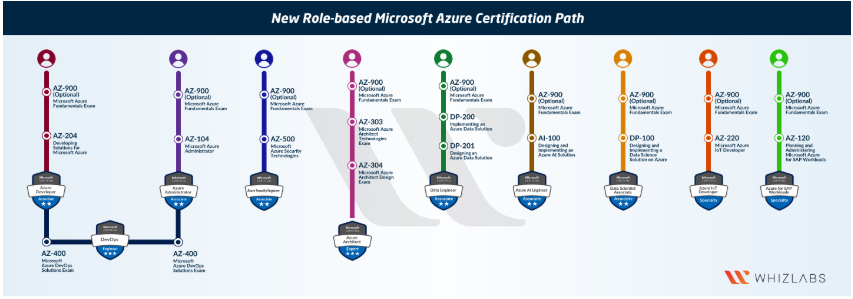
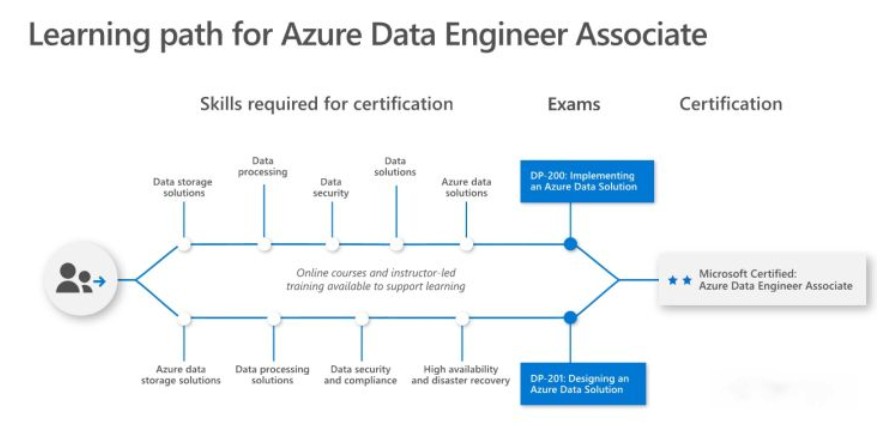
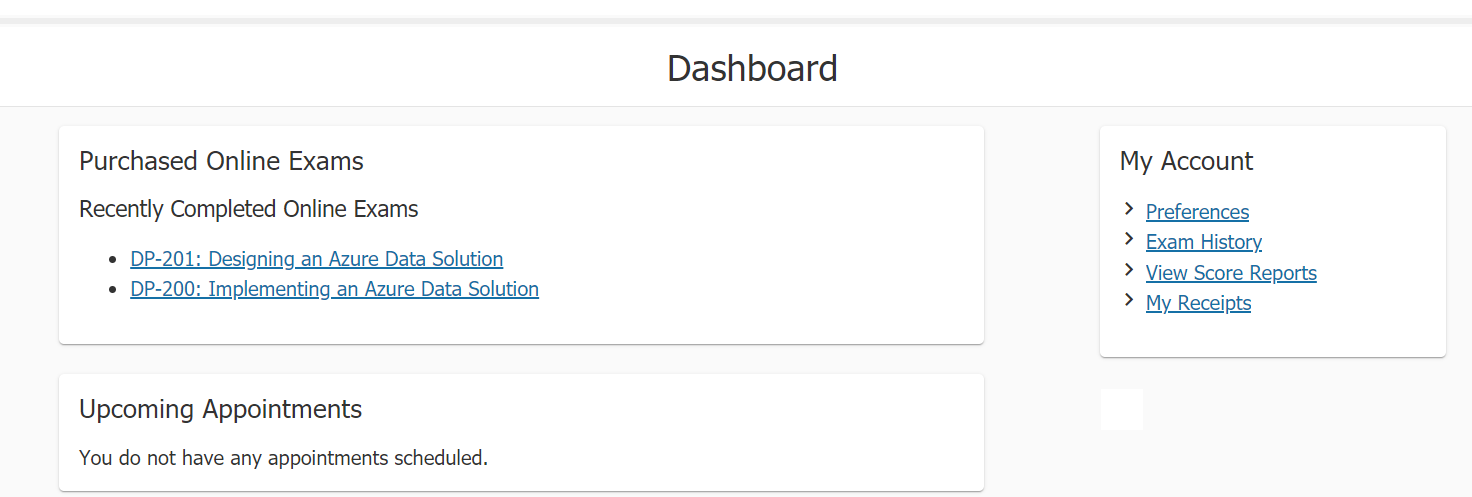
    <content type="html"><![CDATA[<h1 id="Azure-Certifications-and-Exams"><a href="#Azure-Certifications-and-Exams" class="headerlink" title="Azure Certifications and Exams"></a>Azure Certifications and Exams</h1><p>Last month, I passed two Azure exams and earned the Azure Data Engineer Certification.</p><p><a href="https://www.youracclaim.com/badges/ba23d9b9-e09b-4c41-84c7-37d4de1ded6c/public_url" target="_blank" rel="noopener"><img src="https://raw.githubusercontent.com/xinyeah/xinyeah.github.io/master/images/image-20200802114853769.png" alt="Data Engineer Certificate" style="zoom:33%;" /></a> </p><p>I take data engineer certificate as an example, to explain how to prepare and what the Azure certification exams look like.</p><h2 id="Overview"><a href="#Overview" class="headerlink" title="Overview"></a>Overview</h2><p>Microsoft has made big changes to its Azure certifications at Ignite conference 2018. The new certifications are role-based, more practical and have a narrower focus for each certification.</p><p><img src="https://raw.githubusercontent.com/xinyeah/xinyeah.github.io/master/images/image-20200802125758492.png" alt="image-20200802125758492"></p><p><img src="https://raw.githubusercontent.com/xinyeah/xinyeah.github.io/master/images/image-20200802113632842.png" alt="image-20200802113632842"></p><p>Currently, there are 9 role based azure certifications. To earn each certification, it is required to clear one or two certification exams. I list the current certifications and also the required exams in the following:</p><ul><li>Associate<ul><li>Data Engineer (DP-200, DP-201)</li><li>Data Scientist (DP-100)</li><li>Administrator (AZ-104)</li><li>Security Engineer (AZ-500)</li><li>Database Administrator (DP-300)</li><li>AI Engineer (AI-100)</li><li>Developer (AZ-204)</li></ul></li><li>Expert<ul><li>Solution Architect (AZ-303, AZ-304)</li><li>DevOps Engineer (AZ-400)</li></ul></li></ul><h2 id="Which-certification-is-right-for-me"><a href="#Which-certification-is-right-for-me" class="headerlink" title="Which certification is right for me?"></a>Which certification is right for me?</h2><p>Should you go with AWS, Azure, or Google Cloud? Whether you are looking to move into a high paying cloud career or just looking to declare your existing cloud skills, Azure certifications are a great choice. Besides all the benefits that will bring to your career, all the Azure certs can be obtained remotely, which is awesome when working from home to fight against COVID-19.</p><p>Once you decided which cloud provider path is right for you, your next step is to figure out which certification path is right for you. From my experience, since Microsoft’s Azure certifications are role-based, it is better to select  the job title and also go through the skills measured for each certification.</p><h2 id="Certification-Learning-Path"><a href="#Certification-Learning-Path" class="headerlink" title="Certification Learning Path"></a>Certification Learning Path</h2><p><img src="https://raw.githubusercontent.com/xinyeah/xinyeah.github.io/master/images/Capture1.jpg" alt="Capture1"></p><p>Data Engineer Certification: validates the skills and knowledge to design and implement the management, monitoring, security, and privacy of data using the full stack of  Azure data services to satisfy business needs.</p><p>Job role: Data Engineer</p><p>Prerequisites: None</p><p>Required exams($165 each):</p><ul><li><a href="https://docs.microsoft.com/en-us/learn/certifications/exams/dp-200" target="_blank" rel="noopener">DP-200 Implementing an Azure Data Solution</a></li><li><a href="https://docs.microsoft.com/en-us/learn/certifications/exams/dp-201" target="_blank" rel="noopener">DP-201 Designing an Azure Data Solution</a></li></ul><p>Skills measured: <a href="https://query.prod.cms.rt.microsoft.com/cms/api/am/binary/RE3VwUG" target="_blank" rel="noopener">skills outline</a></p><ul><li>Implement data storage solutions</li><li>Manage and develop data processing</li><li>Monitor and optimize data solutions</li><li>Design Azure data storage solutions</li><li>Design data processing solutions</li><li>Design for data security and compliance</li></ul><h2 id="What-the-Azure-certification-online-exams-look-like"><a href="#What-the-Azure-certification-online-exams-look-like" class="headerlink" title="What the Azure certification online exams look like?"></a>What the Azure certification online exams look like?</h2><p>All the exams are held by Pearson VUE, the exam appointments appear on the dashboard after registration.</p><p><img src="https://raw.githubusercontent.com/xinyeah/xinyeah.github.io/master/images/image-20200802132919448.png" alt="image-20200802132919448"></p><p>All Azure role based certifications can be taken online, but there are extra <a href="https://docs.microsoft.com/en-us/learn/certifications/online-exams" target="_blank" rel="noopener">policies</a> need to be follow.</p><p>Before the exam:</p><ul><li>Perform a system test</li><li>prepare 2 Government issued personal ID</li><li>prepare your phone for identity verification and room scans. Also the exam proctor might contact you if there is an issue during the exam. Make sure your mobile phone is outside of the immediate testing space, but within extended arms reach with the screen visible.</li><li>prepare a work area: <ul><li>Additional monitors (must be unplugged and turned away from you)</li><li>Additional computers (must be turned off and monitors must be dark)</li><li>clear of all materials, including the following items that are not allowed within arm’s reach: books, notepads, Post-it notes, typed notes/papers, or writing instruments such as pens, markers, whiteboards, or pencils.</li></ul></li></ul><p>Start the exam:</p><ul><li>log in 15 minutes early to start the check-in process.</li><li>Choose <strong>Start a previously scheduled online proctored exam</strong> on dashboard.</li><li>Select the exam under <strong>Purchased Online Exams.</strong></li><li>Select <strong>Begin exam</strong> and proceed through the self-check-in process and wait for a proctor to connect with you.</li></ul><p>During the exam:</p><ul><li>No breaks/eating/drinking</li><li>No personal belongings</li><li>No exam assistance</li><li>use facial comparison technology to verify identity during the testing process</li><li>the proctor will continuously monitor you by video and audio, and your face, voice, the physical room where you are seated, and the location during exam delivery will be recorded.</li></ul><p>After exam:</p><ul><li>when your exam ends, you should see your exam results(pass or fail) immediately before exiting the exam app.</li><li>Also your sore report will be available on dashboard after several hours.</li><li>You will receive an email about claiming your exams and certifications. Click the link to claim on <a href="https://www.youracclaim.com/earner/earned" target="_blank" rel="noopener">cclaim</a>, and then you can share your earned badge anywhere.  </li></ul><p>Reschedule policy: at least 6 business days prior to your appointment. 12.5% reschedule fee.</p><p>Cancelation policy: at least 24 hours prior to your appointment.</p><h2 id="Exam-question-types"><a href="#Exam-question-types" class="headerlink" title="Exam question types"></a>Exam question types</h2><p>The exam may contain several <a href="https://docs.microsoft.com/en-us/learn/certifications/certification-exams#exam-formats-and-question-types" target="_blank" rel="noopener">question types</a>: active screen, best answer, build list, case studies, drag and drop, hot area, multiple choice, repeated answer choices, short answer, labs, mark review, and review screen.</p><p>For security reason, exam formats or exact question types are not identified before the exam. You can view all question samples <a href="![image-20200802142151160](C:\Users\tgttx\Documents\sugartxy.github.io\source\images\image-20200802142151160.png)">here</a> to prepare the exam.</p><h2 id="Learning-materials"><a href="#Learning-materials" class="headerlink" title="Learning materials"></a>Learning materials</h2><ul><li><a href="https://docs.microsoft.com/en-us/azure/?product=featured" target="_blank" rel="noopener">Azure docs</a> for mentioned products.</li><li><a href="https://docs.microsoft.com/en-us/learn/certifications/browse/?products=azure" target="_blank" rel="noopener">Azure learn</a> </li><li><a href="https://www.pluralsight.com/search?q=azure%20certification" target="_blank" rel="noopener">Pluralsight paths</a></li><li><a href="https://cloudacademy.com/library/azure/" target="_blank" rel="noopener">Cloud academy</a></li></ul>]]></content>
    
    <summary type="html">
    
      Congratulations to myself! I just hit my July goal and am now a certified Azure Data Engineer! Do you also want to snag some cloud certifications? Excellent! You&#39;ve come to the right place!
    
    </summary>
    
    
      <category term="Azure Certification" scheme="https://xinyeah.github.io/categories/Azure-Certification/"/>
    
    
      <category term="Azure" scheme="https://xinyeah.github.io/tags/Azure/"/>
    
      <category term="certification" scheme="https://xinyeah.github.io/tags/certification/"/>
    
      <category term="exam" scheme="https://xinyeah.github.io/tags/exam/"/>
    
  </entry>
  
  <entry>
    <title>Spark stateful streaming processing is stuck in StateStoreSave stage!</title>
    <link href="https://xinyeah.github.io/Spark-stateful-streaming-processing-is-stuck-in-StateStoreSave-stage/"/>
    <id>https://xinyeah.github.io/Spark-stateful-streaming-processing-is-stuck-in-StateStoreSave-stage/</id>
    <published>2020-07-07T20:46:59.000Z</published>
    <updated>2020-09-23T00:46:23.740Z</updated>
    
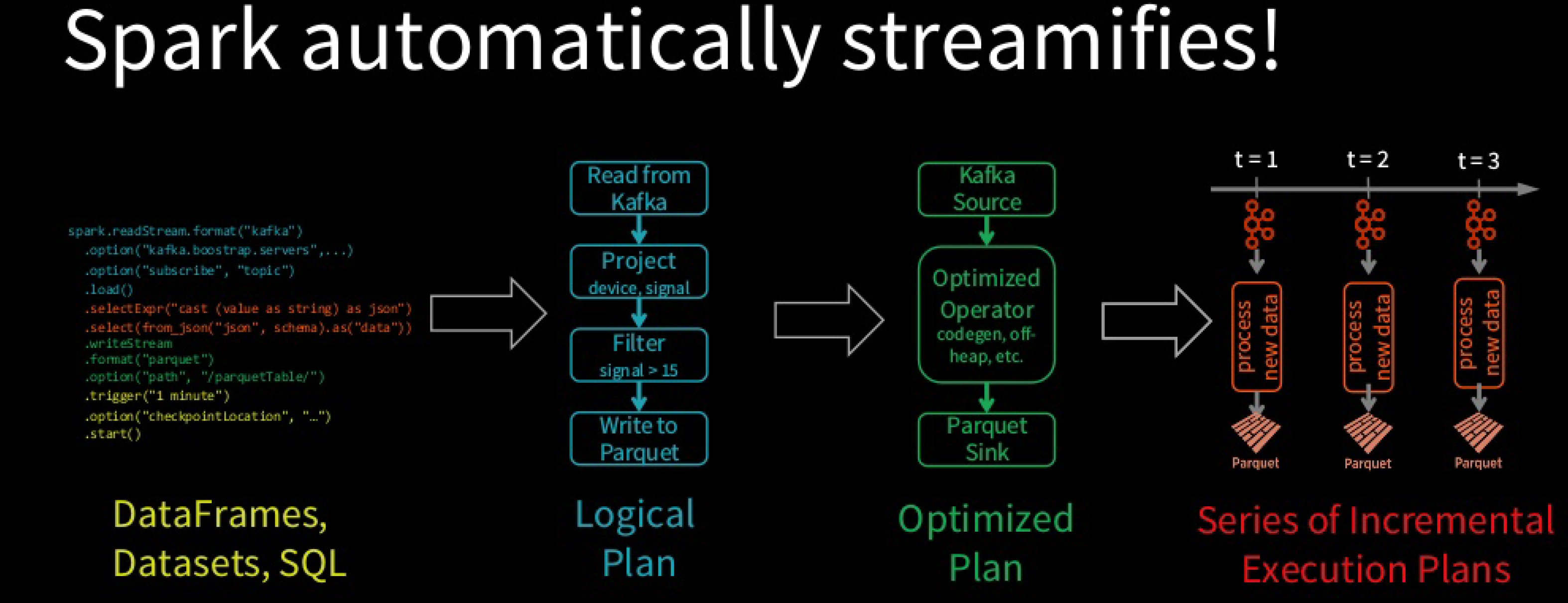
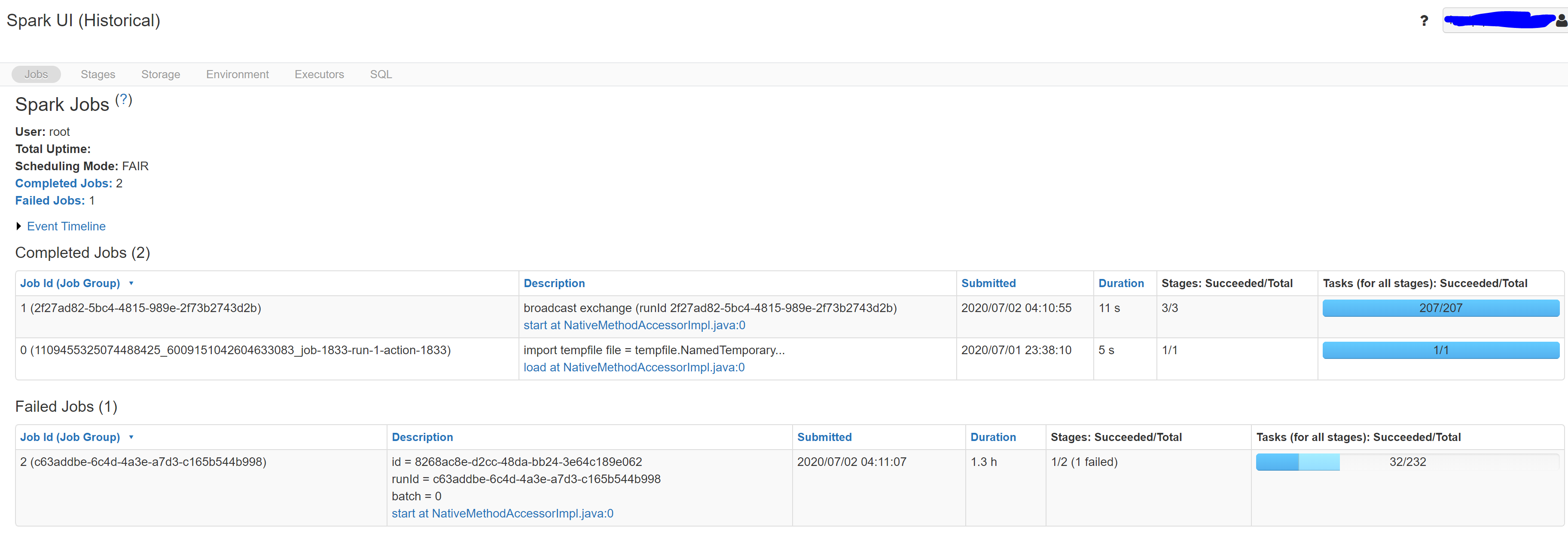
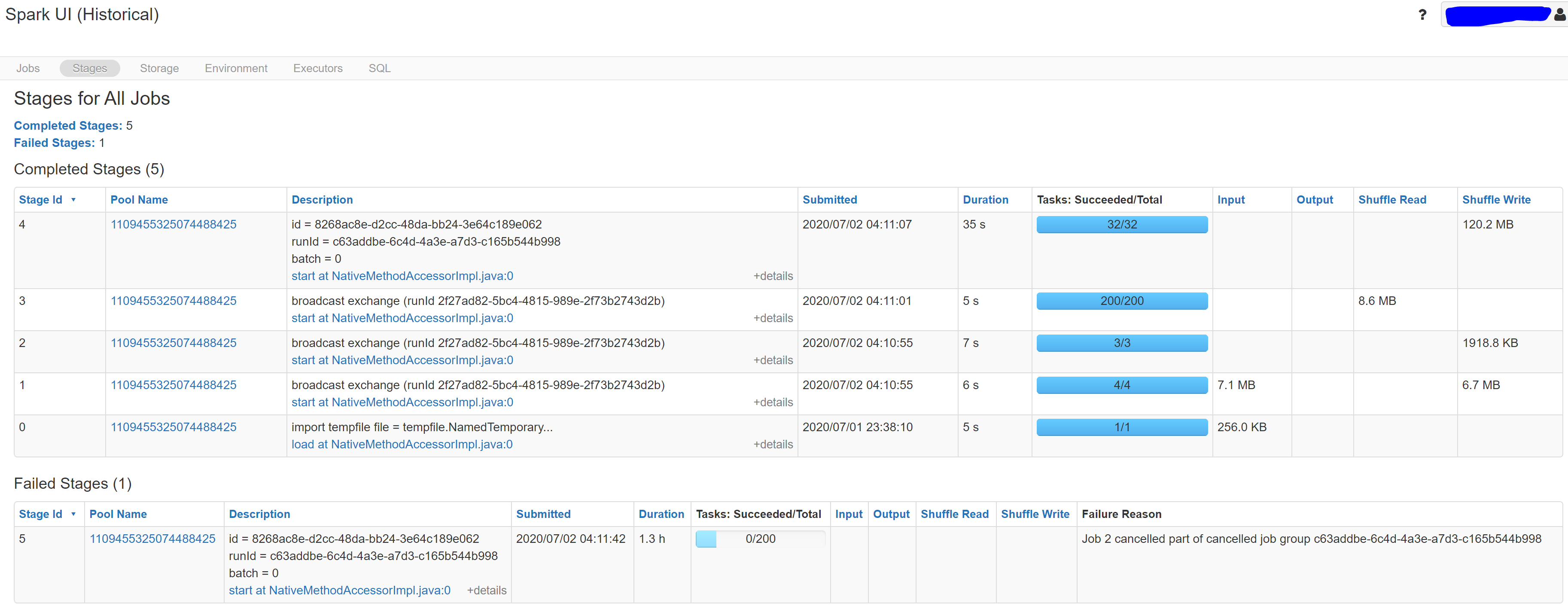
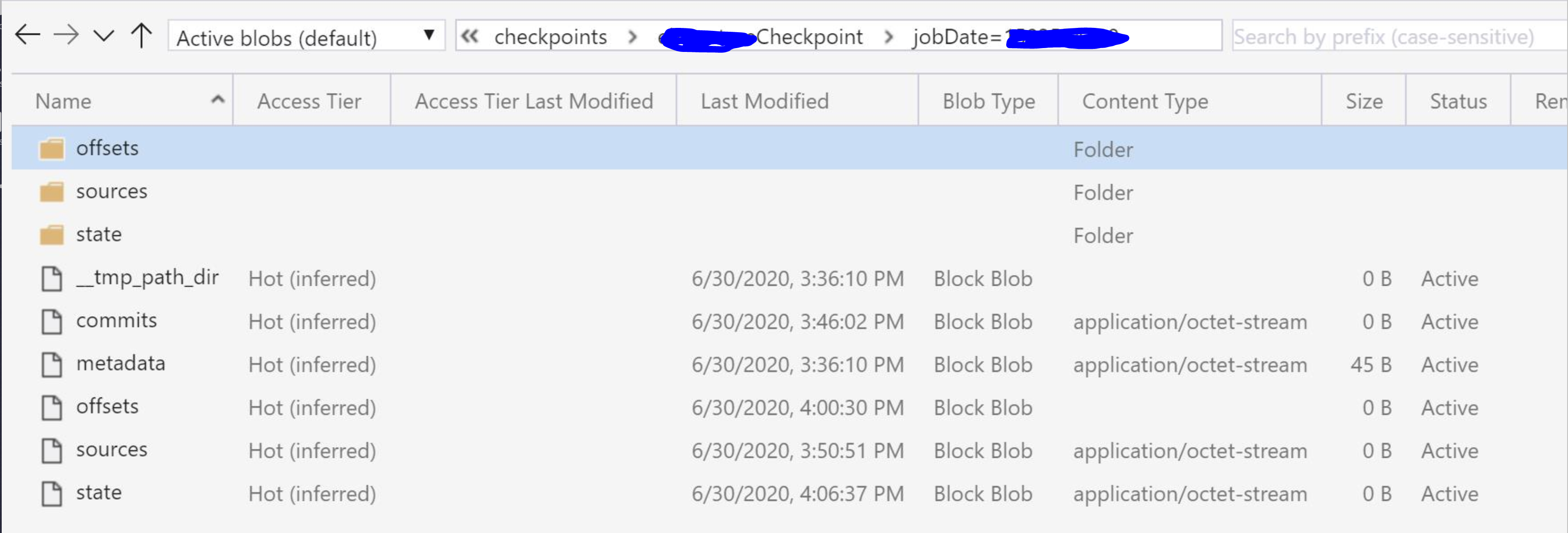
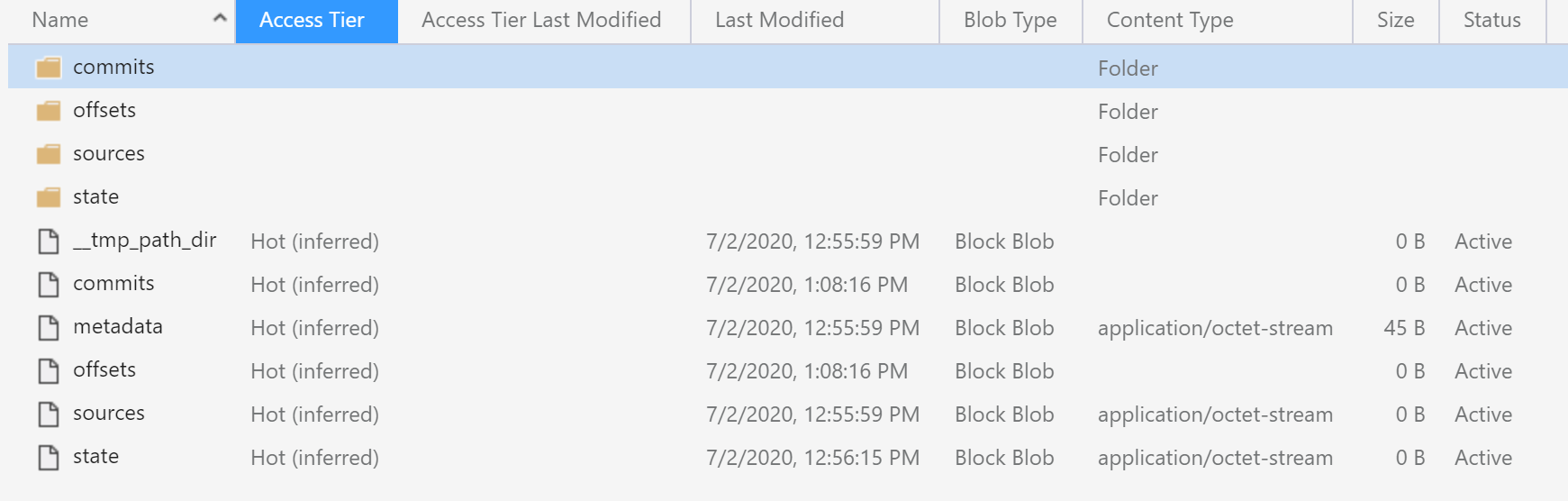
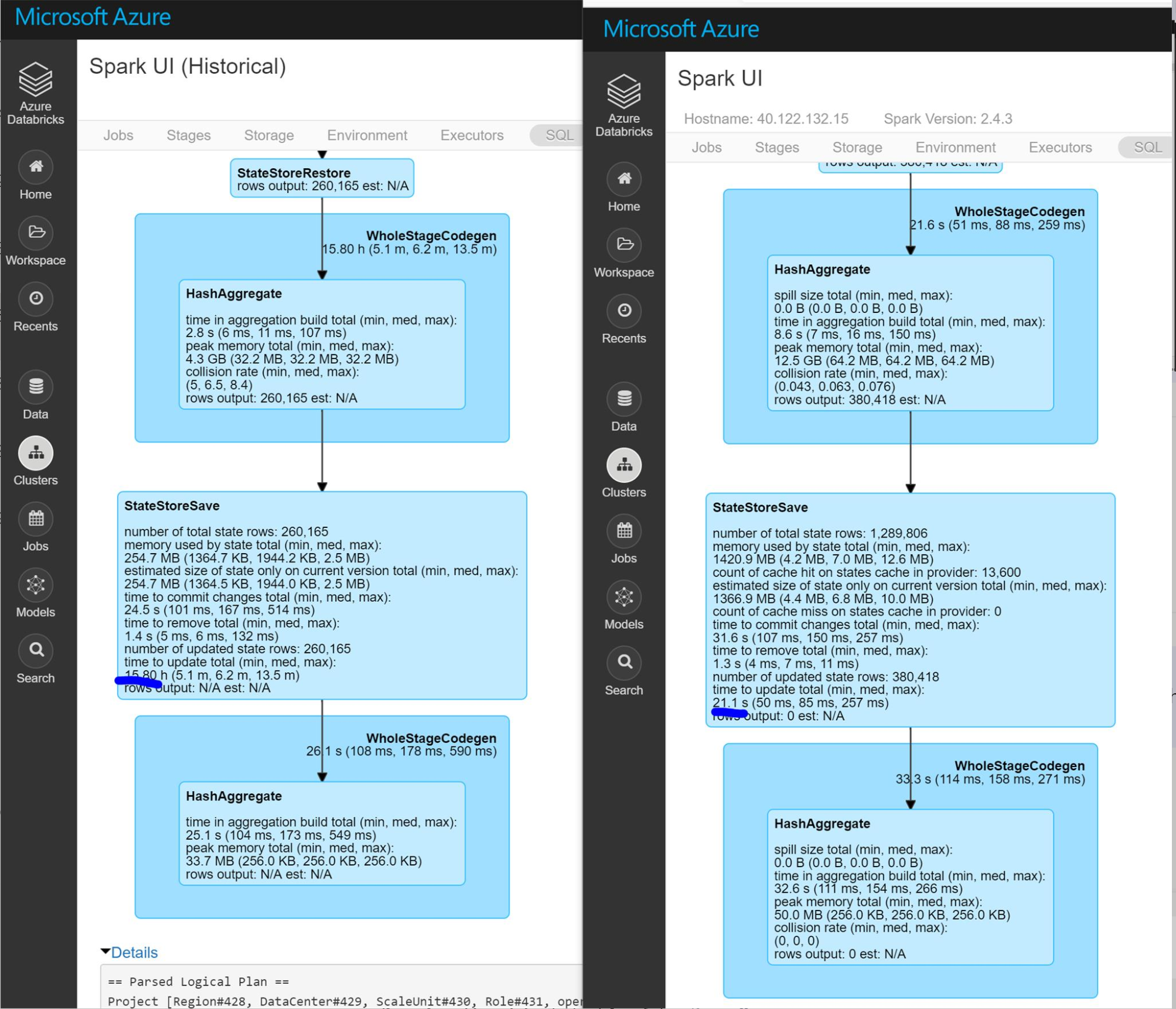
    <content type="html"><![CDATA[<h1 id="Spark-stateful-streaming-processing-is-stuck-in-StateStoreSave-stage"><a href="#Spark-stateful-streaming-processing-is-stuck-in-StateStoreSave-stage" class="headerlink" title="Spark stateful streaming processing is stuck in StateStoreSave stage!"></a>Spark stateful streaming processing is stuck in StateStoreSave stage!</h1><p>A stateful structured stream processing job is suddenly stuck at the 1st micro-batch job. Here are the notes about that issue, how to debug Spark stateful streaming job, and also how I fix it.</p><h2 id="Stateful-Structured-Streaming-Processing-Job"><a href="#Stateful-Structured-Streaming-Processing-Job" class="headerlink" title="Stateful Structured Streaming Processing Job"></a>Stateful Structured Streaming Processing Job</h2><figure class="highlight python"><table><tr><td class="gutter"><pre><span class="line">1</span><br><span class="line">2</span><br><span class="line">3</span><br><span class="line">4</span><br><span class="line">5</span><br><span class="line">6</span><br><span class="line">7</span><br><span class="line">8</span><br><span class="line">9</span><br><span class="line">10</span><br><span class="line">11</span><br><span class="line">12</span><br><span class="line">13</span><br><span class="line">14</span><br><span class="line">15</span><br><span class="line">16</span><br><span class="line">17</span><br><span class="line">18</span><br><span class="line">19</span><br><span class="line">20</span><br><span class="line">21</span><br><span class="line">22</span><br><span class="line">23</span><br></pre></td><td class="code"><pre><span class="line"> <span class="comment">## specify data source, read data from Azure Event Hub</span></span><br><span class="line">(spark.readStream.format(<span class="string">"eventhubs"</span>) </span><br><span class="line"> .options(**self.config.ehConfig)</span><br><span class="line"> .load()  </span><br><span class="line"> <span class="comment">## use watermark to control state size</span></span><br><span class="line"> .withWatermark(processTimeCol, waterMarkTime)</span><br><span class="line"> <span class="comment">## transformations. </span></span><br><span class="line"> .withColumn(eventTimeCol, col(eventTimeCol).cast(<span class="string">'timestamp'</span>))</span><br><span class="line"> <span class="comment">## aggregation by event time windows</span></span><br><span class="line"> .groupBy(col(key), window(eventTimeCol, <span class="string">"15 mins"</span>))</span><br><span class="line"> .agg()</span><br><span class="line"> ...</span><br><span class="line"> .select(*(cols+[<span class="string">'windowStart'</span>, <span class="string">'firstEventTime'</span>, <span class="string">'lastEventTime'</span>, <span class="string">'count'</span>]))</span><br><span class="line"> <span class="comment">## specify data sink, write transformed output to Azure blob storage</span></span><br><span class="line"> .writeStream</span><br><span class="line"> .format(<span class="string">"parquet"</span>)</span><br><span class="line"> .option(<span class="string">'path'</span>, outputPath)</span><br><span class="line"> .outputMode(<span class="string">"append"</span>)</span><br><span class="line"> <span class="comment">## Processing details--Trigger: when to process data</span></span><br><span class="line"> .trigger(processingTime=<span class="string">"2 seconds"</span>)  </span><br><span class="line"> <span class="comment">## Processing details--Checkpoint: for tracking the progress of the query</span></span><br><span class="line"> .option(<span class="string">"checkpointLocation"</span>, checkpointPath)</span><br><span class="line"> .start())</span><br></pre></td></tr></table></figure><p>Spark SQL converts batch-like query to a series of incremental execution plans operating on new micro-batches of data.</p><p><img src="https://raw.githubusercontent.com/xinyeah/xinyeah.github.io/master/images/image-20200706163510103.png" alt="image-20200706163510103"></p><h2 id="Environment"><a href="#Environment" class="headerlink" title="Environment"></a>Environment</h2><p>This Streaming job is running on <strong>Databricks</strong> clusters triggered by <strong>Azure Data Factory</strong> pipeline.</p><p>Data source is from <strong>Azure Event Hub</strong>, and this job store the aggregated output to <strong>Azure Blob Storage</strong> mounted on <strong>Databricks</strong>.</p><p><strong>Databricks</strong> instance has <strong>Vnet injections</strong> and have <strong>NSG</strong> associated with the Vnet.</p><p>Databricks cluster version is 5.5 LTS which use <strong>Scala</strong> 2.11, <strong>Spark</strong> 2.4.3 and <strong>Python</strong> 3. </p><p>We also use <strong>PySpark</strong> 2.4.4 for this streaming job.</p><h2 id="Issue-Symptom"><a href="#Issue-Symptom" class="headerlink" title="Issue Symptom"></a>Issue Symptom</h2><p>This streaming job is scheduled to run for 4 hours every time. When the current job stops, the next one will start to run. It means the max number of concurrency job is 1. </p><p>It was running well before. Suddenly, when a new streaming job starts, it seems to stuck at the 1st micro-batch like the following picture. You can see the job is stuck for batch=0 and it fails because of time out.</p><p>We have 3 regions and this issue happened to every region one by one in a week.</p><p><img src="https://raw.githubusercontent.com/xinyeah/xinyeah.github.io/master/images/image-20200706171557385.png" alt="image-20200706171557385"></p><p><img src="https://raw.githubusercontent.com/xinyeah/xinyeah.github.io/master/images/image-20200706171822384.png" alt="image-20200706171822384"></p><p>If you check the checkpoint folder:</p><p><img src="https://raw.githubusercontent.com/xinyeah/xinyeah.github.io/master/images/image-20200706172128040.png" alt="image-20200706172128040"></p><p>compare with the normal checkpoint:</p><p><img src="https://raw.githubusercontent.com/xinyeah/xinyeah.github.io/master/images/image-20200706172305651.png" alt="image-20200706172305651"></p><p>The difference is obvious: there is no commits in the checkpoint path. It means the streaming job didn’t succeed in processing even a single micro-batch.</p><h2 id="Possible-Causes"><a href="#Possible-Causes" class="headerlink" title="Possible Causes"></a>Possible Causes</h2><p>It is really tough to debug this issue because no error message shown up and just several misleading warning messages in the executor’s error logs.</p><p>Usually, there are several possible reasons to cause streaming processing job stuck, such as:</p><ul><li><p><strong>Total size of state per worker</strong> is too large which leads to higher overheads of snapshotting and JVM GC pauses.</p></li><li><p><strong>Number of shuffle partitions</strong> is too high, so the cost of writing state to HDFS will increase which cause the higher latency.</p></li><li><p><strong>NSG rules</strong> added to Databricks Vnet might block some ports and thus infect worker to worker communication.</p></li><li><p><strong>Databricks mounted blobs are expired</strong> and need to rotate the storage connection string and databricks access token.</p></li><li><p><strong>Databricks cluster version</strong> is deprecated and not supported any more.</p></li><li><p><strong>Spark .metadata directory</strong> is messed up. We need to delete the metadata and let the pipeline recreate a new one. but for this one, it would complete micro-batch, and it just do nothing in the process.</p></li></ul><p>  But <strong>none of them work</strong> this time. We struggle to figure out the <strong>root cause</strong> is:</p><ul><li><strong>Azure blob storage has too many files in the checkpoint folder</strong> which slow down the read and write speed. </li></ul><p>I compare the DAG visualization with normal job’s, it is shown that the StateStoreSave stage takes much longer (16 hours) than the normal one (21 seconds). StateStoreSave is the stage when spark store current streaming process status in checkpoint. Thus the issue exists in checkpoints. More info for StateStoreSave can be found <a href="https://jaceklaskowski.gitbooks.io/spark-structured-streaming/spark-sql-streaming-StateStoreSaveExec.html" target="_blank" rel="noopener">here</a></p><p><img src="https://raw.githubusercontent.com/xinyeah/xinyeah.github.io/master/images/image-20200706161548770.png" alt="image-20200706161548770"></p><p>From this detailed stage information, we can get:</p><ol><li><p><strong>number of total state rows</strong> is not the concern. we cannot solve the issue by reduce the watermark threshold or recreate checkpoint.</p></li><li><p><strong>memory used by state total</strong> is lower than the normal state. so it is not a JVM GC pause issue.</p></li><li><p><strong>time to update total</strong> is the pain point. It takes longer even the number of updated state rows is less, which point the issue to the <strong>write speed</strong> in blob storage. </p><p>In the checkpoint folder, we stored around 17 million checkpoints for each region. After I delete the whole checkpoint folder and restart the streaming job, the issue is fixed. I am not 100% sure about the reason for it. One possible reason for it is Azure blob storage doesn’t support <strong>hierarchical namespace</strong>, and it just mimic hierarchical directory structure by using slashes in the name. </p></li></ol><h2 id="Solutions"><a href="#Solutions" class="headerlink" title="Solutions"></a>Solutions</h2><h3 id="Solution-1-migrate-Azure-blob-storage-to-Azure-Data-Lake-Gen2-which-supports-hierarchical-namespace"><a href="#Solution-1-migrate-Azure-blob-storage-to-Azure-Data-Lake-Gen2-which-supports-hierarchical-namespace" class="headerlink" title="Solution 1 - migrate Azure blob storage to Azure Data Lake Gen2 which supports hierarchical namespace."></a>Solution 1 - migrate Azure blob storage to Azure Data Lake Gen2 which supports hierarchical namespace.</h3><h3 id="Solution-2-delete-checkpoint-folder-and-decrease-retention-period"><a href="#Solution-2-delete-checkpoint-folder-and-decrease-retention-period" class="headerlink" title="Solution 2 - delete checkpoint folder and decrease retention period."></a>Solution 2 - delete checkpoint folder and decrease retention period.</h3><p>Step1: Stop current streaming job</p><p>Step2: Delete .metadata directory and checkpoint folder</p><p>Step3: Add a failover mechanism so that the streaming job will resume from where the streaming job stopped in the last successful data persistence.</p><p>Here is my failover mechanism if no checkpoint found, so we can delete the checkpoint folder without losing state.</p><figure class="highlight python"><table><tr><td class="gutter"><pre><span class="line">1</span><br><span class="line">2</span><br><span class="line">3</span><br><span class="line">4</span><br><span class="line">5</span><br><span class="line">6</span><br><span class="line">7</span><br><span class="line">8</span><br><span class="line">9</span><br><span class="line">10</span><br><span class="line">11</span><br><span class="line">12</span><br><span class="line">13</span><br><span class="line">14</span><br><span class="line">15</span><br><span class="line">16</span><br><span class="line">17</span><br><span class="line">18</span><br><span class="line">19</span><br><span class="line">20</span><br><span class="line">21</span><br><span class="line">22</span><br><span class="line">23</span><br><span class="line">24</span><br><span class="line">25</span><br><span class="line">26</span><br><span class="line">27</span><br><span class="line">28</span><br><span class="line">29</span><br><span class="line">30</span><br><span class="line">31</span><br><span class="line">32</span><br><span class="line">33</span><br><span class="line">34</span><br><span class="line">35</span><br></pre></td><td class="code"><pre><span class="line"><span class="keyword">try</span>:</span><br><span class="line">       <span class="comment"># if the checkpoint exists, continue to use it without refreshing</span></span><br><span class="line">       config.dbutils.fs.ls(config.checkpointPath)</span><br><span class="line">       print(<span class="string">'Continue streaming job with checkpoint path, %s'</span> %</span><br><span class="line">             config.checkpointPath)</span><br><span class="line">   <span class="keyword">except</span>:</span><br><span class="line">       <span class="comment"># remove _spark_metadata folder when use a new checkpoint</span></span><br><span class="line">       config.dbutils.fs.rm(config.outputPath + <span class="string">'_spark_metadata'</span>, <span class="literal">True</span>)</span><br><span class="line">       print(<span class="string">'removed _spark_metadata for last checkpoint'</span>)</span><br><span class="line">       print(<span class="string">'New streaming job checkpoint path is %s'</span> %</span><br><span class="line">             config.checkpointPath)</span><br><span class="line">       <span class="comment"># set the streaming start time to catch up from where the streaming job stoped in last data persistence</span></span><br><span class="line">       timeKey = <span class="string">'windowStart'</span></span><br><span class="line">       <span class="keyword">try</span>:</span><br><span class="line">           ts = [int(p.path.split(timeKey + <span class="string">"="</span>)[<span class="number">1</span>][:<span class="number">-1</span>])</span><br><span class="line">                 <span class="keyword">for</span> p <span class="keyword">in</span> config.dbutils.fs.ls(config.outputPath) <span class="keyword">if</span> timeKey <span class="keyword">in</span> p.path]</span><br><span class="line">           <span class="keyword">if</span> ts:</span><br><span class="line">               lookbackTs = int(dt.datetime.now().replace(minute=<span class="number">0</span>, second=<span class="number">0</span>, microsecond=<span class="number">0</span>).timestamp()) - defualtLookbackTime</span><br><span class="line">               <span class="comment"># Set stream start time to the maximum of (15min aggregation output timestamp or one day back from current time)</span></span><br><span class="line">               streamStartTime = np.max([np.max(ts), lookbackTs])</span><br><span class="line">               <span class="comment"># Add 15min to start time</span></span><br><span class="line">               streamStartTime = dt.datetime.fromtimestamp(</span><br><span class="line">                   streamStartTime) + dt.timedelta(minutes=<span class="number">15</span>)</span><br><span class="line">               streamStartTime = streamStartTime.strftime(<span class="string">"%Y-%m-%dT%H:%M:%S.%fZ"</span>)</span><br><span class="line">               <span class="comment"># Create the positions</span></span><br><span class="line">               startingEventPosition = &#123;</span><br><span class="line">                   <span class="string">"offset"</span>: <span class="literal">None</span>,</span><br><span class="line">                   <span class="string">"seqNo"</span>: <span class="number">-1</span>,</span><br><span class="line">                   <span class="string">"enqueuedTime"</span>: streamStartTime,</span><br><span class="line">                   <span class="string">"isInclusive"</span>: <span class="literal">True</span></span><br><span class="line">               &#125;</span><br><span class="line">               config.ehConfig[<span class="string">"eventhubs.startingPosition"</span>] = json.dumps(</span><br><span class="line">                   startingEventPosition)</span><br><span class="line">        <span class="keyword">except</span>:</span><br><span class="line">           <span class="keyword">pass</span></span><br></pre></td></tr></table></figure><p>Step 4: restart the streaming job.</p><p>Step 5: Add retention policy to the checkpoint folder to decrease the checkpoints lifetime.</p>]]></content>
    
    <summary type="html">
    
      A stateful structured stream processing job is suddenly stuck at the 1st micro-batch job. Here are the notes about that issue, how to debug Spark stateful streaming job, and also how I fix it.
    
    </summary>
    
    
      <category term="Spark" scheme="https://xinyeah.github.io/categories/Spark/"/>
    
    
      <category term="Spark" scheme="https://xinyeah.github.io/tags/Spark/"/>
    
      <category term="Databricks" scheme="https://xinyeah.github.io/tags/Databricks/"/>
    
      <category term="Stream processing" scheme="https://xinyeah.github.io/tags/Stream-processing/"/>
    
      <category term="Azure Blob Storage" scheme="https://xinyeah.github.io/tags/Azure-Blob-Storage/"/>
    
      <category term="Azure Data Lake Storage Gen2" scheme="https://xinyeah.github.io/tags/Azure-Data-Lake-Storage-Gen2/"/>
    
  </entry>
  
  <entry>
    <title>Databricks Migration Guide</title>
    <link href="https://xinyeah.github.io/databricks-migration-guide/"/>
    <id>https://xinyeah.github.io/databricks-migration-guide/</id>
    <published>2020-06-24T22:18:09.000Z</published>
    <updated>2020-09-23T00:46:23.740Z</updated>
    
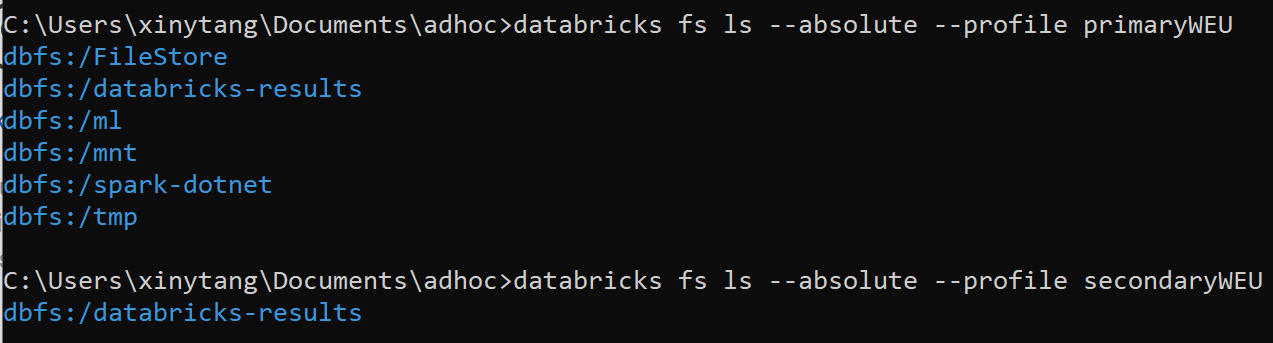
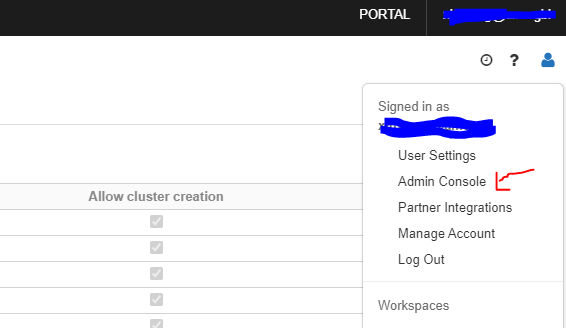
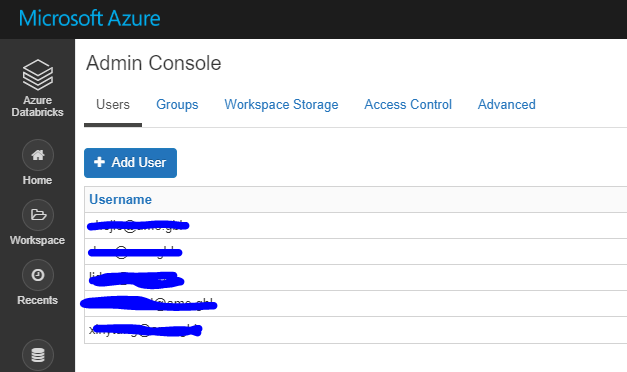
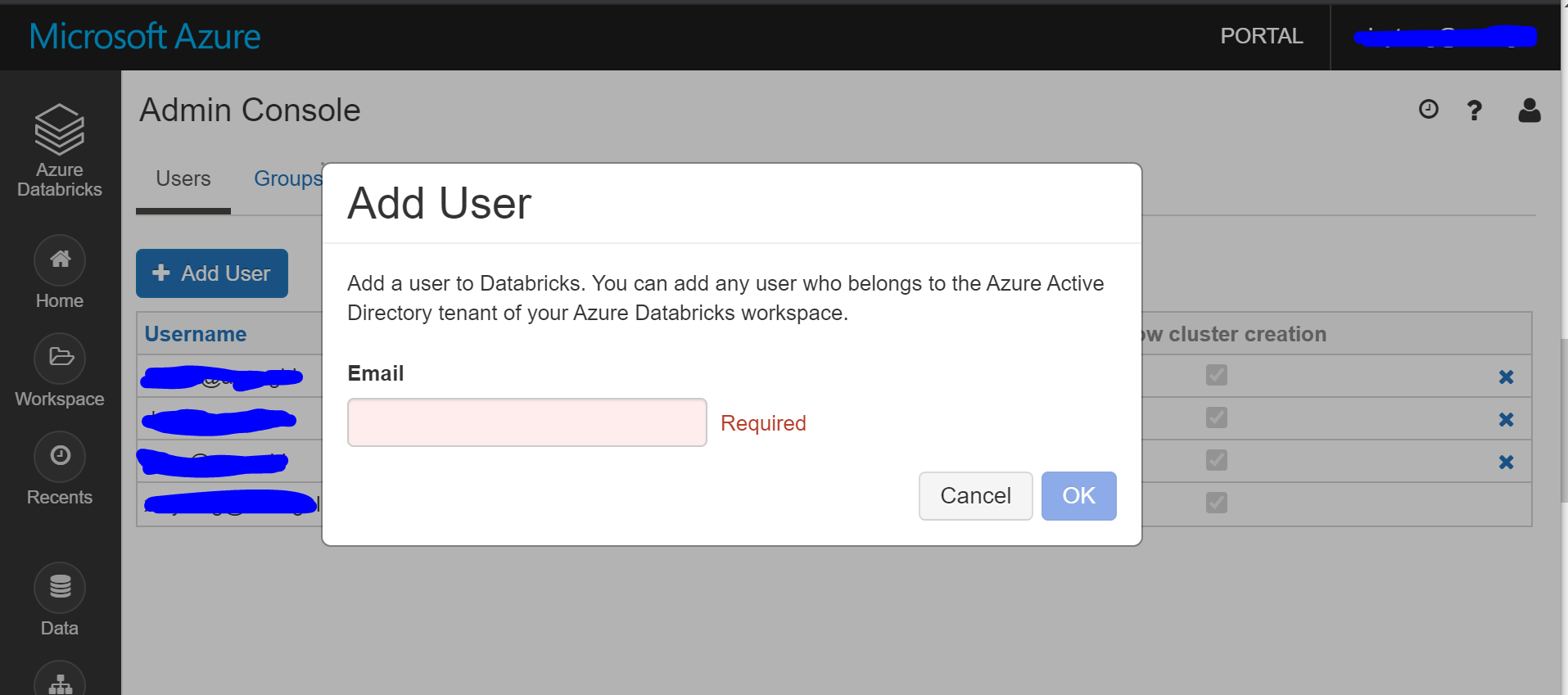
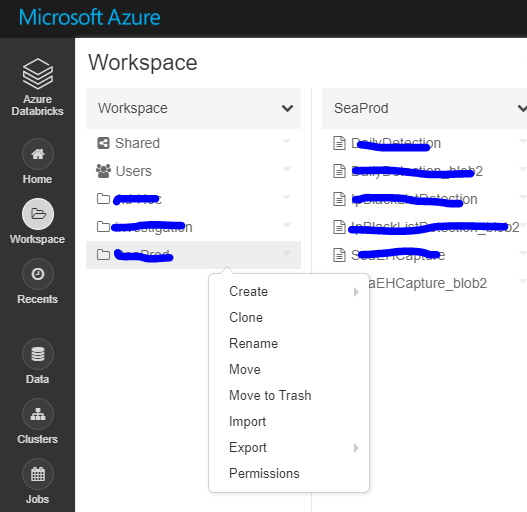
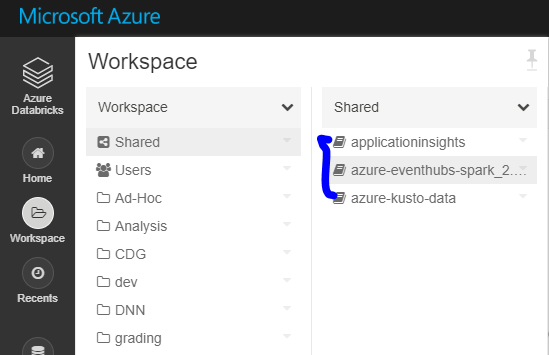
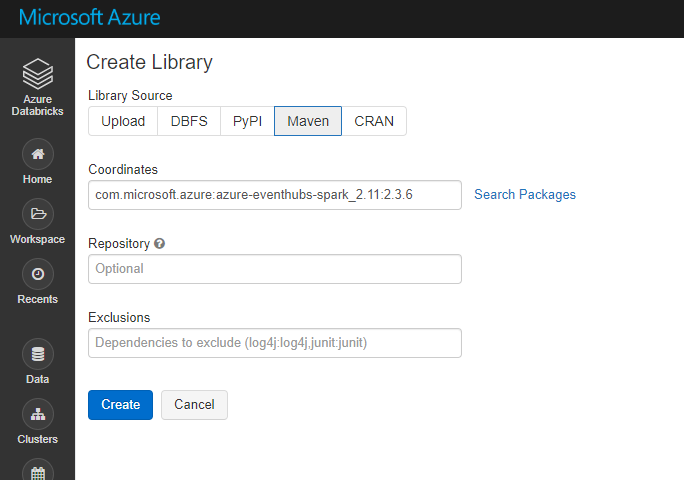
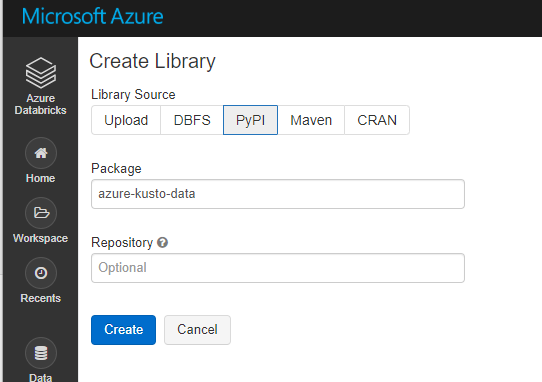
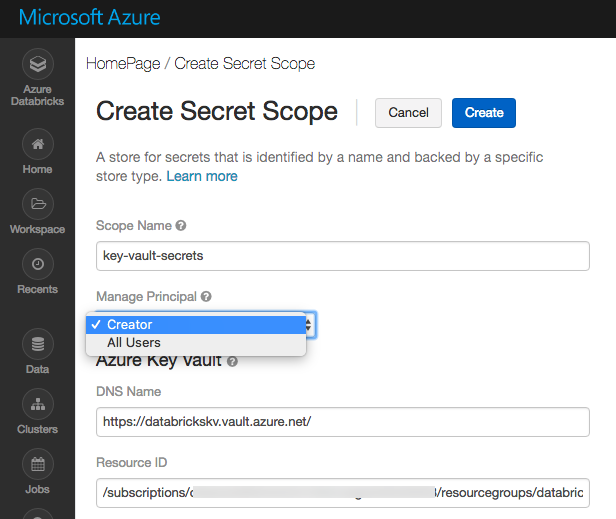
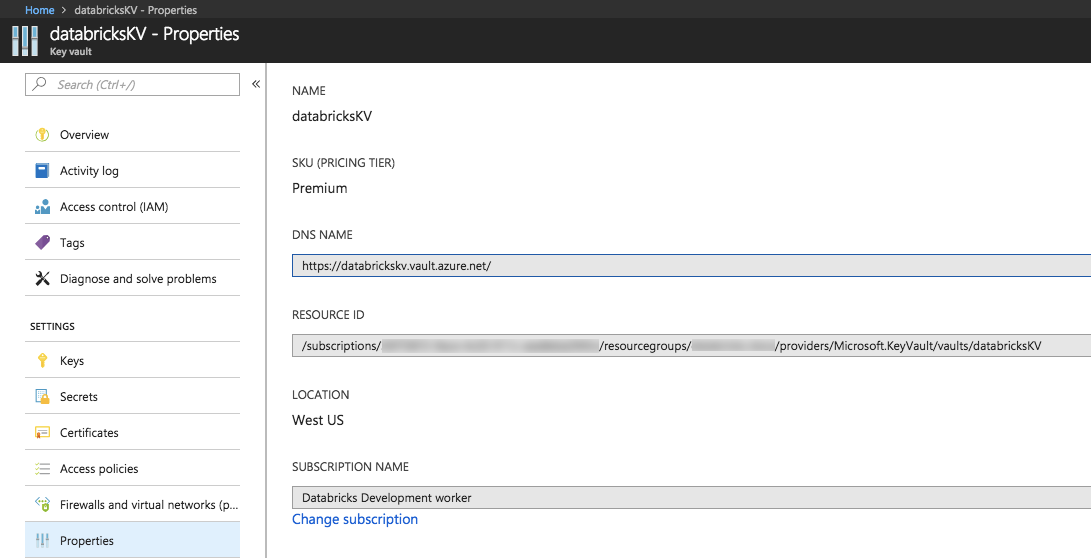
    <content type="html"><![CDATA[<h1 id="Databricks-migration-steps"><a href="#Databricks-migration-steps" class="headerlink" title="Databricks migration steps"></a>Databricks migration steps</h1><p>When you need to migrate an old Databricks to a new Databricks, all of the files, jobs, clusters, configurations and dependencies are supposed to move. It is time consuming and also easy to omit some parts. I document the detailed migration steps, and also write several scripts to automatically migrate folders, clusters and jobs.<br>In this chapter, I will show you how to migrate Databricks.</p><h2 id="0-Prepare-all-scripts"><a href="#0-Prepare-all-scripts" class="headerlink" title="0. Prepare all scripts"></a>0. Prepare all scripts</h2><p>Navigate to <a href="https://github.com/xinyeah/Azure-Databricks-migration-tutorial" target="_blank" rel="noopener">https://github.com/xinyeah/Azure-Databricks-migration-tutorial</a>, fork this repository, and download all needed scripts.</p><h2 id="1-Install-databricks-cli"><a href="#1-Install-databricks-cli" class="headerlink" title="1. Install databricks-cli"></a>1. Install databricks-cli</h2><figure class="highlight plain"><table><tr><td class="gutter"><pre><span class="line">1</span><br></pre></td><td class="code"><pre><span class="line">pip3 install databricks</span><br></pre></td></tr></table></figure><h2 id="2-Set-up-authentication-for-two-profiles"><a href="#2-Set-up-authentication-for-two-profiles" class="headerlink" title="2. Set up authentication for two profiles"></a>2. Set up authentication for two profiles</h2><p>Set up authentication for two profiles for old databricks and new databricks. This CLI authentication need to done by a personal access token.</p><h3 id="2-1-Generate-a-personal-access-token"><a href="#2-1-Generate-a-personal-access-token" class="headerlink" title="2.1 Generate a personal access token."></a>2.1 Generate a personal access token.</h3><p><a href="https://docs.databricks.com/dev-tools/api/latest/authentication.html" target="_blank" rel="noopener">Here</a> is step by step guide to generate it.</p><h3 id="2-2-Copy-the-generated-token-and-store-it-as-a-secret-in-Azure-Key-Vault"><a href="#2-2-Copy-the-generated-token-and-store-it-as-a-secret-in-Azure-Key-Vault" class="headerlink" title="2.2 Copy the generated token and store it as a secret in Azure Key Vault."></a>2.2 Copy the generated token and store it as a secret in Azure Key Vault.</h3><p>On the Key Vault properties pages, select <strong>Secrets</strong>.<br>Click on <strong>Generate/Import</strong>.<br>On the Create a secret screen choose the following values:</p><ul><li><strong>Upload options</strong>: Manual.</li><li><strong>Name</strong>: </li><li><strong>Value</strong>: paste the generated token here</li><li>Leave the other values to their defaults. Click <strong>Create</strong>.</li></ul><h3 id="2-3-Set-up-profiles"><a href="#2-3-Set-up-profiles" class="headerlink" title="2.3 Set up profiles"></a>2.3 Set up profiles</h3><p>In this case, the profile <em>primary</em> is for the old Databricks, and the profile <em>secondary</em> is for the new one.</p><figure class="highlight plain"><table><tr><td class="gutter"><pre><span class="line">1</span><br><span class="line">2</span><br></pre></td><td class="code"><pre><span class="line">databricks configure --profile primary --token</span><br><span class="line">databricks configure --profile secondary --token</span><br></pre></td></tr></table></figure><p>Every time set up a profile, you need to provide the Databricks host url and the personal access token generated previously.<br><img src="https://raw.githubusercontent.com/xinyeah/xinyeah.github.io/master/images/image-20200619153249382.png" alt="image-20200619153249382" style="zoom: 80%;" /></p><h3 id="2-4-Validate-the-profile"><a href="#2-4-Validate-the-profile" class="headerlink" title="2.4 Validate the profile"></a>2.4 Validate the profile</h3><figure class="highlight plain"><table><tr><td class="gutter"><pre><span class="line">1</span><br><span class="line">2</span><br></pre></td><td class="code"><pre><span class="line">databricks fs ls --absolute --profile primary</span><br><span class="line">databricks fs ls --absolute --profile secondary</span><br></pre></td></tr></table></figure><img src="https://raw.githubusercontent.com/xinyeah/xinyeah.github.io/master/images/image-20200624141216762.png" alt="image-20200624141216762" style="zoom:50%;" />Here is the DBFS root locations from [docs](https://docs.microsoft.com/en-us/azure/databricks/data/databricks-file-system)![image-20200624113619104](https://raw.githubusercontent.com/xinyeah/xinyeah.github.io/master/images/image-20200624113619104.png)<h2 id="3-Migrate-Azure-Active-Directory-users"><a href="#3-Migrate-Azure-Active-Directory-users" class="headerlink" title="3. Migrate Azure Active Directory users"></a>3. Migrate Azure Active Directory users</h2><p> 3.1 Navigate to the old Databricks UI, expand <strong>Account</strong> in the right corner, then click <strong>Admin Console</strong>. You can get a list of users as admin in this Databricks.</p><img src="https://raw.githubusercontent.com/xinyeah/xinyeah.github.io/master/images/image-20200619153401452.png" alt="image-20200619153401452" style="zoom: 80%;" /><img src="https://raw.githubusercontent.com/xinyeah/xinyeah.github.io/master/images/image-20200619153500424.png" alt="image-20200619153500424" style="zoom:80%;" /><p>3.2 Navigate to the new Databricks portal, click <strong>Add User</strong> under <strong>Users</strong> tag of <strong>Admin Console</strong> to add admins.</p><img src="https://raw.githubusercontent.com/xinyeah/xinyeah.github.io/master/images/image-20200624142142524.png" alt="image-20200624142142524" style="zoom: 35%;" /><h2 id="4-Migrate-the-workspace-folders-and-notebooks"><a href="#4-Migrate-the-workspace-folders-and-notebooks" class="headerlink" title="4. Migrate the workspace folders and notebooks"></a>4. Migrate the workspace folders and notebooks</h2><p><strong>Solution 1</strong><br>Put the <a href="https://github.com/xinyeah/Azure-Databricks-migration-tutorial/blob/master/step4-migrate-folders.py" target="_blank" rel="noopener">migrate-folders.py</a> in a separate folder (it will export files in this folder), and then run the migrate-folders.py script to migrate folders and notebooks. Libraries are not included using this scripts. It is shown in Step 5 to migrate libraries.<br>Remember to replace the profile variables in this script to your customized profile names:</p><figure class="highlight python"><table><tr><td class="gutter"><pre><span class="line">1</span><br><span class="line">2</span><br></pre></td><td class="code"><pre><span class="line">EXPORT_PROFILE = <span class="string">"primary"</span></span><br><span class="line">IMPORT_PROFILE = <span class="string">"secondary"</span></span><br></pre></td></tr></table></figure><p><strong>Solution 2</strong><br>Also, you can do it manually: Export as DBC file and then import.<br><img src="https://raw.githubusercontent.com/xinyeah/xinyeah.github.io/master/images/image-20200619155250927.png" alt="image-20200619155250927" style="zoom:50%;" /></p><h2 id="5-Migrate-libraries"><a href="#5-Migrate-libraries" class="headerlink" title="5. Migrate libraries"></a>5. Migrate libraries</h2><p>There is no external API for libraries, so need to reinstall all libraries into new Databricks manually.</p><h3 id="5-1-List-all-libraries-in-the-old-Databricks"><a href="#5-1-List-all-libraries-in-the-old-Databricks" class="headerlink" title="5.1 List all libraries in the old Databricks."></a>5.1 List all libraries in the old Databricks.</h3><img src="https://raw.githubusercontent.com/xinyeah/xinyeah.github.io/master/images/image-20200619165944999.png" alt="image-20200619165944999" style="zoom:67%;" /><h3 id="5-2-Install-all-libraries"><a href="#5-2-Install-all-libraries" class="headerlink" title="5.2 Install all libraries."></a>5.2 Install all libraries.</h3><p>Maven libraries:<br><img src="https://raw.githubusercontent.com/xinyeah/xinyeah.github.io/master/images/image-20200619165917476.png" alt="image-20200619165917476" style="zoom:67%;" /><br>PyPI libraries:<br><img src="https://raw.githubusercontent.com/xinyeah/xinyeah.github.io/master/images/image-20200619170223832.png" alt="image-20200619170223832" style="zoom:67%;" /></p><h2 id="6-Migrate-the-cluster-configuration"><a href="#6-Migrate-the-cluster-configuration" class="headerlink" title="6. Migrate the cluster configuration"></a>6. Migrate the cluster configuration</h2><p>Run <a href="https://github.com/xinyeah/Azure-Databricks-migration-tutorial/blob/master/step6-migrate-cluster.py" target="_blank" rel="noopener">migrate-cluster.py</a> to migrate all <strong>interactive clusters</strong>. This script will <strong>skip</strong> all <em>job</em> source clusters.<br>Remember to replace the profile variables in this script to your customized profile names:</p><figure class="highlight python"><table><tr><td class="gutter"><pre><span class="line">1</span><br><span class="line">2</span><br></pre></td><td class="code"><pre><span class="line">EXPORT_PROFILE = <span class="string">"primary"</span></span><br><span class="line">IMPORT_PROFILE = <span class="string">"secondary"</span></span><br></pre></td></tr></table></figure><h2 id="7-Migrate-the-jobs-configuration"><a href="#7-Migrate-the-jobs-configuration" class="headerlink" title="7. Migrate the jobs configuration"></a>7. Migrate the jobs configuration</h2><p>Run <a href="https://github.com/xinyeah/Azure-Databricks-migration-tutorial/blob/master/step7-migrate-job.py" target="_blank" rel="noopener">migrate-job.py</a> to migrate all jobs, <strong>schedule information</strong> will be removed so job doesn’t start before proper cutover.<br>Remember to replace the profile variables in this script to your customized profile names:</p><figure class="highlight python"><table><tr><td class="gutter"><pre><span class="line">1</span><br><span class="line">2</span><br></pre></td><td class="code"><pre><span class="line">EXPORT_PROFILE = <span class="string">"primary"</span></span><br><span class="line">IMPORT_PROFILE = <span class="string">"secondary"</span></span><br></pre></td></tr></table></figure><h2 id="8-Migrate-Azure-Key-Vaults-secret-scopes"><a href="#8-Migrate-Azure-Key-Vaults-secret-scopes" class="headerlink" title="8. Migrate Azure Key Vaults secret scopes"></a>8. Migrate Azure Key Vaults secret scopes</h2><p>There are two types of secret scope: Azure Key Vault-backed and Databricks-backed.<br>Creating an Azure Key Vault-backed secret scope is supported only in the Azure Databricks UI. You cannot create a scope using the Secrets CLI or API.</p><h3 id="List-all-secret-scopes"><a href="#List-all-secret-scopes" class="headerlink" title="List all secret scopes:"></a>List all secret scopes:</h3><figure class="highlight plain"><table><tr><td class="gutter"><pre><span class="line">1</span><br></pre></td><td class="code"><pre><span class="line">databricks secrets list-scopes --profile primary</span><br></pre></td></tr></table></figure><p><img src="https://raw.githubusercontent.com/xinyeah/xinyeah.github.io/master/images/image-20200619175501231.png" alt="image-20200619175501231"></p><h3 id="Generate-key-vault-backed-secret-scope"><a href="#Generate-key-vault-backed-secret-scope" class="headerlink" title="Generate key vault-backed secret scope:"></a>Generate key vault-backed secret scope:</h3><ol><li>Go to <code>https://&lt;databricks-instance&gt;#secrets/createScope</code>. This URL is case sensitive; scope in <code>createScope</code> must be uppercase.<img src="https://raw.githubusercontent.com/xinyeah/xinyeah.github.io/master/images/azure-kv-scope.png" alt="Create scope" style="zoom:50%;" /></li><li>Enter the name of the secret scope. Secret scope names are case insensitive.</li><li>These properties are available from the <strong>Properties</strong> tab of an Azure Key Vault in your Azure portal.<img src="https://raw.githubusercontent.com/xinyeah/xinyeah.github.io/master/images/azure-kv.png" alt="Azure Key Vault Properties tab" style="zoom:50%;" /></li><li>Click the <strong>Create</strong> button.</li></ol><h2 id="9-Migrate-Azure-blob-storage-and-Azure-Data-Lake-Storage-mounts"><a href="#9-Migrate-Azure-blob-storage-and-Azure-Data-Lake-Storage-mounts" class="headerlink" title="9. Migrate Azure blob storage and Azure Data Lake Storage mounts"></a>9. Migrate Azure blob storage and Azure Data Lake Storage mounts</h2><p>There is no external API to use, have to manually remount all storage.</p><h3 id="9-1-List-all-mount-points-in-old-Databricks-using-notebook"><a href="#9-1-List-all-mount-points-in-old-Databricks-using-notebook" class="headerlink" title="9.1 List all mount points in old Databricks using notebook."></a>9.1 List all mount points in old Databricks using <code>notebook</code>.</h3><figure class="highlight python"><table><tr><td class="gutter"><pre><span class="line">1</span><br></pre></td><td class="code"><pre><span class="line">dbutils.fs.mounts()</span><br></pre></td></tr></table></figure><h3 id="9-2-Remount-all-blob-storage-following-the-official-docs-using-notebook"><a href="#9-2-Remount-all-blob-storage-following-the-official-docs-using-notebook" class="headerlink" title="9.2 Remount all blob storage following the official docs using notebook."></a>9.2 Remount all blob storage following the official <a href="https://docs.databricks.com/data/data-sources/azure/azure-storage.html" target="_blank" rel="noopener">docs</a> using <code>notebook</code>.</h3><figure class="highlight python"><table><tr><td class="gutter"><pre><span class="line">1</span><br><span class="line">2</span><br><span class="line">3</span><br><span class="line">4</span><br></pre></td><td class="code"><pre><span class="line">dbutils.fs.mount(</span><br><span class="line">  source = <span class="string">"wasbs://&lt;container-name&gt;@&lt;storage-account-name&gt;.blob.core.windows.net"</span>,</span><br><span class="line">  mount_point = <span class="string">"/mnt/&lt;mount-name&gt;"</span>,</span><br><span class="line">  extra_configs = &#123;<span class="string">"&lt;conf-key&gt;"</span>:dbutils.secrets.get(scope = <span class="string">"&lt;scope-name&gt;"</span>, key = <span class="string">"&lt;key-name&gt;"</span>)&#125;)</span><br></pre></td></tr></table></figure><p>where</p><ul><li><code>&lt;mount-name&gt;</code> is a DBFS path representing where the Blob storage container or a folder inside the container (specified in <code>source</code>) will be mounted in DBFS.</li><li><code>&lt;conf-key&gt;</code> can be either <code>fs.azure.account.key.&lt;storage-account-name&gt;.blob.core.windows.net</code> or <code>fs.azure.sas.&lt;container-name&gt;.&lt;storage-account-name&gt;.blob.core.windows.net</code></li><li><code>dbutils.secrets.get(scope = &quot;&lt;scope-name&gt;&quot;, key = &quot;&lt;key-name&gt;&quot;)</code> gets the key that has been stored as a <a href="https://docs.databricks.com/security/secrets/secrets.html" target="_blank" rel="noopener">secret</a> in a <a href="https://docs.databricks.com/security/secrets/secret-scopes.html" target="_blank" rel="noopener">secret scope</a>.</li></ul><h2 id="10-Migrate-cluster-init-scripts"><a href="#10-Migrate-cluster-init-scripts" class="headerlink" title="10. Migrate cluster init scripts"></a>10. Migrate cluster init scripts</h2><p>Copy all cluster initialization scripts to new Databricks using DBFS CLI.</p><figure class="highlight bash"><table><tr><td class="gutter"><pre><span class="line">1</span><br><span class="line">2</span><br><span class="line">3</span><br><span class="line">4</span><br><span class="line">5</span><br></pre></td><td class="code"><pre><span class="line">// Primary to <span class="built_in">local</span></span><br><span class="line">dbfs cp -r dbfs:/databricks/init ./old-ws-init-scripts --profile primary</span><br><span class="line"></span><br><span class="line">// Local to Secondary workspace</span><br><span class="line">dbfs cp -r old-ws-init-scripts dbfs:/databricks/init --profile secondary</span><br></pre></td></tr></table></figure><h2 id="11-ADF-config"><a href="#11-ADF-config" class="headerlink" title="11. ADF config"></a>11. ADF config</h2><p>For Databricks jobs scheduled by Azure Data Factory, navigate to Azure Data Factory UI. Create a new Databricks linked service linked to the new Databricks by the personal access key generated in step 2.<br><img src="https://raw.githubusercontent.com/xinyeah/xinyeah.github.io/master/images/image-20200624174250964.png" alt="image-20200624174250964" style="zoom: 33%;" /></p><h1 id="Reference"><a href="#Reference" class="headerlink" title="Reference"></a>Reference</h1><p><a href="https://docs.microsoft.com/en-us/azure/databricks/administration-guide/cloud-configurations/azure/vnet-inject" target="_blank" rel="noopener">https://docs.microsoft.com/en-us/azure/databricks/administration-guide/cloud-configurations/azure/vnet-inject</a><br><a href="https://docs.microsoft.com/en-us/azure/azure-databricks/howto-regional-disaster-recovery#detailed-migration-steps" target="_blank" rel="noopener">https://docs.microsoft.com/en-us/azure/azure-databricks/howto-regional-disaster-recovery#detailed-migration-steps</a><br><a href="https://docs.microsoft.com/en-us/azure/databricks/dev-tools/cli/" target="_blank" rel="noopener">https://docs.microsoft.com/en-us/azure/databricks/dev-tools/cli/</a><br><a href="https://docs.microsoft.com/en-us/azure/databricks/security/secrets/secret-scopes" target="_blank" rel="noopener">https://docs.microsoft.com/en-us/azure/databricks/security/secrets/secret-scopes</a></p>]]></content>
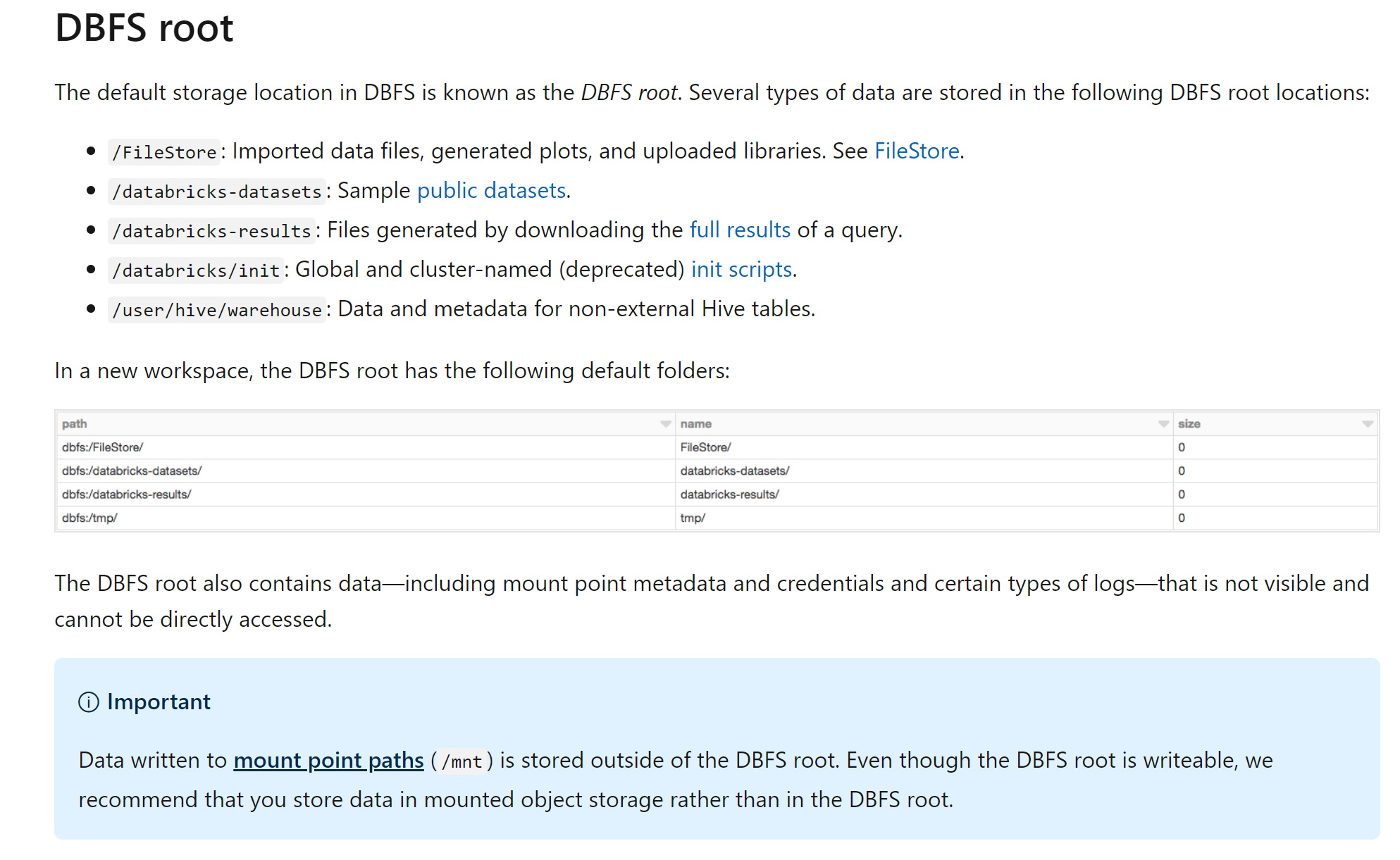
    
    <summary type="html">
    
      When you need to migrate an old Databricks to a new Databricks, all of the files, jobs, clusters, configurations and dependencies are supposed to move. It is time consuming and also easy to omit some parts. I document the detailed migration steps, and also write several scripts to automatically migrate folders, clusters and jobs. In this chapter, I will show you how to migrate Databricks.
    
    </summary>
    
    
      <category term="Databricks" scheme="https://xinyeah.github.io/categories/Databricks/"/>
    
    
      <category term="Databricks" scheme="https://xinyeah.github.io/tags/Databricks/"/>
    
      <category term="migration" scheme="https://xinyeah.github.io/tags/migration/"/>
    
      <category term="scripts" scheme="https://xinyeah.github.io/tags/scripts/"/>
    
  </entry>
  
  <entry>
    <title>Always flush Application Insights</title>
    <link href="https://xinyeah.github.io/always-flush-application-insights/"/>
    <id>https://xinyeah.github.io/always-flush-application-insights/</id>
    <published>2020-06-22T21:50:20.000Z</published>
    <updated>2020-09-23T00:46:23.740Z</updated>
    
    <content type="html"><![CDATA[<h2 id="What-is-Application-Insights"><a href="#What-is-Application-Insights" class="headerlink" title="What is Application Insights?"></a>What is Application Insights?</h2><p>Application Insights is one of Azure Monitoring solutions, it monitors the availability, performance, and usage of your web application. </p><h2 id="How-it-works"><a href="#How-it-works" class="headerlink" title="How it works"></a>How it works</h2><p>Before you can use the Application Insights, you need to install an Application Insights SDK (instrumentation package) in your app. This instrumentation monitors your app and sends out the telemetry data  to an Azure Application Insights resource identified by an instrumentation key (a unique GUID).</p><p>It support Java, C#, Node.js, python <a href="https://docs.microsoft.com/en-us/azure/azure-monitor/app/platforms" target="_blank" rel="noopener">and so on</a></p><h2 id="Flush-data"><a href="#Flush-data" class="headerlink" title="Flush data"></a>Flush data</h2><p>The official docs says, the SDK sends out data at fixed intervals (typically 30 secs) or whenever the buffer is full (typically 500 items). </p><p>However,  from my personal experience, <strong>it won’t send the data if you don’t flush</strong>.</p><p>Here is a C# code example to flush the telemetry. </p><figure class="highlight plain"><table><tr><td class="gutter"><pre><span class="line">1</span><br><span class="line">2</span><br><span class="line">3</span><br><span class="line">4</span><br><span class="line">5</span><br><span class="line">6</span><br><span class="line">7</span><br><span class="line">8</span><br><span class="line">9</span><br><span class="line">10</span><br><span class="line">11</span><br><span class="line">12</span><br></pre></td><td class="code"><pre><span class="line">&#x2F;&#x2F; Set up some properties and metrics:</span><br><span class="line">var properties &#x3D; new Dictionary &lt;string, string&gt;</span><br><span class="line">    &#123;&#123;&quot;game&quot;, currentGame.Name&#125;, &#123;&quot;difficulty&quot;, currentGame.Difficulty&#125;&#125;;</span><br><span class="line">var metrics &#x3D; new Dictionary &lt;string, double&gt;</span><br><span class="line">    &#123;&#123;&quot;Score&quot;, currentGame.Score&#125;, &#123;&quot;Opponents&quot;, currentGame.OpponentCount&#125;&#125;;</span><br><span class="line"></span><br><span class="line">&#x2F;&#x2F; Send the event:</span><br><span class="line">telemetry.TrackEvent(&quot;WinGame&quot;, properties, metrics);</span><br><span class="line">&#x2F;&#x2F; Flush the buffer</span><br><span class="line">telemetry.Flush();</span><br><span class="line">&#x2F;&#x2F; Allow some time for flushing before shutdown.</span><br><span class="line">System.Threading.Thread.Sleep(5000);</span><br></pre></td></tr></table></figure><h2 id="Reference"><a href="#Reference" class="headerlink" title="Reference"></a>Reference</h2><p><a href="https://docs.microsoft.com/en-us/azure/azure-monitor/app/api-custom-events-metrics" target="_blank" rel="noopener">https://docs.microsoft.com/en-us/azure/azure-monitor/app/api-custom-events-metrics</a></p><p><a href="https://docs.microsoft.com/en-us/azure/azure-monitor/app/app-insights-overview" target="_blank" rel="noopener">https://docs.microsoft.com/en-us/azure/azure-monitor/app/app-insights-overview</a></p>]]></content>
    
    <summary type="html">
    
      Databricks docs says, the SDK sends out data at fixed intervals (typically 30 secs) or whenever the buffer is full (typically 500 items). However,  from my personal experience, it won&#39;t send the data if you don&#39;t flush.
    
    </summary>
    
    
      <category term="Application Insights" scheme="https://xinyeah.github.io/categories/Application-Insights/"/>
    
    
      <category term="Application Insights" scheme="https://xinyeah.github.io/tags/Application-Insights/"/>
    
  </entry>
  
  <entry>
    <title>Java serialization is a bitch!</title>
    <link href="https://xinyeah.github.io/Java-serialization-is-a-bitch/"/>
    <id>https://xinyeah.github.io/Java-serialization-is-a-bitch/</id>
    <published>2020-06-21T21:54:05.000Z</published>
    <updated>2020-09-23T00:46:23.740Z</updated>
    
    <content type="html"><![CDATA[<h2 id="Concept"><a href="#Concept" class="headerlink" title="Concept"></a>Concept</h2><p><strong>Object Serialization</strong> is the process of converting an object into a stream of bytes to store or transmit the object between machines. </p><p>The reverse process is called <strong>deserialization</strong> to use the byte stream to recreate the object.</p><h2 id="Issue-for-Java-Serialization"><a href="#Issue-for-Java-Serialization" class="headerlink" title="Issue for Java Serialization"></a>Issue for Java Serialization</h2><p>The main concern to use Java Serialization is security issue. There is a so called <strong>Java deserialization vulnerability</strong> affect all apps that receives serialized Java objects which can be used by attackers to gain complete remote control of an app service. Also, the attack surface is so big and even if you adhere to all best practice, your app is still be vulnerable.</p><p>What’s the vulnerability?</p><p>Many apps that accept serialized bytes stream do not <strong>validate</strong> or <strong>check</strong> untrusted input before deserialization. The attackers can insert a malicious code into the bytes stream and have it execute on the app. They can easily mount a <em>denial-of-service</em> attack by causing the deserialization takes forever, which is called <em>deserialization bomb</em>. </p><h2 id="Solutions"><a href="#Solutions" class="headerlink" title="Solutions"></a>Solutions</h2><p>The best way to avoid Java serialization vulnerability is <strong>never</strong> to use Java serialization!</p><p>There are other mechanisms to store and transmit between objects and bytes sequences which avoid Java serialization vulnerability, such as <em>JSON</em> and <em>Protocol Buffers(Protobuf)</em>.</p><h2 id="JSON-vs-Protocol-Buffers"><a href="#JSON-vs-Protocol-Buffers" class="headerlink" title="JSON vs Protocol Buffers"></a>JSON vs Protocol Buffers</h2><p>I summarize the differences between them:</p><table><thead><tr><th></th><th></th></tr></thead><tbody><tr><td>JSON</td><td>Protocol Buffers</td></tr><tr><td>human-readable</td><td>not human-readable, but it provide pbtxt for readability.</td></tr><tr><td>text-based</td><td>binary</td></tr><tr><td>no schema needed</td><td>offer schemas to enforce appropriate usage</td></tr><tr><td></td><td>simple, faster, smaller in size</td></tr></tbody></table><p>But they are both good serialization mechanisms: </p><ul><li>They are simpler than Java serialization. </li><li>They don’t support auto serialization or deserialization</li><li>They only support a few primitive and array data types to avoid deserialization issue.</li></ul><h2 id="Reference"><a href="#Reference" class="headerlink" title="Reference"></a>Reference</h2><p>Effective Java, Third Edition</p><p><a href="https://www.darkreading.com/informationweek-home/why-the-java-deserialization-bug-is-a-big-deal/d/d-id/1323237" target="_blank" rel="noopener">https://www.darkreading.com/informationweek-home/why-the-java-deserialization-bug-is-a-big-deal/d/d-id/1323237</a></p>]]></content>
    
    <summary type="html">
    
      There is no reason to use Java Serialization anymore.
    
    </summary>
    
    
      <category term="Effective Java reading notes" scheme="https://xinyeah.github.io/categories/Effective-Java-reading-notes/"/>
    
    
      <category term="JAVA" scheme="https://xinyeah.github.io/tags/JAVA/"/>
    
      <category term="serialization" scheme="https://xinyeah.github.io/tags/serialization/"/>
    
  </entry>
  
  <entry>
    <title>Deploy Spark .NET app on Databricks</title>
    <link href="https://xinyeah.github.io/deploy-spark-dotnet-app-on-databricks/"/>
    <id>https://xinyeah.github.io/deploy-spark-dotnet-app-on-databricks/</id>
    <published>2020-06-19T10:35:53.000Z</published>
    <updated>2020-09-23T00:46:23.740Z</updated>
    
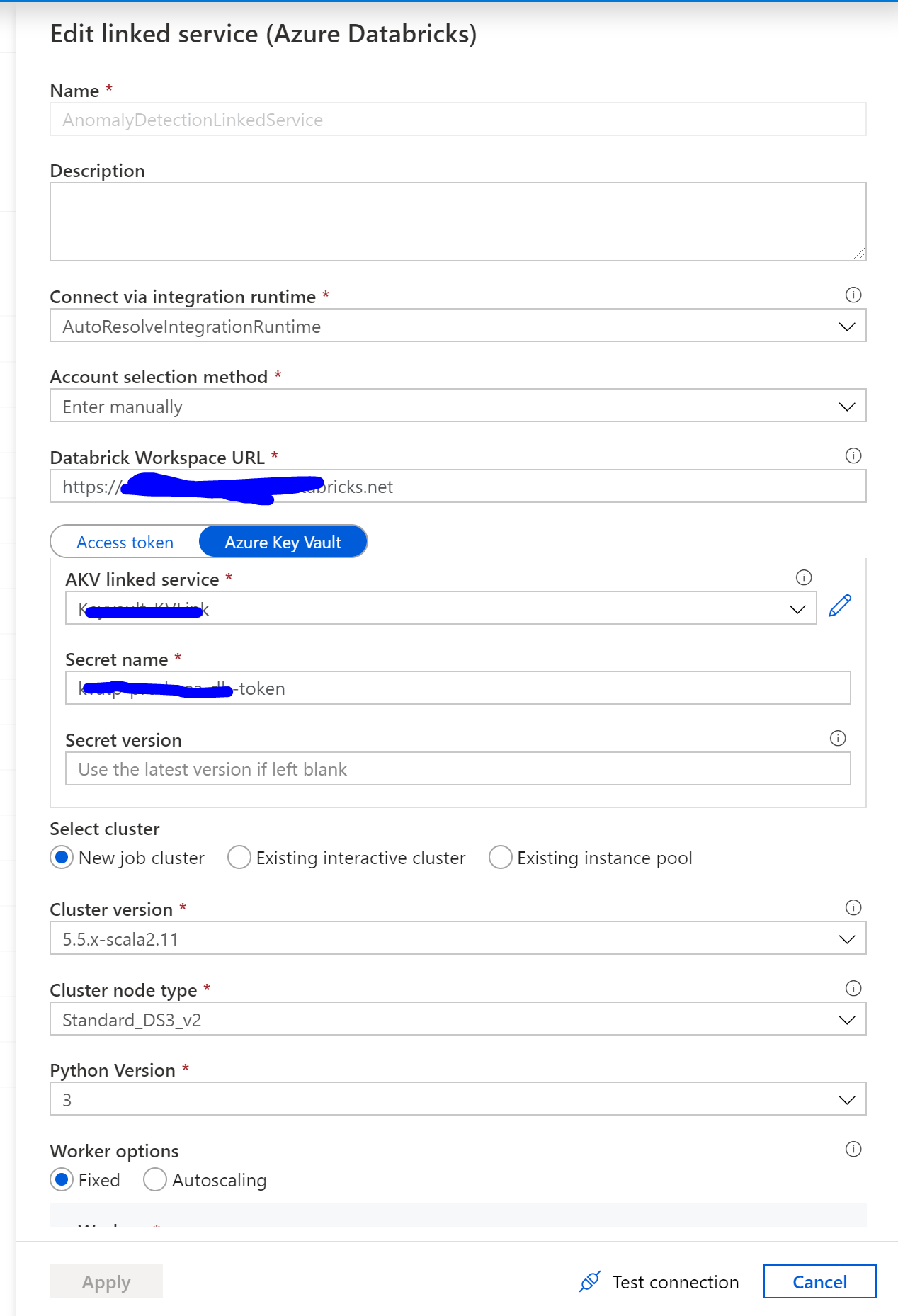
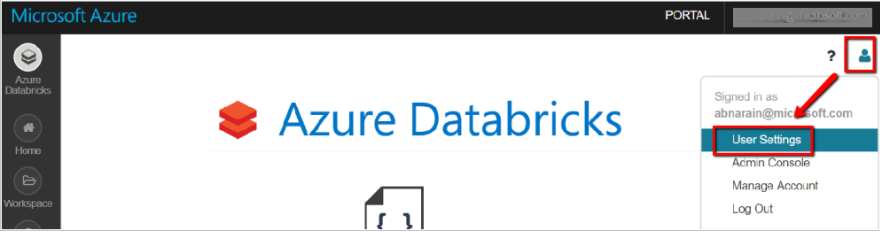
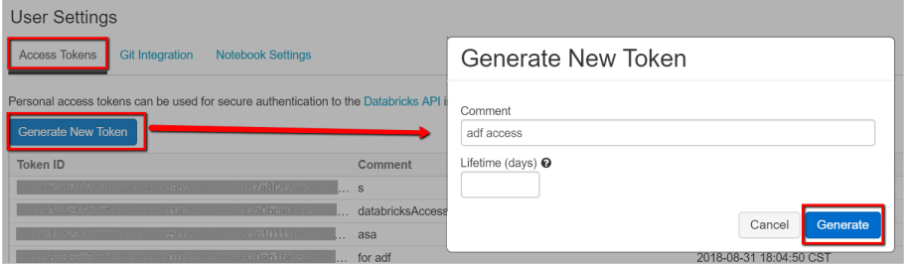
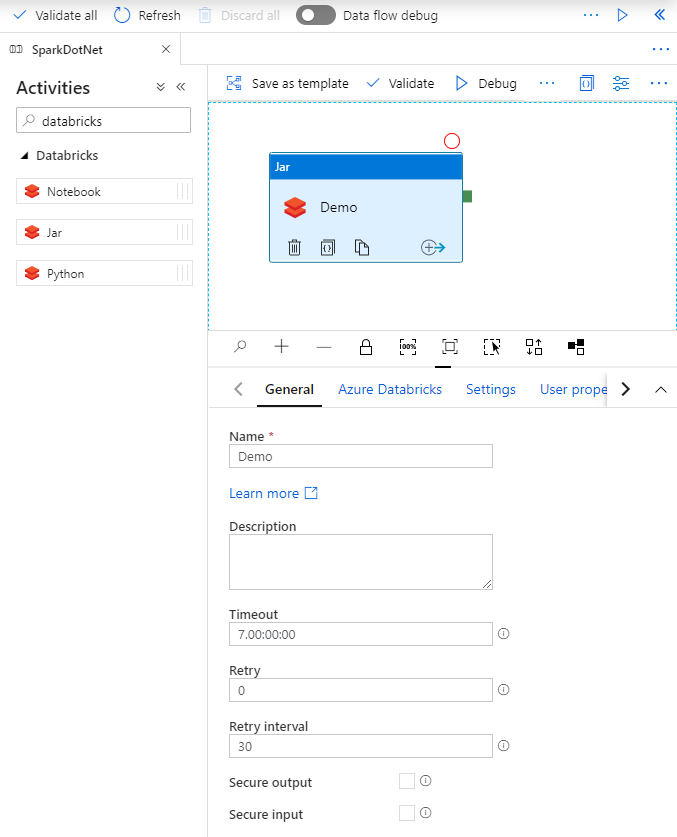
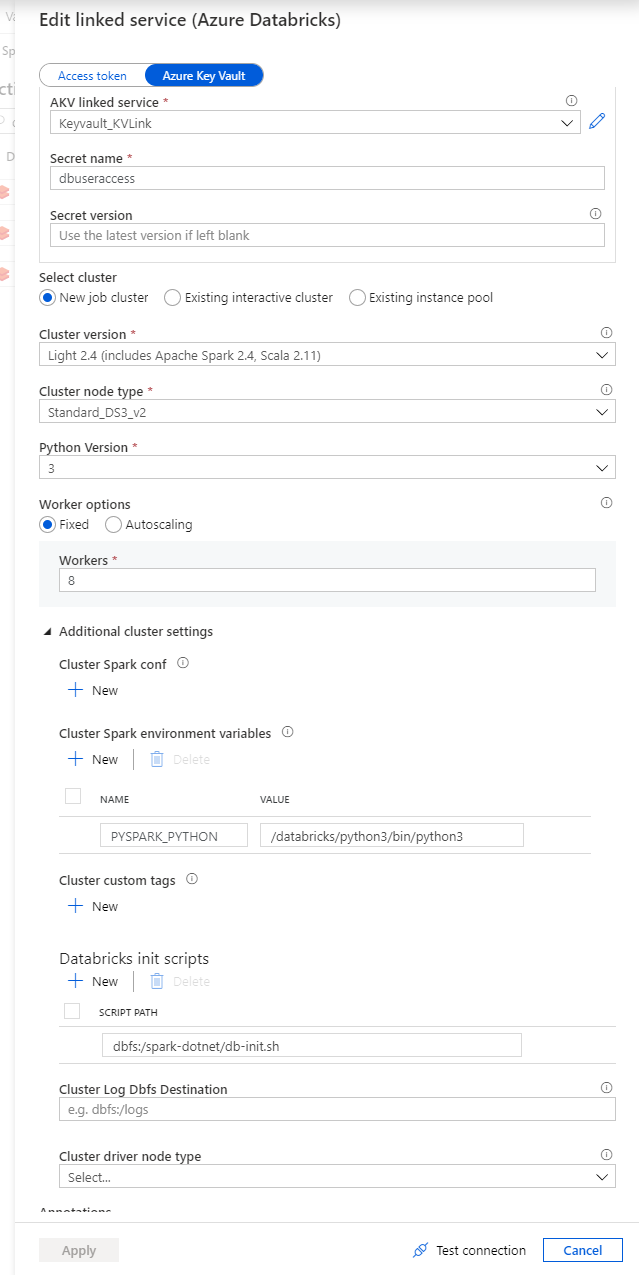
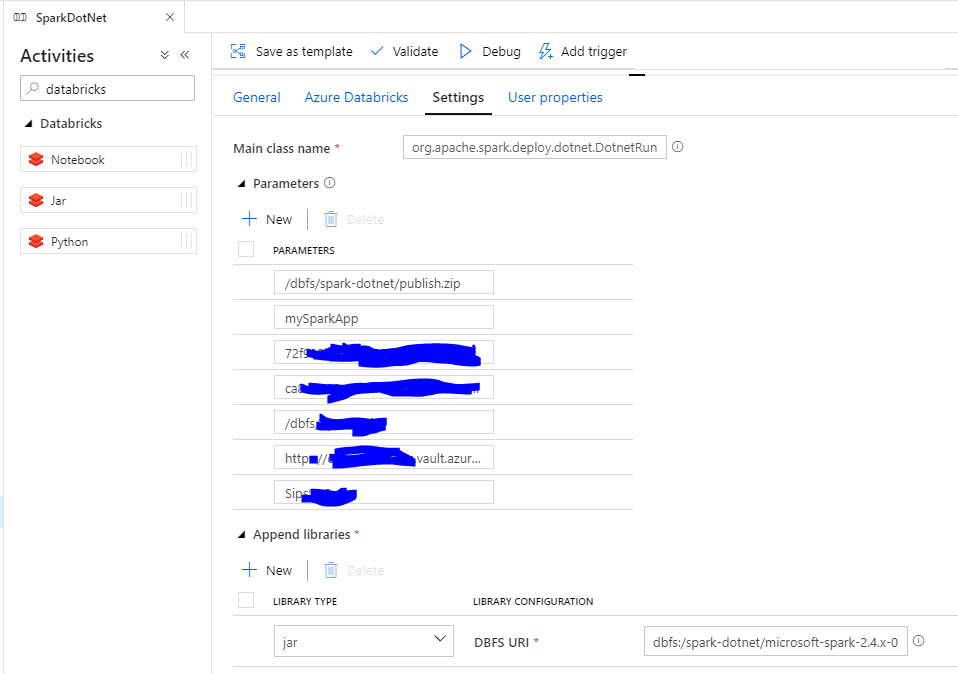
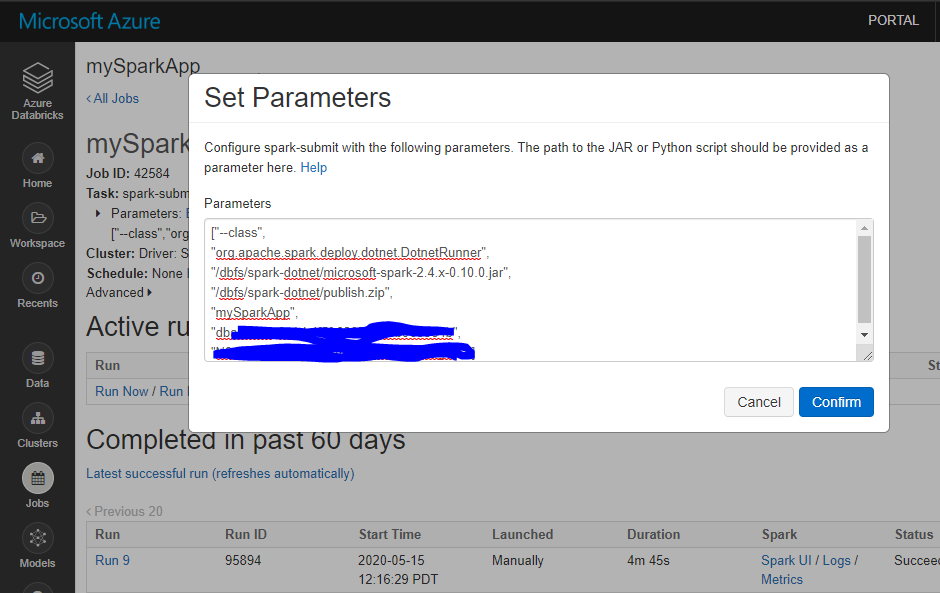
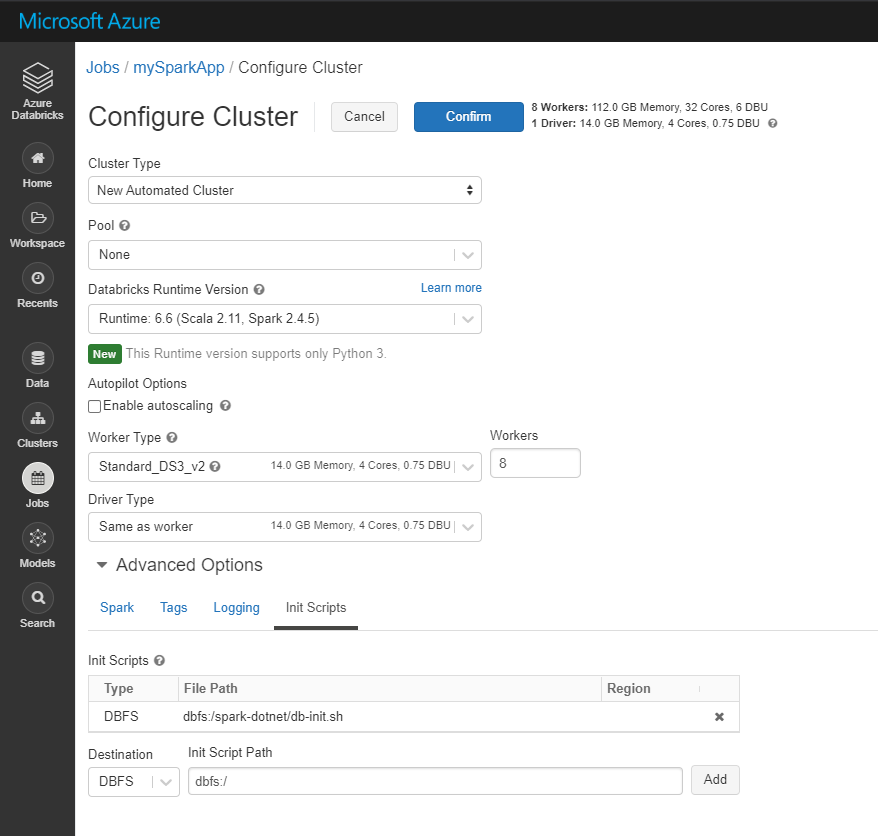
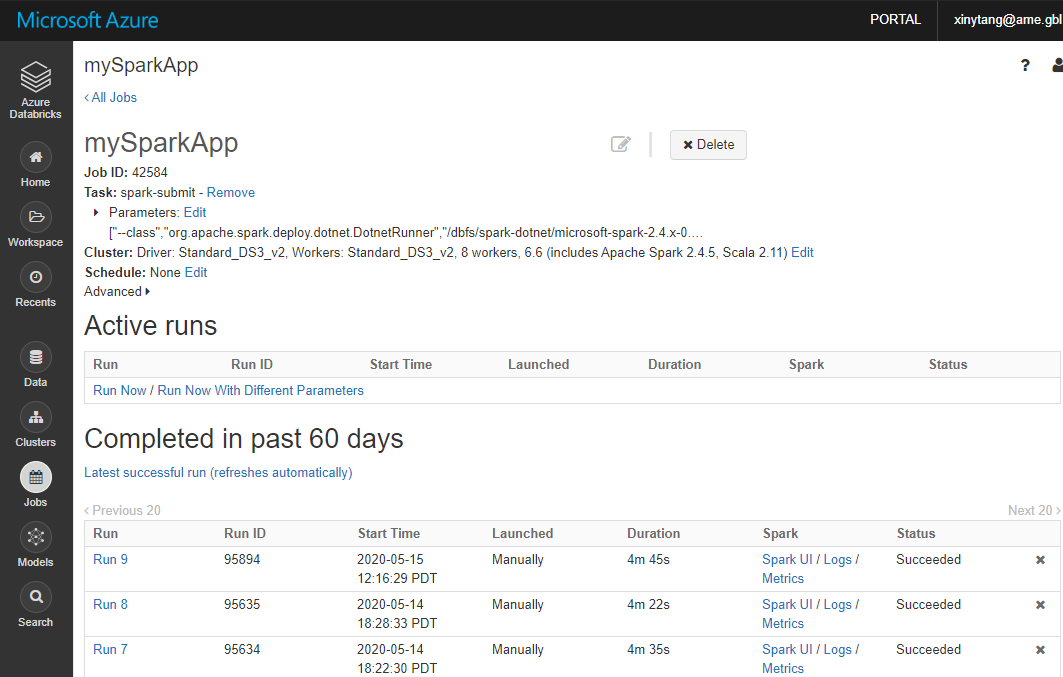
    <content type="html"><![CDATA[<h1 id="Deploy-Spark-NET-app-on-Databricks"><a href="#Deploy-Spark-NET-app-on-Databricks" class="headerlink" title="Deploy Spark .NET app on Databricks"></a>Deploy Spark .NET app on Databricks</h1><p>I struggled to deploy a Spark .NET app on Databricks scheduled by Azure Data Factory pipeline. Here are the notes on the solutions how I finally figured out. </p><p>From this chapter, you can step-by-step create a Spark .NET app and deploy it either on Databricks directly or scheduled by an Azure Data Factory pipeline.</p><h2 id="Prepare-a-Spark-NET-application"><a href="#Prepare-a-Spark-NET-application" class="headerlink" title="Prepare a Spark .NET application"></a>Prepare a Spark .NET application</h2><p>This <a href="https://docs.microsoft.com/en-us/dotnet/spark/tutorials/get-started" target="_blank" rel="noopener">doc</a> teaches you how to run a Spark .NET app using .NET Core. If you are familiar with .NET, we can simplify the process as:</p><ol><li><p><strong>Prepare environment</strong>.</p><p>1.1 Install the following dependencies: <strong>.NET</strong>, <strong>Java</strong>, compression software, <strong>Apache Spark</strong>, <strong>.NET for Apache Spark</strong>, <strong>WinUtils</strong>.</p><p>1.2 Set <em><code>DOTNET_WORKER_DIR</code></em> environment variable.</p><p>1.3 Verify you have all dependencies: you are good if you run <code>dotnet</code>, <code>java</code>,<code>mvn</code>,<code>spark-shell</code>from command line successfully.</p></li><li><p><strong>Code a demo app to count words</strong>.</p><figure class="highlight plain"><table><tr><td class="gutter"><pre><span class="line">1</span><br><span class="line">2</span><br><span class="line">3</span><br><span class="line">4</span><br><span class="line">5</span><br><span class="line">6</span><br><span class="line">7</span><br><span class="line">8</span><br><span class="line">9</span><br><span class="line">10</span><br><span class="line">11</span><br><span class="line">12</span><br><span class="line">13</span><br><span class="line">14</span><br><span class="line">15</span><br><span class="line">16</span><br><span class="line">17</span><br><span class="line">18</span><br><span class="line">19</span><br><span class="line">20</span><br><span class="line">21</span><br><span class="line">22</span><br><span class="line">23</span><br><span class="line">24</span><br><span class="line">25</span><br><span class="line">26</span><br><span class="line">27</span><br><span class="line">28</span><br><span class="line">29</span><br><span class="line">30</span><br><span class="line">31</span><br><span class="line">32</span><br><span class="line">33</span><br><span class="line">34</span><br></pre></td><td class="code"><pre><span class="line">using Microsoft.Spark.Sql;</span><br><span class="line"></span><br><span class="line">namespace MySparkApp</span><br><span class="line">&#123;</span><br><span class="line">    class Program</span><br><span class="line">    &#123;</span><br><span class="line">        static void Main(string[] args)</span><br><span class="line">        &#123;</span><br><span class="line">            &#x2F;&#x2F; Create a Spark session.</span><br><span class="line">            SparkSession spark &#x3D; SparkSession</span><br><span class="line">                .Builder()</span><br><span class="line">                .AppName(&quot;word_count_sample&quot;)</span><br><span class="line">                .GetOrCreate();</span><br><span class="line"></span><br><span class="line">            &#x2F;&#x2F; Create initial DataFrame.</span><br><span class="line">            DataFrame dataFrame &#x3D; spark.Read().Text(&quot;input.txt&quot;);</span><br><span class="line"></span><br><span class="line">            &#x2F;&#x2F; Count words.</span><br><span class="line">            DataFrame words &#x3D; dataFrame</span><br><span class="line">                .Select(Functions.Split(Functions.Col(&quot;value&quot;), &quot; &quot;).Alias(&quot;words&quot;))</span><br><span class="line">                .Select(Functions.Explode(Functions.Col(&quot;words&quot;))</span><br><span class="line">                .Alias(&quot;word&quot;))</span><br><span class="line">                .GroupBy(&quot;word&quot;)</span><br><span class="line">                .Count()</span><br><span class="line">                .OrderBy(Functions.Col(&quot;count&quot;).Desc());</span><br><span class="line"></span><br><span class="line">            &#x2F;&#x2F; Show results.</span><br><span class="line">            words.Show();</span><br><span class="line"></span><br><span class="line">            &#x2F;&#x2F; Stop Spark session.</span><br><span class="line">            spark.Stop();</span><br><span class="line">        &#125;</span><br><span class="line">    &#125;</span><br><span class="line">&#125;</span><br></pre></td></tr></table></figure></li></ol><ol start="3"><li><p><strong>Build your app</strong>.</p><figure class="highlight plain"><table><tr><td class="gutter"><pre><span class="line">1</span><br></pre></td><td class="code"><pre><span class="line">dotnet build</span><br></pre></td></tr></table></figure></li><li><p><strong>Locally submit your app to run on Apache Spark</strong>.</p><figure class="highlight plain"><table><tr><td class="gutter"><pre><span class="line">1</span><br><span class="line">2</span><br><span class="line">3</span><br><span class="line">4</span><br><span class="line">5</span><br></pre></td><td class="code"><pre><span class="line">spark-submit \</span><br><span class="line">--class org.apache.spark.deploy.dotnet.DotnetRunner \</span><br><span class="line">--master local \</span><br><span class="line">microsoft-spark-2.4.x-&lt;version&gt;.jar \</span><br><span class="line">dotnet HelloSpark.dll</span><br></pre></td></tr></table></figure></li><li><p><strong>If it is successful, you can see the word count data written on the console</strong>.</p></li></ol><h2 id="Prepare-dependencies-on-Databricks"><a href="#Prepare-dependencies-on-Databricks" class="headerlink" title="Prepare dependencies on Databricks"></a>Prepare dependencies on Databricks</h2><ol><li><p>Download <a href="https://github.com/dotnet/spark/releases/download/v0.6.0/Microsoft.Spark.Worker.netcoreapp2.1.linux-x64-0.6.0.tar.gz" target="_blank" rel="noopener">Microsoft.Spark.Worker</a> which helps Apache Spark execute your app.</p></li><li><p>Download <a href="https://github.com/xinyeah/Spark/blob/master/dotnet/deployment/install-worker.sh" target="_blank" rel="noopener">install-worker.sh</a> which copys .NET for Apache Spark dependencies into your cluster’s nodes.</p></li><li><p>Download <a href="https://github.com/xinyeah/Spark/blob/master/dotnet/deployment/db-init.sh" target="_blank" rel="noopener">db-init.sh</a> which installs dependencies on your Databricks cluster.</p></li><li><p>Publish your Spark .NET app.</p><figure class="highlight plain"><table><tr><td class="gutter"><pre><span class="line">1</span><br></pre></td><td class="code"><pre><span class="line">dotnet publish -c Release -f netcoreapp3.1 -r ubuntu.16.04-x64</span><br></pre></td></tr></table></figure></li><li><p>Compress the published app files in the previous step. Navigate to mySparkApp/bin/Release/netcoreapp3.1/ubuntu.16.04-x64, compress <code>Publish</code> folder as a zip file.</p></li><li><p>Upload files to DBFS.</p><figure class="highlight plain"><table><tr><td class="gutter"><pre><span class="line">1</span><br><span class="line">2</span><br><span class="line">3</span><br><span class="line">4</span><br><span class="line">5</span><br><span class="line">6</span><br><span class="line">7</span><br><span class="line">8</span><br><span class="line">9</span><br><span class="line">10</span><br></pre></td><td class="code"><pre><span class="line">databricks fs cp db-init.sh dbfs:&#x2F;spark-dotnet&#x2F;db-init.sh</span><br><span class="line">databricks fs cp install-worker.sh dbfs:&#x2F;spark-dotnet&#x2F;install-worker.sh</span><br><span class="line">databricks fs cp Microsoft.Spark.Worker.netcoreapp3.1.linux-x64-0.6.0.tar.gz dbfs:&#x2F;spark-dotnet&#x2F;   Microsoft.Spark.Worker.netcoreapp2.1.linux-x64-0.6.0.tar.gz</span><br><span class="line"></span><br><span class="line">cd mySparkApp</span><br><span class="line">databricks fs cp input.txt dbfs:&#x2F;input.txt</span><br><span class="line"></span><br><span class="line">cd mySparkApp\bin\Release\netcoreapp3.1\ubuntu.16.04-x64 directory</span><br><span class="line">databricks fs cp mySparkApp.zip dbfs:&#x2F;spark-dotnet&#x2F;publish.zip</span><br><span class="line">databricks fs cp microsoft-spark-2.4.x-0.6.0.jar dbfs:&#x2F;spark-dotnet&#x2F;microsoft-spark-2.4.x-0.6.0.jar</span><br></pre></td></tr></table></figure></li></ol><ol start="7"><li>Then all the dependencies are ready. We can deploy it on Databricks.</li></ol><h2 id="How-to-deploy"><a href="#How-to-deploy" class="headerlink" title="How to deploy"></a>How to deploy</h2><p>We can run .NET for Apache Spark apps on Databricks, but it is not what we usually do for Python or Scala jobs. For the Python or Scala jobs, we can just start a Notebook task for them. But for Spark .NET job, we need to use the “spark-submit” or “Jar” tasks. </p><h3 id="Scheduled-by-Azure-Data-Factory-pipeline"><a href="#Scheduled-by-Azure-Data-Factory-pipeline" class="headerlink" title="Scheduled by Azure Data Factory pipeline"></a>Scheduled by Azure Data Factory pipeline</h3><h4 id="Deploy-using-Set-Jar"><a href="#Deploy-using-Set-Jar" class="headerlink" title="Deploy using Set Jar"></a>Deploy using Set Jar</h4><ol><li><p>Generate a <strong>Databricks access token</strong> for Azure Data Factory to access. </p><p>1.1 In Databricks workspace, select your user profile in the upper right, and select  <strong>User Settings</strong>.</p><p><img src="https://raw.githubusercontent.com/xinyeah/xinyeah.github.io/master/images/image-20200617105838264.png" alt="image-20200617105838264"></p><p>1.2 Select <strong>Generate New Token</strong> under the <strong>Access Tokens</strong> tab.</p><p><img src="https://raw.githubusercontent.com/xinyeah/xinyeah.github.io/master/images/image-20200617105851323.png" alt="image-20200617105851323"></p><p>1.3 Save the access token for later use in creating a Databricks linked service. Usually save it in Azure Key Vault for security.</p></li><li><p>Navigated to the <strong>Pipelines</strong> page on Azure Data Factory, create a new pipeline, search for <strong>Databricks</strong> activities, drag the Jar task to panel.</p><p><img src="https://raw.githubusercontent.com/xinyeah/xinyeah.github.io/master/images/image-20200617104722883.png" alt="image-20200617104722883"></p></li><li><p>In the <strong>Jar</strong> activity Demo, updates the paths and settings as needed. <strong>Databricks linked service</strong> should be created using <strong>access token</strong> generated on Databricks previously. Remember to add init script for cluster settings.</p><p><img src="https://raw.githubusercontent.com/xinyeah/xinyeah.github.io/master/images/image-20200617104957870.png" alt="image-20200617104957870"></p></li><li><p>Check the <strong>Jar</strong> settings. <strong>Main class name</strong> is org.apache.spark.deploy.dotnet.DotnetRunner. <strong>Parameters</strong> will pass to the main class. it must have your app publish.zip and your app name as the first two parameters. The rest parameters are what your app need. <strong>Append libraries</strong> are microsoft-spark-2.4.x-0.10.0.jar on dbfs.</p><p><img src="https://raw.githubusercontent.com/xinyeah/xinyeah.github.io/master/images/image-20200617113228776.png" alt="image-20200617113228776"></p></li><li><p>Click <strong>Debug</strong> to run a test for the current pipeline.</p></li><li><p>Save the newly added pipeline by click <strong>Publish all</strong>.</p></li></ol><h3 id="Directly-on-databricks"><a href="#Directly-on-databricks" class="headerlink" title="Directly on databricks"></a>Directly on databricks</h3><h4 id="1-Deploy-using-Spark-submit"><a href="#1-Deploy-using-Spark-submit" class="headerlink" title="1. Deploy using Spark-submit"></a>1. Deploy using Spark-submit</h4><ol><li><p>Navigate to Databricks Workspace and create a job. Select Task as spark-submit. Set job parameters。</p><p><img src="https://raw.githubusercontent.com/xinyeah/xinyeah.github.io/master/images/image-20200617113422955.png" alt="image-20200617113422955"></p></li><li><p>When configure Cluster, need to add init script located on DBFS (Databricks Filesystem).</p><p><img src="https://raw.githubusercontent.com/xinyeah/xinyeah.github.io/master/images/image-20200616164936163.png" alt="image-20200616164936163"></p></li><li><p>select <strong>Run Now</strong> to test the job. Once the job’s cluster is created, your Spark job will be submitted.</p><p><img src="https://raw.githubusercontent.com/xinyeah/xinyeah.github.io/master/images/image-20200617104003375.png" alt="image-20200617104003375"></p></li></ol><h4 id="2-Deploy-using-Set-Jar"><a href="#2-Deploy-using-Set-Jar" class="headerlink" title="2. Deploy using Set Jar"></a>2. Deploy using Set Jar</h4><p>We can also use the <strong>Jar</strong> task to deploy on Databricks. The settings should be the same with the one <a href="#deploy-using-set-jar">triggered by Azure Data Factory</a>.</p><h2 id="Reference"><a href="#Reference" class="headerlink" title="Reference"></a>Reference</h2><p><a href="https://docs.microsoft.com/en-us/dotnet/spark/how-to-guides/databricks-deploy-methods" target="_blank" rel="noopener">https://docs.microsoft.com/en-us/dotnet/spark/how-to-guides/databricks-deploy-methods</a></p><p><a href="https://docs.microsoft.com/en-us/azure/data-factory/solution-template-databricks-notebook" target="_blank" rel="noopener">https://docs.microsoft.com/en-us/azure/data-factory/solution-template-databricks-notebook</a></p><p><a href="https://docs.microsoft.com/en-us/azure/data-factory/transform-data-databricks-jar" target="_blank" rel="noopener">https://docs.microsoft.com/en-us/azure/data-factory/transform-data-databricks-jar</a></p><p><a href="https://docs.microsoft.com/en-us/dotnet/spark/tutorials/get-started" target="_blank" rel="noopener">https://docs.microsoft.com/en-us/dotnet/spark/tutorials/get-started</a></p><p><a href="https://dotnet.microsoft.com/learn/data/spark-tutorial/intro" target="_blank" rel="noopener">https://dotnet.microsoft.com/learn/data/spark-tutorial/intro</a></p>]]></content>
    
    <summary type="html">
    
      I struggled to deploy a Spark .NET app on Databricks scheduled by Azure Data Factory pipeline. Here are the notes on the solutions how I finally figured out. From this chapter, you can step-by-step create a Spark .NET app and deploy it either on Databricks directly or scheduled by an Azure Data Factory pipeline.
    
    </summary>
    
    
      <category term="Databricks" scheme="https://xinyeah.github.io/categories/Databricks/"/>
    
    
      <category term="Spark" scheme="https://xinyeah.github.io/tags/Spark/"/>
    
      <category term="Databricks" scheme="https://xinyeah.github.io/tags/Databricks/"/>
    
      <category term=".NET" scheme="https://xinyeah.github.io/tags/NET/"/>
    
      <category term="Azure Data Factory" scheme="https://xinyeah.github.io/tags/Azure-Data-Factory/"/>
    
      <category term="deploy" scheme="https://xinyeah.github.io/tags/deploy/"/>
    
  </entry>
  
  <entry>
    <title>搭建Hexo + Github Pages + Travis CI个人站点的详细教程</title>
    <link href="https://xinyeah.github.io/deploy-hexo-site/"/>
    <id>https://xinyeah.github.io/deploy-hexo-site/</id>
    <published>2020-06-07T21:27:46.000Z</published>
    <updated>2020-09-23T00:46:23.740Z</updated>
    
    <content type="html"><![CDATA[<h2 id="技术栈选择：-Github-Pages-Hexo-Travis-CI"><a href="#技术栈选择：-Github-Pages-Hexo-Travis-CI" class="headerlink" title="技术栈选择： Github Pages + Hexo + Travis CI"></a>技术栈选择： Github Pages + Hexo + Travis CI</h2><p>首要原因：没钱。这是一套<strong>免费</strong>的组合拳。</p><p>在众多站点选择中，最终选择了Github Pages。主要还是因为熟悉Github的版本控制，以及Github对其他平台很好的集成。官方推荐的静态站点生成器(static site generator)是<a href="https://help.github.com/en/github/working-with-github-pages/setting-up-a-github-pages-site-with-jekyll" target="_blank" rel="noopener">Jekyll</a>。还可以在项目仓库Settings页面中的Github Pages部分，选择Jekyll的theme。</p><p>Hexo也是一款静态站点生成框架(static site generator)，基于Node.js 。通过Hexo可以使用Markdown来写文章，不用太关注排版和格式。而且Hexo比较成熟，有很多稳定的好看的主题。</p><p>Travis CI 是持续集成(continuous integration)的平台，可以监控repo具体分支上的代码变动，自动触发build和test。帮助实现频繁的merge小段代码的Best practice。有了自动部署，就可以不受开发平台限制，不需要搭建环境也可以发布文章。</p><h2 id="安装环境"><a href="#安装环境" class="headerlink" title="安装环境"></a>安装环境</h2><ol><li><p>安装并配置github</p></li><li><p>安装Node.js 和 npm</p><p>npm(Node Package Manager), 是用来开发和分享Javascript代码的工具。在这里<a href="https://nodejs.org/en/download/下载Node.js的最新版本，就包含了NPM。" target="_blank" rel="noopener">https://nodejs.org/en/download/下载Node.js的最新版本，就包含了NPM。</a></p><p>打开Command Prompt，验证安装成功了Node.js和NPM。</p><figure class="highlight plain"><table><tr><td class="gutter"><pre><span class="line">1</span><br><span class="line">2</span><br><span class="line">3</span><br><span class="line">4</span><br><span class="line">5</span><br></pre></td><td class="code"><pre><span class="line">$ node –v</span><br><span class="line">v12.17.0</span><br><span class="line"></span><br><span class="line">$ npm –v</span><br><span class="line">6.14.4</span><br></pre></td></tr></table></figure></li><li><p>安装Hexo</p><figure class="highlight plain"><table><tr><td class="gutter"><pre><span class="line">1</span><br><span class="line">2</span><br><span class="line">3</span><br><span class="line">4</span><br><span class="line">5</span><br><span class="line">6</span><br><span class="line">7</span><br></pre></td><td class="code"><pre><span class="line">$ npm install -g hexo-cli</span><br><span class="line"></span><br><span class="line">$ hexo -v</span><br><span class="line">hexo-cli: 3.1.0</span><br><span class="line">os: Windows_NT 10.0.18363 win32 x64</span><br><span class="line">node: 12.17.0</span><br><span class="line">...</span><br></pre></td></tr></table></figure></li><li><p>安装Hexo-deployer-git</p><figure class="highlight plain"><table><tr><td class="gutter"><pre><span class="line">1</span><br></pre></td><td class="code"><pre><span class="line">$ npm install hexo-deployer-git --save</span><br></pre></td></tr></table></figure></li></ol><h2 id="初始化Hexo-Github-Pages项目"><a href="#初始化Hexo-Github-Pages项目" class="headerlink" title="初始化Hexo+Github Pages项目"></a>初始化Hexo+Github Pages项目</h2><ol><li><p>初始化<YourName>.github.io为Hexo项目</p><figure class="highlight plain"><table><tr><td class="gutter"><pre><span class="line">1</span><br><span class="line">2</span><br><span class="line">3</span><br><span class="line">4</span><br><span class="line">5</span><br><span class="line">6</span><br><span class="line">7</span><br><span class="line">8</span><br><span class="line">9</span><br><span class="line">10</span><br><span class="line">11</span><br></pre></td><td class="code"><pre><span class="line">$ mkdir &lt;YourName&gt;.github.io</span><br><span class="line"></span><br><span class="line">$ cd &lt;YourName&gt;.github.io</span><br><span class="line"></span><br><span class="line">$ hexo init</span><br><span class="line">INFO  Copying data to ~&#x2F;***&#x2F;&lt;YourName&gt;.github.io</span><br><span class="line">INFO  You are almost done! Don&#39;t forget to run &#39;npm install&#39; before you start blogging with Hexo!</span><br><span class="line"></span><br><span class="line">$ npm install</span><br><span class="line"></span><br><span class="line">$ git init</span><br></pre></td></tr></table></figure></li><li><p>初始化后的目录如下：</p><blockquote><p>.<br>├── _config.yml   #站点的配置文件<br>├── package.json   #应用的基本信息和依赖应用<br>├── scaffolds   #模板文件夹。新建文章时候，默认填充的内容模板。<br>├── source   #markdown和html文件会被解析存放在public文件夹中<br>|   ├── _drafts   #新建的draft会保存在这里<br>|   └── _posts   #新建post的时候会保存在这里<br>└── themes   #主题文件夹，根据主题来生成静态页面</p></blockquote></li><li><p>Github上创建一个<YourName>.github.io为名的公开的代码库。其中Yourname应该跟你的Github用户名保持一致。</p><p>为了防止错误，不要用 <em>README</em>, license, 或者 <code>gitignore</code>文件初始化项目.</p><p>代码库Settings中查看Github Pages相关设置，你就拥有了自己的站点：https://<YourName>.github.io。对于个人站点，只能将master分支设置为发布来源。</p><p><img src="https://raw.githubusercontent.com/xinyeah/xinyeah.github.io/master/images/image-20200617193336642.png" alt="image-20200617193336642"></p></li><li><p>复制代码库的URL。</p></li></ol><p><img src="https://raw.githubusercontent.com/xinyeah/xinyeah.github.io/master/images/image-20200617181657118.png" alt="image-20200617181657118"></p><ol start="2"><li><p>在本地代码库添加remote upstream</p><figure class="highlight plain"><table><tr><td class="gutter"><pre><span class="line">1</span><br><span class="line">2</span><br><span class="line">3</span><br><span class="line">4</span><br></pre></td><td class="code"><pre><span class="line">$ git remote add origin remote-repository-URL</span><br><span class="line"># Sets the new remote</span><br><span class="line">$ git remote -v</span><br><span class="line"># Verifies the new remote URL</span><br></pre></td></tr></table></figure></li><li><p>根据<a href="https://hexo.io/docs/configuration" target="_blank" rel="noopener">文档</a>，修改_config.yml文件中关于站点的配置信息。</p></li><li><p>执行以下命令， 验证效果</p><figure class="highlight plain"><table><tr><td class="gutter"><pre><span class="line">1</span><br><span class="line">2</span><br><span class="line">3</span><br><span class="line">4</span><br></pre></td><td class="code"><pre><span class="line">$ hexo clean</span><br><span class="line">$ hexo generate</span><br><span class="line">$ hexo server</span><br><span class="line">INFO  Hexo is running at http:&#x2F;&#x2F;0.0.0.0:4000&#x2F;. Press Ctrl+C to stop.</span><br></pre></td></tr></table></figure></li></ol><h2 id="添加博客主题"><a href="#添加博客主题" class="headerlink" title="添加博客主题"></a>添加博客主题</h2><ol><li><p>Fork <a href="https://github.com/xinyeah/hexo-theme-next" target="_blank" rel="noopener">hexo-theme-next</a> 项目到自己的仓库.</p></li><li><p>运行以下命令将 Fork 出来的仓库 pull 到本地子模块</p><figure class="highlight plain"><table><tr><td class="gutter"><pre><span class="line">1</span><br><span class="line">2</span><br></pre></td><td class="code"><pre><span class="line">cd &lt;YourName&gt;.github.io</span><br><span class="line">git submodule add https:&#x2F;&#x2F;github.com&#x2F;&lt;YourName&gt;&#x2F;hexo-theme-next.git themes&#x2F;next</span><br></pre></td></tr></table></figure></li></ol><p>运行该命令后会在项目根目录生成 <code>.gitmodules</code> 文件，文件内容如下：</p><figure class="highlight plain"><table><tr><td class="gutter"><pre><span class="line">1</span><br><span class="line">2</span><br><span class="line">3</span><br></pre></td><td class="code"><pre><span class="line">[submodule &quot;themes&#x2F;next&quot;]</span><br><span class="line">    path &#x3D; themes&#x2F;next</span><br><span class="line">    url &#x3D; https:&#x2F;&#x2F;github.com&#x2F;sugartxy&#x2F;hexo-theme-next</span><br></pre></td></tr></table></figure><ol start="3"><li><p>对主题进行个性化配置后，先要 check in子模块，在 theme/next 目录下依次执行：</p><figure class="highlight plain"><table><tr><td class="gutter"><pre><span class="line">1</span><br><span class="line">2</span><br><span class="line">3</span><br><span class="line">4</span><br></pre></td><td class="code"><pre><span class="line">cd theme&#x2F;next</span><br><span class="line">git add .</span><br><span class="line">git commit -m &quot;update config file&quot;</span><br><span class="line">git push origin master</span><br></pre></td></tr></table></figure></li><li><p>切换到项目根目录，打开站点配置文件(<YourName>.github.io/_config.yml)，修改theme字段, 使得主题修改生效。</p><figure class="highlight plain"><table><tr><td class="gutter"><pre><span class="line">1</span><br></pre></td><td class="code"><pre><span class="line">theme: next</span><br></pre></td></tr></table></figure></li><li><p>执行以下命令， 验证效果</p><figure class="highlight plain"><table><tr><td class="gutter"><pre><span class="line">1</span><br><span class="line">2</span><br></pre></td><td class="code"><pre><span class="line">$ hexo server</span><br><span class="line">INFO  Hexo is running at http:&#x2F;&#x2F;0.0.0.0:4000&#x2F;. Press Ctrl+C to stop.</span><br></pre></td></tr></table></figure></li><li><p>在项目根目录下，将代码check in到项目仓库下：</p><figure class="highlight plain"><table><tr><td class="gutter"><pre><span class="line">1</span><br><span class="line">2</span><br><span class="line">3</span><br><span class="line">4</span><br></pre></td><td class="code"><pre><span class="line">cd &lt;YourName&gt;.github.io</span><br><span class="line">git add .</span><br><span class="line">git commit -m &quot;add submodule&quot;</span><br><span class="line">git push origin master</span><br></pre></td></tr></table></figure></li></ol><h2 id="生成博客并部署"><a href="#生成博客并部署" class="headerlink" title="生成博客并部署"></a>生成博客并部署</h2><ol><li><p>执行以下命令生成新的博客</p><figure class="highlight plain"><table><tr><td class="gutter"><pre><span class="line">1</span><br><span class="line">2</span><br></pre></td><td class="code"><pre><span class="line">$ hexo new post &lt;title&gt;</span><br><span class="line">INFO  Created: ~&#x2F;&lt;YourName&gt;&#x2F;&lt;YourName&gt;.github.io&#x2F;source&#x2F;_posts&#x2F;&lt;title&gt;.md</span><br></pre></td></tr></table></figure><p>将博客内容写在新创建的markdown文件里。</p></li><li><p>如果themes/next路径下的内容做了改变，在themes/next路径下，将更改的代码check in到刚刚Fork的repo中。</p></li><li><p>在YourName.github.io项目路径下，将更改的代码check in到YourName.github.io repo 的master分支.</p></li><li><p>在本地部署。使用后续Travis CI配置后，可以省略此步骤。</p><p>4.1 修改配置文件<code>_config.yml</code>中关于部署的字段</p><figure class="highlight plain"><table><tr><td class="gutter"><pre><span class="line">1</span><br><span class="line">2</span><br><span class="line">3</span><br><span class="line">4</span><br></pre></td><td class="code"><pre><span class="line">deploy:</span><br><span class="line">  type: git</span><br><span class="line">  repository: https:&#x2F;&#x2F;git@github.com&#x2F;&lt;YourName&gt;&#x2F;&lt;YourName&gt;.github.io.git</span><br><span class="line">  branch: master</span><br></pre></td></tr></table></figure><p>4.2  执行以下命令部署站点，当执行 <code>hexo deploy</code> 时，Hexo 会将 <code>public</code> 目录中的文件和目录推送至 <code>_config.yml</code> 中指定的远端仓库和分支中，并且<strong>完全覆盖</strong>该分支下的已有内容。</p><figure class="highlight plain"><table><tr><td class="gutter"><pre><span class="line">1</span><br><span class="line">2</span><br><span class="line">3</span><br></pre></td><td class="code"><pre><span class="line">$ hexo clean # 清除缓存文件（db.json）和已经生成的静态文件（public）</span><br><span class="line">$ hexo generate  # 生成静态文件</span><br><span class="line">$ hexo deploy  # 部署网站</span><br></pre></td></tr></table></figure></li></ol><h2 id="使用Travis-CI自动化部署"><a href="#使用Travis-CI自动化部署" class="headerlink" title="使用Travis CI自动化部署"></a>使用Travis CI自动化部署</h2><p>Travis CI对于开源的Repository是免费的，只需要拥有Github账户和至少一个项目，在项目中增加.travis.yml文件，就可以使用Travis CI。<a href="https://hexo.io/zh-cn/docs/github-pages" target="_blank" rel="noopener">Hexo文档</a>中详细说明了如何使用Travis CI将Hexo自动部署到Github Pages。只需要做如下修改:</p><ol><li><p>修改.travis.yml文件</p><figure class="highlight plain"><table><tr><td class="gutter"><pre><span class="line">1</span><br><span class="line">2</span><br><span class="line">3</span><br><span class="line">4</span><br><span class="line">5</span><br><span class="line">6</span><br><span class="line">7</span><br><span class="line">8</span><br><span class="line">9</span><br><span class="line">10</span><br><span class="line">11</span><br><span class="line">12</span><br><span class="line">13</span><br><span class="line">14</span><br><span class="line">15</span><br><span class="line">16</span><br><span class="line">17</span><br><span class="line">18</span><br><span class="line">19</span><br><span class="line">20</span><br><span class="line">21</span><br><span class="line">22</span><br><span class="line">23</span><br><span class="line">24</span><br><span class="line">25</span><br><span class="line">26</span><br><span class="line">27</span><br><span class="line">28</span><br><span class="line">29</span><br></pre></td><td class="code"><pre><span class="line">sudo: required</span><br><span class="line">language: node_js</span><br><span class="line">node_js:</span><br><span class="line">  - 10 # use nodejs v10 LTS</span><br><span class="line"></span><br><span class="line">branches:</span><br><span class="line">  only:</span><br><span class="line">    - master # build master branch only</span><br><span class="line"></span><br><span class="line"></span><br><span class="line"># Start: Build Lifecycle</span><br><span class="line">install:</span><br><span class="line">  - npm install -g hexo-cli</span><br><span class="line">  - npm install</span><br><span class="line">  - npm install hexo-deployer-git --save</span><br><span class="line">  # 设置git提交名，邮箱</span><br><span class="line">  - git config user.name &quot;&lt;YourName&gt;&quot;</span><br><span class="line">  - git config user.email &quot;&lt;YourEmail&gt;&quot;</span><br><span class="line">  # 替换同目录下的_config.yml文件中gh_token字符串为travis后台刚才配置的变量，注意此处sed命令用了双引号。单引号无效！</span><br><span class="line">  - sed -i &quot;s&#x2F;gh_token&#x2F;$&#123;GH_TOKEN&#125;&#x2F;g&quot; .&#x2F;_config.yml</span><br><span class="line"></span><br><span class="line">script:</span><br><span class="line">  - hexo clean</span><br><span class="line">  - hexo generate # generate static files</span><br><span class="line">  </span><br><span class="line">after_success: # 只有前面步骤成功了才会触发</span><br><span class="line">  - hexo deploy</span><br><span class="line">  </span><br><span class="line"># End: Build LifeCycle</span><br></pre></td></tr></table></figure></li></ol><ol start="2"><li><p>修改_config.yml文件</p><figure class="highlight plain"><table><tr><td class="gutter"><pre><span class="line">1</span><br><span class="line">2</span><br><span class="line">3</span><br><span class="line">4</span><br><span class="line">5</span><br></pre></td><td class="code"><pre><span class="line">deploy:</span><br><span class="line">  type: git</span><br><span class="line">  # 下方的gh_token会被.travis.yml中sed命令替换</span><br><span class="line">  repo: https:&#x2F;&#x2F;gh_token@github.com&#x2F;&lt;YourName&gt;&#x2F;&lt;YourName&gt;.github.io.git</span><br><span class="line">  branch: master</span><br></pre></td></tr></table></figure></li></ol><p>这样每一次更新博客，只需要check in Markdown文件到master 分支，就会自动部署。在Travis CI网站中可以看到部署的状态。</p><p><img src="https://raw.githubusercontent.com/xinyeah/xinyeah.github.io/master/images/image-20200617204126319.png" alt="image-20200617204126319"></p><h2 id="其他问题"><a href="#其他问题" class="headerlink" title="其他问题"></a>其他问题</h2><h3 id="1-添加评论系统-gitalk"><a href="#1-添加评论系统-gitalk" class="headerlink" title="1. 添加评论系统-gitalk"></a>1. 添加评论系统-gitalk</h3><p>参考文献：<a href="https://www.standbyside.com/2018/12/04/add-comment-function-to-next/" target="_blank" rel="noopener">https://www.standbyside.com/2018/12/04/add-comment-function-to-next/</a></p><p>1.1 进入<a href="https://github.com/settings/applications/new" target="_blank" rel="noopener">github</a>新建一个认证application</p><p><img src="https://raw.githubusercontent.com/xinyeah/xinyeah.github.io/master/images/image-20200618225450931.png" alt="image-20200618225450931"></p><p>创建完后会生成这个application对应的 Client ID 和 Client Secret</p><p>1.2 在自己的github中创建一个同名的repository</p><p>以后每篇文章都会对应这里的一个issue，这篇文章的comments和like都会记录到对应的issue里。</p><p>1.3 Next主题v7.6.0中已经集成了gitalk，只需要进入主题的_config.yml里修改comments相关属性</p><figure class="highlight plain"><table><tr><td class="gutter"><pre><span class="line">1</span><br><span class="line">2</span><br><span class="line">3</span><br><span class="line">4</span><br><span class="line">5</span><br><span class="line">6</span><br><span class="line">7</span><br><span class="line">8</span><br><span class="line">9</span><br><span class="line">10</span><br><span class="line">11</span><br><span class="line">12</span><br><span class="line">13</span><br><span class="line">14</span><br><span class="line">15</span><br><span class="line">16</span><br><span class="line">17</span><br><span class="line">18</span><br><span class="line">19</span><br><span class="line">20</span><br><span class="line">21</span><br><span class="line">22</span><br><span class="line">23</span><br><span class="line">24</span><br><span class="line">25</span><br><span class="line">26</span><br><span class="line">27</span><br><span class="line">28</span><br><span class="line">29</span><br><span class="line">30</span><br></pre></td><td class="code"><pre><span class="line">comments:</span><br><span class="line">    # Available values: tabs | buttons</span><br><span class="line">    style: tabs</span><br><span class="line">    # Choose a comment system to be displayed by default.</span><br><span class="line">    # Available values: changyan | disqus | disqusjs | gitalk | livere | valine</span><br><span class="line">    active: gitalk</span><br><span class="line">    # Setting &#96;true&#96; means remembering the comment system selected by the visitor.</span><br><span class="line">    storage: true</span><br><span class="line">    # Lazyload all comment systems.</span><br><span class="line">    lazyload: false</span><br><span class="line">    # Modify texts or order for any navs, here are some examples.</span><br><span class="line">    nav:</span><br><span class="line">        #disqus:</span><br><span class="line">        #  text: Load Disqus</span><br><span class="line">        #  order: -1</span><br><span class="line">        #gitalk:</span><br><span class="line">        #  order: -2</span><br><span class="line">    </span><br><span class="line">gitalk:</span><br><span class="line">    enable: true # 启用gitalk</span><br><span class="line">    github_id: # 你的github用户名</span><br><span class="line">    repo: # 刚才你创建的repository的名字，只要名字，不要全链接</span><br><span class="line">    client_id: # 你的 Client ID</span><br><span class="line">    client_secret: # 你的 Client Secret</span><br><span class="line">    admin_user: # 联系人, 页面显示联系**初始化评论</span><br><span class="line">    distraction_free_mode: true  # Facebook-like distraction free mode</span><br><span class="line">    # Gitalk&#39;s display language depends on user&#39;s browser or system environment</span><br><span class="line">    # If you want everyone visiting your site to see a uniform language, you can set a force language value</span><br><span class="line">    # Available values: en | es-ES | fr | ru | zh-CN | zh-TW</span><br><span class="line">    language:</span><br></pre></td></tr></table></figure><h3 id="2-本地图片无法显示"><a href="#2-本地图片无法显示" class="headerlink" title="2. 本地图片无法显示"></a>2. 本地图片无法显示</h3><p>参考文献：<a href="https://merrier.wang/20190111/image-skills-in-hexo.html" target="_blank" rel="noopener">https://merrier.wang/20190111/image-skills-in-hexo.html</a></p><p>2.1  在路径 yourName.github.io/source下创建images文件夹，将图片全部放在这个文件夹下。</p><p>2.2 Markdown访问图片方式：</p><figure class="highlight plain"><table><tr><td class="gutter"><pre><span class="line">1</span><br></pre></td><td class="code"><pre><span class="line">![](&#x2F;images&#x2F;image_name.jpg)</span><br></pre></td></tr></table></figure><h2 id="参考文献"><a href="#参考文献" class="headerlink" title="参考文献"></a>参考文献</h2><p>Next中文教程：<a href="https://theme-next.iissnan.com/getting-started.html#description-setting" target="_blank" rel="noopener">https://theme-next.iissnan.com/getting-started.html#description-setting</a></p><p>Hexo中文教程：<a href="https://hexo.io/zh-cn/docs/" target="_blank" rel="noopener">https://hexo.io/zh-cn/docs/</a></p><p>Github Pages中文教程：<a href="https://help.github.com/cn/github/working-with-github-pages" target="_blank" rel="noopener">https://help.github.com/cn/github/working-with-github-pages</a></p><p>Travis官方文档：<a href="https://docs.travis-ci.com/user/tutorial/" target="_blank" rel="noopener">https://docs.travis-ci.com/user/tutorial/</a></p>]]></content>
    
    <summary type="html">
    
      本文详细介绍了如何快速的搭建Hexo + Github Pages + Travis CI个人站点。以Next主题为例，介绍了在项目中添加了作为git submodule的主题后，如何正确的部署站点和发表文章。以及如何使用Travis CI将Hexo项目自动部署到Github Pages。
    
    </summary>
    
    
      <category term="搭建站点" scheme="https://xinyeah.github.io/categories/%E6%90%AD%E5%BB%BA%E7%AB%99%E7%82%B9/"/>
    
    
      <category term="Hexo" scheme="https://xinyeah.github.io/tags/Hexo/"/>
    
      <category term="git submodule" scheme="https://xinyeah.github.io/tags/git-submodule/"/>
    
      <category term="Next" scheme="https://xinyeah.github.io/tags/Next/"/>
    
      <category term="Travis CI" scheme="https://xinyeah.github.io/tags/Travis-CI/"/>
    
      <category term="Github Pages" scheme="https://xinyeah.github.io/tags/Github-Pages/"/>
    
  </entry>
  
</feed>