<?xml version="1.0" encoding="utf-8"?><feed xmlns="http://www.w3.org/2005/Atom" xml:lang="en"><generator uri="https://jekyllrb.com/" version="4.3.4">Jekyll</generator><link href="https://yakhyo.github.io/feed.xml" rel="self" type="application/atom+xml" /><link href="https://yakhyo.github.io/" rel="alternate" type="text/html" hreflang="en" /><updated>2026-03-05T22:05:44+09:00</updated><id>https://yakhyo.github.io/feed.xml</id><title type="html">Home</title><subtitle>Exploring Life Through the Lens of a Computer Scientist: AI, Tech, and Beyond.</subtitle><author><name>Yakhyokhuja Valikhujaev</name></author><entry><title type="html">UniFace: All-in-One Face Analysis Toolkit for Production</title><link href="https://yakhyo.github.io/blog/2025/11/uniface-all-in-one-face-analysis/" rel="alternate" type="text/html" title="UniFace: All-in-One Face Analysis Toolkit for Production" /><published>2025-11-11T12:00:00+09:00</published><updated>2025-11-11T12:00:00+09:00</updated><id>https://yakhyo.github.io/blog/2025/11/uniface-all-in-one-face-analysis</id><content type="html" xml:base="https://yakhyo.github.io/blog/2025/11/uniface-all-in-one-face-analysis/"><![CDATA[<p><strong>UniFace</strong> is a lightweight, production-ready face analysis library built on ONNX Runtime. It provides a unified API for face detection, recognition, landmark detection, attribute analysis, face parsing, gaze estimation, anti-spoofing, and privacy features.</p>

<p><a href="https://opensource.org/licenses/MIT"><img src="https://img.shields.io/badge/License-MIT-blue.svg" alt="License" /></a>
<img src="https://img.shields.io/badge/Python-3.10%2B-blue" alt="Python" />
<a href="https://pypi.org/project/uniface/"><img src="https://img.shields.io/pypi/v/uniface.svg" alt="PyPI Version" /></a>
<a href="https://pepy.tech/project/uniface"><img src="https://pepy.tech/badge/uniface" alt="Downloads" /></a></p>

<hr />

<h2 id="documentation-moved">Documentation Moved</h2>

<p>The comprehensive documentation for UniFace has been moved to a dedicated documentation site with tutorials, API references, and guides.</p>

<p><strong><a href="https://yakhyo.github.io/uniface/">UniFace Docs Page →</a></strong></p>

<hr />

<h2 id="interactive-notebooks">Interactive Notebooks</h2>

<p>Run examples directly in your browser with Google Colab:</p>

<table>
  <thead>
    <tr>
      <th>Notebook</th>
      <th>Colab</th>
      <th>Description</th>
    </tr>
  </thead>
  <tbody>
    <tr>
      <td>Face Detection</td>
      <td><a href="https://colab.research.google.com/github/yakhyo/uniface/blob/main/examples/01_face_detection.ipynb"><img src="https://colab.research.google.com/assets/colab-badge.svg" alt="Open In Colab" /></a></td>
      <td>Detect faces and 5-point landmarks</td>
    </tr>
    <tr>
      <td>Face Alignment</td>
      <td><a href="https://colab.research.google.com/github/yakhyo/uniface/blob/main/examples/02_face_alignment.ipynb"><img src="https://colab.research.google.com/assets/colab-badge.svg" alt="Open In Colab" /></a></td>
      <td>Align faces for recognition</td>
    </tr>
    <tr>
      <td>Face Verification</td>
      <td><a href="https://colab.research.google.com/github/yakhyo/uniface/blob/main/examples/03_face_verification.ipynb"><img src="https://colab.research.google.com/assets/colab-badge.svg" alt="Open In Colab" /></a></td>
      <td>Compare faces for identity</td>
    </tr>
    <tr>
      <td>Face Search</td>
      <td><a href="https://colab.research.google.com/github/yakhyo/uniface/blob/main/examples/04_face_search.ipynb"><img src="https://colab.research.google.com/assets/colab-badge.svg" alt="Open In Colab" /></a></td>
      <td>Find a person in group photos</td>
    </tr>
    <tr>
      <td>Face Analyzer</td>
      <td><a href="https://colab.research.google.com/github/yakhyo/uniface/blob/main/examples/05_face_analyzer.ipynb"><img src="https://colab.research.google.com/assets/colab-badge.svg" alt="Open In Colab" /></a></td>
      <td>All-in-one face analysis</td>
    </tr>
    <tr>
      <td>Face Parsing</td>
      <td><a href="https://colab.research.google.com/github/yakhyo/uniface/blob/main/examples/06_face_parsing.ipynb"><img src="https://colab.research.google.com/assets/colab-badge.svg" alt="Open In Colab" /></a></td>
      <td>Semantic face segmentation</td>
    </tr>
    <tr>
      <td>Face Anonymization</td>
      <td><a href="https://colab.research.google.com/github/yakhyo/uniface/blob/main/examples/07_face_anonymization.ipynb"><img src="https://colab.research.google.com/assets/colab-badge.svg" alt="Open In Colab" /></a></td>
      <td>Privacy-preserving blur</td>
    </tr>
    <tr>
      <td>Gaze Estimation</td>
      <td><a href="https://colab.research.google.com/github/yakhyo/uniface/blob/main/examples/08_gaze_estimation.ipynb"><img src="https://colab.research.google.com/assets/colab-badge.svg" alt="Open In Colab" /></a></td>
      <td>Gaze direction estimation</td>
    </tr>
  </tbody>
</table>

<p><a href="https://yakhyo.github.io/uniface/notebooks/">View all notebooks →</a></p>

<hr />

<h2 id="quick-install">Quick Install</h2>

<div class="language-bash highlighter-rouge"><div class="highlight"><pre class="highlight"><code>pip <span class="nb">install </span>uniface
</code></pre></div></div>

<p>For GPU support:</p>

<div class="language-bash highlighter-rouge"><div class="highlight"><pre class="highlight"><code>pip <span class="nb">install </span>uniface[gpu]
</code></pre></div></div>

<hr />

<p><strong>Resources:</strong></p>
<ul>
  <li><strong>Documentation</strong>: <a href="https://yakhyo.github.io/uniface/">yakhyo.github.io/uniface</a></li>
  <li><strong>GitHub</strong>: <a href="https://github.com/yakhyo/uniface">github.com/yakhyo/uniface</a></li>
  <li><strong>PyPI</strong>: <a href="https://pypi.org/project/uniface">pypi.org/project/uniface</a></li>
</ul>]]></content><author><name>Yakhyokhuja Valikhujaev</name></author><category term="deep-learning" /><category term="computer-vision" /><category term="facial-recognition" /><summary type="html"><![CDATA[UniFace is a lightweight, production-ready face analysis library built on ONNX Runtime. It provides a unified API for face detection, recognition, landmark detection, attribute analysis, face parsing, gaze estimation, anti-spoofing, and privacy features.]]></summary></entry><entry><title type="html">Face Parsing using BiSeNet for Real-time Semantic Segmentation</title><link href="https://yakhyo.github.io/blog/2024/11/face-parsing-bisenet/" rel="alternate" type="text/html" title="Face Parsing using BiSeNet for Real-time Semantic Segmentation" /><published>2024-11-29T12:00:00+09:00</published><updated>2024-11-29T12:00:00+09:00</updated><id>https://yakhyo.github.io/blog/2024/11/face-parsing-bisenet</id><content type="html" xml:base="https://yakhyo.github.io/blog/2024/11/face-parsing-bisenet/"><![CDATA[<p>BiSeNet (Bilateral Segmentation Network) is a state-of-the-art model for real-time semantic segmentation, initially proposed in the paper <a href="https://arxiv.org/abs/1808.00897">Bilateral Segmentation Network for Real-time Semantic Segmentation</a>. The architecture addresses the fundamental challenge in semantic segmentation: achieving high accuracy while maintaining real-time performance.</p>

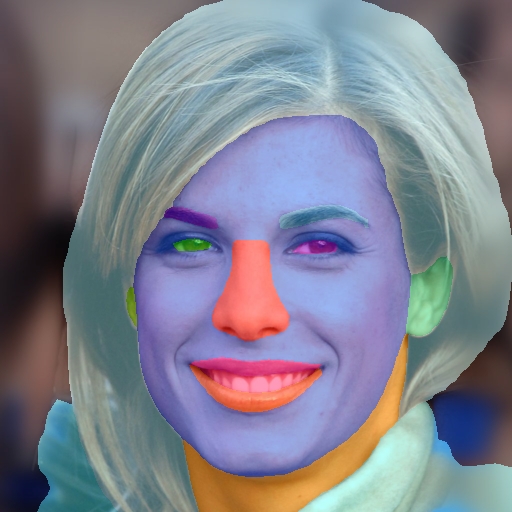
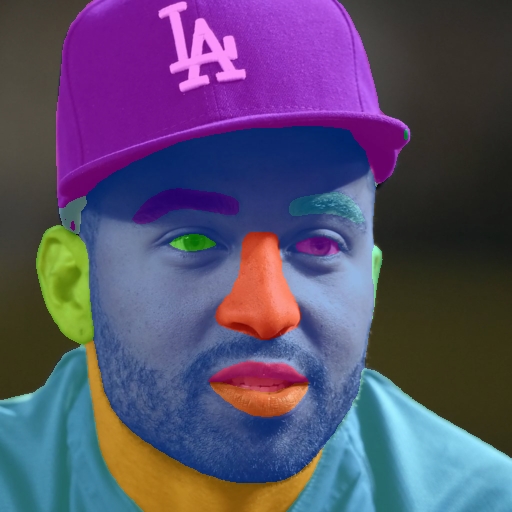
<h2 id="architecture-overview">Architecture Overview</h2>

<p>BiSeNet combines two complementary paths to balance spatial detail and semantic context:</p>

<ul>
  <li><strong>Spatial Path</strong>: Preserves high-resolution spatial information through a shallow network with wide channels, capturing fine-grained details essential for precise segmentation boundaries.</li>
  <li><strong>Context Path</strong>: Employs a lightweight backbone to aggregate rich contextual information with a large receptive field, enabling accurate semantic understanding.</li>
</ul>

<p>The fusion of these paths through a Feature Fusion Module ensures high segmentation accuracy with low computational cost, making it ideal for applications requiring real-time performance on resource-constrained devices.</p>

<p><a href="https://github.com/yakhyo/face-parsing/releases"><img src="https://img.shields.io/github/downloads/yakhyo/face-parsing/total" alt="Downloads" /></a>
<a href="https://github.com/yakhyo/face-parsing/stargazers"><img src="https://img.shields.io/github/stars/yakhyo/face-parsing" alt="GitHub Repo stars" /></a>
<a href="https://github.com/yakhyo/face-parsing"><img src="https://img.shields.io/badge/GitHub-Repository-blue?logo=github" alt="GitHub Repository" /></a></p>

<hr />

<h2 id="key-features">Key Features</h2>

<ul>
  <li><strong>Accurate Facial Parsing</strong>: Segments detailed facial features including eyes, nose, mouth, and hair for precise analysis</li>
  <li><strong>ONNX Support</strong>: Seamless conversion from PyTorch to ONNX format for cross-platform deployment</li>
  <li><strong>Flexible Backbones</strong>: Support for ResNet18 and ResNet34, allowing trade-offs between speed and accuracy</li>
  <li><strong>Production-Ready</strong>: Optimized for real-time applications in AR/VR, digital makeup, and facial analysis systems</li>
</ul>

<hr />

<h2 id="performance-comparison">Performance Comparison</h2>

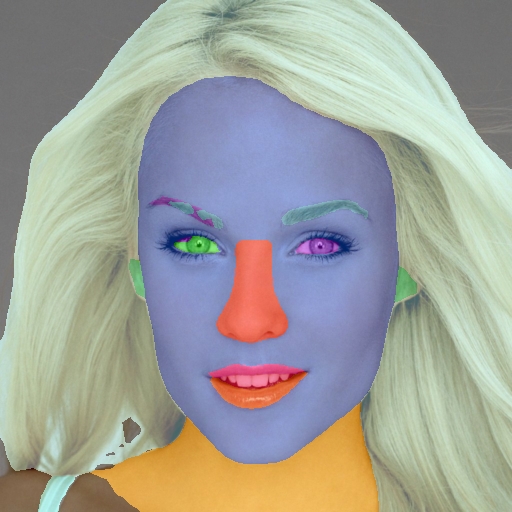
<h3 id="resnet34-backbone">ResNet34 Backbone</h3>

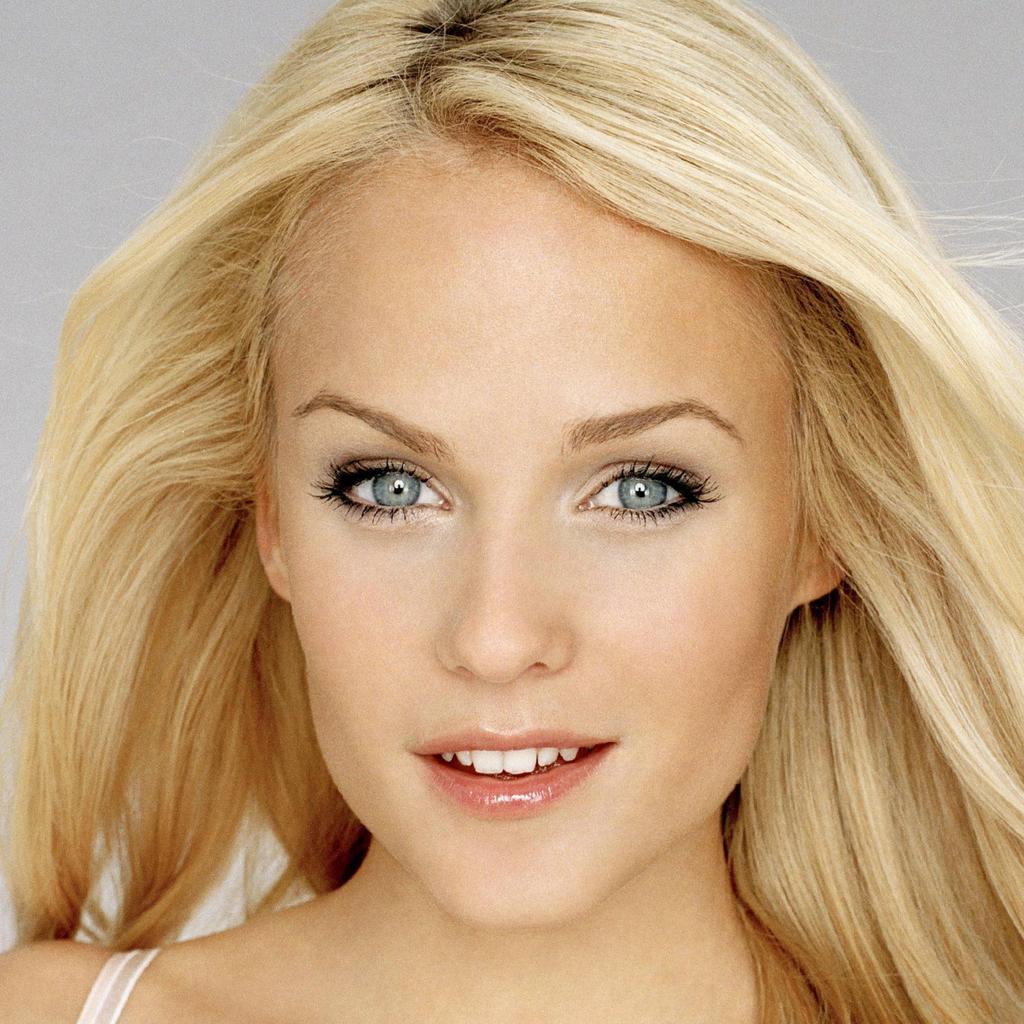
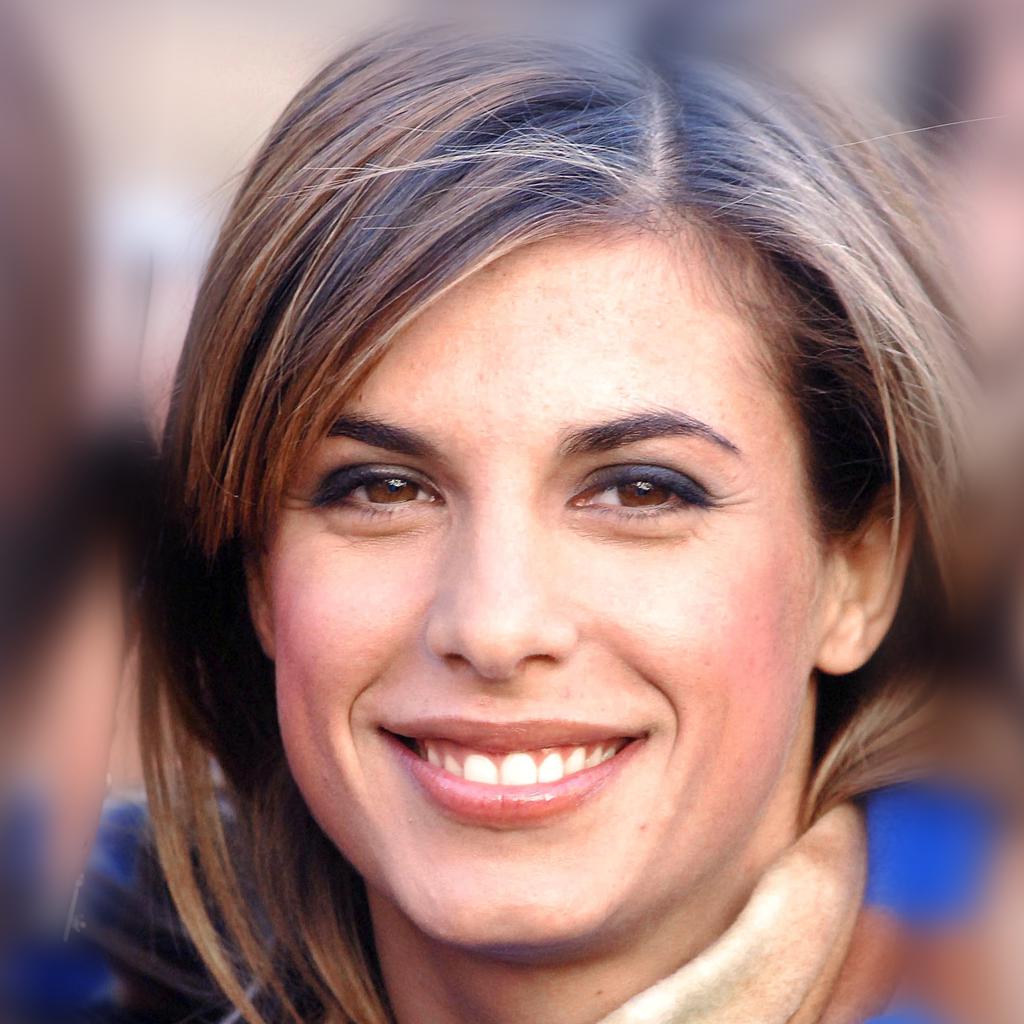
<div align="center">
<img src="https://yakhyo.github.io/face-parsing/assets/images/1.jpg" width="24%" />
<img src="https://yakhyo.github.io/face-parsing/assets/images/1112.jpg" width="24%" />
<img src="https://yakhyo.github.io/face-parsing/assets/images/1309.jpg" width="24%" />
<img src="https://yakhyo.github.io/face-parsing/assets/images/1321.jpg" width="24%" />
</div>

<div align="center">
<img src="https://yakhyo.github.io/face-parsing/assets/results/resnet34/1.jpg" width="24%" />
<img src="https://yakhyo.github.io/face-parsing/assets/results/resnet34/1112.jpg" width="24%" />
<img src="https://yakhyo.github.io/face-parsing/assets/results/resnet34/1309.jpg" width="24%" />
<img src="https://yakhyo.github.io/face-parsing/assets/results/resnet34/1321.jpg" width="24%" />
</div>

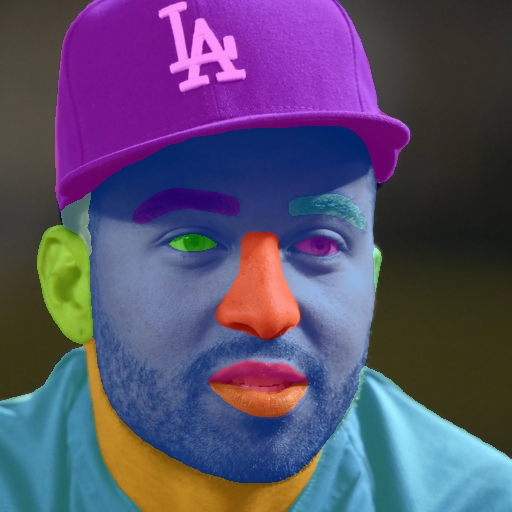
<h3 id="resnet18-backbone">ResNet18 Backbone</h3>

<div align="center">
<img src="https://yakhyo.github.io/face-parsing/assets/results/resnet18/1.jpg" width="24%" />
<img src="https://yakhyo.github.io/face-parsing/assets/results/resnet18/1112.jpg" width="24%" />
<img src="https://yakhyo.github.io/face-parsing/assets/results/resnet18/1309.jpg" width="24%" />
<img src="https://yakhyo.github.io/face-parsing/assets/results/resnet18/1321.jpg" width="24%" />
</div>

<hr />

<h2 id="getting-started">Getting Started</h2>

<p>Clone the repository and install dependencies:</p>

<div class="language-bash highlighter-rouge"><div class="highlight"><pre class="highlight"><code>git clone https://github.com/yakhyo/face-parsing.git
<span class="nb">cd </span>face-parsing
pip <span class="nb">install</span> <span class="nt">-r</span> requirements.txt
</code></pre></div></div>

<p>Pre-trained weights are available for download:</p>
<ul>
  <li><a href="https://github.com/yakhyo/face-parsing/releases/download/v0.0.1/resnet18.pt">ResNet18 Model</a></li>
  <li><a href="https://github.com/yakhyo/face-parsing/releases/download/v0.0.1/resnet34.pt">ResNet34 Model</a></li>
</ul>

<h2 id="use-cases">Use Cases</h2>

<p>This implementation is particularly useful for:</p>
<ul>
  <li><strong>Digital Makeup Applications</strong>: Precise facial feature segmentation for virtual makeup try-on</li>
  <li><strong>Face Swapping</strong>: Accurate face region extraction for deepfake and face replacement systems</li>
  <li><strong>Facial Analysis</strong>: Detailed feature extraction for emotion recognition and facial attribute analysis</li>
  <li><strong>AR/VR Applications</strong>: Real-time face parsing for augmented reality filters and effects</li>
</ul>

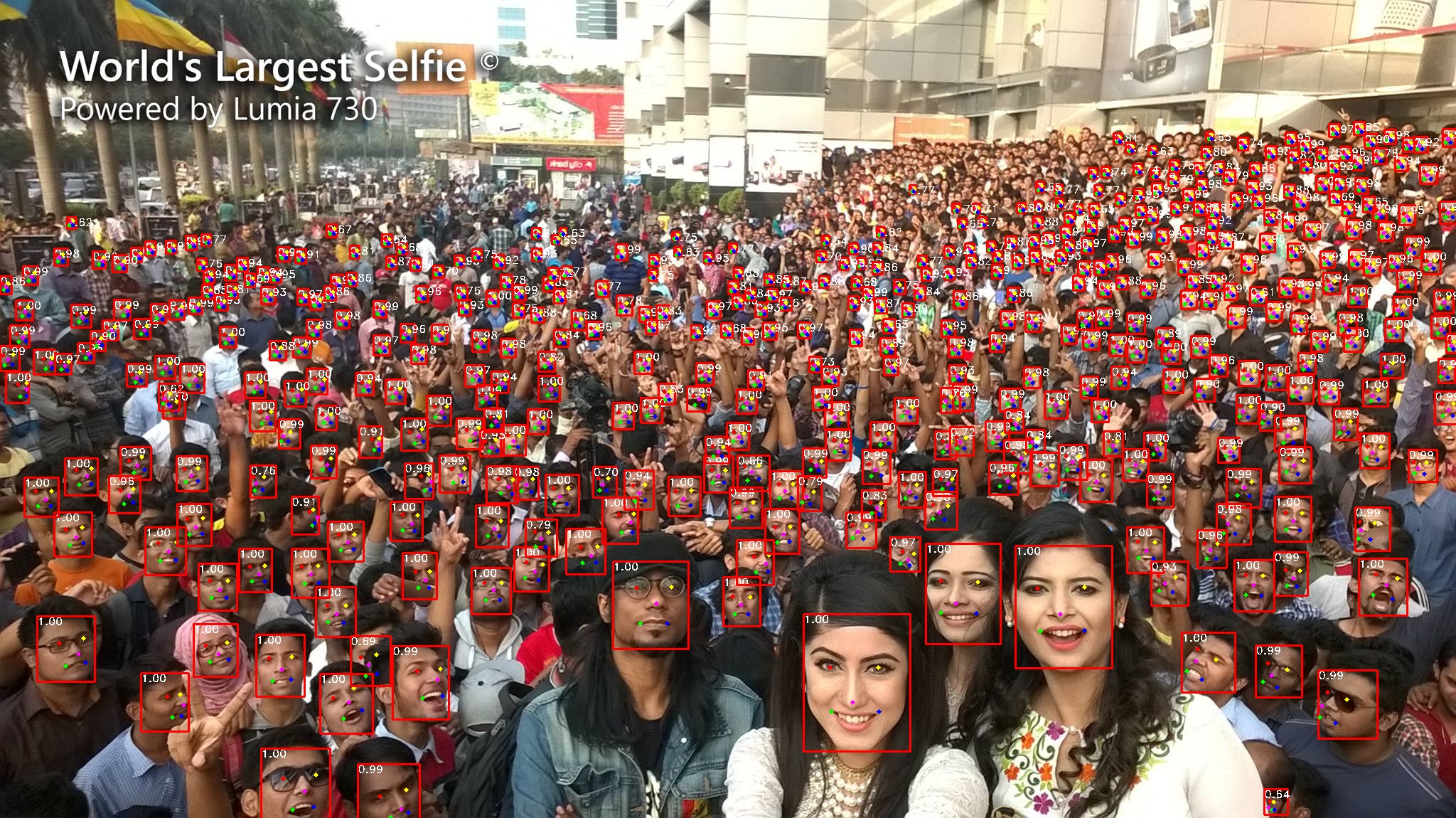
<p>Visit the <a href="https://github.com/yakhyo/face-parsing">GitHub repository</a> for detailed documentation, training scripts, and inference examples.</p>]]></content><author><name>Yakhyokhuja Valikhujaev</name></author><category term="deep-learning" /><category term="computer-vision" /><category term="semantic-segmentation" /><category term="bisenet" /><summary type="html"><![CDATA[BiSeNet (Bilateral Segmentation Network) is a state-of-the-art model for real-time semantic segmentation, initially proposed in the paper Bilateral Segmentation Network for Real-time Semantic Segmentation. The architecture addresses the fundamental challenge in semantic segmentation: achieving high accuracy while maintaining real-time performance.]]></summary></entry><entry><title type="html">Tiny-Face: Ultra-lightweight Face Detection for Mobile and Edge Devices</title><link href="https://yakhyo.github.io/blog/2024/11/efficient-tiny-face-detector/" rel="alternate" type="text/html" title="Tiny-Face: Ultra-lightweight Face Detection for Mobile and Edge Devices" /><published>2024-11-09T12:00:00+09:00</published><updated>2024-11-09T12:00:00+09:00</updated><id>https://yakhyo.github.io/blog/2024/11/efficient-tiny-face-detector</id><content type="html" xml:base="https://yakhyo.github.io/blog/2024/11/efficient-tiny-face-detector/"><![CDATA[<p>Tiny-Face is an ultra-lightweight face detection model specifically designed for deployment on mobile and edge devices where computational resources are limited. Unlike conventional face detection models that prioritize accuracy at the cost of model size and inference speed, Tiny-Face achieves an optimal balance between detection performance and computational efficiency.</p>

<p>Building upon the core concepts of RetinaFace, Tiny-Face introduces several key optimizations that make it practical for real-world deployment on mobile phones, embedded systems, and IoT devices. The model is streamlined to use minimal memory and processing power while maintaining high precision in face detection across various challenging conditions.</p>

<p><a href="https://github.com/yakhyo/tiny-face-pytorch">GitHub Repository</a></p>

<p><a href="https://github.com/yakhyo/tiny-face-pytorch/releases"><img src="https://img.shields.io/github/downloads/yakhyo/tiny-face-pytorch/total" alt="Downloads" /></a>
<a href="https://github.com/yakhyo/tiny-face-pytorch/stargazers"><img src="https://img.shields.io/github/stars/yakhyo/tiny-face-pytorch" alt="GitHub Repo stars" /></a>
<a href="https://github.com/yakhyo/tiny-face-pytorch"><img src="https://img.shields.io/badge/GitHub-Repository-blue?logo=github" alt="GitHub Repository" /></a></p>

<video controls="" autoplay="" loop="" src="https://github.com/user-attachments/assets/faf65b91-db76-4538-beca-87fc65566e51" muted="false" width="100%"></video>

<div align="center">
  <img src="https://yakhyo.github.io/tiny-face-pytorch/assets/largeselfi_retina.jpg" />
</div>

<h2 id="key-features">Key Features</h2>

<ul>
  <li><strong>Ultra-lightweight Architecture</strong>: Model sizes ranging from 1.4MB to 1.8MB, ideal for mobile deployment</li>
  <li><strong>Multiple Configurations</strong>: SlimFace, RFB, and MobileNet variants optimized for different resource constraints</li>
  <li><strong>Real-time Performance</strong>: Achieves real-time inference on mobile CPUs without GPU acceleration</li>
  <li><strong>Pretrained Models</strong>: Ready-to-use weights trained on WiderFace dataset for immediate deployment</li>
</ul>

<h2 id="performance-on-widerface-dataset">Performance on WiderFace Dataset</h2>

<h3 id="multi-scale-image-size">Multi-scale Image Size</h3>

<table>
  <thead>
    <tr>
      <th>Models</th>
      <th>Pretrained on ImageNet</th>
      <th>Easy</th>
      <th>Medium</th>
      <th>Hard</th>
      <th>#Params(M)</th>
      <th>Size(MB)</th>
    </tr>
  </thead>
  <tbody>
    <tr>
      <td>SlimFace</td>
      <td>False</td>
      <td>79.50%</td>
      <td>79.40%</td>
      <td>68.36%</td>
      <td>0.343</td>
      <td>1.4</td>
    </tr>
    <tr>
      <td>RFB</td>
      <td>False</td>
      <td>80.49%</td>
      <td>81.51%</td>
      <td>75.73%</td>
      <td>0.359</td>
      <td>1.5</td>
    </tr>
    <tr>
      <td>RetinaFace</td>
      <td>True</td>
      <td>87.69%</td>
      <td>86.39%</td>
      <td>80.21%</td>
      <td>0.426</td>
      <td>1.8</td>
    </tr>
  </tbody>
</table>

<h3 id="original-image-size">Original Image Size</h3>

<table>
  <thead>
    <tr>
      <th>Models</th>
      <th>Pretrained on ImageNet</th>
      <th>Easy</th>
      <th>Medium</th>
      <th>Hard</th>
      <th>#Params(M)</th>
    </tr>
  </thead>
  <tbody>
    <tr>
      <td>SlimFace</td>
      <td>False</td>
      <td>87.10%</td>
      <td>84.36%</td>
      <td>67.38%</td>
      <td>0.343</td>
    </tr>
    <tr>
      <td>RFB</td>
      <td>False</td>
      <td>87.09%</td>
      <td>84.61%</td>
      <td>69.22%</td>
      <td>0.359</td>
    </tr>
    <tr>
      <td>RetinaFace</td>
      <td>True</td>
      <td>90.26%</td>
      <td>87.48%</td>
      <td>72.85%</td>
      <td>0.426</td>
    </tr>
  </tbody>
</table>

<h2 id="technical-implementation">Technical Implementation</h2>

<p>The model architecture incorporates several optimization techniques:</p>

<ul>
  <li><strong>Depthwise Separable Convolutions</strong>: Reduces computational cost while maintaining representational power</li>
  <li><strong>Feature Pyramid Network</strong>: Multi-scale feature extraction for detecting faces of various sizes</li>
  <li><strong>Efficient Anchor Design</strong>: Optimized anchor boxes specifically tuned for face detection tasks</li>
  <li><strong>Quantization-Friendly</strong>: Architecture designed to maintain accuracy after INT8 quantization</li>
</ul>

<h2 id="use-cases">Use Cases</h2>

<p>Tiny-Face is particularly well-suited for:</p>

<ul>
  <li><strong>Mobile Applications</strong>: Face detection in camera apps, social media filters, and photo editing tools</li>
  <li><strong>Edge Computing</strong>: Real-time face detection on IoT devices and smart cameras</li>
  <li><strong>Embedded Systems</strong>: Integration into resource-constrained hardware for access control and monitoring</li>
  <li><strong>Offline Applications</strong>: Face detection without requiring cloud connectivity or GPU acceleration</li>
</ul>

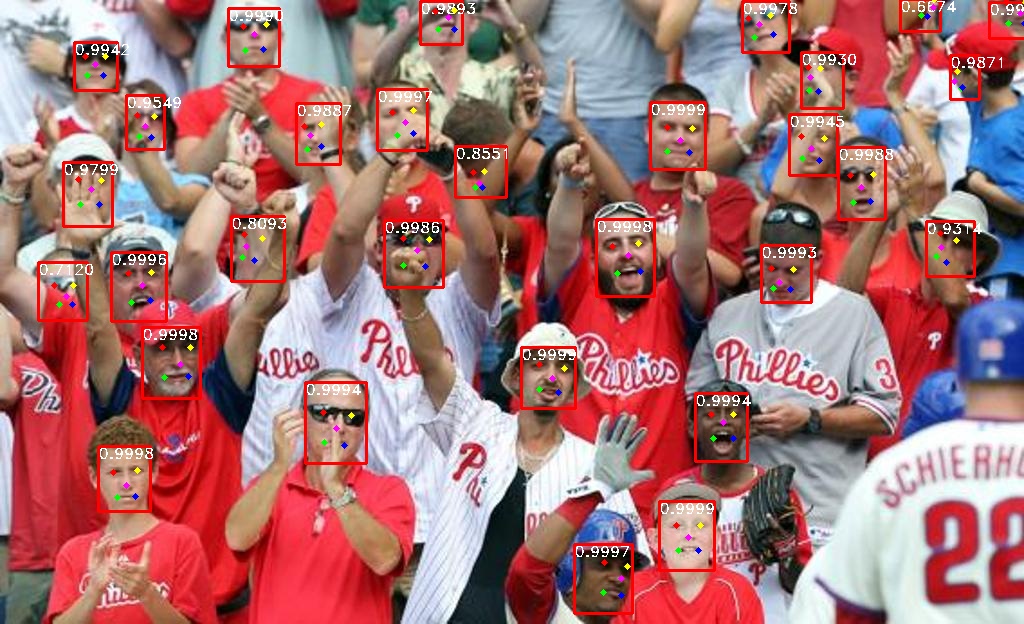
<p>Explore the <a href="https://github.com/yakhyo/tiny-face-pytorch">GitHub repository</a> for detailed setup instructions, training scripts, and deployment examples for various platforms including Android, iOS, and embedded Linux systems.</p>]]></content><author><name>Yakhyokhuja Valikhujaev</name></author><category term="deep-learning" /><category term="computer-vision" /><category term="facial-recognition" /><summary type="html"><![CDATA[Tiny-Face is an ultra-lightweight face detection model specifically designed for deployment on mobile and edge devices where computational resources are limited. Unlike conventional face detection models that prioritize accuracy at the cost of model size and inference speed, Tiny-Face achieves an optimal balance between detection performance and computational efficiency.]]></summary></entry><entry><title type="html">RetinaFace: Single-stage Dense Face Localisation in the Wild</title><link href="https://yakhyo.github.io/blog/2024/10/high-performance-retinaface-detector/" rel="alternate" type="text/html" title="RetinaFace: Single-stage Dense Face Localisation in the Wild" /><published>2024-10-28T12:00:00+09:00</published><updated>2024-10-28T12:00:00+09:00</updated><id>https://yakhyo.github.io/blog/2024/10/high-performance-retinaface-detector</id><content type="html" xml:base="https://yakhyo.github.io/blog/2024/10/high-performance-retinaface-detector/"><![CDATA[<p>RetinaFace is a robust single-stage face detection framework designed for dense face localisation in unconstrained environments. This implementation provides a production-ready solution with multiple backbone options, enabling flexible deployment across different hardware constraints and accuracy requirements.</p>

<p>The model excels at detecting faces across extreme variations in scale, pose, and occlusion, making it particularly effective for real-world applications where faces may appear at any size or orientation within the image.</p>

<blockquote>
  <p><strong>UniFace Library</strong>: For easier integration, check out <a href="https://github.com/yakhyo/uniface">UniFace</a>, a lightweight Python library built on models from this repository. UniFace provides a simple API for face detection, alignment, and landmark extraction.
<a href="https://pypi.org/project/uniface/"><img src="https://img.shields.io/pypi/v/uniface.svg" alt="PyPI Version" /></a> <a href="https://github.com/yakhyo/uniface/stargazers"><img src="https://img.shields.io/github/stars/yakhyo/uniface" alt="GitHub Stars" /></a></p>
</blockquote>

<p><a href="https://github.com/yakhyo/retinaface-pytorch">GitHub Repository</a></p>

<p><a href="https://github.com/yakhyo/retinaface-pytorch/releases"><img src="https://img.shields.io/github/downloads/yakhyo/retinaface-pytorch/total" alt="Downloads" /></a>
<a href="https://github.com/yakhyo/retinaface-pytorch/stargazers"><img src="https://img.shields.io/github/stars/yakhyo/retinaface-pytorch" alt="GitHub Repo stars" /></a>
<a href="https://github.com/yakhyo/retinaface-pytorch"><img src="https://img.shields.io/badge/GitHub-Repository-blue?logo=github" alt="GitHub Repository" /></a></p>

<video controls="" autoplay="" loop="" src="https://github.com/user-attachments/assets/ad279fea-33fb-43f1-884f-282e6d54c809" muted="false" width="100%"></video>

<div align="center">
  <img src="https://yakhyo.github.io/retinaface-pytorch/assets/mv2_test.jpg" />
</div>

<h2 id="key-features">Key Features</h2>

<ul>
  <li><strong>Multiple Backbone Options</strong>: Choose from MobileNetV1 (various width multipliers), MobileNetV2, ResNet18, and ResNet34</li>
  <li><strong>Improved Training Strategy</strong>: Enhanced filtering of small faces (&lt; 16 pixels) to reduce false positives</li>
  <li><strong>ONNX Export Support</strong>: Seamless conversion for deployment on various platforms and inference engines</li>
  <li><strong>Real-time Inference</strong>: Optimized for webcam and video stream processing</li>
  <li><strong>Production-Ready</strong>: Clean, well-documented codebase with reproducible training pipelines</li>
</ul>

<h2 id="performance-on-widerface-dataset">Performance on WiderFace Dataset</h2>

<h3 id="multi-scale-image-size">Multi-scale Image Size</h3>

<table>
  <thead>
    <tr>
      <th>RetinaFace Backbones</th>
      <th>Pretrained on ImageNet</th>
      <th>Easy</th>
      <th>Medium</th>
      <th>Hard</th>
    </tr>
  </thead>
  <tbody>
    <tr>
      <td>MobileNetV1 (width mult=0.25)</td>
      <td>True</td>
      <td>88.48%</td>
      <td>87.02%</td>
      <td>80.61%</td>
    </tr>
    <tr>
      <td>MobileNetV1 (width mult=0.50)</td>
      <td>False</td>
      <td>89.42%</td>
      <td>87.97%</td>
      <td>82.40%</td>
    </tr>
    <tr>
      <td>MobileNetV1</td>
      <td>False</td>
      <td>90.59%</td>
      <td>89.14%</td>
      <td>84.13%</td>
    </tr>
    <tr>
      <td>MobileNetV2</td>
      <td>True</td>
      <td>91.70%</td>
      <td>91.03%</td>
      <td>86.60%</td>
    </tr>
    <tr>
      <td>ResNet18</td>
      <td>True</td>
      <td>92.50%</td>
      <td>91.02%</td>
      <td>86.63%</td>
    </tr>
    <tr>
      <td>ResNet34</td>
      <td>True</td>
      <td><strong>94.16%</strong></td>
      <td><strong>93.12%</strong></td>
      <td><strong>88.90%</strong></td>
    </tr>
  </tbody>
</table>

<h3 id="original-image-size">Original Image Size</h3>

<table>
  <thead>
    <tr>
      <th>RetinaFace Backbones</th>
      <th>Pretrained on ImageNet</th>
      <th>Easy</th>
      <th>Medium</th>
      <th>Hard</th>
    </tr>
  </thead>
  <tbody>
    <tr>
      <td>MobileNetV1 (width mult=0.25)</td>
      <td>True</td>
      <td>90.70%</td>
      <td>88.12%</td>
      <td>73.82%</td>
    </tr>
    <tr>
      <td>MobileNetV1 (width mult=0.50)</td>
      <td>False</td>
      <td>91.56%</td>
      <td>89.46%</td>
      <td>76.56%</td>
    </tr>
    <tr>
      <td>MobileNetV1</td>
      <td>False</td>
      <td>92.19%</td>
      <td>90.41%</td>
      <td>79.56%</td>
    </tr>
    <tr>
      <td>MobileNetV2</td>
      <td>True</td>
      <td>94.04%</td>
      <td>92.26%</td>
      <td>83.59%</td>
    </tr>
    <tr>
      <td>ResNet18</td>
      <td>True</td>
      <td>94.28%</td>
      <td>92.69%</td>
      <td>82.95%</td>
    </tr>
    <tr>
      <td>ResNet34</td>
      <td>True</td>
      <td><strong>95.07%</strong></td>
      <td><strong>93.48%</strong></td>
      <td><strong>84.40%</strong></td>
    </tr>
  </tbody>
</table>

<h2 id="architecture-highlights">Architecture Highlights</h2>

<p>RetinaFace incorporates several advanced techniques:</p>

<ul>
  <li><strong>Multi-task Learning</strong>: Simultaneously performs face detection, landmark localization, and 3D face reconstruction</li>
  <li><strong>Feature Pyramid Network</strong>: Enables detection of faces at multiple scales efficiently</li>
  <li><strong>Context Module</strong>: Increases receptive field for better handling of small faces</li>
  <li><strong>Dense Regression</strong>: Pixel-wise prediction for precise face localization</li>
</ul>

<h2 id="quick-start">Quick Start</h2>

<p>Clone the repository:</p>

<div class="language-bash highlighter-rouge"><div class="highlight"><pre class="highlight"><code>git clone https://github.com/yakhyo/retinaface-pytorch.git
<span class="nb">cd </span>retinaface-pytorch
</code></pre></div></div>

<p>Install dependencies:</p>

<div class="language-bash highlighter-rouge"><div class="highlight"><pre class="highlight"><code>pip <span class="nb">install</span> <span class="nt">-r</span> requirements.txt
</code></pre></div></div>

<p>Run webcam inference:</p>

<div class="language-bash highlighter-rouge"><div class="highlight"><pre class="highlight"><code>python detect.py <span class="nt">--network</span> mobilenetv1 <span class="nt">--weights</span> retinaface_mv1.pth
</code></pre></div></div>

<h2 id="deployment-options">Deployment Options</h2>

<p>The implementation supports various deployment scenarios:</p>

<ul>
  <li><strong>Python Inference</strong>: Direct PyTorch inference for development and testing</li>
  <li><strong>ONNX Runtime</strong>: Cross-platform deployment with optimized inference</li>
  <li><strong>Mobile Deployment</strong>: Lightweight MobileNet backbones for on-device inference</li>
  <li><strong>Server Deployment</strong>: High-accuracy ResNet backbones for cloud-based services</li>
</ul>

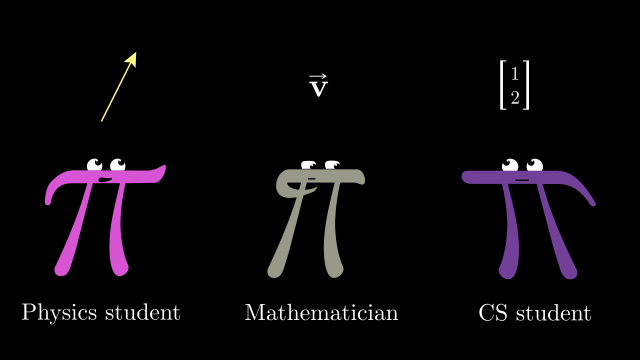
<p>For detailed documentation on training custom models, fine-tuning on specific datasets, and deployment guides, visit the <a href="https://github.com/yakhyo/retinaface-pytorch">GitHub repository</a>.</p>]]></content><author><name>Yakhyokhuja Valikhujaev</name></author><category term="deep-learning" /><category term="computer-vision" /><category term="facial-recognition" /><summary type="html"><![CDATA[RetinaFace is a robust single-stage face detection framework designed for dense face localisation in unconstrained environments. This implementation provides a production-ready solution with multiple backbone options, enabling flexible deployment across different hardware constraints and accuracy requirements.]]></summary></entry><entry><title type="html">Understanding the Geometric Perspective of Vectors in Machine Learning</title><link href="https://yakhyo.github.io/blog/2024/09/math-for-machine-learning/" rel="alternate" type="text/html" title="Understanding the Geometric Perspective of Vectors in Machine Learning" /><published>2024-09-19T12:00:00+09:00</published><updated>2024-09-19T12:00:00+09:00</updated><id>https://yakhyo.github.io/blog/2024/09/math-for-machine-learning</id><content type="html" xml:base="https://yakhyo.github.io/blog/2024/09/math-for-machine-learning/"><![CDATA[<p>While I have a strong mathematical background in calculus and linear algebra, including the ability to perform matrix operations and transformations by hand, I recently discovered a crucial gap in my understanding: the geometric interpretation of vectors and their operations.</p>

<div align="center">
  <img src="https://www.3blue1brown.com/content/lessons/2016/vectors/figures/introduction/Perspectives.svg" />
</div>

<p>This realization came as I began exploring geometric explanations of linear algebra concepts. What were previously abstract lists of numbers or array indices suddenly transformed into intuitive geometric objects—arrows pointing to specific locations in space, representing directions and magnitudes in a visually comprehensible way.</p>

<h2 id="why-geometric-intuition-matters">Why Geometric Intuition Matters</h2>

<p>Understanding vectors geometrically fundamentally changes how we approach machine learning problems:</p>

<ul>
  <li><strong>Feature Spaces</strong>: Each data point becomes a position in high-dimensional space, making concepts like similarity and distance intuitive</li>
  <li><strong>Transformations</strong>: Matrix operations become geometric transformations—rotations, scalings, and projections</li>
  <li><strong>Optimization</strong>: Gradient descent transforms from abstract calculus into following the steepest downhill path in a landscape</li>
  <li><strong>Embeddings</strong>: Word embeddings and latent representations become geometric relationships where similar concepts cluster together</li>
</ul>

<p>This geometric perspective provides deeper insight into why certain machine learning algorithms work and how to debug them when they don’t.</p>

<h2 id="recommended-learning-resources">Recommended Learning Resources</h2>

<p>For anyone working in machine learning who hasn’t yet explored the geometric foundations, I highly recommend these courses:</p>

<h3 id="linear-algebra">Linear Algebra</h3>

<ul>
  <li>
    <p><strong>Essence of Linear Algebra</strong> by 3Blue1Brown - <a href="https://www.3blue1brown.com/topics/linear-algebra">Course Link</a>
An exceptional visual introduction to linear algebra concepts with stunning animations that build geometric intuition</p>
  </li>
  <li>
    <p><strong>Mathematics for Machine Learning: Linear Algebra</strong> - <a href="https://www.coursera.org/learn/linear-algebra-machine-learning">Coursera</a>
Specifically designed for ML practitioners, covering the essential linear algebra needed for understanding modern ML algorithms</p>
  </li>
</ul>

<h3 id="calculus-and-optimization">Calculus and Optimization</h3>

<ul>
  <li><strong>Mathematics for Machine Learning: Multivariate Calculus</strong> - <a href="https://www.coursera.org/learn/multivariate-calculus-machine-learning">Coursera</a>
Focuses on the calculus concepts most relevant to machine learning, particularly gradient-based optimization</li>
</ul>

<h3 id="dimensionality-reduction">Dimensionality Reduction</h3>

<ul>
  <li><strong>Mathematics for Machine Learning: PCA</strong> - <a href="https://www.coursera.org/learn/pca-machine-learning">Coursera</a>
Explores Principal Component Analysis from both mathematical and geometric perspectives</li>
</ul>

<h2 id="practical-impact">Practical Impact</h2>

<p>This geometric understanding has practical implications for machine learning work:</p>

<ul>
  <li><strong>Better Model Design</strong>: Understanding how transformations affect data helps in designing better architectures</li>
  <li><strong>Debugging</strong>: Geometric intuition makes it easier to identify why models fail on certain data</li>
  <li><strong>Feature Engineering</strong>: Knowing how features interact geometrically guides better feature design</li>
  <li><strong>Interpretability</strong>: Geometric perspective aids in explaining model decisions to non-technical stakeholders</li>
</ul>

<p>Investing time in building this geometric intuition is one of the most valuable things you can do as a machine learning practitioner. It transforms machine learning from a collection of algorithms and formulas into an intuitive, visual discipline where you can reason about what models are doing and why.</p>]]></content><author><name>Yakhyokhuja Valikhujaev</name></author><category term="mathematics" /><category term="machine-learning" /><category term="linear-algebra" /><category term="calculus" /><summary type="html"><![CDATA[While I have a strong mathematical background in calculus and linear algebra, including the ability to perform matrix operations and transformations by hand, I recently discovered a crucial gap in my understanding: the geometric interpretation of vectors and their operations.]]></summary></entry><entry><title type="html">Real-Time Gaze Estimation Using Lightweight Deep Learning Models</title><link href="https://yakhyo.github.io/blog/2024/09/gaze-estimation/" rel="alternate" type="text/html" title="Real-Time Gaze Estimation Using Lightweight Deep Learning Models" /><published>2024-09-18T12:00:00+09:00</published><updated>2024-09-18T12:00:00+09:00</updated><id>https://yakhyo.github.io/blog/2024/09/gaze-estimation</id><content type="html" xml:base="https://yakhyo.github.io/blog/2024/09/gaze-estimation/"><![CDATA[<p>This project focuses on predicting gaze direction using lightweight deep learning models optimized for real-time performance on mobile devices. The implementation combines classification and regression techniques to create an efficient and accurate solution suitable for deployment on resource-constrained hardware.</p>

<iframe width="100%" height="480" src="https://www.youtube.com/embed/q-uxquFdPB8?si=hrtMjo17zfI4-SPq" title="YouTube video player" frameborder="0" allow="accelerometer; autoplay; clipboard-write; encrypted-media; gyroscope; picture-in-picture; web-share" referrerpolicy="strict-origin-when-cross-origin" allowfullscreen=""></iframe>

<p><a href="https://github.com/yakhyo/gaze-estimation">GitHub Repository</a></p>

<h2 id="applications-and-use-cases">Applications and Use Cases</h2>

<p>Gaze estimation technology enables a wide range of applications across multiple domains:</p>

<ul>
  <li><strong>Mobile User Experience</strong>: Hands-free navigation and attention-aware interfaces</li>
  <li><strong>Virtual and Augmented Reality</strong>: Natural interaction through eye tracking in VR/AR systems</li>
  <li><strong>Accessibility</strong>: Assistive technologies for users with limited mobility</li>
  <li><strong>Automotive Safety</strong>: Driver attention monitoring and drowsiness detection</li>
  <li><strong>Human-Computer Interaction</strong>: Intuitive control mechanisms for various devices</li>
  <li><strong>Market Research</strong>: Understanding user attention patterns and visual behavior</li>
</ul>

<h2 id="model-architecture-and-design">Model Architecture and Design</h2>

<p>The project implements multiple lightweight architectures, each optimized for different deployment scenarios:</p>

<h3 id="resnet-variants">ResNet Variants</h3>

<p>Employs residual learning techniques to enable deeper networks without degradation. The residual connections allow gradients to flow more effectively during training, resulting in better accuracy without significant computational overhead.</p>

<h3 id="mobilenet-v2">MobileNet v2</h3>

<p>Specifically designed for mobile deployment, MobileNet v2 introduces inverted residual structures and linear bottlenecks. This architecture achieves an optimal balance between model size, inference speed, and accuracy, making it ideal for on-device gaze estimation.</p>

<h3 id="mobileone-s0-s4">MobileOne (s0-s4)</h3>

<p>The MobileOne family represents the state-of-the-art in mobile-optimized architectures. With variants ranging from s0 to s4, it offers flexibility in trading off between speed and accuracy. The architecture is specifically optimized for mobile CPUs, achieving impressive real-time performance without GPU acceleration.</p>

<h3 id="face-detection-integration">Face Detection Integration</h3>

<p>The system integrates SCRFD (Sample and Computation Redistribution for Efficient Face Detection) for robust face localization. SCRFD provides:</p>

<ul>
  <li>Fast inference suitable for real-time applications</li>
  <li>High accuracy across various face scales and poses</li>
  <li>Efficient resource utilization for mobile deployment</li>
  <li>Reliable performance in challenging lighting conditions</li>
</ul>

<h2 id="technical-implementation">Technical Implementation</h2>

<p>The gaze estimation pipeline consists of several stages:</p>

<ol>
  <li><strong>Face Detection</strong>: SCRFD localizes faces in the input frame</li>
  <li><strong>Face Alignment</strong>: Detected faces are normalized to a standard pose</li>
  <li><strong>Eye Region Extraction</strong>: Precise localization of eye regions for gaze prediction</li>
  <li><strong>Gaze Prediction</strong>: Deep learning model estimates gaze direction as pitch and yaw angles</li>
  <li><strong>Temporal Smoothing</strong>: Optional filtering to reduce jitter in video streams</li>
</ol>

<h2 id="performance-characteristics">Performance Characteristics</h2>

<p>The implementation achieves:</p>

<ul>
  <li>Real-time inference (30+ FPS) on modern mobile devices</li>
  <li>Low latency suitable for interactive applications</li>
  <li>Minimal battery impact through efficient computation</li>
  <li>Robust performance across different lighting conditions and head poses</li>
</ul>

<p>The complete implementation, including training scripts, pre-trained models, and deployment examples, is available on <a href="https://github.com/yakhyo/gaze-estimation">GitHub</a>.</p>]]></content><author><name>Yakhyokhuja Valikhujaev</name></author><category term="deep-learning" /><category term="computer-vision" /><category term="machine-learning" /><category term="neural-networks" /><category term="gaze-estimation" /><summary type="html"><![CDATA[This project focuses on predicting gaze direction using lightweight deep learning models optimized for real-time performance on mobile devices. The implementation combines classification and regression techniques to create an efficient and accurate solution suitable for deployment on resource-constrained hardware.]]></summary></entry><entry><title type="html">Real-Time Head Pose Estimation with Efficient Deep Learning Backbones</title><link href="https://yakhyo.github.io/blog/2024/09/head-pose-estimation/" rel="alternate" type="text/html" title="Real-Time Head Pose Estimation with Efficient Deep Learning Backbones" /><published>2024-09-17T12:00:00+09:00</published><updated>2024-09-17T12:00:00+09:00</updated><id>https://yakhyo.github.io/blog/2024/09/head-pose-estimation</id><content type="html" xml:base="https://yakhyo.github.io/blog/2024/09/head-pose-estimation/"><![CDATA[<p>This project delivers accurate real-time head pose estimation through optimized deep learning architectures. The implementation focuses on achieving high performance across various deployment scenarios, from mobile devices to desktop applications, while maintaining robust accuracy in challenging conditions.</p>

<iframe width="100%" height="480" src="https://www.youtube.com/embed/DF2mAlwRr04?si=a2I57L8x8KT6bdDS" title="YouTube video player" frameborder="0" allow="accelerometer; autoplay; clipboard-write; encrypted-media; gyroscope; picture-in-picture; web-share" referrerpolicy="strict-origin-when-cross-origin" allowfullscreen=""></iframe>

<p><a href="https://github.com/yakhyo/head-pose-estimation">GitHub Repository</a></p>

<h2 id="applications-and-industry-impact">Applications and Industry Impact</h2>

<p>Head pose estimation plays a critical role in numerous applications:</p>

<ul>
  <li><strong>Augmented and Virtual Reality</strong>: Natural user interaction through head tracking</li>
  <li><strong>Attention Monitoring</strong>: Understanding user focus in educational and workplace settings</li>
  <li><strong>Driver Safety Systems</strong>: Detecting driver distraction and drowsiness in automotive applications</li>
  <li><strong>Human-Computer Interaction</strong>: Enabling intuitive control mechanisms</li>
  <li><strong>Video Conferencing</strong>: Automatic camera adjustment and gaze correction</li>
  <li><strong>Accessibility Technologies</strong>: Assistive systems for users with limited mobility</li>
</ul>

<h2 id="technical-architecture">Technical Architecture</h2>

<p>The system integrates multiple components to achieve robust performance:</p>

<h3 id="backbone-networks">Backbone Networks</h3>

<p><strong>ResNet Variants</strong></p>

<p>ResNet architectures provide the foundation for high-accuracy head pose estimation. The residual connections enable training of deeper networks, capturing complex patterns in head orientation across various poses and lighting conditions.</p>

<p><strong>MobileNet v2 and v3</strong></p>

<p>MobileNet architectures are specifically optimized for mobile deployment:</p>
<ul>
  <li>Inverted residual structures reduce computational requirements</li>
  <li>Depthwise separable convolutions minimize parameter count</li>
  <li>Hardware-aware network design ensures efficient inference on mobile processors</li>
  <li>Maintains accuracy while achieving real-time performance on edge devices</li>
</ul>

<h3 id="face-detection-pipeline">Face Detection Pipeline</h3>

<p>The system incorporates SCRFD (Sample and Computation Redistribution for Efficient Face Detection) for robust face localization:</p>

<ul>
  <li>High-speed detection suitable for real-time video processing</li>
  <li>Accurate localization across various scales and orientations</li>
  <li>Efficient resource utilization for mobile deployment</li>
  <li>Reliable performance in challenging environmental conditions</li>
</ul>

<h2 id="implementation-details">Implementation Details</h2>

<p>The head pose estimation pipeline consists of:</p>

<ol>
  <li><strong>Face Detection</strong>: SCRFD localizes faces in the input frame with high precision</li>
  <li><strong>Face Preprocessing</strong>: Detected faces are normalized and aligned to a standard format</li>
  <li><strong>Pose Estimation</strong>: Deep learning model predicts Euler angles (pitch, yaw, roll)</li>
  <li><strong>Temporal Filtering</strong>: Optional smoothing to reduce jitter in video streams</li>
  <li><strong>Visualization</strong>: Real-time rendering of estimated head orientation</li>
</ol>

<h2 id="performance-characteristics">Performance Characteristics</h2>

<p>The implementation achieves:</p>

<ul>
  <li>Real-time inference (30+ FPS) on modern mobile devices</li>
  <li>Sub-100ms latency suitable for interactive applications</li>
  <li>Robust accuracy across diverse demographics and lighting conditions</li>
  <li>Efficient memory usage enabling deployment on resource-constrained devices</li>
</ul>

<h2 id="model-selection-guide">Model Selection Guide</h2>

<p>Choose the appropriate backbone based on your deployment requirements:</p>

<ul>
  <li><strong>ResNet50</strong>: Highest accuracy, suitable for server-side deployment or powerful edge devices</li>
  <li><strong>ResNet34</strong>: Balanced accuracy and speed for desktop applications</li>
  <li><strong>MobileNet v3</strong>: Optimal for mobile devices requiring real-time performance</li>
  <li><strong>MobileNet v2</strong>: Legacy mobile support with proven reliability</li>
</ul>

<p>The complete implementation, including training scripts, pre-trained weights, and deployment examples for various platforms, is available on <a href="https://github.com/yakhyo/head-pose-estimation">GitHub</a>.</p>]]></content><author><name>Yakhyokhuja Valikhujaev</name></author><category term="deep-learning" /><category term="computer-vision" /><category term="machine-learning" /><category term="neural-networks" /><category term="head-pose-estimation" /><summary type="html"><![CDATA[This project delivers accurate real-time head pose estimation through optimized deep learning architectures. The implementation focuses on achieving high performance across various deployment scenarios, from mobile devices to desktop applications, while maintaining robust accuracy in challenging conditions.]]></summary></entry></feed>