The post A slight change to our update process appeared first on Arkenforge Tabletop.
]]>What’s staying the same?
First of all, the core development loop will remain the same. All new features will go into the Beta version, and once the Beta version is polished, the entire Beta update series will be moved into the Public version all at once. This is a system that we’re quite happy with, and it ensures that all new features come across to the Public version as polished and bug-free as possible.
We will also be continuing with a large number of smaller updates in the Beta version, rather than a small number of large updates. We enjoy releasing new features quickly, and a fast turnaround time on bug fixing is something we are quite proud of.
What’s changing?
Some notable issues appeared during our last update cycle. The biggest one is that with such a long beta update series, a lot of bugs appeared in the Public version that we were not able to address. From now on, we will be restructuring our development process to allow us to continue putting out bug fixing patches to the Public version.
On the Beta version front, each Beta update series will now begin with an incremented version number. For the upcoming beta series, this will be v0.5.1.
This change will make it clearer that the Beta version contains new features and functionality. It will also allow us to continue incrementing the public update version without overlapping update numbers with Beta.
We will also be endeavouring to reduce the duration our Beta update series in future. Ideally, we’ll have update series that are only a few months long at the absolute most. This means a tighter update series with a smaller feature set, but also that these features will end up in the Public version faster.
We hope that these changes will lead to an even more stable and feature-rich Toolkit moving forward.
The post A slight change to our update process appeared first on Arkenforge Tabletop.
]]>The post Preparing Dungeondraft Asset Packs for the Arkenforge Toolkit appeared first on Arkenforge Tabletop.
]]>
How do I set my asset packs to be usable in the Arkenforge Toolkit?
Allowing content packs to be used in the Arkenforge Toolkit requires setting an option when creating the pack. This option, or ‘flag’, is a variable in the Pack.json file of the Dungeondraft asset pack. This flag tells us whether or not your pack can be used outside of Dungeondraft.
Megasploot, creator of Dungeondraft, has graciously included a flag in the Dungeondraft packs that allows third parties to import content. Without this flag set, your content packs can not be used in Arkenforge.
How to set the flag
Allowing your packs to be imported into Arkenforge is a very simple process. All it requires is is setting the ‘allow_3rd_party_mapping_software_to_read’ value in the pack from ‘false’ to ‘true’. That’s all! One simple change, and your existing content packs can be loaded into the Arkenforge Toolkit.
There’s a few ways to do this, depending on how you assemble your content pack.
From within Dungeondraft

If you’re using Dungeondraft’s own ‘Package custom assets’ feature, you’ll want to enable the ‘Allow 3rd party mapping software to use this pack’ checkbox.
Using a pack builder
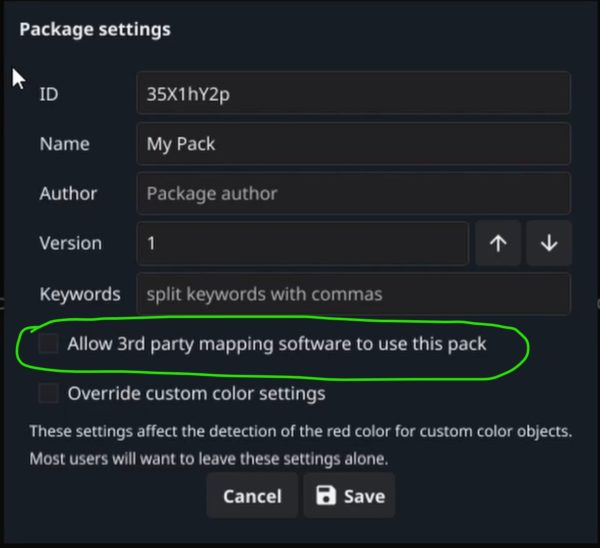
Any third party Dungeondraft Pack Builder tool should have the same option available. Enabling this option will allow the Arkenforge Toolkit to import your pack.
Pictured here is Ryex’s GoPackager, available at https://github.com/Ryex/Dungeondraft-GoPackager/releases/
Modfiying the Pack.json file directly
If you’re creating your own Pack.json file, you’ll need to include the variable ‘allow_3rd_party_mapping_software_to_read’, and set it to TRUE.
What will your content look like inside Arkenforge?
We do our best to ensure that your content matches how it appears in Dungeondraft, while also making them integrate seamlessly with our map building features. Both Dungeondraft and Arkenforge use a 256×256 grid, so your assets should appear at their native size with the Arkenforge Toolkit.
First, we organise your assets into a set folder structure. Then, we set Textures as Tile placement types by default, and walls and paths as Line placement types. We also support recolouring. Any assets in the colorable folder will have their red channel recolourable via our Chroma Key function.
As your assets are treated the same as all other Arkenforge content, users can also use our vast range of map customisation features. This means users can fully recolour your content, not to mention adding animated using our effects system, or lighting and sound effects (and more!).
What if I don’t want my content usable in the Arkenforge Toolkit?
We care strongly about the rights of artists here at Arkenforge. Some creators have only licensed their content for use in Dungeondraft. That’s a position we 100% respect. For that reason, the Arkenforge Toolkit can only import your packs if you have allowed them to be.
If you have not allowed your pack to be usable in software outside of Dungeondraft, users will see the following message when they try to import it into the Arkenforge Toolkit.
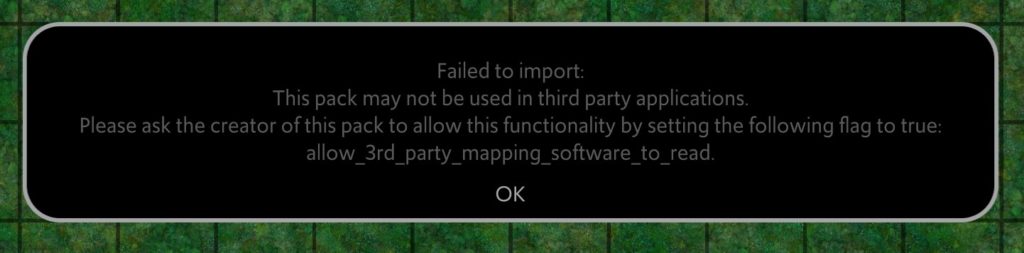
If you have older content packs that pre-date the ability to opt-in to non-Dungeondraft importing, you need not worry. We won’t import those either.

That’s it!
Don’t hesitate to reach out if you have any follow-up questions. You an reach me at [email protected].
I hope that this information has helped to make your Dungeondraft asset packs Arkenforge Toolkit-ready 
The post Preparing Dungeondraft Asset Packs for the Arkenforge Toolkit appeared first on Arkenforge Tabletop.
]]>The post It’s here! The v0.5.0.0 Arkenforge Toolkit is out now appeared first on Arkenforge Tabletop.
]]>After over 2 years of solid development, the day is finally here. We are releasing the Arkenforge Toolkit v0.5.0.0 into the Public stream!
It’s been coming for a long time – 30 months, to be exact.
We’re incredibly proud of this release. We’ve poured so much into the Toolkit, and the end result is something that feels better to use than ever, has a huge range of new features, and has never run smoother.
We want to hear your feedback on this update, so please jump into our Discord and let us know what you think! You can find it at https://discord.gg/Arkenforge
What does this mean?
Well, it means that all Arkenforge users are about to have access to over two years of new features, bug fixes and optimisations. And most importantly – the update is free for everyone.
As with all of our previous major public updates, all trials have been reset. This gives everyone another 30 days to check out the new Toolkit.
Now, let’s take a look at just a few of the exciting new features you’ll have access to.
If you’d like to check out the full patch notes – we’ve included them at the end of this article.
New Features
Text Placement
One of our most requested features over the years, and something we’re very happy to finally have in the Toolkit. You can now place text directly on the map.
As a bonus – text is treated the same as any other map object, meaning you can add Effects to it!
Dice Rolling
The Toolkit now features the d20 dice system! The 3D dice can be rolled openly or secretly, and you can roll without the 3D effect to instantly generate your dice results.
We aim to include more dice systems in future updates, as well as important features such as exploding dice. For now though, enjoy your rolling!
New Stat Blocks

You can now add 5e 2014 and 5e 2024 stat blocks to your notes. This should make it much easier to view the information of your monsters and NPCs at a glance.
Rollable Tables
Determining the outcome of your party’s actions has never been easier! Rollable tables are now a part of the Arkenforge Toolkit.
These tables also allow for weighting by letting you set a range of rolls for each outcome.
Token Touch Control
Previously, touch control would only reveal fog where the touch occurred. This meant that every touch point would reveal the same vision radius, and other effects could not be added.
Now that you can directly move tokens with touch, each touch point can have completely different vision values.
Ambience Listeners
In previous Arkenforge Toolkit versions, proximity-based ambience would trigger based on the position of the player screen. With this new update, all tokens can have Listeners attached!
Listeners will allow tokens to hear ambience as they approach it, increasing the immersion of your games.
Toolkit Colouring
Accessibility and personalisation are important cornerstones of Arkenforge’s design philosophy. In line with these principles, we’ve added several new UI elements to the ‘can be recoloured’ pile.
We always enjoy seeing screenshots with different UI colouring. Don’t hesitate to show off yours!
New map export options
Many of our users enjoy building maps in the Toolkit for use online. For that reason, we’ve built on our existing map export functionality so that you can match what you get in the Toolkit with your target VTT as closely as possible.
Video export is now significantly improved, allowing for custom sizing and DPI. We’ve added WebM and WebP as export options, alongside an updated FoundryVTT Module exporter.
UI Improvements

We’ve reworked every panel and window in the Toolkit to make it much clearer and simpler. Controls are now organised into toggleable sub-headings, so you won’t feel as overwhelmed by the number of options available. Widgets have been moved to the right-hand side, and the number and visibility of them can be fully customised. We’ve also moved the important features down to the taskbar, meaning you’ll spend less time in menus.
Optimisation
We’ve worked hard to get the Toolkit running as smooth as possible. It can now handle even larger maps, even more animations, and even more effects, all while maintaining a minimum of 60FPS.
Even the UI feels snappier to use
What’s next?
The v0.5.x update series has one central focus – Players. The finer points of what that means is something we’ll announce in the future, but we can guarantee the end goal of the v0.5 update series – a free player app that will connect to the Toolkit.
That’s not to say there won’t be other things in there as well. We have a whole heap of other features and improvements that we’ll be bringing out as we roll out these updates. We’re incredibly excited for what we’ve got coming next, and we can’t wait to show off some amazing new features!
We’ll also be releasing a bunch of content that we’ve got in the wings that required this update before release. Look out for some exciting content releases throughout the year! In the meantime, please enjoy the new public release.
Thank you for sticking with us on this journey.
– The Arkenforge Team
v0.5.0.0 Patch Notes
NEW FEATURES
General
- Added WebP support
- Added a search bar to the taskbar. This mimics the content of the Content Library search, without the suggested search filters
- Added notification section above the Currently Selected panel
- Added right click options to map objects:
- Select all of this object
- Added Drag + Drop UI element. This will highlight when content can be dropped somewhere
New Panels
- Maps
- Import map
- Map Builder
- Blur
- Shadow
- Text
- Customise
- Ambience
- Blur
- Text
- Drop shadow
- Live Play/VTT
- Dice
- Tokens
- Touch
- Export
- VTT
- Image
- Video
- UVTT
- Content
- Index
- Pack Export
Accessibility
- Can now change colour of T1 Menu Background
- Can now change colour of T2 Menu Background
- Can now change colour of T3 Menu Background
- Can now change colour of Selection Box Background
- Can now change colour of Arkenbar Background
- Can now change colour of Taskbar Background
- Can now change colour of Asset Selection Background Colour option.
- Added ‘Spacialize UI Audio’ option to Accessibility panel. This is enabled by default
Ambience
- Can now link proximity-based audio to all map content. All existing proximity-based audio has been upgraded to the new system
- Added ‘add to map’ option when selecting an ambience preset in the Ambience Presets panel
- Added icon on taskbar to show if ambience is currently playing
- Ambience Presets now have meta files
Animation
- Added ‘Destroy After Playing’ option to Animation Customisation panel
Arkenbar
- Added ‘Heading’ option to ‘Add to Arkenbar’ button. Headings will give a hoverable icon that custom text can be added to
- Added ‘Divider’ option to ‘Add to Arkenbar’ button. Dividers will add a divider icon to the Arkenbar
Audio
- Added ‘Dice Volume’ slider
Blocking
- Removed ‘alpha friendly collider’ option
- Added ‘Collider Mode’ option. The following collider modes have been added
- Standard. The regular collider that most assets use.
- Alpha-friendly. A more complex collider. More intensive, but may provide better results when dealing with low-transparency assets.
- Simple box. Just puts a box collider around the asset. Assets with this collider type will not block light/fog/etc.
- Added ‘Movement’ blocking type. This will stop content from moving through this object if it has ‘affected by movement blocking’ enabled
Bulk importer
- Used to import large numbers of files efficiently
- Selecting content for import will put importer into ‘staging mode’, allowing you to select how your content will import
- Audio can be imported as Songs or SFX
- Visual media can be imported as Map Asset, Map, or Token
- Files with underscores can be treated as standalone files, or as sub-tracks/animation frames
Customise – Colour
- Chroma Key can now be set to change colour, rather than only erasing colour
Customise – Content Link
- Added ‘Use default tint’ in the Customise -> Content Link panel
- Added ‘Visible on lower levels’ option in Customise -> Content Links panel. This will be set to ‘enabled’ for existing maps
Customise – Drop Shadow
- Can be used to set per-object drop shadow settings
- Values can be set to map default, or overridden
Content Library
- Updated Content Library UI
- Deleted files are now moved to the Deleted Content folder, rather than being instantly removed. The Deleted Content folder will be cleared when the Toolkit is exited. Right clicking on files in the Deleted Content folder will give the option to restore content
- Added Shortcuts section to Content Library window. Folders can be dragged into shortcuts section for quick access. Right clicking a shortcut will give the option to remove it from the shortcuts section
- Folders can be dragged onto the Arkenbar for quick access. Selecting them will open the Content Library to the specified folder
- Added search filter list. Existing search filters can be removed by pressing the X button on them
- Added suggested search terms. Clicking these will add the given search filter to the stack
- Added option: Sizing -> Horizontal Squares. This will set the horizontal size of the selected content to a set number of squares
Dice
- Can roll multiples of each dice type with modifier
- Can roll with or without 3D dice
- Dice history is shown in Dice panel
- Can change colours of individual dice
- Can change colours of individual elements of individual dice
Effects
- Added new effect: Double Click
- This effect will allow a content link to be set on an object. Double clicking on the object will activate the content link
- If an object has multiple links set, they will trigger in the order the effects were added
- Line Scroll can now be reversed
- The following effects are now available for Line placement types
- Float
- Shake
- Rotate
- Rotate Pivot
- Added ‘Plays while hidden’ option to Sound Trigger effect
- Added ‘Vary sound properties’ toggle to Sound Effects trigger. This will vary the pitch and volume of the triggered sound effect
Fog of War
- Added ‘fog of war brush colour’ option in Fog of War panel
- Added text to player screen alerting that fog of war is enabled. This can be turned off in the Fog of War panel
- The Fog of War brush now respects walls and barriers. This will stop rooms from accidentally being revealed while brushing
Grid Scaler
- Updated Grid Scaler functionality. Can now use an infinite number of points to scale grid (minimum 2)
Hotkeys
- Added a search bar to the Hotkey panel
- Can now drag hotkeys to Arkenbar
- Can now drag hotkeys to map
- Can now export all hotkeys from a given hotkey profile as a text document
- Added ‘Overwrite’ option to Hotkey prompt. This will remove all existing hotkeys that use the selected key combination
Importing
- Can now import WebP files
- Can now import Dungeondraft Asset Packs when importing Mapping Assets. Only packs with the ‘allow_3rd_party_mapping_software_to_read’ can be imported
Indexing
- All Toolkit content is now Indexed. An index file will be generated when the Toolkit starts if one is not already present
- Index is used for content searching and finding missing content
Indicators
- Added second colour option for toggleable blocking. This will allow users to change the colour of barrier indicators that are toggled on and off
Layer Stack
- Added ‘Delete this content’ button to layer stack
Lighting
- Added Light Direction slider to light settings panel. This will rotate lights with a reduced FOV without needing to rotate the asset itself
Lines
- Added Line Scroll option. This will allow you to scroll the line texture manually
- Added Line Fade option. This will cause a line to fade out. Settings are provided for where along the line the fade starts
Live Play – Tokens
- This new panel provides a list of all tokens in the Toolkit
- Clicking + Dragging a token onto the map will populate it automatically as a note with an icon and size field
- Token panel has a search bar to quickly find tokens
- Can place Tokens as PC or NPC. This will change the default fields on the token
Map Background Textures
- Added Map Background Texture option in Grid Settings and New Map panels
- The following textures are included as options:
- None
- Dirt
- Grass1
- Grass2
- Grass3
- Stone
- Water1
- Water2
- Desert
- Dungeon1
- Dungeon2
- Lava
- Sand
- Sky
- Snow
- Maps will use Grass1 texture as default
Map Builder – Blur
- Blurs content underneath the placed area
- Blur can be placed as a tiled tile or a polygon tile
Map Builder – Shadows
- Can now place shadows directly as a line or tile brush
- Added Shadow Strength option
- Added Shadow Width option
- Added One Sided option when using Line shadows
Map Builder – Text
- Can now place text on the map
- Can change text colour, formatting, size, outline, and outline colour
Map Content
- Added right click option: Hotkey all selected content. This will allow multiple objects to be assigned to the same hotkey.
- Added ‘Build with this asset’ to right click menu of placed map assets
- Added ‘Content Link’ as a default placement option
Map Export
- Added WebP export for Image export type
- Added WebP export for FoundryVTT export type
- Added WebP export for Fantasy Grounds Unity export type
- Added WEBM option for video exports
- Added WEBM export option to Foundry VTT export
- Added Foundry v11+ Module export (Windows only).
- Added WEBM export option to Fantasy Grounds Unity export.
- This will generate the XML file as well, allowing you to import WEBM files with line of sight and lighting
- Added D&D Beyond export.
- Added Owlbear Rodeo export option
- Added the following toggles to map exports. These will affect what is visible in the final export
- Grid
- Lights
- Hidden objects
- Tokens
- Only export this level
- Upper level shadows
- Added ‘show file after export’ checkbox. This will open the folder containing the exported file
Map Info
- Added ‘Generate asset list’ button. This will export a list of all assets in your map as a CSV file
- Added ‘Open map file in browser’ button
Measurement
- Can now move persistent measurements using the UI handle.
Missing Assets
- Added ‘Clear all missing assets’ button
New Map
- New Map is now a T3 panel, rather than a standalone window
- Added new pre-defined map sizes
- Pre-defined map sizes now appear as a right click-style menu for easy navigation
- Added ‘enable drop shadows’ option
- Added ‘Background texture’ option
Notes
- Added new note fields:
- 5e 2014 Stat Block
- 5e 2014 Item Block
- 5e 2014 Spell Block
- 5e 2024 Stat Block
- 5e 2024 Item Block
- 5e 2024 Spell Block
- Controllable. Notes with this field can be controlled by touch
- Listener. Notes with this field will be able to hear positional audio
- Rollable table
- Added ‘Direction’ slider to Vision field. This will change the direction of vision for vision FoV lower than 360
- Added ‘Show Token identifier’ checkbox to Note Icon field
- Added ‘Token Identifier’ input field to Note Icon Field
- Added options
- Set Background -> Colour
- Set Background -> Static Image
- Set Background -> Scrollable Texture
- Added Caret Width option in Settings -> Notes -> Text
- Typing @ will now pop up a global search window that will populate with content as you type
- Selecting a content link that pops up in this manner will link it in the note at the location of the @ symbol
- Note: Only indexed content will appear
- Added Show Border option to Text field
- Added Show Border option to Media field
- Added ‘Vision works while hidden’ checkbox to Vision field
- Added ‘Generate content links’ button in right click menu for all text boxes. This covers Text fields, Rollable Table fields, and System-specific stat blocks
- Users can set what types of content are found in the Note Settings panel
- Users can set the minimum name length of found content in the Note Settings panel
- Only indexed content can be found
- Added ‘Remove content link from selected’ button to Note Formatting bar. This will remove any content links from the selected text
- Added ‘Auto-Link Settings’ to Note Settings dropdown
- Added button next to Media fields to view content in window
- Added a Resize handle on Media fields. This can be click + dragged to resize media in the note
- Can now set font in text fields. Available fonts
- Toolkit default
- Toolkit dyslexic
- 5e Heading
- Added new default note templates
- Adventure note
- 5e Character
- 5e Item
- 5e Spell
Pack Export
- This panel allows you to export selected assets into a MyAssets-style folder
- Linked content in the selected assets will automatically be added to the export
- The contents of this exported folder can be copied into the MyAssets folder of a different device
Player Screen
- Added ‘Local Streaming’ option to Add Extended Screen panel
- Only Player Screen can be set to stream. Extended GM Screen panel can not be streamed
- A second screen is not required for local streaming
- Navigate to your computer’s local IP address in any browser on your local network to see the Player Screen
- Streaming resolution and framerate can be adjusted in the Settings -> Display panel when streaming is active
- Streaming can be deactivated in the Settings -> Display panel
- Player screen streaming will launch a local webserver application in the background. This will be closed when the Toolkit closes
- If you accidentally turn this webserver off, disabling and re-enabling the player screen for local streaming will restart it
- Right clicking on any map content and selecting ‘Link player screen to this’ will cause the player screen to follow that object
- Added ‘Square width’ option to Add New Screen -> Player Screen panel. This will set the width of your squares to the desired physical size
- Renamed Player Splash Screen to Player Screen Overlay
- Player Screen Overlay can now be set on a per-map basis, as well as a global splash
- ‘Set start point’ button on Player View Box will now provide the following options:
- Set start point
- Add bookmark here
Playlists
- Added ‘Start playlist on shuffle’ button
- Added icon on taskbar to show if music is currently playing
- Playlists now have meta files
Quick Access Menu
- Added ‘Link content’ button. This button will appear when a single item is selected. Dragging it will provide a content link to the object.
- Created link references the default placement settings of the given asset
Settings – Audio
- Added ‘Default ambience volume’ slider
- Added ‘Spacialize UI Audio’ option
Settings – Grid
- Added ‘Default BG Colour’ option to Map Background settings
- Added Background Textures options
Settings – Map
- Added ‘Fade in on unhide’ option
Settings – Performance
- Added ‘Thumbnail Placement Threshold’ value. Images with a pixel size below the selected value will use the full image for placement, not a thumbnail
- Added Framerate viewer
- Added ‘clear undo/redo queue’ button
SFX Palettes
- Can now randomise audio properties when playing sound effects from an SFX Palette
- SFX Palettes now have meta files
Shown Content
- Can now increase size of shown content by up to 3x
- Added ‘Clear content when panel closed’ toggle. This will remove shown content when the ‘Shown Content’ panel is closed
Time of Day
- Can now enable/disable drop shadows globally
- Added ‘northern hemisphere’ checkbox for ‘Shadows follow sun’ option
- Added option ‘Time only moves forward’. This is enabled by default
- Added ability to time cycle. This will cause time to move forward at the current ‘Speed of time change’ rate. This can only be triggered by hotkey. Any manual changes to the time of day will stop time cycling
Tokens
- Can now place tokens with video icons on the map
- Can convert video placed assets to tokens via right click menu
Touch
- Touch now only works with the v3 Touch Client
- Toolkit no longer broadcasts over the network. Broadcasts now come from the Touch Client
- Users now select which Touch Client to connect to from all available on the network. This allows multiple Toolkits and Touch Clients to operate on the same network without issue.
- Touch client connection process is now more robust
- Can now rename the currently connected touch client
- Can now disconnect from the currently connected touch client
- Added ‘touch points visible’ option. Disabling this will hide touch points.
- Added ‘Rotate input 90 degrees’ option
- Added ‘touch points reveal fog’ option. Disabling this will stop touch points from revealing fog of war.
- Touch points now set vision direction for tokens
- Added option ‘players see touch points’
- Added ‘Touch point timeout (frames)’ to Touch Client panel. This will adjust how long touch points will stay around without touch client input
- Added ‘Touch enabled while player screen is moving’ option.
Transforms
- Added ‘Affected by movement blocking’ option
- Flipping multi-selected content now takes their relative positions into account
- Polygon tiles can now be flipped
- Added ‘Move X Only’ option
- Added ‘Move Y Only’ option
URI
- Adding ‘SHOW|’ to the front of a URI string that points to a map asset file will now show that content to players
Video
- Added ‘Destroy After Playing’ option to Video Customisation panel
Widgets
- Updated widget layout. Widgets are now aligned to the right side of the screen
- Widget config values have been reset. All widgets will be visible by default, and will be the default colour
- The map name is now clickable. Clicking on it will allow you to rename the current map
- Renamed ‘Map Functions’ widget to ‘Edit’
- Edit widget now contains the following options:
- Undo
- Redo
- Current undo/redo queue count
- Added Zoom widget. It contains the following options:
- Zoom in
- Zoom out
- Reset to 100% zoom
- Current zoom level
- Added Import widget. It contains the following options:
- Open import panel
- Import image/video
- Import PNG sequence
- Import Token
- Import UVTT
- Added Export widget. It contains the following options:
- Open export panel
- Export image
- Export video
- Export PDF
- Export UVTT
- Time of day widget now contains the following options:
- Open Time of day panel
- Night
- Morning
- Noon
- Evening
- Holding SHIFT when selecting times on the time of day widget will set the time instantly, rather than fading to the given time
- Bookmarks widget now contains the following options:
- Open bookmark panel
- Add bookmark
- Set start point
- Toggle bookmark visibility
- Player screen widget now contains the following options:
- Open player view panel
- Toggle player view box
- Set player view to current DM view
- Reset to one inch grid
- Open Add Display window
- Projection widget added. Contains the following options
- Toggle Freeze player screen
- Toggle Hide player screen
- Toggle player screen overlay
- Grid widget now contains the following options:
- Open grid settings panel
- No grid
- Square grid
- Hex grid
- Iso grid
- Fog of war widget now contains the following options:
- Toggle fog of war
- Brush fog
- Erase fog
- Toggle vision-only mode
- Indicators widget added. It contains the following options
- Toggle Hidden indicators
- Toggle Locked indicators
- Open Indicators panel
- Added Lights widget. This widget contains lighting presets for quick light placement
- Added Barriers widget. This widget contains barrier presets for quick barrier placement
- Added Widget settings widget. This provides options to edit widgets, as well as a link to the Widget settings panel
BUG FIXES
General
- Updated Unity version to fix security issue
- Each fast click following a double click will no longer be treated as a new double click
- Sizing -> DPI slider now sets to correct value when opened, not 100x the correct value
- Fixed an issue where colours could not be selected on some resolutions
- Fixed an issue where attempting to quit the Toolkit while offline would stop the Toolkit from quitting
- Touching a touch screen connected to the Toolkit PC will no longer cause the Toolkit to behave erratically when attempting to select and move content
- Crashes that occur when exiting the Toolkit will no longer generate an error message and will allow the Toolkit to exit
- Fixed an issue that could cause maps to save into the base directory, instead of their correct subfolder
- Locking map content no longer selects the next asset under the mouse cursor
- Fixed various crashing issues around renaming content
- Fixed various crashing issues around missing content
- Fixed various crashes related to invalid characters in file and folder names
- Closing the New Map panel before confirming that you would like to override an existing map no longer crashes
- Fixed some instances where the incorrect cursor sprite would be used
- Fixed issues with content appearing on the incorrect level after copy/paste
- Animations now start at frame 0 when placed
- Creating a group preset containing objects with Pivot Rotate effects no longer cause those objects to change position
- Fixed various crashes related to selecting content
- Various instances of attempting to access a file already in use will now give a notification instead of crashing
- Fixed various issues with content not scaling at UI scales under 150%
- Fixed a bug that could occur when attempting to replace an animated object
- Deleting a video file before its thumbnail has been generated will no longer cause a crash
- Renaming a file that has been moved or deleted will no longer cause a crash
- Fixed crashes when trying to place various types of content as objects
- Pressing Escape will now fix a UI soft-lock that occured when selecting a placement type with no selected content
- Attempting to Duplicate or Copy/Paste a token with a nonexistant path will now provide a helpful message rather than a crash
Ambience
- Fixed a crash occurring when attempting to add a nonexistant ambience preset to the player
- Fixed various crashes that could occur when attempting to remove playing ambiences from the player
- Adding an SFX to an ambience from an existing ambience will no longer link the SFX’s values
- Fixed an issue that could cause sound cards to become overloaded with multiple sounds playing at once
- Fixed a crash that would occur if an ambience preset was quickly removed and re-added to the Ambience Player
Animation
- Unhiding a triggered animation no longer pauses on the first frame
- Paused animations that are copy/pasted or saved into group presets will remain paused on placement
Barriers
- Fixed issue that occurred when trying to place a barrier when a barrier was already selected
- Rotated barriers no longer show incorrect one-way calculations for light and fog
Drop Shadow
- Fixed an issue where drop shadow would not stay on object when scaling
- Drop shadows now correctly follow an object with ‘float’ effect
Effects
- Moving objects with Pivot Rotation enabled will no longer cause them to change their rotation angle
- Can now rotate an object correctly after removing a pivot rotation effect
Fog of War
- Deleting a token with vision now clears fog of war correctly
- Undoing a deleted token with vision now updates fog of war correctly
- Overlapping darkvision and nightvision will no longer green-out the nightvision
- Darkvision/Nightvision no longer overlaps at a distance
- Creating a new light source correctly updates darkvision/nightvision
- Fog quality setting now works correctly
Hotkeys
- Hotkeying missing files of some file types will no longer cause a crash
Importing
- Will now give a warning on Windows if a filename is too long, rather than soft crashing
- Fixed a memory leak when importing lots of large images
- Fixed a memory leak when importing UVTT files
- Importing a UVTT file with no image will now provide a prompt instead of showing a compatability issue message
- Importing an asset onto a map with the same name but different content type as an existing asset on the map will no longer crash
- Closing the Toolkit while video thumbnails are generating will no longer cause a crash
- UVTT files will now offset lights and barriers by the Map Origin
Layer Stack
- Selecting all assets no longer selects objects that have been deleted
- Selecting all assets no longer leaves the originally selected object deselected
- Fixed an issue where selecting content could cause the layer stack to close
Lights
- Fixed a crash that would occur when converting an object with a light to a token
Lines
- Fixed crashes that occurred when trying to move line points after removing one
Map Builder
- Right clicking when placing a brush will no longer cause the brush to stop placing and be unselectable
- Randomised placement now works correctly with multiple objects selected
- Fixed some crashes that could occur when using the Replace placement type
- Message will now appear if a replacement attempt is incompatible
Map Export
- UVTT export now treats lines correctly, and exports them as two-way barriers
- Fixed some situations where Foundry exports would crash due to permissions or disk space. Will now provide a prompt instead
Missing Assets
- Dragging a group asset into a Missing Asset section will now provide a prompt instead of a crash
- Selecting ‘Auto-find missing assets’ will no longer crash if the full list of missing assets hasn’t yet loaded in
New Map
- Fixed some pre-defined map sizes that had incorrect measurements
Notes
- Typing inside or next to a content link in a Text field will no longer break the link. Instead, the new characters will be treated as regular unlinked text
- Italic text shortcut now works correctly
- Will no longer crash when clicking the options section of a Note Icon field with no set icon
- Renaming a media field while part-way through creating a new note field will no longer cause a crash
- Fixed a crash caused by pasting certain unicode characters. These characters will no longer paste
Player Screen
- Splash screen doesn’t appear with full transparency if set to lower opacity
- Player screen orientation fixed for portrait-oriented screens
- Fixed some instances where the player screen resize handle goes missing
- Can now show videos to players without a crash occurring
Playlists
- Fixed a crash that could occur when renaming a music track
Quick Access Bar
- The quick access bar now correctly moves to the right edge of the screen in non-16:9 aspect ratios
- Fixed a crash occurring when the number of active buttons is less than the number of visible buttons
- ‘Expand menu’ button now only shows active menu options
SFX Palettes
- Moving content from a SFX Palette will no longer cause that content to be removed from the palette
- SFX Palettes will now load the Arkencore version of sound effects
Tiles
- Tiles with a texture scale of 100 no longer reset themselves
- Y offset value now works correctly with stretched textures
- Tile offsets are no longer shared between all tiles of the same type
Time of day
- Drop Shadows correctly follow ‘Drop shadows follow sun’ map setting
Tokens
- Changing a static token image to an animated one while it’s still on the map will no longer cause a crash
- Token collider will now correctly update when changing the image of a token already on the map
URI
- Pressing Escape after closing URI panel no longer shows ‘Cancelling URI generation’ notification
Video
- Fixed some instances where a VP9 WEBM would place as a small white box
- ‘Loop’ value now sets correctly for default placement
- Deleting a video that has failed to load will no longer cause a crash. Will now provide a prompt if placed video exceeds system resources
- Fixed a crash that could occur when attempting to quit the Toolkit with a video loading
OPTIMISATION
General
- Images now use less resources, load faster
- Searching is done via index, rather than hard drive – greatly speeding up search operations
- Deleting large amounts of content no longer causes hanging
- Loading maps is now faster
- Displaying files in various windows is now faster
- File browser is smoother on Silicon Mac devices
- Config values are now stored in memory while the Toolkit is running, rather than accessed from the config file each time. This will cut down a lot on file read/write processes
- Removed instances of files being loaded and not released from memory
- Selecting content now occurs slightly faster
- UI refreshes less when loading, leading to a much smoother experience
Animation
- Animations optimised. Now use ~80% less resources
- Maps with large numbers of animations will now run smoother
Ambience
- Calculations for proximity-based map ambience are now performed faster
- Ambience will no longer calculate volume channel data if ambience track buttons are not created in Ambience Player
Blocking
- If blocking is disabled, all objects will use a simple box collider. This will reduce lag when moving content and calculating lighting/fog
Fog of War
- Optimised fog brush. Will now use less resources when fog of war is active and brush type is set to ‘none’
Global search
- Global search now uses the index, rather than the hard drive
Importing
- Content imports ~10x faster
- UVTT imports now use a simple box collider
- Imported UVTT files no longer have a drop shadow enabled by default
Lights
- Lights with movement effects (float, shake, etc.) will now only update shadows if a certain threshold has been moved
Map Browser
- Deleting a map no longer refreshes the entire map list
Map Builder – Assets
- Images now use less resources
- Content populates roughly twice as fast
- Assets now load dynamically. After a certain point, assets will only load when the scroll bar is moved across
Notes
- Deleting a note field no longer reloads the entire note
- Dragging note fields is now smoother
Player Screen
- Player camera disabled until player screen is activated
Touch
- Slightly optimised touch input
USER EXPERIENCE
General
- Double-clicking a window header will now toggle fullscreen, if that window has a minimise/maximise button
- Moved ‘Packs’ menu from Settings to Content t1 menu
- Updated logos to new Arkenforge Toolkit logos
- Updated all text from Master’s Toolkit to Arkenforge Toolkit
- Updated splash screen
- Clicking the volume button on the taskbar will now toggle mute
- Y/N keys can now be used to answer Yes/No prompts
- Can now use ‘+’ modifier to search multiple names at once.
- eg. metal+door will return all content with ‘metal’ and ‘door’ in its name
- Removed Global Search window
- Fixed UI issues with hotkey popup at small UI scales
- Windows can now be moved outside of screen bounds. Only the window header must remain on screen
- Locking content will now deselect that content
- Rotating content now shows how much rotation is being performed
- Alt-text now scales with UI size
- Reset button in colour selection prompt moved to right side of header
- Removed ‘Drop Shadow’ option from Customise – Lighting menu
- Removed ‘Drop Shadow’ option from Customise – Blocking menu
- During map loading, animated content will now show the frame count along with the currently loading frame
- Copying tiles will now provide a popup with the number of tiles copied
- Error message prompt has been updated
- OS file browser will now remember which folder it was in when last importing / exporting content, and open to that folder by default
- Saving a map will now set the saved location as the start point, if no start point has been manually set
- Dragging Encyclopedia Media onto the map now gives the following placement options
- Map Object
- Content Link
- Up to two previous log files will be created, named ‘Arkenlog-Prev1’ and ‘Arkenlog-Prev2’
- Activating Playlists or Ambience Presets now gives a notification
- Can now undo/redo all slider-based changes in the Customise menu
- UI audio is now a part of the master sound mixer
- Added default icons for in-built Toolkit content types
- Renamed Quality settings to Performance settings
- All T3 panels have had their UI updated
- Updated taskbar UI
- Content Library can now be opened from taskbar
- Dice panel can now be opened from taskbar
- Tokens panel can now be opened from taskbar
- Playlists can now be opened from taskbar
- Ambience Presets can now be opened from taskbar
- Global search field is now on taskbar
- ‘Dragging content’ UI now appears to the right of the mouse
- ‘Dragging content’ UI no longer shows ‘usable in’ section
- Right click menu UI updated
- Map that loads when Toolkit first opens will now use Default Map settings
- Holding SHIFT will now change the Save icon to Save As New
- Window headings are now left-aligned to prevent overlap with window buttons
- Content in ‘Hidden items’ folders no longer appear in asset browsers or search functions
- Selection box now aligns correctly when multiple videos are selected
- Folder Browser section of windows can now only be extended to a maximum of 50% of the window width
- Folder Browser section of windows will now adjust correctly when changing UI scale
- Can no longer use a newline character in content names
- User will now be informed if a search contains a file that is now missing, and will suggest a reindex
- Having the Toolkit open on a second screen with a higher resolution than the OS primary screen will no longer cause cursor/placement issues
- Opening a Note window that is already open or minisised will now open the existing window instead of creating a new one
- Opening an SFX Palette window that is already open or minisised will now open the existing window instead of creating a new one
- Updated splash screen copyrights to 2026
- Can no longer perform a ‘Save as new’ on official maps
- Content with missing thumbnails will now display a generic Media File icon instead of a white square
- Splash screen no longer shows a skewed image on non-16:9 screens
- Added ‘Copy selected tiles’ option to right click menu when right clicking on map tiles
- Added ‘Paste copied tiles’ option to right click menu when right clicking on the map. This option will only appear if there are copied tiles
Ambience
- Dragging a SFX into the ambience panel will create a new ambience for that sound effect
- Ambiences created in this way will be saved in the Generated folder of the Ambience Presets directory
- Dragging ambience onto the map now gives a ‘Proximity ambience’ vs. ‘Manual ambience’ option
- Can no longer set the falloff radius lower than the radius on positional ambience
- Ambience Presets will now load the Arkencore version of sound effects
- Ambience Presets will now toggle when name is clicked, as well as dropdown
- Ambience Preset tracks will now toggle when name is clicked, as well as dropdown
- Ambiences no longer have a 10% timing variance by default
Animation
- Typing a framerate value can now exceed minimum and maximum slider values
- Go To Frame now starts at 1 instead of 0
Arkenbar
- Hovering an Arkenbar button will now show the content’s name
- Creating a web link now only looks for ‘://’, rather than ‘http’. This will allow for any network calls to be made
- File path removed from hovered content
Barriers
- Barriers now snap to the correct number of grid points when placing
- Presets are now available in Customise -> Blocking panel
- Added Custom barrier option to Map Building -> Barriers panel
- Selected preset in Map Building -> Barriers panel will change as barrier options are adjusted
- Added different barrier colours for pre-defined barrier types. These types are:
- Wall
- Door
- Window
- Other
Blocking
- Objects with light sources can now block movement/sound/vision
Bookmarks
- Updated Bookmark UI
- Bookmarks now appear as a circular marker with a name and description
- Added right click options to bookmarks on map:
- Set Identifier
- Set Name
- Set Background Colour
- Set Rim Colour
- Set Text Colour
- Remove Bookmark
- Holding SHIFT when clicking on a bookmark will now pan the camera to that bookmark at a speed of 10 squares/second
- Can now right click directly on bookmarks to set hotkey, rather than dragging them to the Arkenbar first
Content – Packs
- Panel now has Creator dropdowns
- Can now enable/disable all packs for a given creator
- Changed ‘Toggle all packs enabled’ checkbox to buttons
Content Library
- Mouse 3 will now go back one folder
- Mouse 4 will now go forward one folder
- Selecting ‘From Content Library’ on various file selection prompts throughout the Toolkit will now open the Content Library window in a ‘File Selection’ mode
- Selecting content in this mode, either via double click, or using the ‘Select Content’ button, will assign the content to the relevant field
Content Links
- Moving content linked on an open map will now update the content live, instead of requiring the map to be reloaded
- Content link panel no longer shows file path of linked content
- Content link panel now shows content name, type, and pack for linked content
Effects
- Line Scroll speed is now measured in squares per second, rather than being arbitrary based on the texture size and line width
- Tile Scroll speed is now measured in squares per second, rather than being arbitrary based on the texture size
- Pivot rotation now updates light and fog
- Pulse effect now updates light blocking
- Maximum pulse size increased to 30
- Increased maximum Line Scroll speed from 5 to 50
- Added ‘Clear all effects’ button
- Adding and removing effects is now added to the undo/redo queue
Fog of War
- Fog of war is now split into Manual and Dynamic modes, rather than ‘brush’, ‘brush + vision’, and ‘vision only’
- Dynamic fog is the former Vision mode
- Manual fog is the former Brush modes
- Added ‘Ignore token vision’ option to Manual fog mode. This will act as ‘brush only’ mode when enabled
- The size of the fog of war brush will now save between Toolkit sessions
- Fog of war brush size now defaults to one square
Hotkeys
- One function can now have multiple hotkeys assigned
- The same hotkey can now be used for multiple functions at once
- Updated hotkey settings UI
- Can now remove individual hotkeys from a function
Import
- Multiple files can now be quick imported to a map at once
- Added list of reasons that imported images may not be compatible
Indicators
- Renamed ‘Overlays’ to ‘Indicators’
- ‘Hidden content’ indicators are set to ‘always on’ by default
Layer Stack
- Flat Colour now appears as its correct colour in the layer stack
Lights
- Double clicking a standalone light source now opens the Customise -> Light panel
- Renamed ‘shines through fog’ to ‘light source reveals fog of war’
- Hiding a light source with ‘light source reveals fog of war’ now correctly sets the fog of war state
- Customise -> Lighting panel will now provide a message if global lighting settings are disabled, as well as a clickable link to the Settings -> Lighting menu
Lines
- Line manipulation points will only be visible when a single line is selected
- Lines will now snap to the set number of grid points
- Line shadows are now affected by drop shadow options
- Can no longer remove line points if only 2 points are remaining
- Indicators on lines will now attach to a segment of the line, rather than in the middle of all points
- Can now undo a split line
- Lights and fog now update when line points are removed
- Fixed some odd interactions with lights and one-way barriers
- Can now undo/redo ‘Convert to polygon line’
- Newly placed circle lines will now close much better
- Increased line stability when holding a line point in the same place
Live Play – Player Overlays
- Removed this panel
Live Play – Player Screen
- Combined with ‘Player Overlays’ panel
Map Builder – Assets
- Ghost tile for tile placement now accurate shows how tile will appear after placement
- Dragging a line onto the map will now place it as a properly editable polygon line
- Dragging a tile onto the map will now place it as a properly editable tile
- ‘Replace’ placement type now keeps the same colour settings
- Hex tile placement is now added to the Undo/Redo queue
- Isometric tile placement is now added to the Undo/Redo queue
- Removed ‘return to base folder’ option
- Added ‘Your content’ as a base folder
- Added ‘Community Packs’ as a base folder
- Polygon tile placement now correctly snaps to the set number of grid snap points
- ‘Manipulation: FlipH’ and ‘Manipulation: FlipV’ hotkeys will now flip objects before placing
Map Export
- Removed Astral VTT export preset
- Video export now much smoother
- Video export no longer exports audio
- Video export is now affected by the DPI value
- Video export is no longer locked to 1080p
- Can no longer export licensed maps
- Previous selection area doesn’t disappear when selecting ‘Select export area’. It will now disappear when you begin dragging the new export area
- UI goes transparent when selecting export area
- Video export now has a progress bar
Measurement
- Measurement settings now save between sessions
- Measurement text is now the same colour as rest of the measurement tool
- ‘Clear all measurements’ button now only appears if a persistent measurement is on screen
- Added ‘Start measurement button’
- Added a dot in the middle of circle measurement
- Can now delete overlapping measurements
- Persistent measurements now clear when a map is loaded
Network
- Broadcast receive port changed to 11811
- OSC receive port changed to 11819
- OSC Transmit port changed to 11820
Notes
- Updated appearance of options in ‘Add Field’ menus for greater clarity
- TAB will now move from the main stat field to the secondary stat field in MinMax and Split stat fields
- Shift + TAB will now move from the secondary stat field to the main stat field in MinMax and Split stat fields
- Can now use TAB in text fields
- Note links in text fields will update when content is moved into a different folder
- Duplicated tokens now go into a ‘Map Generated/[map name]’ folder to avoid messing up people’s note folders
- Selecting ‘Create Empty Note Here’ on the map will now create a note with a single empty text field by default, rather than a completely empty note
- Note text size now resizes according to UI Scale
- Note default text size is now 40px, rather than 48px
- Can now right click on media fields in locked notes with limited options
- Can now right click on icon fields in locked notes with limited options
- Ctrl + I no longer adds an indent
- Ctrl + J no longer adds a new line
- Removed Hover Text and Alias fields
- Left clicking on a note field’s handle now opens the field options
- Removed ‘Favourite’ template option. Now remembers previously selected note template instead
- Added Note Functions section to top right of Notes window. New buttons added:
- ‘Save Note’ button
- ‘Save as note template’ button
- Moved undo/redo buttons from Note Formatting to Note Functions bar
- Added ‘Link’ button on Note Formatting bar. This will allow users to more easily add in-line links into notes
- Added ‘other Options’ button on Note Formatting bar. This will open the text field’s Right Click Menu
- Note Locked icon now updates depending on lock state
- Can now click + drag note name to place note on the map
- Can now click note name to rename note
- Duplicating a note on a map with a non-default token will create a duplicate note and assign it to the new token
- Copy/pasting a note on a map with a non-default token will create a duplicate note and assign it to the new token
- Removed option to show content from an empty Note Icon field
- Removed option to show content from an empty Media field
Notes – Folder
- Can now click on Category field handles
- Removing an open Category field will now remove all fields in the category from the UI
- Added section that fields can be dragged into to add them to a category
- Updated UI
Notes – Media field
- Resize handle is now inside the image box
- ‘Open in new window’ button is now underneath the field
- ‘Open in new window’ button is now only visible if media field has content
- Media field content now has a minimum width for resizing (250px)
Ping
- Added ‘Ping here’ to map right click options
- Added ‘Ping this object’ to map object right click options
- Ping volume is now affected by the master volume slider
Player Screen
- Updated Add New Screen panel UI
- The player view window now resizes from the top corner, rather than from the middle
- Holding SHIFT while resizing the player view window will resize from the middle, similar to resizing map content
- Can no longer move player view box onto player screen
- Changed ‘Set Start Point’ button tooltip to ‘Bookmark this location’
Playlists
- Playlists will now load the Arkencore version of songs
- Songs added to playlist will have track volume set to 80% by default
- Currently playing song now highlights when playing
- Currently playing playlist will now open automatically when opening the Playlists panel
- Playbar will now hide in Playlist panel if no song is playing
- Added Play button next to selected playlist name. This will begin playing a playlist from the beginning
- Playlists now have repeat enabled by default
Settings -> Autosave
- Autosave list now populates with all autosave files
Settings – Display
- Added ‘UI Size’ option to Display panel
Settings – Hotkeys
- Updated alignment of hotkey buttons
- Added dividers between hotkeys for improved readability
Settings – Layering
- Added ‘Open Layer Stack’ button to Layering settings panel
Settings – Lights
- Added ‘Lighting Quality’ option to Light Settings panel
Shown Content
- ‘Rotate shown content’ button now rotates 90 degrees, rather than 180 degrees
Sound Effects
- Dragging a SFX onto the map will now give the option of placing it as a triggered sound or a proximity sound
- Ambiences created in this way will be saved in the Map Import/[Map Name] folder of the Ambience Presets directory
Tiles
- Tile noise now scrolls along with Tile Scroll effect
- Tile noise now moves with Tile Position offset sliders
- Tile noise scale now ranges from 1 – 1000. All values 10x
Tokens
- Updated UI of token health ring
- Health indicators now sit below the Fog of War layer on player screen
Touch
- When multiple touch points are detected in a close area, only one of them will be used for controlling tokens
Video
- Attempting to place a video that exceeds system resources will now automatically delete the placed video
ADDED HOTKEYS
- Content Library
- Up one folder. Ctrl + Up by default
- Back one folder. Ctrl + Left by default
- Forward one folder. Ctrl + Right by default
- Go to Home folder. Unassigned by default
- Measurement
- Straight Line Measurement
- Arc 45 Measurement
- Arc 60 Measurement
- Arc 90 Measurement
- Arc 180 Measurement
- Circle Measurement
- Remove Persistent Measurements
- Added ‘Assign “Show to player” hotkey’ to files with the Map Tile content type
- Rename (F2 by default)
- Animation
- Animation: Go to next frame
- Animation: Go to prev frame
- Time
- Time Cycling: Activate
- Time Cycling: Deactivate
- Time Cycling: Toggle
- Set time instantly: Midnight
- Set time instantly: Morning
- Set time instantly: Noon
- Set time instantly: Evening
- Placement – Barrier
- Placement: Barrier – Wall
- Placement: Barrier – Door
- Placement: Barrier – Window
- Placement: Barrier – Illusion
- Dice
- Clear 3D Dice
- Roll2D – d4 through d100
- Roll3D – d4 through d100
- Lines
- Add Line Point At Cursor
- Map Background Texture
- Set Background Texture: None
- Set Background Texture: Desert
- Set Background Texture: Dirt
- Set Background Texture: Dungeon1
- Set Background Texture: Dungeon2
- Set Background Texture: Grass1
- Set Background Texture: Grass2
- Set Background Texture: Grass3
- Set Background Texture: Lava
- Set Background Texture: Sand
- Set Background Texture: Sky
- Set Background Texture: Snow
- Set Background Texture: Stone
- Set Background Texture: Water1
- Set Background Texture: Water2
- Ping
- Ping at cursor
- Alert Ping at cursor
- Question Ping at cursor
- Placement – Object
- Rotate placement CW (holdable)
- Rotate placement CW 45
- Rotate placement CCW (holdable)
- Rotate placement CCW 45
- Scale placement up (holdable)
- Scale placement down (holdable)
- Player screen overlay
- Fade in Player Map Overlay
- Fade out Player Map Overlay
- Show to players
- Show selected to players
- Video
- Video: Restart
The post It’s here! The v0.5.0.0 Arkenforge Toolkit is out now appeared first on Arkenforge Tabletop.
]]>The post The Dark Fantasy Construction Kit has launched on Kickstarter! appeared first on Arkenforge Tabletop.
]]>We’re incredibly excited to announce that our new Kickstarter – the Dark Fantasy Construction Kit – is now available on Kickstarter!
Check out the trailer below.
This is the largest range of content we’ve ever had for a Kickstarter project. It contains many types of dark fantasy assets, from maps and map assets to mood images and tokens – everything you need for your Dark Fantasy campaigns, and plenty of things you didn’t know you needed!
If you’re after a whole bunch of dark fantasy assets that slot perfectly into your Strahd, Grim Hollow or Ravenloft games, or if you’re looking to build your own dark fantasy adventures, click below!

The post The Dark Fantasy Construction Kit has launched on Kickstarter! appeared first on Arkenforge Tabletop.
]]>The post Project Sigil: A Presumptive Farewell appeared first on Arkenforge Tabletop.
]]>As we did with Astral tabletop, we will now offer a eulogy to Project Sigil, a spark that burned out before it could reach its potential.

Project Sigil: A short-lived life
While rumours had long been circulating that Wizards of the Coast was developing a digital virtual tabletop platform (VTT), commonly known as OneD&D, Project Sigil was officially unveiled at Gencon 2024. It was a 3D VTT prophesied to be the ultimate platform for the new edition of Dungeons and Dragons. A tool intended to bring all D&D players, and through the terms of service, bind them.
The Alpha version launched in September 2024. It released in February 2025 with a limited feature set. The release was met with a lukewarm reception, with many users complaining of bugs and usability problems. This is something that most software deals with, and these are typically ironed out through the alpha and beta process. In extreme cases, such as Cyberpunk 2077 or No Mans Sky, developers can power through and release a product that meets its original promise.
This is not what lay in store for Project Sigil. Instead, it was barely given room to breathe before it was put on life support. Allegedly, it is now being maintained by a skeleton crew before its final send-off.
This quick turnaround from announcement, to release, to cancellation, naturally begs the question. What went wrong?
We will try to explain.
A VTT without a home

From its inception, Project Sigil has held a curious place in the tabletop landscape. Its niche was incredibly small. Several decisions, both early in development and later in its release cycle held it back.
We’ll cover a selection of them here.
1. Chasing Baldur’s Gate 3
First of all, the target audience. The official announcement in the D&D Direct on August 19, 2024, explicitly calls out Baldur’s Gate 3 players as the intended userbase for the VTT.
Clearly WotC thought they could capitalise on Larian’s monumental success. It seems though, that they attributed the success more towards ‘3D D&D’, and not ‘Incredible storytelling and implementation of game mechanics’. A simple mistake, but one that Wizards tends to make over and over again. We saw this as well with the attempted OGL changes at the start of 2024. The pattern suggests WotC thinks that third party products are successful solely because of D&D, and not that D&D is hugely successful due to the large range of supporting third party products.
The crossover between Baldur’s Gate 3 players and D&D players is likely much lower than one would expect. By attempting to convert these players who had not played a tabletop roleplaying game in the past, they had ignored the millions of folks who already play D&D. It was clear that this product wasn’t for them.
But for those that it was…
2. A high-spec engine

This single decision to chase the Baldur’s Gate 3 crowd led to a number of follow-on decisions. The first of these is the requirement for high-fidelity 3D graphics.
In order to actually use this though, users would need a reasonably powerful computer. Let’s have a look at the recommended specs:

This is a solid mid-range PC these days. For those who don’t have one already, this requires an up-front purchase of, conservatively, $1500. Compare this to the recommended specs for a long-running 3D VTT, Talespire.
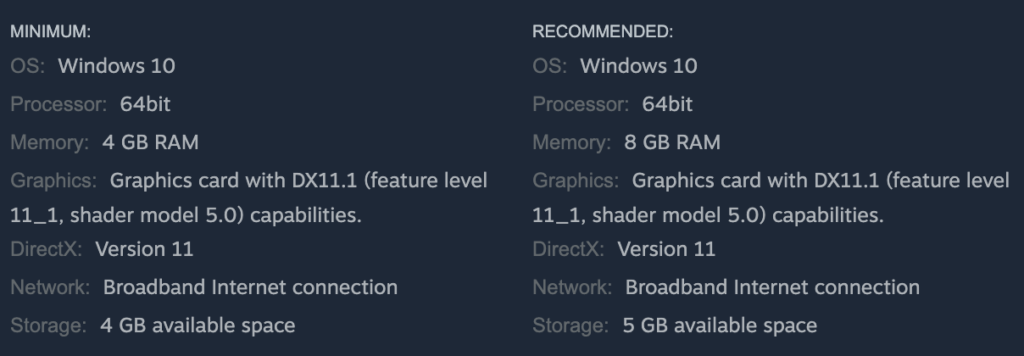
Had the platform been given time to develop, rounds of optimisation could have brought these requirements down somewhat. Even with these though, there would still be a minimum requirement that is a significant investment for those that already play D&D.
Some reading may point out – DnD Beyond has millions of users. Surely a lot of these would be interested in Project Sigil.
Wizards of the Coast certainly thought so, tying Project Sigil’s subscription to a DnD Beyond account. However, a majority of these users play on mobile, tablet, or Chromebook. None of these devices would be capable of running Project Sigil.
Now, if a D&D Beyond user did have a powerful enough computer, they would run into the next problem.
3. 3D Map Building
Building your own maps is a difficult thing, even with tools designed to make it fun and easy. 3D map builders are a different beast entirely. Compared to 2D mapping, which uses a top-down camera, users now need to handle a free-moving perspective camera. The third dimension also adds difficulties in placing content. Having to correctly align objects in 3D space can be a fiddly and time-consuming task, especially when needing to consider different camera angles.
This is why tools such as Dungeon Alchemist have become wildly popular. By including procedural generation, platforms can generate 3D maps quickly from a set of simple parameters. Users can then adjust the maps afterwards to fit their game.
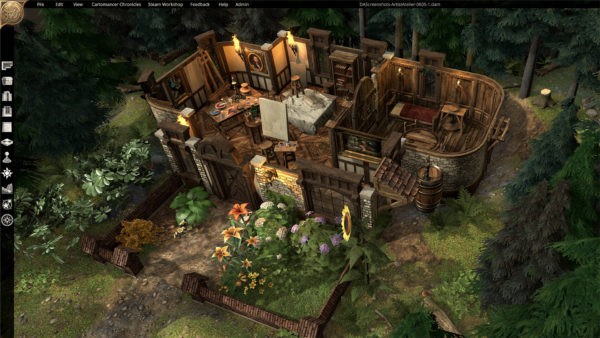
Another issue with 3D map creators is the difficulty of using custom and third party content. There is 50 years of RPG content available, almost exclusively 2D, not to mention hundreds of creators putting out maps on Patreon. All of this content can not be used effectively in a 3D VTT.
In the rare occasions that 3D mapping tools allow for 3D model imports, users need to both create a 3D model and manage UV mapping and texturing. This is a much more complicated task.
And, with a much lower amount of custom content, homebrewing becomes more difficult. Most users who would be building maps would be creating their own custom ones. With only a set number of assets available, the number of different kinds of maps that can users can create is limited.
In all, it’s a choice that raises the barrier of entry to content creation, while lowering the number of content themes available.
4. Subscription Model

Due to design decisions in the way Project Sigil was developed, a subscription would be necessary to keep the platform running. Unlike other locally installed VTTs that are self-hosted, Project Sigil made heavy use of cloud infrastructure. From our analysis of the platform, even maps seem to not be saved locally. Rather, they would be downloaded from the cloud each time you wanted to access them.
In our current climate, this is a rookie mistake. More and more, VTTs are turning away from the subscription model. Consumers are tired of monthly payments, especially as practically every service in their lives are trying to extract as much money from them as possible.
The post-2016 generation of tabletop platforms are largely subscription-free. Platforms such as FoundryVTT have exploded onto the market with a one-time-purchase model. These are much friendlier to consumers, and they don’t risk losing access to their content if life throws unexpected hardship their way.
Admittedly, D&D Beyond already features a large subscription userbase, which, if the previously mentioned problems didn’t exist, would seek to work in their favour. Unfortunately their target market for Project Sigil overlaps very little with their existing D&D Beyond userbase.
5. The Project Sigil Gen Con demo
During Gen Con, Wizards of the Coast ran a stage game with Project Sigil to show off its capabilities. You can watch the game below:
The cast performed fantastically, putting on an entertaining performance. But the intended star of the show, Project Sigil, came off looking second best. The game came to a stop multiple times as the cast figured out how the software worked. Plus, showing an entire group of players sitting around a table staring at their screens does not evoke the joy and social engagement that tabletop provides.
The demo failed to show off the best parts of the platform, while highlighting how it can negatively impact both the game and the atmosphere.
(P.S. If you are looking to bring digital tools to your table, try out a tool that’s built for it specifically.)
6. Lack of Marketing
A surprising number of people were not aware the Project Sigil existed. Outside of the D&D Directs, there has been little to no marketing about its release. Here are a couple of comments from /r/dnd


This was not a small indie release. This was supposed to be a flagship product release by the largest company in tabletop gaming. A company as large as WotC has the budget and experience to promote Project Sigil. Such a failure of marketing can only be a deliberate act, or spectacular incompetence.
All of these points worked together to create a lacklustre launch. With all these issues, it is no surprise that Project Sigil failed to find its place in the market. At this point, WotC had two options before it.
- Stick with Project Sigil in the long term. Continue building on the project until it is a compelling offer for D&D players.
- Cut their losses and scrap the project, laying off most the development and gently smother the project until it stops breathing.
Guess which one they chose…
Project Sigil developers laid off

(You can read the original post here.)
Lay-offs in the games industry are common. Especially after the release of a new product. Firing 90% of a development team before a project is feature-complete however, never bodes well.
Industry sources state that there are anywhere from 3-5 developers remaining on the project at most. This number tracks with the 90% figure given in Andy’s post. With a project the size of Project Sigil, this is practically a guarantee that the project is being wound down. The remaining developers will be maintaining the service until it is finally let go. This could occur in a matter of days, or weeks.
We feel for the development team, and hope they find gainful employment. Lay-offs are happening all over the tech industry at the moment, and finding work in a similar area will be difficult.
Many commenters find Project Sigil’s demise hardly surprising, albeit possibly sooner than expected. This is because in life, there are three things of which you can be certain; death, taxes, and Wizards of the Coast failing to create a digital D&D platform.
The most notorious example is their attempt at a D&D4e VTT. Billed as an online subscription-based character management and virtual tabletop tool, it was announced alongside D&D4e at Gen Con 2007. This service did eventually launch with some of the promised character creation, but never reached its full potential. Before that was Master Tools / e-Tools for third edition. These are but a couple of notable entries in WotC’s extremely checkered past of digital products.
Alternate platforms to Project Sigil
For those new to the VTT scene who were excited for Project Sigil, never fear. There are many other VTTs out there that you can use to enhance your gaming experience, depending on how you play and your technical proficiency.
If you’re playing in-person, Arkenforge is the way to go. Built specifically to use while sitting around a table, and your players won’t need to use any screens.
If a 3D VTT is what you’re after, then grab a copy of Talespire. It is a highly competent 3D mapping and playing tool, and was even featured on Dimension 20!
If you’re playing online and have some solid technical know-how, then FoundryVTT is the platform for you. With a single purchase and an incredibly active modding community, it will do just about anything you want it to.
If you still want the single purchase, but want less technical hassle, then give Fantasy Grounds Unity a go. It’s been around for over 20 years at this point, and has thousands of modules ready to download and use.
If you want to run games in a browser, Roll20 and Owlbear Rodeo are both excellent options, however both require subscriptions to get full feature access.
And with that, we conclude the service. Refreshments will be available in the reception, and we will see you in 5 years to commemorate WotC’s next digital toolset.
The post Project Sigil: A Presumptive Farewell appeared first on Arkenforge Tabletop.
]]>The post A Year Of Change, Phase 3 – Audio Changes appeared first on Arkenforge Tabletop.
]]>
Hey folks! Nathan here. It’s a nice and short one today as I’ll walking you through some changes we’ll be making to audio in the Toolkit.
That is – everyone is getting it for free!
Free audio!?
That’s right!
All of our music and sound effects from every Arkenforge content pack is being moved into the Arkencore Pack. That’s over 10,000 audio tracks, now available to every user in one massive 3gb update!

But why free audio?
As we’ve released more and more audio through our major packs, there’s been one particular nightmare that has kept us awake at night.
Playlists, Ambience Presets and SFX Palettes.
Because our audio content has been bundled into packs until now, we can’t easily build these into audio collections that pull from multiple packs. You may have noticed that we have playlists with names like ‘Battle’, and ‘Battle (Wild)’. There’s no ‘Battle (Towns and Cities)’ because we realised that having the same version of the same playlists in each pack is a bit silly.
Dante in particular has been wanting this problem solved for a while. The Arkencore Pack has provided the best opportunity to do so.
This is also part of why we brought down the price of our content packs in Phase 2. It wouldn’t be right to charge the same price for a pack that now had less in it.

More audio in more places
With all of our music and sound effects being in a central location, we can give future packs their own custom playlists and ambiences. These would be curated specifically for the theme of the given pack, and would use the same songs and sound effects that everyone has access to.
This change will also allow users to more easily share their created audio collections without needing to worry about what packs other users have installed. In future, we’d love to see Community Playlists and Community Ambiences sections, as well as Community Maps. With the ability to edit the individual stems of our tracks, I’m personally excited to see what folks come up with!

Phase 3 complete!
Phase three of our Year of Change is now done. The Arkencore patch should be available to you already.
Stick around and watch out for our article on Phase 4!
While you wait, check out the Arkenforge Toolkit at https://arkenforge.com
The post A Year Of Change, Phase 3 – Audio Changes appeared first on Arkenforge Tabletop.
]]>The post Arkenforge Devlog – Designing for Accessibility appeared first on Arkenforge Tabletop.
]]>
Hey folks! It’s Disability Pride month, so this month’s devlog is Designing for Accessibility. We’ll be looking at it from a general software lens, so there’s nothing here specific for VTTs.
We’ll be focusing on the things that we currently do, but we’ll also add in a section at the end on future things we’d like to implement.
Let’s learn how we can make our VTTs (and software in general) more accessible!

UI Resizing
Arkenforge currently allows UI scaling in 4 discrete increments: 75%, 100%, 125% and 150%.

Providing UI resizing options has two major benefits.
- It can allow people with vision issues to more easily read your UI.
- By increasing the size of clickable items, it makes it easier for people with motor function issues to interact with your software.
Adding UI resizing options takes some careful design. Sure, you could just add a UI size slider that goes as high as the user would like, but a larger UI without designing for a larger UI can easily make the situation worse. UI elements can overlap, and text can end up off-screen or wrapping to the point of unreadability.
Implementation
To ensure that everything works well at our largest UI scale, we build all UI at 150%, then downscale from there. It’s significantly easier to downscale a large UI than it is to upscale a small UI. This also lets us see what the largest feasible size for UI is inside the Arkenforge Toolkit, which is why we cap out at 150%. Any larger than that, and you begin to flirt with usability issues.
Right now our UI scaling is uniform. That is, every UI element is scaled by the same amount. In future we’ll be adding in UI scaling on a per-UI basis. This would mean that your widgets could be scaled differently to your Arkenbar, which could be scaled differently to your left-side menu panels. This high level of customisation would improve the experience for our users while allowing for larger UI scaling values.
In order to implement this yourself, you’ll either want to have all of your UI adjust its scale value, or adjust its height and width based on the new scale. We like to do the latter, as it works better with our anchoring.
Recolouring

Recolouring UI elements is another accessibility feature that assists those with vision impairment and colour blindness. By allowing users to recolour elements of your software, you don’t need to worry as much about colour-blind modes. Your users will set their own UI colours to best fit their needs.
That being said, your default colour scheme should be colour-blind friendly to start with. Users shouldn’t have to fight against your default UI to set the colours that they need.
Outside of vision impairment issues, recolouring can help with many flavours of neurodiversity. Being able to set colours for different sections of your software can help users to find things faster, and ultimately use your software more effectively.
Finally, you can’t discount the personalisation element. While not a disability-specific benefit, accessible features aren’t just for those that need them. They ultimately help everyone. We’ve seen screenshots from our users with all kinds of different UI colouring. Giving users the ability to set up their software to look how they want it to helps them feel more attached.
Implementation
We use an event system to manage UI recolouring that all UI elements are subscribed to. When a colour is changed, all active UI elements are notified, and they update their colour accordingly. This allows for real-time visualisation of the changes while editing, rather than needing to do an ‘Apply now’ button and having the user repeat the entire process again.
Simulated mouse button toggle
About two years ago now, we had a user reach out with the following info (paraphrased): “My daughter has CP. She struggles to hold down left click and drag a mouse.” With most of our software being built on click-and-drag functionality, this was obviously something that needed addressing.
At the time we had the ability to hold down the spacebar to move selected content (and still do!), but this was also not feasible. Holding down any keyboard key for any length of time was something that would cause pain.
We ended up going with an option to set middle click as a simulated left mouse button toggle. To put it simply, clicking the middle mouse button when hovered over a map object or UI element would put it into ‘dragging’ mode. From here, you could move it to wherever you liked, then click the middle mouse button again to drop it. It took a bit of work to implement into our UI code, but as a result, someone can now use the Arkenforge Toolkit without pain.
Implementation
This one relies on writing your own custom input manager. We do this in Arkenforge to unify input between touch and mouse control for map building, but it also lets us do these kind of accessibility features.
The only part you’ll need to add in is a ‘simulateMouseDown’ bool that flips based on the input of choice (In our case, the middle mouse button). When testing your ‘GetMouseButton’ function, you’ll just need to add in the ‘simulateMouseDown’ value to test as well. If the value is true, then you’re holding down the mouse, and can set up your drag events accordingly. Just make sure that you’re adding a simulated ‘OnMouseDown’ and ‘OnMouseUp’ function as well (depending on the toggle state) when you hit your input, otherwise you end up with a dragging event with no pick up / put down events to go along with it.
OpenDyslexic
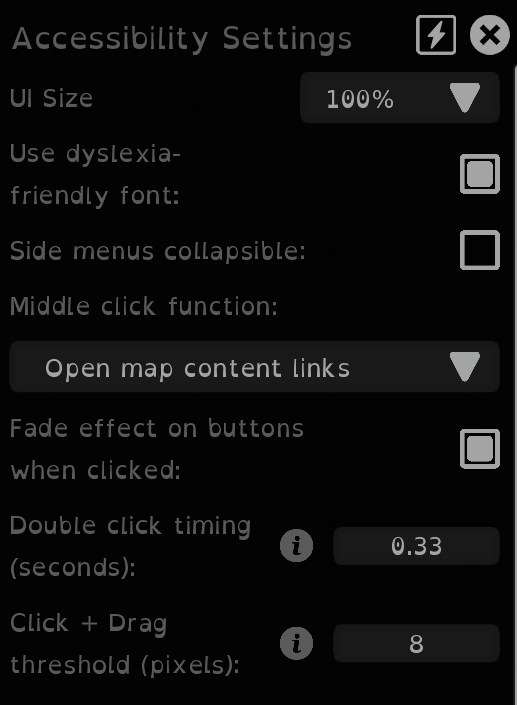
OpenDyslexic is a free typeface designed to help with some of the common issues that those with dyslexia face. Being a free typeface, it’s a simple addition that all platforms can implement.
The Arkenforge Toolkit provides a checkbox that allows users to swap all font to OpenDyslexic.
If you’d like to implement this yourself, you can find the typeface at https://opendyslexic.org/.
Implementation
Arkenforge implements OpenDyslexic in a similar way to its recolouring. All text UI elements in the Arkenforge Toolkit are subscribed to an event that pings when the ‘Use OpenDyslexic’ checkbox value is changed, and update accordingly when the setting is modified.
Double click timing
By allowing users to adjust the speed of a double click, users who aren’t able to click rapidly can more accurately interact with your software. There should be options for this in your user’s operating system settings as well, but adjusting these will adjust the setting for all software on their computer. Providing the option to set this on a per-software basis can allow your users to make the necessary changes in your software without affecting their experience in other software applications.
Implementation
When managing your input system, have a timer start the moment a mouse button is clicked. If the timer is below the double click time threshold, then a double click has occurred. If it’s over, then it’s another single click.
Make sure your double click event is also looking at the distance the mouse has moved, and that the same button is being pressed when calculating your double click. Adding a small allowable distance that the mouse can travel for a double click to occur can also help those with tremors and other such conditions to interact with your software.
Click + Drag threshold
Adjusting the click and drag threshold will change the distance in pixels that a held click with mouse movement becomes a drag.
Users with motor function issues or hand tremors may have trouble with click and drag functionality. For some, the standard value is too low, and they can accidentally drag content when they just want to click. In our software this can lead to placing content in the wrong spot, accidentally creating content links, or accidentally revealing parts of the map.
By allowing users to set the click and drag threshold to a custom value, we can alleviate these issues.
Implementation
For UI, Unity has this built into its EventSystem class already through the EventSystem.current.pixelDragThreshold variable.
When it comes to scene content however, this does not exist. Therefore we need to add it into our custom input manager. It’s quite an easy one if you’re already detecting content dragging. You just need to do a distance check between the current mouse position and the position that the mouse was first clicked.
UI Audio
Sound effects on your UI are more than just some flashy sounds that respond to input. They can be a helpful tool that provide an extra layer of information to your user. In the Arkenforge Toolkit, we use UI audio in a variety of different ways.
First of all, we provide different kinds of UI audio. Each of these can be toggled on or off depending on what sounds the user wants to hear. The following are offered currently in the Arkenforge Toolkit:
- Button Click
- Deleting map content
- Opening a dropdown menu
- Error message
- Extended screen activated
- Hovering a UI element
- Placing a map tile
- Rotating a map tile
- Adjusting a UI slider
- Resizing a map tile
- A tooltip appearing.
We could certainly add more options, but these ones provide a responsive sound effect for every major function of our software.
Rather than just adding the sound effects in, with a little extra work you can increase the accessibility of your sounds. For example, our slider sound will adjust in pitch depending on the fill percentage. This provides simple responsive feedback that can alert a user as to the state of the slider. To go one step further, you can base the sound’s panning on the element’s screen position. In Arkenforge a UI element on the left side of the screen will be louder in the left channel, and one on the right will be louder in the right channel. This is one that we borrowed from, of all places, Animal Crossing. This provides just that little bit of extra feedback to let a user know where the mouse might be on the screen.
Watch the below example with your eyes closed, and see if you can tell which slider is being updated, and to what value.
Implementation
We use a singular UISoundManager class with a PlaySFX function that feeds in the sound type, screen x position, pitch, and volume. From here, it selects the correct sound effect and, if that sound type is enabled, play the sound effect at the correct volume as determined by the UI audio volume slider and the volume variable passed into the function. We also use the screen x position for panning the audio. You don’t want to go from a -1 -> 1 with this, as you frequently end up with audio in only one channel. We max out at 75/25, so there’s always some element of audio in one side. It gives enough of a difference that it’s quite noticeable, while still feeling satisfying in both ears.
Conclusion
These are just some of the ways that you can make your platform more accessible. On top of this, here a few additional accessibility features that you could add into your project.
- Screen reader support, with both text reading and alt-text support for images and buttons.
- Keyboard navigation through UI elements. This is helpful for folks who find it difficult to use a mouse.
- Zoom window. Operating systems should have this as a default feature, but providing a window that can zoom in on UI elements can further help users with vision issues.
I hope this has been a helpful guide, and that if you’re developing your own software that you’ll implement at least some of the above features.
If you’d like to see them in action, check out our Arkenforge Toolkit at https://arkenforge.com!
The post Arkenforge Devlog – Designing for Accessibility appeared first on Arkenforge Tabletop.
]]>The post Arkenforge Devlog – Content Management appeared first on Arkenforge Tabletop.
]]>
As the old song goes: “How do you solve a problem like managing hundreds of thousands of user-generated files in a way that provides quick access, organizability and searchability, while also keeping a low barrier to entry and minimising resource usage?”. Ok, that might not be exactly how it went, but it’s what we’re covering in today’s Arkenforge Devlog – Content Management

It took quite a few iterations to reach the point we’re at, and there will probably be more in the future. Each step has solved new sets of problems that have arisen as the Toolkit has grown and developed over the years, and as our community has become more and more ambitious with their content usage. For anyone else building a VTT, or really any platform that required file management on a large scale, this article is for you! If you aren’t a developer, have a read anyway
This follows on from our previous article on the subject from 2020. We’ll summarise it below in the ‘early years’ section, but you can read the full article here: https://arkenforge.com/content-management-and-arkenforge-a-history/

The early years: 2017 – 2020
Did we know what we were doing? It’s a strong maybe.
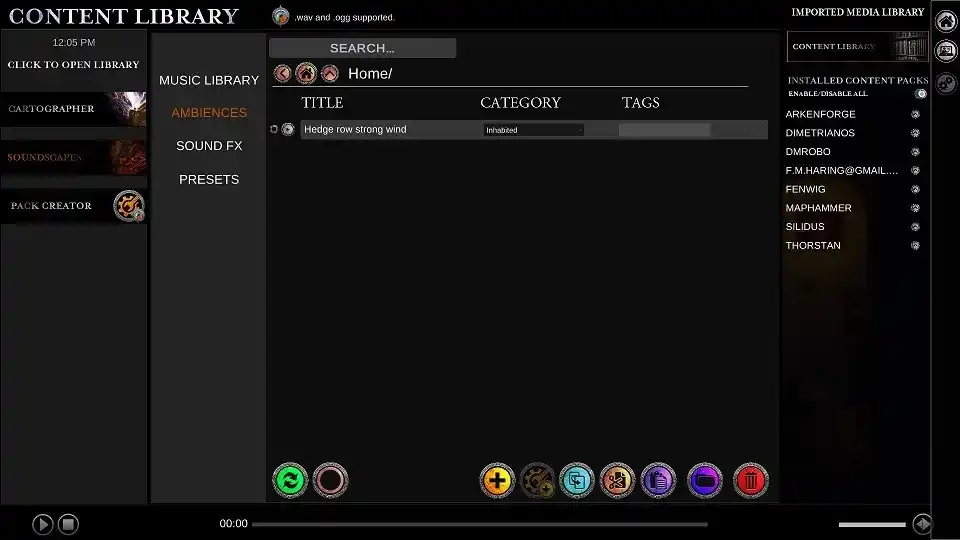
The Arkenforge Toolkit is locally installed software. That gives us challenges that many online platforms don’t have to deal with. Mainly – that the only limit to your content library is your hard drive space.
We went through a lot of iterations, from a 5gb file that was loaded directly into RAM, to a map asset management system that was easy to use, but incredibly convoluted to configure. Eventually we landed on a system that allowed users to easily see their imported content, but made it difficult to actually use that content in many cases.
At the start of 2020, COVID appeared on the global stage. Throughout most of 2020 and a good portion of 2021, we were locked down in Melbourne. As we couldn’t go to conventions, or really leave the house much at all at times, we decided that we’d go through and fully redesign the Toolkit. When it came to the content system, the version at the time had its flaws. There were issues with content management and usability of imported assets. Primarily, users with lots of content could take 15 – 20 minutes to load the Arkenforge Toolkit software. This had to change.

The Problems
We identified two core problems with our current content management system. Two problems doesn’t sound like a lot, but they were large problems. Problems that went to the very core of how the Arkenforge Toolkit software operated.
1. The content loading problem
You see, meta files were an incredibly useful tool. But, while we lazy-loaded the main content, all meta files were loaded into the Toolkit in RAM. This essentially brought us back to the .rwpack days of old, but with significantly smaller file sizes. The main issue here was our power users that had imported huge quantities of map assets. When the Toolkit was launched, it would go through every folder in the ArkenforgeData folder to find the meta files it would load into the Toolkit. When you’re dealing with tens, if not hundreds of thousands of files, this takes quite a long time. Effectively, we were punishing users for using more of the Toolkit.
Not a great thing to do.
2. The content organisation problem
We were also still using the Palette Tool. It was an excellent function back in the early days of the Toolkit, but like much of the UI, it was quickly becoming unfit for purpose. Not only did it limit things to category/subcategory, leading to large amounts of content in each subcategory, but when users were importing content they would have to create their own categories to move their content to. With the benefit of hindsight, this was a terrible idea. However, progress occurs incrementally, and this was needed to increment upon.
So, we needed to find a way to stop all of these files loading in at runtime, but still be able to access them when needed. We also had to give users a way to easily manage their imported content, without having to spend hours creating categories to assign that content to. There was a clear solution.
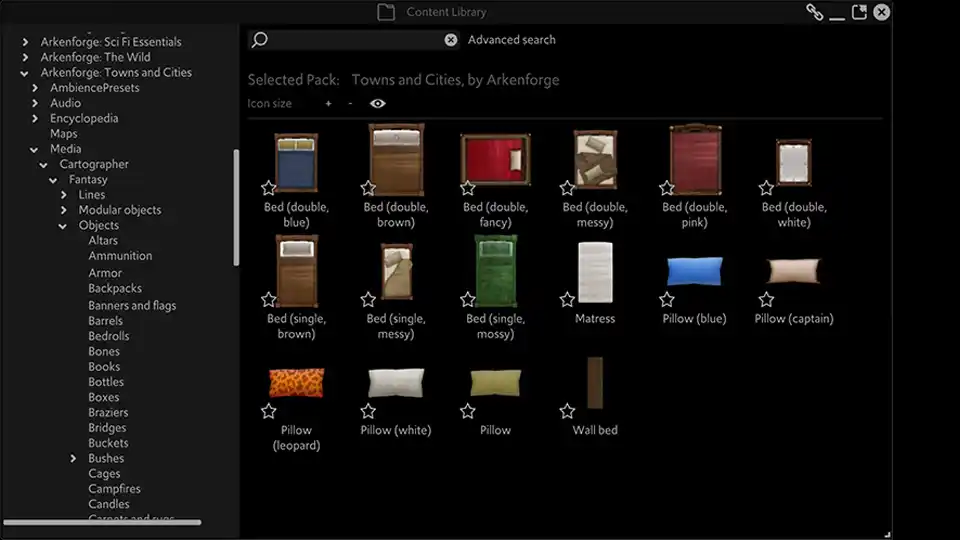
2021: The new file system
There’s already something out there that provides a clear way to organise files. One that requires minimal effort on part of the user and allows new files to be added and accessed immediately. One that you’re using right now to read this article.
An operating system.
It was a bafflingly simply solution. Mimic the operating system’s folder structure, and show content as it’s physically organised on the computer. How hadn’t we thought of it earlier? Well, honestly we hadn’t needed to.
So, we updated the Content Library once more. We put in fixed folders that each content type would be placed in. Users could create their own custom folders within them. This kept content where it should be, and it let users easily organise their imported content. We could also use this system with our content packs. It allowed us to split content into a greater number of categories, and eventually genres, keeping the number of assets per folder relatively low.
As we were swapping to a folder-based system, we no longer needed to know every file in the Toolkit. The operating system was handling that for us. This meant that we could now lazy load our meta files as well! Meta files were only loaded when the relevant folder was opened. Some types of files, namely playlists, ambience presets, and SFX triggers, would be loaded in the background when the Toolkit started. This was because audio content could be assigned to them through a right click menu, and if the content wasn’t loaded, it couldn’t appear as an option in those menus. This loading was done in a separate thread after the Toolkit was launched.
Boy, it was nice to have finally solved the problem once and for all! Well, for about two years…

2023: Identifying new problems
With the new changes, the load time for the Toolkit was now effectively zero. All content could now be managed easily through the file browser, so our organisation problem was sorted. All were rejoicing!
But there were small, pesky problems that kept coming up. Our notes system updates meant that people were using them more. That meant lots of data added, and naturally the desire to link all that content together. We’d also optimised our mapping quite heavily, so people could now add more and more assets to their maps. With our new content packs, there were tens of thousands of new assets available to build with.
You can see the singular big problem that this is all leading to.
Searching
How do you search through hundreds of thousands of assets without slowing down, or even in some cases, freezing your software?
Our existing method wasn’t great. Since we were relying on the folder system to show content, we were also relying on it to search content. Do you know how long it takes to search hundreds of thousands of files to find all the trees? Too long. Especially when that process involves opening every meta file in every folder to read the contents. If you could just search by name, the problem wouldn’t be quite as bad. At least then you’d be able to just read the file names without needing to open them. Still a long process, but nowhere near as long as opening the meta files. But no, we gave people filters. Content type, content pack, creator, artist, etc. All data that you can’t easily keep in a file name.
Suffice to say, when you’re dealing with as much content as many of our users, that search began to take a while to return its results. Fortunately there’s a relatively simple solution for this one.

Indexing
An index is essentially a phone directory for your content. When building our index, we essentially pull all of the information out of our meta files and put them into a very long list.
A list of text is significantly faster for a computer to parse than opening and parsing multiple files. It’s even faster when the full list is in RAM. By running our search system off the index rather than the file system, it can find content near instantly. The primary issue at this point is keeping the index properly updated.
Importing and deleting content from the Toolkit updates the index accordingly. For any content not indexed, such as users who copy files into the Toolkit through the OS file browser, individual folders can be reindexed, as can any given content pack, or the entire Toolkit if a user so wishes. We keep the content library using the folder system for this reason. If a user has unindexed content, it can lead to confusion if it doesn’t appear in the content library. When viewed in the content library, all content has a UI element to show its indexed state.
A hidden weakness
The index update also revealed a small weakness of the old system. Some content types didn’t have meta files attached. As these files were rather small, we would just load them directly. In order to index them effectively, we had to create meta files for these types of content. This also meant updating the existing Toolkit systems to base decisions on these meta files, rather than on the content files directly. Something seemingly simple such as dragging and dropping content relies on knowing what type of content is being dragged and dropped. If the content type changes from a Playlist to a Playlist Meta, the logic breaks, because everything was built to handle Playlists.
This change also allowed us to streamline quite a lot of the file management and display code in the Toolkit. When every shown file is a meta file, then we don’t need different classes for the meta-less content types. We removed a lot of conditional logic, which provided a small boost to performance when loading files.
Other benefits
The new Content Library system we’ve built has a few extra features that aid with usability.
Firstly, folders are now treated as a content type. This means that users can drag and drop them onto the Arkenbar, onto the map, or into notes.
We also include folders into the index file. This increases search functionality, as users can add part or all of a folder path as a search filter. This helps when users have multiple instances of content with the same or similar names.
Finally, by unifying our file viewing code to only look at meta files, it allows opportunities in the future for custom folders with mixed media. This would allow audio, images, video, and the various collection-based content types to co-exist in the same folder.
All of these new systems work together to allow our users to find and access their content faster than ever before.
Conclusion
That’s where we with content management are as of the Q2 2024 Arkenforge Toolkit Beta Version. A mixture of native OS folder structures and content indexing that provides management of hundreds of thousands of files while allowing full searchability in under second.
There are some updates that we could make in future, mostly around removing the requirement of every content type needing its own fixed folder structure. This would give users more freedom in managing their content, as well as removing a level of confusion that can arise from where certain types of content are stored. That’ll be quite a large and painful update though, so it likely won’t be happening any time soon.
Thanks for reading, and we’ll see you in the next one!
The post Arkenforge Devlog – Content Management appeared first on Arkenforge Tabletop.
]]>The post A Year Of Change, Phase 2 – Standalone Toolkit Release appeared first on Arkenforge Tabletop.
]]>
Hey folks! Nathan here. Today we’re unveiling the second phase of our 7th birthday changes. The Standalone Arkenforge Toolkit. If you missed the announcement of Phase 1, you can read it about it here.
The Standalone Arkenforge Toolkit

It’s something we’ve heard time and time again over the years. “Why can’t I just get the software with no asset packs?”. Historically we’ve been apprehensive about giving the software out without any content, as there’s a base level of assets that folks expect from a tool such as ours. This was a large reason we brought out the Arkencore Pack.
With all users having access to the Arkencore Pack, we can now set up the Toolkit as its own standalone product. This is intended for those who primarily want to use Arkenforge for running their in-person games on a screen or projector.
The Standalone Toolkit provides the full software experience. No features are being spun out into separate products. We’re staying true to our goal of all Arkenforge Toolkit features being available with a single purchase.
With the Standalone Arkenforge Toolkit software product comes some updates to our pricing.
New Software Pricing
Yes, prices are changing. I recognise that this is often the point where companies jack up the prices of everything, citing ‘cost of living’ or ‘Too much value for customers.’ That’s not what we’re about at Arkenforge.
Overall, things should be better for our users.
Arkenforge Toolkit: US$35 US$35

Wait. Isn’t the Arkenforge Toolkit already US$35? Yes, but read on.
Arkenforge is at a point now that it can be considered fully-fledged commercial software. It excels at its job, which is providing the best in-person TTRPG experience. On top of this, it is a highly competent map builder, audio tool, and campaign manager. With that in mind, we’re now providing the option to purchase it as its own standalone software. No Fantasy or Sci Fi Essentials Pack bundled in – only the standalone Arkenforge Toolkit.
This is also why every user will receive the Arkencore pack for free. By purchasing the standalone Arkenforge Toolkit, not only will you have access to world class TTRPG software, but you’ll get a free library of content along with it. If you’re a user who just uses the Toolkit to run your games with imported content, then effectively there is no change. If you’re interested in building some amazing maps, then read on!
Arkenforge Fantasy/Sci-Fi Starter: US$35 US$50

The price of the current starter bundles will be raised to $50.
This is admittedly higher for those who just want to dip their toes in and experiment with mapping. But, if folks like what they see and want to get more, it’ll be much easier to dive in.
New Content Pack Pricing
One of the complaints we hear about our marketplace is the high price to get all of the content. Surely by increasing the base software price, we’re just making that problem worse, right?
Wrong!
We’re dropping the price of our content packs! As we’re continuing to release packs and ramp up content production, it only becomes more and more expensive to get all Arkenforge content. This is great for us, but not so great for our users. So, we’re making it easier for you to get the Arkenforge mapping content you want.
Our pricing will be unified between all Major Packs, Minor Packs, and Token Packs.
Major Packs: US$30 US$20

Major packs are the packs from our major content releases. At time of release of this article, the Major Packs are:
- Fantasy Essentials
- The Wild
- Towns and Cities
- Dungeons Deep
- Sci Fi Essentials
- Cyberpunk
- Deep Space
- Wasteland
Minor Packs: US$15 US$10

Minor packs are all mapping content packs outside of the Major packs. At time of release of this article, the Minor Packs are:
- Halloween
- Ice and Snow
- Magical Effects
- Animated Trees
- Underwater
- Forest of the Fey
- Haunted Ruins
- Furniture and Decor: Home
- Viking Village Scenery Pack
Token Packs: US$5 US$5

Token packs will remain at their current price. It’s important to note that the Dungeon Dwellers and Arkenteam Token Packs are no longer available for purchase, as they have been included for free in the Arkencore Pack.
Bundles

With our content packs becoming cheaper, our bundles prices are coming down with them!
All pack bundles will be dropping from US$70 to US$50. We’ve aimed for an Arkenforge Toolkit Starter + Major Bundle to be roughly the same price. With the new price being US$100, compared to the old one of US$105, we think we’ve done well there. For all purchases after that point, you’ll be spending less money than you would have under our previous pricing model.
The Ultimate Bundle price will also be dropping quite a bit, going from US$320 to $250. As the Ultimate Bundle includes all Arkenforge content releases, this one will continue to increase as we release new content.
Phase 2 complete!
That’s all for Phase 2! We’ve now got the Arkencore Pack, the Standalone Toolkit, and some new user-friendly pricing.
Stay tuned for Phase 3, where we’ll discuss some further changes to our content!
The post A Year Of Change, Phase 2 – Standalone Toolkit Release appeared first on Arkenforge Tabletop.
]]>The post A Year Of Change, Phase 1 – Arkencore Pack appeared first on Arkenforge Tabletop.
]]>
Hey folks! 2024 is shaping up to be a big year for Arkenforge. We recently celebrated our 7th birthday, and it’s the catalyst for some big changes. All of these changes we’re making hinge on a single starting point. That starting point is the Arkencore Pack.

What is the Arkencore Pack?
The Arkencore pack is exactly what it sounds like. A core pack for Arkenforge. In its initial release it will contain over 1GB of fantasy mapping content. That’s over 200 mapping assets, many of which are animated. It’ll also be launching with over 100 sound effects. Finally, it’ll be launching with all tokens from the Arkenteam and Dungeon Dweller token packs. Think of it as a new Fantasy Essentials Pack, but with a bunch of content that can largely fit into any campaign.
The word ‘launching’ is the key word here. Over time we will expand this pack with new content, providing even more free assets for all users.
What makes the Arkencore Pack special?
One simple thing makes the Arkencore Pack different to all the others. Every user will have access to it for free. The Arkenforge Launcher will automatically install and update the Arkencore Pack, similar to how the Launcher Patcher is now. We’ll also have the Toolkit install automatically, but patching it will remain optional. This goes live with v6.2.0.0 of the Arkenforge Launcher. The Launcher update is optional, so feel free to hold off on it until you’re ready to experience the full power of the Arkencore pack!
By giving every user the Arkencore Pack, it provides a pool of content that we can rely on every Arkenforge user having access to. That lets us do some fancy things.
We can use the Arkencore Pack wherever we like. Modular objects in all content packs can contain Arkencore assets. This will reduce asset duplication and allow for a much wider range of modular objects than could otherwise be supported. As the pack contains sound effects as well, we can add things like sound triggers to content much easier, as well as creating some simple ambience effects that all users can access.
All in all, we have more content to use for more things in the Toolkit.
Just the beginning
This is the first of many content changes we’ll be rolling out this year. The Arkencore is the first phase, and we you’ll love all the new assets and opportunities it brings.
Not only do we have a huge update coming to public later this year, but we’ve also got some really neat packs in the pipeline that we’re incredibly excited to show you.
Stay tuned for news on our future phases by joining our Discord!
The post A Year Of Change, Phase 1 – Arkencore Pack appeared first on Arkenforge Tabletop.
]]>