
let's make rating systems meaningful again!
]]>
let's make rating systems meaningful again!
]]>
ULIDs are my favourite identifiers to use in projects, they're soooo cool! There used to be a website that would generate, validate and decode ULIDs right in the browser, but the domain expired and whoever was running it abandoned the project. So I decided to recreate it and keep it alive!
]]>
minimalistic IP country lookup
]]>
what are the core values in your life? here's an exercise that can help you discover them!
]]>
a minimalistic, privacy-friendly library for browser fingerprinting in nodejs
]]>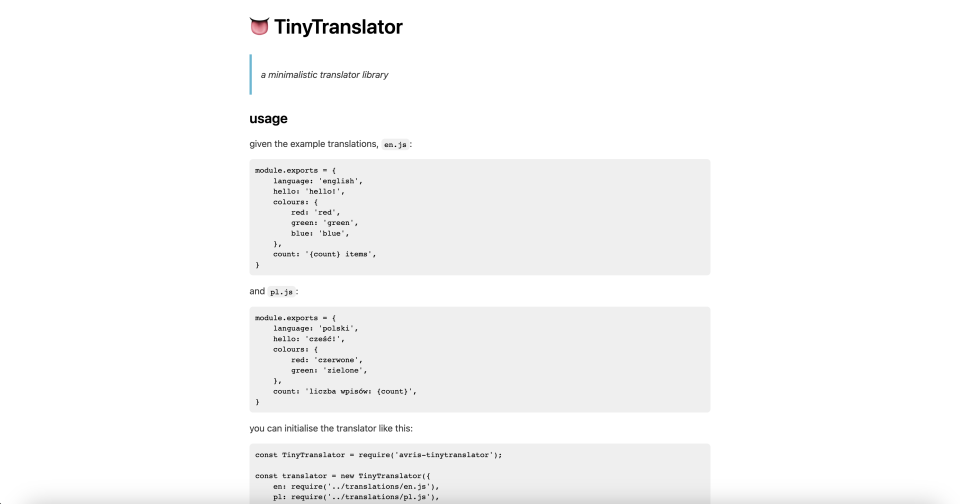
a minimalistic translator library
]]>
a minimalistic library for inline markdown: 9 features – 10 lines of code – 0 dependencies
]]>
i'm not “a female” / “a male” / “a they/them”
please, just call me by my gender! 🙄
]]>
Eksperymentalny inkluzywny słownik sprawdzania pisowni języka polskiego
]]>
An experimental, inclusive spellchecker dictionary for Polish.
]]>
A simple doodling project – probably not that useful, but I enjoyed creating it 🤷
I liked the way Wendover Productions displayed the HDI score in their video „The News You Missed in 2021”, so of course I decided to create a widget like this for VueJS 😅
Here's a demo:
And here's how I made it:
To minimise the initial bootsrapping, I picked a framework I already know and absolutely love: Nuxt. Its upcoming version, v3, cuts all the bootstrapping crap to the minimum, while remaining highly flexible. All I had to do to start working were those commands:
npx nuxi init ProgressBar
cd ProgressBar
yarn
yarn dev -o
What they do is fetch a project template, install dependencies, start a development server
and open http://localhost:3000/ in the browser.
Bootrapping done; now I can focus on work. It's a simple project, so only two files will be relevant:
app.vue is the main entrypoint, the homepage.
It contains what you see in the demo: just some introduction and lots of <AvrisProgressBar/> components
embedded to showcase their usage.
I won't focus here on the app.vue code, because it's really straightforward –
you can check it out here.
Sidenote: if I ever need to add multiple pages, I'll just create a routes directory
and move app.vue to the appropriate structure inside of that folder, it's as simple as that! –
and for the simplest case it's all already preconfigured and working!components/AvrisProgressBar.vue is the actual component I'll be working on.
Nuxt automatically configures everything so that throughout the application
you can simply use the <AvrisProgressBar/> tag.The template is really simple:
<template>
    <div class="outer" :style="`background-color: ${colourOuter}`">
        <div class="inner" :style="`width: ${percent}%; background-color: ${colourInner}`"
             role="progressbar" :aria-valuenow="percent" aria-valuemin="0" aria-valuemax="100"></div>
    </div>
</template>
All we need is two divs:
And here's how I styled them:
<style scoped>
.outer {
    --apb-height: 16px;
    --apb-border-width: 0px;
    --apb-border-color: #aaa;
}

.outer {
    width: 100%;
    border-radius: calc(var(--apb-height) / 2);
    height: var(--apb-height);
    margin: 4px;
    padding: calc(var(--apb-height) / 4 - var(--apb-border-width));
    display: inline-block;
    border: var(--apb-border-width) solid var(--apb-border-color);
}
.outer .inner {
    height: calc(var(--apb-height) / 2);
    border-radius: calc(var(--apb-height) / 2);
}
</style>
I used CSS variables so that each usage of this widget can override the default height and border.
Now all we need to do is calculate percent, colourOuter and colourInner. Easy!
Let's start with declaring props of our component:
<script>
export default {
    props: {
        value: { required: true },
        min: { 'default': 0 },
        max: { 'default': 1000 },
        colours: { 'default': () => {
            return [
                '#ff0000',
                '#ffff00',
                '#00ff00',
            ];
        }}
    },
};
</script>
We expect the user of our widget to provide a value (eg. <AvrisProgressBar :value="123"/>)
and we allow them to overwrite the default values of min (0), max (1000) and colours (red, yellow, green)
with their own (eg. <AvrisProgressBar :value="69" :min="24" :max="169"/>).
Now let's calculate the percent.
It's pretty simple: we divide the current progress by the full range, and multiply by 100%.
If min == 0, the formula is trivial: 100% * value / max.
But in any other case we should add the min to the formula:
100% * (value - min) / (max - min).
Plus let's cut it at no less than 0 and no more than 100, just in case the user provides some weird input.
Here's a Vue code that implements that:
computed: {
    percent() {
        let percent = 100 * (this.value - this.min) / (this.range);
        if (percent < 0) { return 0; }
        if (percent > 100) { return 100; }
        return percent;
    },
    range() {
        return this.max - this.min;
    },
},
And for the remaining two properties that we need, let's first mock their values to simply be green and black respectively,
just so that we can validate that percent works well without worrying about the colours.
computed: {
    colourOuter() {
        return '#00ff00';
    },
    colourInner() {
        return '#000000';
    },
},
Of course, in a full-blown, production-ready library, we should cover a lot more ground than in my simple doodle: supporting multiple colour models, implementing colour mixing algorythms that adjust for human perception, etc. But here I wanted to keep it simple:
#C71585),Actually, that's my main purpose for creating this widget – I'm curious whether such a simple setup would give a visually pleasant effect. Spoiler alert: it's not perfect, but it works well enough indeed!
So now, let's compute two more values that will help us in further calculations.
coloursHighpoints will be a map between the primary colours and the values where they should appear.
In the default case, we have n = 3 colours (red, yellow, green) and a range from 0 to 1000,
so to spread them out evenly we'd need red to be at 0, yellow at 500 and green at 1000.
The code below splits the available range into n - 1 sections (so in this case sections have a width of 500)
and then produces points at: min, min + range, min + 2*range, …
So in our case the methods retuns a map like this: {0: "#ff0000", 500: "#ffff00", 1000: "#00ff00"}:
coloursHighpoints() {
    const highpoints = {};
    const sectionRange = this.range / (this.colours.length - 1);
    for (let i in this.colours) {
        const point = parseInt(this.min + i * sectionRange, 10);
        highpoints[point] = this.colours[i];
    }
    return highpoints;
},
The next step would be to figure out which colours to mix for a given value.
Let's say our value = 400. We know it's between 0 / red and 500 / yellow,
so we expect it be an orange-ish yellow.
But how do we put that into code?
We need a method that will return an object telling us what's the closest highpoint
before our value, and what's the closest one after our value.
Let's iterate over the highpoints and keep assigning their values to the variable left as long as it's smaller than this.value.
As soon as a highpoint appears that's higher than this.value, we assign it to the right variable.
And then let's handle the edge case of value >= max.
Here's the code for that, and it produces the following output for our parameters: {left: 0, right: 500}.
coloursBetween() {
    let left = null;
    let right = null;
    for (let val of Object.keys(this.coloursHighpoints)) {
        val = parseInt(val);
        if (val <= this.value) {
            left = val;
            continue;
        }
        right = val;
        break;
    }
    if (!right) {
        right = left;
    }
    return {left, right};
},
Before we actually calculate our colours, let's prepare some helpers that we'll need:
hexToDec and decToHex – simply converting the number base and adding some hex-colour specific padding,splitColour: turns #C71585 into [199, 21, 133],mergeColour: turns [199, 21, 133] into #C71585,adjustValue: takes an RGB component and increases it by a given percent,shadeColour: splits a colour into components, adjusts their value and merges them back into a colour,mixColours: takes two colours and a ratio in which they should be mixed, splits them into components,
for each of them calculates a weighted average, and then merges them back into a colour.methods: {
hexToDec(hex) {
return parseInt(hex, 16);
},
decToHex(dec) {
return parseInt(dec, 10).toString(16).padStart(2, '0');
},
splitColour(colour) {
return [
this.hexToDec(colour.substring(1, 3)),
this.hexToDec(colour.substring(3, 5)),
this.hexToDec(colour.substring(5, 7)),
];
},
mergeColour(r, g, b) {
return `#${this.decToHex(r)}${this.decToHex(g)}${this.decToHex(b)}`;
},
adjustValue(val, percent) {
val = parseInt(val * (100 + percent) / 100);
if (val > 255) { val = 255; }
if (val < 0) { val = 0; }
return val;
},
shadeColour(colour, percent) {
const [r, g, b] = this.splitColour(colour);
return this.mergeColour(
this.adjustValue(r, percent),
this.adjustValue(g, percent),
this.adjustValue(b, percent),
);
},
mixColours(colour1, colour2, ratio) {
const [r1, g1, b1] = this.splitColour(colour1);
const [r2, g2, b2] = this.splitColour(colour2);
return this.mergeColour(
r1 * ratio + r2 * (1 - ratio),
g1 * ratio + g2 * (1 - ratio),
b1 * ratio + b2 * (1 - ratio),
);
},
},And now it's finally time to put it all together.
To calculate colourOuter we take the coloursBetween and we calculate
how far away from left is our value.
In our case that's (value - left) / (right - left) = (400 - 0) / (500 - 0) = 400 / 500 = 0.8.
We will use that value as our weight when calculating the weighted average
between the colour in the left highpoint and the colour in the right highpoint.
And colourInner will just be just colourOuter darkened by 30%.
colourOuter() {
    const {left, right} = this.coloursBetween;
    const ratio = (this.value - left) / ((right - left) || 1);

    return this.mixColours(
        this.coloursHighpoints[left],
        this.coloursHighpoints[right],
        1 - ratio,
    );
},
colourInner() {
    return this.shadeColour(this.colourOuter, -30);
},
And that's it, we're done!
]]>
Answer a bunch of very random questions, see where that puts you on the political compass, and share the results with friends 😉
]]>
I create lots of things, mostly software, and I put them on the Internet for free. As an author I have the right to decide under which conditions do I waive my copyrights. Common practice is to just pick one of the permissive licenses, many of which aim to maximise the user's freedom…
But I don't care.
The whole point of me giving away stuff for free is to make the world a slightly better place – so if someone wants to use them for evil, then screw their freedom. I'm queer, I'm a member of minoritised communities – and I can't just blindly worship “freedom” in a world where so many use their freedom to actively hurt the most vulnerable.
I don't want my work to be freely used – I want it used for good.
So, my license prohibits any use by big corporations, cops, military, or use in a bigoted or violent way.
You're free to use it too, just keep in mind that I am not a lawyer. This license is inspired by and based on Leftcopy, The Social Domain, The Hippocratic License, ACAB License, the fuck around and find out license, The Anti-Capitalist Software License, CC-BY-NC-SA, and Jamie Kyle's MIT License.
]]>
The Public Land Survey System (PLSS) is the surveying method developed and used in the United States to plat, or divide, real property for sale and settling. [wikipedia]
Bureau of Land Management provides an interface to convert between PLSS and the universal system of latitude & longitude, but it's hard to call it a user friendly tool.
This website is a wrapper on their API that makes it way easier to use.
]]>
This little app is a tribute to Simon Anthony, former UK team member in World Sudoku and World Puzzle Championships and co-host of a YouTube channel Cracking The Cryptic.
His catchphrases and reactions are getting iconic among the viewers, so I thought: why not create a reaction board out of them?
]]>
It's the simplest way to show a counter of visitors on your website – just copy-paste this simple HTML code!
]]>
Polska gramatyka jest skomplikowana i silnie zgenderyzowana. Nie oznacza to jednak, że niemożliwe jest używanie innych form niż „on” i „ona”.
To narzędzie udostępnia linki do przykładów użycia (w prostych zdaniach oraz w literaturze, prasie, filmach i serialach) zaimków i innych form płciowych – nie tylko normatywnych „on” i „ona”, lecz także form niebinarnych.
Dlaczego należy je respektować? Bo zwracanie się do kogoś tak, jak sobie życzy, jest podstawą relacji społecznych. Nie powiesz do Ani “Franku”, nie powiesz “na ty” do osoby, z którą jesteś “na pan”, itp. A są osoby, które nie chcą, by im mówić “on” ani “ona”. Czy to uszanujesz, świadczy wyłącznie o Tobie.
Warto wrzucić link do swoich zaimków na swoje profile na portalach społecznościowych – nawet jeśli jesteś cis i używasz „on” lub „ona” – ponieważ dzięki temu pokazujesz wsparcie dla społeczności trans i normalizujesz podawanie zaimków przez osoby, których zaimki nie są oczywiste (więcej powodów tutaj).
]]>
We all have pronouns. They're those words that we use instead of calling someone by their name every time we mention them. Most people use “he/him” and “she/her”, so we automatically assume which one to call them based on someone's looks. But it's actually not that simple…
Gender is complicated. Some people “don't look like” their gender. Some prefer being called in a different way from what you'd assume. Some people don't fit into the boxes of “male” or “female” and prefer more neutral language.
This tool lets you share a link to your pronouns, with example sentences, so that you can show people how you like to be called.
]]>
The most accurate horoscope ever!
Seriously, you won't get a more accurate reading anywhere else online 😉
]]>
SumUp is a simple tool that shows all possible combinations of numbers that add up to a given sum. It's useful for certain types of puzzles, like for example this killer sudoku.
]]>
I got super annoyed having to set up all the dependencies for each project every time I started one, and especially implementing user management... Log in, register, confirm email, forgot password, MFA, change email, impersonate, manage avatars, over and over again, booooooring!
So here it is: a template for quickstarting new projects, with all of the above (and more!) included out of the box!
]]>
Twemoji is a great way to make emoji's on your website independent of system and browser. But alas, it requires JavaScript...
Unless you just use this library to replace emojis with <img> tags in your backend.

Where are you on the Sexuality Spectrum?
Disclaimer:
I'm not the author of the original concept of those axes. They were circulating online in form of a picture without a watermark – making it practically impossible to find the author. I just made an interactive version of it, with a few adjustments.
I'm aware that this representation of gender & sexuality is not perfect – but none is! Humans are more complex than just a few axes!
Yes, us nonbinary folx aren't necessarily in between “male” and “female”, yes, lumping bisexuality and pansexuality together is not ideal, etc. etc. etc. But it's an approximation. If you come up with a better one, I'd gladly make an app for it 😉
]]>
FontAwesome provides thousands of icons, but you probably only use a few dozen on your website. Instead of loading all of them as a webfont, you could use SVG sprites.
This library is a simple helper that:
You can check out a blog post about possible gains.
]]>
Our sexuality is more complex than just straight/bi/gay. Here you can describe it on three axes: attraction type, relationship type and orientation type.
(mine is rE4)
]]>
Lightweight sorting of tables.
Just add [data-sort] attributes to the th elements in columns you’d like to sort a table by, include ~1kB of JS & CSS, and initialise with sorter() – and that’s it!
For installation instructions and more customisation options, you can check out the readme file.
]]>
I got tired of creating deployment scripts for my project, so I finally put together a simple, language-agnostic deployment script based on Makefile and symlinks.
]]>