This component allows a reader to easily sign up for a newsletter, opt-in to text updates, or submit your info to learn more about a product or service. The experience was designed to be as seamless as possible. While reading a story a user can “swipe up”, or a tap on the call to action button to learn more. When the page attachment opens, a reader can complete the fields, submit their information, and then easily go back to finishing the story or reading a new one.
The amp-form extension allows you to create forms (<form>) to submit input fields in a Web Story. The amp-form extension also provides polyfills for some missing behaviors in browsers. For the full implementation guidance, review this resource.
<script async custom-element="amp-form" src="https://cdn.ampproject.org/v0/amp-form-0.1.js"></script>New opportunities for new verticals
Creators – Build brand awareness
Did you just post your Bali travel vlog? Looking to increase engagement on your latest Winter Lookbook?
Consider up-leveling your content strategy by using Web Stories to grow your newsletter.
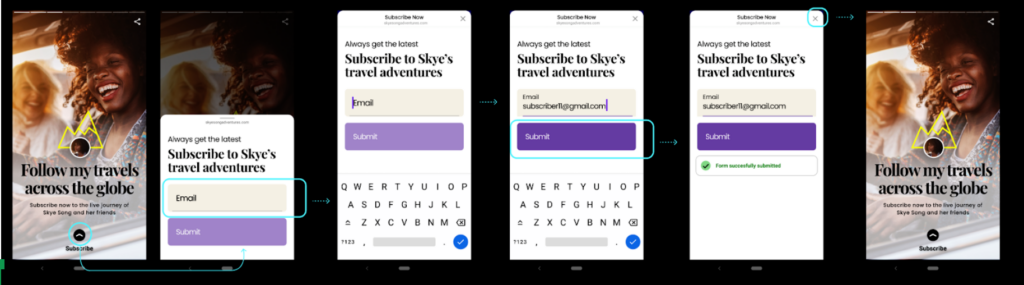
Publishers & small businesses – Secure leads
Are you hosting an event? Do you want to let your readers know when your newest cupcake recipe is published?
Forms can help you keep track of your growing audience.
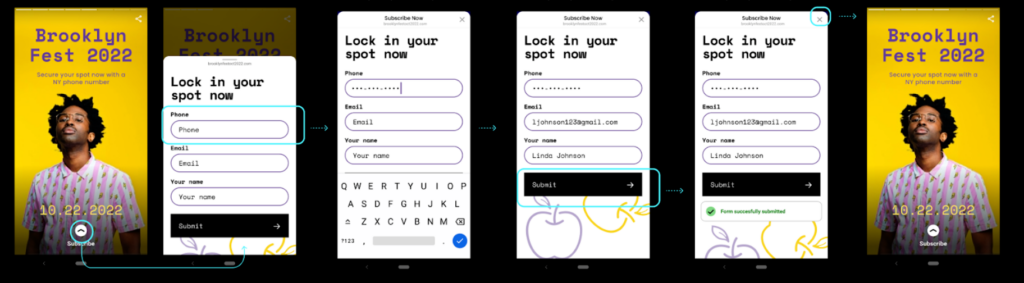
Brands – Nurture and convert leads
Is your new product dropping soon? Do you want to stay connected with your top customers?
Instead of an endless vertical scroll, experiment with Web Stories as landing pages.
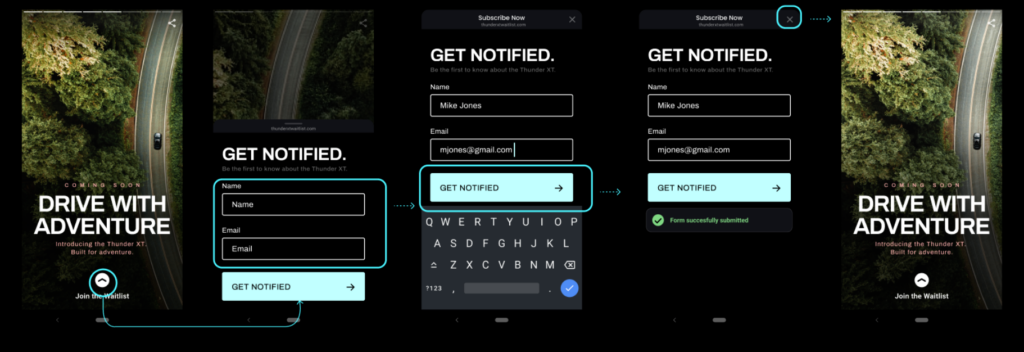
Summary
Forms for Stories are like forms for your website. Creation tools are working on adding form support. Finally, remember to follow form best practices to ensure you are protecting your readers’ data.
Stay updated
Whether you like reading Web Stories, are interested in creating them yourself, or are building creation tools, come share your ideas and suggestions with the Web Stories working group. You can reach out to us on Github, Slack and can subscribe to a low traffic developer preview email group.
Posted by Ryan Warrender, Web Stories Product Manager, Google
]]>
One of the top requests we have heard from the AMP community is the ability to use AMP’s highly performant components in non-AMP pages. Today we’re excited to fully launch our first round of Bento components. Bento components are highly performant components with great user experience baked into them! They are intended to solve practical, real-world problems that web developers encounter in achieving great user experience when adding functionality to their pages. We hope you try them out and give us feedback! You can read more about Bento on the new Bento blog.
Use AMP components anywhere and everywhere
The AMP Project’s goal has always been to help developers create great user-first experiences. AMP’s highly performant and user centric components are a key part of this value proposition. Now with Bento you can use these high-performance web components, which were formerly restricted to AMP, with your favorite framework and CMS.
For example, developers can use Bento components for one-off cases such as adding a carousel to a non-AMP page. They can also be useful for AMP-focused developers interested in incrementally converting a page to valid AMP.
Bento and AMP’s future direction
AMP continues to provide websites with a turnkey solution for driving good user experience on their web pages, and we continue to fully support and invest in AMP formats as part of the AMP Project. At the same time, we understand that website publishers sometimes want to use features on their site that are not compatible with AMP. These publishers can now use Bento components to address specific UX challenges on their site without having to compromise on other features.
We envision a future where publishers have the freedom to leverage AMP for good user experience, leverage Bento to address individual performance issues, or meet their page experience goals without assistance from either AMP or Bento.
Try Bento now!
Read the getting started guide to try out Bento components! The team encourages and welcomes developer feedback through GitHub and our Slack channel. Please reach out with any questions or issues!
Posted by Alan Orozco, Bento Engineering
]]>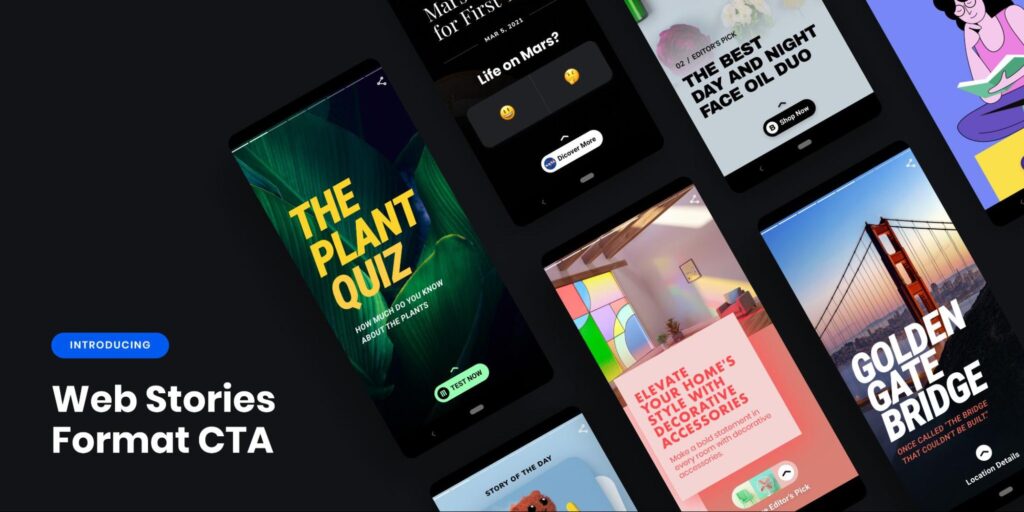
Web Stories are an excellent way to reach a new audience and direct them back to your own website. It has become popular for creators and publishers to utilize CTAs as a bridge between a Web Story and their website. To further enhance the reader experience we have upgraded CTAs with more features for customization while creating a more consistent UX.
The refreshed component will allow a reader to easily get additional content in the form of a link. Readers can reveal this content through a “swipe up” gesture, or a tap on the call to action element. A prompt to open the attachment will automatically be added at the bottom of every page that uses the component.

Usage
Many creation tools have already rolled out support for (<amp-story-page-outlink>). If you’re building Web Stories yourself here are some notable changes we made to improve the reader experience:
1. Introduced a primary CTA UI for Web Story pages that can open arbitrary external links (<amp-story-page-outlink>) and page attachments (<amp-story-page-attachment>).

2. Next we made it easier to make a great theme to match your Story’s branding. Now a creator can customize the CTA (ie, colors, icons etc).
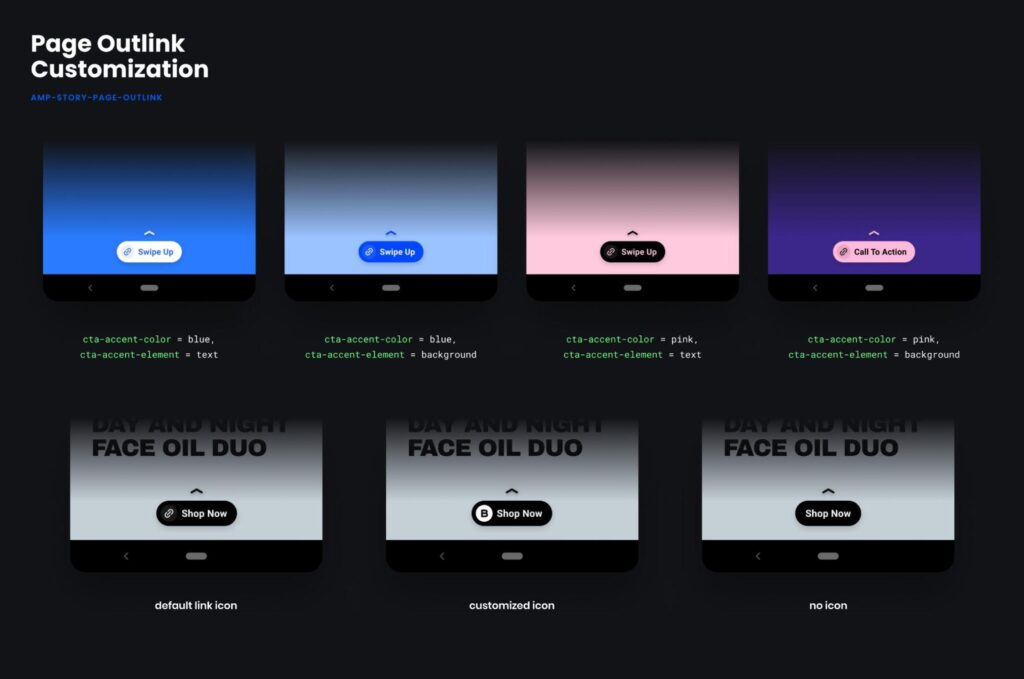
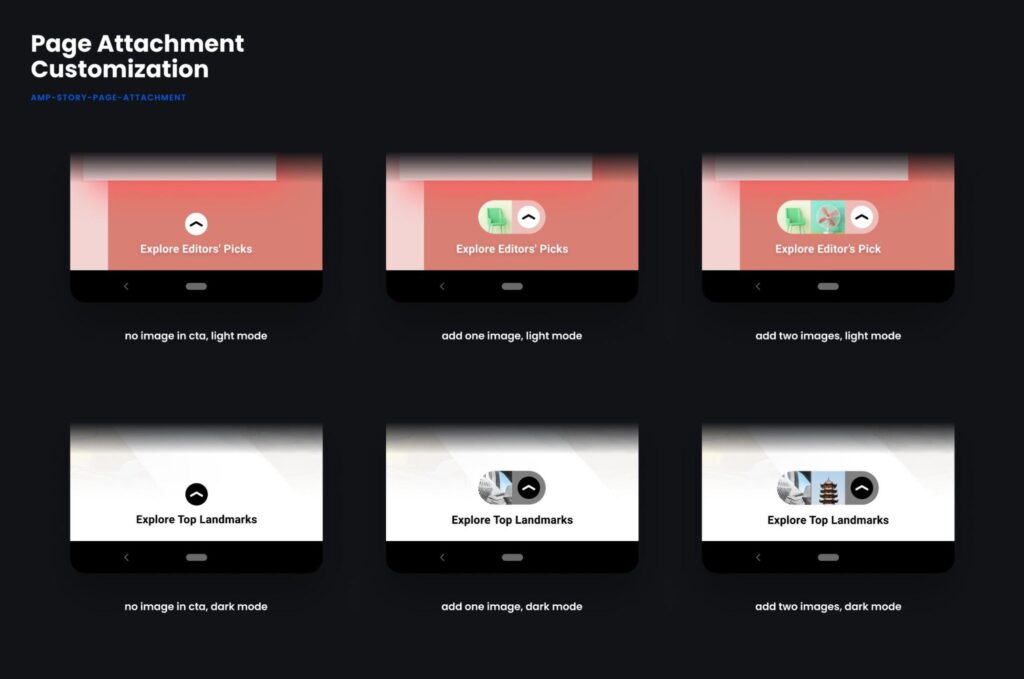
3. We intend to replace the functionality of the <amp-story-cta-layer> without requiring changes to older Stories. Any existing Story that uses the <amp-story-cta-layer> will visually look different since the custom styled element will be removed and replaced with an amp-story-page-outlink element. This added benefit requires no action on the creator or publisher.
Linked Content
Use AMP Story Page Outlink for a one-tap outlinking experience. The URL is opened when the user activates the CTA button. This functionality was previously handled by amp-story-page-attachment. We separated the functionality for a more clear creator experience.
Demos
Check out the new design, API and implementation examples in our demo Story.
Get Involved
Whether you like reading Web Stories, are interested in creating them yourself, or are building creation tools, do share your ideas and suggestions with the Web Stories working group. You can reach out to us on Github, Slack and can subscribe to a low traffic developer preview email group.
Posted by Ryan Warrender, Web Stories Product Manager, Google
]]>TikTok is one of the most popular social media sites with over 2 billion mobile downloads worldwide as of October 2020. As such, we are excited to share that you can now easily embed TikTok content into your valid AMP Documents using the <amp-tiktok> component.
@countingprimes You can now embed TikTok’s in AMP ♬ original sound – countingprimes
How does it work?
In the simplest example all an <amp-tiktok> needs to work are the width, height, and data-src attributes.
The data-src attribute refers to either the video id for the TikTok, or its full URL, both of which can be found on the source page for the TikTok. More information about finding these sources can be found in TikTok’s embed documentation.
Using the TikTok’s full URL for the data-src attribute has the added benefit of including a placeholder thumbnail image, and includes the TikTok’s caption as a part of the aria-label on the embedded iframe for improved accessibility.
Additionally, <amp-tiktok> supports the use of the TikTok auto-generated embed code, about which more information can be found in the amp-tiktok documentation.
Sites running the AMP plugin for WordPress (v2.1.4+) will automatically use <amp-tiktok> when a TikTok embed is added (such as via the TikTok block). Previously the <amp-embedly-card> component was utilized.
Posted by Beck Thomas, Software Engineer, AMP Project
]]>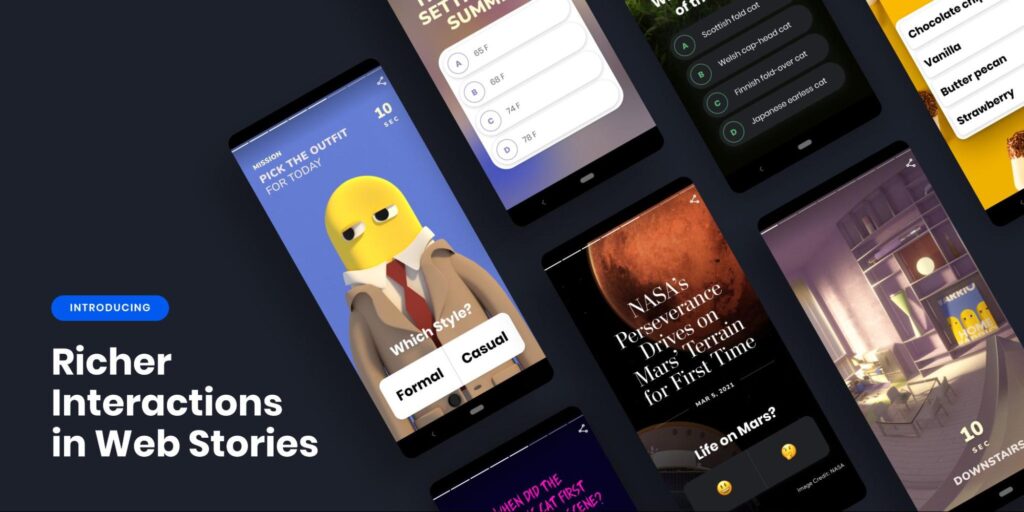
As Web Stories continue to be adopted by a diverse set of creators and publishers, it is important to expand the ways in which they can engage and excite readers. Based on feedback from creators and users, we have developed an initial set of richer interactions in Web Stories: interactive quizzes and polls, image transitions and 360 video (with more underway).
These capabilities are now available in the Web Stories format – check out this example story to see some in action. Web Story creation tools have started incorporating them into their creation experience – reach out to your favorite creation tool if you think these will be useful to you as a creator!
Interactive quizzes and polls
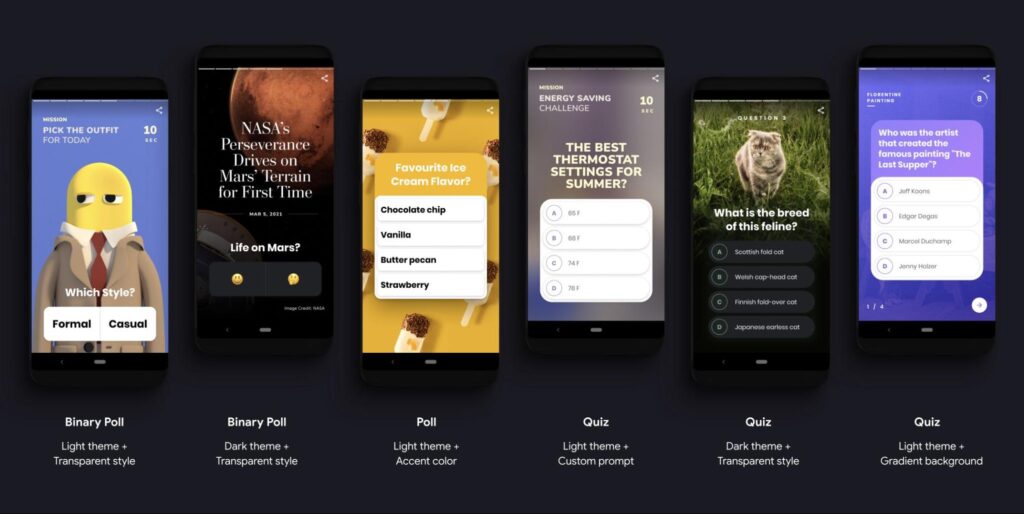
You can now incorporate quizzes and polls into your Stories using interactive components. The components enable rich UI customization (demo with examples) so you can match the experience to the tone and spirit of your Story. You can build out a multi-page quiz or poll that tallies the results on a final page: challenge, test or learn from your readers! Detailed documentation, demos and examples can be found here. Quizzes and polls are only the first of multiple new interactions you will be able to create using this family of components.
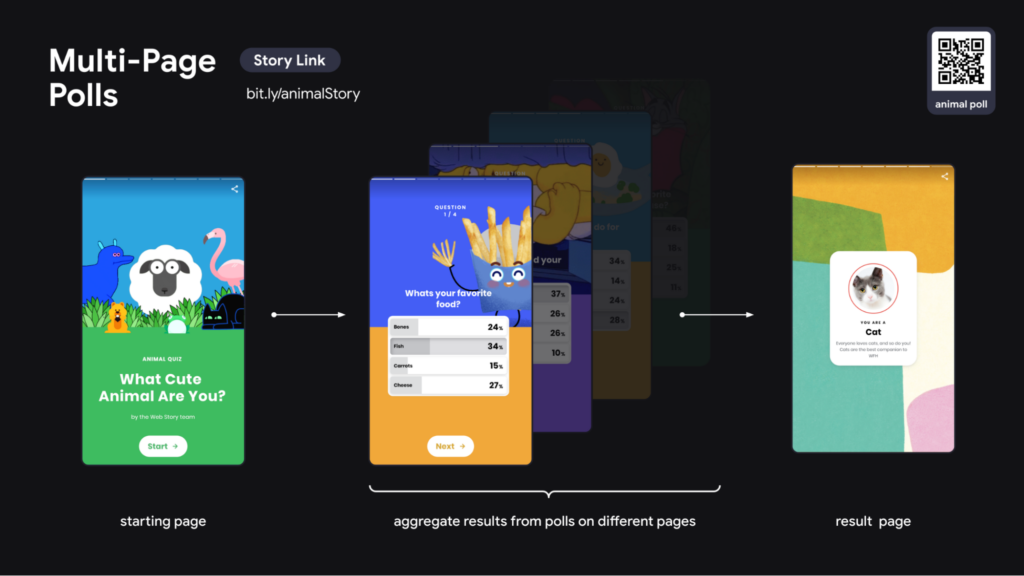

These interactive components support backend services to aggregate user responses. You can build your own, or use Story creation tools that support these components. If a backend is used, an information icon will be displayed helping users understand where their data is being sent.
Image transitions (Coming Soon)
The key user interaction in Web Stories is tapping to progress the narrative. The <amp-story-panning-media> component allows you to create seamless and immersive transitions between pages in your Story. The component allows you to pan and zoom across a background image, and even enables you to create rich parallax effects (demo). Documentation and suggestions on how to incorporate this capability into a creation tool UI can be found here.
Immersive 360 video
<amp-story-360> allows you to incorporate immersive 360 degree images or video into your Stories. You can guide the user’s view through key points or give them control to explore with their mobile device’s gyroscope sensor (demo). For detailed documentation, demos and 360 media guidelines checkout the <amp-story-360> docs.
More to come
Richer interactivity will make Web Stories more engaging and immersive for readers, and we plan to continue exploring the possibilities in the coming months. Whether you like reading Web Stories, are interested in creating them yourself, or are building creation tools, do share your ideas and suggestions with the Web Stories working group. You can reach out to us on Github, Slack and can subscribe to a low traffic developer preview email group.
Posted by Varun Rao, Web Stories Product Manager, Google
]]>
Web performance is critical for a great user experience. We continue to see Story creators utilizing video-first narratives to keep their viewers engaged and coming back for more. However, the distribution cost of serving videos, and the complexity of serving video quickly to users globally, can be high. To help address these challenges: Web Stories has expanded support for video caching (i.e. using the Google cache is not an obligatory part of using Web Stories).
Google now provides support for video caching to all Web Stories. For most creators your favorite creation tool will likely handle this added performance boost. If you are publishing your own Stories you can opt-in to the Google Cache by following the steps below.
Potential Benefits
- Reduced serving costs: If you opt-in, Google will try to serve videos from the Google cache before falling back to your site’s hosting, potentially reducing your video hosting costs by up to 99%.
- Less waiting: Videos played from the Google cache start playing 35% faster on average than non-cached videos across Discover, Google Search and Google Images.
- Better reader experience: Google’s video cache is fast, and we see on average a 75% improvement on bounce rate on pages with video across Discover, Google Search and Google Images.
Opt-In Instructions
If you opt in, Google will try to serve videos from the Google cache before falling back to your site’s hosting, potentially reducing your video hosting costs by up to 99%.
To get started using the Google Cache to serve video, you’ll need access to the HTML of your Stories.
To opt-in on the Google cache:
Mark the amp-video with the attribute cache="google".
The sources should be specified as a source child component and not through the src attribute of amp-video. Use 720p videos or higher to take advantage of all the video transcodes and adaptive bitrate algorithms.
Example:
<!-- Enable caching on this video via the attribute opt-in -->
<amp-video cache="google">
  <source src="source1.mp4">
</amp-video>
If the opt-in was successful, you will be able to see on the browser network tab a request to https://*.cdn.ampproject.org/mbv/s/* that returns a JSON with an empty list of sources (since the cache missed this video). In the following minutes/hours, the Google video cache will fetch and store the video contents, so that a later request to this url can return a processed list of video sources for that origin video.
Implementation Troubleshooting
Your video hosting must allow crawling the videos and the video must be public for the cache to fetch it. A typical way hosting services disable crawling is via robots.txt. For example, Vimeo or YouTube disable crawling, so if your videos are hosted on such services and embedded into your Stories, you won’t be able to use the feature.
Stay Updated
Whether you like reading Web Stories, are interested in creating them yourself, or are building creation tools, do share your ideas and suggestions with the Web Stories working group. You can reach out to us on Github, Slack and can subscribe to a low traffic developer preview email group.
Posted by Ryan Warrender, Web Stories Product Manager, Google
]]>
Do you spend hours crafting the design of your Web Story only to find that it does not quite display right on older devices or on the biggest phones? It can be tricky to develop content in a portrait-based aspect ratio and make it look great across devices. So to make testing easier, today the Web Story Team is releasing a tool that shows you the major design breakpoints of your Stories. Simply add #development=1 to the end of any Web Story’s URL to access the Web Stories Dev-Tools. This additional markup will create a new portal to analyze your Stories before publishing them. You can test it on this example Story.
Web Stories Dev-Tools
With the support of dev-tools, you can check your Story against a variety of devices and platforms, you can also check for valid AMP documents inside the tool, and access a curated list of resources to get started with Stories. The main feature is a Preview tool for your Story, where you can visualize exactly how it will look on multiple mobile devices, so your design gets tested on the most common surfaces. It will help you catch design inconsistencies in your Story that you wouldn’t be able to see otherwise from the editor view of your tool of choice.

While there are thousands of phone models out in the wild we carefully chose a selection of devices to preview the most common screen sizes, aspect-ratios and platforms. You can even preview your Story on common tablets and desktops if it supports landscape mode.

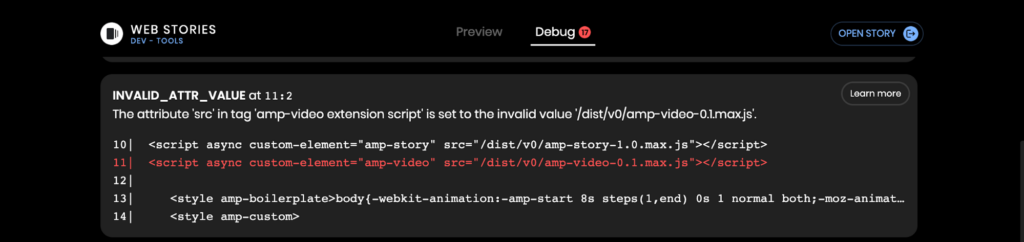
For developers that craft their Stories using traditional web development workflows, we also surface validation errors on the Debug tab. Make sure to fix all errors before publishing your Story.
Common layout issues in Web Stories
Web Stories often run into the following common issues on different phone sizes:
- Key text is cropped in on smaller screens
- CTAs or tap targets are cropped or obscured
- Shapes and images are deformed by changes to aspect ratios
- Line breaks in text are misplaced
- Background and foreground elements do not line up properly
Immersive Experience for All
Whether you like reading Web Stories, are interested in creating them yourself, or are building creation tools, do share your ideas and suggestions with the Web Stories working group. You can reach out to us on Github, Slack and can subscribe to a low traffic developer preview email group.
Posted by Ryan Warrender, Web Stories Product Manager, Google
]]>When the AMP project moved to the OpenJS Foundation in 2019, our technical governance leaders shared a plan to separate the AMP runtime from the Google AMP Cache, and host the AMP runtime infrastructure at the vendor-neutral OpenJS Foundation. OpenJS is happy to report that this complex task of re-architecting the AMP infrastructure is making tremendous progress thanks to input and guidance from the AMP Technical Steering Committee (TSC) and AMP Advisory Committee, as well as thanks to the AMP Project and OpenJS teams for coming together despite the work and life challenges that were sometimes faced during the pandemic.
About AMP
AMP is a multi-stakeholder open source project used across a broad range of organizations to increase web performance. It’s a web component framework with a collection of complementary technologies that help publishers easily create websites that load quickly and predictably on different networks and devices.
Today AMP powers nearly 10 billion web pages worldwide, and is implemented by Google, Microsoft Bing, Pinterest and Pantheon, among others.
An AMP Cache is a cache of validated AMP documents published to the web, which allows the documents to be served more quickly than if they were generated by the original site each time they were displayed. Two of the largest AMP Caches are operated by Google and Microsoft, each of whom use the foundations developed by the AMP open source project to build their own commercial AMP Cache. This is a similar model to how most commercial products are built today with open source projects such as Linux and other JavaScript technologies such as Electron and Node.js.
Understanding how the AMP runtime will be served moving forward
The AMP runtime is a piece of JavaScript technology that a developer can add to their website to be able to use AMP components for building their website. By using AMP components, their pages become eligible to be hosted by an AMP cache. Some websites may choose to host the AMP runtime files themselves, while others may want to rely upon the AMP runtime soon hosted by the OpenJS Foundation to deliver the latest version of the code on demand. Ultimately, the choice is up to the developer. Please note that documents served from the Microsoft or Google AMP Caches will still download the runtime from the specific AMP Cache itself.
The AMP runtime itself is developed openly and transparently in the AMP Performance Working Group. This part of AMP will not change, as the goal in moving to the OpenJS Foundation was to ensure this work could continue under a vendor-neutral nonprofit, and this is still a high priority. What’s new is that after disentangling the AMP runtime from the Google AMP Cache, the OpenJS Foundation will manage the servers that deliver the AMP runtime files (the download server and the CDN). As planned, the OpenJS Foundation has been involved in the implementation of hosting the CDN and has been spending additional time to fully understand the technical requirements.
Hosting project infrastructure is a core service of our Foundation – it’s one of many ways we help maintainers manage the stability and delivery of their open source projects. The way OpenJS hosts the AMP runtime infrastructure will be very much like how we support the infrastructure for the popular jQuery CDN, which performs a similar function and distributes 2.2 petabytes of jQuery libraries per month. We are working with Cloudflare to host the AMP runtime CDN. OpenJS Foundation projects benefit from the goodwill of Cloudflare’s contribution to open source through its free Cloudflare Enterprise program, in addition to other CDN providers who support other OpenJS communities.
As an umbrella organization, the OpenJS Foundation has a governance model that gives a strong voice to its projects. Each of the projects are run independently at the direction of their core maintainers or Technical Steering Committees, as is this case with the AMP TSC. At the same time, OpenJS takes on the non-development aspects of the projects, ranging from infrastructure support to marketing, to help our projects grow and get better every day.
We are thrilled to be making this change to help the open source AMP Project continue to grow and diversify its contributors as they all work to make great experiences for the web.
If you have any questions about OpenJS please reach out to me at [email protected], or on our Slack workspaces: OpenJS Foundation or AMP. If you have any AMP Project specific questions please feel free to reach out via GitHub.
Posted by Robin Ginn, Executive Director, OpenJS Foundation
]]>Based on the AMP Intent to Deprecate process, the AMP Project will now start to deprecate support for all Internet Explorer versions. This has implications for developers creating AMP documents, and developers working on AMP formats.
Expected Impact
Over the course of a given week, roughly 0.05% of requests for AMP JavaScript resources are from Internet Explorer 11 user-agents or those pretending to be one. For a more fine-grained breakdown, please visit the intent to deprecate thread.
For AMP Documents and Developers Creating AMP Documents
Existing documents sometimes rely on AMP to handle Internet Explorer compatibility issues, ensuring documents render as expected (minus custom styling or scripting). This plan removes support, and as a result could introduce inconsistent behavior for Internet Explorer users.
For AMP Developers
Dropping Internet Explorer compatibility will allow the codebase to take advantage of more modern APIs in the styling and scripting layers without introducing additional testing pressure to ensure polyfills work for an increasingly out of date browser platform. The AMP Project hopes to see many other front-end frameworks adopt a similar strategy which could improve overall performance on the web for the vast majority of users.
Timeline
Over the next six weeks, visitors to AMP documents running Internet Explorer will have an additional message available on the developer console with a reminder of this deprecation policy. This message includes a link to the intent to deprecate thread. Following this period, the following release of AMP will begin to remove code associated with Internet Explorer support, and all Continuous Integration testing on Internet Explorer will cease.
Posted by Kristofer Baxter, Technical Lead for the AMP Project
]]>As the page experience signals roll out, AMP Project contributors around the world are dedicated to ensuring site owners are getting the best shot toward a performant experience when creating AMP pages. However, like many other frameworks, AMP can’t implement all web development best practices. To get the strongest possible user experience on your AMP pages, we highly encourage all site owners to implement additional optimizations as recommended by the AMP Page Experience Guide.
Since the launch last year we have added more actionable feedback to the AMP Page Experience Guide making it more useful. This has been driven by our learnings from analysing the performance of different websites using AMP. For example, this guide will now give you custom font loading recommendations to help you optimize LCP and CLS.
Today, we are excited to share that starting today Search Console will direct developers debugging AMP page experience issues to the AMP Page Experience Guide!
This new functionality will make it easier for you to act on performance issues reported by Search Console.
Our thanks go out to you, the AMP development community, for your feedback. As always, please let us know if you have any issues or feature requests, especially if they are related to the AMP Page Experience Guide.
Posted by Naina Raisinghani, Product Manager, AMP Project
]]>