Learning to code and explore AI isn’t just about understanding technology—it’s about building something meaningful, whether it’s a creative project, a new skill, or a pathway to the future. Whether you’re a teacher searching for better ways to engage your students, a parent looking for hands-on learning tools, or someone just curious about AI and coding, this update has something for you. We’ve listened to your feedback and made key improvements to AI HackStack and CodeCombat Junior, making them even more intuitive, interactive, and fun. Let’s take a look at what’s new.
AI HackStack: A Comprehensive AI Learning Experience
AI literacy is more than just learning how to use AI tools—it’s about understanding their impact, applying them across disciplines, and developing skills for the future. That’s why AI HackStack now offers a full curriculum accompanying the Learning Scenarios designed to integrate AI into multiple subjects, making it accessible to educators and learners across different fields.

An AI Curriculum for Every Learning Path
The AI HackStack curriculum now includes two distinct learning paths, ensuring flexibility for both structured classroom use and self-paced exploration:
- AI Explorations Curriculum – This path is designed for open-ended learning and does not assume students are in a specific subject area. Instead, it introduces AI concepts through creative projects. Students engage in hands-on activities like making a weather app, generating AI art, designing a word search game, and simulating real-world events. With 12 interactive lessons and more to come, learners experiment with AI in unique and engaging ways. The curriculum emphasizes interdisciplinary learning, allowing students to see how AI connects to real-world applications across multiple domains.
- Classroom Curriculum – For educators looking for a structured approach, this curriculum emphasizes AI literacy, ethics, and responsible AI use while integrating AI concepts into subjects like English Language Arts, Math, Science, and Career Readiness. Teachers guide students through foundational AI concepts first before diving into subject-specific AI applications, ensuring a deeper understanding of AI across disciplines. Lessons are designed to help students analyze, create, and apply AI in meaningful ways, reinforcing their understanding through structured activities and discussions.

While home users don’t receive the full curriculum and teacher resources, they still have access to the same AI HackStack Learning Scenarios as educators and students. These guided, interactive exercises provide an engaging way to practice AI prompting and apply AI concepts in real-world tasks—such as building a simulation, writing an email, or creating a webpage. Educators benefit from structured curriculum materials to guide instruction, while home users can explore and learn independently at their own pace.
Remix Projects: Build on Ideas
One of the most exciting new features in AI HackStack is the Remix function. Students no longer need to start from scratch—they can take other students' existing AI projects and modify them to build something unique. This encourages deeper learning, faster iteration, and collaborative idea-sharing, helping learners refine their understanding of AI concepts while applying them in creative ways.

Teachers can easily toggle this feature on or off in the classroom settings. They will have the opportunity to view whether a student’s project was remixed, along with the original project it was based on.
Professional Development for Educators
To support teachers in bringing AI into the classroom, we now offer AI HackStack Professional Development. These workshops help educators integrate AI into their lessons, navigate ethical discussions, and gain confidence in using AI tools effectively. Built on best practices from organizations like Teach AI, EdSafe, CSTA, and AI4K12, this training ensures that educators have the resources they need to provide students with meaningful AI experiences.

How a High School in Georgia Is Leading the Way
One of the best ways to see the power of AI HackStack in action is through the students at Tift County High School. In Dr. Busbin’s Artificial Intelligence class, students have been exploring AI in a hands-on way, including a lesson where they debated whether a hot dog is a sandwich or a taco using AI models.
What started as a fun food classification exercise quickly turned into a deep discussion about how AI makes decisions, how biases can influence models, and why understanding AI matters. By using AI HackStack’s Food Classifier, students saw firsthand how AI can categorize objects—and where it sometimes falls short. This kind of real-world, engaging learning is exactly what AI HackStack is all about.

CodeCombat Junior: More Engaging and Accessible Than Ever
Originally designed for K-5 learners, CodeCombat Junior is perfect for anyone new to coding, thanks to its intuitive design and accessibility features. Its no-typing and no-reading options, along with full compatibility on iPads and tablets, make it an excellent entry point for early learners and beginners of all ages.
A Fresh Look and More Interactive Features
We’ve enhanced CodeCombat Junior with more engaging visuals and new interactive scenarios, creating a richer, more immersive coding experience. These updates make learning more dynamic and playful, keeping students motivated as they progress through the levels.

More Practice, More Progress
With 173 structured learning levels and over 1,100 practice levels, CodeCombat Junior ensures a personalized learning experience. The platform automatically assesses each learner’s progress and adapts by recommending custom-generated practice levels when additional support is needed. This dynamic approach helps students build confidence, reinforcing skills at every stage. Learners can move at their own pace, retry challenges, and receive targeted guidance, while parents and educators can track progress and provide additional support as needed.
Always Improving
Thank you for joining us on this journey to review our latest features and improvements! As always, we welcome your questions and feedback. Feel free to email us at [email protected].
Request a Quote
If you are an educator looking for solutions to your AI and computer science needs, request a quote or demo today to be directly connected to our team!
]]>We’re excited to introduce AI HackStack, a versatile tool designed to enhance educational experiences across various subjects, extending beyond just coding. Created specifically for first-time AI users, this platform prioritizes safety and ease of use, empowering individuals to confidently integrate artificial intelligence into their projects. By showcasing different user-created projects made with AI HackStack, we aim to illustrate its effective applications across diverse fields, from creative writing to environmental studies. Our focus is on inspiring curiosity and supporting innovative learning methods for all users while ensuring a secure environment for exploring AI.
Motion Tracking: Hand-Controlled Tank Game
This Hand-Movement-Controlled Tank Game offers a fun and interactive challenge that allows players to control a tank character with hand gestures. As players guide a blue tank through enemy attacks and shoot projectiles at approaching red AI enemies, they’ll develop quick reflexes and improve hand-eye coordination. New enemies constantly appear, and players must stay alert to avoid losing health. With each enemy defeated, the score rises, making this immersive game not only engaging but also a great workout for your reflexes!

Math Tutoring: Interactive Learning Platform
For those looking to brush up on their math skills, the Math Learning Platform provides personalized high school-level problems in subjects like algebra, geometry, calculus, and statistics. The platform gives instant feedback, guiding learners through mistakes with clear, step-by-step explanations. Users can track their progress and review past challenges, making this a perfect tool for self-paced learning. Whether you're preparing for an exam or just enjoy problem-solving, this platform strengthens critical thinking and boosts confidence in math.

Game Development: Monster Fighting Adventure
The Monster Fighting Adventure, inspired by games like Dicey Dungeons, invites players to dive into turn-based battles using strategic dice rolls and ability cards. Each battle introduces new monsters and fresh challenges, requiring players to balance offense and defense as they progress through increasingly difficult levels. Players can activate powerful attacks, healing abilities, and more by rolling dice and assigning them to specific cards. As you defeat monsters, your achievements are tracked through a trophy log, providing a sense of accomplishment as you advance.

Creative Writing: Virtual Reality Novel
In the Virtual Reality Adventure, readers dive into storytelling through a narrative about two programmers trapped in a system called "Infinite Loop." As the story unfolds, users explore character interactions, uncover story twists, and experience the emotions and strategies of the characters. This project demonstrates how AI can enhance creative writing by making the storytelling experience immersive and engaging.

Machine Learning: Image Recognition App
This Image Recognition Application allows users to upload photos and identify whether they contain an image of a bear, showcasing the power of machine learning. By leveraging a pre-trained model, the app analyzes images and returns a confidence score, indicating the likelihood that a bear is present. This project introduces learners to the world of AI and demonstrates how machine learning can be applied in creative, real-world tasks like visual recognition.

Environmental Simulation: Groundwater Usage
The Groundwater Usage Simulation delves into the Tragedy of the Commons by exploring how collective water consumption impacts shared resources, specifically focusing on the Los Angeles groundwater basin. By simulating the effect of water usage on groundwater levels, participants can see firsthand the importance of balancing consumption with sustainability. This interactive experience raises awareness of environmental challenges and encourages thoughtful discussion on managing shared resources for a sustainable future.

Try AI HackStack
By showcasing these diverse projects, we hope to inspire innovative uses of AI HackStack across disciplines and highlight its potential to enhance both learning and creativity. Whether you’re an educator, student, hobbyist, or someone simply curious about AI, AI HackStack offers a secure, user-friendly platform to bring your ideas to life.
If you’re interested in learning how to properly prompt AI or are excited to create your own unique project, AI HackStack is the perfect place to start. Explore today and begin your journey into the world of artificial intelligence!
Request a Demo
Are you ready to bring AI HackStack into your classroom? Connect with our team today by clicking the button below. We’re here to help you unlock the full potential of this innovative AI solution, ensuring that your students are set on the path to success from their very first prompting experience.
]]>For the first time, we’re bringing our expertise in coding education to the youngest learners with CodeCombat Junior, our eagerly awaited K-5 curriculum. Designed to support students at every stage, this solution guides them from using icon-based blocks, ideal for non-readers, to confidently typing actual code. By adapting to each student’s learning pace, CodeCombat Junior allows young learners to embark on their coding journey with excitement and confidence, building a strong foundation for their future in technology.

Tailored for Young Learners
Teaching coding to elementary students presents unique challenges, and CodeCombat Junior is designed to meet these challenges head-on. The curriculum is tailored to the learning pace of young students, focusing on foundational coding concepts without overwhelming them. Through a progression of learning levels, students gradually build their skills, moving from basic syntax and sequences to more complex algorithms and debugging techniques. The aim is to foster a deep understanding of coding fundamentals that students can build on as they advance.
Multiple Ways to Code
CodeCombat Junior is designed to be flexible and accessible, accommodating different learning styles and paces. For beginners, the curriculum offers an icon-based block coding option, ideal for students who may not yet be reading or typing. As they gain confidence, students can transition to text-based coding in both Python and JavaScript, using a unique side-by-side view that shows blocks and text, allowing them to see real-time changes as they code. This smooth progression is supported by a platform optimized for various devices, including tablets and iPads, ensuring all students can participate.

Endless Opportunities for Learning
CodeCombat Junior offers a robust and dynamic learning experience. With over 1,100 levels and more in development, students have access to an expansive curriculum that adapts to their individual progress. The platform’s procedural generation of levels ensures that content is always challenging and relevant to each student's competency level. Educators can guide students through personalized learning pathways, assign additional practice levels, and monitor progress, making it easy to tailor the learning experience to each student's needs. This approach not only keeps students engaged but also ensures that they are continually challenged as they advance through the curriculum.

Hear from Real Teachers
To truly understand the impact CodeCombat Junior can have in your classroom, we encourage you to watch our recent webinar, Kickstarting CS in K-5 Classrooms. In this session, CodeCombat's Director of Education, Charlotte Cheng, and American STEM Prep's STEM Program Director, Jacob Kaminski, explore the capabilities of CodeCombat Junior and CodeCombat Worlds. They discuss practical strategies for integrating these solutions into your classroom, share success stories, and answer questions from educators like you.

Always Improving
Thank you for joining us on this journey to review our latest updates! As always, we welcome your questions and feedback. Feel free to email us at [email protected].
Request a Demo
Are you ready to bring CodeCombat Junior into your classroom? Connect with our team today by clicking the button below. We’re here to help you unlock the full potential of this innovative coding solution, ensuring that your students are set on the path to success from their very first coding experience.
]]>In today's tech-saturated world, introducing computer science education during the foundational K-5 years goes beyond enhancing the curriculum; it marks a significant shift in preparing young learners for the digital age. Notable research by Emiliana Vegas and Brian Fowler highlights a substantial gap between traditional education models and the competencies needed for future success. Addressing this gap involves integrating robust computer science education early on, laying a foundational knowledge base that surpasses basic technological skills (Vegas & Fowler, 2020).

More than Coding: Developing Critical Lifelong Skills
The value of computer science in early education extends beyond programming. It involves cultivating critical thinking, problem-solving, and analytical skills from a young age. According to a Brookings report by Vegas and Fowler, not only is computer science education associated with higher college enrollment rates, but it also enhances cognitive abilities like planning and problem-solving (Vegas & Fowler, 2020). Early engagement with computational thinking allows children to understand complex concepts through dynamic and interactive learning experiences.
Additionally, a 2022 SmartBrief update on computer science equity emphasizes that beginning computer science education early can significantly boost confidence and interest in STEM fields. These formative years are essential for dismantling stereotypes and fostering diverse, inclusive educational environments where all students, particularly girls and students of color, can see themselves as future technology experts (LEGO Education, 2022).
Supporting the Computer Science Educational Journey
At CodeCombat, we are committed to supporting this educational journey with specially designed tools for early learners. CodeCombat Junior, our curriculum for K-5 students, introduces essential coding concepts at a pace suitable for young minds, ensuring the development of a solid computer science foundation. Students learn to code using drag-and-drop and a variety of code formats, including icon-based blocks and word blocks. CodeCombat Junior's flexible IDE allows students the option to code with blocks and text code side-by-side, helping students make the transition to text-based coding.

AI Junior takes a novel approach by merging multi-modal generative AI technologies with a user-friendly platform for K-5 students. This enables children to participate in creative activities such as sketching, writing, and designing digital products, transforming the learning process into an interactive and enjoyable experience.

As students progress in their K-12 journey, our curriculum adapts to their increasing capabilities and shifting interests. In middle school, Ozaria provides a strong coding foundation, which later allows for more personalized learning trajectories. High school students delve into AP Computer Science Principles and have the opportunity to explore a variety of specialized courses, tailoring their education to their specific interests.
One notable example of how an early introduction to CS can profoundly impact a student's trajectory is the story of Jiaying Shi. At just nine years old, Jiaying placed among the top 32 finalists in the Tsinghua Computer Science Tournament, a competition typically reserved for college students, eventually ranking 19th and outperforming several older participants. Her journey began with CodeCombat, and her passion grew as she explored further into our Ozaria platform, showcasing the profound capabilities young students can develop when provided with supportive, progressive learning tools.

By integrating computer science education early in students' academic paths, we enrich their learning experiences from kindergarten through high school. Starting with foundational concepts, students develop critical thinking and problem-solving skills that evolve with their educational progression. This approach not only enhances academic success but also prepares them for real-world challenges, fostering innovative and adaptable thinkers equipped for a digital future.

As we settle into the new year, we're thrilled to unveil the latest developments in our ongoing quest to enhance the CodeCombat experience for all users. Our focus remains steadfast on refining our tools to better serve your needs, and we're excited to introduce some significant updates that promise to streamline your experience. From a unified look for our Teacher Dashboards to innovative updates like the AI Level Chat Bot and a sleek website revamp. Join us as we embark on this journey of continuous improvement and innovation.
The CodeCombat Teacher Dashboard Is Getting a Makeover
We're excited to announce a unified look for our Teacher Dashboards across all our products. For educators familiar with our Ozaria Teacher Dashboard, transitioning to the new CodeCombat interface will feel seamless. Rest assured, this update doesn't detract from the existing CodeCombat dashboard; instead, it streamlines the experience, empowering educators to efficiently navigate key features.

With the introduction of the new Teacher Dashboard, CodeCombat educators also gain enhanced control over their students' learning paths. They can now individually lock, skip, or designate certain levels as optional, tailoring the learning journey to each student's unique needs and abilities. Furthermore, the level control feature allows teachers to schedule lessons and assignments with precision by setting lock dates for specific levels.

Currently in beta, the new dashboard isn't automatically activated but can be toggled on and off in the settings as we gradually transition to its full implementation.

Here's the timeline for the transition process:
- February: Existing CodeCombat users can choose to enable or disable the new dashboard.
- March: New teacher accounts will automatically utilize the new CodeCombat dashboard.
- April: All CodeCombat users will be migrated to the new dashboard, with the option to revert to the old version if preferred.
- July: The old CodeCombat dashboard will be phased out entirely.
This phased approach allows users to acclimate to the changes at their own pace while ensuring a seamless transition to the improved CodeCombat experience. Please don't hesitate to reach out to us at [email protected] if you encounter any inconsistencies while using the new dashboard. We appreciate your feedback and support!
CodeCombat AI Level Hints
The CodeCombat AI Hints is now automatically enabled for classrooms. This feature aids in addressing coding errors and offers guidance to students in problem-solving without providing direct answers, facilitating smoother classroom assistance and alleviating educators from the burden of addressing every classroom-level help request. Educators can choose to disable this feature in classroom settings.

We’re Revamping Our Website With a Sleek New Look
Some of you may have already noticed, but we’re currently testing our updated website look with a select group of users. Still in the process of A/B testing, we will be bringing you an updated look to the website as we gradually transition each page to the new style. Our purpose is to streamline the website, tailoring it to each user's preferences by prioritizing essential information and showcasing useful tools and solutions. We believe this update will unlock the full potential of our platform for both new and returning users.

Join Us in Developing Our Latest Solutions!
We're gearing up to unveil our newest offerings tailored for K-5 students: CodeCombat Jr., AI HackStack Jr., and our Roblox curriculum. These developments are set to launch in Fall 2024.
CodeCombat Jr.
Our flagship K-5 curriculum, CodeCombat Jr., is meticulously crafted to introduce basic coding principles to elementary students. Featuring a gradual progression of learning levels, this curriculum offers a tailored pace suitable for young learners. Students can engage with coding through drag-and-drop blocks, parallel blocks with text, or traditional text-based coding options, providing flexibility in their learning journey.

AI HackStack Jr.
Designed specifically for K-5 students, AI HackStack Jr. offers an accessible platform to explore multimodal generative AI. This intuitive tool empowers students to delve into AI project creation within a safe and imaginative space. From bringing hand-drawn artwork to life on the computer to exploring various AI applications, students can unleash their creativity while gaining valuable insights into artificial intelligence.

CodeCombat Worlds Roblox Curriculum
Dive into an immersive universe where students master Roblox programming. From the Rift Village quests to Luau coding challenges, our Roblox experience caters to all skill levels. We encourage educators to try it out with us as we shape teacher resources for a complete classroom experience.

If you're eager to incorporate these solutions into your classroom or home learning environment, we invite you to join our beta testing phase by signing up below. Let's shape the future of education together!
Always Improving
Thank you for joining us on this journey to review our latest features and improvements! As always, we welcome your questions and feedback. Feel free to email us at [email protected].
Let's Chat!
If you are an educator looking for solutions to your computer science needs, request a quote or demo today to be directly connected to our team!
]]>For 2023, we’re thrilled to introduce our latest offerings, featuring an immersive coding experience created in collaboration with Roblox Education and a cutting-edge generative AI tool tailored for newcomers. With CSEdWeek approaching, millions of students globally are set to participate in the Hour of Code, and this year, our commitment is to provide an unparalleled learning journey for all participants. Join us for the CodeCombat 2023 Hour of Code activities and discover the excitement of coding and AI like never before!

An Immersive 3D Coding Experience on Roblox
Prepare to transform how your students engage with code in our latest Hour of Code activity: CodeCombat Worlds. This groundbreaking collaboration with Roblox Education empowers every player to become a creator on the Roblox platform.
Thanks to the Roblox Community Fund, CodeCombat was selected to create an in-experience coding and creation solution, teaching both Luau coding and game development, unlocking creation for Roblox players who can't use Studio.

- Play: Immerse yourself in an expansive Overworld where students code pets, collect resources, and level up their skills. The experience encourages coding practice and experimentation within a captivating environment.
- Code: Dive into training areas offering a scaffolded progression of Learning Levels. Students learn Luau and core coding concepts with step-by-step tutorials for beginners.
- Create: Once equipped with some basic coding knowledge, users can showcase what they’ve learned in Creative Mode. Empower your class to design their own immersive games and experiences.

Whether you're introducing coding to beginners or guiding seasoned coders, CodeCombat Worlds offers an engaging and accessible journey into the realm of game development. Empower your students to unleash their creativity—the ability to create is now within their grasp! For detailed info, visit our CodeCombat Roblox page and explore Teacher Resources for classroom materials. Your students' coding adventure awaits!
The First AI Made With Your Students In Mind
Dive into the realms of Artificial Intelligence with our groundbreaking Hour of Code activity, CodeCombat AI HackStack! Students can now discover AI while prioritizing privacy and safety, exploring the first generative AI companion tool designed for AI newcomers.

In this hands-on experience, students are introduced to CodeCombat AI HackStack, a platform that seamlessly combines simplicity and power to accelerate their coding abilities and unleash their creative potential. Tailored for those new to AI, this tool not only teaches the fundamentals of AI but also grants secure access to cutting-edge Language Models such as ChatGPT-4, Claude, Stable Diffusion, DALL-E, and more.

The journey begins with a guided training mode where users quickly grasp the intricacies of AI, unlocking the full creative potential of CodeCombat AI HackStack in mere minutes. From prompt-to-code-to-published projects, students will witness the magic of this AI-powered application as they effortlessly generate games, art, websites, and code - pushing the boundaries of their imagination.
Join us in this AI adventure where students don't just learn about AI; they actively engage with it, creating projects that showcase the true power of CodeCombat AI HackStack. Elevate your coding prowess and explore the limitless possibilities of AI in a safe and exciting environment!
Request a Quote
If you are an educator looking for solutions to your computer science needs, request a quote or demo today to be directly connected to our team!

Empowering Every Player to Become a Creator on Roblox
Learning coding and game development can be
]]>We've been developing all summer long, and now we're eager to unveil our latest innovation. Join us as we take a first look at CodeCombat Worlds, our collaboration with Roblox.
Empowering Every Player to Become a Creator on Roblox
Learning coding and game development can be challenging. Roblox Studio, the pro-level code IDE (integrated development environment) on the Roblox platform, is a great place to learn these skills in a creative and engaging way, but most learners still lack access on their devices. Those with Chromebooks, tablets, phones, and consoles unfortunately don’t have the ability to use this powerful tool. Furthermore, both coding and Roblox Studio have steep learning curves, limiting the potential of most would-be creators.

Thanks to the Roblox Community Fund, CodeCombat was selected to create an in-experience coding and creation solution experience teaching both Luau coding and game development, unlocking creation for the many Roblox players who can’t use Studio.
CodeCombat Worlds has three mutually reinforcing core game loops:
- Play: The experience is ‘play’ first, encouraging coding practice and experimentation within an immersive world. Players code pets and collect resources to level up in the Overworld.
- Code: Players enter training areas where they learn Luau and core coding concepts in a scaffolded progression of Learning Levels.
- Create: After building just a small amount of coding knowledge, users will create their own immersive experiences in Creative Mode.

The power to create is in everyone's hands:
- All ages, rated 6+ and designed to appeal to players 15+
- All skill levels, new coders start with step-by-step tutorials, while Luau pros can go straight to Creative Mode.
- Consumer and Education versions, with deep parent and teacher involvement
- All devices, including phones and tablets, via custom mobile code editor
Play on Mobile
Your game development journey can start anytime, anywhere. The code engine powers context-aware code completions based on mobile tap points, allowing full text-based Luau coding without resorting to drag-and-drop simplifications. With this feature, you are always just a few taps away from coding the next best creation.

Game Modes
Begin your adventure in the Overworld, the home base and social hub of each player’s coding journey. Here, you adopt your first pet and are taught to interact with it using basic code commands like pet:hit("tree") to gather wood. As you complete Overworld quests and engage with the lively characters who reside there, you'll not only gain familiarity with coding but also level up your pets, preparing them to take on the more formidable monsters that occupy the land.

Learning Levels serve as the training grounds that will form the core game loop for players learning coding concepts. Traverse dangers and complete puzzles using Luau code to control a powerful golem carrying out your tasks. The first set of learning levels you encounter will introduce you to using method arguments. Upon completing each level set, you'll unlock new quests that challenge you to apply your newfound knowledge to assist in the Overworld. This will enable you to unlock various rewards and provide you with the coding knowledge necessary for Creative Mode!

Finally, Creative Mode is where you’ll apply what you’ve learned to make your own games. Game development is equal parts building environments and coding gameplay–here, you can do both, using simple tools to lay out the scenes and creating object interactions with Luau.
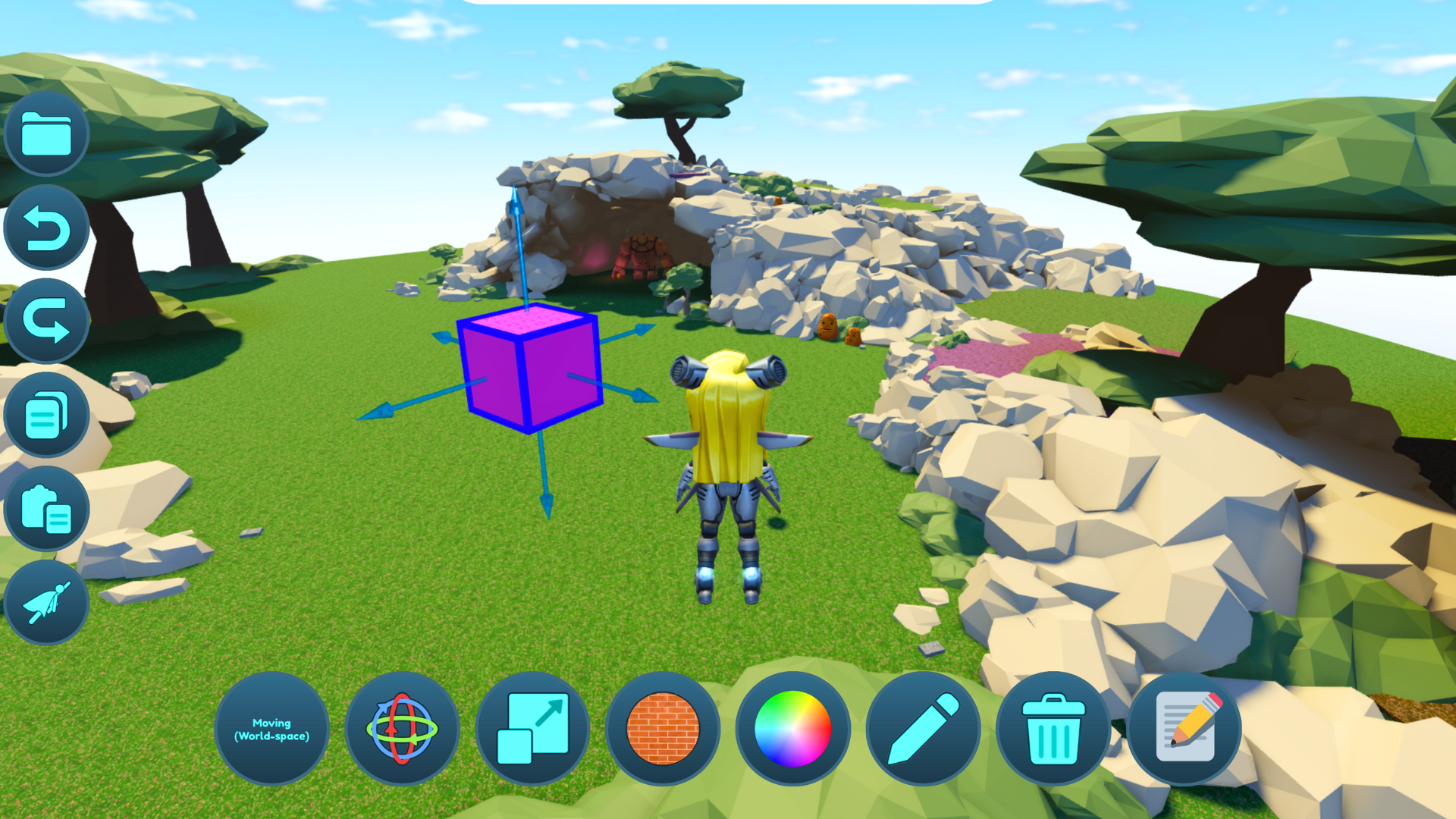
Creative Mode also features a new AI-powered Code-It-For-Me tool that supercharges the creation process and enhances accessibility. You can generate and iterate entire games and immersive experiences through simple prompts. When you feel your creation is complete, you can go ahead and publish it within CodeCombat Worlds for everyone to see and eventually import it to Roblox Studio, taking the first step towards becoming a full-fledged Roblox developer!

Start exploring CodeCombat Worlds today. The power to create is in your hands!
Always Improving
Thank you for joining us on this journey to review our latest updates! As always, we welcome your questions and feedback. Feel free to email us at [email protected].
Request a Quote
If you are an educator looking for solutions to your computer science needs, request a quote or demo today to be directly connected to our team!
We've officially entered the AI era. Along with hype and hyperbole comes a wave of fear and uncertainty concerning the future of computer science. Videos of AI writing code with simple inputs and stories of engineers replaced by AI bots fueled a dramatic yet ultimately flawed narrative. The truth is, AI isn’t replacing coding; it’s accelerating it!
More than Just Code
Before we address the AI elephant in the room, it’s important to note that learning to code and studying computer science are not just linear means to an end. As noted in SIGCSE '20: Proceedings of the 51st ACM Technical Symposium on Computer Science Education, computer science education provides the immediate benefits of boosting problem-solving competencies, sharpening mathematical abilities, and encourages the logical thinking necessary for success across many other core school subjects. The learning extends far beyond the code, enhancing students' capability to solve complex problems, adapt to different situations, and foster a growth mindset. Even in the brand-new world of AI, having coding literacy will allow you to use AI more effectively as a coding companion. Most of what AI produces is not perfect. It will take an experienced programmer to know how to turn it into something that works well.
AI Will Drive Growth in STEM Jobs
For those interested in pursuing careers in coding and computer science, no worries; AI is not going to replace you. In fact, according to the McKinsey Global Institute Report [Generative AI and the future of work in America], by 2030, STEM jobs will see the second highest labor demand growth at +23%, just behind healthcare. As our economy continues to digitize, employers in all sectors will need highly skilled tech professionals to support their digital transformation efforts. AI will not eliminate jobs. Instead, it will enable professionals to work more efficiently. With the introduction of generative AI, we could see 30% of work hours automated by 2030. STEM professionals will be well-positioned to understand and adopt the latest AI technologies as they continue to evolve, making those employees even more effective and valuable.

How We Use AI
At CodeCombat, we’ve adopted AI as a tool to accelerate the learning process as students develop their Computer Science skills. Our AI chatbot in CodeCombat can address student inquiries immediately, providing important real-time feedback. CodeCombat Worlds on the Roblox platform includes a generative AI feature allowing simple text-to-code outputs, empowering every player to become a creator. And CodeCombat AI HackStack is the first generative AI companion tool specifically crafted for those new to AI - which, let's face it, is practically everyone. HackStack allows learners of any age to explore AI in a safe and protected environment while they also learn about AI ethics and constraints.

How We Integrate AI Safely
With the great power of AI comes great responsibility. Our AI technology adheres to safety-first principles, providing confidence to both students and educators. We do not allow our backend LLM providers to train your chats and have established protective measures against inappropriate content. These measures include filtering harmful language, maintaining focus on relevant subjects, safeguarding personal information, and educating students about potential AI pitfalls. Moreover, we log AI chat activity for teacher monitoring and uphold stringent data privacy and security protocols.

Like many tech breakthroughs before, AI has been met with much apprehension, but those who embrace it will have the opportunity and skills to thrive. Computer science and coding skills are key to maximizing what AI can do. Contact our team today to learn more about how our tools can help your students get the most out of AI.
Hello, everyone! We hope you're doing well. We're thrilled to bring you more exciting improvements this week. Just a friendly reminder, if you haven't signed up for our beta test yet, now's the perfect time to do so! By joining our beta test, you'll have the chance to get early access and be among the first to experience the amazing features we've been working on. Don't miss out on this fantastic opportunity – sign up today and be part of the adventure!
Changes This Week
🚀Creative Mode Improvements:
We fixed several issues with creative mode!
- For better viewing, the control buttons have been moved to be at the bottom of the screen rather than above the selected object.
- A deletion button has been added ❌ for easy removal of placed objects.
- Introducing startSpinning() touch method, allowing customizable rotation speed per second. Make objects spin at thrilling speeds! 🌀
- bounceToucher() now normalizes the force given between 0 (no bounce) and 100 (extremely high bounce.)
- Expanded collection of objects. We've added exciting new additions, including a pumpkin, penguin pet, chinchilla pet, wolf pet, potato pet, and stone golem. But we're not stopping there! Keep an eye out for more coming soon.

🎓Learning Level 3 Progress:
Our team has been burning the midnight oil, meticulously crafting and perfecting the 3rd learning level. Very cozy, but what's making the water red?

🔧 Bug Fixes:
This week, we embarked on a bug-squashing spree in our creative mode. Those mischievous little critters🦟 didn't stand a chance against our determination...
We fixed the place list - before, it wasn't showing up.
- This was because our testers made so many amazing creations we had trouble listing them!
- We migrated the list to our own server, which keeps track of all of the creations.
- In the future, players will be able to search places, see the most popular ones, and more.
- The new setup allows for more exciting features, like having a website platform for the creations.
Bugs affecting creative mode saves have been fixed, as they've been crashing the game.
Thank you for tuning in for this week's updates!
]]>The end of the school year is upon us, but the excitement at CodeCombat is just getting started! Join us as we look through our latest product update, jam-packed with brand-new features and improvements. And that's not all! Our Changelog is your one-stop shop to stay up-to-date on all the latest and greatest features. So, what are you waiting for? Let's dive in and discover what's new at CodeCombat!
High-Contrast Color Scheme for Enhanced Accessibility
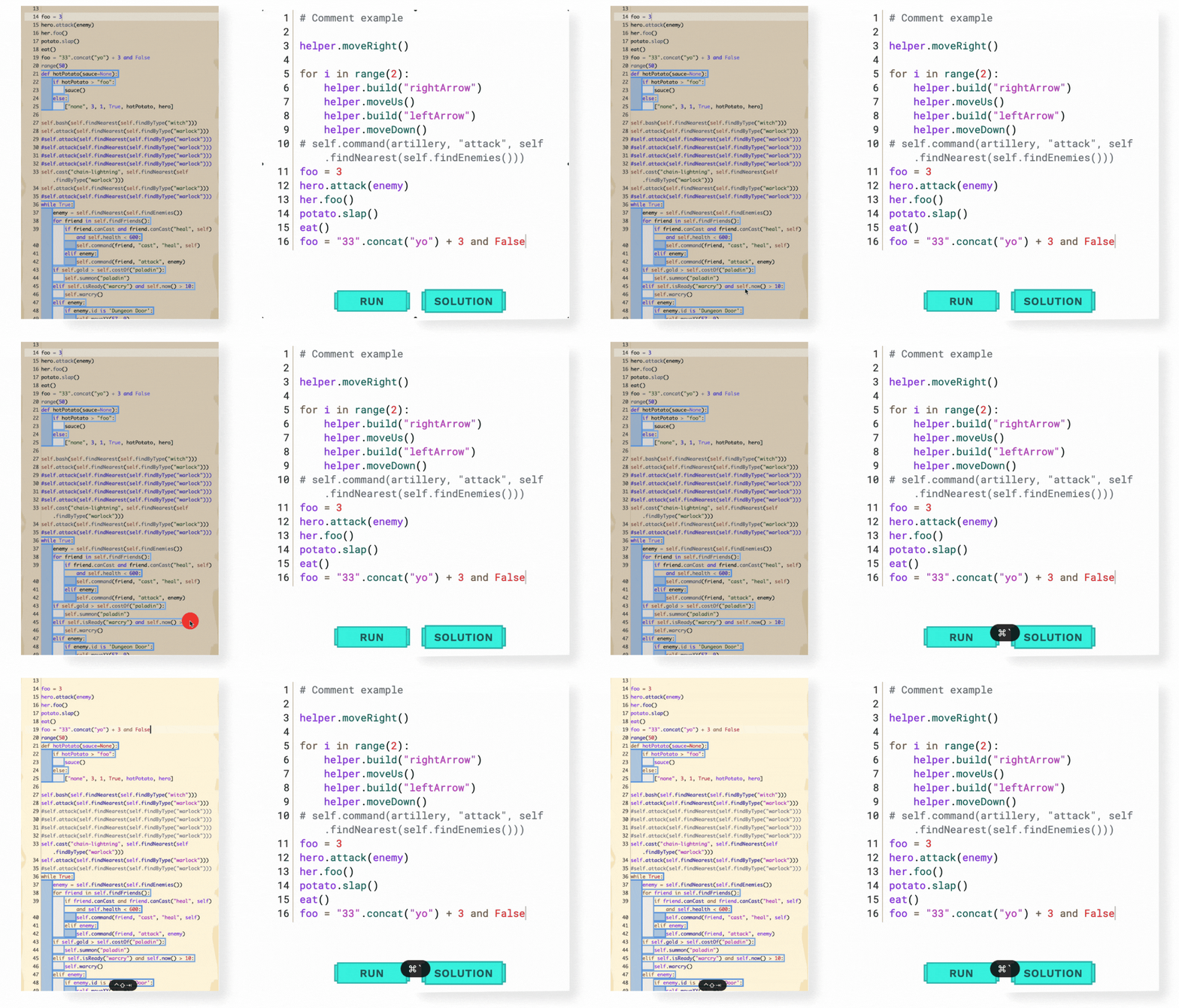
As part of our ongoing mission, we believe everyone should have the opportunity to learn and excel at coding, regardless of their abilities. That's why we're proud to introduce our latest feature - a colorblind-friendly syntax highlighting color scheme, now available in both Ozaria and CodeCombat. Our high-contrast color scheme was crafted with low-vision and colorblind players in mind, ensuring that everyone can easily read and understand code. We've also made further enhancements by adding a lighter background to the code editor, providing even more contrast. Additionally, we've highlighted a few more types of code, making it easier to code like a pro.
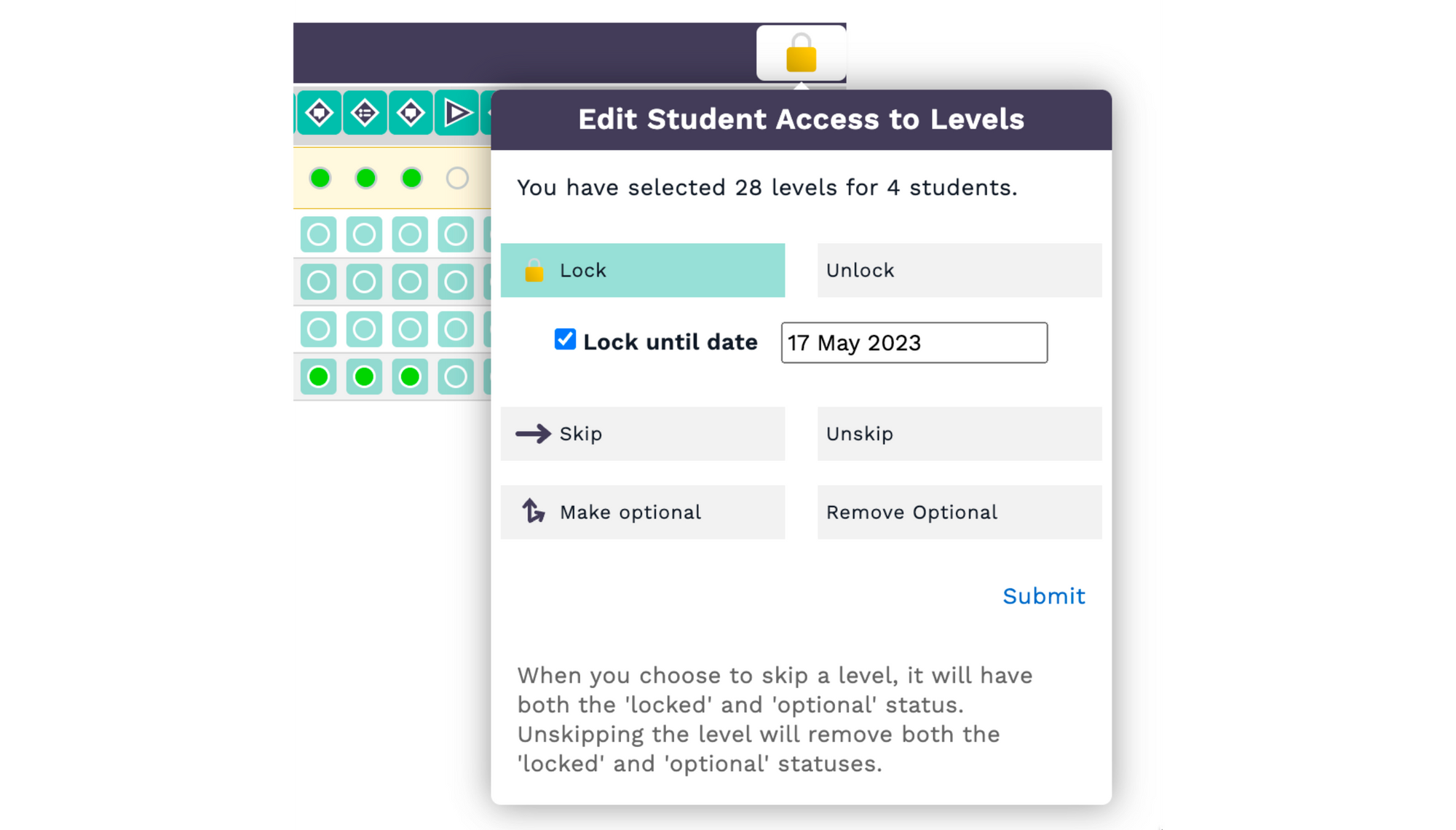
Advanced Level Control for Teachers
In the Teacher Dashboard, teachers now have the power to individually lock, skip, or make certain levels optional for their students. This level control feature enables teachers to tailor their students' learning journeys to fit their unique needs and abilities. In addition, with the option to set lock dates for specific levels, teachers can also schedule lessons and assignments with greater flexibility and precision.
Increased Teacher Usability With Test as Student Feature
Our Test as Student feature allows teachers to view CodeCombat's games through the eyes of a student. With just a few clicks, teachers can switch to an automatic student account, simplifying the process of testing code, saving progress, and allowing teachers to see firsthand how their students navigate challenges and identify potential improvement areas.
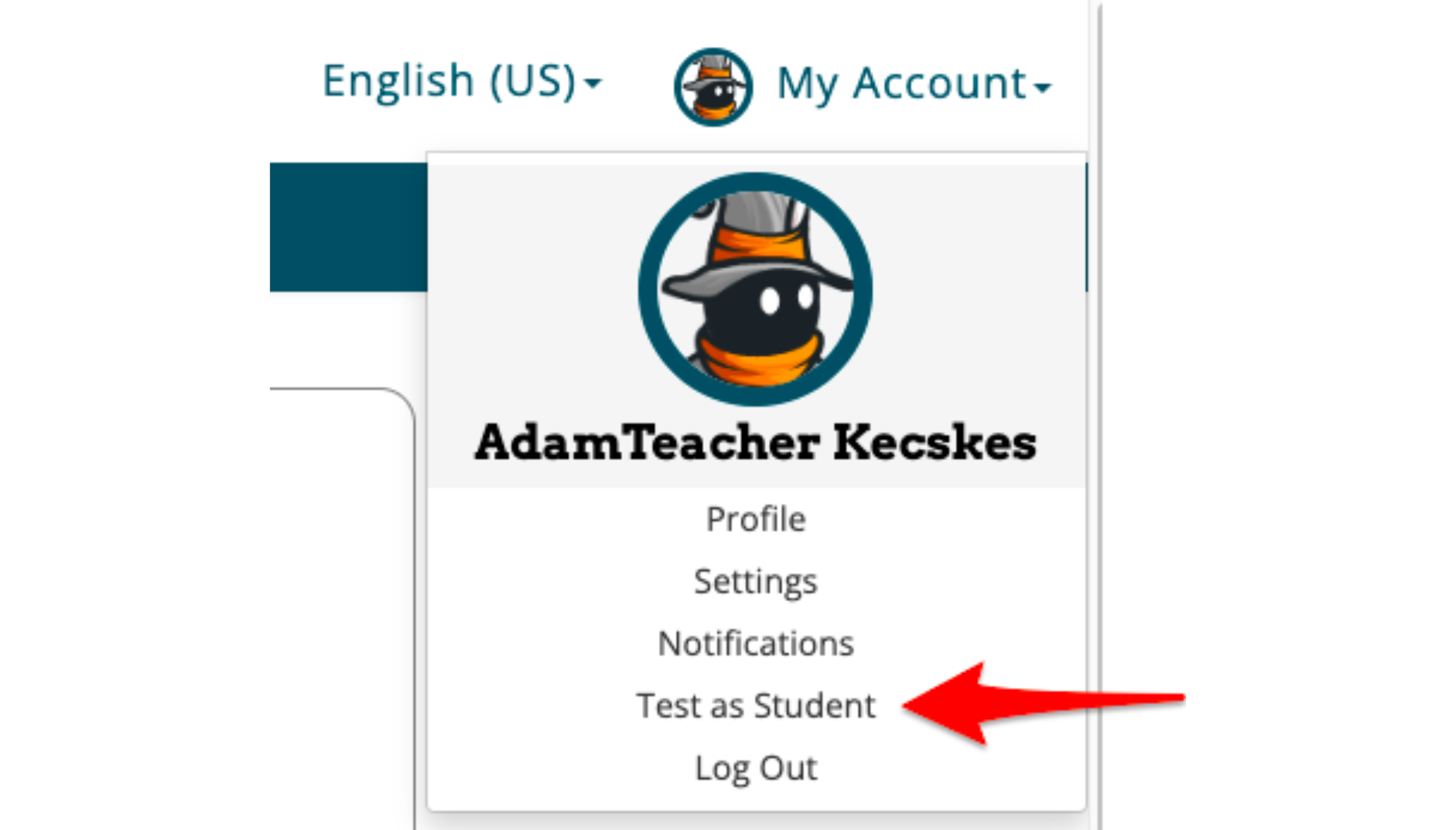
To access the Test as Student feature, navigate to "My Account" in the navigation bar and select "Test as Student." This feature is available for all teachers on both Ozaria and CodeCombat platforms, and we hope that it will enhance the teaching experience and help students succeed in their coding journey.
Revamped CodeCombat Game Design Lessons & Slides!
We're excited to announce the latest update to our CodeCombat Game Design curriculum! We've updated the lesson plans and slides for Game Design 1 and 2, ensuring they work seamlessly together. You can now access this new and improved curriculum in the Course Guide and Teacher Toolkit.

But that's not all - we've also created all-new lesson plans and slides for Game Design 3! These updated materials offer students a more engaging and comprehensive learning experience and are available in the Course Guide and Teacher Toolkit.

Our team is continually working to improve our curriculums, and we're already hard at work updating the Web Development curriculum. So stay tuned for another exciting announcement soon!
AI League Esports Curriculum in CodeCombat Teacher Toolkit
We have added AI League Esports lesson slides in the CodeCombat Teacher Toolkit for easier access. This curriculum equips teachers with the resources they need to bring the world of competitive coding into their classrooms, enabling students to develop essential skills in strategy and problem-solving. With the AI League Esports curriculum, teachers can help students take their coding skills to the next level while having fun and enjoying the competitive spirit of esports.

Spanish Subtitles For Ozaria Cutscenes
Spanish subtitles have been added to all Ozaria cutscene videos. These subtitles are enabled by default for users who have selected Spanish as their preferred interface language. This update makes Ozaria more accessible to Spanish-speaking players and enhances their gaming experience. Now, players can fully immerse themselves in the game's storyline without language barriers.

Convert Home Accounts to Student Accounts in Ozaria with Ease
We've simplified the process of converting CodeCombat home accounts to Ozaria student accounts, so students who create accounts before receiving a classroom invite can quickly get started with coding in class. Previously, students could only convert their accounts to CodeCombat classroom accounts, but now they can easily convert to student accounts in Ozaria as well. Thanks to this, teachers can invite students to their Ozaria classrooms with peace of mind, knowing that the conversion process is straightforward and accessible.

Higher Framerate Rendering for Improved Gameplay
CodeCombat's games have always been rendered at 30 frames per second (FPS). While this may be acceptable for watching TV, it doesn't quite cut it for fast-paced coding game action. So, with the power of modern GPUs, we decided to take advantage of higher framerates for a smoother gaming experience.

Starting now, our games will render at whatever the innate refresh rate of the player's device is, up to a maximum of 240 FPS. This means that players with capable devices can enjoy our games with a higher framerate, resulting in a smoother and more responsive gameplay experience. Say goodbye to choppy animations and lagging gameplay, and say hello to improved game performance with higher framerate rendering!
CodeCombat API Upgrades for Improved Integration
If you're a CodeCombat partner looking to integrate our platform into your coding education business, we have some exciting updates to share! Our API now includes the following resources to help you streamline the integration process:

We also encourage you to check out our partners page for more examples of how our partners are using the CodeCombat API to enhance their coding education offerings.
Always Improving
Thank you for joining us on this journey to review our latest features and improvements! As always, we welcome your questions and feedback. Feel free to email us at [email protected].
Let's Chat!
If you are an educator looking for solutions to your computer science needs, request a quote or demo today to be directly connected to our team!
]]>👋 Hello everyone, and welcome to the first-ever CodeCombat Worlds development blog post! We are thrilled to announce the release of version 0.0.14 this week and cannot wait to reveal the exciting new updates that have taken place behind the scenes. Get early access to the experience and help us make it better by signing up for the beta test waitlist here!
For us, transparency is key. We want you, the players, to be involved every step of the way. That's why we'll be publishing these updates, so you can see what we're building and help shape the project into something truly amazing.
We appreciate your interest in CodeCombat Worlds and are grateful for your continued support. Let's work together to make this game the best it can be. Have a great week, adventurers! ⚔️🛡️
Changes This Week
🖌️ Creative Mode:
An early prototype of creative mode has been shipped! You'll be able to make your own Roblox experiences within CodeCombat Worlds that can be shared with friends.
- To use creative mode, click the book icon 📕 in the right-hand corner. Then click on the artist palette icon 🎨. You can play what others have made or create your own by clicking "New."
- Place objects in the level, move them around, make them bigger/smaller, and code what happens when touched! Currently, we only support changing the color and bouncing the player up in the air, but we'll add a bunch more soon.
- After you create something, click the floppy disk icon 💾 to save!
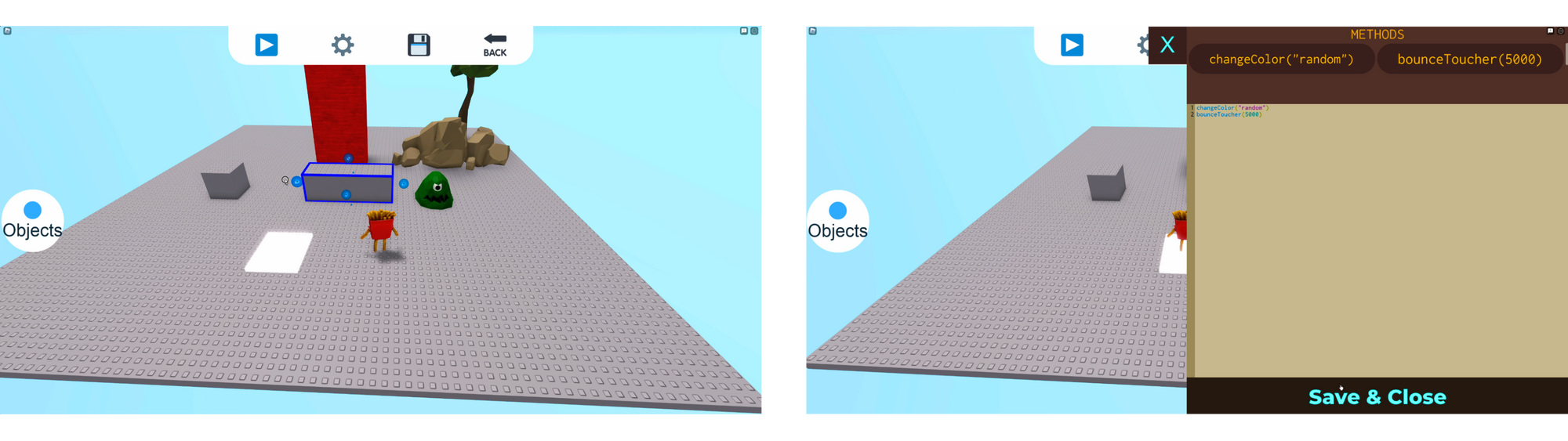
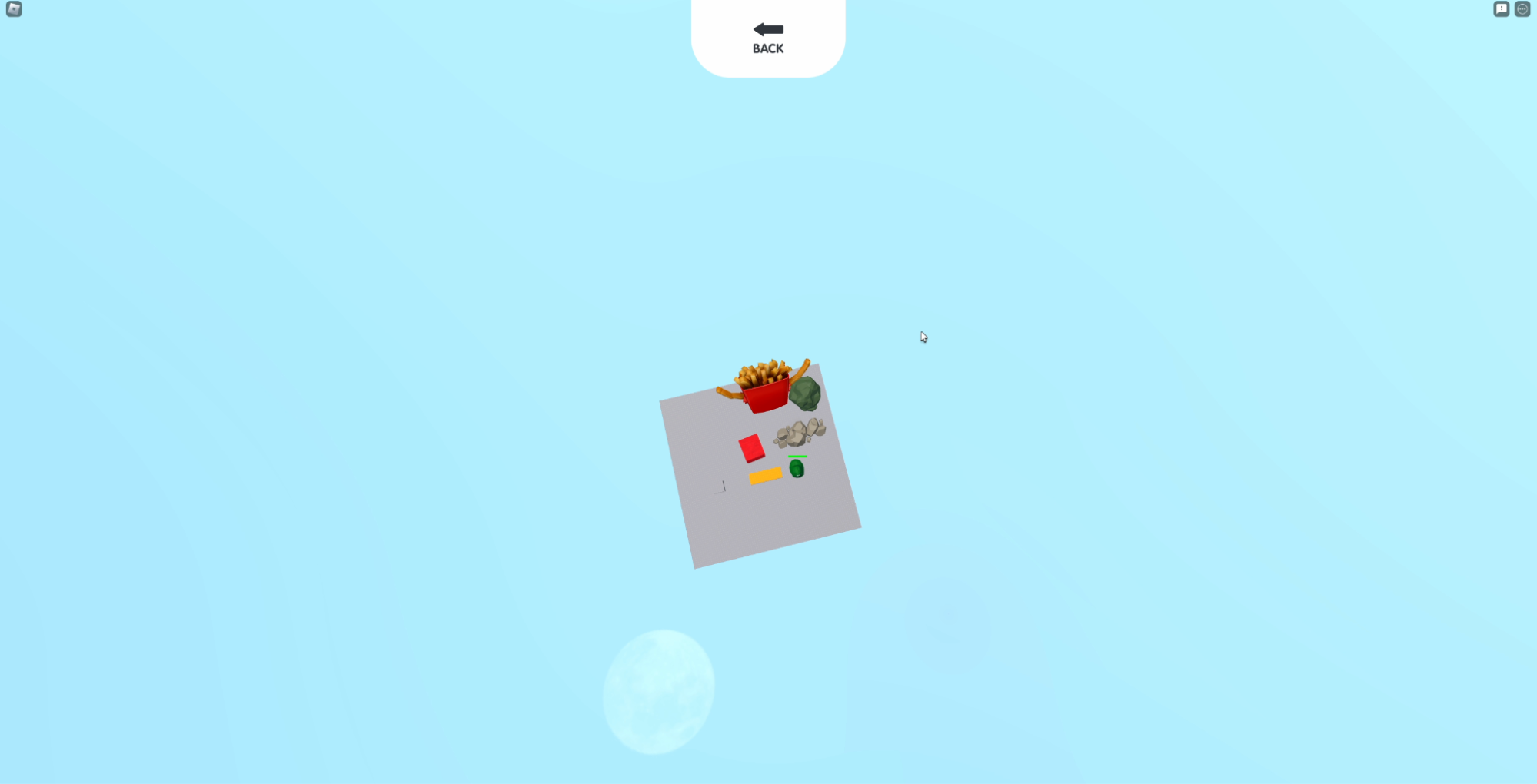
We are excited about this feature and wanted to share it with you as early as possible. But because it is so early (we built this entire feature in just 10 days), there are many known bugs. So we might need to erase what you create until we fix everything. But don't worry, we'll add many more cool things soon!
📖 Adventure Manual Styling:
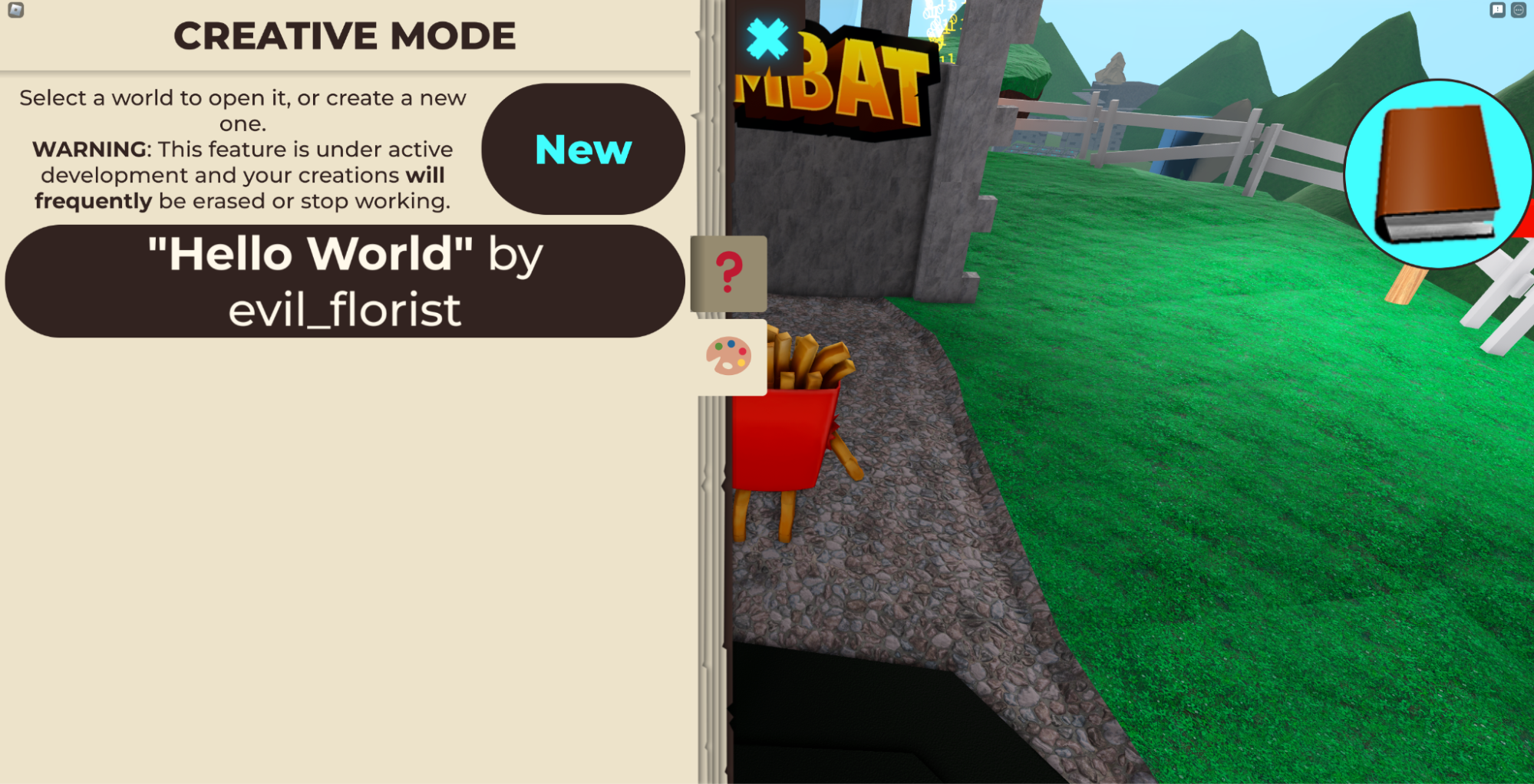
The design of the adventure manual has been updated to resemble a book now.
🎓 Learning Level Tutorials:
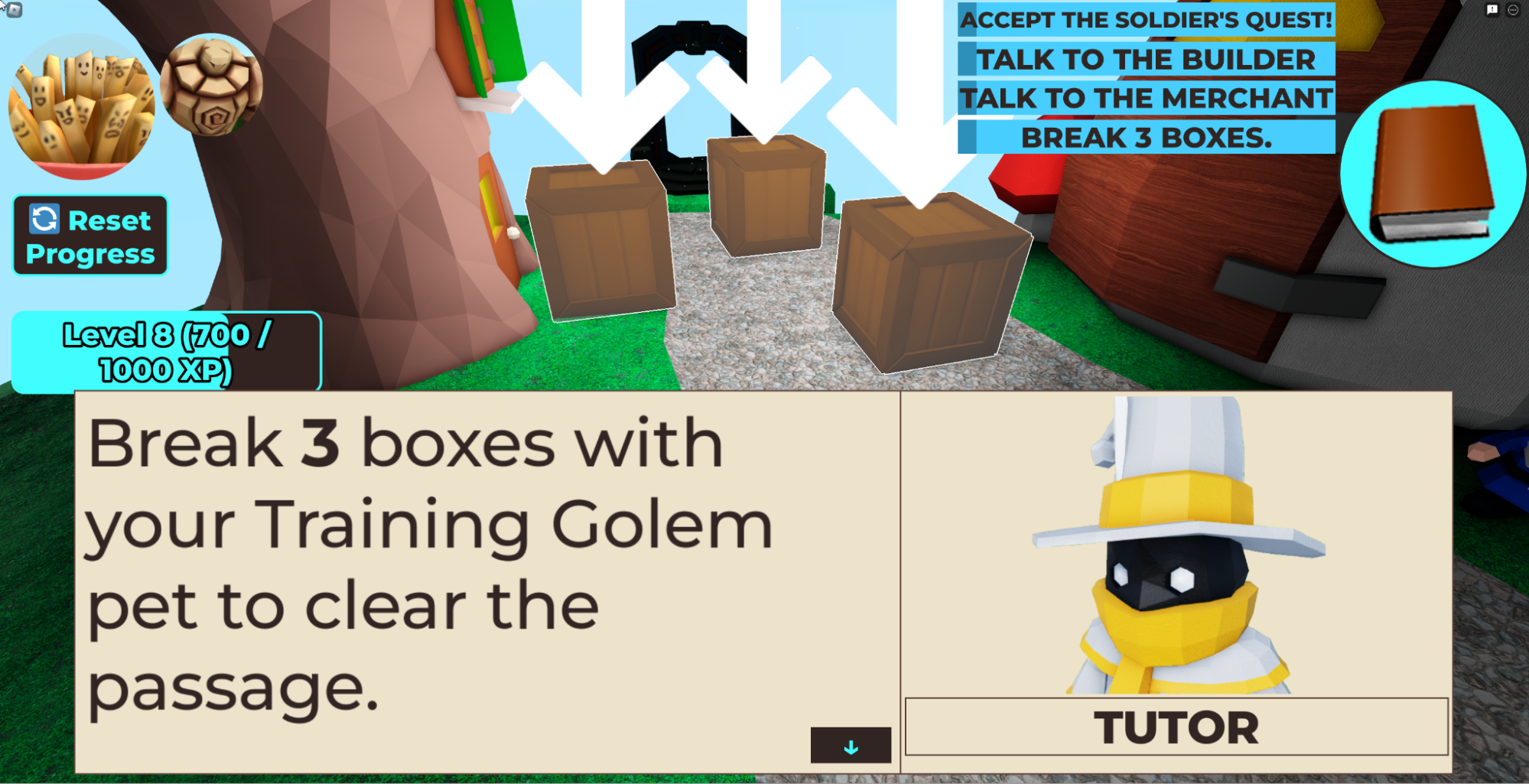
The learning level tutorials have been improved, so you can expect a much smoother and less buggy experience!
🔧 Bug Fixes:
Fixed! The editor autocomplete box will no longer appear when you press the "Run" button.
That's it for this week's update! Stay tuned for more exciting updates coming your way soon.
]]>Computer science education has become a vital component of a student's academic journey as the world becomes increasingly driven by technology. However, many schools face challenges in securing the necessary resources to provide their students with comprehensive computer science programs. At CodeCombat, we understand the funding hurdles that schools encounter and are passionate about helping them overcome these obstacles.
This guide will explore various funding opportunities and resources available to schools seeking to enhance their computer science offerings. While securing funding for a computer science program can be a complex process, several sources can be explored, depending on the school's unique situation. We encourage all teachers to connect with their school administrators to explore the various funding opportunities available in this guide. We highly recommend teachers collaborate with their administrators to explore the different funding opportunities outlined in this guide. If further assistance is required to justify the utilization of these funds, our team at [email protected] is always happy to help.
Funding Starting Points
District Educational Foundations
District Educational Foundations (DEFs) are non-profit organizations that work to support and enhance the educational opportunities of students within a specific school district. DEFs typically consist of community members, parents, and educators committed to promoting quality education for all students in the district.
DEFs often provide funding for programs that may not be covered by a school district's budget, including computer science education. They can provide funding for classroom technology, teacher professional development, and even the creation of new computer science programs. DEFs can often provide funding through various means, including donations from local businesses, grants, and fundraising events.
Examples of DEFs
- California: https://www.cnsef.org/
- Texas: https://www.pisd.edu/foundation
- Utah: https://www.jordaneducationfoundation.org/
- Florida: https://educationfoundation.com/
Grants
Grants are an excellent funding source for schools seeking to enhance their computer science programs. They are awarded by government agencies, private foundations, and corporations and can cover various expenses related to computer science education. In addition, grants don't need to be repaid, making them a valuable resource for schools with limited resources. To find grant opportunities, research the organizations that fund computer science education, review their guidelines, and apply accordingly.
Here are some grant options and additional resources for finding grants:
Online grant databases can be a valuable tool for schools looking to locate grants and gain information on the application process, including tips for crafting a strong proposal. Clearly defining project goals and objectives, outlining the budget, providing evidence of need, describing the evaluation plan, and writing concisely are all key components of a successful grant proposal. We understand that completing grant applications can be difficult, so we're happy to provide any assistance you may need. Keep in mind that grant proposals are highly competitive, so it's crucial to be thorough and meet all of the listed requirements.
Additional Grants Sources
- Grants.gov Grants listed by all federal agencies
- GrantWatch Local and federal grants
- The Foundation Center All grant types
- DOE Forecast of Funding Opportunities for Current FY Federal Grants
- STEM Grant and Funding Finder All grant types by state
- Afterschool Alliance All grant types by state
- GetEdFunding Education grants
- GrantsAlert Funding for educators and community-based leaders
- Grants for Teachers Education grants
- WeAreTeachers STEAM education grants
Crowdfunding
Crowdfunding has become a popular way for individuals and organizations to raise funds for various projects, including computer science education programs. Crowdfunding allows schools to solicit donations from a broad network of supporters, including parents, alums, and community members.
One of the benefits of crowdfunding is that it can be a relatively straightforward process. Schools can create an online campaign through a crowdfunding platform and share the campaign with their network via social media, email, and other channels.
When creating a crowdfunding campaign, it is essential to provide a clear and compelling case for why the funding is needed and how it will benefit students. This may include outlining specific goals and objectives, providing details on how the funds will be used, and highlighting any unique aspects of the program that make it particularly valuable.
Crowdfunding Platforms
Finally, it's important to remember that securing funding for computer science programs is a long-term process that requires ongoing effort and dedication. Therefore, it's essential to continuously explore new funding opportunities, engage with stakeholders, and seek feedback from students, teachers, and community members to ensure the program meets their needs.
We hope this guide has provided helpful information for schools seeking to enhance their computer science programs. Securing funding for such initiatives can be daunting, but with the right resources and guidance, it can be achievable. With the proper support, every student can have access to the computer science education they need to succeed. CodeCombat is dedicated to providing resources and tools that help students learn and succeed in computer science, and we encourage schools to explore their programs and offerings to support their students' learning.
Request a Quote
If you are an educator looking for solutions to your computer science needs, we invite you to request a quote or demo today to be directly connected with our team. Here at CodeCombat, we are dedicated to helping schools unlock opportunities and secure funding to enhance their computer science programs. Contact us today to learn more!
This year we made it our resolution to bring you new features and better improvements so that both you and your class can enjoy all CodeCombat has to offer! So, starting this year off, we want to share with you some of our most recent product updates, and don’t forget you can now stay on top of all the new changes happening with our Changelog.
Create Your Own Esports Tournament
Teachers with the esports product can now create their own personal AI League tournaments! Create a fun and competitive esports experience for your class as they put their coding skills to the test. Click the "create custom tournament" button on the esports page to get started.

To create a tournament, select a team to manage the participants and set the startTime and endTime. Our CodeCombat team will then calculate a resultTime (when the results are available). Once the tournament ends, the player's code will freeze along with the final results (leaderboard). From then on, the leaderboard will remain stable for review with the class.
Engaging New Lesson Slides and Lesson Plans for CodeCombat
As part of our constant curriculum development process, we’re bringing teachers some improvements to the CS1-CS4 curriculum. Teachers can now access the new accompanying lesson slides and lesson plans for each of these CS courses:

- Lesson plans show teachers how they can implement lesson slides in their classrooms. Additionally, the first page highlights essential resources they may need.
- Lesson slides are turnkey and student-facing slides that teachers can use to introduce/reinforce coding concepts. The included speaker notes also contain talking points for each slide.
Teachers can find this new curriculum in two locations:

- Course Guide: In the teacher dashboard, go to the "Course Guide" tab. Under each computer science course, you'll now find buttons that lead you to lesson plans and lesson slides.
- Teacher Toolkit: In the teacher dashboard, go to the "Teacher Toolkit" tab. Then go to the "Curriculum" section to find links to our new curriculum.
A final addition is that CS1-CS4 now contains capstone projects at the end of each course where students get to explore coding in a more professional platform called repl.it. It is a free and more open-ended platform that helps students practice the coding concepts they've learned in CodeCombat.

Our team is currently developing and working on creating more lesson slides and lesson plans for our other courses, so keep a lookout for more updates this year!
Ozaria Chapter 1 Feedback Empowered Revisions
We've received feedback from multiple teachers that some of the levels in Chapter 1 of Ozaria are too long or a little challenging. To address these concerns, we've removed the following levels from Chapter 1:
- Stair Ye Well
- In the Spirit Lands
- Step Lively
- Repetition Inquisition
We have also simplified and revised a few levels that caused student struggles in the past:
- Spirited Away
- Crystal Clear

Additionally, Chapter 1 Lesson Slides have been updated to reflect these changes. There are a few more improvements/revisions currently in the pipeline, which will be announced once they go live. Please let us know if you encounter any inconsistencies while playing Chapter 1 by reaching out to us at [email protected]. We appreciate your feedback and support!
Always Improving
Thank you for joining us on this journey to review our latest features and improvements! As always, we welcome your questions and feedback. Feel free to email us at [email protected].
Request a Quote
If you are an educator looking for solutions to your computer science needs, request a quote or demo today to be directly connected to our team!
]]>Expanding the World of Ozaria
Explore the
]]>Every December, millions of students worldwide participate in Hour Of Code to explore the fun of coding. This year, we have focused on developing the best possible learning experience for everyone. Join us as we dive into CodeCombat’s 2022 HOC activities!
Expanding the World of Ozaria
Explore the world of Ozaria: Your Journey Begins, where students become the hero on an epic adventure. They must use the power of coding to defeat the darkness that has taken over the world! Along the way, they’ll meet unique characters and travel to different lands, practicing coding concepts like sequences, loops, debugging, and decomposition. In the end, they’ll put everything they’ve learned to the test and design their own playable game that you can share with friends!

The magical world of Ozaria: Your Journey Begins is now more accessible than ever. We are committed to providing all students with the opportunity to learn to program, and with these playability updates, now they can.
For those with visual impairments, a screen reader mode has been implemented. It features full WCAG 2.0 AAA compatibility, and all Ozaria content has been made playable for screen reader users. Accompanying this, a smooth game navigation system with a keyboard-and-narrated-text overlay has been developed. Additionally, an automatic video subtitle display and cinematic keyboard navigation has been integrated into the game for further accessibility options.

We value and rely upon your feedback for further growth. If you are a student or educator using these functions, please let us know your thoughts and suggestions at [email protected].
For more information on Ozaria, visit Ozaria.com.
Undertake Our Latest Adventure
Show students the enthralling adventure that is coding with our brand new Hour of Code activity, Goblins ‘n' Glory! Choose your champion and embark on a quest to save the town from a Goblin attack while learning Python or Javascript. With every step, students will learn new coding commands and, in the end, will be greeted by an arena where they will test their new coding skills against their friends.
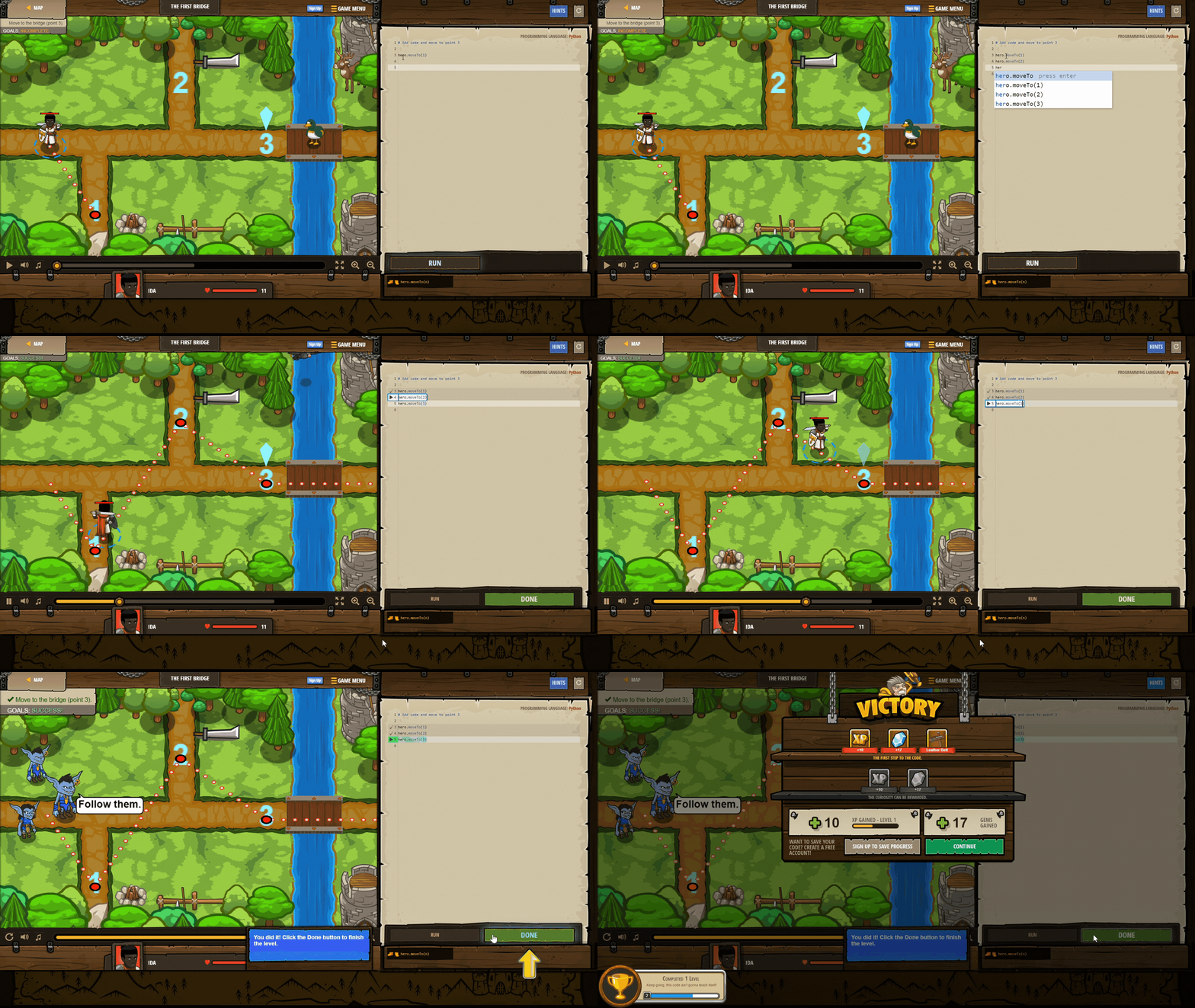
Students are introduced to a town that needs their help. Instead of block-based visual programming languages that hinder a student’s proper understanding of code, they will begin by guiding their hero via real code methods such as “hero.moveTo(n).” By the end of this exercise, your students will be able to confidently use Python syntax, call methods, and understand that order of operations matters.
After completing the scaffolded learning levels, your students will enter the Goblins ‘n' Glory arena, where they will compete to gather the most gold within 120 seconds. To win, students need to use everything they learned prior in order to navigate through a maze of gold, glory, and enemies. During the round, students will compete against the computer. Once students beat the default computer, they can create an account and put their code to the test against other students participating in the Hour of Code activity.
For more information on CodeCombat, visit CodeCombat.com.
Esports Bootcamp
Competitive coding has never been so epic! Your students will learn the skills they need to play like the pros in our Esports Bootcamp: AI League. No coding experience needed. They will start by training in the dungeon and discovering the coding strategies and tactics needed to compete. After honing their skills, they’ll put their code to the test in our esports arena against other players worldwide!

In this activity, students start in the Dungeons of Kithgard, traversing challenges and learning the core principles of programming. This is the training portion, where they will be taught everything they need for the final area. Students will become experienced in basic movement methods, string arguments, and while loops.
Once training is complete, students enter Magma Mountain to compete with others. They will need to strategize as they take part in the Volcano Race. Each student will be in control of a magma snail that leaves behind it a dangerous trail of lava that can be used to defeat their opponent. But watch out! If students aren’t careful with their code, they could be the ones to succumb to their own snail's lava trail.
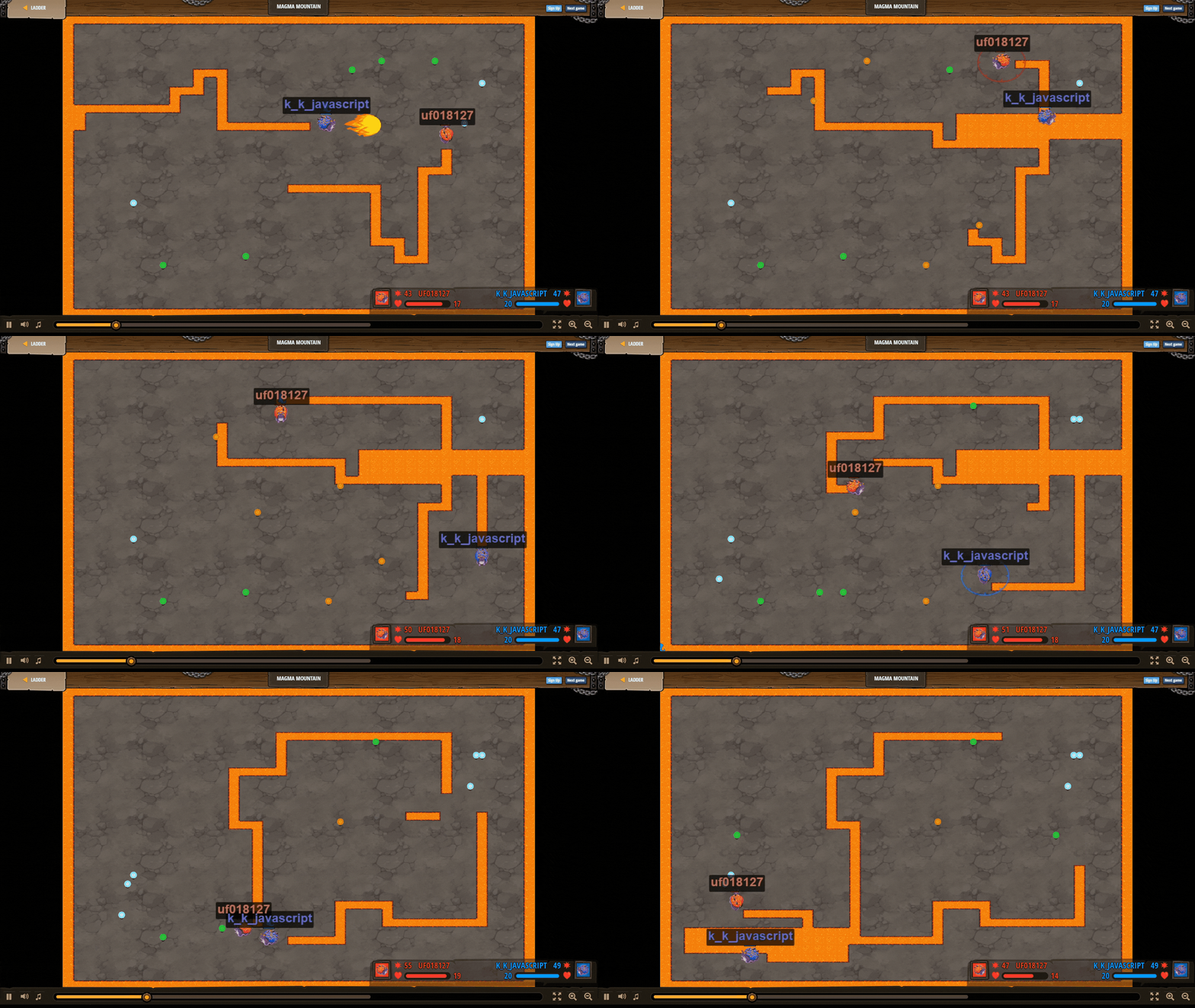
To learn more about the CodeCombat AI League and options for customizing a tournament for your school or district, check out the following resources.
AI League Video Overview | AI League Flyer | AI League Getting Started Guide | AI League Video Tutorial | AI League Season 5 Recap Video
Getting Ready For Hour Of Code
CSEd week will be held this year from December 5th to the 11th. With so many options available, it can be challenging to prepare. So join us on December 1st at 2 PM PST for a CodeCombat Hour of Code Walkthrough! Our team will take you through activities and show you how you can best use them in your classroom. Register here!

Social Media
We look forward to seeing you and your students enjoying our activities! Please find us on Facebook, Instagram, Twitter, or TikTok, and use the hashtags #CodeCombat and #Ozaria to share all the fun you're having with the rest of the community!
Other official HoC Activities available from CodeCombat:
CodeCombat: Build Your Own Game! | CodeCombat: Teacher-Led Activities | CodeCombat: Code, Play, Create | CodeCombat: Build an Arcade Game!
]]>In honor of National STEM day, we are sharing with you some extraordinary individuals whose passion for learning and education has helped shape the world of computer science into what it is today. Let's take a look at some of the accomplishments of Ada Lovelace, Annie Easley, and
]]>In honor of National STEM day, we are sharing with you some extraordinary individuals whose passion for learning and education has helped shape the world of computer science into what it is today. Let's take a look at some of the accomplishments of Ada Lovelace, Annie Easley, and Raj Reddy.
Ada Lovelace

Born December 10th, 1815, Augusta Ada Lovelace was a mathematician with ideas ahead of her own time. She is known as the first computer programmer as she wrote the first published description of a stepwise sequence of operations for solving certain mathematical problems for an invention she was collaborating on called the Analytical Engine. In an article on the Analytical Engine, she also speculated that the Engine “might act upon other things besides number... the Engine might compose elaborate and scientific pieces of music of any degree of complexity or extent.” This prediction of modern-day computers was an invention that wouldn’t come about until hundreds of years later.
Annie Easley

In 1955 Annie Easley offered her exceptional mathematical skills to the National Advisory Committee for Aeronautics as a human computer performing complex mathematical calculations. As actual computers developed, she became a talented computer programmer, supporting several NASA programs. Her contributions to computer science can be seen in early hybrid vehicles and the Centaur rocket, which helped revolutionize communication and expand the frontiers of space.
Raj Reddy

Dabbala Rajagopal "Raj" Reddy is a brilliant computer scientist pioneer in AI speech recognition. He developed the first system, Hearsay I, capable of continuous speech recognition. In 1994 he was co-awarded the Turning Award for “design and construction of large-scale artificial intelligence systems, demonstrating the practical importance and potential commercial impact of artificial intelligence technology.” He is renowned for his work in computer speech recognition, robotics, human-computer interaction, and innovations in higher education.
References
https://www.computerhistory.org/babbage/adalovelace/
https://www.nasa.gov/image-feature/annie-easley-computer-scientist-and-mathematician
https://www.nasa.gov/centers/glenn/about/history/centaur.html
]]>