super_diff, which we’ve found quite helpful at Splitwise. It greatly clarifies RSpec output – in particular, the test failure output, which makes debugging tests and identifying regressions much easier and faster.
We love the gem so much that we asked Elliot if we could take over ownership and continue to maintain it, and he very kindly said yes! You can find the repository at its new home here, and the rest of Splitwise’s open-source repositories here.
Elliot made contributing to super_diff a pleasure. His reviews were as educational as they were friendly. We’re honored that he’s passing the project on to us, and are committed to keeping this welcoming atmosphere as we maintain and continue to develop it.
Elliot, the open-source world will miss you and your great work, but we’re glad you’re pursuing your best life. Thank you for the awesome gems!

We’ve rebuilt all the most important screens in a modern new style. Improvements include:
- Clean look and feel that embraces modern Material Design
- New layout that speeds up task completion
- Updated balance presentation, for greater clarity around who owes who and why
- Better interface for unequally splitting an expense
- Enhanced discoverability of important features
- Small quality-of-life improvements throughout the app
Our goal for this redesign was to keep Splitwise easy and simple to use, while refreshing the interface to feel modern, clean, and polished. The Splitwise team felt (and some of you told us) that the Android app was starting to show its age. These changes represent a big step forward.
Here’s a detailed look at what’s new.
Modern look and feel
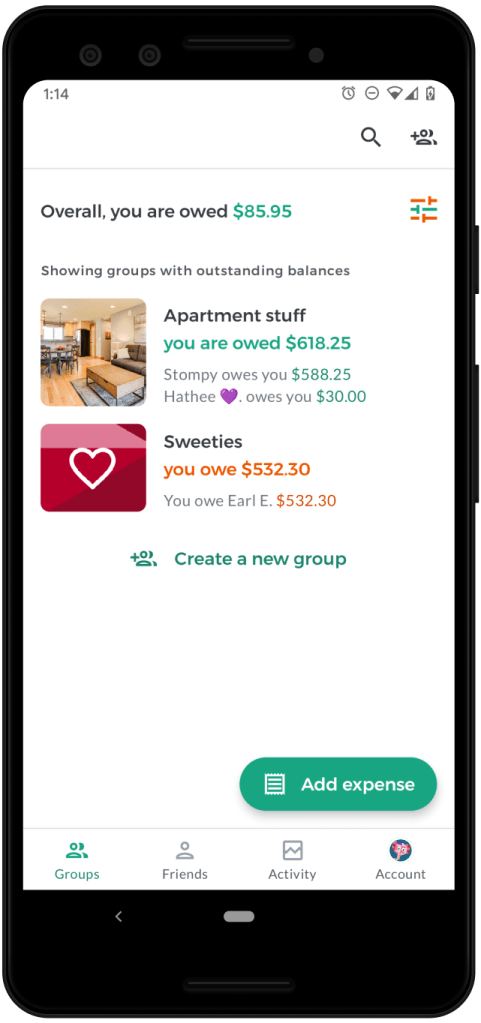
Splitwise for Android version 5.0 thoughtfully leverages Material Design for a more pleasant, platform-native experience. Changes include:
- A bottom navigation bar
- A coherent color palette that provides higher contrast for increased readability
- Standardized iconography
- Adoption of system components where appropriate, such as the default date picker
Under the hood we have also embraced modern Android technologies such as Kotlin, fragments, and theming. These tech changes will help our team ship faster, better updates going forward and lay the groundwork for adding Dark Theme and right-to-left language support in a future update.
New tab layout
Splitwise users can share costs with groups (“Groceries with Roadtrip”) and individual friends (“Groceries with Ana”). Both capabilities are very important, but we know groups are the most common unit of organization and the place where most transacting occurs. Splitwise for Android version 5.0 establishes “Groups” as the leftmost and default tab for most new sessions (in previous versions, “Friends” had this spot). Our beta testing showed this change speeds up task completion for most people.
We’ve also introduced a new visual language to discern groups from friends in the interface. Now, groups are represented by rounded rectangles, while friends are represented by circles.
Balance presentation

The redesigned app gives more real estate to group/friend balances, so folks always know their total balance (“You are owed $40 overall”) as well as the recommended repayments that add up to that total (“Ana and Bob each owe you $20”). We’ve brought this change to iOS as well.
We’ve also created more educational content on our powerful “simplify debts” feature, to help everyone trust the final balances and feel confident about Settling Up.
Add expense

We refreshed the add expense form to improve ease of use. Most notably, we built a new interface for splitting expenses unequally. The changes make it easier to know which split method is best for a given scenario and enter all the amounts.
Settle up

One of Splitwise’s strengths is that you can see a presentation of a total balance with a friend, across all group and individual expenses shared. This release adds the ability to settle a specific group balance in addition to the total balance.
Group and friend details

Of the many changes to this screen, the biggest improvement comes from getting rid of the overflow menu, to help users find the many powerful and important capabilities that were hidden there. We’ve moved these features into a horizontally scrolling list of buttons that can be used without opening another menu.
We’ve also added the date of each expense to the expense list, a popularly requested change that should make it easier to stay on top of changes and discern this week’s grocery run from the last.
Expense details

The new expense details screen is majorly improved in terms of layout, with many quality-of-life improvements for editing, deleting, categorizing, and commenting on specific expenses. Budgeters will love the quick categorizer button for tagging uncategorized bills. It’s also much easier to get to the receipt upload button for attaching an image to an existing expense. We’ve also added a sticky comments bar to better facilitate conversations around shared spending.
Group settings

The updated group settings screen contains many small layout improvements, and makes it easier to manage members by clarifying who can/cannot be removed.
We’ve also added a new group type for couples. From surveys and app reviews, we know that millions of couples already use Splitwise to manage their relationship finances. Creating a dedicated group type for couples will also allow us to build special product features for couples in future releases.
Account tab

We did away with the hamburger menu for account settings, instead introducing a dedicated tab for account management. The layout of the buttons and options there is improved, and should be more familiar to Android users. Head here to upgrade to Splitwise Pro, add a phone number to your account, or change your notification settings.
Feedback and thanks
If you have feedback, praise, complaints, or other thoughts about the new Android app, please reach out to [email protected] or use the Contact Us option in the Account tab to get in touch. We read and respond to every email, generally within 1-2 business days.
To all our users: thank you so much for continuing to support Splitwise. We’re so excited to share this new Android app with you, and for all that’s yet to come.
]]>
Today, Splitwise is launching a major refresh of our entire platform, including our mobile apps, homepage, and logo.
First and foremost, we’re releasing Splitwise for iOS Version 5.0, which is a full redesign of our flagship iPhone app. We’ve rebuilt all the most important screens in a modern new style. Improvements and features include:
- Updated visual identity: app icon, colors, default avatars
- Custom cover photos for groups
- Worldwide support for Splitwise Pro
- Redesigned core screens
- Faster group creation flows
- Enhanced discoverability of popular features
- Small improvements throughout the app
Our goal for this redesign was to keep Splitwise easy and simple to use, while refreshing the interface to feel modern, clean, and polished. The Splitwise team felt (and some of you told us) that the iPhone app was starting to show its age. These changes represent a huge step forward.
Simultaneously, we are releasing an updated version of our Android app. Splitwise for Android 4.6 is a significant evolution that includes support for the updated branding and all the same new features as the iOS update: group cover photos, new default user avatars, faster group creation flows, and support for Splitwise Pro. We’ve also redesigned our homepage and web app to incorporate the new logo, icons, and visual identity.
Here’s a detailed look at what’s new.
New visual language

We’ve expanded the Splitwise color palette to incorporate more saturated jewel tones, which mirror the jewel-like facets we’ve added to our visual language. We were drawn to this metaphor because gemstones – like our relationships – are beautiful and precious. This visual identity was developed in collaboration with our friends at Motel, a design agency also headquartered in Providence, RI. We have also adopted a new family of elephant mascots to give you a tour of this multifaceted world.
New, varied default avatars add a punch of color, make it easier to find someone specific on the Friends tab, and help you visually distinguish between people with similar usernames.
Splitwise for iOS Version 5 incorporates this language into a user interface that embraces modern iOS style guidelines. We’ve reworked:
- Root tabs and headers
- Group and friendship screens
- The tab bar (with new icons and colors)
- Icons for categories and notifications
- Button styles
- The grid system
- Empty views
We hope you’ll love these changes as much as we do!
Global launch of Splitwise Pro
We’re excited to introduce global support for Splitwise Pro, which is the first major version of our premium service and unlocks advanced features which make sharing expenses even easier. Splitwise Pro includes:
- OCR-based receipt scanning and itemization for splitting complicated bills quickly
- Budgeting tools (spending by category pie charts, spending over time graphs)
- Currency conversion to help you settle up in your preferred currency; we use the standard rate as provided by openexchangerates.org
- Expense search
- Ability to set a custom default split for a group (e.g. “always split 60%-40%”)
- High resolution receipt storage up to 10GB
- Early access to new features and redesigns
- Ad-free experience across platforms
We’re excited about the Pro features. Itemized receipt scanning in particular has become a favorite among the Splitwise team and is great for large grocery receipts or splitting a complex dinner bill item-by-item.
These are the early days of Splitwise Pro, and we’re offering a 30-day free trial so you can check it out and give us feedback. You can subscribe and see more information (including pricing in your local currency) on our website, or via the Account tab (iOS) or settings drawer (Android).
We’re proud to offer a version of Splitwise that users think is worth paying for. We’re extremely grateful to all of the users who asked us to create a paid version, and especially grateful to those who subscribed to Splitwise Pro before it was really even a thing.
Pro is still very much a work in progress, and we plan to continue improving and evolving its features. In particular, we look forward to improving the UI and OCR in our receipt scanning technology, especially outside the US. If you have any feedback, suggestions or complaints, please let us know!
Cover photos for groups
 The iPhone redesign was an opportunity to build one of our most commonly requested features: cover photos for groups. (We’ve brought group cover photos to Android as well, so everyone can join in on the fun.)
Splitwise beta testers have had a blast uploading roommate selfies, scenic shots from trips, and memes. Cover photos can be fun and meaningful – you can reminisce about vacations or apartments past – and also practical, making a list of groups more scannable so it’s easier to find the group you’re looking for.
We think this feature makes Splitwise more delightful, and is a good reminder of what we’re all about: our most important relationships.
Improvements to core iOS screens

Splitwise for iOS Version 5 (codenamed “Memorable Elephant”) also includes changes and improvements to nearly every screen in the core app. By rebuilding major portions of our core screens, we were able to improve functionality and accessibility, while making powerful features more discoverable.
Friends and groups tabs
 We simplified and redesigned the home tabs to make it easier to see all your balances in one place. The custom header on this screen now allows you to persist a filter, so for example you can choose to only view your friends with outstanding balances only. This can be very useful if you have a lot of friends on Splitwise.
Group and friend details
 Of the many changes to this screen, the biggest discoverability improvement comes from getting rid of the “more” button. We’ve moved many of these powerful features (such as export to CSV) into a horizontally scrolling list of buttons that can be used without opening another menu.
Group totals in particular is a popular feature that is much easier to find in the redesigned iPhone app. Totals functions as a lightweight budgeting tool for knowing how much you’ve spent in a group and how much your group has spent overall (this month, last month, and all time). Splitwise Pro contains even more powerful budgeting and graphing features!
Expense Details
 The new expense details screen is majorly improved in terms of layout with many quality-of-life improvements. Budgeters will love the small chart on this screen showing spending-by-category and the quick categorizer button for tagging uncategorized bills. This chart will link to more in-depth reports if you’ve purchased Splitwise Pro. We’ve also added a sticky comments bar for easier expense comments.
Create group / add friends
 We’ve made it much easier to create and manage groups with many members, and to add many friendships at once. In the redesigned version, you can select multiple new group members or friends at once (instead of selecting them one-by-one). You can also invite friends to a group by sending them a link, whether or not they have a Splitwise account already.
We’ve also improved the search functionality to find people by first and last name, and we’ve added a final confirmation screen to confirm and edit contact methods.
Group settings
 The updated group settings screen contains many small layout improvements, as well as the ability to save default splits for Pro users.
Add bill
 We used the new visual language to refresh the add expense screen. While the changes are subtle, we think they’ve had a real impact on discoverability of the category, currency, date, receipt, and note features. We also realigned all the fields to achieve a more uniform interface, which makes it easier for new users to learn how to use the form to enter their costs.
Users with Splitwise Pro will also be able to make use of receipt scanning and itemization, which are powerful new features that we plan to continue improving and refining in the months to come.
Recent Activity
 We’ve made a few improvements to Recent Activity, including badging notifications with the user avatar of the relevant person. This makes it easier to see at a glance what changed and who changed it.
Account tab
 We’ve renamed the Me tab to Account, which is now denoted by your user avatar in the tab bar. The layout of the buttons and options there is improved, and should be more familiar to iOS users. Head here to upgrade to Splitwise Pro, add a phone number to your account, or change your notification settings.
Feedback and thanks
If you have feedback, praise, complaints, or other thoughts about the new direction, please reach out to [email protected] or use the Contact Us option in the Account tab to get in touch. We read and respond to every email, generally within 1-2 business days.
To all our users: thank you so much for continuing to support Splitwise. We’re so excited and proud to share this new iOS app with you.
]]>
cacheable!
The cacheable gem is an aspect-oriented, unobtrusive approach to caching. It turns this example code (taken from the Rails caching documentation):
class Product < ApplicationRecord
  def competing_price
    Rails.cache.fetch("#{cache_key}/competing_price") do
      Competitor::API.find_price(id)
    end
  end
end
Into this:
class Product < ApplicationRecord
  cacheable :competing_price

  def competing_price
    Competitor::API.find_price(id)
  end
end
And to help handle more complex caching scenarios, cacheable includes many more powerful features too: conditional caching, dynamic cache key generation, utility methods to skip and clear the cache, and more.
You can read the full story behind cacheable here, and start using cacheable by reading our docs on GitHub. Building cacheable enabled us to clean up Splitwise’s balance-caching code significantly, and it helped us solve several hard-to-diagnose bugs in the process!
Why cacheable?
At Splitwise, we found ourselves writing the same crufty caching code over and over again. Wrapping our code in caching blocks made it harder to read and more difficult to test. And any time that we wanted to perform more complex logic in one of our cached methods – for example, conditional caching – it would cause that method to balloon in size and complexity.
We decided to step back and reexamine our first principles – specifically, the single responsibility principle. We realized that a method like Product#competing_price shouldn’t be responsible for caching at all! We began to think, “What if we could extract the caching logic from our cached methods? What if each method was only responsible for its own logic, and the caching could be tested and built separately?”
Enter aspect-oriented programming (AOP). By switching to an aspect-oriented approach, we were able to build a caching framework that was easier to use, easier to test, and MUCH more reliable across the various parts of our codebase.
Try it yourself!
We’ve been using cacheable in production on Splitwise for many months, and today we’re excited to share it with the rest of the world  Check out our docs on GitHub for complete instructions on how to start using
 cacheable in your own Ruby app. We look forward to making additional improvements, and we welcome enhancements and pull requests from the Ruby community!
Splitwise is designed to take the stress out of sharing expenses. If people think we’re doing a good job, they’re going to put more expenses in Splitwise. This is great! But eventually, a Splitwise group has so many expenses that it takes a non-trivial amount of time to calculate the total balance. We don’t want a server that is taking time to crunch numbers to increase stress, so we needed to speed this process up. Since balances only change when there is activity in the group, we decided to solve this classic space/time trade off by caching the most recent balance calculation.
While our performance improved, our code developed a smell. Caching logic had to be custom added into any method that could benefit from it. Not only was our code no longer DRY (Don’t Repeat Yourself), we were noticing occasional inconsistencies at runtime, requiring cache recalculation. This was not overly surprising, as we all know that cache invalidation is one of the two hard things. But because correct balances are the core of Splitwise, we need them to work correctly all of the time.
We continued to tweak the caching logic, built workarounds, and even added conditional caching clauses to avoid race conditions. But we still had problems. As if this wasn’t frustrating enough, the extra caching code made our tests more and more complicated. We had intended to pay for time (a faster better user experience), with space (memory for cache), but also received the hidden fee of increased maintenance costs. There simply had to be a better way.
We decided to step back and reexamine our first principles, specifically the single responsibility principle (SRP). While it’s primarily for modules and classes, it can be applied to methods too. Our method for computing the balance should not be responsible for caching at all — not checking, validating, or populating, conditionally or not. We began to think, “What if we could extract the caching logic from the method? What if the method was only responsible for the balance, and the caching could be tested and built separately?”
As an interpreted language, Ruby makes method composition easy to accomplish with metaprogramming, or code that writes code. A good deal of the incredible functionality found in Rails and other gems comes from Ruby’s embrace of metaprogramming. If you’ve used Ruby for any amount of time, you’ve likely encountered metaprogramming whether you knew it or not because it is typically small, unobtrusive, and well encapsulated. In our case, we extracted the caching logic from our methods and moved it to a dedicated module. This module can then be included in other classes and a single directive used to initiate the metaprogramming which will wrap the indicated methods with caching behavior.
Previously, each method, in addition to calculating data and caching, would not only create its own key to use in the cache, but be responsible for conditionally clearing the cache. How should a unified caching system handle something as hard and thorny as cache invalidation? As with many things, Rails has an opinion. Rails uses key-based cache expiration which ties the generated cache key to the object’s state. ActiveRecord has a method called `cache_key` for this which creates the key from the object’s class, id, and updated_at timestamp. Put simply, when an object is created or updated in the database, its cache key changes. The fresh key has no value in the cache and the old cached value is associated with a key that is no longer generated. When combined with many cache systems that remove the least recently used (LRU) values over time or as they run out of space, you get an effective way to sidestep the cache invalidation problem.
This was a good starting point, as we had decided our caching library should have a general opinion on the format of the key for ease of use and that it should be easily modified. By default, the key under which a cacheable method stores its value is made up of the result of `cache_key` (or the class’ name if undefined) and the method being called. This allows an easy point of modification where `cache_key` can be overwritten to provide any details necessary about the instance being cached. Finally, a method’s result depends on its arguments. However, its cache key may not. Since there wasn’t good default behavior here, we added the ability to specify a `key_format` proc when invoking Cacheable so that the key can be fine tuned using the instance, method name, and method arguments.
We noticed benefits as soon as we began writing the code. The balance calculating methods were DRYing back up, and now so was the caching logic. In addition, the code was getting more and more maintainable. It became easier to read, test, and modify as the disparate responsibilities were pulled apart and isolated. With the caching logic encapsulated, it also became trivial to add caching to additional methods and peer review these changes as often, only a single line of code was required.
It’s no small victory increasing your developers’ productivity and happiness, but how does it stack up in production? I’m happy to say that simply untangling the caching code from business logic dropped our error rate by an order of magnitude. Instead of a handful of inconsistent cache hits and necessary recalculations a day, now we saw the same or fewer a month. Clarity has its benefits.
We didn’t know it beforehand, but we learned we had stumbled onto aspect-oriented programming (AOP). I am no expert in AOP, but this foray showed it to be a useful tool to reduce the cost of code maintenance. It allowed us to separate the code, and thus the responsibilities for aspects, or behaviors such as caching and calculating balances, and composing new methods from modules. These aspects are able to be more thoroughly and reliably tested independently of each other. Increasing code reliability saves us maintenance by avoiding it entirely. In addition, the aspects are easier to understand when independent and take less time to maintain and augment without risk of regression.
We make use of many wonderful open source projects every day and strongly believe in giving back to the community. We’ve found this abstraction to be easy to use and love how it has increased our code’s reliability. It’s ready for out-of-the-box use with Rails and we’d love for you to try it out and let us know what you think. The GitHub repository has more information in addition to implementation instructions and examples.
]]>As part of the upgrade process, the PayPal mobile integration was temporarily unavailable on iOS and Android for several weeks starting Friday, June 29th, 2018. (You may have seen an “under construction” message on the PayPal button.) During the upgrade, the PayPal integration on web (splitwise.com) remained live.
Change Log:
Updated 10/17 Belatedly updated to reflect that the update has been completed and the changes are live; Splitwise+PayPal integration is once again usable on all platforms
Updated 8/20 Updated to reflect late August roll out
Updated 7/16 Updated to reflect expected launch date (early August 2018)
]]>
The integration has been disabled for now and will be re-enabled when we’re confident everything is working as expected. We will post here with more information as it becomes available. The integration has now been re-enabled.
A small number of users who settled up with Paytm in the last few days (since upgrading to Paytm v6.6.0) may not have a matching payment in their Splitwise ledger. Users who were potentially affected have been personally contacted via email.
During the outtage, users who still want to settle Splitwise balances using Paytm may do the following:
- Launch Paytm to send money to a friend directly.
- Launch Splitwise and use our “record a cash payment” feature to record a matching payment in Splitwise. You may use the notes field to indicate the funds were actually sent via Paytm.
Users with Paytm v6.6.0 who have recently used the integration can do the following if they want to verify that their balances are correct:
- Launch Paytm and open the “Passbook” to see if any Splitwise payments have been made since February 14th (Splitwise payments will show “For bills on splitwise.com” if you tap on a transaction)
- Launch Splitwise to check if these Paytm payments have been recorded. You may find it easiest to check from the Activity Tab.
- If you notice a missing payment, use our “record a cash payment” feature to manually record that payment to Splitwise. You may use the notes field to indicate the funds were actually sent via Paytm.
Change Log:
Update 3/2: Updated to reflect that the issue has been fixed. Please update to the newest Paytm (6.6.1 or higher) and Splitwise (4.2.2 or higher) apps from the Play Store to re-enable the integration.
Update 2/22: Updated to reflect that the issue has re-occurred.
Update 12/2: The glitch is fully fixed. Please update to the newest Paytm (6.4.1 or higher) and Splitwise (4.1.14 or higher) apps from the Play Store to re-enable the integration.
Update 12/1: The glitch has been fixed and Paytm and Splitwise have started rolling out app updates that fix and re-enable the integration. These will be widely available over the next couple days. Once you have upgraded to both Paytm 6.4.1 and Splitwise 4.1.14, the integration will be automatically re-enabled.
Update 11/30: Potentially affected users were contacted via email by Splitwise support with instructions.
11/28: Post about issue first occurring for Paytm 6.4.0.
]]>Splitwise is supported as both a trigger and an action: New expenses can cause things to happen on other platforms (see Add Trello tasks for new Splitwise expenses), and new expenses can be created automatically after things happen on other platforms (see Create Splitwise expenses for new Google Sheets rows).
Below is an in-depth how-to for my favorite Zap: How to turn email receipts into Splitwise expenses automatically.
Many thanks to our friends over at Zapier, who built this integration using the Splitwise API.
___
My shared household runs on Amazon Prime and Splitwise: I buy everything from cleaning supplies to curtains from the e-commerce giant, and then manually add the amounts to Splitwise. Amazon email receipts are an important part of this flow: They arrive seconds after I’ve checked out, and I leave them unread until I’ve added a matching Splitwise expense.
With Zapier I can automate this workflow so that every time I receive an email receipt from Amazon, a matching expense is created in Splitwise with the group / friend of my choosing. Of course you can do this for any email-sending merchant you love, from Seamless to Target.
You’ll need:
- A Splitwise account (free)
- A Parser account with 1 Mailbox (free)
- A Zapier account (free)
- Any regular email account that offers email forwarding (Gmail does this and is free)
Let’s go! Check out my how-to video or read the below instructions.
IN PARSER
- Forward an old Amazon email receipt to your new Parser Mailbox. Create a template based on that forwarded email: Highlight “Amazon.com” and name that field “Description”, and highlight the number beneath “Shipment total”, naming that “Cost”.
IN ZAPIER
- Start setting up the Parser+Splitwise Zap in Zapier (official Zap name is “Create Splitwise expenses from new parsed emails”).
- On the “Set Up Splitwise Expense” page in Zapier, you’ll need to specify which field from your email template should be interpreted as the expense description, and which should be interpreted as the expense cost. Select “Parse output cost” for expense cost and “Parse output description” for description.
- Select the Splitwise group / friend you want to share all future Amazon expenses with.
- After clicking “Continue” go take a look at your Splitwise account – you should see a new expense that matches the email you forwarded in step 1. It should be paid by you and split equally amongst all participants.
- If everything looks good in Splitwise, return to Zapier and turn the Zap on.
IN YOUR REGULAR INBOX
- Visit your main inbox and set up rule-based email forwarding so that all emails from [email protected] get forwarded to your Parser Mailbox. This will ensure all future Amazon emails get turned into expenses automatically.
Repeat for every merchant you use frequently.
]]>To access the integration, open a group or friendship where you owe money, tap “Settle Up”, then tap Pay with Paytm:

After you tap “Pay with Paytm”, Splitwise will prompt you to confirm the recipient’s phone number and the payment amount. Hitting “Next” will launch the Paytm app to complete the transaction.

Once the payment is complete, you’ll be pushed back into the Splitwise app. Your Paytm payment will automatically be added to Splitwise and your balance will be updated.

A few things to note about using the Splitwise Paytm integration:
- You need to have the Paytm app installed on your phone. If you do not have the Paytm app, you won’t see “Pay with Paytm” when you tap “Settle Up”.
- You can only settle an Indian Rupee balance (INR). If you go to settle a non-INR balance, you won’t see “Pay with Paytm”.
- Only Android users using Splitwise 4.1.9 and above will be able to send Paytm payments using this integration for now.
Users on iPhone and web will be able to receive and view Paytm payments, but not send them. With Paytm’s help, we hope to bring the integration to iPhone and other platforms when we’re able.
We’re thrilled to be launching our first payment integration outside the US, and we hope Paytm support makes Splitwise even better for our users in India. To share feedback or ask questions about the integration, please send an email to [email protected] – we’d love to hear from you.
]]>Update 2:55pm March 28: The iPhone integration will be re-enabled tomorrow March 29. Please make sure you’ve updated to Venmo version 7.0.1 and Splitwise version 4.4.7. If you need to Settle Up today, please log into our website (splitwise.com); the Splitwise Venmo web integration is working at this time. Or you can send your payment via Venmo directly and use our “Record a cash payment” feature to subsequently update your balance in Splitwise.
Update 9:30am March 22: Venmo is testing a release that will fix this issue.
Update 5:15pm March 21: Android Venmo payments are back to working normally.
Venmo released an iPhone update yesterday (version 7.0) that is preventing the Splitwise integration from working properly with the Venmo iPhone app. We are working with Venmo to resolve the issue and will post here with more information soon.
In the meantime, we’ve temporarily disabled the Venmo button in the Splitwise app until this is resolved (on both iPhone and Android).
Venmo payments made on the Splitwise Android app and website are not affected. Android users should have the Venmo integration re-enabled by the end of the day. If you need help with your account, please email us at [email protected]. Thanks for your patience.