What is Ask AI?
Ask AI is Writefull’s built-in writing assistant for Word, designed to support academic writing. It can help with a range of tasks—from reviewing your text to explaining concepts and checking references. Since it works directly within Word, you can select any part of your document and ask questions about it without switching tabs. It provides context-aware answers that consider the surrounding text in your document, and that are tailored to research. Seamlessly integrated with Writefull’s language feedback and other writing tools, it makes a convenient and research-focused AI assistant. (Note: Writefull offers a separate AI assistant for Overleaf called TeXGPT, which helps with LaTeX writing.)

Is Writefull’s Ask AI assistant better for research than ChatGPT?
To compare the performance of Writefull’s Ask AI and ChatGPT for research, we entered eight research-related questions into Writefull’s Ask AI and ChatGPT and looked at the responses. The questions were about doing research, using methods, and improving text. Find a summary below this post, and the full document with the used texts and responses here.
In six out of eight questions, we saw that:
- Writefull’s Ask AI showed a stronger focus on academic rigor, going deeper into methodology, ethical considerations, transparency, and replicability.
- Writefull’s Ask AI demonstrated a deeper awareness of research contributions by encouraging hypothesis generation, theory advancement, and study implications.
- While ChatGPT also gave valuable research advice, it generally focused more on language, readability, and practical improvements.
Interestingly, performance seemed related to the type of question asked:
- In two cases (questions 4 and 5, about methods), ChatGPT and Writefull’s Ask AI performed equally well. These were the questions that indicated a strong research focus in their topic and wording. This suggests that ChatGPT’s responses become more suitable to academic writing when the question and its wording is academic.
- In the more generic questions about doing research (questions 1-3: ‘What makes a good questionnaire / analysis?’, ‘What are case studies?’), ChatGPT’s advice was more general and less research-focused.
- Similarly, in the three cases where we asked for text to be improved (questions 6-8: ‘How would you improve this Abstract / Conclusion / Research Objective?’), we saw that Writefull’s Ask AI focused mostly on how to make the content more solid from a research perspective (highlighting scientific evidence, emphasizing study importance, summarizing key findings), while ChatGPT was more concerned with language and readability.
These examples show that Writefull Ask AI’s tend to prioritize academic rigor and content more than ChatGPT does, even if the question does not imply a strong research focus. Combined with Writefull’s other features, like its research-tailored language edits and specialized writing widgets, such responses offer invaluable support for crafting research texts.
Getting started
Want to try Ask AI, along with Writefull’s language feedback, paraphraser, and other widgets? Download Writefull for Word to get started!
Summary of the Ask AI vs. ChatGPT comparison:
Question 1 - Doing research
What makes a good analysis?
Writefull Ask AI gives highly tailored advice, listing elements that shouldn’t be overlooked in a research analysis as they are key to transparency and reproducibility. For instance, it mentions the importance of:
- Clearly stating your objectives or research questions
- Relating the analysis to a strong literature review
- Transparent methods that should strive for reproducibility
- Reliable data with systematic and objective analysis, avoiding biases
- The acknowledgement of the study’s limitations
- Ethical considerations, like citing sources and following ethical guidelines
The more generic ChatGPT gives advice applicable to a broad audience. It focuses on clarity, structure, and actionability. While these are useful for other types of analyses, they don’t suffice to meet academic research standards.
Question 2 - Doing research
What are case studies and why are they useful?
Writefull’s Ask AI explains case studies as a research method, and lists how this method serves current and future research. It explains how case studies can help academic inquiry through:
- Hypothesis generation - they help generate questions for future research
- Theory development - they can support or challenge existing theories
It emphasizes how case studies help ‘the advancement of theory’.
In contrast, while ChatGPT mentions researchers and students, its response does not go into research-focused contributions. It focuses more on the practical applications and general benefits, like ‘critical thinking’ and ‘problem-solving’.
Question 3 - Doing research
What makes a good questionnaire?
Writefull’s Ask AI approaches the questionnaire from a researcher’s perspective by mentioning the research goal ('Clearly define the objective of the research’), and research topic (‘Ensure each question is relevant to the research topic’). ChatGPT does not have this focus.
Both the Writefull and ChatGPT also include broader advice, like question order, simple language, and avoiding bias.
Question 4 - Methods
What are the main methodological differences between a randomized controlled trial and a quasi-experimental design in education research?
In this case, we see GPT aligns more closely with Writefull. Both go into research-relevant details like randomization and reducing bias. Writefull does give slightly more detail on ethical concerns than GPT does.
GPT likely aligns more with Writefull in this response because of the scientific focus and terminology fed by the question. This indicates we’re asking for a research perspective more clearly than questions that use simpler language and that aren’t necessarily about research, like ‘What are case studies?’.
Question 5 - Methods
What are the most effective data visualization techniques for representing longitudinal survey data in social sciences?
Similar to question 4, we see that the responses of ChatGPT and Writefull’s Ask AI are quite similar. Both list various techniques and how these can be used for different use cases in social science research. ChatGPT’s response is slightly more informative, as it refers to types of datasets or to tools that can be used.
Question 6 - Revising text
How would you improve this abstract? Please give me bullet points of the things to change, and why.
When asked to improve an abstract, we see a clear difference between the responses of ChatGPT and Writefull’s Ask AI. ChatGPT focuses on enhancing the overall structure, flow, and language (informal and vague wording, ungrammatical phrases, capitalization). In terms of the content, it includes many of the points that Writefull’s Ask AI covers, like clarifying the research aim, specifying the methods used, and including quantitative findings. Writefull’s Ask AI adds to this by advising the use of scientific technology and encouraging to emphasize what’s unique or significant about the study–key to writing a scientific abstract.
Question 7 - Revising text
How would you improve this conclusion? Please give me bullet points of the things to change, and why.
The two responses again show a stronger focus on language by ChatGPT, and on research by Writefull’s Ask AI. Language revision makes up 5 out of 7 points by ChatGPT, versus 2 out of 5 by Ask AI.
ChatGPT doesn’t entirely skip content, however. It advises to strengthen the significance of the findings and to expand on future research directions, two points also mentioned by Writefull’s Ask AI. Ask AI additionally recommends to clearly summarize the key findings, to add a concluding opinion about the implications, and to follow the expected flow of first the findings, then implications, and then future research.
Question 8 - Revising text
How would you improve this Research Objective section? Please give me bullet points of the things to change, and why.
In terms of content, both ChatGPT and Writefull’s Ask AI recommend to explain the role of birds in the ecosystem and to mention specific studies or data. Writefull’s Ask AI elaborates more on this. While ChatGPT recommends to give more detail in order to ‘provide more context’ and ‘emphasize the importance’, Writefull’s Ask AI explains what could be specified and why (‘specific examples of how birds contribute to the ecosystem, such as specific species involved in seed dispersal or pollination, to provide concrete evidence of their ecological importance’, ‘examples or findings from recent studies showing how climate change affects bird physiology, migration patterns, or breeding success’, etc.). Writefull’s Ask AI also recommends mentioning current conversation efforts and long-term implications.
The advice given by Writefull’s Ask AI therefore helps more to ground the paragraph in scientific evidence and highlight the importance of the study–both important in a Research Objective section.
Synonyms in Context explained
Effective word choice is key in research writing, where clarity, precision, and impact matter. Writefull’s Synonyms in Context goes beyond a standard thesaurus, understanding your sentence to suggest synonyms and phrases that suit the context. In this recent blog post, we gave a few examples of how it can help, showing its outputs within Writefull for Overleaf. To recap, these are some of the powerful benefits of this feature:
- Add variety to your text and avoid using the same words every time.
Example: Root yield is important > Root yield is crucial, vital, fundamental, key - Paraphrase to find more impactful expressions.
Example: This study tries to solve this problem > This study aims to address this issue, attempts to resolve this challenge, seeks to tackle this dilemma - Find new connectors to use.
Example: Thus, > Therefore, Consequently, As a result,

Where to find Synonyms in Context
Simply select up to 5 words in Writefull for Word, click ‘Synonyms in Context’ in the Writefull panel, and get contextually-suited synonyms and phrases. Each suggestion shows a suitability percentage, letting you choose the option that best matches your intended meaning. Click your preferred option for it to be incorporated into the sentence.
Free vs. Premium access
With a free account, this feature is limited by a daily usage quota, and you’ll be notified once you reach it. To get unlimited synonyms, language suggestions, and full access to Writefull’s features in both Word and Overleaf, you’ll need to upgrade to Writefull Premium.
Soon, a Premium subscription will also include unlimited access to the GPT model in Writefull for Word (already available in Writefull for Overleaf). This will allow you to revise texts in any language, and use custom prompts to tailor the language edits you get. Stay tuned!
]]>Breaking down language barriers
Academic writing can be challenging, especially for those of us who don’t speak English as a first language. But language skills shouldn’t stand in the way of sharing quality research. As researchers, we want journal editors, reviewers, and other decision-makers to focus on the value and rigor of our work, not the level of English.
The ICCB organizing committee is well aware of this challenge. Their Language Accessibility programme encourages people from all linguistic backgrounds to participate in the conference and works to reduce language barriers for everybody. Along with the Writefull service, the program offers guidelines for reviewers, encouraging them to focus on the content of submissions and giving tips on how to offer language feedback.
ICCB’s Language Accessibility initiative is a great fit with what we do at Writefull. We often partner with libraries, publishers, and event organizers to offer our language services to authors. Not only does this give (non-native) researchers the language support they need, it also encourages and facilitates knowledge sharing, ultimately benefiting research as a whole.
Writefull’s offering for ICCB authors
Researchers submitting to the ICCB 2025 conference get to use Writefull at two occasions. First, all authors submitting an abstract are invited to use Writefull Revise to improve the language of their abstract before they submit. They can upload their abstract, download a revised version with Writefull’s edits in Tracked Changes, and accept the edits they agree with before submitting. Writefull Revise uses Writefull’s proprietary language models, which are customized for research writing.
Second, authors who get their abstracts accepted for presentation will get free access to Writefull Premium for two months in 2025. This will help them prepare their presentations or any other research writing.
Learn more
Go here for details about the ICCB Language Accessibility initiatives, or visit the ICCB website for more information about the conference and its sponsors. If you have any questions about this sponsorship, contact Dr. Hilde van Zeeland, applied linguist at Writefull, at [email protected].
]]>Research writing in languages other than English
Although most research is published in English, many students and researchers write in other languages. Assignments and theses are often done in the local language, and in some fields, non-English journals are common. At Writefull, we’re dedicated to supporting writers in all languages–and that's why we’ve now added multilingual support. All you need to do is select the GPT model to start checking your text in Spanish, Dutch, German, Chinese, or any other language.

Writing outside academia
Although Writefull specializes in academic writing, most of us write non-academic documents, too–think of CVs, letters, and meeting notes. With the new GPT model, you can now check any text without needing to leave Writefull, no matter the genre.
Using the GPT model with a custom prompt
Do you know how you want your text to be revised? Perhaps you want to use a particular tone, target a certain audience, or only get edits that are absolutely necessary. With the GPT model, you can add a custom prompt to define exactly how you want your text revised, and it will follow your instructions. This is a Premium feature.
Writefull vs GPT for language feedback: what’s the difference?
Just like the Writefull language model, the GPT model checks your text for language accuracy, improving grammar, word use, spelling, punctuation, and phrasing. However, the two have their differences:
- Language scope: The Writefull model can be used on English texts only, while GPT works with any language.
- Specialization: The Writefull models have been trained on English research papers, and offer highly specialized language feedback for academic writing. GPT’s feedback is more general, making it a better choice for non-academic texts like CVs or emails.
- Efficiency: The Writefull models are small and light-weight, making them fast and efficient. As GPT is a Large Language Model, you’ll see it takes a bit longer to correct a text.
- Data privacy: GPT sends your text to the OpenAI servers, where it is stored temporarily (but not used for training purposes). The Writefull model runs on our own servers (located in the EU), and your text is never stored.
- Customization: GPT lets you enter your own prompt to adjust the language feedback you get, but this isn’t possible with the Writefull model.
How to access
The GPT model is available to everybody using Writefull for Overleaf (Writefull for Word will follow soon). A button on the Writefull toolbar indicates which model is active (this is Writefull’s model by default). Click this button to switch between models or to enter your own prompt. When you have a non-English document open but the Writefull model selected, you’ll be prompted to switch to GPT.
Contact us
Any questions, issues, or feature requests? Write to us at [email protected]; we’re always happy to hear from you.
]]>About this analysis
At Writefull, we regularly analyze the language used in published papers to offer insights that help with academic writing. What phrases are typical in specific disciplines or sections? What are common errors to avoid? In this analysis, we focus on conciseness. We processed a dataset of published papers using Writefull’s ‘Make Concise’ feature, an AI tool that automatically shortens text. From this, we identified the phrases that were frequently shortened and categorized these in two ways: first, by frequency to highlight common opportunities for conciseness, and second, by impact to show which changes save most characters.
- Most frequent conciseness edits
The figure below shows the most common edits made by Writefull to make sentences more concise. They are ranked by frequency, and the bar colors indicate the level of shortening (darker bars show greater reductions in character count). The most frequent edit replaces associated with with linked to, followed by the change of an important to a key.
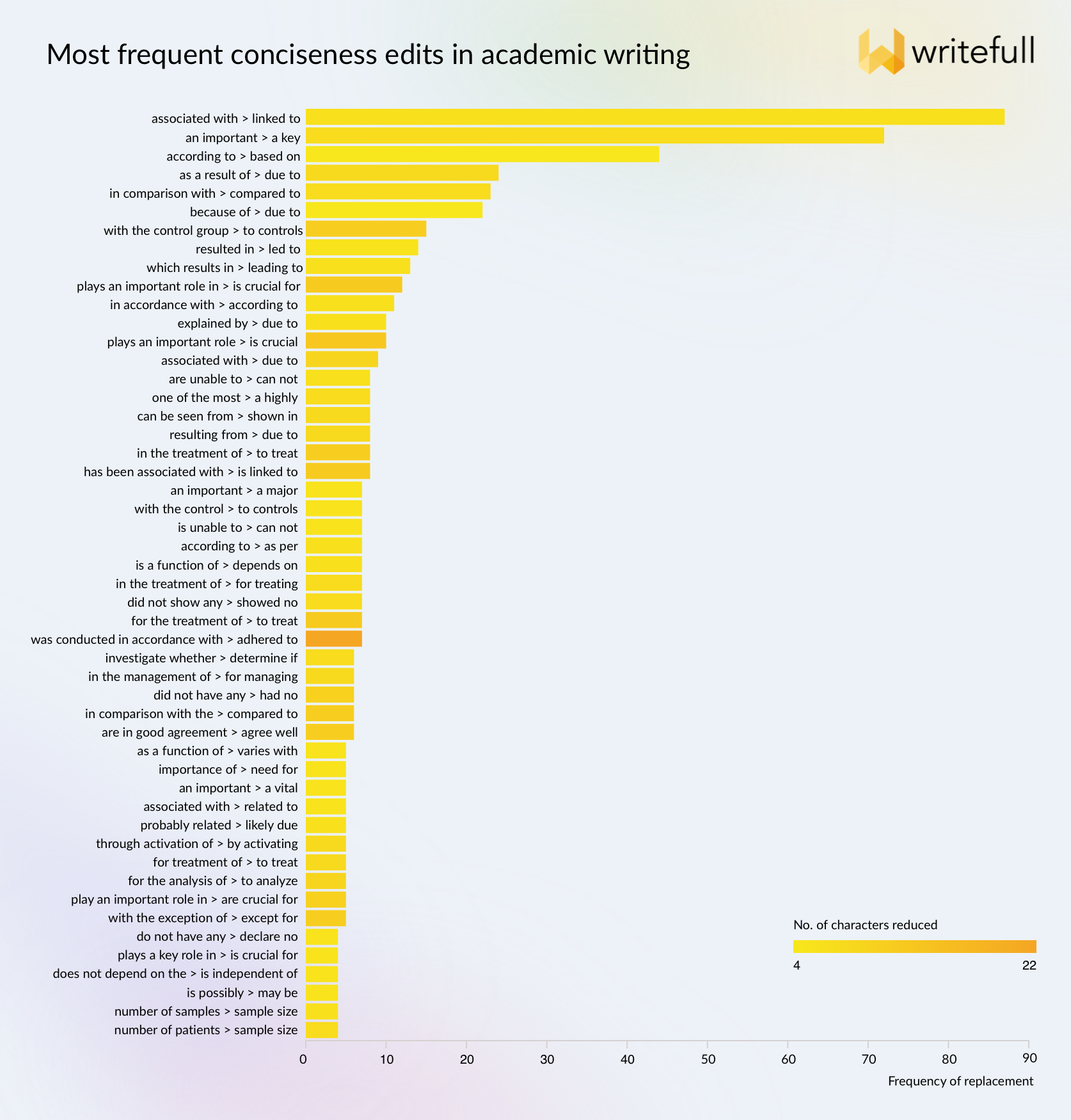
Here’s a breakdown of the types of changes we see, with examples from the list:
Complex verb phrases
- was conducted in accordance with > adhered to
- does not depend on the > is independent of
- plays an important / key role in > is crucial for
- are in good agreement > agree well
Phrases with prepositions
- associated with > linked to
- according to > based on
- as a result of > due to
- in comparison with > compared to
Noun phrases instead of verbs
- in / for the treatment of > to treat / for treating
- in the management of > for managing
- through activation of > by activating
Lengthy adjectives
- an important > a key / a major / a vital
- one of the most > a highly
Lengthy nouns
- with the control group > to controls
- number of patients / samples > sample size
Complex negation
- is / are unable to > can not
- did not have any > had no
- did not show any > showed no
- Most impactful conciseness edits
Next, we looked at the changes that had the greatest impact in reducing length. The image below shows the 50 most impactful edits, sorted by the amount of character savings. The top edit replaces ‘was conducted in accordance with the principles of’ with the much (!) shorter ‘adhered to’. Darker bars indicate changes that were applied relatively frequently in our dataset, like the following:
- resulted in a significant reduction in > significantly reduced
- were significantly higher / greater than those in > compared to
- were conducted / carried out in accordance with > adhered to
- plays an important role > is crucial
- has been associated with > is linked to
- for the treatment of > to treat

Need some help from Writefull's AI?
Of course, there's no need to learn these lists by heart. You can now make your writing more concise instantly with Writefull's 'Make Concise' feature, available from Writefull for Word and Writefull for Overleaf.
Questions about this analysis, the 'Make Concise' feature, or anyting at all? Contact us at [email protected].
]]>Boost your writing style and clarity with ‘Rewrite’
Going beyond language revision, the new set of ‘Rewrite’ features helps you paraphrase what you’ve written, change your style to fit your audience, and more:
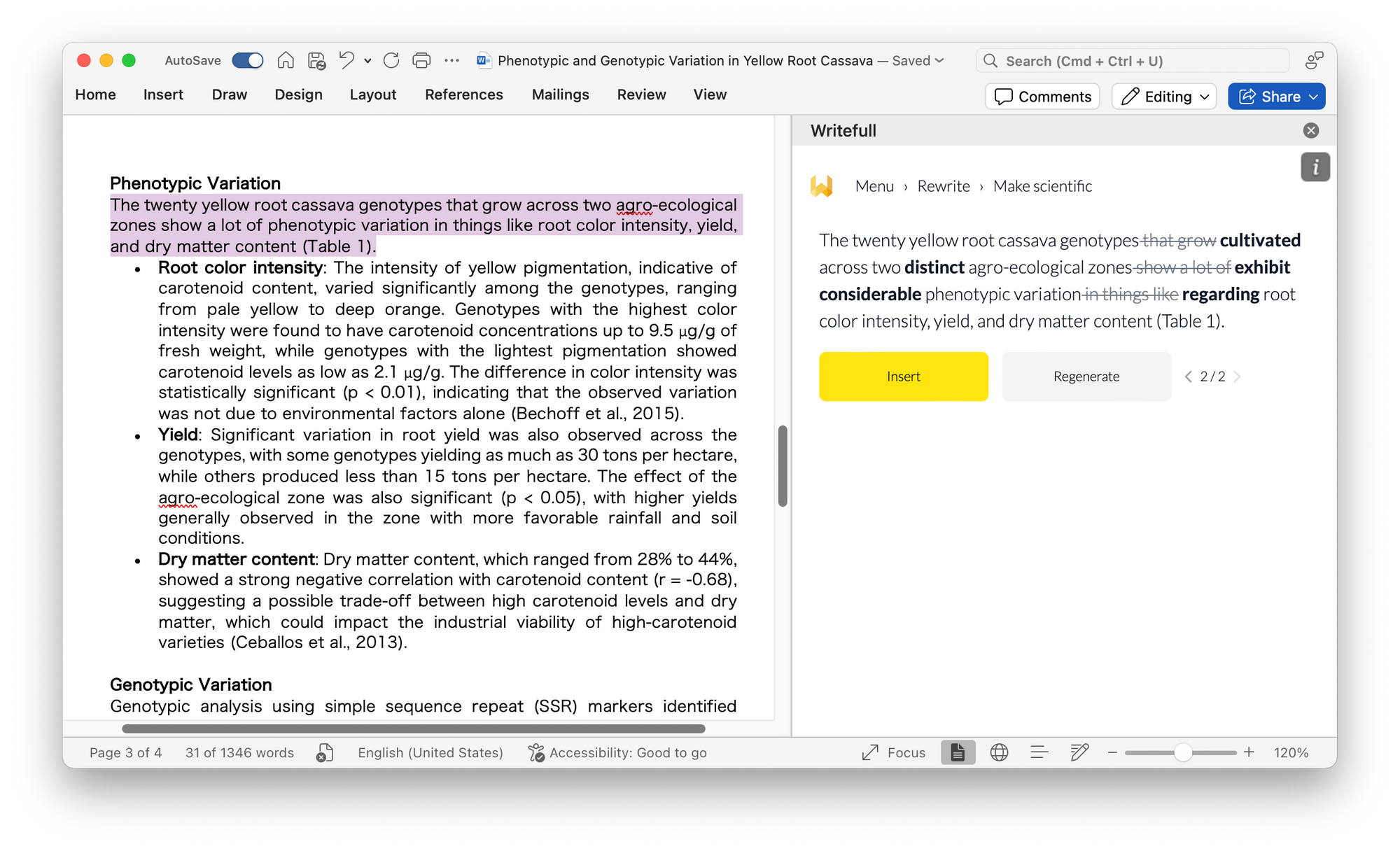
- Make concise, punchy, or scientific
Feel like your writing is too informal or lengthy? Use these features to make it more concise or academic. Simply select the part of your text you want rewritten, whether this is a phrase, sentence, or paragraph, and click to change your writing style.
- Split or join
This option lets you either split a sentence into two or more sentences, or join two or more sentences. Splitting a long sentence can make it easier to read. Likewise, you can choose to join two or more short sentences to improve your flow.

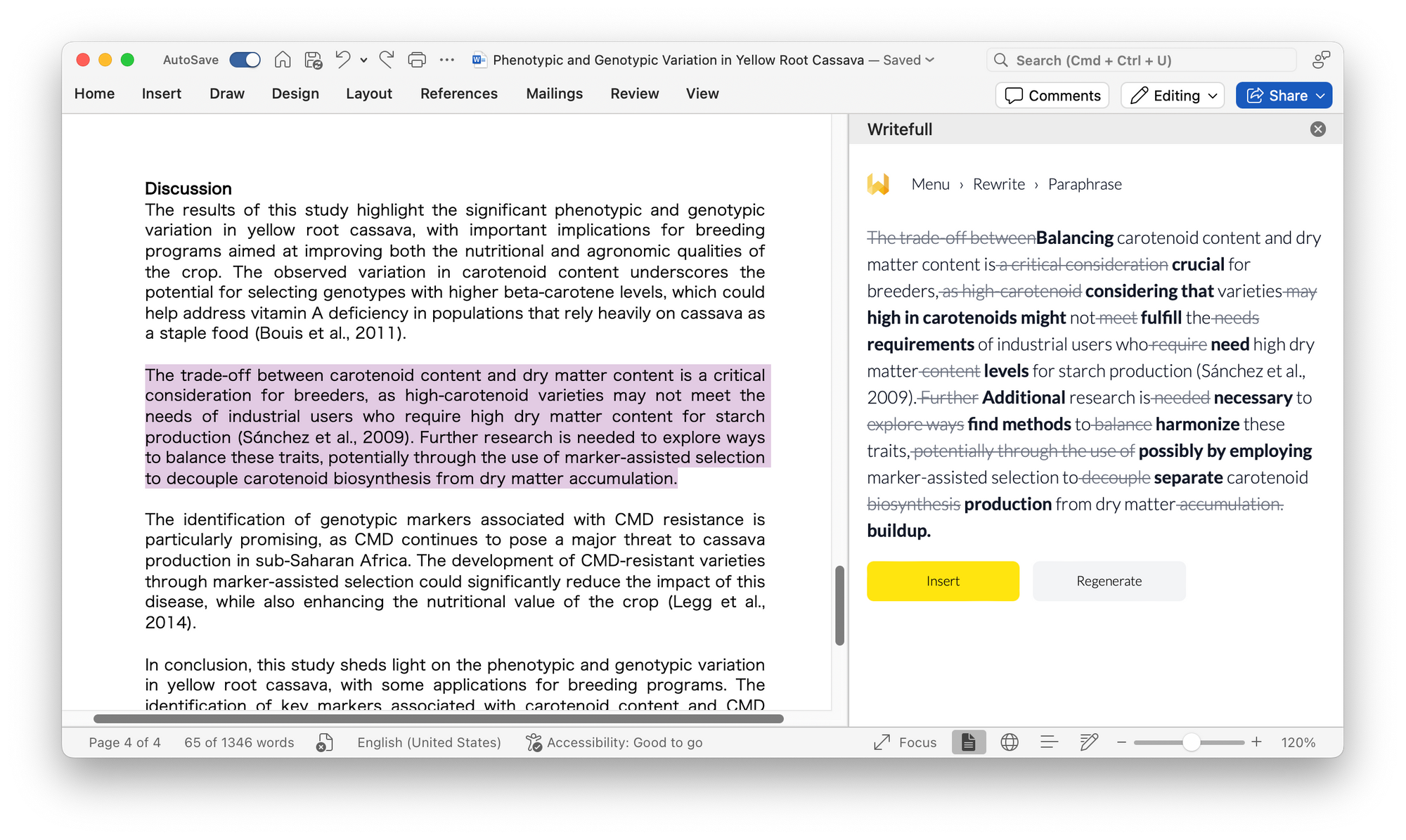
- Paraphrase
Express yourself differently and bring your ideas to life! Use the new and improved Paraphraser to instantly generate different options for expressing yourself.
Get answers to academic questions with ‘Ask AI’
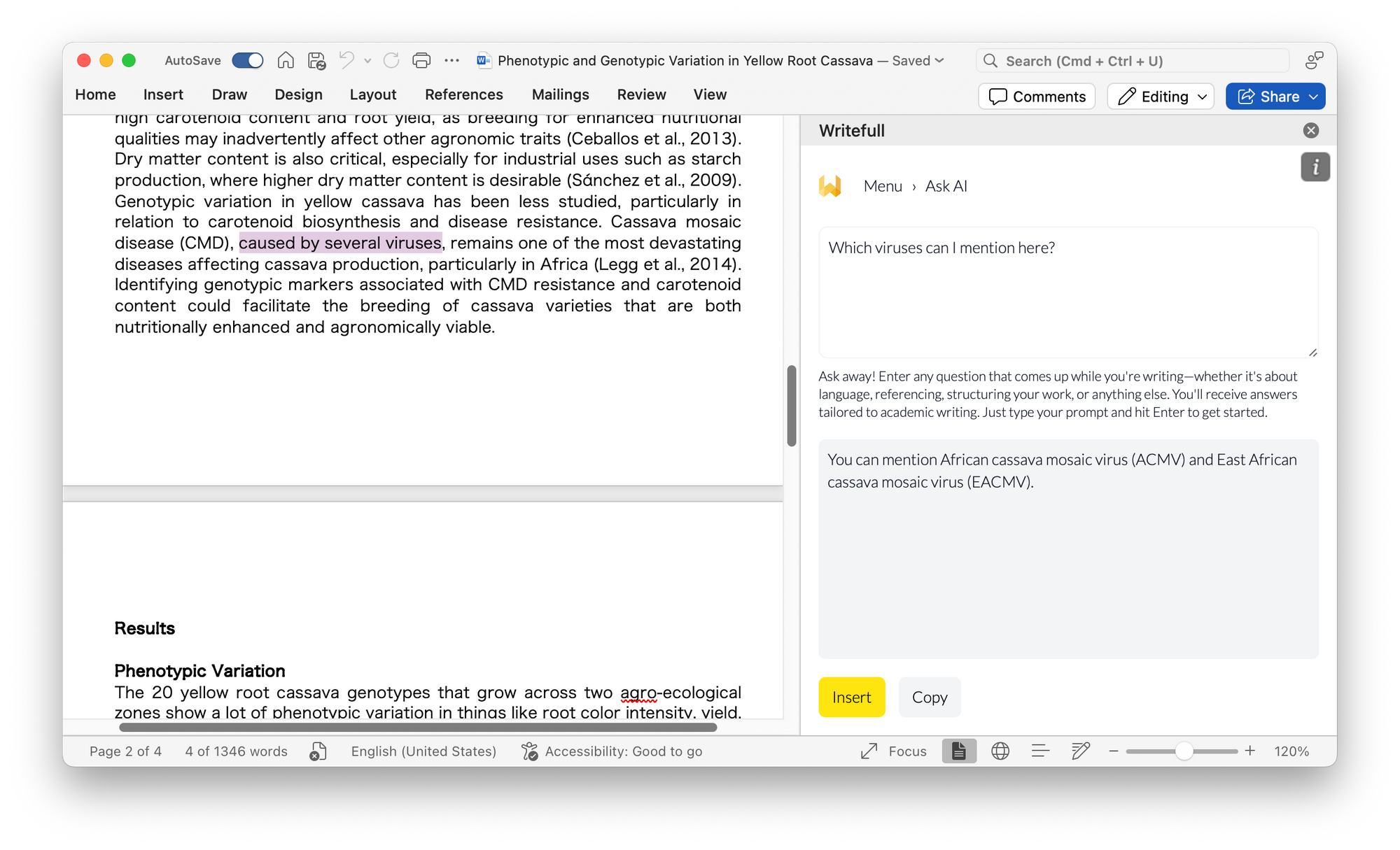
Get instant help from Ask AI, a built-in assistant that is specifically designed to answer your questions in an academic context. Simply enter a prompt and get an immediate response, all within your document: no new tabs or back-and-forth conversation required.
Present key concepts effectively
Crafting abstracts, conference posters, or cover letters just got easier! These new features quickly summarize or explain key findings, Combined with Writefull’s Abstract and Title Generator, which are still available in this new version, this feature set helps you make your work ready to share.
- Summarize
Want to get to the gist of something, to reuse in your abstract or discussion, or to explain to someone? The ‘Summarize’ option is perfect for this. Select a piece of your text and choose this option to get a concise summary.

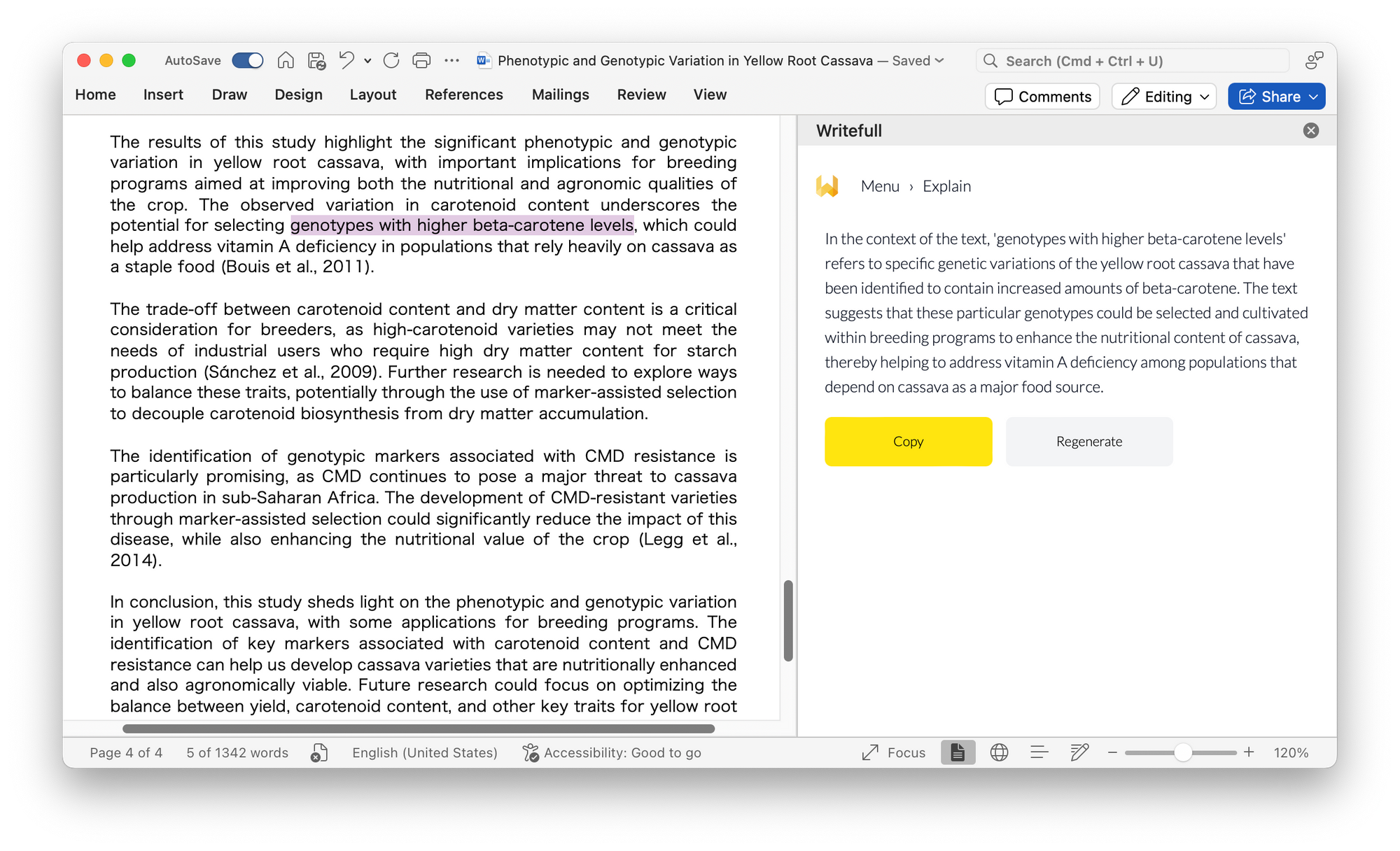
- Explain
This option helps you explain part of your text, using the wider context to do so. If you select one sentence, it will use the paragraph as context to explain the selected sentence. The ‘Explain’ option can help you to dive deeper into statements you make, or to respond to questions of reviewers or other peers.
Use Writefull’s high-quality language edits with even more ease
Writefull’s language feedback, tailored to academic writing, is now even more accessible through an improved interface. Edits can be accepted individually or by sentence, blocked for future occurrence, and viewed with or without Track Changes.
Accessing the new version
If you're using Writefull for Word already, the add-in will automatically update to the new version when you reload it or open and close Word; otherwise, you can download the add-in from the Microsoft Appsource. If you're using a version of Word of before 2016, you can download the legacy version of Writefull for Word from our website.
You need to create an account to start using Writefull. A free account gives you limited access to Writefull's language suggestions and writing features, in Word, Overleaf, and on Writefull X. For unlimited access, you can upgrade to one of our Premium plans.
]]>With this update, you can adapt your text to align perfectly with your texts’ objectives and preferred tone. This should add greater flexibility and precision–whether you need to condense lengthy passages, expand on key points, or adjust your tone. You can fix your preferences or prompt; for example, if you always want your paraphrases to be concise, or if you never any technical terms changed. You can also choose to change your settings or prompt for individual paraphrases.
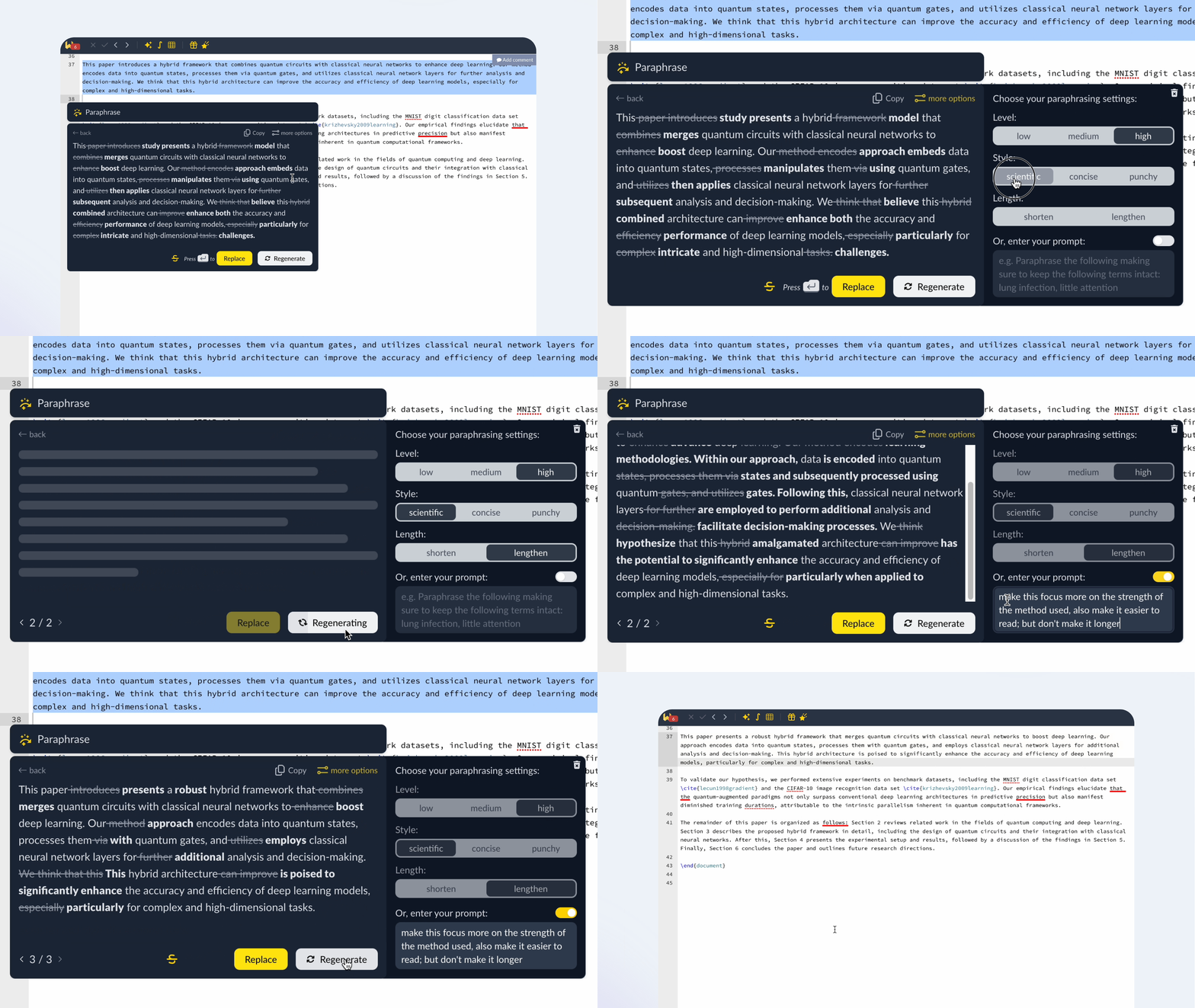
You can access these advanced options in the Paraphraser window by clicking ‘more options’ in the top right corner. From there, choose your preferred level of rephrasing, length, and style. Alternatively, you can enter a custom prompt, like ‘Rewrite this in simpler language and make it as concise as possible, without changing these terms: [term1], [term2], [term3]’. You can either use the settings or a custom prompt, but not both simultaneously—selecting one deactivates the other.
Your chosen settings or prompt will remain active until you modify them. When ‘more options’ appears in yellow, it indicates that the paraphrase was generated using your settings or prompt.
]]>Our analysis
We analyzed a dataset of Open Access papers from ten different fields, parsing combinations of adverbs, verbs, and nouns. To ensure consistency and completeness, we lemmatized the data; meaning we combined different forms of the same phrase (for instance, ‘succesfully solve/solving/solved/solves problem/problems’ were grouped into ‘succesfully solve problem’).
Using this structured data, we examined which positive adverbs were most frequently used across disciplines (Part 1) and identified the verbs and nouns they were commonly paired with (Part 2). The results show us how each field celebrates its achievements.
Results
Part 1: Which positive adverbs are most commonly used?
We began by identifying the 600 most frequent adverb-verb-noun combinations across all ten disciplines. From these, we extracted 17 positive adverbs that were used frequently in every field (‘effectively’, ‘successfully’, ‘accurately’). We excluded those that sounded positive but, looking at the data, were often used to bring neutral or negative news–such as ‘considerably’, ‘properly’, ‘clearly’, and ‘significantly’.
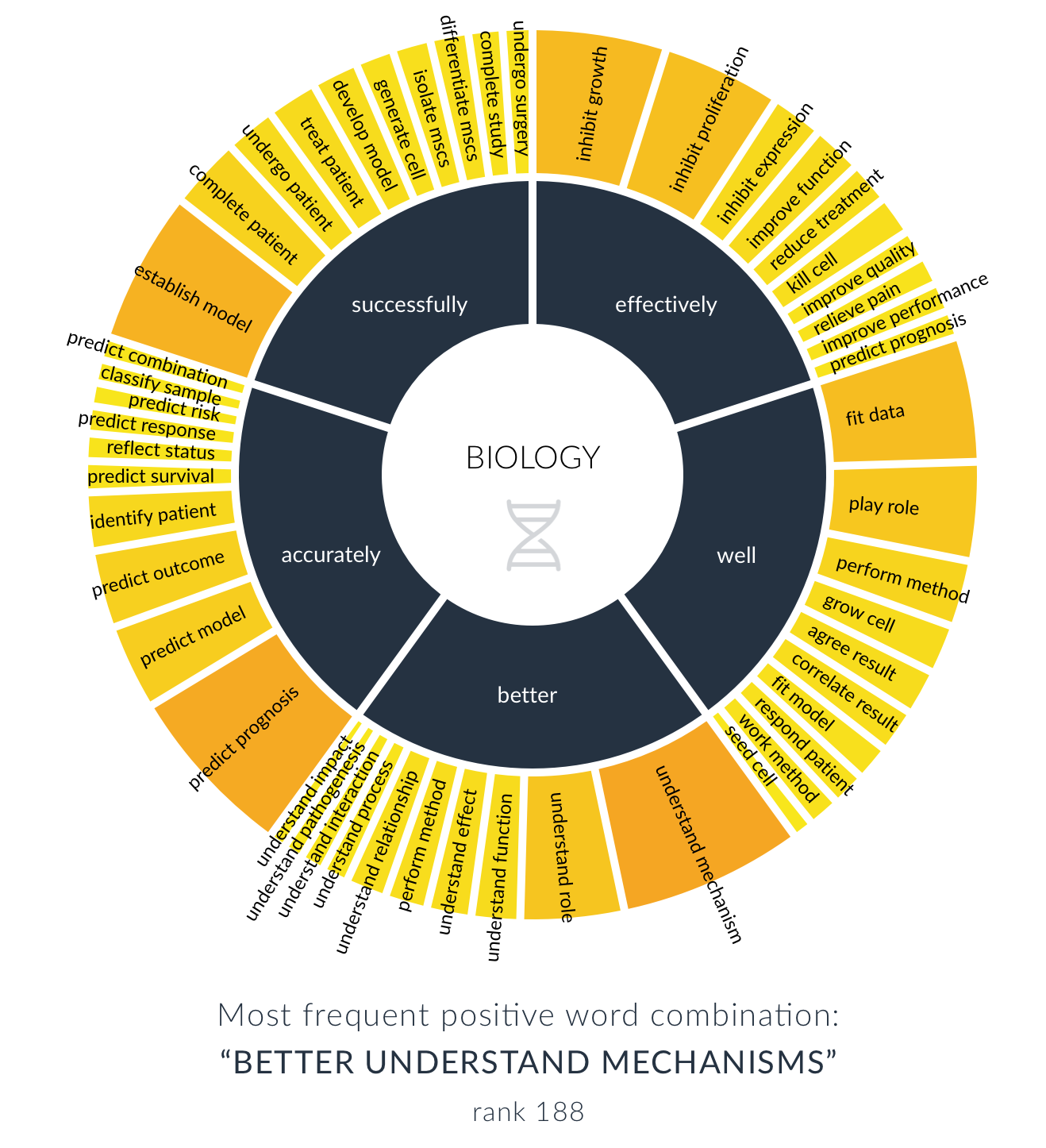
The image below shows the adverbs’ relative frequency across the ten disciplines. While the most frequent adverbs–‘effectively’ and ‘better’, for example–are used in all disciplines, we do see differences. The word ‘interestingly’, for instance, appears very frequently in Biology and Medicine, but is hardly used in Engineering, Computer Science, and Mathematics.

Part 2: What do different disciplines talk about positively?
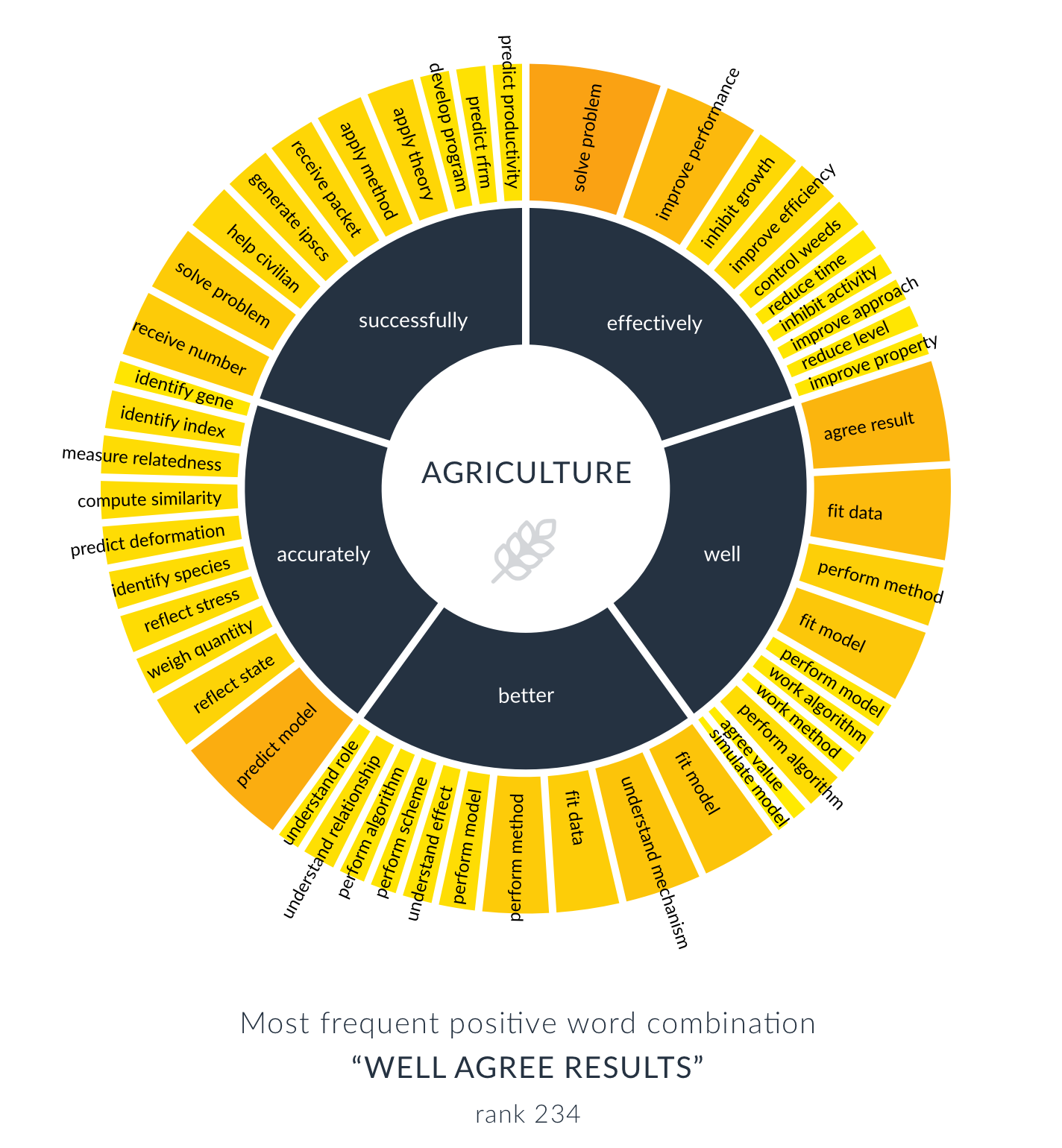
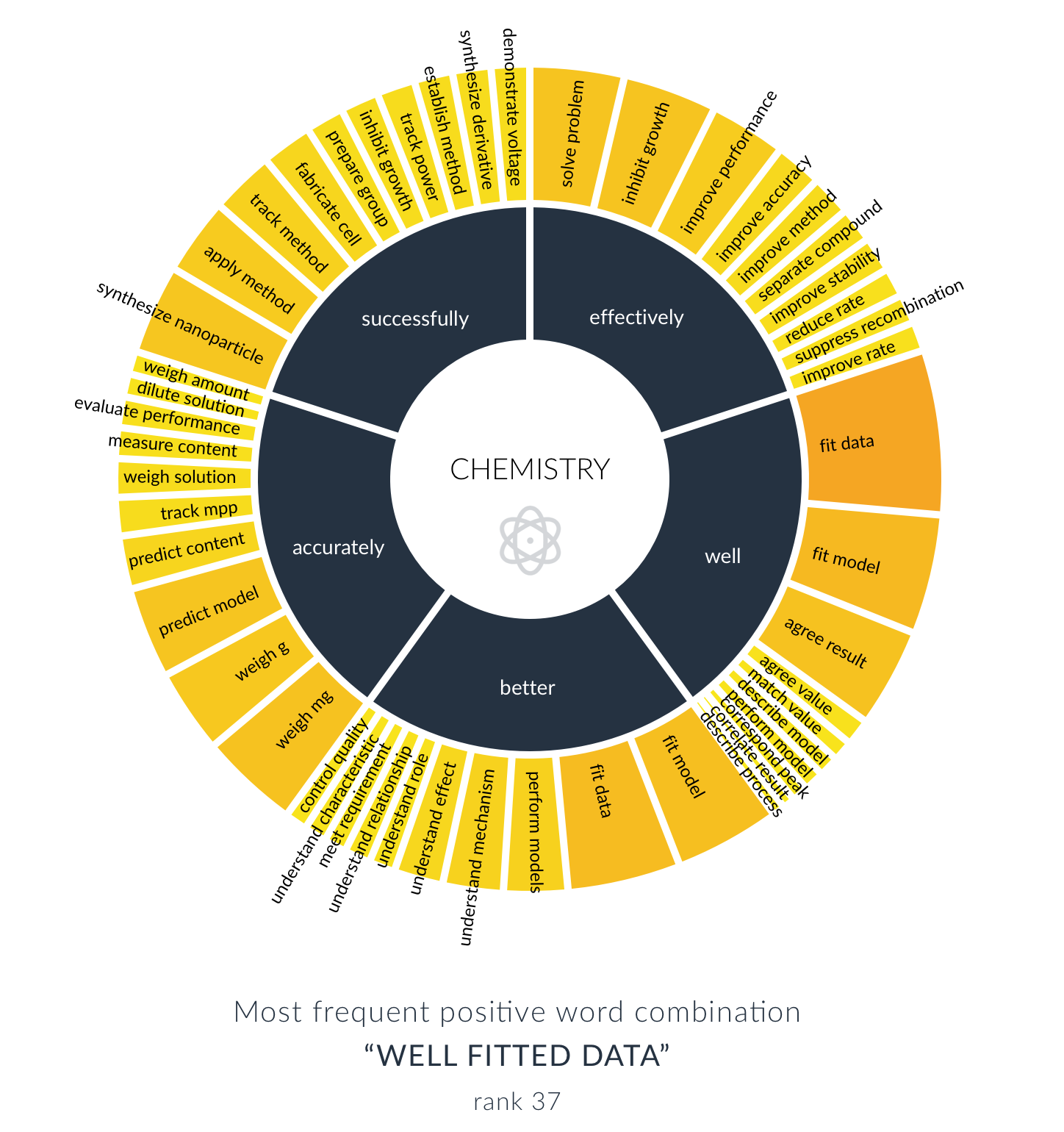
Next, we looked at what it is that researchers write about positively. We took the five most frequent positive adverbs, and identified which verbs and nouns these were most often paired with. Three disciplines had to be excluded for this part of the analysis, as their datasets were too small to be representative.
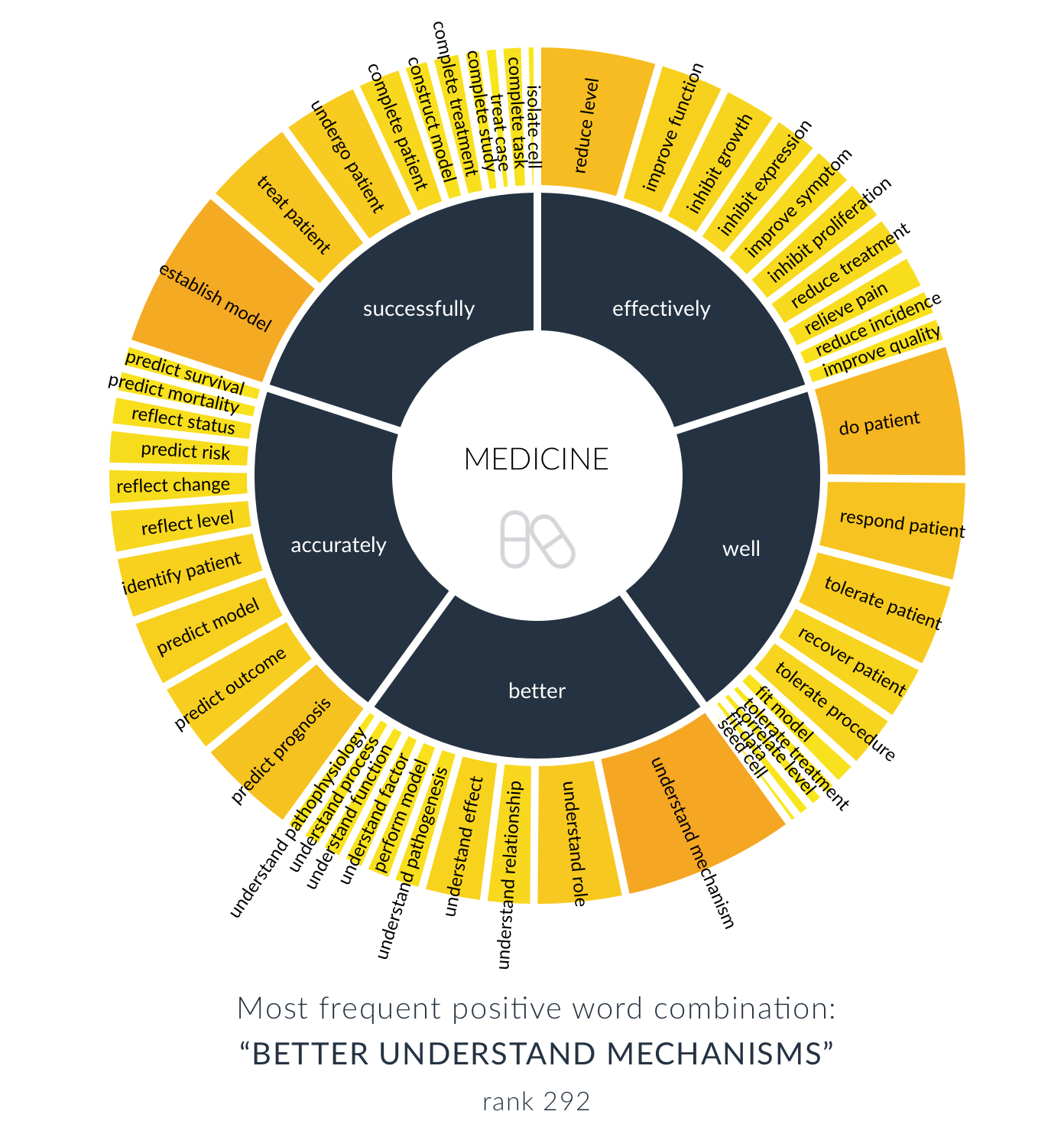
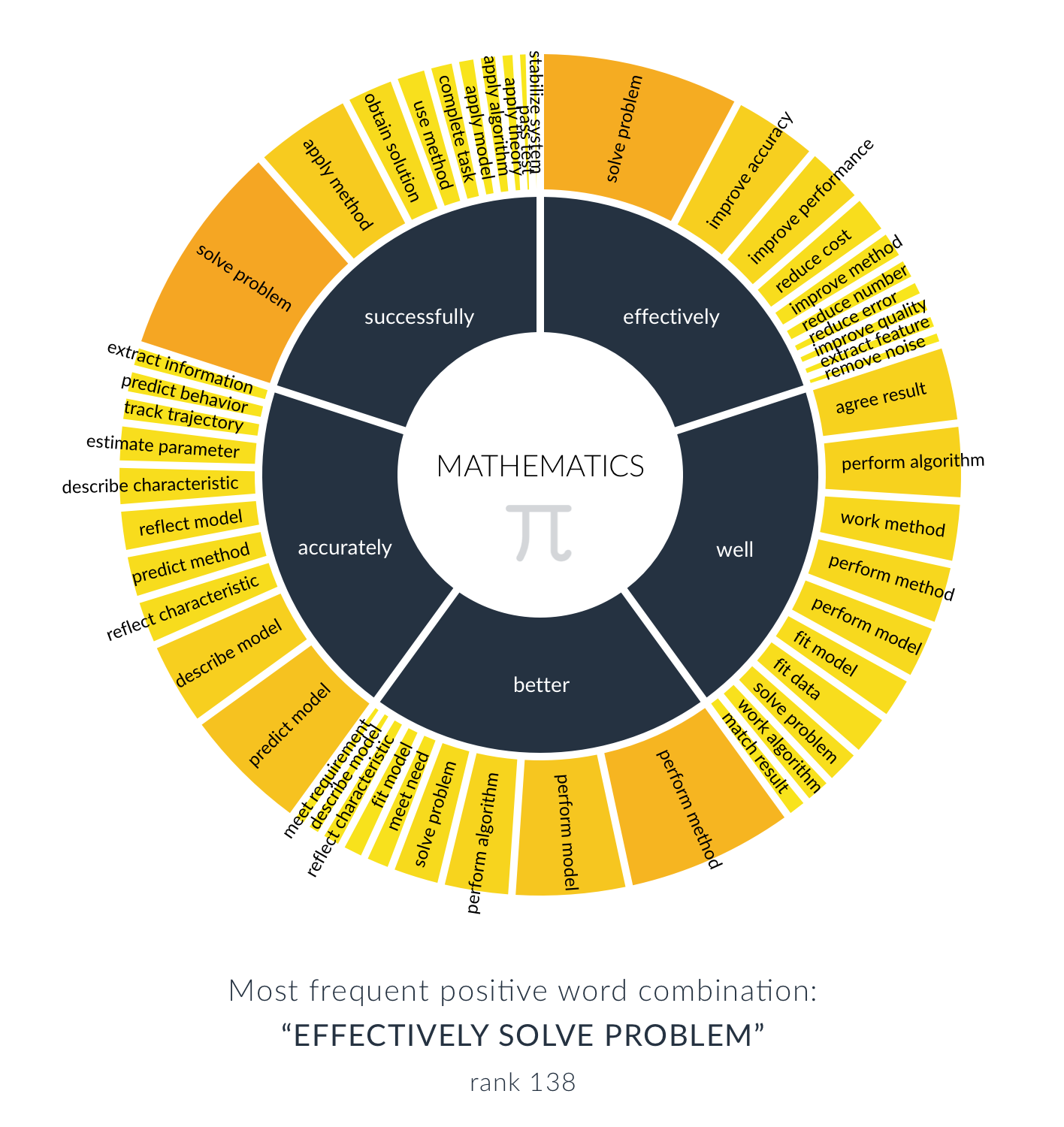
The image below shows the results. To take a closer look, you can also download the visualization and discipline-specific images from this folder, and find close-up images at the bottom of this blog post.
For each discipline, you can see the relative frequency of the noun-verb combinations following each adverb, in percentages.
We can see clear disciplinary differences. For example:
- In the context of ‘accurately’, Biology papers often discuss ‘accurately predicting prognosis’, Computer Science and Engineering papers focus on ‘accurately predicting models’, and Chemistry talks about ‘accurately weighing mg’.
- Looking at ‘better’, we see that Engineering, Computer Science, and Mathematics refer mostly to ‘performance’ (of a method, model, etc.), where Biology and Medicine aim for better ‘understanding’ (of a mechanism, role, etc.).
- When it comes to ‘effectively’, we see that almost all fields appreciate the effective ‘solving of problems’, while Biology and Medicine primarily aim to effectively ‘inhibit/reduce growth’.
- ‘Successfully’ also shows some interesting disciplinary differences, like ‘successfully helping civilians’ (Agriculture), ‘successfully synthesizing nanoparticles’ (Chemistry), and ‘successfully obtaining solutions’ (Mathematics).

For all disciplines, looking at the tail of less frequent word combinations shows more disciplinary focus areas of positive language. Take these examples from the top tens of each discipline:
- Agriculture: effectively control weeds, accurately identify species
- Chemistry: effectively separate compounds, accurately dilute solutions, successfully fabricate cells
- Engineering: successfully avoid obstacle, successfully resist attack
- Biology: effectively kill cell, better understand pathogenesis, successfully undergo surgery
- Computer science: accurately extract information, successfully log user
- Medicine: effectively relieve pain, better understand pathophysiology, accurately predict survival
- Mathematics: effectively reduce error, accurately track trajectory, successfully stabilize system
Learn more
At Writefull, we’re passionate about language and science, and we bring these worlds together through analyses like this. There’s much more to uncover, so stay tuned for future insights! If you’re looking for the right words for your own research, see how Writefull can support your writing in Word and Overleaf.
Images by discipline:


Synonyms in Context explained
Choosing the right words is crucial in research writing. Whether you’re working on a thesis or a manuscript, your writing should be precise, clear, and impactful. Writefull’s new Synonyms in Context feature lets you instantly replace words or phrases to add variation, improve clarity, and articulate your ideas more effectively. Unlike a typical synonym dictionary, this feature considers the entire sentence and works on single words as well as phrases–making it incredibly powerful!
Here are six examples of how it can help you:
1. Adding variation to your writing
Are you looking to avoid repetitive wording? In the example below, you see how Writefull offers synonyms of the word ‘domains’, to prevent repetition within the same sentence:

2. Avoiding vague language
In research writing, you want to be as clear and specific as you can. This means avoiding vague language like ‘nice’, ‘kind of’, or ‘some things’. Writefull gives you alternatives:

3. Paraphrasing part of your sentence
You might feel that you’re not using the right phrase; it’s not convincing enough, doesn’t read well in your sentence, or doesn’t convey the message you have in mind. Use Writefull’s Synonyms in Context feature to rephrase within a sentence (you can also use Writefull’s separate Paraphrase feature for this):

4. Making your language more accessible
It’s important for a scientific text to be understandable by novice researchers as well as experienced ones. If you feel parts of your sentence are too complex, ask Writefull for alternatives and pick a simpler alternative:

5. Enhancing argumentation
The Synonyms in Context feature can also help when you’re looking to strengthen your arguments by finding more convincing words or phrases. (To do this for a whole sentence or paragraph, use Writefull’s separate ‘Change Style > Punchy’ feature from the Context Options.)

6. Bridging sentences creatively
Bridging sentences with connectors is important for the readability of your text. Use the Synonyms in Context feature to come up with alternatives and bridge sentences smoothly:

How to access Writefull’s Synonyms in Context
Within Writefull for Overleaf, select 1 to 5 words, and click the magnifier icon to get synonyms or alternative phrases for your context:

As is the case with Writefull’s language suggestions, the alternatives also show you percentages. These indicate their semantic similarity to the text you selected, indicating how closely they correspond to the original meaning. Click one of the options to add it directly to your text in Overleaf!
This feature is part of Writefull’s Premium offering. While you get a limited preview with a free account, you’ll need to upgrade for unlimited use.
More feature ideas?
We value your feedback. Have an idea for a feature to improve your writing in Overleaf, whether it's around language or LaTeX? Share your thoughts with us at [email protected]!
]]>Table Generator
Writefull’s Table Generator gives you LaTeX code for a table, based on a prompt you enter or an image you upload. Access this feature by clicking the table icon in the Writefull toolbar, and enter your table requirements as a prompt or drag and drop a table image. Writefull then automatically generates the LaTeX code for your table:

The image you upload can be a simple screenshot; for example, from a spreadsheet with your own data, or from an existing article.
Click ‘Insert’ to add the table to your source code. If needed, click ‘Generate’ to refine the result.
Equation Generator
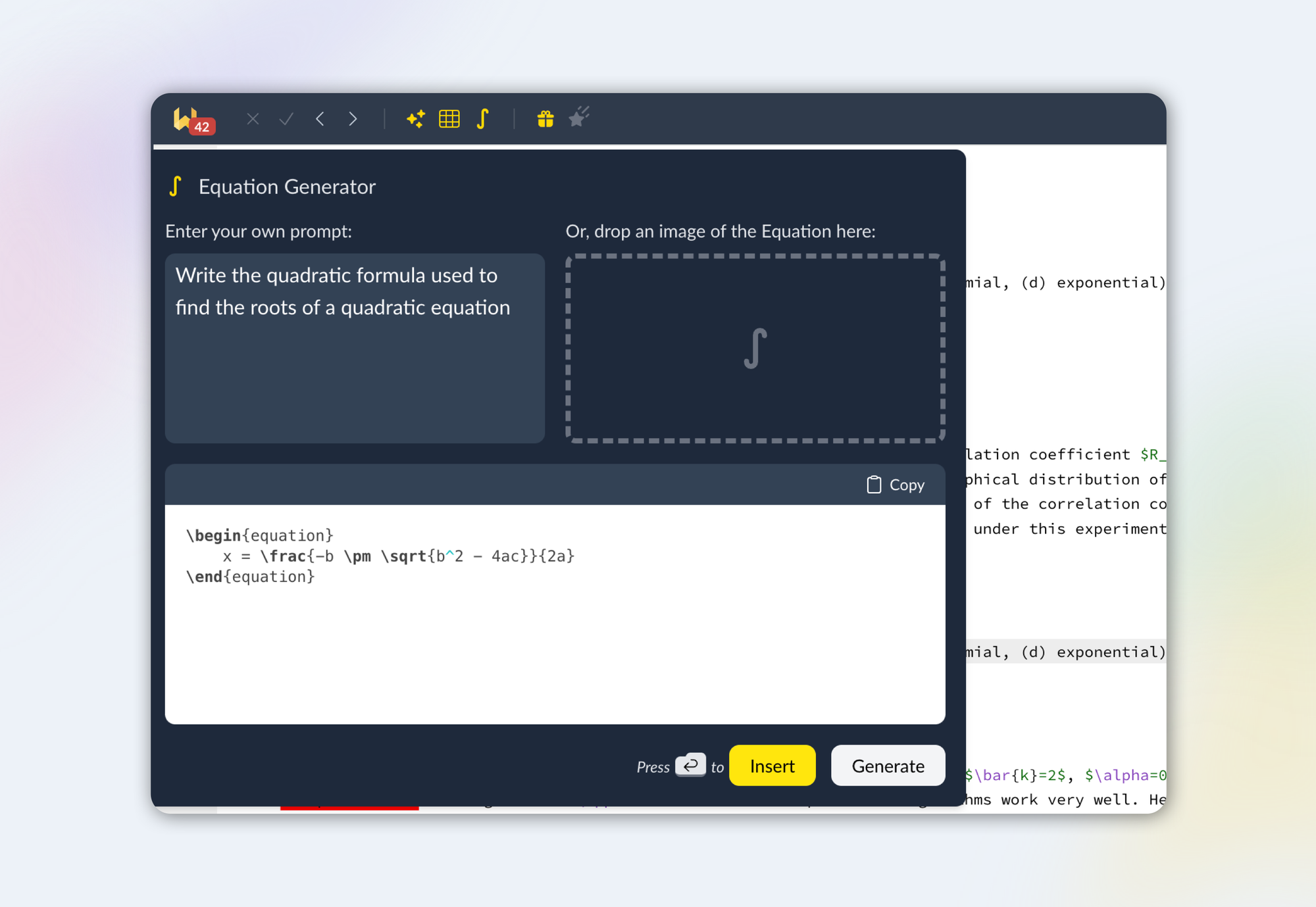
Like the Table Generator, Writefull's Equation Generator lets you enter your own prompt, or drag and drop an image. You instantly get the LaTeX code needed for your equation, which you can insert right into your source code.
How to access
You can find these new features in the Writefull toolbar. Like more of Writefull’s AI features, the Table and Equation Generator are Premium. Upgrading to Premium gives you full access to TeXGPT for more LaTeX and writing help, as well as to Writefull’s Context Options, like Paraphrase, Change Style, Explain, and Summarize. You also get unlimited* language suggestions from Writefull's models, which are tailored to LaTeX and research writing.
What happens to your prompts and images
At Writefull, we don’t store any of your prompts, images, or text, nor do we use any of your data to train our language models. As the Table and Equation Generator features use GPT, your prompts and images will be sent to the OpenAI GPT API. The OpenAI’s API service doesn’t use your data to train its models, unlike some versions of ChatGPT. To learn more, visit OpenAI’s Privacy page (section ‘API Platform FAQ’).
Get involved!
We have more exciting features coming! Keep an eye on the recently added ‘What’s new’ section within the app (the gift icon in the Writefull toolbar) for any updates. Any ideas for new features? We’d love to hear from you! Please drop us a line at [email protected].
*Fair usage policy applies
Hang on–what’s TeXGPT?
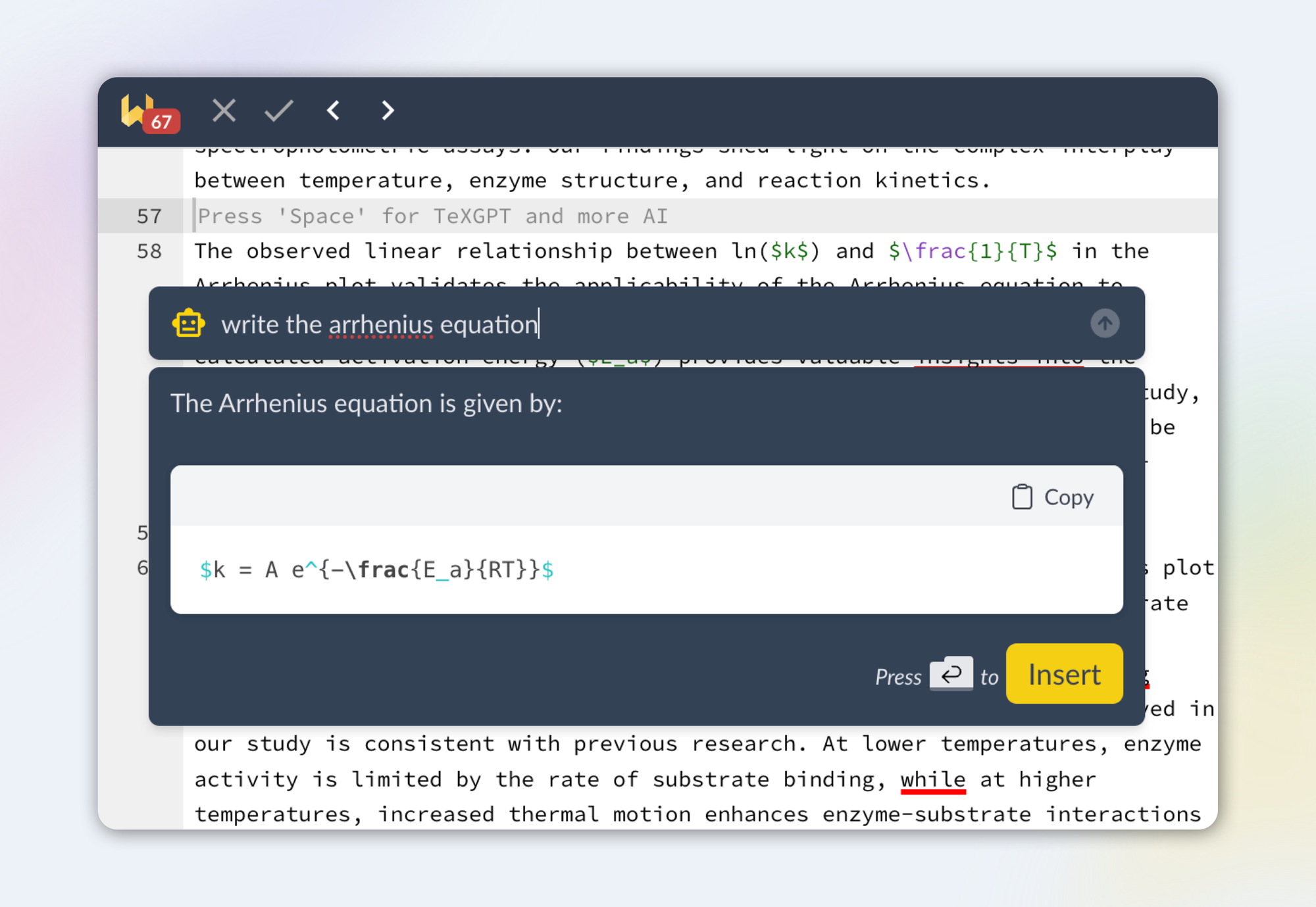
TeXGPT is a popular generative AI feature offered by Writefull and specifically tailored to LaTeX. It helps you generate tables and figures, equations, formatting, and more–and it answers all of your questions around LaTeX and research writing.
You’ll notice that we made TeXGPT more accessible in this new version. You can now activate it by pressing space on a new line, or by clicking the context menu popup that appears when you select some text:
New AI options
The second and most exciting change is the addition of new AI options, which work on the text you select. You can choose to paraphrase, change your style, split or join sentences, or summarize or explain paragraphs. We’ll look at these in turn.

Paraphrase
The previous version also offered this option, but it is now much easier to use, as you can select (part of) a sentence or paragraph and choose ‘paraphrase’ from the context menu directly.
Change style
Feeling that your writing is too informal or lengthy? Use this option to make it more scientific-sounding, concise, or punchy. Like with the paraphraser, you select the part you want rewritten, whether this is a phrase, sentence, or paragraph.
Split / join
This option lets you either split a sentence into two or more sentences, or join two or more sentences. Splitting a long sentence can make it easier to read. Likewise, you can choose to join two or more short sentences to improve your flow.
Summarize
Want to get to the gist of something, to reuse in your abstract or discussion, or to explain to someone? The ‘summarize’ option is perfect for this. Select a piece of your text and choose this option to get a concise summary.
Explain
This option helps you explain part of your text. What’s especially great is that it uses the wider context to do so. If you select one sentence, it will use the paragraph as context to explain the selected sentence. The Explain option can help you to dive deeper into statements you make, or to respond to questions of reviewers or other peers.
Navigating the menu
The menu always opens with the TeXGPT question bar active, so you can start entering your question or LaTeX query straight away. To use one of the other options instead, use the keyboard or mouse.
When you’re happy with the response (whether this is an answer, paraphrase, rewrite, or something else), press Enter or click the button to add it to your text.
Accessing these new AI features
Like TeXGPT, the new AI context menu options are Premium features. However, even if you don’t have a subscription, you get to use all Premium features offered in the context menu for a small number of times a day, so you can try them out.
We’d love to hear from you!
We’d love to hear what you think of this revamped version of Writefull for Overleaf! Please write to us at [email protected] with any questions, issues, or suggestions.
]]>Writefull Revise is a web service that automatically copy edits texts using Writefull’s language models. Publishers can offer this service to authors who are about to submit. After uploading their document, authors can download a revised version with Writefull’s edits in Track Changes.
While Writefull’s generic language models are trained on published papers, giving language edits appropriate for research writing, ACS’s instance of Writefull Revise runs models that have been trained specifically on ACS’s content. This means that the edits given by Writefull Revise align very closely with ACS Publications’s writing standards.
ACS is piloting this service to evaluate its effectiveness in helping their authors, with the aim to reduce linguistic barriers:
“ACS is committed to cultivating global equity in scientific communication, and we expect that offering this scientifically trained language tool for free to authors will reduce language barriers to publication, helping authors everywhere tell their stories with confidence and clarity.” (source: ACS Axial)
The pilot currently covers ten of ACS’s journals (find the list here). Data gathered during the pilot will be used to decide whether the service is expanded to more.

Learn more
Would you like to learn more about Writefull Revise or any of Writefull’s other services for publishers? We would love to tell you more, and discuss how Writefull could help your publishing processes. Please get in touch with us at [email protected] or visit our website for more information.
]]>The society’s Production Operations team is responsible for tasks like technical editing and proof review. As the organization grew, it needed more capacity, and they now leverage a global supply chain – including Writefull.
The team is also involved in developing and implementing new technologies, with a particular focus on how to make the best use of Artificial Intelligence. They looked into the concept of language modification done programmatically but were “really striking out with commercially available broad-sweeping tools. They did not perform well on our content.” What they needed was something that could suggest improvements to academic language usage, such as sentence structures in scientific writing or discipline-specific vocabulary.
Supporting the entire publishing workflow
Then the organization was introduced to Writefull. They were immediately intrigued by the specificity it offers, as Writefull’s models can be tailored to a particular niche of scientific content. After a competitive RFP process, they decided to work with Writefull, and together they began developing some of the services they have since operationalized.
Writefull’s full publisher solution offering supports each stage of the publishing pipeline, from submission to copy editing to quality assurance:
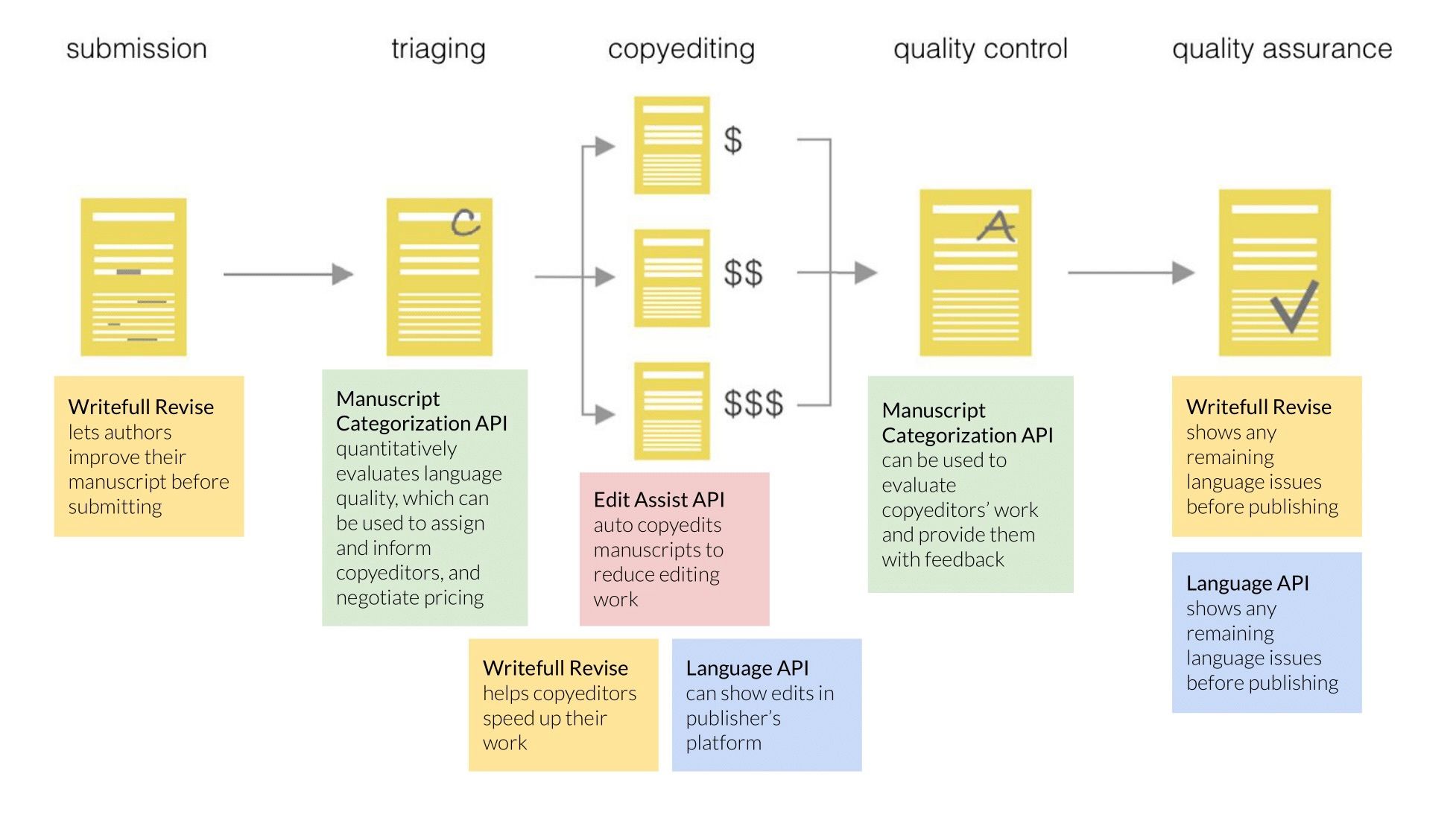
Over the years, the society has incorporated four unique tools from Writefull. A member of the Production Operations team explains: “We have a very rigorous method for evaluating the quality of each step of the production process. For example, one of the things we need to do when we evaluate quality involves scoring the language after copyediting. Traditionally, it would take a long time for one of our team members to complete a review like this, limiting the amount of content that could undergo quality review. But when we tailored Writefull’s Manuscript Categorization API to our requirements and benchmarked it against our own quality analysts, it reached over 95% alignment in categorising texts.” With such a high level of alignment, the automation of this task can significantly reduce the time spent on manuscript evaluation and allow more content to be reviewed for quality purposes.
The organization’s quality evaluation program also includes assessment of metrics such as whether author names and affiliations are present and correct. They use Writefull’s Metadata API to facilitate and partly automate this task, by extracting manuscript elements for post-editing quality assessment. This reduces the number of items in their quality evaluation that need manual review and the time spent reviewing them.
Another API they have adopted is Language Edit Assist (LEA), which auto-applies a highly customized subset of Writefull’s language edits to manuscripts prior to copyediting. The manuscript is then at a better starting point when it reaches the copyeditor, increasing efficiency in the editing process.
A transformative step
Writefull’s services have delivered multiple benefits to the society - including demonstrable time and cost savings.
A prime example comes from its recent analysis of LEA results. 715 papers were randomly split into two workflows, with manuscripts of similar language quality levels present in each workflow. Prior to technical editing, one group had automatic edits applied by Writefull’s LEA service and the other group did not. Without LEA applied, 58% of the papers were classified as well-written (the highest quality level). But with LEA applied, 81% of the papers were classified as well-written – enabling the organization’s copyeditors to focus their time on high-value-added edits, instead of on basic grammatical fixes, such as articles, punctuation, and conjunctions.

Additionally, editors at the society evaluated 35,000 individual edits made by LEA. After refinement using internal data, edits applied without error were 99.04%, and edits introducing errors were 0.96% - showing a high level of accuracy.
“It has been transformative,” says a member of the Production Operations team. “The data we’ve obtained has really been useful because it’s highly customized to our work. Having quality information at the right time is so important, and there’s a limit to what human manual efforts can do and when they can do it. Being able to do it programmatically with a high degree of accuracy gives you a wealth of data – and that means you get new insights into how you’re operating the business and the strategic directions you should consider.”
From strength to strength
There has been a high degree of adoption, and the society and Writefull are working together to refine the processes further.
They are now looking ahead at what this adoption and their new knowledge means for operational performance: “Is there some opportunity there for improving throughput or quality? What are the key metrics that this is going to impact? The next part is to manage that forward. We’re seeing the refinements boost the tools’ overall performance and increase staff buy-in further.”
Part of the project’s success is attributed to how well the organization and Writefull work together. Juan Castro, CEO and Co-founder of Writefull, reflects: "Many of the services we offer to publishers today are the fruits of our collaboration with this society. It is together that we have identified challenges, thought of solutions, and developed and vetted new technologies. I personally think LEA is the most exciting of all—it is such a powerful solution, which offers direct assistance. We look forward to many more future projects together."
The society has found Juan and the wider Writefull team to be “very creative and collaborative, and they’ve really been engaged in coming up with innovative ways to overcome the challenges involved and achieve our goals. They’re a fantastic group to work with.”
If you’d like to explore how Writefull’s services could support your organization, request a demo.
This article first appeared on the Digital Science blog.
]]>
The integration is currently being rolled out to all Overleaf users. Once it is available to you, you will see the activation toggle in your Overleaf account settings page:

Once you have activated Writefull, it will appear in your toolbar. The menu links to a Guide to help you get started.

To start using Writefull, you will need to create a Writefull account. Creating an account and using Writefull is free. You can choose to upgrade if you would like a higher daily quota or access to TexGPT.
If you already have Writefull for Overleaf installed, there is no need to do anything. You can keep using Writefull as usual, and if you have a Premium subscription or group license, this will keep running. The features and usability of the downloaded extension and the integrated version are exactly the same.
Learn more about this integration on Overleaf's blog, and contact us at [email protected] with any questions!
]]>Writefull and Digital Science’s history
The very first version of Writefull was launched about 10 years ago. Since then, we’ve always been an independent startup with a small (but dedicated and highly specialised) team–but we’ve grown with the support of Digital Science.
In 2016, we won Digital Science’s Catalyst Grant, which allowed us to continue pushing our products and reach. Two years later, we raised an investment from Digital Science, which then became part-owner of the company. It was also around this time that we launched Writefull for Overleaf, an extension for the LaTeX editor of our sister company Overleaf.
Over the last years, we’ve become the front-runner in the area of AI language services for research. While Writefull is renowned for its high-quality language check, we offer a wider range of AI-driven services to institutions, publishers, and other enterprises to facilitate and automate tasks. Most of these are language-related, like copy editing and language quality evaluation, but some apply AI to other tasks, like the validation of manuscript metadata. All of these services closely align with Digital Science’s vision of a trusted, frictionless, and collaborative research ecosystem.
What this acquisition might mean for you
Whether you’re a student, librarian, publisher, copyeditor, or other type of Writefull customer, nothing will change for you. Writefull will keep providing the services you know, as you know them. People on the team aren’t going anywhere, our servers are staying where they are and, of course, we will continue treating your data as we do now: securely, confidentially, and without storing your texts or language suggestions.
With Writefull being part of Digital Science, we have an exciting future ahead of us, one that will surely witness integrations with some of the other portfolio solutions.
Steve Scott, Director of Portfolio Development at Digital Science:
“At Digital Science, we’ve been impressed with Writefull’s AI language capabilities since day one. We believe their technology is currently state-of-the-art in language quality evaluation, cost and scalability, as evidenced by multiple customers. While the broader focus is currently on LLMs, Writefull’s small, specialised models offer more flexibility, at lower cost, with auditable metrics.
“Writefull will be an ideal addition to what we call our Collaboration Hub within Digital Science – collaborative solutions that are tailored to the customer experience. This means we’ll further develop Writefull’s ability to provide outstanding language services to customers, while integrating it seamlessly with some of our other solutions, including Dimensions and Dimensions Research Integrity. The overall impact will be to provide a transformative service to academics and researchers, institutions and publishers worldwide.”
Juan Castro, CEO and co-founder at Writefull:
“What began as an idea to help improve academic writing for researchers from non-English-speaking backgrounds has now become a comprehensive service used by academics, researchers and publishers all around the world – not just for copy editing but also to help publishers with manuscript categorization, structural checks and metadata extraction.
“We couldn’t be happier with Writefull’s journey. We are proud of the breakthroughs we’ve made over recent years in the use of AI language models to support our customers, and now we’re excited about what is to come next under the full ownership of Digital Science.”
Contact us
Do you have any questions, or do you just want to congratulate the Writefull team? We’d love to hear from you! Please write to us at [email protected].
]]>