node_modules folders eating up your disk space. Let's look at how to clean them up easily with a tool called npkill.Why node_modules Are a Pain
If you build websites or
]]>node_modules folders eating up your disk space. Let's look at how to clean them up easily with a tool called npkill.Why node_modules Are a Pain
If you build websites or apps with JavaScript, you know the drill:
- Every project gets its own huge
node_modulesfolder - These folders are chunky - often 200MB to 500MB each
- Old projects you forgot about still hog your disk space
- Finding and deleting them by hand is boring and takes forever
What's npkill?
npkill is a simple tool that finds and helps you delete node_modules folders with just a few keystrokes.
How to Use npkill
Step 1: Run the Tool
The easiest way is to use npx, which lets you run it without installing anything:
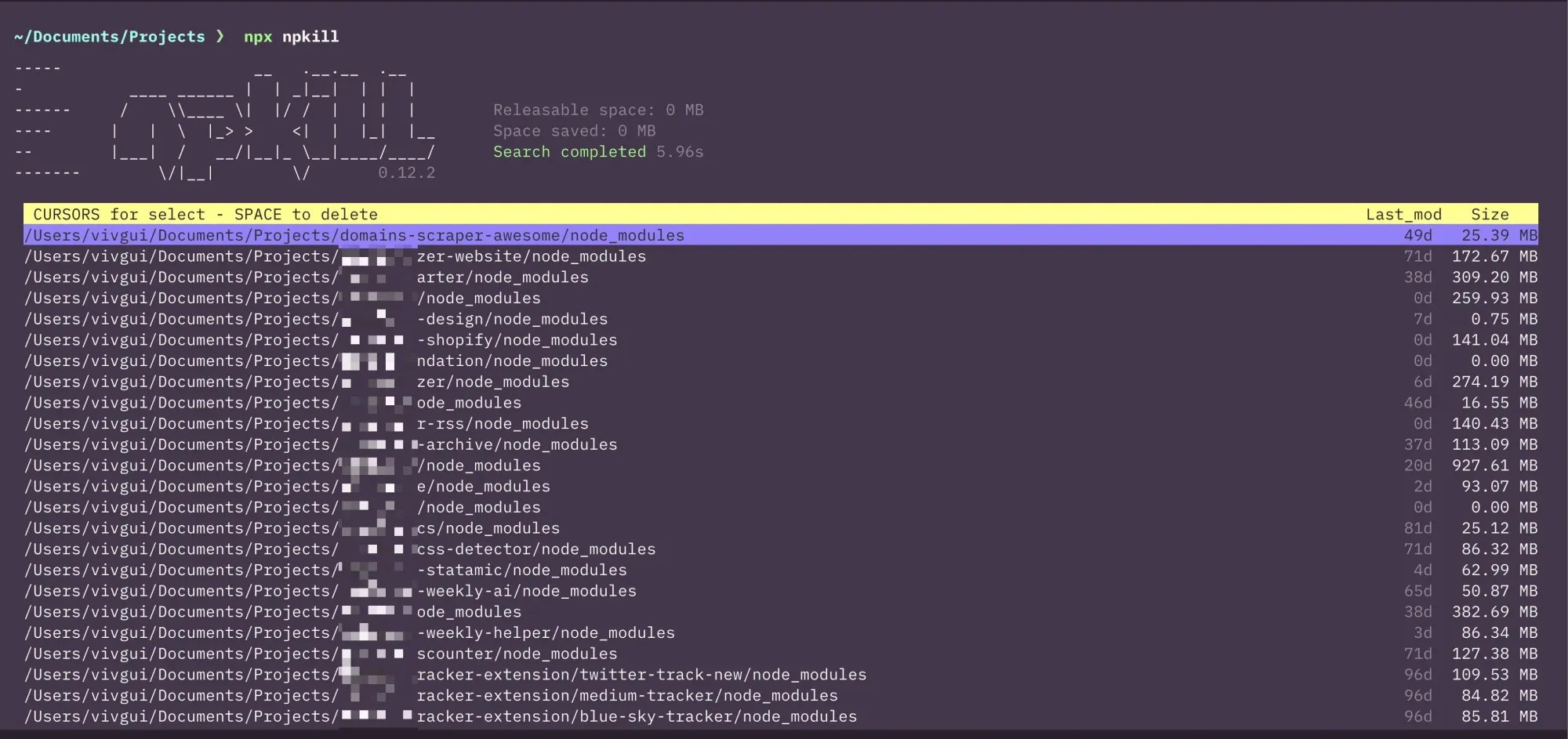
npx npkillThis starts looking from where you are. To scan a specific folder:
npx npkill -d ~/projectsStep 2: Check Out What It Finds
npkill shows you a list with:
- All the
node_modulesfolders it found - How much space each one takes up
- When you last used them
- Easy controls to delete them
Step 3: Delete What You Don't Need
It's super easy to clean up:
- Use up/down arrows to move through the list
- Hit
SPACEto mark a folder you want to delete - Press
dto delete the folder right away - Press
qto quit when you're done
Cool Tricks
npkill can do more than just find node_modules:
See biggest folders first
npx npkill --sort-by sizeSkip folders you want to keep
npx npkill -e vendor,backupDelete other folders too: Like dist or build folders
npx npkill -f dist,buildTips for Better Cleanup
- Look at the dates - If you haven't touched a project in months, it's safe to delete
- Don't worry about mistakes - You can always run
npm installlater if you need those files again - Do this every few months - Make it a habit when your disk gets full
For projects you're still using, try:
npm pruneThis cleans up unused stuff without deleting everything
That's it!
With npkill, you can free up tons of space in just a few minutes. It's amazing how much disk space you can get back by cleaning up these folders!
Next time your computer slows down or you get a "disk full" message, give npkill a try - your computer will thank you!
My first choice was scp and I ended up with something like this:
scp -r [email protected]:/home/ploi/[website_folder]/users/ ~/Documents/Projects/My first choice was scp and I ended up with something like this:
scp -r [email protected]:/home/ploi/[website_folder]/users/ ~/Documents/Projects/[local_project_folder]/But on one of the sites, I have A LOT of files and scp is single-threaded and took forever.
So, I decided to look into rsync and came up with this
rsync -avz -e ssh [email protected]:/home/ploi/[website_folder]/content/ ~/Documents/Projects/[local_project_folder]/content/Here's an overview of the command above:
-a: Archive mode. It preserves symbolic links, permissions, timestamps, and more.-v: Verbose mode. It shows you detailed output during the transfer.-z: Enables compression during the transfer.-e ssh: Specifies that SSH should be used for the data transfer.
In the end, using rsync made the files sync 5x faster!
Velja – A simple tool to open links in specific browsers or apps
]]>Velja – A simple tool to open links in specific browsers or apps based on customizable rules. Supports removing tracking parameters, handling short URLs, and integrating with various workflows. Trusted by over 130K users for efficient link management.
Feedbin – A customizable RSS reader to organize and enjoy feeds, podcasts, YouTube channels, and newsletters all in one place. Clean themes, full-text extracts, and powerful search ensure a seamless reading experience. Sync across apps. Free 30-day trial, then $5/month!
Dynalist – A powerful outlining app for capturing, organizing, and realizing your ideas. Loved by professionals and teams for its thoughtful design, robust features, and fluid keyboard shortcuts. Ideal for staying focused and productive. Free to start—get organized today!
Pinata – Simplify decentralized file storage with easy IPFS integration. Effortlessly upload, manage, and access files in minutes using SDKs, custom gateways, private IPFS, and analytics. Perfect for secure app development, trusted by 600,000+ developers. Start free today!
]]>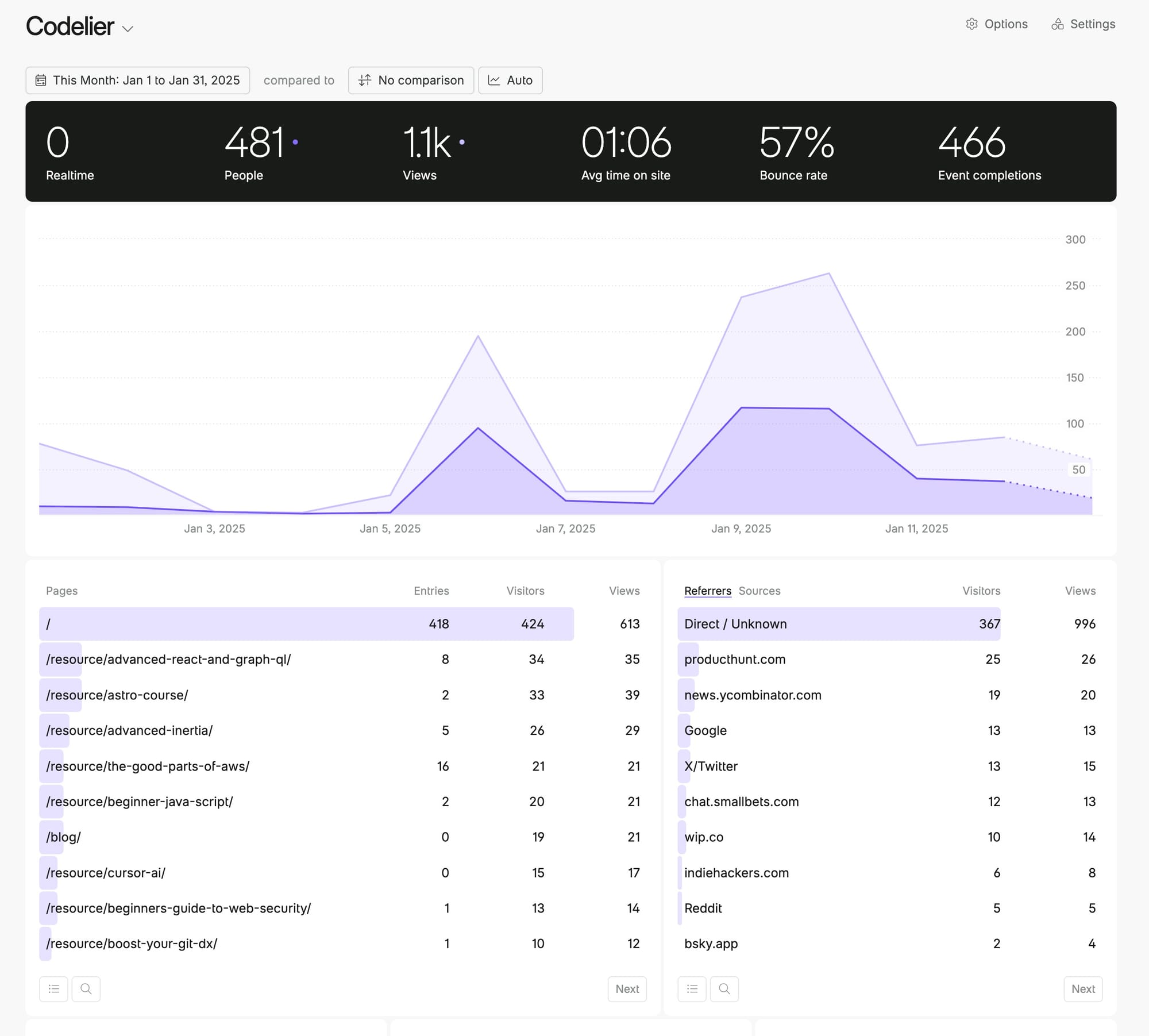
Almost 500 visitors so far since launch, surreal!
Since launch I added:
- Individual technology pages
- Search
- 404 and privacy policy pages
- A price range indicator to the resource card component
- A blog and published my first blog post
- UTM params so authors know when I'm sending them traffic
Almost 500 visitors so far since launch, surreal!
Since launch I added:
- Individual technology pages
- Search
- 404 and privacy policy pages
- A price range indicator to the resource card component
- A blog and published my first blog post
- UTM params so authors know when I'm sending them traffic
It's a directory of high-quality books and video courses for developers, all from indie authors. The kind that go beyond the typical "Learn X in 2 hours" tutorials.
What's in it:
• 45+ carefully curated resources
It's a directory of high-quality books and video courses for developers, all from indie authors. The kind that go beyond the typical "Learn X in 2 hours" tutorials.
What's in it:
• 45+ carefully curated resources (more coming soon!)
• Focus on intermediate/advanced level content
• Hand-picked from various tech stacks
One thing that was worrying me was the backups. We were just doing it on
]]>One thing that was worrying me was the backups. We were just doing it on the same server, but that's NOT good security. So, I looked into moving them somewhere else and saw that Pocketbase offers this feature.
You can store your backups in any S3-compatible storage. Since we were using Cloudflare for other stuff, we decided to try to make it work with R2.
After some trial and error, we figured out how to fill out the fields, here's how it works:
- Bucket: name of the bucket in R2, in my case, it was
backups - Region: set it to
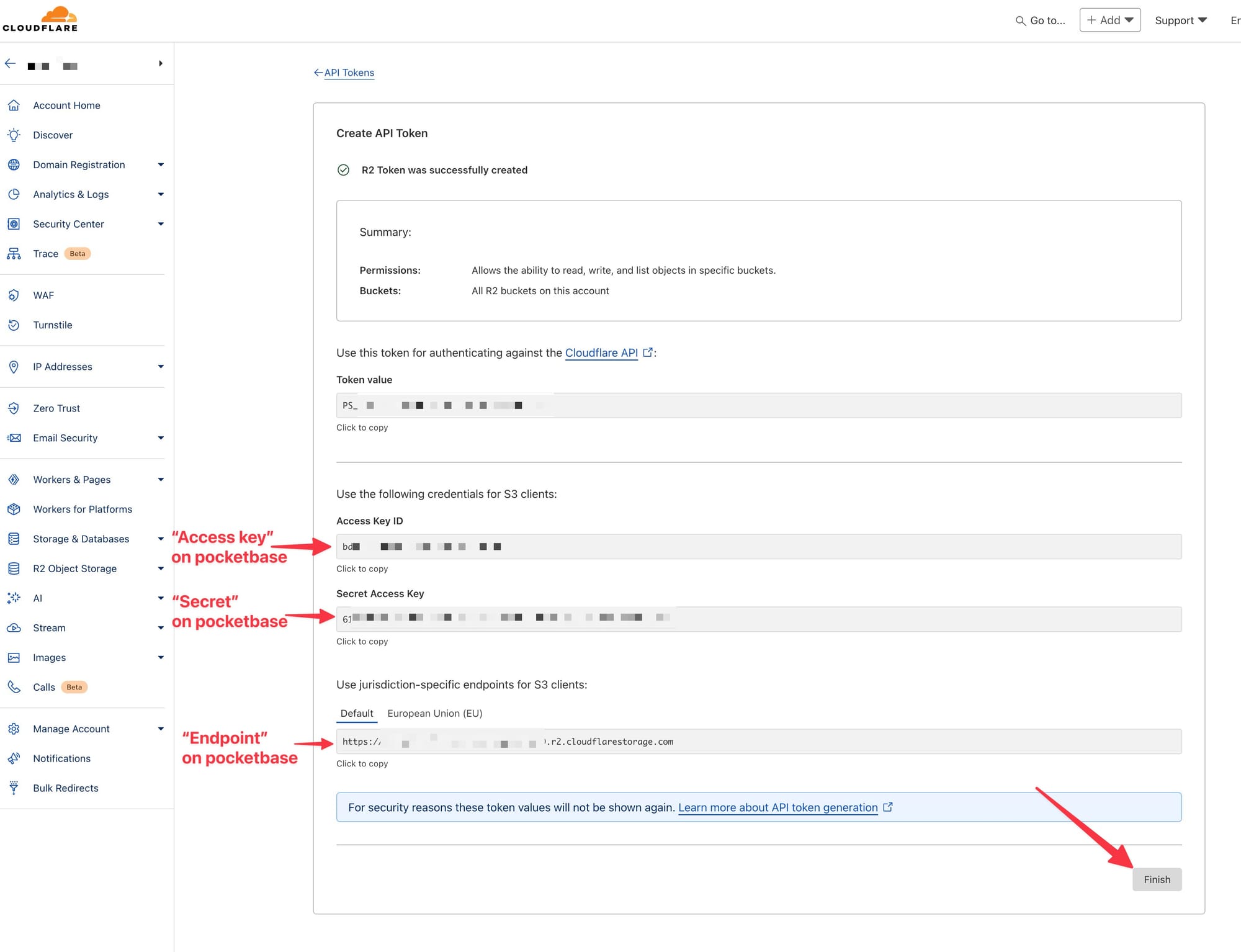
auto - Endpoint: Cloudflare gives you this; it's usually in this format
https://[CLOUDFLARE_ID].r2.cloudflarestorage.com - Access key: Cloudflare gives you this once you create your R2 token
- Secret: Cloudflare gives you this once you create your R2 token
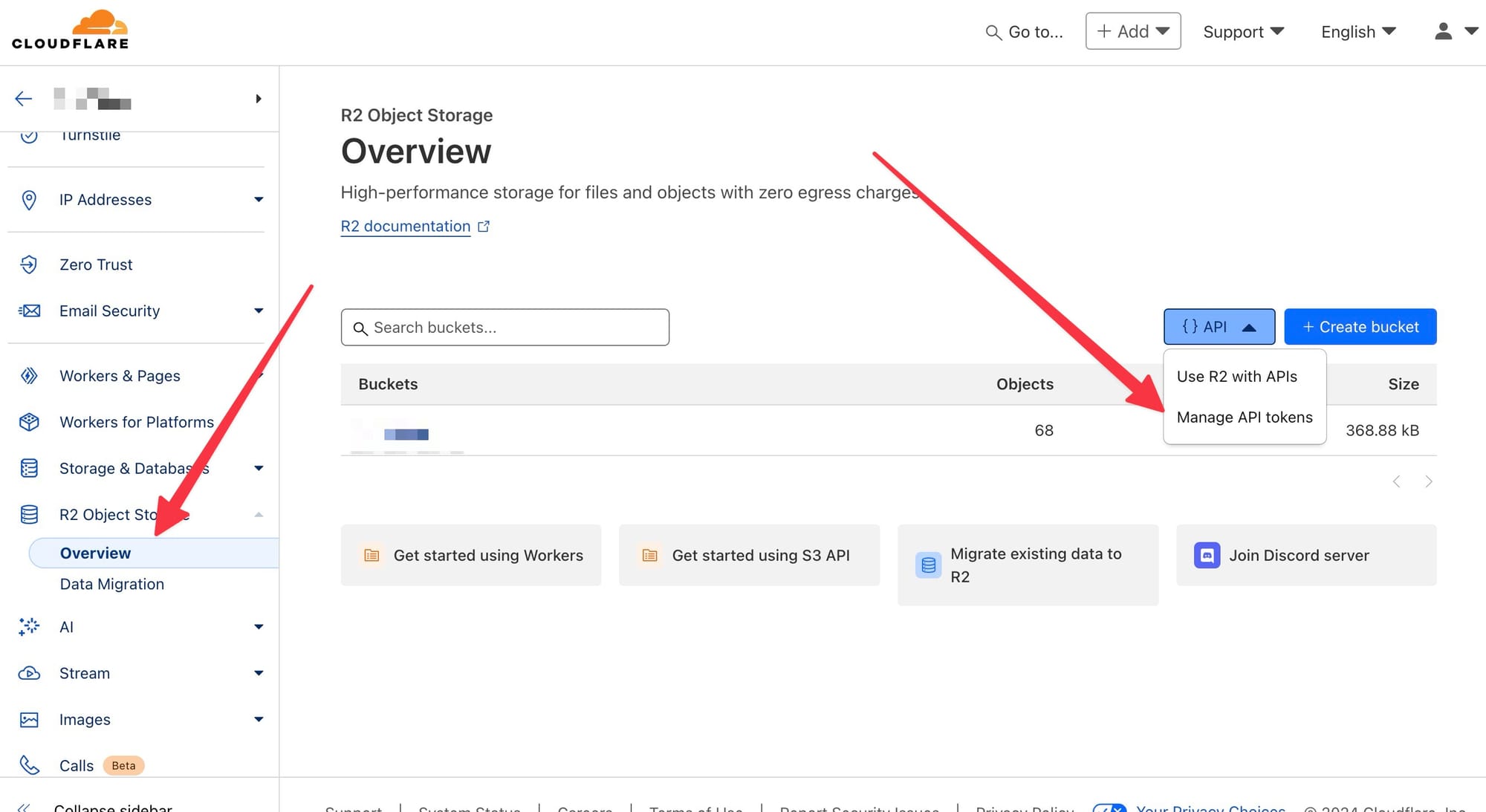
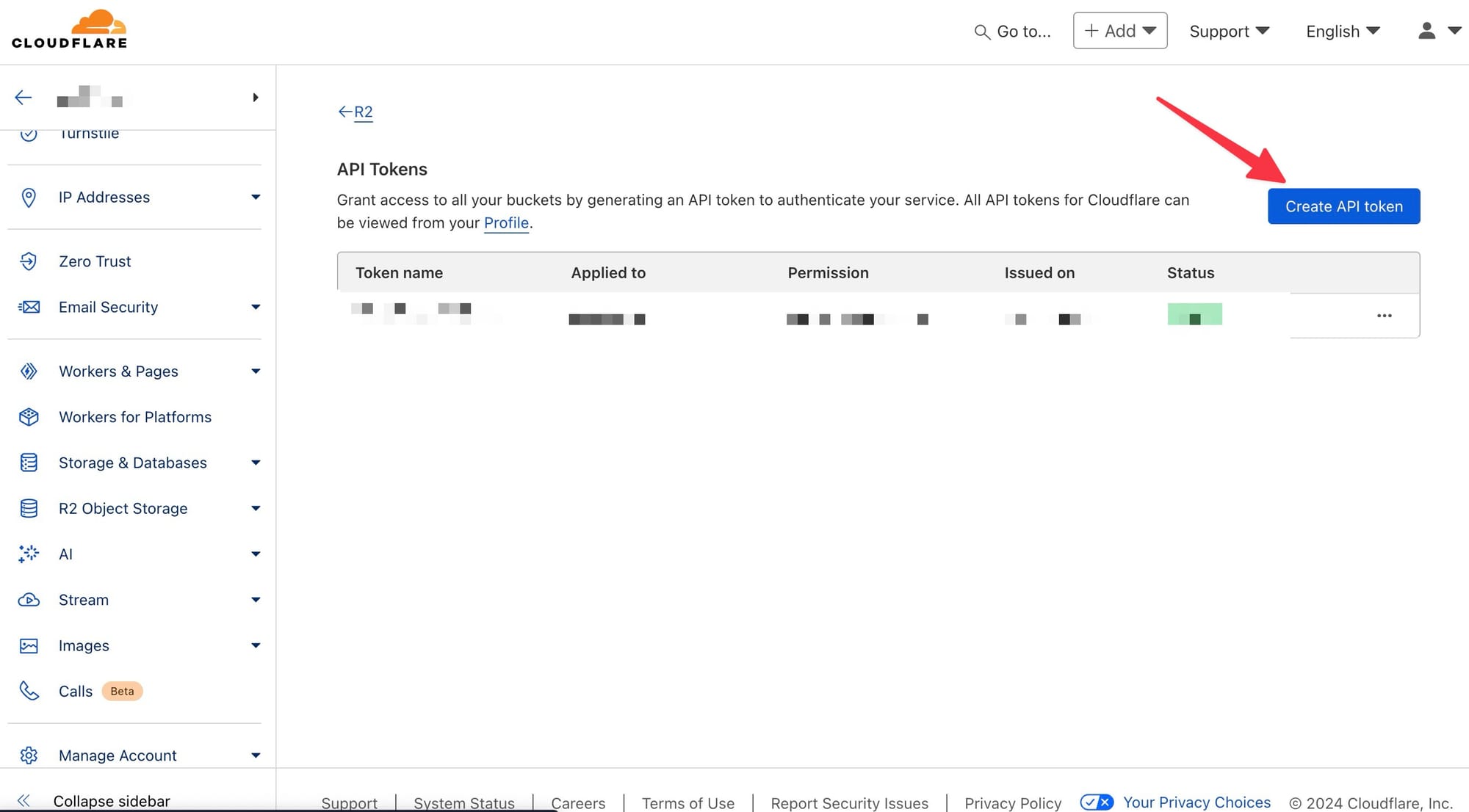
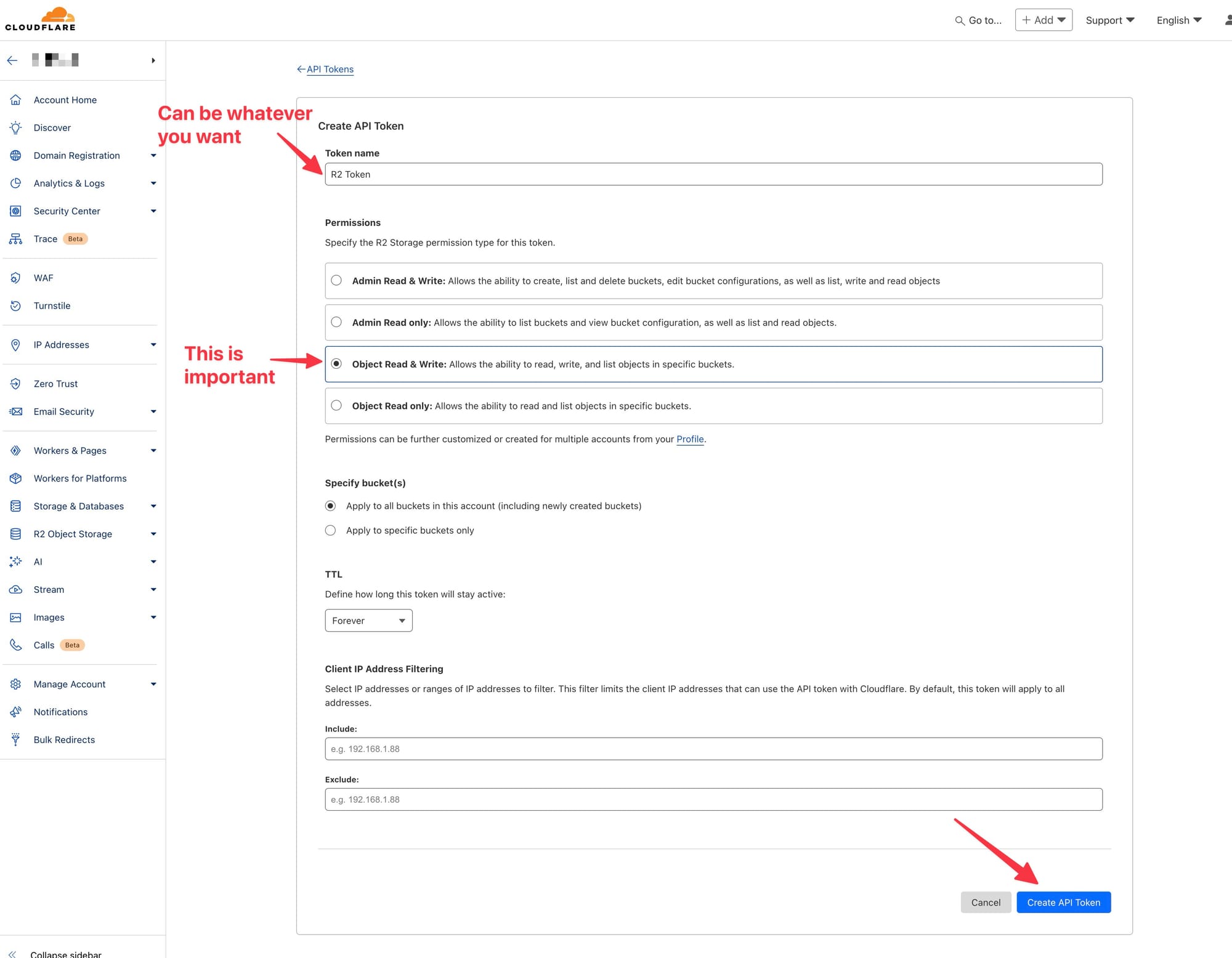
For the Endpoint, Access key, and Secret, you need to create an R2 API token in Cloudflare, here's how to do it in late 2024
That's it. Now, all our backups are done daily and sent to our bucket in R2.
]]>alias npmup="npx npm-check-updates -u && npm i"But now that I'm slowly switching to pnpm I wanted an equivalent, and
alias npmup="npx npm-check-updates -u && npm i"But now that I'm slowly switching to pnpm I wanted an equivalent, and luckily pnpm has this functionality out of the box with the up command.
Here's how I have it now:
alias npmup="pnpm up --latest && pnpm install"TRMNL – An e-ink dashboard designed to keep you focused.
]]>TRMNL – An e-ink dashboard designed to keep you focused. Display important info like calendars, tasks, and more with zero distractions. Custom layouts, privacy-first architecture, 3-month battery, and open-source plugins make it a powerful, minimalist tool for work and life.
Mythic – An open-source macOS game launcher for playing Windows® games using Apple’s Game Porting Toolkit. Manage your library, import titles, and customize with ease. Supports multiple environments, privacy-first, and built for gamers by the community. Alpha available now!
Tuta – Turn ON privacy with free, encrypted email, calendars, and contacts. End-to-end encryption ensures your data stays yours. Open source, ad-free, and powered by green energy. Intuitive apps for all platforms and custom domain support for professionals. Take back your data today!
Copilot Money – The best money tracker app, now on Mac, iPhone, and iPad. Track spending, budgets, investments, and net worth with a beautifully designed and secure app. Features include smart categorization, net-worth tracking, bill monitoring, and investment insights. Manage your finances effortlessly!
]]>Lunch Money – Delightfully simple personal finance and budgeting tool for modern spenders. Import transactions, track
]]>Lunch Money – Delightfully simple personal finance and budgeting tool for modern spenders. Import transactions, track budgets, manage recurring expenses, and analyze your net worth.
Counter – Open-source, privacy-friendly web analytics. No cookies, no logging, no IP tracking—just simple insights like unique visitors and referrals. Built to keep things focused and minimal, with zero enforced payments. Pay when you’re ready.
Glass – A global, ad-free photography community built for sharing and exploring high-quality images. With no algorithms or public metrics, Glass focuses on meaningful discussions, curated categories, and a chronological feed to inspire and connect photographers worldwide.
bolt.new – AI-powered dev sandbox by StackBlitz for building full-stack web apps. Scaffold, run, and deploy projects easily—start with frameworks like Astro, NativeScript, or Vitepress, or create from scratch. Perfect for experimenting, prototyping, and launching ideas quickly.
]]>I mainly run Vite, Queues, Logs, and a Stripe CLI listener. But after I got everything set up, I got annoyed by a tiny detail: only the Vite tab had color highlighting. Bummer!
After googling around, I found that, for the Queues and Logs artisan commands, I could pass the --ansi flag to output colors in a format Solo can understand.
And for the Stripe CLI command (which I'm running through NPM) you can set a --color=on flag.
Here's how my setup looked:
// SoloServiceProvider.php
<?php

namespace App\Providers;

use AaronFrancis\Solo\Commands\EnhancedTailCommand;
use AaronFrancis\Solo\Facades\Solo;
use Illuminate\Support\ServiceProvider;

class SoloServiceProvider extends ServiceProvider
{
    public function register()
    {
        if (class_exists('\AaronFrancis\Solo\Manager')) {
            $this->configure();
        }
    }

    public function configure()
    {
        Solo::useTheme('dark')
            ->addCommands([
                'Vite' => 'npm run dev',
                'Stripe' => 'npm run stripe -- --color=on',
                'Queue' => 'php artisan queue:work --ansi',
                'Logs' => 'php artisan pail --ansi',
            ])
            ->addLazyCommands([])
            ->allowCommandsAddedFrom([]);
    }

    public function boot()
    {

    }
}
#!/bin/bash

# Default values
PANTHEON_SITE=""
LOCAL_PROJECT_FOLDER=""
ENVIRONMENT="live" # Default environment

# Parse command line options
while [ "$#" -gt 0 ]; do
  case "$1" in
    --pantheon-site=*)
      PANTHEON_SITE="${1#*=}"
      ;;
    --local-project-folder=*)
      LOCAL_PROJECT_FOLDER="${1#*=}"
      ;;
    --env=*)
      ENVIRONMENT="${1#*=}"
      ;;
    *)
      echo "Unknown option: $1"
      exit 1
      ;;
  esac
  shift
done

# Check if required options are set
if [ -z "$PANTHEON_SITE" ] || [ -z "$LOCAL_PROJECT_FOLDER" ]; then
  echo "Usage: $0 --pantheon-site=<PANTHEON_SITE> --local-project-folder=<LOCAL_PROJECT_FOLDER> [--env=<ENVIRONMENT>]"
  exit 1
fi

# Create a backup of the files
echo "Creating a backup of the $ENVIRONMENT files..."
terminus backup:create --element=files $PANTHEON_SITE.$ENVIRONMENT

echo "Downloading $ENVIRONMENT files from Pantheon..."
# Download the files from the specified environment
FILES_ZIP_FILE="$HOME/pantheon-local-copies/files/$PANTHEON_SITE-files.tgz"
terminus backup:get --element=files --to=$FILES_ZIP_FILE $PANTHEON_SITE.$ENVIRONMENT

# Check if the files archive exists before extracting
if [ -f "$FILES_ZIP_FILE" ]; then
  echo "Extracting files to the local project folder..."
  gunzip -c $FILES_ZIP_FILE | tar -xv --strip-components=1 -C "$HOME/Documents/Projects/$LOCAL_PROJECT_FOLDER/web/app/uploads"
else
  echo "Error: Files archive not found at $FILES_ZIP_FILE"
  exit 1
fi

echo "Cleaning up..."
# Remove the dump file after import
rm $FILES_ZIP_FILE

echo "Files synchronization complete."
Then I add a command alias to my zsh settings
alias syncpfiles="~/scripts/sync-db.sh"And I run the command as the following
syncpfiles --pantheon-site=testname --local-project-folder=testname --env=liveEach Pantheon site has 3 environments: Dev, Test and Live.
When we deploy it goes to Dev and then we manually deploy to Test and then to Live.
We switch between projects a lot so sometimes I haven't touched a particular project in a while and my local environment does not reflect what is currently on Pantheon.
At the beginning I used to do the sync process manually by creating a DB backup and importing it locally via Tableplus but it was a tedious process.
So I decided to automate it by writing a script and I want to share it here:
#!/bin/bash

# Default values
PANTHEON_SITE=""
LOCAL_DB_NAME=""
ENVIRONMENT="live" # Default environment
DB_DUMP_FILE="$HOME/pantheon-local-copies/db/$PANTHEON_SITE-db.tgz" # Default dump file path


# Parse command line options
while [ "$#" -gt 0 ]; do
  case "$1" in
    --pantheon-site=*)
      PANTHEON_SITE="${1#*=}"
      ;;
    --local-db=*)
      LOCAL_DB_NAME="${1#*=}"
      ;;
    --env=*)
      ENVIRONMENT="${1#*=}"
      ;;
    *)
      echo "Unknown option: $1"
      exit 1
      ;;
  esac
  shift
done

# Check if required options are set
if [ -z "$PANTHEON_SITE" ] || [ -z "$LOCAL_DB_NAME" ]; then
  echo "Usage: $0 --pantheon-site=<PANTHEON_SITE> --local-db=<LOCAL_DB_NAME> [--env=<ENVIRONMENT>]"
  exit 1
fi

# Ensure PANTHEON_SITE is not empty
if [ -z "$PANTHEON_SITE" ]; then
  echo "Error: PANTHEON_SITE is not set. Please provide a valid site name."
  exit 1
fi

# Create a backup of the database
echo "Creating a backup of the $ENVIRONMENT database..."
terminus backup:create --element=db $PANTHEON_SITE.$ENVIRONMENT

echo "Downloading $ENVIRONMENT database from Pantheon..."
# Download the database from the specified environment
DB_DUMP_FILE="$HOME/pantheon-local-copies/db/$PANTHEON_SITE-db.tgz"
terminus backup:get --element=db --to=$DB_DUMP_FILE $PANTHEON_SITE.$ENVIRONMENT

MYSQL_USER="root"
MYSQL_PASSWORD="" # Assuming no password
DB_DUMP_FILE="$HOME/pantheon-local-copies/db/$PANTHEON_SITE-db.tgz"

# Check if the dump file exists before decompressing
if [ -f "$DB_DUMP_FILE" ]; then
  echo "Decompressing database dump..."
  gunzip -c $DB_DUMP_FILE > "${DB_DUMP_FILE%.tgz}.sql"
else
  echo "Error: Database dump file not found at $DB_DUMP_FILE"
  exit 1
fi

DB_SQL_FILE="${DB_DUMP_FILE%.tgz}.sql"

echo "Importing database into local MySQL..."
# Use mysql command to import the database
mysql -h 127.0.0.1 -P 3306 -u $MYSQL_USER $LOCAL_DB_NAME < $DB_SQL_FILE

echo "Cleaning up..."
# Remove the dump file after import
rm $DB_DUMP_FILE
rm $DB_SQL_FILE

echo "Database synchronization complete."
Then I add a command alias to my zsh settings
alias syncpdb="~/scripts/sync-db.sh"And I run the command as the following
syncpdb --pantheon-site=testname --local-db=testname --env=devSensei – Revitalize your Mac with Sensei, the ultimate cleaner for macOS.
]]>Sensei – Revitalize your Mac with Sensei, the ultimate cleaner for macOS. Boost performance with advanced cleaning, monitoring, and customization features. Free up space, track real-time stats, and optimize effortlessly.
BetterTerminal – Transform your MacOS terminal into a productivity powerhouse with BetterTerminal. Customize command shortcuts, prompts, and themes.
Typebot – Revolutionize form interactions with Typebot, the open-source app builder for dynamic chat experiences. Craft intuitive chatbots using drag-and-drop tools and integrate with ease.
Overkill – Dive deep into the world of handheld gaming with Overkill, your go-to source for reviews, guides, and news on devices like the Steam Deck and Nintendo Switch. Get insights, expert opinions, and exclusive content.
]]>Timebox.so – Boost productivity and reduce stress with this deep work planner inspired by Cal Newport. Organize your
]]>Timebox.so – Boost productivity and reduce stress with this deep work planner inspired by Cal Newport. Organize your day into focused hourly blocks, eliminating distractions and decision fatigue.
Securelog – Keep your code and logs clean by detecting and preventing leaked secrets and API tokens seamlessly across repos, build environments, and CI pipelines.
E2B – Execute AI-generated code securely in open-source cloud sandboxes. Perfect for AI apps, data analysis, and more. With 15K+ devs and 8M+ sandbox launches, optimize your projects with fast, LLM-agnostic runtimes.
Helptail – Enhance customer relationships with a dedicated email support tool designed for small SaaS companies. Streamline your support process without the clutter of unnecessary features.
]]>