The post The Ultimate Guide to the Best .NET Core E-commerce Open Source Platforms appeared first on Coding Infinite.
]]>Not all like to install a WordPress theme & start selling. Some are quite conscious of choosing technologies because there are many factors you need to consider – high-performance, scalability, security, extensibility, pricing, programming language, etc.
Related: Why I’m in Love with .Net Core – Future of .Net Core
A key feature of any E-Commerce is its modular architecture which allows additional features to be added that’s one of the reasons that WordPress & Zero Up Ecommerce became so popular while choosing Platform for an online store. But the Good News is that .Net Core also has some shopping Platforms with pluggable/modular architecture.
Mobile responsiveness is another must-have feature for any online business because 82% of smartphone users buy while surfing the Internet on their smartphone.
Since you’re here, so you’ve decided to develop your e-commerce store using Asp.net Core.
But choosing the best option is not an easy task. If you start developing your E-commerce platform from scratch it could take months, depending upon your development team. So starting from an open source project is one of the best choices.
In this article, I’ll list down some of the best E-commerce platforms developed in Asp.net Core & available at Github. So let’s get started with the Top 3 Open Source E-commerce platform in ASP.NET Core.
1. NopCommerce
NopCommerce is a free and open-source e-commerce platform.
It’s a fully customizable shopping platform developed in Asp.Net Core.
Its architecture is modular & clean which allows developers to easily customize the front-end design and the back-end functionality.
New themes and add-ons can also be developed on top of nopCommerce.

Features
Responsive: nopCommerce has fully Responsive & Mobile ready design.
Multi-store: you can host many frontend stores on different domains and manage all operations from your single backend panel.
Multi-vendor: multiple vendors can add their products & sell.
Product comparison: user can select & compare products features.
Search Engine Optimization: customized URLs, friendly SEO names for products, sitemap, microdata, URL Canonicalization & Google analytics integration.
Reward Points System: points earning system on the money spent at store.
Discounts and coupons: It can either be a fixed value or a percent off, e.g. $20 off or 20% off. we can also define between what dates discount offer is valid.
Payment methods: more than 50 supported payment methods.
Affiliate program: supports affiliate marketing feature.
Tax Feature: Tax calculation system is so configurable.
Platform
.Net Core SDK Version: .Net Core 2.2
Database: SQL Server 2008
2. SimplCommerce
SimplCommerce is Another simple, cross-platform, customized E-commerce system developed on .NET Core.
SimplCommerce is divided into many self-contained modules.

Features
Responsive: fully responsive UI on all size devices.
Product Comparison: user can compare different products.
Coupons & Discounts: you can generate discount coupons for direct & percentage of discounts.
Payment Methods: Stripe, Paypal Express, COD
Tax System: Tax System is available for tax per country, state or zip code.
Platform
.Net Core SDK Version: .Net Core 2.2
Database: Microsoft SQL Server, PostgreSQL, MySQL, SQLite
3. GrandNode
GrandNode – Powered By nopCommerce is another functional cross-platform e-commerce solution developed for the most demanding users. You can run it on any operating system – Linux, Windows.
It’s based on ASP.NET Core 2.2 and MongoDB – non-relational database system.


Features
Responsive: Support devices of all sizes.
Multi-store: can host many web store using a single back-end
Multi-vender: also support Multi-vender functionality like NopCommerce.
Product Comparison: user can compare different products.
Search engine optimization: Sitemap, Friendly URLs, Google Analytics integration & Localizable URLs.
Reward Points System: Reward Points System, Gift Cards, Discounts
Coupons & Discount: can generate coupons for discounts.
Payment Methods: more than 50 payment methods and gateways.
Tax System: flexible tax system.
Platform
.Net Core SDK Version: .Net Core 2.2
Database: MongoDB
Comparison
| Feature | nopCommerce | SimplCommerce | GrandNode |
| Docker | Yes | Yes | Yes |
| Multi-store | Yes | Yes | Yes |
| Multi-vender | Yes | Yes | Yes |
| Product Comparison | Yes | Yes | Yes |
| Payment methods | 50+ | Stripe, Paypal Express, COD | 50+ |
| Reward System | Yes | Yes | Yes |
| Coupons Discount | Yes | Yes | Yes |
| .Net Core Version | 2.2 | 2.2 | 2.2 |
| Database | SQL Server 2008 | SQL Server, PostgreSQL, MySQL, SQLite | MongoDB |
Here are more Articles you might be Interested:
– A Complete Guide to Secure Your Asp.Net Core Web Application & Apis
– Creating Admin Panel in Asp.net Core MVC – Step by Step Tutorial
— Best 20 .Net Core Libraries Every Developer should know
– Best Cross-platform .Net Core Ide for Windows | Macos | Linux
The post The Ultimate Guide to the Best .NET Core E-commerce Open Source Platforms appeared first on Coding Infinite.
]]>The post Stack Overflow Developers Survey 2019 vs 2018 Programming Technologies Comparison appeared first on Coding Infinite.
]]>This year, nearly 90,000 developers took the 20-minute world’s largest developer survey.
I’ve read through the results of the Stack Overflow survey and compiled the most interesting results related to Technologies right here in this article.
So without further ado, here’s a snapshot of what Software Development Technologies has risen in the ranks in 2019 as compared to 2018.
At the top of Key Results, Stack Overflow declared the Python fastest-growing major programming language, has risen in the ranks of programming languages in their survey yet again, edging out Java this year and standing as the second most loved language
Let’s compare the Technologies by categories.
Most Popular Technologies
Programming, Scripting, and Markup Languages
| 2018 | 2019 |
|---|---|
 |  |
From the last 7 years, JavaScript is the most popular & commonly used language but Python is the fastest growing language. There’s no change in C#, Php & C++ position but Go & Kotlin gained popularity.
Frameworks, Libraries, and Tools
| 2018 | 2019 |
|---|---|
 |  |
This year Stack Overflow separated the Web & other general purposes Frameworks. This year JQuery leading the Web Frameworks list. React, Angular & Asp.net are at 2nd, 3rd & 4th positions respectively.
Actually, this is the Good news for .Net & .Net Core Developers.
Databases
| 2018 | 2019 |
|---|---|
 |  |
Not a big change in this list. One thing to note is that there’s a decrease of about 10% in SQL Server usage. It might be because now people are moving toward lightweight solutions.
Platforms
| 2018 | 2019 |
|---|---|
 |  |
Linux & Windows popularity increased as development platforms. Stack Overflow added Docker for the first time in the list & It got the 3rd position.
Most Loved, Dreaded, and Wanted
Most Loved, Dreaded, and Wanted Languages
| 2018 | 2019 |
|---|---|
 |  |
Rust maintained its position with a 5% increase in the most Wanted & Loved Languages List.
Most Loved, Dreaded, and Wanted Other Frameworks, Libraries, and Tools
| 2018 | 2019 |
|---|---|
 |  |
It’s really good to see .Net Core & Flutter at the better positions in the Most Loved, Dreaded & Wanted frameworks List as compared to the previous year. Dotnet Core is one of the most versatile frameworks that’s one of the reason that .Net Core is loved by so many developers.
Development Environments and Tools
Most Popular Development Environments
| 2018 | 2019 |
|---|---|
 |  |
I think It was obvious to increase in the popularity of Visual Studio Code this year. VS Code is one of the top choices of developers.
Developers’ Primary Operating Systems
| 2018 | 2019 |
|---|---|
 |  |
Top Paying Technologies
Highest Salaries Technologies Worldwide
| 2018 | 2019 |
|---|---|
 |  |
According to Stack Overflow, there are regional variations in this category, like Scala is the highest paying programming language in the US, while Clojure and Rust developers earn the most in India.
We’ll love to know your opinion, please vote for your favourite Programming Language Survey:
[totalpoll id=”3022″]
Conclusion
This year Stack Overflow survey was not accessible to the entire world. It was blocked for the Traffic from Crimea, Cuba, Iran, North Korea, and Syria. Still, about 90,000 developers took the survey. It’s a huge bundle of results categorised as Developers Profile, Technology, Work, Community, methodology & the subcategories of all these. You can check the complete survey results at Stack Overflow.
Here are some more Articles you might be interested:
- Here Are The Ten Best Programming Languages to learn in 2019
- Some Keeps to avoid bugs while Programming | Coding
- 10 Simple Rules For Best Programming Practices/Tricks
The post Stack Overflow Developers Survey 2019 vs 2018 Programming Technologies Comparison appeared first on Coding Infinite.
]]>The post Best 20 .Net Core Libraries Every Developer should know appeared first on Coding Infinite.
]]>With Every new Update, new features are added that help developers deploy high-performance & highly scalable applications using less Code.
In this article, I’m listing down some of the most useful but not very commonly used .Net Core Libraries that every developer needs to know.
LiteDB
LiteDB is a lightweight, small & fast NoSQL embedded database. It’s Open source & freely available for everyone, also for commercial usage. LiteDB is fast & also support LINQ queries. It stores data in documents & support Datafile encryption using DES (AES).
Like SQLite, LiteDB also stores data in a single file. It can also index document fields for fast search.
CacheManager
CacheManager is an open source caching abstraction layer for .NET written in C#. It supports various cache providers and implements many advanced features.
CacheManager makes developer’s life simpler by handling very complex cache scenarios. It also provides the implementation of multiple layers of caching in just a few lines of code, e.g. in-process caching in front of a distributed cache.
Smidge
A lightweight runtime CSS/JavaScript file minification, combination, compression & management library for ASP.Net Core. It supports compression, Minification & combination for CSS/JS Files. It properly configures client-side caching & persistent server-side caching.
Smidge is easily extensible. You can completely customize the pre-processor pipeline and create your own processors for any file type.
BCrypt.Net-Core
A .net Core version of BCrypt.net, with enhanced features and security. Compatible with .net framework as well as .net core. It should be a drop-in replacement for BCrypt.net as the namespaces are unchanged.
AspNetCore.Diagnostics.HealthChecks
This project is a BeatPulse liveness and UI port to new Microsoft Health Checks feature included on ASP.NET Core 2.2. It supports almost every commonly used database including MySql, Sql Server, Sqlite, MongoDB, Amazon S3, Postgres, Elasticsearch, DynamoDb & many other.
FluentEmail
Send email from .NET or .NET Core. Many useful extension packages make this very simple and powerful. It also offers Email body as a template. We can also use a template from disk. Here’s the basic usage example, look how simple it is.
var email = Email
    	.From("[email protected]")
    	.To("[email protected]", "bob")
    	.Subject("hows it going bob")
    	.Body("yo dawg, sup?")
    .Send();
UnitConversion
UnitConversion is designed to be expansible through factories or through concrete converter implementations. It supports Mass Conversion, Time Conversion, Area Conversion, Distance Conversion & Volume Conversion.
FastReport
FastReport provides open source report generator for .NET Core 2.x/.Net Framework 4.x. You can use the FastReport in MVC, Web API applications.
You can get data from XML, JSON, CSV, MySql, MSSQL, Oracle, Postgres, SQLite, MongoDB, Couchbase, RavenDB.
autocomplete
A very simple, Persistent, powerful and portable autocomplete library. Ready for desktop, web & cloud. It Supports all stream types, including on classical disc storage for cheapest hosting. Considered as one of the fastest autocomplete algorithms with O(n) complexity for searching.
AppMetrics
App Metrics is an open-source and cross-platform library used to record metrics within an application. it provides several metric types to measure things such as the count of login users over time, the rate of requests, measure time to run a DB query, measure the amount of free memory and so on. It supports Counters, Meters, Gauges, Histograms and Timers etc.
sharpcompress
SharpCompress is a compression library that can unzip, unrar, un7zip, untar unbzip2 and ungzip with forward-only reading and file random access APIs. Write support for zip/tar/bzip2/gzip are implemented.
The major feature is support for non-seekable streams so large files can be done on the fly.
HashLib
Here you can find implementations of many hashing algorithms e.g. all sha3 round 2 and 3 candidates. You can hash files, streams, common types of data.
nopCommerce
nopCommerce is the best open-source e-commerce shopping cart. nopCommerce is available for free. It is a fully customizable shopping cart. It’s stable and highly usable. nopCommerce is an open source ecommerce solution.
nopCommerce can be up-and-running in just a few clicks. just download and follow the simple instructions. It’s also optimised for search engines & has friendly URLs.
MailKit
The main goal of this project is to provide the .NET world with robust, fully featured and RFC-compliant SMTP, POP3, and IMAP client implementations.
cscore
A free .NET audio library which is completely written in C#. it offers many features like playing or capturing audio, en- or decoding many different codecs, effects and much more!
NetOffice
NetOffice supports extending and automating Microsoft Office applications: Excel, Word, Outlook, PowerPoint, Access, Project and Visio. It doesn’t have any version limitation. It supports Office versions from 2000 to the latest version.
SSH.NET
This project was inspired by Sharp.SSH library which was adopted from java and it seems like was not supported for quite some time. This library is a complete rewrite, without any third party dependencies, using parallelism to achieve the best performance possible.
It provides SSH commands using Sync & Async methods. SFTP functionality also supports Sync & Async operations. Supports two-factor or higher authentication as well.
SignalR
ASP.NET SignalR is a library for ASP.NET developers that makes it incredibly simple to add real-time web functionality to your applications.
“real-time web” functionality is the ability to have your server-side code push content to the connected clients as it happens, in real-time.
C-Sharp-Algorithms
A C# plug-and-play class-library project of Algorithms & standard Data Structures. It includes 30+ Algorithms & 35+ Data Structures designed as Object-Oriented separate components. Actually, this project was started for educational purposes, the implemented Algorithms & Data Structures are efficient, standard, tested & stable.
Nancy
Nancy is a lightweight framework for building HTTP based services on .NET Framework/Core and Mono.
Nancy is designed to handle GET, POST, PUT, DELETE, HEAD, OPTIONS, & PATCH requests and provides a simple, elegant way for returning a response with just a couple of keystrokes, leaving you with more time to focus on the important logic of your application.
Here are some more Articles, you might be Interested:
– A Complete Guide to Secure Your Asp.Net Core Web Application & Apis
– Top Open Source Asp.Net Core Content Management System (Cms)
– Best Cross-platform .Net Core Ide for Windows | Macos | Linux
The post Best 20 .Net Core Libraries Every Developer should know appeared first on Coding Infinite.
]]>The post Error Logging in Asp.Net Core Application | NLog | Log4Net | Tutorials appeared first on Coding Infinite.
]]>There are many open-source libraries available for Error Logging. For .Net, most trusted & commonly used frameworks are NLog & Log4Net. Both frameworks make it simpler to send our application logs in different places like databases, files, log management systems & many other places. We can also Email our Critical logs. The awesome thing is that we can send the logs to a different place just by changing the config file.
By using Error Logging in an Application, we can categorize our logs at different levels. Here’s the list.
Levels
- Info – Info Message, enabled in production mode
- Warning – Warning Messages, temporary & recoverable problems.
- Error – Error Messages, programming exceptions.
- Trace – Very detailed Logs, usually enabled during the development phase.
- Debug – Debugging information, less information than Traces.
- Fatal – Serious Errors, failures that need immediate attention.
As I have discussed above, Error Logging Frameworks also facilitates us to send our application’s log to different destinations, we called them targets.
Targets
- Files- We can log our messages into a file.
- Databases – Important Logs can also be stored in a database. Usually, we store only those logs to a database which we need to display in our application.
- Console – In Console Applications, best available target to display logs is console itself.
- Email – In case of fatal errors which need attention we need to aware the team with the failure. so it’s always a good idea to email those logs.
Let’s have a quick look at available Logging frameworks for .Net Core. After deciding the better one, we’ll implement the winner logging framework in our Application. So in case, you missed the Admin Panel tutorials,
here you can follow => Creating Admin Panel in Asp.net Core MVC – Step by Step Tutorial
Choosing a Framework
Here’s the result of a speed comparison of 5 most popular error logging framework for .Net & .Net Core
Logging Frameworks Comparison Result by Loggly and SolarWinds
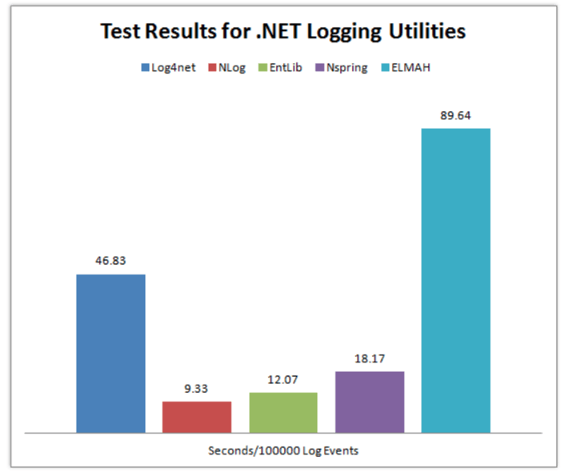
So clearly, NLog is the winner here because it’s taking the minimum time to Log.
Without wasting our time let’s see how we can install, configure and use NLog in our Application.
Creating a Project
I’m going to use VS Code to create an empty web project.
Create an empty Web Application using this command
dotnet new web
after this add the Code below to your “Startup.cs” File to ready your Application.
using Microsoft.AspNetCore.Builder;
using Microsoft.AspNetCore.Hosting;
using Microsoft.Extensions.DependencyInjection;

public class Startup
{
    public void ConfigureServices(IServiceCollection services)
    {
        services.AddMvc();
    }

    public void Configure(IApplicationBuilder app, IHostingEnvironment env)
    {
        if (env.IsDevelopment())
        {
            app.UseDeveloperExceptionPage();
        }

        app.UseMvc(routes =>
        {
            routes.MapRoute(
                name: "default",
                template: "{controller=Home}/{action=Index}/{id?}");
        });
    }
}
Now create a new Folder as “Controllers” at the root level of your Project & inside this folder create a controller class as “HomeController.cs”
Installing NLog
After creating the project, we need to add NLog Library.
NLog is available at Nuget. You can install it in the way you like it. I’m going to use the .Net CLI. So, here’s the command to install NLog
dotnet add package NLog
Configuration
Now Add a configuration file at the root of your project with the name as “NLog.config” & paste this Code
<?xml version="1.0" encoding="utf-8" ?>
<nlog xmlns="http://www.nlog-project.org/schemas/NLog.xsd"
      xmlns:xsi="http://www.w3.org/2001/XMLSchema-instance">

    <targets>
        <target name="logfile" xsi:type="File" fileName="Logs.txt" />
        <target name="logconsole" xsi:type="Console" />
    </targets>

    <rules>
        <logger name="*" minlevel="Info" writeTo="logconsole" />
        <logger name="*" minlevel="Debug" writeTo="logfile" />
    </rules>
</nlog>
There’s another way to configure NLog but I’ll recommend using XML configuration. In this case, you’ll be able to edit you Logging configuration even after publishing your application.
If you still don’t like configuring NLog using above way then you can do the same by programmatically.
Here’s the alternate way.
var config = new NLog.Config.LoggingConfiguration();

var logfile = new NLog.Targets.FileTarget("logfile") { FileName = "Logs.txt" };
var logconsole = new NLog.Targets.ConsoleTarget("logconsole");

config.AddRule(LogLevel.Info, LogLevel.Fatal, logconsole);
config.AddRule(LogLevel.Debug, LogLevel.Fatal, logfile);

NLog.LogManager.Configuration = config;
you can add this code to your “Program.cs” or “Startup.cs”.
Writing Logs
Now Add the code below in your “HomeController.cs” inside your Controllers Folder.
Microsoft.AspNetCore.Mvc;
using NLog;

public class HomeController : Controller
{
    private static Logger logger = LogManager.GetCurrentClassLogger();

    public void Index()
    {
        logger.Debug("Hello from Home Controller...");
    }
}
Run your application & go to the Home Controller URL. e.g. http://localhost:*/Home
Now you’ll find your “Logs.txt” here => bin -> Debug -> netcoreapp
Here’s what I got in my “Logs.txt” File
2019-02-21 13:17:49.4574|DEBUG|NLogTutorials.HomeController|Hello from Home Controller...
Comment If you find any problem or have any Question.
Here are more Articles you might be Interested
– Creating Admin Panel in Asp.net Core MVC – Step by Step Tutorial
– Top 10 .Net Core Features You need to know
– Dynamic Role-Based Authorization Asp.net Core
The post Error Logging in Asp.Net Core Application | NLog | Log4Net | Tutorials appeared first on Coding Infinite.
]]>