Choosing Your Method
What you’ll need:
- A clear digital copy (PDF best), the recipient’s fax number (with country/area codes), and one sending method (app, web, or email-to-fax).
- Optional: a brief cover page and an e-signature image.
Quick decision:
- App → you’ll fax more than once; want camera scanning + delivery receipts.
- Web → you don’t want to install anything or you’re on a shared device.
- Email-to-fax → you work in email and want simple templates/automation.
Method 1: iPhone App (Mobile-First)
What it is:
A dedicated app that scans, attaches, adds a cover, sends, and tracks delivery.
When to choose it:
Frequent or on-the-go faxing; you want real-time status and history.

The home screen
On launch, you land on the send screen for fast outbound faxes. The app organizes everything across four simple sections.
The send screen is the default view so you can start a fax in seconds without navigating menus.

Attach documents & images
Tap the add button to pull files from multiple sources. The app supports multi-page jobs and all common formats.
If you only have paper, use the in-app camera scanner or iPhone Notes to create a PDF, then attach it.

Add a cover sheet
A short cover sheet clarifies who the fax is for and why it’s arriving. Prevents misrouting and looks professional.
Always include a cover sheet for official or medical paperwork — it reduces the chance of documents getting lost.

Choose a fax number
Pick a number with a specific area code to appear local to clients. It handles both outbound identity and inbound faxes.
Choose an area code matching your clients’ region so the fax looks local and familiar.

Final preview
Before sending, check page order, rotation, cropping, and text legibility. Make sure margins aren’t clipped.
Fax output is black-and-white — low-contrast photos can lose detail. Bump up contrast before sending.

Delivery confirmation
After tapping send, the app tracks each attempt in near real time. Receipts with timestamps are saved automatically.
If the recipient’s line is busy, use the built-in retry rather than re-sending manually.

Receiving a fax
Incoming faxes arrive in your inbox tied to your number — no phone jack needed. View, download, forward, or save to cloud.
Organize received faxes by client or project name so you can find them quickly during follow-ups.
Method 2: Web Dashboard (No App)
What it is (in one line):
Sign in on a website, upload PDF/JPG/TIFF, enter number, send, watch status.
When to choose it:
Occasional use or desktop workflows; shared devices where installing apps is awkward.
Upsides:
Zero install, easy drag-and-drop, same account works on phone and desktop.
Trade-offs:
Scanning is two-step (scan with Notes/Camera, then upload); mobile browser UX varies; must stay online during upload/send.
Privacy notes:
Use HTTPS, avoid public computers, check how long files are stored post-send.
Common gotchas:
Large PDFs can hit upload limits; some networks block uploads—keep the tab open until confirmation.
Method 3: Email-To-Fax (Automation-Friendly)
What it is:
Email your document to an address like [email protected]; the service faxes it.
When to choose it:
Admins/power users; repeat destinations; simple templating or rules in email.
Upsides (short):
Works from any device with email; easy to standardize and repeat.
Trade-offs:
Weaker previews; scanning happens separately; formatting follows provider defaults; delivery status via email.
Privacy notes:
Attachments pass through your email provider—use trusted accounts and 2FA.
Common gotchas:
The address format must be exact (country code, symbols); multiple attachments can merge/reorder unless specified.
How Internet Faxing Works with iPhone Apps
Finding Your Perfect Fax App in 2026
Finding the right iPhone fax app in 2026 doesn’t have to feel like scrolling a never-ending menu. Big names (e.g., eFax, FaxBurner, iFax, CocoFax, FAX.PLUS) list lots of features; simpler options like Municorn Fax focus on the core job. Bigger isn’t always better—reliable basics beat a crowded feature sheet.
What matters most (quick check)
- Scanner quality: crisp, de-skewed scans that work in average lighting.
- File handling: PDF first; DOC/DOCX/JPG support without weird formatting.
- Workflow speed: recent contacts, resend/history, clear delivery receipts.
- Signing & covers: lightweight e-signature and an easy cover page.
- Cloud access: grab files from iCloud, Google Drive, or Dropbox without fuss.
- Privacy basics: encryption in transit/at rest, sensible data retention.
How to choose (in one minute)
- If you’ll fax often → pick the app with the best scanner + status tracking.
- If you mostly send existing PDFs → prioritize clean file import and receipts.
- If you share docs from cloud all day → make cloud access the tiebreaker.
Reality check
Skim a couple of recent, hands-on reviews to confirm scan quality, file quirks, and delivery reliability. With this short list, you won’t settle for clunky—just pick the tool that fits how you actually work.
Connecting Your Email and Contacts
Link your iPhone contacts so you can pick recipients without re-typing numbers. You can also share files from Mail or Gmail straight into the app to attach.
Set once and forget: notifications (sent/failed), a default cover style, and where files save (device or cloud). The app converts PDF/JPG/TIFF to fax format automatically.
Cover page and signature
A short cover—To/From, subject, one-line note—keeps faxes routed correctly and looks professional. When a signature is required, draw it on screen or import a scanned signature you can reuse.
Entering the right number
Enter the full fax number with country and area codes; include the exit code for international sends. Pull numbers from Contacts or recent history to avoid typos.
Before you send, do a quick preview to confirm pages, order, and destination.
Plans: free vs. paid
Free tiers are great for testing but often cap pages or add watermarks. Paid plans raise limits and may add international sending, cloud storage, multi-recipient sends, and priority support.
Rule of thumb: occasional senders → short plan or pay-per-fax; steady use → monthly plan for predictable cost.
Keeping Track of Your Faxes
Status Checks and Notifications
Delivery status updates in near real time; failed sends can be retried with one tap. Sent and Inbox views keep receipts and timestamps, and search by contact or date makes old faxes easy to find.
Security basics
Use a strong password and 2FA. Prefer providers that state encryption in transit and at rest, plus clear data-retention windows. If you handle sensitive health or legal documents, confirm whether a BAA is available and what it covers.
Use your iPhone as a scanner
Scan with the in-app camera or Notes for clean, de-skewed PDFs. Shoot on a flat, matte surface with good light, and check contrast so text stays readable in black-and-white fax output.
Cloud storage
Connect iCloud, Google Drive, or Dropbox to grab files quickly and keep everything paperless. Save finished faxes back to your cloud for tidy records and easy sharing.
Organization
Name files clearly, group by client or project, and rely on search and history rather than manual filing. Turn on notifications for new inbound faxes so time-sensitive documents never sit unseen.
Frequently Asked Questions
What are the steps to send a fax directly from an iPhone?
Download a fax app and create an account, then allow camera/files access. Attach or scan your document, enter the full fax number (with country/area codes), add a brief cover, preview, and send.
Quick checklist:
- App installed and signed in
- Document attached or scanned (PDF/JPG/TIFF)
- Number formatted correctly (country/area codes)
- Cover added (optional)
- Preview passed → Send → Delivery receipt saved
Can I send a fax from an iPhone without using any apps?
Not natively—iOS has no built-in fax. Your options are a fax app, a provider’s web dashboard in Safari/Chrome, or email-to-fax.
Consider:
- No install: use web dashboard
- Automation: use email-to-fax
- Best mobile UX: use an app with scanner + status
How can you fax a PDF file from an iPhone?
Open your fax app and choose the PDF from Files, iCloud, Google Drive, or an email attachment. Confirm page order and margins in preview, enter the number with proper codes, then send and keep the receipt.
Tips for clean PDFs:
- Export/scan to PDF (not photos, if possible)
- Use letter/A4 page size
- Check contrast so B&W fax stays readable
Can you send a fax for free from an iPhone and if so, how?
Some apps offer trials or a few free pages, but limits and watermarks are common. For ongoing or professional use, a paid plan removes caps and improves reliability, support, and tracking.
Typical differences:
- Free: page caps, watermarks, limited regions
- Paid: higher limits, international send, better delivery logs, priority support
Can I scan and fax documents from an iPhone?
Yes—use the app’s scanner or the Notes scanner for de-skewed, high-contrast pages, then attach and send with delivery tracking. Good lighting and a flat, matte surface help a lot.
Scanning best practices:
- Fill the frame; avoid glare
- Boost contrast; rotate/trim edges
- Prefer multi-page PDF over individual photos
Available via PC, Mac, email, printer and from mobile devices, SRFax comes with advanced security and a team of expert faxing specialists, and its high quality faxes make it a strong choice for people sending documents with important or sensitive information, as well as for companies. It particularly stands out for those with medium faxing needs.
SRFax is however, quite limited in other ways – the lack of a dedicated mobile app having almost zero extra features are big drawbacks, as well as some extra charges and user experience issues.
The Good
- Strong security and HIPAA compliance
- Reliable customer service team with a strong reputation
- Impressive fax quality
- Not bad value, with lots of subscriptions to choose from
- Very good option for businesses
The Bad
- Very few features and tools beyond simply sending/receiving faxes
- No dedicated mobile app
- Some extra charges can apply
- User experience is better on other services
- Some page cropping problems with multiple-page faxes
Overall Score: Four Stars ★★★★☆
SRFax is a Canada-based company, who since 2004 have been providing SaaS online fax solutions to individuals and corporations, helping folks fax without physical fax machines. SRFax serves key industries such as healthcare providers, governments, financial organisations and the legal sector, which means it places a huge focus on security and customer service.
Serving businesses of every size, SRFax offers a large variety of plans and subscriptions. It provides a range of specialist support tailored for small businesses or those on larger plans, such as fax API, printer driver support, multiple accounts/fax numbers, and specific Healthcare solutions. SRFax is also available to individuals, and has plans starting from 200 pages per month at $12.60.
SRFax excels with its security credentials and customer support team, with a dedicated phone line of specialists based in British Columbia and a helpful Developer support section on their website. SRFax also provides excellent fax quality, especially when compared to most similarly-priced online fax services.
However, there are some key issues that come with SRFax – the first is the stark lack of features. This is apparent when you compare most online fax services, which have dedicated mobile apps, to SRFax. SRFax fails to meet most of its competitors with features, tools, or user experience.
SRFax fundamentally feels like it was built as a corporate-specific faxing solution first, which was built as such and then offered to individuals. It does not feel like most mainstream fax services, which are aimed at individual users and/or corporations.
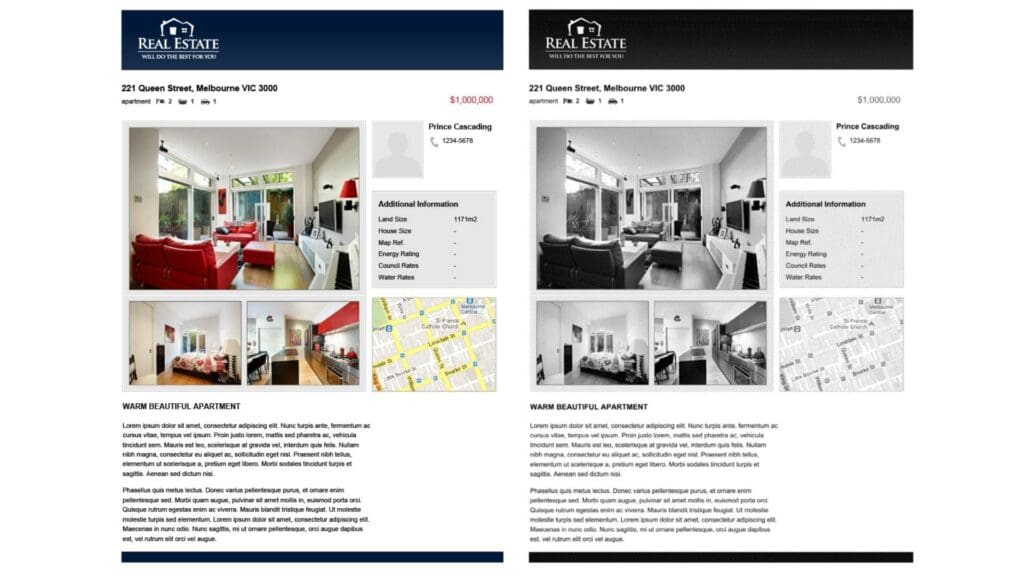
For our review of SRFax, we have tested it on mobile and on the web, faxing a sample invoice, and sample brochure page. These two documents are common types of files that people might send as faxes, and have a number of elements such as text, color, and images.
We have scored SRFax on four key areas:
- Quality
- User Experience
- Price
- Security & Customer Support
Quality | ★★★★☆
Fax quality is one of the most important things to look for in a fax service, and SRFax does very well in this regard. Across our two tests, the brochure page document in particular was transmitted with a high level of detail and clarity. The photographs are clear and detailed, all of the shading has transmitted well (particularly across the top banner), and the detailed graphics such as the map are clear and readable.

We can compare this against the same test fax from a similar popular fax service, such as Fax.Plus, and find that SRFax does transmit the page slightly better. Firstly, there’s more nuance and detail in the shading on the top banner. Then, the large photograph is more detailed, light, and clear. The map is also slightly more readable, with more blurring in the Fax.Plus page.

In our verdict, SRFax is a better quality fax than many other providers we’ve tested, including Fax.Plus. However, we can only give four stars in the quality score, because the first time we tried to send our test document, this happened:

As can be seen above, the page did not transmit properly in our first test, and much of the page was lost. The files only transmitted properly once we separated the test files into one fax per page. This means we would advise all SRFax users to be very careful when they send faxes with more pages, and to preview the fax before sending. This ended up costing us extra pages to resend the test fax, so this could be a problem for users sending larger faxes.
User Experience | ★★★☆☆
There are pros and cons to SRFax when it comes to the user experience, so first we will focus on the good things.
Firstly, signing up is a quick, easy and simple process. In about 1 minute, we were able to sign up, then choose our plan and our toll free fax number (or a local fax number).
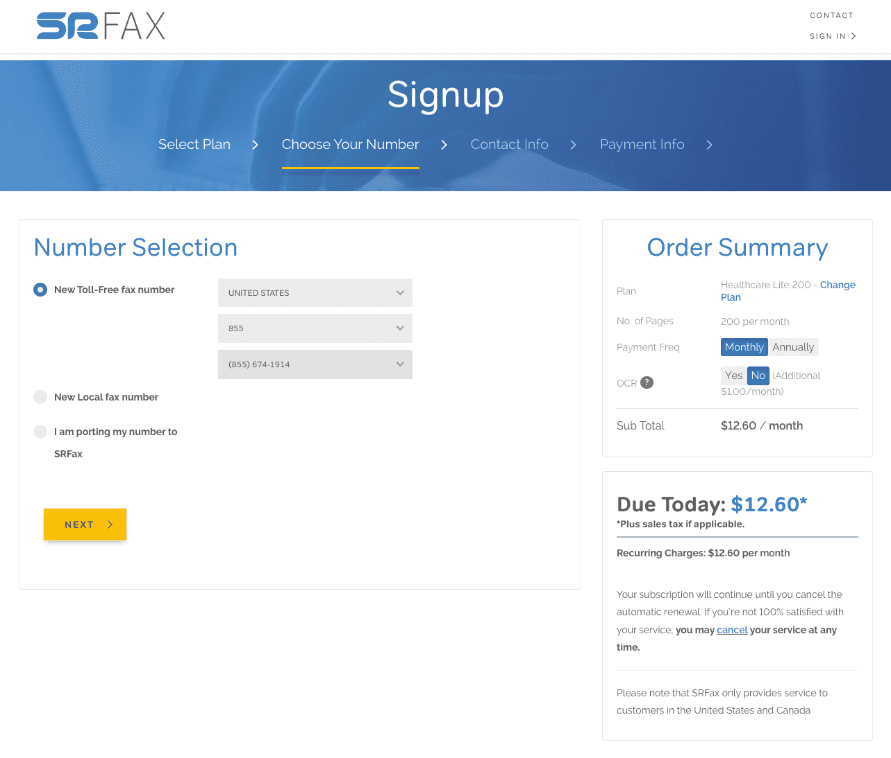
Furthermore, once you are able to log on, the interface is very simple and easy to use. You will land on the ‘Account Summary’ page, where all options are clearly available on the sidebar – Faxes, Settings, Account, etc. It’s easy to navigate to send faxes, view incoming faxes, etc., and it’s even easy to see where to close your account in one click.
The interface is designed to make faxing as easy and simple as possible. Another nice touch is the fax usage view below, which shows users how many fax pages they have left to send.
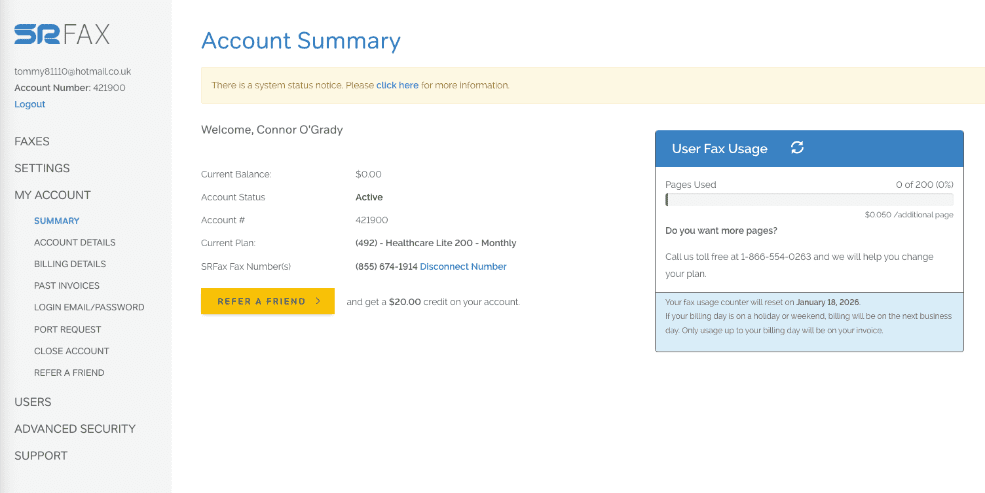
SRFax also benefits from the fact that users can access it on any device, mobile or computer, and offers technical abilities such as fax broadcasting, which allow you to send to multiple recipients.
However, there are some key problems with the user experience on SRFax. The first, and most obvious when you have used other services before, is that SRFax has barely any features when it comes to sending faxes.
Most online fax services allow the user to edit documents in a variety of ways, such as annotating, highlighting, e-signing, or cropping documents. Dropbox Fax, for instance, has totally free tools in-built to the web portal, which allow users to scribble and annotate on documents, and sign them, before sending.
SRFax does not allow users to do any of this – if you want to make changes to your documents, you must do it all in another app or program before sending it via SRFax. SRFax does not even give users the option of previewing fax pages whilst you are typing in the details of your fax. It is possible to preview a fax before sending it, however whilst you are preparing your fax, you cannot see the fax pages.
This is related to another huge drawback when you compare SRFax against its competition: the lack of a dedicated mobile app. Most online fax solutions include a mobile app, which allow users to take advantage of their smart phones to do things like scan documents using their phone camera, and easily rearrange or edit pages on their phones, which you can do with iOS apps like Municorn’s Fax App. With SRFax, you would have to download an additional, external scanning app in order to get the best use of your mobile device when faxing.
In addition to this, the interface of SRFax, whilst being easy to use, does look rather dated and clunky compared to other top services.
For example, in the ‘send fax’ pages below, EveryFax – a similar online fax service that’s HIPAA compliant and has attractive pricing – looks a lot simpler and easier to use than SRFax. The fax number is displayed in a proper format, and even has a flag to show which country code the number is for. Then below, the fax is clearly structured before the user presses send, and each page can be viewed easily. SRFax in comparison, looks clunky and complicated, and hard to understand.

The same thing can be noticed when viewing your inbox – below, EveryFax looks very simple and easy to understand, the inbox is neatly presented. SRFax, on the other hand, looks very technical and overcomplicated, and much less user-friendly for the average person.

Of course, you can just use your email account to use SRFax, since it offers the email to fax feature. However, if we are comparing SRFax against other services, there is a clear difference in user experience which makes SRFax appear dated in comparison to other top providers.
There’s one more small thing which frustrated our experience of SRFax: when using it on computer, it constantly signs you out, even if you select ‘Remember on this device’ when logging in. Be prepared to type in your password many times!
Price | ★★★★☆
Price-wise, SRFax lets you choose from a large range of plans, catered to anybody from those who fax infrequently, to large corporations with heavy faxing needs. A big positive of SRFax is the price transparency – there’s no pushy tactics, it’s very clear what you are signing up for and easy to cancel, SRFax wants to give its customers the best value choice available to them.
On the bottom end, their Basic+ plan is on the pricey side compared with other fax providers – it’s slightly more expensive than the 200 monthly pages you can get from Fax.Plus or iFax, and much more expensive than Dropbox Fax. However, it is cheaper than MyFax or CocoFax. The healthcare Lite option, with HIPAA compliance, is however a rather cheap low-volume HIPAA compliant fax plan.
However, for 500 pages on a Standard Lite plan it’s a better price than iFax, Fax.Plus, eFax, CocoFax, Dropbox Fax, and many other services. You’d get a lower price with FaxBurner (which also offers a mobile app), however it’s overall a better quality service than FaxBurner, with much more security and customer support.
Once you get into the heavy / business faxing plans with HIPAA compliance, SRFax remains a slightly above average value price. For example, iFax’s 5,000 pages at the time of writing is $208.33 per month, whereas SRFax is much lower at $137.90. Dropbox Fax is also slightly more expensive, at $159.99 per month.
However, at the higher range there are also much more cost effective plans, such as EveryFax’s unlimited faxing business plan, which is even cheaper than 2,500 pages from SRFax.

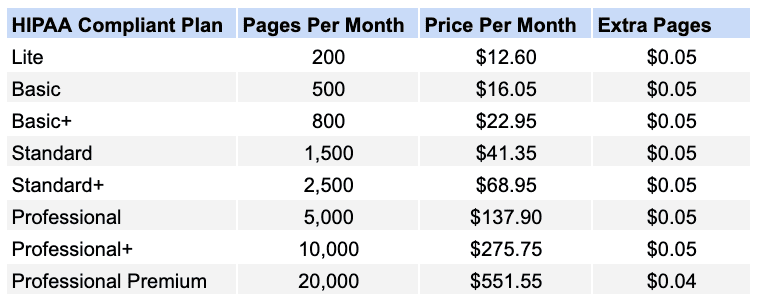
The takeaway from all this: if price is the only factor, then the SRFax cost is best for people with moderate faxing needs. If you have heavy or light faxing requirements, there may be better priced alternatives available.
Another important consideration on SRFax’s pricing, however, is the existence of additional charges. SRFax is quite transparent about most of these, however any potential customers should consider 3 main extra charges:
- Cover Page Charges. Whilst SRFax is quite good value at some level, there is one caveat to this: when sending our test faxes, we were charged 1 page for a cover page. Most other fax services do not do this, so with SRFax, you will use up your pages faster than on other services.
- International Faxing. SRFax is not like fax services such as Municorn’s Fax App, or EveryFax, where faxing to other countries is included in your plan for free. SRFax’s website states that extra charges can be as high as $6.61 per page depending on where you send a fax, however for many western countries and US territories, it is only 5 cents per page.
- OCR Charges. If you want to utilise full-text searching in your faxes, you’ll have to pay an extra charge on your plan, which changes depending on your subscription. You can request this feature in a separate section when signing up.
These extra charges can add up, so it’s important to bear them in mind when choosing SRFax. There are, however, some ‘free’ standard features that SRFax includes which other fax services charge for, like the option to create a toll free number.
Security & Customer Support | ★★★★★
SRFax is made primarily to support enterprises and healthcare solutions, as well as other regulated industries. As a result, it places a high priority in being safe and secure, following HIPAA procedures and offering a range of HIPAA and PHIPA compliant plans, with a quick and easy way for customers to request a business associate agreement.
It’s also incredibly easy to enable two factor authentication in the settings, and other nice features SRFax offers helps customers filter out junk faxes and other unwanted correspondence.
SRFax utilises industry-leading 2048-bit end to end encryption for all data in transit and at rest, meaning anything from protected health information to payment information is safe and secure. Enhanced SSL encryption is available, with PGP keys and SPF enablement to ensure higher security email to fax access. There are more technical security features corporate customers may want to utilise, such as IP and subnet restrictions or role-based access controls if you have multiple users.
All of these features make SRFax a leading security fax service. What’s more, unlike many other services, there is a phone line to contact a team to a team of specialists based in BC, Canada, who can be phoned during business hours. Barring that, there is a toll free fax number you can contact, or a form on the website which can be completed to ask for help.
SRFax receives incredibly positive feedback from its enterprise customers and from individuals, with hundreds of positive testimonials available from across the web, including on Trustpilot, where it keeps an average 4.9/5 score.
There are other fax services which offer slightly more enhanced support features, however – such as Municorn’s Fax App and EveryFax, which have live chat support and AI support for customers who need a quick answer to a quick question. iFax also has a 24/7 live chat and phone support. However, SRFax still stands out as an industry leader.
SRFax: Four Stars ★★★★☆
SRFax is a well-priced option for moderate faxers, or those seeking to fax with a HIPAA compliant plan, as long as you watch out for the potential extra charges. For those with light or heavy faxing needs, there may be better value elsewhere, however SRFax does deliver a very high quality of fax, with strong security and customer support.
The user experience, on the other hand, is not as good as it is with other providers. The user interface is often quite dated and complicated, and the lack of a mobile app puts SRFax at a strong disadvantage for those who want to fax on-the-go, or use the power of their smart phone to quickly and easily create faxes.
We’d recommend SRFax as a solid option for anybody who faxes semi-regularly, and wants to benefit from a high security service.
SRFax Alternatives
- Fax.Plus is similar to SRFax in some respects, also offering HIPAA compliant enterprise plans with advanced technical features. Fax.Plus also allows users to access a mobile app, which can make faxing easier. The pricing of Fax.Plus however is less flexible and can be lower value than SRFax.
- eFax competes with SRFax as a high-security, industry-trusted faxing solution. eFax’s pricing is not quite as good, but it does offer more services, such as natural language processing and AI, document signing, and enterprise cloud solutions.
Thanks to online fax services, it’s easier than ever to send and receive faxes from any Mac computer – but some ways are better than others. We’ll show you exactly how to do it, and which fax services we love the most as Mac users.
Why Fax From A Mac?
“Can it send faxes?” might not be the first question you have when checking out that new iMac or Macbook Pro in the Apple Store, but it’s a more important question than you might think – faxing is still so common when it comes to important correspondence.
Most online fax services also offer better basic security features – like end to end encryption, which email giants such as Gmail and Outlook still don’t include as standard to all users. The better security and legal protection are things you can take full advantage of with an online fax service from your Mac.
Best-for-Mac Online Fax Services
There are several key ways you can use a Mac to send faxes online:
- By installing a fax app on your Mac
- By using a web browser to access an online fax service
- By using an email-to-fax service, using your regular email account
To help you decide which option is right for you, we tested dozens of services and narrowed them down to our top X ways to turn your Mac into a fax machine, with no additional equipment. Below, we’ll break down each option – explaining how it works, what it costs, where it shines, and where it might fall short. If you are looking for a specific “how to do it” guide, we’ve got covered here.
1. Fax App by Municorn
Fax App by Municorn is a faxing app for Mac computers and for iPhone. The highest rated faxing app on the app store, it downloads native faxing software straight to your Mac without the need to navigate a web interface, making the faxing process as easy as using any other Mac app – like Messages, or Mail.
It comes with a simple but powerful interface, a range of simple subscription options which all include truly unlimited faxing, and over 350,000 reviews on Apple’s store, with an average rating of 4.8 out of 5.
Why we love it
- Only service listed to include truly unlimited global faxing as standard – no extra charges, ever
- Best, easiest user experience from a Mac computer, and can also be used from iPhone, syncing perfectly for easy document scanning on your phone
- Top quality fax transmissions
What could be improved
- Because it’s a fax app, it doesn’t offer a fax-from-email service or web faxing – so if you also have a PC you want to fax from, or would rather use email, you’ll need to find a different method
Municorn’s Fax App is the smoothest, and most intuitive experience that exists when it comes to faxing from a Mac. Once you install it from the app store – where it enjoys being the highest rated, most popular faxing app available – you can create your fax number in a matter of seconds, choosing from any area code by name.

Since you can set everything up with your Apple ID, there’s no need to create a new account, confirm your email address, and then set up a new password to remember. Once you’ve chosen your fax number, you can send a fax easily by opening the app, selecting ‘new fax’ and following the instructions. There’s a helpful summary page which shows you all the details before you send – so you can review your fax pages, your recipient’s fax number, and your cover page all from one view, before hitting send.

Navigating the Fax App feels instantly familiar, thanks to the Apple-friendly design, but it’s the quality of the service that also stands out. No other platform we tested could capture our brochure PDF file test in better detail, with text, images, and graphics transmitting in perfect HD quality – so if you need to send documents via fax with the best clarity, we’d recommend this service.
When it comes to value, this is also the only service that offers a truly unlimited fax plan as standard – that means international faxing included (most other services charge extra depending on where you are sending a fax), and no page limits. There are weekly, monthly, or annual plans to choose from.
The customer support is another win for Fax App – it’s the app store’s highest rated fax app for Mac for a reason – you can get in-app live chat support, and you benefit from full HIPAA compliance and end to end encryption – something your email service won’t give you.
It does, however, share all the good things about email. You can upload and attach as many files as you need to your fax, just like an email, and it will convert them into fax pages. The app keeps a log of all sent and received faxes – even backing them up for free, in case you lose your device.
Overall, if you’re looking for a way to get the most out of your hardware, and fax from Mac with minimum hassle, we’d recommend using the Fax App.
2. EveryFax
EveryFax is a web faxing and email-to-fax service, and is our favorite web faxing interface for a browser (for Mac and for mobile). If you prefer to use email or a web browser like Safari to fax from Mac, EveryFax offers one of the cleanest and simplest user experiences, with high quality faxing and more value than almost any other service.
Why we love it
- Simple and easy to use web faxing, with a sleek and well-designed user experience
- High quality support features, like live support chat, HIPAA privacy protections, and AI
- Outstanding value, covering 50+ countries with no extra charges (unlike most others on this list), and offering an unlimited faxes option at a lower cost than some other limited fax services
What could be improved
- No weekly subscription option (only monthly or annual), offering slightly less flexibility than services like Fax App
You can use EveryFax from any email app or web browser for Mac – both options are included as standard – so all you need is an internet connection to get full fax utility for your Mac.
The best thing about EveryFax is its simple and easy to navigate web faxing interface – it’s as intuitive as any app you might download, and compared to alternatives on this list such as Fax.Plus, EveryFax just feels more polished, cleaner and slicker.
For example, the little flag symbol next to the fax number to show the user what country that fax is from adds a small, but useful level of detail. The layout and colours are also slightly more ‘Windows XP’ on Fax.Plus, whereas EveryFax looks and feels more like Apple’s latest operating system.

Also, notice the small speech bubble in the bottom right of the EveryFax menu – this is another extra feature, you can click that to open up a chat window, then either contact customer support or connect to an AI agent to help you – you can make a free account and try this yourself if you have any questions about faxing before you sign up for the service.

The other standout for EveryFax is value. EveryFax’s basic, lowest cost subscription does not charge you any extra for international faxes – most other faxing services charge a high premium for faxing abroad. EveryFax’s mid-range plan also includes unlimited faxing, and this is at a much lower price than other services on this list which limit users to as little as 500 pages. When it comes to your average price per page, EveryFax and the Fax App are the clear winners on this list.
EveryFax offers Team and Business plans too, in case users want faxing capabilities for their company. There is also an advanced Enterprise plan, which you can speak to the team about – this makes EveryFax a fantastic option for business users on Macs who need to stay productive even when they’re not in the office.
3. iFax
iFax is a super-smart faxing service, packed with features and providing an elite level of customer support. iFax is available for Mac users via an app, or email-to-fax (at extra cost), but to take full advantage of all that iFax provides, it’s best to use the web faxing platform.
iFax does however have a few quality concerns, as well as not quite representing as good value as other services on this list.
Why we love it
- Huge range of advanced technical features
- Outstanding customer support
- Mac users can use it over email, web or app
What could be improved
- Inconsistent quality of fax transmission
- Value – it’s expensive compared to other features
- Many basic features are locked behind higher-costing subscriptions – for example, email-to-fax is only available on the most expensive option
Having sent over 20 million faxes, iFax is a highly trusted online faxing service for Mac owners. Helpfully, iFax has a Mac app, but can also be used on a web browser or, at an extra cost, using email-to-fax. We’d recommend the web browser for the best experience, due to the number of features that can only be used via the web.
Speaking of features, iFax brings more than any other service on this list. From custom cover pages, scheduled faxes, AI support, smart templates, document annotation and signing, automation, or even a color-coded dashboard to help you manage your faxes – iFax has a fantastic range of features available which make faxing easier and more powerful.

iFax does not include an unlimited faxing option, unlike the two services above, and it also has a quality system which allows users to spend more pages (you get a certain number of fax pages per month) to make a fax HD or HD+, meaning you can basically spend more to ensure a higher quality fax. However, we tested this and it didn’t work very well – HD (2 credits per page) was by far the worst option, and HD+ (3 credits per page) wasn’t as good as the standard quality of other services.

This leads to another concern over value – iFax is quite expensive. To be able to use email-to-fax, you have to get the highest cost individual subscription available – the ‘Pro’ package, which still limits your pages, for $39.99 per month. EveryFax and Fax App will give you fully unlimited worldwide faxing for a lower price than this, representing a better offer for Mac users.
There is also a lot of upselling with iFax – the web menu shows you the full functionality of Pro, even if you’re not a Pro customer. Then, whenever you click on a ‘Pro only’ feature without realising, you get an email – every single time! This means multiple emails per minute if you’re navigating the menu – which was a negative that we experienced.

However, there’s no faulting the customer service – it is absolutely outstanding, and you get what you pay for with customer support. iFax will even offer new customers a free video call, to show them how to fully use iFax. What’s more, there is a phone line and live chat inside iFax, which regular users can access at any time. iFax is perhaps the best option on this list for customer support.
4. Fax.Plus
Fax.Plus is another service Mac users can use to send faxes via web or email-to-fax. It also comes with an app available for Mac, but it isn’t verified for MacOS, so you might experience performance issues.
Fax.Plus has a fantastic range of features and subscriptions for all types of users, with slightly better basic value than comparable services like iFax. However, some basic features are not included with the price, and so for a premium service that includes everything, you may find yourself paying more.
Why we love it
- Good range of features
- Quality of faxed documents is above average
- Good value at the lower-price end of subscription type
What could be improved
- Some basic features are locked behind extra paywalls
- Some features are pointless
Fax.Plus is a Mac-friendly web faxing and email-to-fax service – it also comes with an app that is downloadable for Mac, however it’s not verified for use on Mac, so we don’t recommend this option.
Fax.Plus has a strong range of features, second only to iFax on this list, with things like scheduled fax, cloud storage integration, specialised apps for signing and scanning documents, and an ‘optimise for image/text’ option when you send faxes (however, we tested this and found absolutely no difference in the fax).
Fax.Plus’ features offer better value than iFax in some ways – for example, email-to-fax is included in the very cheapest plan for Fax.Plus – unlike iFax. However, other features are locked behind higher paywalls – for example, even if you pay for the ‘Business’ package at almost $40 per month, it still doesn’t include the ability to sign documents, which you’ll still have to pay extra for with Sign.Plus. HIPAA compliance is also only offered on the $100 per month package, whereas other services include this on their most basic packages.
For fax quality, Fax.Plus is above average, although not quite on the level as other top apps. For example, when we compare it to Municorn’s Fax App, we can see slightly clearer image quality – the large picture has kept more light and detail, which you can see on the back of the couch and the map. However, Fax.Plus still does well against most other services.

Fax.Plus also offers a free trial, letting new users send up to 10 free faxes before purchasing a subscription. The value of Fax.Plus is generally the strongest at the lower price level – for people on a budget it’s a better choice than iFax, and it’s a great choice for Mac owners who might not want to send many faxes. However, iFax does have it beat when it comes to the more advanced features, and including more services in the price of a more expensive subscription.
5. Dropbox Fax
Dropbox Fax is perfect for Mac users already using Dropbox to store their files, offering a way to email-fax or web-fax those files from your Mac or iPhone. It’s a great budget-friendly option which comes with easy ways for editing/signing documents before faxing, all from the web portal. However, the fax quality is below average, and there are certain flaws we found such as customer support, and a lack of privacy protections such as HIPAA.
Why we love it
- Low-price for casual users who don’t fax very often
- Very easy to edit and sign documents before you send a fax
- Free trial
What could be improved
- Average fax quality
- Bad reputation for customer support
- No dedicated mobile app
Dropbox Fax (formerly HelloFax) is a built-in service for Dropbox, allowing users to send and receive faxes through their regular account at a small extra charge. For Mac users, this can be done over the web, or by using the email-to-fax option with the email address your account is registered to.
First off, the fax quality of Dropbox Fax is not as good as other services on this list – Dropbox is first and foremost a document storage service, so you wouldn’t expect the same level of quality as specialised fax services. When compared to a top service like the Fax App, you can see the difference in clarity and color shades, like on the logo below, the large photograph, or the map – the Fax App image has far more detail and quality captured.

Dropbox Fax gets around this by offering to host a high-resolution color option for all faxes, whereby your fax will send your recipient details of how to access a super high-quality version of all scanned documents on the Dropbox website.
Staying on the few downsides of Dropbox Fax, there’s also a poor level of customer support – no live chat, barely any FAQs, and the only way you can contact support is through a form on their website – the TrustPilot reviews on Dropbox Fax are also very negative.
Dropbox Fax is, however, an incredibly easy service to use on web for Mac owners – particularly with the document editing and signing features, which are included on every level of subscription. The value overall is very strong compared to iFax or Fax.Plus, offering 300 pages per month at only $10 per month, with email-to-fax and document signing included. It’s one of the better deals on this list.
6. eFax
eFax makes faxing from Mac possible via web browser or email-to-fax, also offering mobile apps to iPhone and iPad users. Its sleek interface resembles Gmail and is easy to use, the fax quality is also pretty strong – eFax is behind a lot of other faxing services, such as MyFax. However, eFax doesn’t provide the best value on this list, and it’s quite bare in terms of features compared to others.
Why we love it
- Good fax quality
- Simple user interface for web faxing
- Has a ‘send large file’ option
What could be improved
- Value could be better
- Not many features
- Often logs you out on Mac
eFax is a longtime favorite online fax service for businesses and corporations, providing specialised support to the healthcare and finance industries in particular, but it also offers individual Mac users the ability to fax from the web, or emails (as well as mobile apps).
Creating an eFax account takes less than a minute from Mac (it cannot be done from the mobile app), and once you’ve signed up and chosen your fax number, you’ll be put through to an interface that looks very similar to any modern email service, like Gmail. It’s very easy and intuitive to use.
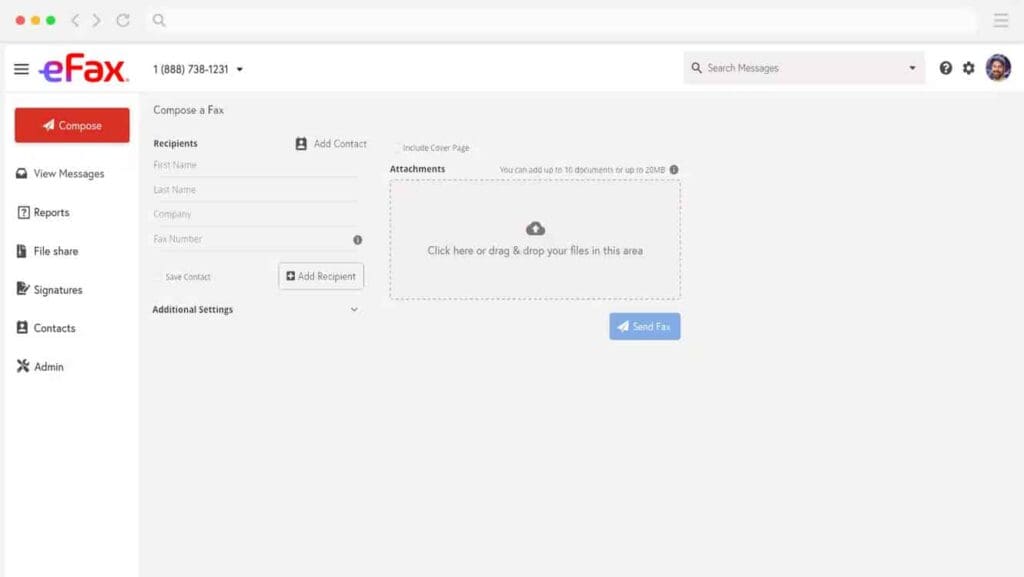
eFax also offers basic features like signatures, and contacts, and includes email-to-fax as standard, unlike services such as iFax – however, in terms of advanced functionality and customer support, iFax and Municorn’s Fax App offer much more.
eFax’s fax quality is amongst the best on this list – this is to be expected from the company behind eFax, which provides faxing services for Fortune 500 companies and also runs a number of specialist faxing apps.
The value for individual users, however, is limited – the ‘Pro’ option for eFax only includes 150 pages per month, and is more expensive than the 200 pages per month you can get using Fax.Plus, and the 300 pages you get with Dropbox Fax. Another small but noticeable issue we encountered with eFax is that it is constantly logging you out on the website – this makes using it quite difficult.
7. GotFreeFax
GotFreeFax is a completely free way to send faxes from Mac – allowing any user to send or receive a limited number of faxes each day via the GotFreeFax website. This service is the best you can get without ever spending anything – however there are downsides – the quality is poor, the number of pages are extremely limited, and it isn’t clear how secure it is for important documents.
Why we love it
- Completely free way to fax from Mac – sending and receiving
- Simple and easy website
- Offers unbranded cover pages
What could be improved
- Quality is much worse than paid faxing services
- Received faxes are public and not secure
- Supports limited number of file formats
GotFreeFax is a website Mac users can visit to send free faxes (or receive them), with no strings attached. Anybody can send two free faxes per day, with three pages per fax – but only to fax numbers in the US or Canada. The service is free and supported by ads. Faxes can also be received via this page – you will need to know the sender’s fax number in order to view that specific fax, but they are all listed publicly.
Navigating the website is fairly easy and straightforward from Mac – simply input the information about the sender and receiver, upload and attach the files you’re faxing, and then hit send.

GotFreeFax is hard to criticise, because it is completely free, however there are obvious downsides to using a free service. First of all, the fax quality is much worse – which can be seen in our test fax below. Much of the detail and clarity in the image has been lost, the map is unreadable, and the person icon next to the phone number has completely disappeared. This is not a service to use if you want to send clear, detailed documents.

There are also obvious downsides in file limits – many faxes are much longer than 3 pages, but you will have to pay in order to send these with GotFreeFax. The paid service does not improve in quality, therefore if you are sending longer faxes, or faxing more regularly than twice in a day, it more than pays off to choose a different paid service instead.
The Best Ways To Fax From Mac
We’ve looked at 7 of the best ways to send a fax from Mac – including using apps, using a web browser, using emails, and even without spending a penny! We hope Mac users everywhere can find this guide helpful, and understand that faxing is very easy and accessible from any type of Mac computer.
]]>Below you’ll find free fax cover sheet templates you can download and use right away (PDF and DOCX). After the downloads, we’ll explain what a fax cover sheet is, when you need one, what it should include, and how to handle things like HIPAA and other confidential documents.
| Category | Template | Best for | Formats | Download |
|---|---|---|---|---|
| Standard | Standard Fax Cover Sheet | General use | PDF / DOCX | PDF | DOCX |
| Business | Standard Business Fax Cover Sheet | Everyday business communication | PDF / DOCX | PDF | DOCX |
| Confidential | Confidential Fax Cover Sheet | Sensitive information | PDF / DOCX | PDF | DOCX |
| Legal | Privileged and Confidential Communication | Attorney-client or sensitive comms | PDF / DOCX | PDF | DOCX |
| Urgent | Urgent Fax Cover Sheet | Time-sensitive faxes | PDF / DOCX | PDF | DOCX |
| Emergency | Emergency Services Fax Priority | Emergency / priority handling | PDF / DOCX | PDF | DOCX |
| International | International Fax Cover Sheet | Overseas / cross-border faxing | PDF / DOCX | PDF | DOCX |
| Government | Government Agency Fax Cover Sheet | Public sector correspondence | PDF / DOCX | PDF | DOCX |
| HR | Human Resources Fax Cover Sheet | HR forms / onboarding | PDF / DOCX | PDF | DOCX |
| Finance | Financial Fax Cover Sheet | Invoices / banking / finance | PDF / DOCX | PDF | DOCX |
| Legal | Legal Fax Cover Sheet | Law offices / legal matters | PDF / DOCX | PDF | DOCX |
| Legal | Legal Documents Fax Cover Sheet | Contracts / filings / packets | PDF / DOCX | PDF | DOCX |
| Education | Educational Institution Fax | Schools / universities | PDF / DOCX | PDF | DOCX |
| Education | Academic Fax Cover Sheet | Academic departments | PDF / DOCX | PDF | DOCX |
| Nonprofit | Non-Profit Organization Fax Cover Sheet | Charities / nonprofits | PDF / DOCX | PDF | DOCX |
| Events | Event Planning Fax Cover Sheet | Coordinators / vendors | PDF / DOCX | PDF | DOCX |
| Personal | Personal Fax Cover Sheet | Personal faxes | PDF / DOCX | PDF | DOCX |
| Business | General Business Communication Fax Cover Sheet | General business faxes | PDF / DOCX | PDF | DOCX |
| Business | Multi-Purpose Fax Cover Sheet | All-purpose use | PDF / DOCX | PDF | DOCX |
| Branding | Company Branded Fax Cover Sheet | Branded comms | PDF / DOCX | PDF | DOCX |
| Design | Minimalist Fax Cover Sheet | Clean/simple layout | PDF / DOCX | PDF | DOCX |
Why Use a Fax Cover Sheet?
So, what’s the point of a fax cover sheet? Simply put, it hits the target first. It offers the context that lets whoever’s on the receiving end route the fax to the right recipient. For healthcare facilities, law firms, and financial institutions, accuracy is super important.
To get the complete fax where it needs to be, the cover sheet hosts important routing info, like the sender’s and recipient’s names, a time/date stamp, and a subject heading. Simple, but they let whoever receives the fax get all the info they need at a glance – a lifesaver in busy offices.
But the government regulates some information. For example, HIPAA ensures privacy for people’s sensitive health records. Non-compliance could land you in hot water, and a cover sheet, at the very least, keeps sensitive info out of sight (More on how cover sheets protect privacy below). We also have a ton of fax cover sheet templates for download.
Essential Elements of a Fax Cover Sheet
But general fax cover sheets share a lot in common, regardless of the industry or purpose of the fax. These standard elements keep faxes clear, accurate, and professional-looking. Here’s a cheat sheet to help create your own cover sheet or navigate one if you’re on the receiving end. For a closer look, you can check out the fax cover sheet example PDFs on this page, too.
- Sender Information: This could be the sender’s name, company, and any other relevant contact info. From it, the recipient can easily identify or contact the sender in case of a problem.
- Recipient Information: The same, but for the intended recipient. Helps with delivery, but can also prevent someone from reading a fax that isn’t theirs to read!
- Date/Time Stamp: Many offices need to track communications. Accurate time data helps immensely, especially in a busy setting.
- Subject or Reference Number: Context is everything. A concise description of what’s included in the fax can keep the delivery process flowing smoothly.
- Confidentiality Notice: Sometimes optional, sometimes required. It’s an added notice that the contents are private. HIPAA mandates a confidentiality notice for medical information.
- Number of Pages: Sometimes, things get lost in transmission. A complete page count lets the recipient know if something’s amiss.
The Main Types of Fax Cover Sheets
There are about as many types of fax cover sheets as there are reasons to fax someone. That said, we can break them down into three (very) broad categories. Each category emphasizes a slightly different aspect of a cover sheet’s main purpose.
- General Fax Cover Sheets: These focus on accuracy for routine business or personal communications. They are super versatile, and their most important feature is all the contact info we mentioned above – sender/recipient, date/time, number of pages/subject heading, etc. Perfect for basic communication.
- Company-Branded Fax Cover Sheets: Businesses need to maintain a professional look, and branding is a great way to do it. B2B faxes will often have a company logo and sometimes include colors and other branding elements. And, depending on the industry, there may be a confidentiality notice.
- HIPAA-Compliant Fax Cover Sheets: HIPAA regulations are strict because everyone has a right to medical privacy. A HIPAA-compliant fax cover must have a confidentiality notice, and may include additional safeguards, like instructions on when to contact the sender or how to dispose of an erroneous receipt.
- Use this information to help you understand fax cover sheets when you’re on the receiving end. Likewise, it’s great stuff to keep in mind when you’re making your own. However, you can also check out our printable and downloadable fax cover sheet examples that cover dozens of different use cases. They’re customizable, consistent, and save time.
How Are They HIPAA-Compliant?
The Health Insurance Portability and Accountability Act (HIPAA) regulates the communication of protected health information (PHI). Its main purpose is to keep your private records private and out of the hands of bad actors. HIPAA mandates very high standards; failing to observe them can lead to legal action – businesses could incur millions in fines.
But despite the reliability of faxing, the sensitivity of the data and the penalties for non-compliance mean you need to tread carefully. The main way of doing so is the HIPAA-compliant fax cover sheet. You might notice that they carry a beefed-up version of a confidentiality disclaimer, often enumerating the penalties for not delivering the fax to the intended recipient, using, or otherwise abusing the data in it.
However, there are ways to ensure privacy in addition to the cover sheet. These practices are common in offices that send and receive medical information, but they are easy to follow for individuals when they send their own data to a doctor’s office. Doing so is just another way to protect yourself. Here’s some standard best practices to keep everything in order:
- Use a Modified Confidentiality Statement: Indicate that the information in the fax is private. It should instruct unintended recipients to destroy the fax and notify you ASAP.
- Double-Check Sender/Recipient Contact Info: Clearly identify both parties to reduce the risk of an errant delivery.
- Record Date/Time/# of Pages: Healthcare facilities track their faxes in case of an error, audit, or other issue. You can do the same. Make sure everything is right on the cover sheet, then copy it into a log in your private documents.
How to Add a Fax Cover Sheet When Faxing Online
One of the nice things about modern faxing is that you don’t need to spend money on a machine. You can do it right from your computer or smartphone. For instance, Fax App is a reliable way to do it easily. It only takes 4 steps:
- Open the Fax App: Launch the Fax App on your smartphone (iPhone or Android). If you don’t have an account, you can easily sign up for one in the app.
- Get Your Document Ready: Upload the document you want to fax. You can use files from your device’s storage, like iCloud, Google Drive, or Dropbox, or use the app’s built-in scanner to convert a picture of a physical document into a legible PDF.
- Add a Cover Sheet: The app will prompt you to include a cover sheet. Use one you have on hand, or choose one from Fax App’s printable fax cover sheet templates. Then, fill out the info as we outlined above.
Review and Send: Finally, give everything a once-over for accuracy. Once you’re happy with it, tap “Send,” and your fax is on the way. Fax App securely encrypts your fax (along with the cover sheet!) from point A to point B.
The Benefits of Fax App
This brings us to the specific benefits of Fax App, especially for people who don’t need to fax every day. First, it’s super convenient and flexible, since you can do everything on your smartphone and skip out on emergency dashes to FedEx. You can always upload documents to the cloud ahead of time, but our image analysis software can read off your phone’s camera, so you can instantly convert physical to digital. It’s as easy as email.
We also emphasize security and confidentiality. Fax App uses end-to-end encryption to protect sensitive documents from unauthorized access. Your phone covers physical security; our tech covers network security! These safeguards make it great for PHI, legal, or proprietary business documents.
And since you skip out on buying a fax machine, you don’t have the attendant ink, paper, and dedicated phone line costs. Every subscription to Fax App comes with an online number to deal with all incoming and outgoing faxes. Simple, yes. But also way less expensive.
Finally, we also offer international faxing at the same rate as local. This helps with everything from international finance to sending medical docs from your vacation in the Bahamas. If you consider this next to our certified HIPAA compliance, you get everything you need for personal and professional communications.
Wrapping Up: Fax Cover Sheets Matter – Fax App Can Help
So, there you have it. Fax cover sheets keep your faxes accurate, professional-looking, and secure. For the general user, they make it much more likely that documents end up in the right hands. However, for secure data like PHI, they boost security to keep private records under wraps.
And Fax App makes it super easy to attach the right fax cover sheet to your docs. It’s a simple solution that covers security, flexibility, cost-saving, and ease of use all in one place. Check out our fax cover sheet templates to download and print or use for online faxing.
]]>Genius Fax is a basic, user-friendly and reliable service which provides great value and a very flexible pricing model for its users, especially benefitting those who don’t send or receive faxes regularly.
However, Genius Fax comes with some downsides, particularly a lack of features and a pricing model which may confuse some. The fax quality is also slightly below average compared to other popular services.
The Good
- Very user-friendly experience
- Mobile app and web faxing options
- Paired with Genius Scan, a very good app to scan documents before faxing
- Flexible and very transparent credit pricing model
- Tremendous value for people who fax very rarely
The Bad
- Pricing model more confusing than most other apps / online fax services
- Lack of features
- Fax quality is not great
Overall Score: Four Stars ★★★★☆
Created by French company The Grizzly Labs as a sister app to the brilliant Genius Scan (as well as Genius Sign), Genius Fax has also received hugely positive feedback from its users, who love the simplicity, transparency and value it offers as an online fax service.
Genius apps are a regular fixture in the top business apps for Apple and Android, and Genius Fax’s simple and beautiful UI makes sending faxes an easy task from your phone or computer. It offers fair and very transparent value to its users, and is an especially affordable option for those who don’t frequently send faxes.
Genius Fax is ultimately held back from a perfect review by several key factors – firstly, the fax quality is not at the same standard as other paid fax services, which can result in files being blurrier, transmitting less detail in image files. Furthermore, the lack of features is very noticeable when you’ve used other faxing services.
For our review of Genius Fax, we have tested it on mobile and on the web, faxing a sample invoice, and sample brochure page. These two documents are common types of files that people might send as faxes, and have a number of elements such as text, color, and images.
We have scored Genius Fax on four key areas:
- Quality
- User Experience
- Price
- Security & Customer Support
Quality | ★★★☆☆
Fax quality is arguably the most important thing any fax service has to get right, and unfortunately this is where Genius Fax comes up average at best. To see why, we can focus on the brochure page test which we sent with Genius Fax, and compare it to other faxing services.
Genius Fax does do some things very well – the detail on the photographs has been transmitted to a higher level of detail than most other faxing services, for example. Services like Fax.Plus and iFax had much worse photographs than the example below.
However, when we look at the detail on the right of the page, Genius Fax has fallen short. There is a complete loss of detail in the person icon, the shading has disappeared from the ‘Additional Information’ box, and the map has lost most of its detail.
Overall, it can be said that whilst photographs and text transmit very well, Genius Fax has not managed to preserve all the detail on a very common type of document users might send, which might make sending a PDF or image file difficult.

We can compare this to another leading fax service to see the difference – in this case, Fax App by Municorn, which is also available on iPhone and Android. When the two are compared side-by-side, there is a clear difference in quality of the shading in the photographs and along the top banner, and the Fax App has preserved all the detail on the right side of the page.

If we zoom in, the difference in quality becomes even more noticeable and stark. Any fax service which costs money should be preserving more detail than the Genius Fax test in this example did.

The speed of transmission however, was very good – with under 1 minute per page we sent. This can be up to 6 or 7 minutes for other fax services, and whilst the capacity of the network can play a role in fax speed, this is still a very impressive speed, and so users can be confident that their faxes will send in quick time.
User Experience | ★★★★☆
Genius Fax offers a very intuitive and simple user experience, making it easy for anybody to create a Genius Fax account and begin using it confidently in a matter of minutes.
Firstly, the web platform means you can send faxes from any computer or phone without an app, and similarly to the mobile app, it’s designed with a ‘one page’ focus – you can see all your sent and received faxes, your account credit information, and the send button, all from one dashboard.
This is a very simple and helpful way to structure a faxing service – many others will have different pages for inbox, sent faxes, drafts, account information, etc., but having it all in one very simple and attractive menu makes using Genius Fax an enjoyable experience.

The mobile app is structured the same way – allowing users to see all of their faxes, their fax number, how many credits they have left, and how to send a new fax, all from one page. Creating a new fax is just one click away, and the app makes it very clear how to input all of the recipient details, attach any files you want to send, and then preview your fax before you hit send.

Scanning documents is another highlight of using Genius Fax. The Grizzly Labs, after all, is a scanning company first, and sells their digital scanning technology to other companies all over the world. The mobile app has very good scanning, with features like automatic border detection, auto-scanning, and document straightening, along with other tools such as filters and cropping.
If you want even more highly advanced scanning and editing features, you can simply download Genius Scan and use that app to prepare your fax. Genius Scan has even more ways to edit, sign, and annotate documents before you are ready to fax them. For those who aren’t scanning, Genius Fax supports documents which are PDF files or JPEG image files – this is far less file types than many other faxing services support, however.
Besides scanning, however, Genius Fax is not heavy on features. Many other fax services allow users to do basic things like schedule faxes, or save drafts, but this is not possible with Genius Fax.
Genius Fax also does not support email-to-fax, which many other apps do include as standard. Email-to-fax allows users to send faxes using their online fax service entirely from email, which can be more convenient for many users.
Price | ★★★★★
It’s probably best to start with the downsides of Genius Fax’s pricing model. Genius Fax has 2 different types of charge:
- Users purchase fax credits which enable them to send or receive faxes. One credit = one fax page sent or received (you can get a free cover page with every fax).
- Users can also rent a fax number for a certain period of time with fax number subscriptions. If they do not do this, they will not have a dedicated fax number to receive faxes to.
This is more complicated than most other fax services, where you’ll often be charged a regular subscribe cost (on a weekly, monthly, or annual basis) which will give you a fax number, and a certain number of fax pages to send and receive. Some users might not like the Genius Fax way of pricing, however for certain users it does offer advantages.
Chiefly, if users don’t fax very often, and may not want to receive faxes as much as they send faxes, this can be a cheaper way to fax. When you add credits with Genius Fax, those credits do not expire until they are used. Conveniently, buying credits in bulk to use over an extended period of time is more cost-effective for irregular faxers than keeping a monthly subscription which isn’t used very often.

Another fantastic thing about the pricing for Genius Fax is how transparent and fair to the user it is. The prices are incredibly clear, and the app is constantly reminding you how many credits you have left, and how much longer your fax number will last.
By fair, we don’t necessarily mean cheap – there are cheaper faxing services available – but Genius Fax is the only app we have tested which automatically does not auto-renew your monthly subscription when you get your own fax number. By default, this means if you forget about a subscription you’ve made, you cannot be charged for months before realising. Genius Fax is also very fair in the sense that your credits last forever.
Another final positive on price is the fact that select international fax numbers are not charged as extra – there are 46 international destinations supported, and for any supported country 1 credit = 1 credit. Most other services charge extra for faxes sent or received outside of the US and Canada.
Overall, despite being more complex than other fax apps, Genius Fax represents a strong value proposition for most users, especially people who fax infrequently. Whilst it isn’t the very cheapest, it is still a good deal in the online fax service market.
Security & Customer Support | ★★★☆☆
Genius Fax is a slightly mixed bag when it comes to security and customer support.
To start with security, Genius Fax does not have the significant security credentials that many other fax services have. It has not been designed to process Protected Health Information, and is not HIPAA-compliant – this means that the service is not following the measures needed to be fully compatible with the Privacy Rule under HIPAA, and is generally not recommended as the best secure way of transmitting sensitive healthcare information. This puts it at a huge disadvantage and may put many users off.
The basic security measures are there, such as encrypted storage and encryption in fax transmissions. Genius Fax also does not share any of your data with any external parties. Since Genius Fax is also based in the EU, it must follow GDPR regulations when handling all user information.
On the customer support side, there are several basic features users can rely on for guidance – such as an extensive FAQs section, and an email address which users can send questions to. Other fax services do far more than this, however, with services such as EveryFax and Municorn’s Fax App offering live chat to customer support, and iFax offering a 24/7 phone line to customers.
Customer feedback, however, cannot be ignored, and Genius Fax enjoys a 4.9 average rating from over 41,000 reviews on the Apple store.
Genius Fax: Four Stars ★★★★☆
Genius Fax is a simple, convenient way to send faxes from mobile or computer. Whilst the fax quality is below average and it may not be the most secure service, it represents great value and is a very user-friendly way to fax for many people. Despite its flaws, it’s one of the better ways to send and receive faxes digitally, especially if you pair it with Genius Scan – one of the best scanning apps in the world.
Genius Fax Alternatives
- Fax.Plus matches the modern, user-friendly interface of Genius Fax but adds significant functionality. Unlike Genius Fax, it includes email-to-fax capabilities and scheduled sending as standard features. It is a more robust choice for users who want that slick app experience but require HIPAA compliance and cross-platform flexibility between web and mobile.
- eFax If Genius Fax feels too basic for your business needs, eFax is the heavy-duty upgrade. It offers the enterprise-grade security, unlimited storage, and third-party integrations that Genius Fax lacks. It is the ideal choice for corporate users or those handling sensitive legal and healthcare documents who require industry-standard compliance rather than a simple pay-as-you-go model.
- iFax For users who want a mobile-first experience like Genius Fax but need higher security and support, iFax is a strong contender. It bridges the gap between a simple fax app and a professional business tool by offering 24/7 support and banking-grade security features. It is particularly well-suited for freelancers and small business owners who need reliable HIPAA compliance on the go.
Most people haven’t seen a fax machine for at least 10 years. Except – that isn’t exactly true – the majority of us actually use one almost every day!
While traditional fax machines may no longer be the norm, any Windows computer can send and receive faxes thanks to online fax services and a couple of old-school methods like using a printer or a Windows Fax and Scan app. There are so many ways to do this – let’s go through 8 of the best and easiest services you can use.
Why Fax From Computer?
Digital faxing has replaced physical fax machines, and now anybody can send faxes from their PC in just a few minutes. The ability to fax documents is still important for a huge number of reasons, including:
- Most online fax services come with security features such as E2E encryption as standard (unlike email services such as Gmail or Outlook), making communication very safe for important documents. If you’re handling taxes, healthcare, or finances – faxing is the gold standard.
- Signing documents remotely is considered more secure and legally binding when it’s a signed, faxed document, rather than an e-signature. Even Docusign admits this, and advises caution using e-sign companies in areas like healthcare, banking, real estate, government, and insurance.
- HIPAA compliance and other regulatory factors make faxing sensitive information more secure and legally protected with faxing, especially when dealing with healthcare providers and medical information. This is why over 70% of providers still use fax machines.
The Best Ways To Fax From Your PC
There are a number of ways to turn your PC into a fax machine in just a few seconds,
- By using an online fax service which can be accessed via any internet browser (recommended)
- By using an email to fax service (recommended)
- By downloading a Windows fax app (less recommended)
- By connecting your PC to a fax machine or printer which is capable of faxing (not recommended)
This guide covers 8 top ways to fax, which all allow you to receive faxes and send faxes online straight from your PC. There are pros and cons to each, and each comes at a different price, so all the information you need to get started is below!
1. Fax.Plus
Fax.Plus is a service that Windows users can use to send faxes via web or email-to-fax. It also comes with apps for iPhones or Android phones. Fax.Plus has a good range of features and subscriptions for all types of users, offering good value for basic users and an attractive free trial.
Headlines
- Good web browser faxing experience
- Better value than other services for low-cost faxing
- Above average fax quality
Fax.Plus is a Windows-friendly web faxing and email-to-fax service which also offers mobile app support, meaning it can be used on almost any computer or mobile device. Fax.Plus offers advanced features such as scheduled faxes, the ability to optimise a fax for either text or image quality, and special apps for signing and scanning documents (which can cost extra).

The fax quality is above average, whilst not quite on the level of services such as EveryFax, Fax.Plus produces clear, sharp and readable fax transmissions, even for more complicated documents that contain a mix of images and text.
In terms of value, Fax.Plus provides good value to basic fax users in particular, offering a ‘Basic’ plan which is low-cost and covers 200 fax pages per month, and then a range of higher plans which offer more pages and features. All ways of faxing, including email to fax, are included from the Basic plan onwards, unlike other services such as iFax, where email access costs more.
Fax.Plus also offers a free trial of up to 10 completely free faxes (capped at 10 free pages), meaning users can fax for free before signing up to a paid plan.
Value-wise, Fax.Plus does hold some things back which may cost extra, however. For example, many services, such as Dropbox Fax, include document signing in the price. With Fax.Plus however, you need to pay extra to use Sign.Plus, their document signing service. Fax.Plus also won’t guarantee HIPAA compliance unless you’re using the $100 per month plan, their most expensive. Our full Fax.Plus review is here.
2. EveryFax
EveryFax is a web faxing and email-to-fax service, allowing PC users to send and receive faxes via their regular email account or by using any web browser such as Chrome. EveryFax is our favorite web faxing interface, with a simple and intuitive design, great customer support, and high quality of fax, all at great value.
Headlines
- Most comfortable web browser faxing experience
- High quality support, featuring live chat with customer support, HIPAA compliant privacy, AI services
- Outstanding fax quality
- Fantastic value, covering over 50 countries with no extra charge (unlike most other fax services on this list), and the only service on this list offering unlimited faxing – no page limits!
EveryFax is an online fax service best used from any internet browser, but can also be used from your email account with email-to-fax or fax-to-email. The best things about EveryFax are the hassle free web faxing experience, the customer support, and the value, which make it our top overall recommendation for faxing from PC.
Signing up to EveryFax takes less than a minute, and once you’ve chosen your fax number, you’re all set to send a fax or view your incoming faxes via web or email.

One of the best things about EveryFax is the user experience on the web browser. Creating a new fax, viewing your inbox, downloading documents or contacting support is all incredibly simple, and can all be done in just a click. You can also integrate it with cloud storage services for faster document download/upload.
Compare EveryFax below to Fax.Plus, another leading web fax provider – both are top services from a user experience perspective, but EveryFax is overall a simpler and cleaner design, with helpful little touches like showing the fax number in the proper format – e.g. +1 (234) 567-8901 – and also by showing a little flag of the country each fax number is based in.
There’s also a speech bubble in the bottom-right of EveryFax’s menu – this is their live chat support – you can ask any question you like!
Speaking of faxing internationally, EveryFax includes this at no extra cost – this is incredibly rare for an online fax service, most of which charge significant extra fees to send faxes to other countries. Value-wise, EveryFax also offers a very basic plan for people who might not fax too often, but also an unlimited faxing paid plan at only a slightly higher price, offering the best value per page of all services in this guide.
This brings us to fax quality – EveryFax provides top tier fax quality, even with complicated documents containing text, images, and graphics – many fax services fail to capture the image quality you can see below, but EveryFax has done an outstanding job of preserving the detail in the pictures, the map, and the shading.

EveryFax also supports highly regulated industries, offering small businesses and large corporate plans for anybody who needs to fax with their company.
3. Dropbox Fax
Dropbox Fax is an ideal fax solution for the millions of Windows users, or the 56% of Fortune 500 companies that already use Dropbox to store their files.
Another service that Windows users can use to send faxes via web or email-to-fax. It also comes with apps for iPhones or Android phones. Fax.Plus has a good range of features and subscriptions for all types of users, offering good value for basic users and an attractive free trial.
Headlines
- Low-price extension for Dropbox to fax your files
- Good signing and editing tools
- Free trial
Dropbox Fax (formerly HelloFax) is a built-in Dropbox service which allows users to send and receive faxes through their Dropbox accounts at an extra charge to their regular plan. Like the previous two services on this list, this can be done via web browser or email to fax, but the web platform allows full use of all the features on offer.
Dropbox Fax is a good deal for budget users – you can create a free account and begin a free online trial, sending 5 free faxes. Following this, it starts at $10 per month for 300 pages per month – this comes in at slightly better value than Fax.Plus, which at a similar price only offers 200 pages, and much cheaper (and with more features) than iFax’s basic 200-page plan at $15.
Dropbox Fax also offers good value for corporate customers, with a range of enterprise packages from $70 to $750+ per month which support all sized businesses.
The built-in signing and editing features are very handy, and are covered in the basic price, unlike Fax.Plus. You can easily and quickly make a number of helpful edits or electronic signatures before faxing a document.

Overall, the user interface is very simple and easy to use, with a helpful color-coded menu and an unmissable ‘send faxes’ button to create a new fax. Another differentiating factor for Dropbox Fax is that you can save drafts and come back to them later – something other services such as Fax.Plus do not allow users to do.

Overall, Dropbox Fax is a fantastic service, but does have a few drawbacks – firstly, the fax quality is slightly below average compared to other paid fax services on this list. The image and graphical quality in particular doesn’t come through as well as it does with EveryFax or Fax.Plus. Dropbox Fax gets around this by offering to host a high-resolution color option for all faxes, whereby your fax will send your recipient details of how to access a super high-quality version of all scanned documents on the Dropbox website.
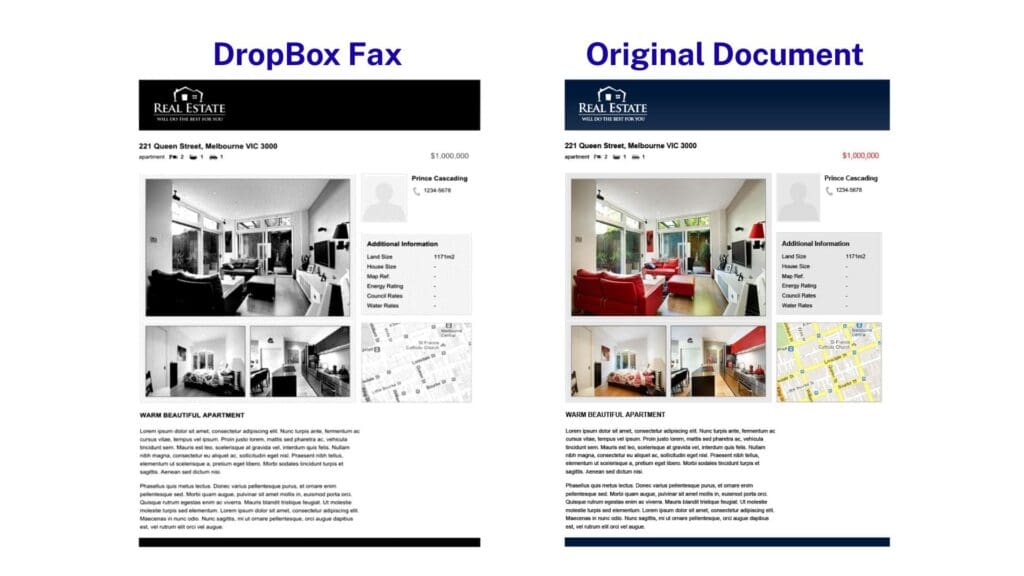
Furthermore, there’s also a poor level of customer support – no live chat, barely any FAQs, and the only way you can contact support is through a form on their website – the TrustPilot reviews on Dropbox Fax are also very negative. This can make sending sensitive faxes a more stressful experience, since you want to know you’ve got help on hand in case anything goes wrong. Our full Dropbox Fax review is here.
4. iFax
iFax is packed with more advanced features than any other service on this list, and comes with top tier security and customer support. Available via Windows app, web or email-to-fax (at extra cost), iFax is a premium-priced service for users who might want to take full advantage of a more expensive subscription.
Headlines
- Advanced technical features
- Industry-leading customer support
- Quite expensive
iFax, as the name might suggest, was originally an iPhone app which has since become a leading service on multiple platforms – available to PC owners via a Windows app on the Microsoft store, email, or by using the iFax website.
iFax is packed with super smart features, with a strong range of custom cover pages, document annotation/signing, AI support, a smart dashboard, live support, approval flows for teams, smart templates for regular faxing, and even advanced reports. If you’re super serious about faxing and don’t mind spending more, iFax is a great choice.
The customer support and customer data security is industry-leading, with every security certification you can think of, and live customer support chat at any time – you can even schedule a 1:1 video call with their team when you sign up, to show you how to use iFax properly.
That said, there are a few downsides to iFax – the first being the high price. Most other services on this list will give you more, for less. iFax also doesn’t include basic features such as email-to-fax on standard plans – you have to subscribe to the highest price individual plan, at $40 per month, to be able to fax by email – most other services include this as standard under every basic plan. iFax has a tendency to block features in this way, and upsell customers into choosing a more expensive plan, which can become frustrating if you don’t want to pay that much.
Furthermore, the fax quality is not perfect, and operates on a system where you can pay more ‘credits’ (or pages) for a higher quality fax. We tried each option below, and found inconsistent quality between the various options, which can result in confusion for customers. Full ifax review is here.
5. GeniusFax
GeniusFax is the faxing partner of GeniusScan, a very popular scanning app for mobile devices. Whilst best used on mobile app, you can also fax from the website in a basic, no-frills way. GeniusFax is a value-friendly and incredibly flexible way to fax for occasional / sporadic users.
Headlines
- Flexible pricing model that works for occasional faxers
- No hidden charges or extra fees for international faxes
- Average-bad quality
GeniusFax is a mobile-first fax service with a particularly good scanning app to go with it, however for Windows users GeniusFax is a basic, low-price way to fax, which most important provides flexibility for people who don’t fax very often.
Users can navigate to the EveryFax website to create an account and send faxes from their computer. The user experience is basic, but very easy to follow. Whilst it doesn’t have the high level of functionality that EveryFax or iFax offers, you can see all your sent and received faxes in one easy menu, as well as your fax credits, and your current fax plan.

GeniusFax’s pricing plan is slightly more complicated than others on this list – because users must pay to send faxes differently to how they receive faxes. To send or receive a fax, credits can be purchased – these credits last forever and one credit is required to send or receive one fax page – whether it’s a local or international fax. Prices start at $1 per credit, but they get much cheaper if you buy more at a time.
To receive faxes, users can then sign up to claim a fax number for a certain amount of time – this starts at $4 per month, but the value improves if you sign up for a longer time period, for example – 2 years is $70.
Whilst this is a more confusing and possibly an overcomplicated model for pricing, for people who very rarely send faxes it could be better value in the long term. However, if you ever find yourself needing to fax more, then other services are definitely better value.

Apart from the lack of features, the main downside for GeniusFax is the fax quality – in our test, lots of detail was lost in the map, in the person icon, and the images are quite distorted and badly transmitted. GeniusFax is recommended more for text-only documents.
6. GotFreeFax
GotFreeFax is a completely free fax service, allowing any Windows user to send a free fax online, with a limited number of faxes and pages each day. GotFreeFax is the best service you can regularly use without ever spending a penny, however there are huge limitations and downsides including fax quality, page limitations, and security.
Headlines
- Completely free online fax service, to send and receive faxes online. See our free fax review to learn more.
- Simple and easy to use website
- Poor quality and insecure customer data
GotFreeFax is a free, no strings attached service accessible via web browser, which allows users to send a maximum of two free faxes per day, with a limit of three pages per fax – only to fax numbers in the US and Canada. A complimentary cover page is included, which helpfully is unbranded and professional-looking.
Navigating the website is simple and straightforward – users simply need to input information about the sender, the recipient, edit the cover page, and attach documents to create the fax, then hit send.
It’s difficult to criticise a totally free service, however there are some obvious limitations to GotFreeFax compared to the rest of this list. Firstly, the fax quality is considerably worse – below is an example of how unclear and distorted documents, and images in particular, can be in the final fax transmission.
Furthermore, the page limitations are severe – at only 3 pages per fax and 2 faxes per day, this service is not an option for anybody who may be sending multiple pages in longer faxes, which is usually the case for important things. What’s more – this service should not be recommended for important documents or sensitive faxes, since it’s unclear on the GotFreeFax website how secure this service is – we can assume that a free service isn’t operating under the highest security standards.
You can receive faxes too with GotFreeFax, but again, received faxes are publicly listed (although you need the sender’s fax number to view them, many people would be able to find this out), and we would not recommend using this as a way to receive any important or confidential information.
For very short and unimportant faxes, GotFreeFax is a very convenient way to fax from computers at no cost to the user. See our fell review here.
7. Faxing From a Printer
Many multi-function printers can send faxes – if they have an internal fax modem and a connected phone line / fax line, this can be an incredibly convenient way of scanning and faxing documents without the need to pay extra for an online fax service. However, unless you already have this set up, it is considerably more expensive than most online fax services.
Headlines
- Convenient and powerful way to fax for computer users who already have a multi-function printer and a phone line
- Very secure if connected to a fax line, which are much less hackable than internet communication
- Expensive to set up if it’s a choice between this and an online fax service
Any windows computer can send faxes via a multi-function printer, if that printer supports faxing and is connected to a fax or phone line. To do this, users can check their model of printer in the first instance, and then check that it’s connected to a phone line.
If the printer is fax-friendly and has the right connections, users simply need to place scan or upload their documents, and then open the fax menu on their printer or computer.
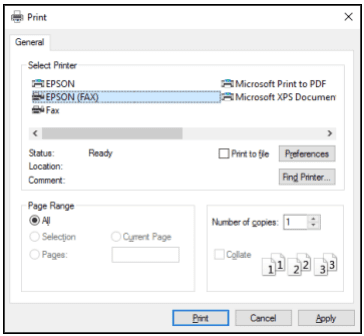
Once the fax-capable printer is selected, the recipient’s fax number and other details can be entered the same way you would using an online fax service.
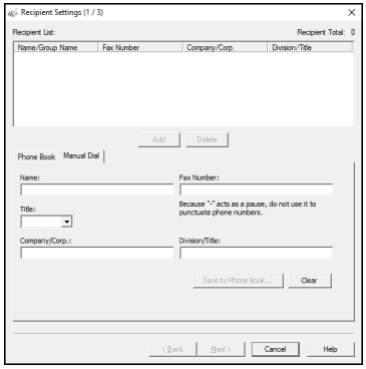
This method is very convenient and lower cost if you already have such a printer and a phone line. However, if you’re starting without anything and choosing the best way to fax from your computer, it is much more expensive to buy a multi-function printer, supply it with ink, and then maintain a landline connection for your phone or fax line. With no setup costs, an online fax service from one of the above options would be much cheaper, more portable, and more convenient.
8. Windows Fax and Scan
Windows Fax and Scan is a native application in any Windows computer, which allows you to scan documents, and send and receive faxes without a fax machine, provided that you have a fax modem or server available to use.
Headlines
- Requires a fax modem or fax server to connect your PC to
- Native Windows software – no external download or subscription needed
- Convenient way to fax and scan quickly if you have a scanner
Windows Fax and Scan is a little-known piece of software which is built-in to every Windows PC. To enable it or install it, you can follow a quick guide here, but it is located in Settings > System > Optional Features, and will usually need to be activated in this way before you can use it.
This software is, therefore, totally free to anybody with a Windows computer, and comes with no subscription – however, you must be able to connect the software to a fax modem or a fax server on your network (which many companies may have). A fax modem requires a phone line, and so there is cost required to keep this connected to your provider. Without this, you cannot fax with this software.
Given that Windows Fax and Scan works via a phone line connection, the output quality is usually exceptionally good (but can be affected by the strength of the phone line). Phone lines are also very secure compared to internet communication, given that they are subject to much fewer hacks, and require a physical connection to the line in order to intercept communications, so cybercriminals tend not to target this method of correspondence.

Windows Fax and Scan has a very dated interface, and looks quite like a basic Windows XP email application. All the basic functionality is there – inbox, drafts, sent items, etc., but you won’t get any of the fancy features of advanced customer support that a good online fax service offers.
Windows users have expressed positive feedback about this software, in particular that it is more simple and reliable for scanning & faxing than the proprietary software than comes with many printers, for example, HP printers.
Overall, if you have a fax modem or phone line connection already, this is a free way to send and receive faxes – it may have less fancy features than online faxing, but it works very well. If, however, you are starting from scratch, the cost of setting up a phone line connection is usually much more expensive than the cost of joining an online fax service.
The Best Ways To Fax From A Computer
We’ve gone through 8 of the best ways to send a fax from a PC, including using Windows apps, web fax services, email-to-fax, and from a multi-function printer. We hope that PC users find this guide informative, and understand that faxing is incredibly easy and accessible from any computer or mobile device.
]]>Like it or not – faxing isn’t going anywhere. Whether it’s filing taxes, dealing with healthcare providers, signing and sending legal documents (faxed signatures are still more legally accepted than e-signatures), or even running your own small business, there are still so many times we may need to send a fax.
Luckily, as traditional fax machines have disappeared from homes and workplaces, online faxing services have risen up to take their place, and there are now hundreds of different options for your Android phone. We’ve tested and rated 6 of our favorites to help you figure out which you should download today!
Look here for our best iPhone fax app review list.
Ranking The Best Android Fax Apps
We’ve given our favorite fax apps for Android a score out of 5 across these five categories:
- Performance – A closer look at how well each app works, the features it offers, and the quality of the fax, as well as any bonus performance points to note, like great document scanning or cloud storage integration.
- User-friendliness – Any app has to be well-designed and easy to use – definitely easier than using an old-fashioned fax machine. It should be as simple as sending an email, with no extra complications involved, and a layout that’s easy to understand.
- Pricing – Fax apps are generally much cheaper than using physical fax machines, but some apps are cheaper than others. We’ll look at the price, the flexibility of options, and other things like page number limits, to judge the best deal for your needs.
- Support – Faxing is normally a way of sending very important documents, so if something goes wrong, you want to use a service with great customer support. We looked at all the ways these apps provide customer service.
- Customer Feedback – Don’t just take our opinion – we’ll tell you the scores that other users are giving these apps, and what they’re saying about them.
The Best Android Fax Apps in 2026:
1. Municorn Fax App
Overall Score | 24/25
Municorn were too busy building the best Android fax app to come up with an original name, but everything else about this app screams creativity, attention to detail, and value. Powerful, easy to use, and reliable – with both the highest number of reviews and the highest score of all apps we looked at. But most importantly – the unlimited faxing subscription price is probably the best deal in online faxing.

Performance | 4/5
Municorn’s Fax App is a lightweight app which runs incredibly smoothly on both our old and new Android phones. Even on our much older device, we were able to use the full range of faxing features, such as combining multiple documents, and high-quality scanning in the app, to send crystal clear faxes in quick time. We can compare it to other top apps on this list, such as iFax, and see clearer images and more detail being preserved in the transmission.

All the basics of faxing are included – cover pages, delivery updates, document previews and cloud storage integration – and there’s no distractions beyond that. Being able to choose your own fax number and your own area code (even if you don’t live in that area) is also a great touch. The only downside is some other apps offer more specialised features which business-users may want, like scheduled send or advanced document editing.
User-friendliness | 5/5
The Fax App has a really simple, sleek design, which naturally guides the user through sending a fax, just as easily as if sending a WhatsApp message. We particularly like the ability to dynamically search by area code – this helped us double-check that we were sending our test faxes to the right number, since it tells you the city/region you are sending to. That’s the kind of feature which makes this app helpful, but not overcomplicated.
Price | 5/5
The Fax App by Municorn looks like the best deal in online faxing. It is the only major app we found which offers truly unlimited (no fine print, no hidden charges!) faxing, for a small subscription fee which you can cancel anytime. There are no page limitations, and you get worldwide coverage with no extra charges for international faxes, and no confusing pricing structures, unlike similar subscriptions on this list.
The weekly subscription fee is great value (with unlimited faxing) if you have an important week of faxing ahead, and you might not know how many faxes you might be asked to send (e.g. tax returns, healthcare forms). The annual subscription is the cheapest way to fax regularly out of all the fax apps on this list.
Support | 5/5
Municorn, being a large tech company with a strong infrastructure, offers a great deal of support to users, including an extensive FAQs and video guide section, and live chat support inside the app. We were able to ask the AI assistant questions, and connect to a team member for more individual queries – AI integration shows how much effort the team puts into integrating faxing with the latest modern technology.

We also love the fact that Municorn promises HIPAA-compliance, and there’s a neat section on their website talking you through exactly they store and safeguard your information.
Customer Feedback | 5/5
Firstly, we have to let the numbers speak for themselves. Out of all the top apps we looked at on the Google Play store, the Fax App has:
- The highest number of downloads (over 3 million Android)
- The highest number of reviews (over 60,000)
- The highest average rating (4.4/5)
The team is very responsive to all reviews, writing individual responses to all the reviews we could see, so it’s great to see that they’re checking every single comment they receive and taking the time to make a response which isn’t copy and pasted.
2. Fax.Plus by Alohi
Overall Score | 21/25
Fax.Plus offers the best range of technical features for advanced faxing options – options like scheduled send and the variety of cover pages set this app apart as a truly great product, with a supportive team at Alohi standing behind it. Despite problems with the pricing structure, we loved this app.

Performance | 4/5
The Android version of Fax.Plus is just as impressive as the iPhone version, since both apps run on the same underlying infrastructure at Alohi, Fax.Plus for Android sends faxes reliably and in great time. It’s packed with features that should cover all your faxing needs – like signing documents, cloud storage integration, and scheduled send. The scanner is also one of the best to use – it easily picks up the borders of documents, and we didn’t need to manually correct any scans. You can also customize the cover sheet with many options. In short, this is an elite fax app for Android.
The overall quality is fantastic, whilst not being quite as good as the best apps on this list, it’s still going to send a perfectly readable fax every time.

User-friendliness | 4/5
Fax.Plus is an intuitive, easy-to-use app which smoothly follows the look and feel of an Android phone. The navigation and icons make any action obvious and natural to the user. However, Fax.Plus loses a point here for not being the most ‘polished’ app, especially on older phones, where the app interface wasn’t fully fitting on our phone screen, causing the menus and buttons to look distorted. It looks like the display support for some older Android phones might be a concern, so if your phone is 3+ years old, another app might be better.
Price | 3/5
On the one hand, Fax.Plus has a great offering and pricing model – you can sign up for 10 free fax pages, and then pay a monthly subscription for extra fax pages with your own fax number. It’s not a bad deal, but there are several key problems we found with Fax.Plus’ price offering.
Firstly, you’re limited on pages. When you compare this to Municorn’s Fax App, which is a slightly lower price for the subscription (and also gives you unlimited pages), you can see that there are much better deals out there.
Secondly, we read the fine-print on the website and found a confusing detail with the subscription plan – if any page takes longer than 1 minute to send, then you get charged for two pages. This information isn’t disclosed anywhere on the app, and so we think the advertised page numbers are misleading – you might be charged 2 pages to send 1 page, and you cannot control when that happens.
There’s also some confusion because faxing a page to specific countries can count as two pages instead – so overall we’re not huge fans of the value offering here.
Support | 5/5
It’s hard to fault the support offered by Alohi – Fax.Plus has a great help section inside the app, which offers detailed instructions on how to overcome almost any problem a typical user may be having. There’s also a quick, responsive team behind Fax.Plus who are very good at answering questions, and the website is full of guides and how-tos. We particularly like the ‘System Status’ page on their website, which shows you the live status of every aspect of the app – so if you’re having an issue, you can check their website first to see if a telecom service is down – this is a neat feature that makes Fax.Plus stand out.
Lastly – unlike some other apps – no data is shared with third parties, which we always like as a standard privacy feature.
Customer Feedback | 4/5
Fax.Plus is hugely popular – with over a million downloads and an average rating of 4.1/5, this is one of the most widely used and highly rated apps in our rankings. Whilst the reviews are mostly positive, there are quite a few problems with cancelling subscriptions and customer support, and the Fax.Plus team gives the same copy + paste response to each of these reviews – so they slightly miss out on full marks here.
3. Genius Fax by The Grizzly Labs
Overall Score | 19/25
The sister app to the hugely popular Genius Scan scanning app, Genius Fax is a separate offering allowing you to fax the documents you’ve put together in the Genius Scan app. This makes the process of faxing slightly longer, as you’ll need both apps to do the same basic faxing functions that the other, single apps on this list can do. We’d recommend Genius Fax if you want to take advantage of all the Genius Scan capabilities, and don’t mind a longer, more complicated faxing experience.

Performance | 3/5
Genius Fax is a separate app intended to fax the documents you are scanning in Genius Scan – this sounds good in theory but leads to a more complicated process than other faxing apps. For example, you can’t scan documents in Genius Fax – you need to use the Genius Scan app first and then change apps – so you’ll need to download two apps. You also can’t use Genius Fax to combine multiple documents – you again need to use the scan app first.
There’s also limited faxing features which other apps do better – for example, Genius Fax’s cover page customisation is very limited.
Besides this, the app works well, and our faxes were delivered successfully in just a few minutes. However, there are other apps that offer a simpler, one-app faxing process, and we wouldn’t prefer Genius Fax unless we wanted to use the full range of advanced scanning options that Genius Scan offers – such as advanced document editing, or super high-quality scanning.
User-friendliness | 4/5
The Grizzly Labs know how to make great apps which are easy to use – and Genius Fax is no exception. It looks great, it’s easy to follow, and the layout may have been one of the best of all the apps we used. Unfortunately, this app is designed to work with another app, and switching between apps can cause the apps to sometimes crash and reset your progress, especially if you’re on an older phone with RAM limitations, so we had to take one point for that.

Price | 3/5
There are credit-based fax apps which allow you to pay per page, and then there are subscription fax apps. Each one has its pros and cons, however Genius Fax is actually both. You have to buy credits for each page you send – the regular price is $0.99 per page, but you can go as low as $0.40 if you buy in bulk. You then have to pay an extra subscription if you want to get your own fax number to use and receive faxes – this is a subscription on top.
For us, this confuses things and you end up getting the worst of both worlds – other subscription apps will give you unlimited faxing and your own toll-free fax number for one price – like Municorn’s – and other credit-based apps can work out cheaper by allowing you to watch ads for credits. Genius Fax is still cheaper than using the UPS or Staples fax machines, but if you want a complete fax machine on your phone, you’ll find simpler and cheaper deals elsewhere.
Support | 5/5
Genius Fax stands out when it comes to support – The Grizzly Labs have a great team and offer enterprise solutions to lots of small and medium sized companies – this means there is an extra level of support many other faxing apps cannot offer – advanced backup, MDM compatibility, and even customisable UIs. This app has a great team behind it, and it shows.
Customer Feedback | 4/5
Genius Fax has a 3.4/5 average score – not the best score on this list by any means, and a smaller number of reviews than most of this list too. On the other hand, Genius Scan is one of the best-rated scanning apps in the world, with a 4.9/5 average from over 450,000 reviews. So when you balance the “meh” score of Genius Fax with the “omg” score of Genius Scan, we think a 4 is fair.
4. iFax by Crowded Road
Overall Score | 18/25
iFax is a shiny and fancy app with fantastic support and many great features that you can also use on your computer with your Android subscription. However, the final quality and the price can be a turn off – it’s very expensive, and the end result isn’t as good a fax as you’ll get from other services.
Performance | 3/5
iFax sends faxes incredibly quickly – taking around a minute per page, and has a number of options for fax quality – you can spend 1 page credit on a ‘Standard’ fax, or 2 credits on ‘HD’ – but you can also spend 3 pages on ‘HD+’, which promises to be much better quality than even HD.
The problem we found was that for our testing, the ‘HD’ option turned out very bad, and HD+ didn’t look much better than the ‘Standard’ option – see for yourself below.
Overall, it doesn’t look worth using HD at all, and HD+ doesn’t look good enough to make it worth spending 3x the credits on – especially when you compare it to the standard fax quality of other apps on this list.

User-friendliness | 4/5
iFax is a lovely app to use from a user-friendliness perspective – the scanning is very easy with great border detection, and there are helpful details everywhere – such as country flags for when you are typing international fax numbers, live updates of your faxes, and a great dark mode option.
The best thing about iFax is the cover pages – you can customize them fully, and they look fantastic compared to most faxing services.
Price | 2/5
The cost of this great user experience is one of the most expensive faxing app subscriptions you’ll find today. There is a ‘Basic’ option for $15 per month, however you cannot receive faxes with this option – you’ll have to pay $30 per month for the cheapest way to receive faxes with iFax, which is expensive compared to most other services.
However, under the $30 plan you are still locked out of basic features like email-to-fax, which other apps include under their most basic plans. You’ll have to get the ‘Pro’ $40 per month package to be able to do this with iFax – as well as do other things other apps include as basic features, like schedule fax, forward fax, and use cover page templates.
Ultimately, to get the full experience of iFax you need to pay a lot of money, and you can get these features from other apps for much less.
Support | 5/5
With the support system of iFax, you get what you pay for, and iFax has better customer support than most other apps we’ve seen. You can use live chat to speak to a real support agent, or to an AI, depending on your problem. You can also book a call with a support agent when you sign up – they’ll show you everything you need to know about how to use iFax.
For more advanced packages and corporate packages, there is a 24/7 phone line available. iFax also takes security very seriously, and comes with a range of security credentials such as HIPAA, SOC 2 & ISO 27001 compliance.
Customer Feedback | 4/5
iFax has a pretty low 3.4 average on the Google store, and there seems to be one big reason for this – in many of these reviews, people say that iFax has tried to sign them up for an expensive year-long or monthly subscription automatically, and they have been charged a lot of money which they can’t get back after a free trial period.
We’d suggest that you watch out for this when using iFax – be very careful about what you are signing up to. However, it is your responsibility to check what you are signing up for through the Google store – and checking/cancelling services is quite easy.
Apart from this, user feedback is generally strong, we can say firsthand that the app works well, but so many people have had trouble losing their money that we would advise caution!
5. Easy Fax by Cool Mobile Solution
Overall Score | 18/25
Easy Fax is exactly what it promises to be – an easy, basic way to send faxes. As an online fax service, it may have the best ‘free’ offering on this list, and pretty good pricing options for faxing credits. It lacks a lot of features that other apps include, but it’s a great no-frills option if you need to send a quick single fax which doesn’t contain important or sensitive information.

Performance | 4/5
EasyFax is a powerful, lean app which ran great on both the older and the new device we tested it on. It’s a no-frills app which is lacking in the more advanced features you might find in other apps, but it makes up for it by doing exactly what it says it’ll do.
This doesn’t mean it’s basic – it supports integration with all major cloud storage services, and lets you use your Google Account to log in across multiple devices. The in-app scanner produces clear, readable documents in daylight (not the clearest documents from indoor lighting, but very readable) – even though we had a few issues with automatic border detection, the 8-way manual controls made it easy to fix. There are some nice basic editing options for faxed documents too, like color filters and contract editing.
The only huge downside – you can’t receive faxes, so this isn’t a “complete” faxing app.

User-friendliness | 4/5
If you’re used to using an Android device, there’ll be nothing new or confusing when using Easy Fax – it looks like a natural extension of your phone, and it doesn’t overcomplicate the interface with too many options. Another nice touch is a color status for all of your faxes, which makes it easy to spot anything that hasn’t been successfully sent. Your grandma would be able to use this app with no problems!

Easy Fax promises use of one account across all of your devices, and initially we thought this might extend to their iPhone app too. However, it turns out it doesn’t link to your iPhone account if you have both an Android and iPhone – so this was the only major disappointment we found.
Price | 4/5
Easy Fax operates on a ‘price per page’ model using credits, which you can buy in different amounts. It gets a bit confusing here, but the number of credits needed to send one fax page depends on which country you are sending a fax to. The US and Canada are 10 credits per page, and other countries are usually 15 credits per page.
10 credits can cost anywhere between $0.25 and $0.80, depending on how many you buy at once. If you’re high-volume faxing, or even just sending a few faxes regularly, this means the cost can really add up. However, we do like the fact that you can watch ads to get some credits, you get some free credits to start, and the app will instantly refund your credits if a fax fails to send – even if it’s your fault, like if you entered an invalid fax number.
Support | 2/5
Support is where Easy Fax is let down – it’s a great app, but you get the feeling there’s only a small support team behind it. Easy Fax’s website is pretty short and contains a not-very-helpful and short FAQs section (and we couldn’t even find a secure connection to the website when we accessed it). There’s no in-app support options, only an email address is provided.
We also noticed that the app collects a lot more data than other apps on this list, and can share things like user geolocation with third parties. It’s not even clear if the app is HIPAA-compliant. Easy Fax gets a few points back by being fully end-to-end encrypted, but overall we feel the support and privacy is lacking compared to the rest of this list.
Customer Feedback | 4/5
Easy Fax has achieved solid reviews amidst its huge popularity – over 1 million downloads, and an average score of 3.9/5 from over 21,000 reviews – not a bad score at all. People like this app because it’s simple and effective, and one thing users really love is being able to watch ads for fax credits, which not every app offers.
6. Tiny Fax by TinyWork Apps
Overall Score | 17/25
Tiny Fax is a solid, albeit basic option which unfortunately we had to score a little lower because of the pricing system and the support infrastructure. It is, however, the best-looking fax app on this list, and so we had to recognise the great work that has gone into making this app visually stand out.

Performance | 3/5
Tiny Fax was the slowest to send our test fax, and the slowest to give us the delivery confirmation. However, it still did send accurately, and we like the other features the app offers – the cover page options look professional compared to other apps on this list, and the scanner produced exceptionally clear scans with perfect border detection.
The drawbacks were that the app did struggle with speed on our older Android phone, and we also noticed that you cannot view faxes that you have sent – which is a basic feature for other apps.
User-friendliness | 5/5
Tiny Fax is another app which charges you twice if you want to both send and receive faxes – you’ll need a different subscription for each, whereas other fax apps let you do both with one cheaper subscription.
On the plus side, you get lots of fax pages with your subscription, and you may only want to send or receive faxes, so this could save you money. But at the same time, two subscriptions can be more difficult to manage, track and cancel than one, and if you want a full faxing solution, other apps can offer everything, unlimited, under one subscription.
Price | 3/5
This app feels pretty light on the support front – there’s an FAQ section inside the app covering some of the basics, but we couldn’t find much beyond that. We can’t even find a website for the developer or team that made the app. Fax.Plus, Municorn’s Fax App and Genius Fax all have amazing websites with loads of helpful content and contact information, so this was a big negative for us.
It’s also not clear why it collects so much of your personal data compared to the other apps on this list, and again, we could find no detail surrounding that. The only email address you can find is on the Google Play store listing – and they only provide it because they want you to contact them before writing a negative review.
Support | 2/5
This app feels pretty light on the support front – there’s an FAQ section inside the app covering some of the basics, but we couldn’t find much beyond that. We can’t even find a website for the developer or team that made the app. Fax.Plus, Municorn’s Fax App and Genius Fax all have amazing websites with loads of helpful content and contact information, so this was a big negative for us.
It’s also not clear why it collects so much of your personal data compared to the other apps on this list, and again, we could find no detail surrounding that. The only email address you can find is on the Google Play store listing – and they only provide it because they want you to contact them before writing a negative review.
Customer Feedback | 4/5
Speaking of negative reviews, this app doesn’t actually have many of them! There are some complaints surrounding slow sending times, like we experienced, but beyond that, Tiny Fax has a respectable 4.2/5 rating on the Google Play store, with over 22,000 ratings. TinyWorks’ other scanning app has an even more impressive rating. We can’t fault the numbers here – however one thing we didn’t love was the same copy + pasted response to any negative reviews.
7. FaxFile by Actual Software
Overall Score | 16/25
With very limited functionality and a very retro user interface, FaxFile is not for everyone. But if it is for you, you’ll love it. If you want a fax app which looks more like Windows 95 than Android, and only want to fax a few documents per year without receiving any faxes (different app required for that), FaxFile is perfect!

Performance | 3/5
There are some things that people won’t like about this app – like the lack of an in-app scanner to scan documents (which almost every other fax app has), or the fact that there’s no option to receive faxes (you need a separate app from the same developers for that, with a separate price).
FaxFile is almost charming enough to get away with this, because it doesn’t pretend to be like any other fax app. It is much more basic, and to the point. What it does, it does well – and that’s send PDFs, word documents, or images from your phone. It sent faxes the fastest of any app we tried, so for that we liked it, however the more limited nature of the app is a drawback for us.
User-friendliness | 3/5
This is the app your grandma would be confused by the most. As techies, we love the retro, almost ‘Windows 95’ vibe of the user interface, but most ordinary users will not appreciate this. There are some other things that users will not appreciate – like not being able to actually view your document before sending it (in case you want to double check it) or having to manually scroll through a pricing list to find the area code you want to fax to.
Ultimately, FaxFile’s quirky style has great throwback appeal, which we loved as techies, but be warned – if you’re looking for a more modern, sleek and easy interface, you will want to go elsewhere.
Price | 3/5
FaxFile is another ‘pay per page’ app which allows you to buy and store credits, as well as watch ads for more credits. As far as these apps go, FaxFile isn’t the cheapest – we got an offer to pay $2.99 for 50 credits, and it’s 10 credits per fax page to the USA/Canada – working out at around $0.60 for a one-pager fax. You can get this down to $0.33 per page if you buy a larger number of credits.
Support | 4/5
FaxFile has a limited ‘help’ section inside the app, with some introductory guidelines and FAQs, and the option to send a message to the support team. This isn’t particularly impressive compared to other apps, but what we love is that FaxFile is a fully encrypted service which shares absolutely no data with third parties. If you like privacy above all, this might be the app for you.
The People’s Verdict | 3/5
FaxFile’s reviews are ‘okay’. It’s a popular app, sitting at over half a million downloads, and a 3.7/5 rating after over 15,000 reviews. People have emphasised how much they appreciate buying credits many years ago and still having those credits on their account, so if you only need to send a fax once or twice a year, this app looks great. That said, a 3.7 isn’t the strongest score on this list, and there are frequent complaints about technical issues, especially with international faxing, as well as issues getting refunds.
8. MyFax by Consensus
Overall Score | 13/25
MyFax is the budget option on this list, offering the very cheapest way to have your own fax number and regularly send a limited number of faxes. It isn’t very good at doing much else, but if you want a simple way to send some faxes as cheaply as possible, you might want to give it a look.
Performance | 2/5
The quality is actually pretty good for the price. If you look at our brochure page test below, you’ll see images, text and graphics being transmitted quite well – however, the text is slightly blurred and the picture does have a strange square grid effect over it.

Transmission speed is a much bigger problem – our 2-page fax took 498 seconds to send, that’s over 8 minutes! The BIG problem with this is that MyFax charges customers 1 page per minute it takes to send – which means a simple 2-page fax could end up costing you 8 page credits, at no fault of your own.
There’s also a strong sense that this is a budget app – it’s very simple and basic, and doesn’t include many features like customisable cover pages, which other apps have.
User-friendliness | 3/5
MyFax is simple enough to use and understand – there’s a menu on the left hand side which lets you navigate your inbox, sent faxes, drafts, etc., and sending a new fax is pretty simple to understand.
However, there is a lack of polish which is quite clear when you compare to other apps. Take Municorn’s Fax App for instance – you can see details that make the user-friendliness much better, for example having the fax number in a proper format, a country flag for the country your fax is sending to, and being able to actually see small pictures of the fax you are sending – all of these add up to making an app better, and MyFax doesn’t do many of these details well.

Price | 4/5
MyFax’s big selling point is the price of its basic package – you can get your own fax number and 100 pages each way for $12 per month ($5 in your first month). This is a very cheap way to keep your own fax number all year, and send or receive a small number of faxes regularly.
MyFax’s higher tier subscriptions aren’t worth looking at – it goes to $25 per month for the next highest package, which will get you 300 pages per month – there are much better deals elsewhere on much better apps – you should be looking at MyFax for its cheapest deal, which is very good as a budget option.
Support | 2/5
The funny thing about MyFax’s customer support is that they provide you with a free fax number to send a fax to if you’re having any problems… but if you are struggling to send a fax, this means you can’t contact them at all!
Apart from this, there’s very little support to speak of – some FAQs are available but they aren’t very detailed. On the security side, MyFax benefits from being in the eFax ecosystem, so you are getting good data protection and encryption in your faxes, despite the app not being HIPAA compliant.
Customer Feedback | 2/5
MyFax doesn’t have great customer feedback, with a 2.4 score on the Android store. The main problems are people having trouble cancelling their subscriptions, but other people also mention the app not working well on slightly older Android phones. The responses from the team are not great, mostly copy and pasted messages directing customers to send an email instead.
]]>Sending and receiving faxes is now easier than ever before, thanks to the exploding popularity of fax apps—each offering to turn your iPhone into a fax machine! But with so many options, how do you know which one to choose? To answer this question, we’ve tried 7 of the most popular iPhone fax apps in the world and reviewed each one. Here’s our favorite iPhone fax apps to use in 2026, and how we rate each one.
Finding The Best Fax App For iPhone In 2025
The technology we use every day is rapidly evolving, changing the way we live, work and relax. But faxing has stood the test of time and is still important in big industries such as healthcare, law and insurance, partly due to the better security and legal protection it still provides over things like e-signatures.
For the average person, faxing is now mobile and digital. In the 1990s we had traditional fax machines – today we have our smartphones, and thanks to mobile fax apps, these can now do the exact same thing.
Back in the 1990s, you needed to make sure you were buying the best physical fax machine. Today, you need to make sure you are downloading the best fax app, so we have used and reviewed 7 of the most popular fax apps for iPhone in order to help you make the right choice.
How We Reviewed Each App
We have downloaded and used each of the apps on an iPhone 16 Pro Max, an iPad, and an older iPhone SE. This is to give you a reflection of how these fax apps work on newer and older iPhones.
Many people need to fax documents regularly for things like medical or insurance information, or financial reasons—after all, faxed signatures are still much more legally accepted than e-signatures. Others may fax only occasionally – maybe even once or twice a year. Other people may rely on faxing for their businesses, needing unlimited faxes and a wider range of fax services. We have considered every use case, and used 5 different categories, giving each app a score from 1 to 5 in each category, with a maximum possible score of 25.
- Performance
If the app doesn’t work properly, then nothing else matters, and there is no point reading on, right? So, the first category is performance – the fax app has to work properly, it has to send and receive faxes, work with multiple file formats, send good-quality documents and provide a range of other useful features that work. - User-Friendliness
Sending a fax should be as easy as sending an email, or doing anything else on your iPhone – it should be simple to understand and use the features on offer, for all types of users. - Pricing
There are lots of reasons someone might use a fax app for iPhone. An online fax service must cater to as many possible customers as possible, and offer a good deal. We looked for flexible pricing options, page limitations, a free trial option, whether there was a monthly fee or setup fee, to judge whether the fax app had competitive pricing options for every user. - Support
We looked at the companies behind each fax app to judge whether or not they provide good customer support and reliable services. Faxing is stressful enough sometimes, and usually involves sending important and sensitive documents – you want to make sure yours are in safe hands. We also looked at other factors, such as data security and privacy features, when scoring each app. - Customer Feedback
Don’t just take it from us. Each of these apps is a popular option on the app store, with thousands of reviews for each app – we take a look at the average score each app gets, the problems people report experiencing, and if the app developer gives a satisfying response to reviews.
Our Final Rankings
1st Place | Municorn Fax App
Overall Score: 24/25 | “Amazing, all you need in one app.”
Our favorite all-round fax app in terms of performance, usability, pricing, and customer support – with a mountain of customer reviews to back it up.

Performance: 5/5
Municorn’s FAX from iPhone app does everything you could ever need it to do, and many things you wouldn’t even know you needed. Firstly, the quality of the sent and received faxes with this app was the highest quality – scanning documents and combining multiple documents together, even when using multiple file formats, looked perfect every time. You can pull documents from iCloud, Google drive, or any other app on your iPhone and include it within a fax using this app.
Getting a dedicated fax number which works anywhere in the world is a major benefit to this app. Sending faxes only took around a minute, and the status of each fax we sent and received updated instantly from “pending” to “delivered” as soon as it came through on the other device.
Overall, there was no better quality of fax on this list – even against other top services.
User-Friendliness: 4/5
The layout is simple and easy to understand – and is almost unrecognisable from most major email apps. This app is intuitive – it feels like you’ve used it before, and there wasn’t a moment of confusion from the second we installed it. Plus, it has a dark mode! The only downside we found is that it doesn’t offer VR/Apple Watch support yet, or desktop web support. This isn’t important to everyone, but other fax apps for iPhone do offer this.
Pricing: 5/5
There is a simple pricing structure on offer, and every package includes truly unlimited pages – giving it a huge advantage compared to other fax apps, which normally limit your pages or make you pay per page. After a free trial you can buy a weekly, monthly, or annual package at a competitive price, which offers market-leading flexibility and value.
Support: 5/5
Municorn set themselves apart when it comes to customer support. Within the app is a very helpful FAQs section, with every possible question you could think of. If that fails, you can contact the support bot, or a live chat with a member of the support team, directly from the app, a feature none of the other apps had. Municorn has a wide range of productivity and business apps on the app store beyond the fax app – and thus they have a very established dedicated service team on hand for their customers across all apps.
This is also one of the top apps we looked at for security and data privacy – with secure servers and only tracking 5 data points of its users, with no intrusive tracking. You’re also covered if you lose your iPhone – you can request your full account history and get access to a fully encrypted archive of your faxes.
Customer Feedback: 5/5
Municorn’s app has an average rating of 4.8/5, with over 350,000 reviews – the largest number of reviews of all the apps on this list. It’s regularly in the Top 50 apps of the Business section of the App Store for a reason – it’s the premier, reliable fax app for iPhone. The numbers don’t lie!
2nd Place | Genius Fax, by The Grizzly Labs
Overall Score: 21/25 | “A great all-rounder.”
Genius Fax does pretty well in every category and is really nice and easy to use. It’s pretty basic, but if you want basic, Genius Fax comes with very good reviews.

Performance: 3/5
Genius Fax is a well-performing fax app which nails the basics – our faxes were sent in just a few minutes, and it takes very little time to set up your own fax number. However, Genius Fax does suffer from a lack of features and advanced functionality – with no external cloud storage integration, no page editing, very basic cover page options, and difficulty to rearrange the pages on larger faxes. This is a great app for short and basic faxes – for heavier lifts, you might want to look elsewhere.
User-Friendliness: 5/5
This is a really easy-to-use app which doesn’t overcomplicate things. The app doesn’t contain clear menus across a bottom ribbon, like most apps do. Instead, there is essentially one menu screen, where you can choose to send a new fax or view your received/sent faxes – it’s very simple and it works well. At the bottom of the screen, you can clearly see your pages balance and your fax number. Everything is on one page, and it made this app stand out in simplicity.
Pricing: 4/5
We were conflicted on pricing for Genius Fax – the model requires you to pay a monthly or annual fee to keep your own fax number, and then an additional price for “credits”, which enable you to send faxes – you pay for one page at a time, or can buy them in a bundle. If you only want to send OR receive faxes, this is a great model that provides flexibility, however most people want to do both, which makes Genius slightly more expensive for them than other options.
Support: 4/5
We love Genius Fax because the app doesn’t directly track your data at all – not even just your in-app usage. This is a top app for privacy. They also provide several helpful video tutorials for the basics. However, there is a lack of support features such as live chat, or even the option to send a help query to the team.
Customer Feedback: 5/5
Genius Fax has a very impressive 4.9 average from tens of thousands of reviews – the team often responds to feedback and addresses customer challenges, and it has a large community forum online for customers to help each other. They get the top score for being trusted by so many people.
3rd Place | iFax App by Crowded Road
Overall Score: 21/25 | “A good app, but pricey.”
iFax comes packed with neat, practical features which we really enjoyed. It’s a pleasure to use and the customer support is outstanding; however, it’s very expensive, especially for the quality of fax.

Performance: 5/5
iFax is packed full of helpful features on its web faxing interface, but the iPhone app in comparison has very few of those features. You can do the basics, like simple document editing and signatures, however anything more advanced will require you to use its web platform – this isn’t a feature-rich faxing app, but it covers the basics well.
As for faxing quality, you can choose a Standard, an HD, or an HD+ transmission quality, each costing 1, 2 or 3 credits respectively per page. Strangely, we found the first option, Standard, to be the best one, with the others very disappointing based on the price – especially HD. The Standard fax will convey images clearly and with sharpness, however it is still lower quality than other competitors on this list. iFax seems to struggle with images in particular – we had no complaints on the quality of our test documents which were all text. The transmission time is also very fast – about 1 minute per page.
User-Friendliness: 5/5
Once again, iFax gets the top grade for user-friendliness. The design is simple, and all options are clearly signposted with bright and colourful buttons. We particularly liked how custom folders make storing your sent and received faxes easier, and how you can sort all your drafts by date, name or status, making it easier to pick up faxes you haven’t sent yet.
Whilst you can’t do anywhere near as much on the iPhone app as you can on iFax’s web app, it’s still a great faxing app compared to most of the competition.
Pricing: 3/5
iFax is let down by the pricing, especially if you’re only using it on the iPhone – you’ll be paying a high price for something which a lot of other apps do just as well, but cheaper. Overall it’s priced like a premium service – the Basic plan is $14.99 per month, but you can’t even get a fax number or receive faxes at this price – to do that you’ll need the Plus package, at $29.99 per month. Even then, you won’t get email-to-fax until you pay another $10 per month on their Pro package at $39.99 per month.
Basic things like email-to-fax are covered as standard with other apps, so the way iFax locks key features behind higher paywalls brings it down for pricing.
Support: 4/5
There’s nothing to complain about for support – iFax is run by a good team, the in-app user guide has so many helpful FAQs, and the team boasts an average response time of under 9 hours to help requests – some other apps take days to get back to you. There’s a live-chat function that uses AI to help users, plus you can even book a welcome call with a support staff member to show you how to use iFax when you sign up.

Customer Feedback: 4/5
Unfortunately, whilst we really like this app, it doesn’t have the best reviews out of the apps we’ve looked at. A 4.5 average rating makes this one of the lowest customer-rated apps on the list. We’ve looked at negative reviews, which often complain about a misleading free trial, technical problems, and trouble cancelling subscriptions.
4th Place | – Fax.Plus, by Alohi
Overall Score: 19/25 | “A great app with some nice features!”
A great alternative to consider, with some very advanced technical features that set it apart from other apps.

Performance: 5/5
Fax.Plus supports a huge variety of sources and document types or scans, and sends high-quality faxes from web, email-to-fax, or the iPhone app. There can be no complaints on quality at all – faxes are clear and readable, with images generally coming through well (albeit not as good as the Fax App by Municorn). It has a number of other very nice features too – like the ability to schedule when a fax will send, or email recipients PDFs of the fax.
The in-app scanner is very smart and has the best document detection and automatic border cropping out of all the apps we looked at, with very good brightness and contrast configuration. We also particularly enjoyed the cover sheet options with Fax.Plus, which let you customise your faxes to a higher degree.
Our 2-page test fax with a cover sheet took 4 minutes to send – this is a fast time compared to most apps. This is a top quality app that works well.
User-Friendliness: 4/5
The iPhone app is visually great, simple and intuitive to use with a clear sign-up and fax-number creation process, making it easy to choose exactly where you want your local fax number to be based. The design is pretty clean and functional – you’ll have no problem using this app, even though it isn’t quite as shiny and ‘polished’ as apps like Municorn’s or the iFax app.
The real issue with Fax.Plus is a workflow one. Alohi, the app’s creator, offers scanning and signing services too – which are pretty essential features for a fax app – however both of these functions are only usable through other apps – Sign.Plus and Scan.Plus. This means in order to get the full Fax.Plus experience, you need to download three different apps, and switch between them while you create your fax. It’s incredibly frustrating to do this, when other fax apps can get the same things done all inside one app.
Fax.Plus also only supports 4 languages – by far the lowest on this list.
Pricing: 3/5
This app offers four different pricing packages, from Basic all the way through to Enterprise users, which give flexibility to any type of faxer. You can get a monthly subscription, or save ~20% with an annual subscription – there’s no weekly option.
There’s an issue we found whereby page credits are used even for cover pages – many other fax services don’t charge users for cover pages, so this puts Fax.Plus below other similar apps. You will also get charged more credits for fax pages that take over 1 minute to send – this is through no fault of the user, so we felt this was unfair.
Many features are locked behind higher tiered subscriptions – such as the ability to sign documents (via their external Sign.Plus app), or benefit from HIPAA compliance if you’re a small business (only available in the $100 per month Enterprise plan).
There is no “unlimited faxes” option, but overall despite the faults above, Fax.Plus is far from the worst deal in online faxing – given the quality and support you get from Alohi.
Support: 4/5
This app tracks none of your personal data – making it a top choice for privacy. It’s also very secure, offering touch ID and 2-factor authentication to make your faxes safer. All the key basics for security are there, including encryption, GDPR compliance (it’s a Swiss company), and advanced features like ISO27001 compliance, access logging, and HIPAA compliance all available.
There is a dedicated email support team to help – however it’s not as instant as Municorn’s app, which has live chat feature and a chat bot, giving you quicker help. The website, however, is incredibly useful for quick queries – we found the network status page particularly helpful for understanding if there is ever an outage in the fax systems Alohi uses.
Customer Feedback: 4/5
With an average rating of 4.7 across thousands of reviews, people are generally satisfied with this app – it’s a popular service used by individuals and businesses, however there are other apps with higher scores and more reviews.
Download on the App Store
5th Place | FaxBurner, by Networx
Overall Score: 19/25 | “Nice and basic, with a compelling free option.”
FaxBurner is a budget faxing service with stripped down features and average quality, but it offers great value and includes a free version that will suit some people very well.
Performance: 3/5
FaxBurner’s fax quality is average at best – operating at an industry-standard 204×196 dpi resolution, it will give you good quality text documents like letters and forms, but don’t expect detailed pictures or images to transmit perfectly – our test had a few lost details in the images (you can see this in the map and person icon in our test), and we saw color and shading not quite transmitting as well as other apps.
Still, it’s good enough to rely on for most things, and our 3-page fax took around 5 minutes to send, which is quite an average speed.
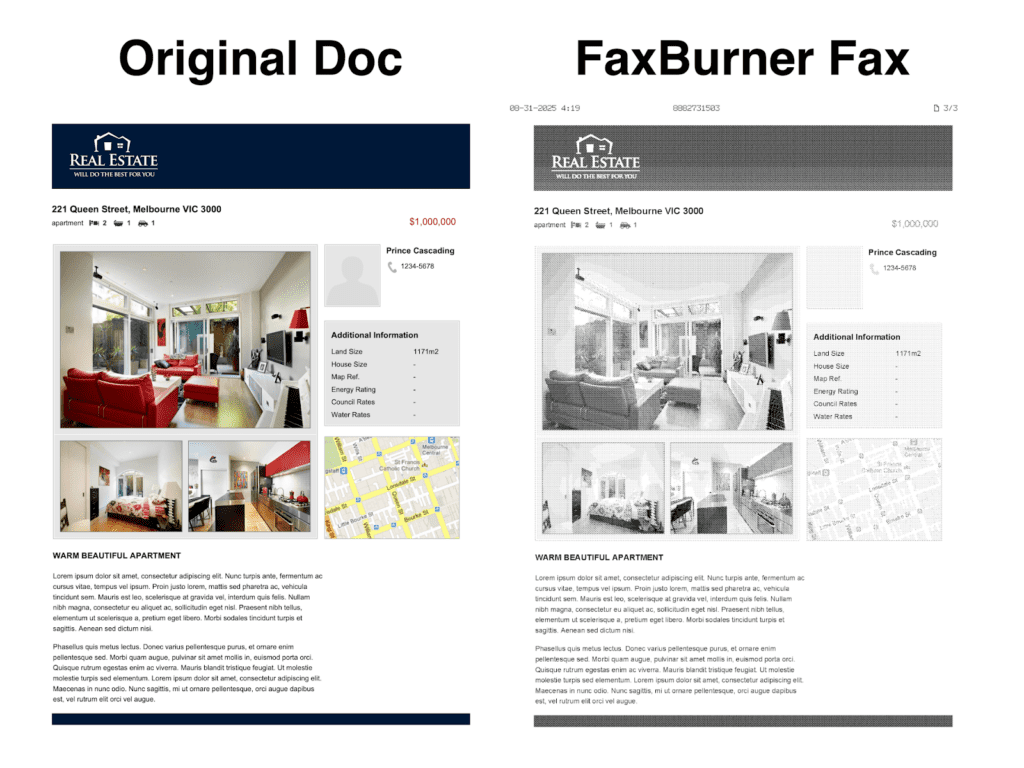
User-Friendliness: 4/5
FaxBurner is a very basic app for iPhone – visually it feels like it hasn’t been refreshed in around 10 years, but everything works well and is easy to do. FaxBurner recommends its iPhone app, but offers email-to-fax with all subscriptions too, in case you’d rather use your email app.

You can easily create custom cover pages and add signatures to documents – but that’s about it. FaxBurner, whilst being limited, is very friendly for all users for what it does offer.
Pricing: 5/5
FaxBurner’s price is unique on this list, in that it offers the best free option here. Without paying anything, you can send 5 fax pages per month every month, and receive 25 pages – using the app or email-to-fax. However, you cannot get your own permanent fax number until you sign up to a plan – the cheapest of which is $14.95 a month, giving you 500 pages each way every month – one of the cheaper options on this list.
There’s also a good value Premier plan for $24.95, which puts FaxBurner towards the better value end of the entire online faxing market. However, it’s the free service which many like about FaxBurner – for folks who send or receive a very small fax every now and then, this might be a favorite.
Support: 2/5
FaxBurner isn’t the best service for high security and confidentiality – it doesn’t offer HIPAA compliance, and there’s very little detail on the website to see if they even encrypt faxes. The support is also minimal, which reflects the low price. There is no live chat, no phone line, you can send a request for help on the website, and then you’ll have to wait a few days for a response.
Customer Feedback: 5/5
FaxBurner is a popular app on the Apple store, with a 4.9/5 rating. They can often be seen responding to positive or negative views uniquely, taking all their customers’ opinions seriously, and offering refunds or goodwill gestures to a lot of complaints.
6th Place | – eFax App, by j2 Cloud Services
Overall Score: 18/25 | “Hard to use, but a top choice for large businesses.”
A good technical app from a long-established efax company, but held back by confusing pricing options and terrible usability. This might be the better option for a medium or large business, but as a regular iPhone faxing app it feels dated and inconvenient.

Performance: 5/5
eFax works really well when it comes to fax quality – from our test faxes, it’s as good as any high-end fax machine at transmissions – pictures are sharp and clear, and key details in images are well preserved.
eFax has some basic features that other fax services offer, like e-signatures, document editing, and in-app scanning, and supports a wide range of file formats. Whilst you can’t do as much as you can on other apps (like scheduled sending for example), it covers all the basics.
User-Friendliness: 3/5
This app is not the easiest to use. For a start, upon installing it, we found that you could only enter your login details as an existing user – there was no way to sign up using the app – we had to go onto their website to do this, which isn’t convenient if you’re mobile and in a hurry.
Once you do sign up, the user interface is sometimes difficult to comprehend – with confusing icons and a more dated appearance than the other, slicker apps. A big plus however is the eFax ecosystem – you can use their website, and also send and receive faxes via email if you need to.
There’s also a huge issue we ran into, which is that the mobile app was broken a lot of the times when we tried to use it. The ‘New Fax’ button often just crashes the app – you can see this happening on two different devices in this video.

Pricing: 3/5
eFax feels far more aimed at large corporate customers than at regular consumers. Their website offers a low monthly price, but only 150 pages per month under their “Pro” package, which is lower than even the “Basic” option for Fax.Plus, and far below the unlimited pages that Municorn offers. To see their corporate pricing, you have to contact eFax directly. We had to give eFax a lower score due to the lack of flexibility and page limitations.
eFax also does what some other faxing services do – which is charge customers extra if a fax page takes over 60 seconds to transmit. Again, this is something the customer cannot control, and we were only informed of this after we signed up, which has forced us to mark it down on price compared to services that don’t do this.
Support: 5/5
eFax stands out for support – firstly being one of the few fax apps to provide a customer support phone line. They also respond to every negative review, to their credit. eFax is clearly well setup to provide large-scale support to their corporate customers, with extra security and features to cater to the corporate crowd, such as SAP integration. There’s a reason they are relied on by Fortune 500 companies for faxing.
Customer Feedback: 3/5
eFax has a 4.7 star average with over 25,000 ratings – a very strong showing – and a longer list of large corporate partners who can vouch for eFax as a strong choice for enterprises. This is clearly a very good choice for a business that needs heavier fax support than the average person.However, the broken app seems to have been a thing for a while – we can see reviews from back in March on the App Store showing people complaining about the same problem, and eFax responding with a copy and paste message. It’s very disappointing that eFax has known about this for months and still hasn’t fixed the problem.
Read our full eFax review here.
7th Place | MyFax by Consensus Cloud Solutions
Overall Score: 16/25 | “The low-budget option”
MyFax is a very basic, incredibly average option if you’re looking to have your own fax number, and get the lowest price possible. There’s not much that impresses about MyFax, but the low price is enough for it to make our list.
Performance: 3/5
MyFax is readable enough to rely on – it’s good but not great. You’ll notice slightly blurry text on our test fax, and not-amazing image quality – but it’s all good enough for most faxing purposes.
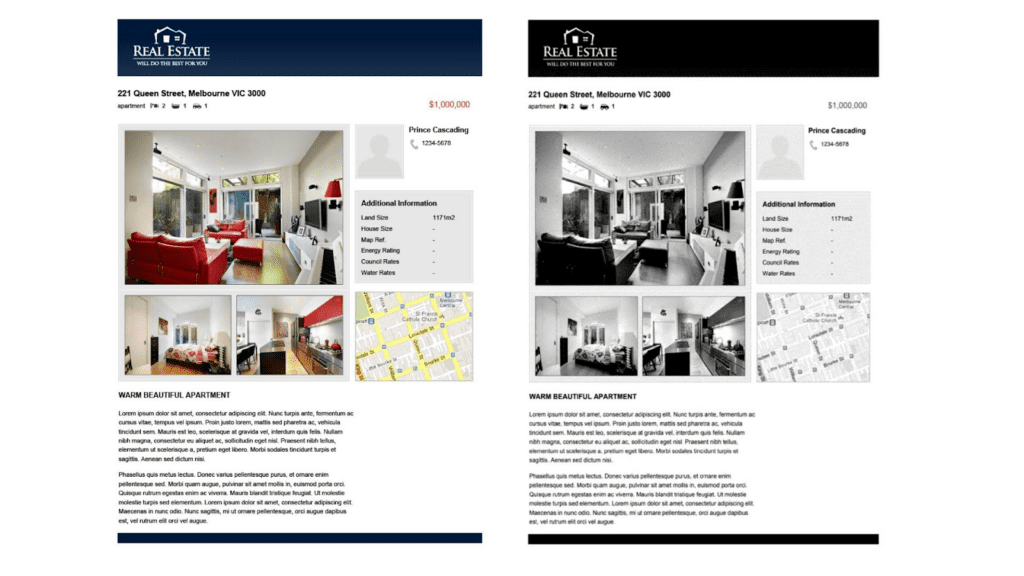
The main concern for us is transmission speed – MyFax is the slowest out of all the apps on this list – our 2-page fax took over 8 minutes to send. This is a problem because you get charged per-page, and MyFax, like many other fax services, charges 1 page per minute when a page is sending. This means out 2-page fax ended up costing a lot more than 2 credits.
User-Friendliness: 2/5
MyFax’s app is simple, but not in a good way – for example, it offers an in-app ‘scanner’ for documents – however, unlike other faxing apps, it just uses the camera. There’s no adapted software which scans text and adapts the image into a document-style format – no border detection, no lighting adjustment – you just send a straight-up picture as a fax, which makes transmissions less readable.
On top of this, it’s just a less thoughtful, less enjoyable app to use. Compare the two ‘send fax’ interfaces below – you can see on Municorn’s app, there’s useful features like a flag of the country you’re sending a fax to, a picture preview of your documents, and the recipient’s fax number in the proper format. With MyFax, it’s less formatted, and harder to read and review at a glance.
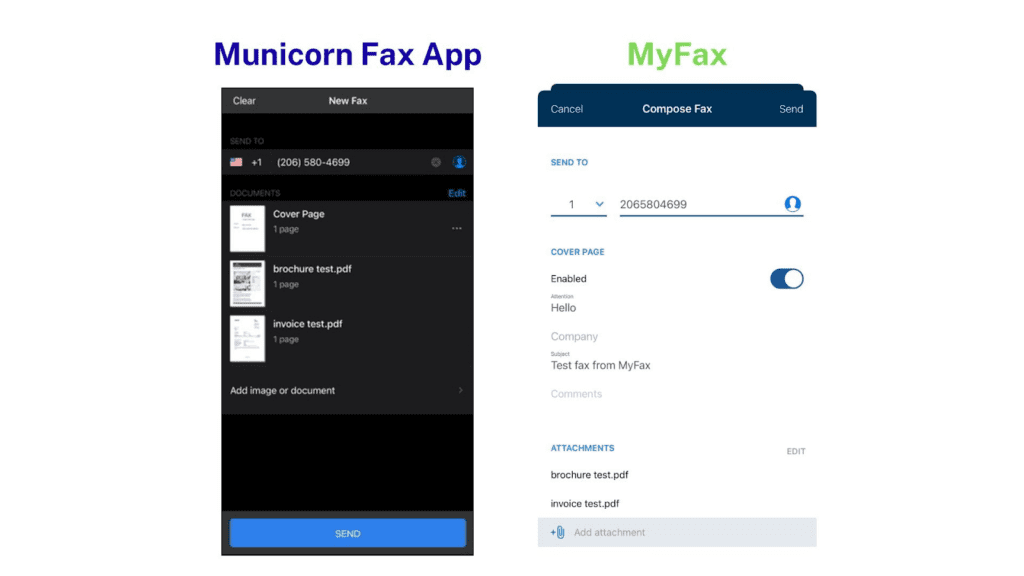
Pricing: 4/5
This is why people use MyFax – the basic package is $12 per month ($5 in the first month), which is a very cheap iPhone faxing service, and a great deal if you don’t do much faxing and aren’t too fussed about using a fancy app. It’s miles cheaper than keeping a fax machine too.
There’s flexibility too – you can pay even less if you get an annual subscription. However, it does charge extra to send faxes internationally, unlike apps like Municorn’s.
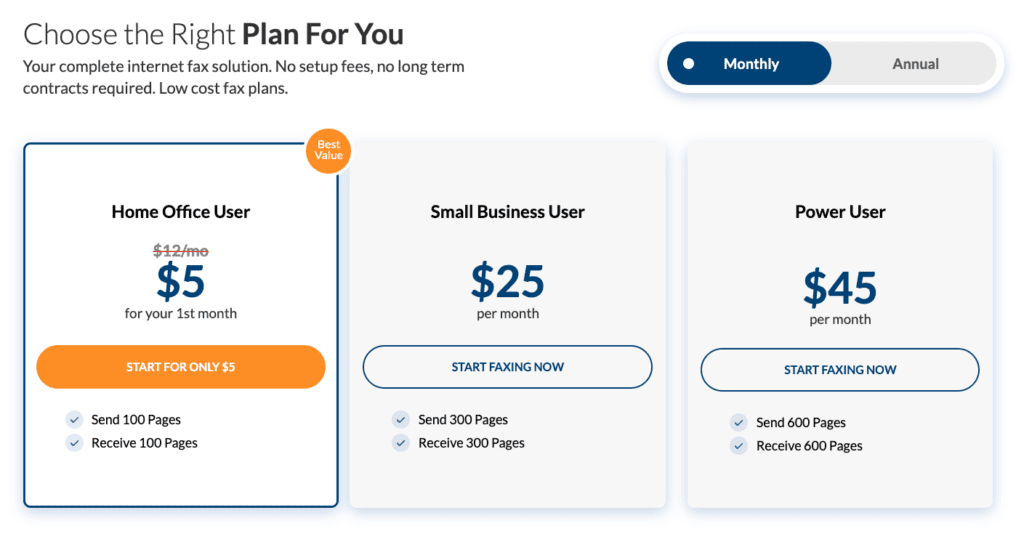
The Small Business User and Power User packages, however, are bad value – you can get much better deals on much better apps elsewhere, so we only like MyFax for low-volume users.
Support: 3/5
The good news is that there’s a long, useful FAQs section on the website, and a customer support number which you can fax if you need something – but that’s it, and most people don’t like having to send a fax as a means of contacting customer support – especially if you’re having trouble sending a fax!
Since it’s in the Consensus family, MyFax benefits from all the typical industry-standard security measures, which means it’s a fairly safe option to use, despite not offering HIPAA support to any customers.
Customer Feedback: 4/5
Nothing major to complain about here – the app has a 4.7 rating on the app store with thousands of reviews. There’s a few complaints about people having trouble unsubscribing, but those mostly look like misunderstandings. MyFax is a popular and generally well-reviewed app – we couldn’t find any major red flags in any reviews we looked at.
]]>The most secure way to transmit medical, healthcare or insurance information is by faxing it. For the majority of us without a fax machine, this means using an online fax service. But be careful – you can’t just use any online fax service – you must use a certified HIPAA compliant faxing service to make sure your data is safe.
This article will explain why HIPAA compliance is so essential for anybody faxing medical records, we’ll then break down the best online fax services which are HIPAA compliant, for the next time you need to fax your sensitive information. Jump straight to our top options by clicking here.
What Is HIPAA?
HIPAA, or the Health Insurance Portability and Accountability Act, is the federal law which set the bar when it comes to how your healthcare information should be transmitted and protected.
If you’ve ever received healthcare, medicine, insurance, or ever interacted with the medical industry – then HIPAA has protected your information from anybody who didn’t absolutely need to see it.
Let’s go over the key concepts of HIPAA:
Protected Health Information
A key concept of HIPAA is PHI, or Protected Health Information. This basically means any medical records about you – any treatment you’ve received, any healthcare or medicine you’ve ever had, or any other medical fact about you.
HIPAA makes it clear what PHI is, and then puts very strict rules on any HIPAA compliant organisation that handles it. All services which adhere to HIPAA standards have to sign a business associate agreement, accepting their responsibility to follow the HIPAA rules.
Business Associate Agreement
A Business Associate Agreement (or a BAA for short), is a legally binding contract required under HIPAA, which lay out the rules for how PHI must be protected. Any fax service handling PHI and claiming to be HIPAA compliant must sign one of these to any customer that asks for it – otherwise they basically aren’t signing up to be an official HIPAA Covered Entity, and the HIPAA rules won’t legally apply to them.
There is only one provider on this list which has not made clear whether or not it will sign a BAA – so we have highlighted this – all of the other services will sign them, and therefore are committing to the full security measures of HIPAA.
Three key HIPAA rules you should know about are the Privacy Rule, the Security Rule, and the Breach Notification Rule.
The Privacy Rule
The Privacy Rule tells HIPAA compliant organisations exactly how they can and can’t use your sensitive information, how they have to store it, and even forces them to notify you whenever it is used.
It even forces organisations to give you a contact in case you want to make a complaint, and lets you see what information they hold on you at any time. Put simply – it protects your privacy to a level that no other communications service does, so this is what makes using a HIPAA compliant fax service so important.
Security Rule
The Security Rule sets out the security features which an organisation must have if it holds your Protected Health Information. This means administrative, physical and technical protections to keep your data in the right hands.
These security requirements are much more strict than those for a regular company that might hold your data – such as a utility or phone company, which makes your medical information incredibly safe when sent with a HIPAA compliant faxing service.
Breach Notification Rule
This rule forces a HIPAA compliant service to quickly notify you if your information is accessed without your permission.
In the unlikely event that a HIPAA compliant fax service ever leaked your data, they’d have to tell you, they’d have to tell the government, and in some cases they would even have to tell the media!
This makes losing customer data very damaging and embarrassing, which is why HIPAA compliant fax services do everything in their power to protect your data. They can be hit with huge fines if they fail to do this.
Why Do You Need A HIPAA Compliant Fax Service?
All of the very strict rules we’ve just looked at apply to every HIPAA compliant faxing service. If a faxing service is not HIPAA compliant, then they don’t legally have to follow any of those rules!
Lots of us use faxing to send our patient data and medical records, either to our healthcare providers or insurance companies (75% of all medical communications in America still happen via fax). Even more of us use faxing to send other sensitive data – like handling legal and financial issues.
So the question is this – why should we ever use a faxing service that doesn’t provide us with the robust security measures and privacy that HIPAA offers?
They say that actions speak louder than words, and many online fax services make promises that they will protect your data, provide strong security, etc., but unless they’re offering you a certified HIPAA compliant service, they don’t legally have to give your data these protections.
If you want the peace of mind that comes with HIPAA’s enhanced security and patient privacy, then you need a HIPAA compliant fax service which is willing to sign Business Associate Agreements with its customers – end of story.
It’s important to stress this – because a fax service which provides HIPAA compliant faxing implements very strong security measures. Some non-HIPAA services can also have these security measures, but if a company is HIPAA compliant and signs BAAs, this means they definitely do implement those strong security measures. The importance of HIPAA isn’t just the certification, but that the faxing service is following the strong security measures required by HIPAA.
The Best HIPAA Compliant Fax Services
The strict requirements of HIPAA makes it expensive for online fax services to get HIPAA certified, and so you might think that a HIPAA compliant fax service would be very expensive.
After all, a HIPAA compliant fax service needs to have key features like military-grade advanced encryption, strict access controls, detailed audit trails, password protection and strong data security and retention policies – otherwise they won’t get certified!
However, if you know where to look, some online faxing services can be HIPAA compliant and low cost. In fact, the best ones are usually HIPAA certified.
This brings us to the best HIPAA certified online fax services – we’ve done the research for you and ranked our favourite online fax services that meet the HIPAA regulations, making these the only options you should consider if you’re ever sending or receiving sensitive medical information.
#1 – Fax App by Municorn
Overall Score: ★★★★★
As per the terms of services, Municorn will sign a HIPAA Business Associate Agreement on request.
The Best Overall Choice For Most Users
Municorn’s iPhone Fax App (also available on Android or on the web) is our best online fax service for HIPAA compliance, and also happens to be the most rated fax app on the Apple Store, with over 340k ratings and an average score of 4.8 out of 5 – so we’re not the only ones putting this at the top of our list.
It offers great value and flexibility, an unrivalled quality of service, and the easiest user experience on this list – with top-rated mobile phone apps and a web portal, offering all types of users a smooth faxing experience.
The Best Value And Flexibility
Our top choices on this list include HIPAA compliance in every single tier of subscription – from the most basic to the most expensive – and Municorn’s Fax App is no different. However, Municorn goes one better, and includes unlimited pages and worldwide international faxing at no extra cost, even on the lowest cost subscription.
What’s more, this is one of the rare faxing services which gives you a weekly subscription option, as well as an annual or monthly subscription. This is the ultimate flexible pricing offer, giving users short-term or longer-term options to set up their own HIPAA compliant fax number, and send as many faxes as needed without any extra charges.
Incredible Fax Quality
Medical faxes need to be incredibly clear and readable, so fax quality is crucial for any HIPAA compliant service. This app leaves us in no doubt – capturing text, graphics and photos in perfect detail, check out the fax quality of a test fax we sent below.

Customer Support
Another way this app stands out is the technical and customer support. Firstly, your entire faxing history is backed in in cloud storage, and since this app is HIPAA certified, this means a very secure storage method.
There’s a reason it’s the highest rated fax app on the Apple Store – very few other apps on this list offer in-app live chat with customer support, which means you can get instant help if you have any questions. Check out the example below, where I asked about HIPAA and got an instant response!

Easy User-Interface
Beyond the live chat feature, the entire fax app is incredibly easy to use, whether you’re on iPhone, Android, or the web. You can send and receive faxes with ease, and signing up and choosing your own fax number takes a matter of minutes.
Should You Use Fax App?
Municorn’s fax app is our top all-round choice for any individual, whether you have heavy or moderate faxing needs. Unlimited pages and high quality faxes, with flexible pricing and low-cost subscriptions make this the ideal choice for most people – however if you’re using faxing for your business then you may prefer the next option.
#2 – EveryFax
Overall Score: ★★★★★
We have checked the terms of service, and this provider will sign a HIPAA Business Associate Agreement on request.
The Best Choice For Email Faxing, or Businesses
Some people prefer to send faxes over email – especially when it comes to dealing with healthcare organizations. EveryFax is an email-to-fax service which lets customers send and receive faxes straight from their email account, and also includes our favourite web faxing option.
Value and Flexibility
Despite not having a weekly option, EveryFax offers great value to individuals through including HIPAA compliance as standard on its basic plan, and also includes unlimited faxing on all other plans – only the top two options on this list offer unlimited pages, which means you won’t ever have to worry about sending lots of faxes in a short time – which can often happen during a medical situation or insurance claim.
EveryFax also offers 5 seat or 25 seat options, making it ideal for small businesses who need to handle sensitive healthcare information across a team.
Email or Web Faxing
EveryFax gives all users two ways to fax – using email, or using the web app, which can be accessed from any desktop or mobile browser. This makes it ideal for connecting with healthcare professionals in a way that suits you best. You can take advantage of the web app’s functionality with features like electronic signatures – in case any of those medical documents need a quick signature and fax.
Customer Support
EveryFax also demonstrates exceptional customer support – even including access to a 24/7 support line for most of its plans. It’s also one of the few options on this list to include a live chat feature, which you can use to ask its AI questions about the service, or speak to a support agent. I asked it about HIPAA faxing – check out the answers it gave me below!

Should You Use EveryFax?
EveryFax is a top choice for anybody who just prefers doing things over email, or people who want an advanced web app to fax from using any device – it works great on desktop or mobile. EveryFax is also the best choice for small or medium sized businesses who handle electronic Protected Health Information – the unlimited faxing combined with the industry leading customer support makes this a no brainer if you’re running a business.
#3 – CocoFax
Overall Score: ★★★★☆
We have checked the terms of services, and this provider will sign a HIPAA Business Associate Agreement on request.

A User-Friendly and Very Flexibly Priced Alternative
CocoFax is a popular fax service used by individuals and enterprises and stands out for its multi-platform offering and its very flexible pricing – with a huge range of subscription packages to choose from. You can even try it out for free with no strings attached – including free HIPAA compliance!
The Good…
- Lots of different pricing options – including very limited and low-cost ‘Lite’ and ‘Basic’ options, giving flexibility to customers who only fax occasionally for as low as $8 per month, as well as advanced business packages.
- A free trial which allows users to send up to 9 pages of HIPAA compliant faxes, with your own custom fax number.
- Very strong security, with every subscription level offering HIPAA compliant faxes, as well as top data security measures such as 256-bit AES encryption, 2FA and firewall protections, complete with GDPR and PCI-DSS compliance.
- CocoFax claims to be omni-platform – use it on a web browser, windows or Mac computer, iPhone or Android, or email-to-fax, at no extra cost. However, take a look at our last point on the ‘Bad’ section.
- CocoFax supports connectivity with most cloud storage services, productivity apps, and electronic medical record systems – great for businesses.
- The web faxing app is very user-friendly, resembling most popular email services like Gmail or Outlook.
- CocoFax is well reviewed on G2, with a 4.7 out of 5 rating – better than top services like HelloFax and Documo. Users on GetApp also have good things to say about it, with a 4.3 out of 5 rating.
The Bad…
- CocoFax charges you a page for cover sheets, which many online faxing services do not do. There’s also an option for you to send a message with your outgoing faxes – CocoFax puts this message on a separate page (not the cover page), and charges you for that too – meaning you could be charged 3 pages for a 1 page fax. You need to bear this in mind when selecting your monthly subscription, as a Lite subscription can run out very quickly.
- The fax quality is good, but not as excellent as some other top services.
- CocoFax’s options for business customers are not quite as advanced and customisable as those offered by other online faxing services, such as eFax and Fax.Plus.
- At the time of writing, the CocoFax Android app was unavailable on the Google Play store, with the link provided on their website leading to a broken URL. We also couldn’t find it when searching the store on our own phone. What’s more – we were unable to find any link to the iPhone app, and we couldn’t find it on the iPhone app store, despite CocoFax’s website claiming to offer an iPhone app. So right now, there is no evidence to support CocoFax’s claim to be available on Android or iPhone apps.
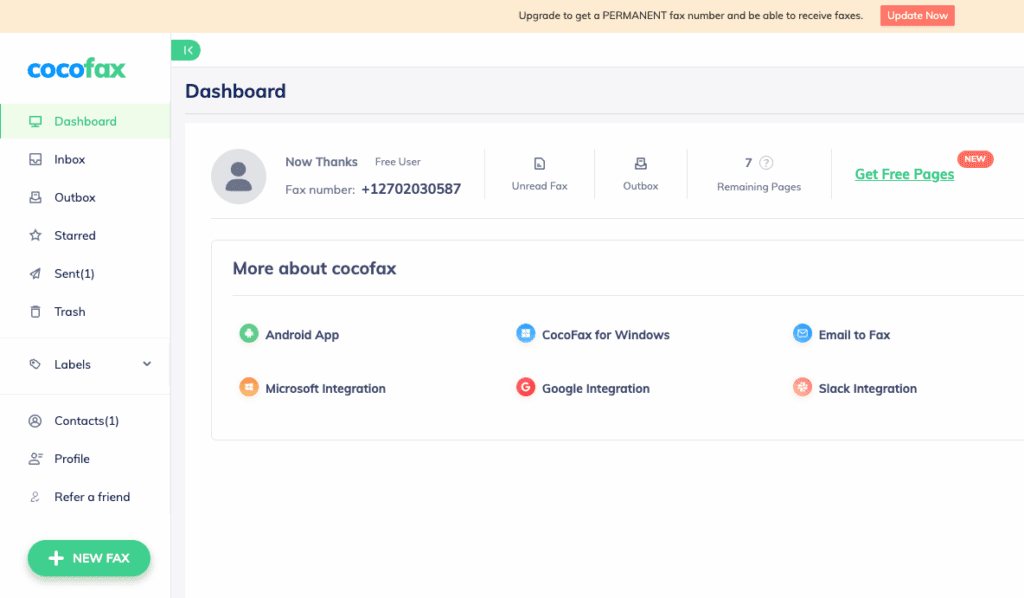
Should You Use CocoFax?
CocoFax is a great alternative option for most people, but especially those who do not regularly send faxes. The very low-cost options which include HIPAA compliance make this a really accessible choice. However, there’s a few things to watch out for – don’t count on the mobile apps being available (we couldn’t find them!), and since you get charged for fax cover pages and messages, your low-cost subscription could run out very quickly.
#4 – Faxage
Overall Score: ★★★★☆
We have checked the terms of services, and this provider will sign a HIPAA Business Associate Agreement on request.
Faxage is a healthcare-specialised online faxing provider. It’s not the shiniest or most exciting option on this list, but it offers exceptional value and support for HIPAA faxing, and is multi-platform, and it’s provided by a company with a great reputation.
The Good…
- Faxage has a great range of low-cost options and will even recommend you a plan based on what you need. None of the higher options on this list offer what Faxage does – a very cheap monthly fee of $3.49 to maintain your own fax number, and then $0.05 per minute (per page) for any incoming and outgoing faxes.
- You can get multiple fax numbers under the business plans.
- You can also get a toll free fax number at a good deal – great for businesses who want to give their customers this option.
- Faxage is truly omni-platform – you can fax from the website, from email-to-fax, from their mobile apps, or with their API access.
- You can call Faxage at any time during business hours and receive specialist support over the phone, no matter your subscription level.
The Bad…
- The web app and mobile phone apps are quite dated – they don’t look or feel very modern, and lack some of the features and ease-of-use that services like Municorn’s Fax App and EveryFax offers – such as in-app scanning, and the wide range of file types.
- There is a small setup fee of $5 for most subscriptions, incentivising people to stay subscribed for longer lengths of time rather than quickly subscribe and unsubscribe whenever they need to.
- Faxage’s website states that they support faxing across the US and Canada – it isn’t clear if you can send international faxes.
Should You Use Faxage?
Faxage isn’t the best-looking or the easiest to use, but it works on every platform and is a very good option if you need a cheap, long-term fax number which will always be HIPAA compliant, with the occasional need to send faxes that guarantee a secure transmission. If you very rarely send faxes, but always want a fax number just in case, then Faxage might be the best value option on this list.
#5 – Documo
We have checked the terms of services, and this provider will sign a HIPAA Business Associate Agreement on request.
Overall Score: ★★★☆☆
Documo (formerly known as mFax) is a highly secure cloud-based faxing service, which helps its users send over 600,000 fax pages per day. It comes with very user-friendly apps and web options, also including email-to-fax and of course, HIPAA compliance on all subscription tiers.
The Good…
- Top customer support, with live chat, phone line contact or email during business hours.
- Comes with very advanced features for businesses, including integration into many different systems, and its own Intelligent Document Processing feature – designed to help businesses process incoming faxes more efficiently.
- Very good iPhone and Android apps, as well as web faxing and email-to-fax.
- Lots of good value business pricing tiers, with competitive prices for high-volume business faxing.
The Bad…
- Documo only has one subscription option for individuals, meaning that for personal use, it gives customers a very limited choice which doesn’t represent the best value.
- The apps can be limited in functionality, and it is better to scan and edit documents for faxing in a different app.
Should You Use Documo?
Documo is a good option for high-volume business faxing – the Enterprise plan offers good value for heavy faxing, and the multi-platform nature means it can be flexibly used. However, it’s not recommended for smaller business on a tighter budget, and it’s also not the best choice for individual users.
#6 – iFax
We have checked the terms of services, and this provider will sign a HIPAA Business Associate Agreement on request.
Overall Score: ★★★☆☆
iFax is a popular online fax service, offering a very sleek and modern user experience across all platforms. It offers a variety of pricing and user options when it comes to faxing, and includes some very advanced and AI powered features to enhance the faxing process.
The Good…
- Very widely used service with strong ratings on G2, and a variety of industry awards and certifications.
- Multiple pricing models – you can purchase a subscription for regular faxing, or you can pay per fax – offering better flexibility than most options on this list.
- Very modern and well-designed apps which are a pleasure to use, and support a huge range of features such as annotate/sign documents, scheduled faxing, integration with other systems, and AI geatures.
- High quality faxes.
The Bad…
- One of the more expensive options on this list – HIPAA compliant faxing is only available with the advanced ‘Plus’ subscription, which starts at $30 per month and includes 500 pages per month – you can get better deals elsewhere.
- The ‘Plus’ subscription option is very limited and it feels like iFax is trying to push users to the more expensive ‘Pro’ option, at $40 per month. With ‘Plus’, you cannot get basic features like custom cover sheets, scheduled faxing, fax forwarding, annotate or signing, 24/7 live chat, or even faxing via email.
Should You Use iFax?
iFax is one of the pricier options on this list for HIPAA compliant faxing, which is what brings it down to this ranking. However, it’s still a fantastic service if you’re willing to pay for it – the ‘Pro’ option is a great choice for an individual or business with heavy faxing requirements, and the iFax apps are some of the best in all of online faxing.
#7 – SRFax
We have checked the terms of services, and this app will sign a HIPAA Business Associate Agreement on request.
Overall Score: ★★★☆☆
SRFax is an email-to-fax focused service with extremely high security and HIPAA standards, set up specifically to help people and medical providers faxing patients medical information. If you only need to use email-to-fax, SRFax can be a very affordable way to stay HIPAA compliant when faxing.
The Good…
- Low-cost ‘Lite’ option – 200 pages per month (sending or receiving combined) for only $12.60 per month, with your own fax number. Other packages are also very competitive and low-cost for more pages.
- Complies with all Canadian regulations (PHIPA) as well as HIPAA.
- Optional PGP encryption available on all faxes to further protect sensitive information.
- Provides access to a secure downloader and printer driver, for more advanced and technical users and organisations.
- Will sign a business associate agreement whenever required.
The Bad…
- No app or web faxing options, therefore only usable via email-faxing or by printer driver faxing – which most people do not prefer.
- Very high volume plans can become expensive (it goes over $500 per month) compared to an unlimited faxing service such as Municorn’s Fax App, or EveryFax.
- The website states “SRFax is the only HIPAA-compliant fax for healthcare that will sign a Business Associate Agreement”. This is false and misleading – other services on this list do that, so we have a problem with them putting false claims on their website which are unfair about other faxing services.
Should You Use SRFax?
SRFax can be very budget-friendly if you only need light email-to-fax support – it has very high security standards, and businesses can benefit from their BAA support, secure downloader and printer driver options. The more high-volume faxing plans are extremely expensive, however.
#8 – SimpleFax
We have checked the terms of services, and it is not clear whether or not this app will sign a HIPAA Business Associate Agreement.
Overall Score: ★★★☆☆
SimpleFax is a unique, niche option for people who don’t send many faxes, and don’t need too many advanced technical features. The pricing model is very different to anything else on this list, and will only suit some people, but for those people it is a great option.
You pay a one-time fee to download the app – either for mobile app, Windows or Mac computer. You then follow a 20/20 rule – you can send 20 HIPAA compliant faxes per month, of up to 20 pages each.
The Good…
- Incredibly cheap long-term option for people who have light, but regular requirements to send faxes.
- You can send faxes to around 25 different countries, at no extra cost for international HIPAA faxing.
- Available on Android and iPhone, and Mac and Windows.
- No subscriptions.
The Bad…
- The app claims to be HIPAA compliant, but there is no detail apart from that statement on their website, and they do not say if they will sign Business Associate Agreements with customers. This means we cannot be sure that they are implementing the security measures associated with HIPAA compliance.
- There are no ‘bells and whistles’ – the app is extremely limited and only supports PDF documents, so you will have to scan and prepare your documents separately before using.
- You cannot get your own fax number, and you cannot receive faxes – only send.
- Customer support is very limited.
- Fax quality is average at best.
- If you want to use SimpleFax on a different platform, you have to purchase it again – for example, going from Windows to iPhone requires 2 different purchases.
Should You Use SimpleFax?
People with infrequent faxing needs, who only need to send (not receive) faxes, and don’t mind about the average quality and lack of technical features might benefit from using SimpleFax. If you’re technologically savvy enough to work with it, it’s a great long-term option.
The only other big problem is that with medical faxing, you may sometimes need to have your own fax number to receive important documents back from healthcare organizations.
#9 – eFax
We have checked the terms of services, and this provider will sign a HIPAA Business Associate Agreement on request.
Overall Score: ★★☆☆☆
eFax is a king in the world of online faxing, and has helped Fortune 500 companies with their faxing needs for over 25 years. With some of the highest security measures in the industry, it should be on any list of faxing services which offer secure HIPAA faxing.
The Good…
- eFax has a ‘very large files’ feature for sending huge files, which are usually too big for emails or faxes. This can be helpful for complex medical documents.
- eFax has some of the most robust security measures in online faxing and can offer customers specialist compliance advice for companies that work in regulated sectors, so they also act as consultants.
- Unrivaled fax quality.
- You can get a free trial period (but it won’t be HIPAA compliant).
The Bad…
- HIPAA compliant faxing is only offered with eFax Protect or above – meaning that you cannot get a HIPAA compliant service for under $50 per month, making it one of the most expensive options to get basic HIPAA protection.
- Other important features are also only available on the more expensive plans.
- The online fax portal and mobile apps are outdated with frequent performance issues – such as broken links, crashing, and constantly logging you out. This gets very frustrating when using the app.
Should You Use eFax?
eFax is a top option for large businesses who want custom-built enterprise fax plans and would benefit from the specialist advice and features eFax can provide. As a smaller business or individual user, there are much better options on this list for HIPAA-compliant faxing.
Read our full eFax review here.
#10 – Fax.Plus
Overall Score: ★★☆☆☆
We have checked the terms of services, and this provider will sign a HIPAA Business Associate Agreement on request.
Fax.Plus is a sleek and polished online faxing service – with some of the most user-friendly apps available and some clever features for higher paying customers, it also offers HIPAA faxing to some users.
The Good…
- Fantastic apps and user-friendliness on all devices.
- Strong basic security, and very advanced security features such as access to data residency locations for Enterprise customers.
- Free trial period (which is not HIPAA compliant).
The Bad…
- HIPAA compliance is only offered to Enterprise customers – at $100 per month, this makes it the most expensive option on this list for customers who want the peace of mind that HIPAA offers.
- Lots of other key features are only available on more expensive plans.
Should You Use Fax.Plus?
Fax.Plus is a great online faxing service for casual faxers, with a great range of apps that support high quality faxing. However, for HIPAA compliant faxing, it’s not a good choice simply because of how expensive it is. The only people we’d recommend consider this option are large businesses with heavy faxing needs, who might want to use some of Fax.Plus’ other advanced features available on the Enterprise plan. Read our Fax.Plus review here.
]]>What FaxBurner lacks in quality and security, it makes up for in price and convenience, making it a great budget choice for non-sensitive day-to-day faxing.
For more important or sensitive faxes, or for folks looking for more advanced features, we’d recommend looking elsewhere.
FaxBurner – What We Like
- Low price and a (very limited) free option
- Mobile app use and email-to-fax included on all plans
- More features than other low-cost faxing services
FaxBurner – What We Don’t Like
- No annual pricing – monthly only
- Less security than most other faxing services
- Fax quality is limited
About FaxBurner
FaxBurner was launched in 2010 by Networx Online, a tech company headquartered in California. The aim of FaxBurner is to provide low-cost faxing to people who don’t want to get a fax machine.
FaxBurner gives its users the ability to fax on iPhone or Android, on the web portal via their website, or to use email-to-fax to send faxes with their regular email service.
Positioned in the low-cost end of the market, FaxBurner doesn’t provide many of the fancy features or advanced security you’ll see with other online fax services. It is, however, cheaper than those other options, and includes a rare completely free option, which users can use indefinitely to get a temporary fax number and receive a small number of faxes per month.
FaxBurner – Full Review
We’ve been trying and testing FaxBurner, using the app and email functionalities to send faxes and test the features.
The documents sent in our tests, as we do with other apps we review, are the sample invoice, and sample brochure page. These two documents are common items that people might send as faxes, and have a mix of text, lines, shading, color and images – the fundamental parts of a document.
Our review will focus on four key areas:
- Quality
- User Experience
- Price
- Security & Customer Support
Quality | ★★☆☆☆
The quality of the fax transmissions we sent was average at best when it comes to the fundamentals. FaxBurner operates at an industry-standard 204×196 dpi resolution, but let’s look at how well that came through in our tests.
We can start by looking at the original documents we sent, versus how FaxBurner transmitted them:

The sample invoice is a basic document comprised of mostly text, but with some shading and lines, and a logo. The shading failed to transmit through on the top line of the invoice breakdown – appearing as white in the final fax, however the rest of the document is very clear and readable.

The brochure page test is more advanced, and allows us to judge how well FaxBurner deals with color and images. In this case, this is a slightly below-average fax transmission. The lightness of the images has been preserved well enough to show the image, however the quality has been distorted and lots of detail has been lost, resulting in bad resolution photographs on the final fax.
On top of this, the map image has lost a lot of clarity and detail, and graphical elements such as the person icon have disappeared completely. The shading on the top bar has also transmitted badly, resulting in a two-tone block of color along the top.
For perspective, let’s compare FaxBurner’s fax quality to another fax service – Fax App by Municorn. The difference is easy to see – Fax App has kept more detail and sharpness in the images, the map is much easier to read, and the color and shading has transmitted much better.

Overall FaxBurner’s quality is good enough to rely on it for basic documents such as letters and invoices, especially considering FaxBurner’s pricing. However, for any documents with images, color, or other graphical elements, FaxBurner’s quality can lose a lot of important detail and make documents look far worse than other services.
Our 3-page fax too around 5 minutes to send, which is neither fast nor slow compared to other services – this is around what you would reasonably expect from an average fax service.
User Experience | ★★★★☆
Despite being quite limited functionally, FaxBurner is a very user friendly service considering it’s one of the cheaper options available, offering not only app access but email-to-fax services for all users (even on the free plan).
FaxBurner App
Let’s start with a look at the mobile app, which FaxBurner recommends over email-to-fax as a day-to-day way to use.
The design of the app feels quite ‘dated’ in 2025 – it clearly hasn’t had a refresh for a long time, and there are other more slick and modern faxing apps available. Despite this, it handles the basics very well and works smoothly.
FaxBurner’s app offers a few basic features that you don’t usually see on other online fax services in the budget end of the market, such as the ability to sign documents and customizable cover pages.

Email-to-Fax
FaxBurner also stands out in offering email-to-fax to all users on any plan, even the free users! This a great way to fax without the app, but does have a few limitations.
The email-to-fax instructions are easy to follow, and in just a few clicks you can attach your documents and send your fax via email. However, it’s unclear how you should handle international fax numbers when sending an email fax, and the instructions don’t cover this.
It’s also hard to fully customize your cover sheet when sending an email-fax. This is because when you send your email, you have to put the recipient’s fax number in the subject line. This means the ‘RE:’ (subject) section of the cover sheet will be blank. There seems to be no way to add a subject label when sending an email-to-fax fax, which is a limitation.
On top of this, the branding of the cover sheet is quite over-the-top, and can look unprofessional with the FaxBurner logo and website written all over the top of the sheet.
Another small thing we noticed is that it messed up the apostrophe in the sender’s name, reading “O’Grady” as “O'Grady” – this means many users will have their name appearing incorrectly when sending a fax with FaxBurner.

One great thing we noticed is that FaxBurner automatically emails you each fax you receive as a pdf, so you don’t even need to have the app handy when you receive a fax in order to view it.
Overall, FaxBurner is easy to use, however the mobile app version is the way we’d prefer to use it regularly.
Price | ★★★★☆
FaxBurner is a very competitively-priced low-cost online fax service, and a good choice for a range of people looking for a basic fax service on a budget, which will cost far less than a physical fax machine.
| Free Plan | Professional Plan | Premier Plan | |
| Price (Monthly) | Free! | $14.95 | $24.95 |
| Fax Number | Temporary | Permanent | Permanent |
| Fax Pages | 25 Inbound 5 Outbound (Total) | 500 (Inbound and Outbound) | 2,000 (Inbound and Outbound) |
| Fax App | Yes | Yes | Yes |
| Email-to-Fax | Yes | Yes | Yes |
| HIPAA Secure | No | No | No |
Free Fax Service?
FaxBurner prizes itself on its “free” version, which allows users a free service to receive faxes up to 25 pages per month, forever. However, this is more of a free trial than a permanent plan – as you can only send 5 total fax pages, and this does not reset each month – you just get 5 pages in total.
You can setup a temporary fax number, which you get to keep for 24 hours, if you want to receive faxes on the free plan. After 24 hours, your disposable fax number will be removed, and you will need to request a new, different temporary number to receive more faxes.
The free package should be seen as a convenient way to receive faxes occasionally in an unsecured and time-restricted way. It is, however, much more than other services offer for free, and so FaxBurner deserves credit for this option.
Paid Plans
FaxBurner’s paid account plans get you more pages to send and receive, with up-front monthly pricing and no other hidden fees.
With the Professional and Premier plans, you can get your own permanent fax number, a toll free fax number with 500 or 2,000 monthly pages respectively.
This represents much more value per page than equivalent plans at services such as Fax.Plus or iFax, which also don’t offer email-to-fax on all their plans, as FaxBurner does. However, you can get even more value from unlimited faxing services, such as the cheaper overall HumbleFax, and the HIPAA compliant Fax App by Municorn, which both have unlimited faxing (Fax App includes international faxes in that plan too), making those services cheaper per page.
Other Pricing Considerations
One frustration with FaxBurner’s pricing is that you can only purchase a monthly subscription – no annual subscription is offered to users. This means if you want a long-term plan or a more permanent toll free number, you could find better value from services which offer heavy discounts for annual plans, such as Fax App by Municorn.
An advantage to new users is that no credit card or payment details are required in order to set up your free account – you can get started completely free today by just entering your email address and creating a password – you’ll even be able to download apps from FaxBurner and use them for free on your phone.
At the time of writing this, it’s unclear if FaxBurner offers international faxing at all, or at an extra cost. It’s mentioned that the service only works in the US and Canada when you sign up, so we’re assuming you cannot send faxes internationally. That question is also included, but left blank, in their FAQs.

Security & Support | ★★☆☆☆
Security
FaxBurner is not a service you should be using if you need a highly secure way to send documents and keep confidential faxes safe – other services can offer more security and regulatory compliance.
Firstly, FaxBurner is not HIPAA compliant. This means that the strict rules enforced by HIPAA regulations to HIPAA compliant fax services do not apply to FaxBurner. These rules, which apply to fax services like Municorn’s Fax App, protect your sensitive information whenever you send documents, making sure you have maximum privacy and security, and imposing strong penalties on services which fail to do this.
Since FaxBurner is not HIPAA compliant under any plan, it is not recommended to use this service to send sensitive information, particularly concerning healthcare or medical information.
Furthermore, there is very little detail on the security measures FaxBurner does provide. Services like Municorn’s Fax App also provide AES 256-bit end to end encryption – the same level of security used in nuclear technology – but FaxBurner doesn’t claim to use this, instead using basic TLS protocols to protect faxes.
Support
The support provided by the FaxBurner team is minimal, as is to be expected from a lower cost service. There is no live chat or phone line to call, as you’ll get with other services, instead you can raise a ticket for support and the team will get back to you – but you can only do this if you have a paid plan.
There are some FAQs on the web page which cover most scenarios and common questions, which are relatively helpful.
FaxBurner also warns users of the free plan to not interact with the IRS with temporary fax numbers – this is because many people use faxes to complete their taxes, but the disposable fax numbers reset after 24 hours.
FaxBurner also claims to use AI to monitor for fraud and spam – however there’s no elaboration on how this is done, or what this process involves.
Reviews
Customer feedback is positive for FaxBurner.
FaxBurner has a very positive score on the Apple Store, with a 4.9/5 rating. They can frequently be seen responding to good and bad reviews in a unique and engaging way – we even found one bad review which led them to refund a customer’s annual charge because they locked themselves out of their account.
FaxBurner Rating | ★★★☆☆
FaxBurner is a good, low-cost fax service for people who might want to do the following:
- Receive faxes occasionally with a temporary number under the free plan.
- Send and receive faxes which are non sensitive or confidential, and therefore do not need the high security or privacy regulations that HIPAA certification provides (no medical or financial information recommended).
FaxBurner’s user-friendliness and basic features, combined with a relatively low price, make it a good option for regular unimportant faxes. However, for sensitive or important faxes, for high-volume faxes, or for people looking for a more advanced and modern service, we would recommend looking elsewhere.
FaxBurner Alternatives
Here are some alternatives to FaxBurner if you want to explore other fax services:
- Municorn’s Fax App offers a more powerful, modern and popular app than FaxBurner’s, and is available on iPhone and Android platforms. Fax App offers unlimited faxing under every plan (including international faxing), offers heavy discounts on an annual subscription, as well as monthly and weekly for flexibility, and it is far more secure, offering HIPAA compliance.
- EveryFax is a web faxing and email-to-fax service which offers greater security than FaxBurner, and also includes unlimited pages beyond its basic plan. The web portal is more modern and user-friendly than FaxBurner, and as well as HIPAA compliance it offers business packages and enterprise-level security and support.
- HumbleFax, like FaxBurner, is a low-cost fax service without many frills or strong security measures like HIPAA compliance. However, it is slightly cheaper per month than FaxBurner’s Professional plan, and offers unlimited faxing pages. However, HumbleFax does not offer a mobile app, and must be used through the web.
- MyFax is a low-cost fax service which has a cheaper monthly price ($12 per month) than FaxBurner, but comes with only 100 pages per month to send and receive, versus FaxBurner’s 500 pages at $14.95. It includes a mobile app and email-to-fax.