 Dear valued customers, As the year comes to an end, we’d like to take a moment to say thank you. Thank you for choosing ConnectyCube, for trusting our platform, and for building amazing products with us throughout the year. Your read more...]]>
Dear valued customers,
As the year comes to an end, we’d like to take a moment to say thank you.
Thank you for choosing ConnectyCube, for trusting our platform, and for building amazing products with us throughout the year. Your ideas, feedback, and projects inspire us to keep improving and delivering better real-time communication solutions every day.
This year has been full of growth, new challenges, and exciting milestones – and we’re truly grateful to have you as part of the ConnectyCube community.
 Wishing you a Merry Christmas filled with warmth, joy, and meaningful moments with your loved ones.
 May the New Year bring growth, success, exciting new opportunities, and ambitious goals that turn into real results.
We’re excited to continue working with you in the year ahead and to support your projects.
Thank you for being with us – and here’s to another year of building great things together! 
Warm wishes,
The ConnectyCube Team
]]>
 Push notifications are the bridge between real-time communication and real-world user behavior. When implemented correctly, push notifications keep conversations alive, messages timely and users engaged. When implemented poorly – they become a source of frustration, missed messages and eventually read more...]]>
Push notifications are the bridge between real-time communication and real-world user behavior. When implemented correctly, push notifications keep conversations alive, messages timely and users engaged. When implemented poorly – they become a source of frustration, missed messages and eventually app uninstalls.
In chat applications especially, push notifications are not a “nice to have” feature. They are part of the core messaging infrastructure. This article explores how push notifications work in chat apps, the platform-specific nuances of Android and iOS, and the best practices developers should follow to build a reliable, scalable and user-friendly notification system.
Push notifications as part of chat architecture
In a real-time chat system, push notifications act as a fallback transport. When a client is connected via WebSocket or another persistent channel, messages are delivered instantly. When the client is disconnected, backgrounded or terminated, push notifications become the only way to notify the user that a new event has occurred.
This duality creates a fundamental architectural requirement: push notifications must be consistent with real-time message delivery, not independent from it. A push notification should never be the source of truth for message content. Instead, it should act as a signal that prompts the client to synchronize state with the backend.
Well-designed chat systems treat push notifications as event triggers, not message containers.
Platform push services and their constraints
Android and iOS rely on fundamentally different push delivery models, even though they serve the same purpose.
On Android – Firebase Cloud Messaging (FCM) provides a relatively permissive environment. Applications can receive data payloads, perform limited background processing and decide how notifications should be displayed. However, this flexibility is balanced by aggressive battery optimization features such as Doze mode, App Standby Buckets and background execution limits.
On iOS – Apple Push Notification service (APNs) is far more restrictive. Background execution is tightly controlled, silent notifications are opportunistic rather than guaranteed, and misuse of push mechanisms can directly impact delivery reliability. Apple treats push notifications as a privileged system resource and applications must operate within narrow constraints to remain compliant.
A production-grade chat app must be designed with these differences in mind from the start.
Payload design and message semantics
One of the most common architectural mistakes in chat apps is embedding full message content directly into push notification payloads. While this may appear convenient, it creates multiple long-term problems:
- both FCM and APNs impose payload size limits
- push payloads are not encrypted end-to-end in the same way as message transport channels
- push delivery is not guaranteed, which means payload-based message delivery can lead to data loss or inconsistency.
The correct approach is to include only identifiers and minimal metadata in push payloads. Typical payload data should include:
- Conversation or dialog identifierSender identifier
- Event type (message, call, mention, system event)
- Timestamp or sequence marker
When the client receives the push, it should fetch the actual message content from the backend. This ensures consistency, allows message history recovery and keeps push notifications lightweight and reliable.
Android delivery behavior and execution model
Android allows two primary push message types: notification messages and data messages. For chat applications, data messages are almost always preferable, because they allow the application to decide how and when notifications should be shown.
Delivery priority plays a critical role in Android push behavior. High-priority messages can wake the device and bypass certain battery optimizations, while normal-priority messages are deferred to preserve power. In chat apps, high priority should be reserved for user-visible, time-sensitive events such as direct messages or calls. Overusing high priority leads to throttling and degraded delivery over time.
Background execution limits further complicate Android delivery. When the app is idle, background services may not start immediately, and network access may be delayed. For this reason, push handlers must be lightweight, deterministic, and short-lived. Any complex logic should be deferred until the app is brought to the foreground.
Notification channels are also essential for long-term usability. They allow developers to separate message notifications, group notifications, and call notifications into distinct categories, giving users control without disabling notifications entirely.
iOS delivery behavior and background limitations
iOS enforces stricter delivery rules that significantly affect chat app behavior. Silent notifications can be used to trigger background updates, but delivery is opportunistic and depends on system heuristics such as app usage patterns, battery state, and network conditions.
Apple explicitly discourages using silent notifications as a real-time transport mechanism. Instead, they should be treated as hints that allow the app to update state when conditions permit.
Alert notifications, while more reliable in terms of user visibility, should be used sparingly. Excessive alerts degrade user experience and increase the likelihood that users will disable notifications or that the system will reduce delivery priority.
For call-related events, iOS provides PushKit and VoIP pushes, which are designed for immediate delivery and allow the app to present an incoming call UI even when terminated. These notifications are tightly regulated and must only be used for genuine call events.
Payload size limitations on iOS reinforce the principle of minimal push content. Including identifiers rather than message bodies improves delivery reliability and keeps the system compliant with Apple’s guidelines.
State synchronization and message consistency
A push notification should never be the sole trigger for displaying a message. Chat applications must always synchronize message state with the backend upon app activation.
This includes:
- fetching missed messages
- resolving message ordering
- updating read receipts
- handling duplicate events
Push notifications can arrive out of order, arrive late or fail to arrive entirely. A robust chat app assumes that any of these scenarios can occur and uses server-side state as the authoritative source.
Sequence IDs, timestamps, and message versioning are essential tools for maintaining consistency across devices and sessions.
Notification suppression and context awareness
Context-aware notification delivery is critical in chat apps. If a user is actively viewing a conversation, sending a push notification for that same conversation adds no value and actively harms the experience.
Advanced chat systems track:
- app foreground/background state
- active dialog identifiers
- user presence and session activity
Using this information, the backend can suppress or downgrade notifications dynamically. This reduces noise, improves engagement, and preserves user trust.
Security and privacy considerations
Push notifications often carry metadata that can reveal communication patterns. Even without message content, identifiers and timestamps can be sensitive.
For this reason:
- Push payloads should never contain confidential message content
- Backend systems must validate permissions before sending notifications
- Tokens should be securely stored and rotated
- Invalid or expired tokens should be removed promptly
In regulated environments, push notifications must also comply with privacy and data residency requirements, especially when third-party push services are involved.
Scalability and high-volume delivery
At scale, push notifications become a throughput and reliability problem. Large chat systems may need to handle millions of push events per minute during peak usage.
Scalable architectures typically include:
- Asynchronous push queues
- Rate limiting and batching
- Retry mechanisms with exponential backoff
- Separation of transactional and non-critical notifications
Monitoring delivery success rates and platform feedback is essential. Silent failures can accumulate unnoticed and degrade user experience over time.
Useful links to explore
Encrypted Push Notifications in React Native
Troubleshooting common issues with VoIP Push Notifications on iOS
Finally to say
Push notifications in chat applications are not a simple messaging feature. They are a distributed system problem that spans backend infrastructure, mobile operating systems, network conditions, and user psychology.
A technically sound implementation treats push notifications as signals rather than data carriers, respects platform constraints, and prioritizes state synchronization over payload delivery. When designed correctly, push notifications become an invisible yet essential part of a seamless chat experience.
For chat applications aiming for reliability, scalability, and long-term user trust, push notifications must be engineered with the same care as the core messaging system itself.
If you don’t want to worry about push notifications at all- sign up for ConnectyCube, use ready-to-use APIs and clear documentation to build Android and iOS chat apps without dealing with push infrastructure complexity.
—
Join the ConnectyCube Discord сommunity for quick answers and expert tips
 Meet the newest addition to ConnectyCube: a brand-new feature inside the ConnectyCube Admin Panel – the Chat App Builder. If you’ve ever wished for the fastest possible way to spin up a fully functional chat application without coding, configuring read more...]]>
Meet the newest addition to ConnectyCube: a brand-new feature inside the ConnectyCube Admin Panel – the Chat App Builder. If you’ve ever wished for the fastest possible way to spin up a fully functional chat application without coding, configuring servers, or setting up SDKs – this release is for you.
With the new Chat App Builder you can now generate a fully hosted chat application in just three simple steps:
- Enter the domain where you want your chat app to be deployed
- Select the features you want to include
- Click Generate and your customized chat app is live
You’ll instantly receive a link to your deployed chat – ready to share with teammates, friends or anyone who needs quick and secure communication.
Why we built the Chat App Builder?
We know that many users want to:
-
test ConnectyCube capabilities instantly
-
run a chat experience without spending time on integration
-
let teammates try the chat before full development
-
quickly create a standalone chat space for internal or short-term use
-
demonstrate chat functionality to clients
Traditionally, this required setting up SDKs, configuring authentication, hosting files and connecting APIs.
Not anymore.
The Chat App Builder removes every barrier between an idea and a working chat app.
Now, anyone can launch a custom chat application in under a minute.
Chat App Builder is the fastest way to go from idea → working chat app.
How it works
A new section, Chat App Builder, is now available in the Admin Panel menu. Simply open your app and select Chat App Builder from the left sidebar.

1. Enter your domain
Type the website domain where you want the chat app to live. You will see the final url under the domain field.
This domain will be used to generate the final deployment link.

2. Choose Your Features
Customize your chat experience by selecting the features you want. Every option adjusts how your chat app will behave – giving you full control without touching code.
By default, all settings are un-ticked – user presence, voice/video calls, in-app notifications, moderation and misc.

3. Click “Generate”
Once your settings are selected, click Generate.
That’s it!
ConnectyCube automatically builds and deploys your chat application for you. You will see the progress bar with the deploying status:

Final step – get your chat link
You’ll receive a ready-to-use link where your chat app is deployed.
Open it in your browser and start chatting or share it with your colleagues to join right away.
No manual installation.
No hosting setup.
No code.
Just a clean, modern chat app that works instantly.

Follow the link you received and here is your new chat ready. Find people you shared link with and happy chatting!

What you get with a Chat App Builder
The Chat App Builder gives you several key advantages:
You don’t need to write a single line of code – everything is generated for you automatically and fully hosted on our side.
You can customize the app by choosing only the features you want, and once it’s created, you immediately get a link you can share with anyone.
The interface is production-ready out of the box, with clean UI and smooth UX.
And behind the scenes, your chat app runs on ConnectyCube’s powerful Chat, Calls, Notifications, and Moderation APIs.
Try it to see it in action
If you’re curious to see how the Chat App Builder works or think it could be useful for your project, just head to your ConnectyCube Admin Panel, open your app, and generate your own chat link. It only takes a moment and you’ll instantly see your chat app live in action.
If you’re not a ConnectyCube user yet, simply sign up – it takes just a minute.
—
Join the ConnectyCube Discord сommunity for quick answers and expert tips
 Building a chat app today is easier than ever – but choosing the right framework can significantly affect how fast the app loads, how smooth it feels, and its overall performance. Two of the most popular cross-platform frameworks today read more...]]>
Building a chat app today is easier than ever – but choosing the right framework can significantly affect how fast the app loads, how smooth it feels, and its overall performance.
Two of the most popular cross-platform frameworks today are Flutter and React Native. Both allow developers to build Android and iOS apps using a single codebase, but each comes with its own strengths, weaknesses and ideal use cases.
So, which one is the better fit for your chat application?
Let’s break down the key differences to help you make a confident choice.
What makes Chat Apps special
Chat apps are not just about sending messages. They require:
- real-time updates (messages, typing indicators, read receipts),
- offline support,
- fast and responsive UI,
- and smooth multimedia handling (images, voice notes, video calls).
That’s why choosing the right framework isn’t just about syntax – it’s about performance, ecosystem, and scalability.
Flutter: Google’s vision for consistency
Flutter created by Google, uses the Dart programming language and comes with its own rendering engine. Everything – from UI components to rendering – is controlled by Flutter itself, ensuring predictable results across platforms.
 Pros:
Pros:
- Consistent design: your chat bubbles, message lists, and animations look identical across iOS and Android.
- Fast performance: compiled to native code, so scrolling through long message lists feels smooth.
- Rich animations: ideal if you want a sleek, modern chat UI with transitions, reactions, and effects.
- Great documentation: clear guides and examples that make development straightforward.
 Cons:
Cons:
- Dart is less familiar for most developers
- App size tends to be larger
- Fewer ready-made plugins for real-time features compared to React Native.
React Native: Facebook’s JavaScript powerhouse
React Native maintained by Meta (Facebook), uses JavaScript or TypeScript and leverages React principles – making it a natural fit for web developers.
Pros:
- Mature ecosystem: tons of community packages and ready integrations for chat SDKs.
- Familiar syntax for JavaScript/React developers.
- Hot Reload and strong debugging tools speed up development.
Cons:
- UI can look slightly different on iOS vs Android due to reliance on native components.
- Performance may dip slightly on animation-heavy screens compared to Flutter.
Performance
For chat apps, real-time performance is crucial – messages, typing indicators, and presence updates should appear instantly.
Flutter:
Flutter apps compile to native ARM code, which gives them excellent performance and smooth animations. This makes Flutter slightly better for chat apps that need seamless transitions or complex UI animations (like message bubbles, reactions, or image previews).
React Native:
React Native’s performance is strong but relies on a JavaScript bridge to communicate with native modules. While this is rarely noticeable in everyday chat interactions, Flutter tends to handle heavier UI loads more efficiently. And complex animations may need optimization.
 In short: Flutter wins slightly for raw performance.
UI and design consistency
A chat app needs to look and feel the same across devices – text bubbles, avatars, timestamps, and chat lists must be consistent.
Flutter:
Flutter shines here. Its widget-based approach ensures the UI looks identical on Android and iOS without extra tweaking. You have total control over every pixel.
React Native:
React Native uses native components, which means slight design differences between Android and iOS. You may need additional adjustments to keep the UI uniform.
In short: Flutter wins for pixel-perfect design consistency.
Real-Time Chat features and SDK integration
This is a big one.
A chat app requires sockets, message persistence, push notifications, and sometimes audio/video calling.
React Native – offers broader support from real-time SDKs.
Flutter – is catching up quickly, and for example, both the ConnectyCube React Native SDK and ConnectyCube Flutter SDK can now be integrated in minutes with ready-to-use methods for chat, push notifications and calls.
Both frameworks work great but React Native may still provide a slightly smoother start when it comes to third-party integrations, as many SDKs offer React Native wrappers or built-in support out of the box.
Development speed and ecosystem
React Native:
If your team already uses JavaScript or React for web, React Native offers a very gentle learning curve. Its ecosystem is mature, with many ready-to-use libraries for chat features, push notifications, and media handling.
Flutter:
Flutter’s development is fast, too, especially with Hot Reload and a consistent UI across platforms. However, the Dart ecosystem is smaller, and you may find fewer third-party packages for chat-related needs compared to React Native.
In short: React Native wins for ecosystem and developer familiarity.
Community and long-term support
Both frameworks are backed by tech giants:
- Flutter by Google
- React Native by Meta
Both receive regular updates.
React Native has been around longer and powers apps like Instagram, Discord, and Shopify.
Flutter is newer but rapidly growing, with strong Google backing and enterprise adoption.
In short: React Native has a larger ecosystem today, but Flutter is quickly closing the gap.
So… Which should you choose?
Choose Flutter if you want:
A highly polished, consistent UI
Custom animations & visually rich chat layouts
Predictable cross-platform behavior
Choose React Native if you want:
Faster development with JavaScript
A larger developer community
Easy integration with existing native modules
Final thoughts
Both Flutter and React Native are excellent choices for building a chat app. The best framework ultimately depends on your team’s skill set, UI requirements and long-term goals.
Choose Flutter if performance and visual consistency are your top priorities.
Choose React Native if you prefer a mature ecosystem and easier third-party integrations.
In short: Flutter delivers polished visuals, while React Native offers greater flexibility.
Whichever framework you choose, ConnectyCube ensures you don’t need to build everything from scratch. It provides all the essential features a chat app needs, so you can focus on your product’s unique value instead of backend complexity.
Build faster. Chat smarter. Pick the stack that matches your vision – and let ConnectyCube handle the rest. 
 Useful links
ConnectyCube Flutter SDK Getting Started
ConnectyCube Flutter Chat API documentation
ConnectyCube React Native SDK Getting Started
ConnectyCube React Native Chat API documentation
Join the ConnectyCube Discord сommunity for quick answers and expert tips.
]]>
 VoIP push notifications are the backbone of any real-time calling feature. They make sure users get incoming call alerts instantly – even when your iOS app is closed or running in the background. But getting them to work smoothly read more...]]>
VoIP push notifications are the backbone of any real-time calling feature. They make sure users get incoming call alerts instantly – even when your iOS app is closed or running in the background.
But getting them to work smoothly can sometimes feel like solving a puzzle. Everything seems fine in the simulator – until real users start reporting missed calls or silent notifications. In most cases, it comes down to something small: a mismatched certificate, an invalid token, or an incorrect payload.
In this post, we’ll walk through how VoIP pushes work on iOS, the most common issues developers run into, and how to fix them quickly.
-
Quick refresher: how VoIP Push Notifications work on iOS
Before we jump into troubleshooting, let’s quickly go over how VoIP push notifications actually work behind the scenes.
- Your app first registers for PushKit notifications to get a unique VoIP token.
- When someone calls, your server sends a VoIP push through Apple Push Notification service (APNs) using that token.
- iOS receives the push and wakes up your app in the background – even if it’s not running.
- Your app then reports the incoming call via CallKit, which shows the native iOS call screen.
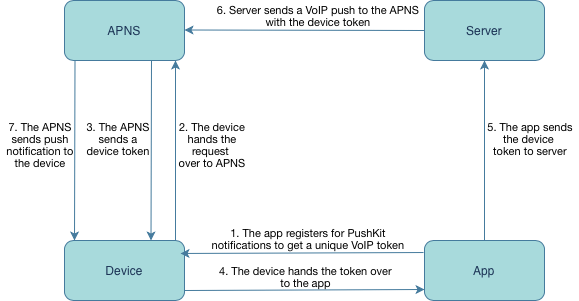
Each of these steps depends on the others. If any link in the chain fails – a bad token, a wrong payload, or a missing CallKit trigger – your users might never receive the call alert.
-
Common issues and how to fix them
Issue 1: VoIP Notifications not received at all
If your app isn’t receiving VoIP pushes, don’t panic – this is one of the most common issues developers face when setting up VoIP on iOS.
 Possible causes:
- The VoIP push certificate is invalid or expired.
- The app is using the wrong device token (remember, the VoIP token from PushKit is not the same as a regular APNs token).
- Pushes are sent to the wrong environment – for example, sandbox instead of production.
 How to fix it:
- Check your VoIP Services certificate in the Apple Developer Console and make sure it’s valid.
- Confirm you’re sending pushes using the PushKit device token.
- Make sure the push environment matches your build type:
Sandbox → for development builds
Production → for TestFlight or App Store builds
Even a small mismatch between certificates, tokens, or environments can prevent iOS from delivering VoIP pushes to your app.
Issue 2: Notifications are delayed or missed
Sometimes VoIP pushes do arrive, but with noticeable delays or not at all after some time. This usually means iOS is managing your app’s background activity too aggressively or the pushes aren’t prioritized correctly.
Possible causes:
- The system kills your app too frequently to save resources.
- Background Modes → Voice over IP isn’t enabled properly in Xcode.
- Pushes are being sent with low priority, or Apple is temporarily delaying delivery under heavy load.
How to fix it:
- In Xcode, enable Background Modes → Voice over IP so iOS knows your app can handle incoming calls.
- Keep your VoIP push payloads minimal – large payloads or extra data can slow delivery.
- Use high-priority notifications (`apns-priority: 10`) when sending via APNs to ensure instant delivery.
 Tip: VoIP pushes are designed to wake your app only when a real call is incoming. Sending too many “test” or “keep-alive” pushes can cause Apple to throttle or deprioritize them.
Issue 3: Incoming calls not displayed when the app is killed
Your VoIP push arrives, but no incoming call screen appears – the user never knows they’re being called. This problem often comes down to how the app handles the notification once it’s received.
Possible causes:
- CallKit isn’t triggered when the VoIP push arrives.
- The app isn’t being properly re-launched by PushKit when it’s terminated.
- The payload lacks key call information (e.g., caller ID or session type).
How to fix it:
- Make sure to call
'reportNewIncomingCall'inside your VoIP push handler – this step is required to show the native iOS call UI. - Test with the device locked and the app terminated – VoIP pushes should still bring up the call screen.
- Verify that your VoIP push payload contains all mandatory fields (like caller ID, call type, or session ID) so CallKit can correctly display the call.
Tip: If the push arrives but no CallKit UI appears, add logging in your VoIP handler to confirm that the push is received and processed as expected.
Issue 4: Missing permissions or user settings
Sometimes the issue isn’t technical at all – it’s just about permissions. Even if everything in your push setup is correct, users won’t receive call alerts if they’ve denied access to notifications or the microphone.
Possible causes:
- The user denied Push Notification or Microphone permissions.
- The app didn’t properly request these permissions on first launch.
How to fix it:
- Prompt users to enable Push Notifications and Microphone Access when they first open the app.
- If permissions were previously denied, guide users to Settings → Notifications → [Your App] to re-enable them.
Tip: Always request permissions at a moment that makes sense – for example, right before the first call. This makes users more likely to grant access.
Issue 5: VoIP Notifications stop working after an app update
Everything was working perfectly – until you released a new version of your app, and suddenly VoIP notifications stopped coming through. Don’t worry – this is a common issue after code signing or version updates.
Possible causes:
- The VoIP push certificate was invalidated or replaced during re-signing.
- The app didn’t handle token invalidation, so the device token used by your server is no longer valid.
How to fix it:
- After every major app update or re-signing, refresh and upload a new VoIP push certificate to your server.
- Implement proper handling of
'pushRegistry(_:didInvalidatePushTokenFor:)'to automatically re-register a new VoIP token when the old one becomes invalid.
Tip: Automating the re-registration process after updates ensures users continue receiving calls seamlessly, without needing to reinstall the app.
-
Debugging tips
When VoIP notifications don’t behave as expected, debugging can feel a bit tricky – especially since they don’t work in the iOS simulator. Here are a few reliable ways to track down the problem and verify that your setup is working correctly:
- Use Apple’s Console app or go to Xcode → Devices and Simulators → Logs to watch incoming VoIP push events in real time.
- Always include the header `apns-push-type: voip` when sending notifications. Missing this header can cause Apple to silently drop the push.
- Test exclusively on real devices – VoIP pushes won’t be delivered in the simulator.
- If you need deeper insight, use a third-party VoIP testing tool or a logging middleware to inspect payloads, delivery times, and responses from APNs.
Tip: Add server-side logging for every push you send – it helps you confirm whether APNs accepted the request and can save hours of debugging time later.
-
Best practices for reliable VoIP push delivery
Once your VoIP setup is working smoothly, it’s important to keep it that way. Follow these best practices to ensure your call notifications stay fast, consistent, and reliable over time.
Recommended practices:
- Use CallKit for call handling. It’s required for background VoIP apps and provides the familiar, native iOS call screen that users trust.
- Keep your VoIP payload lightweight. Smaller payloads mean faster delivery and fewer delays when waking the app.
- Avoid sending too many VoIP pushes in a short time. Apple may throttle your pushes if the system detects unnecessary or excessive traffic.
- Renew VoIP certificates regularly. Don’t wait for them to expire – schedule periodic checks and renewals in advance.
- Monitor delivery and performance metrics. Track push logs and delivery statuses from your backend – for example, using ConnectyCube’s dashboard and API tools – to quickly identify and resolve issues.
Tip: Consistency matters more than frequency. Send VoIP pushes only when needed, and keep your infrastructure clean and efficient.
-
Conclusion
At ConnectyCube, we know how important reliable call delivery is for any communication app. VoIP push notifications keep your users connected, ensuring that incoming calls ring instantly – whether the app is active, in the background, or even terminated.
Thay play a vital role in delivering seamless real-time communication, but require precise setup and continuous maintenance.
By keeping your certificates, tokens, permissions, and background configurations in check and following the best practices above, you can eliminate most delivery issues and guarantee a smooth user experience.
If you’re building VoIP features with ConnectyCube, our SDKs and APIs handle all the heavy lifting – from VoIP push registration to reliable call delivery – so you can focus on building intuitive, engaging communication experiences.
 Need help integrating or debugging VoIP calls?
Explore our documentation or contact our support team.
Join our Discord community for real-time support, tips, and to connect with other developers!
]]>
 Big news for marketplace builders: the ConnectyCube Chat Widget now supports multi-vendor setups – starting with deep integration for Vendure. This release makes it easier for buyers, sellers and support teams to communicate directly inside your e-commerce platform – even read more...]]>
Big news for marketplace builders: the ConnectyCube Chat Widget now supports multi-vendor setups – starting with deep integration for Vendure. This release makes it easier for buyers, sellers and support teams to communicate directly inside your e-commerce platform – even when multiple independent vendors are involved.
What іs a multi-vendor marketplace?
A multi-vendor marketplace is an e-commerce platform where multiple independent sellers list and sell their products to customers under one digital roof. Think of platforms like Amazon, Etsy or eBay – each vendor has their own storefront, but buyers enjoy a unified shopping experience.
This model brings flexibility and scale: marketplaces can expand product variety quickly while giving vendors control and autonomy.
Multi-vendor support in Vendure
Vendure – a modern commerce platform – has native support for multi-vendor marketplaces.
In Vendure each Seller is treated as an independent entity, meaning you can have multiple shops operating within one platform – each with its own catalog, orders, and communication channels.
Learn more in the Vendure docs: How to set up multi-vendor marketplaces
ConnectyCube & Vendure: real-time chat for every vendor
To bring communication into the heart of your marketplace, ConnectyCube offers a Chat Widget plugin for Vendure. It enables buyer-seller messaging, live chat, and group conversations – all backed by ConnectyCube’s secure and scalable infrastructure.
With this plugin, store owners can:
-
Add live chat support for customers in real time;
-
Enable private chats between buyers and vendors;
-
Support group discussions;
-
Store and manage messages safely on ConnectyCube’s backend.
Read about Vendure plugin release: ConnectyCube Chat Widget is now available for Vendure e-commerce platform
How the Chat Widget Works in Multi-Vendor Marketplaces
The key change in this release is that each vendor now gets their own dedicated chat space with customers, automatically managed via the Seller entity in Vendure.
If in the single-store setups you normally specify CHAT_WIDGET_STORE_ID and CHAT_WIDGET_STORE_NAME as environment variables to connect the widget to your store, for multi-vendor marketplaces this step is no longer required. Instead, the widget automatically uses the Seller information from the product or variant data to identify which vendor a customer is chatting with.
See technical details and examples here:
Setup Multi-Vendor marketplace for Vendure Backend
Setup Multi-Vendor marketplace for Vendure Storefront
By supporting multi-vendor setups, ConnectyCube Chat Widget helps you build trust between buyers and sellers, improve conversion rates, and create a smooth, unified user experience – no matter how many vendors your marketplace hosts.
Further Reading
Vendure chat widget plugin – Official Developers Documentation | ConnectyCube
How to add ConnectyCube Chat Widget to your Vendure store | Medium
How ConnectyCube Chat Widget helps marketplaces grow sales
Enable Marketplace Chat with ConnectyCube
Integration takes just a few steps and no extra setup is needed for multi-vendor marketplaces. If your e-commerce platform is powered by Vendure, you can now integrate the ConnectyCube Chat Widget and immediately enable real-time messaging for all your vendors.
Get started with our Vendure plugin and connect every buyer to the right seller instantly.
—
Join the ConnectyCube Discord сommunity for quick answers and expert tips.
 Billions of messages are sent every day via real-time messaging apps. From personal chats to workplace collaboration tools – these platforms handle an enormous volume of sensitive information: financial details, private conversations, health data, business IP and many many read more...]]>
Billions of messages are sent every day via real-time messaging apps. From personal chats to workplace collaboration tools – these platforms handle an enormous volume of sensitive information: financial details, private conversations, health data, business IP and many many more.
This convenience, however, comes with a cost. Hackers and malicious actors see chat apps as high-value targets. Data breaches, phishing attacks and privacy violations can destroy user trust overnight. For developers, building secure messaging isn’t optional; it’s the foundation of credibility.
In this article, we’ll explore the essential practices that help developers protect user data in real-time chat applications: from encryption and authentication to storage and compliance.
Security begins with awareness
When users open a chat app, they trust the app with their personal conversations, private photos, or business secrets. That trust can vanish instantly if their data falls into the wrong hands.
To build a truly secure messaging experience, developers first need to understand what they’re protecting against:
-
Eavesdropping & interception – unencrypted traffic can be read or modified during transmission.
-
Man-in-the-middle (MITM) attacks – attackers impersonate servers or clients to intercept data.
-
Unauthorized data access – weak authentication or insecure APIs can expose private messages.
-
Data leaks from misconfigured servers – poorly secured storage buckets or backups can be downloaded by anyone.
-
Insecure push notifications – sensitive content revealed in plain text on a user’s lock screen.

Because chat is instantaneous and often stored in multiple locations (server + client), the attack surface is larger than for traditional apps.
Practical measures to secure user information
1. Implement End-to-End Encryption (E2EE)
E2EE ensures that messages are encrypted on the sender’s device and only decrypted on the recipient’s device. Even the server can’t read the content.
-
Use established protocols such as the Signal Protocol or Double Ratchet for key management.
-
Employ Perfect Forward Secrecy (PFS) to prevent future key compromise from exposing past messages.
-
Don’t roll your own crypto; rely on well-maintained libraries.
If E2EE isn’t feasible for your entire app (e.g., for compliance reasons), at least encrypt data in transit (TLS 1.3) and at rest.
Useful link: https://developers.connectycube.com/guides/security-compliance/
2. Secure authentication & authorization
2.1 Use standards-based authentication (OAuth 2.0 / OpenID Connect)
Don’t reinvent login logic. Use well-tested, open standards for both security and interoperability.
-
OAuth 2.0 -> Ideal for token-based access control between client and API.
-
Use Authorization code flow with PKCE for native and SPA apps to prevent code interception.
-
-
OpenID Connect (OIDC) -> Built on top of OAuth 2.0, adds identity layer for user profiles, useful for cross-app login.
2.2 Enforce strong password & credential policies
-
Require minimum password entropy (length, symbols, no common words).
-
Hash passwords using Argon2id (preferred), bcrypt, or scrypt with a unique salt per user.
-
Rotate salts and rehash passwords when algorithm parameters change.
-
Never store API keys, tokens, or credentials directly in code – use environment variables or secret managers (e.g., AWS Secrets Manager, Vault).
2.3 Multi-Factor Authentication (MFA)
Add an extra layer for sensitive or admin accounts. Options include:
-
TOTP (Time-based One-Time Password) via Google Authenticator or Authy.
-
SMS / Email codes (less secure, but easy to implement).
Use a separate endpoint for MFA verification and rate-limit attempts.
2.4 Token lifecycle & session security
Use JWTs (JSON Web Tokens) or opaque tokens for access control. JWT design recommendations:
-
Include only minimal claims (
sub,iat,exp,scope). -
Keep token lifetime short (5–15 minutes) and issue refresh tokens with rotation.
-
Sign using RS256 (asymmetric) or ES256 (ECDSA). Avoid
noneor symmetric secrets shared across apps. -
Implement token revocation via a denylist or refresh token rotation (store refresh IDs in DB).
-
For mobile/web hybrid apps:
-
Store access token in memory, refresh token in secure storage (Keychain/Keystore).
-
Revoke both immediately upon logout or device change.
-
2.5 Authorization: implement fine-grained access control
After authentication, authorization defines what a user or bot can do. Use one of these patterns:
-
RBAC (Role-Based Access Control) – assign roles (
user,moderator,admin) and validate permissions per API route. -
ABAC (Attribute-Based Access Control) – check rules based on context (user attributes, message ownership, resource type). Useful for multi-tenant chat apps.
- PBAC (Policy-Based Access Control) – define policies as JSON or YAML (e.g., using Oso or Casbin).
For multi-tenant systems, always include a tenant ID claim in tokens and verify it on every request to isolate user data.
2.6 Protect session cookies & websockets
-
Use
SameSite=strictandSecureflags for cookies. -
Always serve authentication endpoints via HTTPS.
-
When using WebSockets, authenticate the initial handshake with a JWT or API key, and periodically re-validate the session.
2.7 Monitor and audit authentication events
-
Log login, logout, and failed attempts (anonymized, no raw passwords).
-
Detect unusual patterns – multiple logins from different IPs, token reuse, expired refresh token usage.
-
Implement rate limiting (e.g.,
express-rate-limitor Cloudflare Rules).
3. Protect data storage & transmission
Even with end-to-end encryption, certain metadata (timestamps, message IDs, device info, presence data) will still reach your servers and must be protected as carefully as message content.
-
Encrypt at rest – use AES-256-GCM or ChaCha20-Poly1305 for all stored data, including message history, attachments, and user profiles. Apply full-disk encryption on servers and encrypt database backups separately.
-
For PostgreSQL or MongoDB, use built-in TDE (Transparent Data Encryption) or an external layer such as HashiCorp Vault or AWS KMS.
-
Regularly rotate encryption keys and maintain a versioned key store to support decryption of older records when necessary.
-
-
Encrypt in transit – enforce TLS 1.3 with strong ciphers (e.g.,
TLS_AES_256_GCM_SHA384) for all HTTP, WebSocket, and file-upload endpoints.-
Use HSTS headers to prevent protocol downgrade attacks.
-
Disable weak protocols (TLS 1.0/1.1) and ciphers like RC4 or 3DES.
-
-
Key management – store cryptographic keys separately from data using a Hardware Security Module (HSM) or cloud key vault (AWS KMS, Azure Key Vault, GCP KMS).
-
Implement key access policies – only backend services that require decryption should have read permissions.
-
Log and audit all key usage operations.
-
-
Data retention & anonymization – define retention policies per data type (e.g., messages = 30 days, logs = 90 days).
-
Use background jobs to purge old records or pseudonymize user IDs in archived analytics.
-
Ensure deletions cascade to backups and CDN caches.
-
-
Integrity & verification – add checksums (SHA-256) or digital signatures to verify file integrity during uploads/downloads.
-
For large media, generate signed URLs that expire within minutes to restrict unauthorized access.
-
These measures ensure that even if your network or storage is compromised, attackers cannot read or tamper with user data without access to protected encryption keys.
4. Secure APIs & SDKs
Most chat platforms expose REST or GraphQL APIs for message delivery, file handling, and user management and often distribute SDKs to simplify access. Every exposed interface increases the attack surface, so API and SDK hardening is essential.
4.1 Input validation and sanitization
All inbound data should be treated as untrusted, even when it comes from your own mobile client.
-
Use server-side validation frameworks such as Joi (Node.js), class-validator (NestJS), or Marshmallow (Python).
-
Always whitelist expected fields instead of blacklisting bad ones.
-
Escape or sanitize user-supplied input to prevent injection vulnerabilities (
SQLi,NoSQLi,XSS). - Use parameterized queries for database access and ORM parameter binding.
4.2 Authentication & token validation
-
Require a valid access token (JWT or OAuth) on every request, even for WebSockets.
-
Use signature verification (RS256 / ES256) and reject unsigned or malformed tokens immediately.
-
Implement token introspection or cache validation results in Redis to prevent replay attacks.
-
For long-lived connections (like chat WebSockets), periodically re-authenticate with a short-lived session token.
4.3 Rate limiting and abuse prevention
To protect your API from brute-force attacks or spam:
-
Apply rate limits per IP + user + endpoint, using sliding windows or token buckets (e.g.,
express-rate-limit, NGINXlimit_req, or API Gateway throttling). -
Combine with CAPTCHA or Proof-of-Work for public endpoints (e.g., signup or anonymous messaging).
-
Detect and block patterns like message floods or bot-driven socket spam in real time.
4.4 Use signed URLs for file handling
File uploads and downloads are common vectors for data leaks.
-
Generate time-limited signed URLs with embedded cryptographic signatures (e.g., AWS S3 pre-signed URLs, Google Cloud Signed URLs).
-
Restrict MIME types (
image/*,video/*) and set file size limits. -
Scan uploaded files asynchronously with ClamAV or third-party malware scanners.
-
Store uploaded files in isolated buckets and never expose raw storage paths.
4.5 Secure CORS and API exposure
-
Set strict CORS headers:
-
Never use
Access-Control-Allow-Origin: *for endpoints that require authentication. -
For public APIs, expose only necessary routes, and separate admin or internal APIs onto different subdomains (
api.connectycube.comvs.internal.connectycube.net).
4.6 SDK security best practices
If you distribute SDKs to external developers:
-
Abstract authentication – make the SDK handle token refresh and HTTPS enforcement by default.
-
Disable any debug or test endpoints in production builds.
-
Embed runtime checks to prevent sending unencrypted HTTP requests.
-
Sign SDK releases and verify package integrity (npm
integrityhashes orpipsignatures). -
Clearly document secure usage patterns (e.g., “never log tokens” or “always handle errors securely”).
4.7 Logging, monitoring & versioning
-
Log every API call with anonymized user IDs and trace IDs (use OpenTelemetry).
-
Implement API versioning (
/v1,/v2) to deprecate outdated or insecure endpoints safely. -
Use WAFs (Web Application Firewalls) like AWS WAF or Cloudflare to detect anomalies automatically.
5. Handle push notifications carefully
Push notifications are convenient for real-time engagement but pose significant security risks if implemented incorrectly. They often cross third-party infrastructures (APNs, FCM, Huawei Push Kit), so sensitive data should never travel in plaintext through these services.
5.1 Never include sensitive message content in payloads
Push notification payloads can be intercepted, logged or shown on lock screens – meaning sensitive content could be exposed even without unlocking the device.
Instead, do the following:
-
Send generic or obfuscated notifications
-
The client then uses the included IDs to securely fetch the full message from your backend using an authenticated API call (with JWT or session token).
-
On the server, validate that the user requesting the message is a participant in that conversation before returning the content.
5.2 Token-based authentication for message fetching
When the app opens or receives a background event:
-
Use a short-lived access token (JWT with ≤15-minute lifetime) to fetch the actual message content via HTTPS.
-
Never store or transmit refresh tokens in notification handlers.
-
On the backend, implement audience-based validation to ensure the token’s
submatches the intended message recipient.
5.3 Use “silent” or “background” notifications for syncing
Both Android and iOS allow non-visible push types that trigger background data syncs.
This is ideal for secure apps: the OS wakes the app silently, allowing it to fetch data over encrypted channels.
-
iOS (APNs):
-
Use
"content-available": 1in the payload. -
Don’t include the
alertfield – this makes the push silent. -
Ensure your app has the background modes -> remote notifications capability enabled.
-
Fetch data using a secure HTTPS request with a short-lived token.
-
- Android (FCM):
- Use
data-only messages (nonotificationkey) so the app can handle them silently in the background. - Implement background fetch logic inside a
FirebaseMessagingService.
Firebase information is here: https://firebase.google.com/docs/cloud-messaging/
- Use
5.4 Encrypt payloads for highly sensitive use cases
If you must send partial message data in the notification (for example, to show previews in enterprise messaging), encrypt the payload at the application level:
-
Encrypt message content with a shared symmetric key per conversation using AES-GCM or ChaCha20-Poly1305.
-
Store the symmetric key securely in device keychain/keystore and never on the server.
-
Decrypt on-device after receiving the push
- Rotate encryption keys periodically and re-establish during session reauthentication.
5.5 Control visibility and logging
-
Avoid exposing message content in OS logs, analytics, or crash reports.
-
For iOS, set
UNNotificationPresentationOptions.nonefor background updates that don’t need to appear visually. -
For Android, use notification channels with
VISIBILITY_PRIVATEorVISIBILITY_SECRETto hide notification text from the lock screen.
5.6 Verify delivery and prevent replay attacks
-
Generate unique message identifiers (
UUIDv4) for each notification. -
Validate each delivery once on the backend; reject duplicates to prevent replay or spam.
-
For high-availability systems, store recent notification hashes temporarily (e.g., Redis) and verify HMAC integrity before processing.
This implementation ensures that push notifications enhance UX without compromising privacy or security, even when passing through untrusted third-party channels.
6. Privacy by design & compliance
Privacy regulations like GDPR (EU), HIPAA, CCPA (California), PIPEDA (Canada), and LGPD (Brazil) impose strict technical and operational rules for how user data is collected, stored, processed, and deleted. For messaging apps, where sensitive content is exchanged in real time, compliance is not just a legal checkbox – it directly influences how you design your backend, APIs, and data flows.
6.1 Data minimization & purpose limitation
Collect only what’s essential for the chat to function. Every new field in your database should have a documented purpose.
Implementation guidelines:
-
Use strict schemas in your database models (Mongoose, Prisma, Sequelize) – reject fields not defined in the schema.
-
Avoid logging personally identifiable information (PII) such as full names, phone numbers, or email addresses in plaintext logs.
-
Anonymize telemetry and analytics data by replacing user IDs with random UUIDs or salted hashes.
- Use data classification tags in your code or DB to separate personal from non-personal data.
6.2 Explicit consent management
Before collecting or processing personal data (like contact lists or location), obtain clear user consent and store the record of it.
Implementation details:
-
Add a
consent_statusfield to yourUserstable with timestamps and consent versioning (accepted_v3,revoked_v4). -
Present a modal or screen explaining what data is collected and why (don’t hide it in Terms & Conditions).
-
Keep consent records auditable — log changes in a secure audit table or use an immutable ledger (e.g., AWS QLDB).
-
Expose an API to revoke consent at any time
6.3 Right to access, portability, and erasure
Users have the right to request all their data or to have it deleted (“right to be forgotten”).
Developer requirements:
-
Data Access API – expose a secure endpoint (authenticated with MFA) to export all user-related data (messages, files, settings) as JSON or ZIP.
-
Data erasure workflow:
-
Use asynchronous jobs (e.g., with BullMQ or Celery) to delete all user-related data from primary DBs, caches, and file storage.
-
Soft-delete first, then purge after verification.
-
Cascade deletions through relationships (
ON DELETE CASCADEor manual cleanup). - Remove associated media from S3/GCS using signed admin credentials.
-
- Portability – allow export in machine-readable format (JSON, CSV, XML) following GDPR Article 20.
6.4 Data retention & expiry policies
Define how long user data and messages are stored. Set automatic deletion or anonymization schedules.
How to implement:
-
Add a
created_attimestamp to all stored records and run a cron job that deletes or anonymizes data after retention expires. -
Use TTL indexes (Time-To-Live) in MongoDB or partition pruning in PostgreSQL to automate cleanup.
- Document these policies in your privacy policy and ensure your API follows them consistently.
6.5 Data localization & residency
Some laws (like GDPR) require data to be stored within specific geographic regions.
Technical setup:
-
Use region-based databases or clusters (e.g., AWS RDS Multi-Region, GCP Spanner).
-
Store region info with each user record (
user.region = 'eu') and route traffic accordingly via load balancer or API gateway. -
Encrypt backups separately for each region with different keys.
6.6 Secure data processing & logging
-
Avoid storing raw chat content in logs.
-
Mask sensitive values in logs and monitoring tools (
[email protected]->u***@example.com). -
Use centralized logging systems (ELK, Loki, CloudWatch) with access controls and data retention limits.
-
Pseudonymize analytics and crash reports (e.g., by using hashed user IDs).
6.7 Privacy auditing & compliance automation
-
Maintain a Data Processing Inventory: a JSON or YAML file listing all collected fields, storage locations, and purposes.
-
Implement privacy unit tests – automated tests that ensure no unexpected PII fields are logged or returned via APIs.
-
Use tools like Datadog Sensitive Data Scanner, AWS Macie, or GitGuardian to detect exposed secrets or personal data.
-
Regularly perform Privacy Impact Assessments (PIA) and document all data flows.
6.8 Encryption & access controls
Compliance frameworks require protecting PII both at rest and in transit:
-
Encrypt all PII columns (
email,phone,IP) using field-level encryption or KMS-managed encryption keys. -
Apply role-based access control (RBAC) – only allow privileged services or admins to query sensitive fields.
-
Log every access to PII for audit purposes.
Useful link: https://medium.com/@connectycube/connectycube-shares-its-ways-to-gdpr-compliance-4ff5a4a29f64
Principles of Building Secure Messaging in ConnectyCube
At ConnectyCube, we follow a security-first architecture – every component from SDKs to cloud infrastructure is designed to protect user data and communication privacy.
All messaging traffic is encrypted end-to-end using modern cryptography standards (AES-256, RSA-2048). Authentication relies on JWT tokens with short lifetimes, while all API and WebSocket connections are secured with TLS 1.3. Messages, attachments, and backups remain encrypted at rest, and file uploads use signed URLs that expire automatically.
Data privacy and compliance are built in. ConnectyCube adheres to GDPR / CCPA, allows data export or deletion on demand, and provides configurable retention policies. Keys are securely managed and rotated within internal KMS systems, and infrastructure isolation (shared, dedicated, or on-premise) ensures full control over data location.
In practice, ConnectyCube applies:
-
End-to-end message encryption
-
Secure token-based authentication
-
TLS-encrypted APIs and SDKs
-
GDPR-compliant data handling
-
Regular key rotation and monitoring
By choosing ConnectyCube, you can be confident that every message, call, and file transfer is protected by enterprise-grade security measures, so your users’ data stays private, your app remains compliant, and your platform earns lasting trust.
Explore more on secure messaging
Secure chat: implementing end-to-end encryption in Web and React Native chat apps
Secure chat: implementing end-to-end encryption in Flutter chat apps
Implementing End-to-End Encryption in Flutter Chat Apps: A Guide to Secure Messaging
Introducing enhanced GET Users API V2: A Leap Forward in Security
Encrypted Push Notifications in React Native
Introducing Advanced Features: Encrypted Address Book
Conclusion: security is an ongoing commitment
Protecting user data in a real-time chat application is an ongoing commitment. Threats evolve, and so must your defenses.
By following best practices described in this article you can drastically reduce risk and build user trust. The key is to make security part of your product DNA from day one. Your users’ privacy and your reputation depend on it.
If security and privacy are priorities for your app, ConnectyCube is built for you. Sign up now to get a secure backend for chat, voice, and video – so you can focus on features while we handle the protection.
—
Join the ConnectyCube Discord сommunity for quick answers and expert tips.
 Shopping online today isn’t just about clicking “buy” and forgetting about the store. It’s about creating a seamless, comfortable experience where the customer feels guided and supported every step of the way. From quick answers to personalized advice, shoppers read more...]]>
Shopping online today isn’t just about clicking “buy” and forgetting about the store. It’s about creating a seamless, comfortable experience where the customer feels guided and supported every step of the way. From quick answers to personalized advice, shoppers now expect businesses to be present, responsive, and ready to help the moment they need it. This is what determines whether they stay, complete a purchase, or turn to a competitor – and that’s where live chat makes all the difference.
That’s why more and more marketplaces are adopting live chat support. Instead of long email threads or delayed responses, live chat offers instant, real-time assistance directly within your platform.
Here’s how it can transform your user support and help your platform grow.
-
Faster responses build trust
Shoppers today expect quick answers. If a customer has to wait hours (or even days) for a reply, they’re likely to abandon the purchase.
With marketplace live chat:
- Buyers get immediate answers about products or services.
- Sellers close deals faster by addressing doubts in real time.
Result: faster support = happier customers = more completed purchases.
-
Reduce abandoned carts
One of the top reasons for cart abandonment in e-commerce is unanswered questions. Maybe they weren’t sure about delivery time, product details, or payment security.
Live chat helps bridge that gap instantly:
- Buyers ask sellers directly on the product page.
- No need to leave the page or search for information elsewhere.
- Confidence to complete the transaction grows.
-
Personalized user support at scale
Live chat makes support feel more human. Even automated chatbots or AI assistants can provide friendly, personalized responses based on user activity.
For example:
- Greet returning customers by name.
- Offer product recommendations based on browsing history.
- Provide tailored answers depending on the user’s language or location.
This personalization improves satisfaction and retention.
-
Quick resolution of issues
Disputes are inevitable in any marketplace – whether it’s the wrong size, a delayed delivery, or simple miscommunication. Live chat helps by:
- Enabling buyers and sellers to instantly clarify misunderstandings and resolve issues directly.
- Preventing escalation and negative reviews through real-time conversations.
The result? Less frustration for users and greater credibility for your marketplace.
-
Grow engagement and customer loyalty
When buyers know support is just one click away, they feel safer using your marketplace.
- Buyers return because they trust the platform.
- Your marketplace becomes the go-to place, not just another online store.
- Loyalty increases, and so does revenue.
Final Thoughts
Live chat is more than just an extra feature – it’s a key driver of marketplace success. By reducing cart abandonment and enhancing customer satisfaction, it gives your platform the edge it needs to stand out in a crowded market.
With solutions like the ConnectyCube Chat Widget, you can add real-time communication to your platform in just a few steps – no need to build from scratch or reinvent the wheel.
Don’t keep your users waiting. Give them instant answers today and watch your marketplace grow!
—
Join the ConnectyCube Discord сommunity for quick answers and expert tips.
 Running a successful online store today isn’t just about showcasing products and processing orders – it’s about engagement, trust, and speed. Shoppers don’t want to wait days for responses – they expect real-time communication, instant answers and support built read more...]]>
Running a successful online store today isn’t just about showcasing products and processing orders – it’s about engagement, trust, and speed. Shoppers don’t want to wait days for responses – they expect real-time communication, instant answers and support built right into their buying journey.
That’s where the ConnectyCube Chat Widget truly makes a difference. Instead of building a chat system from scratch, you can integrate ready-to-use, real-time communication features in just a few steps. Everything is pre-built, scalable, and customizable – with a polished UI, reliable backend, and advanced tools that fit perfectly into your store.
Here are the top 5 features that make it a must-have for any e-commerce business.
-
1-1 & Group Chats
Whether it’s a customer asking a question about a product or a support agent handling multiple requests, real-time text messaging is at the core of online sales success.
- 1–1 chat: enables direct buyer–seller communication.
- Group chat: perfect for team collaboration (e.g., customer, seller, and support staff in one chat).
Buyers get quick answers before purchasing.
Sellers can close deals faster by resolving doubts in real time.
Smooth conversations often become the key factor before customers hit that “Buy” button. By reducing response time, you help customers feel more confident in their purchase decisions.
-
 Audio & Video Calling
Sometimes text chat isn’t enough. With built-in voice and video calls, your customers can connect directly with sellers or support agents.
- Audio calls: for quick consultations without distractions.
- Video calls: for product demonstrations.
Builds trust and confidence by adding a human touch. This feature helps recreate the in-store experience – but online.
-
 Push Notifications
Missed messages = missed opportunities. That’s why push notifications are built right into the widget.
- Instant alerts for new messages, calls, or updates.
- Keeps conversations alive and ensures no customer inquiry is left unanswered.
With real-time notifications, your store stays connected with customers 24/7.
-
 Screen & File Sharing
Sometimes, a text message just isn’t enough – you need to show what you mean. With the ConnectyCube Chat Widget, both buyers and sellers can share files and screens directly in the chat, making communication faster and more effective.
- File sharing: instantly send images, PDFs, or any relevant documents to clarify product details or order instructions.
- Screen sharing: walk customers through processes, troubleshoot issues, or demonstrate products live.
Everything happens in real time, keeping both parties aligned without leaving the store interface.
This feature ensures clearer communication, reduces misunderstandings, and helps resolve questions more efficiently.
-
 AI-Powered Features
AI is no longer a luxury – it’s a must-have for modern communication. The ConnectyCube Chat Widget includes smart AI assistants that make conversations faster, clearer, and more engaging.
- Text summarization – condense long messages into quick, easy-to-read highlights with a single click.
Perfect for when:
– You’re catching up on a busy chat and need the main points fast.
– A customer sends a detailed update, and you only need the essentials.
– You want a quick overview of lengthy feedback.
- Tone adjustment – instantly rephrase your text in different styles to better match the situation.
Available options include:
– Positive – turn any message into something uplifting and encouraging.
– Negative – highlight urgency or dissatisfaction when a stronger tone is needed.
– Cringe – exaggerate for playful or sarcastic effect (great for informal, fun contexts).
This flexibility ensures your conversations always hit the right note – whether you want to stay professional, keep it lighthearted, or even inject humor when appropriate.
Final Thoughts
With the ConnectyCube Chat Widget, you’re not just adding a chat feature – you’re creating a complete communication hub for your online store. From real-time conversations to video calls, global support, and even AI-powered enhancements, it gives your customers the seamless experience they expect.
Ready to transform your e-commerce store? Try the ConnectyCube Chat Widget and see how it can improve sales and customer satisfaction.
Haven’t signed up to ConnectyCube? Get started for free in just a couple of clicks and bring real-time communication to your users today.
—
Join the ConnectyCube Discord сommunity for quick answers and expert tips.
]]>
 We’re excited to introduce the latest update to the ConnectyCube Chat Widget – now enhanced with AI-powered features that make every conversation clearer, faster, and more effective. With this release, users can: Summarize long texts into quick highlights. Adjust message tone read more...]]>
We’re excited to introduce the latest update to the ConnectyCube Chat Widget – now enhanced with AI-powered features that make every conversation clearer, faster, and more effective.
With this release, users can:
-
Summarize long texts into quick highlights.
-
Adjust message tone to match the situation.
These tools work seamlessly inside the Chat Widget, helping your users stay focused and communicate better.
Text summarization: clarity at a glance
Not every message needs to be a wall of text. With Text summarization, long messages can be condensed into easy-to-read summaries in a single click.
This helps when:
-
You’re catching up on a busy chat and need the key points quickly.
-
A teammate sends a long update, and you want just the essentials.
-
Customers share detailed feedback, and you need a quick overview.

Change message tone: Say it the right way
Sometimes, the meaning is clear – but the tone needs adjusting. With the new Change Message Tone feature, you can instantly rephrase your text in different styles to better fit the situation.
Available options now include:
-
Positive – turn any message into something uplifting and encouraging.
-
Negative – highlight urgency or dissatisfaction when a softer approach isn’t enough.
-
Cringe – exaggerate the tone for playful or sarcastic effect (great for informal, fun contexts).
Example:
Original: “Your order has been delayed.”
-
Positive: “Good news – we’re almost ready! Your order just needs a bit more time before it reaches you.”
-
Negative: “Unfortunately, your order is delayed and won’t arrive on time.”
-
Cringe: “OMG, your package is playing hide and seek… still waiting, lol.”
This flexibility makes conversations adaptable, whether you want to stay professional, keep things lighthearted, or even add humor when the situation allows.


Where this shines: Marketplaces and beyond
These AI features are useful in any environment where communication is a key – customer support, team collaboration, communities, and SaaS platforms.
But they’re especially powerful in marketplaces:
-
For buyers: summarized product details mean faster decisions without reading endless text.
-
For sellers: tone adjustment helps polish messages – be positive to inspire confidence, negative to create urgency, or cringe to add playful humor.
-
For platforms: better conversations build trust and drive conversions.
Adding AI directly inside the Chat Widget ensures that interactions stay smooth, productive, and aligned with your business goals.
Ready to try it?
If you’re already using the ConnectyCube Chat Widget, simply update and start exploring the new AI features today.
If you’re new, this is the perfect moment to add smart, real-time communication to your website, app, or marketplace.
The new version is already on our website available for demo. Get started here and check what ConnectyCube offers for your business!
—
Join the ConnectyCube Discord сommunity for quick answers and expert tips.