Dab Tech Solutions Consulting https://dab.solutions/ Dab Tech Solutions Consulting Fri, 03 Jan 2025 10:35:15 +0000 en-US hourly 1 https://wordpress.org/?v=6.9.4 https://dab.solutions/wp-content/uploads/2025/11/cropped-2-11-32x32.png Dab Tech Solutions Consulting https://dab.solutions/ 32 32 AI Challenges for CISOs: Balancing Innovation, Security, and Privacy https://dab.solutions/uncategorized/ai-challenges-for-cisos-innovation-security-privacy/ Fri, 03 Jan 2025 10:25:29 +0000 https://dab.solutions/?p=1434 Artificial Intelligence (AI) is reshaping industries, offering incredible opportunities for automation and innovation. While much of the focus is on how AI can improve cybersecurity, the challenges it presents—particularly when adopted across various departments—often go overlooked. From mitigating risks of data exposure and intellectual property leaks to balancing privacy with productivity, CISOs face a complex landscape. This article explores how CISOs can address these challenges, offering practical strategies like leveraging synthetic data, managing AI vendors, and ensuring employee awareness, all while fostering secure innovation in an AI-driven world.

The post AI Challenges for CISOs: Balancing Innovation, Security, and Privacy appeared first on Dab Tech Solutions Consulting.

]]>

Artificial Intelligence (AI) is revolutionizing industries, and its impact on cybersecurity is no exception. Much of the conversation around AI and cybersecurity focuses on leveraging AI to automate tasks such as threat detection, incident response, and vulnerability management, just to name a few. These advancements are critical, but they’re only part of the story. Few discussions address the broader challenges CISOs face when AI is integrated into every corner of an organization—beyond the IT and security departments.

As AI tools and services proliferate, they are increasingly used by departments like marketing, HR, and operations to drive innovation, improve efficiency, and enhance decision-making. This decentralized adoption creates unique challenges for CISOs who must secure an environment where sensitive data flows through a variety of AI applications, many of which are outside their direct control. Managing these risks requires more than technical expertise: it demands a comprehensive strategy that includes governance, awareness, and cross-departmental collaboration.

Whether your company leverages third-party AI services or develops its own AI solutions, the challenges go beyond technical defenses. This blog explores the multifaceted issues CISOs face and practical strategies to address them, with a particular focus on managing the activity of other departments using AI tools.

AI Across the Organization

Expanding the Security Perimeter

AI adoption isn’t confined to IT or product development teams. Marketing, HR, customer support, and management are increasingly turning to AI tools to automate processes, analyze data, and improve decision-making. This widespread adoption blurs the traditional security perimeter and creates unique challenges for the CISO, including:

  • Data Exposure Risks: Employees experimenting with free or low-cost AI tools may unknowingly upload sensitive data.
  • Vendor Security: Rapid adoption often outpaces vendor vetting, leading to potential data misuse or breaches.
  • Regulatory Compliance: Ensuring that AI usage across departments aligns with data protection regulations.

Challenge 1: Developing AI Systems Safely

For organizations building AI solutions, maintaining security across development, staging, and production environments is critical. Yet, many rely on real-world data to train and test AI models, introducing risks:

  • Data Breaches in Staging Environments: Using customer or private data in non-production environments increases exposure.
  • Compliance Headaches: Meeting regulatory requirements, such as ISO 27001 or GDPR, becomes challenging when sensitive data is spread across multiple environments.
  • Intellectual Property Leaks via AI Code Assistants: Developers using AI-powered code assistants risk exposing proprietary code or sensitive project details, as these tools may store and reuse input data to improve their models. While there are risks associated with AI code assistants, blocking their use entirely could stifle productivity and innovation. Instead, CISOs should aim to act as enablers, not blockers, by adopting a balanced approach. This includes establishing clear boundaries, fostering a culture of security awareness, and leveraging secure AI tools that align with the organization’s goals. By accepting some level of managed risk, organizations can empower developers to work efficiently while maintaining security integrity.

Solution: Ensuring Secure and Efficient AI Development

  1. Synthetic Data Synthetic data—artificially generated but realistic data—is a game-changer for secure AI development. By training models with synthetic data, organizations can:
    • Safeguard sensitive information while maintaining model accuracy.
    • Simplify compliance with data deletion policies and contractual obligations.
    • Reduce costs associated with securing lower environments to production standards.
  2. Policies and Tools for AI Code Assistants To mitigate the risk of intellectual property leaks:
    • Favor on-premises or self-hosted AI development tools when dealing with critical or proprietary projects (when possible).
    • Regularly audit AI code assistant usage to identify potential leaks and reinforce secure practices.
    • Ensure vendor contracts explicitly prohibit the use of your data for training external models.

Challenge 2: Balancing Speed and Security in AI Adoption

AI fosters innovation, and enabling employees to experiment with tools is essential for staying competitive. However, uncontrolled AI usage introduces risks such as:

  • Unvetted Vendors: Employees may use AI services without involving security teams.
  • Sensitive Data Uploads: Data entered into AI tools could be stored or used to train external models.

Solution: Agile Vendor Management and Awareness Training

To mitigate these risks, organizations need a twofold approach:

  1. Agile Vendor Management:
    • Adopt frameworks like the NIST AI Risk Management Framework (AI RMF) and ISO standards such as ISO 42001 (AI Governance) and the forthcoming ISO 27090/27091.
    • Ensure vendor contracts explicitly prohibit the use of your data for training external models.
  2. Employee Awareness:
    • Educate employees on the risks of uploading sensitive data to AI tools.
    • Promote the use of synthetic data to anonymize sensitive information before experimentation.

Challenge 3: Privacy vs. Productivity in AI Tools

AI-powered productivity tools, such as transcription services (e.g., Zoom AI Assistant), are becoming indispensable for management. These tools capture sensitive conversations and data, raising critical questions about privacy and security:

  • Data Storage and Breaches: What happens if the vendor storing your transcriptions is breached?
  • Access Controls: How do you prevent unauthorized access to sensitive meeting notes?

Solution: Trust but Verify

  1. Vendor Trust:
    • Select vendors with robust security practices and compliance certifications.
    • Regularly audit their adherence to contractual agreements.
  2. Internal Safeguards:
    • Encrypt sensitive data before uploading it to AI tools (where possible).
    • Implement access controls to restrict who can view AI-generated transcriptions.
  3. Incident Response Plans:
    • Develop contingency plans to mitigate the impact of potential vendor breaches.

Conclusion: Empowering CISOs in the Age of AI

AI’s transformative potential brings both opportunities and challenges. As a CISO, you’re not just managing technical risks; you’re navigating a complex ecosystem where security, privacy, and innovation intersect. By adopting solutions like synthetic data, agile vendor management, and robust employee training, you can enable your organization to harness AI responsibly while safeguarding its most valuable assets.

The journey isn’t without its hurdles, but with the right strategies in place, CISOs can lead the way in building a secure and innovative AI-driven future.

The post AI Challenges for CISOs: Balancing Innovation, Security, and Privacy appeared first on Dab Tech Solutions Consulting.

]]>
Navigating the Digital Divide: Understanding the Nuances between IT and OT Security https://dab.solutions/uncategorized/navigating-the-digital-divide-understanding-the-nuances-between-it-and-ot-security/ Mon, 05 Feb 2024 18:40:04 +0000 https://dab.solutions/?p=710 In today’s interconnected world, the realms of Information Technology (IT) and Operational Technology (OT) play pivotal roles in shaping the landscape of modern businesses. While both are essential components, their security landscapes differ significantly. In this blog post, we’ll explore the nuances between IT and OT security, shedding light on the unique challenges each domain faces and the strategies to mitigate potential threats. IT security primarily focuses on safeguarding data, networks, and systems that form the digital backbone of an organization. This includes everything from protecting sensitive customer information to ensuring the confidentiality, integrity, and availability of data. In the

The post Navigating the Digital Divide: Understanding the Nuances between IT and OT Security appeared first on Dab Tech Solutions Consulting.

]]>
In today’s interconnected world, the realms of Information Technology (IT) and Operational Technology (OT) play pivotal roles in shaping the landscape of modern businesses. While both are essential components, their security landscapes differ significantly. In this blog post, we’ll explore the nuances between IT and OT security, shedding light on the unique challenges each domain faces and the strategies to mitigate potential threats.

IT Security: Fortifying the Digital Backbone

Key Features

  • Data Encryption: Encrypting sensitive information prevents unauthorized access, ensuring that even if data is compromised, it remains indecipherable.
  • Firewalls and Intrusion Detection Systems (IDS): These act as the first line of defense, monitoring and controlling incoming and outgoing network traffic to prevent malicious activities.
  • Endpoint Security: Protecting individual devices from cyber threats through antivirus software, firewalls, and regular security updates.

OT Security: Securing the Operational Frontline

Key Features

  • Industrial Control Systems (ICS): Securing the hardware and software that monitor and control industrial processes, ensuring the safety and reliability of operations.
  • Physical Security Measures: Implementing measures such as access controls, surveillance systems, and environmental monitoring to protect physical assets.
  • Anomaly Detection: Identifying unusual patterns in operational data that may indicate a security breach or a malfunction in the industrial environment.

Bridging the Gap: Converging IT and OT Security

Challenges

  • Communication Divide: IT and OT teams traditionally operate in silos, hindering effective collaboration and information sharing.
  • Legacy Systems: Many OT environments still rely on legacy systems that were not designed with cybersecurity in mind, posing challenges for modern security integration.

Strategies

  • Integrated Security Frameworks: Adopting unified security strategies that address the unique needs of both IT and OT environments.
  • Cross-Training Teams: Promoting collaboration by providing IT professionals with insights into OT and vice versa, fostering a holistic security mindset.

Conclusions

The post Navigating the Digital Divide: Understanding the Nuances between IT and OT Security appeared first on Dab Tech Solutions Consulting.

]]>
DHIS2 SIEM automation https://dab.solutions/uncategorized/dhis2-siem-automation/ Wed, 22 Feb 2023 10:21:00 +0000 https://dab.solutions/?p=753 One of the aspects of a mature security posture is how prepared the organization is to detect and response to cyber threats: due to a combination of factors that make cyber attacks easier to carry on and therefore more common, build the system to detect promptly such attacks and respond appropriately becomes more and more an urgent and early necessity.

The post DHIS2 SIEM automation appeared first on Dab Tech Solutions Consulting.

]]>
One of the aspects of a mature security posture is how prepared the organization is to detect and response to cyber threats: due to a combination of factors that make cyber attacks easier to carry on and therefore more common, build the system to detect promptly such attacks and respond appropriately becomes more and more an urgent and early necessity.

That is why we have built an automatic Security Information Event Management (SIEM) system for DHIS2 on lxd server infrastructure in dhis2-tools-dab: by the introduction of the new features it was easy to develop a new container of type es_siem, bringing the power of ElasticSearch into the platform.

SIEM & ElasticSearch

ElasticSearch has been a reference in the log collection space for awhile and its ease of installation and management, thanks also to the web user interface named Kibana, made for us the default choice for this system, on top of the well known reliability, flexibility and the great community behind the project.

Although ElasticSearch was born as a log management solution, it’s in the right position to offer a good security alerting system, although some of their best features on this regard comes as a paid subscription (more on that on the Limitations section).

Said that, a SIEM solution should provide flexible rules creation, notification mechanisms and easy to consult alerts, all things ElasticSearch does well, for free.

Setting up a SIEM on DHIS2

So let’s dive into the setup and some first impressions.

This setup is performed thanks to the es_siem container type introduced with dhis2-tools-dab.

You can take a look at the es_siem and es_siem_postsetup files to know more about how the system is setup and replicate it manually.

The postscript configures in each container journald system, which centralises logs into a file that it’s then parsed by the filebeat agent, which ultimately sends the data to ElasticSearch for storage and analysis already iin JSON format.

To get started, let’s add the container type entry in the containers configuration file.

dab@battlechine:~$ sudo cat /usr/local/etc/dhis/containers.json
{
  "fqdn":"192.168.130.130",
  "email": "[email protected]",
  "environment": {
          "TZ": "Europe/Madrid"
  },
  "network": "192.168.0.1/24",
  "monitoring": "munin",
  "apm": "glowroot",
  "proxy": "nginx",
  "containers": [
    {
      "name": "proxy",
      "ip": "192.168.0.2",
      "type": "nginx_proxy"
    },
    {
      "name": "postgres",
      "ip": "192.168.0.20",
      "type": "postgres"
    },
    {
     "name": "siem",
     "ip": "192.168.0.200",
     "type": "es_siem"
    }
  ]
}

As you can see, the new section named “siem” has been added: when running ./create_containers.shthe new and missing container is identified and created:

dab@battlechine:~/dhis2-tools-ng-dab/setup$ sudo ./create_containers.sh
Skipping adding existing rule
Skipping adding existing rule (v6)
Skipping adding existing rule
Skipping adding existing rule (v6)
Reading package lists... Done
Building dependency tree
Reading state information... Done
auditd is already the newest version (1:2.8.5-2ubuntu6).
apache2-utils is already the newest version (2.4.41-4ubuntu3.13).
unzip is already the newest version (6.0-25ubuntu1.1).
jq is already the newest version (1.6-1ubuntu0.20.04.1).
The following packages were automatically installed and are no longer required:
  libfwupdplugin1 libpython2-dev libpython2-stdlib libpython2.7 libpython2.7-dev libpython2.7-minimal libpython2.7-stdlib python2 python2-dev python2-minimal python2.7
  python2.7-dev python2.7-minimal
Use 'sudo apt autoremove' to remove them.
0 upgraded, 0 newly installed, 0 to remove and 34 not upgraded.
[2023-02-20 23:19:03] [WARN] [create_containers.sh] Container proxy already exist, skipping
[2023-02-20 23:19:03] [WARN] [create_containers.sh] Container postgres already exist, skipping
[2023-02-20 23:19:03] [INFO] [create_containers.sh] Creating siem of type es_siem (ubuntu 20.04)
Creating siem
waiting for network
[2023-02-20 23:19:11] [INFO] [create_containers.sh] Running setup from containers/es_siem

WARNING: apt does not have a stable CLI interface. Use with caution in scripts.

[...]

[2023-02-20 23:23:08] [INFO] [create_containers.sh] Configuring Elasticsearch and Kibana
[2023-02-20 23:23:08] [INFO] [create_containers.sh] Waiting for Kibana to be up&running (sleep 10s)
[2023-02-20 23:23:19] [INFO] [create_containers.sh] Waiting for Kibana to be up&running (sleep 10s)
[2023-02-20 23:23:51] [INFO] [create_containers.sh] Configuring journal for 'postgres'
[2023-02-20 23:23:52] [INFO] [dhis2-set-journal] Configuring postgres to log to journal
[2023-02-20 23:23:52] [INFO] [create_containers.sh] Configuring filebeat for 'postgres'
[2023-02-20 23:23:53] [INFO] [dhis2-set-elasticsearch] Retrieving filebeat 8.4.1 (arm64)
[2023-02-20 23:23:53] [INFO] [dhis2-set-elasticsearch] Installing filebeat
Selecting previously unselected package filebeat.
(Reading database ... 38331 files and directories currently installed.)
Preparing to unpack /tmp/filebeat.deb ...
Unpacking filebeat (8.4.1) ...
Setting up filebeat (8.4.1) ...
[2023-02-20 23:23:58] [INFO] [dhis2-set-elasticsearch] Configuring filebeat
Synchronizing state of filebeat.service with SysV service script with /lib/systemd/systemd-sysv-install.
Executing: /lib/systemd/systemd-sysv-install enable filebeat
Created symlink /etc/systemd/system/multi-user.target.wants/filebeat.service → /lib/systemd/system/filebeat.service.
[2023-02-20 23:24:01] [INFO] [dhis2-set-elasticsearch] Filebeat configured. All good
[2023-02-20 23:24:01] [INFO] [create_containers.sh] Configuring journal for 'proxy'
[2023-02-20 23:24:02] [INFO] [dhis2-set-journal] Configuring nginx to log to journal error logs and HTTP access logs
[2023-02-20 23:24:03] [INFO] [create_containers.sh] Configuring filebeat for 'proxy'
[2023-02-20 23:24:04] [INFO] [dhis2-set-elasticsearch] Retrieving filebeat 8.4.1 (arm64)
[2023-02-20 23:24:04] [INFO] [dhis2-set-elasticsearch] Installing filebeat
Selecting previously unselected package filebeat.
(Reading database ... 34741 files and directories currently installed.)
Preparing to unpack /tmp/filebeat.deb ...
Unpacking filebeat (8.4.1) ...
Setting up filebeat (8.4.1) ...
[2023-02-20 23:24:10] [INFO] [dhis2-set-elasticsearch] Configuring filebeat
Synchronizing state of filebeat.service with SysV service script with /lib/systemd/systemd-sysv-install.
Executing: /lib/systemd/systemd-sysv-install enable filebeat
Created symlink /etc/systemd/system/multi-user.target.wants/filebeat.service → /lib/systemd/system/filebeat.service.
[2023-02-20 23:24:13] [INFO] [dhis2-set-elasticsearch] Filebeat configured. All good
[2023-02-20 23:24:13] [INFO] [create_containers.sh] Configuring Kibana proxy access
[2023-02-20 23:24:14] [INFO] [create_containers.sh] Done configuring SIEM
[2023-02-20 23:24:14] [WARN] [create_containers.sh] Monitor container not existing or running. Skipping
dab@battlechine:~/dhis2-tools-ng-dab/setup$

If everything goes as expected, you should be able to reach the Kibana web page:

Features built-ins

You can get the credentials via get_creds :

dab@battlechine:~/dhis2-tools-ng-dab/setup$ source libs.sh
dab@battlechine:~/dhis2-tools-ng-dab/setup$ get_creds elasticsearch
{ "service": "elasticsearch", "username": "elastic", "password": "c_2odlH7BoNAB=juUUkg" }
dab@battlechine:~/dhis2-tools-ng-dab/setup$

The es_siem_postscript automatically configures the following features:

  • A transformation routine that parse logs coming from containers into meaningful data;
  • Two security rules to alert when 3 failing login attempts have been made against a DHIS2 instance;
  • An index to store those alerts;
  • Two dashboards: one for alerts and another for all logs.

Limitations

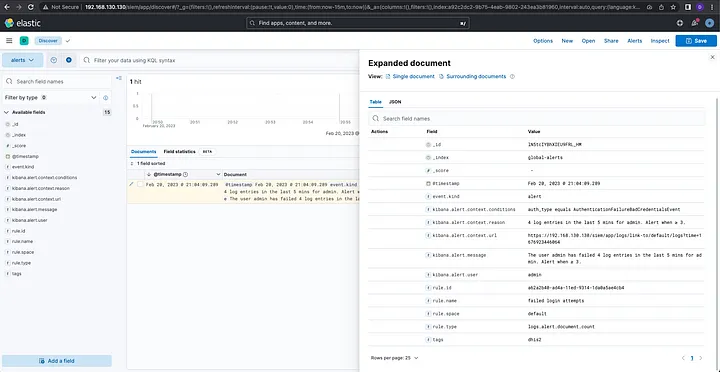
Let’s try to trigger the “failed login attempts” rule: I’ve made 4 unsuccessful login attempts for the user admin at a DHIS2 instance. After few seconds, we will see the alert triggered in the alert data view:
All logs can be seen in the main data view and tweaks can be to further filter data:

There are some limitations that come with this predefined setup.

First, its ease of setup and management comes at a cost: some of the most interesting features around security comes at a price of a license, which means another added cost.

The built in rules are great as a starting point, but the information available is sometimes limited. Each connector exposes different values that can be used to craft enrich an alert: just to give an example, the email and es query connectors expose the actual logs that trigger the alert, while for the log threshold connector, only the triggered values are reported.

You may want to explore free alternatives like the ElasticSearch forked version OpenSearch.

From a purely technical point of view, a SIEM, by its nature, stores logs coming from every container, and the more activity there is, the more logs are generated and sent to ElasticSearch. The outcome is an increase amount of disk storage to keep up with the database entries. There are several ways you can avoid that, beside the ones officially recommended:

Another issue regards how DHIS2 manages logs and log entries: it’s not always clear how the logging and audit systems behave, therefore some experimentation is needed. Appropriately assign log entries to their severity level is another issue DHIS2 should address to make logs useful and concise.

Beyond

Having a SIEM system is just the first step to a thorough detection and response platform.

We strongly recommend developing your own detection rules that tie into your environment and workflow.

If you want to share them with us, please do so by opening a ticket in our Github repository.

From here, you can think about adding Kibana connectors, to build complex workflows like with a webhook notification used to integrate into a messaging application like Slack, Telegram or WhatsApp to receive real-time alerts notification, or to kick of immediate actions through a SOAR.

If you need more information or need assistance with setting up DHIS2 SIEM automation, don’t hesitate to contact us!

The post DHIS2 SIEM automation appeared first on Dab Tech Solutions Consulting.

]]>
How to upgrade from dhis2-tools-ng to dhis2-tools-dab https://dab.solutions/uncategorized/how-to-upgrade-from-dhis2-tools-ng-to-dhis2-tools-dab/ Fri, 17 Feb 2023 22:28:00 +0000 https://dab.solutions/?p=745 We have previously introduced dhis2-tools-dab to the world, but many of you are wondering: how to I upgrade from the current dhis2-tools-ng to the new management system? This article explains how you can seamlessly upgrade your dhis-tools setup to utilise the new features provided by the new suite of tools.

The post How to upgrade from dhis2-tools-ng to dhis2-tools-dab appeared first on Dab Tech Solutions Consulting.

]]>
We have previously introduced dhis2-tools-dab to the world, but many of you are wondering: how to I upgrade from the current dhis2-tools-ng to the new management system?

This article explains how you can seamlessly upgrade your dhis-tools setup to utilise the new features provided by the new suite of tools.

Prepare for the upgrade

Before upgrading, it’s good practice to make a backup of your current containers so in case something goes wrong you can easily restore them.

There are plenty of how to perform a backup and restore of LXD containers (like this one). In general, you have to:

  • Backup LXD init information
  • Backup all containers
  • Backup LXD snap directories

There is no need to backup DHIS2 specific files since both dhis2-tools can easily restore them via install_scripts.sh script: just run it within each other’s setup directory and you will be good to go.
To be extra careful, we recommend to save all the backups in a different server in case of an emergency situation.

How to upgrade

The upgrade process will:

  • Update LXD from version 4.0 to version 5.0 stable
  • Install the new scripts (under /usr/local/bin)
  • Check for containers in /usr/local/etc/dhis/containers.json and create them if not present on the system

To start the upgrade process you need just two simple steps. Please note that no downtime is expected when upgrading.

  1. Download dhis2-tools-dab
dab@battlechine:~$ git clone https://github.com/davinerd/dhis2-tools-dab.git
dab@battlechine:~$ cd dhis2-tools-dab/setup
  1. Run the lxd_setup.sh script (assuming defaults in parse_config.sh ):
dab@battlechine:~/dhis2-tools-dab/setup$ sudo ./lxd_setup.sh
[sudo] password for dab: 
[2023-02-14 13:40:37] [INFO] [lxd_setup.sh] Updating local machine
Hit:1 http://es.archive.ubuntu.com/ubuntu jammy InRelease
Hit:2 http://packages.microsoft.com/repos/code stable InRelease                                                                                                                              
Get:3 http://es.archive.ubuntu.com/ubuntu jammy-updates InRelease [119 kB]                                                                                                                   
Hit:4 https://repo.protonvpn.com/debian stable InRelease                                                                                                                                     
Hit:5 https://dl.google.com/linux/chrome/deb stable InRelease                                                                                                                                
Get:6 http://es.archive.ubuntu.com/ubuntu jammy-backports InRelease [107 kB]                                                           
Get:7 http://security.ubuntu.com/ubuntu jammy-security InRelease [110 kB]                                                                        
Hit:9 https://updates.signal.org/desktop/apt xenial InRelease                                                                                                            
Hit:10 https://apt.syncthing.net syncthing InRelease                                                                                                                                        
Get:8 https://packages.cloud.google.com/apt kubernetes-xenial InRelease [8.993 B]                    
Err:8 https://packages.cloud.google.com/apt kubernetes-xenial InRelease
  The following signatures couldn't be verified because the public key is not available: NO_PUBKEY B53DC80D13EDEF05
Get:12 http://security.ubuntu.com/ubuntu jammy-security/main amd64 DEP-11 Metadata [41,4 kB]
Get:13 http://security.ubuntu.com/ubuntu jammy-security/universe amd64 DEP-11 Metadata [13,3 kB]          
Hit:11 https://packagecloud.io/slacktechnologies/slack/debian jessie InRelease
Fetched 400 kB in 2s (165 kB/s)
Reading package lists... Done
W: An error occurred during the signature verification. The repository is not updated and the previous index files will be used. GPG error: https://packages.cloud.google.com/apt kubernetes-xenial InRelease: The following signatures couldn't be verified because the public key is not available: NO_PUBKEY B53DC80D13EDEF05
W: https://packagecloud.io/slacktechnologies/slack/debian/dists/jessie/InRelease: Key is stored in legacy trusted.gpg keyring (/etc/apt/trusted.gpg), see the DEPRECATION section in apt-key(8) for details.
W: Failed to fetch https://apt.kubernetes.io/dists/kubernetes-xenial/InRelease  The following signatures couldn't be verified because the public key is not available: NO_PUBKEY B53DC80D13EDEF05
W: Some index files failed to download. They have been ignored, or old ones used instead.
Reading package lists... Done
Building dependency tree... Done
Reading state information... Done
Calculating upgrade... Done
The following packages were automatically installed and are no longer required:
  libllvm13 linux-tools-common
Use 'sudo apt autoremove' to remove them.
The following packages have been kept back:
  alsa-ucm-conf python3-software-properties software-properties-common software-properties-gtk ubuntu-advantage-tools update-notifier update-notifier-common
0 upgraded, 0 newly installed, 0 to remove and 7 not upgraded.
[2023-02-14 13:40:47] [INFO] [lxd_setup.sh] Installing/Updating lxd to 5.0/stable
2023-02-14T13:41:17+01:00 INFO Waiting for "snap.lxd.daemon.service" to stop.
lxd (5.0/stable) 5.0.2-838e1b2 from Canonical✓ refreshed
[2023-02-14 13:41:30] [INFO] [lxd_setup.sh] Initializing lxd
Skipping adding existing rule
Skipping adding existing rule (v6)
Skipping adding existing rule
Skipping adding existing rule (v6)
Skipping adding existing rule
Skipping adding existing rule (v6)
Skipping adding existing rule
Skipping adding existing rule (v6)
Installing service scripts
DHIS2 cron already exists
Installing new configuration files
'etc/dhis2-env' -> '/usr/local/etc/dhis/dhis2-env'
'etc/filebeat.yml' -> '/usr/local/etc/dhis/filebeat.yml'
'etc/log4j2-file.xml' -> '/usr/local/etc/dhis/log4j2-file.xml'
'etc/log4j2.xml' -> '/usr/local/etc/dhis/log4j2.xml'
'etc/proxy_params' -> '/usr/local/etc/dhis/proxy_params'
'etc/s3cfg' -> '/usr/local/etc/dhis/s3cfg'
'etc/tomcat_default' -> '/usr/local/etc/dhis/tomcat_default'
'etc/tomcat_setup' -> '/usr/local/etc/dhis/tomcat_setup'
'etc/tomcat-users.xml' -> '/usr/local/etc/dhis/tomcat-users.xml'
Credentials file already exists, not over-writing
containers.json already exists, not over-writing
Done
Skipping adding existing rule
Skipping adding existing rule (v6)
Skipping adding existing rule
Skipping adding existing rule (v6)
Reading package lists... Done
Building dependency tree... Done
Reading state information... Done
auditd is already the newest version (1:3.0.7-1build1).
jq is already the newest version (1.6-2.1ubuntu3).
apache2-utils is already the newest version (2.4.52-1ubuntu4.3).
unzip is already the newest version (6.0-26ubuntu3.1).
The following packages were automatically installed and are no longer required:
  libllvm13 linux-tools-common
Use 'sudo apt autoremove' to remove them.
0 upgraded, 0 newly installed, 0 to remove and 7 not upgraded.
[2023-02-14 13:41:35] [WARN] [lxd_setup.sh] Container proxy already exist, skipping
[2023-02-14 13:41:35] [WARN] [lxd_setup.sh] Container postgres already exist, skipping
[2023-02-14 13:41:36] [WARN] [lxd_setup.sh] Container monitor already exist, skipping
[2023-02-14 13:41:36] [INFO] [lxd_setup.sh] Adding containers to monitor...
[2023-02-14 13:41:36] [INFO] [lxd_setup.sh] Installing munin into container 'proxy'
Reading package lists... Done
Building dependency tree       
Reading state information... Done
munin-node is already the newest version (2.0.56-1ubuntu1).
The following package was automatically installed and is no longer required:
  libfreetype6
Use 'apt autoremove' to remove it.
0 upgraded, 0 newly installed, 0 to remove and 0 not upgraded.
Skipping adding existing rule
[2023-02-14 13:41:38] [WARN] [lxd_setup.sh] Container proxy already added to monitor. Skipping
[2023-02-14 13:41:38] [INFO] [lxd_setup.sh] Installing munin into container 'postgres'
Reading package lists... Done
Building dependency tree       
Reading state information... Done
munin-node is already the newest version (2.0.56-1ubuntu1).
0 upgraded, 0 newly installed, 0 to remove and 0 not upgraded.
Skipping adding existing rule
[2023-02-14 13:41:41] [WARN] [lxd_setup.sh] Container postgres already added to monitor. Skipping
Reading package lists... Done
Building dependency tree... Done
Reading state information... Done
munin-node is already the newest version (2.0.57-1ubuntu2).
The following packages were automatically installed and are no longer required:
  libllvm13 linux-tools-common
Use 'sudo apt autoremove' to remove them.
0 upgraded, 0 newly installed, 0 to remove and 7 not upgraded.
dab@battlechine:~/dhis2-tools-dab/setup$

That’s it! You have successfully upgraded to dhis2-tools-dab.
To verify:

dab@battlechine:~/dhis2-tools-dab/setup$ lxc --vesion
5.0.2
dab@battlechine:~/dhis2-tools-dab/setup$ lxc list
+----------+---------+---------------------+------+-----------+-----------+
|   NAME   |  STATE  |        IPV4         | IPV6 |   TYPE    | SNAPSHOTS |
+----------+---------+---------------------+------+-----------+-----------+
| monitor  | RUNNING | 192.168.0.30 (eth0) |      | CONTAINER | 0         |
+----------+---------+---------------------+------+-----------+-----------+
| postgres | RUNNING | 192.168.0.20 (eth0) |      | CONTAINER | 0         |
+----------+---------+---------------------+------+-----------+-----------+
| proxy    | RUNNING | 192.168.0.2 (eth0)  |      | CONTAINER | 0         |
+----------+---------+---------------------+------+-----------+-----------+

Post-upgrade steps

After you’ve upgraded, you can now take advantage of the new features.

First, you may want to start securing your services.

By default, with dhis2-tools-ng, munin and glowroot are installed without authentication: this means both services are exposed publicly to the internet for anyone to access.

dhis2-tools-dab has borrowed from SolidLines a tool called dhis2-set-credential and expanded it to be an easy credentials management tool.

To secure current munin installation:

dab@battlechine:~/dhis2-tools-dab/setup$ sudo dhis2-set-credential munin monitor
[2023-02-14 13:43:13] [INFO] [dhis2-set-credential] Service munin found. Setting credentials
==============================
Do you want to add the password manually for the user admin in the service munin? (If not, password will be generated randomly)
1) Yes
2) No
#? 2
Adding password for user admin
Credentials have been set                                                                  
=========================
Service: monitor (munin)
Username: admin
Password: 948586b9ba9e5b24d62cbcc3a0ea5e1c0ad26ef1f9a41004
dab@battlechine:~/dhis2-tools-dab/setup$

And here it is the result:

To secure running glowroot installation on a DHIS2 instance called testdev we will use a very similar command but this time the service name will be glowroot :

dab@battlechine:~/dhis2-tools-dab/setup$ sudo dhis2-set-credential glowroot testdev
[2023-02-14 13:55:56] [INFO] [dhis2-set-credential] Service glowroot found. Setting credentials
==============================
Do you want to add the password manually for the user admin in the service glowroot? (If not, password will be generated randomly)
1) Yes
2) No
#? 2
--2023-02-14 13:55:57--  https://github.com/glowroot/glowroot/releases/download/v0.13.6/glowroot-central-0.13.6-dist.zip
Resolving github.com (github.com)... 140.82.121.3
Connecting to github.com (github.com)|140.82.121.3|:443... connected.
HTTP request sent, awaiting response... 302 Found
Location: https://objects.githubusercontent.com/github-production-release-asset-2e65be/16336212/40f7f480-5b29-11ea-937a-fecb3d456fb2?X-Amz-Algorithm=AWS4-HMAC-SHA256&X-Amz-Credential=AKIAIWNJYAX4CSVEH53A%2F20230214%2Fus-east-1%2Fs3%2Faws4_request&X-Amz-Date=20230214T125558Z&X-Amz-Expires=300&X-Amz-Signature=d930680b96e5efcf2a1a3aca1f26500def56d81e414965dfe6950a9ef16c800d&X-Amz-SignedHeaders=host&actor_id=0&key_id=0&repo_id=16336212&response-content-disposition=attachment%3B%20filename%3Dglowroot-central-0.13.6-dist.zip&response-content-type=application%2Foctet-stream [following]
--2023-02-14 13:55:58--  https://objects.githubusercontent.com/github-production-release-asset-2e65be/16336212/40f7f480-5b29-11ea-937a-fecb3d456fb2?X-Amz-Algorithm=AWS4-HMAC-SHA256&X-Amz-Credential=AKIAIWNJYAX4CSVEH53A%2F20230214%2Fus-east-1%2Fs3%2Faws4_request&X-Amz-Date=20230214T125558Z&X-Amz-Expires=300&X-Amz-Signature=d930680b96e5efcf2a1a3aca1f26500def56d81e414965dfe6950a9ef16c800d&X-Amz-SignedHeaders=host&actor_id=0&key_id=0&repo_id=16336212&response-content-disposition=attachment%3B%20filename%3Dglowroot-central-0.13.6-dist.zip&response-content-type=application%2Foctet-stream
Resolving objects.githubusercontent.com (objects.githubusercontent.com)... 185.199.108.133, 185.199.110.133, 185.199.111.133, ...
Connecting to objects.githubusercontent.com (objects.githubusercontent.com)|185.199.108.133|:443... connected.
HTTP request sent, awaiting response... 200 OK
Length: 46193863 (44M) [application/octet-stream]
Saving to: ‘/tmp/tmp.7OwfqPfKDh/glowroot-central-0.13.6-dist.zip’

glowroot-central-0.13.6-dist.zip                100%[=====================================================================================================>]  44.05M  4.83MB/s    in 9.8s    

2023-02-14 13:56:08 (4.50 MB/s) - ‘/tmp/tmp.7OwfqPfKDh/glowroot-central-0.13.6-dist.zip’ saved [46193863/46193863]

[2023-02-14 13:56:11] [INFO] [dhis2-set-credential] Glowroot credentials set. Restarting tomcat  
Credentials have been set:
=========================
Instance: testdev
Service: testdev-glowroot
Username: admin
Password: b61f42699783a4c6eee444e99d5ea5450e34c8bfa85d0fd6
dab@battlechine:~/dhis2-tools-dab/setup$

Pointing to glowroot, it now asks for credentials:

Default DHIS2 installation comes with a built in admin account with an hardcoded password ( district). dhis2-set-credential can be used to set a different, more robust DHIS2’s admin password and can be scripted to rotate the password regularly:

$ sudo dhis2-set-credential dhis2-admin testdev
[2023-02-14 14:00:18] [INFO] [dhis2-set-credential] Service dhis2-admin found. Setting credentials
==============================
Do you want to add the password manually for the user admin in the service dhis2-admin? (If not, password will be generated randomly)
1) Yes
2) No
#? 2
{"httpStatus":"OK","httpStatusCode":200,"status":"OK","response":{"responseType":"ImportReport","status":"OK","stats":{"created":0,"updated":1,"deleted":0,"ignored":0,"total":1},"typeReports":[{"klass":"org.hisp.dhis.user.User","stats":{"created":0,"updated":1,"deleted":0,"ignored":0,"total":1},"objectReports":[{"klass":"org.hisp.dhis.user.User","index":0,"uid":"M5zQapPyTZI","errorReports":[]}]}]}} 
 
Credentials have been set:
=========================
Instance: testdev
Service: testdev-dhis2-admin
Username: admin
Password: 6fT8#t{tJ=D<oG*!>8ve7J%x
$

Now should not be able to login with the default district password and use the one reported above instead.

For details on how the tool works and all its features, please refer to the official documentation.

Please note that changing password for DHIS2 via dhis2-set-credential works for the first time only if the default admin password hasn’t been changed. If you did, you have to save the new password into the dhis2-tools-dab keystore via the save_creds function within libs.sh file to being able to manage credentials with the tool:

dab@battlechine:~/dhis2-tools-dab/setup$ source libs.sh
dab@battlechine:~/dhis2-tools-dab/setup$ save_creds '{"service":"testdev-dhis2-admin","username":"admin","password":"very secure password!"}'
dab@battlechine:~/dhis2-tools-dab/setup$ sudo dhis2-set-credential dhis2-admin testdev
[2023-02-15 11:05:43] [INFO] [dhis2-set-credential] Service dhis2-admin found. Setting credentials
==============================
Do you want to add the password manually for the user admin in the service dhis2-admin? (If not, password will be generated randomly)
1) Yes
2) No
#? 2
{"httpStatus":"OK","httpStatusCode":200,"status":"OK","response":{"responseType":"ImportReport","status":"OK","stats":{"created":0,"updated":1,"deleted":0,"ignored":0,"total":1},"typeReports":[{"klass":"org.hisp.dhis.user.User","stats":{"created":0,"updated":1,"deleted":0,"ignored":0,"total":1},"objectReports":[{"klass":"org.hisp.dhis.user.User","index":0,"uid":"M5zQapPyTZI","errorReports":[]}]}]}} 
 
Credentials have been set:
=========================
Instance: testdev
Service: testdev-dhis2-admin
Username: admin
Password: #,y8f0?W_jnnyiI=LEZ<BS2c
dab@battlechine:~/dhis2-tools-dab/setup$

If you want to retrieve credentials for any service, you can do in two ways (in the following example we are retrieving munin credentials):

# using get_creds
dab@battlechine:~/dhis2-tools-dab/setup$ source libs.sh
dab@battlechine:~/dhis2-tools-dab/setup$ get_creds "munin"
{ "service": "munin", "username": "admin", "password": "638f70dabb638aed8edb0d65" }
# using jq
dab@battlechine:~/dhis2-tools-dab/setup$ sudo cat /usr/local/etc/dhis/.credentials.json | jq -r '.credentials[] | select(.service=="munin")'
{
  "service": "munin",
  "username": "admin",
  "password": "638f70dabb638aed8edb0d65"
}
dab@battlechine:~/dhis2-tools-dab/setup$

Final thoughts

There are plenty of new features to discover. For details, please refer to the extended services documentation. We will add more information so it can become a useful reference.

We are also thinking about adding new features. Interested in helping us out? If so, read the contributing section and start giving your contribution!

Stay tuned for more in depths tutorials on dhis2-tools-dab.

Need help with the migration? Contact us at [email protected] and we will get in touch to support you in performing a safe migration.

The post How to upgrade from dhis2-tools-ng to dhis2-tools-dab appeared first on Dab Tech Solutions Consulting.

]]>
Presenting dhis2-tools-dab: an improved DHIS2 infrastructure management platform https://dab.solutions/uncategorized/presenting-dhis2-tools-dab-an-improved-dhis2-infrastructure-management-platform/ https://dab.solutions/uncategorized/presenting-dhis2-tools-dab-an-improved-dhis2-infrastructure-management-platform/#comments Tue, 14 Feb 2023 16:36:00 +0000 https://dab.solutions/?p=663 With the more demanding need of reliability of critical infrastructures, security is a even more important aspect to take into account.The DHIS2 community has benefited years with the support of the DHIS2 team thanks to their official guidelines, tutorials, academy and discussion groups.

The post Presenting dhis2-tools-dab: an improved DHIS2 infrastructure management platform appeared first on Dab Tech Solutions Consulting.

]]>
With the more demanding need of reliability of critical infrastructures, security is a even more important aspect to take into account.
The DHIS2 community has benefited years with the support of the DHIS2 team thanks to their official guidelines, tutorials, academy and discussion groups.

The origins

Since the beginning, the robustness of the platform was taken seriously and great efforts were made to make not only the DHIS2 system more stable, but also its infrastructure more resilient.

And from this effort, Bob Jolliffe created the so famous dhis2-tools-ng: a suite of bash scripts with the goal of create a robust and secure DHIS2 infrastructure with ease of deployment and management.
The tool is actually used in several countries where DHIS2 is deployed.

With the years, came along the support of SolidLines, a company that provides DHIS2 as a Service: they have forked and added more functionalities to the dhis2-tools-ng suite.

But the explosion of DHIS2 implementations around the world has made hard to keep up with the increase demand of stability and security.

The new infrastructure management platform

It’s from that need that Dab Solutions has created a fork of the dhis2-tools-ng suite and created a new suite of tools that bring the following new features, among others:

  • Improved output for better error handling and progress tracking;
  • Services credentials handling which allows easy credentials management;
  • Possibility to specify different Ubuntu version for each container;
  • LXD cluster support which allows containers to be spread across multiple physical servers;
  • Upgraded LXD from 4.0 stable to 5.0 stable;
  • Additional container types (logs centralization and Security Information Event Monitoring system).

The tool is called dhis2-tools-dab and can be found on Github: the tool is free to grab, use and improve.

More guides will follow on how to use and configure the new features, so stay tuned!

If you need more information or need help, contact us!.

The post Presenting dhis2-tools-dab: an improved DHIS2 infrastructure management platform appeared first on Dab Tech Solutions Consulting.

]]>
https://dab.solutions/uncategorized/presenting-dhis2-tools-dab-an-improved-dhis2-infrastructure-management-platform/feed/ 1