Metadata import with interface tables
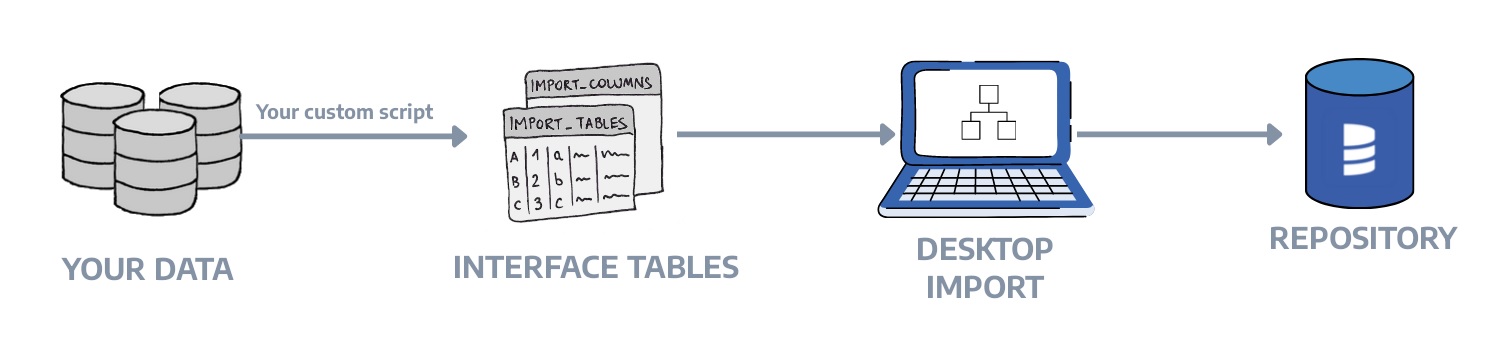
Interface Tables allow you to import metadata into Dataedo from any source by populating a set of predefined tables in the Dataedo repository. This is useful when Dataedo doesn't have a native connector for your data source.
When to use Interface Tables
Use interface tables when you need to:
- Document a system without a native connector - custom applications, APIs, file-based data, or legacy databases
- Automate metadata loading - generate metadata from scripts or CI/CD pipelines and load it automatically
- Combine metadata from multiple tools - merge metadata from various sources into one documentation entry
- Include external lineage - document data flows that involve objects outside of Dataedo
- Import reporting objects - document dashboards, visualizations, and datasets
For a UI-based approach without SQL, consider using Copy & Paste Import which uses interface tables under the hood.
For a complete working example, see the Multi-database pipeline tutorial which demonstrates documenting a CRM → Ecommerce → Data Warehouse → Reporting pipeline with cross-database lineage.
How it works
- You populate the
import_*tables with the metadata of your database objects - You use the Interface Tables connector in Dataedo Desktop to import the data
- Dataedo reads the interface tables and creates documentation
Think of each database_name as a documentation "snapshot." When you run an import, Dataedo reads all rows for that database_name and merges them into the documentation:
- Objects are matched by unique keys (described below). Keep those keys stable over time.
- If a row disappears, removal depends on import settings (whether you choose to remove missing objects).
- If a row changes, Dataedo updates the documented object on the next import.
For reporting objects (reports, dashboards, visualizations), use the Interface Tables Reporting connector to create a Reporting data source.
Running the import
If data is already present in the Dataedo Repository, you can start importing with the connector.
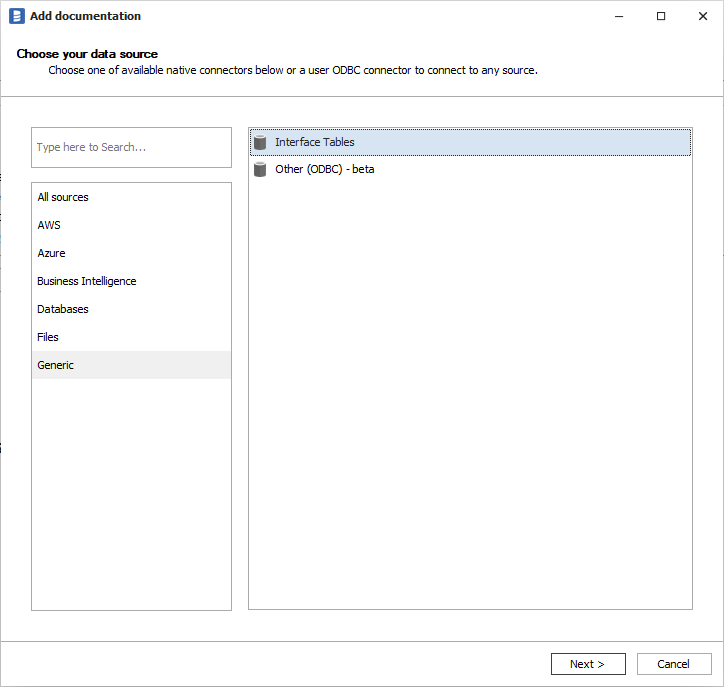
Remember that importing comments or descriptions to Custom Fields is available in advanced settings.
Interface tables reference
You should put your data in the following tables:
| Table | Description |
|---|---|
import_tables | Tables, views, structures, and datasets |
import_columns | Columns for tables, views, structures, reports, and datasets |
import_tables_keys_columns | Primary keys and unique keys with their columns |
import_tables_foreign_keys_columns | Foreign keys with their columns |
import_procedures | Procedures and functions |
import_parameters | Procedure and function parameters |
import_triggers | Triggers |
import_reports | Reports, dashboards, and visualizations |
import_data_lineage | Column-level and object-level data lineage |
import_data_lineage_processes | Attributes for data processor processes (ETL steps/tasks) |
import_linked_sources | External systems for building cross-database lineage |
Output tables:
import_errors- list of errors from the import process
More details about table schemas are available in Dataedo Repository Schema.
Valid object types
Before using interface tables, understand what object types are valid in a given context.
Quick reference
| Context | Valid Values |
|---|---|
Tables (import_tables.object_type) | TABLE, VIEW, STRUCTURE, DATASET |
Reports (import_reports.object_type) | REPORT, DASHBOARD, VISUALIZATION |
Procedures (import_procedures.object_type) | PROCEDURE, FUNCTION |
Triggers (import_triggers.trigger_type) | TRIGGER |
| Function types | Scalar-valued, Table-valued, Aggregate |
Keys and parameters do not follow the ObjectType/ObjectSubtype pattern:
| Context | Field | Valid Values |
|---|---|---|
Key types (import_tables_keys_columns.key_type) | key_type | PK, UK |
Parameter modes (import_parameters.parameter_mode) | parameter_mode | IN, OUT, INOUT |
For most use cases, set object_subtype to match object_type (e.g., TABLE/TABLE, VIEW/VIEW).
Use specific subtypes like MATERIALIZED_VIEW or EXTERNAL_TABLE when you need more granular classification.
Object subtypes by import table
Database objects → import_tables
| object_type | Common Subtypes | Use Case |
|---|---|---|
| TABLE | TABLE, EXTERNAL_TABLE, FOREIGN_TABLE, FILE_TABLE, SYSTEM_VERSIONED_TABLE, HISTORY_TABLE, COLLECTION, FLAT_FILE, ICEBERG_TABLE | Database tables |
| VIEW | VIEW, MATERIALIZED_VIEW, INDEXED_VIEW, DYNAMIC_TABLE, NAMED_QUERY, PROJECTION, EPHEMERAL, INCREMENTAL, SNAPSHOT | Views and virtual tables |
| STRUCTURE | STRUCTURE, CSV, JSON, XML, PARQUET, ORC, AVRO_RECORD, EXCEL_TABLE, DELIMITED_TEXT, DELTA_LAKE, STAGE | File-based and semi-structured data |
| DATASET | DATASET, DATASET_TABLE, TABLEAU_PUBLISHED_DATASOURCE, TABLEAU_EMBEDDED_DATASOURCE | BI datasets |
Code objects → import_procedures
| object_type | Common Subtypes | Use Case |
|---|---|---|
| PROCEDURE | PROCEDURE, CLR_PROCEDURE, EXTENDED_PROCEDURE | Stored procedures |
| FUNCTION | FUNCTION, CLR_FUNCTION, EXTERNAL_FUNCTION | Functions |
BI objects → import_reports
| object_type | Common Subtypes | Use Case |
|---|---|---|
| REPORT | REPORT, POWER_BI_REPORT, TABLEAU_REPORT, SSRS_REPORT, PAGINATED_REPORT, TABLEAU_WORKSHEET | Reports and paginated reports |
| DASHBOARD | DASHBOARD | Dashboards |
| VISUALIZATION | VISUALIZATION | Charts, visuals, widgets |
Parameter modes
Use in import_parameters.parameter_mode:
| Value | Description |
|---|---|
IN | Input parameter (data flows into the procedure) |
OUT | Output parameter (data flows out of the procedure) |
INOUT | Input/output parameter (bidirectional) |
Column subtypes
Use in import_columns.object_subtype:
| Subtype | Description |
|---|---|
COLUMN | Standard column (default) |
FIELD | Document or record field |
ATTRIBUTE | Object attribute |
COMPUTED | Computed/calculated column |
MEASURE | BI measure (aggregation) |
HIERARCHY | Hierarchy level |
USER_TYPE | User-defined data type |
Trigger subtypes
Use in import_triggers.trigger_type. The object_type is always TRIGGER:
| Subtype | Description |
|---|---|
TRIGGER | Standard DML trigger |
CLR_TRIGGER | CLR-based trigger (.NET) |
RULE | Database rule |
Object identification
Objects are identified by a combination of columns that form a unique key:
| Object Type | Unique Key |
|---|---|
| Table/View | database_name + table_schema + table_name + object_type |
| Column | database_name + object_schema + object_name + object_object_type + column_name + column_path |
| Procedure | database_name + procedure_schema + procedure_name + object_type |
| Report | database_name + report_schema + report_name + object_type |
| Foreign Key | database_name + foreign_table_* + primary_table_* + column names |
The database_name groups all objects that belong to the same documentation entry.
Importing tables and views
Use import_tables to document tables, views, structures, and datasets:
INSERT INTO import_tables
    (database_name, table_schema, table_name, object_type, object_subtype, description)
VALUES
    ('MyDatabase', 'sales', 'customers', 'TABLE', 'TABLE',
     'Master table storing customer information.'),
    ('MyDatabase', 'sales', 'orders', 'TABLE', 'TABLE',
     'Stores all customer orders with status tracking.'),
    ('MyDatabase', 'reports', 'vw_order_summary', 'VIEW', 'VIEW',
     'Aggregated view showing order totals per customer.');
See Object subtypes for all valid object_type and object_subtype combinations.
Key columns:
database_name- groups objects into one documentation entrytable_schema- schema/namespace (can be NULL)object_type- TABLE, VIEW, STRUCTURE, or DATASETobject_subtype- more specific type (e.g., MATERIALIZED_VIEW, EXTERNAL_TABLE, CSV, JSON)definition- SQL source code for views or other executable objects
Importing columns
Use import_columns to document columns:
INSERT INTO import_columns
    (database_name, object_schema, object_name, object_object_type,
     column_name, ordinal_position, datatype, nullable, is_identity, is_computed, description)
VALUES
    ('MyDatabase', 'sales', 'customers', 'TABLE',
     'customer_id', 1, 'int', 0, 1, 0, 'Unique customer identifier.'),
    ('MyDatabase', 'sales', 'customers', 'TABLE',
     'email', 2, 'varchar(255)', 0, 0, 0, 'Customer email address.'),
    ('MyDatabase', 'sales', 'customers', 'TABLE',
     'full_name', 3, 'varchar(200)', 0, 0, 0, 'Customer full name.');
Key columns:
object_object_type- must matchobject_typefromimport_tablesordinal_position- column order (1, 2, 3...)nullable- 0 = NOT NULL, 1 = NULL allowedis_identity- 1 for auto-increment columns
Nested columns for JSON structures
For JSON, XML, or nested structures, use column_path and column_level:
INSERT INTO import_columns
    (database_name, object_schema, object_name, object_object_type,
     column_name, column_path, column_level, ordinal_position, datatype, nullable, is_identity, is_computed, description)
VALUES
    -- Root level (column_level = 1)
    ('MyDatabase', 'api', 'customer_payload', 'STRUCTURE',
     'profile', NULL, 1, 1, 'object', 0, 0, 0, 'Nested profile object'),
    -- Inside profile (column_level = 2)
    ('MyDatabase', 'api', 'customer_payload', 'STRUCTURE',
     'first_name', 'profile', 2, 1, 'string', 0, 0, 0, 'First name from profile'),
    -- Deeper nesting (column_level = 3)
    ('MyDatabase', 'api', 'customer_payload', 'STRUCTURE',
     'city', 'profile.address', 3, 1, 'string', 1, 0, 0, 'City from address');
Importing keys and relationships
Primary and unique keys
INSERT INTO import_tables_keys_columns
    (database_name, table_schema, table_name, table_object_type,
     key_name, key_type, disabled, column_name, column_order, description)
VALUES
    ('MyDatabase', 'sales', 'customers', 'TABLE',
     'PK_customers', 'PK', 0, 'customer_id', 1, 'Primary key'),
    ('MyDatabase', 'sales', 'customers', 'TABLE',
     'UK_customers_email', 'UK', 0, 'email', 1, 'Email must be unique');
Foreign keys
INSERT INTO import_tables_foreign_keys_columns
    (database_name,
     foreign_table_schema, foreign_table_name, foreign_table_object_type,
     primary_table_schema, primary_table_name, primary_table_object_type,
     foreign_column_name, primary_column_name,
     column_pair_order, key_name, description)
VALUES
    ('MyDatabase',
     'sales', 'orders', 'TABLE',
     'sales', 'customers', 'TABLE',
     'customer_id', 'customer_id',
     1, 'FK_orders_customers', 'Links order to customer');
Importing procedures and functions
INSERT INTO import_procedures
    (database_name, procedure_schema, procedure_name,
     object_type, object_subtype, function_type, language, definition, description)
VALUES
    ('MyDatabase', 'sales', 'sp_create_order',
     'PROCEDURE', 'PROCEDURE', NULL, 'T-SQL',
     'CREATE PROCEDURE [sales].[sp_create_order] ...',
     'Creates a new order from cart items.');
Procedure parameters
Use import_parameters to document procedure and function parameters:
INSERT INTO import_parameters
    (database_name, object_schema, object_name, object_object_type,
     parameter_name, ordinal_position, parameter_mode, datatype, description)
VALUES
    ('MyDatabase', 'sales', 'sp_create_order', 'PROCEDURE',
     '@customer_id', 1, 'IN', 'int', 'Customer placing the order'),
    ('MyDatabase', 'sales', 'sp_create_order', 'PROCEDURE',
     '@order_date', 2, 'IN', 'date', 'Order date (defaults to today)'),
    ('MyDatabase', 'sales', 'sp_create_order', 'PROCEDURE',
     '@order_id', 3, 'OUT', 'int', 'Returns the new order ID');
Parameter modes: IN (input), OUT (output), INOUT (both). Function return values are mapped as OUT. See Parameter modes for details.
Importing triggers
Use import_triggers to document table triggers:
INSERT INTO import_triggers
    (database_name, table_schema, table_name, table_object_type,
     trigger_name, trigger_type, after, on_insert, on_update, definition, description)
VALUES
    ('MyDatabase', 'sales', 'orders', 'TABLE',
     'trg_orders_audit', 'TRIGGER', 1, 1, 1,
     'CREATE TRIGGER trg_orders_audit ON sales.orders AFTER INSERT, UPDATE ...',
     'Logs order changes to audit table');
Trigger types: TRIGGER (standard DML), CLR TRIGGER (.NET-based), RULE. See Trigger types for details.
Timing flags: Set before, after, or instead_of to 1.
Event flags: Set on_insert, on_update, on_delete to 1 for applicable events.
Importing reports and dashboards
Use import_reports for reports, dashboards, and visualizations. Use the Interface Tables Reporting connector to import these.
INSERT INTO import_reports
    (database_name, report_schema, report_name, object_type, object_subtype,
     external_id, url, description)
VALUES
    ('MyReports', 'dashboards', 'executive_sales', 'DASHBOARD', 'DASHBOARD',
     'dash-001', 'https://bi.example.com/dashboards/executive-sales',
     'Executive sales dashboard for leadership.'),
    ('MyReports', 'dashboards', 'sales_chart', 'VISUALIZATION', 'VISUALIZATION',
     'vis-001', 'https://bi.example.com/dashboards/executive-sales#chart',
     'Revenue trend chart.');
Key columns:
object_type- REPORT, DASHBOARD, or VISUALIZATIONexternal_id- stable identifier (required for lineage matching)parent_object_*- links visualizations to their parent dashboard
Dataset placement: DATASET objects go in import_tables (not import_reports), but use the Reporting connector to import them.
See BI objects for all valid subtypes.
Data lineage
Data lineage tracks how data flows from source to target through a processor (transformation).
Lineage model
[Source] --> [Processor] --> [Target]
- Source: Where data comes from (table, column)
- Processor: The object that performs the transformation (view, procedure, report, or ETL step)
- Target: Where data goes to (table, column)
The processor is required. If you don't have a separate transformation object, use the target object as the processor.
Importing lineage
INSERT INTO import_data_lineage
    (source_database_name, source_object_schema, source_object_name, source_object_type, source_column_name,
     processor_database_name, processor_object_schema, processor_object_name, processor_object_type, processor_process_name,
     target_database_name, target_object_schema, target_object_name, target_object_type, target_column_name,
     transformation, description, creation_date)
VALUES
    ('SourceDB', 'dbo', 'customers', 'TABLE', 'email',
     'TargetDB', 'dim', 'dim_customer', 'TABLE', 'Load Customer Dimension',
     'TargetDB', 'dim', 'dim_customer', 'TABLE', 'email',
     'LOWER(TRIM(email))', 'Email normalized to lowercase', GETDATE());
Key points:
processor_*columns are required; rows withoutprocessor_object_nameare skipped- The processor must belong to the
database_nameyou are importing processor_process_name(optional) groups flows into named steps under the same processor- Column-level lineage requires both source and target columns; otherwise, it's object-level
Object matching for lineage
Objects in lineage are matched using this priority:
- If
external_idis provided → match byexternal_id+object_type+database_name - If no
external_id→ match byschema+name+object_type+database_name
Important: When the target object has an external_id in import_tables or import_reports, the lineage row must include the matching external_id column. Schema+name matching only works when both the lineage row and the target object have NULL external_id. This commonly affects DATASET, DASHBOARD, and VISUALIZATION objects.
Example with external_id:
-- When the target DATASET has external_id = 'ds-001', lineage must include it
INSERT INTO import_data_lineage
    (source_database_name, source_object_schema, source_object_name, source_object_type,
     processor_database_name, processor_object_schema, processor_object_name,
     processor_object_external_id, processor_object_type, processor_process_name,
     target_database_name, target_object_schema, target_object_name,
     target_object_external_id, target_object_type,
     description, creation_date)
VALUES
    ('Analytics_DW', 'reports', 'rpt_daily_sales', 'VIEW',
     'Reporting_Catalog', 'datasets', 'daily_sales_data',
     'ds-001', 'DATASET', 'Ingest Sales Data',
     'Reporting_Catalog', 'datasets', 'daily_sales_data',
     'ds-001', 'DATASET',
     'Dataset ingests from warehouse view', GETDATE());
Linked sources
Linked sources represent external databases or systems that participate in lineage but are not fully documented in Dataedo.
INSERT INTO import_linked_sources
    (database_name, source_database_id, linked_source_name, external_id, sql_dialect,
     connection_details, default_schema, description)
VALUES
    ('MyDatabase', NULL, 'External_API', 'api-001', 'API',
     'https://api.example.com', NULL,
     'External API that provides customer data');
Use linked source references in lineage by setting source_database_linked_source_external_id or source_database_linked_source_name with a NULL source_database_name.
Loading data via Public API
Instead of inserting data directly into the repository with SQL, you can send it as JSON over HTTP using the Dataedo Public API. No direct database access is needed.
This approach is useful for SaaS users, organizations with strict security requirements, or when integrating with CI/CD pipelines.
The API supports the same entity types as those listed above. For the full endpoint reference, see the Public API documentation.
How it works
A typical automation flow looks like this:
- Extract metadata from your source (parse DDL, query catalog, read files, etc.)
- Clean the staging area —
POST /public/v1/interface-tables/delete - Load metadata — use the corresponding
POSTendpoints for each entity type, for example:POST /public/v1/interface-tables/tablesPOST /public/v1/interface-tables/columnsPOST /public/v1/interface-tables/keys- (and so on for foreign keys, procedures, data lineage, etc.)
- Trigger the import — choose one of:
POST /public/v1/scheduler/tasks/{taskId}/trigger— trigger an existing scheduler taskPOST /public/v1/data-sources/{id}/import-connector— one-time import by data source ID
- Check status —
GET /public/v1/scheduler/executions/{executionId}
API details
- Authentication: JWT Bearer token in the
Authorizationheader - Base path:
/public/v1/interface-tables/
Importing from Interface Tables
Custom fields
All interface tables include 100 custom fields (field1 through field100) for storing additional metadata. These map to Custom Fields in Dataedo.
Common uses:
field1: Status (Active, Deprecated, Planned)field2: Data classification (PII, Confidential, Public)field3: Owner/Team
Enable custom field import in Dataedo's advanced import settings.
Resolving errors and warnings
In the case of any errors or warnings, you have the choice of either ignoring them or fixing them and starting the import once again. All errors are displayed during import and also saved in corresponding import_* tables.
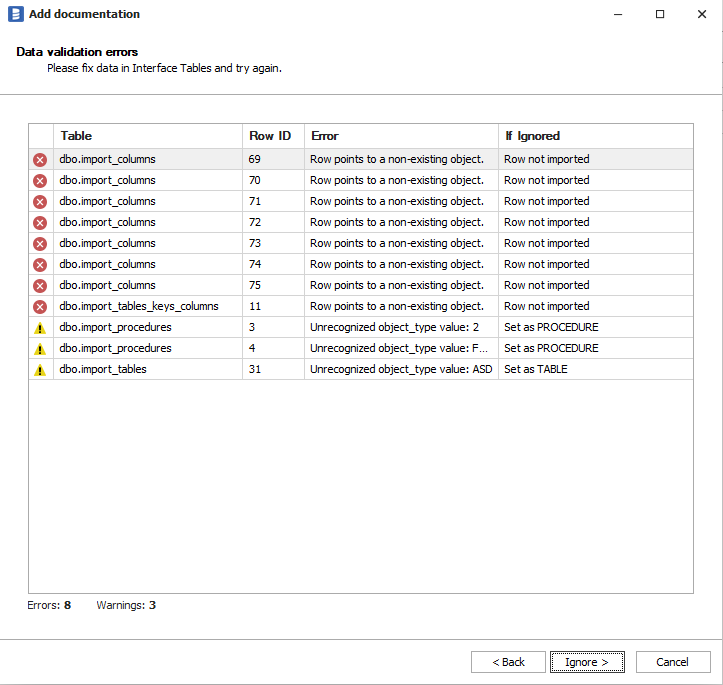
Checking for errors
After import, check for errors:
-- Check import_errors table
SELECT * FROM import_errors
WHERE creation_date > DATEADD(hour, -1, GETDATE())
ORDER BY creation_date DESC;

-- Check individual tables for row-level errors
SELECT database_name, table_schema, table_name, error_message
FROM import_tables
WHERE error_failed = 1;
Common errors and warnings
| Condition | Result | Solution |
|---|---|---|
| Missing required field | Error - row skipped | Populate required fields (database_name, table_name, etc.) |
| Duplicate unique key | Error - row skipped | Update existing row or use different key values |
| Processor object not found | Error - lineage row skipped | Add processor object to import_tables, import_procedures, or import_reports |
| Source/target object not found | Error - lineage row skipped | Add the referenced object or check schema/name/type spelling |
| FK references table that doesn't exist | Error - FK row skipped | Add the referenced table first |
No processor_process_name | Warning - assigned to default process | Add processor_process_name to group flows under named steps |
| Only source OR target column provided | Warning - object-level lineage only | Provide both source_column_name and target_column_name for column-level lineage |
| Column not found in existing table | Warning - object-level lineage only | Check column name spelling or add column to parent object |
Unrecognized trigger_type value | Warning - stored as-is | Use valid values: TRIGGER, CLR TRIGGER, RULE |
Unrecognized object_type value | Warning - stored as-is | Use valid values (TABLE, VIEW, PROCEDURE, etc.) |
Sample data
To lower the learning curve, we've put a sample interface database in the repository, so that you can try importing right away.
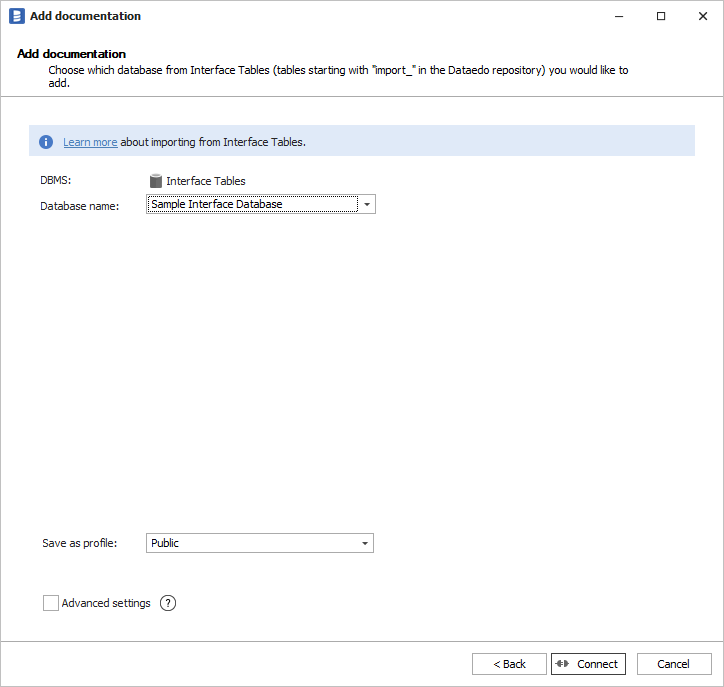
Quick reference: Required fields
| Table | Required Fields | Notes |
|---|---|---|
import_tables | database_name, table_name, object_type | object_type defaults to 'TABLE' |
import_columns | database_name, object_name, object_object_type, column_name, nullable, is_identity, is_computed | Bit fields default to 0 |
import_tables_keys_columns | database_name, table_name, key_name, key_type, column_name | key_type: 'PK' or 'UK' |
import_tables_foreign_keys_columns | database_name, foreign_table_name, primary_table_name, foreign_column_name, primary_column_name | |
import_procedures | database_name, procedure_name | object_type defaults to 'PROCEDURE' |
import_parameters | database_name, object_name, object_object_type, parameter_name | |
import_triggers | database_name, table_name, trigger_name | Bit flags default to 0 |
import_reports | database_name, report_name, object_type | object_type defaults to 'REPORT' |
import_data_lineage | source_object_name, source_object_type, target_object_name, target_object_type, processor_object_name, processor_object_type | Database names can be NULL if linked source provided |
import_data_lineage_processes | processor_database_name, processor_object_name, processor_process_name | |
import_linked_sources | database_name, linked_source_name |
Column reference
import_tables
| Column | Type | Required | Description |
|---|---|---|---|
database_name | nvarchar(500) | Yes | Groups objects into one documentation entry |
table_schema | nvarchar(500) | No | Schema/namespace name |
table_name | nvarchar(500) | Yes | Object name |
external_id | nvarchar(1000) | No | Stable external identifier for matching |
object_type | nvarchar(100) | Yes | TABLE, VIEW, STRUCTURE, or DATASET |
object_subtype | nvarchar(100) | No | More specific type (CSV, JSON, PARQUET, etc.) |
description | nvarchar(max) | No | Object documentation |
definition | nvarchar(max) | No | SQL definition or source code |
location | nvarchar(max) | No | Physical location or file path |
language | nvarchar(100) | No | Programming/query language |
dbms_created | datetime | No | Creation timestamp from source system |
dbms_last_modified | datetime | No | Last modification timestamp |
field1 - field100 | nvarchar(max) | No | Custom fields |
import_columns
| Column | Type | Required | Description |
|---|---|---|---|
database_name | nvarchar(500) | Yes | Parent database |
object_external_id | nvarchar(1000) | No | External ID of parent object (use when parent has external_id) |
object_schema | nvarchar(500) | No | Parent object schema |
object_name | nvarchar(500) | Yes | Parent object name |
object_object_type | nvarchar(100) | Yes | Parent object type (TABLE, VIEW, REPORT, etc.) |
column_name | nvarchar(500) | Yes | Column/field name |
column_path | nvarchar(max) | No | Path for nested structures (dot notation) |
column_level | int | No | Nesting depth (1 = root) |
ordinal_position | int | No | Column order (1-based) |
datatype | nvarchar(250) | No | Data type (int, varchar(255), etc.) |
nullable | bit | Yes | 0 = NOT NULL, 1 = NULL allowed |
is_identity | bit | Yes | 1 = auto-increment/identity |
is_computed | bit | Yes | 1 = computed/calculated column |
computed_formula | nvarchar(max) | No | Formula for computed columns |
description | nvarchar(max) | No | Column documentation |
field1 - field100 | nvarchar(max) | No | Custom fields |
import_procedures
| Column | Type | Required | Description |
|---|---|---|---|
database_name | nvarchar(500) | Yes | Parent database |
procedure_schema | nvarchar(500) | No | Schema name |
procedure_name | nvarchar(500) | Yes | Procedure/function name |
external_id | nvarchar(1000) | No | External system identifier |
object_type | nvarchar(100) | No | PROCEDURE or FUNCTION (default: PROCEDURE) |
function_type | nvarchar(100) | No | Scalar-valued, Table-valued, Aggregate |
language | nvarchar(100) | No | SQL, Python, etc. |
definition | nvarchar(max) | No | Full source code |
description | nvarchar(max) | No | Documentation |
field1 - field100 | nvarchar(max) | No | Custom fields |
import_reports
| Column | Type | Required | Description |
|---|---|---|---|
database_name | nvarchar(500) | Yes | Documentation entry |
report_schema | nvarchar(500) | No | Schema/folder/workspace |
report_name | nvarchar(500) | Yes | Report name |
external_id | nvarchar(1000) | No | External system ID |
url | nvarchar(2000) | No | Report URL |
embed_url | nvarchar(2000) | No | Embedded report URL |
object_type | nvarchar(100) | Yes | REPORT, DASHBOARD, or VISUALIZATION |
description | nvarchar(max) | No | Documentation |
parent_object_external_id | nvarchar(1000) | No | Parent report/dashboard ID |
parent_object_schema | nvarchar(500) | No | Parent schema |
parent_object_name | nvarchar(500) | No | Parent name |
parent_object_type | nvarchar(100) | No | Parent type |
field1 - field100 | nvarchar(max) | No | Custom fields |
import_data_lineage
| Column | Type | Required | Description |
|---|---|---|---|
source_database_name | nvarchar(250) | Conditional | Source database (or use linked source) |
source_database_linked_source_external_id | nvarchar(1000) | No | Source via linked source external ID |
source_database_linked_source_name | nvarchar(500) | No | Source via linked source name |
source_object_schema | nvarchar(250) | No | Source object schema |
source_object_name | nvarchar(250) | Yes | Source object name |
source_object_external_id | nvarchar(128) | No | Source object external ID |
source_object_type | nvarchar(100) | Yes | Source object type |
source_column_name | nvarchar(250) | No | Source column (for column-level lineage) |
source_column_external_id | nvarchar(128) | No | Source column external ID |
processor_database_name | nvarchar(250) | Yes | Processor database |
processor_object_schema | nvarchar(250) | No | Processor schema |
processor_object_name | nvarchar(250) | Yes | Processor object name |
processor_object_external_id | nvarchar(128) | No | Processor external ID |
processor_object_type | nvarchar(100) | Yes | Processor type |
processor_process_name | nvarchar(250) | No | Named process (groups flows) |
processor_process_external_id | nvarchar(1000) | No | Process external ID |
target_database_name | nvarchar(250) | Conditional | Target database (or use linked source) |
target_database_linked_source_external_id | nvarchar(1000) | No | Target via linked source external ID |
target_database_linked_source_name | nvarchar(500) | No | Target via linked source name |
target_object_schema | nvarchar(250) | No | Target schema |
target_object_name | nvarchar(250) | Yes | Target object name |
target_object_external_id | nvarchar(128) | No | Target external ID |
target_object_type | nvarchar(100) | Yes | Target type |
target_column_name | nvarchar(250) | No | Target column (for column-level lineage) |
target_column_external_id | nvarchar(128) | No | Target column external ID |
transformation | nvarchar(max) | No | Transformation expression/description |
description | nvarchar(max) | No | Lineage documentation |
script | nvarchar(max) | No | Full SQL/script source |
line_from | int | No | Script line start |
line_to | int | No | Script line end |
char_from | int | No | Character position start |
char_to | int | No | Character position end |
is_direct | bit | No | 1 = direct lineage (no transformation) |
field1 - field100 | nvarchar(max) | No | Custom fields |
import_parameters
| Column | Type | Required | Description |
|---|---|---|---|
database_name | nvarchar(500) | Yes | Parent database |
object_external_id | nvarchar(1000) | No | Parent procedure external ID |
object_schema | nvarchar(500) | No | Parent procedure schema |
object_name | nvarchar(500) | Yes | Parent procedure name |
object_object_type | nvarchar(100) | Yes | PROCEDURE or FUNCTION |
parameter_name | nvarchar(500) | Yes | Parameter name |
ordinal_position | int | No | Parameter order (0 for return value) |
parameter_mode | nvarchar(10) | No | IN, OUT, INOUT |
datatype | nvarchar(250) | No | Parameter data type |
data_length | nvarchar(50) | No | Length specification |
description | nvarchar(max) | No | Documentation |
field1 - field100 | nvarchar(max) | No | Custom fields |
import_triggers
| Column | Type | Required | Description |
|---|---|---|---|
database_name | nvarchar(500) | Yes | Parent database |
table_schema | nvarchar(500) | No | Table schema |
table_name | nvarchar(500) | Yes | Table name |
table_object_type | nvarchar(100) | No | Table object type |
trigger_name | nvarchar(500) | Yes | Trigger name |
trigger_type | nvarchar(100) | No | TRIGGER, CLR TRIGGER, or RULE |
definition | nvarchar(max) | No | Trigger source code |
before | bit | No | 1 = BEFORE trigger |
after | bit | No | 1 = AFTER trigger |
instead_of | bit | No | 1 = INSTEAD OF trigger |
on_insert | bit | No | 1 = fires on INSERT |
on_update | bit | No | 1 = fires on UPDATE |
on_delete | bit | No | 1 = fires on DELETE |
disabled | bit | No | 1 = trigger is disabled |
description | nvarchar(max) | No | Documentation |
field1 - field100 | nvarchar(max) | No | Custom fields |
import_tables_keys_columns
| Column | Type | Required | Description |
|---|---|---|---|
database_name | nvarchar(500) | Yes | Parent database |
table_schema | nvarchar(500) | No | Table schema |
table_name | nvarchar(500) | Yes | Table name |
table_object_type | nvarchar(100) | No | Object type |
key_name | nvarchar(500) | Yes | Constraint name |
key_type | nvarchar(100) | Yes | PK (primary) or UK (unique) |
description | nvarchar(max) | No | Documentation |
disabled | bit | No | 1 = constraint is disabled |
column_name | nvarchar(500) | Yes | Column in the key |
column_path | nvarchar(max) | No | Path for nested columns |
column_order | int | No | Column order in composite key |
import_tables_foreign_keys_columns
| Column | Type | Required | Description |
|---|---|---|---|
database_name | nvarchar(500) | Yes | Parent database |
foreign_table_schema | nvarchar(500) | No | FK table schema |
foreign_table_name | nvarchar(500) | Yes | FK table name (child) |
foreign_table_object_type | nvarchar(100) | No | FK table type |
primary_table_schema | nvarchar(500) | No | Referenced table schema |
primary_table_name | nvarchar(500) | Yes | Referenced table name (parent) |
primary_table_object_type | nvarchar(100) | No | Referenced table type |
foreign_column_name | nvarchar(500) | Yes | FK column name |
foreign_column_path | nvarchar(max) | No | Path for nested columns |
primary_column_name | nvarchar(500) | Yes | Referenced column name |
primary_column_path | nvarchar(max) | No | Path for nested columns |
column_pair_order | int | No | Order in composite FK |
key_name | nvarchar(500) | No | FK constraint name |
description | nvarchar(max) | No | Documentation |
import_data_lineage_processes
| Column | Type | Required | Description |
|---|---|---|---|
processor_database_name | nvarchar(250) | Yes | Database containing process |
processor_object_schema | nvarchar(250) | No | Schema |
processor_object_name | nvarchar(250) | Yes | Processor object name |
processor_object_external_id | nvarchar(1000) | No | Processor external ID |
processor_object_type | nvarchar(100) | No | Processor type |
processor_process_name | nvarchar(250) | Yes | Process name |
processor_process_external_id | nvarchar(1000) | No | Process external ID |
description | nvarchar(max) | No | Process documentation |
language | nvarchar(100) | No | SQL, Python, etc. |
script | nvarchar(max) | No | Process code |
process_order | int | No | Execution order |
import_linked_sources
| Column | Type | Required | Description |
|---|---|---|---|
database_name | nvarchar(500) | Yes | Interface tables database |
source_database_id | int | No | Dataedo database ID to link to |
external_id | nvarchar(1000) | No | External system identifier |
linked_source_name | nvarchar(500) | Yes | Name for lineage references |
connection_details | nvarchar(max) | No | Connection string/URL |
sql_dialect | nvarchar(500) | No | Database type |
default_schema | nvarchar(500) | No | Default schema |
description | nvarchar(max) | No | Documentation |
field1 - field100 | nvarchar(max) | No | Custom fields |
import_linked_source_configuration
Maps linked sources to existing Dataedo databases.
| Column | Type | Required | Description |
|---|---|---|---|
database_name | nvarchar(500) | Yes | Interface tables database |
linked_source_name | nvarchar(500) | Yes | Linked source name |
linked_source_external_id | nvarchar(1000) | No | Linked source external ID |
source_database_id | int | Yes | Dataedo database ID |

