The post Contact Support appeared first on Data Ladder.
]]>If you need support, we have multiple channels to provide the support you need:
Live chat: Please go to www.dataladder.com – then go to the chat  . Fill the form with the information below:
 You will be routed with our support team to open a ticket immediately.
Email Support: Send an email to [email protected]. A new ticket will be opened and you will be notified via email. Please add as many details as you can about your bug or query. Someone from our customer service team will review it and respond shortly.
Contact our Call Center: Call our support team (888) 779-6578 / (866) 557-8102.
Submit a Form: Click here to contact our team.
The post Contact Support appeared first on Data Ladder.
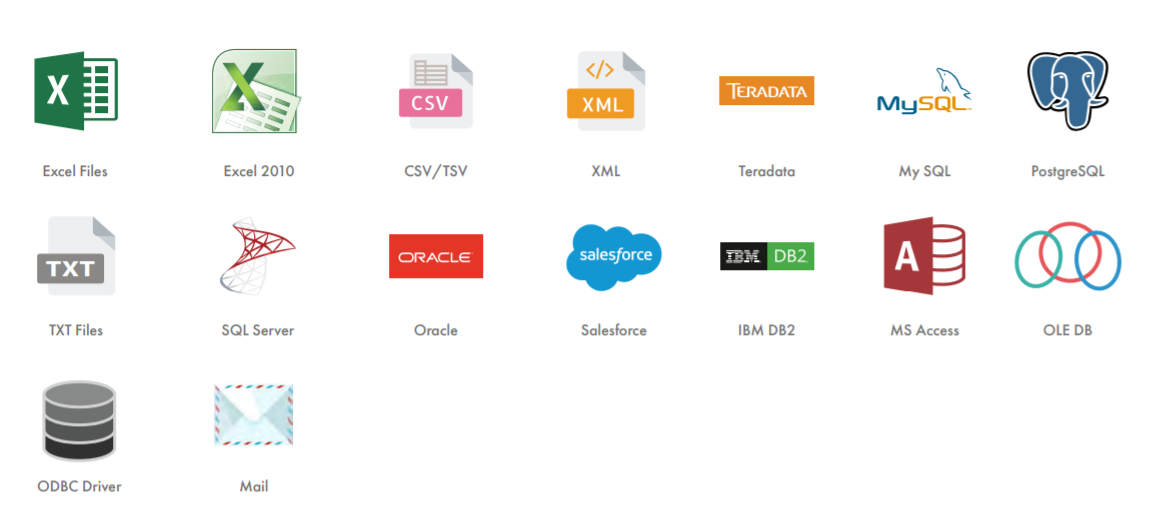
]]>The post Which Sources and Integrations Can We Import? appeared first on Data Ladder.
]]>
The post Which Sources and Integrations Can We Import? appeared first on Data Ladder.
]]>The post Is the Scheduler Option Available on the Trial Version? appeared first on Data Ladder.
]]>No, the scheduler is not available on the trial version.
The post Is the Scheduler Option Available on the Trial Version? appeared first on Data Ladder.
]]>The post Why Can’t I Export the Results of My Trial Version? appeared first on Data Ladder.
]]>Our solution allows you to work from start to finish on your data quality projects. You can import up to 1 million records to your project. These can be processed from profiling to matching them and you will be able to see the changes in real-time. However, you will not be able to export the results.
The post Why Can’t I Export the Results of My Trial Version? appeared first on Data Ladder.
]]>The post Can I Run DataMatch Enterprise on a Mac (Apple) Computer? appeared first on Data Ladder.
]]>Unfortunately, our software is not MAC compatible. However, we do have numerous clients using www.parallels.com. This is a workaround which we provide you with a discount on our software thus resulting in over 300 dollars off the original price.
The post Can I Run DataMatch Enterprise on a Mac (Apple) Computer? appeared first on Data Ladder.
]]>The post Why Can’t I Download the Trial Demo? appeared first on Data Ladder.
]]>- Go to https://dataladder.com/data-matching-software-trial/.
- Fill the form with the information required.
- Once you submit the form, you will receive an email with the trial link. You have 15 days to test our DataMatch Enterprise Desktop version.
 If you don’t receive the email with the trial link, send an email to [email protected] with the data you used to download the trial. Our team will contact you in the next 12 business hours. If you don’t receive the email with the trial link, send an email to [email protected] with the data you used to download the trial. Our team will contact you in the next 12 business hours. |
The post Why Can’t I Download the Trial Demo? appeared first on Data Ladder.
]]>The post How Can I Install the Address Verification/CASS Files? appeared first on Data Ladder.
]]>Please use the link below to download the new CASS files and see the instructions to update DataMatch Enterprise if applicable. Additionally, take into account that it is very important you update your DataMatch Enterprise version to the latest one using the link below in order to ensure compatibility with the latest CASS files and also to allow for Canadian address verification: Download DataMatch Enterprise
- Download the installer and the two bin files.
- Run the installer.
- Be sure that the default locations match exactly as you see them in the image below. You may need to remove a single folder from the default destination (Address Data Path & Geo Data Path).
The post How Can I Install the Address Verification/CASS Files? appeared first on Data Ladder.
]]>The post How Can I Extend My Trial Version? appeared first on Data Ladder.
]]>If you are enjoying our product and you want to evaluate our solutions further, we can extend your trial version. You can send an email to [email protected] using the template below:
Hi support team,
I would like to evaluate your product further. Can you please extend my trial version? Below you will find the contact data:
- Username: Email of the user.
- PC Signature: Collected by the user when the software is installed on the computer. To register your solution, open the application and click on the registration button.
- Company Name
- Use Case: Please describe in detail, why do you need to extend your license key (Usecase, pain points, how can DME help you)
Look forward to hearing from you.
Our support team will get in touch with you in the next 24-48 business hours.
The post How Can I Extend My Trial Version? appeared first on Data Ladder.
]]>The post Where Do I Have to Send the Registration Info When I Pay? appeared first on Data Ladder.
]]>Once you pay for the license key, our support team will be contacting you in the next 24 to 48 hours, during business days. They will be asking you to send:
- Username: Email of the user.
- PC Signature: Collected by the user when the software is installed on the computer. To register your solution, open the application and click on the registration button.
- Company Name
If our team doesn’t contact you. Send an email to [email protected] mention “PAID KEY PRODUCT NAME & VERSION” in the subject line. We will get back to you in the next 24 to 48 business hours.
The post Where Do I Have to Send the Registration Info When I Pay? appeared first on Data Ladder.
]]>The post How Can I Download and Install DataMatch Enterprise? appeared first on Data Ladder.
]]>-
- To install our latest version of DataMatch Enterprise you need to click this link: Download DataMatch Enterprise
2. To register your software, first, open the application and then click on the registration button.
3. Once you have clicked on the registration button, click on “Copy to Clipboard” and then reply to us with your PC Signature and your chosen registration name to [email protected]. (If you already have the License Key, Launch DME by right-clicking & selecting “run as administrator”).
4. Once you receive the registration key and the name, then copy the key (all in green text) and click on the button “Paste registration info from clipboard”.
5. You will receive a registration key and a registration name.
If your key is approved, a window will pop up with the following “Registration Complete – Thank You!”
The post How Can I Download and Install DataMatch Enterprise? appeared first on Data Ladder.
]]>