DSLReports DC FAQ gets updated

The popular Direct Connect FAQ at DSLReports existed and served as a primary source of DC related information and howto’s for a long time. However, some parts of it has become really outdated over the years, but now we can annouce that the complete FAQ list has been updated in the recent weeks.

Dead links and pages about depreciated features are corrected, the related DC++ changelog entries updated, so the currently existing pages should have correct and recent information about DC++ and the whole DC network. Of course the whole FAQ could be improved with new questions and answers but that’s another story…

People now can visit the site and if anything you think is missing or not correct, you can leave feedback on the bottom of every FAQ page. Any corrections or suggestions welcomed…

Installer improvements

Hi,

The DC++ installer has recently received a neat facelift. You will get to try it out when the next version is released.

But before i show off the new installer looks, let me invite translators to hop to the new DC++ installer translation page. There are only 14 strings to translate, thanks to the efforts of the NSIS (the installer builder that we use) contributors.

For comparison purposes, let us reminisce what the now defunct installer used to look like:


Now here are screen-shots of the new one:


As you can see, the first obvious addition is the language selection dialog. Besides that, we have migrated to the Modern User Interface for NSIS, and added theming support and some new icons.

For those who want to try building it, get the most recent code repository and run “scons distro=1”.

Today’s item; modernization (of this blog, specifically, in this case)

You have probably noticed (unless you’re only reading the RSS feeds) that the blog had a makeover… It’s now using the ‘Enterprise’ theme.

Tell us your opinion on the new interface and if we should change something (or change theme completely). I should note that I can’t find the themes on http://wordpress.org/extend/themes/ , so you might need your own blog and try different themes out and then report which you like. The CSS for the theme is available, so I might (or someone else) be able to hack up some of the changes you might propose. (I haven’t done CSS in a while. And by ‘a while’ I mean years. And ‘done CSS’ I mean trying things out until av very basic ASP page looked non-bad.)

Update: it seems we need to pay $14.97 a year to be able to modify the CSS… So it seems that option isn’t looking too good now…

How to modernize the appearance of DC++?

Most users who follow DC++ development may have noticed that recently the User Interface of DC++ has improved. Some modification is already visible in the current version, some of them can be seen in the currently developed version, and some of them is not visible in any form yet. So let’s see a few notes and ideas about what changed recently and what needs to be done to make the GUI even better.

Toolbar changes

A few versions ago a drop-down menu was introduced for the Favorite Hubs and Recent windows toolbar buttons which allow users to simply reach their frequently used hubs or users with only a single click. Also, the toolbar got brand new icons made by Radox and slowly more and more icons are appearing for menu items in the application. If you haven’t seen the new toolbar icons, you can check the screenshot below. Speaking of icons, I discovered two icons which needs to be revised in the near future:

  • The first is the “Follow last redirect” command which has an icon on the toolbar, but unfortunately I don’t get how the red and green arrows placed next to each other means “following redirection”, and I think most users are in the same situation, so maybe that one should be replaced. As an alternative, or an addition, the hub window could display a link after received a redirect attempt, so the user would see a “Click here to follow the redirection to adc://blahblah” instead of “Press the follow redirect button to connect to adc://blah”. The same could work to reconnect the hub after the user got disconnected.
  • The second icon is the “Notepad” icon which seems to be blurry on any other size than 16 px. Oh, did you know that you can resize the toolbar by right-clicking on it and selecting your desired size?

Close button on hub tabs

There were several ways to close a hub tab or private message previously: one could right click on the unwanted tab then select Close from the menu to get rid of the window. As an alternative, you could use the middle button of the mouse or clicking on the tab with the primary button of the mouse while holding down the Shift key. You could even write /close to the chatline. All listed method works, but for a general user, none of them is straightforward (maybe the right-click menu is the most easier to find). So the upcoming version of DC++ is going to have the desired close button which is a little red X on the active tab. This improves usability a lot. I’m using this for a longer time and finally I noticed that I don’t use the Shift+Click thing as often as earlier, so it’s a good move. Moreover, in the Settings you can choose between the old and new tab displaying method, so “hardcore right-clickers” are satisfied too.

Right now a little flickering is still visible when you move the mouse over the active tab, but I think that will be fixed soon.

Restructured Help menu

I always find annoying when I select a menu item somewhere and I find myself on a website without wanting to go there. The upcoming version solves this problem by creating a Links submenu in the Help for the different DC++-related websites. In the Help menu, there is a little thing to fix though: it states that “Help Contents” can be reached by pressing F1 which is unfortunately not true, since F1 is a context-sensitive help. So either the F1 shortcut should be removed from the menu or should be replaced with something which actually works, like Shift+F1 or something similar.

Aligning and unifying dialogs

DC++ has a lot of features so when the user uses the client, she or he meets a lot of different dialogs. If we are talking about a power user or an operator, then even more dialogs appear. The client should provide a consistent and modern look when it puts a dialog into the users’s face. Let’s see a common dialog:
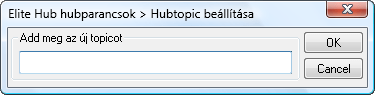
Most operators and a lot of power users see a lot of this kind of dialog every day: you have a label, a line where you can put some text and two bottons: OK and Cancel. This one works perfectly and does exactly what you want. However, it would look much more better for the eyes if it would be not so crowded. This could be achieved by simply enlarging the spacing between the buttons and having a larger margin for the dialog itself so the spacing between the buttons and the dialog border would be larger.

How would a modified dialog look like? Let’s see an example! We all know the Settings dialog, it looks something similar to this:
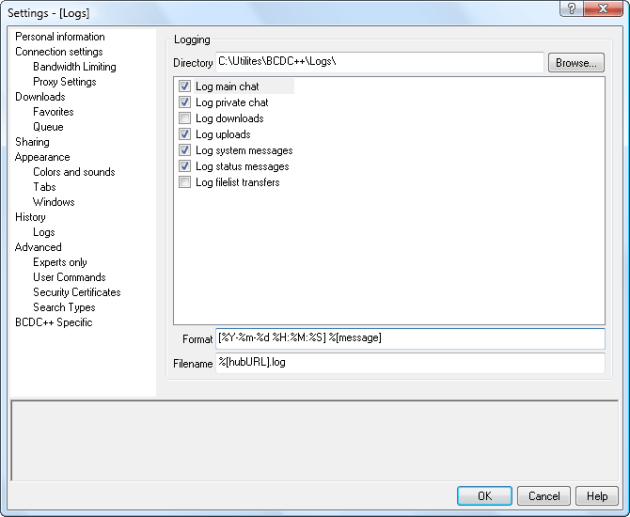
We have a context-sensitive help on the bottom, a category list on the left and the remaining area is the one which changes from category to category, that contains the actual things which we can set. This one also works perfectly, however it does not look consistent nor clear. We could fix this for example the following way:

If you look carefully, only a very few things changed while we reached what we wanted: a better dialog. What is the difference between the two pictures?

  • The most important thing is that on the latter picture the items are 12 px far from the dialog border instead of the 2-4 px which was used on the original dialog
  • Also, the distance between different items is increased to 6 px (8 px for distance between buttons, but that can be achieved by using 6 px everywhere plus set an extra 1 px margin for each button
  • I previously described that there are three areas on the dialog. However, unfortunately all three look differently: the category list has a white background with no border, the help is a grey box with a 3D border and the configuration options has nothing but a few groups. To unify their look, we could set a simple flat border for all three parts. To achieve this, set a flat border for the category list, and also set a flat border for the help box. We also need to change the gray background of the help box to white so it would look similar to the category list. Finally, instead of putting the configuration options on the remaining area, we put a new panel to the empty area and set its border and background to the same style as the help box and the category list. Now we divided the dialog into three parts which look similarly. Finally, we put all configuration options, fields, checkboxes, etc. into that newly created panel. Since the modified spacing applies here too, it will look good.

Please note that the picture of the modified Settings Dialog is only a mockup and not an actual work yet, but I think it demonstrates that how big improvement can be achieved with such a little modification. I hope that DC++ will soon reach a point when it provides a consistent look for the users at all places. As you can see, in the past few months it has improved a lot, hopefully the improvements won’t stop here.

A sidenote that this blog post is already posted on my personal blog, so if you find this “on the Internet” more than once, that’s not an accident

ADC Extensions officially move to 1.0.4

The specification for ADC extensions has now moved to version 1.0.4. This introduces a couple of things;

      Added magnet link extension to UCMD – Simply allows people to send magnet links as part of the user command.
      Added NAT traversal extension NATT – Allows passive to passive C-C connections. cologic talked about this earlier.
      Added referral field to STA – The referral field is something most have implemented already, but it was never in the official specification (even added to the Wiki and a general concensus was that it was approved).
      Added upload queue field to STA – Allow better ordering for those that are waiting to download from you. Since there is no explicit upload order (first to request is first to receive a slot) in ADC (nor NMDC for that matter) this allow clients to be more helpful to those who have waited longer.
      Added partial file sharing extension PFSR – Partial file sharing allow you to download files that clients have not completely downloaded or was previously downloaded but not shared immediately.

Find the documentation at http://adc.sourceforge.net/versions/ADC-EXT-1.0.4.html with the on-going SVN at https://adc.svn.sourceforge.net/svnroot/adc/trunk/ADC-EXT.txt

Amusing site

Hey Guys been awhile since i went on the offensive ragtagging the remarkable sites i found regarding DC++ development  well this time i found a site called oldversion.com

oldversion.com tell the users that updating isnt a good thing that the user should not do it..

“Sometimes upgrading to a newer version can be a good thing. Other times, your computer may not be compatible with the new version, the new version is bloated, or all the options you liked are no longer available.” – Oldversion.com

Their latest recommended version is 0.674 and the registrant is godaddy guess that means gofigure since its probably not godaddy thats behind the site just as a domain registrant.. now we do not recommend any user to actually take their advice and not update since that can resolve in alot of unwanted issues like tth corruption, openssl exploits, adcget exploits, etc etc.

“We believe that every computer user has the right to use a version of the product that he or she is most comfortable with, not the one dictated by the software developer, so we provide access to the files that are no longer obtainable.” – oldversion.com

in anycase i just wanted to show it of since it was funny didnt think that such sites existed, sure its good to have a mirror site but we do however want the mirror sites to be updated if they wanna host older versions fine but don’t tell em not to downgrade to em. Our co-lab with filehippo is a fine example of how we want it to work so our hats goes of to em.

if they was serious about mirroring they could atleast update it to 0.770 instead of saying that 0.674 was the current version..

Microsoft drops Windows 2000, XP SP2 support

As suggested, Microsoft has end-of-lifed Windows 2000. This means there will be no further official, publicly accessible security patches, such as for the still-unpatched Windows 2000/XP TCP/IP Window Size DoSes, TLS/SSL MitM spoofing, or MFC document title updating vulnerabilities, several of which are remotely exploitable. Further, new exploits that work on Windows XP, which will remain an active security target for years, usually work on Windows 2000 as well; those as-yet-unpublished exploits will not see Windows 2000 fixes from Microsoft either. Every additional day with Windows 2000 on the Internet increases the likelihood of being exploited by an unpatched vulnerability. Win2k users should thus find a newer, still-supported operating system to use as soon as feasible.

Microsoft has also dropped Windows XP SP2 support, but that’s fixable just by updating to XP SP3.

Consequently, official DC++ support for both Windows 2000 and XP SP2 has hereby ceased.

ADC Search Types

Search in both ADC and NMDC has already described in great detail in various older posts of this blog. Among those the most important for us now is the one describing the difference of search between ADC and NMDC protocol, mostly the part that tells us how filtering for file types differ in ADC.

In short, when you filter your searches by file types in ADC the big difference (and advantage) is that its you (the sender) who specify what types you want in the result list by sending a file extension list. As written in the posts linked above the old NMDC way leaves up to others (the responders) to decide what file extensions belong to a certain file type you choose to filter by when you do a search. In NMDC predefined file extensions cannot be modified, they are hardcoded to the clients and actually they even differ client by client, version by version. In NMDC the five existing file type categories are predefined and hardcoded as well.

In ADC, the file extension list used to filter search results can be sent by EX parameters of the SCH command. This feature is in the ADC protocol specification for a very long time. Even the code that responsible for proper responding (results filtering) to the EX parameters are implemented long ago in DC++ and its derivative clients. However the ability of the actual use of this filtering feature for searches in ADC hubs had been missing from DC++ until the release of version 0.770. In older versions selecting a search type filter (other than TTH and Directory) had no effect in ADC hubs.

Maybe this was the last missing feature whose absence have put users of ADC hubs into a slight disadvantage over NMDC users so it was really time to patch this last hole and implement user configurable search types for ADC searches in DC++. The new function is added in a compatible way so it retains the behaviour for searches in NMDC hubs while it allows to use even a custom defined search type to filter results of ADC searches.

To make the user’s life easier there are 5 predefined search types to ADC searches (corresponding to the NMDC ones) as well. But opposite to the NMDC ones, ADC types are fully configurable and extensible with custom defined groups. There’s a new pane in Settings dialog of DC++ where you can add, modify or delete your custom search types or even modify the extension list of prefefined types as you wish. Currently predefined ADC types cannot be renamed or deleted.

In the Search window of DC++ you’ll see all the predefined and custom search types listed in the File Types combobox regardless of what type of hubs you’re logged on. You can do searches for both hub type parallel as before, however, there’s no change of behaviour for NMDC hubs only for ADC ones:

  • Selecting a predefined search type will filter results from ADC hubs according the search type configuration and will work the same old way for results from NMDC hubs (what you see is what you get from responder clients)
  • Selecting a custom search type will filter results from ADC hubs according the search type configuration as well and it has no effect on results from NMDC hubs (behaves the same as  ‘Any’ type).

Documenting ADC

The state of ADC has flourished a bit since I last wrote about it, and there are a couple of things to note.

The basic ADC document is basically untouched since it’s last release at 1.0.1. The major updates have occurred on the extensions side of ADC.

The extensions version is currently as of writing at 1.0.3 as the official version. There is a 1.0.4 brewing but it’s something that will be released later on.

ADC extensions are relatively simple to suggest and I’ll happily add the extension as an official one if it has grown traction by developers and a consensus on the extension specification has been agreed upon. Usually, to suggest an extension, pop in to the forums and specify as thoroughly your extension and what implementations exist. Additionally, it’s possible to go to our developer hub, but you might want to still post in the forums as chat can be cumbersome to reference. Updates to the extensions document are usually grouped in one update, so we don’t have multiple updates on the same document and even the same extension in a relatively short while, causing implementations to be potentially invalid.

There is a started ADC recommendations document, basically aimed at providing guide lines for developers, but it’s hardly complete. The idea is to get more people involved in this document so new developers can benefit from old developers’ wisdom of ADC, quirks in implementations and more.

Do note that I am not the only one with access to the official ADC documents; there are others as well, so you can contact the other members of the ADC project if I’m not available.

DC++ 0.770

A new experimental version of DC++ has just out with two major changes in connectivity, a new search filtering function for ADC and a few bug fixes. This version may stay longer in experimental state as we need to collect information about how the new changes work.

As you might expect from previous posts the most important update of this new version is the capability of passive-passive connections using NAT traversal. All technical information about NAT-T have already posted  in detail, briefly it means that if two users of DC++ version at least 0.770 in an ADC hub are both behind a router using passive connection mode, they may able to search for items in each other’s share and may have a limited (one way in the same time) download connectivity. We need as more information as possible about how this function works in real world with various router devices so we kindly ask everybody who wants to help to follow our test survey.

The second major change is the usage of a completly new UPnP handler library called MiniUPnPc. We got many reports of problems with the several years old UPnP code in DC++ submitted by Mark Gillespie. It worked really well for those years but it seems it’s become less compatible with some of the current UPnP (router) devices so we needed to add a more advanced and still maintained solution. This means we need everyone who had problems using UPnP capable routers for port mapping in DC++ its time to give it another go and report us the results (here in the comments or as a bug report in Launchpad). The old UPnP code isn’t removed so in case of the new one fails for some reason then it’ll fallback to the old implementation.

Those who aren’t behind routers or use manual port forwarding can upgrade to 0.770 right away without any risk of experiencing buggy behaviour and can enjoy the following bug fixes and improvements :

  • Fixed a possible crash when file lists opened
  • Applied the final correct solution for the file corruption vulnerability fixed in 0.762
  • Updated to the recent more resource optimized version of zlib (library used for on the fly compressing transferred files).

Based on feedback of new changes its uncertain when this (or a forthcoming) version of  DC++ will be marked stable. The more feedback we get the sooner it can be stable so let’s test :)

Design a site like this with WordPress.com
Get started