T-SQL Tuesday #38 – Standing Firm

T-SQL Tuesday is a recurring blog party, that is started by Adam Machanic (Blog | @AdamMachanic). Each month a blog will host the party, and everyone that want’s to can write a blog about a specific subject.

This month the subject is “Standing Firm”. If you want to read the opening post, please click the image below to go to the party-starter: Jason Brimhall (Blog | @sqlrnnr).


This month I thought about skipping T-SQL Tuesday, because I didn’t thought of a story to tell you. Certainly after my previous post about my targets for this year. Standing firm was something I connected to these targets, until today.

I can’t give you full details about the current situation right now, but trust me if I say it’s not pretty. When I started thinking about targets I want to set myself, I thought about my future. The next 10 years, I saw myself sticking with the same I do now and love: SQL Server development. Then some things… well… changed… Unfortunately, without informing me.

To get back to this months topic, I decided to stand firm for myself from now on. In the past it happened several times, that I accepted things that I didn’t believe in myself. Things that were decided without asking or informing me, and that I let happen in order to keep the peace. But that changed this week.

From now on, I decide what I want, and not what others expect from me. I’m even more determined to succeed as a SQL Server professional, and to show certain people I AM qualified for specific tasks.

This might be hard, and unpleasant for some people, but it’s my future. I want to become an author, a speaker, a person to go to if you have questions, and so on. But I don’t think I can accomplish it if I carry on like this…

So If you help me accomplish one or more of my goals from my previous post, let me know. If you can help me find a new challenge, I’d love to talk to you about that! I need all the help I can get from my #SQLFamily! 🙂

Building an empire, but how and where?

As you might have read in my previous post, I set myself some goals this year. One of these goals is to move my blog to a more permanent location. I started out on Geekswithblogs.net, but after a few months I’ve moved to this location. But now I want to move to a more permanent location, including my own domain name(s).

All I really need at this moment is a WordPress host. No need for extra storage (I use Dropbox and SkyDrive for file-storage), or any other stuff (as far as I know). I’m only looking for a WordPress host, with 2 or 3 domain names attached. But what are the options?

 
Azure
One of the options is Azure, where you can rent a virtual machine, or just host your website. One of the advantages of having a virtual machine is that you can manage your own machine. You can use your own machine as file storage, and maybe even to host more services in the future.

One of the disadvantages is the cost of a whole package. If you want to rent a small virtual machine and some storage, your looking at a monthly cost of about € 25,- (around $ 33,-). That’s a lot of money. But on the other hand, they’ll move your website and storage on hardware failure. So your website will have an almost guarantied up-time.

 
Web hosting package
Another option is buying a web hosting pack at for example GoDaddy. There you get a WordPress host, unlimited websites, unlimited space and bandwith (a pretty good deal if you ask me), and they also add a free domain name. This looks like the deal I want, except for all the bad stories I heard about GoDaddy…

 
Just domain name(s)
It’s also possible to buy a domain name, and point it to your WordPress.com blog. This can be purchased via WordPress.com. Then your blog is still hosted by WordPress.com, and you still can’t use the full potential of a WordPress.org install. On the other hand, WordPress.com is a big player in the market, and how often will it be offline?

 
That’s where YOU come in!
To be honest, I need your help. I’m not that into hosting plans, hosting providers, etc. So if you can help me out, I would greatly appreciate it! You can leave a comment below, or you can Tweet or mail me.

kthxbye 2012, Whazzup 2013?!

The year is running towards the end, and at that point we start evaluating the past year and thinking about plans for the upcoming one. I’m not the person to think about plans for next year. Usually I don’t participate in this, because I always thought that the good intentions lasted till the end of January. Then normal life would continue without the planning for that year. But after a year like 2012, this might be the best time to start.

Let’s just say, 2012 wasn’t my year. A lot of things happened, but the passing of a very close friend (I think of him as a second father) had the biggest impact on me. He was really sick for quite a while (short if you look at time, but it felt a lot longer), and eventually we lost him at the beginning of 2012. I’m not turning into an emotional wreck at this point, but it did put me back into the real world. The loss is still great, and we miss him every day.

But that made me think about my life, and what I wanted to do and achieve. Then I thought about a post I read a long time ago, that was written by Brent Ozar (@BrentO). In the post he talks about setting himself goals and targets, based on the “system” of Nerd Fitness to “level up your life”. This is something I always remembered because of the simplicity and it looks fun!

That’s why I’ll try to set up a similar list for myself for 2013. I’m not setting everything aside for the list, but it’s more like a guideline I set for myself.

Professional:
1) Write more blogposts then in 2012 (which came down to about 2 per month)
2) Write at least 1 printed article for a magazine
3) Become a professional presenter and host a session on (for example) a SQL Saturday
4) Starting the path to become an MCM (starting from rock bottom with 70-461)
5) Meeting at least 10 people IRL from the SQL Server community
6) Working on at least 1 freelancing project, and start my own business
7) Become a professional SQL Server trainer and consultant
8) Be an attendant of SQLBits, Summit 13, or any other great event

Personal:
1) Visit at least 1 world city (Barcelona, Berlin, London, Rome, New York, Los Angeles, etc.)
2) Work on a website to replace this WordPress blog. I’m hoping this will give me more possibilities to expand my blogging

And this is also a shout-out to my community-colleagues. If you could help me with any of my goals, please contact me. I would love to have some support and backup to achieve my goals!

I always thought about the idea of having a mentor who guided you with his expertise and experience. This is exactly what Mickey Stuewe (Blog | @SQLMickey) blogged about in a post, where she asks for a mentor to guide her.

Also, I want to thank Mickey for reviewing this post. She gave me some tips, and pointed me in the right direction. So Mickey, thanks again! 🙂

So, if you can help me achieve my goals: please contact me. For example, if you need speakers on your local SQL event: contact me! I’d love to be there and start a career as a public speaker! Or if you have experience with setting up a WordPress website, I’d like to use your knowledge and experience. If you have tips or want to help me with any of my goals, don’t be shy and tweet or mail me!

And I hope to see/meet you all in 2013! 😉

T-SQL Tuesday #37 – Join me in a Month of Joins

T-SQL Tuesday is a recurring blog party, that is started by Adam Machanic (Blog | @AdamMachanic). Each month a blog will host the party, and everyone that want’s to can write a blog about a specific subject.

This month the subject is “Join me in a month of joins”. If you want to read the opening post, please click the image below to go to the party-starter: Sebastian Meine (Blog | @sqlity).


When I read this months invitation by Sebastian, I thought about a situation last week. A developer asked me to review a bunch of T-SQL queries and procedures that one of the other colleagues wrote, because they didn’t work. The first thing that I noticed was the readability of the scripts. I’ve seen some bad ones in my life, but these were just monstrous!

Thinking about the situation I’m guessing it’s just a lack of knowledge about databases. They don’t see what the connection is between data sets. They don’t know what specific joins do, and so they used what they see everyone uses: just JOIN. But they don’t realize that this implicitly means INNER JOIN for the engine.

One of the biggest issues in the script was the fact that a MERGE was used instead of an UPDATE FROM. I’ll try to explain this by using an example of a car factory. The code is exactly the same as the code I was asked to debug, except the objects are renamed.

MERGE INTO Factory.dbo.Stock
USING #TMP_NewDelivery D
	ON D.Brand = Factory.dbo.Stock.Brand
WHEN MATCHED
	AND D.PartID = Factory.dbo.Stock.PartID
	THEN
		UPDATE SET DeliveredAmount = D.DeliveredAmount
OUTPUT
	deleted.PartID
	$action,
	GETDATE(),
	inserted.PartID
INTO @Logging

One of the issues with this code that I noticed first was the fact that it only updates values. So why didn’t they use an UPDATE FROM? This isn’t too bad, except the JOIN clause isn’t declared once, but twice: in the USING, and in the WHEN MATCHED part. The issue is that the ON clause is joined on Brand (let’s say Seat), and that the PartID is added at a later stage. In the end, the query started updating all rows with the same PartID (let’s say Engine). So instead of updating the stock of Seat Engines, it updated the stock for all Engine parts.

And unfortunately I couldn’t do anything with the logging data that is generated by the script. Instead of storing it in a table, the logging information wasn’t used at all. It was stored in a memory table (why they used a memory table, I don’t know), and this wasn’t saved into another object. So why use precious CPU cycles to “store” information you don’t use?

Looking at this reminded me of something I tend to forget: the database is often some side-track for developers. They quickly write a query that isn’t that good and isn’t that fast, but it does the trick. At least, that’s what they think!

Please start thinking in collections and sets if you work with SQL Server, and don’t use a cursor for everything. If you don’t know the difference between a LEFT, RIGHT and INNER JOIN , please ask for help. Your DBA or SQL developer won’t make fun of you for asking. And if you don’t ask for help, please don’t be mad if we use your code as an example! 😉

Advanced spatial data querying

In this post (part 2 of this series), I’ll try to explain the power of spatial data with real-life polygons.

 
Data
First of all, we need some data. There are several sources of spatial data, and I’ve described importing this data in a previous post. For this post, I’ll be using the Netherlands as an example dataset. You can also use the queries below on your own set of spatial data.

 
Layers
If you start working with spatial data, there are several things to keep in mind. One of these things is that spatial data consists of layers. Every set of objects you select (or draw yourself) is turned into a layer. Layers are stackable and can be joined together (with a UNION operator).

 
First selection
After importing the shape file, we start with a simple selection. In this case the city I love the most in the Netherlands: Rotterdam. This beautiful port-city in the province of South-Holland has a very recognizable shape, and is excellent for the upcoming examples.

Selecting the polygon of Rotterdam can be done with this query:

SELECT GEOG
FROM NLD_adm2
WHERE NAME_2 = 'Rotterdam';

 
Buffer
Every spatial object (Geography and Geometry) has extended methods you can use. These methods vary from very easy (draw a buffer around my object), to calculate the closest distance to another object.

Starting with a very easy one: adding a buffer to a spatial object. You can do this by using the STBuffer() method. The distance you can add as an argument, is based on the reference system of the shape file you imported. In this case we’re working with the EPSG system (SRID 4326), and the unit it used is meter:

SELECT *
FROM sys.spatial_reference_systems
WHERE spatial_reference_id = 4326

So, if you like to draw a buffer of 1 kilometer (1000 meters, or 0.62 miles/ 1091.2 yards for my American friends) around Rotterdam, we use the following query:

SELECT GEOG
FROM NLD_adm2
WHERE NAME_2 = 'Rotterdam'

UNION ALL

SELECT GEOG.STBuffer(1000)
FROM NLD_adm2
WHERE NAME_2 = 'Rotterdam';

As you can see, I selected the city of Rotterdam as a separate layer, with the “buffered layer” on top of it. I did this for visual purposes, so you can actually see what is happening to your object.

 
Get surrounding cities
One of the advantages of spatial data, is that polygons are actually connected to each other. So looking for cities around Rotterdam is pretty easy. What I did is draw a buffer of 1 meter around my city, and ask what intersects my buffer. This query actually works without the buffer, but again, I added it for visual reasons.

DECLARE @City geography;

SET @City = (SELECT GEOG FROM NLD_adm2 WHERE NAME_2 = 'Rotterdam');

SELECT GEOG
FROM NLD_adm2
WHERE GEOG.STIntersects(@City.STBuffer(1)) = 1;

 
Aggregating polygons
Sometimes you want to create your own polygon by aggregating some existing polygons. This can be accomplished by using the method UnionAggregate(). This method aggregates all polygons you select in your query. In this case, all surrounding cities and villages of Rotterdam.

DECLARE @CityBuffer geography;

SET @CityBuffer = (SELECT GEOG FROM NLD_adm2 WHERE NAME_2 = 'Rotterdam');

SELECT Geography::UnionAggregate(GEOG)
FROM NLD_adm2
WHERE GEOG.STIntersects(@CityBuffer.STBuffer(1)) = 1;

 
Conclusion
As you can see in the post above, Spatial Data is a very powerful part of SQL Server. My guess is that it will only become more and more important for businesses.

I’m still looking for a subject for part 3 of this series. I’m thinking about storage, indexing or performance ofw spatial data, but I’d like to hear it from you. What do you want to see in part 3?

Are nested Inserts possible?

Two weeks ago I got an interesting questions. Two of my colleagues thought of a funny way to tease me, by asking me this question:

If we have an insert into table X, can we nest another insert into the query to fill table Y with the identity generated by insert X?

After thinking about this a few minutes, I told them I thought this was possible. Eventually I found a few spare minutes, and came up with this solution. In all honesty, this isn’t completely my solution. A few forums I came across mentioned this option, and I took those ideas and created my own solution.

So first, let’s create the 2 tables we need for this example:

DECLARE @T1 TABLE
	(ID INT IDENTITY(1,1),
	 String VARCHAR(100))

DECLARE @T2 TABLE
	(ID_REF INT,
	 String VARCHAR(100),
	 Action VARCHAR(100))

So I’ve created T1 (table X in the question), and T2 (table Y). Let’s assume that T1 contains your product data, and for every product you insert, you want to insert a log-record into T2.

This can’t be done with actual nested inserts. If you want to do this, the easiest ways is to create a Stored Procedure (SP) that uses SCOPE_IDENTITY to retrieve the generated ID, and insert that into your second table. But because an SP isn’t always the best ways to do this, I wanted to see if I could transform it into a single query.

Since SQL Server 2008 we have the opportunity to use the MERGE statement. What the MERGE does is synchronize two tables by inserting, updating and deleting rows in the destination table, based on a set of rules and/or joins.

So, how would this statement look like? After some trial and error, I created this statement:

MERGE INTO @T1 T1
USING (SELECT -1 AS ID, 'This is a string' AS String) Q
	ON Q.ID = T1.ID
WHEN NOT MATCHED BY TARGET
	THEN INSERT (String) VALUES ('This is a string...')
OUTPUT
	inserted.ID, inserted.String, CONCAT('<<<<< Inserted in T1 @ ', CONVERT(DATE, GETDATE()) ,' >>>>>')
INTO @T2;

As you can see the destination table is T1. This is the first table the record is inserted into, and the table that generates the identity. Because we only want to insert the record, and not update or delete anything, I only created a “WHEN NOT MATCHED BY TARGET” clause.

Because the ID columns don’t match, the record gets inserted into T1. After that, I use the OUTPUT clause of the merge statement to insert the same record (but with the generated identity) into T2. As a reference, I also insert the action-description that contains a date.

So as you can see, you can use nested inserts in SQL Server, only via another statement. But remember, this is just written to prove it’s possible in a single statement, and not for production usage. So if you decide to use this in production or on your system, consider your other options first!


Code samples:
Are nested Inserts possible.sql

T-SQL Tuesday #36 – What does the community mean to you?

T-SQL Tuesday is a recurring blog party, that is started by Adam Machanic (Blog | @AdamMachanic). Each month a blog will host the party, and everyone that want’s to can write a blog about a specific subject.

This month the subject is “What does the community mean to you?”. If you want to read the opening post, please click the image below to go to the party-starter: Chris Yates (Blog | @YatesSQL).


If I think about the SQL community, and about the people behind it, I think about a one-liner of John F. Kennedy:

Ask not what your country can do for you – ask what you can do for your country

Personally I think this also counts for the SQL Server community. Don’t just ask what the community can do for you, but it’s especially important what you can give back. At many times the community helped me with difficult challenges, and solved problems with me. This happened mostly via Twitter, because of the quick communication by members all over the world. If it isn’t Europe that’s awake and helping you out, then it’s probably an American that’s helping you solve problems.

One of the things that really surprised me, is the people that answer your questions. One of the first things I did when discovering the SQL-community on Twitter, was asking a stupid question which I thought everyone would ignore. Not a big enough challenge! But I was really surprised: within 5 minutes I had 5 answers back!

Digging deeper after that, I always try to help people whenever I can. And doing that actually feels better then being assisted by 1000’s of community members. Helping somebody solve an issue is way more satisfying then solving your own issues. This is something I completely didn’t expect.

And yes, sometimes you’re actually criticized by your colleagues. The thing I remember most, is posting one of my very first serious blog posts to #SQLHelp. Without thinking about it, I tried to promote my blog a little, since I try to become a serious blogger. Not a minute later I received a mention: “Please don’t use #SQLHelp to promote your blog”. Okay, I could have anticipated that.

But a few days later, I discovered who actually told me not to do that. It was no other then the great mister Brent Ozar! WHAT?! Brent Ozar? _THE_ Brent Ozar? Apparently even the “big shots in the business” still feel connected to the community. That’s one of the great examples of why the SQL community is such a great group of people. Nobody feels “good enough” to support the community, and help out his/her fellow members.

So that’s when I discovered the true power of Twitter and the community. Even the biggest names in the business use Twitter, and they don’t hesitate to answer your questions. Even if it are really “low-tech” or stupid questions.

Thinking about the topic of this month, I’m actually starting to get a little sad as well. Just last week there was an event called SQL PASS Summit 2012. This event is held every year and gives SQL developers, BI developers, DBA’s, etc. a chance to catch up on new technology and with their colleagues. The sad part: I wasn’t there!

I’d love to meet some of you I talk to on Twitter in person, and catch up. For example: Brent Ozar (Blog | @BrentO). I’d love to see if he’s really that crazy if I’d meet him in person. And is Rob Volk (Blog | @sql_r) really that “Evil Genius”, like his reputation precedes him. And don’t forget the always funny and entertaining Rob Farley (Blog | @rob_farley). Don’t underestimate this mans humor! Watch some of his sessions online, and you’ll know why I would love to meet him in person. And there are many, many more of you I’d like to see in person for a change!

So like I said: I’d loved to have been there with you, and hopefully I can attend next year. Not just for the people there, but the whole experience, new technologies and the community.

Querying spatial data – the basics

A few months ago I started working with spatial data in SQL Server. From that moment on, and I’ve said this before, I’m hooked!

And since my daily work includes more and more work regarding spatial data, I’m trying to write some posts about querying spatial data.

 
Yet another source of information???
If you want to start with spatial data, and you try to find information about this subject, you’ll probably encounter the same problem I had: there’s too much information. Almost all examples are based on real-life polygons and spatial data, and in my opinion way over-engineered to start with or to answer basic questions.

That’s why I’ll try to cover the basics in this post, and maybe create a series about spatial data, without trying to reinvent the wheel.

 
What is spatial data?

Spatial data represents information about the physical location and shape of geometric objects

If we analyse this quote taken from TechNet, it tells us that every object can be visualized with spatial data? As a matter of fact, yes you can!

Every object around you, ranging from a tree to a city or country region, can be represented by one of 3 basic types. The image below (from MSDN) shows these 3 basic types:
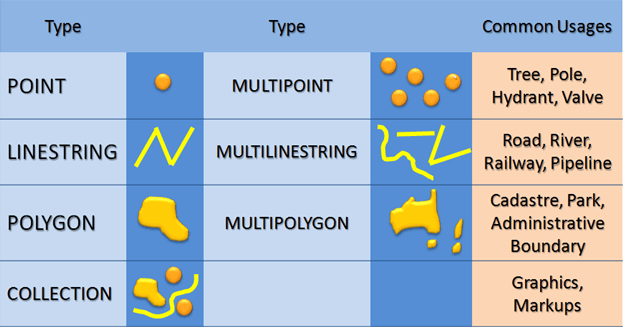
And from these 3 types (or collections of types) you can create every spatial object you want.

 
Geometry vs Geography
In SQL Server you have the option to use 2 spatial types. The main difference between these 2, is that Geometry only stores 2D objects, and Geography can store 3D (and even 4D) objects. Also, Geometry and Geography don’t support the same exact methods. For example, Geography can’t calculate a center-point of a shape.

Another big difference is that Geometry calculates straight lines, and Geography actually compensates for the curvature of the earth.

In order to keep things simple, I created the examples in this post all in Geometry data.

Drawing your first object
To start off basic, what is easier then drawing a simple square? A square consists of 4 coordinates, and is one of the most basic forms you can draw. An example of a square looks like this:

DECLARE @Square geometry;
SET @Square = geometry::STGeomFromText('LINESTRING (0 0, 0 100, 100 100, 100 0, 0 0)', 4326);
SELECT @Square

But what if you want a solid square, instead of an outline? In that case, you need to change the type you’re drawing into a polygon. Where the 4 lines in the example above just draw the outline of the object, a polygon (like the example below) will also contain everything within the lines you draw:

DECLARE @SquareFilled geometry;
SET @SquareFilled = geometry::STGeomFromText('POLYGON((0 0, 0 100, 100 100, 100 0, 0 0))', 4326);
SELECT @SquareFilled

 
Layers
Okay, let’s take this one step further. You can also draw multiple objects in one context. These objects can be drawn next to each other, or on top of each other. Every object you draw will be drawn in a “separate layer”. Objects that don’t overlap are just 2 shapes (polygons). But if you draw 2 shapes on top of each other, it’s a whole different story. Both objects can actually aggregate into 1 big shape, or exclude each other. First, an example with 2 separate shapes:

DECLARE @Square geometry,
		@Triangle geometry;

SET @Square = geometry::STGeomFromText('POLYGON((0 0, 0 100, 100 100, 100 0, 0 0))', 4326);
SET @Triangle = geometry::STGeomFromText('POLYGON((50 50,100 150,150 50, 50 50))', 4326);

SELECT @Square
UNION ALL
SELECT @Triangle

If you run the query above, you’ll see 2 objects appear: a square and a triangle. Both object overlap at a certain point, but they’re still 2 independent shapes.

 
Layer aggregation
Until now it’s just child’s play. Now we’re getting to the exiting stuff! How about combining the 2 previous objects into one big shape?

DECLARE @Square geometry,
		@Triangle geometry;

SET @Square = geometry::STGeomFromText('POLYGON((0 0, 0 100, 100 100, 100 0, 0 0))', 4326);
SET @Triangle = geometry::STGeomFromText('POLYGON((50 50,100 150,150 50, 50 50))', 4326);

SELECT @Square.STUnion(@Triangle)

Now you’ll see that both objects merged into one single object. This is a result of “joining” 2 objects or layers. By using the extended method STUnion on one of your shapes, you can add another shape to it. So in the case, the triangle is added to the square.

 
Layer intersection
But what if you want to know the part of the polygon that intersects? So which part of object 1 overlaps object 2? You can do this by using the STIntersection method:

DECLARE @Square geometry,
		@Triangle geometry;

SET @Square = geometry::STGeomFromText('POLYGON((0 0, 0 100, 100 100, 100 0, 0 0))', 4326);
SET @Triangle = geometry::STGeomFromText('POLYGON((50 50,100 150,150 50, 50 50))', 4326);

SELECT @Square.STIntersection(@Triangle)

Or maybe you want to know which part doesn’t overlap. Then you can query the difference of both objects:

DECLARE @Square geometry,
		@Triangle geometry;

SET @Square = geometry::STGeomFromText('POLYGON((0 0, 0 100, 100 100, 100 0, 0 0))', 4326);
SET @Triangle = geometry::STGeomFromText('POLYGON((50 50,100 150,150 50, 50 50))', 4326);

SELECT @Square.STSymDifference(@Triangle)

 
Center
As you see, there are many really cool things you can do with spatial data. One other I want to show you is how to determine the center of your object. Instead of calculating it yourself, you can use a method called STCentroid:

DECLARE @Square geometry;

SET @Square = geometry::STGeomFromText('POLYGON((0 0, 0 100, 100 100, 100 0, 0 0))', 4326);

SELECT @Square
UNION ALL
SELECT @Square.STCentroid().STBuffer(10)

Just to keep it visual, I’ve added a buffer to the center point. What STBuffer does, is adding a radial to the selected object. So in this case, it created a radial around the center point.

If you didn’t draw that extra radial, it would literally just be a pixel on your screen. So by adding a buffer around the center, it’s still visible. But it’s only for visual purposes, and isn’t required to make this query work.

 
Other possibilities
Another thing I wanted to show, is a really awesome polygon made by one of my colleagues: Johannes Tedjaatmadja (@JTedjaatmadja). You have to see it for yourself, because posting it would spoil the surprise. You can download it from here. And I must say, this’ll be one to make Mladen Prajdic (Blog | @MladenPrajdic) proud! 😉

Get column headers without retrieving data

A few days ago Pinal Dave (Blog | @pinaldave) retweeted an old blog post about retrieving columns without data. Reading this blog post, I started thinking of other ways to achieve this.

One of the downsides of using SET FMTONLY ON is that it’s a session-setting. This means that every query you run in that session, doesn’t return results. This could end up in very confusing situations. You could end up debugging a query which doesn’t return any result, and eventually you discover that this is a result of SET FMTONLY ON. So this may not be the preferred way to get the column headers from a specific query. Also, this option doesn’t return estimated or actual execution plans!

An example of such a query could be:

SET FMTONLY ON

SELECT *
FROM sys.tables

SET FMTONLY OFF

Another way of getting this information, without changing your connection options, is a simple WHERE clause.

SELECT *
FROM sys.tables
WHERE 1 = 0

This query will return the same results as the query with SET FMTONLY ON. And looking at performance, there’s no real difference between the two. I ran statistics on both solutions, and the I/O generated is pretty neglectable.

Conclusion
My personal favorite is the WHERE clause. This is because it doesn’t involve session modifiers, and (if you want to) still returns an execution plan. The SET FMTONLY ON doesn’t return an estimated or actual execution plan.

On the other hand, SET FMTONLY is on the list of deprecated features in future SQL Server versions. So for all new functionality, I’d advise you not to use it.

But maybe the other options suits you more. As always: it depends. Depending on your own preferences and the specific situation. But if you have any other options, please let me know. Post a comment, send me an e-mail, tweet me, whatever you want :).

Calculating Running Totals

When you work with data and database systems, eventually you need to calculate running totals on (for example) product sales or financial data. There are several methods to calculate these amounts. In this post I’ll try to show the pros and cons to the different solutions.

Let’s start with creating the resources for the examples. The most basic example I could think of, is one with only the necessary information: Date and Turnover.

CREATE TABLE Dough
	(Date DATE,
	 Turnover FLOAT)

And then insert some data:

INSERT INTO Dough
	(Date, Turnover)
VALUES
	('2011-01-01', 1000),
	('2011-02-01', 1250),
	('2011-03-01', 1500),
	('2011-04-01', 1750),
	('2011-05-01', 2000),
	('2011-06-01', 2250),
	('2011-07-01', 2250),
	('2011-08-01', 2000),
	('2011-09-01', 1750),
	('2011-10-01', 1500),
	('2011-11-01', 1250),
	('2011-12-01', 1000)

INSERT INTO Dough
	(Date, Turnover)
VALUES
	('2012-01-01', 100),
	('2012-02-01', 125),
	('2012-03-01', 150),
	('2012-04-01', 175),
	('2012-05-01', 200),
	('2012-06-01', 225),
	('2012-07-01', 225),
	('2012-08-01', 200),
	('2012-09-01', 175),
	('2012-10-01', 150),
	('2012-11-01', 125),
	('2012-12-01', 100)

With this resource, we can start on the examples.

Different solutions


When looking at this question, you’ll notice that there are more solutions to return the correct result. The following queries return the same result, but all the solutions are written for a specific version of SQL Server.

SQL 2000
If you’re using SQL Server 2000 (and I certainly hope you don’t have to anymore ;)), you can use the query with the INNER JOIN. This can be used on all SQL Server versions:

SELECT
	A.Date,
	A.Turnover,
	SUM(B.Turnover)		AS RunningTotal
FROM Dough A
INNER JOIN Dough B
	ON YEAR(B.Date) = YEAR(A.Date)
	AND B.Date <= A.Date
GROUP BY A.Date, A.Turnover
ORDER BY A.Date ASC

SQL 2005
In SQL Server 2005 they entered a new join type, called CROSS JOIN:

SELECT
	A.Date,
	A.Turnover,
	SUM(B.Turnover)		AS RunningTotal
FROM Dough A
CROSS JOIN Dough B
WHERE YEAR(B.Date) = YEAR(A.Date)
AND B.Date <= A.Date
GROUP BY A.Date, A.Turnover
ORDER BY A.Date ASC

The example with the INNER JOIN and the CROSS JOIN generate the same execution plan.

SQL 2012
With the release of SQL Server 2012 they handed us (SQL developers) a whole new “bag of tricks”. One of these “tricks” is the window function.

The first time I saw the window function, was at a Techdays NL 2012 session. This session was hosted by Bob Beauchemin (Blog | @bobbeauch). The sessions (T-SQL improvements in SQL Server 2012) is worth watching. Even if you’re using SQL Server 2012 already!

With the window function you can compute and group data, and this is done with the rows you specify.

SELECT
	Date,
	TurnOver,
	SUM(TurnOver) OVER (PARTITION BY YEAR(Date)
						ORDER BY Date ASC
						ROWS BETWEEN UNBOUNDED PRECEDING AND CURRENT ROW)		AS RunningTotals
FROM Dough

Performance


Seeing all these different solutions for the same question, I (and you probably will too) wonder about the performance of these queries. One very quick conclusion: they all return the same records ;).

When using SET STATISTICS IO, you can see the amount of disk activity generated by your statement. If you run this for the queries above, you will get the following results:

INNER JOIN:

Table ‘Dough’. Scan count 2, logical reads 25, physical reads 0, read-ahead reads 0, lob logical reads 0, lob physical reads 0, lob read-ahead reads 0.

CROSS JOIN:

Table ‘Dough’. Scan count 2, logical reads 25, physical reads 0, read-ahead reads 0, lob logical reads 0, lob physical reads 0, lob read-ahead reads 0.

OVER:

Table ‘Worktable’. Scan count 0, logical reads 0, physical reads 0, read-ahead reads 0, lob logical reads 0, lob physical reads 0, lob read-ahead reads 0.
Table ‘Dough’. Scan count 1, logical reads 1, physical reads 0, read-ahead reads 0, lob logical reads 0, lob physical reads 0, lob read-ahead reads 0.

In the OVER query, you see a table called “Worktable”. This is an “extra object” that is generated by SQL Server because you use the OVER statement.

Conclusion


As shown above, there are several different ways to get to the same result. In this example I didn’t show you the cursor solution. This because it’s a bad practice, a bad performer, and a little bit to preserve my good name ;). If you do want to see this, please leave me a comment, and I’ll add it to this post.

But with every solution you’ll see as much discussion about reasons to use is, as discussions on why NOT to use it. And in this case, you might be bound to a specific SQL Server version, so you can’t use a specific approach.

But if you ask me for my opinion, I’ll go for the last option. Not only because I’ve got the privilege to work with SQL Server 2012 in my daily work, but also because it’s the best performer and you’ll end up with the most readable code.

I’m guessing you have a totally different opinion, so please leave a comment with your ideas and/or approaches to this challenge! Also, comments and questions are also greatly appreciated!

Design a site like this with WordPress.com
Get started