Using FOR XML in a CROSS APPLY
October 7, 2014 Leave a comment
A few blog posts ago, I showed how easy it is to generate JSON, JavaScript or arrays with the FOR XML clause. But in the examples, the output is transformed to text. Selecting this output is the same as a normal select. But what if you really want to output XML? Does this work the same? Let’s create the same example table again, and rebuild it to output XML.
Creating resources
Just as in my last blog post, let’s use the airline example:
CREATE TABLE #TMP_AirlineTickets
  (ID INT IDENTITY(1,1),
   Airline VARCHAR(10),
   Departure_Airport_Code VARCHAR(5),
   Price DECIMAL(10,4))


INSERT INTO #TMP_AirlineTickets
  (Airline, Departure_Airport_Code, Price)
VALUES
  ('BA', 'RTM', 10.00),
  ('KLM', 'AMS', 125.00),
  ('BA', 'LHR', 15.00),
  ('KLM', 'BCN', 50.00),
  ('KLM', 'BHX', 75.00)
When you write a query with a CROSS APPLY on this table, it works like it’s supposed to:
SELECT AT.Airline, CA.Departure_Airport_Code
FROM #TMP_AirlineTickets AT
CROSS APPLY
	(
		SELECT Departure_Airport_Code
		FROM #TMP_AirlineTickets A
		AND A.Airline = AT.Airline
	) CA
GROUP BY AT.Airline, CA.Departure_Airport_Code
There is a DISTINCT or GROUP BY needed in this query, to return only the unique records. As we’ll see later on, DISTINCT doesn’t work for this query, so a GROUP BY is used. This results in a dataset where every Airline code is joined to every airport they fly to:

Generating XML in CROSS APPLY
But in the previous post, we got a string as output. But now, we want to return XML instead of a normal resultset. But what happens if we put the FOR XML clause in this query? If we do so, it throws an exception:
SELECT AT.Airline, CA.Departure_Airport_Code
FROM #TMP_AirlineTickets AT
CROSS APPLY
	(
		SELECT Departure_Airport_Code
		FROM #TMP_AirlineTickets A
		AND A.Airline = AT.Airline
		FOR XML PATH('')
	) CA
GROUP BY AT.Airline, CA.Departure_Airport_Code
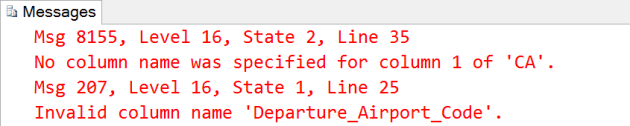
Apparently column 1 of the CROSS APPLY result has no column name. Looking at the result that comes from the CROSS APPLY, the column name is generated automatically:

Giving a column alias to the column in the select doesn’t work. But you can also provide a column list to a cross apply:
SELECT AT.Airline, CONVERT(XML, CA.Airport_XML) AS Airport_XML
FROM #TMP_AirlineTickets AT
CROSS APPLY
    (
        SELECT Departure_Airport_Code AS DAC
        FROM #TMP_AirlineTickets A
        AND A.Airline = AT.Airline
        FOR XML PATH('')
    ) CA (Airport_XML)
GROUP BY AT.Airline, CA.Airport_XML
By adding a column list to the CROSS APPLY, we can now use the column name Airport_XML in the outer select. By doing that, we get the airline name, and the departure airport code list:

Returning XML
So when you want to generate XML in a query, it’s possible to do that with a CROSS APPLY. It’s just a easy as writing a normal query, but it makes you a lot more flexible when you need to output XML from SQL Server. With this, there is no need for CLR’s or external applications to generate the XML you need, but you can just do it with T-SQL.




 SQL from the Trenches