SQL Sentry Plan Explorer: You can’t live without it
December 9, 2014 3 Comments
Every data professional out there will run into slow running queries, or performance issues you can’t explain at some point. At that moment, it’s difficult to explain the problem without looking at an execution plan. SQL Server Management Studio (SSMS) has build-in functionality to look at these execution plans. But this isn’t always as useful as we would like it to be. But there is a great free tool that’ll help you with query-tuning and pinpointing the issue in bad performing queries.
Download
SQL Sentry Plan Explorer is free, and available on the website of SQL Sentry. Even though it says it’s a trial version, it won’t expire after a certain period. The only thing that’s “trial” in this version, is that some functionality is blocked in the free version. But all the good stuff is available in the free version.
Integration in SSMS
When you start the install, the install doesn’t ask you to shut down SSMS. But I recommend you do. If you don’t close SSMS, you won’t see the SSMS add-in menu. It will show after the setup is finished, and you start a new instance of SSMS.
Creating a query, and opening it in Plan Explorer
As an example, I’ve created a really bad query on the Adventureworks2012 database:
USE AdventureWorks2012
GO


DECLARE @MinPrice INT = -1;


WITH Shipping AS
(
SELECT
  PV.ProductID AS ProductID,
  UM.Name AS ShippingPer,
  CASE
    WHEN UM.Name = 'Each' THEN PV.StandardPrice
    WHEN UM.Name = 'Dozen' THEN PV.StandardPrice / 12
    ELSE @MinPrice
  END AS ShippingCostPerUnit
FROM Purchasing.ProductVendor AS PV
INNER JOIN Production.UnitMeasure AS UM ON UM.UnitMeasureCode = PV.UnitMeasureCode
)


SELECT
  P.ProductID,
  P.ProductNumber,
  P.Name,
  S.ShippingCostPerUnit,
  Quantity.TotalQuantity,
  P.ListPrice,
  dbo.ufnGetProductListPrice(P.ProductID, GETDATE()) AS XYZ,
  Locations.TotalLocations,
  P.ListPrice + S.ShippingCostPerUnit AS TotalCostProduct,
  Quantity.TotalQuantity * P.ListPrice AS TotalValueStock,
  ((Quantity.TotalQuantity * P.ListPrice) / Locations.TotalLocations) AS AverageValuePerLocation
FROM Production.Product AS P
INNER JOIN Shipping AS S ON S.ProductID = P.ProductID
CROSS APPLY
(
  SELECT SUM(Quantity) AS TotalQuantity
  FROM Production.ProductInventory
  WHERE ProductID = P.ProductID
  GROUP BY ProductID
) AS Quantity
CROSS APPLY
(
  SELECT COUNT(LocationID) AS TotalLocations
  FROM Production.ProductInventory --WITH(INDEX(0))
  WHERE ProductID = P.ProductID
) AS Locations
WHERE P.ListPrice <> 0
ORDER BY P.ProductID, P.ProductNumber, P.Name, TotalLocations ASC
If you run this query in SSMS, and you include the actual execution plan (Ctrl + M), it will show you the execution plan in a separate result window. In this window, you’ll have the option to right-click, and choose “View with SQL Sentry Plan Explorer”:

If you click this, you’ll open Plan Explorer, and it will show you the execution plan:

So, is that all?
I can almost hear you think: So what’s the difference between Plan Explorer and the default SSMS windows, besides the fancy colors? Just take a look at all the extra opportunities you get with Plan Explorer. For example, how does your join diagram look? Can you pull that from SSMS? No? Well I can do that with Plan Explorer:

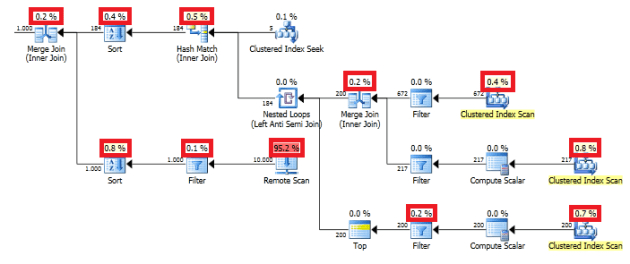
Your most expensive operation in the query? Yes, you could do that by looking at the percentages shown in your queryplan. But can you show me why they are that expensive? Again, I can do that with Plan Explorer:

Can you do you job without it?
If I ask myself this question, I think I can honestly answer this with: yes. Yes, I can do my job without it. But this makes it SO much easier to pinpoint the problem, and to get a quick overview of the query performance. Normally I look at the queryplan in SSMS first, and then immediately open up a Plan Explorer window, to take a closer look at the problems.
So if you write queries on a daily basis, and you’re responsible for, or interested in, qery performance: download it today, and try it out yourself. I’ll promise you, you won’t regret downloading it!
If you want to read more about SQL Sentry Plan Explorer, don’t forget to check out these blog posts:
– Julie Koesmarno: Analysing Execution Plans With SQL Sentry Plan Explorer
– Mickey Stuewe: On sabbatical
– Chris Yates: SQL Sentry Plan Explorer – Don’t Leave Home Without It





 SQL from the Trenches