-
-

Project Architecture
-

Gemini Live Architecture
-

Create new scene by Gemini Live taking notes
-

Beatsheet check by Gemini 3


Pitch
APS (ADI Pre-Production Studio) is a collaborative screenplay writing platform with a real-time voice assistant powered by the Gemini Live API. Writers speak naturally to their screenplay — querying scenes, brainstorming ideas, creating new scenes through narration, and editing existing ones — all through voice conversation with zero typing.
Gemini Live is the backbone of this voice experience. It handles bidirectional audio streaming, understands complex multi-turn conversations about screenplay content, and fires function calls at the right moments to trigger backend operations. The native audio model (gemini-2.5-flash-native-audio) provides natural, low-latency voice responses while maintaining context across the entire conversation. Combined with Gemini 3 Flash for structured reasoning tasks (scene parsing, classification, content search), the Gemini ecosystem powers both the voice interface and the intelligence behind it.
Architecture
The system has three layers:
- React frontend with a custom screenplay editor and voice assistant drawer
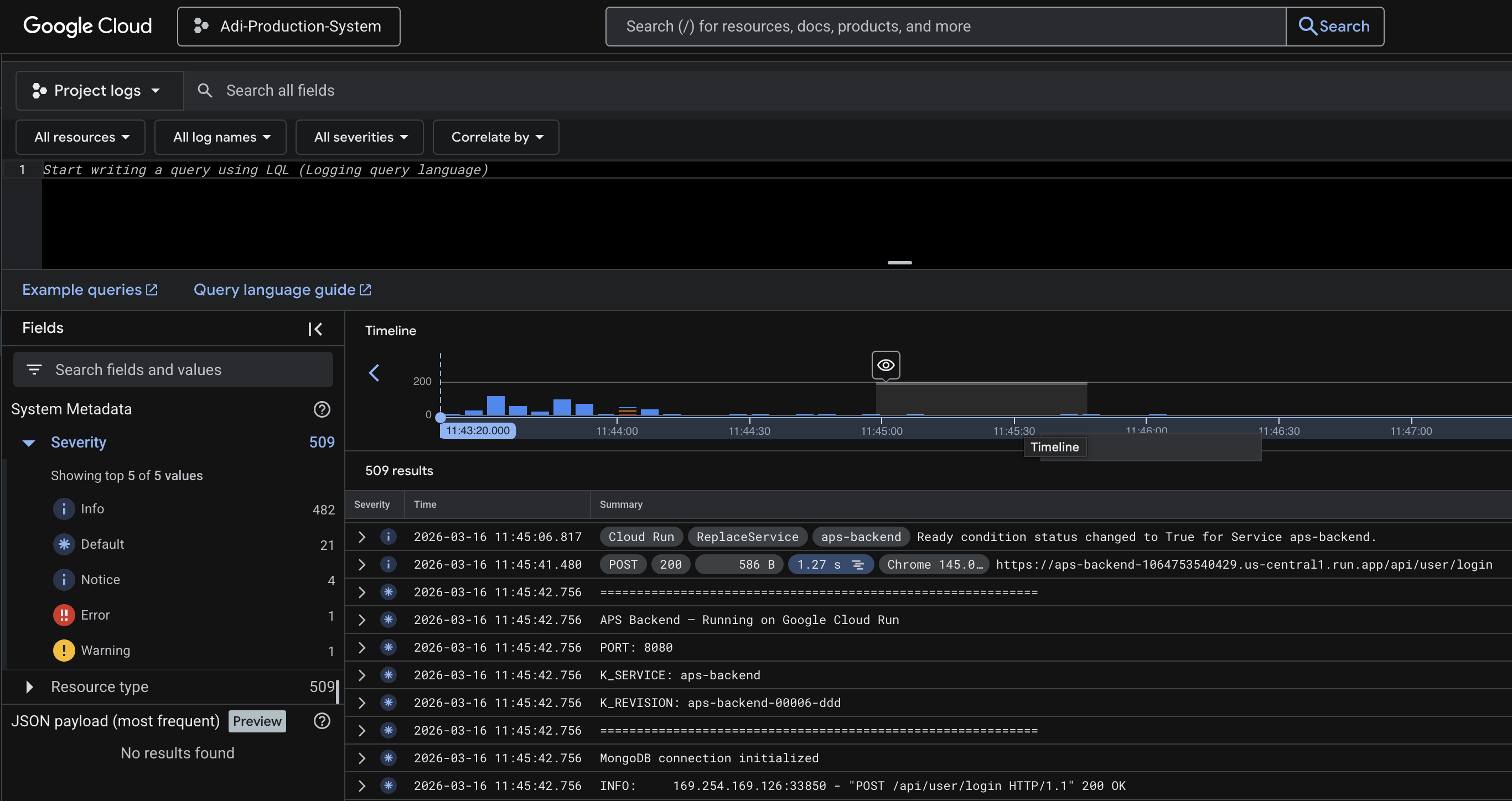
- FastAPI backend deployed on Google Cloud Run, handling auth, database operations, WebSocket voice streaming, and REST APIs
- Preprod Graph (LangGraph agent) handling all AI reasoning, called by the backend over HTTP
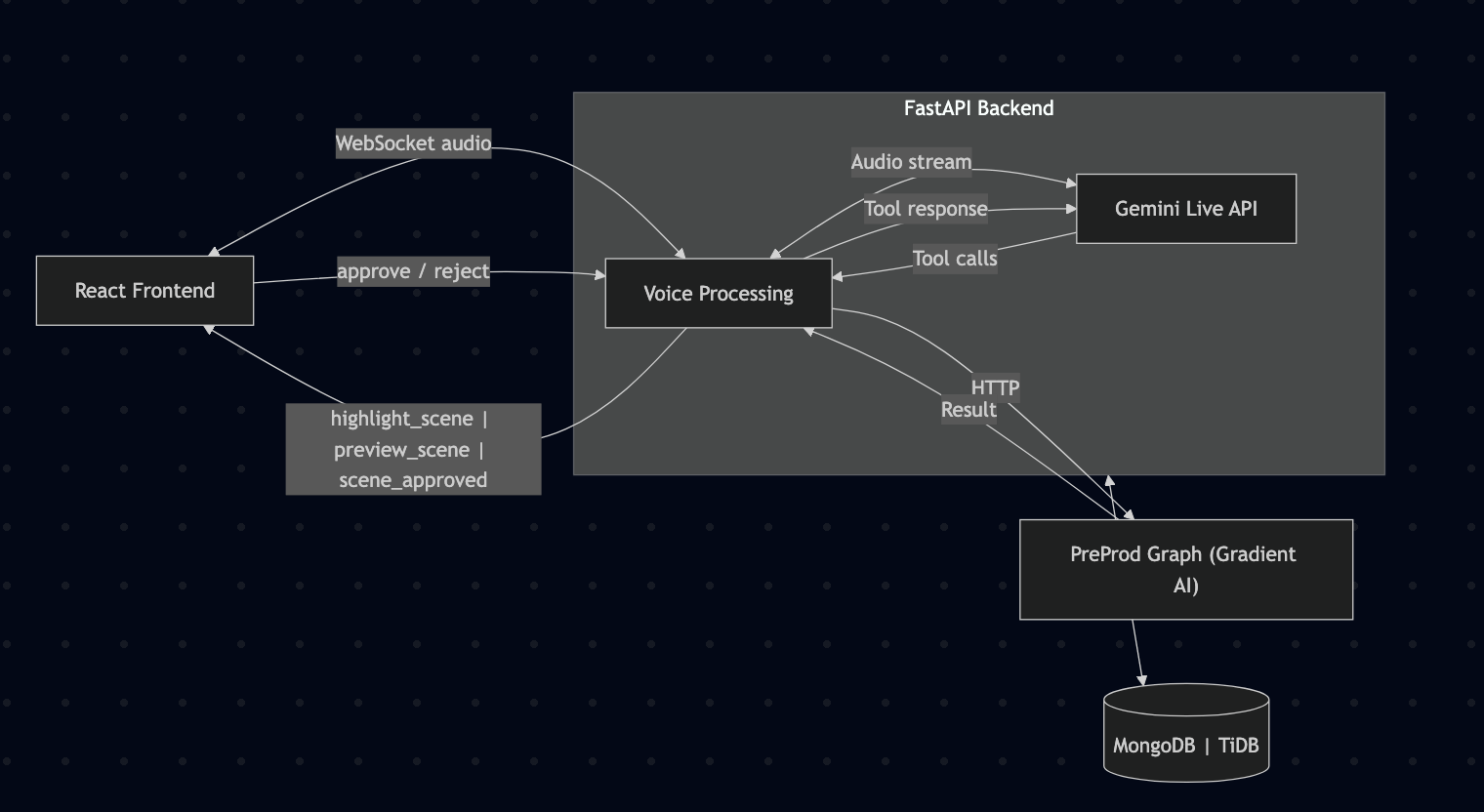
The voice flow:
- React connects to backend via WebSocket
- User's microphone audio streams as PCM at 16kHz
- Backend creates and manages a Gemini Live session
- Audio is forwarded bidirectionally between frontend and Gemini
- When Gemini decides to call a function (e.g. fetch a scene, create one), the backend intercepts the tool call
- Backend routes the call to the preprod graph (HTTP) or database directly
- Tool result is sent back to Gemini to continue the conversation
- Gemini's voice responses stream back to the frontend at 24kHz for playback
This is the high level architecture of the entire project.

The following is the proof that the backend is hosted on Google Cloud Run.
Gemini Live
Gemini Live API and Gemini Flash are used in two distinct roles:
Gemini Live API (Voice Layer)
- Real-time bidirectional audio streaming via
gemini-2.5-flash-native-audio - Handles speech recognition, natural language understanding, and voice synthesis in a single model
- Supports function calling mid-conversation — the model decides when to trigger tools based on conversational context
- Manages multi-turn context so the user can say "now change the dialogue in that scene" after previously asking about it
- Interruption handling — user can cut in mid-response and the model adapts
- 7 registered tools:
get_scene_num,get_scene_by_content,brainstorm_ideas,get_project_info,create_scene,update_project_info,update_scene
Gemini 3 Flash (Reasoning Layer)
- Used via OpenRouter for all structured LLM tasks in the preprod graph
- Intent classification (routing user queries to the right operation)
- Keyword extraction for content-based scene search
- Scene candidate confirmation (picking the best match from search results)
- Narration-to-screenplay parsing (converting spoken descriptions into formatted scene elements)
- Surgical scene editing (find-and-replace on specific elements while preserving structure)
- Project info field extraction (determining which fields the user wants to update)
The backend manages the Gemini Live session lifecycle: creating sessions with system prompts and tool definitions, forwarding audio chunks, intercepting tool calls, routing them to the preprod graph, and sending tool responses back to Gemini to continue generating.
The following is the high level gemini flow. Visit Here for a detailed version.
What it does?
The voice assistant supports three categories of operations through natural speech:
1. Get Data
Retrieve and summarize information from the screenplay project.
Get Scene by Position
- User says "show me the last scene" or "what's in the first scene"
- Gemini Live fires
get_scene_numtool with the position - Backend calls preprod graph → fetches scene by ordinal from MongoDB
- Gemini Flash generates a conversational summary of the scene
- Frontend scrolls to and highlights the scene in the editor
Get Scene by Content/Dialogue
- User describes a scene: "the scene where they argue about the plan"
- Gemini Live fires
get_scene_by_contenttool - Gemini Flash extracts 1-5 search keywords from the description
- Backend string-matches keywords across all scenes in the screenplay
- Gemini Flash confirms the best candidate from results
- Scene is summarized and highlighted in the editor
Get Project Information
- User asks "what is this project about" or "what screenplays do we have"
- Gemini Live fires
get_project_infotool - Graph fetches project metadata (title, description, screenplays) from backend
- Formats and returns it conversationally
Brainstorm Ideas
- User says "what should happen next" or "give me ideas"
- Gemini Live fires
brainstorm_ideastool - Graph pulls existing scene summaries from the screenplay
- Checks beatsheet status to see which story beats are covered
- Gemini Flash suggests next directions based on uncovered beats
2. Create Data
Add new content to the screenplay through voice narration.
Add Scene to Screenplay
- User narrates a scene naturally — describing setting, action, characters, dialogue
- User signals completion with a key phrase ("end scene", "that's it")
- Gemini Live fires
create_scenetool with the full narration - Gemini Flash parses narration into proper screenplay format (scene heading, action, character, dialogue, parentheticals, transitions)
- A preview of the formatted scene appears in the voice drawer
- User approves or rejects via buttons (SVG icons)
- On approval → scene saves to MongoDB → editor reloads with the new scene highlighted
3. Update Data
Modify existing screenplay content through voice instructions.
Update Scene
- User says "update the first scene, change juggling to photography"
- Gemini Live fires
update_scenetool with the full instruction - Gemini Flash identifies which scene (by position or content keywords)
- Graph fetches the scene using shared search utilities
- Gemini Flash applies surgical find-and-replace edits — only changing what was asked, preserving all IDs, structure, and unchanged text
- Updated scene preview shown in the voice drawer for approval
- On approval → scene replaces the original in MongoDB → editor reloads and highlights it
Update Project Information
- User says "change the project name to..." or "update the description"
- Gemini Live fires
update_project_infotool - Graph fetches current project info from backend
- Gemini Flash extracts which fields to change from the instruction
- Backend applies the update via PATCH endpoint
The TechStack
- React + TypeScript — Frontend with custom screenplay editor (ProseMirror-based) and voice assistant drawer
- FastAPI (Python) — Backend REST API + WebSocket server, deployed on Google Cloud Run
- Gemini Live API — Real-time voice conversation with function calling (
gemini-2.5-flash-native-audio) - Gemini 3 Flash — Structured reasoning, classification, and content generation (via OpenRouter)
- LangGraph — Stateful agent graph with classify-and-route pattern
- MongoDB — Screenplay document storage (scenes, elements, revisions)
- TiDB — Relational data (users, projects, screenplay metadata)
- Google Cloud Run — Backend deployment with auto-scaling
This is NOT The END!
The platform is designed for the full pre-production pipeline. Upcoming additions:
- Outlines — Structured story outlines that feed into scene generation
- Storyboard — Visual scene planning with AI-generated shot descriptions
- Beatboard — Visual beat mapping tied to the beatsheet for story structure tracking


Log in or sign up for Devpost to join the conversation.