-
-

app

Inspiration
Reva started from two very simple, very personal frustrations.
First, I’m “that friend” everyone messages when something breaks:
“Hey, my controller drifted again.”
“Do you think this old phone is salvageable?”
“Is it worth fixing this keyboard or should I just buy a new one?”
Most of the time the answer isn’t “it’s unfixable” — it’s “I don’t know where to start.” The guides are scattered across iFixit, random forums, YouTube comments, and half the time you’re not even sure what exact model you’re holding in your hand. So the device quietly moves to a drawer, and eventually to e-waste.
At the same time, I’ve been quietly obsessed with Apple’s move to Apple Silicon. For years, Macs were just another x86 box with a nice OS on top. Then the M-series and A-series chips arrived — and suddenly the same ARM family that used to live only in “low-power phone chips” was out-running laptop CPUs while sipping power. My iPhone and my Mac were now speaking the same ISA, sharing the same design philosophy: custom, high-performance ARM cores plus dedicated blocks for GPU and neural engines.
That made me curious: how far could I push this hardware on its own? I wanted to see how powerful a modern iPhone really is for intelligent, on-device workflows without relying on cloud AI.
So my goal was simple recognize a product, find its repair guide, and guide the user intuitively through the fix, all on-device.
What I Learned
At first, I thought I’d have to gather small, lightweight models and run them through Core ML manually. But as I dug deeper into Apple’s developer docs, I realized something surprising — iOS already does a massive amount of machine learning under the hood.
From photo segmentation to text detection, from voice transcription to intent prediction, the OS itself has been doing ML for years. AI isn’t new here; it’s just finally visible.
So I decided to build on that foundation instead of fighting it. Why reinvent the wheel when Apple already ships world-class frameworks for computer vision, AR, and now even natural language intelligence? That realization shaped everything that followed.
Journey
1. Vision — building a Pokédex for gadgets
I started with Apple’s Vision framework, because it’s already built into iOS and great for quick experiments. Out of the box, it can detect general objects and scenes, so I used it to test the idea — point the camera at a gadget, get a label back.
It worked, but only at a basic level. Vision could tell me something was a phone, not which phone. For Reva, that difference really mattered the teardown for a OnePlus 5 isn’t the same as a OnePlus 7 Pro.
To go beyond that, I trained a custom Create ML model using YOLOv2 for object detection. Started with collecting and labeling images on roboflow with bounding boxes.
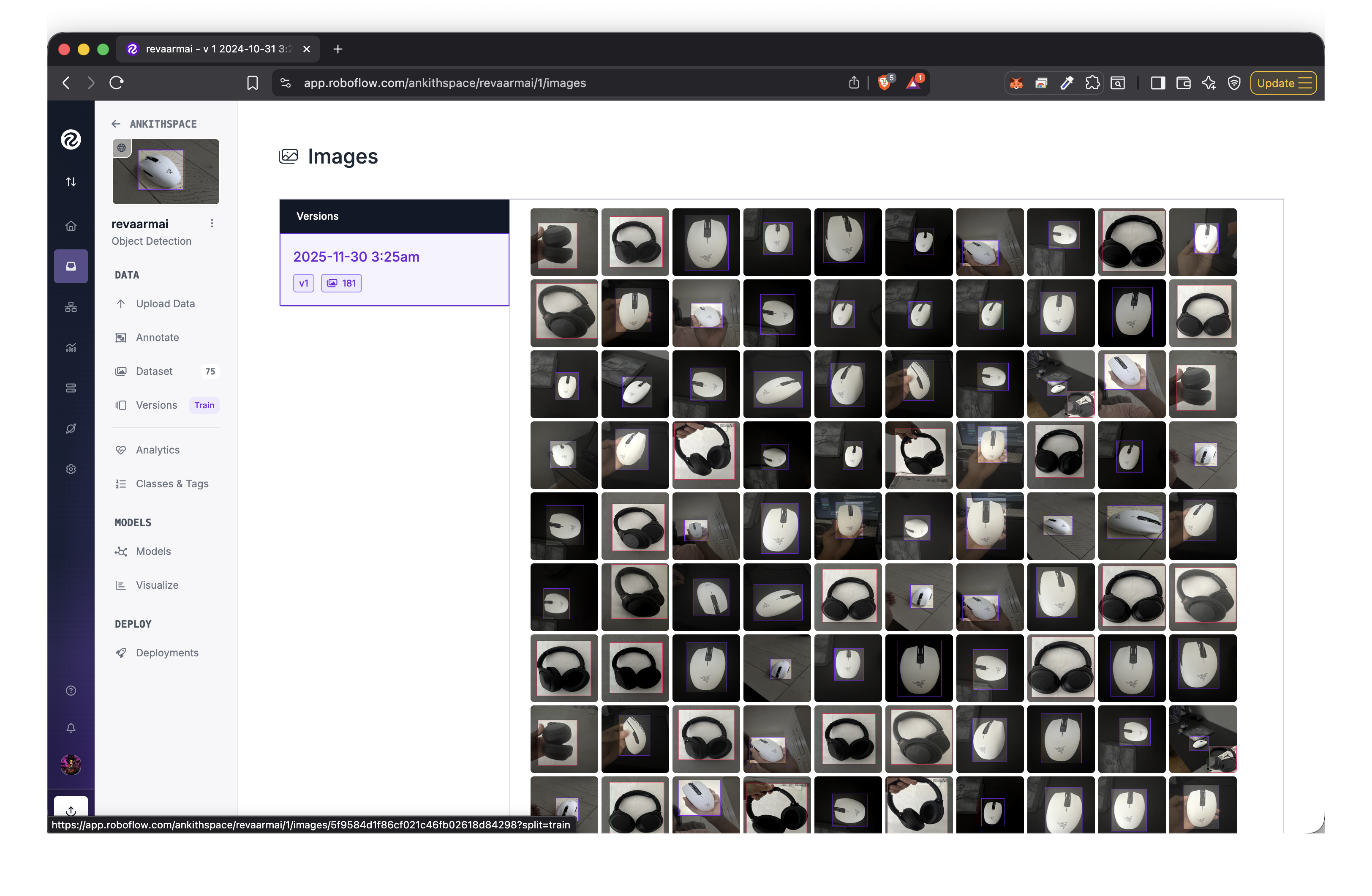

This small model was decent to recognize different products in a go .But once I started thinking about scaling, I knew this wouldn’t hold. Every new device meant retraining, re-exporting, and shipping another model. That’s a nightmare when you want to recognize hundreds of products. It wasn’t really a model problem — it was a data problem.
That’s when I moved to MobileCLIP. Instead of training a model to classify every possible device, I started using image embeddings to measure similarity — basically a retrieval approach. Now Reva only needed one reference image per product, and it could find the closest match locally, no retraining needed. That shift made everything click: smaller, faster, and scalable.
How it works:
Each image is converted into a vector embedding.
controller.jpg → [0.12, 0.47, 0.33, ...] (512 numbers)
keyboard.jpg   → [0.91, 0.14, 0.05, ...] (512 numbers)
Similar devices end up with similar vectors. So when a user points the camera, Reva just compares the live embedding to stored ones and finds the closest match — no retraining, no internet, all local.
let query = clip.embedding(for: image)
let match = findClosestMatch(to: query, in: storedEmbeddings)
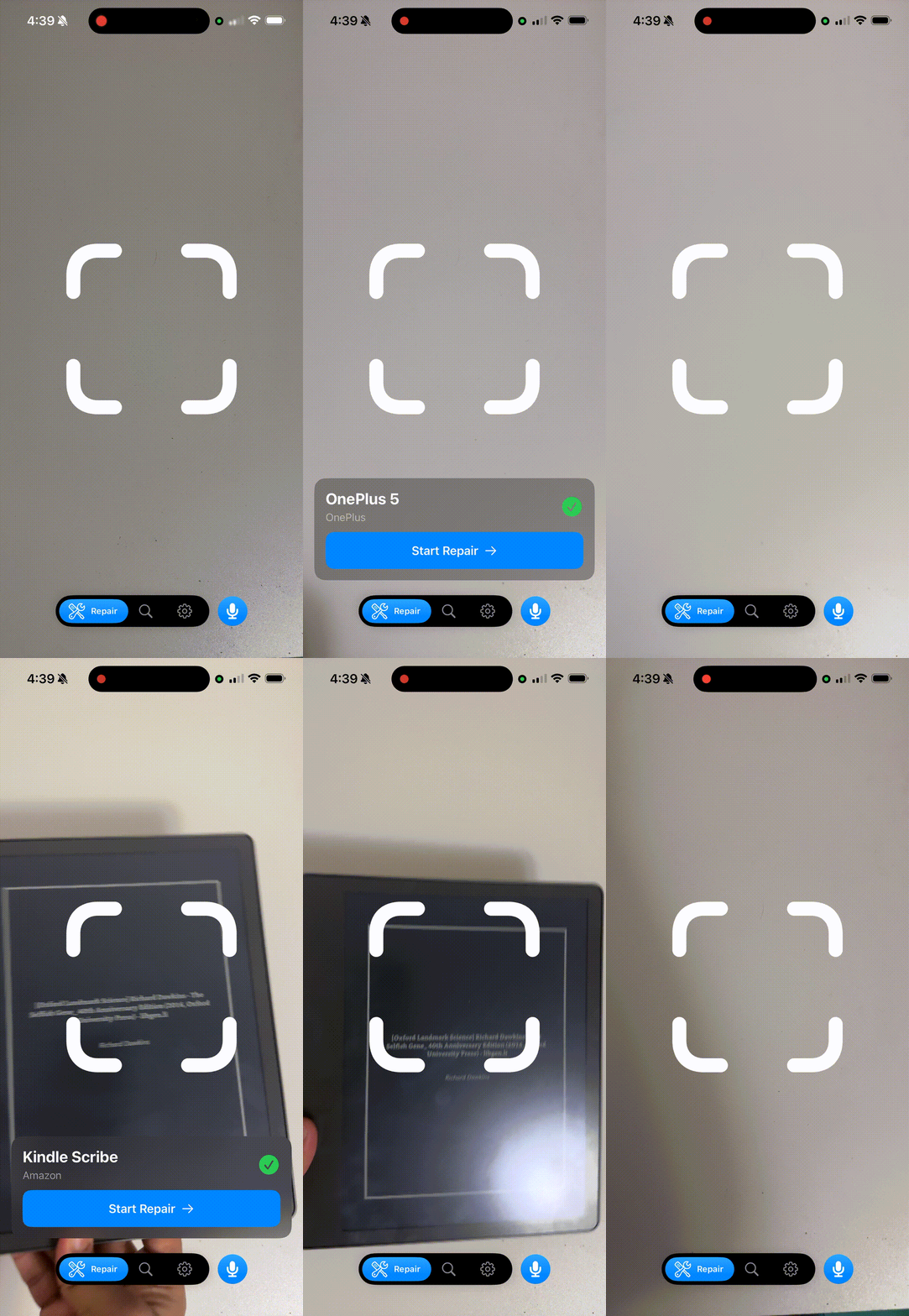
2. Guiding the user — turning recognition into repair advice
Once Reva could recognize a product, the next step was helping users fix it. Recognition alone isn’t enough if the app can’t guide you through what comes next — which screws to remove, what parts to replace, or what tools to use. That meant I needed some form of language understanding running directly on the device.
With iOS 26, Apple added the new Foundation Models framework, which basically gives you a built-in language model that runs locally. I wanted to see how good it was at answering simple repair-related questions.
import FoundationModels

let session = LanguageModelSession()
let response = try await session.respond(
    to: "Is it okay to mix leaded and unleaded solder during repair."
)
print(response.content)
Model output:
Mixing leaded and unleaded solder can be done with care, but it may affect solder properties like melting point, strength, and reliability. The temperature difference can cause thermal stress and potential joint failure, and quality may not match using one type alone. Lead also increases safety risks, so it’s generally safer and more reliable to stick with a single solder type unless mixing is specifically tested for your project.
I tried a few more prompts, and it was actually decent at replying and following along in natural conversation. It could keep context, answer follow-ups, and stay relevant. Combined with Reva’s visual recognition, users could point their camera at a device, ask “what do I do next?”, and get quick, private answers right on their phone.
Next, I wanted the model to answer based on real repair data, not just general knowledge.
So I built a small RAG setup on-device using ObjectBox.
I used it to store image embeddings from MobileCLIP, repair steps, and tool info basically the context that the Foundation Model could pull from when guiding the user.
3. Voice — talking to Reva naturally
Once Reva could recognize devices and explain how to fix them, the next step was to make it feel more natural something you could talk to while working with your hands.
Typing on a phone while holding a screwdriver doesn’t make sense, so I added speech recognition and text-to-speech to create a voice interface.
Using the Speech and AVFoundation APIs in iOS 26, it only took a few lines to get real-time interaction running fully on-device:
import Speech
import AVFoundation

// Speech recognition
let recognizer = SpeechRecognizer()
await recognizer.startRecording()

// Text-to-speech
let synthesizer = SpeechSynthesizer()
synthesizer.speak("Hello, how can I help you?")
Now you can just talk to Reva:
“I have completed it go to next step?” and it replies instantly, hands-free.
4. AR Overlays — making repair visual
Once Reva could recognize a device and guide users with voice, the next step was to make instructions visible to show users exactly where to look or what to remove.
I used ARKit’s Image Tracking for this. The idea was simple: when the user points their camera at the device, Reva recognizes it and anchors virtual overlays right on top of it like highlighting screws, connectors, or components to be removed.
import ARKit
import RealityKit

let configuration = ARImageTrackingConfiguration()
configuration.trackingImages = ARReferenceImage.referenceImages(inGroupNamed: "DeviceMarkers", bundle: nil)!

let session = ARSession()
session.run(configuration)
When ARKit detects the reference image, it locks onto it and keeps the overlay aligned even as you move around.
Each repair step reveals a different overlay red for critical parts, yellow for screws, blue for general info helping users follow along naturally.
This approach turned Reva into a kind of spatial repair manual: point your phone, and the next step appears on the device itself. It’s intuitive, hands-free, and runs entirely on-device using Apple’s ARKit and Metal fast, stable, and battery-efficient on ARM hardware.
Challenges and What’s Next for Reva
One major challenge was AR overlays and viewing angles. ARKit’s image tracking works best when the camera sees the device from roughly the same angle as the reference image. If the user tilts the phone too much, tracking can drift or break. I tried converting reference images into
.arobjectfiles for more reliable 3D detection, but it still wasn’t fully scalable each new device needs its own high-quality scan or calibration.The second challenge was data. Recognition and retrieval models like MobileCLIP are only as good as the reference embeddings behind them. I’d love to build a proper open dataset of repair photos and embeddings, then push it to Hugging Face . so others can reuse and improve it, turning Reva into a truly community-driven repair dataset.
And finally, performance tuning was constant. Balancing Core ML inference, AR rendering, and speech synthesis all running locally took trial and error to keep things smooth on battery-powered devices.
Reva started as a small experiment to see how far an iPhone could go on its own. Now it’s shaping into a vision for intelligent, open, and accessible repair assistance — powered entirely by on-device AI.
Built With
- arkit
- coreml
- mlx
- swift-ui


Log in or sign up for Devpost to join the conversation.