Jekyll2026-03-08T01:54:35+00:00https://digx7.github.io/feed.xmlEverette Webber PortfolioDeveloper Portfolio featuring projects, blogs, and more.Everette WebberNext Fest Failed…? | Frost Loop | Devlog 72026-03-07T00:00:00+00:002026-03-07T00:00:00+00:00https://digx7.github.io/2026/03/07/Next%20Fest%20FailedWant to watch this instead? Wishlist FrostLoop

Intro

Hello I’m Digx7 and this is Devlog 7 of my first steam game Frost Loop a Survival City Builder on Rails

Composer

Near the start of January I signed on a Music Composer: Guillaume Fabre. We had been talking back and forth for a bit and I loved the demo they sent me. Initially I was planning on working on the project completely solo, but since my main objective is to use this project to boost my portfolio I figured being able to add ‘contracting a composer’ to my resume would be a huge plus. So once I made this decision I spent a bit of time researching contracts. I wanted to do this fairly and properly. During my research I came across a great series of GDC talks on legal contracts for game developers, I’ll link it in the description below. (NOT LEGAL ADVICE) I won’t go into details on any of the terms we settled on but I’m very happy with the arrangement and the work that Faber has produced since. I’ll link his details in the description if you happen to be looking for a composer as well.

FMOD

As part of bringing on a composer we wanted to create dynamic music that changed as the game changed. To achieve this we decided to add FMOD to the project. FMOD, whose logo you’ve likely seen at the start of many games, is an audio tool that lets you edit audio clips in real time, for example: music that changes right when the boss enters its second phase. Initially I was worried that adding FMOD into my existing project would take a ton of work, but it actually only took a day at most. The process was really smooth thanks to FMOD’s own documentation on how to integrate with Unity.
The main challenge comes in converting all Unity’s Audio Components and Audio Clips to FMODs Emitters and Events. Depending on how you were handling these previously is what will determine how easy or hard this conversion is. Also pay special attention to your version control process as FMOD has a few files it really doesn’t want you to save in Version Control.

Now granted, I’m a solo developer with a strong programming background, so your mileage may vary on how easy it is for you to add FMOD to your project. But within a day FMOD was integrated into Unity and within a week of signing the composer Faber had access to and was working in their own branch in the code base.

Next Fest

Moving on toward the end of February my game participated in the 2026 February Steam Next Fest. As part of prepping for that I had to refine my game and make a demo build. I started by locking parts of the research tree out of the Demo. Next I overhauled the layout of the research tree as well as reworked the initial tutorial objectives. Both of these were done in an effort to improve the player onboarding experience as both were elements that tripped up players the most in previous playtesting.

The last thing I did was add a scenario selection button to the new game menu. This does not do anything right now but in the full game I plan on adding multiple scenarios that the player can play through, this is just my way of hinting at that in the demo.

Once nextfest itself kicked off it was kind of surreal. Looking at the steam analytics I got around 100+ people to play my game. Not alot but I also went in with basically zero marketing. The strangest part was getting almost no feedback. I initially didn’t create a discord server, nor did the demo have its own steam page (so users couldn’t leave reviews). This means that outside of seeing the analytics numbers go up I have no evidence that anyone played it at all. No feedback on what they liked or didn’t like. Going from in person playtests to this feels really strange.

Part of that is on me for not providing traditional avenues for feedback. Part of that is the lack of any audience around my game. In the future I’ll have both a separate demo page and a discord setup going into NextFest.

I also realized halfway through Nextfest that the public demo build was a much older build than I expected. I had been using my automated build pipeline for so long that I forgot that Steam requires you to manually approve public builds before they can go live. So many learning experiences all around.

But regardless of the outcomes I have only about 1 month left on this project before its release on March 27th. So it’s time to add the last few features, really polish what I have and get everything ready for release.

Outro

That’s all for this post next will likely be either right before or right after the games release. So I’ll see you all then. Thanks for reading.

]]>
Everette Webber
The Making of Treasure Hunt | Game Jam2026-02-03T00:00:00+00:002026-02-03T00:00:00+00:00https://digx7.github.io/2026/02/03/The%20Making%20of%20Treasure%20HuntI made a game in 12 hours for an event hosted by PlayMath.org. They had a list of games they were looking for and I chose to make the Battleship-Like game. To make the game non-violant I re-flavored it as treasure hunting instead of blowing up ships.

However, during the event PlayMath told me they didn’t want the players to just blindly click around, but to instead connect a given grid coordinate, like A5, with its actual space on the map.

To achieve this I gave each treasure piece a hint to its location. Now the player must connect these hints with the actual spots on the map.

To balance this I had planned to limit the number of spots the player could check before failing, forcing them to use the hints. But I ran out of time before I could add this feature.

Should I continue working on this game?

]]>
Everette Webber
Tools Unlocked | Frost Loop | Devlog 62025-12-19T00:00:00+00:002025-12-19T00:00:00+00:00https://digx7.github.io/2025/12/19/Tools%20UnlockedWant to watch this instead? Wishlist FrostLoop here

Intro

Merry Christmas and Happy holidays! Here’s what I’ve been working on for the past few weeks in no particular order.

CSV Pipeline

It was getting tedious to manually edit the data for each train, and impossible to compare them for balance purposes. So I developed a tool that can import and export their data to and from a .csv spreadsheet.

.csv or comma separated values stores this, as this (csv code). Each line is one entry and all values are separated by a comma, simple. But, what if a single value has multiple lines? The intended solution is to wrap those values with double quotes. Therefore any code that reads .csv files needs to ignore data inside a double quote when separating rows. Use these line breaks, but not these. Easy for a human to spot, tricky for code to spot.

Most languages have libraries or packages to handle this exact problem, C# is no different with CSVHelper. However, I could not figure out how to install this into Unity as doing so requires terminal shenanigans that elude me. In theory it’s just a single command. In practice something in my own Unity project folder isn’t set up in the standard way so this command is failing. What exactly is causing it to fail? I don’t know, nor have I been able to figure it out.

So instead I rolled out my own .csv parser. I changed the commas to pipes and added dollar signs to indicate the end of each row. Now my parser just looks for a dollar sign followed by a line break to indicate the end of a row.

Hey, if it’s stupid but it works, it’s not stupid.

Now I can edit and balance all the data for my trains from a single spreadsheet.

Speed Controls

Now the speed options change depending on what engine you’ve built, if any. Also the backgrounds now match your speed and the map shows a preview of where you will move.

An engine’s speed options are stored with the data letting me use my new CSV script to edit them.

Others

I was able to use my CSV pipeline to automatically tag certain keywords so in game they appear a different color or can have an icon appear next to them.

I might even one day have them link to the in game Guide pages that I have now implemented. These are still a work in progress but at the moment I have around 100 pages. Because there is a page for every train, resource, and station in the game (more on those later).

Demands

Now, for the longest time the player never really had clear objectives to work towards. The main objective is to max out this Hope bar. But the way they are supposed to increase that is by completing various objectives or demands that their citizens will have. So I finally started implementing those. At the moment I think the demands will include a variety of resources that the player must make within a set number of turns. For example, make 100 rations within 25 turns. As the game proceeds the amount of resources and number of demands will increase. So the player will start the game with 1 demand but by the end might have a dozen at once.

Stations

For example I want stations to have their own demands. Stations are another big feature I’ve begun working on. At set locations on the map the player can build a station and assign workers to them. Stations will produce resources just like train cars, but at a larger amount with the trade off of taking several turns. For example the Forestry Station can produce 200 wood every 10 turns. The catch is that the player must be at the station to pick up the resources.

In the future I want these stations to have their own demands the player must complete or risk the station falling apart.

Demands and Stations are something I’m still very much working on but will be a core part of the game.

CICD Script

I’ve been dreading the process of getting a build of my game uploaded onto steam. I was under the impression that it would be a very tedious and complicated process. It was not.

It could be.

But thanks to a tutorial I found that I’ll link below it was incredibly easy Tutorial.

To be clear I’m just talking about getting a build of my game onto steam, not releasing it or going though certification.

To even get it on steam I thought I would need my game connected to the steamworks api, which is written in c++ but unity is in c#. So I thought I would need to wrangle some third party plugin just to upload my game. Turns out I don’t. Well I will still need to do that if I want to implement Steam achievements or cloud saves, which I do, but that’s a future me problem.

So now even though the game is not public I can play it from my own steam library, which feels awesome.

After figuring out how to upload builds to steam I began automating the process. I put together a terminal script that can make builds from unity and upload them to steam.

Could I do this process manually? Yes. It only takes a few minutes. But it’s nice to be able to just push a button and have a new build on steam. Especially once my game is live, having this in place will let me get patches out faster.

Having this script in place lets me expand upon it in the future if I start having to manage multiple builds of my game at once.

This got me thinking about the potential worst case scenario. As a game dev how many different builds could I have to manage at once? 2,3,5.. Try 20+.

How in the world did I come up with that number? Well let’s think through what separates builds. First you have the full game, and maybe a demo. But what if you also want to release on Windows, Mac, and Linux. Each of those needs a demo as well. If you’re releasing your game on Steam and including steam achievements and cloud saves your builds need to connect to Steam’s API. That means if you also release any other pc platforms like Epic, itch, or the Windows Store those builds need to be separate, and even unique if those platforms have their own APIs. This is starting to add up. And you could still have web builds, mobile builds, and console builds. Any one of these builds could have its own dev build for testing, or a unique showcase version used just for in person conventions, and we haven’t even added localization into the mix.

Obviously this is an excessive example and I can’t really think of any game that actually does this. But if I have one script that can automatically make and deploy one or all of these builds at once, that will be a huge benefit to me in the future. Not just for this game but for any game I make.

In fact I’m already getting some good use out of this script.

Playtesting and Showcasing

Recently I’ve gotten the chance to show off my game at a few local indie developer meetups. Through these events I was able to get invaluable feedback and playtesting data on my game. The biggest feedback I’ve been getting is that the tutorial and opening few minutes needs some reworking. Many playtesters were confused on the big picture goal they were aiming for, and stumped on how a few systems worked. However, the few playtesters who did figure these things out went on to play for an average of 30-40 minutes with some even completing most of the content I’ve implemented in around an hour or so. Encouraging, but clearly there’s more work I need to do.

Outro

That’s all for this devlog, thanks for reading and have a wonderful day!

]]>
Everette Webber
Steam Store Page Setup | Frost Loop | Devlog 52025-11-08T00:00:00+00:002025-11-08T00:00:00+00:00https://digx7.github.io/2025/11/08/Steam%20Store%20Page%20SetupWant to watch this instead? Wishlist FrostLoop here

Intro

Hello I’m Digx7 and this is Devlog 5 of Frostloop, a train survival management game.

Working on Trains

In my last devlog I drew a lot of the trains. And here they are in the game. The implementation was a lot of dragging and dropping files into the right spots. Easy when you only have one train, tedious when you’ve got 30.

There’s still more work to do as I need to update each train’s game data to give them their exact effects, stats, and so on. I basically need to fill out a complex form for each train. Again, easy when you’ve got 1 train, but tedious when you have 30.

So I’ve been putting that off as I instead worked on the UI art. And I’ve finished the first art pass!! This means I’m not using any Unity default art assets anywhere in the game anymore. Every panel, button, and knob has been replaced with custom art that I’ve drawn myself.

I absolutely could have sped up this process by making better use of prefabs, but I’m just happy to have this milestone finished.

There’s still more I could work on, adding animations and more player feedback.

However, this gets me pretty close to achieving another big milestone of having a Steam Store page up. I’ve been putting it off for a while as I’ve wanted to wait until the screenshots or trailers would look good.

If I’m being honest the only thing holding me back is that I’d want to do another pass on my Key Art. Maybe give it a more dynamic composition.

You know I might just work on that next.

Thumbnail

So I grabbed some reference images, made some thumbnail sketches, turned the one I liked into a full sketch, and then rendered it out.

For the sketches I focused on composition trying not to copy a SnowPiercer poster one for one, but when your subject is ‘Train in Snow’ there’s only so many options.

Once rendering I focused on contrast and color values. I needed the train to be the focal point of the image and standout from the background.

Afterwards I got this strange feeling that the finished result was ‘too simple’.

It had less noise than my last attempt, but also a clear readable subject.

Wait, that’s what you want isn’t it?

Yes, and it took me an embarrassingly long time to realize that. I sat a whole day with this final result before moving on.

Yet… but I couldn’t help shake this feeling that something wasn’t right, that it was too easy to make, its too clear too readable, is this a sign of me growing as an artist or just stagnating, should this really be the cover art for the game I’ve spent 3 months working or should this just be some concept art? Should I really be trying to make any art if I can’t produce top tier AAA artwork or is the fact that my art is bad give it any charm to it that somehow makes it actually good?

You’re probably overthinking it.

Yeah… But let me know if you think it’s any good.

Other Store Page Stuff

Steam requires multiple sizes of your capsule art for all possible locations it could appear in. So I had to copy my result, move and resize all the layers for each image. Well I was at it I also made some other sizes to cover all my social media needs

With my key art in hand I grabbed some screenshots for the store, made a new app icon, and with nothing else holding me back … I submitted my store page for review.

It took a few days for steam to review the store page (which is normal), but by the time you’re seeing this it will be live. So please wishlist the game, a link will be in the description.

Outro

That’s all for this devlog, thanks for reading and have a wonderful day!

]]>
Everette Webber
Dev Diary 7/19 - 8/152025-08-15T00:00:00+00:002025-08-15T00:00:00+00:00https://digx7.github.io/2025/08/15/DevDiary5Hello. I’m Everette, aka Digx7, and I’m looking for work in the games industry. In the meantime, I’m working on various projects. This is my Dev Diary for 7/19 - 8/09.

Normally I try to post these every 2 weeks but life got in the way. So I just rolled 2 posts into 1.

So for this post you get 4 weeks, enjoy.


7/19 - 7/25

Art

I spent this week focuesed mostly on background art, getting parallaxing working, and concept art.

Also my drawing tablet arrived this week.

Lastly I had a church retreat over the weekend.

Background

I started the week by spending more time working on more background props.

I was focusing on getting blurred out props that can appear farther in the background. This is a technique that Hollow Knight makes use of and the fact that I’m not using pixel art anymore means I can do it as well.

I found out I can really easily add blur to an image in Krita using filters by just going Filter/Blur.

Well I was at it I also improved upon the ground tilemap and the enviromental particles.

Parallaxing

In my last post I talked about my struggles and thoughts on achiving a Parallaxing background.

I have since solved those problems.

I now have background parallaxing elements that can work consistantly with any given camera starting position, and even can be toggled on to be previewable in the editor.

My solution involved…

TODO: figure out what I did.

Concept Art

I spent part of the week making physical concept art for Ion, Six, and the enemies of Chapter 1.

I find that drawing physically on a sketch pad helps me lock in my ideas.

Ion and Six Concept Art Ion and Six Concept Art
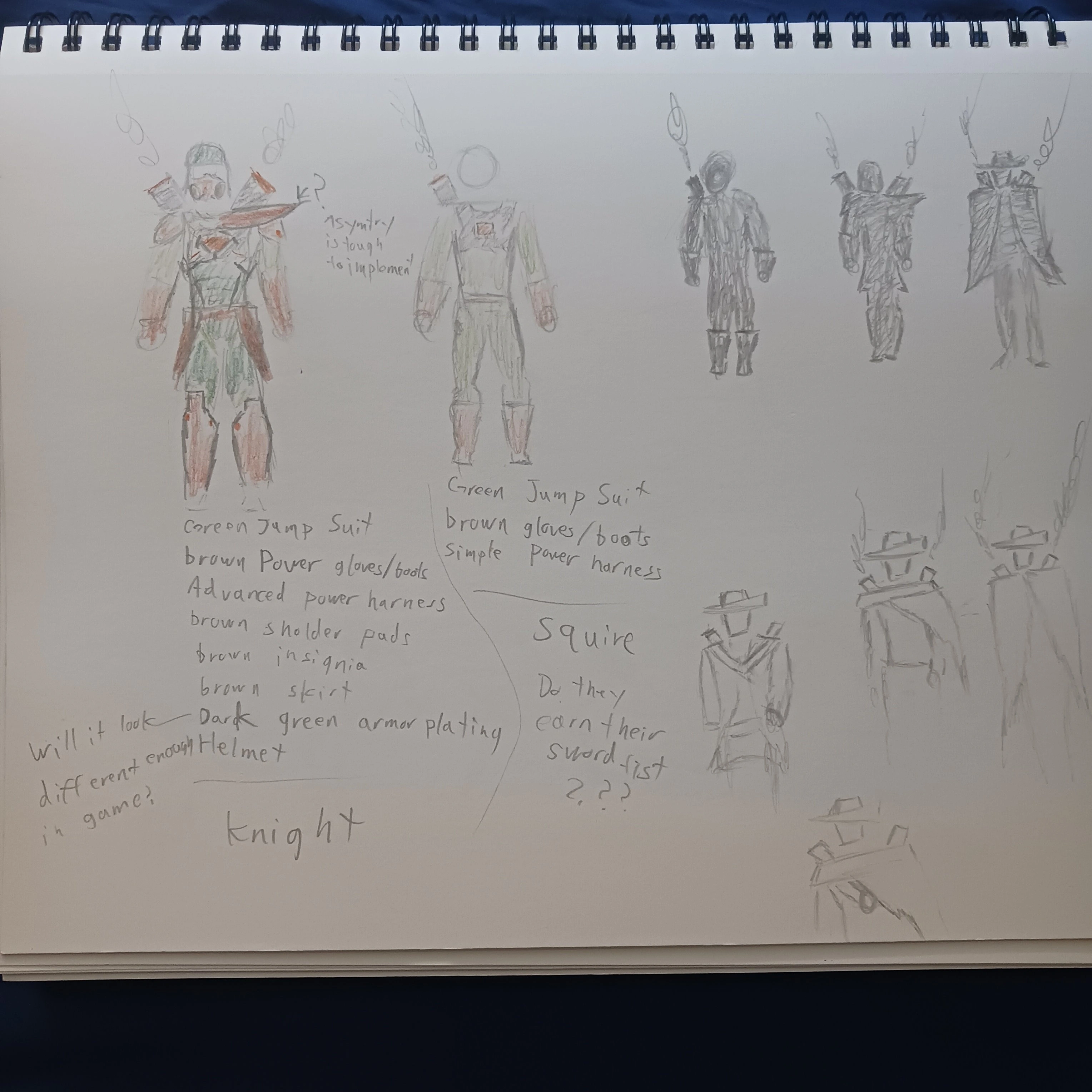
I’ve been giving some serious thought to the outfits that Ion and Six would wear.

Given that Ion is a squire in training under Six I’m liking the idea of Ion having to earn their full suite over the course of the game.

However, this means I would need to design at least 2 different outfits for Ion. At the moment I’m taking heavy inspiration from the Clone Trooper armor from Star Wars: The Clone Wars for Ions final outfit. Still a work in progress.

For Six I’m was toying around with what exact kind of western cloak he would wear. It turns out that there are alot of varieties.

At the moment I’m just trying to get the silhouette just right.

Chapter 1 Monster Concept Art Chapter 1 Monster Concept Art Chapter 1 Monster Concept Art

I began concept art work on for the monsters that you fight in chapter 1.

I wanted the grunt enemies to feel other worldly, challenging enough that special hunters make sense, but easiy enought that they make sense for the first enemies in a RPG.

Alot to juggle.

I landed on the idea of doing some combination of deer and fish. Deer because I wanted them to feel like something that could be hunted for sport. Fish cause I wanted something kinda familar, but odd.

I guess this is why Lovecrafian horror always relies on fish.

Ultimately I’m happy with the design.

As a benifit I also landed on an in world reason as to why these monsters somehow captured all the hunters requiring Ion and Six to be called in.

These monsters are actually cattle being hearded by this charater I’m calling The Shepeard for now. The Shepeard is someone who was pulled into this world by the portals and is just trying to protect their flock.

Given how heavly the story revolvs around the portals and the consequences of animals, peoples, and other societies randomly getting dragged in this feels like a really clean execution.

It will give the player a neat villian and allow Chapter 1 to be a mini version of the entier games story. Which reolves around an entire society being dragged in, and them not being super friendly.

I began sketching these characters in Krita to test them out in Unity.

Drawing Tablet

My Drawing Tablet My Drawing Tablet My Drawing Tablet

I ordered the XP Pen Deco 640 a couple of weeks ago. When I initially ordered I had a typo in my address that caused it to be sent back mid shipment. But after reordring it and double checking the address it finally arrived.

I wasn’t sure what to expect, but I addapted to it increadibly fast. I had always heard that drawing tablets have a bit of a learning curve as you get used to drawing not where your looking.

This was not a problem for me.

I don’t know if this means I’m just great at addapting, or if I’m just terrible at drawing.

The drawing tablet arrived near the end of the week so I wouldn’t really get to stress test it until the GMTK 2025 game jam I took place in the following week.

Retreat

I spent the weekend of 7/25 - 7/27 at a church retreat up in Big Bear Lake.

The retreat was focused on God in the workplace and what that looks like in our specific fields. It got me thinking on what it looks like to include him in my ultimatly very creative field.

Won’t say to much more on it as I want these blogs to focus on work an not personal life. But I will say that I really enjoyed that retreat and came back from it with a bit to think on.

7/26 - 8/2

I spent this week participating in the GMTK 2025 game jam and made the game FrostLoop.

I go into that process in more detail in my post The Making of Frost Loop (Game Jam).

8/5 - 8/9

After the GMTK 2025 game jam I wanted to work more on the art work I was not able to finish in time.

I decieded to release the artwork for the game as a Asset Pack called FrostPunk Trains.

I go into that process in more detail once the art pack is approved and released on all sites

8/12 - 8/15

I spent this week debating on weather or not I should continue work on FrostLoop. With 3 months of work I though I could get it to a full release version.

Maybe a release on Steam?

Having a fully released game on Steam would be a massive boon to my resume.

In doing some research I realized that there would be a Steam Next Fest running in the middle of October. Right before I would be planning to release if I kept to the 3 month dev cycle.

Could I make Next Fest?

A full steam game that went through Next Fest? How could that not look good on my resume?

Steam Next Fest Docs Steam Next Fest Docs

But still questions abounded. Would it be good enough for steam? What does the upload process look like, when is the deadline to submit to Next Fest. Can you keep updating your build during Next Fest, or are you stuck with the first build you released.

So I began to do some research.

Turns out the registration deadline was 8/25, in about 2 weeks.

Panic.

Would I need to finish my game and get it ready in 2 weeks!!!

Turns out no, but I didn’t know that at first. By God’s grace there was a Steam Next Fest Developer Q&A on 8/12, the very next day after I realized this.

So I attended, and took notes like I never have before.

Even once the 1 hour Q&A stream was done I spent a good 6 hours researching everything I could to see how viable this option would be.

Steam Next Fest QA Dev Session Steam Next Fest QA Dev Session

Research

Steam

You don’t need a live Steam Page to register, but you do need a steamworks account.

To paricipate in Next Fest you just need a Steam Page, and a Demo before the start of Next Fest (10/13)

Now the catch is that before your Steam Page and your Demo can go live they each need to go through certification. At least once. This takes 3-7 buisness days each. And if they fail certification you need to fix whatever failed and reapply for cert.

So at minimum you need to start the process 2 weeks in advance. 1 week minimum for your steam page and 1 week minimum for the Demo Build. And hope that nothing fails.

However, once you get through cert once you don’t need to do it again for any following updates to your steam page or build. This means I could be making updates to the Demo as Next Fest progresses.

Another element is that Steam takes the week before Steam Next Fest to run a private version of that for just the press. You don’t need to particpate in this, but doing so would be good for both my game and my resume.

Steam Next Fest Docs Steam Next Fest Docs

Lastly all of this requires setting up a SteamWork account (Steams Developer Backend) which requires some legal paperwork. Some of which can take up to 30 days to process. Specifically the tax info

If it takes that long then I would miss the opportunity to particpate in the October Next Fest.

I also spent the day diving into the SteamWorks docs looking at everything from the graphical assets I would need for my store page, to the technical details of how to upload a build.

The steam stuff feels very doable, it just means I would have to get started on it ASAP. Rather than towards the end of my 3 month development like I was orginally thinking.

Part of my hesitation is that because I would have to start up this process so early I don’t know that my art (screenshots) would be good enough for final use. Perhaps I can update them as development progresses. It also means I would need graphical assets worked on ASAP as well.

Marketing

I spent time thinking through my solo developer marketing options.

Since I am doing this for a resume piece and not for $$$ I don’t need it to be a finacial hit. But it would be nice, and would be good to atleast try to market the game well.

My main avenues I could see would be through a YouTube Devlog, social media posts, and reaching out to influencers just before and during Next Fest.

The Devlogs are probaly my most important and this would most easily demonstrate to future employers my process for making this game. It is also the most timeless.

Steam Demos Steam Demos

Reaching out to influencers is a long shot and likely not to work. But if I focus my efforts on niche strategy game channels I might have better luck.

I also thought about and quickly dismissed the idea of putting a Discord together. Moderating and managing a discord server as a part time solo dev does not sound like fun. It might be doable, but not something I feel I will attempt.

Instead I know that Steam has a Community Hub section for each game. I will be using those for basic comunity interactions, bug reports, and feedback.

Beyond that I have options to make Reddit Posts, annoucements on X and Instagram. These last likely won’t be much use until traffic from my game starts getting driven to them. I could also take my Devlogs and clip them for YouTube Shorts, Reels, and TicToks.

Overall marketing is something I want to try, but is not a huge stresser for me as commercial viability is not a goal of this project. Completion is.

New Features

I gave some thought to what features I’d want in the full game.

The big ones are Maps, Heat/Coal use, and Research/Laws.

Maps Probably the biggest feature I had to cut from the game jam version was the ability to view the map.

I’d want the player to be able to view the map and see information about the upcoming spaces depending on what train cars they currently have.

I’d also want to add junction spaces where the player can choose which path to take, instead of just endlessly going in a big loop.

Also I’d want there to be weather patterns that move around the map causeing you to have to think about where to go to next.

Heat/Coal Use At the moment Coal is just used to power the engine. Also for a game that takes place in the snow heat is strangly not a concern.

I’ve dabbled with ideas surrounding you being able to using coal to heat up individual train cars. Maybe the weather patterns control the tempurature. If a train car gets to cold in increases the chance of a worker getting sick. You can increase the heating of cars but it increases coal consumption.

Also I’d want a way to control a trains speed. The faster it goes the more Coal it consumes, but the more spaces you move. I’ve given thought to some tradeoffs to this. Maybe you can only get the effect of some spaces by landing on them (like stations or random events). Maybe going faster through some spaces damages your train.

Research/Laws I’d want some kind of Tech Tree to allow you to unlock new or better trains.

Also for there to be laws you can enact to add effects and trade offs to your game.

Quality of Life Changes

Saving the game: I would like to make it where you can save and load your game from any turn

Polish Changes

I’ve given some thoughts as to what polish changes I’d want to focus on:

Improved the UI
In the Game Jam version I made the UI and Icons way to big for PC, so I’d want to decrease them. Also I’d want to add popup windows for when you hover over elements with your mouse.

Toggleble Views For seeing info about the trains at a glance. Info like

  • Train Health
  • Number of People
  • Heat

A Codex To explain all the systems

Notifications/Hints Notifications for smaller things that don’t deserve a full event. Hints that can teach the player the game.

Improved Animations For some of the carts or elements

Improved Backgrounds To match the current map space you are on

Audio SFX and Music

##My Decision I decided to go for it.

It seems doable, I feel I could pull off both the needed code and artstyle.

Having a full Steam Game on my Resume would look amazing and I don’t have any other projects even close at the moment. Also not needing it to be commercially successful sounds nice.

The main goals I landed on are

  1. Release within 3 months (end of October)
  2. Hit Steam Next Fest

The side goals are nice to haves but not needed

  1. Make at least $100 off it (to cover Steam Direct Fee)
  2. Make a devlog of the process

With those in mind I began work.

My first Deadline is Steam Next Fest Registration (8/25)

Ideally you have a Coming Soon store page by then. You don’t needed it but it’s ideal.

A store page needs:

  • graphical assets (Thumbnails in many different resolutions)
  • 5 screenshots
  • 1 trailer

It also takes a week for Steam to review your store page.

However, before this you need a SteamWorks account (Steams Dev Backend). A SteamWorks account requires you to pay $100 and send in some Tax info. Said Tax info could take several days to a month to process.

You need a SteamWorks account to apply for Next Fest or make a Store Page.

So I started by making a SteamWorks account.

Despite the site claiming it could take a week to process it only took a day. I guess when your a Sole Proprietor and a US citizen there’s not much to process. Larger foreign corporations likely take longer to process.

Next I began working on my store page graphics

Every Steam game has something called a Capsule image. This is the main key art or cover art you see for the game on the store. It is both the first thing the viewers see and it is used everywhere for your game.

It also is needed in many different image sizes. Steam provides a full list of the needed sizes.

To tackle this I’m making one image at the largest size. Then I’m scaling it down and moving around the layers for the smaller sizes.

For the screenshots and trailer I’m just gonna use footage from the current build of my game.

Luckily I can change out these screenshots, trailer, and even capsule art at a later date if I want to.

This means I can have a coming soon page ready by Registration (8/25) and then update it as the game build improves.

Maybe by my next post there’ll be a store page I can show.

Regardless this is what I’ll be working on in my free time for the next few months.


That’s all for this entry. I’ll be working on this game for the next few months so expect to hear more about it soon.

And as always: Don’t Stop Creating.


References

]]>
Everette Webber
The Making of: Frost Loop (Game Jam)2025-08-02T00:00:00+00:002025-08-02T00:00:00+00:00https://digx7.github.io/2025/08/02/The%20Making%20of%20Frost%20Loop%20(Game%20Jam)FrostLoop was a Survival City-Building game with heavy FrostPunk and SnowPiercer inspirations that I built for the GMTK 2025 game jam. This is how I built it.


Pre Settup

Before the game jam started I setup my files

I used my custom Unity Template to set up a blank project and a Git Repo.

I’ve used this Unity Template for several projects before. It gives me several managers and features I’ve used in every game.

There were a few features I needed to add to this template. These features had to do with how my scenes were being loaded and how my channels were talking to each other.

If you want my template you can find it linked below. Be warned it’s not super well documented.

With my project files ready to go all I had to do was wait.

Getting the idea

I had work the day the jam started. However, this gave me time to think on the theme and land on an idea.

The theme was: Loop

What goes in a loop? Trains.

Trains, that got me thinking about SnowPiercer. I’d never seen a game based on it.

But if I were to make one it could be a cool FrostPunk like city builder game with a limited scope. Since you’d only be placing the train cars in a line it would limit the complexity I’d need to design. Also the game could be 2D and allow me to stress test my workflow with the drawing tablet.

Reference Images Reference Images

The game loop I landed on was this: The player would manage a train of people trying to maximize some resources without those people rebelling.

The game would happen over a series of turns. Each turn the player could build, repair, or sell train cars on the train using the resources they had. They could also assign workers to each built train car to generate more resources.

Each turn the train would move to the next location on the world map. As it moved, random events could happen.

With design in hand I could start development. Even though the jam ran for 4 days I’d only have 2 days free to work. So my plan was to spend day 1 getting the backend up and day 2 getting the frontend up.

Day 1 The Backend

The Backend is all the systems that store and manage the players data for the game.

I spent about an hour ideating on my game idea and writing out all the systems I’d need to execute it.

Systems Layout Systems Layout

The main systems I got where:

  • Resource Manager
  • Map Manager
  • Train Manager
  • People Manager
  • Event Manager

Resource Manager

The first system I made. This system kept track of the resources the player had. Their current and maximum amounts, as well as how much they were generating and consuming each turn.

The system needed to allow any other system to talk to it. This is part of what took this project so long making it so any system could talk to any other system.

The resources I landed on where:

  • Coal: Powers the train, running out is game over
  • Wood: Basic crafting resource
  • Stone: Basic crafting resource
  • Steel: Advanced crafting resource, comes from Stone
  • Lodging: Needed to house people. Homeless people are very unhappy and can lead to a quick game over
  • Raw Food: Needed to make Meals
  • Meals: Each worker consumes 1 per turn. If someone doesn’t each they get sick and unhappy and can lead to a gameover
  • Discontent: Is raised when people are unhappy. Its GameOver if this maxes out.
  • Hope: Is raised when people are happy. You win if this maxes out.

Map Manager

The second system I built. This one was responsible for holding all the data on each location.

This lead me to defining the following map spaces

  • Blank: Nothing special happens here
  • Event: 1 Random event out of a list is drawn
  • Station: You may spend lots of resources to unlock a train station. If already unlocked you gain tons of resources.
  • Interchange: You may change up the order of your train cars here This space was cut for time

Under the hood this system was a fancy list of Mapspace Classes. There was a parent abstract Mapspace class and each of the types of spaces where unique classes that derived from this.

Again the main challenge with this class was getting it to talk to every other system. Specifically to be able to broadcast the current space and its type. Also I needed clean ways to recieve requests to update the current space in the list.

For awhile I was stumped by a bug where the Mapspace classes in the list were never updating. This was because I was initializing a private variable, resulting in the function that was broadcasting the Mapspace to be broadcasting a unique object rather than a reference.

Finally fixing this bug made me feel incredibly smart and confused at the same time. Never had initializing a variable cause a bug before.

Train Manager

The third system I built. This system keeps track of all the train cars you’ve built and the data about them.

Each train had a set amount of health, could be assigned some amount of workers or engineers fancy workers, and had some effect.

This led me to designing the following trains

  • Engine: Takes no workers. Consumes 1 Coal per turn
  • Sleep: Takes no workers. It’s existence adds 10 lodgings
  • Farm: Generates Raw Food based on number of workers
  • Kitchen: Turns Raw Food into Meals based on number of workers
  • Scraper: Generates Stone, some passively and some based on number of workers
  • Factory: Turns Stone into Steel based on number of workers
  • Greenhouse: Generates Wood based on number of workers
  • Storage: Increase maximum storage of resources
  • Prison: Lowers Discontent
  • Entertainment: Raises Hope

Under the hood this system was a more complex version of my Map Manager.

It was a list of TrainCar classes. But instead of broadcasting the active space, it needed to modify and broadcast data about any train car at any time.

Whenever another system requested to modify a train car, or there was an update to a train car, I included that train index in the List.

I worried this would cause problems when a train car was deleted, but because of how decoupled the systems were it was not a problem.

I also had to design this system in a way so that the exact effects could be iterated upon. This meant each train had a list of systems to talk to weather when they were: created, destroyed, or had workers added or removed.

For example: The Farm car needed to increase Raw Food generation each time a worker was added. It also needed to decrease Raw Food generation each time a worker was removed, or if the train car itself was destroyed.

Keeping track of and scripting the train effects in such a way so that resources could not be infinitely generated, took a bit of time.

People Manager

The fourth system I built. This system was very similar to the Resource Manager in that it kept track of how many workers you had.

But unlike the resources, which could be generated or consumed, the People Manager tracked your total number of workers and the number of unemployed workers.

For example you could have 15 workers and 5 unemployed workers. This means that the other 10 workers have been assigned to a certain train car.

Note that I was not actually tracking individual workers. Instead I was just updating the totals when a worker was assigned or freed from a train car.

I had 2 types of workers Worker: the default Engineer: fancy workers

To avoid any further confusion from now on whenever I refer to workers I am talking specifically about the default type. I will instead use the word People when I’m referring to both Workers and Engineers.

There was also a third type of person the Player Manager kept track of. Sick People.

For simplicity’s sake I made it so the number of sick people is exactly equal to the difference of total people workers + engineers and Lodgings See the Resource Manager.

Sick people also generate discontent.

They are cleared by making more Lodgings than total people.

Taking what I had learned from the Resource Manager, this system was actually really easy to throw together.

Event Manager

The Last system I built. This system processed the random events that could happen.

It does not generate the events, but instead handles their consequences.

This system has a queue of Events that can be added to by any system. Said systems provide the exact event to enqueue.

Then at the start of each turn this system iterates through all the events in its queue showing them, waiting for the user’s input, then processing that result. It does this until there are no events left in its queue.

These events are shown at the start of the turn before the player can do anything else.

The Map Manger ended up being the system that enqueued Events the most often. Particularly the Event Spaces and the Station Spaces.

The Event Space would queue up a random event from its own list. The Station Spaces had two events they could show. One was the event to pay to unlock the station. If the Station Space was already unlocked it would enqueue the second event, where you collected the resources at said station.

Under the hood the Events themselves where ScripableObjects with custom classes for the options. The classes for the options included child classes for each type of option what system it would call and with what data. I even had to make variations that would first check a given system for some amount before calling a second system.

An example would be an option that gives you +2 Engineers if you have 5 Wood.

The hardest part of this system was getting the option classes working in a way where I could easily iterate on them. However, once I got them to where they are now I could easily create hundreds of Events if I wanted. I believe for the game jam I kept it to around 20.

A surprise win of this system is that it allowed me to use it to cover some unexpected UI cases. These include, how to handle Station Spaces, Game Overs, Win states.

Other Systems.

There were a few other smaller systems I had to make.

Turn Manager. This system just handled the order of what other systems to call when the player ends their turn. When the turn ends resources are generated or consumed, trains may take damage and therefore be destroyed, the Game Manager needs to check if the game is over. The Map Manager needs to move to the next space, and any queued events need to be displayed.

Game Manager. Just check if the game is over. Based on the end state it queues a given event.

End Of Day 1 End Of Day 1

Day 2 The Frontend

Day 2 was spent working on the Frontend. This included Artwork, UI, polishing, and various bug fixes. This was also my last day and the day I released the game.

Artwork

One of my goals going into this Game Jam was the desire to stress test my Pen Tablet and my digital art skills.

I had recently picked up the XP Pen Deco 640 drawing tablet and had been using it with the free drawing software Krita.

Because this digital art workflow is closer to how I do traditional pen drawings it felt so much more rewarding than doing pixel art.

Nothing against pixel art, this is just a personal preference on my part.

Over the course of this game I got to use this workflow to make:

  • The trains
  • The backgrounds
  • The particles
  • The UI Icons

The Trains

I originally had plans to make unique train sprites for each train. However, to save time for the game jam I kept to these very simple designs

Show trains

I would go on to make the train sprites the following week as some followup work. See my post on The Making of FrostPunk Trains

The backgrounds

These would be tiled elements in the background and foreground.

At first I tried making them detailed but found I got better results if they were one color. This made them not draw attention from the Train. I also found that by making them all white I could adjust their color in the Unity Editor.

These were also made on a single spritesheet.

The particles

I easily made these in Krita. I made a bunch but ended up only using 1.

Day 2 Vibes Day 2 Vibes

The UI Icons

Like the background these were all made on a single spritesheet.

For simplicity I made them all white. Well I had fun making these. I found out that the linework on these needs to be very precise for the effect I was going for. More precise than I could realistically do.

UI

Making the UI Huds and Menus took the most time of anything I worked on this day.

When I was making the Backend I built those systems in such a way that any system could talk to any other system. They were not tightly coupled to each other. They also did not care where their inputs came from.

This allowed me to make it so the UI basically interacts with the Backend via API calls. It’s not literally an API, and it’s not going over the web. But it has the same effect. I could completely replace all the UI and not have to touch the BackEnd at all.

That said each UI Hud or Menu still took on average around 2 hours a piece.

This is because each UI Widget Hud or Menu includes both visually designing it laying out the components, and code to get it talking to the correct systems.

Let me give you an example of a simple system. The Resource Bar at the top of the screen. This shows all the resources, how many the player has, and how many they will consume or generate each turn. This Widget needs to be listening to the Resource Manager for anytime that a given resource is updated. Once a resource is updated this Widget will update itself accordingly.

Another example is the menu for buying new trains. Once the player selects which train to buy the Widget will query ask the Resource Manager if it has enough resources. If so it tells the Resource Manager to deduct those resources, and tells the Train Manager to add that new Train. Just a reminder NONE of the logic of these Backend systems existed in these UI Widgets. Honestly this is probably good dev practice in general.

What took the longest and was the cause of the most bugs was making sure that each button on any UI widget talked to the correct systems in the correct order.

Day 2 UI Day 2 UI

Polishing and bug fixes

Near the end with all the systems and front end online I began to test the game for polish and bugs.

The polish mostly included balancing out the exact numbers to make the game possible to beat but also fun. An early balance issue I found was that it was really hard to gain any new workers, and that without a steady supply of new workers it was really hard to grow your train.

In the end I realized I could have spent hours balancing the numbers, tweaking the exact order of map spaces, and adjusting the events to maximize the fun and challenge. But because it was a game jam and I was short on time I balanced everything to be super favorable towards the player.

Part of my thinking was that as the developer I knew all the optimal decisions and build order. But most new players wouldn’t know. So they would need some breathing room.

Most of the bugs came from edge case in the UI where I either forgot to include a call to some system, or accidentally had a Widget listening to the wrong system.

Release Near the end I threw together a Thumbnail in Krita, grabbed some screenshots, made a web build and set it to be released.

I was really cutting down to the wire. Even though I released 5 hours before the deadline, it was about 30 mins before I would need to be leaving due to a personal event.

Post Wins and Losses

Personally, this game jam was a big win for me. This feels like the closest I’ve had to a game that matches the vision I set out with.

I made nearly exactly the game I intended to make.

Now the scores I got from the game jam rates weren’t great. My average raw score was around 2.39 out of 5. What really got me was the lack of any audio, clear tutorials, and a bug where you had to refresh the webpage to restart properly.

But the comments on the game were super positive with many loving the narrative and claiming they’d enjoy the game if it was polished/fleshed out a bit more.

Overall a win.

Going forward I spent an extra week improving the art. You can read about that in my post The Making of FrostPunk Trains.

At the time of writing I’m still deciding on whether I want to keep working on this project. So keep an eye out for that.

]]>
Everette Webber
Dev Diary 7/5 - 7/182025-07-19T00:00:00+00:002025-07-19T00:00:00+00:00https://digx7.github.io/2025/07/19/DevDiary4Hello. I’m Everette, aka Digx7, and I’m looking for work in the games industry. In the meantime, I’m working on various projects.. This is my Dev Diary for 7/5 through 7/18


7/5 - 7/12

This week felt like a bit of a lull. I had planned on working on an art pack but never started. Not really sure why but I couldn’t really find much motivation to work on game dev related stuff.

That’s not to say I did absolutely nothing this week. I had a job interview, tried out some digital art techniques, and improved this website.

Job Interview

The job interview was for an IT/Consultant position at OCUnited 1 which is the parent organization that runs the RFKC camp 2 that I have volunteered at before. I wasn’t sure what to expect going in, but afterwards it’s clear that their need is less technical and more admin work for their suite of business tools that they use. That’s all I’ll say on those specifics for now.

Regardless, I felt it went well. It’s still up in the air if it will end up being volunteer work or part time paid work (their a non-profit with no budget so I get it even if I’m a little bummed). Honestly, I’d take minimum wage pay if it was offered. Still during the interview they showed me the tools they were using and we started looking into ways to optimize them.

The meeting went for about an hour and a half and I’m meeting with them next week to continue helping them with their tools. So keep an eye out to see where this goes.

Digtial Art

On an unrelated note I’ve been drawing a bit more recently. On a whim I looked up and found the best free digital painting software: Krita 3.

I don’t know why but recently the process of rendering out a digital image (going from sketch to full color) finally clicked with me. For a long time I’ve been thinking of drawing in terms of just lines or line work as that’s most of what I have done.

Some of my past work

Some of my past work

But recently I’ve been using colored pencils to at least add basic color to my drawings.

Work with Colored Pencils

Work with Colored Pencils Work with Colored Pencils

Through that I was led to Krita 3, and in Krita 3 they have a bunch of different odd brushes that (with my mind on not just line work anymore) I could now see how I could use them to make all kinds of interesting textures in my drawings.

Lightsaber

Lightsaber

As an experiment I tried using no conventional brushes (pens or pencils) to make the above image. The blade is a combination of paint splatter brushes to give it that flowing feel, and the hilt is a couple of chalk like brushes. The pattern in the background is another brush that felt like it just fit. Overall I was really happy with how the blade turned out, not so much the hilt. I wanted a metallic look to the hilt but couldn’t think of a good way to do that.

Afterwards I wanted to test a few different shading or rendering styles in Krita 3. So I sketched up this pose of Ion from D2 using the following reference images.

Ion Sketch

Ion Sketch

Ion Pose Reference

Ion Pose Reference

From there I tried a few different shading or rendering styles.

GrayScale Shading

GrayScale Shading

The first style I’m calling GrayScale shading (not sure if it has an actual name), it’s a style often seen in simple comics or manga 4 as a quick way of separating backgrounds and shapes well preserving line work. Well at first I thought it only used flat tones of gray I’d also see examples that use gradients as well, noticeably on backgrounds. So the background is 2 separate gradients to make up the floor and the sky. The gray is all the same tone, I guess you could use darker and lighter tones, but most examples I’ve seen stick to just 1 or 2. In the end I see how this could be a really fast shading process once you get used to it.

Dynamic Shading

Dynamic  Shading

This style is closest to what you might find in a marvel or dc comic. I’m calling it dynamic shading though I don’t know that it’s normally called that. This shading style makes use of fully black inked in spots for the darkest areas and a variety of line and cross hatching for the inbetweens. This style is closest to inking in real life. 5

Interestingly because it makes use of line thickness and actually relies on imprecise line work I found emulating this digitally to be extra challenging. If your lines are to clean the image ends up looking like a coloring book. One work around I’ve seen but not emulated well is doubling up on certain lines. Also getting the variety in line thickness is also a challenge, especially for the cross hatching which normally involves a ton of line tapering. This last part might have been harder because I was drawing with a mouse rather than a pen or tablet.

Regardless, well I don’t feel bad about the result. I definitely feel like I could improve a lot on this particular art style. I’m also realizing that this is far from the only art style used in comics and I don’t have to use it if I don’t want to.

In the end this was a fun experiment and I’m curious as to what using this art style in game would look like. My current project is using pixel art but all the 2D art could be swapped out with digital art like this instead. I’m honestly considering it as despite all the work in pixel art I’ve done I just not really feeling it. And this digital art is closer to the type of art I like to make IRL anyway. One hang though is I’m not sure what using this art in production would look like. I feel like complex animation would be out of the question, though I could work around that.

If I go down this route I’d like to pick up a drawing tablet to at least try that, the cheapest ones are $40-$50 so I’m honestly considering it. 6

Updating this website

I’m trying to work on writing every Saturday so I don’t fall to far behind. In the process of writting the previous week I wanted to update a few things on my main website.

By the time you are reading this those changes will already be in place.

The first change was making it so blogs can now link to both the next and previous blogs at the bottom of the page. You should be able to see this down below.

This will not be the case for every blog but merely those that are in the same series (right now thats just my Dev Diaries).

The second feature I added was giving this blog an RSS feed. So now you can add it by clicking the RSS button at the bottom of any blog page. I still want to improve the css for this button but for now it exists.

Actually adding the feature was incredibly easy (infact it was already happening without me realizing it). It turns out theres a plugin called jekyll-feed 7 that I was already using without realizing it. This plugin automatically genereates an RSS file based on the meta data and content of your posts. I was able to implement this feature by using a combination of the jekyll-feed 7 documentation and a blog post about the topic by Dzhavat 8.

So feel free to add this site to your RSS feed to stay up to date.

If you are not reading this blog on my website then you will not see these features (obviously).

7/13 - 7/18

This week felt more productive. I finally opened up Unity again and was surprised to find that I still could make sense of the code and where the project was.

I started off the week by finally whiteboxing the forest and adding basic combat encounters. The rest of the week was spent testing out a new art style and process using Krita3 for my artwork.

Whiteboxing the Forest

The last time I opened up Unity I was whiteboxing all the areas for chapter 1. So far I had whiteboxed the entire town, but I still needed to whitebox the outside areas, the forest, the caves, and the ruins.

Each of these areas was also a place where they player can have combat encounters. Part of my uncertianty in blocking out these areas was in how (or if) the transition between combat and exploration would work seemlessly (its been months since I touched the combat code).

And yet it worked.

Turns out I had made combat system solid enough to let you transition from exploration, to combat, and back again. There were only one or two bugs I had to fix, but beyond that there was no issues.

Exploration to Combat and Back Again

Exploration to Combat and Back Again

Whiteboxing the forest required me to think a differently than whiteboxing the town. The town required only pathways between key locations, which were seperate rooms the NPCs just stood in, the forest required those locations to be combat arenas.

Large arenas where interesting turn based battles can take place. I am still unsure what exactly makes for an interesting combat encounter in this game. Is it key enviromental hazards? Is it unique status effect interactions? Is it scale? I don’t know just yet. (I probably should know by now)

Whiteboxing of the Forest

Whiteboxing of the Forest

Regardless whiteboxing the forest requires me to make interesting coridors between these arenas. It also requires me to consider what exact combat encounters I want, who your fighting, why, and what unique challeges are provided. For now I know I want some battles in the forest, near a field, in some caves with bandits, and near some underground ruins entrance. So I’ve put in basic spots for those right now. I still need to design an implement the exact enemies later. I might also add more combat encounters in the future.

New Krita Artstyle

After spending the previous week messing around with Krita and making digital art, I wanted to see if I could use it to make art for this game. After all this time I still wasn’t full commited to pixel art yet and wasn’t happy with any of the results I could produce.

So I tried it.

I made a new branch of this project and tried it using similar techiques and workflows I had been using with Aesprite for the game. I wanted to answer the following questions:

  1. Could I store the raw Krita files in my project so they would automatically work with version control? Yes.

  2. Could I export the files directly into Unity? And if so would all the import settings and placements stay even if I changed the file? Yes and yes.

  3. Does krita support animation? Yes.

  4. Could I make it work with Unity? Yes-ish (the way krita exports animations is by exporting each individual frame as an image, so no spritesheets. This means as long as the frame count didn’t change, the above assumtions held)

  5. Could I make tilemaps work? Yes (But I would need to pay special attention to the dimentions to make sure all the tiles are the same size)

Having tested out the above questions I proceded by making an idle animation of Six, a ground tilemap, and some background enviroment props for the forest.

I really wanted to push the painterly/illustration artstyle that Krita would allow me to pull off. So for the charcter I played around with adding some dynamic shading and a paintbrush like texture. For the background props I decided to use no line art to help the character (with their line art) stand out, but I still used painterly texters that I could get with Krita.

Six Idle Animation

Six Idle Animation

First Forest Background Assets

First Forest Background Assets

Honestly, I was quite happy with the results. I could see myself producing decent artwork this way much faster than if I used pixel art.

It also felt like a huge relief, and quite liberating, to use esetially the same artstyle that I use for IRL drawings for artwork in this game. I don’t know that I can put into words how good this felt. It wasn’t an amazing euphoric moment, but it felt really good.

With the artstyle tested and the workflows proven I got to work creating better background art for the forest. Well the above example works, one thing that I didn’t like was the fact that the character does not pop against the background as much as I would like.

It was in thinking about this that I realized I would need to pay special attention to my color palletes and color choices when working the art for this game. Not just for each art asset but for how those assets would look side by side in the final game.

I began by gather some reference images of what other 2D games did for background art in forest or jungle settings.

Forest Background Reference Images

Forest Background Reference Images Forest Background Reference Images Forest Background Reference Images Forest Background Reference Images

Two things imediatly caught my attention:

  1. How desaturated the backgrounds were
  2. How they were all primarely one color

How desatured the backgrounds were

Even before looking up the reference images I already had an idea that the backgrounds would be desatured. They use this to draw you eyes to the brighter more satured elements, which are the parts of the game enviroment the player can interact with, like the ground or objects of note. Interesting enough games like Rayman actually use this to have parts of the foreground hide secrets the player can find.

Lastly, I was supprised to note that most games use brighter elements towards the center and darker elements towards the border.

How they were all primarely one color

In a forest the leaves are green and the tree bark is brown. So this is how I colored my background assets. Interestly most game I found didn’t do that. They had the background be primarely one color. Or I should say, various shades of one color. For forests they would use green as the base color, with a lighter or more washed out version of it to indicated wood or stone. Given the shape and composition of the background you could tell it was a tree but it also didn’t draw your eye the way the foreground elements did.

This blew my mind as it feels so counter-intuitive. Yet looking at various examples it worked.

After studying these reference images I began to implement what I saw.

Second Pass on Forest Background Assets

Second Pass on Forest Background Assets

I made new background props well focusing on using a few very desatured greens for the trees to try to not draw attention to them. I started with the base color being the darkest shade of green and used some paint splater textures to add on the lighter elements.

The branches where interesting. I could have made them a shade of green as well, but I decided against that. Instead of brown I wanted to make them an alien purple, so I did.

The resoning for this is that I actually want to draw attention to them, slightly. To indicate that this is not a normal forest you would find anywhere here on earth. This is a Fantatsy game, why would it have to look like our enviroments. I also wanted to later convay with the town that the buildings are made using this unique wood, and purple would easily convay that.

Even still I paid special attention to use only a few very desatured purples when making it. This way it draws your attention by being purple, but still blends into the background by being desatured.

After this I began looking into solutions for Parallaxing different layers to add depth.

In therory parallaxing is simple. You just have different layers move at different speeds in different directions when the camera moves.

Challenge comes in when you want consistancy, and to be able to start with the camera in any location.

Parallaxing is when the different layers of an enviroment appear to move at different speeds, as the camera moves, to create a sense of depth. In practice this means that all background layers are following the camera at a slower speed, this gives them the illusion of scolling by slower than the middleground (where the player is). The foreground layers are moving in the oposite direction of the camera to create the illusion that they are scrolling by faster than the middleground (where the player is).

So all you need to do is move these layers appropriately when the camera moves.

But what if the camera doesn’t always start in the same location?

In my game the player will be able to move and explore the world in a number of different ways and be able to backtrack through most enviroments. Since they can start enviroments at different locations, the camera will start at different locations. Meaning the maximum possible delta of the camera in any given direction could change every time the scene is loaded.

Lets say I have an enviroment that is a long corridor along the x-axis. Lets divide it up into 10 equal segments. Assuming the player could start this enviroment at segment 1 or at segment 10.

In the case where the player starts at segment 1 they can only move along the x-axis towards segment 10. Since the camera follows them, this means its maximum possible delta (how much and were the camera can move) from its starting point is 1-10 in a positive direction. The camera can not ever move in a negative direction. Since the background parallaxing elments always follow the camera and the foreground elements always go in the opposite direction of the camera this means that: the background elements can only move in a positive direction and the forground elements can only move in a negative direction.

In the case where the player starts at segment 10 theey can only move along the x-axis toward segment 1. Since the camera follows them, this means its maxium posible deltat from its starting point is 10-1 in a negative direction. The camera can not ever move in a positive direction. Since the background parallaxing elements always follo the camera and the foreground elements go in the opposite direction of the camera this means that: the background elements can only move in a negative direction and the forground elements can only move in a positive direction.

These case hold true for any two starting segments and holds true if you add in the y-axis as well.

This creates the problem in not having your parallax layers be in consitant positions, when the camera is at the same loction, if the camera starts at different locations.

This is not a problem if one has no desire for a consistant parallax effect regardless of starting location, for example if you had a simple infinite scrolling background.

However, for my case I do want consitent results regardless of starting location.

At the time of writing this I am still working out a solution to this problem.

My guess is that I will need for the parallaxing to take into account the offset of the cameras starting location from some given location (likely the world origin) and start the scene by snapping the parallax layers to some position based on that. This also means it will be hard to view this in the editor in the scene view as I am placing the elements down. Since where the layers are placed in the scene view might not line up with where I want them to be in the final game. I will likely need to make a editor tool to let me preivew where they will be for a given camera location.

I’ll be sure to write about whatever solution I end up using.


Regardless, that’s all for this entry. Not sure what I want to focus on for the next few weeks. Possibly another art pack. I’d like to participate in the GMTK game jam at the end of the month. No guarantees that either will happen, just my thoughts at the moment.

And as always: Don’t Stop Creating.

References

]]>
Everette Webber
Dev Diary 5/10 - 7/42025-07-05T00:00:00+00:002025-07-05T00:00:00+00:00https://digx7.github.io/2025/07/05/DevDiary3Hello. I’m Everette, aka Digx7, and I’m looking for work in the games industry. In the meantime, I’m working on various projects.. This is my Dev Diary for 5/10 through 7/4.


Those observant among you will notice a massive date gap for this dev diary compared to my previous 2 entries. I am still relatively new to this and am trying to figure out a writing/working schedule I can stick to long term. So, even though my past entries were about 2 weeks apart, this one will cover about 2 months. I could get upset and despair over this gap, but since I know no one is reading these and that these are only for me I instead just carry on. I want these blogs to both show future employers my progress but also be a way for me to collect my thoughts.

So rather than despair the only thing to do is keep moving forward and refine the process as I go. To that end here is what I was up to over the last 2 months.

5/10 - 5/16 & 5/27

I spent this week and a later day working on a variety of smaller tasks and making headway on art prep and level gray boxing. Art is not my strong suit, even though I do have some basic drawing skills. Looking back on it I definitely had a ton of likely valid imposter syndrome weighing me down. I’m decent at programming, I know that, so I don’t really stress over whether or not my code is good. I have no clue if my art is good or not. So the entire time I spent working on art I had this looming, almost dranging sense, that none of it was good anyway.

Also I’m far less familiar with the process for making game art than I am for making game code. I know it in theory, but the actual practice of it, not so much. From the outside it feels like I’m expecting myself to create the final environment assets, character animations, and world layouts in one elegant wave of a brush.

I know that’s not the case.

In drawing I know that sometimes I have to slowly build up the basic shape first, then add more and more details over time to get an image to where I want it. It’s the same in game art. Starting with a simple shape, a simple layout, then slowly working it up. I know all this in theory, in practice though… its hard.

For me clear forward progress, with a logical start and end point, with a clear goal, is what I have found most helpful. It’s why I like programming. You are working with clear logical steps, and a very clear goal. At the end the program works or it doesn’t. With art though… it could always be improved.

I say this all to show that well I’m slowly learning this lesson, it is a hard one for me. Thus this week was stressful for me. But, given that I want to make games for a living I realize that it is a lesson I must learn.

Regardless, allow me to go over what I accomplished this week.

The game art process as I understand it is this:

  1. Gather reference images
  2. Create concept art/mockups
  3. Iterate on those mock ups refining more and more details
  4. Create final assets these may be the last mockups

On the scale of the entire game you may be iterating over everything at once. Right now I am just working on the first chapter of my game to work out these processes. So I began this process with the environment and the key characters.

For the characters, I chose the POV character Ion and his mentor Six. I began with gathering the reference images and then making some concept art.

Ion Reference Images

Ion Reference Images

Six Reference Images

Six Reference Images

Both characters are part of a steampunk-esc society that makes mechanical companions, weapons, armor, and tools to help improve the lives of the citizens. Six is a robot that is a mix between a special forces unit, and a detective. Ion is their human trainee/apprentice. The society they live in is run by an AI that includes humans in its operations as a kind of check against its own power. I want their society to be ruled by an AI, not skynet, but not a utopia, just a messy government that is trying its best, like any modern government.

Therefore both characters can share a lot of similar reference images. For both I like the visual image of a glowing engine or light at their core that powers them, or their armor. For Ion I’m wanting to go for a cool steampunk power armor look but don’t want it to appear too bulky like a Space Marine. And for Six I really like the idea of a cowboy/gunslinger look, but I don’t want firearms to be prevalent in this world.

Ion and Six Concept Art

Ion and Six Concept Art

After gathering the reference images I tried making a pixel art concept image. It started as a silhouette test but I felt like trying my hand at details as well. This is not final, and my biggest worry was that no one would even know what it was by looking at it. But after showing it to a few people in discord those fears were alleviated. Still not sure if I want to use pixel art as I can’t get that art style to look the way I want.

Regardless I still feel I need to make some more concept art of these characters to really nail down their look and feel.

I also started this art process for the environment

Bostra Reference Images 1

Bostra Reference Images 1

Bostra Reference Images 2

Bostra Reference Images 2

For Bostra I’m thinking of going for a medieval town/remote village vibe but I’m not sure yet. Regardless, an interesting thing I learned was how the style of medieval houses were affected by the types of trees available which in turn were affected by the climate. In colder climates you would see more log cabin style houses whereas in warmer climates you would see more wattle and daub type houses.

Wattle and Daub Example

Wattle and Daub Example

Still not sure if this is the direction I want to go in.

Regardless I have gone ahead and gray boxed all the exterior and interior areas of the town.

Gray Box Images

Gray Box Images

I still need to do the surrounding forests. Again my imposter syndrome really kicked in here with the gray boxing process and has caused me to drag in this process a lot. Honestly, I wish I’d written this dev diary soon as writing out my thoughts now is really helping. One thing I’m thinking through as I gray box the environments is how to make them interesting to navigate and not be boring, not just to be one long corridor you walk through.

This process did involve me cutting one area of the town and combining it with another.

In this chapter Ion and Six go to Bostra after it experiences a resource boom. Some really valuable local wildlife has begun appearing and has attracted a ton of hunters and 2 hunter guilds to the town. However, said wildlife appears to be more dangerous or crafty than expected, resulting in the disappearance of a massive hunting party recently. As a result Ion and Six are called in to investigate. Previously the town was split up into 3 areas: Old Bostra: the farming town that was there before the boom, New Bostra: a vibrant trading hub where both of the hunters guild and various groups that follow them have setup, The Slums: A tent city of wanna be hunters or camp followers that has also appeared.

Since both New Bostra and The Slums were tent cities set up just outside Old Bostera it was making less and less sense to separate them. In this world resource booms like this are common enough that some groups follow them around in a nomadic lifestyle. I realized this means they’d likely use tents as well meaning both New Bostra and The Slums would both be tent cities. So I decided to combine them. This also cuts down on the number of locations I’d have to create.

I’m thinking of at least finishing the grayboxing process for all areas of chapter one before starting on making concept art for the areas and props.

In this week I also tackled a few smaller things like: getting a navigable pause menu, adding one way platforms, and fixing a camera bug.

6/10 - 6/15

I spent this week focusing on getting my main website setup.

I go into more detail on this in my post The Making of: This Website

Below is the shorter version.

I had previously found out about github pages when looking for where best to post these blogs. Github Pages is a free service on Github where you can host a website directly in a repo. It’s geared towards simpleler static or low traffic websites, with its main use case being to host detailed documentation for a given repository. It has tools in place to make a website from a few simple text files up to all the usual HTML, CSS, and JS and the various frameworks. It even lets you make one organization site per account or one site per repository.

It does have a hard limit of not allowing any commercial transitions, and soft limits on traffic and the total website size. But it does have free hosting.

So it was perfect for building my portfolio website.

Portfolio Site Homepage

Portfolio Site Homepage

I already had the rough outlines of what I wanted the website to look and feel like from previous attempts at making a website. Using those I started with building up the HTML scaffold and asking Chat-GPT to give me the starting CSS files to make it look pretty with a minimalist darkmode tech vibe. From there I built up the site using Jekyll a framework that GitHub pages provides that allows for basic CRUD operations and dynamic linking to other site pages to give me the following pages:

  • Homepage
  • Resume
  • Projects listing all the projects I’ve worked on
  • Blogs listing all the blogs I’ve worked on
  • Article a template page used for all individual projects and blogs

The parts of this project that took the longest was figuring out what exactly I could do with Jekyll and getting the CSS to look exactly the way I wanted. Even though Jekyll has a remarkably simple way of letting you add metadata to individual articles and creating templates for various pages, it still took a bit of time to learn at first. The CSS took a while to get exactly right as the process involved fine tuning the specific wording of a few key CSS tags. Both of these problems were exacerbated by the fact that I am not as familiar with web development as I am with other areas. So there was a lot of looking-up what others might consider basic terms.

In the end I had a website that looked nice, is free to host, and allows me to easily add new pages to it. There’s always more that could be fine tuned, but overall I consider it a success. Now I just have to use it more often.

6/22 - 6/27

I spent this week volunteering at RFKC (Royal Family Kids Camp) a summer camp for foster kids ages 5-12.

RFKC Logo

This was my third year in a row volunteering and each year I do video/tech work for them. As you do at a summer camp. At the end of each day the kids get to watch a 15 minute slideshow/video recapping everything they did that day. The kids love it. So I get to spend all day working on said video.

The process involves me filming and editing all day up until the very last minute to get something together for the kids. I’m helped by 3 other photographers who spend the entire day taking photos as well. The photos also get printed out and go in a personal memory book that each kid gets to take home. Those photos, combined with the videos I’m taking, together make the final product that the kids get to watch.

It is both super fun and super stressful work. Fun because of what I’m making and seeing the kids and counselors’ amazing reactions to it at the end of the day. Many of the kids go crazy when they see themselves on the screen, and for some it’s their favorite part of the day. Stressful because of the tight deadline the camp is a week long and I need to put together a video each day by 8pm.

As the years have gone on I’ve gotten better and better at the process and don’t stress nearly as much about it anymore. I still stress a bit though.

Complicating this year was the fact that we went to a new camp location. I can not disclose where for legal reasons. The group I volunteered with the last 2 years had been using the same camp location for the past 20 or so years. Sadly last year that camp ground was sold and is now being developed into a housing complex.

So we needed a new location.

The location we found was super nice. The logistics were hard though. Over the 20 years at the old camp location our volunteer staff and the campsites staff had become super familiar with each other’s process and schedule to the point of barely even needing to communicate.

Obviously we didn’t have that luxury at the new site.

So over the first half of the week there were multiple times when we thought a certain location or activity would be open, thought we had communicated it with the camp staff, had told all the kids it would be open, and it was not. At one point nearly half our group had to wait an hour longer than expected for the pool to open. It was stressful for everyone involved.

However, it sounded like the way our group’s leadership handled those conversations with the camp staff was way better than the camp staff expected. Combining this with multiple comments from the camp staff that the way our volunteers handled the kids with so much more patience than they are used to seeing resulted in the camp staff bending over backwards for us by the end of week.

They really wanted us back next year.

And so far the consensus is to return to that same camp location next year.

For my part I’m glad I was able to volunteer again this year. It’s something I can see myself volunteering at for the following years, as long as life allows.

The missing dates

Observant readers will catch that there are many weeks un accounted for. What happened? Was I not working on anything during those weeks?

Well I’d like to lie and say I was, the truth was I wasn’t. I think a combination of working on this game on and off for about 6 months plus the thoughts I mentioned in the art section about my imposter syndrome resulted in a bit of burn out. I do want to keep working on my projects but I have to acknowledge this.

During this time I was instead reading a lot, listening to audio books, and playing games. In that time I finally finished the Wheel of Time series and listened through all The Stormlight Archives books. Both of which did give me plenty of ideas and inspirations for my projects.

But how best to avoid this burnout going forward? I think 2 things.

  1. Writing these dev diaries more. Probably not posting them more often then 2 weeks at most, but getting my thoughts written down might help. Even writing down my thoughts on my art stuff from back in May feels like it helps.
  2. Realize that realistically I’m the only one who’s gonna be reading these for a bit, if at all, so I should make these for myself first. Enjoy the process rather than stress over if anyone is actually watching or not. Journey before Destination.

No guarantee that it will work, but it’s a start. The next step even. Can you tell I really liked The Stormlight Archive


Regardless, that’s all for this entry. Not sure what I want to focus on for the next few weeks. Possibly another art pack. I’d like to participate in the GMTK game jam at the end of the month. No guarantees that either will happen, just my thoughts at the moment.

And as always: Don’t Stop Creating.
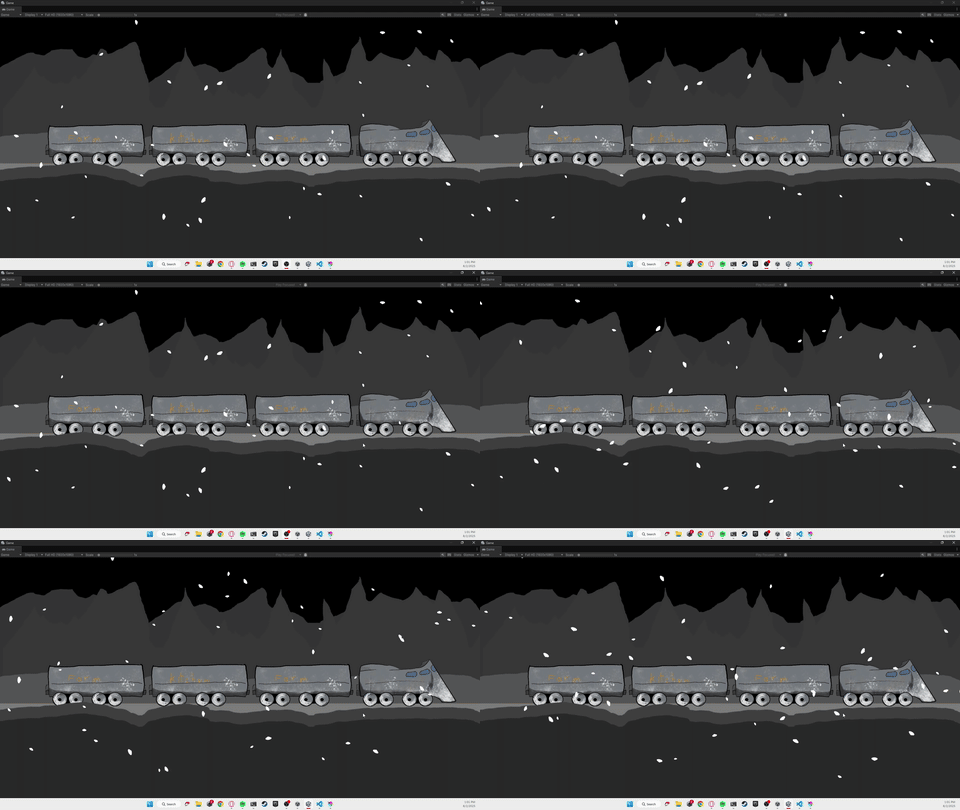
]]>
Everette Webber
The Making of: This Website2025-06-14T00:00:00+00:002025-06-14T00:00:00+00:00https://digx7.github.io/2025/06/14/The%20Making%20of%20This%20WebsiteI’ve been meaning to make a website for a long time. Indeed, since 2020 this website you are viewing is actually the 3rd iteration of this same idea.

To have a portfolio site where I can post any projects I work on, game, blog, or anything else.

The first iteration was a Wix site using their free resources to get something simple up and running. The biggest problem I was running into was one of scale. At the time the free Wix Site tools were best for single (or a handful of) static site pages that never change. But I needed both a page for every project, and a page that lists all all projects. Combine that with how hard getting a new page up was and I never got around to updating it.

But making a new iteration was always on the back of my mind.

Still my expertise is in Gamedev so as the years went on my knowledge in that area increased but my knowledge in WebDev never grew. Sure I looked into it from time to time, but never looked for long or was even sure where to start.

One thing holding me back was the assumption that I’d have to pay for site hosting.

Even still the second iteration of this website really started in January of 2025 when I was finally done with college and looking for work (still looking btw). I looked into frameworks that would be the easiest to do. Part of me wanted to code the website myself rather than using a site builder, I did study Computer Science after all. So on a whim I chose Ruby On Rails.

It seemed to allow an easy CRUD framework, had tons of documentation, and would shoe that I could code a website. Regardless, despite tons of design work for each page (I had worked out the design for each page) the project fell to the back burner as I spent more time working on my games instead.

And even if I coded it I’d still have to pay for hosting.

Then about a month ago I stumbled onto GitHub Pages just by poking around on the site. I was looking to make the Dev Diary blogs and looking for places I could post them. In learning GitHub Pages I made a small site for my current game project D2. So after a month of that I pulled the trigger and made a new portfolio site using GitHub Pages.

It had all the elements I was looking for. It’s free hosting, lets me code the site myself, is scalable (for the small size I need), and lets me add new pages easily. It was perfect.

So what is it using under the hood? GitHub Pages makes use of Jekyll, a static site generator, to take simple HTML and MarkDown files to make a website. It lets you use as little as a single .md file to as much as custom html, css, and js files. The entire site is hosted in a GitHub repo and whenever you push a new change it rebuilds the site using Jekyll’s process through GitHub Actions (GitHubs automation framework). All I need to do is push a new change and the website will be updated.

As for making the website itself, what your seeing took about 1 week of part time work. Having the design from iteration 2 sped things up as I knew what I was working towards. It started with the basic html for each page. What took the most time was refining the css, js, and how exactly Jekyll links the pages.

ChatGPT came in clutch giving me the starting templates for the css and all js files. Css is something I don’t know much about and through this I didn’t have to spend hours poking through docs just to get the bare minimum up. Even still I had to spend hours fine tuning some elements to get exactly what I wanted.

In particular the Carousels on the homepage took the most time as I wanted the Cards to all have the same size regardless of the underlying image sizes. I still might tweak it further in the future.

There’s always more to do, and more I could improve on. At the time of writing many of the project pages need to be written or further fleshed out (I haven’t touched some of these projects for years) I also could tweak the CSS to make the site more mobile friendly (some of the elements are really small on mobile even though it looks fine on desktop). Lastly, I would like to one day add subcategories to my blogs and projects, though I’m putting that off to tell I have more of each.

For now I’m considering the site finished enough to be used. I’ve already linked it on all my socials and plan on using it for all future job applications.


Visit the site here: digx7.github.io

]]>
Everette Webber
Dev Diary 4/25 - 5/92025-05-10T00:00:00+00:002025-05-10T00:00:00+00:00https://digx7.github.io/2025/05/10/DevDiary2Hello. I’m Everette, aka Digx7, and I’m looking for work in the games industry. In the meantime, I’m working on a 2D narrative-driven RPG under the working title of D2. This is my Dev Diary for 4/25 through 5/9.

4/26 Saturday

I spent all of 4/26 writing out the last post. What took most of the time was gathering all the images and the reformatting I needed to do. So I wrote out the drafts originally on Google Sheets with the plan of posting to both Itch.io (Itch.io, n.d.) and my project page. Firstly the images and specifically the gifs took awhile to gather together since each was originally a video that I had to trim down then format into a gif. Doing that for each one, even once I figured out the process, took a bit of time.

Next when it came time to post on Itch.io I had to reformat everything. This is because posts on Itch.io can take the form of plain text, markdown, or html. The latter of the two help format your post. So I needed to go back through the entire post and add in all the extra data for formatting. I also had to upload and repost all the images.

I’m hoping this is a process I can smooth out in the future. In fact formatting and writing took so long that this was all I did for this day.

I did however, stumble onto GitHub pages and will look into that as another place to post these blogs. As with all things I’m sure the process will become smoother with time.

4/28 Monday

I spent the day looking into GitHub pages (GitHub, n.d.). Turns out it's a static website builder that GitHub provides. All you need at minimum are .html or even just .md files for your home page and posts. Since Itch.io also takes the format of html or markdown (.md is short for markdown) this means I should be able to post to both with little reformatting needed between each.

I ended up using a separate branch on my project for its GitHub pages website. Turns out this is a common practice with the branch being called gh-pages most of the time.

Since GitHub pages lets you host a site with your account name I may use this in the future to make my own basic website.

In the future I may look into how to customize these sites even more.

4/29 Tuesday

After trying several different things to do to alter the layout I came back to the default github pages layout. The problem is that changing anything visually required me to make a working _config.yml file (a hidden default one is used if you don’t include one). Everytime I tried to make a _config.yml file the site would break and there was no clear way of debugging it. Ultimately I may have to look at other Github pages' site code to see what they are doing. At the end of the day I figured I could work with the default for now and revisit it as I make more blogs and have more content worth posting in the first place.

Wanting to get something done I switched gears and implemented tags into my dialogue system. I’ve talked in past blogs about my dialogue system (see my previous blog for a full breakdown). The process basically involves using Twine (Twine, n.d.) to create node based conversations where the player can make choices. Those conversations then get turned into Json files that then get imported into my game.

As it stood my system let me just use the entire text of each node in Twine as the line of dialogue in a conversation. However, I needed a way to pack more information into each node. Information like: the current speaker, the profile image to use, any quests to trigger, etc.

So I updated my custom importer to look for special tags in the text in each node and to treat the data inside those tags differently based on the given tag.

Figure 1

Tags Example

Enter image alt description

As seen in the above image all tags use the format //: so for example the //Speaker: tag tells the importer to use the rest of the line Orxan as the current speaker. The //Icon: tag gives the file name of the speaker icon to show. If one using that name does not exist then a fallback is used (So Icon_Name does not break the game, the fallback is used instead). Lastly some tags have opening and closing tags, line //Body: and //End_Body:. Using these allows the main body (the actual dialogue line) to be multiple lines in and of itself without breaking anything. (The [[1]] is Twine's way of linking passages and is irrelevant for this discussion).

This system of tags is flexible enough that it allows me to add more tags in the future if I need it. The downside is that since all the writing is done in Twine, Twine has no way of knowing about or fixing any spelling mistakes in these tags.

It means I really need to watch my spelling and naming of tags and external files.

Even still it works and I’m quite happy with it.

In fact I was so happy with it that I started writing out all the conversations for the first chapter of my game, the chapter I’m using as the vertical slice. In writing even the placeholder dialogue I already found myself with 16 different conversations and named characters I would need to write. Some of these conversations are more fleshed out than others.

To help with naming all these npcs you can talk to I’m using a fantasy name generator (FantasyNameGenerator, n.d.). But to keep the names consistent I used the same type of name generator for each faction in the first chapter.

The first chapter will take place in a boom town that is experiencing an influx of hunters to hunt a new exotic animal in the area. But the animal is much more clever than they all thought and has since captured most of the hunters. You come in to help fix the problem.

The main factions in the first chapter and the naming conventions I used are

  1. The og towns folks: Hellenic (greek)
  2. The hunters: Gothic and Dutch Renaissance (There two different groups of hunters)
  3. The mages: German Renaissance
  4. Enterprising merchants: Azerbaijani

I was feeling good about the writing and also daunted by the large amounts of writing my game may end up having. Writing is hard.

4/30 Wednesday

I didn’t have as much time to work today but spent it writing. Ultimately I only really got about 2 conversations done. At this point it’s taking me about 1 hour per conversation. I haven’t looked at the word count to see how well that stacks up with the speed of professional writers.

A big stumbling block is the fact that it's hard to write out the conversations for various quest lines when I’m not entirely sure where each quest will even go.

So I spent some time diagraming out all the quests for the first chapter. It turned out most of them were simpler than I thought in my head. But having the structure on paper will help.

It’s at this point I may need to do the same thing for the large scale story of my game.

?? Lost Time

Looking back it both makes sense and is surprising that this time was only a week.

At this point I was in a bit of a slump realizing that I would need some more clear story direction to help guild my writing for the game. I would need not just media analysis material but actually ‘how the sausage is made’ writing direction learning material. It is during this time that I stumbled onto and finished Way of Kings (Sanderson, 2011), a fantasy book by acclaimed author Brandon Sanderson. I have been a fantasy reader for a long time and have been reading through the Wheel of Time (Jordan, 1990) series for a few years at this point (at the time of writing I’m on Towers of Midnight). It is through those books that I discovered Brandon Sanderson and his books. In Particular, I have read the first Mistborn (Sanderson, 2007) book and really loved it.

But I bring all of this up because at some point during this week after finishing Way of Kings I found on YouTube a lecture series that Brandon had given at BYU on creative writing in fantasy and sci-fi (Sanderson, 2020). And it was really informative.

Most of it was geared toward books, but the way he was able to break down how he, a writer, thinks about and constructs plots and characters was incredibly helpful.

Some notable advice was breaking down plots with the ideas of promises, progress, and payoff. -

  • Promises: what are you signaling to the audience at the start will or could happen (Chekhov's Gun).
  • Progress: how are you moving this plot along, how are we conveying movement towards some end. This could be any type of movement.
  • Payoffs: how are you resolving plot lines? This structure can be a good way to think of any plotlines big or small.

Advice I got for characters was to think of them in terms of likability, copentece, and proactivity. Then to view their character arcs as them changing in terms of these fields. I’m doing it injustice here but it was a really helpful framework to view my own writing and direction.

In the process of doing all of this I was able to take a step back and nail down on a more solid direction for the writing and story of my game.

Well I’m still working out some details and may change a few things here’s what I have planned so far:

My story so far

The game takes place in a world where storms of portals appear rather frequently. These storms tend to deposit things from other worlds. Anything. Objects, treasures, rocks, animals, mountains, cities, and people. Everything in this world can trace its origin to some portal that dumped it here at some point or another. Some a few years ago some thousands of years ago.

Yet rather than be landfill the world is a thriving ecosystem of societies and wildlife that has adapted and learned to thrive here. The various cultures and nations each have different origins and different explanations as to why they are here. But regardless they make due. Entire societies appearing at once are not impossible, but are so rare that many view such an event as a myth.

The game follows 3 different characters as they find their place in the world during one such event.

Each of the characters will have key moments in their story where the player can make choices about the type of character they will end up being. These choices have both narrative and gameplay consequences since these choices impact that character's combat build.

The characters I have so far (or their rough ideas) are:

Ion: A squire in training to become a knight. A hero who protects his country and his people. He is nearing the end of his training and must decide what it means to be a knight. His possible arcs the player can experience revolve around this question as well as his relationship to his government and his mentor Six

Ivi: A mage of some kind. I have not developed the magic as much or the exact faction Ivi will belong to. But I want her paths to explore the perspective of those trying to understand the portals and the exact science or questions raised by them. I have ideas about making her story a more Lora Croft/ Indiana Jones styled story just to give the player more action or reason to be getting into combat.

Omen: A parent of a family displaced by the society that will appear from a portal as part of the main story of this game. I want their arcs to show the perspective of those who find themselves here for the first time. Since most other people are born and raised here. I am unsure if I want them to be a mother, a father, or a single parent.

The game will contain multiple chapters where each chapter follows a different character through their story. The plan at the moment is for each character to have 3 chapters giving the game 9 chapters in total. The first chapter of each character is their introduction. The second chapters will likely open with the new society appearing and each of their initial reactions. The third and final chapters will all take place at the same location, a battlefield where the new society is fighting one of the existing societies.

Overall I want the story to follow ‘ordinary’ characters as they deal with the changing world around them. Characters who ultimately won’t be the ones changing history or the fate of the world, but will be changing who they are over the course of the game.

Even though most of this story is still just in my head it feels like a huge weight off my shoulders having a clear direction to work towards in my future writing.

5/6 Tuesday

As part of developing D2 (the working title for my current project) I have been looking through various game assets. Part of that process got me to look into what it would take to make my own game assets. What kind of assets could be viable, how many I would need, and what kind of return I could expect. So part that last bit has been none.

But regardless having made 2 asset packs now it's been good experience. One of the big factors in selling art assets is volume. Lots of similarly styled assets do better than one off assets. A creator who has made 20 different but similar monster assets does better than someone who just did 1. So I am making at least one asset pack a month and seeing where that gets me. On 5/6 I spent the entire day working on my third asset pack. And I’m getting faster at them. The first asset pack I made took a week to make. The second pack took 2 days. This last one took 1 day.

A big thing that's helped speed up the process has been my growing familiarity with the files and formats needed to upload assets to the various websites. The three websites I’m currently selling on are Itch.io (Itch.io, n.d.), GameDevMarket (GameDev Market, n.d.), and the Unity Asset Store (Unity, n.d.). Itch.io and GameDevMarket both need the assets to be uploaded as a .zip file whereas the Unity Asset Store needs you to upload the assets from inside the Unity Engine itself. All three sites need key art (thumbnails) and screen shots but all three expect different resolutions. Also Itch.io is the only site that accepts gifs in place of screenshots.

Each website also takes a different amount of time to approve of the assets before letting them be shown to the public. Itch.io lets you post instantly, GameDevMarket takes 3-7 business days, and Unity can take up to 2 weeks.

I’ve also found a few scripts that speed up the process of exporting and naming all the files. The reason the first pack took a week was partially due to me having to learn all the things and process I needed as I went.

On the one hand it is discouraging that the packs haven’t sold at all. On the other hand it is encouraging that I can at least see growth in my turnaround time decreasing for the art assets. It also helps me to practice my art skills.

Below are links to the 2 art assets I’ve made already. At time of writing I’m still waiting for Unity to approve of this most recent asset pack. When it does get approved I might go back and link it here:

5/8 Thursday

Initially the plan was to finally do some artwork and level gray boxing. It’s something I’ve needed to do and have been putting off for a while at this point. So I got my workspace setup. And I noticed I had many different applications I needed to set up. I need to open:

  1. OBS and set the output to today’s directory (to help record for blogs like this or future devlogs)
  2. Google sheets to enter my starting time (to track my work hours)
  3. a notes app with todays note (to write down my thoughts so I can compile them here later)
  4. spotify open for music
  5. github desktop for version control
  6. vs code cause I always need it open
  7. opera gx cause i’ll be looking up stuff as I work
  8. Unity so I can work on my game.

That’s a lot.

I remember it each time but still it would be nice to just press a button instead. That’s when I remembered terminal scripts. Honestly, they are not something I’m super familiar with, I only know about them because of some friends in college. But they are super handy for these kinds of repetitive managerial tasks.

So I started working on some. It shouldn’t take too long, right?

It took 8 hours.

The first thing I tackled was OBS (OBS, n.d.), that was the most tedious one and the one I was the least sure was even possible. In the past I tried making devlogs or blog posts about my projects as I worked on them. The biggest challenge I’d always found was in gathering footage. You need to be recording yourself as you work. But not all the time. Otherwise when editing later you have hours and hours of footage you need to comb through, all you're looking for are short few second moments. All I needed in each video was footage that related to or was a few seconds on what I was talking about. So I needed an easy way to record my screen at any moment AND organize the footage in a way it would be easy to look back through later.

So I have a folder on an external hard drive that has a new sub folder created at the start of each day. And each day OBS’s settings are changed to write directly to that new sub folder.

Meaning the first question for this terminal script was: Could I automate that entire process from the terminal? Could anything automate it?

Creating a new sub folder is easy. But modifying the setting from code? That was the unknown.

Looking around at first I found a few Repos of command line plugins for OBS (grigio, n.d.) (pschmitt, n.d.). But according to their own docs none of them had any commands that would help me. This made sense. What I was looking for was admittedly something obscure. I needed some way of having a script change a single setting in the settings of OBS.

The exact setting I need to change can be found under Settings/Output/Recording/Recording Path

But I didn’t give up just yet.

It turns out that in OBS if you go to File/Show Settings Folder it takes you straight to the folder where all the settings are stored. Most are in a combination of .ini or .json files. So I opened each file up in VS code and just used CTRL + F to find where the setting I was looking for was stored. I didn’t know if it was stored in more than one place or not.

It was stored in only one spot. I found the setting I was looking for in basic/profiles/Untitled/basic.ini

Through trial and error I found it was best to manually change the values in this file well OBS was closed. Changing the values well OBS was open led to strange results, like the value being immediately edited back to the previous value. So now that I could do it manually I just needed a script to edit this text file. And that was indeed possible. After this I began coding a PowerShell script to run everything. First I found a simple learning module by Microsoft on PowerShell scripting. I had worked on small amounts of PowerShell scripting before but wanted a solid base to work with before I started (Microsoft, n.d.).

The very first thing I had the script do was verify that the external hard drive is plugged in and if it is, create a new sub folder for the day. Part of creating a new sub folder is adding in a text file that I can write my thoughts down.

Now I needed to edit the OBS settings file from the script. After some digging online I found a solution I could modify to my needs (mortalwombat-, 2019). The solution used a regex expression to find the exact setting I was looking for and replace it with the new value. I ran into a challenge in that the setting I was trying to change was named very similarly to 2 other settings that I did not want to change. They were so close in naming that a normal find and replace would change all 3 when I only wanted to change the 1. In that same post I was pointed to this really neat site that lets you test out different regex expressions to see how they would work (gskinner, n.d.). It gave me a huge appreciation for how compact but flexible they are. Even still it wasn’t quite working.

It turned out that part of the solution I was following was treating the entire file as if it was one big string, but I was expecting the regex expressions to work using the multiline flag. With that sorted out I could modify the regex expression to only change the 1 setting I needed.

So at this point I’m feeling good about myself.

My PowerShell script could create a new sub folder on my external hard drive for the day. And it could change the settings of OBS to save all its recordings to the new sub folder.

The next big thing I wanted to look at was Google Sheets. Which straight up I knew would be impossible and that I would need to rethink if I wanted to automate it.

See on Google Sheets I have one sheet I use as a work timesheet to track my hours. When I start working I enter my start time and when I’m done for the day I enter my end time. Then I can see how many hours I worked.

I didn’t even bother looking to see if I could edit a Google Sheet on my Google Drive from my computer's terminal.

But since I’m using windows I could use Microsoft Excel. All the same formulas are there and the file lives as a local file on my computer. So I wondered if I could modify an Microsoft Excel file from the terminal?

Turns out I could.

In fact I feel like I lucked out, in that I almost immediately found a form answer that gave just about all the pieces I would need to do it (signalhouse, 2020). I don’t entirely understand how exactly it works. But I’ll try to explain.

Basically PowerShell is able to use something called COM objects to create custom class variables. Using this I could import a type of library that let me create variables for Microsoft Excel files and edit them. The solution I found had me make an instance of Microsoft Excel, run that instance and then open up the individual file and create a variable for each layer of the file as I worked my way down to modify the individual cells themselves (Microsoft, n.d.).

Apparently Excel files have this structure:

  • Workbook: the top level file and contains all the sheets
  • Worksheet: a single tab or sheet in excel contains all the cells.
  • Cells: Contains the data

Ok now that I write that out it seems incredibly straight forward. However, looking through the documentation it did not feel straight forward. The challenge was that everything had at least 2 similar but slightly different documentation pages. One for Microsoft’s .Net framework (working with C#) and one for the COM objects. Also the thing I cared about was trying to check the value of a cell (I’ll explain why in a second) so I had to dig through about 6+ pages of documentations to try and make sense of how it fit together.

In the end it did work. I simply have PowerShell open up the given Excel file, access the first worksheet, look down the rows to find the first empty row and insert the current date and time into that row. This is why I needed to figure out how to check if a cell was empty or not. Once I did the rest of the code fell into place.

At this point my PowerShell script can set up the sub folder for my footage, change the settings of OBS, and add the current date and time to an excel sheet. All with the click of a button on my end.

The last thing I got it to do was open up all the applications I needed.

  1. OBS
  2. Notepad
  3. Spotify
  4. Github Desktop
  5. VS Code
  6. Opera GX
  7. Unity Hub

Now whenever I need to clock in for the day I can just open up my terminal and run the ClockIn.PS1 script.

I also made a ClockOut.PS1 script. All it does is add the end date and time to my Excel sheet. I thought about having it close out all the applications. But honestly it’s really satisfying to me to manually close down all the applications at the end of the day.

Just like I find it satisfying to close down all my browser tabs when I’m done researching a particular problem.

Regardless it meant less coding on my part. It was also at this point I realized I had just spent around 8 hours on this one thing.

So maybe I’ll eventually start saving time after like a year or 2. Either way I’m happy with how it turned out.

I ended the day by starting to write this post

5/9 Friday

I spent the day writing all of this very post. To help speed things along I found a Google Docs extension that lets me convert a Doc to a .md or to html. This will help speed things up when I post it later (Likely on 5/10).

I also found out that Docs has a way of managing Citations under Tools/Citations. Well I am using it I’m ultimately unhappy with it. The problem is that the only citation styles it offers are APA, MLA, and Chicago Author-Date. All of which are great citation methods for academic environments. But aren't super useful when all your references are actually just links to the homepages of other websites, or YouTube videos. Also the style of in-text citation is not helpful. For that specifically I would love the method that Wikipedia uses where the in-text citation block [cite] links to the reference in question.

Regardless, for this post I’m using this citation method. Though in the future I will likely look into alternative solutions.

And that’s all for 4/25-5/9 thanks so much for reading and I hope to see you in the next one whenever that is.

References

FantasyNameGenerator. (n.d.). Fantasy name generators. Names for all your fantasy characters. Retrieved May 9, 2025, from https://www.fantasynamegenerators.com

GameDev Market. (n.d.). GameDev Market: Game Assets for Indie Developers. Retrieved May 9, 2025, from https://www.gamedevmarket.net

GitHub. (n.d.). GitHub Pages | Websites for you and your projects, hosted directly from your GitHub repository. Just edit, push, and your changes are live. Retrieved May 9, 2025, from https://pages.github.com

grigio. (n.d.). obs-cmd. https://github.com/grigio/obs-cmd

gskinner. (n.d.). learn regex. regexr. https://regexr.com

Itch.io. (n.d.). itch.io: Download the latest indie games. Retrieved May 9, 2025, from https://itch.io

Jordan, R. (1990). The Eye of the World. Tom Doherty Associates.

Microsoft. (n.d.). Introduction to scripting in PowerShell. Microsoft Learn. https://learn.microsoft.com/en-us/training/modules/script-with-powershell/

Microsoft. (n.d.). Microsoft.Office.Interop.Excel Namespace. Microsoft Lear. https://learn.microsoft.com/en-us/dotnet/api/microsoft.office.interop.excel?view=excel-pia

mortalwombat-. (2019). editing an ini with powershell. reddit. Retrieved 2025, from https://www.reddit.com/r/PowerShell/comments/aldoup/editing_an_ini_with_powershell/

OBS. (n.d.). OBS Homepage. OBS Homepage. https://obsproject.com

pschmitt. (n.d.). obs-cli. obs-cli. https://github.com/pschmitt/obs-cli

Sanderson, B. (2007). The Final Empire (Mistborn, Book 1). Macmillan.

Sanderson, B. (2011). The Way of Kings: Book One of the Stormlight Archive. Tor Publishing Group.

Sanderson, B. (2020). 2020 Creative Writing Lectures at BYU. In YouTube Playlist. YouTube. Retrieved 2025, from https://youtube.com/playlist?list=PLSH_xM-KC3Zv-79sVZTTj-YA6IAqh8qeQ&si=LFEjCO8laZcXK5tG

signalhouse. (2020). update a cell in a excel sheet using powershell. stack overflow. https://stackoverflow.com/questions/59402365/update-a-cell-in-a-excel-sheet-using-powershell

Twine. (n.d.). Twine / An open-source tool for telling interactive, nonlinear stories. Retrieved May 9, 2025, from https://twinery.org

Unity. (n.d.). Asset Store. Unity Asset Store: The Best Assets for Game Making. Retrieved May 9, 2025, from http://assetstore.unity.com

]]>
Everette Webber
Dev Diary 4/17 - 4/242025-04-25T00:00:00+00:002025-04-25T00:00:00+00:00https://digx7.github.io/2025/04/25/DevDiary1Hello. I’m Everette, aka Digx7, and I’m looking for work in the games industry. In the meantime, I’m working on a 2D narrative-driven RPG under the working title of D2. This is my Dev Diary for 4/17 through 4/24.


Why Dev Diary?

First, why am I calling this a Dev Diary and not a Dev Log? Isn’t that what these are normally called? Yes, but, at least to me, they seem to have a bit of a reputation that I’d like to avoid. Most of them seem to rely on the spectacle of new features or new visual things being added each time. To the point where some developers focus on adding new features rather than making the game stable. Adding new features is cool but they are not the only part of game development.

I want to focus on both the progress I make and also on my thought process as I develop it. Hence going with the term Dev Diary rather than Dev Log. Well I’m still figuring out what kind of schedule I want to make these on, I’m thinking about one every 2 weeks.

4/17

At this point in the project, I am trying to create the first area of the game as a way of figuring out all the systems and processes I will need to make the rest of the game. In drawing it is common to start with a simple sketch to figure out the shape, then to slowly work in the details, before finally committing to a final render. So right now I am in the process of sketching out the first area.

Figure 1

Location and Conversation Graph Note: Here is a graph I made of the different locations and conversations the player can have in this first area. Well, it’s not final, it gives me a plan to work on when sketching this area.

Figure 2

Placing Doors

I started by adding all the doors to each scene allowing the player to move between them. This may not seem like a lot but with 16 connections and each connection requiring 2 doors (1 in each scene), that means I had 32 individual doors I had to place and configure. It was at this point that I started to get a sense of how much content management would be a challenge for this project moving forward.

Figure 3

Working on Conversations

I next placed all the conversations in their locations in each scene. None of the dialogue was final and most of the conversations were just one line long with that line being the name of the conversation. But I had 22 conversations to make and place (about 2-3 per scene). Again managing all of these, especially as the game scales will take a lot of work.

Figure 4

Testing made conversions

Lastly, I added location title cards and improved how the game handled the scene transitions by adding a screen wipe and updating how the camera gets set up in each scene. I also built it so the scene transition can be interchangeable allowing me to add other scene transitions in the future. At the moment when playing it in the editor the game noticeably hitches on a scene change, but the transition hides this pretty well. I am uncertain what it would look like on a full build.

Figure 5

Location Title Cards

Figure 6

Scene Transitions

And that is all I did for 4/17. Well, the doors were all set up, and placeholder conversations were in place. I still needed to graybox each location. At the moment all my scenes are nothing more than simple hallways with doors.

I am also seeing the value of several dev tools I might need to develop to help speed up making or managing certain types of content.

The tools I have in mind are as follows:

  • Dialogue Pipeline: Some way of creating dialogue in a node graph editor, exporting that to the game, and automatically hooking it up to localization.
  • Sprite Wrangler: A grab bag of several small tools to handle various sprite-based bottlenecks. Including: slicing multiple sprites at once, and automatically generating multiple sprite-based animations at once
  • Quest Graph: Some way of creating quests in a node graph-based way might be similar to the dialogue pipeline.
  • Scene Connector: Some way of easily managing the connections between scenes in the editor.

4/24

Originally I was planning to graybox each of the scenes. But instead, I decided to work on making the Dialogue Pipeline tool.

Before I go into what I worked on this day I need to give some background on this tool and the problems it’s aiming to solve.

Figure 7

Showing the conversation before

At the moment in D2 dialogue is stored in a Unity ScriptableObject called a conversation. A conversation is just a list of nodes that can be either lines of dialogue, choices the player can make, or events to trigger (like progressing a quest line). However, working with a branching dialogue when you can only view it as a list will not scale well. I needed a way to work on it in a graph form, this was the first goal.

A second goal of the tool was to get it to connect to localization automatically. Well as a solo developer, it is unlikely I will have the funds to pay for a translation anytime soon, it would be foolish of me to not at least keep that option on the table. Especially given that this will be a primarily narrative and dialogue-driven RPG.

To solve the first problem there are solutions on the Unity Asset store that exist, unfortunately, they cost too much so I instead have to roll out my own solution. Unity has an experimental package that gives you access to a library of node graph-type functions to use in a custom editor window like what the Shader Graph does. And it well it seems robust it is also experimental. Custom editor window creations are also one of those areas of game development I know very little about and it feels super tricky to learn anything on. The problem is that Unity has 2 separate editor UI frameworks, its legacy framework, and UI Toolkit, each of which would take a lot to learn on their own. Also, both frameworks have gone through a lot of iterations so finding up-to-date documentation on either is difficult. So instead I decided to look elsewhere.

Technically I didn’t need this graph editor to exist within Unity. It could exist as its own tool and then have its data imported into Unity. At runtime, the game doesn’t care how the data is stored, so long as it can access it. So at runtime having the data in a list (as it already was in the Conversation ScriptableObjects) works just fine. Well, I’m sure there are some frameworks out there that let you easily build node graph editors. I could not find any at a quick glance. What I could find was a tool I already knew existed: Twine. [1]

Figure 8

Twine Showcase

Twine [1] is a simple node graph editor designed for making Choose Your Own Adventure-type stories that can be played in the web browser. It has a very simple and clean interface. It also has a feature called Story Formats that allows you to modify how the story gets displayed in the browser. One Story Format I found turns the entire story into a JSON file that you can use elsewhere [2]. I decided to see if I could use this to build my dialogue for D2.

Figure 9

Example JSON output from Twine

Now onto what I did.

I spent the first half of the day figuring out how to make Unity Editor scripts that could do each of the individual steps I would need for this Dialogue Pipeline. A way of importing JSON files from Twine into the dialogue for my game.

Figure 10

Creating a scriptable object with editor scripts

Figure 11

Code to create a scriptable object from editor script

I first figured out how to create new ScriptableObjects of a given type of ScriptableObject. It turns out the Unity Editor has access to a static class called AssetDatabase that allows you to do all kinds of asset manipulation, from making new assets, editing them, loading them, or deleting them. This class will be used in all the following steps.

Figure 12

Unity Localization Package

Next, I need to figure out how to connect this to localization. First I need to figure out how to handle localization. It turns out that Unity has a localization package [3] you can use. This package basically lets you create spreadsheets where each row is a unique string and each column is that string in a given language. So to get this setup I would need my Dialogue Pipeline to be able to edit existing English strings (if I was editing a conversion) or to create new rows and add the correct English strings (if I was making a new conversation). Eventually, I figured this out.

Figure 13

Modifying a localization table from a editor script

Lastly, I need to figure out how to parse a JSON file into anything else in Unity. It turns out Unity has a nice JsonUtility class that we can use. However, this class is designed to serialize or deserialize objects to and from JSON files. This means that I needed to create a new class that closely matched the structure of the JSON files Twine was giving me. I called these classes TwineStory classes. Using these TwineStory classes I was able to successfully deserialize the JSON files into these classes.

Figure 14

Twine Story class

Figure 15

Steps the Dialogue Pipeline takes

With each of the pieces figured out I spent the next half of the day making a Unity Editor script that put them all together. It would take a JSON file and deserialize it to a TwineStory object. Next, it would look at the name of the story and either make a new Conversation ScriptableObject or edit an existing one. It would fill the nodes of the Conversation with the lines it got from the TwineStory. Lastly, it would go through the Conversation ScriptableObject and add all the lines to the Localization table. Once this was all working I made it so this script could work on multiple JSON files at once.

Figure 16

Creating a dialogue from a JSON file

One problem I had to solve was the fact that in each Conversation Node, there can be more metadata than just the dialogue line itself. These can be things like the name of the speaker, or the image portrait to show. Also for nodes that trigger events, there can be all kinds of metadata needed about the event to trigger. To add these in Twine I am using a system of adding comments in the text to label these things. I then need to update the DialoguePipeline script to parse out this text and put the metadata in the correct spots. At the moment it only does this with the speaker and the main line. One thing I’ll have to look out for is possible bugs related to typos in this metadata since Twine itself has no way of validating this metadata.

And that’s all I did on 4/24. Regardless I am super happy with how this tool turned out and that I even got it working. As always there are still a few things left to work on. One is adding the Names and text for the player’s options to the localization tables, at the moment only the main line is added. Another thing is how best to handle option nodes and event nodes. I’ll need to figure out both the metadata needed and how to get my DialoguePipeline to parse that properly.

On the topic of managing a bunch of content, I am realizing that a strict naming schema for content will be needed going forward. Also, Localization will present some challenges in making sure that all the strings get connected, but also that we don’t have any dead strings. After all, I won’t want to pay for localization of strings that will never get used.

Anyway, now that it’s working I should try making a few more conversations to see how well the workflow scales.

And that’s all for 4/17-4/24 thanks so much for reading and I hope to see you in the next one whenever that is.


References:

  1. Twine (software) : link
  2. Twine to JSON story format : link
  3. Unity Localization Package : link

Further Reading:

  1. How CD Project Red handled localization for Cyberpunk 2077 : link
]]>
Everette Webber
Releasing My First Asset2025-03-27T00:00:00+00:002025-03-27T00:00:00+00:00https://digx7.github.io/2025/03/27/Releasing%20My%20First%20AssetReleasing my very first asset pack. No idea how well it will do.

After spending way to long looking through other asset packs for my games I decided I would try my hand at making my own. No idea if I’ll be able to make some income through it or if I’ll never sell anything.

However, the hope is that there are many different ways to do character art meaning this should be a endless market. Also theoretically once I post this once it should have a infinite long tail. Who knows though. Time to put that theory to the test.

My next steps are to try and figure out how to get this asset on the Unity Asset store, Game Dev Market Place, and maybe Unreal Engine Market place.

After that I'll decide if I wanna keep making and selling more asset packs.

Might see if I can do this along side my game development.

Anyway that's all for this post.

Don't stop creating.

]]>
Everette Webber
Eleong Incorperated2025-01-01T00:00:00+00:002025-01-01T00:00:00+00:00https://digx7.github.io/2025/01/01/Eleong%20JobI worked as a logistics assistant for Elong Incorperated

]]>
Everette Webber
RFKC2025-01-01T00:00:00+00:002025-01-01T00:00:00+00:00https://digx7.github.io/2025/01/01/RFKC%20JobEvery summer I volunteer at a summer camp for foster kids. I make recap videos for them.

]]>
Everette Webber
Renew Church2025-01-01T00:00:00+00:002025-01-01T00:00:00+00:00https://digx7.github.io/2025/01/01/Renew%20JobI volunteer at my church as a live audio mixer everyother month

]]>
Everette Webber