The post gravityflow_display_name_discussion_field appeared first on Gravity Flow Documentation.
]]>The gravityflow_display_name_discussion_field filter is used to customize the display name for discussion field values.
Parameters
| Parameter | Type | Details |
|---|---|---|
| $display_name | String | The display name of the current item in the discussion field. |
| $item | Array | The current item in the discussion field. |
| $field | Gravity_Flow_Field_Discussion | The field currently being processed. |
Examples
Display the email address for discussion item users.
add_filter( 'gravityflow_display_name_discussion_field', 'sh_display_email_discussion_field', 10, 3 );
function sh_display_email_discussion_field( $display_name, $item, $field ) {
    if ( isset( $item['user_id'] ) ) {
        $user = get_userdata( $item['user_id'] );
        if ( $user ) {
            $display_name = $user->user_email;
        }
    }

    return $display_name;
}
Placement
This code can be used in the functions.php file of the active theme, a custom functions plugin, a custom add-on, or with a code snippets plugin.
See also the PHP section in this article: Where Do I Put This Code?
Source Code
This filter is located in the Gravity_Flow_Field_Discussion class in includes/fields/class-field-discussion.php.
Since
This filter was added in Gravity Flow 3.0.1
The post gravityflow_display_name_discussion_field appeared first on Gravity Flow Documentation.
]]>The post Get Steps By Entry with Rest API v2 appeared first on Gravity Flow Documentation.
]]>This endpoint allows you to retrieve all steps of the workflow for the specified entry.
Authentication
For details on the methods available to authenticate to the API, refer to this REST API v2 Authentication guide.
This endpoint requires the gravityflow_create_steps capability. This can be adjusted using gravityflow_rest_api_capability_get_forms_steps filter
Using the Endpoint
Path and Method
GET /wp-json/gf/v2/entries/[entry_id]/workflow/steps
The path must include the specific entry ID that you wish to get the steps for.
Request Parameters
There are no required or optional properties for this endpoint.
Response
Success
A successful response will contain an JSON array of Workflow Steps Objects of steps in the forms workflow.
Failure
A failed response will provide a JSON string of the error code and message.
| Key | Type | Description |
|---|---|---|
| code | string | Error code. |
| message | string | Human-readable error message. |
| data[status] | integer | HTTP response status code |
There are several failure scenarios which could be returned depending on request data provided.
| Response Code and data[status] | Error Code | Message | Details |
|---|---|---|---|
| 401 / 403 | permission_denied | You are not allowed to view steps. | User does not have the required permissions for this endpoint. |
| 404 | entry_not_found | Invalid entry id. Entry could not be found. | Could not find an entry with the specified entry_id. |
Examples
PHP Request
//Update these variables
$entry_id = '1273';
$domain   = 'https://develop.local';
$auth_value = 'Basic replace-me-with-basic-auth-based-on-user-application-password';

// {@see https://codex.wordpress.org/HTTP_API}
$response = wp_remote_post( $domain . '/wp-json/gf/v2/entries/' . $entry_id . '/workflow/steps', array(
    'headers' => array(
        'Authorization' => $auth_value,
    ),
) );

if ( ! is_wp_error( $response ) ) {
    // The request went through successfully, check the response code against
    // what we're expecting
    if ( 200 == wp_remote_retrieve_response_code( $response ) ) {
        // Do something with the response
        // $body = wp_remote_retrieve_body( $response );
        // $headers = wp_remote_retrieve_headers( $response );
    } else {
        // The response code was not what we were expecting, record the message
        $error_message = wp_remote_retrieve_response_message( $response );
    }
} else {
    // There was an error making the request
    $error_message = $response->get_error_message();
}
API Response
[
  {
    "id": 121,
    "type": "workflow_start",
    "label": "Start",
    "name": "Start",
    "is_active": true,
    "entry_count": 0,
    "supports_expiration": false,
    "assignees": [],
    "settings": {
      "step_name": "Start",
      "description": "",
      "step_type": "workflow_start",
      "feed_condition_conditional_logic": "0",
      "feed_condition_conditional_logic_object": [],
      "scheduled": "0",
      "schedule_type": "delay",
      "schedule_date": "",
      "schedule_delay_offset": "",
      "schedule_delay_unit": "hours",
      "schedule_date_field_before_after": "after",
      "schedule_date_field_offset": "0",
      "schedule_date_field_offset_unit": "hours",
      "instructionsEnable": "0",
      "instructionsValue": "",
      "display_fields_mode": "all_fields",
      "destination_complete": "next",
      "_entry_count": 0
    }
  },
  {
    "id": 123,
    "type": "webhook",
    "label": "Outgoing Webhook",
    "name": "GET Star Wars Spaceships\/Vehicles",
    "is_active": true,
    "entry_count": 0,
    "supports_expiration": false,
    "assignees": [],
    "settings": {
      "step_name": "GET Star Wars Spaceships\/Vehicles",
      "description": "",
      "step_type": "webhook",
      "step_highlight": "0",
      "step_highlight_type": "color",
      "step_highlight_color": "#dd3333",
      "feed_condition_conditional_logic_object": {
        "conditionalLogic": {
          "actionType": "show",
          "logicType": "any",
          "rules": [
            {
              "fieldId": "1",
              "operator": "is",
              "value": "starships"
            },
            {
              "fieldId": "1",
              "operator": "is",
              "value": "vehicles"
            }
          ]
        }
      },
      "feed_condition_conditional_logic": "1",
      "scheduled": "0",
      "schedule_type": "delay",
      "schedule_date": "",
      "schedule_delay_offset": "",
      "schedule_delay_unit": "hours",
      "schedule_date_field_offset": "",
      "schedule_date_field_offset_unit": "hours",
      "schedule_date_field_before_after": "after",
      "url": "https:\/\/swapi.dev\/api\/{I need details about...:1}\/?search={Search Term:3}",
      "method": "get",
      "authentication": "",
      "basic_username": "",
      "basic_password": "",
      "connected_app": "",
      "requestHeaders": [
        {
          "key": "",
          "custom_key": "",
          "value": "",
          "custom_value": ""
        }
      ],
      "body": "select",
      "raw_body": "",
      "format": "json",
      "body_type": "all_fields",
      "mappings": [
        {
          "key": "gf_custom",
          "custom_key": "",
          "value": "",
          "custom_value": ""
        }
      ],
      "response_body": "select_fields",
      "response_mappings": [
        {
          "key": "gf_custom",
          "custom_key": "results\\0\\name",
          "value": "6",
          "custom_value": ""
        },
        {
          "key": "gf_custom",
          "custom_key": "results\\0\\model",
          "value": "8",
          "custom_value": ""
        },
        {
          "key": "gf_custom",
          "custom_key": "results\\0\\manufacturer",
          "value": "7",
          "custom_value": ""
        },
        {
          "key": "gf_custom",
          "custom_key": "results\\0\\crew",
          "value": "11",
          "custom_value": ""
        },
        {
          "key": "gf_custom",
          "custom_key": "results\\0\\passengers",
          "value": "12",
          "custom_value": ""
        },
        {
          "key": "gf_custom",
          "custom_key": "results\\0\\url",
          "value": "13",
          "custom_value": ""
        }
      ],
      "destination_complete": "next",
      "destination_error_client": "complete",
      "destination_error_server": "complete",
      "destination_error": "complete",
      "highlight": "",
      "condition": "",
      "_entry_count": 0
    }
  },

  {
    "id": 127,
    "type": "approval",
    "label": "Approval",
    "name": "Perform another search?",
    "is_active": true,
    "entry_count": 2,
    "supports_expiration": true,
    "assignees": [
      {
        "key": "role|administrator",
        "id": "administrator",
        "type": "role",
        "display_name": "administrator",
        "status": false
      }
    ],
    "settings": {
      "step_name": "Perform another search?",
      "description": "",
      "step_type": "approval",
      "step_highlight": "0",
      "step_highlight_type": "color",
      "step_highlight_color": "#dd3333",
      "feed_condition_conditional_logic_object": [],
      "feed_condition_conditional_logic": "0",
      "scheduled": "0",
      "schedule_type": "delay",
      "schedule_date": "",
      "schedule_delay_offset": "",
      "schedule_delay_unit": "hours",
      "schedule_date_field_offset": "",
      "schedule_date_field_offset_unit": "hours",
      "schedule_date_field_before_after": "after",
      "type": "select",
      "assignees": [
        "role|administrator"
      ],
      "editable_fields": [
        "1",
        "3"
      ],
      "routing": "",
      "assignee_policy": "any",
      "instructionsEnable": "1",
      "instructionsValue": "<strong>Approve<\/strong> = Perform another search.\r\n<strong>Reject<\/strong> = You are a now a Jedi master.\r\n\r\nCan't spell for bantha fodder?\r\n<ul><li><strong>People<\/strong>: R2-D2 or Luke Skywalker<\/li><li><strong>Planet<\/strong>: Tatooine or Hoth<\/li><li><strong>Starships<\/strong>: Star Destroyer or Millennium Falcon<\/li><li><strong>Vehicle<\/strong>: AT-AT or snowspeeder<\/li><\/ul>",
      "display_fields_mode": "all_fields",
      "confirmation_prompt": "0",
      "conditional_logic_editable_fields_enabled": "1",
      "revertEnable": "0",
      "assignee_notification_enabled": "0",
      "assignee_notification_from_name": "",
      "assignee_notification_from_email": "{admin_email}",
      "assignee_notification_reply_to": "",
      "assignee_notification_cc": "",
      "assignee_notification_bcc": "",
      "assignee_notification_subject": "",
      "assignee_notification_message": "A new entry is pending your approval. Please check your Workflow Inbox.",
      "assignee_notification_disable_autoformat": "0",
      "resend_assignee_emailEnable": "0",
      "resend_assignee_emailValue": "7",
      "resend_assignee_email_repeatEnable": "0",
      "resend_assignee_email_repeatValue": "3",
      "rejection_notification_enabled": "0",
      "rejection_notification_type": "select",
      "rejection_notification_routing": [
        {
          "assignee": "user_id|11",
          "fieldId": "0",
          "operator": "is",
          "value": "",
          "type": ""
        }
      ],
      "rejection_notification_from_name": "",
      "rejection_notification_from_email": "{admin_email}",
      "rejection_notification_reply_to": "",
      "rejection_notification_cc": "",
      "rejection_notification_bcc": "",
      "rejection_notification_subject": "",
      "rejection_notification_message": "Entry {entry_id} has been rejected",
      "rejection_notification_disable_autoformat": "0",
      "approval_notification_enabled": "0",
      "approval_notification_type": "select",
      "approval_notification_routing": [
        {
          "assignee": "user_id|11",
          "fieldId": "0",
          "operator": "is",
          "value": "",
          "type": ""
        }
      ],
      "approval_notification_from_name": "",
      "approval_notification_from_email": "{admin_email}",
      "approval_notification_reply_to": "",
      "approval_notification_cc": "",
      "approval_notification_bcc": "",
      "approval_notification_subject": "",
      "approval_notification_message": "Entry {entry_id} has been approved",
      "approval_notification_disable_autoformat": "0",
      "revert_notification_enabled": "0",
      "revert_notification_type": "select",
      "revert_notification_routing": [
        {
          "assignee": "user_id|11",
          "fieldId": "0",
          "operator": "is",
          "value": "",
          "type": ""
        }
      ],
      "revert_notification_from_name": "",
      "revert_notification_from_email": "{admin_email}",
      "revert_notification_reply_to": "",
      "revert_notification_cc": "",
      "revert_notification_bcc": "",
      "revert_notification_subject": "",
      "revert_notification_message": "Entry {entry_id} has been reverted",
      "revert_notification_disable_autoformat": "0",
      "note_mode": "not_required",
      "approved_messageEnable": "0",
      "approved_messageValue": "Entry Approved",
      "reverted_messageEnable": "0",
      "reverted_messageValue": "Entry Reverted",
      "rejected_messageEnable": "0",
      "rejected_messageValue": "Entry Rejected",
      "processed_step_messageEnable": "0",
      "processed_step_messageValue": "This link is no longer valid.",
      "due_date": "0",
      "due_date_type": "delay",
      "due_date_date": "",
      "due_date_delay_offset": "",
      "due_date_delay_unit": "hours",
      "due_date_date_field_offset": "",
      "due_date_date_field_offset_unit": "hours",
      "due_date_date_field_before_after": "after",
      "due_date_highlight_type": "color",
      "due_date_highlight_color": "#dd3333",
      "expiration": "0",
      "expiration_type": "delay",
      "expiration_date": "",
      "expiration_delay_offset": "",
      "expiration_delay_unit": "hours",
      "expiration_date_field_offset": "",
      "expiration_date_field_offset_unit": "hours",
      "expiration_date_field_before_after": "after",
      "status_expiration": "rejected",
      "destination_expired": "next",
      "destination_rejected": "complete",
      "destination_approved": "121",
      "highlight": "",
      "condition": "",
      "instructions": "",
      "display_fields": "",
      "revert": "",
      "notification_tabs": "",
      "approved_message": "",
      "reverted_message": "",
      "rejected_message": "",
      "processed_step_message": "",
      "_entry_count": 2
    }
  }
]
Since
This endpoint was added in Gravity Flow 3.0.
Source Code
This endpoint is located in the gravityflow/includes/rest-api/v2/ folder with most of the route code in the class-controller-steps.php file.
The post Get Steps By Entry with Rest API v2 appeared first on Gravity Flow Documentation.
]]>The post Get Steps By Form with Rest API v2 appeared first on Gravity Flow Documentation.
]]>This endpoint allows you to retrieve all steps of the workflow for the specified form.
Authentication
For details on the methods available to authenticate to the API, refer to this REST API v2 Authentication guide.
This endpoint requires the gravityflow_create_steps capability. This can be adjusted using gravityflow_rest_api_capability_get_forms_steps filter.
Using the Endpoint
Path and Method
GET /wp-json/gravityflow/v2/forms/[form_id]/workflow/steps
The path must include the specific form ID that you wish to get the steps for.
Request Parameters
There are no required or optional properties for this endpoint.
Response
Success
A successful response will contain an JSON array of Workflow Step Objects of steps in the forms workflow.
Failure
A failed response will provide a JSON string of the error code and message.
| Key | Type | Description |
|---|---|---|
| code | string | Error code. |
| message | string | Human-readable error message. |
| data[status] | integer | HTTP response status code |
There are several failure scenarios which could be returned depending on request data provided.
| Response Code and data[status] | Error Code | Message | Details |
|---|---|---|---|
| 401 / 403 | permission_denied | You are not allowed to view steps. | User does not have the required permissions for this endpoint. |
| 404 | form_not_found | Form could not be found. | Could not find a form with the specified form_id |
Usage
PHP Request
//Update these variables
$form_id = '35';
$domain   = 'https://develop.local';
$auth_value = 'Basic replace-me-with-basic-auth-based-on-user-application-password';

// {@see https://codex.wordpress.org/HTTP_API}
$response = wp_remote_post( $domain . '/wp-json/gf/v2/forms/' . $form_id . '/workflow/steps', array(
    'headers' => array(
        'Authorization' => $auth_value,
    ),
) );

if ( ! is_wp_error( $response ) ) {
    // The request went through successfully, check the response code against
    // what we're expecting
    if ( 200 == wp_remote_retrieve_response_code( $response ) ) {
        // Do something with the response
        // $body = wp_remote_retrieve_body( $response );
        // $headers = wp_remote_retrieve_headers( $response );
    } else {
        // The response code was not what we were expecting, record the message
        $error_message = wp_remote_retrieve_response_message( $response );
    }
} else {
    // There was an error making the request
    $error_message = $response->get_error_message();
}
API Response
[
  {
    "id": 121,
    "type": "workflow_start",
    "label": "Start",
    "name": "Start",
    "is_active": true,
    "entry_count": 0,
    "supports_expiration": false,
    "assignees": [],
    "settings": {
      "step_name": "Start",
      "description": "",
      "step_type": "workflow_start",
      "feed_condition_conditional_logic": "0",
      "feed_condition_conditional_logic_object": [],
      "scheduled": "0",
      "schedule_type": "delay",
      "schedule_date": "",
      "schedule_delay_offset": "",
      "schedule_delay_unit": "hours",
      "schedule_date_field_before_after": "after",
      "schedule_date_field_offset": "0",
      "schedule_date_field_offset_unit": "hours",
      "instructionsEnable": "0",
      "instructionsValue": "",
      "display_fields_mode": "all_fields",
      "destination_complete": "next",
      "_entry_count": 0
    }
  },
  {
    "id": 123,
    "type": "webhook",
    "label": "Outgoing Webhook",
    "name": "GET Star Wars Spaceships\/Vehicles",
    "is_active": true,
    "entry_count": 0,
    "supports_expiration": false,
    "assignees": [],
    "settings": {
      "step_name": "GET Star Wars Spaceships\/Vehicles",
      "description": "",
      "step_type": "webhook",
      "step_highlight": "0",
      "step_highlight_type": "color",
      "step_highlight_color": "#dd3333",
      "feed_condition_conditional_logic_object": {
        "conditionalLogic": {
          "actionType": "show",
          "logicType": "any",
          "rules": [
            {
              "fieldId": "1",
              "operator": "is",
              "value": "starships"
            },
            {
              "fieldId": "1",
              "operator": "is",
              "value": "vehicles"
            }
          ]
        }
      },
      "feed_condition_conditional_logic": "1",
      "scheduled": "0",
      "schedule_type": "delay",
      "schedule_date": "",
      "schedule_delay_offset": "",
      "schedule_delay_unit": "hours",
      "schedule_date_field_offset": "",
      "schedule_date_field_offset_unit": "hours",
      "schedule_date_field_before_after": "after",
      "url": "https:\/\/swapi.dev\/api\/{I need details about...:1}\/?search={Search Term:3}",
      "method": "get",
      "authentication": "",
      "basic_username": "",
      "basic_password": "",
      "connected_app": "",
      "requestHeaders": [
        {
          "key": "",
          "custom_key": "",
          "value": "",
          "custom_value": ""
        }
      ],
      "body": "select",
      "raw_body": "",
      "format": "json",
      "body_type": "all_fields",
      "mappings": [
        {
          "key": "gf_custom",
          "custom_key": "",
          "value": "",
          "custom_value": ""
        }
      ],
      "response_body": "select_fields",
      "response_mappings": [
        {
          "key": "gf_custom",
          "custom_key": "results\\0\\name",
          "value": "6",
          "custom_value": ""
        },
        {
          "key": "gf_custom",
          "custom_key": "results\\0\\model",
          "value": "8",
          "custom_value": ""
        },
        {
          "key": "gf_custom",
          "custom_key": "results\\0\\manufacturer",
          "value": "7",
          "custom_value": ""
        },
        {
          "key": "gf_custom",
          "custom_key": "results\\0\\crew",
          "value": "11",
          "custom_value": ""
        },
        {
          "key": "gf_custom",
          "custom_key": "results\\0\\passengers",
          "value": "12",
          "custom_value": ""
        },
        {
          "key": "gf_custom",
          "custom_key": "results\\0\\url",
          "value": "13",
          "custom_value": ""
        }
      ],
      "destination_complete": "next",
      "destination_error_client": "complete",
      "destination_error_server": "complete",
      "destination_error": "complete",
      "highlight": "",
      "condition": "",
      "_entry_count": 0
    }
  },

  {
    "id": 127,
    "type": "approval",
    "label": "Approval",
    "name": "Perform another search?",
    "is_active": true,
    "entry_count": 2,
    "supports_expiration": true,
    "assignees": [
      {
        "key": "role|administrator",
        "id": "administrator",
        "type": "role",
        "display_name": "administrator",
        "status": false
      }
    ],
    "settings": {
      "step_name": "Perform another search?",
      "description": "",
      "step_type": "approval",
      "step_highlight": "0",
      "step_highlight_type": "color",
      "step_highlight_color": "#dd3333",
      "feed_condition_conditional_logic_object": [],
      "feed_condition_conditional_logic": "0",
      "scheduled": "0",
      "schedule_type": "delay",
      "schedule_date": "",
      "schedule_delay_offset": "",
      "schedule_delay_unit": "hours",
      "schedule_date_field_offset": "",
      "schedule_date_field_offset_unit": "hours",
      "schedule_date_field_before_after": "after",
      "type": "select",
      "assignees": [
        "role|administrator"
      ],
      "editable_fields": [
        "1",
        "3"
      ],
      "routing": "",
      "assignee_policy": "any",
      "instructionsEnable": "1",
      "instructionsValue": "<strong>Approve<\/strong> = Perform another search.\r\n<strong>Reject<\/strong> = You are a now a Jedi master.\r\n\r\nCan't spell for bantha fodder?\r\n<ul><li><strong>People<\/strong>: R2-D2 or Luke Skywalker<\/li><li><strong>Planet<\/strong>: Tatooine or Hoth<\/li><li><strong>Starships<\/strong>: Star Destroyer or Millennium Falcon<\/li><li><strong>Vehicle<\/strong>: AT-AT or snowspeeder<\/li><\/ul>",
      "display_fields_mode": "all_fields",
      "confirmation_prompt": "0",
      "conditional_logic_editable_fields_enabled": "1",
      "revertEnable": "0",
      "assignee_notification_enabled": "0",
      "assignee_notification_from_name": "",
      "assignee_notification_from_email": "{admin_email}",
      "assignee_notification_reply_to": "",
      "assignee_notification_cc": "",
      "assignee_notification_bcc": "",
      "assignee_notification_subject": "",
      "assignee_notification_message": "A new entry is pending your approval. Please check your Workflow Inbox.",
      "assignee_notification_disable_autoformat": "0",
      "resend_assignee_emailEnable": "0",
      "resend_assignee_emailValue": "7",
      "resend_assignee_email_repeatEnable": "0",
      "resend_assignee_email_repeatValue": "3",
      "rejection_notification_enabled": "0",
      "rejection_notification_type": "select",
      "rejection_notification_routing": [
        {
          "assignee": "user_id|11",
          "fieldId": "0",
          "operator": "is",
          "value": "",
          "type": ""
        }
      ],
      "rejection_notification_from_name": "",
      "rejection_notification_from_email": "{admin_email}",
      "rejection_notification_reply_to": "",
      "rejection_notification_cc": "",
      "rejection_notification_bcc": "",
      "rejection_notification_subject": "",
      "rejection_notification_message": "Entry {entry_id} has been rejected",
      "rejection_notification_disable_autoformat": "0",
      "approval_notification_enabled": "0",
      "approval_notification_type": "select",
      "approval_notification_routing": [
        {
          "assignee": "user_id|11",
          "fieldId": "0",
          "operator": "is",
          "value": "",
          "type": ""
        }
      ],
      "approval_notification_from_name": "",
      "approval_notification_from_email": "{admin_email}",
      "approval_notification_reply_to": "",
      "approval_notification_cc": "",
      "approval_notification_bcc": "",
      "approval_notification_subject": "",
      "approval_notification_message": "Entry {entry_id} has been approved",
      "approval_notification_disable_autoformat": "0",
      "revert_notification_enabled": "0",
      "revert_notification_type": "select",
      "revert_notification_routing": [
        {
          "assignee": "user_id|11",
          "fieldId": "0",
          "operator": "is",
          "value": "",
          "type": ""
        }
      ],
      "revert_notification_from_name": "",
      "revert_notification_from_email": "{admin_email}",
      "revert_notification_reply_to": "",
      "revert_notification_cc": "",
      "revert_notification_bcc": "",
      "revert_notification_subject": "",
      "revert_notification_message": "Entry {entry_id} has been reverted",
      "revert_notification_disable_autoformat": "0",
      "note_mode": "not_required",
      "approved_messageEnable": "0",
      "approved_messageValue": "Entry Approved",
      "reverted_messageEnable": "0",
      "reverted_messageValue": "Entry Reverted",
      "rejected_messageEnable": "0",
      "rejected_messageValue": "Entry Rejected",
      "processed_step_messageEnable": "0",
      "processed_step_messageValue": "This link is no longer valid.",
      "due_date": "0",
      "due_date_type": "delay",
      "due_date_date": "",
      "due_date_delay_offset": "",
      "due_date_delay_unit": "hours",
      "due_date_date_field_offset": "",
      "due_date_date_field_offset_unit": "hours",
      "due_date_date_field_before_after": "after",
      "due_date_highlight_type": "color",
      "due_date_highlight_color": "#dd3333",
      "expiration": "0",
      "expiration_type": "delay",
      "expiration_date": "",
      "expiration_delay_offset": "",
      "expiration_delay_unit": "hours",
      "expiration_date_field_offset": "",
      "expiration_date_field_offset_unit": "hours",
      "expiration_date_field_before_after": "after",
      "status_expiration": "rejected",
      "destination_expired": "next",
      "destination_rejected": "complete",
      "destination_approved": "121",
      "highlight": "",
      "condition": "",
      "instructions": "",
      "display_fields": "",
      "revert": "",
      "notification_tabs": "",
      "approved_message": "",
      "reverted_message": "",
      "rejected_message": "",
      "processed_step_message": "",
      "_entry_count": 2
    }
  }
]
Since
This endpoint was added in Gravity Flow 3.0.
Source Code
This endpoint is located in the gravityflow/includes/rest-api/v2/ folder with most of the route code in the class-controller-steps.php file.
The post Get Steps By Form with Rest API v2 appeared first on Gravity Flow Documentation.
]]>The post Process the current step with Rest API V2 appeared first on Gravity Flow Documentation.
]]>This endpoint allows you to process the current step for the specified entry either in whole or as an assignee.
Authentication
See REST API v2 Authentication.
This endpoint requires the gravityflow_admin_actions capability. This can be adjusted using gravityflow_rest_api_capability_process_step filter.
Using the Endpoint
Path and Method
POST /gf/v2/entries/[entry_id]/workflow/steps/[step_id]/process
The path must include the specific entry ID and current step ID the entry is on in its’ workflow.
The only interactive steps which currently support this endpoint are Approval and User Input.
Request Parameters
| Key | Type | Required? | Details |
|---|---|---|---|
| status | String | Yes | The status the assignee action should be set to based on step type. – User Input: in_progress or complete. – Approval: approved, rejected or revert. |
| gravityflow_note | String | Step Setting Controlled | Note to be added to workflow timeline. Step settings can define if it is required or in which status it is required. |
| assignee_key | String | No | The key for the assignee to be processed. (i.e. user_id|1 or role|administrator). If not specified, the API request current authenticated user will be used. If they are not an assignee on the step, the request will not be a successful result. |
| input_[field_id] | String | No | Specifying the field value (named in the same format as submitting the form) can be used to update the entry. If any input values are included, the values will be validated based on step settings (editable fields). A name field would use keys such as: input_1_3 = ‘FirstName’ input_1_6 = ‘LastName’ |
Response
Success
A successful response will contain a JSON Workflow Status object that provides the workflow status and the current active step (if appropriate).
Failure
A failed response will provide a JSON string of the error code and message.
| Key | Type | Description |
|---|---|---|
| code | string | Error code. |
| message | string | Human-readable error message. |
| data[status] | integer | HTTP response status code |
There are several failure scenarios which could be returned depending on request data provided.
| Response Code and data[status] | Error Code | Message | Details |
|---|---|---|---|
| 401 / 403 | permission_denied | You are not allowed to view steps. | User does not have the required permissions for this endpoint. |
| 404 | entry_not_found | Invalid entry id. Entry could not be found. | Could not find an entry with the specified entry_id. |
| 404 | step_not_found | Invalid step id. Step could not be found. | Could not find a step with the specified step_id. |
| 422 | invalid_step | Step does not belong to the same form as the entry. | Step does not belong to the same form as the entry. |
| 422 | no_active_step | This entry does not have an active workflow step that can be processed. | All steps in the workflow are inactive. There is no current step to process. |
| 422 | invalid_step | You can only process the current step of a workflow | Specified step is not the current step of the workflow |
| 422 | operation_not_supported | The entry is on a workflow step type which cannot be updated via the API. | The current step is not a user input or approval step. |
| 422 | invalid_assignee | Invalid assignee key, assignee does not belong to the current step or assignee has already been processed. | Assignee status could not be updated. This could be caused by an invalid assignee key, or the assignee does not belong to the current step or assignee not being in a ‘pending’ status. |
| 422 | assignee_already_processed | The status could not be changed because this assignee has already been processed. | Assignee status could not be updated. The assignee specified in the assignee_key parameter is not in a ‘pending’ status. |
| 422 | invalid_status | The specified status is not valid. Only [valid status types] are supported by[step type] steps | User Input: in_progress complete Approval: approved rejected revert |
| 422 | status_not_updated | Assignee status could not be updated. You have either provided an invalid status or there was extra validation performed via a filter that prevented the status to be changed | This is most likely caused by an invalid status, but could be the result of the gravityflow_approval_assignee_status_feedback or gravityflow_feedback_approval filters returning false when processing the status. |
| 422 | revert_disabled | The Revert setting is not enabled for this step | Your request provided “revert” as status on an approval step that does not have the revert setting enabled. |
| 422 | in_progress_disabled | The Save Progress setting is not enabled for this step. | Your request provided “in_progress” as status on a step that does not have the Save Progress setting enabled. |
| 422 | validation_result | There was a problem while updating your form. | The validation of your submitted inputs failed. The data response object includes the Form Object that you should compare field errorMessage for further details. |
Examples
PHP Request
Approval with no editable fields
//Update these variables
$entry_id = '1273';
$domain   = 'https://develop.local';
$auth_value = 'Basic replace-me-with-basic-auth-based-on-user-application-password';
$json = json_encode( array(
	'status' => 'approved'
) );

// {@see https://codex.wordpress.org/HTTP_API}
$response = wp_remote_post( $domain . '/wp-json/gf/v2/entries/' . $entry_id . '/workflow/steps/current/process', array(
    'headers' => array(
        'Authorization' => $auth_value,
        'Content-Type' => 'application/json',
    ),
    'body' => $json,
) );
Approval with rejection, editable fields and a specific assignee.
//Update these variables
$entry_id = '1273';
$domain   = 'https://develop.local';
$auth_value = 'Basic replace-me-with-basic-auth-based-on-user-application-password';
$json = json_encode( array(
	'status' => 'rejected',
	'assignee_key' => 'user_id|42',
	'input_3' => 'The value for a paragraph field submitted via API',
	'input_1_3' => 'First Name',
	'input_1_6' => 'Last Name',
) );

// {@see https://codex.wordpress.org/HTTP_API}
$response = wp_remote_post( $domain . '/wp-json/gf/v2/entries/' . $entry_id . '/workflow/steps/current/process', array(
    'headers' => array(
        'Authorization' => $auth_value,
        'Content-Type' => 'application/json',
    ),
    'body' => $json,
) );
User Input with complete and note
//Update these variables
$entry_id = '1273';
$domain   = 'https://develop.local';
$auth_value = 'Basic replace-me-with-basic-auth-based-on-user-application-password';
$json = json_encode( array(
	'status' => 'complete',
	'gravityflow_note' => 'Assignee action marked complete via API',
) );

// {@see https://codex.wordpress.org/HTTP_API}
$response = wp_remote_post( $domain . '/wp-json/gf/v2/entries/' . $entry_id . '/workflow/steps/current/process', array(
    'headers' => array(
        'Authorization' => $auth_value,
        'Content-Type' => 'application/json',
    ),
    'body' => $json,
) );
User Input with in_progress and editable fields
//Update these variables
$entry_id = '1273';
$domain   = 'https://develop.local';
$auth_value = 'Basic replace-me-with-basic-auth-based-on-user-application-password';
$json = json_encode( array(
	'status' => 'in_progress',
	'input_3' => 'The value for a paragraph field submitted via API',
	'input_1_3' => 'First Name',
	'input_1_6' => 'Last Name',
) );

// {@see https://codex.wordpress.org/HTTP_API}
$response = wp_remote_post( $domain . '/wp-json/gf/v2/entries/' . $entry_id . '/workflow/steps/current/process', array(
    'headers' => array(
        'Authorization' => $auth_value,
        'Content-Type' => 'application/json',
    ),
    'body' => $json,
) );
API Response
See the examples in Workflow Status object for success response or the failure table above.
Since
This endpoint was added in Gravity Flow 3.0.
Note: Prior to version 3.0, the Inbox Block with Quick Actions for Approvals used an endpoint based on /wp-json/gf/v2/entries/[entry_id]/workflow/[rest_base for step type] where the step status could be updated. It has been refactored to use this endpoint for consistency.
Source Code
This endpoint is located in the gravityflow/includes/rest-api/v2/ folder with most of the route code in the class-controller-steps.php file.
The post Process the current step with Rest API V2 appeared first on Gravity Flow Documentation.
]]>The post Send To Step with Rest API V2 appeared first on Gravity Flow Documentation.
]]>This endpoint allows you to send the specified entry to a different step in it’s workflow.
Authentication
See REST API v2 Authentication.
This endpoint requires the gravityflow_admin_actions capability. This can be adjusted using gravityflow_rest_api_capability_send_step filter.
Using the Endpoint
Path and Method
POST /gf/v2/entries/[entry_id]/workflow/steps/[step_id]/send
The path must include the specific entry ID and target step ID that you wish the entry to be sent to.
Request Parameters
There are no required or optional properties for this endpoint.
Response
Success
A successful response will contain a JSON Workflow Status object that provides the workflow status and the current active step (if appropriate).
Failure
A failed response will provide a JSON string of the error code and message.
| Key | Type | Description |
|---|---|---|
| code | string | Error code. |
| message | string | Human-readable error message. |
| data[status] | integer | HTTP response status code |
There are several failure scenarios which could be returned depending on request data provided.
| Response Code and data[status] | Error Code | Message | Details |
|---|---|---|---|
| 401 / 403 | permission_denied | You are not allowed to start steps. | User does not have the required permissions for this endpoint. |
| 404 | entry_not_found | Invalid entry id. Entry could not be found. | Could not find an entry with the specified entry_id. |
| 404 | step_not_found | Invalid step id. Step could not be found. | Could not find a step with the specified step_id. |
| 422 | invalid_step | Step does not belong to the same form as the entry. | Step does not belong to the same form as the entry. |
| 422 | invalid_step | You cannot send the workflow to a step that is already the current step. | The step_id provided is the same as the entry is currently on. Use the restart endpoint if desired. |
Usage
PHP Request
//Update these variables
$entry_id = '1273';
$step_id  = '127';
$domain   = 'https://develop.local';
$auth_value = 'Basic replace-me-with-basic-auth-based-on-user-application-password';

// {@see https://codex.wordpress.org/HTTP_API}
$response = wp_remote_get( $domain . '/wp-json/gravityflow/v2/entries/' . $entry_id . '/workflow/steps/' . $step_id . '/send', array(
    'headers' => array(
        'Authorization' => $auth_value,
    ),
) );

if ( ! is_wp_error( $response ) ) {
    // The request went through successfully, check the response code against
    // what we're expecting
    if ( 200 == wp_remote_retrieve_response_code( $response ) ) {
        // Do something with the response
        // $body = wp_remote_retrieve_body( $response );
        // $headers = wp_remote_retrieve_headers( $response );
    } else {
        // The response code was not what we were expecting, record the message
        $error_message = wp_remote_retrieve_response_message( $response );
    }
} else {
    // There was an error making the request
    $error_message = $response->get_error_message();
}
API Response
See the examples in Workflow Status object.
Since
This endpoint was added in Gravity Flow 3.0.
Source Code
This endpoint is located in the gravityflow/includes/rest-api/v2/ folder with most of the route code in the class-controller-steps.php file.
The post Send To Step with Rest API V2 appeared first on Gravity Flow Documentation.
]]>The post Incoming Webhook Create an Entry via Rest API V2 appeared first on Gravity Flow Documentation.
]]>This endpoint allows external services to submit data directly into a form to create a new entry. Settings defined in the Incoming Webhook Create an Entry feed will determine what the request body (JSON key/value pairs) will be needed to populate entry field values.
Note: If you want to update an existing entry during it’s workflow, refer to the Incoming Webhook Workflow Step Type and related Rest API V2 documentation.
Authentication
This endpoint uses a secure key defined as a part of the Incoming Webhook feed configuration to authenticate requests against. The feed ID and key in the URL path serve as the authentication mechanism. No additional capabilities are required.
If this is not secure enough for your use case then you should consider adding some custom code via the gravityflowincomingwebhook_check_permissions filter to verify the authenticity of the request at a more granular level.
Using the Endpoint
Path and Method
POST /wp-json/gf/v2/workflow/webhooks/[feed_id]/[key]
The path must include both the specific feed ID for the webhook configuration and the authentication key that was configured in the feed.
Required Properties
The request body should contain the data to be mapped to form fields as configured in the webhook settings. The specific properties depend on the field mappings configured for the webhook. Data can be sent as either:
- JSON: Content-Type: application/json
- Form Data: Content-Type: application/x-www-form-urlencoded
- Multipart Form Data: Content-Type: multipart/form-data (supports file uploads)
See the Usage section for examples of form fields, feed settings and how it relates to the request body.
Response
Success
A successful response will contain a JSON object confirming the entry creation operation was completed.
| Key | Type | Description |
|---|---|---|
| result | string | Indicates the operation result. For a successful entry creation the value will be created |
Failure
A failed response will provide a JSON string of the error code and message.
| Key | Type | Description |
|---|---|---|
| code | string | Error code. |
| message | string | Human-readable error message. |
| data[status] | integer | HTTP response status code |
There are several failure scenarios which could be returned depending on request data provided.
| Response Code and data[status] | Error Code | Message |
|---|---|---|
| 401/403 | rest_forbidden | User does not have the required permissions for this endpoint. |
| 404 | form_not_found | Form not found. |
| 422 | not_created | Entry was not created because no values were mapped to fields. |
Usage
For the examples below, we will use a basic contact form setup with the following fields:

When setting up the Incoming Webhook feed you can chose which fields will be mapped based on which keys. Not all fields require mapping.
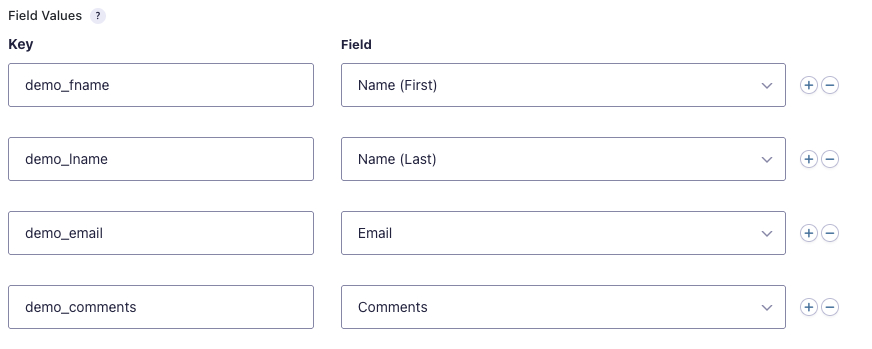
If you were using a testing tool like Postman or RapidAPI, your request body definition would look like the following:
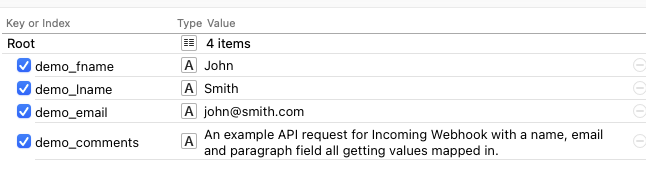
Example Response
{"result":"created"}
cURL Request
curl -X "POST" "https://example.com/wp-json/gf/v2/workflow/webhooks/1234/abc1de2fg3HIJk4L5Mn6o7P8q9RstU" \
     -H 'Content-Type: application/json; charset=utf-8' \
     -d $'{
  "demo_lname": "Smith",
  "demo_email": "[email protected]",
  "demo_comments": "An example API request for Incoming Webhook with a name, email and paragraph field all getting values mapped in.",
  "demo_fname": "John"
}'
PHP Request
<?php

//Replace these variables with values relevant to your site.
$website_url    = 'https://example.com';
$endpoint       = '/wp-json/gf/v2/workflow/webhooks/1234/abc1de2fg3HIJk4L5Mn6o7P8q9RstU';

$json_array = [
  'demo_lname' => 'Smith',
  'demo_email' => '[email protected]',
  'demo_comments' => 'An example API request for Incoming Webhook with a name, email and paragraph field all getting values mapped in.',
  'demo_fname' => 'John'
];

// get cURL resource
$ch = curl_init();

curl_setopt($ch, CURLOPT_URL, $website_url . $endpoint );
curl_setopt($ch, CURLOPT_CUSTOMREQUEST, 'POST');
curl_setopt($ch, CURLOPT_RETURNTRANSFER, 1);
curl_setopt($ch, CURLOPT_HTTPHEADER, [
  'Content-Type: application/json; charset=utf-8',
]);

$body = json_encode($json_array);

// set body
curl_setopt($ch, CURLOPT_POST, 1);
curl_setopt($ch, CURLOPT_POSTFIELDS, $body);

// send the request and save response to $response
$response = curl_exec($ch);

// stop if fails
if (!$response) {
  die('Error: "' . curl_error($ch) . '" - Code: ' . curl_errno($ch));
}

echo 'HTTP Status Code: ' . curl_getinfo($ch, CURLINFO_HTTP_CODE) . PHP_EOL;
echo 'Response Body: ' . $response . PHP_EOL;

// close curl resource to free up system resources
curl_close($ch);
Since
This endpoint was added in Gravity Flow Incoming Webhook 1.3.1
Source Code
This endpoint is located in the gravityflowincomingwebhook/includes/class-step-incoming-webhook.php file.
The post Incoming Webhook Create an Entry via Rest API V2 appeared first on Gravity Flow Documentation.
]]>The post Get Specific Step with Rest API v2 appeared first on Gravity Flow Documentation.
]]>This endpoint allows you to retrieve a specific step of the workflow for the specified entry.
Authentication
For details on the methods available to authenticate to the API, refer to this REST API v2 Authentication guide.
This endpoint requires the gravityflow_create_steps capability. This can be adjusted using gravityflow_rest_api_capability_get_forms_steps filter
Using the Endpoint
Path and Method
GET /wp-json/gravityflow/v2/entries/[entry_id]/workflow/steps/[step_id]
The path must include the specific entry ID and step ID that you wish to get the step details for.
Request Parameters
There are no required or optional properties for this endpoint.
Response
Success
A successful response will contain a JSON of the requested Workflow Step Object of the requested entry.
Failure
A failed response will provide a JSON string of the error code and message.
| Key | Type | Description |
|---|---|---|
| code | string | Error code. |
| message | string | Human-readable error message. |
| data[status] | integer | HTTP response status code |
There are several failure scenarios which could be returned depending on request data provided.
| Response Code and data[status] | Error Code | Message | Details |
|---|---|---|---|
| 401 / 403 | permission_denied | You are not allowed to view steps. | User does not have the required permissions for this endpoint. |
| 404 | entry_not_found | Invalid entry id. Entry could not be found. | Could not find an entry with the specified entry_id. |
| 404 | step_not_found | Invalid step id. Step could not be found. | Could not find a step with the specified step_id. |
| 422 | invalid_step | Step does not belong to the same form as the entry. | Step does not belong to the same form as the entry. |
Usage
PHP Request
//Update these variables
$entry_id = '1273';
$step_id  = '127';
$domain   = 'https://develop.local';
$auth_value = 'Basic replace-me-with-basic-auth-based-on-user-application-password';

// {@see https://codex.wordpress.org/HTTP_API}
$response = wp_remote_get( $domain . '/wp-json/gravityflow/v2/entries/' . $entry_id . '/workflow/steps/' . $step_id, array(
    'headers' => array(
        'Authorization' => $auth_value,
    ),
) );

if ( ! is_wp_error( $response ) ) {
    // The request went through successfully, check the response code against
    // what we're expecting
    if ( 200 == wp_remote_retrieve_response_code( $response ) ) {
        // Do something with the response
        // $body = wp_remote_retrieve_body( $response );
        // $headers = wp_remote_retrieve_headers( $response );
    } else {
        // The response code was not what we were expecting, record the message
        $error_message = wp_remote_retrieve_response_message( $response );
    }
} else {
    // There was an error making the request
    $error_message = $response->get_error_message();
}
API Response
See the Step Type specific examples in Workflow Step Object.
Since
This endpoint was added in Gravity Flow 3.0.
Source Code
This endpoint is located in the gravityflow/includes/rest-api/v2/ folder with most of the route code in the class-controller-steps.php file.
The post Get Specific Step with Rest API v2 appeared first on Gravity Flow Documentation.
]]>The post Get Workflow Status with Rest API V2 appeared first on Gravity Flow Documentation.
]]>This endpoint allows you to get the workflow status, and current step details if available, for an existing entry.
Authentication
For available methods to authenticate to the API, refer to our REST API v2 Authentication guide.
The capability gravityflow_create_steps is required to use GET requests at this endpoint.
This can be filtered using gravityflow_rest_api_capability_workflow_status
Using the Endpoint
Path and Method
GET /wp-json/gf/v2/entries/[entry_id]/workflows/status
The path must include the specific entry ID that you wish to restart the workflow for.
Request Properties
There are no required or optional properties for this endpoint.
Response
Success
A successful response will contain a JSON Workflow Status object that provides the workflow status and the new current active step (if appropriate).
Failure
A failed response will provide a JSON string of the error code and message.
| Key | Type | Description |
|---|---|---|
| code | string | Error code. |
| message | string | Human-readable error message. |
| data[status] | integer | HTTP response status code |
There are several failure scenarios which could be returned depending on request data provided.
| Response Code and data[status] | Error Code | Message | Details |
|---|---|---|---|
| 401 / 403 | permission_denied | You are not allowed view workflows statuses. | User does not have the required permissions for this endpoint. |
| 404 | entry_not_found | Invalid entry id. Entry could not be found. | Could not find and entry with the specified entry_id |
| 422 | no_workflow | This entry does not have an active workflow. | The form that the entry belongs to does not have any workflow steps defined. |
Usage
PHP Request
//Update these variables
$entry_id = '1729';
$domain   = 'https://develop.local';
$auth_value = 'Basic replace-me-with-basic-auth-based-on-user-application-password';

// {@see https://codex.wordpress.org/HTTP_API}
$response = wp_remote_post( $domain . '/wp-json/gf/v2/entries/' . $entry_id . '/workflow/status', array(
    'headers' => array(
        'Authorization' => $auth_value,
    ),
) );

if ( ! is_wp_error( $response ) ) {
    // The request went through successfully, check the response code against
    // what we're expecting
    if ( 200 == wp_remote_retrieve_response_code( $response ) ) {
        // Do something with the response
        // $body = wp_remote_retrieve_body( $response );
        // $headers = wp_remote_retrieve_headers( $response );
    } else {
        // The response code was not what we were expecting, record the message
        $error_message = wp_remote_retrieve_response_message( $response );
    }
} else {
    // There was an error making the request
    $error_message = $response->get_error_message();
}
Since
This endpoint was added in Gravity Flow 3.0.
Source Code
This endpoint is located in the gravityflow/includes/rest-api/v2/ folder with most of the route code in the class-controller-workflows.php file.
The post Get Workflow Status with Rest API V2 appeared first on Gravity Flow Documentation.
]]>The post Restart Step with Rest API v2 appeared first on Gravity Flow Documentation.
]]>This endpoint allows you to restart the current step of the workflow for the specified entry.
Authentication
See REST API v2 Authentication.
This endpoint requires the gravityflow_admin_actions capability. This can be adjusted using gravityflow_rest_api_capability_restart_step filter.
Using the Endpoint
Path and Method
POST /gf/v2/entries/[entry_id]/workflow/steps/[step_id]/restart
The path must include the specific entry ID and current step ID that you wish to be reset.
Request Parameters
There are no required or optional properties for this endpoint.
Response
Success
A successful response will contain a JSON Workflow Status object that provides the workflow status and the current active step (if appropriate).
Failure
A failed response will provide a JSON string of the error code and message.
| Key | Type | Description |
|---|---|---|
| code | string | Error code. |
| message | string | Human-readable error message. |
| data[status] | integer | HTTP response status code |
There are several failure scenarios which could be returned depending on request data provided.
| Response Code and data[status] | Error Code | Message | Details |
|---|---|---|---|
| 401 / 403 | permission_denied | You are not allowed to start steps. | User does not have the required permissions for this endpoint. |
| 404 | entry_not_found | Invalid entry id. Entry could not be found. | Could not find an entry with the specified entry_id. |
| 404 | step_not_found | Invalid step id. Step could not be found. | Could not find a step with the specified step_id. |
| 422 | invalid_step | Step does not belong to the same form as the entry. | Step does not belong to the same form as the entry. |
| 422 | invalid_step | You can only restart the current step of a workflow. | The step_id provided is not the current for the provided entry_id. |
Examples
PHP Request
//Update these variables
$entry_id = '1273';
$step_id  = '127';
$domain   = 'https://develop.local';
$auth_value = 'Basic replace-me-with-basic-auth-based-on-user-application-password';

// {@see https://codex.wordpress.org/HTTP_API}
$response = wp_remote_get( $domain . '/wp-json/gravityflow/v2/entries/' . $entry_id . '/workflow/steps/' . $step_id . '/restart', array(
    'headers' => array(
        'Authorization' => $auth_value,
    ),
) );

if ( ! is_wp_error( $response ) ) {
    // The request went through successfully, check the response code against
    // what we're expecting
    if ( 200 == wp_remote_retrieve_response_code( $response ) ) {
        // Do something with the response
        // $body = wp_remote_retrieve_body( $response );
        // $headers = wp_remote_retrieve_headers( $response );
    } else {
        // The response code was not what we were expecting, record the message
        $error_message = wp_remote_retrieve_response_message( $response );
    }
} else {
    // There was an error making the request
    $error_message = $response->get_error_message();
}
API Response
See the examples in Workflow Status object.
Since
This endpoint was added in Gravity Flow 3.0.
Source Code
This endpoint is located in the gravityflow/includes/rest-api/v2/ folder with most of the route code in the class-controller-steps.php file.
The post Restart Step with Rest API v2 appeared first on Gravity Flow Documentation.
]]>The post Get Current Step with Rest API v2 appeared first on Gravity Flow Documentation.
]]>This endpoint allows you to retrieve the current step of the workflow for the specified entry.
Authentication
For details on the methods available to authenticate to the API, refer to this REST API v2 Authentication guide.
This endpoint requires the gravityflow_create_steps capability. This can be adjusted using gravityflow_rest_api_capability_get_forms_steps filter
Using the Endpoint
Path and Method
GET /wp-json/gravityflow/v2/entries/[entry_id]/workflow/steps/current
The path must include the specific entry ID that you wish to get the current step details for.
Request Parameters
There are no required or optional properties for this endpoint.
Response
Success
A successful response will contain a JSON of the requested Workflow Step Object of the requested entry.
Failure
A failed response will provide a JSON string of the error code and message.
| Key | Type | Description |
|---|---|---|
| code | string | Error code. |
| message | string | Human-readable error message. |
| data[status] | integer | HTTP response status code |
There are several failure scenarios which could be returned depending on request data provided.
| Response Code | Error Code | Message | data[status] | Details |
|---|---|---|---|---|
| 401 / 403 | permission_denied | You are not allowed to view steps. | 401 / 403 | User does not have the required permissions for this endpoint. |
| 404 | entry_not_found | Invalid entry id. Entry could not be found. | 404 | Could not find an entry with the specified entry_id. |
| 404 | step_not_found | Invalid step id. Step could not be found. | 404 | Could not find a step with the specified step_id. |
| 422 | invalid_step | Step does not belong to the same form as the entry. | 422 | Step does not belong to the same form as the entry. |
Usage
PHP Request
//Update these variables
$entry_id = '1273';
$domain   = 'https://develop.local';
$auth_value = 'Basic replace-me-with-basic-auth-based-on-user-application-password';

// {@see https://codex.wordpress.org/HTTP_API}
$response = wp_remote_get( $domain . '/wp-json/gravityflow/v2/entries/' . $entry_id . '/workflow/steps/current', array(
    'headers' => array(
        'Authorization' => $auth_value,
    ),
) );

if ( ! is_wp_error( $response ) ) {
    // The request went through successfully, check the response code against
    // what we're expecting
    if ( 200 == wp_remote_retrieve_response_code( $response ) ) {
        // Do something with the response
        // $body = wp_remote_retrieve_body( $response );
        // $headers = wp_remote_retrieve_headers( $response );
    } else {
        // The response code was not what we were expecting, record the message
        $error_message = wp_remote_retrieve_response_message( $response );
    }
} else {
    // There was an error making the request
    $error_message = $response->get_error_message();
}
API Response
See the Step Type specific examples in Workflow Step Object.
Since
This endpoint was added in Gravity Flow 3.0.
Source Code
This endpoint is located in the gravityflow/includes/rest-api/v2/ folder with most of the route code in the class-controller-steps.php file.
The post Get Current Step with Rest API v2 appeared first on Gravity Flow Documentation.
]]>