# SPX Graphics
**Manage and control HTML graphics in live production.**
SPX Graphics is a powerful set of tool for managing and controlling HTML graphics in live production environments. It runs locally on your computer or in the cloud and provides a browser-based interface for managing graphics templates, rundowns, and playout.
It works seamlessly with popular video production software including OBS, vMix, LiveU Studio, ToolsOnAir, CasparCG, Wirecast, XSplit, MimoLive, and many others.
## Key Features
- 🎨 **HTML Template Support** - Use any HTML/CSS/JavaScript templates
- 📋 **Rundown Management** - Organize graphics in projects and rundowns
- 🎬 **Live Playout** - Control graphics in real-time during production
- 🌐 **Web-Based UI** - Access from any device with a browser
- 🔌 **Plugin System** - Extend functionality with custom plugins
- 🔄 **Multiple Renderers** - Support for various output formats and resolutions
# Quick Links
- 🌐 [Official Website](https://spx.graphics/controller)
- 🎬 [YouTube Channel](https://www.youtube.com/@spxgraphics)
- 📘 [[Welcome to SPX Docs|Knowledge Base]]
- 💬 [Discord Server](https://bit.ly/joinspx)
- ☁️ [SPX Cloud](https://spxcloud.app)
- 🛒 [HTML Marketplace](https://html.graphics)
# Live Demo
🟢 Try SPX here: [spxcloud.app/demo](https://demo.spxcloud.app/gc/00-Getting-Started/1-Intro-To-Graphics)
> **Note:** The demo instance is shared, so expect potential conflicts if multiple users are active. Changes reset automatically every 15 minutes.
# How It Works
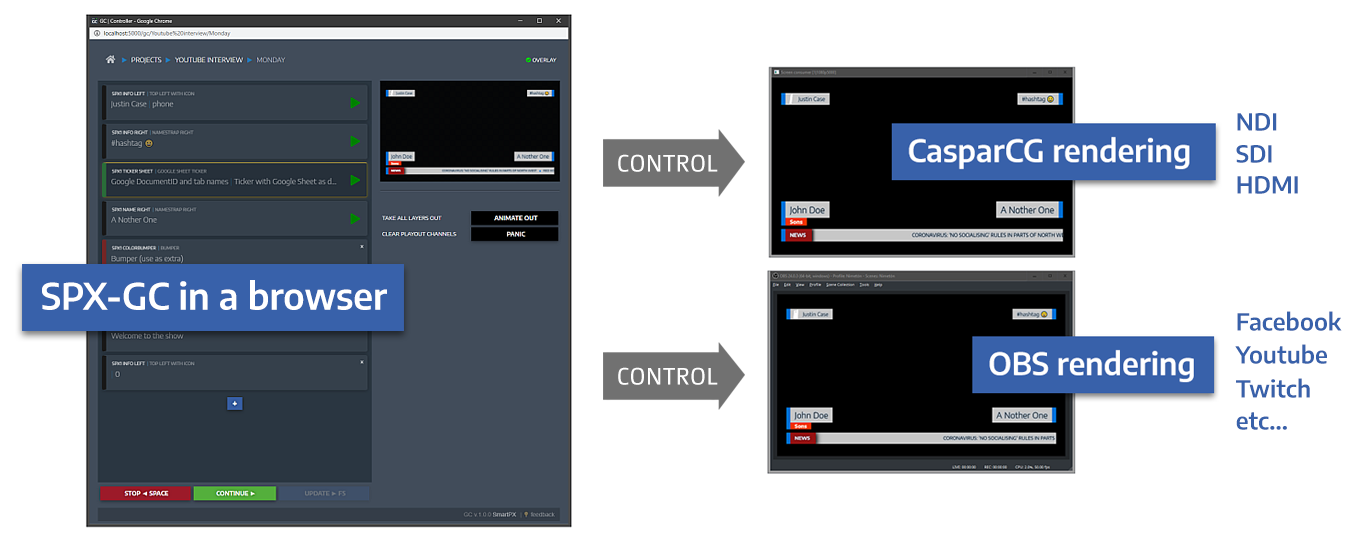
SPX uses a Node.js server that can run on Windows, Mac, or Linux. Graphic templates are typical HTML templates used in any HTML-compatible renderers (such as with CasparCG). Templates are integrated with SPX by adding a template definition (JavaScript snippet) to them.
The live output can be used in various software using the "browser source" approach, where you point your production software to SPX's renderer URL.
# Documentation Structure
This documentation is organized into the following sections:
- **[[Quick Start|Getting Started]]** - Learn the basics and get up and running
- **[[Guides/Getting Started/Installation|Installation]]** - Installation options and setup instructions
- **[[Configurations|Configuration]]** - Configure SPX for your environment
- **[[Documentation/Graphics Controller/Overview|Projects & Rundowns]]** - Organize and manage your content
- **[[Documentation/Graphic Templates/Overview|Templates]]** - Create and configure HTML templates
- **[[Live Streaming Software|Integration]]** - Integrate with OBS, vMix, and other software
- **[[Overview of SPX API|API Reference]]** - Control SPX programmatically
- **[[Plugins & Extensions|Plugins & Extensions]]** - Extend SPX functionality
- **[[Troubleshooting|Advanced Topics]]** - Advanced configuration and troubleshooting
# Version Information
For the latest released version (1.3.3), please visit [spx.graphics/controller/pricing](https://spx.graphics/controller/pricing).
> **Note:** The source code in the repository is always in a **WORK IN PROGRESS** state. For production work, it is recommended to use published versions which are more carefully tested.
# History
Originally developed for [YLE](https://www.yle.fi), a public broadcaster in Finland. The first version was released in September 2020.
# License
This project is licensed under the terms of the MIT license. See [LICENSE.txt](https://github.com/TuomoKu/SPX-GC/blob/master/LICENSE.txt) for details.
---
**Ready to get started?** Check out the [[Quick Start|Getting Started]]!