 Play Play
 Murph
Murph Yer Stack
 Block Party Weekend
 Apple Music Profile
 YouTube Channel
AppleScript Applet for iTunes
Pages CD Label v2.0
Obligatory warning: This script has been designated as an obsoleted "Retro Script". There is no guarantee that it will function as described with modern versions of iTunes (or the newer Music or TV apps) and/or macOS. If used in its current form it may not work at all without modification. At worst, it may corrupt or delete data.
Assists in creating printable CD/DVD Labels in Pages using exported track data from the selected iTunes playlist. Requires Pages.app, included Pages Template, and Avery 5692/8692 labels. Read Me explains more.
Currently not compatible with modern versions of Pages.app.
Action shot:
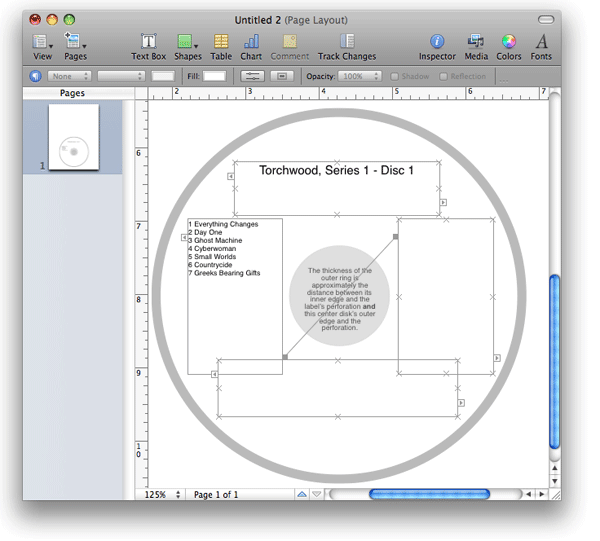
"Pages CD Label of Selected Playlist" in Pages 3.0.
Latest version:
Further:
|
download ⬇
Current v2.0 |
Info:
|

Popular Now
downloaded 21m 7s ago
Play Previous Play Next Playlist v1.0
For Music Select to play the next or previous playlist

downloaded 21m 42s ago
For Music Applet plays tracks with a user-set duration of silence between each track

downloaded 37m 3s ago
Save Album Art to Album Folder v7.5
For Music Export artwork of selected tracks to parent or specified folder
downloaded 41m 56s ago
For Music Exports and then re-imports selected tracks' artwork
10 Most Recently Added
- UPDATED March 1, 2026:
A Space Between v3.5
[ For Music ] Applet plays tracks with a user-set duration of silence between each track - UPDATED March 1, 2026:
Playlist XML Viewer v2.0
[ For Music ] View/play contents of exported playlist XML files - UPDATED December 14, 2025:
Side Splitter v3.0
[ For Music ] Split an album of tracks into playlists by LP side and auto-play them - UPDATED December 11, 2025:
Track CPR v5.0
[ For Music ] Re-associate batch of dead tracks with files dropped from Finder - UPDATED December 9, 2025:
No Lyrics to Playlist v3.2
[ For Music ] Gather tracks that do not have lyrics text - UPDATED December 9, 2025:
Find Empty Media Folders v3.4
[ For Music/TV ] Finds any empty or obsolete folders in the Media folder - UPDATED December 8, 2025:
Albumizer v1.1
[ For Music ] Incrementally re-number tracks and add album tags to a selection - UPDATED December 8, 2025:
Playlist XML Librarian v1.2
[ For Music ] Manage a folder of exported Playlist XML files - UPDATED December 5, 2025:
Albums Amiss v1.4
[ For Music ] Finds album tracks that are a few short or over an Album - NEW December 5, 2025:
Tracks by Name Length to CSV v1.0
[ For Music ] Create a CSV file listing tracks sorted by title length - the 10 most recent in detail...
- the 30 most recent as list...
- Doug's Check For All Updates Applet
 30 Most Recent RSS Feed
