Asana Salesforce integration eliminates that disconnect. It syncs opportunities, cases, accounts, and custom objects with Asana tasks and projects, so updates flow automatically across both platforms.
The native Asana for Salesforce AppExchange connector was deprecated in February 2026. That means organizations now need to choose between Asana Rules (available on Advanced, Enterprise, and Enterprise+ plans), general automation tools like Zapier, or dedicated integration platforms like Exalate that support bidirectional sync, custom field mapping, and cross-company workflows.
This guide walks through all the available options, compares them honestly, covers real implementation scenarios, and helps you pick the right approach for your team’s complexity level.
Key Takeaways
- Dedicated integration platforms like Exalate provide Groovy-based scripting, conditional sync triggers, and independent configuration on each side of the connection for complex enterprise scenarios.
- Common use cases range from post-sale onboarding automation to multi-department pipeline visibility, customer escalation routing, and cross-company partner collaboration.
- Organizations running Asana alongside Salesforce and other tools benefit from a platform that supports multi-system integration networks rather than point-to-point connectors.
- AI-assisted configuration reduces setup time for teams without scripting experience, while full script control remains available for advanced data transformation requirements.

What Is Asana Salesforce Integration?
Asana Salesforce integration connects your CRM with your work management platform, so data moves automatically between them. Instead of sales reps manually notifying project teams about closed deals or project managers updating Salesforce records by hand, the integration handles it.
Here is what it looks like in practice. A sales rep closes an opportunity in Salesforce. The integration creates a project in Asana with templated tasks, assigns the right team members, and maps key deal data (customer name, contract value, close date, product type) to custom fields in Asana.
As the project progresses, status updates in Asana sync back to Salesforce so the account manager can track delivery without switching tools.
The same concept applies in reverse. A customer submits a support case in Salesforce. The integration creates a task in Asana for the relevant team. When that task is completed, the Salesforce case updates automatically.
What Is Asana?
Asana is a work management platform used by project managers, marketing teams, operations teams, and cross-functional groups to organize tasks, manage deadlines, and track project progress. It supports list views, board views, timelines, and custom workflows.
Asana also includes automation through its Rules engine, portfolio-level reporting, and integrations with tools like Slack, Google Workspace, and Microsoft Teams.
What Is Salesforce?
Salesforce is a cloud-based CRM platform for managing customer relationships, tracking sales pipelines, handling support cases, running marketing campaigns, and more. Its product suite includes Sales Cloud, Service Cloud, Marketing Cloud, and the newer Agentforce AI automation capabilities.
Salesforce supports extensive customization through its AppExchange marketplace, Flow Builder for process automation, and APIs for third-party integration. It is particularly common in mid-market and enterprise environments where CRM data needs to connect to multiple downstream systems.
Why Connect Asana and Salesforce?
Sales and project teams depend on each other but rarely work in the same tool. The sales team lives in Salesforce because that is where customer records and revenue metrics live. The delivery team stays in Asana because that is where project plans, task assignments, and timelines live.
Without integration, the space between these tools creates several problems.
- Data silos form quickly. When a deal closes, the delivery team needs customer details, contract terms, timeline expectations, and technical requirements. Without automation, someone has to manually transfer that information from Salesforce to Asana. That process introduces delays and errors.
- Status updates lag behind real-time updates. A project manager updates task progress in Asana, but the account executive in Salesforce has no idea. They either ask for manual updates (which adds overhead) or guess at progress (which damages customer relationships).
- Manual work scales poorly. If your team handles 5 deals per month, manual handoffs might be manageable. At 500 per month, they become a bottleneck that slows time-to-value for every customer.
- Cross-functional visibility disappears. Executives who need to understand both sales performance and delivery health have to pull data from two separate systems and reconcile it manually.
Connecting both platforms automates the data flow, keeps records consistent, and gives every stakeholder the context they need without switching tools.
Asana to Salesforce Integration Options
The Asana Salesforce integration landscape shifted significantly in early 2026. Here is what is currently available.
Asana’s Native AppExchange Connector (Deprecated)
Asana’s official Salesforce integration, available on the Salesforce AppExchange, was deprecated on February 27, 2026. No new installations are supported. Organizations that had the connector installed before that date may still have it running, but Asana is not maintaining or updating it.
This connector allowed users to add an Asana Lightning component to Salesforce object pages, view and manage Asana tasks from within Salesforce, and link Salesforce records to Asana tasks and projects.
However, it had notable limitations even before deprecation. Two users viewing the same Salesforce record could see different Asana tasks due to Asana’s privacy model. Notifications only came through Asana, not Salesforce. The component displayed Asana tasks within Salesforce but did not perform true field-level synchronization between the two systems.
Asana Rules with Salesforce Triggers
Asana still supports Salesforce integration through its Rules engine. This is available on Advanced, Enterprise, and Enterprise+ plans.
It works like this: you create a rule in Asana that uses a Salesforce trigger (such as an opportunity stage changing) and pair it with an Asana action (such as creating a task, adding a comment, or adding a collaborator).
This approach is useful for straightforward automation. For example, when a Salesforce opportunity reaches “Closed Won,” a rule can create an Asana task for the onboarding team. Or when a linked opportunity is updated, Asana can add a comment with a snapshot of the deal details.
The limitations here are important to understand. Rules are one-directional from Salesforce to Asana. There is no built-in mechanism for syncing Asana updates back to Salesforce through Rules alone. Complex field mapping, conditional logic, and bidirectional synchronization require external tools.
iPaaS and Automation Platforms (Zapier, Make, Workato, Tray.io)
Platforms like Zapier and Make offer pre-built connectors for both Asana and Salesforce. They work on a trigger-action model: when something happens in one tool, an action fires in the other.
Zapier, for example, supports Zaps like “When a new Salesforce opportunity is created, create an Asana task” or “When an Asana task is completed, update a Salesforce field.” Make (formerly Integromat) provides similar functionality with a visual workflow builder.
These tools are effective for simple, one-directional automations. They become less reliable for bidirectional workflows where changes need to flow both ways simultaneously.
Building two separate automations (one from Salesforce to Asana and one from Asana to Salesforce) can create sync loops, data conflicts, and error cascading. Some users in the Asana community forums have reported persistent bugs with Zapier’s Salesforce connector specifically.
Workato and Tray.io handle more complex scenarios but come with higher costs and steeper learning curves. They are better suited for organizations that need an enterprise iPaaS across many systems, not just Asana and Salesforce.
Dedicated Integration Platforms (Exalate)
Exalate is a purpose-built integration platform that supports bidirectional synchronization between Asana and Salesforce (along with Jira, ServiceNow, Zendesk, Azure DevOps, GitHub, Freshservice, Freshdesk, and other platforms).
What sets this category apart from iPaaS tools is the architecture. Each side of the connection is configured independently. The Salesforce admin defines what data leaves Salesforce and how incoming Asana data maps to Salesforce objects.
The Asana admin does the same on their side. Neither side depends on the other’s configuration, which is particularly useful for cross-company integrations where two organizations manage their own systems.
Aida, Exalate’s AI scripting assistant, also makes it possible to generate sync rules in order to configure connections. All you need to do is write a prompt describing what you want to sync and the entities, then Aida will generate the code for you in seconds.
Comparing Integration Approaches Between Asana and Salesforce
Here is how the available options stack up across the criteria that matter most for Asana Salesforce integration.
- Sync direction. Asana Rules supports one-way (Salesforce to Asana). Zapier and Make support one-way natively, with two-way requiring dual automations that risk conflicts. Exalate supports true bidirectional sync with built-in conflict handling.
- Field mapping depth. Asana Rules maps Salesforce events to Asana actions but does not perform granular field-to-field mapping. Zapier maps basic fields. Exalate maps any Salesforce object field (including custom objects and fields) to any Asana task or project field, with transformation logic in between.
- Custom object support. Asana Rules works with standard Salesforce objects (Opportunities, Accounts, Cases). Zapier supports some custom objects depending on the plan. Exalate supports any Salesforce object available through the API, including custom ones.
- Cross-company use. Asana Rules and Zapier require shared credentials or admin access to both tools. Exalate’s architecture allows each organization to control its own side without sharing credentials or configuration access.
- Multi-platform support. If you need to connect Asana and Salesforce alongside Jira, ServiceNow, or other platforms, iPaaS tools cover broad app catalogs but with shallow integrations. Exalate supports deep, platform-aware integrations across its supported connectors with independent configuration per connection.
- Test run before going live. Exalate includes a Test Run feature that lets you preview exactly how your sync rules will apply to selected records before publishing. You see the incoming and outgoing data and catch errors before they touch production data.
- Reliability and error recovery. Asana Rules execute when triggered and do not retry on failure. If the action fails, you may not know until someone notices the missing task. Exalate uses a transactional synchronization engine that queues failed operations and retries them automatically once the issue clears. Changes are applied in the correct chronological order after downtime, so no data is lost, and no manual re-sync is needed.
- Versioning and rollback. Asana Rules and Zapier do not version your automation configurations. If you make a change that breaks something, you have to manually undo it or rebuild from memory. Exalate versions for every configuration change. Each published sync rule set is stored as a version (Active, Draft, or Archived), so you can roll back to a previous working version and maintain an audit trail.
Use Cases for Asana Salesforce Integration
Post-Sale Customer Onboarding
Case: A SaaS company closes deals in Salesforce. After the deal closes, the customer success team in Asana needs to kick off an onboarding project with specific milestones, task assignments, and deadlines derived from the deal data.
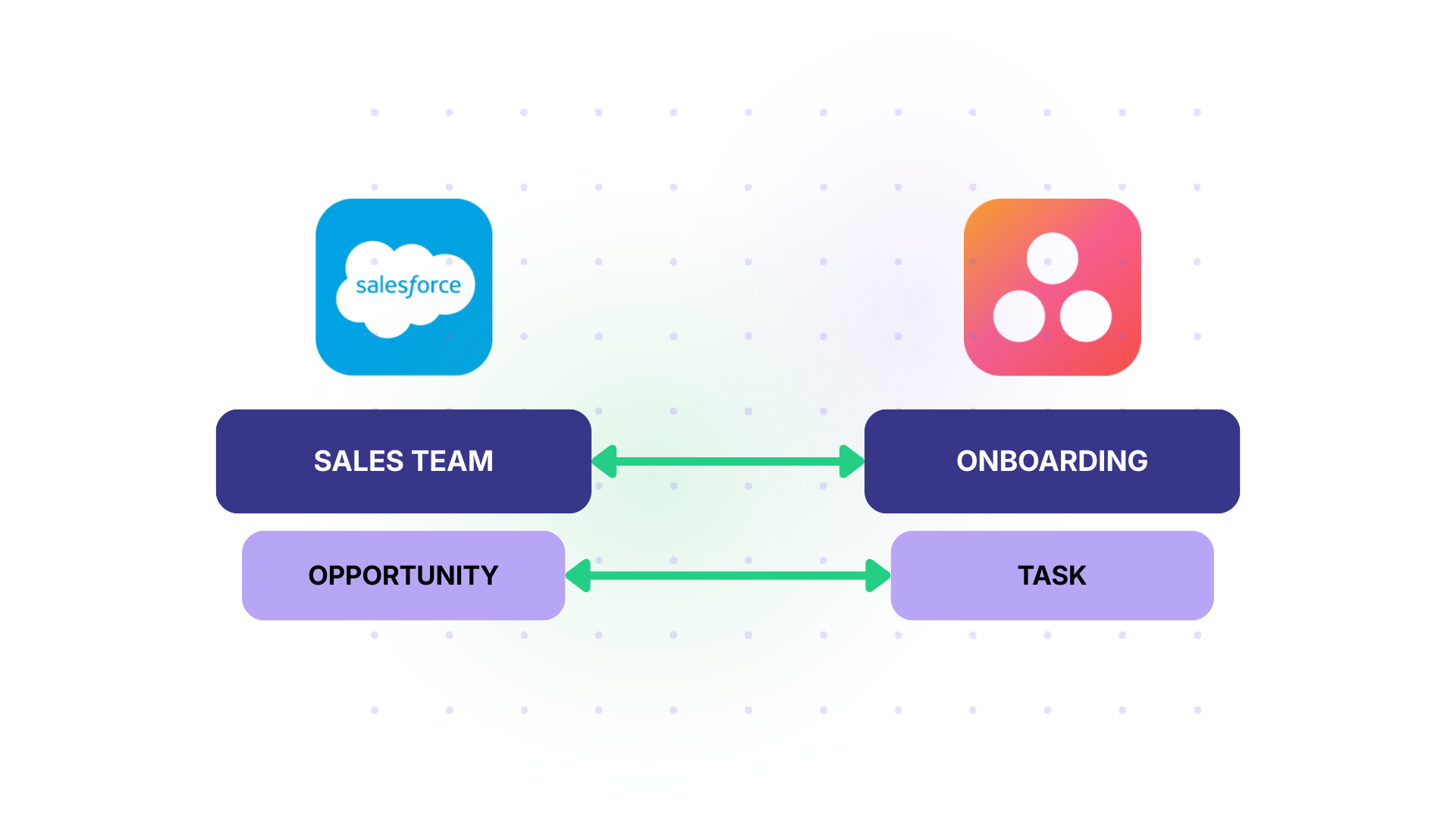
Solution: Configure the integration to trigger when a Salesforce opportunity stage changes to “Closed Won.” Automatically create an Asana project using a predefined template. Map Salesforce fields (customer name, contract value, product tier, expected go-live date) to Asana custom fields. Assign the project to the customer success manager linked to that account.
Real-World Application: A mid-market SaaS company handling 40 new customer onboardings per month previously spent 3 to 4 hours per onboarding just setting up project plans manually. After automating the Salesforce-to-Asana handoff, project creation became instant, and the CS team reclaimed roughly 120 hours per month for actual customer-facing work.
Sales Pipeline Visibility for Project Teams
Case: A professional services firm sells consulting engagements through Salesforce. Delivery leads in Asana need to see incoming opportunities early so they can plan resource allocation before deals close.
Solution: Sync Salesforce opportunities at the “Proposal” or “Negotiation” stage to Asana as draft project placeholders. Include estimated hours, service type, expected start date, and assigned account executive. As the opportunity progresses, update the Asana task status automatically.
Real-World Application: A consulting firm with 200 active engagements uses this approach to give delivery managers a 2- to 4-week planning window before new work hits. They reduced last-minute resource scrambles by roughly 60% because delivery leads could see what was coming and staff accordingly.
Customer Support Escalation to Delivery Teams
Case: Support agents handle incoming cases in Salesforce. Some cases require work from the product, engineering, or operations team that tracks their tasks in Asana.
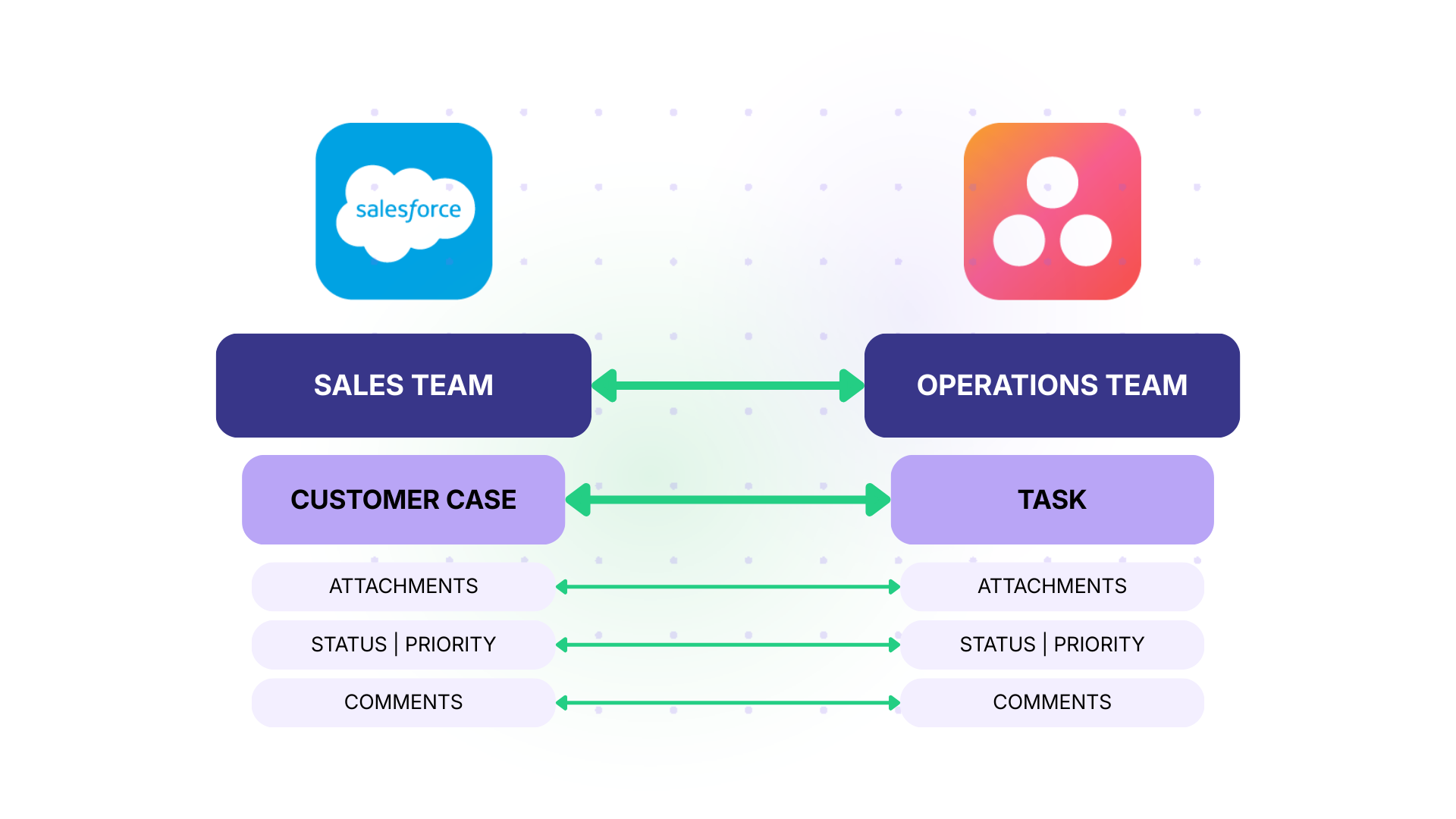
Solution: Set up conditional sync triggers so that only cases meeting specific criteria (such as case type = “Bug,” priority = “High,” or product area = “Enterprise”) create tasks in Asana. Map case subject, description, attachments, priority, and account name to Asana task fields. When the Asana task is completed, update the Salesforce case status.
Real-World Application: A fintech company’s support team logs roughly 200 cases per week. About 30% require product team involvement. Before integration, the support lead manually triaged and forwarded cases via email, resulting in a 48-hour average delay before the product team even saw the issue. After implementing conditional sync, escalated cases reach the Asana product board within minutes, and resolution time dropped by 35%.
Marketing Campaign Execution
Case: The marketing team manages campaigns in Asana or tracks campaign-related opportunities. Creative and content execution happens in Salesforce. Both teams need visibility into each other’s progress.
Solution: When a new campaign launches in Salesforce, automatically create an Asana project with tasks for content creation, design, distribution, and analytics. Sync campaign performance data from Salesforce back to Asana so the project team can see whether the campaign is hitting its targets.
Real-World Application: A B2B company runs 8 to 10 product launch campaigns per quarter. Each campaign involves sales, marketing, product marketing, and design. By connecting Salesforce campaign records to Asana execution projects, the team eliminated the weekly cross-functional sync meetings they used to hold just to share status updates. Each team now checks its own platform and gets the full picture.
Cross-Company Partner Collaboration
Case: An organization works with external agencies, contractors, or partners who manage their work in Asana while the internal team tracks client-related data in Salesforce. Both sides need to exchange project updates without exposing their full system to each other.

Solution: Use Exalate’s architecture, where each organization configures its own sync rules independently. The internal Salesforce admin controls what data leaves Salesforce. The external partner’s Asana admin controls how that data maps to their projects. Neither side needs credentials for the other system.
Real-World Application: A retail brand outsources product launch execution to an agency. The brand’s sales team tracks retail partnerships and launch timelines in Salesforce. The agency manages creative production and event logistics in Asana. Using Exalate, launch milestones and deadlines sync bidirectionally, giving both sides real-time visibility without sharing logins or exposing sensitive CRM data.
What Data Can You Sync Between Asana and Salesforce?
The scope of what syncs depends on which integration method you use. Asana Rules and basic automation tools cover a limited set of actions. Dedicated platforms like Exalate can handle virtually any field available through the Asana and Salesforce REST APIs.
Here is a breakdown by category.
- Core fields. Opportunity Name or Case Subject maps to Asana task name. Description maps to description. Close Date or Due Date maps to the Asana due date. Owner or Assigned User maps to the Asana assignee. These are supported by most integration methods.
- Statuses and stages. Salesforce uses opportunity stages (Prospecting, Qualification, Proposal, Closed Won, Closed Lost) and case statuses (New, Working, Escalated, Closed). Asana uses task statuses like “Not Started,” “On Track,” “At Risk,” and “Complete.” With Exalate, you define the explicit mapping in your sync scripts. For example, Salesforce “Closed Won” becomes Asana “Ready to Start” for the onboarding team, while Salesforce “Escalated” becomes Asana “At Risk.”
- Priorities. Salesforce Cases have a built-in priority field (Low, Medium, High, Critical). Asana supports priority as a custom field, typically with Low, Medium, and High values. Exalate handles the conversion, including mapping Salesforce’s “Critical” to a combined Asana priority and tag so it stands out visually.
- Custom fields. Both platforms support custom fields extensively. Salesforce custom fields can be text, picklists, multi-select picklists, currency, date, lookup, formula, and many other types. Asana custom fields include dropdown, number, text, date, and people types. Exalate’s scripting engine translates between these formats.
- Comments. Comments added to Asana tasks can sync to Salesforce case or opportunity Chatter feeds, and vice versa. This keeps both sales and project teams informed about updates without switching tools.
- Attachments. Files attached to Salesforce records (proposals, contracts, screenshots) can sync to Asana tasks, and Asana task attachments can flow back to Salesforce.
- Account and contact data. Salesforce Account Name, Contact Name, Contact Email, and other relationship data can be mapped to Asana custom fields. This gives project teams customer context directly on their tasks without logging into the CRM.
- Additional fields via REST API. For any field not covered by default mappings, Exalate’s Groovy scripting engine can access any data point available through the Salesforce and Asana REST APIs, including formula fields, roll-up summaries, and cross-object references.
How to Set Up Asana Salesforce Integration With Exalate
This walkthrough covers the full process from account creation to live synchronization between Asana and Salesforce.
Step 1: Create Your Exalate Account and Workspace
Visit the Exalate integrations page or start directly from the Exalate app. Create a new account by entering your email and verifying it, or sign up using Google. If you already have an account, log in.
Once you are in, create a workspace. Workspaces help you organize and manage your integrations and connections in a single place.

You can find all your existing workspaces under the “Workspaces” tab. If this is your first time, click the “+ Create Workspace” button, enter a name and description, and click “Create workspace.”
Step 2: Create a Connection Between Asana and Salesforce
From your workspace, start creating your first connection. You can view all existing connections under the “Connections” tab.

Click on “+ Add connections” then “Create new connection.” Enter the name for your first system. Name either Asana or Salesforce as your System A. It does not matter which one goes first. Enter the URL of your system.
Once you enter the URL, a check happens behind the scenes. If your system is already part of the existing workspace, authentication happens automatically. If the system is part of a different workspace, it will be newly registered for the current one.
You also need to authenticate with both your Salesforce and Asana accounts to proceed.
Complete the same setup for the second system. Give a name and description for your connection (for example, “Oppos to Projects”). Click “Next,” review the details, and click “Create connection.”

When the process is complete, select “Continue to configuration” and choose the Salesforce object or Asana project you want to use for synchronization. Then click “Build & continue.”
You now have two options: “Quick sync” and “Edit & Test.”
Step 3: Quick Sync (Optional Verification)
Using Quick Sync, you can sync one item between Asana and Salesforce to verify that your connection works properly. This step is optional but recommended.

Under the “Item sync monitor,” enter a Salesforce record ID (like an Opportunity or Case number) or an Asana task ID. Click “Sync Now” to sync the first item. To link two existing items, click “Link with existing.”
While the items sync, you will get status updates. Once the sync is complete, you can view both synced items by opening them in a new window. You can also compare how the synced items look and how changes will be applied.
Step 4: Edit and Configure Sync Rules
To start making changes, click “Create a new version” or select “Open latest draft.” This ensures you do not modify the existing configuration accidentally. Changes in the draft are saved automatically.

Click the “Edit” button to open the editor and edit the sync rules. Sync rules are based on Groovy scripts. With these scripts, you can add custom data logic and mapping, along with conditional flows, allowing you to adapt for any complex or advanced use case.
The direction of the sync can be changed by clicking the two arrows next to the connection name. The scripts are divided into incoming and outgoing scripts.
If the sync direction is from Salesforce to Asana, then the outgoing script holds the values passed from Salesforce to Asana, and the incoming script defines how the values coming from Salesforce are mapped in Asana. These scripts reverse if the direction changes.
The Replica works like a message payload and holds the actual data passed between the synced entities. It exists in JSON format. To sync new values, you can enter the sync script yourself. If you want to stop something from syncing (for instance, no attachments from Salesforce to Asana), remove that script line from the outgoing Salesforce script.

For example, on the Salesforce outgoing side, you specify which object fields leave Salesforce: Opportunity Name, Close Date, Account Name, Amount, Priority, and any custom fields. On the Asana incoming side, you define how those values map to Asana entities: Opportunity Name becomes the task name, Close Date becomes the due date, Account Name becomes a custom field, and Amount populates a number field.
Step 5: Use Aida for AI-Assisted Configuration
If you want to save time on scripting, use Exalate’s AI-assisted configuration feature called Aida to generate sync scripts. Aida exists in both the incoming and outgoing script sections.
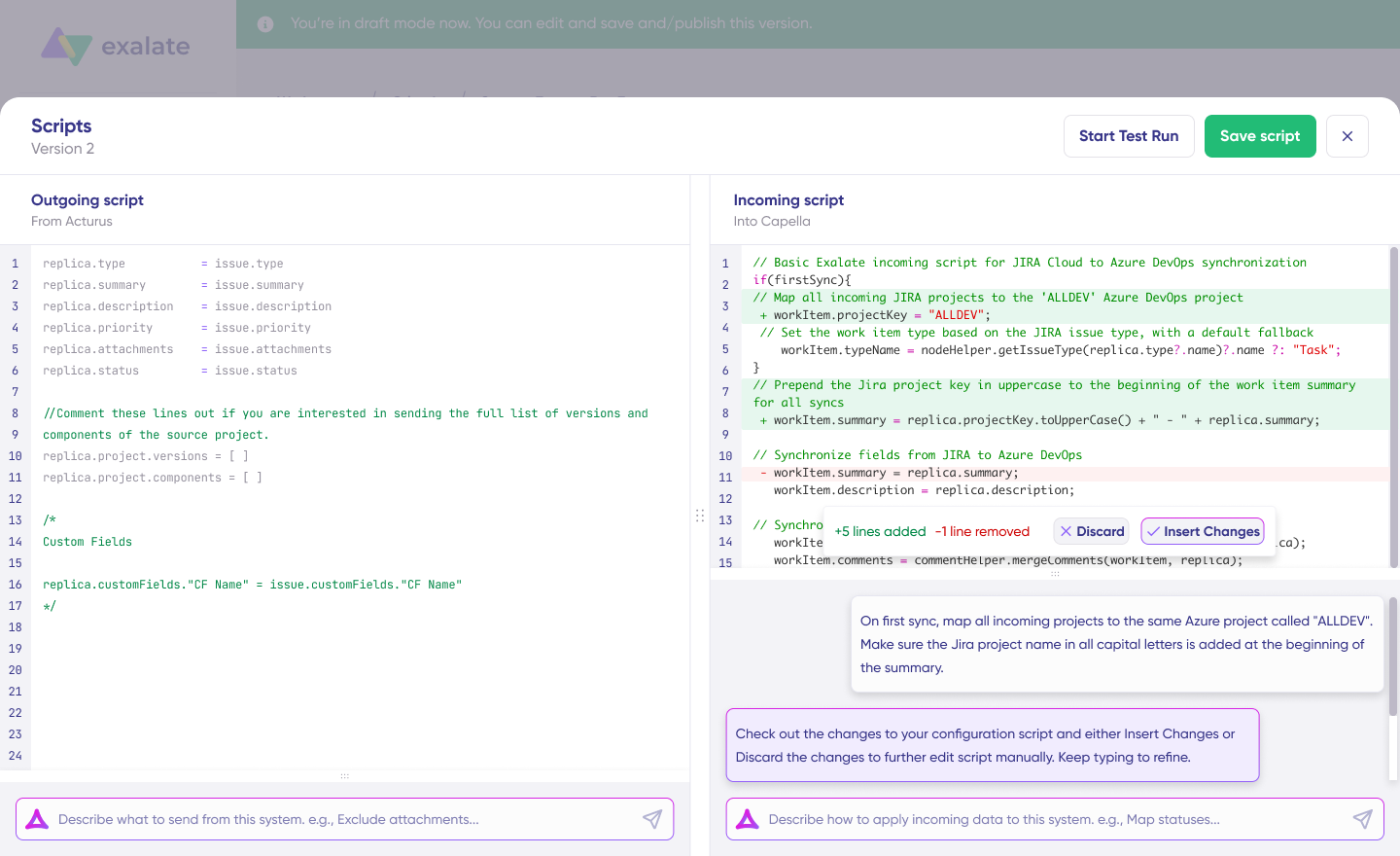
Aida helps you in two ways:
For outgoing scripts, describe what data should leave your system. For example, “Only sync closed-won opportunities with the account name, deal value, and close date.”
For incoming scripts, describe how incoming data should be applied. For example, “Map Salesforce opportunity stages to Asana task statuses” or “Set a default assignee if the user cannot be found in Asana.”
Based on Exalate’s scripting API and your existing scripts, Aida generates working Groovy scripts with proper field mappings.
Once Aida finishes drafting, review the changes suggested. Green highlights new lines that will be added. Red highlights lines that would be removed. You can choose to “Insert” or “Discard” Aida’s suggestions.
The outgoing and incoming scripts work independently, and so does Aida, so maintain separate context and direction for each prompt.
Note: Aida is helpful, but just like with any AI assistant, review the generated code before applying it.
Step 6: Test Run Before Going Live
Once your sync scripts are ready, you can save them or proceed to dry-run them using the “Start Test Run” option.

Select the items you want to apply the sync to. You can select multiple items. Click “Start Test Run.” You can now see all the incoming and outgoing replicas for each item you selected in the respective tabs.
Confirm how the sync configuration will be applied to your items, preview the replica, and verify that the field mappings look correct. If required, go back, adjust the scripts, and test again.
Deploy only when you are confident it works. This safety net prevents errors from affecting live data.

Once everything matches your needs, click “Publish Version” to apply the updated configuration to your live synchronization. All versions for a connection are available in the “Version” dropdown. Versions can be “Active,” in “Draft” (editable), or “Archived.”
Step 7: Add Triggers to Automate Sync
To start your sync automatically, add triggers. Triggers are conditions or filters you apply to specific items.
For Salesforce, you can use SOQL (Salesforce Object Query Language) to specify conditions. For example, sync all Opportunities where StageName = 'Closed Won', sync all Cases where Priority = 'High' AND Type = 'Bug', or sync all custom objects where Status != 'Archived'.

For Asana, set conditions for which tasks or projects should sync back to Salesforce. Click the “+Add trigger” button to start creating triggers. Save your changes by publishing them.
Step 8: Deploy and Monitor
Your first synchronization will start automatically based on the sync rules and triggers you have set.
A significant part of synchronization can involve troubleshooting errors, especially in script-based tools like Exalate that allow flexibility for complex workflows.
Step 9: Troubleshoot With Aida
Aida also helps you troubleshoot errors faster. It offers clear and context-aware suggestions to resolve errors right where you see them.
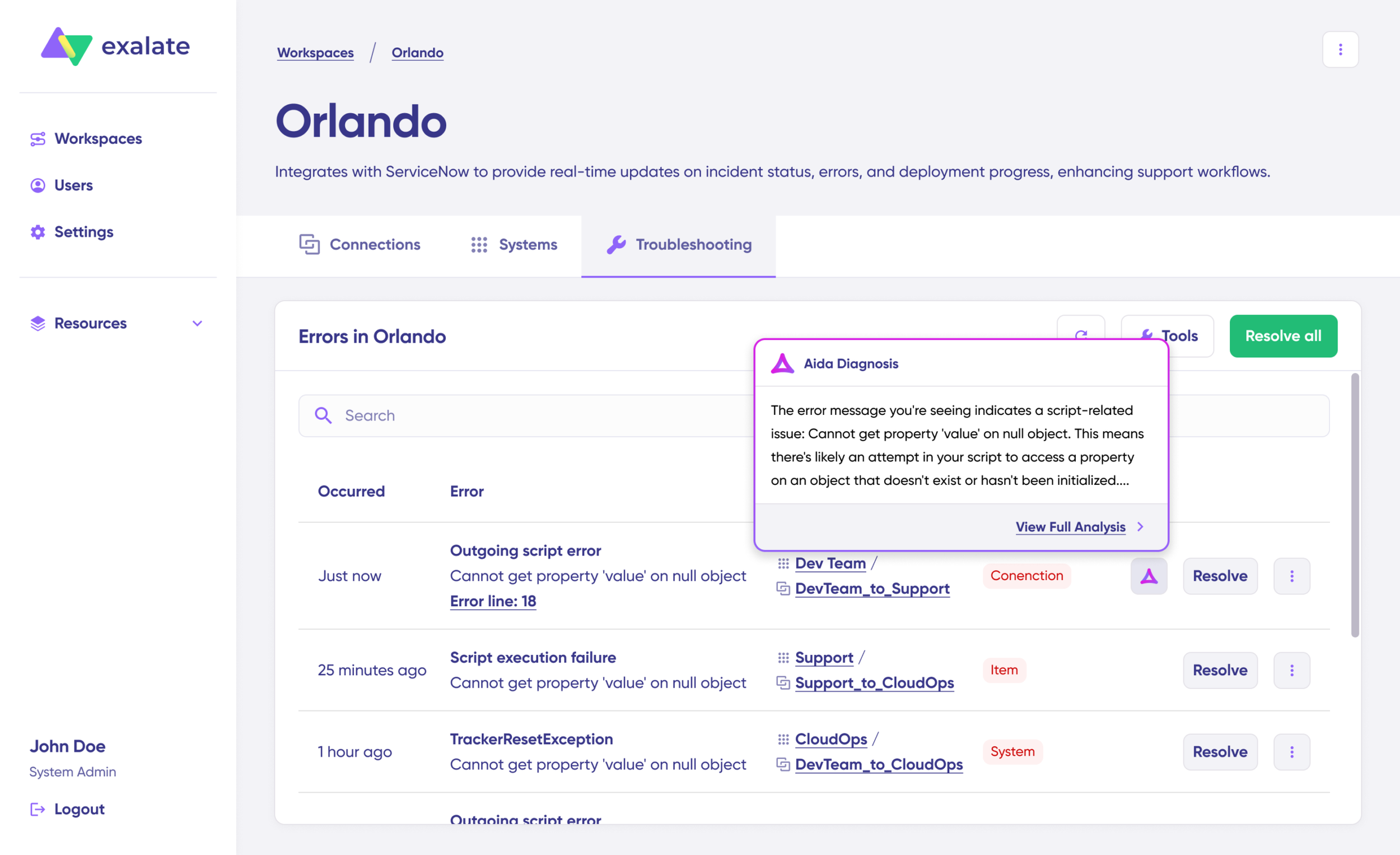
If there is an error, go to the “Troubleshooting” tab of your workspace. Hover over the error you want to diagnose and click the Aida icon that appears next to it.
You will see the AI-generated suggestion in a modal window, including a short explanation of the error and a proposed solution.
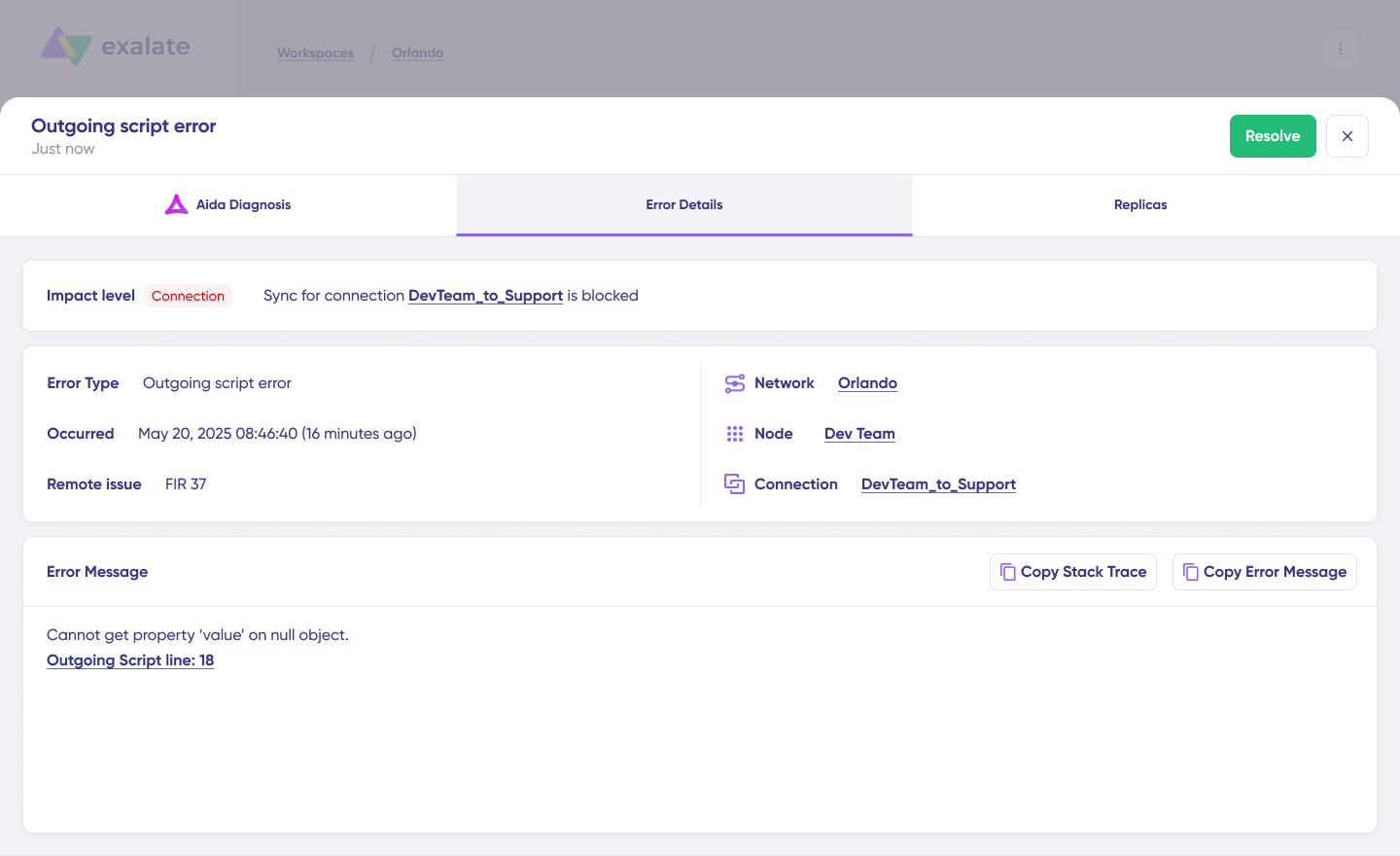
You can also “View Full Analysis” for more context, “Error details” to copy the stack trace, and “Replicas” to view the JSON format if needed. Choose to “Resolve” and retry errors from there.
Best Practices for Asana Salesforce Integration
- Start with one high-impact workflow. The most common mistake is trying to sync everything at once. Pick the single workflow that causes the most friction between sales and project teams (usually post-sale onboarding or support escalation) and get that running smoothly before expanding. A working integration that handles one use case well builds internal trust faster than a half-configured integration that covers five.
- Define data ownership before configuring anything. Decide upfront which platform is the source of truth for each data point. Customer name and deal value? Salesforce owns those. Project status and task completion? Asana owns those. When both platforms can write to the same field without clear ownership rules, you end up with sync conflicts and overwritten data.
- Map your statuses on paper first. Salesforce opportunity stages, case statuses, and Asana task statuses will not match one-to-one. Before touching any configuration, create a mapping table on paper or in a spreadsheet. For example: Salesforce “Closed Won” = Asana “Ready to Start,” Salesforce “In Progress” = Asana “On Track,” Salesforce “Closed Lost” = no sync needed. This exercise surfaces edge cases early and prevents post-launch confusion.
- Use conditional triggers to control sync volume. Not every Salesforce record needs to appear in Asana. Set triggers that filter by criteria like opportunity stage, case priority, record type, or account segment. This keeps the Asana workspace focused and prevents project teams from drowning in irrelevant items. For example, only sync cases where
Priority = "High"andType = "Bug"rather than syncing all 500 cases per week. - Build a naming convention into your sync rules. When Asana tasks are auto-created from Salesforce records, give them a consistent naming pattern that includes the source. Something like “[SF-Opp] Acme Corp – Enterprise” makes it immediately clear where the task originated and what type of record it represents. This is especially helpful when project teams manage tasks from multiple sources in the same Asana project.
- Document your sync rules somewhere accessible. Integration configurations can become opaque over time, especially when the person who set them up moves on. Maintain a simple document (in Confluence, Notion, or even a shared Google Doc) that describes each connection: what triggers it, what fields it maps, what statuses it translates, and who to contact if something breaks.
- Test with sandbox environments first. Both Salesforce and Asana support test environments. Run your integration against a Salesforce sandbox and a dedicated Asana test project before connecting production instances. This catches field mapping errors, trigger misfires, and unexpected data transformations before they affect real customer records.
The Role of AI in Asana Salesforce Integration
AI is changing how integrations get configured and maintained.
On the configuration side, Exalate’s Aida assistant converts natural language prompts into working Groovy sync scripts. Instead of writing field mappings from scratch, you describe what you need, and Aida generates the configuration. This reduces implementation time significantly for teams that do not have Groovy expertise.
On the Salesforce side, Agentforce and Flow Builder are adding AI capabilities for automating internal processes. These tools can complement an Asana integration by, for example, using AI to classify incoming cases before the integration routes them to the correct Asana project.
On the Asana side, Asana’s AI features help with task prioritization, workload balancing, and status reporting. When integrated with Salesforce data, these features become more powerful because they have richer context about the customer and the deal behind each project.
The trend is clear: integration is moving from manual configuration toward AI-assisted setup and AI-driven routing. Organizations that adopt this approach now will be better positioned as both Asana and Salesforce continue expanding their AI capabilities.
How Asana Salesforce Integration Fits Into a Larger Integration Strategy
Most organizations do not just use Asana and Salesforce. They also run Jira for engineering, ServiceNow or Freshservice for IT operations, Zendesk for external support, GitHub for code repositories, and Slack or Teams for communication.
A single Asana-to-Salesforce connection is useful, but the real value multiplies when it is part of a broader integration network.
For example, a customer request logged in Salesforce creates an Asana task for the project team, which links to a Jira work item for engineering, which updates a ServiceNow change record when deployed. End-to-end traceability from customer request to deployment, with no manual handoffs.
Exalate supports this multi-platform approach because each connection is configured independently. Adding a new Jira-to-Salesforce sync does not affect your existing Asana-to-Salesforce configuration. You build your integration network incrementally as needs grow.
Conclusion
Asana Salesforce integration is no longer optional for teams that rely on both platforms. With the native AppExchange connector deprecated, the path forward is either Asana Rules for simple one-directional automation or a dedicated integration platform for bidirectional sync, custom field mapping, and cross-company scenarios.
The right choice depends on your complexity. If you just need a task created in Asana when a deal closes, Asana Rules or Zapier can handle it. If you need true bidirectional sync, conditional routing, custom object support, and the flexibility to expand to other platforms later, a tool like Exalate is built for that.
Prioritize the highest-volume or highest-friction handoffs. Then pick the integration approach that matches your operational complexity, security requirements, and growth trajectory.
Need help setting up your integration? Book a call with our integration experts right away to get started.
Frequently Asked Questions
Can you integrate Asana with Salesforce?
Yes. Even though the native Asana for Salesforce AppExchange connector was deprecated in February 2026, you can still connect both platforms using Asana Rules (for one-way automation) or dedicated integration platforms like Exalate for bidirectional sync with advanced field mapping.
Does Exalate support Asana and Salesforce integration?
Yes. Exalate connects Asana and Salesforce bidirectionally with support for custom field mapping, conditional sync triggers, Groovy-based scripting, and AI-assisted configuration through Aida. Each side of the connection is configured independently, so the Salesforce admin and Asana admin each control their own sync rules.
What data can Exalate sync between Asana and Salesforce?
Exalate can sync Asana task and project fields, including summary, description, status, priority, attachments, custom fields, and notes. On the Salesforce side, it supports any standard or custom object and field available through the Salesforce API, including Opportunities, Cases, Accounts, Contacts, and custom objects.
Can I set up a one-way sync instead of bidirectional?
Yes. Exalate supports one-way sync, two-way sync, and selective sync (where certain fields go one direction and others go both ways). You configure this in the sync rules for each side of the connection.
Does Exalate work with Salesforce Flow Builder?
Exalate operates alongside Salesforce Flow Builder rather than replacing it. You can use Flow Builder for internal Salesforce automation (like updating fields or sending notifications) while Exalate handles the cross-platform synchronization with Asana. Both tools can complement each other in a larger automation strategy.
Can I connect Asana and Salesforce with other platforms simultaneously?
Yes. Exalate supports multi-platform integration networks. You can connect Asana to Salesforce, Salesforce to Jira, Asana to ServiceNow, and other combinations simultaneously. Each connection is configured independently, so adding a new integration does not affect existing ones.
Is Exalate secure enough for enterprise Salesforce data?
Exalate uses JWT-based tokens, HTTPS, TLS 1.2/1.3 encryption, role-based access controls, and multi-factor authentication. It holds ISO 27001 certification. For cross-company scenarios, the architecture ensures neither party needs to share credentials or expose their system configuration.
How long does it take to set up Asana Salesforce integration with Exalate?
Simple integrations (one-directional sync with basic field mapping) can be configured in under an hour using Aida’s AI-assisted setup. More complex configurations with conditional triggers, multi-object mapping, and custom transformations typically take a few hours to a couple of days, depending on requirements.
What Asana plan do I need for Salesforce integration?
Asana Rules with Salesforce triggers require the Advanced, Enterprise, or Enterprise+ plan. For Exalate, any Asana plan that provides API access works, since Exalate connects through Asana’s API rather than through Asana’s internal Rules engine.
Can Exalate handle Salesforce custom objects?
Yes. Exalate supports any Salesforce object available through the API, including custom objects, custom fields, and custom record types. You define the object and field mappings in the sync rules using Groovy scripts or Aida’s AI-assisted configuration.
Can I use Exalate if I also need to integrate Salesforce with Jira?
Yes. Exalate supports Salesforce integration with Jira, ServiceNow, Azure DevOps, Zendesk, GitHub, Freshservice, Freshdesk, and Asana. You can run multiple integrations from the same workspace, and each connection operates independently with its own sync rules and triggers.
]]>Not every integration method works the same way, though. The native Asana for Jira Cloud Data Sync is limited to certain plan tiers and only connects to Jira Cloud. Zapier handles basic triggers but can’t do true bidirectional sync. And platforms like Exalate support advanced scripting, cross-company collaboration, and all Jira deployment types.
This guide covers every option, with practical use cases, a step-by-step Exalate setup walkthrough, a decision framework, and answers to common questions.
Note: Jira now refers to “issues” as “work items” across its platform. This guide uses the updated terminology.
Key Takeaways
- Jira Asana integration keeps engineering teams in Jira and business teams in Asana aligned by automatically syncing tasks, work items, statuses, and comments in real time.
- Third-party platforms like Exalate support deep, scriptable integrations across Jira Software, Jira Service Management, and more, including cross-company collaboration where each side controls its own sync rules.
- Mapping fields correctly between Asana tasks and Jira work items (statuses, priorities, assignees, custom fields) is the most critical step in any integration setup.
- Choosing the right integration tool depends on your Jira deployment type, the level of customization you need, whether the sync is internal or external, and your Asana plan tier.
Why Teams Need Jira Asana Integration
Jira and Asana solve different problems for different people. Jira is built for software teams: sprint planning, bug tracking, release management, and agile workflows. Asana is built for work management at the organizational level: project timelines, cross-functional coordination, goal tracking, and campaign planning.
The overlap happens when both types of teams work on the same initiatives. A product launch requires the marketing team to track deliverables in Asana while the engineering team builds features in Jira.
A client project at an agency requires the account team in Asana to stay informed about development progress tracked in Jira. An enterprise IT rollout might involve operations in Asana coordinating with DevOps in Jira.
Without integration, these teams default to status meetings, email threads, and manual updates. That creates delays, version conflicts, and missed deadlines. Here’s what a functioning Jira Asana integration actually solves:
- Real-time visibility across tools. When a developer moves a Jira work item from “In Progress” to “Done,” the corresponding Asana task updates immediately. Product managers don’t need to ask for a status update. They see it.
- Elimination of duplicate data entry. Instead of creating a Jira work item and then manually logging the same information as an Asana task, the integration handles it. Create in one, and it appears in the other.
- Consistent priority alignment. When a business-critical task gets escalated in Asana, the linked Jira work item reflects the updated priority. No more situations where support thinks something is urgent while engineering has it queued as low priority.
- Fewer context-switching interruptions. Developers stay in Jira. Project managers stay in Asana. Both teams get the data they need without switching platforms, which reduces cognitive load and keeps focus intact.
- Better reporting for leadership. With synced data across both tools, managers and executives can build dashboards that combine development velocity from Jira with project milestones from Asana, giving them a consolidated picture of delivery progress.
What Data Can You Sync Between Jira and Asana?
Before choosing an integration method, it helps to understand what data flows between the two platforms. The scope varies depending on which tool or method you use, but here’s a general breakdown:
- Standard fields: Task/work item titles, descriptions, due dates, assignees, statuses, priorities, and comments. These map relatively cleanly between Asana tasks and Jira work items, though the exact values may need transformation (e.g., Asana’s “On Track” status mapped to Jira’s “In Progress”).
- Custom fields: Both Asana and Jira support custom fields, but they use different formats. Asana uses dropdown, number, text, date, and people fields. Jira supports single-select, multi-select, text, number, date picker, user picker, cascading selects, and more. A capable integration tool handles these conversions.
- Comments and notes: Bidirectional comment sync ensures that conversations happening in Jira are visible in Asana and vice versa. This is critical for keeping both teams in the loop without requiring them to check a second tool.
- Attachments: Files attached to Jira work items can sync to Asana tasks and the other way around. Not all integration tools support this. For example, basic Zapier automations don’t handle attachment transfers natively.
- Subtasks and hierarchy: Jira has subtasks, epics, and stories. Asana has subtasks and sections within projects. Mapping these hierarchies correctly matters for teams that work with multi-level task structures.
- Project-to-project mapping: Most integrations connect a specific Asana project to a specific Jira project. Some tools also support many-to-one mappings, where tasks from multiple Asana projects feed into a single Jira project.
Integration Options: Native, Automation, and Third-Party
There are three main categories for connecting Jira and Asana. Each comes with trade-offs in flexibility, pricing, and complexity.
Asana for Jira Cloud Data Sync (Native)
Asana offers a built-in integration with Jira Cloud that provides two-way data sync between Asana tasks and Jira work items. It’s developed and maintained by Asana and available directly through the Asana app directory.
What it does well: It creates a real-time bidirectional sync between a connected Asana project and a Jira project. You can configure which fields sync (title, description, assignee, status, comments) and set the direction for each field. Tasks created in one tool automatically appear in the other.
It also works with Asana Rules, which means you can set up project-level automations. For example, when a task is added to a specific Asana project, it automatically creates a corresponding work item in Jira.
Where it falls short:
- It requires an Asana Business or Enterprise plan for full Data Sync functionality. Asana Starter (formerly Premium) only gets the ability to create Asana tasks from Jira work items and view a Jira widget on tasks.
- It only works with Jira Cloud. If your team runs on Jira on-premise, the native sync is not an option.
- Custom field mapping options are limited compared to dedicated integration platforms.
- There’s no support for cross-company sync. Both the Asana and Jira instances need to be within the same organizational boundary.
Best for: Internal teams where both sides are on Asana Business/Enterprise and Jira Cloud, with straightforward field mapping needs.
Automation Platforms (Zapier, Make, Power Automate)
General-purpose automation tools connect Asana and Jira through trigger-action workflows. For example: “When a new task is created in Asana, create a work item in Jira.”
What they do well: Quick to set up for simple, one-directional workflows. Good for lightweight use cases like automatically creating Jira bugs from Asana tasks or posting Jira status changes as Asana comments.
Where they fall short:
- Bidirectional sync is difficult to configure and prone to infinite loops if not handled carefully.
- Custom field mapping is basic. Complex transformations (like converting Asana’s priority dropdown to Jira’s priority scheme) often require workarounds.
- Attachment sync is either unsupported or requires extra steps.
- Each automation step consumes a “task” in the platform’s pricing model, so high-volume syncs can get expensive.
- No concept of cross-company or autonomous control.
Best for: Teams with simple, one-way workflows who already use Zapier or Make for other automations.
Dedicated Real-time, Bidirectional Integration Solutions (Exalate)
These tools are purpose-built for syncing work management platforms. They go deeper than automation tools and handle the nuances of bidirectional sync, custom field transformation, and error recovery.
Exalate stands out in this category for several reasons:
- Supports Jira Cloud. This matters for enterprises that haven’t fully migrated to the cloud.
- Uses a scripting engine (Groovy-based) that gives you code-level control over how data transforms between Asana and Jira. You can write conditional logic, map values across different field types, and handle edge cases that template-based tools can’t.
- Offers AI-assisted configuration through Aida. Instead of writing sync scripts manually, you describe what you want in plain language, and Aida generates the sync rules. This cuts setup time significantly and makes advanced integrations accessible to teams without dedicated integration developers.
- Supports intra-company and cross-company collaboration. Exalate’s architecture means each side of the integration controls its own sync rules. Your agency can control what data gets sent to a client’s Jira, and the client controls what they share back. Neither side needs access to the other’s instance.
- Features a transactional synchronization engine that tracks changes even during downtime. If either system goes offline temporarily, Exalate queues the updates and applies them in the correct order once connectivity is restored.
- ISO 27001 certified, with single-tenant architecture, JWT access tokens, TLS 1.2/1.3 encryption, and role-based access controls.
Best for: Teams with complex workflows or requirements, cross-company collaboration needs, or use cases that require conditional logic and data transformation beyond basic field mapping.
Jira Asana Integration Use Cases
Here are practical scenarios where Jira Asana integration delivers measurable value. Each is broken into the problem, the integration solution, and a real-world application.
Product Launch Coordination
Case: The product team manages launch timelines in Asana, covering go-to-market activities, documentation deadlines, and partner enablement. The engineering team tracks feature development, bug fixes, and release readiness in Jira. Both teams need to know when milestones are hit, but neither wants to check the other tool daily.

Solution: Set up a two-way sync between the Asana “Product Launch” project and the relevant Jira project. Map the status field bidirectionally so that when engineering moves a feature to “Ready for Release” in Jira, the corresponding Asana task updates to “Development Complete.” Comments sync in both directions, so product managers can ask clarifying questions directly from Asana.
Real-World Application: A SaaS company launches a new feature quarterly. Before integration, the product team held weekly standup meetings just to get engineering status updates. After connecting Asana and Jira, the product manager sees real-time progress on every feature in their Asana timeline. Standup frequency dropped from weekly to biweekly, saving the team approximately 4 hours per month.
Agency-Client Project Delivery
Case: A digital agency manages internal work in Asana (design briefs, content calendars, campaign tracking). Their client’s development team uses Jira to build and deploy the features the agency designs. The agency needs to submit requirements and track progress. The client needs to receive specs without giving the agency access to their internal Jira.

Solution: Use Exalate to create a cross-company integration where the agency’s Asana project syncs with the client’s Jira project. The agency controls which task fields (title, description, attachments, priority) get sent to Jira. The client controls what comes back (status updates, developer comments).
Real-World Application: A marketing agency works with an e-commerce client on seasonal campaigns. Previously, requirements were shared via email, and status updates required weekly calls. With the cross-company sync in place, the agency sees feature completion status in their Asana board the moment the client’s developer updates Jira. Email volume for this project dropped significantly, and campaign launches hit target dates more consistently.
Bug Escalation from Business Teams
Case: A customer success team uses Asana to track customer-reported issues and internal improvement requests. When something requires engineering attention, they need to escalate it to Jira without re-entering all the details manually.
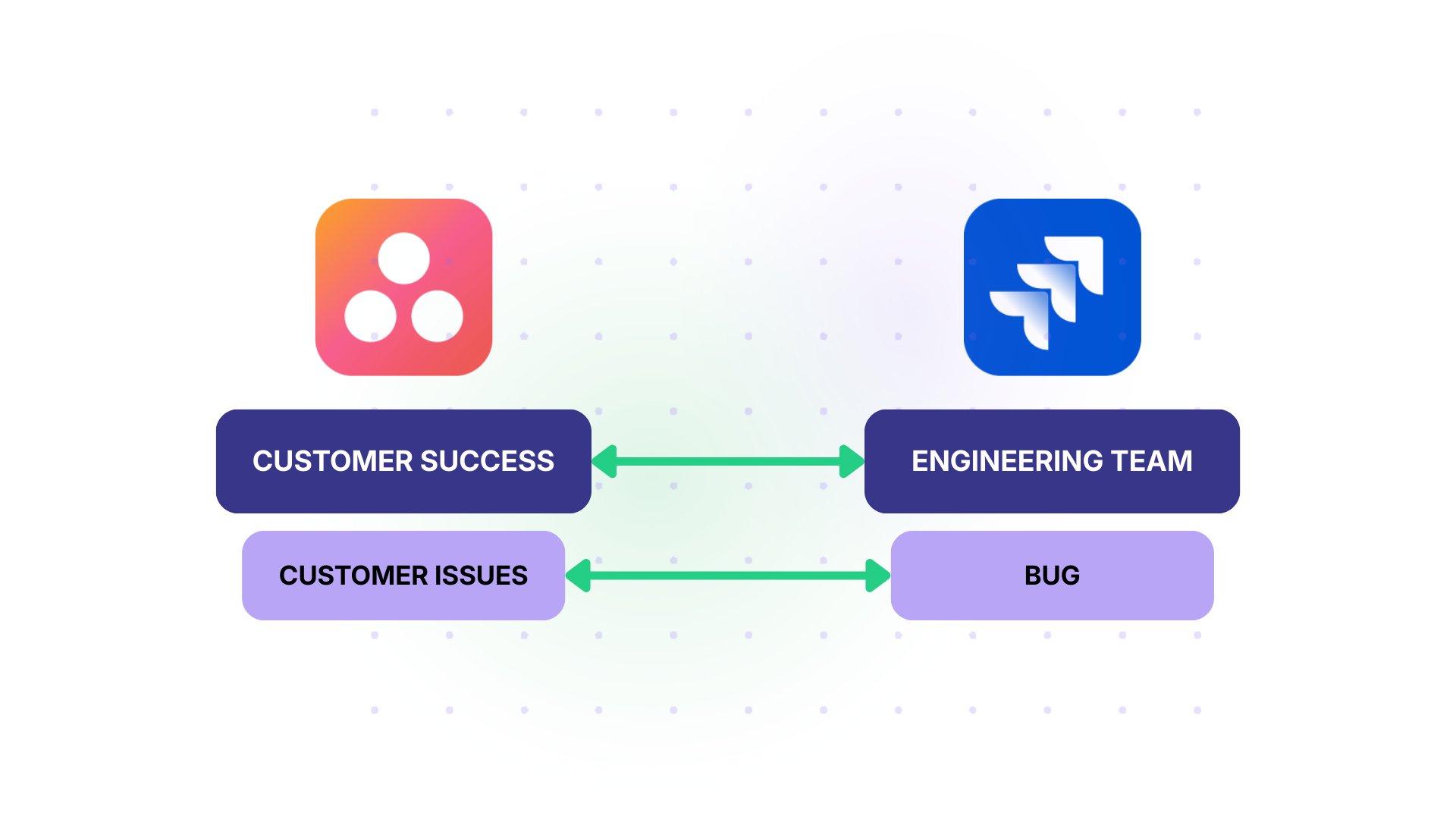
Solution: Configure a one-way sync with trigger conditions. When an Asana task in the “Customer Issues” project is tagged as “Needs Engineering,” the integration automatically creates a Jira work item with the task title, description, attachments, and priority mapped. Optionally, set up a reverse sync for status updates only, so the customer success team can track resolution progress without accessing Jira.
Real-World Application: A B2B software company’s customer success team logs between 30 and 50 issues per week. Before integration, the team lead manually created Jira tickets for each escalation, spending roughly 5 hours per week on data entry alone. After setting up the automated escalation flow, the time dropped to near zero, and engineering received consistently formatted bug reports with all necessary context attached.
Enterprise IT and Operations Alignment
Case: An enterprise runs a large-scale IT infrastructure upgrade. The operations team plans and tracks rollout phases in Asana (hardware provisioning, network configuration, user migration). The DevOps team uses Jira to manage the technical implementation.
Solution: Sync specific Asana tasks from the “Infrastructure Upgrade” project to a Jira project dedicated to the DevOps workstream. Map custom fields like “Environment” (Production, Staging, Development) and “Region” (US-East, EU-West) to corresponding Jira fields. Use conditional logic in Exalate to only sync tasks where the Asana custom field “Requires DevOps” is set to “Yes.”
Real-World Application: A financial services company manages a multi-region cloud migration. Operations tracks 200+ tasks in Asana, but only about 60 require DevOps action. By filtering with conditional sync triggers, the DevOps team in Jira only sees the work that’s relevant to them, avoiding clutter and keeping sprint planning focused.
Multi-Platform Integration Hub
Case: A large organization uses Asana for business teams, Jira for engineering, ServiceNow for IT service management, and Salesforce for customer data. Work items occasionally need to flow between all four.
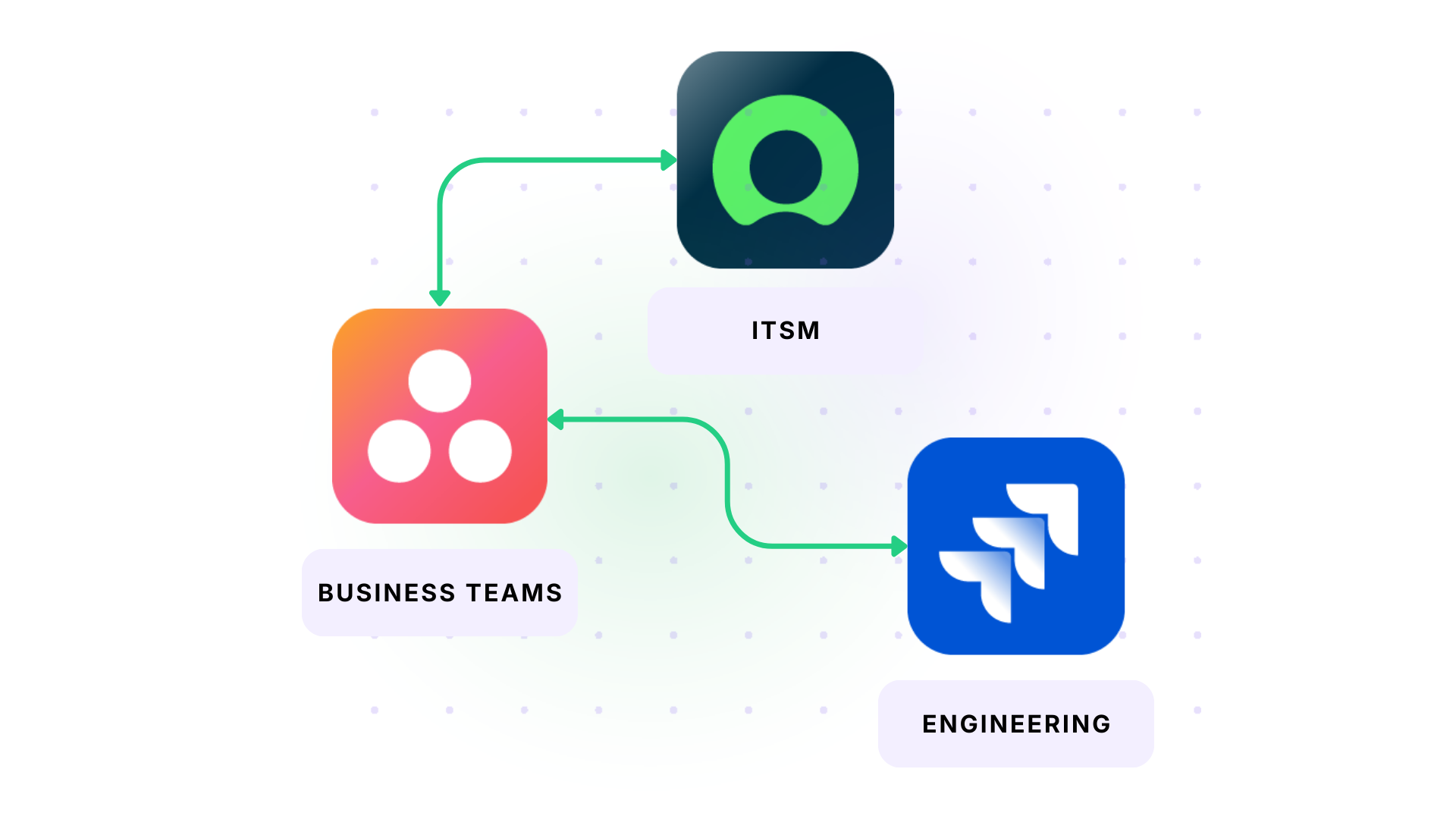
Solution: Exalate acts as an integration hub. An Asana task syncs to Jira for development. When the Jira work item reaches “Done,” a linked ServiceNow incident updates automatically. Customer-facing data from Salesforce feeds context into the Asana task for the account team. Each connection is configured independently with its own rules, field mappings, and sync direction.
Real-World Application: An enterprise software company uses this hub model to connect product feedback from Salesforce to feature requests in Asana, which become engineering work in Jira, which updates related ServiceNow change records. The result is end-to-end traceability from customer request to deployment without manual handoffs between teams.
How to Set Up Jira Asana Integration With Exalate
This walkthrough covers the full process from account creation to live synchronization between Jira and Asana.
Step 1: Create Your Exalate Account and Workspace
Visit the Exalate integrations page to get started. Create a new account by entering your email and verifying it, or sign up using Google. If you already have an account, log in.
Once you are in, create a workspace. Workspaces help you organize and manage your integrations and connections in a single place. You can find all your existing workspaces under the “Workspaces” tab. If this is your first time, click the “+ Create Workspace” button, enter a name and description, and click “Create workspace.”
Step 2: Create a Connection Between Jira and Asana
From your workspace, start creating your first connection. You can view all existing connections under the “Connections” tab.
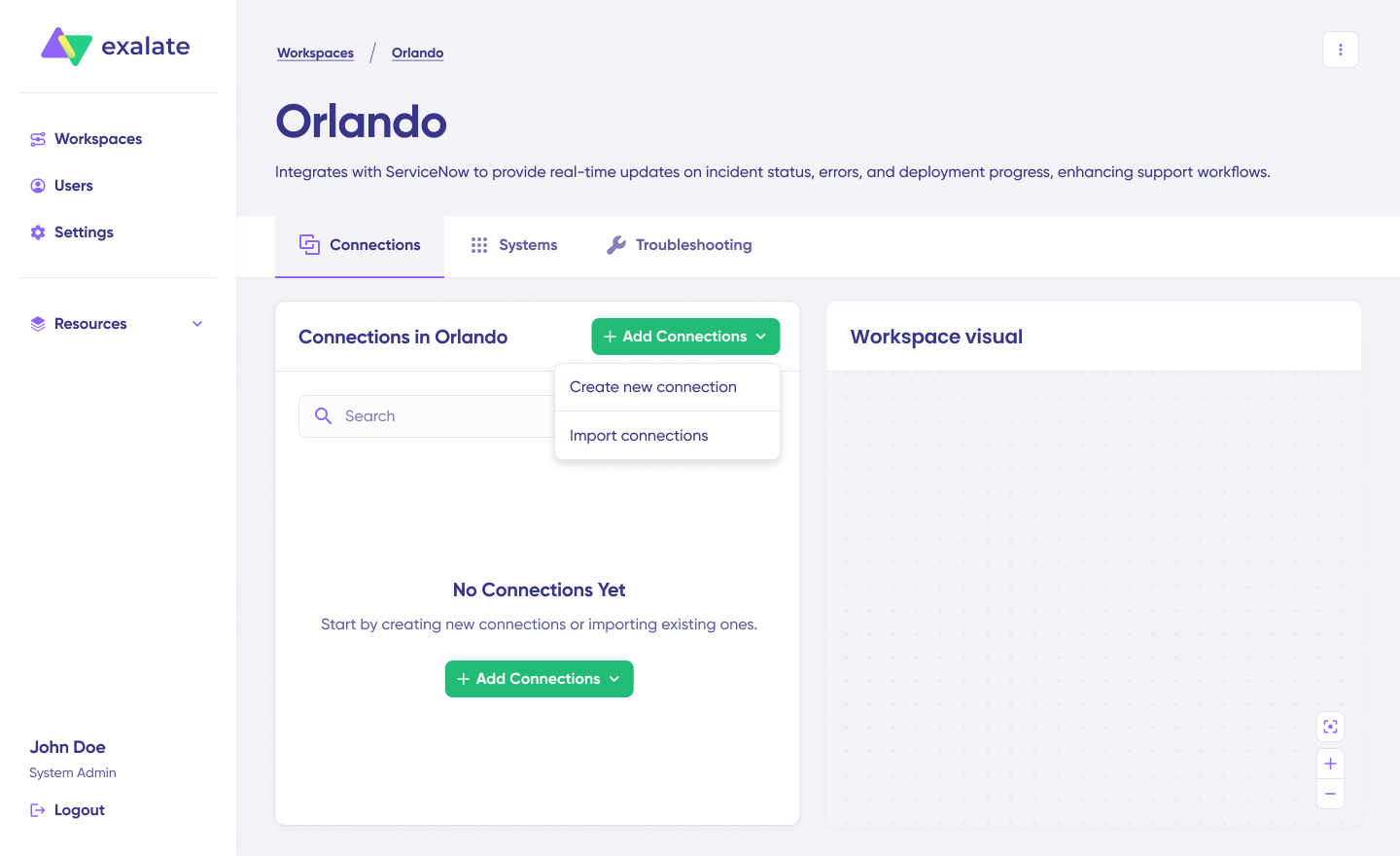
Click on “+ Add connections” then “Create new connection.” Enter the name for your first system. Name either Jira or Asana as your System A. It does not matter which one goes first. Enter the URL of your system.

Once you enter the URL, a check happens behind the scenes. If your system is already part of the existing workspace, authentication happens automatically. If the system is part of a different workspace, it will be newly registered for the current one. For a new system, you need to enter your authentication details for both Jira and Asana.
Give a name and description for your connection (for example, “Engineering Requests from Asana to Jira Sprint Board”). Click “Next,” review the details, and click “Create connection.”

When the process is complete, select “Continue to configuration” and choose the Jira project or Asana project you want to use for synchronization. Then click “Build & continue.”
You now have two options: “Quick sync” and “Edit & Test.”
Step 3: Quick Sync (Optional Verification)
Using Quick Sync, you can sync one item between Jira and Asana to verify that your connection works properly. This step is optional but recommended.
Under the “Item sync monitor,” enter a Jira work item key or an Asana task ID. Click “Sync Now” to sync the first item. To link two existing items, click “Link with existing.”
While the items sync, you will get status updates. Once the sync is complete, you can view both synced items by opening them in a new window. You can also compare how the synced items look and how changes will be applied.
Step 4: Edit and Configure Sync Rules
To start making changes, click “Create a new version” or select “Open latest draft.” This ensures you do not modify the existing configuration accidentally. Changes in the draft are saved automatically.
Click the “Edit” button to open the editor and edit the sync rules. Sync rules are based on Groovy scripts. With these scripts, you can add custom data logic and mapping, along with conditional flows, allowing you to adapt for any complex or advanced use case.
The direction of the sync can be changed by clicking the two arrows next to the connection name. The scripts are divided into incoming and outgoing scripts.
If the sync direction is from Asana to Jira, then the outgoing script holds the values passed from Asana to Jira, and the incoming script defines how the values coming from Asana are mapped in Jira. These scripts reverse if the direction changes.
The Replica works like a message payload and holds the actual data passed between the synced entities. It exists in JSON format. To sync new values, you can enter the sync script yourself. If you want to stop something from syncing (for instance, no attachments from Asana to Jira), remove that script line from the outgoing Asana script.
For example, on the Asana outgoing side, you specify which task fields leave Asana: task name, description, due date, assignee, priority, tags, and any custom fields. On the Jira incoming side, you define how those values map to Jira entities: task name becomes the work item summary, due date maps to the Jira due date, Asana priority (Low, Medium, High) converts to Jira’s priority scheme (Lowest, Low, Medium, High, Highest), and tags map to Jira labels.
Step 5: Use Aida for AI-Assisted Configuration
If you want to save time on scripting, use Exalate’s AI-assisted configuration feature called Aida to generate sync scripts. Aida exists in both the incoming and outgoing script sections.
Aida helps you in two ways:
For outgoing scripts, describe what data should leave your system. For example, “Exclude attachments” or “Only sync tasks tagged with ‘Engineering’ and include the task name, description, assignee, and due date.”
For incoming scripts, describe how incoming data should be applied. For example, “Map Asana status ‘On Track’ to Jira status ‘In Progress'” or “Set a default assignee if the user cannot be found in Jira.”
Based on Exalate’s scripting API and your existing scripts, Aida generates working Groovy scripts with proper field mappings. Once Aida finishes drafting, review the changes suggested. Green highlights new lines that will be added. Red highlights lines that would be removed. You can choose to “Insert” or “Discard” Aida’s suggestions.
The outgoing and incoming scripts work independently, and so does Aida, so maintain separate context and direction for each prompt.
Note: Aida is helpful, but just like with any AI assistant, review the generated code before applying it.
Step 6: Test Run Before Going Live
Once your sync scripts are ready, you can save them or proceed to dry-run them using the “Start Test Run” option.
Select the items you want to apply the sync to. You can select multiple items. Click “Start Test Run.” You can now see all the incoming and outgoing replicas for each item you selected in the respective tabs.
View how the sync configuration will be applied to your items, preview the replica, and verify that the field mappings look correct. If required, go back, adjust the scripts, and test again.
Deploy only when you are confident it works. This safety net prevents errors from affecting live data.
Once everything matches your needs, click “Publish Version” to apply the updated configuration to your live synchronization. All versions for a connection are available in the “Version” dropdown. Versions can be “Active,” in “Draft” (editable), or “Archived.”
Step 7: Add Triggers to Automate Sync
To start your sync automatically, add triggers. Triggers are conditions or filters you apply to specific items.
For Jira, you can use JQL (Jira Query Language) to specify conditions. For example, sync all work items where project = 'ENG' AND status != 'Backlog', sync all work items with label = 'asana-sync', or sync all bugs with priority = 'High'.
For Asana, set conditions for which tasks should sync to Jira, such as all tasks in the “Engineering Requests” project or tasks tagged with “Jira-Sync.”
Click the “+Add trigger” button to start creating triggers. Save your changes by publishing them.
Step 8: Deploy and Monitor
Your first synchronization will start automatically based on the sync rules and triggers you have set.
A significant part of synchronization can involve troubleshooting errors, especially in script-based tools like Exalate that allow flexibility for complex workflows.
Step 9: Troubleshoot With Aida
Aida also helps you troubleshoot errors faster. It offers clear and context-aware suggestions to resolve errors right where you see them.
If there is an error, go to the “Troubleshooting” tab of your workspace. Hover over the error you want to diagnose and click the Aida icon that appears next to it. You will see the AI-generated suggestion in a modal window, including a short explanation of the error and a proposed solution. You can also “View Full Analysis” for more context, “Error details” to copy the stack trace, and “Replicas” to view the JSON format if needed.
Choose to “Resolve” and retry errors from there.
How to Choose the Right Jira Asana Integration Tool
The right tool depends on your specific requirements. Here’s a framework for evaluating options:
- Asana plan tier limits native options. Asana’s native Jira integration requires a Business or Enterprise plan for full Data Sync. If you’re on Asana Starter, you only get basic widget-level linking, not field-level sync.
- Sync direction complexity. One-way sync is straightforward with any tool. True bidirectional sync with conflict handling, code-level flexibility, and selective field direction requires Exalate.
- Cross-company vs. internal. If the integration is between your own teams, most tools work. If it involves an external partner, vendor, or client, you need a tool with independent control. Exalate handles this natively. Unito and the Asana native integration do not.
- Custom field depth. Simple field mapping (title, status, assignee) works everywhere. Complex transformations (cascading selects, multi-value fields, and conditional mappings) require scripting capabilities that only Exalate offers in this category.
- Error recovery and reliability. For mission-critical integrations, transactional sync engines (like Exalate’s) that handle downtime gracefully matter. If a system goes offline for 30 minutes, you want queued changes applied in order, not lost.
- Scalability across Asana plans. Asana Business and Enterprise plans unlock custom fields, goals, portfolios, and advanced reporting. As your usage matures, your integration needs grow with it. Exalate scales with your Asana plan, so you can start simple and add complexity without switching tools.
Common Pitfalls and How to Avoid Them
- Syncing too many fields at once. Start with the essentials: title, description, status, assignee, and priority. Add more fields later as you confirm the basic sync is stable. Overloading the initial setup with every custom field creates debugging headaches.
- Ignoring status mapping conflicts. Asana and Jira use different status workflows. If you don’t map these explicitly, you’ll end up with tasks stuck in limbo or statuses that don’t match reality. Document the status mapping before configuring the integration.
- Not setting up triggers properly. Without filters, every task in the connected project syncs. That means draft tasks, internal notes, and brainstorming items all end up in Jira. Use tags, sections, or custom field values as trigger conditions to control what gets synced.
- Skipping the test phase. Always run a test sync with a few sample tasks before activating for the full project. Check that comments, attachments, and custom fields all transfer correctly. Fixing issues in testing is far easier than debugging a live production sync.
- Assuming one-size-fits-all. The best integration setup for a 10-person startup is very different from a 500-person enterprise with cross-company partners. Evaluate your actual workflows before picking a tool. Overpaying for features you don’t need is just as wasteful as underpaying and hitting limitations within weeks.
Conclusion
Jira Asana integration removes the manual overhead that slows down cross-functional teams. Whether it’s a product launch where marketing tracks milestones in Asana while engineering ships features in Jira, or a cross-company collaboration where an agency needs visibility into a client’s development progress, the right integration keeps both sides aligned without extra meetings or copy-paste workflows.
Start by defining what data needs to sync, in which direction, and between which teams. Then pick the tool that matches those requirements without overcomplicating the setup or limiting your ability to scale later.
Set up your integration between Asana and Jira. Book a call with us to get started.
Frequently Asked Questions
Can I sync Jira work items with Asana tasks in real time?
Yes. Exalate supports real-time bidirectional sync between Jira and Asana. When a work item status, priority, or comment changes in Jira, the linked Asana task updates immediately, and vice versa. You can also configure one-way sync if you only need data flowing in a single direction.
What Asana plan do I need to use Exalate?
Exalate works with all Asana plans, including Starter, Advanced, Enterprise, and Enterprise+. Unlike the native Asana for Jira Data Sync (which requires Business or Enterprise), Exalate doesn’t impose Asana plan restrictions for its own functionality.
Can I sync custom fields between Jira and Asana?
Yes. Exalate’s scripting engine lets you map any custom field available through the Asana and Jira REST APIs. This includes dropdowns, multi-select fields, date pickers, number fields, and user pickers. You define the transformation logic in the sync script, so even fields with different formats on each side can be mapped accurately.
Can I integrate Asana with multiple Jira projects at the same time?
Yes. You can set up multiple connections in Exalate, each linking a different Asana project to a different Jira project. You can also configure many-to-one scenarios, where tasks from multiple Asana projects sync to a single Jira project.
How does Exalate handle cross-company integrations between Jira and Asana?
With Exalate, each side of the integration manages its own sync rules independently. Your organization controls what data leaves your Asana instance, and the external party controls what they share from their Jira instance. Neither side needs administrative access to the other. This makes it ideal for agency-client, vendor-partner, and MSP scenarios.
Can Exalate connect Asana to platforms other than Jira?
Yes. Exalate connects Asana with Jira, ServiceNow, Azure DevOps, Azure DevOps Server, Salesforce, Zendesk, GitHub, Freshservice, Freshdesk, and other platforms. This allows you to use Asana as a hub that connects to multiple technical systems across your organization.
How does Aida (AI-assisted configuration) work?
Aida is embedded in Exalate’s scripting console. You describe your sync requirements in plain language, and Aida generates a working Groovy script. It considers your existing configuration context, so suggestions complement rather than conflict with established mappings. You review the output, accept what’s correct, and refine anything that needs adjustment. This reduces setup time significantly and makes advanced integrations accessible to non-technical users.
How is data secured during Jira Asana synchronization?
Exalate protects data in transit and at rest using TLS 1.2 and 1.3 encryption, JWT access tokens, role-based access controls, and multi-factor authentication. Its single-tenant cloud architecture means your data is isolated in its own process space, file system, network, and database, separate from all other customers. You can review detailed security documentation in the Trust Center.
How does Exalate pricing work for Jira Asana integration?
Exalate pricing is based on the number of items in active sync, not the number of users. Each integration connection is billed separately. Visit the pricing page to see the plan that works best for your team.
]]>Welcome to Sync Room: Episode 2
This is a follow-up post that comes from our “Sync Room by Exalate” webinar series.
In this episode, my co-host, Manoosh, and I discussed different ITSM integration scenarios, what breaks them, and how to choose a winning strategy.
Let’s dive right in.

Around 48% of companies pair Jira with a dedicated ITSM platform. We picked their brains to find out the challenges, hidden costs, and potential solutions to make real-time ITSM integration a reality.
The Broken ITSM Elephant in The Room
Imagine a SaaS company with global teams working on specialized areas. The support team is handling customer concerns in Jira Service Management, while the devs are working on the task using Jira Software.
And this is a common issue in most companies.
Our recent survey shows that 48% of respondents preferred pairing Jira with a dedicated ITSM platform (ServiceNow, Zendesk, Freshservice, or Freshdesk).
These numbers show that over half of the surveyed companies using Jira for ITSM still rely on email and Slack updates to keep up with service delivery.
Without addressing this ITSM-shaped elephant, your company would be setting itself up for inefficient workflows, disconnected systems, data siloes, and dissatisfied customers.
A Tale of Two Broken ITSM Workflows
Scenario 1
Support uses Jira Service Management (JSM) while the developers use Jira Software. They only share updates via email threads:
- A customer files a complaint to support as a JSM ticket.
- The team lead creates an email thread with a quick summary for the dev lead.
- The ticket is then created manually on the Jira Software side based on this information.
Result: Infinite email chains with updates and missing context going back and forth between team members who are getting increasingly frustrated at one another.
Scenario 2
Same scenario, but instead of relying on email communication, the tasks, tickets, and work items are created manually by an admin. Updates also flow back and forth manually with admin approval.
- The JSM ticket data is copied and shared with the devs to create a work item manually.
- The devs now drop comments and updates for the support team to break down to the customer.
Result: Unnecessary delays and broken communication chains at each level, which often lead to dissatisfied customers and disjointed ITSM workflows.
Why Email is Not Your Savior
From what I’ve seen in the field, email is still king in some organizations. Some companies even rely on systems like Slack and Teams for the integration of ITSM systems.
But these options are far from ideal for a coherent ITSM strategy because of the following reasons:
- Longer resolution timelines for customer concerns
- Ever-growing backlog of tickets on the support desk
- Missing attachments and context for tickets and work items
- Overall terrible customer experience, which often leads to churn
- Formation of information silos between support staff and developers
- Precious work hours spent on manually replicating the issue in the dev system.
Integration As Your Salvation: A Strategy That Works
Native integrations are great for simple escalation logic: the ticket goes from P1 to P2 automatically with all the needed context.
But once you try to add any extra layer of complexity, native integrations will no longer fit your needs.
That’s where a tool like Exalate can help you address the elephant in the ITSM room, so you can help support engineers and developers march in lockstep.
Alright, enough puns for today.
But trust me, we’ve implemented this particular workflow in-house at Exalate (as well as for enterprises and MSPs) to help resolve issues faster and build institutional knowledge.
The implementations have been remarkable so far:
- Real-time escalation based on priority and category.
- Automatic work item creation in Jira and Azure DevOps
- Better visibility and context from description, attachments, metadata, and source info.
- Bi-directional integration to convey status changes, resolution information, and comments (internal notes).
- Granular security controls and field-level autonomy over the data for sync.
- Complete audit trail for compliance.
Should You Build or Buy The Integration?
We all know this: any decent engineering team can build a simple integration in a few weeks. And with AI and other tools out there, they can easily knock down the time to mere days.
But that’s good and fine until you now have to deal with edge cases, security and authentication, multi-platform support, and ongoing maintenance. The headaches start to pile up. You can calculate the base cost yourself.
Buying the off-the-shelf option will shave off days, even weeks. Just pay for the integration solution, and you can get through the setup and configuration in a few hours. The ancillary stuff will be handled for you.
A very common sentiment: “Focus on your business and outsource integration to the specialists.”
If you’re running Jira Software/Service Management and dealing with support escalations:
- Map Jira statuses to each team’s workflow.
- Keep each team in their specialized environment.
- Buy integration solutions to explore more synchronization possibilities.
- Establish a common knowledge base between support and development teams.
- Automate based on business rules (priority fields, categories, assignment groups).
Join Us for Episode 3
We’ll be back with the next episode in January, after the holidays.
If you’ve got interesting use cases or specific questions about ITSM integration, I’d gladly discuss them in the comments, or you can reach out directly to us.
]]>82% of teams we surveyed called manual ticket escalation between support and development “hell.” Here’s what we learned about the hidden costs, common chokepoints, and how real-time integration eliminates the copy-paste nightmare.

Welcome to Sync Room: Episode 1
This post comes from our new webinar series called Sync Room by Exalate, short, practical sessions with no fluff, all unfiltered.
For our first episode, my co-host, Manoosh, and I tackled the topic that 82% of our customers immediately identified as their biggest pain point.
So let’s dive into it.
The Problem Everyone Has (But Nobody Talks About)
Our recent survey on integrations shows a striking result: 82% identified manual ticket escalation as their biggest integration pain point. Not data migration. Not reporting. Just the daily grind of moving P1 issues from support desks to development teams.
What Does This “Escalation Hell” Actually Cost?
Let me break down what we see in the field every day:
Direct Costs
- 30+ minutes lost per P1 ticket just collecting logs, writing reproduction steps, and manually creating the issue in the dev system
- Technical resources doing copy-paste work instead of solving problems
- Multiple people logging into systems they’re not familiar with
- Missing attachments (classic nightmare: 4 of 5 log files transfer, developers waste hours debugging the “missing” one)
Indirect Costs
- Higher resolution times for customers
- Increased backlog on the support desk
- Knowledge silos (developers solving issues that support never learns about)
- Poor customer experience leading to churn
The Two Broken Workflows We See
Scenario 1: Email Threads: Support receives a customer complaint → team lead creates email thread → summarizes for development lead → ticket gets created on their side → updates flow back via… more emails.
Scenario 2: Cross-System Access Support logs into Jira/Azure DevOps → manually creates work item → copies information → manually checks for updates → translates dev language back to customer language → repeat every hour for P1s.
Both are painful. Both waste expensive resources on manual work.
Where the Chokepoints Actually Are
For P1 escalations specifically, here’s the reality:
- Initial triage (10-30 minutes): This time isn’t wasted; support is collecting crucial information that developers need
- The handoff: Manual ticket creation, potential data loss, no real-time visibility
- The ping-pong: Hourly/bi-hourly SLA updates requiring constant system switching
- The knowledge gap: Developers work in isolation, support never builds that knowledge base
What Good Integration Actually Looks Like
I’ll be honest. I’m implementing this internally at Exalate because I want our support engineers to see how developers solve issues in real-time. That visibility builds institutional knowledge.
Here’s what we’ve configured (and what we help customers implement):
Real-Time Auto-Escalation
- P1 created in Freshservice/ServiceNow/Zendesk
- Based on priority + impact + category fields
- Automatically creates an issue (work item) in Jira/Azure DevOps
- Complete context transfers: description, attachments, metadata, source info
- Ticket number pings back for confirmation
Bi-Directional Sync
- Developer comments flow to support as internal notes
- Status changes map intelligently (in progress → pending)
- Priority/urgency updates sync both ways
- Resolution information auto-populates
Granular Security Controls
- Role-restricted comments stay private
- Field-level control over what syncs
- Public comments sync, internal notes don’t
- Complete audit trail for compliance
The Many-to-One (and One-to-Many) Problem
One of our most interesting implementations: a service desk supporting 20 software products from 20 different vendors. They were the hub; each vendor had their own system.
Solution? Star network topology. Zendesk dropdown field → Exalate reads it → routes to the correct vendor’s engineering system. Just automated routing and real-time updates.
We also see the reverse constantly: multiple support desks (Zendesk + Jira Service Management + ServiceNow) feeding into a single development environment.
Build vs. Buy: Why Teams Switch to Us
Look, any good engineering team can build a proof-of-concept integration in a few weeks. We see it all the time.
The real costs hit when you need:
- Edge case handling
- API update compatibility (we get early access as marketplace partners)
- Security auditing and logging
- Multi-system support
- Ongoing maintenance
Time to value comparison:
- Off-the-shelf solution: Install in minutes, configure in hours/days
- DIY approach: 3-5 months to production-ready solution
One customer put it perfectly: “Integration isn’t our business. We need to focus on what we specialize in and outsource this to specialists.”
Key Takeaways for Atlassian Teams
If you’re running Jira Software/Service Management and dealing with support escalations:
- Don’t force support into Jira (and vice versa), let each team use their specialized tools
- Automate based on business rules (priority fields, categories, assignment groups)
- Map statuses intelligently to match each team’s workflow
- Control data exposure at the field and comment level
- Build the knowledge bridge so that support learns from development resolution patterns
Join Us for Episode 2
Next Sync Room episode is on December 4th, where we’re tackling ITSM strategy, specifically, why you need to stop pretending that email is an ITSM strategy.
If you’ve got exotic use cases or specific questions about support-development integration, happy to discuss in the comments, or feel free to reach out directly.
]]>We’ve all been there: a new client signs on, and suddenly, your engineers are spending more time integrating them into your systems rather than actually solving service tickets.
When you’re managing Jira Service Management (JSM) for 30, 40, or 50+ clients, the complexity doesn’t just grow; it compounds.
In the latest episode of The Sync Room, Manoosh and I sat down to break down a specific number that should change how you view your operations: 5 hours per engineer, per week.
That is the actual time our partners at SPK & Associates reclaimed by shifting their integration architecture to a scalable strategy.
At the heart of this strategy is Exalate, the integration solution we’ve built specifically to handle these complex workflows. Unlike standard “plug-and-play” tools that force you into rigid data models, Exalate uses a script-based approach that allows MSPs to scale without compromising on security or flexibility.
Why Adhoc Solutions Alone Don’t Scale
Under the pressure of a deadline, it’s tempting to “duct-tape” a solution together using AI-generated code (vibe coding, even) or custom API scripts. It works fine.
But as I discussed in the webinar, AI is probabilistic, while synchronization must be deterministic.
The moment a client renames a custom field or updates a workflow in their Jira instance, an unmanaged script breaks.
This creates undocumented infrastructure. When no one on your team truly “owns” the logic, maintenance becomes a massive liability. You’re left in a reactive posture, firefighting instead of delivering the value your clients actually pay for.
“The ‘quick fix’ turns out to be the most expensive decision you’ll make. It’s not just engineering hours; it’s missed SLAs, eroded trust, and team burnout.”
The Non-Negotiables for MSP Scaling
If you want to scale to 50+ clients without doubling your headcount, your integration needs to hit these three marks:
- Security by Design (Sovereignty): You shouldn’t need admin access to a client’s Jira to sync tickets. Both sides must control their own data mapping to stay compliant with HIPAA or GDPR.
- Autonomy: The sync must be resilient enough to absorb platform updates. If your team has to manually check sync health, it isn’t an autonomous integration.
- Flexibility: No two client environments are the same. Your tooling shouldn’t force you into a fixed data model; it needs to be customizable enough to handle unique workflows across Atlassian, ServiceNow, and Azure DevOps.
Practical Deep Dive: Multi-Tenant Routing for MSSPs
To move from theory to practice, I demonstrated a common cross-platform routing scenario. Imagine an MSSP receiving automated security alerts in a central hub that must be routed to different clients, each using their own preferred stack.
1. Security First
We started by connecting ServiceNow to Jira Cloud. Most tools require you to hand over a “Super Admin” token. We did the opposite. Each side authenticated its own instance locally.
This ensures that even if you’re managing 50 clients, you never hold the “keys to the kingdom” for their entire Jira site, only what is shared.
2. Intelligent Data Mapping with Aida (The AI Layer)
Mapping fields manually is where most time is lost. We used Aida, our AI assistant, to handle “Statuses.”
With a simple natural language prompt, we mapped:
- ServiceNow States: New, In-Progress, Resolved
- Jira Statuses: To-Do, In-Progress, Done
The AI generates the script, but because it sits on a deterministic engine, the sync won’t “hallucinate” or skip a beat if the connection flickers.
3. Multi-Platform Trigger Routing
This is where true scalability happens. We set up automated triggers based on the Assignment Group in ServiceNow:
- Database Incident? The trigger detects assignment_group = database and automatically spins up a ticket in the client’s Jira Cloud project.
- Network Incident? The trigger detects assignment_group = network and routes it to a completely different client’s Azure DevOps board.
This eliminates the “triage bottleneck” where a human has to decide where a ticket goes.
4. Real-Time Observability & Troubleshooting
I showed how to handle the “2 a.m. failure.” Instead of digging through raw API logs, we used the Test Run feature. This allows you to dry-run a script against a real incident to see exactly where a mapping might fail before it ever affects live data. If a field is missing, the error message tells you exactly which line of code to fix.
From “Vendor” to “Operational Fabric”
The most successful MSPs move away from being a “vendor” to becoming an extension of their client’s team. When your systems are genuinely connected, tickets flow automatically, incidents are visible in real-time, no manual handoffs, and you become woven into their daily operations. This makes your service “sticky” and incredibly difficult for competitors to displace.
A Challenge for This Quarter
Don’t wait until you reach 50 clients to fix a broken architecture. Integration debt accumulates silently.
I recommend taking these three steps immediately:
- The Audit: Map out every integration you currently run. If the person who built it left tomorrow, could you still maintain it?
- Prioritize by Risk: Don’t start with the most complex sync; start with the one that would cause the most damage to your reputation or SLAs if it failed tonight.
- The Math: Check out our Build vs. Buy ROI Calculator to see exactly how much “integration debt” is costing your bottom line.
If you want to see how this works with your specific workflow, you can discuss it with our team or simply start a free trial to see Exalate in action within your own environment.
How is your team handling the “Jira-to-Everything” challenge? Are you still relying on custom scripts, or have you moved to a more robust architecture? Would love to hear your thoughts!
]]>Acquisition Is Done, Now What?
One of the ways to unlock fast growth (and a pretty effective one at that) is to acquire another company. On paper, everything looks perfect: you’ll now be able to deliver 54% more, come very close to eliminating technical debt, and give more love and attention to your existing customers with this new injection of resources. But there is a “but.”
According to PwC’s M&A Integration Survey, only 14% of respondents reported achieving significant success with their merger and acquisition integration efforts (How to Achieve Successful M&A Integration: Phases & Challenges).
I’d bet you wouldn’t want to be among that 86% who fail.
What Are We Dealing With
The success of the merger depends on many things. And let’s leave the planning and execution of M&A to the experts.
However, during my 9+ years at Exalate, I saw many cases where companies would come to us at various stages of their M&A with very similar challenges:
Our teams are disconnected.
They use different task management tools, or they use the same tools, but we cannot simply merge the two; we have different processes and ways of working, and (insert your 17 more valid reasons).
They need an easy way to pass on work and the necessary context to make sure that the work will be picked up and completed.

Data is scattered across systems. We don’t have a single source of truth.
Looking across the hundreds of conversations we’ve had with customers and prospects dealing with M&A, there’s a pattern that repeats itself almost every time: the acquired company’s teams resist switching platforms, historical data is too complex to migrate cleanly, and vendor relationships force multi-tool environments that were never meant to be “temporary.”
In this article, I want to talk about how a synchronization solution like Exalate can make your life after M&A easier:
- The 3 main productivity killers in M&A integrations
- How synchronization tools solve communication bottlenecks
- Why full system merges can be riskier than you think
- Handling regulatory compliance and security during integration
- The ROI math behind sync tools
- Best practices for implementing synchronization in your merger
- Frequently asked questions about M&A integration
Why Can It All Fail?
I don’t have to be an expert to state the obvious: two companies are never exactly the same.
They have their own processes and tools, and when these two worlds collide, the loss of productivity is unavoidable. But it doesn’t mean that you cannot minimize it.
Now, next to the planned work both teams have, they have to add more to their workload, because they have to allocate time to understand each other and how they can work together.
That’s why it’s essential to ensure that communication paths are easy and natural.
Communication Challenges
Think of it this way. Imagine you’re a support engineer. The customer you’re assisting has an issue with a database. You’ve seen a similar problem many times, and every time you had to come up with a workaround.
But last week, your managers announced that in the “new part of the company,” there are engineers who have the experience and the knowledge to permanently fix the issue!
Now, you can go about it two different ways.
Scenario 1
You reach out to your manager and ask who these people are, and who is available right now to pick up your issue.
You wait for a response from your manager (it can take from 2 hours to two days). Customer asks for an update, you answer.
After you have the contact information of the DB engineer, you reach out to Mike (his name is Mike) over email, or, let’s be more in the loop with time, over Slack, providing him all the context you have from the ticket.
Mike asks a couple of clarification questions. You go back to the ticket and ask your customer. Mike gets to work. You update the customer via ticket. Mike delivers a fix in 1 hour. (Even I am impressed, well done Mike!)
You come back to the ticket and provide the steps that you got from Mike to the customer.
Customer tries, but something isn’t quite right. A bit more back and forth in the Mike<>you<>customer circle, and the ticket is closed after 5 days.
Customer thanks you, but does mention that they expected a faster turnaround.

Source: https://blogs.brighton.ac.uk/careers/2019/03/05/employers-recruiters-vice-deputy-managing-graduate-hr-coordinators-what-are-they-on-about/
Introducing scenario 2, where we add a synchronization solution to the mix
You escalate (or should I say “exalate” 😏) your ticket to the DB engineers’ Jira instance. An available engineer picks it up. (Hello again, Mike!)
He asks a couple of clarifying questions, which are synced back to your ticket. (In the meantime, please have a coffee break. I am sure you’re exhausted after I made you work so hard in the previous scenario.)
The customer sees the questions from Mike and replies right away. Mike estimates that it’ll take him about 2 hours to fix the issue, so he lets the customer know.
Mike finishes the fix in just 1 hour (we’re all still very impressed, Mike!) and explains how to fix the issue to the customer. The customer is absolutely delighted!
- The issue he reported was worked on within just a couple of hours.
- They were informed all the way through the process.
- And even got the fix earlier than expected.
He’s so happy with this turnaround that he leaves a very positive review on G2 and even agrees to a joint case study. And maybe expansion, but we’ll see.
I mean, scenarios may vary, but I hope you get the gist.
This communication challenge may cost you and Mike 2 extra hours at the very least. Not to mention the customer, who could have gotten his fix 4 days earlier.
When Manual Workflows Hit the Breaking Point
The Mike scenario above is hypothetical, but the pain is very real. Across our conversations, manual data entry after M&A shows up as one of the most consistent productivity killers, and the numbers are worse than most people expect.
One managed security services provider quantified it: 14 hours per week wasted on manual ticket copying between their system and their clients’ systems. That’s nearly two full working days, every single week, doing nothing but copy-paste.
A subsidiary of a major industrial equipment manufacturer described their vendor escalation process as “very, very manual, where they create a ticket in our system, and then it’s manually copied and pasted into each other’s systems.” And when agents went home for the day? Information transfer simply stopped. Dead time. Incidents sat unresolved until the next shift started.
Scale makes it even worse. One user told us directly, “Come September, we’ll have a much larger customer going live on the software, and that will generate a significant support workload. We just wouldn’t be able to create tickets manually.” Another company, after 4 acquisitions in 2 years, found that each new acquisition brought a new ticketing system, and the manual bridging simply couldn’t keep up.
And then there’s the duplicate entry problem. One integration partner described maintaining “double systems manually, entering the same tickets in both Jira instances.” Errors creep in, data gets out of sync, and overnight, nobody’s checking email to catch incoming updates.
The DIY route? Just as painful. One systems integrator tried building custom webhook and API integrations and reported: “It took me so much time, but I moved nowhere.” Another company spent 5 years building bespoke middleware integrations, only to accumulate technical debt they now desperately want to shed.
Data Consolidation
Another villain in the story is the fact that you now have two sets of data.
And you need to get all the necessary data into one dashboard.

Source: https://seattledataguy.substack.com/p/ten-of-the-funniest-data-memes
I’ve seen companies take different approaches to solving this issue. There are many ways and tools to make this work. I have dealt with many companies that came to us to address data consolidation problems.
And if you have already invested in the synchronization tool to make sure that the entire team is aligned and has all the necessary context, why not use the same tool to also solve data accessibility and visibility issues?
Here’s how you can do it.
Some prefer to synchronize everything happening in the remote instance, essentially cloning all the team’s work from their system into yours. This way, you can create enhanced, more comprehensive reports based on all the synchronized data.
Another approach I’ve seen is more selective: only certain outcomes get synchronized. For example, there might be a custom field called “outcome” that, once filled in, automatically syncs to the management Jira instance.
This keeps the synchronization focused on just the essential information that leadership needs to see.

Consolidate data from ITSM and project management tools to improve reporting and visibility, enabling smarter decision-making and unified cross-team insights.
Why a Full System Merge Can Be Riskier Than You Think
Here’s something I hear from customers all the time: “We just acquired a company, and we’d like to sync their projects into our Jira instance because we are not yet ready to merge into one Jira instance.”
And honestly? That “not yet ready” instinct is usually right.
A full system merger collapsing two Jira instances (or a Jira and a Zendesk, or whatever combination you’re dealing with) into one sounds clean and efficient on paper. In reality, it introduces a whole set of risks that can blow up your timeline and your team’s morale.
Here’s what we’ve seen go wrong, not in theory, but from real experiences with companies dealing with this right now.
Teams won’t give up their tools. Period.
This is the single most consistent pattern we see in acquisition after acquisition. One UK-based marketing agency needed to merge 3 separate Jira instances after acquiring multiple agencies, and each agency refused to budge.
A global sportswear brand, after being acquired, kept its own tooling while the parent company mandated ServiceNow.
At a global IT services company, different business units simply refused to standardize, regardless of what leadership wanted.
The logic is pragmatic: forcing a migration disrupts workflows, retrains entire teams, and risks losing the historical context embedded in the existing tool.
Historical Data is Where Migrations Go to Die
Companies consistently discover, often too late, that full migration loses critical context. One company needed 500–600 tickets migrated with exact ticket ID preservation. Migration tools couldn’t do it.
Another company with 250,000 work items found that change history and resolution dates simply wouldn’t carry over due to platform limitations.
A marketing firm was surprised to learn that workflows don’t transfer at all; only raw data comes across flat and stripped of the relationships that made it meaningful. Epics, stories, parent-child hierarchies? Gone.
Timeline Pressure Makes Migration a Non-starter
Several companies we’ve spoken with face tight deadlines where a full migration simply can’t be scoped in time. One company’s ServiceNow licenses expired in three months, making a phased sync-then-migrate approach the only viable path.
Another had 3 weeks before contract expiry with 70,000 tickets, not enough time for a proper migration, even if they wanted one.
Multi-tool Environments Are Permanent, Not Transitional
Here’s the pattern that surprises people the most: after an acquisition, companies almost never end up on a single tool. Vendor relationships, team preferences, regional compliance requirements, and cost all push toward a sustained multi-tool environment.
One company acquired by a large multinational needed to sync with the parent’s systems while keeping their own, not as a transition, but as the permanent operating model.
A fulfillment company that acquired 4 companies in 2 years needed customer support consolidated in Salesforce, while some teams stayed in Jira or Freshdesk.
Sync isn’t a crutch. It’s the architecture that matches the operational reality.
Slow-walk Live Migration
If you want to take data consolidation further, consider live migration. The concept is very simple: teams use their own environments, and synchronization runs in the background. And then when the time is right, you just abandon one of the tools.
What Happens to Your Existing Data During System Integration?
This is one of the first questions we get from companies evaluating synchronization as part of their M&A plan. And the answer is: nothing bad happens if you plan it right.
With a sync-based approach, your existing data stays exactly where it is. Nothing gets moved, overwritten, or deleted. The sync tool creates mirrored copies of the data you choose to share, keeping the originals untouched in their source system.
This means you can start syncing new tickets and items immediately while deciding what to do with historical data at your own pace. Some companies choose to backfill historical data. Others decide that only new items from the acquisition date onward need to be synced.
The beauty of this approach is that it’s reversible. If something doesn’t look right, you pause the sync, adjust your rules, and try again. Compare that to a full migration, where a mistake can mean weeks of cleanup.
Can You Integrate Systems Without Disrupting Daily Operations?
Short answer: yes, that’s the whole point.
With a two-way sync, both teams continue working in their own environments as if nothing changed. The sync runs in the background, and the only difference is that now relevant data appears in both systems automatically.
Our customers love this approach because it’s the most flexible and foolproof. Not to mention, the least stressful for IT and management teams. No migration weekends, no system freezes, no retraining. Teams wake up on Monday, and their tickets are synced. That’s it.
Handling Regulatory Compliance and Security
Let’s quickly consider another very probable plot.
A US-based enterprise called “American Gulls” acquired an EU-based start-up “European Frogs”. GDPR suddenly becomes very real.
You can dive headfirst into a bottomless pit of regulations, or you can use a workaround – a sync tool that makes sure that only necessary data is shared via secure channels and with proper data residency.

Why Compliance Is the Silent Deal-Breaker in M&A
Here’s what keeps compliance officers up at night after an acquisition: suddenly, you have two different data environments, potentially in two different jurisdictions, with two different sets of rules about what data can go where. And the clock is ticking.
This isn’t theoretical. In our conversations with companies, compliance and security concerns show up in over a third of all M&A-related calls. And the concerns are very concrete.
Data residency drives multi-instance architectures. One enterprise client migrating to Jira Service Management needed multi-site sync specifically because of data residency requirements. A technology company runs 4 separate Zendesk instances: APAC, China, Europe, and the Americas, specifically for data protection compliance.
These aren’t companies that chose to be complex. Regulations made them complex. They don’t want one centralized system; they need regional separation with controlled sync.
Government and defense regulations create hard stops. One division of a large industrial conglomerate faces stringent regulations; even screen-sharing during a demo could expose restricted data.
They require Master Service Agreements and technical review board approval before any integration tool touches their systems. Another company working on federal election systems emphasized that “security and compliance are absolutely critical”; no flexibility.
Security reviews add weeks to timelines. One major sports organization halted the deal when they discovered that the integration tool required full Jira admin access; their Head of Security needed to review Trust Center documentation before even scheduling a demo.
How Exalate Addresses Compliance in Cross-Border M&A
A synchronization (or integration) solution like Exalate addresses these concerns head-on:
Selective data sharing. You control exactly which fields sync and which don’t. Personal customer data that should stay in the EU instance? It stays there. Only the ticket summary and status sync to the US team, which is all they need to manage the work anyway. For instance, healthcare organizations can filter protected health information at the sync level, ensuring that sensitive patient data never leaves the provincial system.
Data residency options. Exalate’s architecture means each side of the connection operates independently. The EU data stays on the EU infrastructure. The US data stays on US infrastructure. The sync only passes the data you’ve explicitly scripted to flow between them.
Encryption and security. Data in transit is encrypted using TLS 1.2+, and Exalate is ISO 27001 certified. No passwords are stored; only OAuth tokens and API credentials specific to each platform.
One financial services client told us they avoided €1.3M in potential GDPR violations simply because their sync tool kept EU customer data in EU systems while still giving US teams the visibility they needed.
Real-life Case
My favourite case is DPG Media. When they rapidly grew from 2,000 to 8,000 employees through acquisitions, they faced a classic M&A challenge: their newly acquired company, Medialaan, used Zendesk while DPG used Jira.
One IT employee spent hours daily manually copying customer tickets between systems – a massive productivity drain that left issues loose and untracked. After trying automation tools, they realized that they needed something more robust.
After evaluating a few other options, they implemented Exalate.
The results were immediate: the IT employee who had been doing manual data entry was freed up to become a Product Owner, now managing livestream products that bring breaking news to millions.
In this case, the synchronization tool didn’t just connect systems; it freed human potential, turning mind-numbing manual work into resources ready to address what the organization needed the most at that moment.
ROI Math: The Cost-Benefit Analysis of Sync Tools in M&A
The ROI math is surprisingly simple: DPG Media saved one full-time employee’s salary (€60,000+) by eliminating manual data entry. Add the 45x faster ticket resolution (that’s 4 days saved per ticket × 100 tickets/month = major customer satisfaction gains), plus the avoided cost of maintaining duplicate systems for 18-24 months while you “figure out integration.”
One mid-size tech merger calculated its two-way sync investment paid for itself in just 6 weeks through productivity gains alone.
Case Study: Learn how DPG Media boosted productivity and smoother workflows with Exalate.
How Do You Measure Integration Success Beyond Productivity Metrics?
Productivity is the obvious metric, but smart M&A teams track more than that:
Employee satisfaction. Are the acquired team’s employees still happy? Are they still here? If you’ve forced a tool migration on them, survey results tend to drop. If they’re still working in their preferred tools, that friction disappears.
Customer experience scores. Track CSAT and NPS before and after the integration. If customers notice the merger (in a bad way), your integration isn’t working.
Data accuracy. How many duplicate tickets exist? How many tickets fell through the cracks? A sync tool should drive these numbers toward zero. One integration partner described maintaining “double systems manually” before Exalate; that’s exactly the kind of error-prone duplication you’re eliminating.
Time to resolution across teams. Not just within one team, but across the newly merged organization. If the acquiring team can now tap the acquired team’s expertise (like Mike’s database skills), resolution times should improve.
Speed to first cross-team collaboration. How quickly after the acquisition did the two teams start working together on actual tickets? With a sync tool, this can happen within days. Without one, it often takes months.
Best Practices for Implementing Synchronization in Your M&A
Over ten years and hundreds of M&A-related implementations, we’ve seen what works and what doesn’t.
Here’s what separates the smooth integrations from the painful ones.
1. Start Before Day One
Don’t wait until the deal closes to think about integration. The best outcomes happen when teams evaluate their tooling landscape during due diligence. Identify which systems overlap, which are unique, and where the communication gaps will be.
2. Prioritize Which Systems to Integrate First
Not everything needs to sync on day one. Start with the highest-impact, lowest-risk connections. In most cases, that means:
First, connect the customer-facing systems (support tickets flowing between teams). This is where your customers will first feel the impact of the merger, so get this right immediately.
Second, connect project management and engineering tools. This enables cross-team collaboration on product work.
Third, handle reporting and dashboards. Once the data is flowing, consolidate it into unified views for leadership.
3. Respect Each Team’s Way of Working
The biggest mistake I see in M&A integrations? Forcing the acquired team to adopt the acquiring company’s processes overnight. It never works. We see it constantly: different business units simply refuse to standardize, regardless of executive mandates. And they’re right to push back. Let them keep their tools, their workflows, their field names. Use the sync tool to translate between the two worlds.
4. Handle Different Data Formats Gracefully
The acquired company uses “P1/P2/P3” for priority. You use “Critical/High/Medium/Low.” Their “Bug” is your “Defect.” Status and field mapping chaos is one of the most common pain points we hear about. One manufacturing company described constant confusion because “Resolved” on one side didn’t mean the same thing as “Done” on the other.
This is exactly what sync scripting is built for. Map values between systems so each team sees data in their own language. With Exalate, you can use Groovy-based scripts or the AI-powered Aida assistant to set up these mappings. Aida lets you describe what you want in plain English, and it generates the working configuration.
5. Use Triggers to Automate the Flow
Don’t make people remember to “sync this ticket.” Set up triggers based on conditions: any Zendesk ticket with the tag “escalation” automatically creates a Jira issue in the engineering instance.
Any Jira issue moved to “Done” automatically updates the corresponding Zendesk ticket status to “Solved.”
Automation removes the human bottleneck and eliminates the “dead time” that happens when agents go home, and manual processes stop.
6. Start Small, Scale Fast
Begin with a pilot. Pick one team, one connection, maybe 50–100 tickets. Validate that the sync works correctly.
Then expand. The growth pattern we see from our customers is almost always the same: start with 1–2 connections, grow to 3–5 in the first half-year, and often reach double digits by year-end.
Exalate’s architecture makes it easy to add new connections and platforms without rebuilding anything.
7. Don’t Underestimate the “Temporary to Permanent” Pattern
Here’s something to plan for: the sync you set up “temporarily” during the M&A will very likely become permanent. We see this pattern consistently. Once workflows are built around the tool and teams are working smoothly, there’s no business case to rip it out.
The cost of removing the sync and reintroducing manual processes or forcing a migration is almost always higher than just keeping the sync running.
Plan for this from the start. Set up your sync as if it’s permanent with proper naming conventions, documented rules, and clean scripting so you won’t have to redo it later.
8. When Should You Consider Custom Integration vs. Off-the-Shelf Solutions?
Go custom only when you have truly unique requirements that no existing tool can handle, and even then, think twice.
We’ve spoken with companies that spent years building bespoke middleware integrations, accumulating technical debt they desperately want to shed.
One tried building a webhook and API integrations and reported: “It took me so much time, but I moved nowhere.”
Off-the-shelf solutions like Exalate cover the vast majority of M&A sync use cases out of the box. And because Exalate offers deep scripting capabilities on top of its standard configuration, you get the flexibility of custom code with the stability and support of a managed product.
9. Ensure Scalability Post-Merger
Your sync solution should grow with you. After the first acquisition, there might be a second. And a third.
One fulfillment company acquired 4 companies in 2 years, each bringing its own ticketing system. Exalate’s network architecture supports hub-and-spoke, peer-to-peer, and even complex multi-platform topologies.
Adding a new company’s tools to your sync network is as straightforward as setting up a new connection.
With Exalate’s unified console, you can manage all your connections from a single dashboard and visually map how your instances are interconnected. This becomes invaluable as your integration network grows from 2 connections to 50.
Let’s Sum Up
Of course, we just scratched the surface. To be able to say “our merger was a huge success,” one synchronization tool (even one as powerful and flexible as Exalate) is not enough. And it won’t be a silver bullet. You still need strong leadership, clear communication, and cultural alignment.
But it can eliminate the technical friction that often derails even the best-planned post-merger integrations.
In the early stages of your M&A, it can become a real lifesaver to ensure:
Teams keep using familiar tools while having access to all necessary context, and can escalate issues in a simple way. This isn’t just a nice-to-have across hundreds of conversations; tool preference is the single most consistent reason teams resist full migration.
A full system merge isn’t your only option. Keeping separate instances connected via sync is often safer, faster, and cheaper than forcing everyone into one environment. And it preserves what migration destroys: ticket IDs, change history, parent-child relationships, and workflows.
Management has good visibility into the data they need to move the needle and make strategic choices, without requiring every team to be on the same platform.
Data is shared securely and compliantly with scary abbreviations like GDPR. You control exactly what flows where and maintain proper data residency, something that matters especially when data residency requirements are the reason your architecture is multi-instance in the first place.
It scales as you grow. Today’s two-company sync becomes tomorrow’s multi-company network. We’ve seen customers grow from 1 connection to 50+. Each new connection eliminates more manual work and connects more teams.
As a result, it reduces the number of errors and duplicates, making the integration faster and smoother.
M&A Integration FAQs
What’s the difference between one-way and two-way sync in M&A contexts?
One-way sync sends data from one system to another without sending updates back. It’s useful for reporting: clone the acquired team’s data into your dashboards without affecting their workflow. Two-way sync keeps both systems in real-time alignment such that changes on either side are reflected on the other.
For M&A, two-way sync is almost always what you want for operational workflows, because both teams need to see updates and collaborate actively. One-way sync works well for data consolidation and management reporting.
What’s the ROI timeline for M&A integration tools?
Most companies using Exalate see payback within 4–8 weeks. The savings come from eliminating manual data entry (typically one or more FTEs worth of effort), faster ticket resolution (we’ve seen up to 45x improvements), and avoiding migration costs.
Based on implementation benchmarks from our partner network, typical setups take 20–60 hours: that’s days to weeks, not the months required for a full migration.
How do we measure integration success beyond productivity metrics?
Track employee satisfaction (especially on the acquired side), customer experience scores, data accuracy (duplicate tickets, dropped issues), cross-team resolution times, and time to first cross-team collaboration. The best indicator of a successful integration is when customers don’t notice the merger happened or notice it in a positive way through faster, better service.
When should we consider custom integration vs. off-the-shelf solutions?
Go custom only when your requirements are truly unique and no existing tool can handle them. We’ve spoken with companies that spent years building bespoke integrations only to accumulate technical debt. Platforms like Exalate cover the vast majority of M&A sync use cases with out-of-the-box connectors and deep scripting capabilities. You get the flexibility of custom code with the stability and support of a maintained product.
How do we ensure integration tools are scalable as the company grows post-merger?
Choose a tool with a network-ready architecture. Exalate supports hub-and-spoke, peer-to-peer, and multi-platform topologies, so adding a new company’s tools after a second or third acquisition is as straightforward as setting up a new connection. The typical growth pattern we see: 1–2 connections at launch, 3–5 by month six, and 5–50+ by year-end. One enterprise customer scaled to over 400 connections.
Want to see how Exalate can fit into your M&A integration plan? Book a demo with our team, and we’ll walk you through how other companies in your situation have set up their sync.
About the Author
Mariia Onyshchenko is a Product Marketing Manager at Exalate, where she has spent 10+ years (yes, she’s almost as old as Exalate, not literally 😉) helping companies navigate cross-tool collaboration challenges from M&A integrations to cross-company partnerships.
She has also led Exalate’s partner program and worked closely with hundreds of customers and partners across industries to solve complex synchronization use cases.
You can find more of her writing on the Exalate blog.
]]>- Exalate has evolved into a new experience that now has a unified console, AI improvements, and features that will change the way your integrations are managed.
- New features include a single console to manage all your connections, Test Run functionality, script versioning, side-by-side connection configuration, and Aida (AI-assisted integration)
- Outcome-based pricing model now charges for active sync pairs instead of user counts. Now, you pay per integration, not for each platform. This subscription model is flexible enough to help you start with a plan that works best for your active items in sync.
- Core scripting engine and operational control remain intact. You still decide what syncs and how
- Groovy-based scripts stay separated by direction (incoming/outgoing) for robust security and control
Your integrations are critical infrastructure. They keep teams aligned, data flowing, and work moving across systems. When something changes at that layer, clarity matters.
This update explains what’s new, what stays the same, and how the Exalate experience is evolving.
| A Note on Naming The existing platform is now referred to as Exalate Classic. Exalate Classic remains fully supported and continues to operate exactly as it does today. The improved experience is referred to as New Exalate. It builds on the same integration engine, with a unified console and improved visibility for managing integrations at scale. |
Why Is Exalate Evolving
When Exalate started, integrations were simpler. A few point-to-point connections between tools. Maybe a handful of sync scenarios.
Integration environments today are larger, more interconnected, and harder to operate.
They have grown into a complex, interconnected ecosystem spanning multiple tools, teams, and companies. Managing dozens (sometimes hundreds) of connections across platforms like Jira, ServiceNow, Azure DevOps, Zendesk, Salesforce, Freshservice, Freshdesk, Asana, and GitHub has become its own challenge, which is separate from the integration logic itself.
The New Exalate experience addresses this reality. It adds visibility and operational control when integration environments scale, without changing what makes Exalate work: highly customizable, real-time bidirectional sync with full scripting control.
What Stays the Same
Let’s start with the important part: what’s not changing:
Your Integrations Keep Running
Every connection you’ve built continues to work exactly as it does today.
Your Scripts Stay Intact
The Groovy-based scripting engine that handles your custom workflows remains there. Every script you’ve written, every custom logic you’ve implemented, all work the same way. Scripts are still divided into incoming and outgoing for each system, so your sync logic remains robust and precise.
Full Operational Control Over Your Sync
You maintain complete control over what data syncs and how. Each side of the integration manages its own rules independently.
Security Standards Remain Strong
Your data stays protected with ISO 27001 certification, encryption in transit and at rest, and role-based access control. Learn more at our Trust Center.
What’s New in the Exalate Experience
The New Exalate experience brings operational improvements that make managing integrations easier, especially as environments grow.
Unified Connection Management Console
Instead of visiting each system individually to check configurations or troubleshoot sync errors, you can now access all your nodes and connections from one place. Think of it as a unified view of your entire integration environment, without changing how any of it actually works.

Side-by-Side Connection View
View script rules, active queues, and errors for both sides of your connection simultaneously from the Connection Details page. Diagnose sync issues without switching between systems.
Test Run Functionality
Test your sync scripts before they touch production data. Create draft configurations, preview what would happen, and only publish when you’re confident everything works as expected. This reduces the risk of errors affecting live items in sync.
Script Versioning & Roll Back
Every time you make a change and publish it, a new version is created.
You can:
- Trace what changed
- See who made the change
- Identify when it changed
- Roll back if something doesn’t work as expected
No more “what did we change last week?” detective work.
Aida: AI-Assisted Configuration & Troubleshooting
Aida initially started off as an expert for all things Exalate in the documentation. Then she started evolving and gained more knowledge about the product, including scripting.
Finally, she found her place inside the product and replaced AI Assist in Exalate Classic. So, now you can interact with Aida inside the product in the same way you did with AI Assist.
Aida not only helps you write scripts for your sync logic but also troubleshoots when something goes wrong.
She provides context-aware suggestions, explains errors in digestible language, and cuts troubleshooting time significantly.
Improved Sync Queue Visibility
Monitor synchronization progress more clearly. Filter by connection name or entity ID, view processing status, and identify work item sync issues faster, especially helpful during bulk operations.
Integration Network Visualization
See all your connections and integrations in one place with a visual representation of how nodes are interconnected in your network. Quickly understand integration architecture and identify dependencies.
New Simpler, Transparent Pricing
We’re making a big change to how we charge for Exalate: you now pay based on how many items you’re actively syncing between your systems. And you can choose a different plan for every new integration you create.
Here’s what that looks like in practice. If you’re syncing 50 work items between Jira and ServiceNow, you pay for only those 50. It doesn’t matter how many times they update, how many users work with them, or how many back-and-forth syncs happen; pay for just the number of items you’re keeping in sync.
This means you can calculate exactly what you’ll pay before you commit. No hidden pricing, no surprise quotes, no guessing. Just straightforward numbers based on your actual use.
You can see what this looks like for your team using our pricing calculator. Pick your integrations, estimate your synced items, and get an instant quote. Or check out the full details on the new pricing model.
Important: What’s Not Available Yet (But Coming Soon)
We believe in being upfront about what’s still in development.
At launch, the New Exalate experience does not include:
Trust Levels for Collaborative Access Control
In Exalate Classic, admins only had access to their own side of the connection. In the new experience, the side-by-side view currently shows both sides to all users.
This is what we call “High Trust” mode, useful for integrations where all parties work closely together.
Granular Trust Levels that restore separated access are coming soon. The underlying sync logic remains separated (incoming and outgoing scripts for each system), so your integration rules stay robust and precise. What’s changing temporarily is who can see what in the console—not how the sync actually works.
Connector Availability
The following connectors are supported at launch:
- Jira Cloud
- ServiceNow
- Azure DevOps Cloud (or Service)
- Azure DevOps Server (on-premises)
- Zendesk
- Salesforce
- Freshservice
- Freshdesk
- Asana
- Early access connectors like Xurrent, Halo ITSM, and more.
- Custom connectors can be requested.
Check the full list of supported integrations here.
Note: GitHub and Jira on-premise are available only in Pro and Enterprise plans. Book a call with our team to learn more.
For complete details about the product roadmap, please visit the product portal.
Security Considerations in New Exalate
Security remains a top priority.
The new Exalate experience maintains:
- ISO 27001 certification: Rigorous security standards
- Encryption: Data is protected both in transit and at rest
- Role-based access control: Granular permissions (coming with Trust Levels)
- Script separation: Incoming and outgoing scripts remain separated for each side
- Audit trail: Script versioning provides a complete change history
- SentinelOne protection: Advanced threat detection and response
For complete security details, visit our Trust Center.
How to Get Started
If You’re an Existing User
You can explore the New Exalate experience whenever you’re ready. Your Classic integrations keep running. When you want to try the new console, you can import existing connections and switch to the new experience without the need for migration or rebuilding from scratch.
If You’re New to Exalate
You can directly start with the new experience. The New Exalate console offers clearer visibility into your integrations and connections, with safe testing and better change management.
If You’re Evaluating Exalate
The New Exalate experience gives you a clearer view of what you’re building, with safer testing and better change management. The underlying power of real-time bidirectional sync with full scripting control remains the same.
Template-based sync tools (Unito, GetInt) focus on predefined mappings and limited customization. iPaaS solutions (Workato, MuleSoft) prioritize orchestration across systems but add complexity and operational overhead with higher costs at scale.
Exalate is designed for teams that need operational control and high flexibility for advanced cross-team or cross-company scenarios, while keeping the costs predictable.
How To Set Up Your Integration With New Exalate
For this walkthrough, we’ll demonstrate a Jira and ServiceNow integration, one of the most common cross-platform sync scenarios.
Step 1: Create Your Exalate Account
Go to the exalate.app and create your account. Log in if you already have one.
Start by creating your own Workspace.
Workspaces help you organize and manage all your integrations and connections in a single place. Click “+ Create Workspace”, enter a name and description, then click “Create workspace”.
Step 2: Add Your First Connection
Navigate to the “Connections” tab and click “+ Add connections” > “Create new connection”.
Enter details for both systems:
- System A: Enter your Jira instance URL and authenticate (Basic auth with username and password)
- System B: Enter your ServiceNow instance URL and authenticate
Give your connection a name and description, review the details, then click “Create connection”.

Step 3: Configure Your Sync Rules
After creating the connection, select “Continue to configuration” and choose the Jira project you want to sync.
Click “Build & continue”.
You now have two options:
Quick Sync (Recommended for First-Time Setup)
Sync one work item between Jira and ServiceNow to verify your connection works. Enter a work item key in Jira or an incident number in ServiceNow, then click “Sync Now”. Preview how the synced items look before proceeding.
Edit & Test (For Custom Configuration)
Click “Open latest draft” to start editing sync rules without affecting your live configuration. Changes save automatically.

Step 4: Write or Generate Your Sync Scripts
Sync rules use Groovy-based scripts, divided into incoming and outgoing for each system.
Option 1: Write Sync Scripts Manually
If you’re comfortable with scripting, click “Edit” to open the script editor. Define what data leaves your system (outgoing) and how incoming data should be applied (incoming).
Option 2: Use Aida (AI-Assisted Configuration)
Describe what you want in plain language:
- Outgoing: “Exclude attachments” or “Only sync high-priority work items”
- Incoming: “Map statuses” or “Set a default assignee if user not found”
Aida generates working Groovy scripts based on your requirements. Review the changes (green = added, red = removed), then choose “Insert” or “Discard”.

Step 5: Test Before Going Live
Click “Start Test Run” to validate your configuration without affecting production data.
Select work items to test, then preview:
- How sync rules will be applied
- Field mappings for each item
- Incoming and outgoing replicas
Adjust scripts if needed, test again, then click “Publish Version” when everything looks correct.
Step 6: Set Up Triggers
Triggers define which items sync automatically. Click “+ Add trigger” and specify conditions:
- Jira: Use JQL (e.g., label = “dev”)
- ServiceNow: Use advanced search syntax (e.g., assignment group filters)
Save and publish your triggers.

Step 7: Monitor and Troubleshoot
Your synchronization starts automatically based on your rules and triggers.
If errors occur, go to the “Troubleshooting” tab. Hover over any error and click the Aida icon for context-aware suggestions and proposed solutions. You can view full analysis, error details, or replicas in JSON format.
How To Switch from Exalate Classic to New Exalate
You can switch from Exalate Classic to the New Exalate experience by importing your existing connections.
Use the Import Existing Connections feature to bring your current integrations into New Exalate. Your sync rules transfer automatically, no rebuild required.

What Comes Next
This is the first step. More improvements are on the way:
Trust Levels and collaborative integrations: Granular access control for team-based integration management.
Enhanced AI capabilities: Aida will evolve to help with planning and building integrations, not just scripting.
Additional connector support: More platforms joining the new experience, including GitHub, Jira on-premise, and more.
We’re building in public, and we want your input. If you have feedback or questions, reach out at [email protected].
Frequently Asked Questions
Will my existing Exalate Classic integrations stop working?
No. All existing integrations continue running unchanged. There’s no deadline for switching to New Exalate. You can do that whenever you’re ready.
Do I need to rewrite my scripts from Exalate Classic?
No. All your existing Exalate Classic Groovy scripts work as they are in the new experience. You can also choose to import connections with their configurations intact.
What happens to my Exalate Classic license?
Your Exalate Classic pricing remains unchanged until you choose to transition to the new subscription model.
Can I use both experiences simultaneously?
Yes. You can run Exalate Classic integrations while exploring the new experience. When you’re ready, import connections to the new console.
What’s the difference between Exalate Classic and New Exalate?
Exalate Classic was based on a Groovy-scripting engine that required installation on both sides, so you had to pay for all integrating systems.
The New Exalate experience changes this model, so you no longer need to pay for both sides or install Exalate on all your systems.
New Exalate works as a standalone web interface that can be accessed through exalate.app. This new experience adds unified management for your connections, Test Run functionality, script versioning, and Aida AI assistance, while keeping the same scripting engine and independent operational control you rely on.
How does outcome-based pricing work?
You pay for active work items currently in sync between systems, not for user seats or transaction volumes. If you sync 100 work items between Jira and Azure DevOps, you pay for those 100 active sync pairs.
Is New Exalate suitable for intra- and cross-company integrations?
Yes, New Exalate can work for both intra-company and cross-company basic to advance integrations, though granular Trust Levels are still in development. The current “High Trust” mode works well for all your integrations. Full collaborative integration features are coming soon.
Which platforms are supported in the New Exalate experience?
The New Exalate supports Jira, ServiceNow, Asana, Azure DevOps Cloud and Server, Zendesk, Salesforce, Freshservice, and Freshdesk. In addition to this, it has some connectors in early access like Ivanti, Xurrent, Halo ITSM, & more. You can request custom connectors, best for enterprises looking to integrate their legacy systems or exotic toolsets.
How do I switch to New Exalate from Exalate Classic?
Use the Import Existing Connections feature in the New Exalate console. Select your existing nodes and connections, and your sync rules will transfer automatically. No rebuild required.

The Bottom Line
New Exalate is an evolution, not a replacement. Your current integrations keep working. Your scripts stay intact. Your operational control remains unchanged.
What’s new is clarity, one place to understand every connection, safer testing before deployment, and AI assistance to help you work faster.
Switch when you’re ready. Classic keeps running.
Built by engineers. Refined by reality. Yours to run.
Need help deciding if Exalate is right for your integration needs? Contact our team or start a free trial to test New Exalate.
He had been in the Head of Service Operations (UK) role for a while, and when he moved into the global position, he started to look for ways to improve things.
Leveraging his engineering experience, Ellesh and Gavin (Global Escalations Manager) aimed to improve communication and efficiency at Qoria.
As they continued to work on improving processes, he realized that the cohesion of communication between teams was crucial.
Ellesh spoke with stakeholders, highlighting how much time was being spent on manual tasks.
For example, every time there was a dev escalation, it took 15 to 20 minutes to gather the correct information from the customer. Then, it needed to go through several teams, from first-line support to escalation managers, before reaching development.
Ellesh recognized the spent time and saw an opportunity to streamline the process.
The inefficiency of having to work across two platforms, Zendesk and Jira, was another trigger for the change.
This was the tipping point for both Ellesh and Gavin, prompting them to look for a solution that could simplify the workflow and reduce the time spent on administrative tasks.
Solutions Qoria Considered For Jira Zendesk Integration
It’s been a bit of a journey for Qoria because their business needs are quite specific.
Previously, they used Azure DevOps alongside Jira in Qoria, but the business decided to streamline and focus solely on Jira. The default Jira automation solution wasn’t versatile enough, so they had to do a lot of workarounds.
Unito was also one of the options they considered, but they found Exalate to be more approachable. They felt Unito was more of a self-serve solution, whereas Exalate offered a more personalized onboarding process.
“I think Exalate is more approachable than Unito because I think Unito was basically like self-serve. Whereas with Exalate, we could do a customized onboarding.”
- Ellesh Miyangar, Head of Support Enablement/Operations (UK & Global)
Ellesh believes Exalate will scale as they continue to use it. He is confident it will expand further as they move forward with their global enterprise.
Qoria’s Use Case
Considering Ellesh’s engineering background, we asked if they ever thought about building a custom integration themselves.
They thought about it, but didn’t want something just out of the box. They didn’t want a simple solution where they just escalated something from Zendesk (support) to Jira (engineering).
Working with Exalate’s scripting capabilities and Dhiren Notani (integration engineer at Exalate) gave them the advantage of learning more about Zendesk as a tool itself and what it can do.
Having this ability to build custom integration rules using Exalate with the SaaS tools they use has been great for Qoria.
For example, changing the status to start the escalation workflow from Zendesk to Jira was an important factor for them. And when the Jira work goes back into Zendesk, it tells the support team that a ticket is logged with the hyperlink pointing to the actual work item.
It’s like being on a journey, where the support team logs into their Zendesk and sees a story of everything that’s happening. When they look at how the bidirectional sync works, they can ask questions directly from Zendesk, without having to log into another platform.
Qoria’s integration focuses on syncing key fields that are critical for cross-team collaboration.
Specifically, the following data points are essential:
- Ticket status updates to ensure both platforms reflect the same state of work, reduce the risk of miscommunication.
- Internal comments between support (Zendesk) and engineering (Jira) teams, which will allow for smoother handovers, better visibility, and context sharing across teams without requiring users to log into both systems.
- The syncing should be real-time or as close to real-time as possible to avoid latency in communication.

Why Qoria Chose Exalate?
The key Exalate highlight for the team at Qoria was the speed of the bidirectional sync. Other products they used were slower, and they had to wait for information to flow through. With Exalate, the sync happens almost instantly.
“We were evaluating various products, and Exalate intrigued us because of the flexibility with coding.”
- Ellesh Miyangar, Head of Support Enablement/Operations (UK & Global)
Now, with Exalate, the time spent on manual updates is significantly reduced. It still goes through the support team in Zendesk, but once it reaches the escalation manager, it’s just a quick click-and-go.
The team has also made the process smoother for problem tickets where multiple customers have the same issues.
“We essentially built the custom integration we needed using Exalate, without overcomplicating things.”
- Ellesh Miyangar, Head of Support Enablement/Operations (UK & Global)
Additionally, the flexibility of the AI is a major advantage. The team can simply say, “I want to do this, how can you help?” and it will provide the necessary code. The AI then asks, “Do you want me to apply it for you?” They can either accept that or enter the script themselves, check if it works, and tweak it if needed. From there, they can evolve the solution as they move forward.
“The bidirectional sync is lightning-fast, seconds, not minutes.”
- Ellesh Miyangar, Head of Support Enablement/Operations (UK & Global)
Qoria’s Onboarding with Exalate
Exalate intrigued Qoria because of its flexibility with coding. It was particularly unique because Qoria had a specific way of using Zendesk for support operations, and everything needed to integrate smoothly into their development process, which was based on Jira.
Ellesh, with his engineering background, found this to be very beneficial. It wasn’t just about working on a global enterprise level and structuring processes, but also about understanding the technical side of things.
He wasn’t working alone either. He collaborated with a colleague, Gavin, Escalations Manager of Engineering, who was based in Australia. They worked together because they shared a similar mindset when it came to coding.
“Our Jira Zendesk integration has driven global cohesion. The ticket holds the entire story, from support to engineering and back, which gives us a clean audit trail and protects customers from impact.”
- Ellesh Miyangar, Head of Support Enablement/Operations (UK & Global)
At first, the process was a bit daunting due to the new kind of scripting and coding. However, after going through the documentation and collaborating with Dhiren, they began to understand the system much better and could get everything implemented the way they wanted to.
Measurable Improvements After Using Exalate
Since Ellesh also manages Zendesk administration, he can now track reports easily and share them with relevant stakeholders. He reports directly to the COO, enabling him to demonstrate how case loads have decreased and how capacity planning is improving.
With Exalate, the escalation process has become much more automated and efficient.
When a ticket is logged, it is tagged correctly and placed in the right system, making it easier for the team to handle. The bidirectional sync between Zendesk and Jira has proven to be very helpful. It allows support teams to see the full journey of a ticket without needing to log into both platforms.
“When I showed leadership the before/after, manual escalations taking 20–30 minutes plus another 20 to create dev tickets versus a couple of clicks, they saw the time and cost savings immediately.”
- Ellesh Miyangar, Head of Support Enablement/Operations (UK & Global)
Plus, when a ticket is logged, it goes into the correct tagging system and flows through the proper processes.
The escalation process has been cut down significantly.
Future
“We treat vendors as partners. When things go well, we promote them to other businesses. Exalate is one of those.”
- Ellesh Miyangar, Head of Support Enablement/Operations (UK & Global)
This mindset reflects a long-term perspective, where successful solutions are not only adopted internally but are also promoted to other businesses.
Ellesh recognizes the potential for Exalate to expand its reach through word-of-mouth referrals and recommendations, particularly as the product continues to perform well.
]]>During conversations with customers, we’ve gathered 10 common use cases that come up when integrating Jira with Salesforce. These use cases focus on real challenges teams face and how integration helps sales, support, and delivery teams work together more effectively.
But before jumping into those, it helps to understand why teams integrate these two platforms in the first place, what to look for in an integration tool, and where most setups go wrong.
A note on Jira terminology: Jira now refers to what were previously called “issues” as “work items.” This blog uses the updated terminology throughout.
Key Takeaways
- Automating opportunity-to-work-item handoffs eliminates the manual data copying that stalls project delivery after deal closure.
- Syncing Jira time logs to Salesforce gives finance and customer success teams accurate billing data without manual timesheets.
- MSPs can maintain data isolation across multiple client environments while running bidirectional case sync through a single Jira Service Management instance.
- Real-time alert routing from Salesforce to Jira Service Management eliminates the gap between critical case creation and on-call team notification.
- Linking RFP requests to Salesforce Opportunities replaces manual status tracking with automated bidirectional updates.
- Product release coordination ensures sales teams learn about shipped features before their next customer conversation, not weeks after.
- Cross-platform reporting alignment between Jira and Salesforce reduces the time teams spend reconciling data across systems.
Why Integrate Jira with Salesforce?
Jira and Salesforce serve fundamentally different teams, but those teams depend on each other. Sales closes the deal, support manages the customer relationship, and development builds and fixes the product. Without integration, the handoff between these groups relies on emails, Slack messages, spreadsheets, or someone remembering to update two systems.
That’s where things break down.
A sales rep closes a deal in Salesforce, but the delivery team doesn’t find out until someone manually creates work items in Jira. A customer reports a bug through a support case, but the developer working on the fix has no idea what the customer actually said. A feature ships in Jira, but sales doesn’t hear about it for weeks.
Integration fixes this by creating a persistent, automated connection between the two platforms. Data flows where it needs to go, when it needs to get there. No one has to switch tools or copy-paste information between systems.
The value scales with complexity. A small team might manage with manual updates, but once you’re dealing with multiple projects, dozens of Salesforce Cases per week, or cross-company collaboration scenarios, integration isn’t optional. It’s the only way to keep both systems reliable.
What to Look for in a Jira-Salesforce Integration Tool
Not all integration tools handle the Jira-Salesforce connection the same way. Some are built for simple, one-directional data pushes. Others support complex, bidirectional sync with independent configuration on each side. The right choice depends on what you’re actually trying to accomplish.
Here are a few capabilities that matter most for this specific integration pair:
- Bidirectional sync with independent control. The most common frustration with integration tools is that one side controls the rules for both. In cross-company scenarios or when different teams own Jira and Salesforce, you need each side to define independently what data it sends and what it accepts. This prevents one team’s configuration changes from breaking the other team’s workflow.
- Flexible field mapping and data transformation. Jira and Salesforce structure data differently. Jira uses work item types, custom fields, sprints, and components. Salesforce uses Cases, Opportunities, custom objects, and picklist values. Your integration tool needs to map between these structures accurately, including handling custom fields, multi-select values, and object relationships.
- Conditional triggers and filters. You don’t want every Salesforce Case creating a Jira work item. Triggers that evaluate conditions (like Case Type, Priority, or record type) before syncing keep noise out of both systems.
- Support for attachments, comments, and rich content. Syncing just the work item title and status is rarely enough. Teams need attachments, internal comments (without exposing private notes), and formatted descriptions to flow between systems.
- AI-assisted configuration. Tools that offer AI-assisted setup reduce the time between “we need this integration” and “it’s running.” Exalate’s Aida, for instance, generates sync scripts from plain-language descriptions, which is particularly useful when you’re configuring complex field mappings or conditional logic for the first time.
- Scalability under load. If you’re syncing hundreds of Salesforce Cases per week or running integrations across multiple Jira projects, the tool needs to handle volume without dropped syncs or performance degradation. Transactional sync queues that process changes in order and retry automatically on failure are critical here.
Use Case 1. Automating Opportunity to Work Item Creation
One of the most frequent requests we see is automating the creation of Jira work items when Salesforce Opportunities reach specific stages.

Case: Sales teams close deals in Salesforce, then someone manually creates corresponding work items in Jira for delivery teams to start working. A proposal team runs daily Salesforce reports for new opportunities, then manually copies data into Jira. They might create 4 campaign-level tickets, each spawning 25 downstream tasks. When this manual step fails, entire projects stall.
Solution: Automatic Jira work item creation when Salesforce Opportunities reach stages like “Proposal” or “Closed Won.” Bidirectional field updates ensure changes in either system stay in sync in real time, so delivery teams can start planning immediately. With Exalate, each side controls its own sync rules, meaning the sales team configures what Opportunity data leaves Salesforce while the delivery team defines how incoming data maps to Jira work item fields, projects, and assignees.
Real-world application: A professional services firm uses this setup to trigger project kickoffs the moment deals close. When an Opportunity moves to “Closed Won,” Exalate creates a parent Epic in Jira with account details, contract value, and delivery timeline pulled from Salesforce custom fields. The project manager sees the new Epic in their backlog within minutes, not days. Status updates in Jira flow back to Salesforce, so the account executive always knows where the delivery stands.
We were losing track of opportunities in the handoff between sales and delivery. Now, when an opportunity hits the Proposal stage, a Jira ticket automatically pops up with all the account data our RFP team needs to get started.
— SALES OPERATIONS MANAGER
Use Case 2. Routing Salesforce Cases to Different Jira Work Item Types
Not all Salesforce Cases should become the same type of Jira work item. Teams need intelligent routing based on case attributes.

Case: Salesforce Cases flow into Jira, but they represent different types of work: support requests, bugs, and feature requests. Without filtering, everything gets dumped into a single queue, making prioritization and workflow management chaotic. Development teams waste time triaging and re-categorizing work items that should have been routed correctly from the start.
Solution: Conditional filters route Salesforce Cases to specific Jira work item types. Support Cases become Support work items. Technical issues become Bugs. Enhancement requests become Feature Requests. Each type follows the appropriate workflow from the start, with priority levels, labels, and component assignments carried over from Salesforce Case attributes.
Real-world application: An IT services company routes Salesforce Cases to three different Jira projects based on Case Type and product line. Critical bugs go directly to the engineering sprint board with “Highest” priority. Feature requests land in the product backlog for grooming. Support requests route to the service desk team. The conditional logic runs on Exalate’s Groovy scripting engine, which gives the team full control over routing rules, including edge cases like escalating a support request to a bug when specific keywords appear in the case description.
Our development team works exclusively in Jira and honestly prefers not to touch Salesforce. With this integration, they have all the customer context they need right where they work, and we didn’t have to buy a bunch of extra licenses.
— IT SERVICES DIRECTOR
Use Case 3. Syncing Time Tracking for Billing and Resource Management
Teams track time in Jira but need that data in Salesforce for billing, forecasting, or customer success management.
Case: A company offers 2 days of free training with product purchases. They master customer data in Salesforce but need to track the actual time spent in Jira. Without integration, there’s no way to know if they’ve exceeded the free hours or how to bill for additional work. Finance teams end up reconciling timesheets manually at the end of each month.
Solution: Jira time logs (including Tempo Timesheets) sync to Salesforce objects like Opportunities, Cases, or custom objects. Teams can track effort against free support hours, retainers, or billable work, with automatic updates flowing back to Salesforce. When logged hours approach a threshold, Salesforce can trigger alerts to account managers before free hours are exhausted.
Real-world application: A SaaS company with a tiered support model uses this to track billable hours per customer. Each Salesforce Account has a custom “Support Hours Remaining” field that decreases as Jira time logs sync over. When the balance hits zero, a Salesforce workflow notifies the customer success manager to initiate a renewal conversation. The integration eliminated a weekly 3-hour reconciliation process that previously required pulling reports from both systems and matching them in a spreadsheet.
Use Case 4. MSP Multi-Tenant Scenarios with Restricted Access
Managed Service Providers face a unique challenge: they use Jira Service Management internally, but their vendors and customers use different systems.

Case: An MSP uses JSM to manage operations. Their partners use Salesforce, Zendesk, Freshservice, Freshdesk, and other platforms. They need bidirectional case sync with multiple external parties, but each party should only see their own data, not other customers’ information.
Solution: Secure, segregated sync between the MSP’s Jira Service Management and multiple client environments. Each connection operates independently with its own sync rules, field mappings, and access controls. One client’s Salesforce instance syncs support cases using one configuration, while another client’s Freshservice environment uses a completely different setup. Data isolation is maintained because each integration connection is a separate entity with its own scope.
Real-world application: A managed IT provider serving 15 clients runs separate Exalate connections for each client environment. Three clients use Salesforce, four use ServiceNow, and the rest use various platforms, including Zendesk, Freshservice, and Azure DevOps. When a client submits a case in their Salesforce instance, it appears in the MSP’s JSM queue with the client’s account context. The MSP’s internal notes and triage decisions stay in JSM. Only the resolution details and status updates sync back to the client’s Salesforce.
Use Case 5. RFP and Proposal Tracking with Opportunity Linkage
When sales submits RFP requests, teams need to link them to Salesforce Opportunities and keep the status in sync as proposals progress.
Case: Sales submits RFP requests through various channels, but the proposal team needs those linked to actual Salesforce Opportunities. Manually tracking which Jira work items correspond to which Opportunities, then updating status in both systems, is error-prone and time-consuming. Proposal managers spend more time on administrative tracking than on actual proposal content.
Solution: The RFP request in Jira automatically links to the Salesforce Opportunity. As Opportunity stages change, connected Jira work items get updated. As Jira work items progress, related Salesforce fields get updated as well. The bidirectional link means neither team has to manually check the other system for status changes.
Real-world application: A technology vendor processes around 40 RFP requests per quarter. When a sales rep tags an Opportunity as “RFP Requested” in Salesforce, Exalate creates a work item in the RFP team’s Jira project with the Opportunity name, account details, deal value, and submission deadline. As the RFP team progresses through their workflow (Draft, Review, Submitted, Won/Lost), the Opportunity stage in Salesforce updates automatically. The sales rep sees real-time progress without sending a single “where are we on this?” message.
When someone submits an RFP request in Jira, we can link it directly to the Salesforce opportunity. It’s saved us so much time.
— PRE-SALES MANAGER
Use Case 6. Bug Escalation from Support to Development
When customers report bugs through Salesforce, support teams need to escalate them to development in Jira Service Management without losing context or creating duplicate work.

Case: Customer support uses Salesforce to manage customer cases. When a case turns out to be a product bug, it needs to be escalated to the development team working in Jira Service Management. Support agents manually create bug reports in Jira, copying information from Salesforce Cases. Customers and case owners have no visibility into bug fix progress, leading to repeated “any update on this?” requests.
Solution: Automatic work item creation in Jira Service Management when Salesforce Cases meet specific criteria (like Case Type = "Bug" or Priority = "High"). All case details, attachments, and customer information flow to Jira automatically. As developers update the Jira work item status, those updates sync back to Salesforce, keeping the case owner and customer informed without anyone manually relaying updates.
Real-world application: A B2B software company processes roughly 200 support cases per month through Salesforce. About 15% turn out to be legitimate bugs. Before integration, support agents spent 10 to 15 minutes per bug manually creating Jira work items and copying case details.
With Exalate, when an agent changes the Case Type to “Bug,” a corresponding work item appears in the engineering team’s Jira board within seconds. The bug report includes the original case description, customer environment details, reproduction steps from the support notes, and all attachments. When engineering marks the bug as “Resolved,” the Salesforce Case updates to “Solution Provided” and the customer receives an automated notification.
Use Case 7. Real-Time Alert Routing for Salesforce Cases
When critical customer issues come through Salesforce, the right people need to be notified immediately, not when someone checks their queue.
Case: Cases come into Salesforce, but the on-call development or operations team works primarily in Jira Service Management with established alerting and escalation processes. High-severity cases sit in Salesforce queues while the technical team waits for someone to manually escalate them. By the time the right people get involved, SLA clocks have been running and customer dissatisfaction has grown.
Solution: Integration between Salesforce and Jira Service Management automatically creates alerts based on case criteria. When a high-severity case is created or escalated in Salesforce, a corresponding alert triggers in Jira Service Management, which then routes to the on-call system. When the case status changes in Salesforce (like moving to “Working” or “Closed”), the corresponding alert in Jira Service Management updates automatically.
Real-world application: A financial services provider handles tier-1 customer support in Salesforce. Previously, critical cases that came in overnight sat unnoticed until the morning shift. Now, when a Salesforce Case with Priority “Critical” or “Urgent” is created, Exalate immediately creates an alert in Jira Service Management. The alert triggers the on-call rotation through the team’s existing incident management process. The on-call engineer gets paged within minutes, regardless of the time. Status changes flow bidirectionally, so the Salesforce support team sees the engineering response without switching tools.
Before this integration, critical Salesforce cases would come in overnight, and nobody would see them until morning. Now those cases trigger our on-call system immediately, and the right person gets alerted within minutes.
— OPERATIONS LEAD FOR A FINANCIAL SERVICES PROVIDER
Use Case 8. Product Release Coordination Between Teams
When development ships new features in Jira, sales and customer success teams in Salesforce need to know immediately so they can promote those features to customers.
Case: The product development team tracks feature releases in Jira. Sales and customer success teams work in Salesforce and need to stay informed about what’s new. But features get released, and salespeople don’t know about them for days or weeks. By the time they’re informed, they’ve already had customer conversations where they could have mentioned new capabilities.
Solution: When development marks features as “Released” or “Deployed” in Jira, the integration automatically updates related Salesforce Opportunities or creates tasks for account managers to notify relevant customers. Release notes and feature descriptions flow from Jira to Salesforce, ensuring sales teams have accurate information about what shipped and when.
Real-world application: A product company releases features in two-week sprint cycles. Each release contains 5 to 15 features tracked as Jira work items under a Release version. When the release manager marks the version as “Released” in Jira, Exalate syncs the release notes, feature descriptions, and impacted product areas to a custom “Product Updates” object in Salesforce. Account managers get a Salesforce task for each major feature relevant to their accounts, with talking points pulled directly from the Jira work item description. Sales reps walk into customer meetings knowing exactly what shipped and when.
Use Case 9. Customer Feedback Loop from Salesforce to Product Development
Product teams need direct visibility into what customers are asking for, without relying on intermediaries to relay and interpret feature requests.
Case: Customer-facing teams in Salesforce hear feature requests daily, but that feedback rarely reaches the product team in a structured way. Feature requests get buried in case notes, lost in email chains, or summarized in quarterly reviews that strip out the context product managers need to prioritize effectively.
Solution: When a Salesforce Case or custom “Feature Request” record meets specific criteria (like being linked to high-value accounts or receiving multiple submissions), the integration automatically creates or updates a corresponding work item in the product backlog in Jira. Customer context, account value, request frequency, and verbatim feedback sync from Salesforce, giving product managers the data they need to make informed prioritization decisions.
Real-world application: A B2B platform company creates a custom “Feature Request” object in Salesforce where customer success managers log requests with account context and business impact. When a request is submitted, Exalate creates a Story in the product team’s Jira backlog with the request details, the requesting account’s ARR, and the number of customers who’ve made similar requests. Product managers can sort their backlog by customer impact without ever logging into Salesforce. When the product team updates the work item status (Planned, In Progress, Shipped), the Salesforce record updates automatically, and the CSM can proactively inform the customer.
Use Case 10. Cross-Platform Reporting Alignment
Teams that report from both Jira and Salesforce need consistent data across systems to avoid spending hours reconciling numbers.
Case: Leadership wants a unified view of delivery performance, customer satisfaction, and support metrics. But the data lives in two systems that don’t talk to each other. Project managers pull reports from Jira while account managers pull from Salesforce, and the numbers never quite match because of sync delays, manual entry errors, or different naming conventions.
Solution: Bidirectional field sync keeps key reporting fields aligned between both systems. Work item status in Jira maps to a corresponding stage in Salesforce. Priority levels stay consistent. Custom fields for project codes, customer segments, or product lines sync automatically, so reports generated from either system tell the same story.
Real-world application: A consulting firm tracks project delivery in Jira and client relationships in Salesforce. Before integration, their monthly executive review required two days of data reconciliation. Delivery managers would export Jira data, map it to Salesforce Accounts, and manually cross-reference statuses. With Exalate syncing project status, hours logged, and milestone completion between systems, both the Jira-based delivery report and the Salesforce-based client report now reflect the same data. The monthly reconciliation dropped from two days to a 15-minute spot check.
Common Jira-Salesforce Integration Mistakes (and How to Avoid Them)
Even with the right tool, integration implementations can go sideways. Here are the most common mistakes we see in Jira-Salesforce setups:
- Syncing everything instead of what matters. The temptation is to sync every field between Jira and Salesforce. This creates noise, increases sync volume, and makes troubleshooting harder. Start with the minimum viable sync: work item status, priority, key identifiers, and the specific fields each team actually uses. You can always expand later.
- Not defining ownership of shared fields. When the same field (like Priority or Status) is editable in both systems, you need clear rules about which system is the source of truth for that field at each stage. Otherwise, you get sync loops where both systems keep overwriting each other’s updates. Decide upfront: does Salesforce own the priority until the work item reaches the development team, then Jira takes over? Document these decisions before configuring.
- Ignoring data model differences. Jira’s work item types, workflows, and custom field structures don’t map one-to-one to Salesforce objects. A Salesforce Case might correspond to different Jira work item types depending on the case attributes. An Opportunity might map to an Epic, a Story, or a custom work item type. Spending time on data model mapping before configuration prevents rework later.
- Skipping error handling planning. Syncs fail. APIs time out. Fields get renamed. The question isn’t whether something will break, but what happens when it does. Integration tools with transactional sync queues, automatic retries, and clear error notifications (like Exalate’s queue-based processing) prevent data loss during disruptions. Assume things will break and plan accordingly.
- Treating integration as a one-time setup. Both Jira and Salesforce evolve: new custom fields, workflow changes, new projects, and reorganized teams. Integration configurations need periodic review. Build a quarterly check-in into your process where you verify that sync rules still match current workflows and that no new fields or work item types need to be added.
Choosing the Right Integration Approach for Jira and Salesforce
There are several ways to connect Jira and Salesforce. The right approach depends on what you’re syncing, how many teams are involved, and whether you need cross-company capabilities.
- Native connectors and marketplace apps. Salesforce AppExchange and Atlassian Marketplace both offer integration apps. These work for straightforward, one-directional syncs or basic field mapping. They’re quick to set up but tend to hit limitations when you need conditional routing, complex field transformations, or bidirectional sync where each side controls its own rules.
- iPaaS platforms (Workato, MuleSoft, Zapier). These general-purpose integration platforms can connect Jira and Salesforce along with hundreds of other apps. They excel at multi-step automation workflows and internal system orchestration. However, they typically use a shared configuration model where one team controls the entire integration, which can be a challenge when different organizations or departments own each side.
- Purpose-built integration platforms. Tools like Exalate are designed specifically for complex, bidirectional sync scenarios. Exalate connects Jira, Salesforce, ServiceNow, Azure DevOps, Zendesk, GitHub, Freshservice, Freshdesk, Asana, and other platforms through a connector-based architecture. Each side of the integration maintains its own sync rules independently, meaning the Salesforce admin configures what data leaves Salesforce, while the Jira admin controls how that data maps into their environment. This is particularly useful for MSPs, cross-company collaboration, and scenarios where different teams or organizations manage each system.
- For complex field mapping or conditional logic, Exalate provides a Groovy scripting engine with full control over data transformations. For teams that want faster setup, Aida generates sync scripts from natural-language descriptions, reducing the time from requirements to working integration. Exalate also supports cloud, on-premise, and Docker deployments, which matters for organizations with strict data residency requirements. Security is handled through JWT authentication, TLS encryption, and role-based access controls.
- API-based custom integrations. Both Jira and Salesforce have robust APIs. If your integration needs are highly specific and you have development resources, building a custom integration gives you complete control. The trade-off is ongoing maintenance: every API change, field addition, or workflow modification requires development work to keep the integration running.
Have you come across any of these use cases while integrating Salesforce with Jira or JSM? Share your challenges and insights with us. If you want to learn more, simply hop on a call with our engineers.
Frequently Asked Questions
Can Exalate sync Salesforce custom objects with Jira work items?
Yes. Exalate supports syncing between Salesforce custom objects and Jira work items, including custom fields on both sides. You define the mapping through Groovy scripts, which gives you control over how custom object fields translate to Jira work item fields, components, labels, or custom field values. This is useful when your Salesforce org uses custom objects for things like product feedback, implementation tracking, or partner requests that don’t fit standard Case or Opportunity structures.
Does the Jira-Salesforce integration support real-time sync?
Exalate processes sync events as they occur. When a Jira work item is updated or a Salesforce Case changes, the sync triggers and processes the update through a transactional queue. Processing time depends on payload complexity and volume, but updates typically appear in the other system within seconds to a couple of minutes. The queue-based approach ensures changes are applied in the correct order, even during high-volume periods.
Can I sync Jira work items with Salesforce Opportunities and Cases at the same time?
Yes. You can set up separate sync connections or use conditional logic within a single connection to map different Salesforce objects to different Jira projects or work item types. For example, Salesforce Opportunities at “Closed Won” can create Epics in a delivery project, while Salesforce Cases create Bugs or Support work items in a service desk project. Each mapping has its own rules and field configurations.
How does Exalate handle attachments and comments in the Jira-Salesforce sync?
Exalate syncs attachments, comments, and rich-text content between Jira and Salesforce. You can configure whether internal comments (visible only to agents) stay private or sync across. Attachments transfer with their original file names and formats. This is important for bug escalation scenarios where screenshots, logs, and customer-uploaded files need to follow the work item from Salesforce to the development team in Jira.
Can Exalate connect Jira and Salesforce with other platforms in the same integration setup?
Exalate supports multi-platform integration. You can connect Jira to Salesforce, ServiceNow, Azure DevOps, Zendesk, GitHub, Freshservice, Freshdesk, Asana, and other platforms simultaneously. Each connection is configured independently, so your Jira-to-Salesforce sync rules don’t affect your Jira-to-ServiceNow sync. This is especially relevant for MSPs or organizations with heterogeneous tech stacks.
Do I need scripting knowledge to set up the Jira-Salesforce integration with Exalate?
Not necessarily. Exalate’s Aida generates sync scripts from plain-language descriptions, so you can describe what you want to sync and how, and Aida produces the Groovy script. For teams that need more control, you can edit the generated scripts directly or write custom logic from scratch. The scripting engine supports conditional routing, field transformations, default value assignments, and complex mapping scenarios.
How does Exalate handle Jira workflow transitions triggered by Salesforce updates?
You can configure Exalate to trigger Jira workflow transitions based on incoming Salesforce data. For example, when a Salesforce Case status changes to “Escalated,” the corresponding Jira work item can automatically transition from “Open” to “In Progress.” The mapping between Salesforce field values and Jira workflow transitions is defined in the sync rules, giving you precise control over which Salesforce changes trigger which Jira transitions.
Can I limit which Salesforce Cases or Opportunities sync to Jira?
Yes. Exalate supports trigger-based filtering that evaluates conditions before initiating a sync. You can filter by any Salesforce field: Case Type, Priority, Record Type, Account, custom field values, or combinations of these. Only records that meet your criteria will create or update work items in Jira. This keeps unnecessary data out of Jira and ensures your development and support teams only see relevant work.
Is the Jira-Salesforce integration secure for cross-company use?
Exalate is designed for cross-company integration scenarios. Each side of the integration controls its own sync rules independently, so no organization has to expose its internal configuration to the other party. Data in transit is encrypted with TLS, authentication uses JWT tokens, and access is managed through role-based controls. For organizations with compliance requirements, Exalate holds ISO 27001:2022 certification.
Reading Recommendations:
- Jira Salesforce Integration: Sync Teams Bidirectionally
- Salesforce Integrations: Integrate Salesforce & Other Tools
- Jira Service Management ServiceNow Integration
- Keeping Customers and Partners Satisfied with Jira Service Management Salesforce Integration
- The Complete Guide to Jira Service Management and Azure DevOps Integration
Recently, he walked me through some practical use cases he’s been handling with customers, and they highlight just how diverse these integration needs really are.
What stands out is that both JSM and ServiceNow excel at service delivery, but they serve different purposes. Jira works well for internal teams and agile service operations, while ServiceNow dominates enterprise-wide ITSM with complex workflows and governance.
Without proper integration, teams end up duplicating work, losing communication context, and dealing with delayed incident response. And when you factor in organizations running additional platforms like Freshservice, Freshdesk, Azure DevOps, or Salesforce alongside Jira and ServiceNow, the coordination overhead multiplies.
Here are the real scenarios we’ve gathered based on conversations with service providers, multi-partner operations, and federated ITSM environments.
A quick note on Jira terminology: Atlassian now refers to “issues” as “work items” across Jira products. Throughout this article, we use the updated terminology. If you see “work items” where you’d expect “issues,” that’s why.
Key Takeaways
- Trigger-based automation eliminates the need to manually duplicate work items across Jira and ServiceNow, saving support teams hours of context-switching per week.
- Bidirectional sync keeps comments, attachments, and status changes aligned in real time so both teams always work with current information.
- Selective synchronization lets organizations control exactly which records sync and what data flows, based on record type, category, or severity.
- Cross-company integrations allow each organization to define its own sync rules independently, so partners collaborate without exposing internal workflows.
- AI-assisted configuration through Aida reduces scripting complexity, helping teams set up advanced sync rules faster without deep Groovy expertise.
What Data Can You Sync Between Jira and ServiceNow?
Before diving into specific use cases, it helps to understand what actually moves between these two platforms when they’re properly integrated.
A well-configured Jira-ServiceNow integration typically syncs work item fields (summary, description, priority, status), comments and internal notes, attachments and embedded files, custom fields mapped between both platforms, status transitions and workflow state changes, assignee and reporter information, labels, tags, and categorization data, and linked records (parent-child relationships, related work items).
The specific fields that sync depend on how you configure your connection. Some integrations only need a one-way push of status updates. Others require full bidirectional sync of every field change, comment, and attachment. The flexibility to control this per-connection matters, especially when different use cases within the same organization have different requirements.
When evaluating integration tools for this, look for solutions that handle rich text formatting correctly (not just plain text) and support custom field mapping without requiring you to flatten your data model.
Use Case 1: Critical Work Item Escalation for Contractual Compliance
Case: Many support organizations use Jira for day-to-day work item tracking, but face contractual requirements to log critical items in ServiceNow. Support agents (often 300+ users) track all work in Jira, but specific customers require incidents in ServiceNow for SLA tracking and compliance.

Solution: Implement trigger-based automation where Jira work items with specific labels (like “critical” or “customer-escalation”) automatically create corresponding ServiceNow incidents. Status updates, comments, and resolutions sync bidirectionally so agents can work primarily in Jira while maintaining ServiceNow records for compliance.
Real-world application: A managed services provider supporting enterprise clients contractually obligated to ServiceNow-based SLA reporting uses this pattern to avoid forcing 300+ agents to switch platforms. Critical work items in Jira are tagged and automatically mirrored to ServiceNow with full audit context. The ServiceNow records satisfy compliance requirements while agents stay productive in their primary tool. This approach also works for organizations connecting ServiceNow to Freshservice or Zendesk for similar contractual obligations across different client bases.
Use Case 2: Change and Release Coordination
Case: Development and operations teams track work in Jira Service Management (JSM). Enterprise Change Management processes run in ServiceNow for audit and compliance.

Solution: JSM changes or releases automatically generate ServiceNow Change Requests with relevant technical details. Approval workflows in ServiceNow reference JSM status. Once approved, changes sync back to JSM for implementation tracking.
Real-world application: A software company releasing bi-weekly updates previously spent 4-6 hours per release cycle manually creating and updating Change Requests in ServiceNow. With automated sync, every Jira release version triggers a ServiceNow Change Request containing the release scope, affected services, and risk assessment pulled from Jira custom fields. When the Change Advisory Board approves the request in ServiceNow, the approval status flows back to Jira so the development team proceeds without checking a second system.
Use Case 3: Two-Tier Support Structure with System Separation
Case: Organizations implementing first-line (L1) and second-line (L2) support often want different teams working in their preferred tools. L1 support receives and triages tickets in ServiceNow, while L2 technical teams and developers work exclusively in Jira.

Solution: When L1 support escalates a ServiceNow incident or request to L2, it automatically creates a linked Jira work item in the appropriate project. All comments, attachments, and status changes sync bidirectionally. L1 agents stay in ServiceNow, developers stay in Jira, but everyone sees real-time updates.
Real-world application: A financial services company with a 50-person service desk in ServiceNow and a 120-person engineering team in Jira uses this setup to eliminate the “black hole” problem, where escalated tickets disappeared into the other system with no visibility. Now, when L1 escalates, the Jira work item is created with full incident context (customer details, reproduction steps, screenshots). Developers add technical comments in Jira, and those comments appear in the ServiceNow incident for L1 agents to relay to end users. Resolution time for escalated tickets dropped because both sides stopped waiting for manual status updates.

JSM and ServiceNow are both solid platforms, but getting them to play nice together has been a massive headache for my team. We finally figured it out with Exalate, so things work way smoother at the moment.
– HEAD OF IT
Use Case 4: Problem and Catalog Task Management
Case: ServiceNow tracks various record types, such as Incidents, Changes, Problems, and Catalog Tasks. JSM handles technical investigation and resolution.

Solution: Configure selective sync based on ServiceNow record type and criteria. Problems automatically create JSM investigation tasks. Catalog tasks become JSM stories for development. Status categories in ServiceNow determine when JSM involvement triggers.
Real-world application: An enterprise IT organization manages 15+ ServiceNow record types but only needs JSM involved for three of them. Problems requiring root cause analysis create JSM investigation tasks assigned to the platform engineering team. Catalog tasks tagged “development-required” become Jira stories in the appropriate sprint backlog. Simple incidents stay entirely in ServiceNow. This selective approach prevents Jira from becoming cluttered with records that don’t need developer attention, while ensuring that the work that does need engineering input arrives with full context and appropriate priority.
Use Case 5: Change Management Workflow Integration
Case: Development teams tracking releases and deployments in Jira need those changes reflected in ServiceNow’s Change Management process for approval and governance.
Solution: When a Jira version/release is created or reaches a specific status, it automatically generates a ServiceNow Change Request with relevant details. The Change Request approval process in ServiceNow can leverage Jira status information. Once approved in ServiceNow, the change status syncs back to Jira so development teams can proceed.
Real-world application: A healthcare technology company operating under strict regulatory requirements uses ServiceNow for formal change governance across all production systems. Their development teams plan releases in Jira with story points, sprint assignments, and risk flags. When a Jira release reaches “Ready for CAB Review” status, a ServiceNow Change Request generates automatically with the release summary, list of included work items, test results (synced as attachments), and risk classification mapped from Jira custom fields. After CAB approval, the Jira release status updates to “Approved for Deployment,” giving the release manager a single source of truth without toggling between platforms.
Use Case 6: Service Catalog (or RITM) to Development Task Flow
Case: Business users submit requests through ServiceNow Service Catalog. IT evaluates these RITMs (Requested Items) and determines which ones need development work.

Solution: When a ServiceNow RITM, Service Task, or Catalog Task meets specific criteria (approval status or category), it automatically creates a Jira story in the appropriate project. Requirements, attachments, status updates, comments, and business context sync back to ServiceNow so requestors stay informed.
Real-world application: A retail company processes 200+ monthly catalog requests through ServiceNow, roughly 30% of which require custom development. Before integration, approved requests sat in a shared spreadsheet until a project manager manually created Jira stories, often losing attached mockups and requirements documents in the process. Now, approved RITMs automatically become Jira stories with all attachments and business justification intact. When developers update the story status or add questions as comments, the requesting business user sees those updates directly in their ServiceNow request without needing Jira access.
Use Case 7: Incident-to-Bug and Problem Management
Case: ServiceNow handles incident management and problem identification, while development teams use Jira for bug tracking and code changes.

Solution: ServiceNow incidents or problems automatically create linked Jira bugs when they meet specific criteria (category, severity, assignment group). The bug inherits relevant incident details. When developers resolve the bug in Jira, the ServiceNow problem automatically updates, maintaining end-to-end traceability.
Real-world application: A SaaS platform provider tracks all customer-facing incidents in ServiceNow. When the problem management team identifies a recurring incident pattern and creates a Problem record, it automatically generates a Jira bug in the correct engineering team’s backlog. The bug carries the incident count, affected customer list, and root cause hypothesis from ServiceNow. As developers work through the fix, they add technical notes in Jira that sync back to the ServiceNow Problem for the operations team. When the fix ships, the Jira bug resolution triggers a ServiceNow Problem state change, which in turn resolves all linked incidents and notifies affected customers.
I’ve seen what happens when service teams try to maintain tickets in both Jira and ServiceNow manually. It’s a mess, lost context, delayed responses, frustrated agents. Since we integrated our sites, we’ve seen huge gains in workflow efficiency and incident resolution.
– PROJECT MANAGER
Use Case 8: Agile Development with ITSM Oversight
Case: Smaller agile development teams use Jira Software for backlog management, sprint planning, and task tracking. The broader organization uses ServiceNow for all IT service tracking, including requests and enhancements.
Solution: ServiceNow tracks all incoming requests and enhancement ideas. When items are approved for development, they sync to Jira as backlog items. Development teams work entirely in Jira with complete agile workflows. Sprint progress, story points, and completion status sync back to ServiceNow for organizational reporting.
Real-world application: A mid-sized insurance company runs ServiceNow enterprise-wide for all IT requests. Their 15-person development team uses Jira with two-week sprints. Business stakeholders submit enhancement requests through ServiceNow. Approved requests sync to Jira as stories, complete with priority, business value score, and acceptance criteria from the ServiceNow request. The product owner grooms and assigns these alongside internally-identified work. As stories move through sprint phases (To Do, In Progress, Code Review, Done), ServiceNow reflects each status change. Business stakeholders track progress in ServiceNow without needing Jira licenses or understanding agile terminology.
Use Case 9: CMDB and Business Application Sync
Case: ServiceNow CMDB contains authoritative records for business applications, services, and infrastructure, which developers need access to from their Jira.

Solution: Push business application records from ServiceNow CMDB to Jira as configuration items or custom objects. Updates to CMDB records automatically sync to keep Jira current. Development teams can link work items to specific applications, services, or infrastructure components.
Real-world application: A global logistics company manages 800+ business applications in its ServiceNow CMDB. Development teams working in Jira need to associate every work item with the affected application for impact analysis and release planning. Before integration, developers referenced a stale spreadsheet export of CMDB data. Now, the CMDB application records sync to Jira as custom objects. When a developer creates a work item, they select the affected application from an always-current list pulled from the CMDB. When CMDB records update (ownership changes, dependency modifications, lifecycle status), those changes are reflected in Jira within minutes. This gives development teams an accurate infrastructure context without requiring direct ServiceNow access.
Use Case 10: External Partner and Vendor Collaboration
Case: One organization uses ServiceNow while their partner or vendor uses Jira (or vice versa). Both need visibility into shared work.
Solution: Selective bidirectional sync between internal ServiceNow and partner Jira instances. Only relevant work items sync based on project, customer, or category. Both organizations work in their preferred tool while maintaining shared visibility. Each side controls its own sync rules independently, so no organization has to conform to the other’s data model or workflow.
Real-world application: A telecommunications company outsources network infrastructure maintenance to a vendor that uses Jira. The telecom manages all service operations in ServiceNow. When a network fault is detected, a ServiceNow incident syncs to the vendor’s Jira project with only the relevant technical details (affected equipment, location, severity) while internal customer data and financial information stays behind. The vendor updates progress in Jira. Those updates sync back to ServiceNow. Neither organization accesses the other’s system directly, and each defines independently what fields they send and receive. This setup, built with data governance in mind, also supports ISO-compliant workflows through platforms like Exalate.
Use Case 11: Security Operations and Client-Facing Incident Management
Case: A cybersecurity company uses JSM to receive, analyze, and remediate security alerts and incidents for multiple clients. One client manages their security posture through ServiceNow.
Solution: Implement bidirectional sync between the provider’s JSM instance and the client’s ServiceNow. When a security alert is created in JSM, a corresponding incident appears in the client’s ServiceNow instance with comments and optional SLA sync. Alert severity, response actions, and remediation steps flow between both systems in real time.
Real-world application: A managed security services provider (MSSP) monitors 40+ client environments from a centralized JSM-based SOC. One enterprise client requires all security incidents visible in their ServiceNow instance for internal risk reporting. When the SOC creates a security alert in JSM, the client’s ServiceNow instance receives a corresponding incident within seconds, including threat classification, initial triage notes, and recommended containment actions. As the SOC investigates and updates the JSM ticket, every status change and analyst comment appears in ServiceNow. The client’s internal security team adds context (affected business processes, stakeholder notifications) in ServiceNow, and those notes sync back to the SOC’s JSM. For clients using other platforms like Freshservice or Zendesk, the same integration pattern applies, using the same Exalate infrastructure to maintain consistent alert sharing across different ITSM tools.
Use Case 12: Multi-Instance ITSM Operations
Case: Large enterprises sometimes run multiple ServiceNow instances (by region, business unit, or acquisition) alongside JSM for specific teams or functions.

Solution: Connect multiple JSM projects to different ServiceNow instances or one JSM instance to multiple ServiceNow instances based on organizational structure. Route tickets automatically based on content, category, or affected service. Each connection operates independently with its own sync rules, so regional compliance requirements don’t conflict with each other.
Real-world application: A multinational manufacturing company runs three ServiceNow instances (Americas, EMEA, and APAC) due to data residency requirements, plus a global JSM instance for their product engineering team. When a production defect is reported in any regional ServiceNow instance, it routes to the appropriate JSM project based on product line. Engineering teams see all defects in Jira regardless of which region reported them. Fixes sync back to the originating ServiceNow instance with region-specific field mappings (EMEA uses different severity scales than Americas). Each connection is configured independently, so changes to the APAC integration don’t affect EMEA routing rules.
Use Case 13: MSP Multi-Client ITSM Coordination
Case: A managed service provider supports multiple enterprise clients, each running their own ITSM platform. Some clients use ServiceNow, others use Jira, and a few use Freshservice or Freshdesk. The MSP needs a single operational view of all client work without jumping between systems.
Solution: The MSP connects each client’s ITSM platform to their central JSM or ServiceNow instance through individual sync connections. Each connection is scoped to only share the data relevant to that client relationship, with field mappings tailored per client. The MSP defines what they receive (incident details, priority, SLA targets) while each client controls what they send.
Real-world application: An MSP supporting 12 enterprise clients previously maintained dedicated accounts in five different ITSM platforms, with engineers toggling between browser tabs and manually copying ticket updates. After implementing per-client integrations through Exalate, all client work items arrive in the MSP’s central JSM instance with standardized priority mappings, regardless of the originating platform. An engineer resolves a ServiceNow-originated incident in JSM, and the client’s ServiceNow instance updates. The same engineer handles a Freshservice-originated request in the next ticket, same workflow, same tool. Client-specific SLA timers stay accurate because status transitions sync in real time across all connected platforms.
Use Case 14: Post-Acquisition System Consolidation
Case: After an acquisition, the parent company runs ServiceNow while the acquired company operates on Jira. Full platform migration isn’t practical in the short term, but both teams need to collaborate on shared projects immediately.
Solution: Bridge the two platforms with bidirectional sync scoped to shared projects and work streams. Each organization retains its existing workflows, custom fields, and processes. Only the overlapping project data syncs, and each side maps incoming data to fit its own structures (ServiceNow Categories map to Jira Labels, ServiceNow Assignment Groups map to Jira Teams, etc.).
Real-world application: A private equity-backed healthcare company acquires a digital health startup. The parent company’s 500-person IT department runs ServiceNow with 8 years of customized workflows. The startup’s 60-person team relies on Jira with agile processes. Migrating either side would take 12-18 months. Instead, shared product integration work syncs between both platforms immediately. The parent company’s product managers create requirements in ServiceNow. Those requirements appear as Jira stories for the startup’s developers. Sprint updates flow back to ServiceNow for leadership reporting.
How Exalate Supports These Use Cases
Every use case above shares a common requirement: the integration tool needs to handle diverse record types, complex field mappings, and bidirectional sync without forcing either platform to compromise its workflows.
Exalate connects Jira and ServiceNow (along with Freshservice, Freshdesk, Azure DevOps, Zendesk, Salesforce, GitHub, Asana, and custom REST API-based systems) through independently controlled sync connections. Each side of a connection defines its own sync rules using Groovy-based scripts, meaning organization A can send and transform data differently than organization B receives and processes it.
This matters for cross-company scenarios (Use Cases 10, 11, 13, 14) where each organization needs to maintain control over their data model without depending on the other side’s configuration choices.
For teams that need advanced sync logic but lack deep scripting experience, Exalate’s Aida (an AI-powered scripting assistant) helps generate and troubleshoot Groovy sync scripts through conversational prompts. Instead of writing sync rules from scratch, you describe what you need, and Aida generates the script for review and refinement. This reduces configuration time significantly for complex field mappings, conditional sync triggers, and multi-step workflow integrations.
Exalate also handles the scenarios where the same organization runs multiple instances (Use Case 12) or connects to multiple partner systems (Use Case 13), since each connection operates as an independent entity with its own rules, triggers, and error handling.
For organizations evaluating integration tools for Jira-ServiceNow scenarios, here are the capabilities that matter across these use cases:
- support for multiple ServiceNow record types (Incidents, Changes, Problems, Catalog Tasks, CIs),
- bidirectional comment and attachment sync with rich text support,
- custom field mapping without data model flattening,
- workflow-aware status mapping that respects each platform’s state transitions,
- trigger-based sync initiation using each platform’s native query language,
- independent configuration per connection (critical for multi-instance and cross-company setups),
- and error handling with automatic retry queues that preserve data integrity during outages.
If you want to learn more about implementing ServiceNow-Jira integration for your specific use case, get in touch with our team to discuss your requirements.
Frequently Asked Questions
Can Exalate sync all ServiceNow record types with Jira, or only incidents?
Exalate supports synchronization of multiple ServiceNow record types, including Incidents, Problems, Change Requests, Catalog Tasks, Requested Items (RITMs), Service Tasks, and Configuration Items. Each record type can have its own field mapping and sync trigger, so you’re not limited to a one-size-fits-all configuration. For example, Problems can sync as Jira investigation tasks while Catalog Tasks sync as Jira stories in a different project.
How does bidirectional sync work without creating infinite update loops?
Exalate distinguishes between local changes (made by a user in the platform) and sync changes (made by the integration). Only local changes trigger outgoing sync events. So when a comment syncs from ServiceNow to Jira, Exalate recognizes it as a sync-originated update and doesn’t send it back to ServiceNow. This loop prevention is built into the platform and doesn’t require manual configuration.
Can each organization control its own sync rules in a cross-company integration?
Yes. In Exalate, each side of a connection manages its own outgoing and incoming sync scripts independently. Organization A decides what data to send and how to format it. Organization B decides how to receive and map that data into their own fields. Neither side needs to coordinate configuration changes with the other, which is essential for cross-company scenarios where teams have different security, compliance, and data governance requirements.
Does Exalate support connecting to platforms beyond Jira and ServiceNow?
Exalate supports connections between Jira, ServiceNow, Freshservice, Freshdesk, Zendesk, Azure DevOps (Cloud and Server), Salesforce, GitHub, Asana, and custom systems through REST API connectors. This means an organization running ServiceNow for ITSM, Jira for development, and Freshservice for a specific business unit can manage all three integrations through the same platform with consistent configuration patterns.
How does Aida help with setting up Jira-ServiceNow integrations?
Aida is Exalate’s AI-powered scripting assistant. It helps generate Groovy sync scripts through conversational prompts. You describe the sync behavior you need (for example, “sync high-priority incidents with their attachments and map ServiceNow Assignment Groups to Jira Teams”), and Aida generates the script for you to review and adjust. This is especially useful for complex conditional logic, custom field mapping, and multi-step workflows where writing Groovy from scratch would take significantly longer.
Can I set up different sync rules for different projects or record types within the same Jira-ServiceNow connection?
Yes. Exalate’s sync triggers use each platform’s native query language. In Jira, you use JQL to define which work items sync (e.g., only work items in a specific project with a specific label). In ServiceNow, you use conditions on record type, category, priority, assignment group, or any other field. Within the sync scripts, you can apply conditional logic to handle different record types differently within the same connection, or create separate connections for distinct use cases.
How does Exalate handle security for cross-company integrations?
Exalate uses encrypted communication (TLS) and JWT-based authentication between connected instances. Each connection is isolated, so a security event on one connection doesn’t affect others. For organizations with strict compliance requirements, Exalate is ISO 27001:2022 certified, and detailed security documentation is available through the Trust Center. The independent sync rule model also means each organization controls exactly what data leaves their instance, so no data is shared unless explicitly configured.
What’s the difference between one-way and two-way sync, and when should I use each?
One-way sync pushes data from a source platform to a destination without sending updates back. Use it when one team only needs to read data (like pushing CMDB records to Jira for reference). Two-way (bidirectional) sync keeps both platforms updated with each other’s changes. Use it when both teams actively work on synced records (like the L1/L2 support scenario where agents and developers both add comments and update status). Most Jira-ServiceNow use cases benefit from bidirectional sync because both sides contribute information during the ticket lifecycle.
Can Exalate handle high-volume environments with thousands of daily ticket updates?
Exalate processes sync events through queues designed for high-throughput environments. The platform handles concurrent updates across multiple connections without performance degradation. For organizations processing thousands of daily updates across multiple Jira projects and ServiceNow instances, the queue-based architecture ensures ordered, reliable delivery even during peak volumes. Sync frequency and queue processing can be adjusted based on your specific volume and latency requirements.
Reading Recommendations:
- How to Sync Change Requests Between Jira and ServiceNow
- How AI-Powered Jira ServiceNow Integration Can Transform Your Workflow
- Practical Jira ServiceNow Integration Use Cases
- Jira ServiceNow Integration: Connect Jira & ServiceNow
- How to Sync SLA Records and Maintain State Updates From ServiceNow Incident to Jira Issue