Website animations, Three new website designs styles, AI Agent: generate a custom color palette, AutoLaunch: fully automated website creation, Hosting AI Agent integration.
The post Extendify v2.4: site animations, new styles, and custom color palettes appeared first on Extendify.
]]>Here’s what’s new:
- Website animations
- Three new website design styles
- AI Agent: generate a custom color palette
- AutoLaunch: fully automated website creation
- Hosting AI Agent integration
Extendify v2.4 Overview Video
Website animations
All websites now include subtle animation effects that make them feel more dynamic and polished right out of the box. This release introduces three animation styles, and users can control the style and speed through the AI Agent. Animations can also be disabled entirely or for specific blocks, giving users full flexibility.
We’re already working on expanding the available styles, with more options coming in upcoming releases.
Three new website design styles
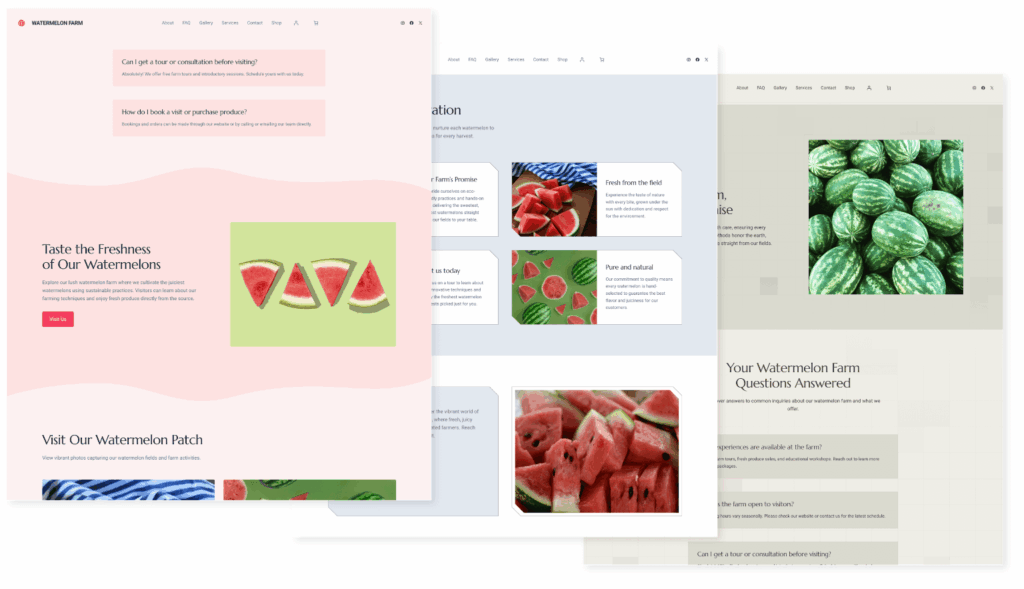
In Extendify v2.3 we introduced a new system for defining website design styles. This release adds three more options, helping users create even more unique and visually distinct sites.
Users can switch between styles using the AI Agent, with real-time previews to help find the best fit. As with everything in Extendify, this follows our no lock-in philosophy, with all styles built entirely on top of core WordPress features.
AI Agent: generate a custom color palette

The Extendable theme already comes with a wide selection of color palettes, but sometimes users need something more specific to match their brand. The AI Agent can now generate custom color palettes on request. Users can now describe what they want, like “change my site colors to dark blue and light red”, and the AI Agent generates four options to choose from. If none feel quite right, clicking “Retry” generates more.
This makes it easier than ever to match a website to a brand, without manually configuring individual color settings.
AutoLaunch: fully automated website creation
With URL Parameters, hosting partners can already pre-fill options during the website creation process, but users still need to select a design. This release introduces AutoLaunch, a new mode where partners can gather user information in their own onboarding flow and pass it to Extendify, which then automatically creates the website without requiring any additional input. Combined with expanded parameters that give partners more control over the final website’s functionality, AutoLaunch enables partners to build their own fully custom onboarding experience on top of Extendify.
Contact us if you’re interested in enabling AutoLaunch for your account.
Hosting AI Agent Integration
The AI Agent helps users with everything inside WordPress, but until now it couldn’t answer questions related to their hosting provider. With this release, we’re introducing a hosting partner integration where the AI Agent forwards hosting-related questions to the partner’s own AI agent and displays the response directly to the user, so they never need to leave their website to get answers.
This initial version works as a general knowledge base, answering common hosting questions without requiring any user authentication. It’s a lightweight starting point, and we’re already exploring deeper integrations that could include account-specific support.
If you’re interested in integrating your AI agent, please reach out.
Other Fixes and Improvements
This release comes with several fixes and refinements, including:
- Improved language support for Swedish.
- Added notification when a “Shop” page will be created for multi-page websites.
- Improved menu page ordering for multi-page websites.
- AI Agent: added the ability to update the logo and favicon, and improved image editing capabilities.
We’re already working on what’s next and would love to hear your thoughts on this release, including what you’d like to see in future updates.
The post Extendify v2.4: site animations, new styles, and custom color palettes appeared first on Extendify.
]]>New website design styles and design controls, Faster and more capable AI Agent.
The post Extendify v2.3: New website designs and faster AI Agent appeared first on Extendify.
]]>Here’s what’s new:
- New website design styles and design controls
- Faster and more capable AI Agent
Extendify v2.3 Overview Video
New website design styles

This release introduces a new system for defining website design styles, bringing greater consistency and cohesion across all site elements. Alongside existing settings like colors and typography, styles now work as a complementary layer that controls details such as border radius, shadows, and spacing, helping each website feel more polished and intentionally designed.
We’re launching with five initial styles and are already working on expanding this set in upcoming releases. As with everything in Extendify, this follows our no lock-in philosophy, with all styles built entirely on top of core WordPress features.
AI Agent: change design style
With the new style system, users can ask the AI Agent to change the website’s design style, and the update is applied across the entire site.
When a user asks to change the website style, the available style options are presented, and each one can be selected to preview the changes in real time. This makes it easy to compare styles and choose the one that fits best, without any rebuilding or manual adjustments.
Faster and more capable AI Agent
With the first few iterations of the AI Agent , we have prioritized functionality over speed. This release represents a significant step forward in AI Agent responsiveness in addition to improving the quality of the responses. The Agent now uses multiple AI models from different providers and automatically selects the most appropriate one for each type of task. This allows us to optimize both speed and accuracy based on user intent. The result is a faster, more capable AI Agent that continues to simplify how people build and manage WordPress sites. Because of smart model selection, the AI Agent is now able to handle larger blocks of code and make more complex changes.
Other Fixes and Improvements
This release comes with several fixes and refinements, including:
- Improved language support for Swedish and Estonian.
- Added a manual retry option for selected AI Agent tasks.
- Clearer messaging in the Reset Site modal to better explain the action.
- Added support for the Esc key to close the AI Agent selector.
- Improved handling and compatibility to run WordPress inside iframes.
Your feedback helps shape each release. Tell us what’s working well and where we can keep improving.
The post Extendify v2.3: New website designs and faster AI Agent appeared first on Extendify.
]]>New AI Agent capabilities: Change images and generate new ones with AI, Create a full page at once and add it to the navigation, Recommend and install plugins; Product Platform.
The post Extendify v2.2: More powerful AI actions appeared first on Extendify.
]]>Here’s what’s new:
- New AI Agent capabilities
- Change images and generate new ones with AI
- Create a full page at once and add it to the navigation
- Recommend and install plugins
- Product Platform
Extendify v2.2 Overview Video
Additional AI Agent Capabilities
The AI Agent capabilities are continually expanding. In order to know what the Agent can do, we’ve added new documentation on our website outlining the full range of AI Agent capabilities, along with example prompts for each. Partners can use this resource to better understand where each capability applies and find ready-to-use examples for marketing materials. It’s also the best place to stay up to date with the latest AI Agent improvements and learn how to communicate its value more effectively.
AI Agent: Change images and generate new ones with AI

In Extendify v2.1 we introduced the AI Agent Selector to make it easier to target specific elements on the page. With v2.2, users can now use the selector to change images directly from the front end, whether by uploading a new image, choosing one from the Media Library, or generating an AI-powered replacement.
This makes updating visuals faster and more intuitive, without ever needing to open the block editor.
AI Agent: Create a full page and add it to the navigation
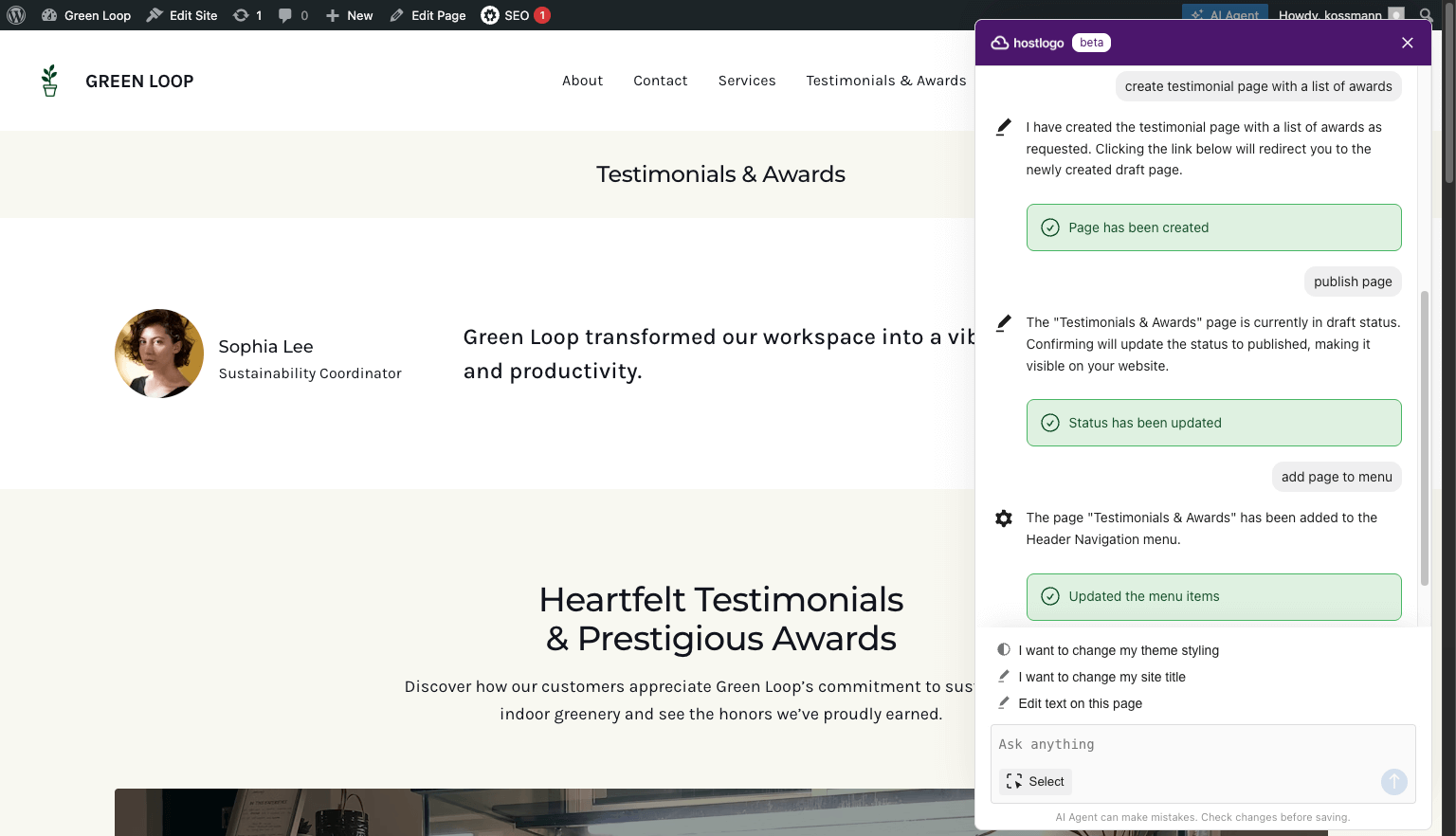
The AI Agent can now create fully designed pages using the same smart generation process as the AI Page Creator. Users can simply describe what they need, like “create a Contact page” or “create an about page with our team members and testimonials”, and the Agent takes care of the rest, matching the existing site style and tone.
Once the page is created, the Agent can also publish or unpublish it and add it directly to the navigation. From user testing, we see that adding pages to the navigation is often one of the most challenging tasks for new users. Now, this can be done with clear and simple requests, making page management much more straightforward.
AI Agent: Recommend and install plugins

The AI Agent can now install and activate plugins directly on request, helping users add new features to their site without opening the WordPress dashboard. Whether it’s adding a contact form, an SEO tool, or an analytics integration, the Agent manages the entire installation process from start to finish, transforming what used to be a multi-step task into a simple, guided experience.
When users ask for help choosing the right tool, such as “What plugin can I use to add booking to my site?”, the AI Agent can now recommend plugins from verified product integrations. These recommendations highlight trusted and compatible solutions that provide a smooth setup and dependable performance, so users no longer need to browse through thousands of plugins in the repository or test which ones actually work best for their site.
Product Platform
Our goal is to support users in achieving their online goals. Often, this requires additional functionality beyond what is offered in WordPress core, but the infinite flexibility of WordPress is both a benefit and a challenge for many users. Finding and setting up different WordPress plugins can be overwhelming.
We are expanding our product platform and investing in deep integrations with select WordPress products that solve important needs for our users. The goal is to help users succeed in finding the right solution for their needs, getting set up easily, and managing it going forward. This includes integrating the experience seamlessly with the initial onboarding, assistance in setting up, management via the AI Agent, and discovery of recommended solutions in plugin search.
All products in the Extendify product platform have passed quality checks, have contracted SLAs in place with us for resolving issues, and have committed resources to ensure the integration provides the best experience for Extendify users.
Here is a list of the current products in the Extendify platform. These cover many of the key functionalities and we will be expanding this in the coming months. If there are products or categories that you would like to see added, please let us know.
Other Fixes and Improvements
This release comes with several fixes and refinements, including:
- AI Agent: Added the ability to update the site description.
- AI Agent: Improved mobile support for a smoother editing experience on smaller screens.
- AI Agent: Refined status messages to provide clearer feedback while tasks are running.
- Launch: Improved handling of errors and failed requests, ensuring a more reliable experience during the site onboarding.
We’re constantly improving Extendify with your feedback in mind. Let us know what you think and how we can make it even more useful.
The post Extendify v2.2: More powerful AI actions appeared first on Extendify.
]]>Selector for the AI Agent, AI Agent: new capabilities, Support AI Agent: support for 3rd party plugins, URL Parameters: site tone and skip steps, Product Platform.
The post Extendify v2.1: AI Agent selector tool and new capabilities appeared first on Extendify.
]]>Here’s what’s new:
- Selector for the AI Agent
- AI Agent: new capabilities
- Support AI Agent: support for 3rd party plugins
- URL Parameters: site tone and skip steps
- Product Platform
Extendify v2.1 Overview Video
Selector for the AI Agent

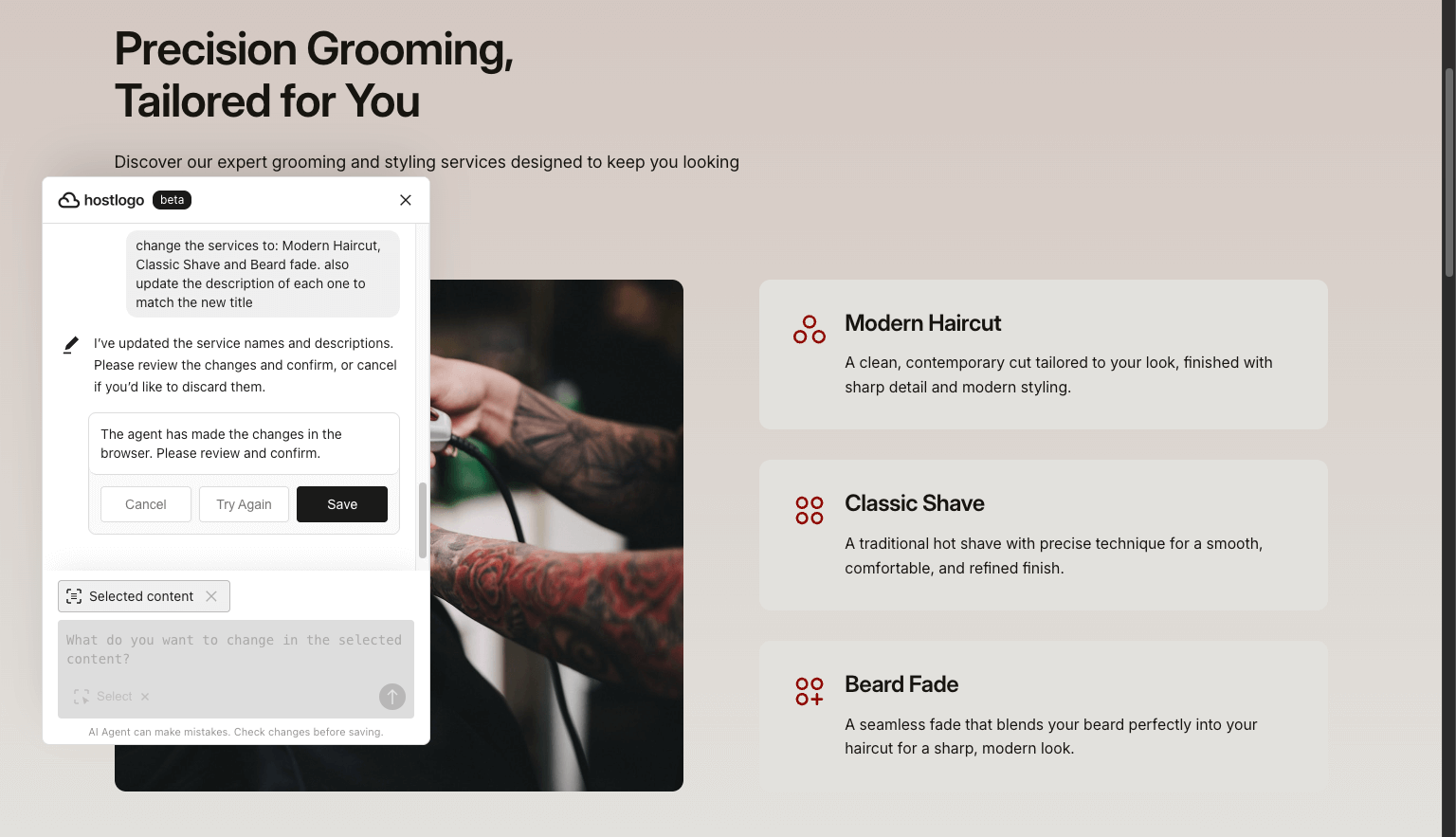
In Extendify v2.0 we introduced AI Agent, enabling users to update and modify their websites using natural language. Now we’ve added a selector tool that lets users point directly to the element they want to change. This makes the AI more precise and also simplifies requests, because users no longer need to explain the context. They can simply point to the element and say things like “add rounded borders”, “change background color to white”, or “make this more persuasive”.
AI Agent: new capabilities
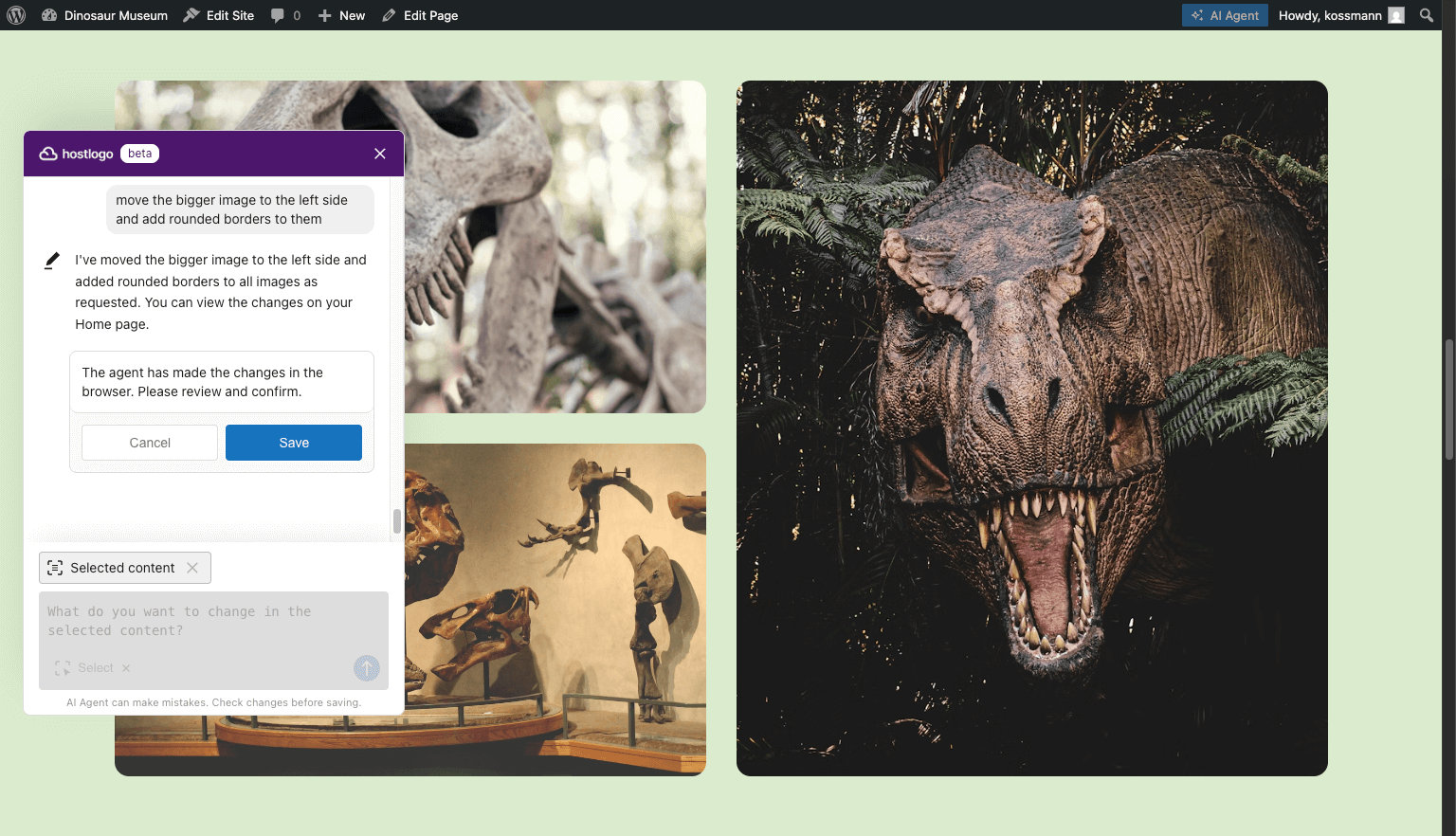
Our AI Agents can now handle an even broader set of tasks, including:
- Changing fonts (typography)
- Adjusting font size
- Updating the site title
- Modifying colors such as text or section backgrounds
- Editing border radius
- Updating button URLs
- Rearranging elements
- Removing blocks
And this is just the beginning. We’re committed to expanding their capabilities even further, so stay tuned for more updates.
Support AI Agent: support for 3rd party plugins
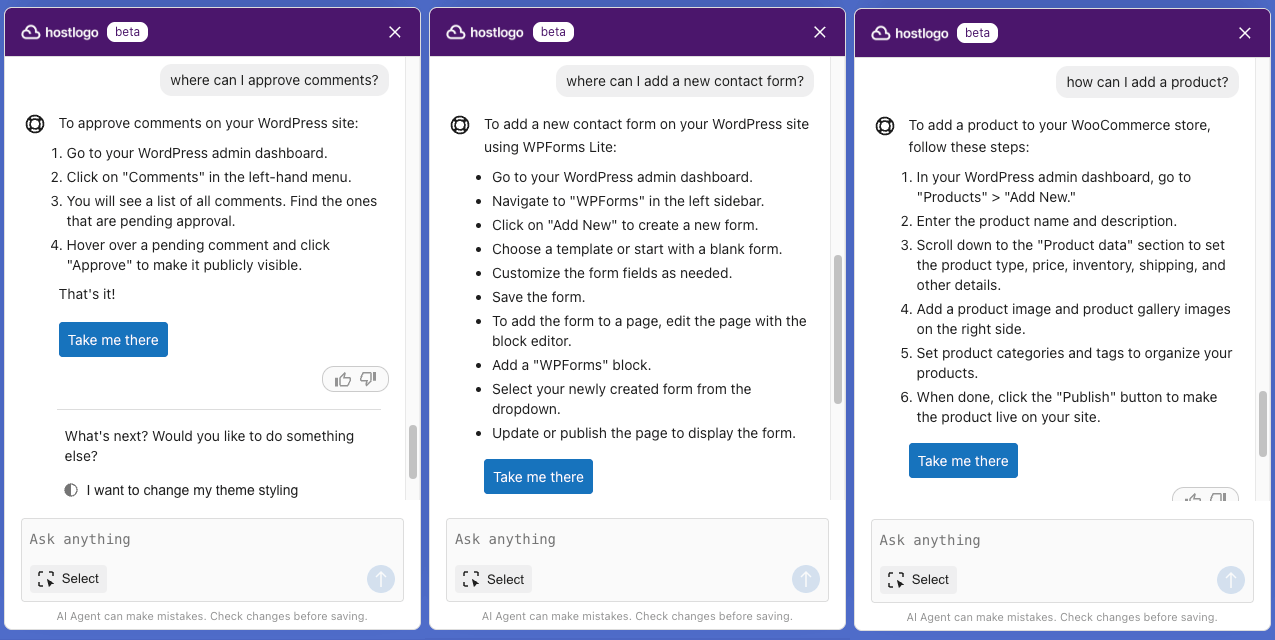
The Support AI Agent has also leveled up. It now recognizes all WordPress Admin pages, including those added by plugins. When users ask questions like “how can I add a product?”, “how can I create a new event?” or “how do I change my SEO settings?”, they receive step-by-step instructions along with a button that takes them directly to the exact admin page they need whenever available.
URL Parameters: site tone and skip steps
We’ve expanded URL Parameters to give hosting partners even more flexibility. Partners can now define the site tone and skip most of the onboarding steps, creating a smoother and more tailored site creation flow.
This unlocks powerful use cases, such as offering a plan for simple single-page websites where key information is already pre-filled and the user only needs to choose a layout, or an eCommerce plan where the correct options are automatically selected.
You can find the full documentation here: https://extendify.com/documentation/launch-url-parameters/
Product Platform
With over 60,000 different WordPress plugins, it can be overwhelming for users to find the right solution for them. With Extendify 2.1, we are rolling out the initial Extendify product platform with pre-vetted solutions being integrated with the Extendify experience. We will be expanding which types of solutions can be included in the Launch sites and also recommending solutions in plugin search results. In the future, plugin recommendations and support for activating/setting up will be added to the AI Agent capabilities.
Other Fixes and Improvements
This release also includes a bunch of fixes and enhancements, including:
- Improved language support for Japanese, Estonian and Spanish.
- Better color palette selection in Launch previews.
We’re excited to keep improving Extendify and would love to hear your thoughts on these updates.
The post Extendify v2.1: AI Agent selector tool and new capabilities appeared first on Extendify.
]]>The post Extendify v2.0: AI Agent and more appeared first on Extendify.
]]>We’re excited to introduce Extendify v2.0, one of our most powerful updates yet that completely transforms the way that users interact with their WordPress site with a team of AI Agents.
Additionally, this release features a smarter onboarding flow, improved image generation, expanded design options, and a more capable Analytics API.
Here’s what’s new:
- AI Agent: Your expert AI team
- Site specific onboarding questions
- AI Image generation with GPT Image1
- New styles, patterns and theme features
- Imprint page template
- Analytics API v2.1: More data and new filter
Extendify v2.0 Overview Video
AI Agent: Your expert AI Team
We’ve heard consistent feedback from WordPress users that they continue to struggle with navigating the admin to manage and update their site. With the release of our AI Agent, a team of specialized assistants lets users update and modify their websites using natural language, often from the front end of their website, without needing to navigate the complexities of the WordPress Admin panel.
Users can simply describe what they want (like “update content X to Y” or “change the site colors”) and the appropriate agent will take care of it. If the request falls outside the current capabilities of our agent team, the Support Agent steps in with clear, step-by-step guidance to help complete the task manually.
This release lays the foundation for an agent-driven approach to website management, making WordPress more accessible, without sacrificing the power and flexibility of the open platform it’s built on. New agents and capabilities will be rolling out regularly – expanding the agents that are available and updating the capabilities of the existing team.

For now, the AI Agent is available for all sites that have completed the Extendify onboarding and are using the Extendable theme. We plan to expand its availability to all sites soon.
This update will be enabled for all partners on September 9, 2025 to give partners time to update any screenshots or documentation with the AI Agent. Contact us if you’d like it enabled for your account sooner or need more time.
Site specific onboarding questions
Onboarding is now more intelligent and site-specific. Based on the user’s site information, our AI presents tailored questions and suggested answers, helping configure a more relevant experience without overwhelming users.
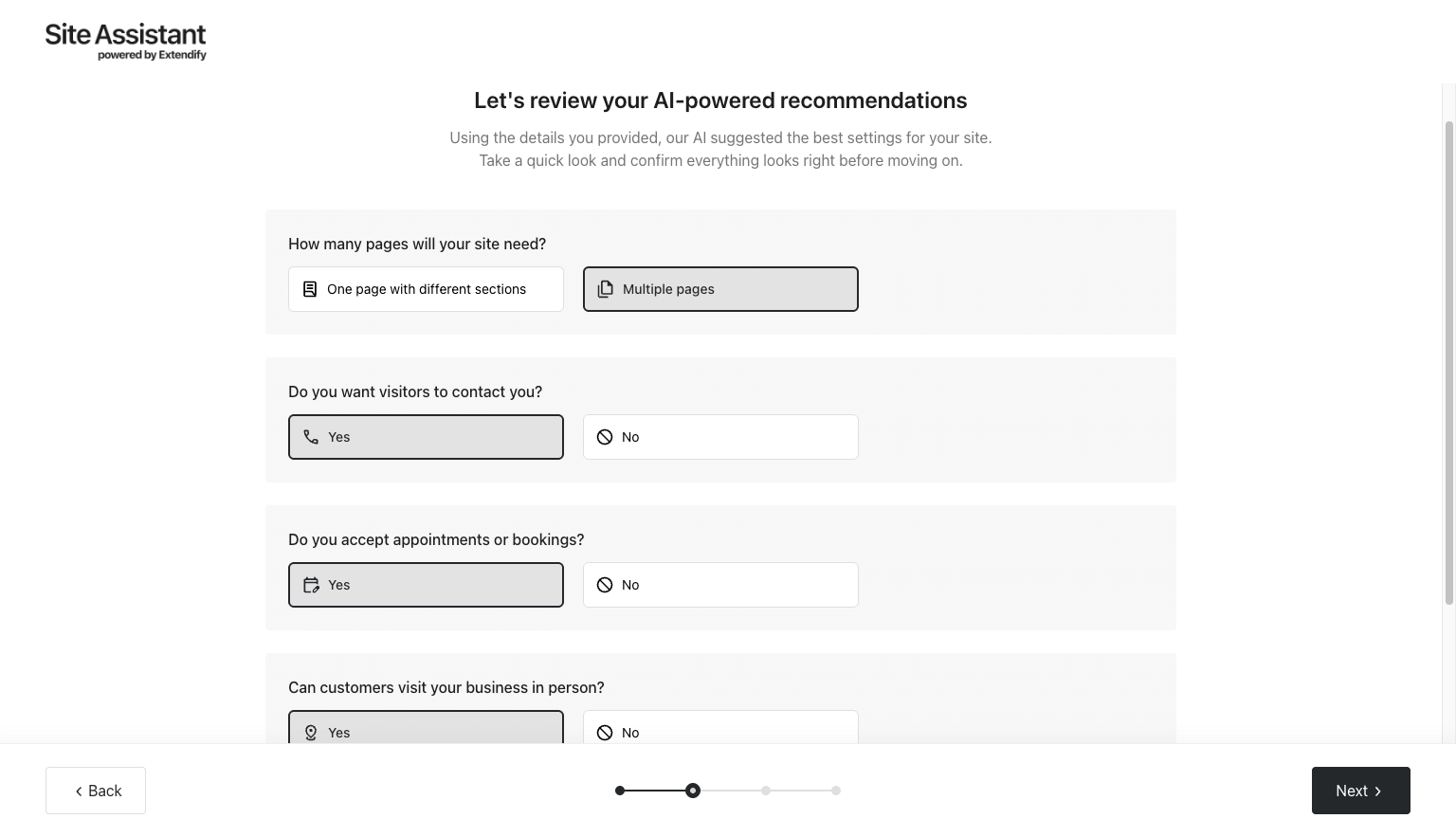
This update will also be enabled for all partners on September 9, 2025.
AI Image generation with GPT Image 1
High-quality visuals are key to building professional websites, so we’ve upgraded our image generation model from DALL·E 3 to GPT Image 1, delivering significantly sharper and more realistic images.
Image generation comparison for “dogs playing in the backyard”

New styles, patterns and theme features
As part of our ongoing effort to help users build more visually compelling websites, we’ve added 21 new styles variations and 150+ new patterns, now available in both the Launch Onboarding and the Design Library.

We’ve also updated the Extendable theme with a redesigned mobile menu that adapts to the site’s color palette and includes the site’s logo and title for a more polished, branded mobile experience.

Lastly, we improved how page titles work across the site, introducing new styles and making them easier to update using the WordPress Site Editor.
Imprint page template
For websites in German and French we’ve included a default Imprint page template, designed to help businesses comply with local legal requirements in countries where this page is mandatory. While users still need to update the content with their own business details, the pre-filled template provides a helpful starting point. This feature is “off” by default, but if you’d like it enabled for your customers, just contact us.
Analytics API v2.1: More data and new filter
This update gives Enterprise partners expanded access to detailed website data, including installed plugins and themes, total user count, and the timestamp of the last admin login. It also introduces a new filter that allows partners to retrieve only websites with data updates after a specific date, making data syncs more efficient.
We’ve updated our API documentation to reflect all recent changes, including a detailed breakdown of each field and its possible values to make integration easier and faster.
Enterprise partners can request access by contacting us.
Other Fixes and Improvements
This release also includes a bunch of fixes and enhancements, including:
- Improved language support for Japanese, Hebrew and French;
- A status page;
- Remove the time limit to always show “Reset site” option in the Site Assistant;
We are incredibly excited about this next milestone in our progress towards transforming the WordPress experience. We look forward to your feedback and ideas!
The post Extendify v2.0: AI Agent and more appeared first on Extendify.
]]>The post Extendify v1.19: AI Page Creation v2 and AI-Generated Logo appeared first on Extendify.
]]>- AI Page Creation v2: broader compatibility and 3rd-party plugin support
- AI-Generated Logo
- License Blocking by IP Range
- Analytics API v2: Multiple Website Data
- Pre-selected Site Objective and Site Structure
Extendify v1.19 Overview Video
AI Page Creation v2: broader compatibility and 3rd-party plugin support
In Extendify v1.18 AI-generated pages were enabled for users who completed onboarding. Now, any site can use it—regardless of onboarding status or whether the Extendable theme is used. Plus, AI Page Creation now supports plugin installation whenever a newly generated page calls for plugin-enabled functionality.
For example, if a user requests a page with a contact form or booking section, it can automatically install Contact Form 7 or SimplyBook.me—if those plugins have been selected by the partner. And this is just the beginning, more integrations are coming soon.

This improvement means that every WordPress site with Extendify can now create feature rich pages in seconds.
AI-Generated Logo
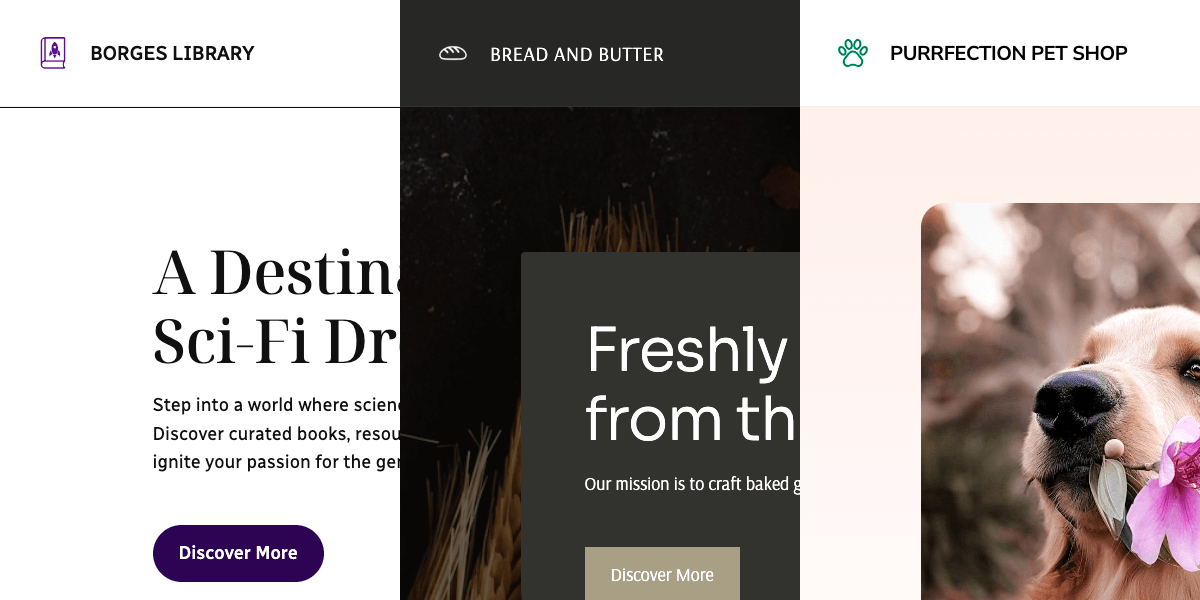
Every website created via Extendify onboarding now gets an AI-generated logo—a simple, clean design to give users a head start. It’s a small touch that makes websites feel more complete, right out of the gate.
License Blocking by IP Range
To support better access control for our Enterprise partners, we’ve added the ability to block license usage based on IP range. This ensures that Extendify features are only accessible to users within approved servers. If you’d like to configure this on your account, please contact our team at [email protected].
Analytics API v2: Multiple Website Data
Following the release of Analytics API v1 in March, v2 now allows Enterprise partners to access data across all their websites in a single request—with the option to filter by license. Results are available in both JSON and CSV formats.
For full technical details, view the API v2 documentation. Enterprise partners can request access by contacting us.
We’re already working on expanding the API to deliver more insights in upcoming releases.
Pre-selected Site Objective and Site Structure
We’ve expanded our URL parameter capabilities, allowing partners to pre-select the Site Objective (e.g., e-commerce, blog) and Site Structure (single or multi-page). This streamlines the onboarding experience and reduces setup time for new users.
For example, if you offer an e-commerce specific hosting plan, you can auto-select e-commerce for all of those users. Or, if you sell a lower-priced “single page site” hosting package, you can select single-page as the site structure for all of those customers.
We’re planning to add additional pre-fill options in future updates. Contact us if you’d like to set this up for your account.
Other Fixes and Improvements
This release also includes a bunch of fixes and enhancements, including:
- Improved language support for Italian, Brazilian Portuguese, Lithuanian and Spanish;
- Responsiveness improvements for Launch;
- Improved font script handling across multiple languages.
As always, we’d love to hear your feedback and ideas!
The post Extendify v1.19: AI Page Creation v2 and AI-Generated Logo appeared first on Extendify.
]]>The post Extendify Analytics API v1 – Single Website Data appeared first on Extendify.
]]>This first version of the API provides access to key website-level data, including:
- Title
- Creation Date
- Structure: Single-page or multi-page
- Objective: Business, eCommerce, Blog, etc.
- Category: Business or Personal
- Goals
- Launch Status
- Selected Pages
This data can help you trigger smarter workflows, track onboarding progress, and better understand how your customers are building their sites.
For full technical details, view the API documentation.
We’re already working on additional endpoints to expand the dataset and deliver even more actionable insights.
Access Details
This feature is available exclusively for partners on our Enterprise plan. To request access, contact us at [email protected].
We’d love to hear how you’re putting this to work. Sharing your integration plans helps us improve the API to better support your needs.
The post Extendify Analytics API v1 – Single Website Data appeared first on Extendify.
]]>The post Extendify v1.18: Tailored Onboarding Flow and AI Page Creation appeared first on Extendify.
]]>- Tailored Onboarding Flow
- AI Page Creation
- Pre-Filled Site Title and Description
- Product Recommendations
Extendify v1.18 Overview Video
Tailored Onboarding Flow
Getting started is now even easier. Users first choose from five website types, and our AI uses this selection along with the website description to automatically set relevant goals. This creates a more intuitive setup experience, ensuring the website is aligned with the user’s needs from the start.
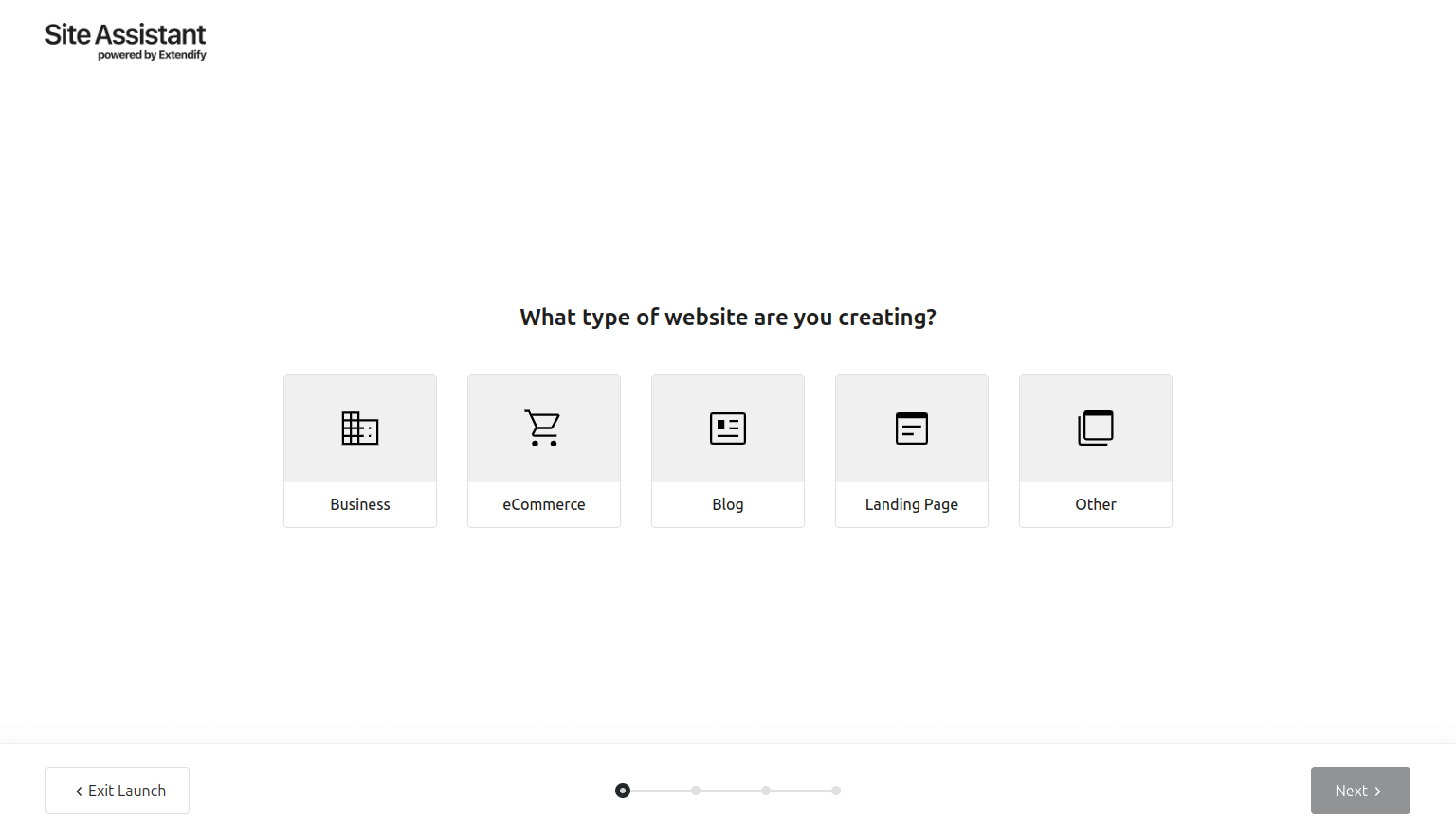
A new Landing Page option is also available, making it easy to create a conversion-focused page with a custom CTA (e.g. an affiliate link).
This update will be enabled for all partners on March 26, 2025 to give partners time to update any screenshots or documentation with the new flow. You can preview the new flow by adding `&preview` to the end of the Launch URL. Contact us if you’d like it enabled for your account sooner.
AI Page Creation
Creating new pages is now just as seamless as setting up a website. Simply describe the page, and Extendify will generate a fully styled version that matches the site’s existing design. Users can easily update the overall website description to ensure new pages stay aligned.
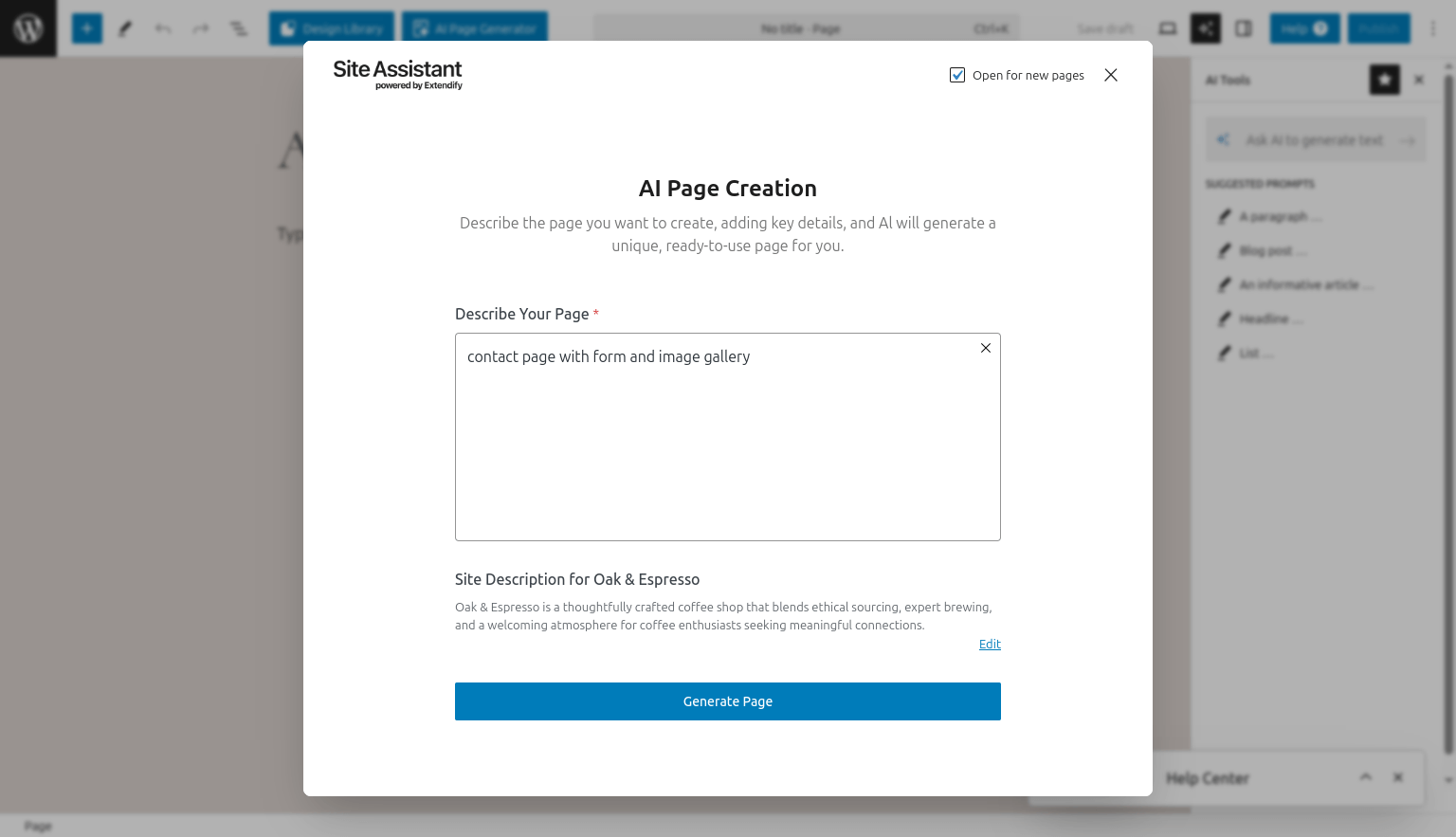
This feature is currently available for all sites that have completed the Extendify onboarding, with plans to expand to all sites soon.
Pre-Filled Site Title and Description
Partners can now pass a site title and description via URL parameters, making setup even faster. This ensures users start with relevant content while still having the flexibility to edit before launching. Future updates will expand pre-filled options to streamline onboarding even further.
Contact us if you’d like to set this up for your account.
Product Recommendations
We’re working on adding product recommendations to help users discover the best tools for their websites. These personalized suggestions will be seamlessly integrated into the dashboard. An early version featuring plugin search recommendations is planned for the next release.
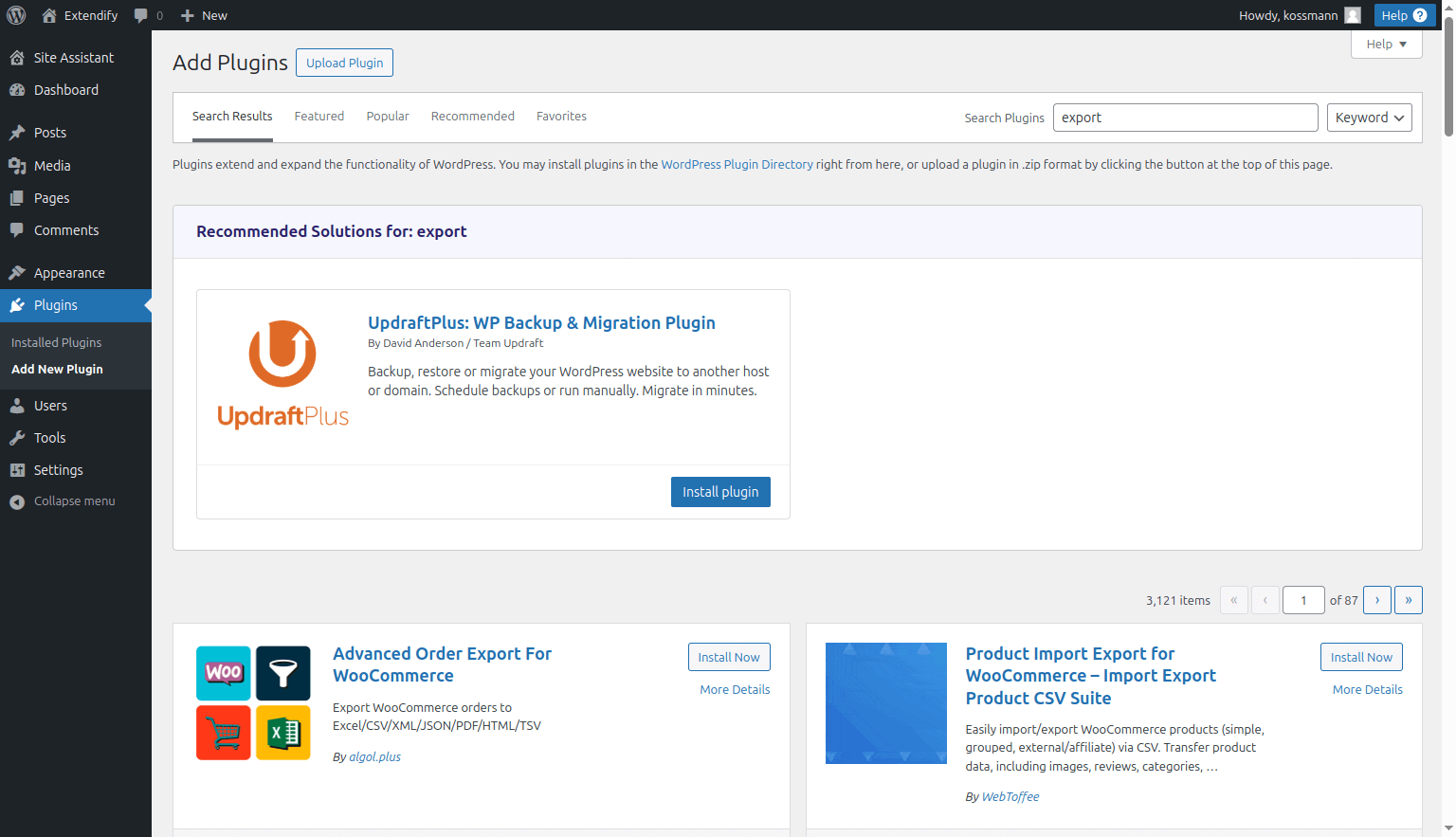
Over the coming months, we will be testing different versions of these recommendations to evaluate the best ways to connect users with the right solutions. This will also be an opportunity for our hosting partners to earn a revenue share based on 3rd party products purchased via our product partnerships program which we expect to launch in 2H 2025.
Other Fixes and Improvements
This release also includes a bunch of fixes and enhancements, including:
- Improved language support for Japanese, Hungarian, Slovak, and German;
- Better redirection handling for users without the right permissions;
- Support for separate SLD and TLD variables in domain recommendation.
As always, we’d love to hear your feedback and ideas!
The post Extendify v1.18: Tailored Onboarding Flow and AI Page Creation appeared first on Extendify.
]]>The post Extendify v1.17: New design styles and AI Typography selection appeared first on Extendify.
]]>- New design styles
- AI-powered typography selection
- Enhanced WooCommerce Integration
Also, we announced an exciting investment in Extendify that will help fuel our plans for 2025 and beyond.
Extendify v1.17 Overview Video
New design styles
Creating a personalized website for every user is at the heart of what we do. In this update, we’ve expanded the range of design styles available for the AI to select from, leveraging the latest WordPress functionalities. The result? Even more diverse and stunning website designs tailored to the user’s needs.

AI Typography selection
With this release, our AI intelligently selects fonts tailored to the user website’s purpose and language needs—now with support for non-Latin scripts.
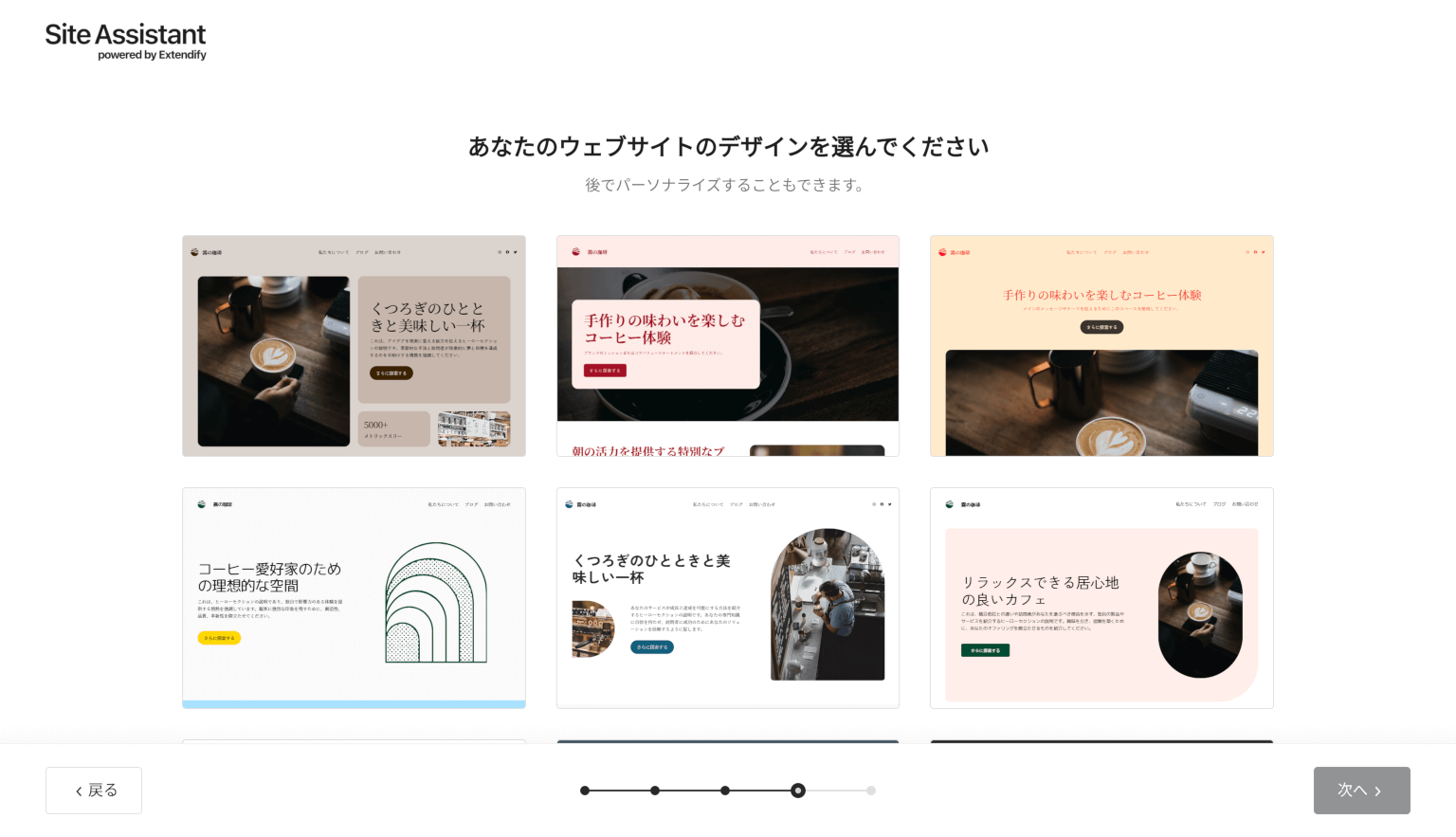
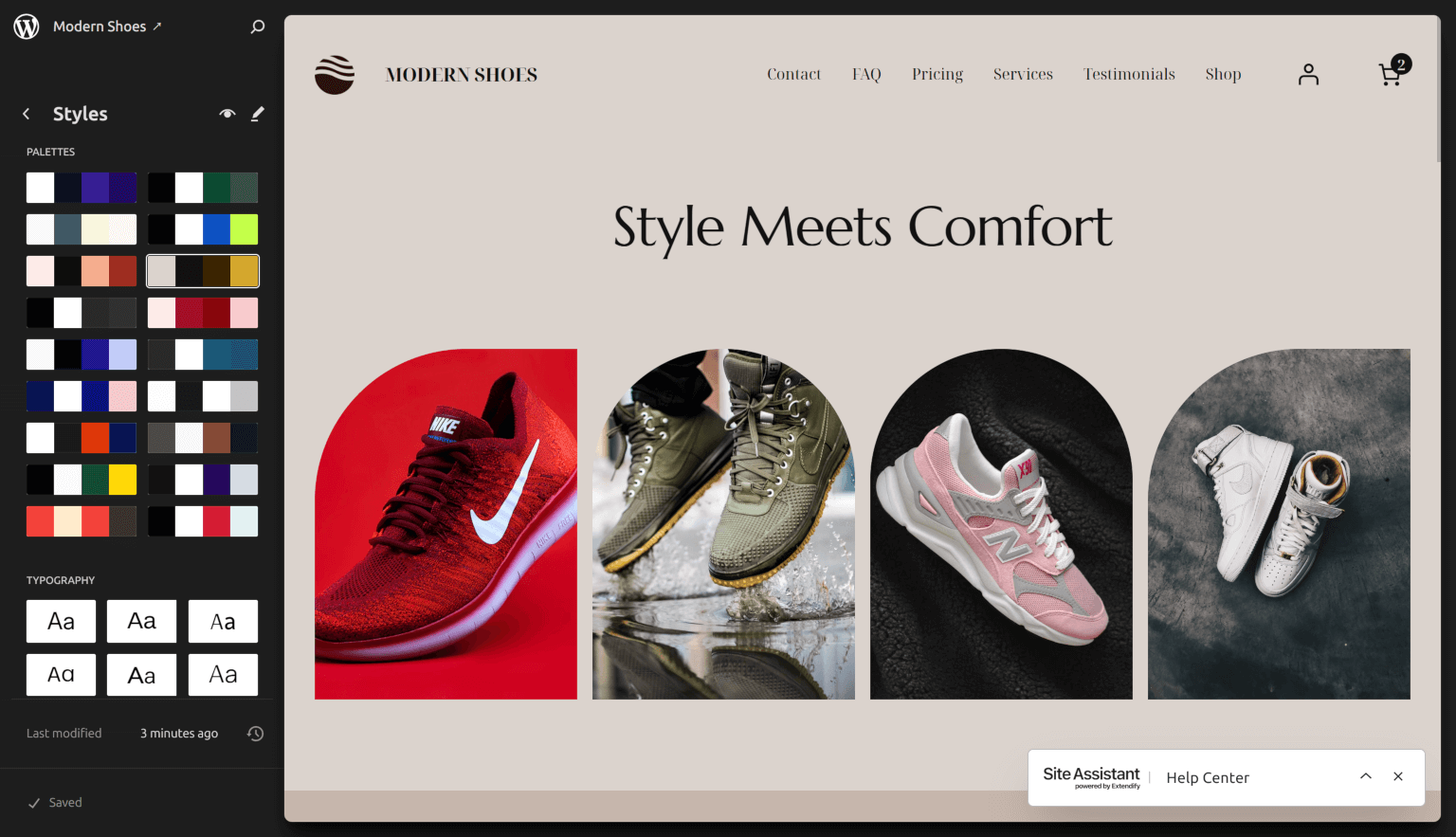
Plus, users can now customize the color palettes and typography directly in the Site Editor after the site is created.
Enhanced WooCommerce Integration
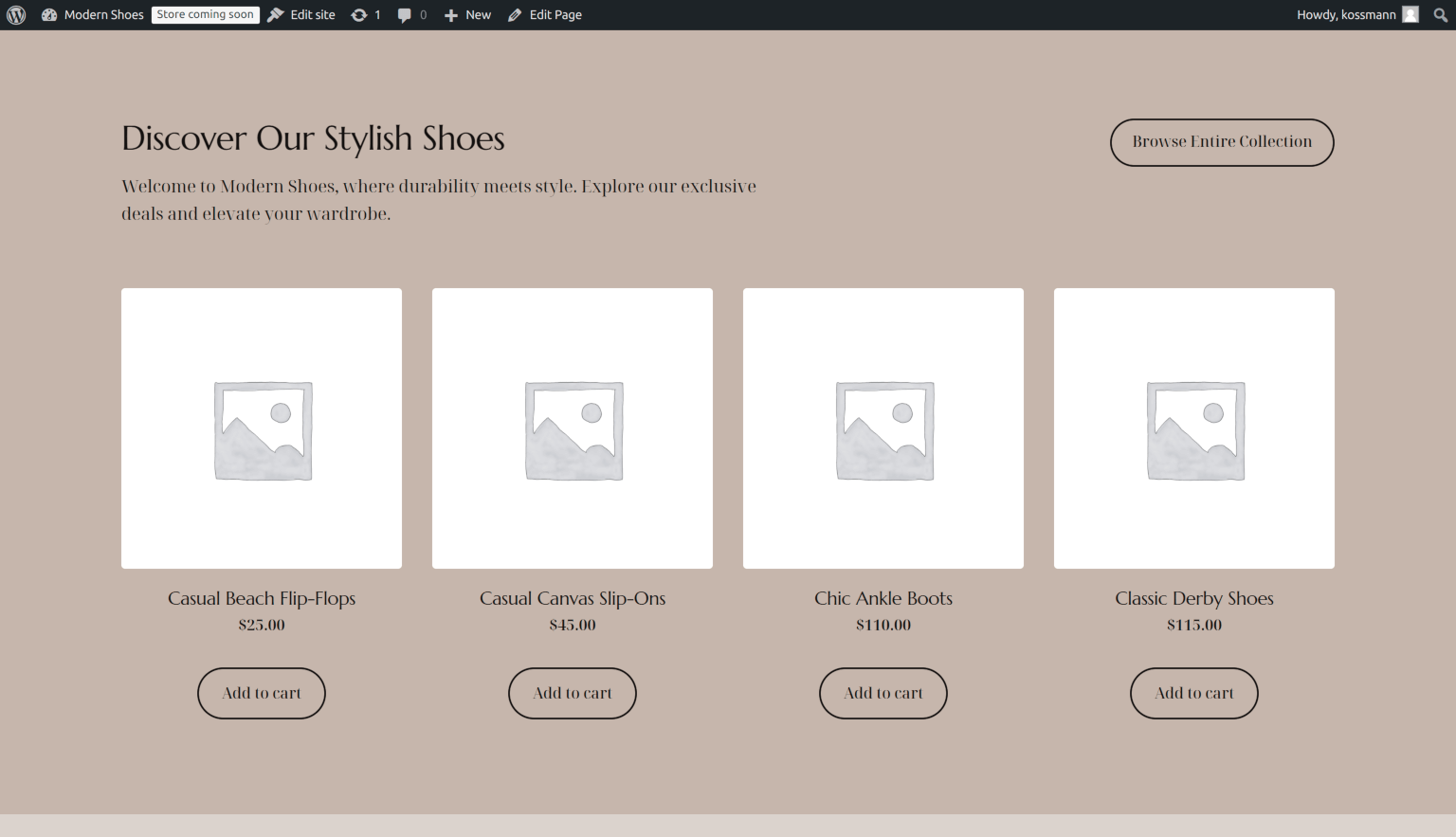
In v1.16, we introduced WooCommerce pattern support, and now we’re taking it a step further. With this release, we’re adding tailored demo content that adapts to the user website’s information, making it easier than ever for them to jumpstart their e-commerce journey.
Other Fixes and Improvements
This release also includes a bunch of fixes and enhancements, including:
- Added support for Arabic and Lithuanian;
- Full Right-to-Left (RTL) language support in the Extendify plugin and Extendable theme.
As always, we’d love to hear your feedback and ideas. Let us know what you think!
The post Extendify v1.17: New design styles and AI Typography selection appeared first on Extendify.
]]>The post Extendify accelerates growth with help from world-class investors appeared first on Extendify.
]]>We are proud to have the support of leading investors in the WordPress, hosting, and SMB software industries. Extendify shareholders include: Automattic (the company behind WordPress.com, WooCommerce, and more), team.blue (one of the largest web hosting groups with over 50 leading hosting brands), Emilia Capital (from the founder + CEO of Yoast SEO), and product leaders bringing experience from companies like Adobe, Salesforce, Square, and Freshworks.
Last but not least, we couldn’t be happier to have our very first investors, Village Global and Mike Levinthal, continue with us on this journey. Their belief and support in Extendify from the very beginning have been invaluable.
We have exciting initiatives planned in 2025, including:
- Continued innovation in our AI-powered WordPress onboarding experience and tools to support the ongoing site editing + management
- Personalized AI-powered recommendations to help all users with their “next best action”
- Product platform to recommend the best solutions to users and help them activate each one seamlessly within WordPress
- Insights platform to help our hosting partners better understand and support their customer needs.
We couldn’t be more excited about the future.
Artur + Chris
The post Extendify accelerates growth with help from world-class investors appeared first on Extendify.
]]>