The post Fully Outsourced vs Co-Managed IT: Which Support Model Fits Your Business? appeared first on F1 Information Technologies.
]]>Maybe you have someone internal who gets overwhelmed when real problems hit. Maybe you’re wearing the IT hat along with five other hats. Maybe you’re just hoping nothing breaks.
The good news is IT support is more flexible than you think. Whether you need a full IT department or just expert backup for your internal team, there’s a solution that fits.
Understanding Fully Outsourced IT Support
Fully outsourced IT means you hand the whole operation to an external team. They become your IT department handling server management, user support, security monitoring, software updates, vendor relationships and strategic planning.
This approach works best when you’re too small to justify a full-time IT person. If you have 5-20 employees, hiring someone full-time is expensive and probably unnecessary. Fully outsourced IT support gives you access to an entire team of specialists for a predictable monthly cost that’s typically less than hiring one employee.
It also makes sense when nobody on your team wants to be the IT person. With outsourced IT services, technology becomes someone else’s full-time responsibility. This leaves your team free to focus on your real, everyday work.
When Co-Managed IT Services Make More Sense
Does this sound familiar? Your IT team is brilliant, but they’re drowning. They’re stuck playing helpdesk hero with password resets and network hiccups instead of focusing on projects that actually grow your business.
Co-managed IT means you have someone internal handling day-to-day tasks while an external partner provides expertise and backup. Your internal IT person handles password resets and new computer setups. Your external partner handles complex network issues and security strategy.
This works when you already have capable internal IT staff who need support. Even good internal IT people can’t know everything or be available 24/7. Co-managed IT services give your internal person access to senior-level expertise when they hit something beyond their skills.
It also works when your internal IT person is overwhelmed. If they’re drowning in tickets and working nights and weekends, they need help. Co-managed IT provides immediate relief.
Comprehensive or Co-Managed? Explaining F1 IT’s Approach to Both
Our Comprehensive IT Support Plan stops your team from wasting talent on IT fires. Your people won’t spend hours every week on tech problems instead of their real jobs.
You get CTO-level expertise without the salary. 24/7 IT management gives you access to senior-level knowledge without hiring internal IT staff. We handle emergencies at any hour. Printer problems and network crashes become our problem, not yours.
Our Co-Managed IT Plan is for teams that need backup, not replacement. What if your IT team could focus on innovation instead of interruptions? F1 IT’s Co-Managed IT Plan fills the gaps: 24/7 helpdesk support, cloud storage, vulnerability scanning, critical patch work and strategic consulting.
We handle day-to-day maintenance so your team can run your business. Ready to give your IT heroes the backup they deserve?
Choosing the Right IT Support Model for Your Business
You might start with fully outsourced IT when you’re small, then transition to co-managed services as you grow and hire internal staff.
The best approach depends on a few key questions:
- Do you have anyone internal with real IT knowledge and bandwidth? If no, fully outsourced makes sense. If yes but they’re stretched thin, co-managed is right.
- What’s your budget? If you can’t afford a full-time IT salary plus benefits and tools, outsourced IT services are more cost-effective. If you already have someone, co-managed extends their capabilities.
- How complex are your technology needs? Basic email and file sharing? Fully outsourced works great. Industry-specific applications, compliance requirements or advanced security? You need the combination co-managed provides.
How F1 IT Approaches IT Support
We work with businesses in both fully outsourced and co-managed arrangements because different companies need different things.
For fully outsourced clients, we become your IT department handling everything from daily user support to strategic planning. For co-managed clients, we work alongside your internal IT person providing backup, specialized expertise and additional coverage.
Serving businesses in Fort Worth and across Texas, we handle the complex world of technology so you can focus on serving your clients and growing your business.
Finding Your IT Support Solution
The real question isn’t which option is better. The real question is which option fits your business right now.
Technology problems don’t wait. They compound, create vulnerabilities and waste time your team should spend on actual work.
Not sure whether fully outsourced or co-managed IT makes sense for your situation? Let’s talk through it. We’ll help you understand what each approach would look like for your specific needs.
FAQ
What is the difference between co-managed IT and fully outsourced IT? Fully outsourced IT means an external team handles all your technology needs and becomes your complete IT department. Co-managed IT means you have internal IT staff who handle day-to-day tasks, while an external partner provides backup, specialized expertise and 24/7 support for complex issues.
How much does fully outsourced IT support cost? Fully outsourced IT support typically costs less than hiring a full-time IT employee with benefits. Pricing varies based on company size, technology complexity and support needs, but most small businesses find it more cost-effective than maintaining internal staff.
What size business benefits most from fully outsourced IT? Businesses with 5-20 employees typically benefit most from fully outsourced IT support. At this size, you need professional IT management but don’t have enough work to keep a full-time IT person busy or justify the expense of hiring internal staff.
How does co-managed IT support help overwhelmed IT staff? Co-managed IT provides backup for after-hours emergencies, handles complex projects that would monopolize your internal person’s time, offers specialized expertise for security and compliance, and provides the additional coverage that prevents burnout and ensures business continuity.
The post Fully Outsourced vs Co-Managed IT: Which Support Model Fits Your Business? appeared first on F1 Information Technologies.
]]>The post IT Infrastructure for Growing Businesses: How Technology Supports Business Growth appeared first on F1 Information Technologies.
]]>Then your systems start buckling under the pressure.
New employees wait days for accounts and equipment. Remote workers struggle to access files. Applications slow to a crawl when everyone’s online. Your team spends more time fighting with technology than serving customers.
Here’s the reality: Your IT infrastructure either scales with your business growth or becomes the bottleneck that chokes it. The good news? You don’t have to figure this out alone. We’re here to help you assess where your systems stand.
Growth Reveals What’s Already Broken
When you’re a small team, you can work around IT limitations. Five people sharing files through email attachments is annoying but manageable. One person handling IT setup when someone new starts will work. Everyone in the office means access issues don’t matter much.
But what works for five people collapses at 15. What’s manageable at 15 becomes impossible at 30.
Growth doesn’t break your IT systems. It exposes the cracks that were always there. The workarounds stop working. The “good enough for now” solutions aren’t good enough anymore.
Scalable IT systems are built to handle growth before it happens. They make adding people, locations and capabilities straightforward rather than painful.
Employee Onboarding Technology Sets the Tone
First impressions matter. When a new employee starts and their email isn’t set up, their computer isn’t ready or they can’t access the systems they need, you’re telling them you’re not prepared for growth.
Proper IT infrastructure makes onboarding seamless. New hires receive equipment set up and ready to go. Their accounts are created with appropriate access. They can be productive from day one instead of spending their first week waiting for IT access.
Fast onboarding directly impacts how quickly new employees contribute value. Every day spent waiting for system access is a day you’re paying someone who can’t do their job. This is where IT for business growth becomes critical.
Strong onboarding systems also reduce burden on your existing team. Instead of pulling experienced employees away from work to manually set up each new person, automated provisioning handles technical setup. Your team focuses on training rather than troubleshooting.
Remote Access Solutions Enable Real Flexibility
Growth often means expanding beyond a single office. You hire talent in other cities. You open additional locations. Your sales team needs customer data while traveling. Your executives need to review reports from anywhere.
None of this works without proper remote access infrastructure.
Modern business requires secure access from anywhere. Cloud-based systems let employees work from home, client sites, or while traveling without compromising security or functionality. File access and collaboration happen seamlessly regardless of location.
Poor remote access creates real limitations. If your systems only work from the office, you can’t hire remote employees. You can’t offer flexibility that top talent expects. Business travel means being cut off from critical information.
Strong remote access solutions ensure business continuity. When weather, illness or unexpected situations prevent people from reaching the office, operations continue. Security matters too. Remote access done right with VPNs, multi-factor authentication and proper access controls keeps your data secure while maintaining accessibility.
Scalable IT Systems Prevent Slowdowns as Teams Expand
Nothing kills productivity like waiting for systems to respond. Applications that load slowly. Files that take forever to open. Systems that crash when too many people are logged in simultaneously.
Business technology infrastructure needs capacity to handle growth. When you add employees, your systems should maintain performance. Bandwidth needs to support increased usage. Server capacity needs to handle more users. Storage needs to accommodate expanding data.
Many businesses don’t think about capacity until it becomes a problem. They add people and assume systems will handle it. Then performance degrades. Work slows down across the entire organization.
The cost of poor performance is hard to measure but very real. If 20 employees each waste 15 minutes per day waiting for slow systems, that’s five hours of lost productivity daily. For growing businesses operating on tight margins, that inefficiency directly impacts profitability.
Properly scaled infrastructure maintains performance as you grow. This includes cloud services that automatically scale resources, network infrastructure designed with headroom for expansion and systems that handle increased load without degradation.
How F1 IT Supports Growing Businesses
This is exactly what F1 IT specializes in. We build IT infrastructure for growing businesses that supports expansion rather than limiting it.
We design scalable IT systems with expansion in mind from the start. Whether you’re planning to double your team in the next year or you’re already experiencing growing pains from rapid hiring, we create infrastructure that handles increased demand without performance issues.
We implement employee onboarding technology that gets new employees operational quickly. Automated provisioning, pre-configured equipment and proper access management mean new hires can contribute immediately rather than waiting for IT setup.
We establish secure remote access solutions that work reliably from anywhere. Your team gets the flexibility to work where they’re most effective while maintaining the security and access they need to be productive.
We monitor performance and capacity to catch issues before they impact your team. When growth creates new demands on your systems, we’re proactively adjusting resources rather than reactively fixing problems after they’ve already slowed down your business.
Serving businesses in Fort Worth and across Texas, we’re compassionate, trustworthy and drama-free. We put in the work, take pride in what we do and always strive to exceed expectations, because that’s who we are.
From comprehensive IT support to government-level security compliance, we handle the complex world of technology so you can focus on what you do best: serving your clients and growing your business.
IT Infrastructure That Supports Growth
If your IT systems are struggling with your current team size, they’re not ready to support business growth. The problems you’re experiencing now will only multiply as you add people.
Strong IT infrastructure for growing businesses enables expansion. It lets you hire confidently, expand into new markets and take on bigger clients without worrying whether your systems can handle it. The businesses that scale successfully build infrastructure capable of supporting growth before they desperately need it.
Ready to build scalable IT systems that support your growth instead of limiting it? Contact F1 IT to discuss infrastructure that scales with your business.
The post IT Infrastructure for Growing Businesses: How Technology Supports Business Growth appeared first on F1 Information Technologies.
]]>The post Cloud Migration for Small Business: What It Means and Why It Matters appeared first on F1 Information Technologies.
]]>What “Cloud Computing” Actually Means
Strip away the tech jargon, and the cloud is surprisingly simple: It’s professionally managed servers and storage that you access over the internet instead of maintaining equipment yourself.
Instead of running software on a server in your office, you access it through the internet from secure data centers maintained by companies like Microsoft, Google or Amazon. Instead of saving files locally, you save them to enterprise-grade storage with built-in redundancy and security. The same major technology companies that power businesses worldwide are now making that infrastructure available to companies of any size.
For businesses, cloud services mean shifting from owning IT infrastructure to accessing technology as a service. Your team still uses the same applications and files. The difference is where everything lives and who’s responsible for keeping it running.
Why Companies Are Moving to the Cloud
Flexibility to grow or shrink without huge investments. Traditional IT requires you to predict your needs months in advance and invest accordingly. Need more storage? Buy a new server. Hiring more people? Purchase additional licenses and equipment. Scaling down? You’re stuck with expensive infrastructure you no longer need.
Business cloud solutions scale with your actual needs. Add users when you hire, reduce them when people leave. Increase storage when you need it, decrease when you don’t. You pay for what you use. A small business can access the same enterprise-grade technology as major corporations without the capital investment.
Your team can work from anywhere. Cloud applications and files are accessible from any device with an internet connection. Employees working from home have the same access as those in the office. Your sales team can pull up customer information from their phones. Managers can review reports while traveling.
This isn’t just about remote work convenience. It’s about business continuity. When weather, illness or unexpected events prevent people from getting to the office, cloud-based operations keep running.
Avoiding downtime protects your business. When your on-site server crashes, your business stops until it’s fixed. You’re scrambling to find an IT technician, hoping the problem isn’t hardware failure and losing money every hour systems are down.
Cloud providers maintain redundant systems across multiple data centers. If one server fails, your applications automatically failover to another. Power outages at your office don’t affect your access to cloud systems. This level of reliability would cost hundreds of thousands of dollars to achieve on your own.
Professional maintenance happens automatically. Software updates, security patches and performance optimization happen continuously without you having to do anything. Your cloud provider employs teams of specialists maintaining systems around the clock.
Predictable costs replace surprise expenses. Traditional IT means upfront capital expenses for equipment, then unpredictable costs when things break. Cloud services operate on subscription pricing. You know exactly what you’ll pay each month.
Enhanced security beyond what most small businesses can achieve alone. Cloud providers invest millions in security infrastructure and expert security teams. They maintain physical security at data centers, implement advanced threat detection and ensure compliance with regulations like HIPAA and CJIS.
Cloud Migration Services: What the Process Actually Looks Like
The idea of “moving to the cloud” can feel overwhelming. Where do you start? What happens to your existing systems? How long does it take?
This is where having the right partner makes all the difference. A cloud migration isn’t something you should attempt on your own. Done wrong, it creates more problems than it solves. Done right, with proper planning and expertise, it transforms how your business operates.
The process starts with understanding what you currently have and what you actually need. Not every business requires the same cloud solution. Your industry, compliance requirements and how your team works all influence the right approach.
Then comes planning the migration itself. Which systems move first? How do you maintain operations during the transition? What’s the timeline? These questions need answers before anything moves.
The actual migration requires technical expertise. Files need to transfer without corruption. Applications need configuration. Security controls need implementation. Everything needs testing before going live. After migration, ongoing management ensures everything runs smoothly.
How F1 IT Handles Cloud Technology Migration
This is exactly what F1 IT specializes in. We take the complexity of cloud migration off your hands so you can keep running your business while we handle the technical work.
We start by assessing your current environment and understanding your business needs. We design a cloud solution that makes sense for how you actually work. We create a migration plan that minimizes disruption to your operations.
We handle the entire technical implementation. Your data moves securely. Your applications get configured properly. Your team gets set up with the right access and permissions. We test everything thoroughly before cutting over.
But more importantly, we don’t disappear after migration. We provide ongoing management and support. When questions arise or issues appear, we’re here. Cloud management becomes our responsibility, not another thing on your team’s already full plate.
Serving businesses in Fort Worth and across Texas, we’re compassionate, trustworthy and drama-free. We put in the work, take pride in what we do and always strive to exceed expectations, because that’s who we are.
From comprehensive IT support to government-level security compliance, we handle the complex world of technology so you can focus on what you do best: serving your clients and growing your business.
Is Cloud Migration Right for Your Business?
If you’re still running critical systems on aging servers in your office, dealing with access issues when people work remotely, worried about what happens if your server crashes or struggling to maintain and secure your systems properly, then yes, cloud migration is worth serious consideration.
The cloud isn’t right for absolutely everyone. But for most small and medium businesses, the flexibility, reliability and accessibility of cloud computing provide significant advantages over maintaining your own infrastructure.
Ready to explore what moving to the cloud could mean for your business? Contact F1 IT today to discuss building a cloud strategy that actually works for how you operate
The post Cloud Migration for Small Business: What It Means and Why It Matters appeared first on F1 Information Technologies.
]]>The post Business Backup & Recovery: Why Every Company Needs a Disaster Recovery Plan appeared first on F1 Information Technologies.
]]>Any of these could happen tomorrow. Without a disaster recovery plan and proper data backup solutions, the only question that matters is: Can you recover?
What Is Backup and Recovery for Business?
Backup and recovery is your insurance policy for business continuity. Data backup solutions create copies of your critical information and store them safely away from your primary systems. Disaster recovery is the ability to restore that data and get your business operational again when disaster strikes.
A solid business continuity plan covers your files, databases, email systems, applications, user settings and the entire operating environment. It defines your recovery time objective (how fast you can get back online), your recovery point objective (how much data you can afford to lose) and who does what when systems go down.
The Cost of Not Having a Disaster Recovery Plan
Companies without proper backup and recovery don’t just lose data. They lose everything.
Your business stops operating. No access to customer records means you can’t serve clients. No financial data means you can’t process payments or payroll. Every hour of downtime costs money, and for small businesses, extended downtime often means permanent closure. Data loss prevention starts with a tested disaster recovery plan.
Data disappears forever. Ransomware destroys files. Hardware failures corrupt data beyond repair. Without reliable data backup solutions, years of customer information, financial records and business-critical documents vanish instantly.
Recovery takes weeks instead of hours. Companies scrambling to rebuild from scratch face massive delays recreating data, reinstalling applications and reconfiguring settings. Even if you eventually recover, the time lost kills client relationships and momentum.
Compliance violations pile up. HIPAA requires healthcare organizations to maintain and restore patient records. Financial regulations demand transaction history preservation. Losing data you’re legally required to keep brings regulatory fines on top of operational disaster.
Trust evaporates. Clients who trusted you with their information don’t forget when you can’t protect or recover it. Your reputation as a reliable business gets destroyed along with your data.
Why Regular Backup Testing Is Essential
Most companies that think they have backups don’t actually have working disaster recovery solutions. They have files sitting somewhere that may or may not be complete, current or recoverable.
Backups fail silently. Your system might run every night and report success, but the data could be corrupted or incomplete. You won’t discover this until you desperately need to restore something.
Recovery procedures break. Software updates change configurations. Staff who knew the process leave. Documentation gets outdated. Without regular disaster recovery testing, your recovery plan becomes theoretical rather than practical.
Recovery takes longer than you think. Large data sets take time to transfer. Applications need reconfiguration. Backup testing reveals your actual recovery time so you know whether your business continuity plan meets operational needs.
You discover gaps before they matter. Testing uncovers what’s not being backed up or what can’t be restored. Finding these gaps during a test is inconvenient. Finding them during a real disaster is catastrophic.
Your team knows what to do. When crisis hits, you don’t want people reading documentation for the first time. Regular testing trains your team on disaster recovery procedures and ensures everyone knows their role when every minute counts.
Professional Backup and Recovery Services
F1 IT specializes in taking technology challenges off your hands so you can focus on running your business. Backup and disaster recovery is one of those areas where expertise matters, because doing it wrong means finding out too late.
We design data backup solutions that match your specific needs. We implement automated cloud backup systems that capture everything critical without slowing operations. We store backups securely with encryption and offsite redundancy so disasters that hit your primary location don’t destroy your recovery options.
But more importantly, we conduct regular disaster recovery testing. We verify backups work by actually restoring data and systems on a schedule. We document recovery procedures clearly, train your team and continuously monitor backup systems to catch failures before they become emergencies.
Serving businesses is what we do. We’re compassionate, trustworthy and drama-free. We put in the work, take pride in what we do and always strive to exceed expectations, because that’s who we are.
Protect Your Business With a Tested Disaster Recovery Plan
Every business needs a backup and recovery plan. Not because disasters are common, but because even one disaster without proper data backup solutions ends your business.
Ready to implement a business continuity plan that protects your data? Contact F1 IT for a free backup and recovery assessment. Let’s build a disaster recovery solution that actually works when you need it most.
Because your business deserves better than finding out your backups don’t work during a crisis.
Frequently Asked Questions About Backup and Recovery
How often should businesses back up their data?
Most businesses should perform daily backups at minimum, with critical systems backed up multiple times per day. The frequency depends on how much data you can afford to lose and your industry’s compliance requirements.
What is the 3-2-1 backup rule?
The 3-2-1 rule is a best practice for data backup: keep three copies of your data, on two different types of media, with one copy stored offsite or in the cloud. This protects against hardware failures, natural disasters and ransomware attacks.
How long does disaster recovery take?
Recovery time varies based on data volume and system complexity, but properly tested disaster recovery plans typically restore critical systems within hours, not days or weeks. Without testing, recovery can take significantly longer.
What is the difference between backup and disaster recovery?
Backup is the process of copying data to protect against loss. Disaster recovery is the comprehensive plan and procedures for restoring all systems, data and operations after a catastrophic event. You need both for complete business continuity.
Do small businesses really need disaster recovery planning?
Yes. Small businesses are actually more vulnerable because they typically lack the resources to recover from major data loss. Studies show that 40 to 60 percent of small businesses never reopen after a significant data disaster.
What should be included in a business continuity plan?
A complete business continuity plan includes data backup procedures, disaster recovery steps, recovery time objectives, recovery point objectives, employee responsibilities, communication protocols, vendor contact information and alternative work procedures during outages.
The post Business Backup & Recovery: Why Every Company Needs a Disaster Recovery Plan appeared first on F1 Information Technologies.
]]>The post Why “We’re Too Small to Worry About Compliance” Could Cost You Everything appeared first on F1 Information Technologies.
]]>Wrong. About 55% of HIPAA fines now target small practices, and Payment Card Industry Data Security Standard (PCI DSS) violations can result in penalties ranging from $5,000 to $100,000 per month. The size of your business doesn’t matter to regulators — if you handle protected data, you’re held to the same standards as the largest organizations in your industry.
What IT Compliance Actually Means for Your Business
IT compliance is a set of security standards and regulations that govern how you must protect sensitive information — whether that’s patient health records, credit card data or criminal justice information. These aren’t suggestions. They’re legal obligations that apply to you whether you have five employees or five thousand.
The Compliance Standards Small Businesses Need to Know
Depending on what kind of data your business handles, you may need to comply with one or more of these major frameworks:
HIPAA: Protecting Patient Health Information
If your business touches healthcare in any way — you’re a medical practice, dental office, mental health clinic, medical billing service, IT provider for healthcare organizations or even a shredding company — you need to comply with the Health Insurance Portability and Accountability Act (HIPAA).
HIPAA requires three types of safeguards: administrative (security officers, risk assessments, employee training, breach reporting), physical (locked cabinets, badge access, screen privacy, secure disposal) and technical (access controls, encryption, audit logs, authentication).
Small businesses can tailor their approach based on size and risk, but “flexible” doesn’t mean optional — you must implement appropriate safeguards, document your decisions and prove compliance during audits.
PCI DSS: Securing Payment Card Data
If you accept credit or debit cards, you must comply with the Payment Card Industry Data Security Standard (PCI DSS). The standard requirements include: maintain firewalls, change default passwords, encrypt cardholder data, use anti-malware, maintain secure systems, restrict data access, assign unique user IDs, restrict physical access, track network access, test security regularly and maintain security policies.
Small businesses typically qualify as Level 3 or Level 4 merchants (under 1 million transactions annually) and complete Self-Assessment Questionnaires and quarterly vulnerability scans. The easiest way to reduce PCI scope? Don’t store cardholder data. Instead, use modern payment processors that handle tokenization and encryption.
CJIS: Protecting Criminal Justice Information
If you provide services to law enforcement agencies, courts or organizations handling Criminal Justice Information (CJI) — arrest records, criminal histories, fingerprints, investigative reports — you must comply with the FBI’s CJIS Security Policy.
CJIS extends to contractors, IT providers, cloud vendors and anyone accessing or storing CJI. Key requirements include mandatory multi-factor authentication, security awareness training, strict access controls, encryption for CJI, comprehensive audit logging and formal incident response plans.
The FBI conducts audits every three years. Non-compliance can result in criminal charges, loss of FBI database access, substantial fines and contract termination.
Why Meeting These Standards Matters Beyond Avoiding Fines
Your business survives on trust. One breach can destroy years of reputation-building overnight. Clients leave, word spreads and your business becomes known as the company that couldn’t keep data safe.
Breaches are devastatingly expensive. The average cost of a healthcare data breach is $6.45 million — and that doesn’t include HIPAA fines. For small businesses, a single breach can mean bankruptcy between notification costs, legal fees, system remediation and lost business.
Compliance failures end contracts. A HIPAA breach terminates Business Associate Agreements. PCI non-compliance means payment processors refuse to work with you. CJIS violations mean immediate loss of system access. Each scenario can shut down your ability to operate.
Good security protects operations and demonstrates professionalism. Compliance requirements are based on security best practices. Meeting them protects you from ransomware, data theft and system compromises while showing potential clients you take security seriously — a differentiator that wins contracts.
The Problem: Compliance Is Complex and Resource-Intensive
Small businesses struggle because compliance is genuinely complicated. You need risk assessments, security policies, technical controls, employee training, detailed documentation, continuous monitoring, regular security testing, vendor management, incident response and audit preparation.
Most small businesses don’t have a dedicated compliance officer, IT security team or specialized legal counsel. You have a business to run and employees already wearing multiple hats. Trying to figure out compliance on your own means hundreds of hours researching, potentially implementing wrong controls, missing critical documentation and still not knowing if you’re actually compliant when audits happen.
How F1 IT Takes Compliance Off Your Hands
This is exactly what F1 IT specializes in. We implement the necessary programs, tools, networks and safeguards so you’re properly protected and provably compliant. Our approach is taking these complex requirements off your hands so you can focus on your actual work.
We assess your current state to identify gaps. We implement technical controls — firewalls, encryption, access controls, multi-factor authentication, monitoring, logging, secure backups and network segmentation. We develop comprehensive policies customized to your business. We train your team on security awareness. We maintain ongoing compliance through continuous monitoring, regular risk assessments, system updates and documentation. And we prepare you for audits with the evidence and trails that prove compliance.
From comprehensive IT support to government-level security compliance, we handle the complex world of technology so you can focus on serving your clients and growing your business.
The Bottom Line
Compliance isn’t optional, and “we’re too small” isn’t a defense that holds up in court or prevents penalties. The regulations exist to protect real people from real harm, and they apply to every organization that handles protected data — regardless of size.
But compliance also doesn’t have to be the overwhelming burden that keeps you up at night, wondering if you’re doing enough or if you’re one audit away from catastrophic fines.
We’re not just another IT company. We’re your strategic technology partner with the expertise and certifications to protect what matters most to you. We’re compassionate, trustworthy, drama-free and intentionally humble. We put in the work, take pride in what we do and always strive to exceed expectations — because that’s who we are.
Ready to stop worrying about compliance and move forward with the confidence that you’re properly protected? Let’s talk about building a security and compliance program that actually works for your business.
The post Why “We’re Too Small to Worry About Compliance” Could Cost You Everything appeared first on F1 Information Technologies.
]]>The post Your Phone Just Pinged. Should You Click That Link? appeared first on F1 Information Technologies.
]]>Except none of it is real. Welcome to smishing — phishing’s more personal, more trusted and increasingly more dangerous cousin.
What Makes Smishing Different (and More Effective)
Smishing is phishing that happens through text messages instead of email. The name combines “SMS” and “phishing,” but the threat is anything but simple.
Here’s why smishing works so well: We trust our text messages differently than we trust email. When your phone buzzes with a text, you’re far more likely to read it immediately, believe it’s legitimate and act on it without questioning. Cybercriminals know this. In fact, research shows that text messages have click-through rates of 19-36% — compared to just 2-4% for phishing emails. That’s a staggering difference.
Smishing messages impersonate banks, delivery services, government agencies, toll operators and even your coworkers. They create urgency: Your account is compromised, your package is stuck, your toll is overdue, you’ll lose access if you don’t act now. The goal is always the same — get you to click a malicious link, share sensitive information or download malware onto your phone.
But not all smishing attacks are urgent. Some are designed to start a conversation. You might get a text like “Are we still on for Wednesday night?” or “Hey, is this still your number?” or “Thanks for lunch yesterday!” These messages seem innocuous — just someone who texted the wrong number, right? Wrong.
These conversational smishing attempts are designed to get you to respond. Once you engage, the scammer knows your number is active and starts building rapport. They might apologize for the wrong number, then continue chatting. Eventually, they’ll steer the conversation toward romance scams, investment opportunities or requests for help that involve sending money or sharing personal information. The key is that they’re playing the long game, building trust before they strike.
And unlike emails that might get caught by spam filters, text messages land directly on your phone with no technical barrier between the scammer and you.
Why Mobile Users Are Prime Targets
Your smartphone isn’t just a communication device anymore — it’s your mobile office, your banking app, your authentication method and your gateway to company data. That makes it an incredibly attractive target for attackers.
Mobile devices have fewer security layers. Most phones don’t have the same robust security software that protects computers. Antivirus programs, email filters and firewalls that might catch threats on your laptop often don’t exist on your phone.
We use phones constantly and quickly. You’re checking texts while walking between meetings, waiting in line or multitasking through a dozen other things. That distraction makes you more likely to click without thinking critically.
Work and personal blend together. Your work email is on the same device as your personal texts. One successful smishing attack can give criminals access to both your personal accounts and your company’s network — especially if you’re using the same device to access company resources or if you reuse passwords.
Attackers exploit small screens. On a phone, it’s harder to hover over a link to see where it really goes. It’s harder to spot a slightly misspelled sender name. The limited screen real estate makes it easier for scammers to hide red flags that might be obvious on a larger screen.
The Smishing Problem Is Getting Worse
In 2025, smishing attacks are surging. Just recently, Google filed a federal lawsuit against a massive cybercriminal network that has compromised anywhere from 15 million to 100 million credit cards through text message scams targeting U.S. residents.
The attackers use sophisticated phishing-as-a-service operations, meaning they’ve industrialized the process. They can send thousands of personalized smishing messages at scale, rotating through new websites and phone numbers daily to avoid detection. They’ve impersonated E-ZPass toll services, USPS package deliveries, bank fraud alerts and even government officials.
And just like with email phishing, AI has made everything worse. Attackers now use AI to write convincing messages with typical grammar, to analyze your communication patterns from public sources and to personalize mass attacks so they feel individually crafted. The spelling errors and awkward phrasing that used to give scams away? Gone.
Simple Habits That Protect Your Company Data
The good news is that defending against smishing doesn’t require becoming a cybersecurity expert. It requires developing a few critical habits that slow you down and make you think before you act.
Stop and verify before clicking anything
This is the single most important defense against smishing. Attackers count on your impulse to act immediately. Break that pattern.
Don’t click links in unexpected texts. If you get a message from your bank, a delivery service or any organization asking you to take action, don’t click the link. Instead, open your browser or the official app and log in directly. If there really is a problem with your account or a package, it will show up there too.
Check the sender’s number. Legitimate companies rarely text from random 10-digit phone numbers or strange international codes. If your bank usually texts you from a short code (like 12345), be suspicious of messages coming from full phone numbers.
Watch for urgency and threats. “Your account will be closed in 24 hours.” “Immediate action required.” “You will be charged if you don’t respond.” Legitimate organizations rarely create this kind of panic, especially over text. Urgency is a manipulation tactic designed to shut down your critical thinking.
Question unexpected messages — even from people you know. If you get a text from a coworker asking you to buy gift cards, click a link or share sensitive information, verify it’s really them through another channel. Call them. Walk to their desk. Text them on a platform you’ve used before. Attackers can spoof phone numbers or compromise accounts to make messages look like they’re from trusted contacts.
Don’t engage with “wrong number” texts. If you get a text that seems like it’s meant for someone else — like “Are we still on for dinner?” or “Is this still your number?”—don’t respond. Just delete it. Even a simple “wrong number” reply confirms your number is active and opens the door for scammers to continue the conversation. Legitimate wrong numbers don’t need your help figuring out they made a mistake.
When in doubt, go directly to the source
Never use contact information provided in a suspicious text. If a message claims to be from your bank, call the number on the back of your credit card — not the number in the text. If it says there’s a problem with a package, open the delivery company’s app or website directly instead of clicking the link.
This simple habit — bypassing the text and going straight to the official source — stops smishing attacks in their tracks. Because if the message was legitimate, the issue will still be there when you check directly. And if it was a scam, you’ve just avoided handing over your credentials or clicking malware.
Create a workplace culture where verification is normal
One of the most powerful things your company can do is make it completely acceptable to question messages and verify unusual requests. Employees should never feel embarrassed about double-checking a text from the CEO, calling a vendor to confirm account changes or asking IT about a suspicious message.
The reality is that one successful smishing attack can give criminals access to sensitive client data, financial accounts or your entire network. The cost of that breach — in money, trust, operational disruption and regulatory consequences — far exceeds the thirty seconds it takes to verify a text message.
You Need More Than Good Habits
Employee awareness is essential, but it’s not enough. Your business also needs technical protections: mobile device management that enforces security policies, multi-factor authentication that protects accounts even if passwords are compromised, endpoint security for mobile devices, secure messaging platforms for business communications and incident response plans for when an attack succeeds.
That’s a lot for a business to manage on top of running its actual operations.
This is exactly why F1 IT exists. When your business depends on technology — and today, every business does — you can’t afford to wing it. One security incident could cost you everything you’ve built. From comprehensive IT support to government-level security compliance, we handle the complex world of technology so you can focus on what you do best: serving your clients and business.
We’re not just another IT company. We’re your strategic technology partner with the certifications and expertise to protect what matters most to you. We put in the work, take pride in what we do and always strive to exceed expectations — because that’s who we are.
Ready to stop worrying about whether the next text will compromise your business? Let’s talk about building real security into every layer of your operations. Reach out to us here on our website. From hosting a staff training to a strategic partnership to a complete IT takeover, we’re here to serve.
The post Your Phone Just Pinged. Should You Click That Link? appeared first on F1 Information Technologies.
]]>The post Phishing: Why That “Urgent” Email Might Be Your Biggest Security Threat appeared first on F1 Information Technologies.
]]>Welcome to phishing, the cyber threat that refuses to go away because it works frighteningly well.
What Is Phishing, Exactly?
Phishing is when cybercriminals impersonate legitimate people or organizations to trick you into handing over sensitive information or access to your systems. Think of it as a con artist wearing a very convincing disguise.
These attacks usually arrive via email, but they can also come through text messages, phone calls and social media. The goal is always the same: get you to click a malicious link, download infected attachments or share confidential information like passwords, financial data or access credentials.
The scariest part? Modern phishing attempts don’t always look like obvious scams anymore. Attackers have gotten sophisticated. They research your company, copy legitimate email formats and create fake websites that are nearly identical to real ones. Some even hijack actual email threads so their messages appear in ongoing conversations.
Why Phishing Still Works in 2025
With all the cybersecurity technology available today, you’d think phishing would be a solved problem by now. So why does it remain one of the most common and successful attack methods?
Because phishing attacks people, not just systems.
Even the most advanced firewall can’t stop an employee from clicking a link in what appears to be a legitimate email. Cybercriminals know this. That’s why they invest time in making their attacks more believable, more urgent and more emotionally manipulative.
Phishing works because:
Attackers exploit human psychology. They create artificial urgency, trigger fear or promise rewards. When someone feels pressured or excited, they’re more likely to act without thinking critically.
People trust familiar brands and contacts. Seeing your bank’s logo, your CEO’s name or your regular vendor’s email address triggers automatic trust. Attackers count on this.
We’re all busy and distracted. In the middle of a hectic workday, it’s easy to click first and question later — especially when an email claims to be time-sensitive.
Technology makes impersonation easier. Creating a fake website that looks identical to a real one takes minutes. Spoofing an email address to make it appear legitimate isn’t much harder.
AI has supercharged phishing attacks. Attackers can now use AI tools to write convincing emails with perfect grammar and tone — eliminating the red flags of obvious spelling errors or awkward phrasing. Worse, AI can analyze your company’s writing style from public sources and mimic it. It can generate personalized messages at scale, making mass phishing campaigns look like they were written specifically for each target. Even voice phishing is possible: AI can clone voices from short audio samples, meaning attackers can impersonate executives or colleagues on phone calls. What used to require skill and time now take minutes and minimal effort.
The truth is, no business is too small to be targeted. If you have data worth protecting, bank accounts or access to client information, you’re on someone’s radar.
How to Protect Your Company: The Power of Slowing Down
Here’s the good news: Employees don’t need to become professional cybersecurity experts to protect company data. They just need to develop one critical habit: Pause before you click.
Most successful phishing attacks work because they rush people into action. The antidote is simple — slow down and verify.
Before clicking any link or downloading any attachment, ask:
Was I expecting this? If you get an invoice from a vendor you work with regularly but you weren’t expecting a payment request, that’s worth questioning. If your IT department suddenly emails about a password reset you didn’t request, stop.
Does something feel off? Trust your instincts. Maybe the language sounds slightly formal when your coworker usually keeps things casual. Maybe there are small typos in what should be a professional message. Maybe the sender’s eagerness for you to act “immediately” feels excessive. Trust your gut. These subtle red flags matter.
Is this actually from who it claims to be? Look at the actual email address, not just the display name. An email might show “CEO John Smith” but the address could be [email protected]. Hover over links before clicking to see where they actually lead. If an email claims to be from your bank, the link should go to your bank’s official website, not some variation of it.
Can I verify this through another channel? If you receive an unusual request via email, pick up the phone or walk over to that person’s desk. It takes thirty seconds and could save your company from a devastating breach. If a vendor sends new payment instructions, call them at the number you have on file — not a number provided in the suspicious email.
Create a culture where verification is normal
One of the most powerful things your company can do is make it completely acceptable — even expected — for employees to verify unusual requests. No one should feel embarrassed about double-checking an email from the CEO or calling a vendor to confirm account changes.
Because here’s what happens when you don’t verify: Attackers gain access to your systems, steal data, lock you out of your files with ransomware or redirect payments meant for your vendors into their own accounts. The cost of one successful phishing attack — in money, client trust and operational disruption — far exceeds the few minutes it takes to verify a suspicious message.
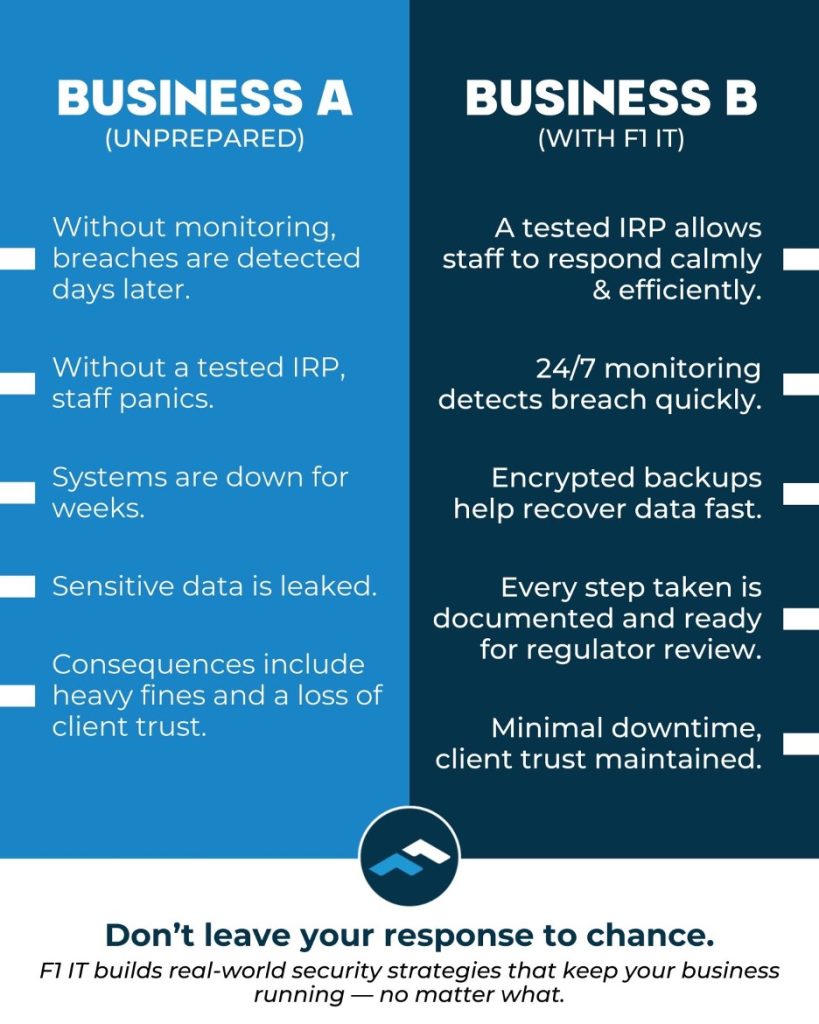
You Don’t Have to Fight This Battle Alone
Educating your team about phishing is essential, but it’s just one piece of comprehensive cybersecurity. Your business also needs technical safeguards: email filtering that catches threats before they reach inboxes, multi-factor authentication that protects accounts even if passwords are compromised, regular security updates, employee training programs and incident response plans for when something does slip through.
That’s a lot to manage on top of running your actual business.
This is exactly why F1 IT exists. When your business depends on technology, you can’t afford to wing it. We specialize in keeping businesses like yours secure, compliant and proactive — handling the complex world of cybersecurity so you can focus on what you do best: serving your own clients and business.
We’re not just another IT company. Whether you’re looking for complete care or a strategic partner, we’re equipped with the certifications and expertise to protect what matters most to you. From comprehensive IT support to government-level security compliance, we handle it all.
Your business deserves better than hoping nothing goes wrong. It deserves protection that actually works.
Ready to stop worrying about whether your team will click the wrong link? Let’s talk about building security into your business from the ground up. We offer a free consultation when you fill out the information form on our homepage.
The post Phishing: Why That “Urgent” Email Might Be Your Biggest Security Threat appeared first on F1 Information Technologies.
]]>The post Top 10 Things to Look for in Your Managed Services Partner appeared first on F1 Information Technologies.
]]>
The post Top 10 Things to Look for in Your Managed Services Partner appeared first on F1 Information Technologies.
]]>The post 12 Questions to Ask Your Current IT Provider appeared first on F1 Information Technologies.
]]>Managing and securing networks is a task all IT providers must master. It’s important your technology grows with your business in order to handle operations. Below are 12 questions we recommend asking your current or potential IT provider.
-
How is the network secured?
Every business should have a managed firewall. Firewalls aren’t one-size-fits-all, it’s important your security caters to your needs and field requirements. It doesn’t matter if you store data in the cloud or on a server, firewalls protect leaks and intrusions from happening. Enterprise-level firewalls use accelerated processors to make intrusion detection and protection more effective, strengthening your security.
-
How is the network managed?
How’s your technology being backed up? If something were to infiltrate your network, would you be able to restore documents? Traffic on your network should be controlled and documented properly to maximize efficiency.
-
How is the software being patched?
Attacks on applications can impact your business just as much as ones on data centers can. It’s important to manage third-party applications. Patch management ensures software vulnerabilities aren’t exploited, this lessens your security risk and keeps company communication safe.
-
How is Microsoft Office 365 maintained?
Office 365 is a great tool for a smooth-running business. Microsoft Word, PowerPoint, Excel, and Outlook are included along with Teams, Exchange, SharePoint, and OneDrive. While these Microsoft tools are great assets, you can lose important information if documents aren’t backed up properly. Once emails or calendar events are deleted from your trash, they can’t be recovered. Backing up third-party applications ensures you can reaccess data you might not have planned on needing, F1 IT offers flexible plans anticipating your business needs.
-
Is the staff being trained?
No matter how secure your network, if your internal employees aren’t educated on cybersecurity practices, cyberattacks are possible. Ensuring your staff adequately understands how to navigate technological problems adds another layer of security to your IT protection. This will not only help your business, but will also benefit employees when preserving their personal online presence.
-
How is risk managed?
Acknowledging the threat breaches pose is an important part of maintaining an efficient network. Do you have an incident response plan? How will you go about resecuring your network if it’s compromised? Having a plan to fall back on decreases the impact breaches may have on your business continuity. Comprehensive disaster recovery plans include a restoration device (BDR) and a backup to speed up recovery in times of need.
-
What is your outlook on technology?
How firms view technology is telling to how a partnership with an IT provider will work. Is it a tool? A necessity? An asset? At F1 IT, we believe technology drives efficiency, productivity, sales and is the basic infrastructure upon which an organization grows, survives or perishes. As a partner, we become a client lifeline, the manager of infrastructure, so basic business isn’t distracted by minimal interruptions.
-
What makes up your network?
If remote devices connect to your network, they are more susceptible to attacks. Are employee devices being protected? Password management offers layered protection and tools for staff to keep all work and personal accounts secure. Security incident and event management (SIEM) and a security operations center (SOC) examines logs on all network devices to report abnormalities and prevent possible threats.
-
How is your network powered?
An uninterrupted power supply keeps your network functional at all times. How is your network configured to deal with a power outage or conserve energy? Without a backup generator, your network will go black with power outages. Network outages can impact customers and lose revenue. Don’t let power outages negatively affect your business.
-
Where is data stored?
What happens to all the stuff you save? Are in-house servers stored somewhere? Do you use the cloud? How well are data centers protected? The way you store data plays a large role in how easy it is to access, use, and how protected it is. Cloud server solutions sync local files enabling access anywhere; allowing your company to securely share files with clients and vendors no matter where you are.
-
Are anti-virus measures taken?
As hackers are becoming more advanced, your network has to withstand new attacks. Multi-factor authentication prevents non-employees from accessing confidential information. This simple security measure goes a long way in keeping your internal communication in-house. Endpoint detection software (EDR) remediates threats related to connected endpoints, it enforces longer passwords and offers a more comprehensive protection plan.
-
Are there personal benefits for employees?
Does IT management continue after hours? F1 IT manages employee passwords and accounts along with offering cybersecurity training to ensure they are protected in and out of the office. Continuing cybersecurity education better positions individuals, providing relevant skills as technological breakthroughs continue.
We, at F1 IT, make our clients’ satisfaction our top priority. Visit our homepage to sign up for a free consultation or ask any questions about our services as a managed service provider (MSP). Technology is essential to your business’s success, investing in it will help grow your business and improve efficiency like nothing else.
The post 12 Questions to Ask Your Current IT Provider appeared first on F1 Information Technologies.
]]>The post Egnyte Brings Secure File Sharing to Managed Service Providers of All Sizes appeared first on F1 Information Technologies.
]]>Egnyte recognizes the integral role MSPs play for organizations that lack the internal resources to efficiently manage and protect their content. As such, Egnyte continues to make investments in growing its partner program to help provide solutions for MSPs that are designed specifically for their small and midsize business (SMB) clients.
“We are witnessing a once-in-a-generation shift in the global economy, and partnerships play a leading role,” said Jay McBain, Chief Analyst at Canalys. “Most business leaders across every industry, of all size firms, and in every corner of the world are considering significant business model shifts. They are realizing that they can’t do it alone in the decade of the ecosystem.”
The new enhancements to Egnyte’s MSP packages include:
- Dedicated partner packages for industries such as Architecture, Engineering, and Construction (AEC). Egnyte’s AEC package provides teams with Building Information Modeling (BIM) file search and preview, project lifecycle management, integration with leading construction management platform Procore, and additional capabilities to deliver projects faster.
- Snapshot-based ransomware recovery. With Egnyte’s Snapshot-Based Ransomware Recovery tool, customers can “look back” at a file snapshot to determine exactly when ransomware infected a file and restore data to that particular point with a single click.
- Simplified CMMC compliance. The Egnyte for CMMC solution is designed for companies that currently work or plan to work with the U.S. Department of Defense, shortening the time it takes to comply with Cybersecurity Maturity Model Certification (CMMC) standards. This is available through Egnyte’s partner referral program.
“Our partnership with Egnyte has allowed us to better serve our client partners, especially as we navigate complex solutions like CMMC,” said JP Keesy, Owner of F1 Information Technologies. “Working with a designated team of experts, the partner portal enhancements, and monthly enablement sessions, Egnyte understands and compliments our needs with the necessary support.”
Egnyte was most recently awarded Best New Solution and Best Expo Hall Presentation at regional ChannelPro SMB Forum events, along with receiving several other industry honors this year. For example, Eric Anthony, Director of MSP Community and Partner Enablement, was included on CRN’s 2022 Channel Chiefs list in February.
The post Egnyte Brings Secure File Sharing to Managed Service Providers of All Sizes appeared first on F1 Information Technologies.
]]>