“Assume no friction”
At the time, it was a welcome footnote because it greatly simplified the academic problem at hand, and allowed me to ignore the inconvenient real-world complexities that would otherwise make the problem much more difficult to solve.
I remember climbing a mountain once with my engineering buddies and yelling “assume no friction!”, and all of us laughing in a way that only engineering nerds would.
I think of “assume no friction” in the context of founding Form.io back in the (far more recent) day. Among the many business strategy decisions we were making at the beginning of Form.io was a strategic go-to-market decision:
“Go Deep? Or Go Wide?”
It could seem like we were making a simple choice between two reasonably equal options: either go deep in one industry vertical or go wide across many verticals; or similarly, go deep in one geographic market or go wide across multiple geographic markets; or even more audaciously, go wide on both.
Many founders would be eager to make that decision with ease. They would say: “I’m going wide on industry verticals AND going wide on geographic markets, in order to maximize my total addressable market”.
But run that great idea by any institutional investor, and you’ll get a very different and buzz-killing view. Why? Because despite the fact that many software dev tools companies have pulled this off, they don’t blindly trust the assumptions that are embedded within your pitch deck, and also, because they have seen a lot of other “Go Wide” business plans fail before.
Why is that true? Well, it’s because in the real world you can’t “Assume no friction” especially if you “Go Wide”. It goes like this:
Investor: “So, you’re going to…
Sell to a global market?
Friction: Building sales organizations in multiple territories all around the world.
Sell to multiple verticals?
Friction: Developing the vertical-specific subject matter expertise and organizational market presence to even be a credible option in each one.
Produce a dominant competitive product for each of these customer/market segments?
Friction: Building and maintaining many different versions of your platform to address differing requirements for each vertical and region.
Be compliant with varying data security requirements?
Friction: Addressing demanding sector and geographic specific data security requirements.
Provide superior implementation and ongoing support to your customers?
Friction: Establishing support resources in multiple regions, time zones, and languages around the world.
The punchline? In the real world you can’t “assume no friction” if you “go wide” in the “Go Deep or Go Wide” decision — unless you have something very special in your hands.
BTW, Form.io did just exactly that.
Form.io exists in this space but operates on different assumptions. Understanding what those assumptions are, and why they matter, helps you determine whether Form.io belongs in your evaluation or whether a simpler tool serves your actual needs better.
The Consumer Form Builder Category
Google Forms, Typeform, and Jotform occupy the consumer and small business segment of form automation. Their value proposition centers on accessibility: anyone can create a form without technical knowledge, distribute it via link or embed, and collect responses in a managed database or spreadsheet.
Google Forms optimizes for speed and zero friction. You create a form in minutes, share a link, and responses flow into Google Sheets. There is no setup, no deployment, no configuration. The tradeoff is limited customization, basic conditional logic, and forms that look like Google Forms regardless of your brand.
Typeform differentiates on user experience. The one-question-at-a-time interface creates a conversational feel that increases completion rates for surveys and lead capture. The design is polished. The templates are extensive. The tradeoff is that you are paying for aesthetics and engagement metrics, not for data infrastructure or developer tooling.
Jotform sits between these poles with broader feature coverage: payment processing, more field types, PDF generation, and integrations with common business tools. It handles more complex use cases than Google Forms while remaining accessible to non-technical users.
These tools share a common architecture. You build forms in their interface. Data lives in their database. Integrations happen through their connection layer. Your application, if you have one, interacts with their API to pull data after submission. The form is a separate service your users visit, not a component embedded in your application.
This architecture works well when forms are standalone data collection points. Marketing surveys. Event registrations. Contact forms. Lead capture. Situations where the form exists independently from any larger application context.
The Internal Tool Builder Category
Retool, Appsmith, and similar platforms solve a different problem. They help developers build internal applications quickly by providing pre-built UI components, database connectors, and a visual development environment. Forms are one component type among many: tables, charts, buttons, modals.
Retool’s value proposition is speed for internal tools. Instead of building an admin panel from scratch, you drag components onto a canvas, write SQL queries to populate them, and deploy an internal application in hours instead of weeks. The forms within Retool connect directly to your database. You write the queries. You control the schema.
The tradeoff is that Retool builds applications, not reusable form infrastructure. Each Retool app is a distinct artifact. The forms within it are not portable, not embeddable in external applications, and not designed for end-user-facing contexts. Retool optimizes for internal operations teams, not for customer-facing data collection at scale.
Retool also requires developers. Despite the visual interface, you write SQL, JavaScript, and configure integrations. This is appropriate for its target audience (internal tool development by engineering teams) but means it does not solve the “business users building forms without code” problem that drives adoption of consumer form builders.
Where Form.io Actually Fits
Form.io occupies a category that neither consumer form builders nor internal tool platforms address: forms as embeddable infrastructure for bespoke applications.
The distinction matters at the architecture level. Consumer form builders host your forms and data on their infrastructure. You visit their service to build forms, and users visit their service (or an iframe) to complete them. Internal tool builders create standalone applications that happen to include forms. Form.io provides a form and API platform that deploys inside your infrastructure and integrates directly into applications you are building. That level of integration means form automation capabilities, third-party connections, automated data flows, and so forth are within reach.
When you drag components onto a Form.io form, you are not just creating a UI. You are defining a JSON schema that simultaneously describes the form’s appearance, validation rules, and the API structure for submissions. The form builder generates both the frontend component and the backend API in a single operation. This is what “forms + APIs” means in practice.
The platform deploys as Docker containers connected to your MongoDB instance. You control the infrastructure. Data never leaves your environment unless you send it somewhere. This matters for regulated industries, enterprise security requirements, and organizations that cannot accept third-party data hosting.
The JavaScript renderer embeds directly in Angular, React, Vue, or vanilla JavaScript applications. No iframes. No redirects to external services. The form appears as a native component in your application, styled with your CSS, authenticated through your session management, and submitting to APIs running in your environment.
Different Problems, Different Tools
The “which form builder should I use” question has no universal answer because the question conflates different problems.
If you need a survey or feedback form that exists independently, Google Forms or Typeform is probably correct. They are faster to set up, require no infrastructure, and optimize for the standalone form use case. Typeform if completion rates and design matter. Google Forms if cost and simplicity matter.
If you need internal admin tools that query your database and let operations teams manage data, Retool or similar platforms make sense. They optimize for that specific workflow and provide components beyond forms that internal tools require.
If you are building an application where forms are embedded data collection components that feed into application logic, where the form schema defines your data model, where you need the form builder to produce reusable form definitions that render across web and mobile, where forms update independently of application deployment cycles, and where data and infrastructure must remain under your control, then Form.io addresses requirements that the other categories do not.
What Form.io Requires That Others Do Not
Form.io assumes you have a development team. The platform provides the form building, API generation, and rendering infrastructure, but you integrate that infrastructure into an application you are building. If you do not have an application, if you are not planning to build one, Form.io solves a problem you do not have.
Installation means deploying containers and configuring MongoDB. The Form.io GitHub repository provides the open source core, and enterprise features require licensing. You manage upgrades, scaling, and operations for your deployment. This is infrastructure you own, with the responsibilities that ownership entails.
The learning curve involves understanding JSON schemas, the relationship between forms and Resources, how Actions work as middleware [(/features/form-actions)], and how the renderer integrates with your frontend framework. The documentation and API reference are comprehensive, but you will spend time learning the platform’s concepts before becoming productive.
Pricing does not scale with usage. Form.io charges per project and per environment, not per form, per submission, or per user. This makes cost predictable for high-volume applications but means the economics only make sense at sufficient scale. A contact form collecting 50 submissions per month does not justify Form.io’s complexity. An enterprise application processing thousands of structured data submissions across multiple tenants begins to reveal why the infrastructure approach matters.
The “Low-Code” Distinction
Form.io sometimes appears in low-code or no-code platform comparisons, but the categorization obscures more than it clarifies.
Consumer form builders are no-code tools. Business users create forms without developer involvement. The platform handles everything.
Internal tool builders like Retool are low-code. Developers use visual interfaces but write queries and logic. The visual layer accelerates development without eliminating code.
Form.io is what the company calls “pro-code/low-code.” The form building interface is visual and accessible to non-developers. Business users can create and modify forms without code changes. But the platform itself deploys into a developer-managed environment. Integration requires code. Custom components require code. The platform accelerates form development while remaining firmly developer-infrastructure.
This post articulates the position directly: Form.io is not an application development platform (ADP) in the traditional sense. Your developers still build the application. Form.io handles the forms, their APIs, and the submission infrastructure so developers do not have to build that layer from scratch.
When Consumer Form Builders Break Down
Consumer form builders work until your requirements exceed their assumptions. Common breaking points include:
Nested and repeating data structures. A form that collects multiple addresses, or line items with variable quantities, or hierarchical data that maps to document structures rather than flat rows. Consumer form builders flatten everything into spreadsheet-compatible formats. Form.io preserves nested JSON structures because MongoDB stores documents, not rows.
Application integration beyond webhooks. If your application needs to render forms dynamically, prepopulate data from user context, validate against business logic before submission, or respond to submission events within application flow, iframe-based embedding and webhook integrations become limiting. Form.io’s renderer operates inside your application context with full access to application state.
Multi-tenant deployments. SaaS platforms that need to provide form building to their own customers, with data isolation between tenants, and white-labeled interfaces, cannot accomplish this with tools designed for single-organization use. Form.io’s multi-tenancy architecture supports these hierarchical structures.
Compliance and data residency. HIPAA, FedRAMP, GDPR data residency requirements, or organizational security policies that prohibit third-party data hosting eliminate consumer form builders from consideration regardless of their features. Self-hosted Form.io deployments keep data in environments you control.
Complex conditional logic and validation. Consumer form builders offer show/hide logic and basic validation. When you need validation rules that query external APIs, conditional flows that span multiple pages with draft saving, or business logic that exceeds what simple condition builders express, you need programmable form infrastructure.
When Form.io Is Overkill
Form.io is overkill when simpler tools solve your actual problem.
If your forms exist independently and do not integrate into an application, consumer form builders are faster and cheaper. The infrastructure overhead of Form.io provides no benefit when forms stand alone.
If you need internal admin tools for your team, Retool or similar platforms optimize for that workflow with features Form.io does not prioritize.
If you are evaluating form solutions for a project that does not yet have committed developer resources, the platform’s dependency on technical implementation becomes a blocker rather than an enabler.
If your organization cannot support self-hosted infrastructure, the operational requirements exceed what your team can maintain. Form.io’s SaaS offering exists but the platform’s design assumes self-hosted deployments for enterprise use cases.
If your forms collect survey data that exports to spreadsheets for analysis, the JSON document model and MongoDB storage add complexity without corresponding benefit.
The Infrastructure Mental Model
The category confusion around Form.io dissolves when you adopt the infrastructure mental model. Consumer form builders are SaaS services you use. Internal tool platforms are application builders. Form.io is infrastructure you deploy, like a database or authentication service.
You do not compare PostgreSQL to Airtable even though both store data. You do not compare Auth0 to a simple password field even though both relate to authentication. Similarly, comparing Form.io to Google Forms based on the presence of drag-and-drop form building obscures that they occupy different layers of the technology stack.
Form.io’s positioning as “forms as infrastructure” reflects this distinction. The platform provides form rendering, schema management, submission APIs, and action pipelines as services your application consumes. You choose this approach when forms are a core component of applications you are building, when you need the control and integration depth that infrastructure ownership provides, and when you have the technical resources to deploy and maintain that infrastructure.
The companion piece on why Form.io is not Google Forms / Typeform / Retool explores these distinctions in technical detail. For now, the key takeaway is categorical: Form.io belongs in evaluations alongside embeddable form infrastructure, not alongside SaaS form services or visual application builders.
Related Resources
- Why Form.io Requires MongoDB explains the data model implications
- Form Schemas vs Submissions covers the JSON schema architecture
- Why Form.io Is Infrastructure, Not an App Builder elaborates the infrastructure positioning
- Why You Should Not Use Form.io Without a Dev Team addresses the developer requirement directly
- formio/formio on GitHub provides the open source core
This distinction matters because it determines what problems Form.io solves and what problems remain yours to solve. Teams expecting an app builder will be frustrated. Teams building bespoke applications who need a forms solution that stays out of their way will find exactly what they need.
What Infrastructure Means in Practice
Infrastructure provides capabilities that applications consume. A database is infrastructure. An authentication service is infrastructure. A payment processor is infrastructure. You do not expect PostgreSQL to generate your admin dashboard or Stripe to build your checkout flow. They provide APIs and data storage. Your application provides everything else.
Form.io operates the same way. It gives you:
A form renderer that takes a JSON schema and produces an interactive form. The renderer handles field display, validation feedback, conditional logic, and submission. You embed the renderer in your application using a JavaScript library or framework component.
A submission API that receives form data, validates it server-side, stores it in MongoDB, and returns the result. Your application calls this API or lets the embedded renderer call it automatically.
A schema API that stores and retrieves form definitions. Your application fetches schemas to pass to the renderer, or you build forms in the portal and reference them by path.
An access control layer that determines who can submit to which forms and who can read which submissions. You configure this through Teams and Permissions and integrate it with your application’s authentication.
What Form.io does not provide: the application shell, routing, user registration flows, email notifications, approval workflows, reporting dashboards, or any screen that is not a form. Those are application concerns. Form.io is the forms solution inside the application, not the application itself.
The Difference From App Builders
App builders like Retool, OutSystems, or Mendix generate complete applications. You define data models, screens, navigation, and logic inside the platform. The platform produces a running application that users interact with directly.
This model works when your requirements fit the platform’s assumptions. It struggles when you need custom behavior, specific performance characteristics, integration with proprietary systems, or a user experience the platform cannot produce.
Form.io makes a different tradeoff. It solves forms completely and their APIs, but not the whole application. This means:
You control the application architecture. Form.io does not impose a framework, hosting environment, or deployment model. Embed the renderer in React, Angular, Vue, or plain JavaScript. Host your application anywhere. Deploy however your organization deploys software.
You control the user experience. The form is one component in your interface. Everything around it, including headers, navigation, progress indicators, help text, and branding, comes from your application. Form.io renders what is inside the form boundary. You render everything outside it.
You control the data flow. Submissions go to Form.io’s API, but you decide what happens next. Webhooks can trigger your backend services. The submission API lets you query and transform data. You can export submissions to other systems. Form.io stores the data; your application decides what to do with it.
You write business logic. Form.io validates form fields. It does not know whether a submitted insurance claim should be approved, whether an expense report needs manager review, or whether a patient intake form should trigger a scheduling workflow. Your application implements these decisions.
What This Requires From Your Team
Treating Form.io as infrastructure means your team handles infrastructure integration. This is not no-code or low-code. This is code-required.
Frontend development. Someone must embed the form renderer in your application, style it to match your design system, and handle the integration points where form events trigger application behavior.
Backend development. If submissions need to trigger workflows, sync to other databases, or integrate with external services, someone writes that code. Form.io provides webhooks and APIs. Your services consume them.
DevOps or platform engineering. Self-hosted deployments require provisioning MongoDB, configuring the Form.io server, managing secrets, and maintaining the infrastructure. Even cloud-hosted deployments require integration work around authentication and network access.
Form building. The drag-and-drop builder lets non-developers create forms, but someone still needs to understand how components map to submission data, how validation rules work, and how the form integrates with the surrounding application.
Teams without development resources should look elsewhere. The article Why You Should Not Use Form.io Without a Dev Team explains this constraint in detail.
Where Form.io Fits in Application Architecture
A typical architecture using Form.io looks like this:
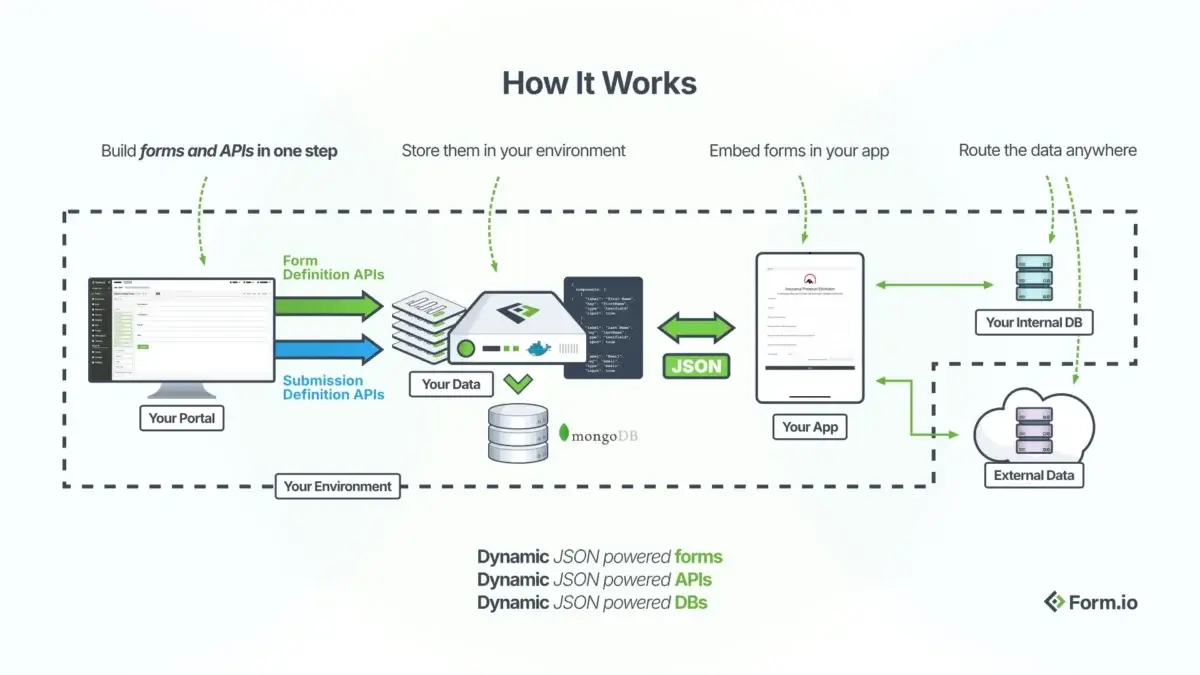
When a user reaches a screen that needs a form, your application renders the Form.io component with the appropriate schema. The renderer handles everything inside the form boundary. On submission, data goes to Form.io’s server, which validates and stores it. Webhooks notify your backend services to trigger downstream processes.
This architecture separates concerns cleanly. Form.io does not know about your user model, your business domain, or your other services. It knows about forms, submissions, and access rules. Your application orchestrates everything else.
Comparison With Embedded Versus Platform Approaches
Forms solutions fall into three categories, each with different integration models.
Standalone form tools like Google Forms or Typeform provide complete form experiences at their own URLs. Users visit the form tool’s domain to fill out forms. Data lives in the form tool’s database. You access it through exports or limited APIs. These tools work for simple data collection but cannot embed into custom applications or match enterprise UI requirements. The article Why Form.io Is Not Google Forms or Typeform explores this comparison.
App builder platforms like Retool or OutSystems include form components as part of a larger application generation system. Forms exist inside applications the platform builds. If you want forms inside an application the platform did not build, you cannot extract just the form component. The form capability is coupled to the platform’s application model.
Forms infrastructure like Form.io provides form capabilities as embeddable components and APIs. The renderer runs inside your application. The API integrates with your backend. The form system is decoupled from any specific application architecture. You use as much or as little as your application needs.
The infrastructure approach requires more development work. It provides more architectural flexibility. This is the fundamental tradeoff.
What Form.io Handles Completely
Despite being infrastructure, Form.io solves certain problems end-to-end so your application does not have to.
Field-level validation runs both client-side for immediate feedback and server-side for security. You configure validation rules in the form schema. The renderer and API enforce them. Your application does not validate individual fields.
Conditional logic shows, hides, enables, or disables fields based on other field values. Complex multi-step wizards with branching paths work through configuration, not custom code.
File uploads handle the complexity of multipart uploads, storage provider integration, and reference management. Submissions contain file references.
Offline support queues submissions when connectivity drops and syncs when it returns. Your application gets this capability by embedding the renderer with offline mode enabled.
Multi-tenancy isolates forms and submissions between tenants at the platform level. If your application serves multiple organizations, Form.io’s tenant model can map to your tenant boundaries.
Revision tracking maintains form schema history so you can audit what version of a form captured any given submission. The revision logs provide this automatically.
These are form-specific concerns that Form.io handles so your application team focuses on application-specific concerns.
When Infrastructure Is the Wrong Choice
The infrastructure model does not fit every project.
Prototyping and MVPs often benefit from app builders that generate working software quickly. If your goal is validating an idea before committing to custom development, the speed of a platform may outweigh the flexibility of infrastructure.
Simple data collection where you need a form and a spreadsheet of responses does not require Form.io’s capabilities. Google Forms or Typeform solve this with less setup.
Teams without developers cannot integrate infrastructure. If no one on your team writes code, you need a platform that generates the entire application, not a forms solution that requires integration work.
Rigid compliance environments that mandate specific platforms may not have evaluated Form.io. If your organization requires all applications to run on a particular low-code platform for governance reasons, that constraint overrides technical fit.
The article What Form.io Does Not Do lists specific capabilities outside Form.io’s scope.
Evaluating Fit for Your Project
Ask these questions to determine if Form.io’s infrastructure model fits your needs.
Are you building a custom application? If yes, Form.io provides the forms layer inside it. If you want a platform to build the application for you, look elsewhere.
Do you have developers? If yes, they can integrate Form.io’s renderer and APIs. If no, you need a no-code solution that Form.io is not.
Do your forms need to match a specific design system? Form.io forms can be styled with CSS to match any visual design. App builder forms typically constrain you to the platform’s styling options.
Do submissions need to trigger complex workflows? Form.io provides the data capture and webhook triggers. Your application implements the workflow logic. If you need workflow automation built in, evaluate platforms that include it.
Is data portability important? Form.io stores submissions in MongoDB that you can query, export, and migrate. Vendor lock-in is minimal because the data layer is transparent. Closed platforms may restrict data access. You can even use your own submission APIs and store data outside of Form.io.
Related Resources
- Why Form.io Is Not Google Forms or Typeform compares platform models
- Why You Shouldn’t Use Form.io Without a Dev Team explains the development requirement
- Form Schemas vs Submissions details the data model
- JSON-Driven Forms explains the schema-driven rendering approach
- Integrations covers webhook and third-party connections
- Form.io Renderer Repository contains embedding documentation
- API Documentation provides endpoint references
A Form.io deployment works with two document types. The form JSON schema defines the structure, validation rules, layout, and behavior of a form. The submission document contains the actual data a user entered, stored separately and linked back to its parent schema. Understanding how these two documents relate is essential for building applications on Form.io, querying data correctly, and avoiding architectural mistakes that surface months into a project.
The Form JSON Schema: Structure Without Data
A form JSON schema is a complete definition of a form’s components, validation logic, conditional display rules, and metadata. It does not contain any user-submitted data. Here is a simplified example:
{
  "_id": "507f1f77bcf86cd799439012",
  "title": "Employee Onboarding",
  "name": "employeeOnboarding",
  "path": "employeeonboarding",
  "type": "form",
  "components": [
    {
      "type": "textfield",
      "key": "firstName",
      "label": "First Name",
      "validate": {
        "required": true,
        "maxLength": 50
      }
    },
    {
      "type": "email",
      "key": "email",
      "label": "Work Email",
      "validate": {
        "required": true
      }
    },
    {
      "type": "datagrid",
      "key": "emergencyContacts",
      "label": "Emergency Contacts",
      "components": [
        {
          "type": "textfield",
          "key": "name",
          "label": "Contact Name"
        },
        {
          "type": "phoneNumber",
          "key": "phone",
          "label": "Phone Number"
        }
      ]
    }
  ]
}
The components array is recursive. Each component can contain child components, which is how Form.io represents nested structures like Data Grids, Edit Grids, and container layouts. The key property on each component determines where that field’s value will appear in the submission data.
This schema tells the Form.io renderer exactly how to display the form, what validation to apply client-side and server-side, and how to structure incoming data. The schema is the source of truth for form behavior.
The Submission Document: Data Without Structure
A submission document contains the data a user entered, wrapped in metadata about when and by whom. The same form schema above produces submissions that look like this:
{
  "_id": "507f1f77bcf86cd799439011",
  "form": "507f1f77bcf86cd799439012",
  "data": {
    "firstName": "Sarah",
    "email": "[email protected]",
    "emergencyContacts": [
      {"name": "Michael Chen", "phone": "303-555-0142"},
      {"name": "Lisa Chen", "phone": "303-555-0187"}
    ]
  },
  "owner": "507f1f77bcf86cd799439013",
  "created": "2024-01-15T14:32:00.000Z",
  "modified": "2024-01-15T14:32:00.000Z",
  "state": "submitted"
}
Notice that the submission references the form by ID in the form field. The actual user data lives inside the data object, with keys that match the component keys from the schema. The nested emergencyContacts array mirrors the Data Grid structure defined in the form schema.
This separation means you can update a form schema without invalidating existing submissions. You can query submissions independently of their parent forms. You can store millions of submissions across thousands of form versions without schema migrations corrupting your data.
Why the Separation Matters
The two-document model creates architectural flexibility that single-document approaches cannot match.
Schema versioning becomes possible. When you update a form schema using Form Revisions, existing submissions remain intact. A submission captured under version 3 of a form still contains exactly the data it captured, even after version 4 adds new fields or changes validation rules. The Form Revision Logs track which schema version was active when each submission arrived, enabling audit trails that compliance requirements often demand.
Querying scales independently. Submissions live in their own MongoDB collection. You can index submission data, run aggregation queries, and export subsets without touching form schemas at all. The Data Reporting features leverage this by querying the submissions collection directly using MongoDB aggregation pipelines.
Rendering separates from storage. The Form.io renderer needs only the schema to display a form. It does not need to know anything about existing submissions. This is why forms can be embedded in any application with a single JavaScript include and a schema reference.
How Components Map to Submission Keys
The key property on each form component determines where submitted data appears in the data object. This mapping is direct and predictable, which matters when you write code that processes submissions.
Simple components create simple keys:
| Component Type | Schema Key | Submission Data |
| Text Field | firstName | data.firstName: "Sarah" |
email | data.email: "[email protected]" | |
| Number | salary | data.salary: 75000 |
| Checkbox | agreedToTerms | data.agreedToTerms: true |
Nested components create nested structures. A Data Grid with key emergencyContacts containing child components with keys name and phone produces an array at data.emergencyContacts where each element has name and phone properties.
Container components like Panels, Columns, and Field Sets do not create keys by default. They exist for layout purposes only. A Text Field inside a Panel still writes directly to data.fieldKey, not data.panelKey.fieldKey. This trips up developers who expect container nesting to affect data structure. It does not, unless you explicitly configure the container to have a key.
Edit Grids and Data Grids behave identically for data purposes. Both produce arrays. The difference is in the editing interface: Data Grids show all rows in a table, while Edit Grids show one row at a time in a modal or inline editor.
The Form Schema Is Not JSON Schema
Form.io’s schema format is proprietary. It is not JSON Schema, the specification used for validating JSON documents. This distinction matters when integrating with systems that expect standard JSON Schema.
JSON Schema defines validation rules for JSON data. It answers the question “is this document valid?” Form.io’s schema defines both validation rules and rendering instructions. It answers “how do I display this form and validate its input?”
A JSON Schema for the employee onboarding example would look different:
{
  "type": "object",
  "properties": {
    "firstName": {"type": "string", "maxLength": 50},
    "email": {"type": "string", "format": "email"},
    "emergencyContacts": {
      "type": "array",
      "items": {
        "type": "object",
        "properties": {
          "name": {"type": "string"},
          "phone": {"type": "string"}
        }
      }
    }
  },
  "required": ["firstName", "email"]
}
This JSON Schema could validate Form.io submission data, but it cannot render a form. It has no concept of labels, layout, conditional visibility, or the dozens of component-specific properties that control form behavior.
Form.io chose a proprietary format because form rendering requires information that JSON Schema was never designed to carry. The JSON-Driven Forms documentation explains how the schema drives the renderer and why the additional properties exist.
Querying Submissions Through the API
The Form.io API provides endpoints for both schemas and submissions. Understanding the separation helps you construct correct queries.
To retrieve a form schema:
GET /form/:formIdTo retrieve submissions for that form:
GET /form/:formId/submissionTo retrieve a specific submission:
GET /form/:formId/submission/:submissionIdSubmission queries support MongoDB-style filtering on the data object:
GET /form/:formId/[email protected]For nested data, use dot notation:
GET /form/:formId/submission?data.emergencyContacts.name=Michael%20ChenThe Export Form Data feature uses these same endpoints internally. When you export to JSON through the portal, you receive an array of submission documents. When you export to CSV, the system flattens the nested data object into columns.
Common Mistakes and How to Avoid Them
Storing derived data in the schema. Form schemas should contain structure, not data. If you need to store metadata about a form (deployment environment, business unit owner, etc.), use a separate configuration document or your application’s database. The schema belongs in MongoDB as Form.io stores it.
Expecting container keys to nest data. Panels, Columns, and similar layout components do not create data nesting by default. If you need nested data structures, use components designed for that purpose: Data Grids, Edit Grids, or containers with explicit keys enabled.
Querying schemas when you need submissions. New developers sometimes query the form endpoint expecting to find submitted data. Forms and submissions live in different collections and serve different purposes. The form endpoint returns structure; the submission endpoint returns data.
Assuming schema updates migrate existing data. When you add a new required field to a form, existing submissions do not suddenly gain that field. They contain exactly what users submitted at the time. Your application code must handle submissions that predate schema changes. The Form Revisions feature helps track which schema version captured each submission.
When This Model Does Not Fit
The two-document model assumes you want to capture structured data through forms and store it for later retrieval. This fits most enterprise applications, but not all use cases.
If you need real-time collaborative editing where multiple users modify the same document simultaneously, Form.io submissions do not support that natively. Each submission is a discrete document created by a single save operation. You would need Collision Control to prevent overwrites, but that is conflict prevention, not real-time collaboration.
If you need the form structure to live inside a relational database alongside your application data, you will hit friction. Form.io requires MongoDB (or a compatible equivalent) for its schema and submission storage. You can synchronize submission data to SQL databases using webhooks and middleware or you can choose to use your own submission API and store your data elsewhere.
If your application generates forms dynamically from external metadata (database columns, API responses), you will need to transform that metadata into Form.io schema format. The schema is specific and detailed. This is not a limitation so much as an explicit interface contract: give the renderer exactly what it expects, and it will render exactly what you specified.
Related Resources
- JSON-Driven Forms explains how the schema drives rendering
- Form Revisions covers schema versioning
- Export Form Data documents submission extraction
- Data Reporting explains MongoDB aggregation access
- Why Form.io Requires MongoDB details database dependencies
- API Documentation provides endpoint references
- Form Building Guide covers component configuration
This document explains why the dependency exists, what specifically breaks if you try to work around it, and how to plan your infrastructure accordingly.
The Architectural Dependency
Form.io stores two primary document types: form schemas and submissions. Both are JSON documents with nested structures, variable fields, and arrays of arbitrary depth. MongoDB stores JSON natively. Relational databases do not.
A typical form schema contains a recursive components array where each component can contain child components. A Data Grid component might contain five child fields. An Edit Grid inside a Panel inside a Wizard step creates four levels of nesting. The schema must preserve this structure exactly because the Form.io renderer reads it directly to display forms.
{
  "components": [
    {
      "type": "panel",
      "key": "employeeInfo",
      "components": [
        {
          "type": "editgrid",
          "key": "workHistory",
          "components": [
            {"type": "textfield", "key": "company"},
            {"type": "textfield", "key": "title"},
            {"type": "datetime", "key": "startDate"},
            {"type": "datetime", "key": "endDate"}
          ]
        }
      ]
    }
  ]
}
MongoDB stores this document as-is. A relational database would require either a recursive table structure with joins to reconstruct the hierarchy, or a JSON column that cannot be indexed or queried efficiently. Neither approach matches how Form.io reads and writes schema data.
Submissions follow the same pattern. The data object inside each submission mirrors the form structure, including nested arrays from Data Grids and Edit Grids. MongoDB’s query language can filter, sort, and aggregate across these nested structures. SQL cannot do this without significant preprocessing or denormalization.
What Breaks With Relational Databases
If you attempt to replace MongoDB with a relational database, the following capabilities fail.
Schema storage and retrieval. Form.io reads the entire form schema as a single document and passes it to the renderer. The renderer expects the exact JSON structure stored in MongoDB. A relational reconstruction would need to join multiple tables and reassemble the component hierarchy in the correct order. The Form.io server does not contain this logic because it was never designed to work that way.
Submission queries with nested filters. The Form.io API accepts MongoDB query syntax for filtering submissions. A request like ?data.workHistory.company=Acme filters on a nested array field. This query syntax is passed directly to MongoDB. Relational databases use SQL, which has no equivalent single-query pattern for filtering inside JSON arrays without database-specific extensions.
Aggregation pipelines for reporting. The Data Reporting feature uses MongoDB aggregation pipelines to compute statistics, group submissions, and join data across forms. These pipelines operate on the document structure as stored. There is no abstraction layer that translates aggregation pipelines to SQL.
Indexing on dynamic fields. Form schemas vary between projects. One form might have fields named firstName and lastName; another might have patientId and encounterDate. MongoDB allows you to create indexes on data.firstName or data.patientId directly. Relational databases cannot index inside JSON columns in the same way, and creating tables with columns matching every possible form field defeats the purpose of a flexible form builder.
Atomic document updates. When a submission updates, Form.io writes the entire data object in a single operation. MongoDB handles this atomically. Relational storage would require updating multiple rows across multiple tables within a transaction, adding complexity and failure modes that the Form.io server does not manage.
Why Not PostgreSQL JSONB?
PostgreSQL’s JSONB column type stores JSON documents and supports some querying. Developers familiar with PostgreSQL often ask why Form.io cannot use JSONB instead of MongoDB.
The short answer: JSONB solves storage but not querying, indexing, or the aggregation pipeline.
JSONB stores JSON as a binary format and allows basic operators like -> and ->> to extract fields. You can write queries like:
SELECT * FROM submissions WHERE data->>'firstName' = 'Sarah';This works for simple top-level fields. It does not work well for the following scenarios that Form.io requires.
Nested array queries. Finding submissions where any element in a nested array matches a condition requires jsonb_array_elements and subqueries. The syntax is verbose and performance degrades on large datasets without specialized indexes.
Dynamic indexing. Creating a GIN index on a JSONB column indexes the entire document, not specific paths. Path-specific indexes require knowing the paths in advance. Form.io forms have arbitrary field structures defined by users, not by application code.
Aggregation. PostgreSQL has no equivalent to MongoDB’s aggregation pipeline. Computing grouped statistics across nested submission data requires extracting data into temporary structures, running standard SQL aggregations, and reassembling results. Form.io’s reporting features assume pipeline operations are available.
Query language compatibility. The Form.io API accepts MongoDB query objects. Translating these to PostgreSQL JSONB queries would require a query compiler that handles every MongoDB operator. This compiler does not exist in Form.io because the architecture assumes MongoDB.
Why Not Firestore or DynamoDB?
Cloud-native document databases like Firestore and DynamoDB store JSON-like documents but lack features Form.io depends on.
Firestore uses a hierarchical data model with collections and subcollections. It does not support the query flexibility MongoDB provides. You cannot query across subcollections, filter on arbitrary nested fields, or run aggregation pipelines. Firestore also limits document size to 1MB, which large form schemas can exceed when forms contain many components with extensive configuration.
DynamoDB is a key-value store with document support. Queries require defining indexes in advance for every access pattern. Form.io’s dynamic query API, where users filter on any field in their submission data, would require indexes on every possible field combination. DynamoDB’s pricing model also charges per read/write operation, which becomes expensive for applications with high submission volumes and frequent queries.
Both databases are designed for specific access patterns defined at application design time. Form.io is a platform where users define their own data structures through form building. The database must support queries on structures that did not exist when the application was deployed. MongoDB does this. Firestore and DynamoDB do not.
What You Can Do With Relational Databases
MongoDB is required for Form.io’s core operation, but that does not prevent you from using relational databases elsewhere in your architecture.
Synchronize submissions to SQL. The webhook action sends submission data to external endpoints in real-time. You can build a small service that receives webhooks and inserts data into PostgreSQL, MySQL, or any other database. The relational database integration guide documents this pattern.
Export and transform. The Export Form Data feature produces JSON and CSV files. You can schedule exports, transform the data, and load it into a data warehouse. This is a batch approach rather than real-time, but it gives you submission data in whatever format your analytics stack requires.
Query MongoDB alongside SQL. Many deployments run MongoDB for Form.io and PostgreSQL or MySQL for application data. Your application code queries both databases as needed. This adds operational complexity but lets you use the right database for each workload.
The pattern to avoid is attempting to make Form.io itself run against a non-MongoDB database. That path leads to forking the codebase, rewriting the data layer, and maintaining a divergent version that cannot receive upstream updates.
Infrastructure Planning
If you are evaluating Form.io, plan for MongoDB from the start. Self-hosted deployments require you to provision and manage MongoDB infrastructure.
MongoDB Atlas is the managed cloud option. Atlas handles replication, backups, scaling, and maintenance. You connect Form.io to an Atlas cluster using a connection string. This is the lowest operational burden for teams without MongoDB expertise.
Self-managed MongoDB gives you full control over the database server. You handle installation, configuration, replication, and backups. This fits organizations with existing MongoDB operations teams or strict requirements about where data resides.
Replica sets are required for production deployments. Form.io uses MongoDB transactions in some operations, and transactions require a replica set. A single MongoDB instance works for development but will fail in production scenarios that trigger transaction logic.
For capacity planning, form schemas are small (typically under 100KB each). Submissions vary based on form complexity and file attachment references. A form with 50 fields capturing text data produces submissions around 5-10KB. Plan storage based on submission volume and retention requirements.
The Form.io server repository documents MongoDB version requirements and connection configuration. Current deployments should use MongoDB 5.0 or later to ensure compatibility with all Form.io features.
When MongoDB Is a Blocker
Some organizations have policies that prohibit MongoDB. Common reasons include standardization on a single database platform, lack of MongoDB operational expertise, or compliance frameworks that have not been evaluated for MongoDB deployments.
If you cannot run MongoDB or a compatible equivalent, Form.io is not the right choice for your project. This is a hard constraint, not a soft preference. Attempting to work around it will consume engineering time without producing a stable result.
Alternatives to evaluate in this situation:
You do not have to store data in Form.io. Form.io can be used to store your form definitions, but you can use your own submission API to store the data elsewhere.
Form builders that store data in relational databases exist, though they typically sacrifice the schema flexibility and API-first architecture that Form.io provides. You trade the MongoDB requirement for other constraints.
Building a custom form solution on your preferred database is possible if your requirements are narrow. Form.io solves a broad set of problems around form rendering, validation, submission handling, multi-tenancy, and access control. Replicating all of this is substantial work.
Using Form.io in a sandboxed environment with data synchronization to your primary database is a middle path. Form.io runs with MongoDB in its own infrastructure boundary. Webhooks or scheduled exports move submission data into your SQL database for integration with other systems. This adds architectural complexity but can satisfy both Form.io’s requirements and organizational database standards.
Related Resources
- Form Schemas vs Submissions explains the two document types Form.io stores
- Self-Hosted covers deployment options
- Data Reporting documents MongoDB aggregation pipeline access
- Export Form Data explains extraction to JSON and CSV
- Relational Database Integration guides SQL synchronization
- Form.io Server Repository contains configuration documentation
- API Documentation details query syntax for submissions
This is not a limitation. It is the design. Form.io solves a different problem than tools like Google Forms, Typeform, or Jotform. Understanding this distinction will save you months of frustration and thousands of dollars in failed implementation.
Form.io Requires Developers at Most Stages
Form.io’s architecture assumes that developers are involved in initial setup, ongoing integration, and production deployment. Here is what each of those stages requires.
Initial setup requires:
- Deploying Docker containers to your infrastructure (if self-hosted)
- Configuring MongoDB or a MongoDB-compatible database
- Setting up environment variables for authentication, CORS, and API secrets
- Integrating the Form.io JavaScript renderer into your application
- Building the application UI that wraps the rendered forms
Ongoing integration requires:
- Writing code to handle form submissions in your application logic
- Implementing authentication flows using JWT tokens, OAuth, or SAML
- Connecting forms to your existing databases and services via webhooks or custom actions
- Building custom components when the standard component library does not meet your requirements
- Managing the project hierarchy and permission structure
Production deployment requires:
- Monitoring container health and database performance
- Managing SSL certificates and load balancers
- Handling upgrades when Form.io releases new versions
- Troubleshooting API issues and submission failures
- Scaling infrastructure as form volume increases
None of these tasks can be completed by someone who cannot read code or manage servers. If your organization expects to hand Form.io to a business analyst and have them fully integrate forms in production applications, that expectation is incorrect.
See the deployment guide for a detailed look at what self-hosted installation involves. If reading that documentation feels like reading a foreign language, Form.io is not for you.
However, it’s worth noting that for many cases developers themselves do not need to be the ones building the forms. You can hand Form.io’s developer portal to a power user who will be able to build complex, drag and drop forms without having to code.
The Drag and Drop Builder Does Not Replace Development
Form.io has a visual drag and drop form builder. This creates a misconception that Form.io is a low-code or no-code tool. It’s not.
The builder’s primary function is to create JSON schemas. It does not create the application that displays those forms. It does not build the page layout that surrounds the form. It does not route submission data outside of itself without custom development.
What the builder does:
- Provides a visual interface for constructing form schemas
- Generates the JSON that the Form.io renderer interprets
- Allows configuration of validation rules and conditional logic
- Enables non-developers to modify forms after developers set up the system
What the builder does not do:
- Create applications
- Build database integrations
- Design page layouts (though there are some limited layout components)
- Replace development work in totality (though it replaces a lot)
The builder is useful because it allows product managers, business analysts, or customer success teams to modify forms without pulling developers off other work. But those non-technical users can only do this after developers have built the application infrastructure that hosts and renders those forms.
Think of it this way: the builder lets you edit a form that already exists in an already-running application. A developer had to build that application first.
What Breaks Without Technical Staff
If you deploy Form.io without adequate developer support, here is what will go wrong.
Database issues will stop everything. Form.io requires MongoDB. When queries slow down, when indexes need optimization, when storage fills up, when replication fails, you need someone who can diagnose and fix MongoDB problems. Without that person, your forms stop working and your submissions become inaccessible.
Container failures will cause downtime. The Form.io Enterprise server runs as a Docker container. Without someone who understands containerized applications, you cannot keep the system running reliably.
Integration failures will block business processes. Form.io sends data to other systems via webhooks and integrations. When those integrations fail, submissions pile up, business processes stall, and someone has to debug the connection. That person needs to understand HTTP requests, authentication tokens, and API error responses.
Authentication problems will lock out users. Form.io supports multiple authentication methods: JWT tokens, OAuth providers, SAML, and custom authentication. When users cannot log in, when tokens expire unexpectedly, when SSO breaks, someone needs to trace the authentication flow and identify the failure point. This requires reading code and understanding authentication protocols.
Custom requirements will not be met. Every organization eventually needs something that Form.io does not provide out of the box. A specific calculation logic. A custom validation rule. A unique component type. Meeting these requirements means writing code. Without developers, custom requirements become blockers.
Upgrades will be ignored or fail. Form.io releases updates regularly. Applying those updates requires pulling new Docker images, testing for compatibility with your customizations, and managing database migrations. Organizations without technical staff either skip updates (accumulating technical debt and security vulnerabilities) or attempt updates and break their systems.
These are not edge cases. They are certainties. Form.io is infrastructure software. Infrastructure software requires operational expertise.
Who Should Not Use Form.io
Marketing teams creating standalone forms: If you need a contact form on your website or a survey for customer feedback, use Typeform, Google Forms, or Jotform. These tools create embeddable forms without technical integration work. Form.io is overkill for standalone forms.
Small businesses without IT staff: If your company has fewer than five employees and no one with a software development background, Form.io will consume more resources than it provides. The time spent trying to deploy and maintain Form.io would be better spent using simpler tools.
Organizations expecting immediate results: Form.io deployments can be done in a day, but full implementations and integrations into your business processes can take weeks to months, not hours. The initial deployment, integration, and testing require sustained developer attention. If you need forms working tomorrow and you are starting from scratch today, Form.io is not the right choice.
Projects with no budget for ongoing technical support: Form.io delivers rock-solid stability and is trusted by governments, global banks, and the most demanding business verticals, but it’s not a set-and-forget tool. It provides monthly releases and requires ongoing updates.
Teams looking for an alternative to hiring developers: Sometimes organizations evaluate Form.io hoping it will eliminate the need for developers altogether. It will not. Form.io significantly reduces developer time spent on form-specific code and deployments, but it does not eliminate the need for developers. If you cannot hire developers, Form.io does not solve your problem.
For comparison with consumer form tools, see Why Form.io Is Not Google Forms, Jot Form, Typeform, or Retool.
Who Should Use Form.io
Form.io is the right choice for organizations with development teams building form-intensive applications. If any of the following describe you, Form.io probably fits.
Software companies building SaaS products: You have developers. You are building a custom application. You need forms throughout your product. You want to stop writing form rendering and submission handling code for every form. Form.io gives you schema-driven data capture that your developers can integrate once and use everywhere.
Development agencies building client applications: You build custom applications for clients repeatedly. Many of those applications involve complex forms. You want a repeatable system for form management across projects. Form.io provides that system, and your developers can use it across multiple client engagements.
Enterprise IT teams building internal applications: You have a development team responsible for internal business applications. Those applications involve data collection, workflow management, and approval processes. You want to empower business users to modify forms without developer involvement for every change. Form.io allows that division of labor after initial setup.
Organizations with strict data compliance requirements: You must keep form data in your own infrastructure for regulatory reasons. You cannot use SaaS form tools that store data on third-party servers. Form.io deploys into your environment so data never leaves your control. But you need developers to deploy and manage it there.
The common thread: all of these organizations have technical staff who can deploy, integrate, and maintain Form.io. The question is not whether you want a form builder. The question is whether you have the technical resources to operate forms as infrastructure.
The Minimum Technical Team
What is the minimum technical capability required to use Form.io successfully?
For self-hosted deployments:
- At least one developer familiar with Docker containers and container orchestration
- Database administration capability for MongoDB
- Backend development skills in Node.js or equivalent for building integrations
- Frontend development skills in React, Angular, Vue, or vanilla JavaScript for application integration
- DevOps capability for managing environments, deployments, and monitoring
For SaaS deployments (Form.io hosted):
- Frontend development skills for embedding forms in your application
- Backend development skills for handling webhooks and building integrations
- Understanding of REST APIs and JSON data structures
- Ability to read and write JavaScript
Even with Form.io’s SaaS offering (which handles infrastructure for you), you still need developers to build the application that uses Form.io. The hosted option reduces operational burden but does not eliminate the need for technical staff.
Part-time technical support is usually insufficient. Form.io implementations are not one-time projects. They require ongoing attention. Plan for dedicated technical ownership or recognize that you will accumulate problems faster than you can solve them.
The Cost of Ignoring This Advice
Organizations that deploy Form.io without adequate technical resources follow a predictable trajectory.
Months 1-3: Excitement about the drag and drop builder. Non-technical staff create forms. Everything seems to work. The system appears simpler than expected.
Months 4-6: First integration issues emerge. Webhooks fail intermittently. Performance degrades as submission volume increases. Nobody understands why, and nobody can fix it. Workarounds accumulate.
Months 7-12: The system becomes unreliable. Business users lose trust. Critical forms fail at critical moments. Leadership questions the decision. Someone suggests migrating to Typeform or Google Forms “just to get something that works.”
Months 12+: The organization either invests in proper technical support (often through expensive consultants because the original team lacks the expertise) or abandons Form.io entirely, writing off the implementation investment.
This trajectory wastes six to twelve months and significant budget. It also damages internal trust in technology decisions and makes future enterprise software implementations harder to advocate for.
The honest assessment is this: Form.io is powerful infrastructure for the right organization. Deploying it without the right technical resources is like buying a commercial kitchen when you need a microwave. The capability is there, but you cannot use it, and you have spent far more than necessary for what you actually need.
Alternatives If You Do Not Have Developers
If you have read this far and recognize that your organization lacks the technical resources for Form.io, here are better options.
For simple surveys and feedback forms: Google Forms is free and works immediately. Typeform creates visually engaging forms with conditional logic. SurveyMonkey handles more sophisticated survey requirements. None of these require technical integration.
For forms embedded in marketing websites: Jotform, Wufoo, and Formstack create embeddable forms with visual builders and handle data storage. They integrate with common marketing tools without code. You can have a working form in an hour.
For forms in internal business processes: Microsoft Forms integrates with Office 365 and SharePoint. Google Forms integrates with Google Workspace. If your organization already uses these platforms, the form tools are available and require no additional deployment.
For application building without code: Retool, AppSheet, and similar platforms let non-developers build internal applications with forms. They handle data storage, user authentication, and application hosting. The tradeoff is limited customization compared to developer-built applications.
These alternatives involve tradeoffs. They may not support your specific integration requirements. They may not meet compliance needs. They may not scale to your volume. But they work without developers, which means they actually work for organizations that lack developers.
Form.io is the right choice when those alternatives cannot meet your requirements and you have the technical team to operate it. If the alternatives work for you, use them. The best tool is the one you can actually operate.
Related Documentation
- Why Form.io is Infrastructure as a Forms Solution, Not an App Builder
- Why Form.io Is Not Google Forms, Jotform, Typeform, or Retool, But Instead a Developer-First Approach to Form Automation
- Self-Hosted Deployment Guide
- Form.io GitHub Repository
- API Documentation
Related Features
- Drag & Drop Form Builder: What the builder does and does not do
- Authentication Support: Technical requirements for authentication
- Integrations: What integration setup involves
- Fully Deployed: Self-hosted deployment requirements
- Multi-Tenancy: Technical architecture for SaaS implementations
No more waiting to be picked up. No more having to get rides from someone else. You can go wherever you want. A whole new life has opened up now that you have your driver’s license.
Maybe this wasn’t your exact experience when you first obtained this kind of freedom, but you get the idea: life was forever different after that moment.
Discovering Form.io is like this for development agencies who build business applications because it solves the exact problems their development teams deal with, who aren’t just building something once, but always have multiple projects on the horizon, each with their own requirements.
Form.io is freedom because it makes that much of a difference. It’s about having total confidence in your team’s ability to deliver because you’ve hired the best and given them the best tools.
So if you’re a development agency, let me show you:
- Why you should take a serious look at Form.io for application development
- How you can tell if Form.io is right for you
- And if it is, how we can work together to help each other win
One more thing before I proceed.
As soon as I start explaining something you’re probably going to be thinking “What about X, Y, and Z?” I have some ideas as to what X, Y, and Z might be, so keep reading.
You Don’t Have to Reinvent the Wheel
When building custom business applications, you’re dealing with forms and potentially all kinds of different fields (components). Right off the bat, Form.io gives you the ability to build forms and nearly any kind of component you can think of with drag and drop and then embed them in the application you’re building with one line of code.
However, I’ve said this before: A. Form. Is. Never. Just. A. Form. If we’re dealing with forms, we’re dealing with data. So when you build a form, multiple API endpoints are generated automatically so you can connect to that form, individual field, or individual submission, and do something with the data.
Now, if you did all this from scratch, then you’d first have to define the view of the form in your application code, like this:
<field …>
<field …>
<field …>
<button …>
And then you’d need to validate the data and tell the form where to send the data with a controller, which is also in the code, like this:
onSubmit(values) {
axios.post(‘/form-a’...);
}
For each and every form.
Which means if you need to make changes, you have to update your application code, which triggers a CI/CD cycle and all the heavy lift involved with that.
With Form.io, you define a form’s view in your application code by pointing to its source, which never changes (unless you rename it), like this:
<formio src=”...”>The form is then rendered with the platform’s rendering engine and no controller is necessary since the Form’s JSON indicates how to handle the data.
Which means when you need to make changes to a form, you aren’t updating application code, and you aren’t triggering a CI/CD cycle. Instead, the changes are made in the drag and drop builder of the Form.io platform. And once the changes are saved, the newly updated forms are already in your live application.
There are staging and development environments within our platform as well so you don’t have to make the changes in the live environment if you don’t want to, in case you were wondering.
And real quick, every form, every field, every submission, every API, basically everything is stored as a JSON object, which has essentially become the universal data structure across technologies. And this means the data you collect and route is compatible with most everything else.
So at a fundamental level, we don’t believe development agencies need to be spending time and resources building and managing forms or their APIs, especially directly in their application code.
The ability to drag and drop forms and APIs AND their decoupled nature being separated from application development, together, saves hours upon hours of development time.
Not a Service
I don’t want you to think of Form.io as a service you connect to in order to get these benefits. What do I mean?
Consider the application you’re building: you need to authenticate your users. Are you going to build your authentication from scratch? Probably not.
Likewise, think about the database you’re using. Did you build that from scratch? Probably not.
I’ve also talked about this before, but I want you to start thinking about forms and their APIs like these elements of application development that you don’t build yourself from the ground up:
- You’re not going to build your own database, you’re going to leverage an existing database technology
- You’re not going to build your own authentication schema, you’re going to leverage an existing one
- You’re not going to build your own email provider, you’re already using an existing one
Even though you’re not building these things from scratch, are they any less a part of your application? No. They’re still very much part of your application because they’re fully deployed in the application.
You don’t have to build your own forms and APIs from scratch, you can leverage the Form.io platform with its drag and drop builder to quickly build forms and APIs, which are fully deployed.
Everything is in your own environment, even the platform’s tools that aren’t part of your application.
So you’re not calling out to Form.io as a third-party service.
No. Instead, you are deploying the Form.io platform in your own environment and accessing it directly.
This means you can use the tech stack you’re already using.
This means the whole platform is within your security umbrella.
This means you can allocate resources to core application development.
This means you can store the data wherever you want.
This means you have a repeatable system, a strategy for building forms and APIs for many applications.
FWIW, we do have a SaaS offering, but 90% of our customers self-host.
What I’m getting at here is that there are a number of common things in business applications that most everyone needs, but are too often being built from scratch over and over again.
Or you’re buying third-party software or using a SaaS that’s highly opinionated, forcing you into an ecosystem that requires things be done a certain way which you may not prefer, and is hard to get out of. It’s the classic make vs. buy dilemma.
What if you could buy something that handles all this common stuff for you, and is maintained for you, but still lets you build your app the way you want, because it’s THIN, it’s flexible, and deploys in your environment?
Too often we think buying or sourcing a solution from an external provider means obtaining an external solution. But with Form.io, you’re buying from an external provider for an internal solution.
And when we do think of buying or sourcing an internal solution (like a database or email provider), we don’t naturally consider forms, APIs, Action Workflows (more on this below), etc. as being part of that category.
But those that do consider it, which you probably are because you’re reading this, will eventually ask themselves “Does something like this exist and if so, how does that play out?” Good question.
It’s gotta be something that has the flexibility to let developers interact with it from their code and not get in their way, while at the same time providing the tools they need to handle all the common things on repeat without involving their code. It’s a delicate balance.
Skinny in the Middle
Form.io doesn’t swoop in, take over everything, and lock you in. Instead it’s a thin middleware that gets along with whatever you already have. What do I mean by this?
Basically everything is an API, which are bridges to other data sources with their own rules of engagement represented by a URL (you probably already knew that). Let’s say you or one of your customers has a user database with its own authentication. You’re not going to duplicate that database into Form.io. You’re just going to bridge to it with the Team API and call that database when needed.
- Want to prepopulate fields with data from some other data source? API.
- Want to store file uploads in your existing AWS/GCD/Azure store? API.
- Want to send submission data to your existing database? API.
So it’s not a monolithic ecosystem of hard to swallow pills. It’s nice and thin and slides right into your tech stack and gets to work.
Many of our customers don’t even store data in Form.io. Instead, they use it as an inventory of forms and APIs and the primary hub for routing data to various places.
Decoupled Workflows
When a user interacts with a form submission, stuff needs to happen. For example:
- Save info in your database
- Send data to a third party system or service via webhooks
- Send an email notification or 2FA
- Update a Google Sheet
And often each of these should only trigger based on specific conditions.
Traditionally, all this is done in your application code, but It doesn’t have to be this way, at least not for the most common stuff.
With Form.io, you can configure multiple actions to fire on a form based on CRUDI activity (Create, Read, Update, Delete, Index (Search)), each with their own conditional logic.
All of this can be configured in the Form.io interface without having to modify your application code, again, without having to trigger CI/CD activity: decoupled. And when the case matters, each action will fire in the order you specify.
I Am Only Scratching the Surface
I haven’t even discussed the robust, feature-rich nature of the forms and toolset, including things like:
- Conditional logic
- Client and server side validation
- PDF intake and output
- Audit trails and logging
- Multi-tenancy
- Integrations
- File Uploads
- Multi-pag wizards
- Reporting
- Group access, roles, and permissions
- Accessibility
- Mobile responsive
- Customizable with CSS
There’s more, but the point is, all things considered, you’re looking at prototyping in days, achieving an MVP in weeks, and shipping in at least half the time it would have taken you otherwise. These guys built a CRM in 2 months instead of what they estimated would take 2 years.
Configurable, Customizable, Reasonable, And Responsive
The Form.io platform is built with an open source core. Much of the platform can be customized and configured to do what you want. Want to build your own custom component? Go for it. Want to do something unique with how forms are rendered? Do that too.
If you want to know exactly what is open source, check this out.
When I say reasonable, what I mean is reasonable pricing. We DON’T price:
- Per form
- Per submission
- Per end user of forms
- Per form builder
- Per developer
- Per API call
- Or any other usage-based metrics
We DO Price:
- Per project (collection of related forms)
- Per API/PDF environment (independent, scalable, and load-balanced servers for your SDLC)
- Optional enterprise feature addons
In other words, we price based on the configuration you need. This means you’ll never get blown out of the water with a crazy high bill because of scaled pricing. Whether there are 1,000 API calls or 1M API calls in a month, the price stays the same because it’s based on the configuration, not the usage. For details and some examples of what a configuration looks like, check out our pricing page.
When I say responsive, what I’m talking about is our support. Email responses are always the same day or the next day from someone who is technical and knowledgeable. No delays. No run-arounds.
Plus, we maintain and update the platform at regular intervals. Not just bugs, but regular updates, improved compatibilities, and new features. See what NDIS had to say about our support.
So Is Form.io Right For Your Agency?
The easiest way to determine this is to have your development team try it out and see if they love it. There are two ways to do this:
- Sign up for a Free 30-day Trial of our SaaS Platform. Even though this isn’t our deployed solution, it’s the exact same tool and experience you get if/when you do deploy Form.io. You can start building and embedding forms today.
- Try a Free 30-day Self-Hosted Enterprise License OR a sandbox license (more on that below) that you can deploy in your own environment. Schedule a call with our team for an introduction to Form.io and tell us about what you’re building. We’ll help you choose a configuration that best fits your project.
Developers get JSON-driven forms with instant APIs, role-based access, CI/CD-friendly configs, and easy embedding. They’ll get accelerated SDLC with their applications. We hear this a lot from our customers.
Let’s Win Together
Join us as a partner and unlock new opportunities—for growth, innovation, and long-term success.
But not like other partnerships. We encourage/embrace non-invasive, marketing-focused partnerships.
You might be thinking, “what does that mean?” Good question.
It means no cost, no quotas. No heavy lift. Instead, think of co-marketing endeavors like webinars, case study spotlights, and/or field events.
What You Get:
We provide your team with:
- A free sandbox/demo license of Form.io that you can stand up in your environment to demo to your customers
- Solution briefs for how to deploy, configure, and use Form.io for various use-cases
- Partner-level technical support
- Our involvement with your customer presentations if desired
- Get business referrals from us for aligned business opportunities
- Potential partner-level discounts
You keep the customer relationship and delivery, we help you win and accelerate.
If a partnership with Form.io sounds like a great fit for your agency, we’d love to hear from you. Fill out our brief partner application, and let’s explore what we can build together.
]]>But here’s the gut punch: every hour spent wrestling with clunky integrations, opaque AI agent behavior, or compliance nightmares is costing you and your organization thousands in missed opportunities. Worse, it’s pushing your project closer to another delay.
The pain is real: disjointed systems, unpredictable AI outputs, and endless custom coding to make it all work. It’s like trying to herd cats while riding a unicycle and juggling flaming torches.
The Hidden Costs of AI Chaos
This is not merely a code problem to be solved.
It’s about orchestrating complex interactions between AI agents, human users, and enterprise systems.
Without the right tools, you’re facing:
- Integration Hell: Your AI agents need to talk to legacy systems, modern APIs, and everything in between. Each integration is a custom-coded battle, eating up weeks of dev time.
- Security Risks: AI agents often need broad access to sensitive data, leaving you exposed to breaches and compliance violations. One misstep could cost millions in fines, or worse, your reputation
- Opaque AI Behavior: Everyone already knows AI agents can be unpredictable, hallucinating outputs or making decisions that don’t align with business rules. Without transparency, you’re flying blind.
- Scaling Struggles: That shiny AI pilot? It’s a ticking time bomb when you try to scale it across teams or departments. Inconsistent data models and workflows can grind everything to a halt.
- Team Resistance: Your non-technical stakeholders may not trust AI-driven processes, and they lack the tools to interact with them effectively, in the context of your business. Adoption stalls and your project fizzles out.
If at any point you said to yourself “I can see that,” then keep reading, because makeshift solutions aren’t going to cut it.
Question: what if there was a way to cut through all the chaos and place guardrails on everything you need without hiring an army of developers?
Form.io: The Developer’s Secret Weapon For AI-Powered Applications That Lets You Take Control Of AI-Workflows
Form.io isn’t just another tool in your stack. It’s the foundation that makes AI-powered business processes work. It might just be THE tool.
It’s the bridge between chaotic agents, human users, and enterprise systems that delivers a straightforward, secure, and scalable solution that developers love.
Here’s why:
1. API-First Data Interfaces: Speak AI’s Language Without The Hassle
AI agents thrive on structured data. So much so that marketers and sales people on social media are offering AI prompts written in JSON as lead magnets to their audience. However, getting the agents to play nice with enterprise systems can be a bad dream full of shadows and jump scares.
Form.io solves this by generating a full REST API layer behind every form, every resource, every field, every user, every form action, every project, every submission, the server…everything.
What this means is that there’s no more hand-coding integrations for every system.
Whether it’s a legacy database, a modern cloud platform, or a 3rd-party service, Form.io normalizes data and exposes clean, RESTful endpoints that AI agents can read from and write to without flying off a cliff.
Why It Matters:
You eviscerate integration time by weeks, letting you focus on building features, not fighting middleware. Form.io becomes the universal translator for your AI agents, ensuring they speak the same language as your backend systems.
How To Win:
Imagine cutting your integration timeline from 6 weeks to 6 days, or your entire timeline from 6 months to 6 weeks. That’s the power of Form.io’s API-first approach.
2. Dynamic UI for Human + AI Collaboration: Make Workflows Feel Natural
AI agents are powerful, but they need human oversight to shine. Form.io’s schema-driven front end lets you dynamically assemble user interfaces that make hybrid interactions feel like works of software art.
Whether it’s pre-populating forms with AI-generated data or enabling human review of agent outputs, Form.io creates the perfect baton handoff between man and machine.
Why It Matters:
Your stakeholders, technical and non-technical alike, get intuitive, user-friendly interfaces that make AI-driven workflows feel like second nature. No more clunky dashboards or confusing UX.
How To Win:
Your team builds forms that AI pre-fills with customer data and sales reps validate it in seconds. That’s a level of efficiency you can feel. Read about the POC.
3. Rapid Integration Without Rewriting Backends: The Zero-Insanity Approach
Rewriting backends for AI is not a vacation destination that developers like to visit. Form.io’s configurable middleware connects UIs and AI agents to existing systems, enforcing business logic, validation, and security without having to custom code all of it.
Why It Matters:
You integrate AI without touching your backend, deploying faster with fewer headaches.
How To Win:
Connect AI-driven analytics to the untouchable, don’t-mess-with-it, don’t-change-anything-in-it ERP system in days, not months, with the Form.io middleware platform.
4. Tailored, Secure, Auditable Interactions: Stay Compliant, Stay Secure
AI accessing sensitive data triggers security and compliance concerns. Form.io’s self-hosted, white-labeled architecture gives full control over data residency, access, and governance, integrating with SSO, OAuth, and LDAP. Audit trails track every interaction.
Why It Matters:
You meet HIPAA, GDPR, and FedRAMP requirements effortlessly, keeping AI processes secure and auditable.
How To Win:
Host the Form.io platform, in which everything meets the highest compliance requirements in the world, deployed in your environment.
5. AI Rehab: Guardrails For AI Autonomy And Hallucinations
AI agents can hallucinate or act unpredictably. Form.io gets them off the shrooms by enforcing validation rules, conditional logic, and approval workflows, with human review for high-risk decisions.
Why It Matters:
You reduce AI errors while maintaining automations’ speed to ensure AI is working for you.
How To Win:
Build your own prompt bank using drag and drop fields, accessible via API, and call them when conditions are met to output tailored recommendations, summaries, content, and more.
The Predestination Effect
If you’ve read this far, I don’t think you’ve found this post by accident. You’re a developer. You’re tired of chaos and you’re ready to build AI applications that work. Form.io is the tool you’ve been searching for.
It’s going to feel like it was built for you:
- Developer-First: Programmatic APIs, JSON data structures, and enough easy-mode functionality like drag and drop forms and schemas that mesh with your workflows and tech stack.
- Scales Without The Cost: You’re only billed per project (collection of related forms and resources), your API/PDF configuration, and optional enterprise addons. You’re never billed per form, per submission, per end user of forms, per form builder, per developer, per API call, or any other usage-based metric.
- Builds Trust: Transparent, open source-based code base means you can extend and customize as you like with human-in-the-loop controls that win over non-developer resources and stakeholders.
- Proves ROI: Rapid prototyping and integrations can show value in days, or even minutes like these guys saw.
- Self-Hosted Control: Deploy in your infrastructure for security, compliance, and 100% ownership.
Two last things.
First, I’ve already hinted at this, but I want you to have clarity about this ONE thing. Explicit clarity:
Form.io does not interfere with how you already do things. It does require MongoDB, but you don’t even have to store data in it and we have an SQL connector anyway. Remember, it’s middleware. Keep using your tech stack, your tools, your services, your whatever.
Second, we’re confident you’ll see immediate value and we’re happy to do a technical deep dive with you at no charge, so don’t wait to talk to us, especially if you’re already in the process of building. You’re not going to want to write another line of code until you see what it can do.
Contact Us ]]>You can build a form and then with a single line of code embed it in an application. Any changes made to the form after the fact are immediately reflected in the application.
Often the assumption here is that you or your team need to build forms once, then your users are completing forms many times, most of the time in the customized application you’ve built.
For example, let’s say you’ve built a sales management application that includes a customer onboarding form for your sales team and it all integrates with your CRM. You’ve built the form that’s embedded in the application once, your sales team uses it regularly.
Makes sense, but not all use-cases are like this.
From Completing Forms To Creating Forms
For some use-case, the assumption is inverted. What do I mean?
Sometimes it’s your users who need to build forms many times so that their users can complete them once. For example:
- Event coordinators need the ability to create events, collect payments, and manage attendees for all future events.
- Clinical researches need to build ongoing surveys for their studies and access the responses
- Marketers and market researchers also need the ability to build ongoing surveys for their campaigns and manage feedback
- Education staff, lenders, and recruiters need to build application forms and collect applicant data.
Each audience needs a use-case specific form builder with the flexibility to handle multiple variations.
Or It’s Just What Your Customers Want
Maybe your needs are simpler because your customers are frustrated. They want new forms built now, but they have to make a formal request and then wait for them to be built, tested, and deployed.
Or you just want to empower your lines of business—marketing, operations, sales, etc.— to execute quickly by always having on hand the ability to build and manage their own bank of forms that are pre-integrated with your data and services.
You could expose Form.io’s Developer Portal with its drag and drop form builder to them, but that’s not a good idea. You don’t want non-technical users or especially external customers stomping around tightly configured settings, IT functions, or visibility of data that’s not their own.
Configure The Form Builder Once, Enable Customers To Build Multiple Forms With Drag And Drop For Their End-User Audience
The Enterprise Form Builder Module enables you to provide your non-technical and/or external customer audience a customized, tightly controlled, highly opinionated, and branded form-building experience for their specific use-case that enables them to self-service form building.
Here’s how it works.
| What You Do | What Your Customers Do |
| Customize the form builder without code (or with if you want) to provide an opinionated experience and embed it in an app | Non-technical and customer audiences can build forms in a controlled, use-case-specific application experience |
| Limit Developer Portal access to only those who need it and limit access to the components you choose | Internal non-technical form builders aren’t distracted with IT functions, and both audiences will only have access to therelevant components for their use cases |
| Pre-define components to pre-populate data, interact with 3rd-party endpoints, and display specialized labels & tooltips,AND/OR create your own custom components | The form builder becomes an intuitive part of the application, helps to minimize form building mistakes, and handles all the data routing behind the scenes |
| Integrated with existing authentication schemas and allows enabling configurable access, roles, and permissions | Audiences can be segmented into roles with varying levels of access and will only see their own inventory of forms |
| Fully themeable with custom CSS | Audiences interact with a branded application that feels likeother company apps |
| The module sits on top of Form.io project(s) and is synced at all times with the backoffice Developer Portal so youare always in control | Proper backoffice management enables better support to the form building audience(s) |
| Deployed in your application | Form building isn’t an iframe or a rough integration in the application, but is instead part of the app which provides a fast, seamless experience |
| Works with multi-tenanted deployments for when data segregation between form builders is a must | Audiences get all the benefits of in-app form building and still maintain security and compliance requirements |
You’re Always In Control
Behind the scenes, everything stays connected to the Form.io commercial platform—the API server, the Developer Portal, all the backoffice APIs for managing projects, forms, teams, PDFs, submissions, and so on.
Which means you can do things like integrate your existing authentication schema with the customer-facing form builder.
The form builder and the forms remain in your application ecosystem while each customer’s forms and data remains segmented from others.The Enterprise Form Builder Module is now available in the latest release and is an addon module for your enterprise configuration. Reach out to us to learn more.
]]>It’s what you choose to be open source and what you choose to be proprietary.
What do I mean by developer productivity tools?
You’re building an app, and you need libraries and/or technologies that are tightly integrated into the app you’re building that define your strategy. That’s the context.
The Case For Choosing Open Source
For a lot of these tools, the decision to use open source is straightforward. A number of them are time-tested, industry-standard, and widely used.
You probably have a pattern or even a script you’ve written to install a boilerplate set of libraries that you use for most projects.
And they’re invaluable. Open source packages are extensible allowing you to fork and modify them for your specific use cases if that becomes necessary or desired. They’re transparent allowing anyone to review the code which helps ensure proper functionality and security. And you can deploy them in your builds and environments. All of this fosters trust and adoption.
And for the most popular libraries, a pure open source offering works great. There’s been enough critical mass of adoption over time where multiple groups of people are maintaining them to ensure their longevity for years to come.
But for some functionality, it’s not that simple, especially when your use case is specific and the application you’re building is mission-critical for your organization and/or your customers.
Modern applications rely on numerous third-party dependencies, creating complex dependency trees that can introduce security vulnerabilities and maintenance overhead. This is especially true for enterprise development teams and organizations with strict security requirements.
You can’t afford to rely on any developer productivity tool or library that may or may not be around in the near future.
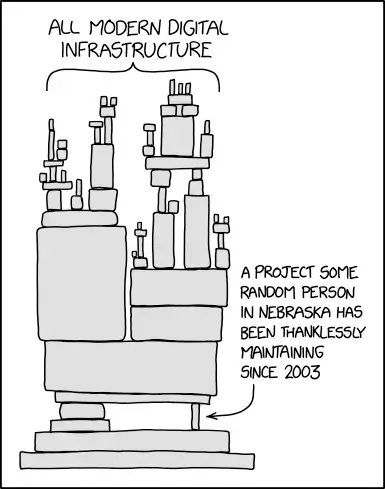
Not every library reaches that critical mass and no open source developer productivity tool is guaranteed to be maintained forever. What then?
Maybe you fork the library and take it over yourself, which is a whole time-consuming side quest that you weren’t planning on.
Skin In The Game
Which is why sometimes the best course to take is to look for a commercial offering. The company that’s built the software has skin in the game. They’re financially incentivized to produce a good software product and maintain it.
And the good companies listen to their customers and build the features that they need. We love it when the difficult problem is solved for us as it saves us time, agony, and money.
For a lot of use cases, this is an easy decision. Most of us buy commercial software for one thing or another—to use. But there’s a huge difference between signing up for the next SaaS to use vs. purchasing a license for something to build with, that will be tightly integrated into your app.
In this scenario, it’s important to ask a different set of questions that need weighing, such as:
- What level of control am I losing if I have to build my app that’s reliant on this proprietary software?
- How much is it going to cost if I scale to hundreds of thousands of users or more?
- What if they double their prices?
- How secure is the software?
- Can I deploy it natively in my environment or app?
With how fast tech moves, the risk of getting locked into something proprietary that will cost time and money down the road is high.
Which is why you might consider mixing things up.
It’s Not Whether, But Which
- It’s not whether you’re going to use open source software for some things or not, but which ones and for what purposes.
- It’s not whether you’re going to use a commercial license for some things or not, but which.
If you’re building an app, chances are you already leverage both. You’re probably going to leverage:
- A commercial email provider
- An open source front-end framework
- A commercial cloud environment
- An open source database with potentially commercial features on top.
And buying / sourcing various services is only expanding:
- Content delivery networks
- Load balancers
- Message queue systems
- Logging & monitoring
- Certificate management
- Payment processors
- Captcha services
- Image optimization
- PDF generation and manipulation
- Form & API generation and management
Depending on your industry and use-cases, what you decide to leverage that’s open source vs commercial will vary.
Which is why in 2025, more and more companies that offer software for developers to build with are providing both—an open source and commercial option.
This hybrid approach allows developers to leverage the transparency, flexibility, and community support of open source while also benefiting from the reliability, dedicated support, and advanced features often associated with commercial offerings.
So You Can
- Maintain Flexibility and Control: Open source components enable developers maintain the ability to modify and customize core functionality when needed. This ensures that the software can be adapted to specific business requirements without being 100% dependent on a vendor’s roadmap.
- Be Cost Strategic: Open source tools often come at no initial cost, allowing teams to allocate budget towards commercial tools that provide significant value-add features or support.
- Ensure Security and Compliance: While open source software benefits from community scrutiny, commercial tools often come with dedicated security teams and compliance certifications, crucial for enterprise environments.
- Receive Support and Maintenance: Commercial vendors provide professional support and regular updates, reducing the maintenance burden on internal teams and ensuring long-term viability.
- AND Get The Advanced Features: Commercial offerings often include sophisticated features that may be absent or less developed in open source alternatives, particularly for specialized or industry-specific needs.
Don’t Default
Which brings me to forms and APIs. In the past, developers would build these from scratch.
Various companies got the wiser and started to offer default solutions that go with their software platform. For example, if you’re using SalesForce, then you can use the default forms that come with SalesForce. But what happens when you need to go outside of Salesforce? It may not be so straightforward.
Of course there are ways around this, there are solutions to this, but they are afterthoughts.
Until recently, forms haven’t been considered as an independent solution from other parts of your tech stack (like the solutions and services mentioned above), because there’s never been a 3rd-party solution that’s intentionally built for developers to build with, that fully deploys in a development environment, and gives you the flexibility and control you need.
Form.io As A Developer Productivity Tool With An Open Source Core Combined With Enterprise Features
Swipe right
Developers use Form.io to build enterprise-class data collection and business process applications with speed and scalability by:
- Automating form building and their respective APIs via drag and drop
- Enabling teams to make form changes that reflect in production environments without having to commit new code
- Auto-generating PDFs based on form submissions and creating forms from PDFs
- Providing form management tools and the necessary roles and permissions for large teams
- And more.
Our core API engine that undergirds the platform, the front-end Javascript rendering libraries (React, Angular, Vue, Vanilla), and a number of other supporting libraries are all open source, so you can modify and extend as needed, deploy natively in your environment, and have trust in the code transparency.
In addition, the data structure is JSON-based and the platform is API-driven, which further enables high scalability, easy integrations, and adherence to the growing global standard.
On top of the open source core, Form.io offers custom form field components, advanced security and compliance modules, professional support, dedicated maintenance, PDF form import and export, reporting, and the ability to deploy the form building interface into your app.
The best part is that even the enterprise licensed components and the tools—the entire Form.io platform—is fully deployed in your environment via Docker, so you never have to API out to 3rd-party infrastructure as part of your core application or log into a 3rd-party tool.If you’re building an app and you want to avoid building these things from scratch or wrangling the default options that come with the platform you’re building on, let us know.
]]>