Leaderboard




Popular Content
Showing content with the highest reputation since 02/21/2026 in all areas
-
Version 1.0
20 downloads
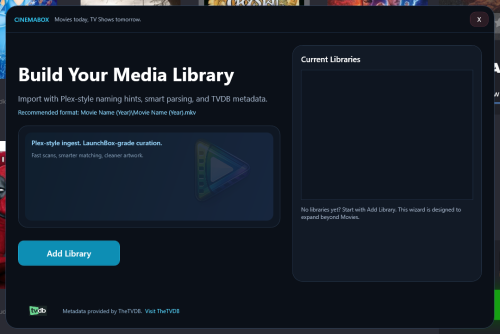
I had a day to spare on the weekend and wanted to try my hand at a LaunchBox plugin. This is the result. I don't plan to actively develop it too much moving forward, as this was very much a weekend hobby experiment project. Still, it works, and I figured I would share it in case it is useful to someone. Requirement: LaunchBox 13.26 or higher What does this do? It's currently a movie importer plus metadata and artwork scraper. It is designed for people who already have a local movie collection organized for apps like Plex, Jellyfin, or Emby. It imports that folder into LaunchBox with minimal fuss. It also downloads and configures MPV so movies can launch cleanly as an "emulator", and be used with a controller. Metadata and artwork provided by TheTVDB. Installation Close LaunchBox Download the 7z archive Unblock the archive in Windows if needed (Right click > Properties > Unblock) Extract it into your LaunchBox Plugins folder Your structure should end up like this: LaunchBox\Plugins\CinemaBox\CinemaBox.dll LaunchBox\Plugins\CinemaBox\CinemaBox.deps.json How to use Tools > CinemaBox Runs the import and downloads and configures MPV. Right click a movie > CinemaBox > Change Match (TVDB) Rematch the movie and re download metadata and artwork. Right click a movie > CinemaBox > Media Download (Replace Artwork) Grab alternate artwork. A few things to be aware of: Matching is based on folder and file names. If your naming is messy, results may be messy. If TheTVDB changes their API, this plugin can break. Heavy scraping could potentially hit API rate limits. MPV configuration is basic and meant to “just work”. If something breaks, feel free to post about it. I'll be checking in every now and then, and may be able to fix it. Uninstall Close LaunchBox Delete the folder: LaunchBox\Plugins\CinemaBox7 points -
Ganbare Goemon
 7 points
 -
Hey all, First time poster here. Love this series, thank you so much Viking! I'm hoping to help the effort. Here are some videos for platforms I couldn't find. I may have bent the rules on a couple, feel free to delete if I went too far and it doesn't fit. For the typical Sega cabinets set ups, I kept true to the rules. Where I deviated was on Incredible Technologies, Adrenaline, and American Laser Games. Since those platforms requires a unique set up,( e.g. IT with track ball or Adrenaline with touch screen), I felt like a normal cabinet wouldn't pay tribute. Anyhow feel free to remove if it's too outside... just wanted to share in case anyone else needs them. I also created a "Rare Systems" Platform video to help capture the ones-y, twos-y game makers in one platform to prevent a scrolling nightmare - all the while attempting to pay proper proper tribute. On top of that, I created a Clone Hero platform and a Wow Action Max. Adrenaline.mp4 American Laser Games.mp4 Clone Hero.mp4 Incredible Technologies.mp4 Rare Systems.mp4 Sega ALLS.mp4 Sega Nu.mp4 Wow Action Max.mp4
7 points
-
Space Panic
6 points
-
last one i already made
6 points
-
SPACE WARRIOR
6 points
-
Dragon Buster
6 points
-
Palamedes
6 points
-
Lunar Rescue (Alternate)
6 points
-
Lunar Rescue
6 points
-
Claim to Power
6 points
-
Metal Marines USA-EUROPE
6 points
-
Kick Off Jaleco Cup
6 points
-
F1 Grand Prix Star II
6 points
-
Tetris Plus 2
6 points
-
Ultima savage Empire
6 points
-
Eek the Cat
6 points
-
And one for ExoDreamm
6 points
-
Not requested...but I made a logo for ExoDos version for the Apple II GS. If anyone is interested....
6 points
-
Japanese characters in number 5 left white, with the overlap to make them black just didn't look right.
6 points
-
Christmas Craze
6 points
-
Krusty's Super Fun House
6 points
-
Old english logo: New version: German Logo:6 points
-
And some HiRes Versions:6 points
-
Thunder Zone
6 points
-
Someone requested Batman Returns (Jap) But I can't find original post. It's only an upscale with minor improvements. https://gamesdb.launchbox-app.com/games/details/1474-batman-returns
6 points
-
Pachinko Wars (JP)
6 points
-
And the Brazilian version
6 points
-
Air Combat - Sharp x68000
6 points
-
6 points
-
Version 1.0.1
55 downloads
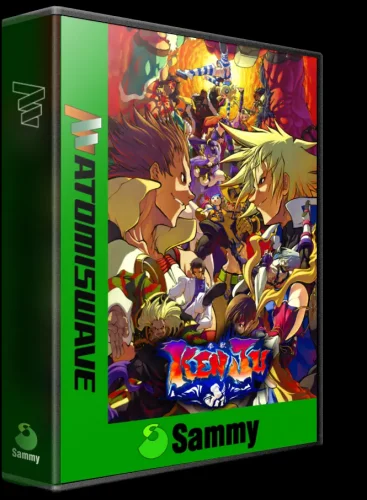
First project for 3D Box. This is my re-imagining of the library created by Cauptain. I'm standardizing it into a 3DBOX model and format. All files are in .webp format.5 points -
5 points
-
Phantasm
5 points
-
5 points
-
5 points
-
Militia
5 points
-
Beauty and the Beast
5 points
-
Rings of Saturn
5 points
-
ROCKET PILOT
5 points
-
Robot Odyssey I
5 points
-
Roach Hotel
5 points
-
actually I found a hi res Sensible Soccer with European Champions subtitle in the database: Sometimes you just have to scour the database for these logos. One system will have a low res logo for one system, but I really hi res logo of the same game on a different system.
5 points
-
Dingo
5 points
-
Reader Rabbit
5 points
-
Rainy Day Fun
5 points
-
Raster Blaster
5 points
-
RETRO-BALL
5 points
-
5 points
-
5 points
-
5 points


.png.a5806e4b26e124b547b9c6035cb61967.png)


