Search the Community
Showing results for tags 'database'.
-
Hi, I have an annoying problem. When I import games from Steam, Epic, EA or similar, some games are not found in the LaunchBox database. But these games are in the database. As soon as I empty the application path, LaunchBox finds the game in the database. Example: Steam: Armor Of Heroes Path steam://rungameid/1368440 LEGO Star Wars III: The Clone Wars steam://rungameid/32510 I have already reinstalled LaunchBox. Unfortunately with the same problem. I have 130 Steam games alone that were not recognized. If possible, I don't want to edit them all again by hand. Does anyone have a solution? Thank you. Edit: I am using the newest version
-
Version 1.3.0
1,423 downloads
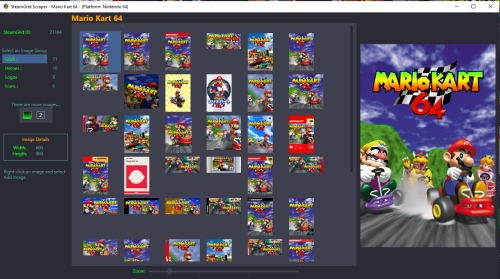
Preview and import images from SteamGrid Database directly into your LaunchBox collection. A personalized SteamGridDB API Key is required. (See below about getting yours) Downloaded images are saved to the default LaunchBox image folder(s). Installing Download and extract the contents of the download to your /LaunchBox/Plugins/ folder. i.e. D:/LaunchBox/Plugins/SteamGrid Scraper/SteamGridScraper.dll First Time Run Select a game, right-click it and select SteamGrid Scraper. The "API key Required" window will open. Paste (or manually type in) your personal SteamGrid API key. Click Save Using Select a game, right-click it and select SteamGrid Scraper. In cases where an exact match for the game Tite is not found, a window will popup listing 'close matches'. Double-click a game from the list to select it. Click on the SteamGrid image group you'd like to view. Options are: Grids Heroes Logos Icons Up to 50 images will show in the Gallery. If the selected group has more than 50 available, click "2" to see then next 50. Use the Zoom slider to increase/decrease the image sizes in the Gallery. Double-click on an image to see a larger view. (Opens in a separate window). The Icons group is pretty much useless in LaunchBox. But since they're available, they're included. Saving an image To add an image to your game, right-click the image in the gallery switch from Image Preview to Add Image and select Add Image. Select the Image Type (folder) you want to save it as from the dropdown box. (It doesn't change automatically for you.) Only a few select image types are shown by default. To see all image folders (types), check the box See All available image types. (Optional) To view your existing images for the game, click View Existing Images Gallery. (Opens in a separate window) This shows only the images for the selected image type. (Optional) Click Open Image Folder to open Windows Explorer to the folder where your existing images are and where the image will be saved to. Click Save Add Image to save the image. Getting your SteamGridDB API Key Log into your SteamGridDB account. Go to your Profile - Preferences - API Click 'Generate API key' As always, all comments and suggestions are welcome. 😎 -
Is the syntax for searching the Games DB posted anywhere? I use the search multiple times daily in my retro work and I have long struggled with knowing what syntax is acceptable. Most things are obvious and work just fine, but when I forget and paste a full game entry into the search field that has an actual + sign in it, I get a database error. Is there a way to include that plus sign as part of the search and not a search parameter?
-
SteamGridDB Scraper View File Preview and import images from SteamGrid Database directly into your LaunchBox collection. A personalized SteamGridDB API Key is required. (See below about getting yours) Downloaded images are saved to the default LaunchBox image folder(s). Installing Download and extract the contents of the download to your /LaunchBox/Plugins/ folder. i.e. D:/LaunchBox/Plugins/SteamGrid Scraper/SteamGridScraper.dll First Time Run Select a game, right-click it and select SteamGrid Scraper. The "API key Required" window will open. Paste (or manually type in) your personal SteamGrid API key. Click Save Using Select a game, right-click it and select SteamGrid Scraper. In cases where an exact match for the game Tite is not found, a window will popup listing 'close matches'. Double-click a game from the list to select it. Click on the SteamGrid image group you'd like to view. Options are: Grids Heroes Logos Icons Up to 50 images will show in the Gallery. If the selected group has more than 50 available, click "2" to see then next 50. Use the Zoom slider to increase/decrease the image sizes in the Gallery. Double-click on an image to see a larger view. (Opens in a separate window). The Icons group is pretty much useless in LaunchBox. But since they're available, they're included. Saving an image To add an image to your game, right-click the image in the gallery switch from Image Preview to Add Image and select Add Image. Select the Image Type (folder) you want to save it as from the dropdown box. (It doesn't change automatically for you.) Only a few select image types are shown by default. To see all image folders (types), check the box See All available image types. (Optional) To view your existing images for the game, click View Existing Images Gallery. (Opens in a separate window) This shows only the images for the selected image type. (Optional) Click Open Image Folder to open Windows Explorer to the folder where your existing images are and where the image will be saved to. Click Save Add Image to save the image. Getting your SteamGridDB API Key Log into your SteamGridDB account. Go to your Profile - Preferences - API Click 'Generate API key' As always, all comments and suggestions are welcome. 😎 Submitter JoeViking245 Submitted 08/18/2024 Category Third-party Apps and Plugins
-
I thought I'd share a spreadsheet I made from the database to easily sort and filter games. The full database is contained within the file and seperated by platform in sheets. I recommend using Excel to open it, I found that other spreadsheet software struggle with it. Full Spreadsheet.xlsx

-
Hey! I like the new look but there is one new thing that is interrupting my workflow and maybe it is a quick fix that can be done. I used to be able to middle click on one of these images and it would just open full size in a new tab. Now with the new look I have to click into the image, wait for it to load, right click and select 'open image in new tab', and then close out of the current image. Maybe nobody else will be impacted by this, but I'm currently going through all the PS1 games and fixing images and logos... and this new change is adding extra steps. If it's something that can be fixed easily I would appreciate it, but if not, just add it to a list. Thanks much!
-
 @AstroBob It looks like a new database look and structure has been put live, but isn't fully functional? The replace image function is broken. It's currently impossible to do it, since they system asks to "make a change" to the entry before you can write a reason for that change and proceed with the update. Just replacing an image is currently not considered a change, but a change of image type would activate the comment field (which is not what should be done in my case). Could you please fix as soon as possible? It's a really bad bug, I'm upgrading the image quality of my local collection (using some of my own scans) and I'm uploading in parallel to the online database so other users could use them as well, but I might stop doing it if I'm just unable to do it. Could you also look at my previous bug report also: Thank you!
 -
For some reason if a game has "Year only" data it will not go through anymore. For example with this game, which I already have in my local LB database (with the year data intact): https://gamesdb.launchbox-app.com/games/details/20682-10th-frame-pro-bowling-simulator If I go to launchbox (13.19), edit metadata and press the red cross (remove database ID) and then do a search again and click the game it will wipe out empty the "release date" field. Same thing happened with some new entries I submitted to the database. The "year only" field will not reach my local game entry even if the year can be found on the online database, it will give me an empty release date instead. Maybe this is related to the new database format? Could you please check, thank you!
-
Hey guys, I have a rather strange question as my implementation of Launchbox is different then most. I have a separate Platform Category for each region, since I study Japanese and play all games exclusively in Japanese. The issue is, I want the roms to show up using their English name (or translation) instead of their Japanese name. This is for many reasons but lets take Xenogears for instance. The japanese name is ゼノギアス while the english name is Xenogears. I can read the Japanese titles no problem, but it gets sorted in order using the Japanese Albephet instead of the American. There is also other use cases where the technical name has Kanji in it, but the file is in Romanji so finding the games is rough and names in japanese using Kanji is actually the hardest thing lol. But also, there are certain games that I only know of by the english, so if I want to play like The Evil Within, I have to know that the Japanese titles is Psycho Break. I am aware you can go into each game, go to Alternate Names, select the english and hit 'Set Selected Name as Title' then OK, but I would have to do this for every Japanese entry on top of once you change that, it sets the scroll bar to the location where the new name exists, so for each game I have to scoll all the way down, select, change, scroll all the way down, etc. Is there a way to either force the use of alternative names, or some type of batch way to manually select the name used for each game? I don't mind doing this even the long way, but it would not be the most fun
-
I would like to change my username at https://gamesdb.launchbox-app.com It's possible?
-
Hello there I've almost finish to add all my games on my Retroid Pocket 3 But for some games, I have to edit metadata because they aren't found (Name still white, no whell...) So i edit metadata, change the name, and click on search in launchbox DB It take few second and almost 9 time on 10 i've got "no results" and few times, whitout change anything the game I want is finded. There is something i miss to use the search ? Thanks
-
If I search for Batman for example I get pages and pages of games. It'd be nice if searches could be filtered by platform.
-
In the games database (https://gamesdb.launchbox-app.com/), the total number of games for each platform must be indicated. I think it's something important that should be seen. Likewise, when you import roms from LaunchBox it should tell you how many games you are importing before hitting the accept button.
-
Hi everyone, I would like to know where personal data is stored. I want get last played time and play time of an game. Could you help-me?
-
I recently installed 12.1 and noticed that none of my platforms or games had video snaps downloaded. They still download when done one at a time, but when adding a brand new system or trying to download in bulk, the videos are not downloaded from Emumovies. I am a lifetime member of both Emumovies and Launchbox, and to troubleshoot the issue, I even installed an old copy of 11.10 that I had on a backup drive, and it (11.10) downloads the video snaps from Emumovies without a fuss when adding new systems or in bulk. I'm not sure what the problem could be. Right now my plan is to block updates on 11.10, download everything and get everything setup then update to 12.1. Any clarification on why this is happening, or how I could fix it, would be greatly appreciated.
-
I would appreciate if someone can help me, I have been trying to find the metadata of Super Mario Bros. 3 but they do not match, I only see Super Mario Bros. 3X which is a HACK Rom in which the original images do not match, I have tried several names but I can't find the correct database connection
-
Fixing the Database: #1 Dedicated Help: The database is crucial to the Launchbox experience, but it seems to always go to the wayside in favor of flashier features. It's even somehow still in "Alpha". So why not let Jason handle Launchbox development, and have designated volunteer(s) or a paid staff member handle the database? #2 Protect Correct Data: Values in the database should have an "Is this is correct?" option next to them that is only visible to moderators. Selecting "Yes" on this option + games that haven't been changed in years would go into the current DB change approval queue with a poll for mods asking: "Is this correct?". Once there are a very significant number of "yes" votes, the data would no longer be open for requests to change it. Moderators would also have the option to flag previously marked "correct" data as invalid. Records should be kept on which games are constantly being changed so that they can be fixed 1 time, marked as correct, and everyone moves on. We should narrow our focus on completing a correct database, rather than wasting moderator time on junk requests for popular games. #3 Protect "complete" Platforms: Changes to "complete" platforms (for example: NES, SNES) should require much more votes than normal to pass. This would lead to less junk for moderators to sort through and fewer duplicates. Currently a request can be made about any game or value. No one wants to moderate when the next several changes are just someone adding Mario, Zelda, etc to the NES. #4 Moderator Ranks: Moderator ranks could be a continuing incentive and could serve many different functions. The Lowest tier would just be the same as the current moderator. Medium tier would be unlocked at x20 the current DB moderator requirement. This would give double the voting power on any changes, and requested changes would say "Submitted by a veteran moderator". Top tier moderators would have all previously mentioned perks, but would only be selected by Launchbox staff. Their votes would count significantly more than a regular vote. They would also have the option to suggest a timeout or ban on users. Both medium tier and top tier moderators would have access to an exclusive forum section to discuss the database & suggest database changes/features. Finally, anyone who has submitted a very significant amount of work to a certain platform should get a badge/tag marking them as a "Platform Expert". #5 Fix Platform Names/Organization: Platform names should be consistent. Either make all Platforms have their company as a prefix or none of them. For example, all other consoles made by NEC have "NEC" in front, so "PC Engine SuperGrafx" should be changed to "NEC PC Engine SuperGrafx". Platforms should also be grouped together by their company. Please add a "Database Revamp" option in the next poll so the community can decide on this. @Jason Carr @Lordmonkus @neil9000 @Zombeaver @DOS76 @RetroHumanoid @Charco @Retro808 @keltoigael @kmoney
- 9 replies
-
- 1
-

-
- moderation
- featurerequest
- (and 2 more)
-
I want to add Steam tags and genres to https://gamesdb.launchbox-app.com/genres Does someone know how? If this already been answered, just link me to the answer.
-
 I wanted to create an auto-generated playlist for vector games. Is there a field for whatever this would be called ("screen"? "monitor"? "graphics type"?) so that I could filter by that?
 -
I believe for the future integrity of the database and continued success of Launchbox these basic database features are necessary and should be considered. Please add a "heavy DB revamp" option in the next poll, and link to this post so the community can decide on it. Thanks. #1 Dedicated help. Jason has talked before about having another developer in the future. This new dev position should be someone working full-time on the database. At the very least, have someone part-time or a volunteer who is fully knowledged in the database working on features/fixes. The database is crucial to the Launchbox experience, but goes pretty much goes to the wayside when Jason goes back to working on features. It's a constant balance for Jason between Launchbox features, and database features. Jason seems to enjoy developing the app more, so the next paid position should be someone working on the database. If you can't pay someone, or can't justify paying someone, get a dedicated volunteer, vet them, and put them to work. Requests like this list could be directed to this person and implemented, instead of competing against more flashy features for the program. Launchbox has been in development for years now, yet the very service that makes it all work is still in "Alpha". That's just crazy. We absolutely need an official (ACTIVE) person overseeing it. #2 Protect correct Database data. Existing data values could be given a "this is correct" option that could be voted on by moderators. Once data hits a certain threshold of "correct" votes, it would become protected so that future changes could not be requested for this data. Data that hasn't been changed in years should also be marked as "correct". Moderators would have the option to flag "correct" data as invalid. Records should be kept on which games are constantly being changed so that it can be fixed 1 time with the correct values, and stop the users that keep modifying it. We should narrow the focus on completing a correct database, rather than moderators seeing absurd junk requests for popular games. #3 Protect "complete" Platforms from duplicate/invalid games. New games for "complete" platforms, for example NES, should require a lot more votes than normal to add since by this point it's probably a user error in not finding that the game already exists. This would lead to less junk for moderators to sort through and fewer duplicates. Currently a request can made about any game or value. No one wants to moderate when the next 50 changes are someone adding Mario, Zelda, ect to the NES. #4 Tiered levels of database moderators. Tiered moderator ranks could be a continuing incentive to moderate, and serve different functions. The lowest tier would just be the same as the current "moderator". Medium tier moderator would be unlocked at x10 the current DB moderator requirement. This would give double the voting power on any changes, and requested changes would say "Submitted by a veteran moderator". Finally, Top tier moderators would have all previously mentioned perks, but would only be selected by Launchbox staff. They would be able to flag "correct" values (as mentioned above), as invalid with only 3 votes required from top tier moderators before it is accepted as invalid. They could also see which user submitted the changes, and have the option to submit a request to ban the user from suggesting changes. Finally, both medium tier and top tier moderators would have access to an exclusive forum section to congregate and also to suggest database changes/features to Launchbox Staff. #5 FIX NAMES Platform names should be consistent. Either make all Platforms have its company as a prefix, or none of them. For example, all other consoles made by NEC have "NEC" in front, so "PC Engine SuperGrafx" should be changed to "NEC PC Engine SuperGrafx". #6 Community Events. I think everyone can agree that at the very least, fan-art submitted should be relevant to the game or sequels to the game on the same console. However this is currently a moderation nightmare, and is heavily influenced by personal bias since no fan-art is "correct". The real question we should ask ourselves is what benefits does fan-art add, and is it worth it compared to an optional fan-art internet scrape upon import? Some fanart from the entire series can be fine, but this could potentially spoil later sequels or even events in the current game (dead characters, betrayals, ect). I don't know how this slipped through the cracks, but personally on my setup any game that has "taz" in it displays fan-art of the Tasmanian devil character for me. Basically, either require fan-art to be specific to the game/sequence of games, or remove it. My solution is that I think we could do without fan-art. *EDIT: I don't mean reconstructions, those should definitely stay* It has no real quality standards so it leaves many high-quality fan-art submissions next to DeviantArt MS-paint fanart. It has no real moderation standards so it bogs down moderation. Seeing as there is no real limit on how much fan-art is "enough", it will constantly take up an ever-increasing amount of database space, increasing import times, but adding little to the experience or even degrading it at times (Tasmanian devil / spoilers). I'm sure many would be mad at the "loss of a feature" but an alternative could be that fan-art would optionally be scraped from the web as an import option. @Jason Carr @Lordmonkus @neil9000 @Zombeaver @DOS76
- 9 replies
-
- 9
-

-
- moderation
- featurerequest
- (and 1 more)
-
An example of an incorrect name is "Daphne". Daphne is an emulator for Arcade LaserDisc games, not the name of the platform or machine. It should be re-named to "LaserDisc". An overarching problem is whether or not the company name should be included or not. All Nintendo and Sega consoles have the company names in the front, however many "NEC" consoles don't. There should be a standard of either having the company name, or not having the company name. @Jason Carr @Lordmonkus
-
There are some duplicate platforms in the database: - XaviXPORT - Mattel HyperScan - Taito Type X
-
 Hello everyone, I'm very happy with my premium license! and I want to contribute every possible thing in my hands for the community and the app, pdta: sorry if my english is not appropriate, this is the situation: Have you think: Why something games does not download artwork and why do not merged automatically ? that's the answer: I've noticed that all the games (generally Japanese versions) in the database with an alternative names but without its corresponding region , have issues with auto download Metadata & Media and especially with the merge function as well. For example In my Snes roms I've one called "Takahashi Meijin no Daibōken Jima II" that is the japanese version of "Super Adventure Island 2" but the Japanese version was not auto included/merged into "Super Adventure Island 2" apps, for a simply reason, the alternative name does not have the region, It does not been specified in the database. as in the image: It easy to report it, I've reported all the Snes & Nintendo 64 alternative names without region, I like to help improving the games database, for this reason, for a better database please do not upload alternative names without his region, If you are a moderator of the database please take in to account that the alternatives names with his region helps to improve the merging in and download Artwork for the collections. If you see an alternative name without region please change it!! is simple, you must delete the previous alternative name by pressing backspace, and create a new entry with the alternative name and his corresponding region, like in the images: That's all!! This must seem very exaggerated hehe, but can you imagine the lot of games without his media & not merged/linked in his parent game, it's like a game without his parents and his home heheh, just for this simply reason, It must be mandatory add the region in every alternative name, this will improve the database and our collections a lot!! Thanks for reading!! have a nice game!
- 2 replies
-
- 2
-
-
- alternative names
- merge
- (and 2 more)
-
I'm trying to use ExoDos and nothing works!!! I used Dosbox as a emulator and imported the roms folder but no games where imported.
-
Hi All, I enjoy helping the Launchbox community by moderating the Database, Approving and Declining peoples updates. Recently though I have got very frustrated with how slow it is to do this. Clicking on the approve or Decline button seems to takes ages to move on to the next game. Timing it just now, it took 26 seconds to do a simple approval on a new image. There is currently a moderation queue of 1067 items and I have noticed this getting longer and longer, it use to be only a couple of hundred. So I assume I am not the only one losing patients with database. Due to various issues I have not been able to help out for the last couple of months, in that time I was hoping this would improve but it has not. Is there anything that can be done to improve this in the background? I know how big this database is and this is not an easy ask, but I fear you will start losing moderators if things do not improve soon. As is evident from the current backlog this already appears to be the case. For the record, I take pride in making sure I am checking for duplicates and that names/pics are correct, I am not simply spamming the Approve button to get the queue down.. I want the Launchbox database to be solid, reliable and accurate. Thanks

.thumb.png.c9faf450e4d2b690a819048b18173f61.png)