Search the Community
Showing results for tags 'pc'.
-
Version 1.1
349 downloads
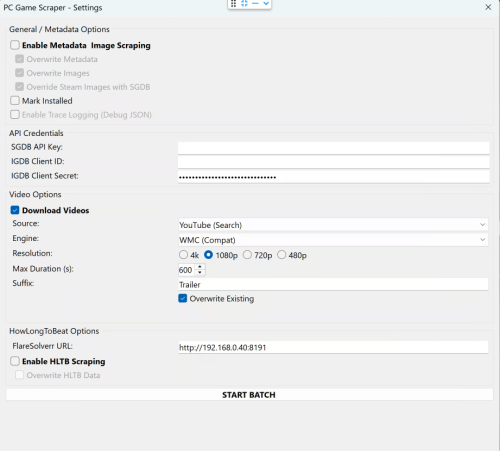
🎮 PC Game Scraper for LaunchBox PC Game Scraper is a robust metadata and media scraping plugin for LaunchBox. It intelligently prioritizes Steam for PC game metadata and IGDB for console titles. It leverages SteamGridDB for high-quality frontend artwork and YouTube (via yt-dlp) for video trailers. The plugin features advanced integration with HowLongToBeat (via FlareSolverr), now upgraded with a dedicated "Console Fork" to pull version-specific completion times directly from the site’s internal data. 🛠️ Dependencies & Requirements To use all features, the following components are required or recommended. I've included everything I can for your convenience. If you are not comfortable with them or do not want to use the optional Deno.exe. You may download your own or remove Deno.exe if you don't plan on using cookies.txt or downloading age gated videos. Required for Core Functionality yt-dlp.exe (Required for Video): The engine that downloads trailers. Must be placed in the plugin folder. ffmpeg.exe (Required for Video): Handles video merging and ensures files play correctly in LaunchBox. Recommended SteamGridDB API Key (Highly Recommended): Required for fallback images not available on Steam. IGDB Client ID & Secret (Highly Recommended): Required for all console game metadata and "Gap Filling" for PC games metadata either not on Steam or difficult to extract. FlareSolverr (Required for HLTB): A local proxy service needed to bypass Cloudflare security when fetching HowLongToBeat playtimes. cookies.txt and Deno.exe (Optional): Helps yt-dlp bypass age-restricted content gates on YouTube and sign in to your premium account. Deno.exe will solve captchas to bypass YouTube's bot protection. ⚠️ Disclaimer This plugin scrapes data from third-party sources. Please use FlareSolverr and yt-dlp responsibly and at your own discretion. ✨ Key Features 🧠 Smart Metadata Routing PC Logic: Scans Steam first. If a game is found, it then uses IGDB to "Gap Fill" fields Steam often lacks, like Series and Age Rating. Console Logic: Automatically skips Steam and routes directly to IGDB based on the game's platform. Manual Search: If automatic matching fails the user is prompted for a new search term, steam app id, steam store or igdb url. 🎬 Video Downloader Source Selector: Select your desired source, Steam or Youtube. Smart Fallback: For PC games, if Steam source is selected it attempts to grab the official Steam Store trailer first. If unavailable allows the user to switch to Youtube, or if the game is a console title, it pivots to a YouTube search and injects the platform in to the search term for better matching. Dynamic Slicer: Automatically applies your "Max Duration" limit to YouTube downloads to save disk space. YouTube videos will be cut off at the time set. A 10 minute gameplay video is cut down to 5 minutes. Resolution: Will attempt to download the desired resolution. If it is not available will scale down until one is found for the selected video. Suffix: Allows user to define desired youtube search term suffix, IE Trailer, Gameplay, etc... ⏱️ HowLongToBeat The plugin now uses two distinct methods to fetch playtimes: PC Logic: Pulls the general "blended average" from the HLTB search results. Console Logic: Loads the game's specific detail page and extracts the exact platform data (e.g., pulling GameCube-specific times for Metroid Prime rather than the Wii Remaster times). Custom Fields: Creates custom fields for dynamic playlist creation. Marathon 60h+, Long 30-60h, Extended 15-30h, Standard 5-15h, and Quick <5h, as well as the exact times provided by HLTB. 🎮 Real-World Workflow Examples If you select a game and run all three functions (Metadata, Images, and Video), here is how the plugin behaves: Example A: Windows Game (Cyberpunk 2077) Identification: Finds the game on Steam via name match. Metadata: Pulls metadata from Steam, then if client id/client secret are populated and correct hits IGDB to add additional fields not available or hard to parse from steam. Images: Grabs all available steam images. If images are missing or if SGDB override is enabled and your SGDB API is present it hits SteamGridDB. Video: Downloads the official trailer directly from the Steam Store servers or YouTube if the video source is YouTube. HLTB: If enabled and flaresolverr is setup. saves the general PC completion times to your custom fields as well as the category times mentioned above. Example B: Console Game (The Legend of Zelda: Twilight Princess for GameCube) Identification: Automatically routes to IGDB after detecting the GameCube platform. Metadata: Pulls the IGDB metadata. Images: Since no Steam ID exists, it goes straight to SteamGridDB to find the community-voted best GameCube media. Video: Recognizes it isn't a PC game and routes to YouTube to search for "The Legend of Zelda: Twilight Princess GameCube Trailer". HLTB: Triggers the Console Fork. It ignores the Wii and Wii U times and pulls only the GameCube platform data. -
PC Game Scraper View File 🎮 PC Game Scraper for LaunchBox PC Game Scraper is a robust metadata and media scraping plugin for LaunchBox. It intelligently prioritizes Steam for PC game metadata and IGDB for console titles. It leverages SteamGridDB for high-quality frontend artwork and YouTube (via yt-dlp) for video trailers. The plugin features advanced integration with HowLongToBeat (via FlareSolverr), now upgraded with a dedicated "Console Fork" to pull version-specific completion times directly from the site’s internal data. 🛠️ Dependencies & Requirements To use all features, the following components are required or recommended. I've included everything I can for your convenience. If you are not comfortable with them or do not want to use the optional Deno.exe. You may download your own or remove Deno.exe if you don't plan on using cookies.txt or downloading age gated videos. Required for Core Functionality yt-dlp.exe (Required for Video): The engine that downloads trailers. Must be placed in the plugin folder. ffmpeg.exe (Required for Video): Handles video merging and ensures files play correctly in LaunchBox. Recommended SteamGridDB API Key (Highly Recommended): Required for fallback images not available on Steam. IGDB Client ID & Secret (Highly Recommended): Required for all console game metadata and "Gap Filling" for PC games metadata either not on Steam or difficult to extract. FlareSolverr (Required for HLTB): A local proxy service needed to bypass Cloudflare security when fetching HowLongToBeat playtimes. cookies.txt and Deno.exe (Optional): Helps yt-dlp bypass age-restricted content gates on YouTube and sign in to your premium account. Deno.exe will solve captchas to bypass YouTube's bot protection. ⚠️ Disclaimer This plugin scrapes data from third-party sources. Please use FlareSolverr and yt-dlp responsibly and at your own discretion. ✨ Key Features 🧠 Smart Metadata Routing PC Logic: Scans Steam first. If a game is found, it then uses IGDB to "Gap Fill" fields Steam often lacks, like Series and Age Rating. Console Logic: Automatically skips Steam and routes directly to IGDB based on the game's platform. Manual Search: If automatic matching fails the user is prompted for a new search term, steam app id, steam store or igdb url. 🎬 Video Downloader Source Selector: Select your desired source, Steam or Youtube. Smart Fallback: For PC games, if Steam source is selected it attempts to grab the official Steam Store trailer first. If unavailable allows the user to switch to Youtube, or if the game is a console title, it pivots to a YouTube search and injects the platform in to the search term for better matching. Dynamic Slicer: Automatically applies your "Max Duration" limit to YouTube downloads to save disk space. YouTube videos will be cut off at the time set. A 10 minute gameplay video is cut down to 5 minutes. Resolution: Will attempt to download the desired resolution. If it is not available will scale down until one is found for the selected video. Suffix: Allows user to define desired youtube search term suffix, IE Trailer, Gameplay, etc... ⏱️ HowLongToBeat The plugin now uses two distinct methods to fetch playtimes: PC Logic: Pulls the general "blended average" from the HLTB search results. Console Logic: Loads the game's specific detail page and extracts the exact platform data (e.g., pulling GameCube-specific times for Metroid Prime rather than the Wii Remaster times). Custom Fields: Creates custom fields for dynamic playlist creation. Marathon 60h+, Long 30-60h, Extended 15-30h, Standard 5-15h, and Quick <5h, as well as the exact times provided by HLTB. 🎮 Real-World Workflow Examples If you select a game and run all three functions (Metadata, Images, and Video), here is how the plugin behaves: Example A: Windows Game (Cyberpunk 2077) Identification: Finds the game on Steam via name match. Metadata: Pulls metadata from Steam, then if client id/client secret are populated and correct hits IGDB to add additional fields not available or hard to parse from steam. Images: Grabs all available steam images. If images are missing or if SGDB override is enabled and your SGDB API is present it hits SteamGridDB. Video: Downloads the official trailer directly from the Steam Store servers or YouTube if the video source is YouTube. HLTB: If enabled and flaresolverr is setup. saves the general PC completion times to your custom fields as well as the category times mentioned above. Example B: Console Game (The Legend of Zelda: Twilight Princess for GameCube) Identification: Automatically routes to IGDB after detecting the GameCube platform. Metadata: Pulls the IGDB metadata. Images: Since no Steam ID exists, it goes straight to SteamGridDB to find the community-voted best GameCube media. Video: Recognizes it isn't a PC game and routes to YouTube to search for "The Legend of Zelda: Twilight Princess GameCube Trailer". HLTB: Triggers the Console Fork. It ignores the Wii and Wii U times and pulls only the GameCube platform data. Submitter spiritedusual Submitted 12/28/2025 Category Third-party Apps and Plugins
-
Hey guys, I know there's not a native version for Linux and it will take time I guess but I would like to run it in Linux anayways. Is it possible to install Launchbox in Linux with Lutris? (or Bottles, Wine etc.) Has anyone tried this and can confirm that it works? Any bug? Thanks!
-
I have made a quick tutorial on how to make 3D PC/Windows Game Cases (as requested) in Photoshop. I have been told the Action File also works in Elements. Any size cover can be used as long as they are full size covers (not Just the front of a cover). Please note that Because the action file is expecting to save to my directory on my PC changing the save location in both parts of the Action file may be necessary. The Action file is attached. PC DVD BOXES.atn
- 106 replies
-
- 17
-

-

-

-

-
I wanted to ask which PS2 emulator people here find works best. I have been using AetherSX2 for a while now. So far, I have not noticed any major problems or crashes. Games run smoothly in my setup. I am curious to hear about other experiences and what emulators others prefer.
-
Hello guys, A few days ago, I remembered a game from when I was a child. It's an Adobe Flash game called "Final Fortress" My question is: Does anyone know where I can find this game?? and if it's possible to add and play it in LaunchBox? Here's a YouTube video so you can see the game I'm talking about. Thanks you all <3
-

Version 3.0.0
1,823 downloads
🌀 Hey! Just a Few Game Themes Each theme usually takes me between 2 and 3 hours to create — from animation to editing, sometimes full-on post-production where I add extra effects just to make it pop. Everything is animated by me. Sometimes I even experiment a bit (lip sync, dynamic effects, timing tweaks, etc.). Let’s just say: hands in the engine, heart in the pixels… and somehow, magic happens ✨ Enjoy! 🎮💜 🆕 New & Upcoming Themes Red Dead Redemption + Nightmare MGS DELTA 2 VERSIONS CRONOS News ! Alan Wake 2 Armored Core VI Baldur's Gate 3 Clair Obscur: Expedition 33 Cronos Cuphead Addon Dead Island 2 DOOM: The Dark Ages Eiyuden Chronicles (HQ 4K) Elden Ring Extension Fatal Fury City of Wolves Final Fantasy Rebirth Final Fantasy VII Rebirth Final Fantasy VII Remake (Sephiroth Version) Final Fantasy XVI Ghost of Tsushima Ghostrunner 2 God of War Ragnarok GTA Vice City Remastered Hellblade 2 Hogwarts Legacy (Epic Version) Horizon Forbidden West Huntdown Indiana Jones Journey Just Cause 3 Apocalypse Edition Just Cause 4 Reload (FR) Kena: Bridge of Spirits King of Fighters XV Lunar Remastered Collection Metal Gear Solid 3: Snake Eater Delta Mortal Kombat 11 Oddworld: Soulstorm Ori and the Will of the Wisps Paprium Red Dead Redemption Resident Evil 4 Remake Robocop Sifu Spider-Man 2 Star Wars: Jedi Survivor Street Fighter 6 Suikoden I & II Remastered Tekken 8 The Banishers The Callisto Protocol The Evil Within 2 The Last of Us Part II FR The Last of Us Part II (English Version) The Last of Us Part II Remastered INTRO The Last of Us Remastered Part II short TMNT: Shredder (Addon Version) --------------------------------------------------------------------- My content sharing here : https://forums.launchbox-app.com/profile/244237-pademonium-prods/content/?type=downloads_file For Follow me : https://www.deviantart.com/pademonium https://www.patreon.com/padcinematic_prod https://www.youtube.com/channel/UC_XcPcxBIY7OEvePbsbDCIg?view_as=subscriber- 1 comment
-
- 11
-
-
-
-
- super disc
- super nintendo cd
- (and 10 more)
-
7th Legion sound pack View File Sounds and audio sourced from the game files. One startup theme was extracted using FastTracker 2 Clone STARTUP002.wav MOVE001.wav SELECT001.wav BACK002.wav Submitter la vache qui rit Submitted 06/07/2025 Category Sound Packs
-
Version 1.0.0
8 downloads
Sounds and audio sourced from the game files. One startup theme was extracted using FastTracker 2 Clone STARTUP002.wav MOVE001.wav SELECT001.wav BACK002.wav -

Version 1.0.0
22 downloads
-
.thumb.jpg.ea1590f452c26514a55d5cd8cc8eac67.jpg) Since these updates addressed some playtime sync issues and i have experienced multiple of those before i did some testing by creating fresh LB builds of both. So far it seems that the updates have fixed many issues but i found that N64 playtime and play-count sync between PC and Android is still broken. I imported 2 different full ROM sets on PC and chose Beetle adventure racing (LB ID #1067) as the test game to import to android and the old problem of playtime not syncing correctly and getting doubled persists. As a play by play i import the games to PC then only beetle adventure to android and after launching it only on android and letting the sync do its thing, there's no playtime on PC but 2 play-count. I delete the game and platform on android and reset the playtime and count on PC and the phantom 2 play-count keeps appearing every time LB syncs. I then manually remove all playtime from the N64 XML on PC which seems to fix the issue. I then try again to import it to android and it immediately syncs and shows 4 play-count now both on android and PC. I delete everything n64 related on android and manually reset XML on PC which for now has fixed the problem on PC at least. Before these updates i have had very similar issues for other platforms but they seem to work fine for now (fingers crossed) I have tested ps1, NES and Genesis so far and every game syncs correctly.
Since these updates addressed some playtime sync issues and i have experienced multiple of those before i did some testing by creating fresh LB builds of both. So far it seems that the updates have fixed many issues but i found that N64 playtime and play-count sync between PC and Android is still broken. I imported 2 different full ROM sets on PC and chose Beetle adventure racing (LB ID #1067) as the test game to import to android and the old problem of playtime not syncing correctly and getting doubled persists. As a play by play i import the games to PC then only beetle adventure to android and after launching it only on android and letting the sync do its thing, there's no playtime on PC but 2 play-count. I delete the game and platform on android and reset the playtime and count on PC and the phantom 2 play-count keeps appearing every time LB syncs. I then manually remove all playtime from the N64 XML on PC which seems to fix the issue. I then try again to import it to android and it immediately syncs and shows 4 play-count now both on android and PC. I delete everything n64 related on android and manually reset XML on PC which for now has fixed the problem on PC at least. Before these updates i have had very similar issues for other platforms but they seem to work fine for now (fingers crossed) I have tested ps1, NES and Genesis so far and every game syncs correctly. -
Since these updates addressed some playtime sync issues and i have experienced multiple of those before i did some testing by creating fresh LB builds of both. So far it seems that the updates have fixed many issues but i found that N64 playtime and play-count sync between PC and Android is still broken. I imported 2 different full ROM sets on PC and chose Beetle adventure racing (LB ID #1067) as the test game to import to android and the old problem of playtime not syncing correctly and getting doubled persists. As a play by play i import the games to PC then only beetle adventure to android and after launching it only on android and letting the sync do its thing, there's no playtime on PC but 2 play-count. I delete the game and platform on android and reset the playtime and count on PC and the phantom 2 play-count keeps appearing every time LB syncs. I then manually remove all playtime from the N64 XML on PC which seems to fix the issue. I then try again to import it to android and it immediately syncs and shows 4 play-count now both on android and PC. I delete everything n64 related on android and manually reset XML on PC which for now has fixed the problem on PC at least. Before these updates i have had very similar issues for other platforms but they seem to work fine for now (fingers crossed) I have tested ps1, NES and Genesis so far and every game syncs correctly.
-
I need a little help understanding how to import the exoDos release into Launchbox correctly. I know that it is supposed to be a self contained DosBox/ScummVM launcher with LB included but I already have an existing LB/BB installation with MAME and Consoles. Can someone please either direct me to a guide for: 1) which build I need to use to selectively install only the games I want (lite or full ver. 5) 2) how to import them into LB/BB correctly (I'm fine getting all the metadata and box art etc later using LB and Emu databases)
-
Version 1.0.1
101 downloads
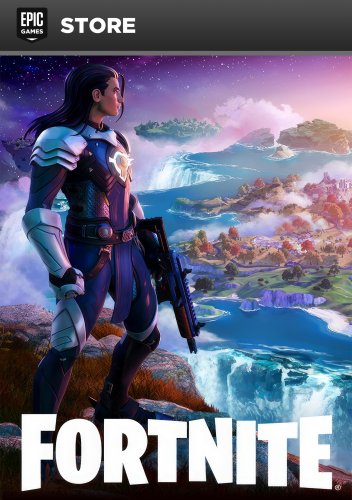
There are so many game clients out there and I'm disappointed that it's just steam covers. So I decided to make one myself for all the popular clients I can think of List of clients: Steam GOG Battle.net Epic Games Store Ubisoft Connect EA Microsoft Store Abandonware (Games that are not available digitally) So feel free to use my template. -
If you love platformers, Penny's Big Breakaway is for you. The pros are that It's a unique 3D platformer with some fun play mechanics and a great soundtrack. The only cons are that the controls can be a little frustrating and it's sometimes hard to gage the perspective when you have to land on another platform. Get ready for a challenge.
-
- 1
-
-
- pennys big breakaway
- platformer
- (and 2 more)
-
Hello all I am new to this community and sorry if this ahs been covered 100 times already but I am curious about the best PC build for a MAME/Retro arch machine. I am designing and building a complete cabinet for home and personal use. I would like for this build to have the capability to run everything in my library from PS1 and earlier (before analog controls). I use big box and emumovies with great success they look awesome, I have built mock ups of 8 way sticks and 8 button controllers, all working good. I am currently running this on a Mac Pro from 2009 with win 10 installed on it. I am at the point in the project where I want to start building a dedicated PC for this project that will live in the cabinet. My first question is what is optimal for smooth emulation and snappy front end? Also my game library is pretty large so I would like to access the games fairly quickly, I don't think I need an SSD for this and am currently looking at () what are your thoughts on this HDD selection? My second question is the monitor, I cant decide if its better to keep hunting for a 4:3 24"CRT or to settle and use a 16:9 flat screen? I own a 36" Sony Trinitron that works perfectly but its way to large for a cabinet unfortunately. I have found some CRTs but the shipping is more that the TV. I don't mind continuing to search for the perfect CRT but am I wasting my time? Do you prefer to use widescreen monitor forced to a 4:3? if so do you use filters to smooth/blue pixels, add scanlines etc.? Again sorry if this is already covered content, I did a quick search but did find what I was looking for so I thought I would post new.
-
Version 1.0
10,572 downloads
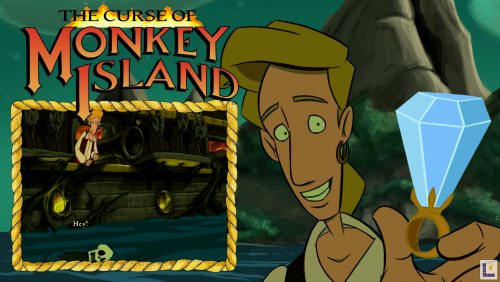
Various PC Themes (1080p) (60fps) 16:9 A few PC themes I created, any requests please do not hesitate to ask. (Most Themes are now being Encoded to under 20mb in size)- 22 comments
- 1 review
-
- 20
-
-
-
- thimbleweed park
- bayonetta
- (and 48 more)
-
Got to play this cool new hidden gem. If you like games where you exploration the ocean and a fun mystery. Then this game is for you. It's just 30 bucks and on several platforms.
-
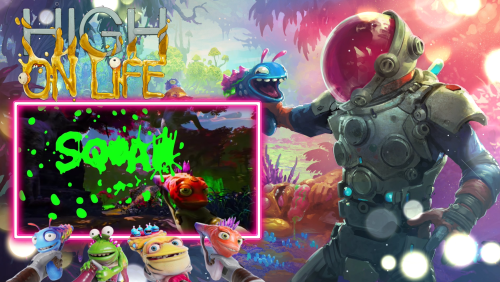
Version 1.0.0
80 downloads
One of my very first themes. Check my channel https://www.youtube.com/channel/UCgzaHYfgdlWHsBL_N7uGVcg for more. Enjoy- 2 reviews
-
- 3
-
-
- high on life
- theme
- (and 3 more)
-
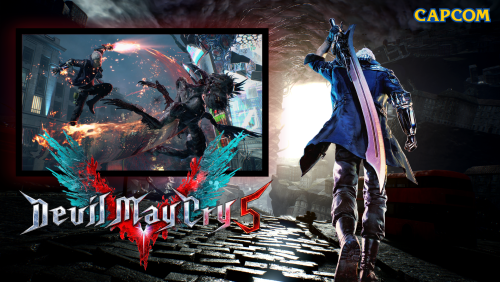
Version 1.0.2
631 downloads
Themes Video for PC Games - Doom Eternal - Ghostrunner - Devil may Cry 5 -

No Man's Sky: Fix for video cards without OpenGL 4.5 support!
ps4isthefuture posted a topic in Games
Below is a link to the work around for No Man's Sky if your video card doesn't support OpenGL 4.5. (AKA crash to desktop at white screen after title screen). This was a huge problem for me as neither my CPU or GPU support OpenGL 4.5 as AMD has stopped driver updates for the legacy cards (anything below HD 7800). I have tested this and works well enough to play on my HD 6670. I had to turn everything down to low, windowed, no boarder, vsync off, and 1280x720. Frame rate is a bit all over the place but even people with high end machines are seeing massive fluctuation in frame rate and hitching. https://www.reddit.com/r/NoMansSkyTheGame/comments/4xk0od/fix_for_video_card_without_opengl_45/?sort=new Please thank this guy if it helps you. He did what the dev team was not able to.....yet...- 2 replies
-
- 1
-
-
- no mans sky
- pc
- (and 1 more)
-
I currently have a Core i5-3470 @ 3.2GHz and I'm not crazy wealthy, so I wanted to see if anyone has an older computer with an i7 that fits an LGA1155 socket. I was looking at the Intel Core i7-2600K @ 3.4GHz, it's on Amazon for ~$300, I can find it on eBay at around $100, but I wanted to see if anyone in this community would potentially be able to make a deal with me. I have a lot of XBOX 360 games, PS2 games, some USB to PS1/2/N64/GameCube adapters. Or even if you're just generous to offer me a better price than what I've been able to find online, I'd greatly appreciate it. I've done some of the art uploads here, so maybe I could create some artwork for your launchbox library? I'm ok at photoshop (still learning), I've gotten really good at GIMP, and I've also done a lot of work in Blender 3D, so maybe I could do a 3D model for you? Anyway, I just wanted to reach out and see what my luck would be like. Not really expecting anything, but it would be fantastic otherwise. I wouldn't be able to buy anything until next month anyway. I also have a Brookstone Giftcard for $25, and a Newegg Giftcard for $10. If any of those would be of interest to you. I have some other things (Books, DVDs, Pop Vinyl figures, Dorbz) that you might like?
-
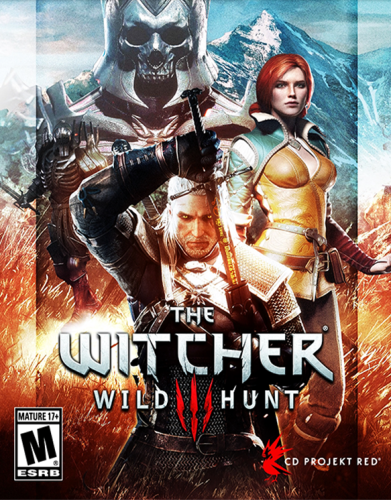
Version 1.5.4
948 downloads
No Filters. No Cases. No Effects. Box Art Each of these images has been adjusted manually - great care was taken to preserve the aspect ratio of the source material, and resized to within a few pixels of 546x747 while maintaining as much of the original artwork as possible. The artwork itself was sourced from around the internet, either through LB, EmuMovies, or a good ol' fashioned Google Image Search. I've been manually adding my own media to my LB library for over a year for things that aren't in either of the databases, so there's a ton of stuff here that isn't currently available through the LB Media Downloads. This is the "raw" version of my Uniform Matte Finish and Microsoft Operating Systems packs. Screenshot - Gameplay I prefer to have at least a couple screenshots for each of my PC games, so as I would look for the box art to use, I would also download several gameplay screenshots. Again, many of these are not found in the LB media downloads, and were sourced from a Google Image search. This pack's initial release contains 3,912 images. The only thing that's been done to modify these screenshots is that they were all scaled to a height of 720px while maintaining their original aspect ratio to maintain a baseline of quality and uniform size among all images. Installation To install any of these packs, you can simply use the new Launchbox Image Pack Importer by clicking Menu > Tools > Image Packs > Import. Please be sure your import settings are set to the correct platform and image type, and read the prompts carefully. This will work great as a simple uniform set of boxes/screenshots on its own, but I wanted to provide this to the LB community as a resource. Feel free to use it as you see fit, and be sure to check out my other work! -
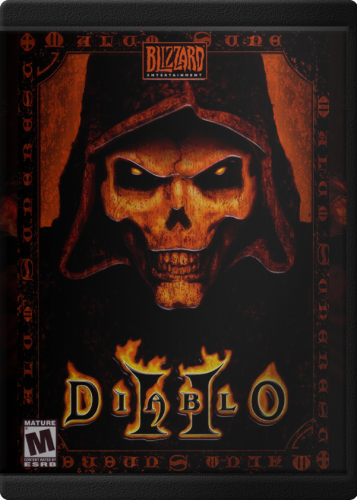
Version 1.0.4
342 downloads
Hey, everyone! Since the beginning, PC Games have come in all shapes and sizes. This is great to make an interesting shelf collection, but it looks a little odd in Launchbox. I wanted to create a uniform set with a bit of realism. I worked out a way to get a nice matte plastic finish on the sleeve with just the slightest bit of sheen to it. Each of these images has been adjusted manually - great care was taken to preserve the aspect ratio of the source material, and fit into this case and maintain as much of the original artwork as possible. The artwork itself was sourced from around the internet, either through LB, EmuMovies, or a good ol' fashioned Google Image Search. I've been manually adding my own media to my LB library for over a year for things that aren't in either of the databases, so there's a ton of stuff here that isn't currently available through the LB Media Downloads. I want to give a nod and a firm handshake to @Retrofrogg for giving me some helpful advice, and ultimately convincing me to allow for cropping to make this work. Also thanks to everyone in the LB Discord for their feedback on this and other projects I've dumped in there. The raw version of this pack can be found HERE - No Filters. No Cases. No Effects. Enjoy! Also be sure to check out the matching pack of Microsoft Operating System boxes to use as default media!







.thumb.jpg.ea1590f452c26514a55d5cd8cc8eac67.jpg)