Search the Community
Showing results for tags 'scraper'.
-
Version 1.1
349 downloads
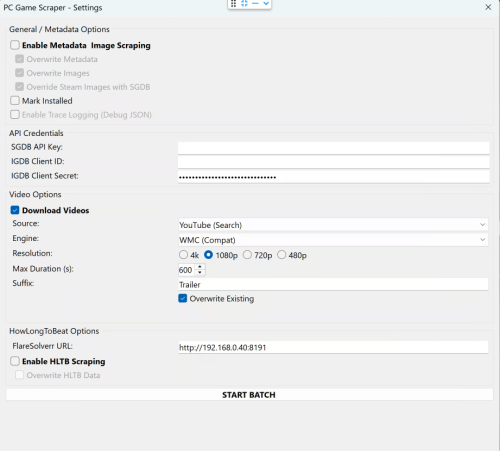
🎮 PC Game Scraper for LaunchBox PC Game Scraper is a robust metadata and media scraping plugin for LaunchBox. It intelligently prioritizes Steam for PC game metadata and IGDB for console titles. It leverages SteamGridDB for high-quality frontend artwork and YouTube (via yt-dlp) for video trailers. The plugin features advanced integration with HowLongToBeat (via FlareSolverr), now upgraded with a dedicated "Console Fork" to pull version-specific completion times directly from the site’s internal data. 🛠️ Dependencies & Requirements To use all features, the following components are required or recommended. I've included everything I can for your convenience. If you are not comfortable with them or do not want to use the optional Deno.exe. You may download your own or remove Deno.exe if you don't plan on using cookies.txt or downloading age gated videos. Required for Core Functionality yt-dlp.exe (Required for Video): The engine that downloads trailers. Must be placed in the plugin folder. ffmpeg.exe (Required for Video): Handles video merging and ensures files play correctly in LaunchBox. Recommended SteamGridDB API Key (Highly Recommended): Required for fallback images not available on Steam. IGDB Client ID & Secret (Highly Recommended): Required for all console game metadata and "Gap Filling" for PC games metadata either not on Steam or difficult to extract. FlareSolverr (Required for HLTB): A local proxy service needed to bypass Cloudflare security when fetching HowLongToBeat playtimes. cookies.txt and Deno.exe (Optional): Helps yt-dlp bypass age-restricted content gates on YouTube and sign in to your premium account. Deno.exe will solve captchas to bypass YouTube's bot protection. ⚠️ Disclaimer This plugin scrapes data from third-party sources. Please use FlareSolverr and yt-dlp responsibly and at your own discretion. ✨ Key Features 🧠 Smart Metadata Routing PC Logic: Scans Steam first. If a game is found, it then uses IGDB to "Gap Fill" fields Steam often lacks, like Series and Age Rating. Console Logic: Automatically skips Steam and routes directly to IGDB based on the game's platform. Manual Search: If automatic matching fails the user is prompted for a new search term, steam app id, steam store or igdb url. 🎬 Video Downloader Source Selector: Select your desired source, Steam or Youtube. Smart Fallback: For PC games, if Steam source is selected it attempts to grab the official Steam Store trailer first. If unavailable allows the user to switch to Youtube, or if the game is a console title, it pivots to a YouTube search and injects the platform in to the search term for better matching. Dynamic Slicer: Automatically applies your "Max Duration" limit to YouTube downloads to save disk space. YouTube videos will be cut off at the time set. A 10 minute gameplay video is cut down to 5 minutes. Resolution: Will attempt to download the desired resolution. If it is not available will scale down until one is found for the selected video. Suffix: Allows user to define desired youtube search term suffix, IE Trailer, Gameplay, etc... ⏱️ HowLongToBeat The plugin now uses two distinct methods to fetch playtimes: PC Logic: Pulls the general "blended average" from the HLTB search results. Console Logic: Loads the game's specific detail page and extracts the exact platform data (e.g., pulling GameCube-specific times for Metroid Prime rather than the Wii Remaster times). Custom Fields: Creates custom fields for dynamic playlist creation. Marathon 60h+, Long 30-60h, Extended 15-30h, Standard 5-15h, and Quick <5h, as well as the exact times provided by HLTB. 🎮 Real-World Workflow Examples If you select a game and run all three functions (Metadata, Images, and Video), here is how the plugin behaves: Example A: Windows Game (Cyberpunk 2077) Identification: Finds the game on Steam via name match. Metadata: Pulls metadata from Steam, then if client id/client secret are populated and correct hits IGDB to add additional fields not available or hard to parse from steam. Images: Grabs all available steam images. If images are missing or if SGDB override is enabled and your SGDB API is present it hits SteamGridDB. Video: Downloads the official trailer directly from the Steam Store servers or YouTube if the video source is YouTube. HLTB: If enabled and flaresolverr is setup. saves the general PC completion times to your custom fields as well as the category times mentioned above. Example B: Console Game (The Legend of Zelda: Twilight Princess for GameCube) Identification: Automatically routes to IGDB after detecting the GameCube platform. Metadata: Pulls the IGDB metadata. Images: Since no Steam ID exists, it goes straight to SteamGridDB to find the community-voted best GameCube media. Video: Recognizes it isn't a PC game and routes to YouTube to search for "The Legend of Zelda: Twilight Princess GameCube Trailer". HLTB: Triggers the Console Fork. It ignores the Wii and Wii U times and pulls only the GameCube platform data. -
PC Game Scraper View File 🎮 PC Game Scraper for LaunchBox PC Game Scraper is a robust metadata and media scraping plugin for LaunchBox. It intelligently prioritizes Steam for PC game metadata and IGDB for console titles. It leverages SteamGridDB for high-quality frontend artwork and YouTube (via yt-dlp) for video trailers. The plugin features advanced integration with HowLongToBeat (via FlareSolverr), now upgraded with a dedicated "Console Fork" to pull version-specific completion times directly from the site’s internal data. 🛠️ Dependencies & Requirements To use all features, the following components are required or recommended. I've included everything I can for your convenience. If you are not comfortable with them or do not want to use the optional Deno.exe. You may download your own or remove Deno.exe if you don't plan on using cookies.txt or downloading age gated videos. Required for Core Functionality yt-dlp.exe (Required for Video): The engine that downloads trailers. Must be placed in the plugin folder. ffmpeg.exe (Required for Video): Handles video merging and ensures files play correctly in LaunchBox. Recommended SteamGridDB API Key (Highly Recommended): Required for fallback images not available on Steam. IGDB Client ID & Secret (Highly Recommended): Required for all console game metadata and "Gap Filling" for PC games metadata either not on Steam or difficult to extract. FlareSolverr (Required for HLTB): A local proxy service needed to bypass Cloudflare security when fetching HowLongToBeat playtimes. cookies.txt and Deno.exe (Optional): Helps yt-dlp bypass age-restricted content gates on YouTube and sign in to your premium account. Deno.exe will solve captchas to bypass YouTube's bot protection. ⚠️ Disclaimer This plugin scrapes data from third-party sources. Please use FlareSolverr and yt-dlp responsibly and at your own discretion. ✨ Key Features 🧠 Smart Metadata Routing PC Logic: Scans Steam first. If a game is found, it then uses IGDB to "Gap Fill" fields Steam often lacks, like Series and Age Rating. Console Logic: Automatically skips Steam and routes directly to IGDB based on the game's platform. Manual Search: If automatic matching fails the user is prompted for a new search term, steam app id, steam store or igdb url. 🎬 Video Downloader Source Selector: Select your desired source, Steam or Youtube. Smart Fallback: For PC games, if Steam source is selected it attempts to grab the official Steam Store trailer first. If unavailable allows the user to switch to Youtube, or if the game is a console title, it pivots to a YouTube search and injects the platform in to the search term for better matching. Dynamic Slicer: Automatically applies your "Max Duration" limit to YouTube downloads to save disk space. YouTube videos will be cut off at the time set. A 10 minute gameplay video is cut down to 5 minutes. Resolution: Will attempt to download the desired resolution. If it is not available will scale down until one is found for the selected video. Suffix: Allows user to define desired youtube search term suffix, IE Trailer, Gameplay, etc... ⏱️ HowLongToBeat The plugin now uses two distinct methods to fetch playtimes: PC Logic: Pulls the general "blended average" from the HLTB search results. Console Logic: Loads the game's specific detail page and extracts the exact platform data (e.g., pulling GameCube-specific times for Metroid Prime rather than the Wii Remaster times). Custom Fields: Creates custom fields for dynamic playlist creation. Marathon 60h+, Long 30-60h, Extended 15-30h, Standard 5-15h, and Quick <5h, as well as the exact times provided by HLTB. 🎮 Real-World Workflow Examples If you select a game and run all three functions (Metadata, Images, and Video), here is how the plugin behaves: Example A: Windows Game (Cyberpunk 2077) Identification: Finds the game on Steam via name match. Metadata: Pulls metadata from Steam, then if client id/client secret are populated and correct hits IGDB to add additional fields not available or hard to parse from steam. Images: Grabs all available steam images. If images are missing or if SGDB override is enabled and your SGDB API is present it hits SteamGridDB. Video: Downloads the official trailer directly from the Steam Store servers or YouTube if the video source is YouTube. HLTB: If enabled and flaresolverr is setup. saves the general PC completion times to your custom fields as well as the category times mentioned above. Example B: Console Game (The Legend of Zelda: Twilight Princess for GameCube) Identification: Automatically routes to IGDB after detecting the GameCube platform. Metadata: Pulls the IGDB metadata. Images: Since no Steam ID exists, it goes straight to SteamGridDB to find the community-voted best GameCube media. Video: Recognizes it isn't a PC game and routes to YouTube to search for "The Legend of Zelda: Twilight Princess GameCube Trailer". HLTB: Triggers the Console Fork. It ignores the Wii and Wii U times and pulls only the GameCube platform data. Submitter spiritedusual Submitted 12/28/2025 Category Third-party Apps and Plugins
-
Steam Scraper View File Plugin that scrapes Steam Information, banner, screenshots and video to a selected game. Requirements: Launchbox 8.8+ Install: Extract the content of zip file to : Launchbox/plugins/SteamScraper Source code: Github (feel free to make a pull request ) Thanks to: @fawkesyeah for the extensive testing @CriticalCid for Ideas. EDIT If you have trouble running the plugin and crashing due CAS error, please right click on the DLL's , properties and then unblock. Usage: Just paste the Steam URL from the game that you need to scrape information. Video Tutorial: If you want to add Additional Custom fields and Tags please edit the properties.json : Note: This will generate a LOT of tags, I advise to hide it if you are going to use it. (Legacy Settings -> Game Details -> Disable Custom Fields) Also if you have the SteamDB or SteamSpy Link only you can use it to get the Steam metadata as well, the regex works just remind to put the / on the final url just like this: BUT THIS WONT GET INFO FROM THE RESPECTIVELY WEBSITES, IT WILL GO TO STEAM ANYWAYS. Submitter srxz Submitted 09/27/2018 Category Third-party Apps and Plugins
-

Version 2.9
2,689 downloads
Plugin that scrapes Steam Information, banner, screenshots and video to a selected game. Requirements: Launchbox 8.8+ Install: Extract the content of zip file to : Launchbox/plugins/SteamScraper Source code: Github (feel free to make a pull request ) Thanks to: @fawkesyeah for the extensive testing @CriticalCid for Ideas. EDIT If you have trouble running the plugin and crashing due CAS error, please right click on the DLL's , properties and then unblock. Usage: Just paste the Steam URL from the game that you need to scrape information. Video Tutorial: If you want to add Additional Custom fields and Tags please edit the properties.json : Note: This will generate a LOT of tags, I advise to hide it if you are going to use it. (Legacy Settings -> Game Details -> Disable Custom Fields) Also if you have the SteamDB or SteamSpy Link only you can use it to get the Steam metadata as well, the regex works just remind to put the / on the final url just like this: BUT THIS WONT GET INFO FROM THE RESPECTIVELY WEBSITES, IT WILL GO TO STEAM ANYWAYS. -

Version 1.0.1
3,353 downloads
DISCLAIMER: Use at your own risk! Please read and understand Youtube's terms of service. I will not be held liable for any misuse of any product or service. Overview: This plugin makes use of the open source and unlicensed application yt-dlp (forked from youtube-dl) in conjunction with ffmpeg to download game videos. It first downloads videos from the link provided in the metadata from LaunchBox, skipping videos longer than a specified duration, and then searches for videos for missing games based on input search terms. It is intended for modern Windows games, as this was my need initially. Requirements: Launchbox 13.19 or newer. (Use version 0.5.1 for older Launchbox installations) ytdlp (included in .zip) ffmpeg (included in .zip) Installation Instructions: Extract the contents of the .zip folder and place it in your LaunchBox plugins folder. Usage Instructions: Select a game or multiple games, right-click, and select "Download Video Snap." Select desired quality. Adjust the maximum duration if desired. The "Get Missing Videos" checkbox sets whether or not to search for videos of games that don't have URL's in their metadata. The "Trim videos" checkbox sets whether or not to trim videos after they have been downloaded. Enter desired search terms for missing videos. Click "Start" to start the download process. Games will download asynchronously. Resuming downloads is also supported natively. Other: PLEASE NOTE: I AM NOT A DEVELOPER! I know very little about C# and programming in general, so I probably won't be able to address many issues that you may face. That being said, I will try and fix things where I can. I've provided the spaghetti source code for anyone to modify, improve, etc. (it seems you need to unblock the forms in the "Resources" folder -> RMB->properties->unblock.) As of now, I'm more comfortable with the usability of the plugin; however, there are still probably many issues. Any comments to provide insight/improvement to the code, etc. would be much appreciated. Thanks to @srxz for his source of Youtube Scraper, on which this is based. Credits: @srxz @JoeViking245 @C-Beats maikeru86 -
Version 1.3.0
1,423 downloads
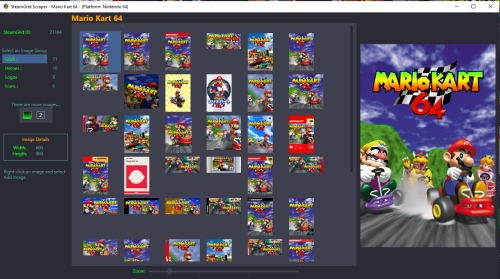
Preview and import images from SteamGrid Database directly into your LaunchBox collection. A personalized SteamGridDB API Key is required. (See below about getting yours) Downloaded images are saved to the default LaunchBox image folder(s). Installing Download and extract the contents of the download to your /LaunchBox/Plugins/ folder. i.e. D:/LaunchBox/Plugins/SteamGrid Scraper/SteamGridScraper.dll First Time Run Select a game, right-click it and select SteamGrid Scraper. The "API key Required" window will open. Paste (or manually type in) your personal SteamGrid API key. Click Save Using Select a game, right-click it and select SteamGrid Scraper. In cases where an exact match for the game Tite is not found, a window will popup listing 'close matches'. Double-click a game from the list to select it. Click on the SteamGrid image group you'd like to view. Options are: Grids Heroes Logos Icons Up to 50 images will show in the Gallery. If the selected group has more than 50 available, click "2" to see then next 50. Use the Zoom slider to increase/decrease the image sizes in the Gallery. Double-click on an image to see a larger view. (Opens in a separate window). The Icons group is pretty much useless in LaunchBox. But since they're available, they're included. Saving an image To add an image to your game, right-click the image in the gallery switch from Image Preview to Add Image and select Add Image. Select the Image Type (folder) you want to save it as from the dropdown box. (It doesn't change automatically for you.) Only a few select image types are shown by default. To see all image folders (types), check the box See All available image types. (Optional) To view your existing images for the game, click View Existing Images Gallery. (Opens in a separate window) This shows only the images for the selected image type. (Optional) Click Open Image Folder to open Windows Explorer to the folder where your existing images are and where the image will be saved to. Click Save Add Image to save the image. Getting your SteamGridDB API Key Log into your SteamGridDB account. Go to your Profile - Preferences - API Click 'Generate API key' As always, all comments and suggestions are welcome. 😎 -
SteamGridDB Scraper View File Preview and import images from SteamGrid Database directly into your LaunchBox collection. A personalized SteamGridDB API Key is required. (See below about getting yours) Downloaded images are saved to the default LaunchBox image folder(s). Installing Download and extract the contents of the download to your /LaunchBox/Plugins/ folder. i.e. D:/LaunchBox/Plugins/SteamGrid Scraper/SteamGridScraper.dll First Time Run Select a game, right-click it and select SteamGrid Scraper. The "API key Required" window will open. Paste (or manually type in) your personal SteamGrid API key. Click Save Using Select a game, right-click it and select SteamGrid Scraper. In cases where an exact match for the game Tite is not found, a window will popup listing 'close matches'. Double-click a game from the list to select it. Click on the SteamGrid image group you'd like to view. Options are: Grids Heroes Logos Icons Up to 50 images will show in the Gallery. If the selected group has more than 50 available, click "2" to see then next 50. Use the Zoom slider to increase/decrease the image sizes in the Gallery. Double-click on an image to see a larger view. (Opens in a separate window). The Icons group is pretty much useless in LaunchBox. But since they're available, they're included. Saving an image To add an image to your game, right-click the image in the gallery switch from Image Preview to Add Image and select Add Image. Select the Image Type (folder) you want to save it as from the dropdown box. (It doesn't change automatically for you.) Only a few select image types are shown by default. To see all image folders (types), check the box See All available image types. (Optional) To view your existing images for the game, click View Existing Images Gallery. (Opens in a separate window) This shows only the images for the selected image type. (Optional) Click Open Image Folder to open Windows Explorer to the folder where your existing images are and where the image will be saved to. Click Save Add Image to save the image. Getting your SteamGridDB API Key Log into your SteamGridDB account. Go to your Profile - Preferences - API Click 'Generate API key' As always, all comments and suggestions are welcome. 😎 Submitter JoeViking245 Submitted 08/18/2024 Category Third-party Apps and Plugins
-
 I created my first plugin that allows for me to list the "Game Size" in the Custom Fields area, as well as tiers, so they can be arranged by size. I have an enormous collection and Windows isn't great with paging folder sizes and such, so I built a tool that either grabs the ROM size, or if it's an MS-DOS or Windows game, it finds the parent folder and gets the size of the entire directory. For games that are installed in your system, this works a lot better than I thought it would. I created an optional game size tier system for easy numerical arranging. I am currently working on scraping "Required Space" for storefront games using a RAWG API. (which when I finish this part, the user will have to add their own API and could be subjected to rate limits, but it's free and pretty good, just sign up) -- WIP -- not finished yet, and I might abandon this feature completely, not sure yet. Realistically, we can always just offload the storefront games and see how large they are using their launchers, but the "portable" or directly installed Windows games WE ALL HAVE (let's be real) get accurate directory sizes and lists them well. So it's basically good to go. Anyway, I found this extremely helpful in cleaning up my drives, and I wanted to know if anyone else actually cares about something like this. If so, ill polish it up and release it. You can do entire platforms using the Tools dropdown Or you can select one or multiple files to only get the sizes for what you want using the right click menu THEN, youll see this that allows you to choose which Custom Fields to actually print (the RAWG fetch is still in development) It scrubs in the background, then a popup will let you know when it's finished. (listing errors if any) You can continue to use LaunchBox while the scrape is happening, Once finished, refresh, and it's updated. As you can see here ^ it doesn't just get the EXE size, it gets the directory (most of the time) I just wanted game size here, but I could also get Game Size Tier, Game Size Last Scanned (date) & hopefully soon the "Est. Required Space" from RAWG. If anyone wants this, let me know and ill finish it and release it. If you guys have any questions, ideas or critiques, LMK!
-
Version 0.1.9
3,762 downloads
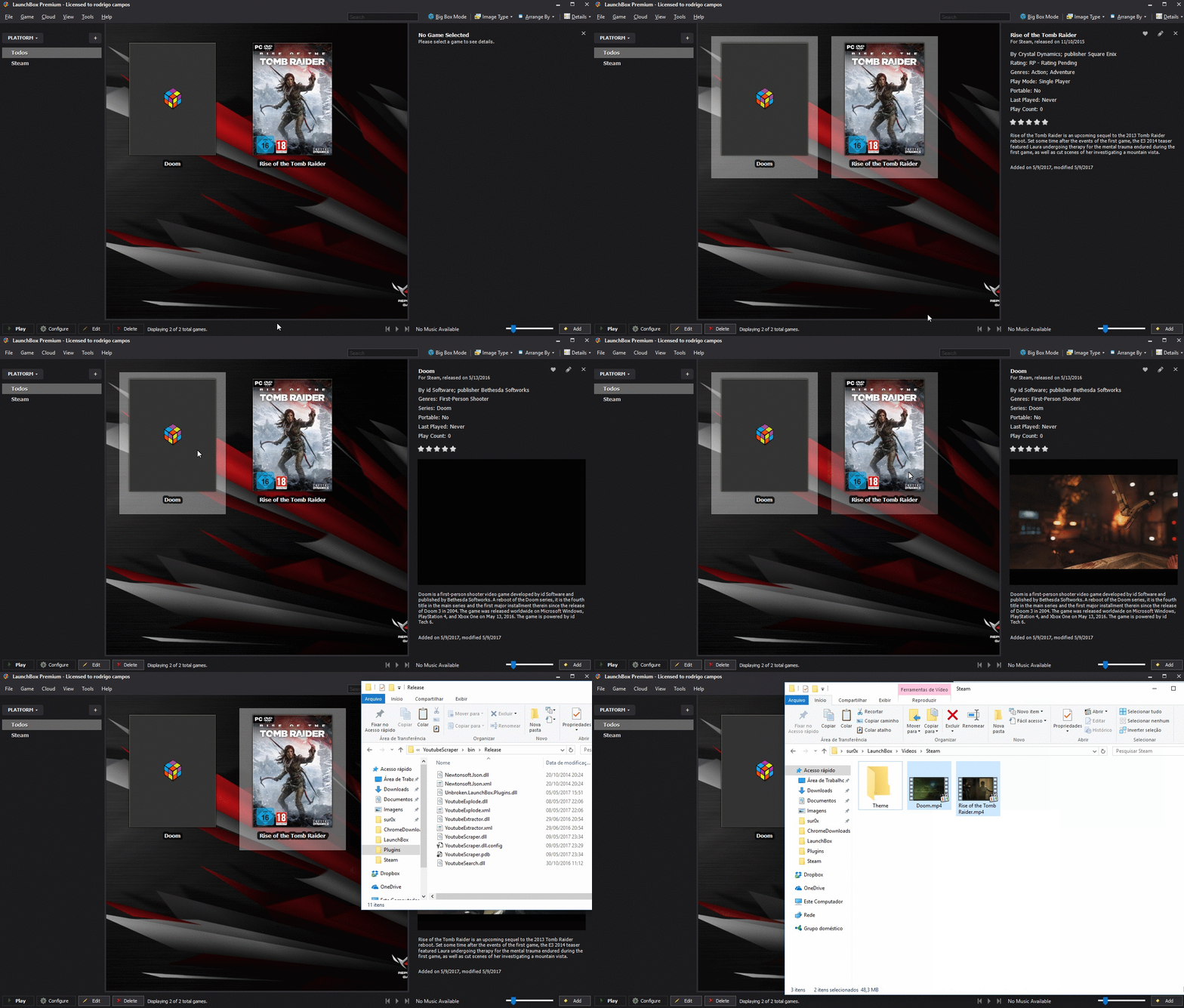
Simple Plugin to automate download videos from youtube. Requirements: Launchbox 8.2+ Install: Extract the content of zip file to : Launchbox/plugins/YoutubeScraper Source code: Github (feel free to make a pull request ) EDIT If you have trouble running the plugin and crashing due CAS error, please right click on the DLL's , properties and then unblock. There's two options: URL Scraper: Just paste entire youtube URL from the desired video One-click downloader: It will search automatically and download the first entry from youtube. Bulk Download supported! -
Version 1.0.3
1,596 downloads
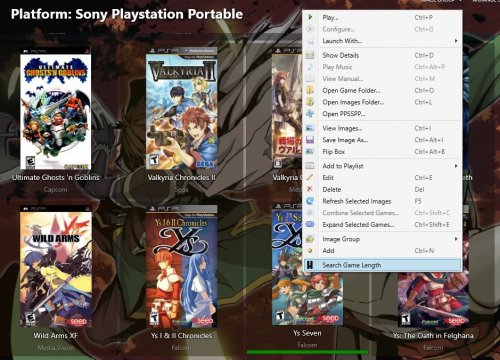
About Plugin that scrapes information from HowLongToBeat.com and adds custom fields with game lengths information. I made this plugin to add length information for certain games, mostly rpgs. This adds 3 custom fields for Main Story, Main + Extra and Completionist length. You can configure which ones you want to add by editing the file HLTBPlugin.xml. Because there's no oficial API from HLTB, I had to parse the HTML, which means that as soon as they change something on the HTML this plugin probably will stop working... Install Extract files (dll + xml) to : Launchbox/Plugins/HLTBPlugin. Config (HLTBPlugin.xml) MainStoryLength: Enable/disable main story length update. Default: true. MainExtraLength: Enable/disable main story + extra length update. Default: true. CompletionistLength: Enable/disable completionist length update. Default: true. MainStoryFieldName: Change main story length custom field name. Default: Main Story Length MainExtraFieldName: Change main story + extra length custom field name. Default: Main + Extra Length CompletionistFieldName: Change completionist length custom field name. Default: Completionist Length Note: If you change the fields names it will not update the games that already have information, so you will end up with duplicated fields with different names and you will have to manually delete them (edit game -> custom fields tab). So config the first time and stick with that. Usage Access the option by right-click a game (only one game, no massive update yet). A window will popup with all the games found and you can choose which one correspond to your game. If there's no results you can manually change the search words (e.g. Metal Gear Ac!d will get no results but you can then change the search to Metal Gear Acid). You can use the "Arrange By" option to order the games by length. Lengths are shown with leading zeroes because is the only way to properly order the games since custom fields are strings and not integers. Tested on version 8.9. I think you need a premium license because custom fields are not supported in free license (not sure). I have no relation with HowLongToBeat.com, if you like their work please go and support them. Public Repository https://github.com/matiasponsml/HLTBPlugin- 32 comments
- 5 reviews
-
- 12
-

-

-

-
- plugin
- game length
- (and 2 more)
-
Vidsnap Scraper View File DISCLAIMER: Use at your own risk! Please read and understand Youtube's terms of service. I will not be held liable for any misuse of any product or service. Overview: This plugin makes use of the open source and unlicensed application yt-dlp (forked from youtube-dl) in conjunction with ffmpeg to download game videos. It first downloads videos from the link provided in the metadata from LaunchBox, skipping videos longer than a specified duration, and then searches for videos for missing games based on input search terms. It is intended for modern Windows games, as this was my need initially. Requirements: Launchbox 13.19 or newer. (Use version 0.5.1 for older Launchbox installations) ytdlp (included in .zip) ffmpeg (included in .zip) Installation Instructions: Extract the contents of the .zip folder and place it in your LaunchBox plugins folder. Usage Instructions: Select a game or multiple games, right-click, and select "Download Video Snap." Select desired quality. Adjust the maximum duration if desired. The "Get Missing Videos" checkbox sets whether or not to search for videos of games that don't have URL's in their metadata. The "Trim videos" checkbox sets whether or not to trim videos after they have been downloaded. Enter desired search terms for missing videos. Click "Start" to start the download process. Games will download asynchronously. Resuming downloads is also supported natively. Other: PLEASE NOTE: I AM NOT A DEVELOPER! I know very little about C# and programming in general, so I probably won't be able to address many issues that you may face. That being said, I will try and fix things where I can. I've provided the spaghetti source code for anyone to modify, improve, etc. (it seems you need to unblock the forms in the "Resources" folder -> RMB->properties->unblock.) As of now, I'm more comfortable with the usability of the plugin; however, there are still probably many issues. Any comments to provide insight/improvement to the code, etc. would be much appreciated. Thanks to @srxz for his source of Youtube Scraper, on which this is based. Credits: @srxz @JoeViking245 @C-Beats maikeru86 Submitter maikeru1986 Submitted 12/16/2020 Category Third-party Apps and Plugins
-
 How Long To Beat - Game Length Plugin View File About Plugin that scrapes information from HowLongToBeat.com and adds custom fields with game lengths information. I made this plugin to add length information for certain games, mostly rpgs. This adds 3 custom fields for Main Story, Main + Extra and Completionist length. You can configure which ones you want to add by editing the file HLTBPlugin.xml. Because there's no oficial API from HLTB, I had to parse the HTML, which means that as soon as they change something on the HTML this plugin probably will stop working... Install Extract files (dll + xml) to : Launchbox/Plugins/HLTBPlugin. Config (HLTBPlugin.xml) MainStoryLength: Enable/disable main story length update. Default: true. MainExtraLength: Enable/disable main story + extra length update. Default: true. CompletionistLength: Enable/disable completionist length update. Default: true. MainStoryFieldName: Change main story length custom field name. Default: Main Story Length MainExtraFieldName: Change main story + extra length custom field name. Default: Main + Extra Length CompletionistFieldName: Change completionist length custom field name. Default: Completionist Length Note: If you change the fields names it will not update the games that already have information, so you will end up with duplicated fields with different names and you will have to manually delete them (edit game -> custom fields tab). So config the first time and stick with that. Usage Access the option by right-click a game (only one game, no massive update yet). A window will popup with all the games found and you can choose which one correspond to your game. If there's no results you can manually change the search words (e.g. Metal Gear Ac!d will get no results but you can then change the search to Metal Gear Acid). You can use the "Arrange By" option to order the games by length. Lengths are shown with leading zeroes because is the only way to properly order the games since custom fields are strings and not integers. Tested on version 8.9. I think you need a premium license because custom fields are not supported in free license (not sure). I have no relation with HowLongToBeat.com, if you like their work please go and support them. Public Repository https://github.com/matiasponsml/HLTBPlugin Submitter matiaspons Submitted 10/26/2018 Category Third-party Apps and Plugins
- 10 replies
-
- 4
-
-
-
- plugin
- game length
- (and 2 more)
-
 When scraping a platform as 'Pinball', it sometimes scrape metadata for a table from another system if that game couldn't be found in the target 'Scrape As' platform. Example Platform The table `The Addams Family` is scraped from another system It scrape from Amstrad CPC platform for some reason. See the matching description in Overview.
-
Youtube Scraper View File Simple Plugin to automate download videos from youtube. Requirements: Launchbox 8.2+ Install: Extract the content of zip file to : Launchbox/plugins/YoutubeScraper Source code: Github (feel free to make a pull request ) EDIT If you have trouble running the plugin and crashing due CAS error, please right click on the DLL's , properties and then unblock. There's two options: URL Scraper: Just paste entire youtube URL from the desired video One-click downloader: It will search automatically and download the first entry from youtube. Bulk Download supported! Submitter srxz Submitted 05/10/2017 Category Third-party Apps and Plugins
-
Info: ROMs: - Dreamcast: Folder with subfolders containing the GDI/BIN/RAW, also tried to CHD the folders - DS: Folder with ZIP Software: - LB Version 1.1 - Android 9 running on a RP2+ Issue: Launchbox > Import Games Selecting Folder for Dreamcast ROMs Selecting Sega Dreamcast as a Platform Enabled Combine ROMs Enabled Import from subfolders Tried with and without enabling to use Folder Names Clicking to proceed with import The importer now finds 1028 files, it should be the Metacritic Top 100 for the DC and imports them as such. The playlist afterwards has 1028 entries, each individual file. If I do the same thing with a CHD, it just adds the CHD, does not scrape the name, content or anyhting. For the DS the exact same thing happens. It just adds the ZIP without scraping. I've added 14 other systems, they all worked flawlessly, so I have to assume something's very wrong with Sega DC and Nintendo DS scraping. My filenames should be more than fine.
-
I'm trying to download the "Advertisement Flyer - Front" for my mame rom set and its taking hours... 13 HOURS to download 4000 of 6769( and 3 erros) 1º i already read others posts, the only two answers that i saw was "uncheck that box" and " emumovies problem"; 2º i'm not using Emumovies and doesnt matter if a have checked or not that cursed box; 3º Its not only for mame, any console, any type of media and any amount of media, the download is super ultra mega SLOW Is there anything a can do ?
-

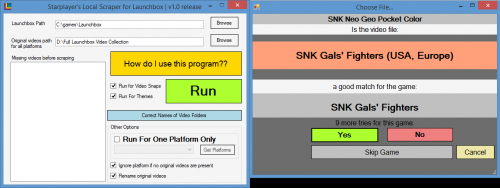
Version 1.0 release
287 downloads
This program is a scraper for your video files, to be used with launchbox. ------------What it does:------------ Imagine you have in your possesison a full collection of video snaps and theme videos for launchbox. Now, you might just have them all in your launchbox\videos\ folder, and everything will work. However, you might prefer to have only some games that you like in your launchbox installation, in a faster SSD, or you might have a Raspberry Pi, which has limited space. In those cases, you will want to only get the videos that correspond to the games you have in launchbox. This program does that automatically for you. ----------------------------------------------------------------------------------------------------------- ------------How do you use this program then??------------ Glad you ask! -1: set the path of your launchbox installation. Usually C:\program Files\Launchbox for example -2: set the path of the folder in which you have your full video collection. For example D:\Launchbox Videos\ -3: Check the checkboxes "Run for videos snaps" and "Run for Themes" depending on if you want to get game snaps, theme videos, or both -4: Press Run ----------------------------------------------------------------------------------------------------------- ------------Things to have in consideration:------------ You have to have your video folders with the same name of the folders in the launchbox directory. ie, if a folder is called "sega saturn" in launchbox, the correspondent in the folder that containsall your videos can't be called only "saturn". The blue button "Correct Names of video folders attempts to solve this, but you should check. If you want, you can run the program for just one game platform. To do that, check "Run for One Platform Only", press "Get Platforms" and select the platform you want to run for. ----------------------------------------------------------------------------------------------------------- ------------"Other Options" explanation:------------ --"Ignore platform if no original videos are present" - check this if you don't want to be reminded thatthe program didn't found any videos for a specific platform. --"Rename original videos": check this if you also want the original videos in your video collection to bepermanently renamed to the name that launchbox is expecting for each game. Any suggestions, you can find me on Launchbox's forum. You're welcome. Be happy. Starplayer Update: You can find the source code here, in case anyone wants to change it. License is GPL: https://github.com/rafcon-dev/Launchbox-Local-Scraper -
Greetings, i am brand new to Launchbox and am setting all my emulators up in it. I have added 9 consoles, DOS games and more and everything is fine with box art and meta data all loaded/downloaded in I have tried adding my N64 roms in and the scraper will find only like 3 pictures for 3 games of the 200+ i have. The games load in fine, but zero meta data and no images/box art are showing up. i am using both databases and emumovies
-
Hi! I've installed the last version of launchbox but it doesn't show me video scrape (i can't choose this possibility) Why? I've lifetime support Best regards
-
Starplayer's Local Scraper for Launchbox View File This program is a scraper for your video files, to be used with launchbox. ------------What it does:------------ Imagine you have in your possesison a full collection of video snaps and theme videos for launchbox. Now, you might just have them all in your launchbox\videos\ folder, and everything will work. However, you might prefer to have only some games that you like in your launchbox installation, in a faster SSD, or you might have a Raspberry Pi, which has limited space. In those cases, you will want to only get the videos that correspond to the games you have in launchbox. This program does that automatically for you. ----------------------------------------------------------------------------------------------------------- ------------How do you use this program then??------------ Glad you ask! -1: set the path of your launchbox installation. Usually C:\program Files\Launchbox for example -2: set the path of the folder in which you have your full video collection. For example D:\Launchbox Videos\ -3: Check the checkboxes "Run for videos snaps" and "Run for Themes" depending on if you want to get game snaps, theme videos, or both -4: Press Run ----------------------------------------------------------------------------------------------------------- ------------Things to have in consideration:------------ You have to have your video folders with the same name of the folders in the launchbox directory. ie, if a folder is called "sega saturn" in launchbox, the correspondent in the folder that containsall your videos can't be called only "saturn". The blue button "Correct Names of video folders attempts to solve this, but you should check. If you want, you can run the program for just one game platform. To do that, check "Run for One Platform Only", press "Get Platforms" and select the platform you want to run for. ----------------------------------------------------------------------------------------------------------- ------------"Other Options" explanation:------------ --"Ignore platform if no original videos are present" - check this if you don't want to be reminded thatthe program didn't found any videos for a specific platform. --"Rename original videos": check this if you also want the original videos in your video collection to bepermanently renamed to the name that launchbox is expecting for each game. Any suggestions, you can find me on Launchbox's forum. You're welcome. Be happy. Starplayer Submitter starplayer Submitted 12/16/2018 Category Third-party Apps and Plugins
-
Starplayer's Local Scraper for Launchbox https://forums.launchbox-app.com/files/file/1606-starplayers-local-scraper-for-launchbox/ Let's you scrape your own video collection, and puts only the needed ones in your launchbox videos folder. Great if you want to save space on your Launchbox drive. Currently only videos are supported, no themes still, and no other media. I'm open to suggestions and bug reports. Enjoy. Submitter starplayer Submitted 12/09/2018 Category Third-party Apps and Plugins
-
Hello, Rencently i have lost all my LB folder due to a disk failure. I'm rebuilding everything now, but the thing is the scraping is too slow. For example i am now waiting for 4 hours and it does not have passed 50% on N64 just downloading box, clear logo and video from emumovies. I have a 10Mbit conection. Does anyone know this is a common issue lately? Thank you in advance.
-
When I try to update a lot of roms with manuals and videos, it doesn't find any. If I do them in smaller batches (like 15) or one by one, it finds them. Is there a bug or am I doing something wrong?
-
Has anyone noticed certain emumovies downloads hanging? I've been trying to add small amounts of games at a time, and every 20 or so games, a certain one will just hang for up to five minutes (either downloading a video or music). Eventually, it produces an error, and the rest of the content goes through, but I wish there was a way to skip these troublesome downloads slowing the whole process. Any ideas?
-
I added the application to the download-page, which automatically generated a new topic. For questions / remarks, please go to:





.thumb.png.c9faf450e4d2b690a819048b18173f61.png)