Search the Community
Showing results for tags 'unified'.
-
(Proto).thumb.png.d61cc2b2a26106fc07c337aec6c623b7.png)
Version 1.0
60 downloads
Because I was somewhat disappointed by the quality of Virtual Boy box art sets, I decided to create my own a while back. But why not share it here? This includes all US releases, along with all Japanese exclusives. On top of that, there is art for the leaked Prototypes as well! For one such game, the very recently leaked Virtual League Baseball 2, no art has ever surfaced, so I got a bit creative there myself. It is based on the first game, but with a black jersey and a new logo. Better than a blank spot, right? I like to have my box art consistent, so I have somewhat unified the designs wherever possible (eg ESRB rating, VB logo, borders). Also included is a template (Affinity Photo). It's not perfect but maybe it'll be helpful for people to create other box arts in the same style (eg for homebrew). Hope you enjoy! - Teleroboxer (Japan, USA) (En) - 3-D Tetris (USA) - Bound High (Japan) (En) (Proto) - Galactic Pinball (Japan, USA) (En) - Golf (USA) - Insmouth no Yakata (Japan) [T-En by Thunderstruck v1.0] - Jack Bros (USA) - Mario Clash (Japan, USA) (En) - Mario's Tennis (Japan, USA) (En) - Nester's Funky Bowling (USA) - Niko-Chan Battle (Japan) (Proto) - Panic Bomber (USA) - Red Alarm (USA) - SD Gundam - Dimension War (Japan) [T-En by Greg Stevens & Benjamin Stevens v1.0] - Space Invaders - Virtual Collection (Japan) - Space Squash (Japan) [T-En by Feel & Greg Stevens & Benjamin Stevens & Thunderstruck v2.0] - V-Tetris (Japan) - Vertical Force (USA) - Virtual Bowling (Japan) - Virtual Boy Wario Land (Japan, USA) (En) - Virtual Fishing (Japan) [T-En by Benjamin Stevens & Thunderstruck v1.0] - Virtual Lab (Japan) - Virtual League Baseball (USA) - Virtual League Baseball 2 (USA) (Proto) - Waterworld (USA) Share as much as you like, no need to attribute or anything!- 1 review
-
- 5
-

-

-
- template
- virtual boy
- (and 3 more)
-
Version 1.1
2,066 downloads
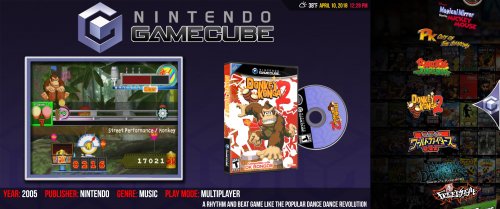
Unified & Ultrawide is a new theme based on @CriticalCid's amazing Unified theme. It takes some liberties in order to make the best use of an ultrawide (21x9) monitor. Please see @CriticalCid's original Unified theme for installation and troubleshooting instructions. Version 1.1 - Released March 26, 2019 (REQUIRES BIG BOX VERSION 9.6 OR LATER): Updated to include all the latest features and improvements from Unified Redux 1.7 Version 1.0 - Initial Release Huge thanks goes out to @CriticalCid for the theme, as well as the many different Hyperspin contributors who donated their time and talent to build an awesome, cohesive experience: Gibbawho @Styphelus Unknown50862 @Klopjero Neonrage @knewlife @Creloce Ghostlost https://www.youtube.com/user/GhostlostGames @ninja2bceen @THK adamg Rkh Rondar @scooter1974 Zinger19 Aloner187 @guyverjay MetalThrix SophT Ledgerewskie hoscarconh https://www.youtube.com/user/hoscarconh @viking @RetroHumanoid http://retrohumanoid.weebly.com/- 14 comments
- 2 reviews
-
- 14
-
-

-
- criticalcid
- unified
- (and 4 more)
-
Unified & Ultrawide View File Unified & Ultrawide is a new theme based on @CriticalCid's amazing Unified theme. It takes some liberties in order to make the best use of an ultrawide (21x9) monitor. Please see @CriticalCid's original Unified theme for installation and troubleshooting instructions. Version 1.1 - Released March 26, 2019 (REQUIRES BIG BOX VERSION 9.6 OR LATER): Updated to include all the latest features and improvements from Unified Redux 1.7 Version 1.0 - Initial Release Huge thanks goes out to @CriticalCid for the theme, as well as the many different Hyperspin contributors who donated their time and talent to build an awesome, cohesive experience: Gibbawho @Styphelus Unknown50862 @Klopjero Neonrage @knewlife @Creloce Ghostlost https://www.youtube.com/user/GhostlostGames @ninja2bceen @THK adamg Rkh Rondar @scooter1974 Zinger19 Aloner187 @guyverjay MetalThrix SophT Ledgerewskie hoscarconh https://www.youtube.com/user/hoscarconh @viking @RetroHumanoid http://retrohumanoid.weebly.com/ Submitter Jason Carr Submitted 04/10/2018 Category Big Box Custom Themes
- 53 replies
-
- 4
-
-
-
- criticalcid
- unified
- (and 4 more)
-
Version 4.4
2,343 downloads
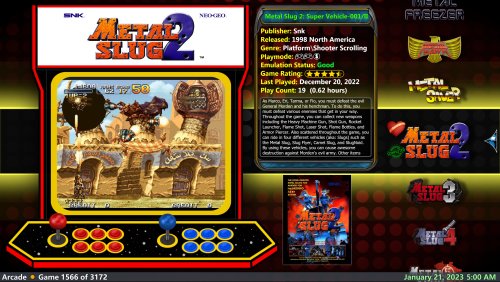
This theme is my re-take on the excellent Unified-Refried theme and I called it 'Unified Lives!'. The goal is to present more information to the user during game selection as well as using more graphic assets to complement the display experience. I hope you like it! - An informative game card that shows many details of the currently selected game. - 6 Game wheel views. 2 vertical, 3 horizontal and 1 text. - 4 Platform/playlist views - Single views for game and platform text views (these are necessary views) - Marquee, box 3d, disc, cd, 3d cart and front flyer images are all used. Visibility rules determine how they appear, depending on platform and also file availability. - Supports different aspect ratios. If it doesn't look right on yours please let me know! - Wheel Badges for Favorite, Completed and Broken games. - Created with Community Theme Creator 2.5 - Dynamically changing theme images based upon current platform/playlist. just like Refried. ** Rename 'background' folder to enable fanart. ** Rename the 'Devices' folder to always show a random game screenshot in platform/playlist views. ** Place your choice of fanart in 'fanart fallback' folder when game or platform fanart does not exist, a random image is chosen ** ESRB icons. If you don't want them, delete or rename the icons. The 'Not Rated' icon is renamed due to the number of titles without rating. Remove the exclamation from the filename to see it. *** Do not overwrite previous versions of the theme, replace the folder. Folder and file structure can change between versions! -
Version 1.1.1
9,915 downloads
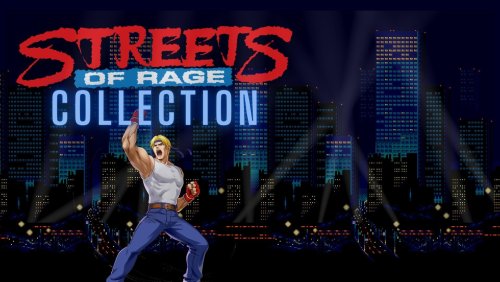
I've been creating these simple but fun videos to go with each collection I create using the Unified Refried 2.0 collections. They can be used for any collection but go great with the built-in ones in Unified Refried 2.0. Also included videos for collections for All Time Top 100, All Time Top 100 Indie Games, Top 100 DOS, and the Video Game Hall of Fame. Will keep adding new ones as I make them. Special Platform Videos: MSU MD+ Nintendo HD Nintendo 64 HD Collection Playlists: Ace Attorney Alex Kidd Animal Crossing Batman Bonk Borderlands Castlevania Contra Crash Bandicoot Donkey Kong Doom Double Dragon Duke Nukem Earthworm Jim Elder Scrolls F-Zero Fallout Final Fantasy Golden Axe GTA Half Life Indiana Jones John Madden Killer Instinct King's Quest Kirby Legacy of Kain Legend of Zelda Lego Light Gun Mario Mario Party Mega Man Metal Gear Metroid Monkey Island Mortal Kombat Ninja Gaiden Pac-Man Phantasy Star Primal Rage Prince of Persia Quake Rayman Resident Evil Saints Row Silent Hill Sonic Soul Calibur Spyro Starfox Streets of Rage Tekken Tomb Raider Twisted Metal Ultima Virtua Fighter Wonder Boy Wolfenstein WWF Y's Yoshi Zork Special Playlists: Greatest of All Time Recently Played Top 100 All Time Top 100 DOS Games Top 100 Indie Games Video Game Hall of Fame- 4 comments
- 3 reviews
-
- 13
-
-
-
-
- playlist
- collection
- (and 3 more)
-
 Hello friends, Right now I have the following views in Big Box... Platform View (Unified), Game View (Unified), Game Details View (New Default). In this last one I want to change it to the Old Default, I like its design better but it was updated and due to some movements I made I deleted the old default theme by mistake. I have that slightly outdated version of Unified Customized, but it's the only one that lets me add the default view in game details. Could you please help me add the old default view in game details?
-
CriticalZone / CriticalZone - BlueBox View File Here you can download alternative versions of the CriticalZoneV2 theme that comes bundled with every LaunchBox installation. CriticalZone is a BigBox theme designed for the usage of widescreen platform videos and utilizes videos as backgrounds. This theme was designed for widescreen displays with 16:9 aspect ratios and optimized for a display resolution of 1920x1080. It will also work with other widescreen resolutions and 16:10 aspect ratios but it may not look as polished. Available Versions: - CritcalZoneV2 - BlueBox: A blue color variant of CriticalZoneV2. It features blue texts instead of green and has a different Default background created by @SentaiBrad - BackgroundVideoOnly: All Views, except the TextList Views, will only use video loops as backgrounds. Also available as BlueBox version. - BackgroundFanartOnly: All Views will only use Fanart images as backgrounds. Also available as BlueBox version. -> Use this version if you have performance problems! - 1.8: The original and now old version of CriticalZone. It's officially EOL and won't get supported by me in any way. It's just still here for archiving reasons. There’s also a red 80’s/Cyberpunk themed version of CriticalZone called “CityHunter”. It’s maintained by @keltoigael and can be found here: How to install: Just download the version of choice and extract the archive into: “..\LaunchBox\Themes\” Open the Options menu in BigBox -> go to “Views” and change the Theme to the version you just have installed. IMPORTANT: CriticalZone V2 requires LaunchBox v7.11 or higher! Known issues: - The description texts in all Platform Views and CoverFlowWithDetails Games View won’t fill the whole space of the descriptions box when you use CriticalZone with a higher DPI setting than 100% or a lower display resolution than 1902x1080. It gets progressively worse the higher the DPI settings and/or lower the resolution is. Thanks & Credits: Thanks to @SentaiBrad for creating the new Default background video for the BlueBox variant. Background video of the standard version: In The Deep - FREE Video Background Loop HD 1080p by NIZ.co (http://niz.co/wp/) Submitter CriticalCid Submitted 11/03/2016 Category Big Box Custom Themes
- 627 replies
-
- 13
-
-
- bigbox
- widescreen
- (and 10 more)
-
Version 1.0.0
114 downloads
Platform video in the Unified style for Sony Playstation 4 -
I was just wondering if anyone can tell me how to get my videos to display in 16:9 like the photo on the bottom for unified redux theme mine is the one the top with square 4:3 video snaps (i know i have to edit the border image in theme as well later) just unsure on how to get the video to play without the black bars, I only want to have 16:9 playback for select platforms (ps3, switch, et) I was having trouble finding a solution in the forums and I went to the discord and was recommended to switch to Unified Refried with a Queso mod for this, however I'm just trying my luck here to see if anyone has a solution as I really like the look of redux and am unfamiliar mods.
-
Sony Playstation Vita Unified HD Platform Video View File Platform video in the Unified style for Sony Playstation Vita Submitter Saieno Submitted 07/14/2024 Category Platform Theme Videos
-
Version 1.0.0
160 downloads
Platform video in the Unified style for Sony Playstation Vita -
Sony Playstation 4 Unified HD Platform Video View File Platform video in the Unified style for Sony Playstation 4 Submitter Saieno Submitted 07/14/2024 Category Platform Theme Videos
-
Version 1.0.0
106 downloads
Platform video in the Unified style for Microsoft Xbox One -
Version 1.0.0
166 downloads
Platform video in the Unified style for Nintendo Switch -
Version 1.0.0
192 downloads
Platform video in the Unified style for Microsoft Xbox -
Nokia N-Gage Unified HD Platform Video View File Platform video in the Unified style for Nokia N-Gage Submitter Saieno Submitted 07/14/2024 Category Platform Theme Videos
-
Version 1.0.0
80 downloads
Platform video in the Unified style for Nokia N-Gage -
Nintendo Switch Unified HD Platform Video View File Platform video in the Unified style for Nintendo Switch Submitter Saieno Submitted 07/14/2024 Category Platform Theme Videos
-
Microsoft Xbox One Unified HD Platform Video View File Platform video in the Unified style for Microsoft Xbox One Submitter Saieno Submitted 07/14/2024 Category Platform Theme Videos
-
Microsoft Xbox Unified HD Platform Video View File Platform video in the Unified style for Microsoft Xbox Submitter Saieno Submitted 07/14/2024 Category Platform Theme Videos
-

.thumb.png.ddcd363a706ec2f31a466aac4540e393.png)
Version 1.0.1
1,611 downloads
Playlist videos and artwork to make your playlists fancier! 🔴INSTALATION OF THE ARTWORK PACK🔴 1-Extract the Playlist art.zip to Launchbox\Themes\(YOUR UNIFIED VERSION)\Images\Theme 2- And that's all! I still use some of the original Unified theme, pointes, logos, etc. Didn't see reason to redo what is already good. But just in case all the artwork needed to have a complete playlist is in this set, both original content and Unified content! Doing requests, if you want something just ask. Covered so far... Franchises Consoles Console developers -
Hi all, Got BigBox pretty much how I want it, however not sure why, but when selecting PSP, no platform logo, background or pointer images are working, all other platforms are ok, see image:
-

Version 1.2
20,213 downloads
This theme is a port of the HyperSpin Unified Widescreen Megatheme project, which was originally started by gibbawho and continued by many other talented artists over the years. It’s supposed to bring a unified look (hence the name) across all platforms while giving every platform it’s own individual touch. I’ve tried to stay very close to the original look and feel but also took some creative freedom, especially when it comes to the new fading info panel at the bottom of the screen. This theme was designed for 16:9 screens and display resolutions only. Big Box will automatically scale itself to a 16:9 aspect ratio when you use a different aspect ratio on your machine. Features: Individual Artwork for a lot of different platforms and playlists + some alternatives you can choose from Matches with the Unified platform video set from EmuMovies Fully animated wheel pointer Spinning discs for disc-based platforms Various other custom animations Templates to build your own platform artwork are included as .psd files Brings a small taste of the HyperSpin feeling to your Big Box setup Currently featured Views: Games Text List View: 3D Box Games Vertical Wheel View 1: 3D Box Games Vertical Wheel View 2: 3D Box + static cart/disc Games Vertical Wheel View 3: 3D Box + rotating disc Games Vertical Wheel View 4: Fullscreen video Platform Vertical Wheel View 1: Fullscreen video + scrolling text Platform Vertical Wheel View 2: Fullscreen video without scrolling text More Views are planned, so stay tuned. The theme includes artwork for the following 498 Platforms/Playlists: The theme will also display a default artwork for Platforms/Playlists which are not yet covered or wrongly named. How to install: This theme only works on LaunchBox version 9.4 or higher! Just download the archive and extract it to: “..\LaunchBox\Themes\” Go to the “Plugins” folder inside of the extracted folder and right-click on the .dll file. Choose Properties -> Click on “Unblock” at the bottom of the window. Close the window. If the "Unblock" button isn't there than you are already good to go. Open the Options menu in Big Box -> go to “Views” and change the Theme to "Unified". Change the “Games List View” and “Platforms List View” to one of the currently featured Views that are listed above. Make sure that in the Big Box Options -> Views –> “Show Games List Title” is enabled. Info: Never rename the theme folder! The theme folder has to be named exactly "Unified" or the theme won't work properly! (that's btw. an universal tip for all other themes as well) Known issues: The logo of the Platform/Playlist and the individual video border don't show up in the Game Details screen and the theme displays the generic Big Box logo and metallic video border instead when it gets opened through any other Games View than the Text List View. Tips for tweaking your LaunchBox setup for this theme: In LaunchBox: Tools -> Options -> Cart Front Priorities -> Select all Cart and Disc related entries, deselect everything else. In Big Box: Options ->Transitions -> Change "Game Image/Video Transition” to “Fade” In Big Box: To avoid spinning cart art go to: Options -> Views -> Make sure that „Remember separate View for each platform” is checked. Than go either to the Keyboard Mappings or the Controller Buttons settings and set up a key/button for “Switch View”. Now you can go back to your platforms and switch the games Views for each platform individually on the fly. Use the Unified Platform videos from EmuMovies for an overall uniform look. You can either download them as free user from the EmuMovies website or if you are an EmuMovies premium user you can get them directly through LaunchBox under: Tools -> "Download Platform/Playlist Theme Videos". Individual platform artwork not showing up?: The media files that are inside the “..\LaunchBox\Themes\Unified\Images\Theme\..” folder have to be named exactly like your platforms inside LaunchBox. I've went with the HyperList/RocketLauncher naming conventions for the filenames in this package. If Big Box doesn’t show any individual artwork for a system that is listed above you may need to manually rename the relevant files for that platform in all four sub-folders. Also make sure that in the Big Box Options -> Views –> “Show Games List Title” is enabled! Discs are not spinning / showing up?: Make sure you have the right Games List View selected and Disc images in your Cart Image Priorities enabled (see the tips section of this download description). Thanks and Credits: @ninja2bceen for creating the default and various other pointers All the artists who created the original HyperSpin themes, pointers and other work that helped me to create this theme (please contact me if I have forgotten someone!): Gibbawho @Styphelus Unknown50862 @Klopjero Neonrage @knewlife @Creloce Ghostlost https://www.youtube.com/user/GhostlostGames @ninja2bceen @THK adamg @RetroHumanoid http://retrohumanoid.weebly.com/ Rkh Rondar @scooter1974 Zinger19 Aloner187 @guyverjay MetalThrix SophT Ledgerewskie hoscarconh https://www.youtube.com/user/hoscarconh @viking @bmonomad @Jason Carr -
.thumb.png.8432d393a93fadc89f09e1bdd887cab9.png)
Version 2.1
1,948 downloads
So basically i have recreated RetroHumanoid's amazing Unified Refried theme in CTC and made quite a few changes to hopefully make it even better. The most notable changes are that it has more info when viewing games and the new movable 3D model boxes. I’ve also added the abilty to choose if you want Fanart or the default images as the background images and having images or text as in the bottom infobar. Atm its only 16:9 but if there is interest I’ll try and add more aspect ratios. To get the most out of this theme you need box - fronts, box - backs and box spines in your Launchbox setup. You can do without the box - backs if you dont paln on rotating the 3D models though. So the views it has so far; 3 Platform views 1 with a full screen video and vertical wheel, one with a smaller video and one that has a selectable favourites and recently played list 3 Wall views to kind of mimic Launchbox (need some tweaking still though) 4 Vertical Wheel games views with 2 different background choices like Refried, one with a big console/handheld/TV and dynamically changing images for different platforms. The other 2 are smaller images of the platform in the corner, without the dynamically changing platform images. 2 of the Vertical Wheel games views (1 dynamic and 1 not as above) have a clear logos wheel and movable 3D model boxes (front, back and spines images needed for full effect for all wheel views) and spinning CD or cart images 2 of the Vertical wheel games views (1 dynamic and 1 not as above) have a vertical box cases wheel as well as 3D movable boxes and and spinning CD or cart images 1 Text view which is mainly for the game selection options (play, read manual ect) with gameplay, title and game select screenshots. ---------- Features: Dynamically changing platform images (like refried) Dynamic Marquees for arcade games (like refried) Dynamic Marquees/Backglass for Pinball games (Future Pinball, Pinball FX3 and Visual Pinball) Moveable 3D model boxes Controller images change in playmode for different platforms Most badges shown Publisher, genre, playmode and certification in infobar and game notes scrolling along the bottom Fanart for the background if you wish. --------- To change/remove certain images; Wheel Views For the Fanart as a background delete or rename the folder; Themes>YART>Media>Background. If you want the any of the Publisher, Genre, Playmode and PEGI/ESRB* images to show as text instead of the images, delete or rename the folders; Publisher Logos, Icons Genres, Icons Play Modes and both the Icons PEGI and Icons ESRB folder (to remove the certification), all are in; Themes>YART>Media. *( When the game certification is shown as text I can’t find a way for it to show the PEGI certification so it will say, M-Mature instead of 18 for example) To change the certification Image from the EU PEGI to the US ESRB ratings, rename or delete folder; Themes>YART>Media>Icons PEGI To change the PEGI text to read ESRB in the wheels views go to the folder; Themes>YART>Views and; Open WheelGamesView.xaml, Wheel2GamesView.xaml, Wheel3GamesView.xaml, Wheel4GamesView.xaml and the TextGamesView.xaml in a text editor (Notepad++ is a good option) and find Text="PEGI: and replace it with Text="ESRB: in all 5 of the above views or just the one you use. To Stop all the Discs from Spinning Open WheelGamesView.xaml, Wheel2GamesView.xaml, Wheel3GamesView.xaml and Wheel4GamesView.xaml in a text editor and search for BeginTime="00:00:02.5" To="360" Duration="00:00:05" RepeatBehavior="Forever"> and replace with BeginTime="00:00:00.0" To="0" Duration="00:00:00" RepeatBehavior="Forever"> You need to do this twice (or replace all in Notepad++) as there are 2 entries you need to replace to stop them all spinning, one for the CDs and one for the Mini CDs Wall Views For Fanart to show for the Wall Views delete or rename the folder; Themes>YART>Media>WallViewBackground To change the certification Image from the EU PEGI to US ESRB overwrite the files in the folder; Themes>YART>Media>Icons PEGI Wall, with files in the Themes>YART>Media>Icons ESRB Wall folder. ---------------------- Text filter and Platform 3, recently played and favourites For these to show you need to go to Options>Views in Bigbox and enable "show filters recent games" and "show filters favourite games" Launchbox controls what images are shown in the recently played and favourites. To change what type of image is used go to image group and choose the type of image you want to use in the dropdown (shown below). This seems to be platform specific as well so you need to go through them all. (Boxes or 3D Boxes work best others don't work well) ---------------- Front and Back Images To have more Front and Back boxes show on the 3D models (If the proper front and back ones arent available) i recommend setting these priorities in Launchbox. Credit: @RetroHumanoid and his amazing Unified Refried on which this built on. Whilst i have made a lot of images myself most are from his theme (especially the video borders). @faeran for his Unified CTC which i used as a template to start this (and it taught me how to use the Community Theme Creator) @y2guru for the unbelievable Community Theme Creator If I’m missing others I’m really sorry as i have been at this for a while off and on so may have used other people images somewhere a long the line. Lastly, this is my first effort at theme creation so bear with me if things aren't as they should be. I'll fix any problems ASAP if you guys find any issues P.S. Please give me suggestions on what to do with views that haven't been filled yet or changes that could me made to the current views. ------------------------------------------- Wheel 1, Wheel 2 Handhelds and Wheel 3 views showing the 3D boxes Wheel1.mp4 wheel 1 handheld.mp4 wheel2.mp4 This is what it looks like with all the images removed (as detailed above) in the infobar -
Unified View File This theme is a port of the HyperSpin Unified Widescreen Megatheme project, which was originally started by gibbawho and continued by many other talented artists over the years. It’s supposed to bring a unified look (hence the name) across all platforms while giving every platform it’s own individual touch. I’ve tried to stay very close to the original look and feel but also took some creative freedom, especially when it comes to the new fading info panel at the bottom of the screen. This theme was designed for 16:9 screens and display resolutions only. Big Box will automatically scale itself to a 16:9 aspect ratio when you use a different aspect ratio on your machine. Features: Individual Artwork for a lot of different platforms and playlists + some alternatives you can choose from Matches with the Unified platform video set from EmuMovies Fully animated wheel pointer Spinning discs for disc-based platforms Various other custom animations Templates to build your own platform artwork are included as .psd files Brings a small taste of the HyperSpin feeling to your Big Box setup Currently featured Views: Games Text List View: 3D Box Games Vertical Wheel View 1: 3D Box Games Vertical Wheel View 2: 3D Box + static cart/disc Games Vertical Wheel View 3: 3D Box + rotating disc Games Vertical Wheel View 4: Fullscreen video Platform Vertical Wheel View 1: Fullscreen video + scrolling text Platform Vertical Wheel View 2: Fullscreen video without scrolling text More Views are planned, so stay tuned. The theme includes artwork for the following 498 Platforms/Playlists: The theme will also display a default artwork for Platforms/Playlists which are not yet covered or wrongly named. How to install: This theme only works on LaunchBox version 9.4 or higher! Just download the archive and extract it to: “..\LaunchBox\Themes\” Go to the “Plugins” folder inside of the extracted folder and right-click on the .dll file. Choose Properties -> Click on “Unblock” at the bottom of the window. Close the window. If the "Unblock" button isn't there than you are already good to go. Open the Options menu in Big Box -> go to “Views” and change the Theme to "Unified". Change the “Games List View” and “Platforms List View” to one of the currently featured Views that are listed above. Make sure that in the Big Box Options -> Views –> “Show Games List Title” is enabled. Info: Never rename the theme folder! The theme folder has to be named exactly "Unified" or the theme won't work properly! (that's btw. an universal tip for all other themes as well) Known issues: The logo of the Platform/Playlist and the individual video border don't show up in the Game Details screen and the theme displays the generic Big Box logo and metallic video border instead when it gets opened through any other Games View than the Text List View. Tips for tweaking your LaunchBox setup for this theme: In LaunchBox: Tools -> Options -> Cart Front Priorities -> Select all Cart and Disc related entries, deselect everything else. In Big Box: Options ->Transitions -> Change "Game Image/Video Transition” to “Fade” In Big Box: To avoid spinning cart art go to: Options -> Views -> Make sure that „Remember separate View for each platform” is checked. Than go either to the Keyboard Mappings or the Controller Buttons settings and set up a key/button for “Switch View”. Now you can go back to your platforms and switch the games Views for each platform individually on the fly. Use the Unified Platform videos from EmuMovies for an overall uniform look. You can either download them as free user from the EmuMovies website or if you are an EmuMovies premium user you can get them directly through LaunchBox under: Tools -> "Download Platform/Playlist Theme Videos". Individual platform artwork not showing up?: The media files that are inside the “..\LaunchBox\Themes\Unified\Images\Theme\..” folder have to be named exactly like your platforms inside LaunchBox. I've went with the HyperList/RocketLauncher naming conventions for the filenames in this package. If Big Box doesn’t show any individual artwork for a system that is listed above you may need to manually rename the relevant files for that platform in all four sub-folders. Also make sure that in the Big Box Options -> Views –> “Show Games List Title” is enabled! Discs are not spinning / showing up?: Make sure you have the right Games List View selected and Disc images in your Cart Image Priorities enabled (see the tips section of this download description). Thanks and Credits: @ninja2bceen for creating the default and various other pointers All the artists who created the original HyperSpin themes, pointers and other work that helped me to create this theme (please contact me if I have forgotten someone!): Gibbawho @Styphelus Unknown50862 @Klopjero Neonrage @knewlife @Creloce Ghostlost https://www.youtube.com/user/GhostlostGames @ninja2bceen @THK adamg @RetroHumanoid http://retrohumanoid.weebly.com/ Rkh Rondar @scooter1974 Zinger19 Aloner187 @guyverjay MetalThrix SophT Ledgerewskie hoscarconh https://www.youtube.com/user/hoscarconh @viking @bmonomad @Jason Carr Submitter CriticalCid Submitted 04/01/2018 Category Big Box Custom Themes
- 481 replies
-
- 17
-
-
(Proto).thumb.png.d61cc2b2a26106fc07c337aec6c623b7.png)






.thumb.png.ddcd363a706ec2f31a466aac4540e393.png)



.thumb.png.8432d393a93fadc89f09e1bdd887cab9.png)

